 ROS Index
Package Summary
| Version | 0.1.0 |
| License | MIT |
| Build type | AMENT_CMAKE |
| Use | RECOMMENDED |
Repository Summary
| Description | |
| Checkout URI | https://github.com/watonomous/wato_monorepo.git |
| VCS Type | git |
| VCS Version | main |
| Last Updated | 2026-03-28 |
| Dev Status | UNKNOWN |
| Released | UNRELEASED |
| Contributing |
Help Wanted (-)
Good First Issues (-) Pull Requests to Review (-) |
Package Description
Maintainers
- WATonomous
Authors
Eidos
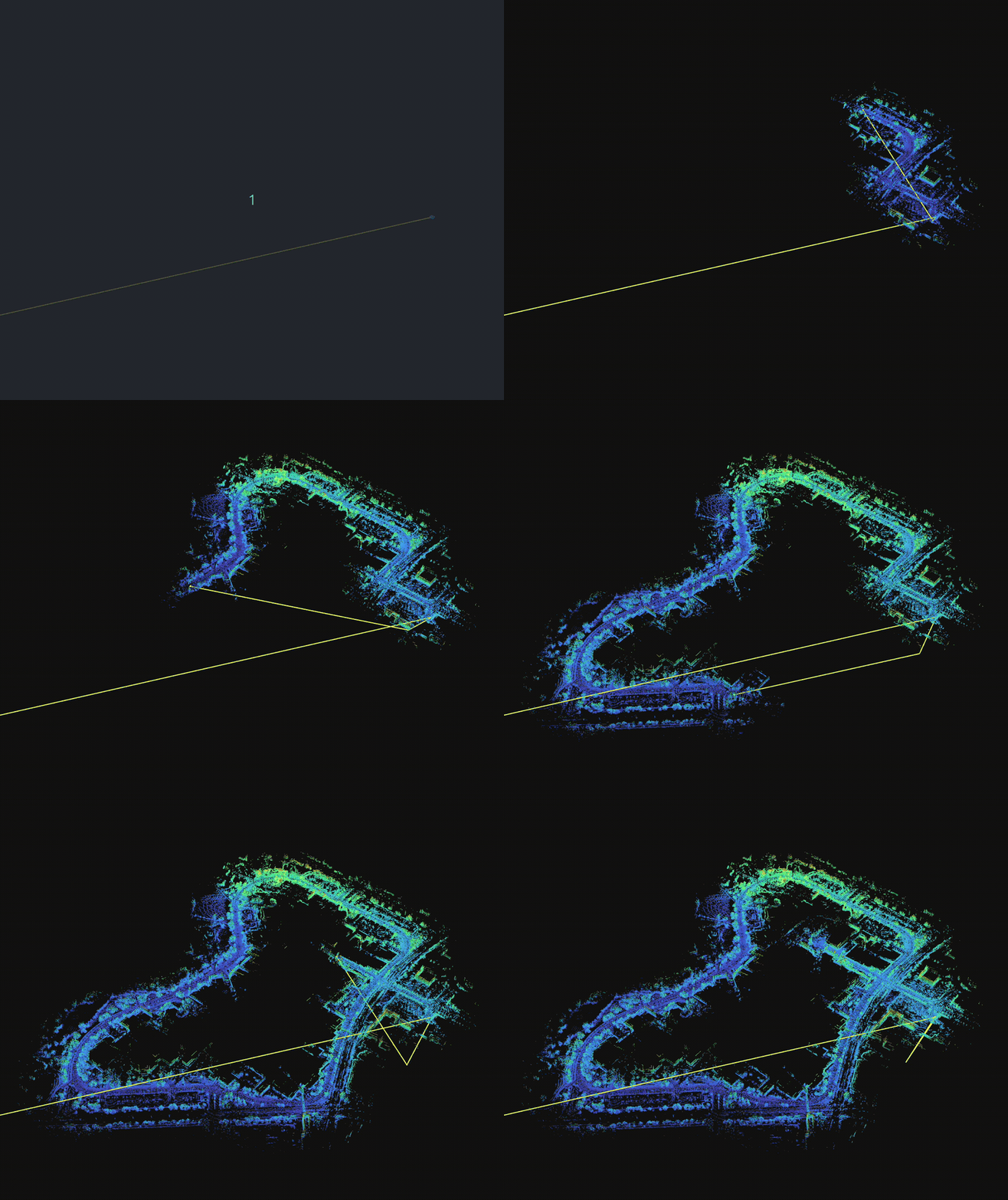
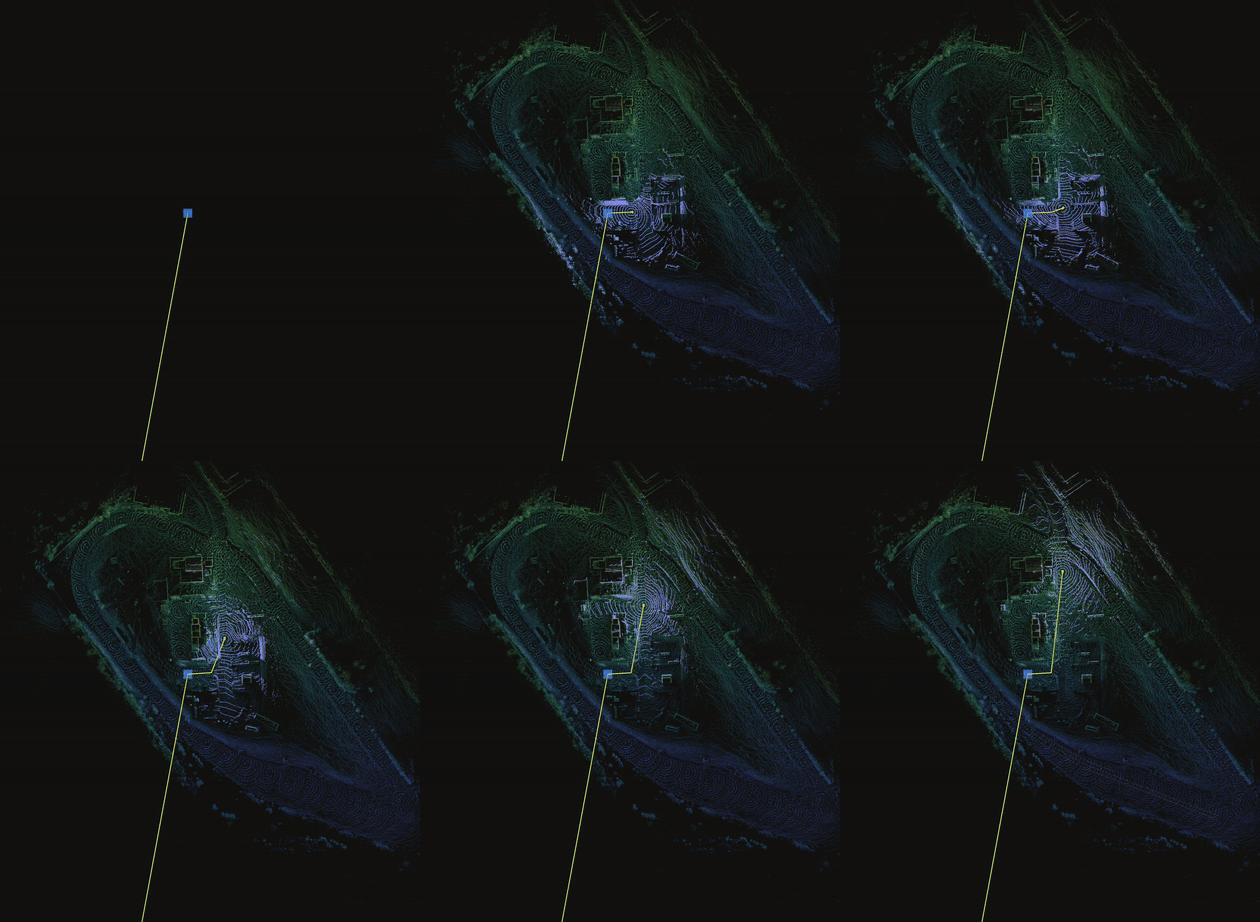
Eidos is a plugin-based LiDAR-Inertial SLAM and localization system for ROS 2. It builds maps from sensor data (mapping mode) and localizes against previously built maps (localization mode). The plugin architecture lets you swap sensors and add constraints – factor plugins, relocalization plugins, and visualization plugins – without modifying core code. Under the hood, Eidos uses GTSAM’s ISAM2 incremental optimizer to maintain a factor graph of vehicle poses, with each plugin contributing factors, latching to existing factors, or consuming the optimized state.
Eidos is pure SLAM: factor graph, ISAM2 optimization, plugin management, and map persistence. It does not broadcast TF or run an EKF. TF broadcasting (map->odom, odom->base_link, utm->map) and EKF-based odometry fusion are handled by the separate eidos_transform package. Eidos publishes slam/pose for eidos_transform to consume.
Quick Start
Eidos ships example configs and a standalone launch file. In a typical deployment, both eidos and eidos_transform are launched together via world_model.launch.yaml, which handles this automatically.
Mapping (live)
# world_model.launch.yaml launches both eidos and eidos_transform
ros2 launch eidos eidos.launch.yaml
Localization (live):
# Specify a configuration for localization and a path to a map
ros2 launch eidos eidos.launch.yaml \
  eidos_config_file:=$(ros2 pkg prefix eidos)/share/eidos/config/example_localization.yaml \
  eidos_map_path:=/path/to/map.map \
Mapping (from bag):
# Specify to use a simulated clock (from bag)
ros2 launch eidos eidos.launch.yaml use_sim_time:=true

# In a separate terminal
ros2 bag play /path/to/bag --clock
Localization (from bag):
# Specify to use a simulated clock (from bag)
ros2 launch eidos eidos.launch.yaml \
  eidos_config_file:=$(ros2 pkg prefix eidos)/share/eidos/config/example_localization.yaml \
  eidos_map_path:=/path/to/map.map \
  use_sim_time:=true

# In a separate terminal
ros2 bag play /path/to/bag --clock
The example configs are in config/example_slam.yaml and config/example_localization.yaml. Copy and adjust topic names, sensor frames, and tuning parameters for your platform.
Mapping vs Localization
Eidos does not have a global “mode” switch. Mapping and localization are different configurations of the same plugin set. Each plugin has its own parameters that control whether it adds factors to the graph, where it sources its submap from, and so on. The two example configs (example_slam.yaml and example_localization.yaml) set these per-plugin parameters to achieve the desired behavior.
Mapping configures plugins to build a new map. Factor plugins add constraints to the graph (add_factors: true), the optimizer runs each tick, loop closures are set to occur, and the result is saved to a .map file. Eidos publishes the optimized slam/pose each tick; eidos_transform subscribes to this and updates the map->odom transform accordingly.
Localization reconfigures the same plugins to track against a prior map. Factor plugins produce odometry only (add_factors: false) and match against stored data from the prior map rather than building new submaps. The map->odom transform is set once from relocalization by eidos_transform and stays fixed. We chose this behavior because large jumps only occur during loop closures, which only occur during active mapping.
State Machine
The node progresses through these states (visible via the slam/status topic and eidos_msgs/msg/SlamStatus):
INITIALIZING ──on_activate()──> WARMING_UP ──all isReady()──> RELOCALIZING ──relocalized──> TRACKING
                                     │                              │
                                     └──no prior map───────────────>┘
- INITIALIZING (enum 0) – Node created but not yet configured/activated.
-
WARMING_UP (enum 1) –
InitSequencerpolls all factor plugins’isReady()each tick (init_sequencer.cpp:handleWarmingUp). Will not proceed until every plugin reports ready.LisoFactor::isReady()gates on IMU stationary detection + gravity alignment (liso_factor.hpp:isReady). Once all ready: transitions to RELOCALIZING if a prior map is loaded, or directly to TRACKING if not. -
RELOCALIZING (enum 2) – Prior map loaded. Polls relocalization plugins each tick. Times out after
relocalization_timeoutseconds. - TRACKING (enum 3) – Normal SLAM/localization operation. Factor plugins produce constraints, the graph optimizer runs, poses are published.
Configuration
All parameters live under the /**/eidos_node/ros__parameters namespace. The two config files (example_slam.yaml and example_localization.yaml) share the same parameter schema but differ in values.
The following are the base parameters for Eidos. These are no plugin-specific.
Frames
| Parameter | SLAM Default | Localization Default | Description |
|---|---|---|---|
frames.base_link |
"base_footprint" |
"base_footprint" |
Robot body frame |
frames.odometry |
"odom" |
"odom" |
Odometry frame |
frames.map |
"map" |
"map" |
Map frame (global) |
Core
| Parameter | SLAM Default | Localization Default | Description |
|---|---|---|---|
slam_rate |
10.0 |
10.0 |
Main SLAM loop frequency (Hz) |
relocalization_timeout |
30.0 |
30.0 |
Seconds to wait for relocalization before giving up |
File truncated at 100 lines see the full file
Package Dependencies
System Dependencies
| Name |
|---|
| libpcl-all-dev |
| eigen |
Dependant Packages
| Name | Deps |
|---|---|
| eidos_tools | |
| world_modeling_bringup |
Launch files
Messages
Services
Plugins
Recent questions tagged eidos at Robotics Stack Exchange
Package Summary
| Version | 0.1.0 |
| License | MIT |
| Build type | AMENT_CMAKE |
| Use | RECOMMENDED |
Repository Summary
| Description | |
| Checkout URI | https://github.com/watonomous/wato_monorepo.git |
| VCS Type | git |
| VCS Version | main |
| Last Updated | 2026-03-28 |
| Dev Status | UNKNOWN |
| Released | UNRELEASED |
| Contributing |
Help Wanted (-)
Good First Issues (-) Pull Requests to Review (-) |
Package Description
Maintainers
- WATonomous
Authors
Eidos
Eidos is a plugin-based LiDAR-Inertial SLAM and localization system for ROS 2. It builds maps from sensor data (mapping mode) and localizes against previously built maps (localization mode). The plugin architecture lets you swap sensors and add constraints – factor plugins, relocalization plugins, and visualization plugins – without modifying core code. Under the hood, Eidos uses GTSAM’s ISAM2 incremental optimizer to maintain a factor graph of vehicle poses, with each plugin contributing factors, latching to existing factors, or consuming the optimized state.
Eidos is pure SLAM: factor graph, ISAM2 optimization, plugin management, and map persistence. It does not broadcast TF or run an EKF. TF broadcasting (map->odom, odom->base_link, utm->map) and EKF-based odometry fusion are handled by the separate eidos_transform package. Eidos publishes slam/pose for eidos_transform to consume.
Quick Start
Eidos ships example configs and a standalone launch file. In a typical deployment, both eidos and eidos_transform are launched together via world_model.launch.yaml, which handles this automatically.
Mapping (live)
# world_model.launch.yaml launches both eidos and eidos_transform
ros2 launch eidos eidos.launch.yaml
Localization (live):
# Specify a configuration for localization and a path to a map
ros2 launch eidos eidos.launch.yaml \
  eidos_config_file:=$(ros2 pkg prefix eidos)/share/eidos/config/example_localization.yaml \
  eidos_map_path:=/path/to/map.map \
Mapping (from bag):
# Specify to use a simulated clock (from bag)
ros2 launch eidos eidos.launch.yaml use_sim_time:=true

# In a separate terminal
ros2 bag play /path/to/bag --clock
Localization (from bag):
# Specify to use a simulated clock (from bag)
ros2 launch eidos eidos.launch.yaml \
  eidos_config_file:=$(ros2 pkg prefix eidos)/share/eidos/config/example_localization.yaml \
  eidos_map_path:=/path/to/map.map \
  use_sim_time:=true

# In a separate terminal
ros2 bag play /path/to/bag --clock
The example configs are in config/example_slam.yaml and config/example_localization.yaml. Copy and adjust topic names, sensor frames, and tuning parameters for your platform.
Mapping vs Localization
Eidos does not have a global “mode” switch. Mapping and localization are different configurations of the same plugin set. Each plugin has its own parameters that control whether it adds factors to the graph, where it sources its submap from, and so on. The two example configs (example_slam.yaml and example_localization.yaml) set these per-plugin parameters to achieve the desired behavior.
Mapping configures plugins to build a new map. Factor plugins add constraints to the graph (add_factors: true), the optimizer runs each tick, loop closures are set to occur, and the result is saved to a .map file. Eidos publishes the optimized slam/pose each tick; eidos_transform subscribes to this and updates the map->odom transform accordingly.
Localization reconfigures the same plugins to track against a prior map. Factor plugins produce odometry only (add_factors: false) and match against stored data from the prior map rather than building new submaps. The map->odom transform is set once from relocalization by eidos_transform and stays fixed. We chose this behavior because large jumps only occur during loop closures, which only occur during active mapping.
State Machine
The node progresses through these states (visible via the slam/status topic and eidos_msgs/msg/SlamStatus):
INITIALIZING ──on_activate()──> WARMING_UP ──all isReady()──> RELOCALIZING ──relocalized──> TRACKING
                                     │                              │
                                     └──no prior map───────────────>┘
- INITIALIZING (enum 0) – Node created but not yet configured/activated.
-
WARMING_UP (enum 1) –
InitSequencerpolls all factor plugins’isReady()each tick (init_sequencer.cpp:handleWarmingUp). Will not proceed until every plugin reports ready.LisoFactor::isReady()gates on IMU stationary detection + gravity alignment (liso_factor.hpp:isReady). Once all ready: transitions to RELOCALIZING if a prior map is loaded, or directly to TRACKING if not. -
RELOCALIZING (enum 2) – Prior map loaded. Polls relocalization plugins each tick. Times out after
relocalization_timeoutseconds. - TRACKING (enum 3) – Normal SLAM/localization operation. Factor plugins produce constraints, the graph optimizer runs, poses are published.
Configuration
All parameters live under the /**/eidos_node/ros__parameters namespace. The two config files (example_slam.yaml and example_localization.yaml) share the same parameter schema but differ in values.
The following are the base parameters for Eidos. These are no plugin-specific.
Frames
| Parameter | SLAM Default | Localization Default | Description |
|---|---|---|---|
frames.base_link |
"base_footprint" |
"base_footprint" |
Robot body frame |
frames.odometry |
"odom" |
"odom" |
Odometry frame |
frames.map |
"map" |
"map" |
Map frame (global) |
Core
| Parameter | SLAM Default | Localization Default | Description |
|---|---|---|---|
slam_rate |
10.0 |
10.0 |
Main SLAM loop frequency (Hz) |
relocalization_timeout |
30.0 |
30.0 |
Seconds to wait for relocalization before giving up |
File truncated at 100 lines see the full file
Package Dependencies
System Dependencies
| Name |
|---|
| libpcl-all-dev |
| eigen |
Dependant Packages
| Name | Deps |
|---|---|
| eidos_tools | |
| world_modeling_bringup |
Launch files
Messages
Services
Plugins
Recent questions tagged eidos at Robotics Stack Exchange
Package Summary
| Version | 0.1.0 |
| License | MIT |
| Build type | AMENT_CMAKE |
| Use | RECOMMENDED |
Repository Summary
| Description | |
| Checkout URI | https://github.com/watonomous/wato_monorepo.git |
| VCS Type | git |
| VCS Version | main |
| Last Updated | 2026-03-28 |
| Dev Status | UNKNOWN |
| Released | UNRELEASED |
| Contributing |
Help Wanted (-)
Good First Issues (-) Pull Requests to Review (-) |
Package Description
Maintainers
- WATonomous
Authors
Eidos
Eidos is a plugin-based LiDAR-Inertial SLAM and localization system for ROS 2. It builds maps from sensor data (mapping mode) and localizes against previously built maps (localization mode). The plugin architecture lets you swap sensors and add constraints – factor plugins, relocalization plugins, and visualization plugins – without modifying core code. Under the hood, Eidos uses GTSAM’s ISAM2 incremental optimizer to maintain a factor graph of vehicle poses, with each plugin contributing factors, latching to existing factors, or consuming the optimized state.
Eidos is pure SLAM: factor graph, ISAM2 optimization, plugin management, and map persistence. It does not broadcast TF or run an EKF. TF broadcasting (map->odom, odom->base_link, utm->map) and EKF-based odometry fusion are handled by the separate eidos_transform package. Eidos publishes slam/pose for eidos_transform to consume.
Quick Start
Eidos ships example configs and a standalone launch file. In a typical deployment, both eidos and eidos_transform are launched together via world_model.launch.yaml, which handles this automatically.
Mapping (live)
# world_model.launch.yaml launches both eidos and eidos_transform
ros2 launch eidos eidos.launch.yaml
Localization (live):
# Specify a configuration for localization and a path to a map
ros2 launch eidos eidos.launch.yaml \
  eidos_config_file:=$(ros2 pkg prefix eidos)/share/eidos/config/example_localization.yaml \
  eidos_map_path:=/path/to/map.map \
Mapping (from bag):
# Specify to use a simulated clock (from bag)
ros2 launch eidos eidos.launch.yaml use_sim_time:=true

# In a separate terminal
ros2 bag play /path/to/bag --clock
Localization (from bag):
# Specify to use a simulated clock (from bag)
ros2 launch eidos eidos.launch.yaml \
  eidos_config_file:=$(ros2 pkg prefix eidos)/share/eidos/config/example_localization.yaml \
  eidos_map_path:=/path/to/map.map \
  use_sim_time:=true

# In a separate terminal
ros2 bag play /path/to/bag --clock
The example configs are in config/example_slam.yaml and config/example_localization.yaml. Copy and adjust topic names, sensor frames, and tuning parameters for your platform.
Mapping vs Localization
Eidos does not have a global “mode” switch. Mapping and localization are different configurations of the same plugin set. Each plugin has its own parameters that control whether it adds factors to the graph, where it sources its submap from, and so on. The two example configs (example_slam.yaml and example_localization.yaml) set these per-plugin parameters to achieve the desired behavior.
Mapping configures plugins to build a new map. Factor plugins add constraints to the graph (add_factors: true), the optimizer runs each tick, loop closures are set to occur, and the result is saved to a .map file. Eidos publishes the optimized slam/pose each tick; eidos_transform subscribes to this and updates the map->odom transform accordingly.
Localization reconfigures the same plugins to track against a prior map. Factor plugins produce odometry only (add_factors: false) and match against stored data from the prior map rather than building new submaps. The map->odom transform is set once from relocalization by eidos_transform and stays fixed. We chose this behavior because large jumps only occur during loop closures, which only occur during active mapping.
State Machine
The node progresses through these states (visible via the slam/status topic and eidos_msgs/msg/SlamStatus):
INITIALIZING ──on_activate()──> WARMING_UP ──all isReady()──> RELOCALIZING ──relocalized──> TRACKING
                                     │                              │
                                     └──no prior map───────────────>┘
- INITIALIZING (enum 0) – Node created but not yet configured/activated.
-
WARMING_UP (enum 1) –
InitSequencerpolls all factor plugins’isReady()each tick (init_sequencer.cpp:handleWarmingUp). Will not proceed until every plugin reports ready.LisoFactor::isReady()gates on IMU stationary detection + gravity alignment (liso_factor.hpp:isReady). Once all ready: transitions to RELOCALIZING if a prior map is loaded, or directly to TRACKING if not. -
RELOCALIZING (enum 2) – Prior map loaded. Polls relocalization plugins each tick. Times out after
relocalization_timeoutseconds. - TRACKING (enum 3) – Normal SLAM/localization operation. Factor plugins produce constraints, the graph optimizer runs, poses are published.
Configuration
All parameters live under the /**/eidos_node/ros__parameters namespace. The two config files (example_slam.yaml and example_localization.yaml) share the same parameter schema but differ in values.
The following are the base parameters for Eidos. These are no plugin-specific.
Frames
| Parameter | SLAM Default | Localization Default | Description |
|---|---|---|---|
frames.base_link |
"base_footprint" |
"base_footprint" |
Robot body frame |
frames.odometry |
"odom" |
"odom" |
Odometry frame |
frames.map |
"map" |
"map" |
Map frame (global) |
Core
| Parameter | SLAM Default | Localization Default | Description |
|---|---|---|---|
slam_rate |
10.0 |
10.0 |
Main SLAM loop frequency (Hz) |
relocalization_timeout |
30.0 |
30.0 |
Seconds to wait for relocalization before giving up |
File truncated at 100 lines see the full file
Package Dependencies
System Dependencies
| Name |
|---|
| libpcl-all-dev |
| eigen |
Dependant Packages
| Name | Deps |
|---|---|
| eidos_tools | |
| world_modeling_bringup |
Launch files
Messages
Services
Plugins
Recent questions tagged eidos at Robotics Stack Exchange
Package Summary
| Version | 0.1.0 |
| License | MIT |
| Build type | AMENT_CMAKE |
| Use | RECOMMENDED |
Repository Summary
| Description | |
| Checkout URI | https://github.com/watonomous/wato_monorepo.git |
| VCS Type | git |
| VCS Version | main |
| Last Updated | 2026-03-28 |
| Dev Status | UNKNOWN |
| Released | UNRELEASED |
| Contributing |
Help Wanted (-)
Good First Issues (-) Pull Requests to Review (-) |
Package Description
Maintainers
- WATonomous
Authors
Eidos
Eidos is a plugin-based LiDAR-Inertial SLAM and localization system for ROS 2. It builds maps from sensor data (mapping mode) and localizes against previously built maps (localization mode). The plugin architecture lets you swap sensors and add constraints – factor plugins, relocalization plugins, and visualization plugins – without modifying core code. Under the hood, Eidos uses GTSAM’s ISAM2 incremental optimizer to maintain a factor graph of vehicle poses, with each plugin contributing factors, latching to existing factors, or consuming the optimized state.
Eidos is pure SLAM: factor graph, ISAM2 optimization, plugin management, and map persistence. It does not broadcast TF or run an EKF. TF broadcasting (map->odom, odom->base_link, utm->map) and EKF-based odometry fusion are handled by the separate eidos_transform package. Eidos publishes slam/pose for eidos_transform to consume.
Quick Start
Eidos ships example configs and a standalone launch file. In a typical deployment, both eidos and eidos_transform are launched together via world_model.launch.yaml, which handles this automatically.
Mapping (live)
# world_model.launch.yaml launches both eidos and eidos_transform
ros2 launch eidos eidos.launch.yaml
Localization (live):
# Specify a configuration for localization and a path to a map
ros2 launch eidos eidos.launch.yaml \
  eidos_config_file:=$(ros2 pkg prefix eidos)/share/eidos/config/example_localization.yaml \
  eidos_map_path:=/path/to/map.map \
Mapping (from bag):
# Specify to use a simulated clock (from bag)
ros2 launch eidos eidos.launch.yaml use_sim_time:=true

# In a separate terminal
ros2 bag play /path/to/bag --clock
Localization (from bag):
# Specify to use a simulated clock (from bag)
ros2 launch eidos eidos.launch.yaml \
  eidos_config_file:=$(ros2 pkg prefix eidos)/share/eidos/config/example_localization.yaml \
  eidos_map_path:=/path/to/map.map \
  use_sim_time:=true

# In a separate terminal
ros2 bag play /path/to/bag --clock
The example configs are in config/example_slam.yaml and config/example_localization.yaml. Copy and adjust topic names, sensor frames, and tuning parameters for your platform.
Mapping vs Localization
Eidos does not have a global “mode” switch. Mapping and localization are different configurations of the same plugin set. Each plugin has its own parameters that control whether it adds factors to the graph, where it sources its submap from, and so on. The two example configs (example_slam.yaml and example_localization.yaml) set these per-plugin parameters to achieve the desired behavior.
Mapping configures plugins to build a new map. Factor plugins add constraints to the graph (add_factors: true), the optimizer runs each tick, loop closures are set to occur, and the result is saved to a .map file. Eidos publishes the optimized slam/pose each tick; eidos_transform subscribes to this and updates the map->odom transform accordingly.
Localization reconfigures the same plugins to track against a prior map. Factor plugins produce odometry only (add_factors: false) and match against stored data from the prior map rather than building new submaps. The map->odom transform is set once from relocalization by eidos_transform and stays fixed. We chose this behavior because large jumps only occur during loop closures, which only occur during active mapping.
State Machine
The node progresses through these states (visible via the slam/status topic and eidos_msgs/msg/SlamStatus):
INITIALIZING ──on_activate()──> WARMING_UP ──all isReady()──> RELOCALIZING ──relocalized──> TRACKING
                                     │                              │
                                     └──no prior map───────────────>┘
- INITIALIZING (enum 0) – Node created but not yet configured/activated.
-
WARMING_UP (enum 1) –
InitSequencerpolls all factor plugins’isReady()each tick (init_sequencer.cpp:handleWarmingUp). Will not proceed until every plugin reports ready.LisoFactor::isReady()gates on IMU stationary detection + gravity alignment (liso_factor.hpp:isReady). Once all ready: transitions to RELOCALIZING if a prior map is loaded, or directly to TRACKING if not. -
RELOCALIZING (enum 2) – Prior map loaded. Polls relocalization plugins each tick. Times out after
relocalization_timeoutseconds. - TRACKING (enum 3) – Normal SLAM/localization operation. Factor plugins produce constraints, the graph optimizer runs, poses are published.
Configuration
All parameters live under the /**/eidos_node/ros__parameters namespace. The two config files (example_slam.yaml and example_localization.yaml) share the same parameter schema but differ in values.
The following are the base parameters for Eidos. These are no plugin-specific.
Frames
| Parameter | SLAM Default | Localization Default | Description |
|---|---|---|---|
frames.base_link |
"base_footprint" |
"base_footprint" |
Robot body frame |
frames.odometry |
"odom" |
"odom" |
Odometry frame |
frames.map |
"map" |
"map" |
Map frame (global) |
Core
| Parameter | SLAM Default | Localization Default | Description |
|---|---|---|---|
slam_rate |
10.0 |
10.0 |
Main SLAM loop frequency (Hz) |
relocalization_timeout |
30.0 |
30.0 |
Seconds to wait for relocalization before giving up |
File truncated at 100 lines see the full file
Package Dependencies
System Dependencies
| Name |
|---|
| libpcl-all-dev |
| eigen |
Dependant Packages
| Name | Deps |
|---|---|
| eidos_tools | |
| world_modeling_bringup |
Launch files
Messages
Services
Plugins
Recent questions tagged eidos at Robotics Stack Exchange
Package Summary
| Version | 0.1.0 |
| License | MIT |
| Build type | AMENT_CMAKE |
| Use | RECOMMENDED |
Repository Summary
| Description | |
| Checkout URI | https://github.com/watonomous/wato_monorepo.git |
| VCS Type | git |
| VCS Version | main |
| Last Updated | 2026-03-28 |
| Dev Status | UNKNOWN |
| Released | UNRELEASED |
| Contributing |
Help Wanted (-)
Good First Issues (-) Pull Requests to Review (-) |
Package Description
Maintainers
- WATonomous
Authors
Eidos
Eidos is a plugin-based LiDAR-Inertial SLAM and localization system for ROS 2. It builds maps from sensor data (mapping mode) and localizes against previously built maps (localization mode). The plugin architecture lets you swap sensors and add constraints – factor plugins, relocalization plugins, and visualization plugins – without modifying core code. Under the hood, Eidos uses GTSAM’s ISAM2 incremental optimizer to maintain a factor graph of vehicle poses, with each plugin contributing factors, latching to existing factors, or consuming the optimized state.
Eidos is pure SLAM: factor graph, ISAM2 optimization, plugin management, and map persistence. It does not broadcast TF or run an EKF. TF broadcasting (map->odom, odom->base_link, utm->map) and EKF-based odometry fusion are handled by the separate eidos_transform package. Eidos publishes slam/pose for eidos_transform to consume.
Quick Start
Eidos ships example configs and a standalone launch file. In a typical deployment, both eidos and eidos_transform are launched together via world_model.launch.yaml, which handles this automatically.
Mapping (live)
# world_model.launch.yaml launches both eidos and eidos_transform
ros2 launch eidos eidos.launch.yaml
Localization (live):
# Specify a configuration for localization and a path to a map
ros2 launch eidos eidos.launch.yaml \
  eidos_config_file:=$(ros2 pkg prefix eidos)/share/eidos/config/example_localization.yaml \
  eidos_map_path:=/path/to/map.map \
Mapping (from bag):
# Specify to use a simulated clock (from bag)
ros2 launch eidos eidos.launch.yaml use_sim_time:=true

# In a separate terminal
ros2 bag play /path/to/bag --clock
Localization (from bag):
# Specify to use a simulated clock (from bag)
ros2 launch eidos eidos.launch.yaml \
  eidos_config_file:=$(ros2 pkg prefix eidos)/share/eidos/config/example_localization.yaml \
  eidos_map_path:=/path/to/map.map \
  use_sim_time:=true

# In a separate terminal
ros2 bag play /path/to/bag --clock
The example configs are in config/example_slam.yaml and config/example_localization.yaml. Copy and adjust topic names, sensor frames, and tuning parameters for your platform.
Mapping vs Localization
Eidos does not have a global “mode” switch. Mapping and localization are different configurations of the same plugin set. Each plugin has its own parameters that control whether it adds factors to the graph, where it sources its submap from, and so on. The two example configs (example_slam.yaml and example_localization.yaml) set these per-plugin parameters to achieve the desired behavior.
Mapping configures plugins to build a new map. Factor plugins add constraints to the graph (add_factors: true), the optimizer runs each tick, loop closures are set to occur, and the result is saved to a .map file. Eidos publishes the optimized slam/pose each tick; eidos_transform subscribes to this and updates the map->odom transform accordingly.
Localization reconfigures the same plugins to track against a prior map. Factor plugins produce odometry only (add_factors: false) and match against stored data from the prior map rather than building new submaps. The map->odom transform is set once from relocalization by eidos_transform and stays fixed. We chose this behavior because large jumps only occur during loop closures, which only occur during active mapping.
State Machine
The node progresses through these states (visible via the slam/status topic and eidos_msgs/msg/SlamStatus):
INITIALIZING ──on_activate()──> WARMING_UP ──all isReady()──> RELOCALIZING ──relocalized──> TRACKING
                                     │                              │
                                     └──no prior map───────────────>┘
- INITIALIZING (enum 0) – Node created but not yet configured/activated.
-
WARMING_UP (enum 1) –
InitSequencerpolls all factor plugins’isReady()each tick (init_sequencer.cpp:handleWarmingUp). Will not proceed until every plugin reports ready.LisoFactor::isReady()gates on IMU stationary detection + gravity alignment (liso_factor.hpp:isReady). Once all ready: transitions to RELOCALIZING if a prior map is loaded, or directly to TRACKING if not. -
RELOCALIZING (enum 2) – Prior map loaded. Polls relocalization plugins each tick. Times out after
relocalization_timeoutseconds. - TRACKING (enum 3) – Normal SLAM/localization operation. Factor plugins produce constraints, the graph optimizer runs, poses are published.
Configuration
All parameters live under the /**/eidos_node/ros__parameters namespace. The two config files (example_slam.yaml and example_localization.yaml) share the same parameter schema but differ in values.
The following are the base parameters for Eidos. These are no plugin-specific.
Frames
| Parameter | SLAM Default | Localization Default | Description |
|---|---|---|---|
frames.base_link |
"base_footprint" |
"base_footprint" |
Robot body frame |
frames.odometry |
"odom" |
"odom" |
Odometry frame |
frames.map |
"map" |
"map" |
Map frame (global) |
Core
| Parameter | SLAM Default | Localization Default | Description |
|---|---|---|---|
slam_rate |
10.0 |
10.0 |
Main SLAM loop frequency (Hz) |
relocalization_timeout |
30.0 |
30.0 |
Seconds to wait for relocalization before giving up |
File truncated at 100 lines see the full file
Package Dependencies
System Dependencies
| Name |
|---|
| libpcl-all-dev |
| eigen |
Dependant Packages
| Name | Deps |
|---|---|
| eidos_tools | |
| world_modeling_bringup |
Launch files
Messages
Services
Plugins
Recent questions tagged eidos at Robotics Stack Exchange
Package Summary
| Version | 0.1.0 |
| License | MIT |
| Build type | AMENT_CMAKE |
| Use | RECOMMENDED |
Repository Summary
| Description | |
| Checkout URI | https://github.com/watonomous/wato_monorepo.git |
| VCS Type | git |
| VCS Version | main |
| Last Updated | 2026-03-28 |
| Dev Status | UNKNOWN |
| Released | UNRELEASED |
| Contributing |
Help Wanted (-)
Good First Issues (-) Pull Requests to Review (-) |
Package Description
Maintainers
- WATonomous
Authors
Eidos
Eidos is a plugin-based LiDAR-Inertial SLAM and localization system for ROS 2. It builds maps from sensor data (mapping mode) and localizes against previously built maps (localization mode). The plugin architecture lets you swap sensors and add constraints – factor plugins, relocalization plugins, and visualization plugins – without modifying core code. Under the hood, Eidos uses GTSAM’s ISAM2 incremental optimizer to maintain a factor graph of vehicle poses, with each plugin contributing factors, latching to existing factors, or consuming the optimized state.
Eidos is pure SLAM: factor graph, ISAM2 optimization, plugin management, and map persistence. It does not broadcast TF or run an EKF. TF broadcasting (map->odom, odom->base_link, utm->map) and EKF-based odometry fusion are handled by the separate eidos_transform package. Eidos publishes slam/pose for eidos_transform to consume.
Quick Start
Eidos ships example configs and a standalone launch file. In a typical deployment, both eidos and eidos_transform are launched together via world_model.launch.yaml, which handles this automatically.
Mapping (live)
# world_model.launch.yaml launches both eidos and eidos_transform
ros2 launch eidos eidos.launch.yaml
Localization (live):
# Specify a configuration for localization and a path to a map
ros2 launch eidos eidos.launch.yaml \
  eidos_config_file:=$(ros2 pkg prefix eidos)/share/eidos/config/example_localization.yaml \
  eidos_map_path:=/path/to/map.map \
Mapping (from bag):
# Specify to use a simulated clock (from bag)
ros2 launch eidos eidos.launch.yaml use_sim_time:=true

# In a separate terminal
ros2 bag play /path/to/bag --clock
Localization (from bag):
# Specify to use a simulated clock (from bag)
ros2 launch eidos eidos.launch.yaml \
  eidos_config_file:=$(ros2 pkg prefix eidos)/share/eidos/config/example_localization.yaml \
  eidos_map_path:=/path/to/map.map \
  use_sim_time:=true

# In a separate terminal
ros2 bag play /path/to/bag --clock
The example configs are in config/example_slam.yaml and config/example_localization.yaml. Copy and adjust topic names, sensor frames, and tuning parameters for your platform.
Mapping vs Localization
Eidos does not have a global “mode” switch. Mapping and localization are different configurations of the same plugin set. Each plugin has its own parameters that control whether it adds factors to the graph, where it sources its submap from, and so on. The two example configs (example_slam.yaml and example_localization.yaml) set these per-plugin parameters to achieve the desired behavior.
Mapping configures plugins to build a new map. Factor plugins add constraints to the graph (add_factors: true), the optimizer runs each tick, loop closures are set to occur, and the result is saved to a .map file. Eidos publishes the optimized slam/pose each tick; eidos_transform subscribes to this and updates the map->odom transform accordingly.
Localization reconfigures the same plugins to track against a prior map. Factor plugins produce odometry only (add_factors: false) and match against stored data from the prior map rather than building new submaps. The map->odom transform is set once from relocalization by eidos_transform and stays fixed. We chose this behavior because large jumps only occur during loop closures, which only occur during active mapping.
State Machine
The node progresses through these states (visible via the slam/status topic and eidos_msgs/msg/SlamStatus):
INITIALIZING ──on_activate()──> WARMING_UP ──all isReady()──> RELOCALIZING ──relocalized──> TRACKING
                                     │                              │
                                     └──no prior map───────────────>┘
- INITIALIZING (enum 0) – Node created but not yet configured/activated.
-
WARMING_UP (enum 1) –
InitSequencerpolls all factor plugins’isReady()each tick (init_sequencer.cpp:handleWarmingUp). Will not proceed until every plugin reports ready.LisoFactor::isReady()gates on IMU stationary detection + gravity alignment (liso_factor.hpp:isReady). Once all ready: transitions to RELOCALIZING if a prior map is loaded, or directly to TRACKING if not. -
RELOCALIZING (enum 2) – Prior map loaded. Polls relocalization plugins each tick. Times out after
relocalization_timeoutseconds. - TRACKING (enum 3) – Normal SLAM/localization operation. Factor plugins produce constraints, the graph optimizer runs, poses are published.
Configuration
All parameters live under the /**/eidos_node/ros__parameters namespace. The two config files (example_slam.yaml and example_localization.yaml) share the same parameter schema but differ in values.
The following are the base parameters for Eidos. These are no plugin-specific.
Frames
| Parameter | SLAM Default | Localization Default | Description |
|---|---|---|---|
frames.base_link |
"base_footprint" |
"base_footprint" |
Robot body frame |
frames.odometry |
"odom" |
"odom" |
Odometry frame |
frames.map |
"map" |
"map" |
Map frame (global) |
Core
| Parameter | SLAM Default | Localization Default | Description |
|---|---|---|---|
slam_rate |
10.0 |
10.0 |
Main SLAM loop frequency (Hz) |
relocalization_timeout |
30.0 |
30.0 |
Seconds to wait for relocalization before giving up |
File truncated at 100 lines see the full file
Package Dependencies
System Dependencies
| Name |
|---|
| libpcl-all-dev |
| eigen |
Dependant Packages
| Name | Deps |
|---|---|
| eidos_tools | |
| world_modeling_bringup |
Launch files
Messages
Services
Plugins
Recent questions tagged eidos at Robotics Stack Exchange
Package Summary
| Version | 0.1.0 |
| License | MIT |
| Build type | AMENT_CMAKE |
| Use | RECOMMENDED |
Repository Summary
| Description | |
| Checkout URI | https://github.com/watonomous/wato_monorepo.git |
| VCS Type | git |
| VCS Version | main |
| Last Updated | 2026-03-28 |
| Dev Status | UNKNOWN |
| Released | UNRELEASED |
| Contributing |
Help Wanted (-)
Good First Issues (-) Pull Requests to Review (-) |
Package Description
Maintainers
- WATonomous
Authors
Eidos
Eidos is a plugin-based LiDAR-Inertial SLAM and localization system for ROS 2. It builds maps from sensor data (mapping mode) and localizes against previously built maps (localization mode). The plugin architecture lets you swap sensors and add constraints – factor plugins, relocalization plugins, and visualization plugins – without modifying core code. Under the hood, Eidos uses GTSAM’s ISAM2 incremental optimizer to maintain a factor graph of vehicle poses, with each plugin contributing factors, latching to existing factors, or consuming the optimized state.
Eidos is pure SLAM: factor graph, ISAM2 optimization, plugin management, and map persistence. It does not broadcast TF or run an EKF. TF broadcasting (map->odom, odom->base_link, utm->map) and EKF-based odometry fusion are handled by the separate eidos_transform package. Eidos publishes slam/pose for eidos_transform to consume.
Quick Start
Eidos ships example configs and a standalone launch file. In a typical deployment, both eidos and eidos_transform are launched together via world_model.launch.yaml, which handles this automatically.
Mapping (live)
# world_model.launch.yaml launches both eidos and eidos_transform
ros2 launch eidos eidos.launch.yaml
Localization (live):
# Specify a configuration for localization and a path to a map
ros2 launch eidos eidos.launch.yaml \
  eidos_config_file:=$(ros2 pkg prefix eidos)/share/eidos/config/example_localization.yaml \
  eidos_map_path:=/path/to/map.map \
Mapping (from bag):
# Specify to use a simulated clock (from bag)
ros2 launch eidos eidos.launch.yaml use_sim_time:=true

# In a separate terminal
ros2 bag play /path/to/bag --clock
Localization (from bag):
# Specify to use a simulated clock (from bag)
ros2 launch eidos eidos.launch.yaml \
  eidos_config_file:=$(ros2 pkg prefix eidos)/share/eidos/config/example_localization.yaml \
  eidos_map_path:=/path/to/map.map \
  use_sim_time:=true

# In a separate terminal
ros2 bag play /path/to/bag --clock
The example configs are in config/example_slam.yaml and config/example_localization.yaml. Copy and adjust topic names, sensor frames, and tuning parameters for your platform.
Mapping vs Localization
Eidos does not have a global “mode” switch. Mapping and localization are different configurations of the same plugin set. Each plugin has its own parameters that control whether it adds factors to the graph, where it sources its submap from, and so on. The two example configs (example_slam.yaml and example_localization.yaml) set these per-plugin parameters to achieve the desired behavior.
Mapping configures plugins to build a new map. Factor plugins add constraints to the graph (add_factors: true), the optimizer runs each tick, loop closures are set to occur, and the result is saved to a .map file. Eidos publishes the optimized slam/pose each tick; eidos_transform subscribes to this and updates the map->odom transform accordingly.
Localization reconfigures the same plugins to track against a prior map. Factor plugins produce odometry only (add_factors: false) and match against stored data from the prior map rather than building new submaps. The map->odom transform is set once from relocalization by eidos_transform and stays fixed. We chose this behavior because large jumps only occur during loop closures, which only occur during active mapping.
State Machine
The node progresses through these states (visible via the slam/status topic and eidos_msgs/msg/SlamStatus):
INITIALIZING ──on_activate()──> WARMING_UP ──all isReady()──> RELOCALIZING ──relocalized──> TRACKING
                                     │                              │
                                     └──no prior map───────────────>┘
- INITIALIZING (enum 0) – Node created but not yet configured/activated.
-
WARMING_UP (enum 1) –
InitSequencerpolls all factor plugins’isReady()each tick (init_sequencer.cpp:handleWarmingUp). Will not proceed until every plugin reports ready.LisoFactor::isReady()gates on IMU stationary detection + gravity alignment (liso_factor.hpp:isReady). Once all ready: transitions to RELOCALIZING if a prior map is loaded, or directly to TRACKING if not. -
RELOCALIZING (enum 2) – Prior map loaded. Polls relocalization plugins each tick. Times out after
relocalization_timeoutseconds. - TRACKING (enum 3) – Normal SLAM/localization operation. Factor plugins produce constraints, the graph optimizer runs, poses are published.
Configuration
All parameters live under the /**/eidos_node/ros__parameters namespace. The two config files (example_slam.yaml and example_localization.yaml) share the same parameter schema but differ in values.
The following are the base parameters for Eidos. These are no plugin-specific.
Frames
| Parameter | SLAM Default | Localization Default | Description |
|---|---|---|---|
frames.base_link |
"base_footprint" |
"base_footprint" |
Robot body frame |
frames.odometry |
"odom" |
"odom" |
Odometry frame |
frames.map |
"map" |
"map" |
Map frame (global) |
Core
| Parameter | SLAM Default | Localization Default | Description |
|---|---|---|---|
slam_rate |
10.0 |
10.0 |
Main SLAM loop frequency (Hz) |
relocalization_timeout |
30.0 |
30.0 |
Seconds to wait for relocalization before giving up |
File truncated at 100 lines see the full file
Package Dependencies
System Dependencies
| Name |
|---|
| libpcl-all-dev |
| eigen |
Dependant Packages
| Name | Deps |
|---|---|
| eidos_tools | |
| world_modeling_bringup |
Launch files
Messages
Services
Plugins
Recent questions tagged eidos at Robotics Stack Exchange
Package Summary
| Version | 0.1.0 |
| License | MIT |
| Build type | AMENT_CMAKE |
| Use | RECOMMENDED |
Repository Summary
| Description | |
| Checkout URI | https://github.com/watonomous/wato_monorepo.git |
| VCS Type | git |
| VCS Version | main |
| Last Updated | 2026-03-28 |
| Dev Status | UNKNOWN |
| Released | UNRELEASED |
| Contributing |
Help Wanted (-)
Good First Issues (-) Pull Requests to Review (-) |
Package Description
Maintainers
- WATonomous
Authors
Eidos
Eidos is a plugin-based LiDAR-Inertial SLAM and localization system for ROS 2. It builds maps from sensor data (mapping mode) and localizes against previously built maps (localization mode). The plugin architecture lets you swap sensors and add constraints – factor plugins, relocalization plugins, and visualization plugins – without modifying core code. Under the hood, Eidos uses GTSAM’s ISAM2 incremental optimizer to maintain a factor graph of vehicle poses, with each plugin contributing factors, latching to existing factors, or consuming the optimized state.
Eidos is pure SLAM: factor graph, ISAM2 optimization, plugin management, and map persistence. It does not broadcast TF or run an EKF. TF broadcasting (map->odom, odom->base_link, utm->map) and EKF-based odometry fusion are handled by the separate eidos_transform package. Eidos publishes slam/pose for eidos_transform to consume.
Quick Start
Eidos ships example configs and a standalone launch file. In a typical deployment, both eidos and eidos_transform are launched together via world_model.launch.yaml, which handles this automatically.
Mapping (live)
# world_model.launch.yaml launches both eidos and eidos_transform
ros2 launch eidos eidos.launch.yaml
Localization (live):
# Specify a configuration for localization and a path to a map
ros2 launch eidos eidos.launch.yaml \
  eidos_config_file:=$(ros2 pkg prefix eidos)/share/eidos/config/example_localization.yaml \
  eidos_map_path:=/path/to/map.map \
Mapping (from bag):
# Specify to use a simulated clock (from bag)
ros2 launch eidos eidos.launch.yaml use_sim_time:=true

# In a separate terminal
ros2 bag play /path/to/bag --clock
Localization (from bag):
# Specify to use a simulated clock (from bag)
ros2 launch eidos eidos.launch.yaml \
  eidos_config_file:=$(ros2 pkg prefix eidos)/share/eidos/config/example_localization.yaml \
  eidos_map_path:=/path/to/map.map \
  use_sim_time:=true

# In a separate terminal
ros2 bag play /path/to/bag --clock
The example configs are in config/example_slam.yaml and config/example_localization.yaml. Copy and adjust topic names, sensor frames, and tuning parameters for your platform.
Mapping vs Localization
Eidos does not have a global “mode” switch. Mapping and localization are different configurations of the same plugin set. Each plugin has its own parameters that control whether it adds factors to the graph, where it sources its submap from, and so on. The two example configs (example_slam.yaml and example_localization.yaml) set these per-plugin parameters to achieve the desired behavior.
Mapping configures plugins to build a new map. Factor plugins add constraints to the graph (add_factors: true), the optimizer runs each tick, loop closures are set to occur, and the result is saved to a .map file. Eidos publishes the optimized slam/pose each tick; eidos_transform subscribes to this and updates the map->odom transform accordingly.
Localization reconfigures the same plugins to track against a prior map. Factor plugins produce odometry only (add_factors: false) and match against stored data from the prior map rather than building new submaps. The map->odom transform is set once from relocalization by eidos_transform and stays fixed. We chose this behavior because large jumps only occur during loop closures, which only occur during active mapping.
State Machine
The node progresses through these states (visible via the slam/status topic and eidos_msgs/msg/SlamStatus):
INITIALIZING ──on_activate()──> WARMING_UP ──all isReady()──> RELOCALIZING ──relocalized──> TRACKING
                                     │                              │
                                     └──no prior map───────────────>┘
- INITIALIZING (enum 0) – Node created but not yet configured/activated.
-
WARMING_UP (enum 1) –
InitSequencerpolls all factor plugins’isReady()each tick (init_sequencer.cpp:handleWarmingUp). Will not proceed until every plugin reports ready.LisoFactor::isReady()gates on IMU stationary detection + gravity alignment (liso_factor.hpp:isReady). Once all ready: transitions to RELOCALIZING if a prior map is loaded, or directly to TRACKING if not. -
RELOCALIZING (enum 2) – Prior map loaded. Polls relocalization plugins each tick. Times out after
relocalization_timeoutseconds. - TRACKING (enum 3) – Normal SLAM/localization operation. Factor plugins produce constraints, the graph optimizer runs, poses are published.
Configuration
All parameters live under the /**/eidos_node/ros__parameters namespace. The two config files (example_slam.yaml and example_localization.yaml) share the same parameter schema but differ in values.
The following are the base parameters for Eidos. These are no plugin-specific.
Frames
| Parameter | SLAM Default | Localization Default | Description |
|---|---|---|---|
frames.base_link |
"base_footprint" |
"base_footprint" |
Robot body frame |
frames.odometry |
"odom" |
"odom" |
Odometry frame |
frames.map |
"map" |
"map" |
Map frame (global) |
Core
| Parameter | SLAM Default | Localization Default | Description |
|---|---|---|---|
slam_rate |
10.0 |
10.0 |
Main SLAM loop frequency (Hz) |
relocalization_timeout |
30.0 |
30.0 |
Seconds to wait for relocalization before giving up |
File truncated at 100 lines see the full file
Package Dependencies
System Dependencies
| Name |
|---|
| libpcl-all-dev |
| eigen |
Dependant Packages
| Name | Deps |
|---|---|
| eidos_tools | |
| world_modeling_bringup |
Launch files
Messages
Services
Plugins
Recent questions tagged eidos at Robotics Stack Exchange
Package Summary
| Version | 0.1.0 |
| License | MIT |
| Build type | AMENT_CMAKE |
| Use | RECOMMENDED |
Repository Summary
| Description | |
| Checkout URI | https://github.com/watonomous/wato_monorepo.git |
| VCS Type | git |
| VCS Version | main |
| Last Updated | 2026-03-28 |
| Dev Status | UNKNOWN |
| Released | UNRELEASED |
| Contributing |
Help Wanted (-)
Good First Issues (-) Pull Requests to Review (-) |
Package Description
Maintainers
- WATonomous
Authors
Eidos
Eidos is a plugin-based LiDAR-Inertial SLAM and localization system for ROS 2. It builds maps from sensor data (mapping mode) and localizes against previously built maps (localization mode). The plugin architecture lets you swap sensors and add constraints – factor plugins, relocalization plugins, and visualization plugins – without modifying core code. Under the hood, Eidos uses GTSAM’s ISAM2 incremental optimizer to maintain a factor graph of vehicle poses, with each plugin contributing factors, latching to existing factors, or consuming the optimized state.
Eidos is pure SLAM: factor graph, ISAM2 optimization, plugin management, and map persistence. It does not broadcast TF or run an EKF. TF broadcasting (map->odom, odom->base_link, utm->map) and EKF-based odometry fusion are handled by the separate eidos_transform package. Eidos publishes slam/pose for eidos_transform to consume.
Quick Start
Eidos ships example configs and a standalone launch file. In a typical deployment, both eidos and eidos_transform are launched together via world_model.launch.yaml, which handles this automatically.
Mapping (live)
# world_model.launch.yaml launches both eidos and eidos_transform
ros2 launch eidos eidos.launch.yaml
Localization (live):
# Specify a configuration for localization and a path to a map
ros2 launch eidos eidos.launch.yaml \
  eidos_config_file:=$(ros2 pkg prefix eidos)/share/eidos/config/example_localization.yaml \
  eidos_map_path:=/path/to/map.map \
Mapping (from bag):
# Specify to use a simulated clock (from bag)
ros2 launch eidos eidos.launch.yaml use_sim_time:=true

# In a separate terminal
ros2 bag play /path/to/bag --clock
Localization (from bag):
# Specify to use a simulated clock (from bag)
ros2 launch eidos eidos.launch.yaml \
  eidos_config_file:=$(ros2 pkg prefix eidos)/share/eidos/config/example_localization.yaml \
  eidos_map_path:=/path/to/map.map \
  use_sim_time:=true

# In a separate terminal
ros2 bag play /path/to/bag --clock
The example configs are in config/example_slam.yaml and config/example_localization.yaml. Copy and adjust topic names, sensor frames, and tuning parameters for your platform.
Mapping vs Localization
Eidos does not have a global “mode” switch. Mapping and localization are different configurations of the same plugin set. Each plugin has its own parameters that control whether it adds factors to the graph, where it sources its submap from, and so on. The two example configs (example_slam.yaml and example_localization.yaml) set these per-plugin parameters to achieve the desired behavior.
Mapping configures plugins to build a new map. Factor plugins add constraints to the graph (add_factors: true), the optimizer runs each tick, loop closures are set to occur, and the result is saved to a .map file. Eidos publishes the optimized slam/pose each tick; eidos_transform subscribes to this and updates the map->odom transform accordingly.
Localization reconfigures the same plugins to track against a prior map. Factor plugins produce odometry only (add_factors: false) and match against stored data from the prior map rather than building new submaps. The map->odom transform is set once from relocalization by eidos_transform and stays fixed. We chose this behavior because large jumps only occur during loop closures, which only occur during active mapping.
State Machine
The node progresses through these states (visible via the slam/status topic and eidos_msgs/msg/SlamStatus):
INITIALIZING ──on_activate()──> WARMING_UP ──all isReady()──> RELOCALIZING ──relocalized──> TRACKING
                                     │                              │
                                     └──no prior map───────────────>┘
- INITIALIZING (enum 0) – Node created but not yet configured/activated.
-
WARMING_UP (enum 1) –
InitSequencerpolls all factor plugins’isReady()each tick (init_sequencer.cpp:handleWarmingUp). Will not proceed until every plugin reports ready.LisoFactor::isReady()gates on IMU stationary detection + gravity alignment (liso_factor.hpp:isReady). Once all ready: transitions to RELOCALIZING if a prior map is loaded, or directly to TRACKING if not. -
RELOCALIZING (enum 2) – Prior map loaded. Polls relocalization plugins each tick. Times out after
relocalization_timeoutseconds. - TRACKING (enum 3) – Normal SLAM/localization operation. Factor plugins produce constraints, the graph optimizer runs, poses are published.
Configuration
All parameters live under the /**/eidos_node/ros__parameters namespace. The two config files (example_slam.yaml and example_localization.yaml) share the same parameter schema but differ in values.
The following are the base parameters for Eidos. These are no plugin-specific.
Frames
| Parameter | SLAM Default | Localization Default | Description |
|---|---|---|---|
frames.base_link |
"base_footprint" |
"base_footprint" |
Robot body frame |
frames.odometry |
"odom" |
"odom" |
Odometry frame |
frames.map |
"map" |
"map" |
Map frame (global) |
Core
| Parameter | SLAM Default | Localization Default | Description |
|---|---|---|---|
slam_rate |
10.0 |
10.0 |
Main SLAM loop frequency (Hz) |
relocalization_timeout |
30.0 |
30.0 |
Seconds to wait for relocalization before giving up |
File truncated at 100 lines see the full file
Package Dependencies
System Dependencies
| Name |
|---|
| libpcl-all-dev |
| eigen |
Dependant Packages
| Name | Deps |
|---|---|
| eidos_tools | |
| world_modeling_bringup |