 ROS Index
Package Summary
| Version | 0.0.0 |
| License | Apache License 2.0 |
| Build type | AMENT_CMAKE |
| Use | RECOMMENDED |
Repository Summary
| Description | |
| Checkout URI | https://github.com/fs-feup/autonomous-systems.git |
| VCS Type | git |
| VCS Version | main |
| Last Updated | 2026-04-06 |
| Dev Status | UNKNOWN |
| Released | UNRELEASED |
| Contributing |
Help Wanted (-)
Good First Issues (-) Pull Requests to Review (-) |
Package Description
Maintainers
- André
Authors
Planning Module
Package Information
Description
The planning module is the third main module in the autonomous system. It comes after the Localization and Mapping processing and precedes the Control module. It is responsible for processing the cones position and to calculate the best path for the car to follow considering the received track. It then sends the desired path to the control in the form of an ordered path points sequence.
The module operates in two modes:
- Skidpad mission: ICP alignment with predefined paths
- Other missions: Full path generation via Delaunay triangulation, midpoint extraction, (B-spline smoothing), (minimum curvature optimization), and velocity planning
Folder Structure
- adapter_planning: Adapters to change ros2 interfaces according to simulator or environment
- config: Configuration structures for the planning module
- utils: Utility functions for the planning module, including spline fitting
-
planning: Main classes and functions for the planning module
- planning/planning: Top-level ROS 2 node, it orchestrates all sub-modules and handles mission dispatch
-
planning/midpoint_generator:
MidpointGeneratorclass, inserts cones into a Delaunay triangulation, computes midpoints, and builds the neighbour graph -
planning/path_calculation:
PathCalculationclass, it uses Delaunay-based midpoint graph construction, graph search with recursive lookahead, and loop closure -
planning/colorpoint:
Colorpointclass, assigns yellow/blue labels to cone pairs using cross-product side determination -
planning/smoothing:
PathSmoothingclass, B-spline smoothing and OSQP-based minimum curvature optimization -
planning/velocity_planning:
VelocityPlanningclass, curvature-based speed targets with friction-ellipse acceleration and braking limiters -
planning/skidpad:
Skidpadclass, ICP-based alignment of a hardcoded path to the detected cone map
Launch Configurations
- eufs.launch.py: Launches the planning node with the necessary parameters for the EUFS simulator.
- vehicle.launch.py: Launches the planning node with the necessary parameters for the 03 vehicle.
- pacsim.launch.py: Launches the planning node with the necessary parameters for the PacSim simulator.
Important Dependencies
-
CGAL: Computational Geometry Algorithms Library, used for Delaunay triangulation in
MidpointGenerator. -
GSL: GNU Scientific Library, used for B-spline fitting in
PathSmoothing. -
OSQP: Operator Splitting QP Solver, used for minimum curvature path optimization in
PathSmoothing. -
PCL: Point Cloud Library, used for ICP alignment in
Skidpad. -
Eigen: Linear algebra library, used for transformation matrices in
Skidpad.
How to Run
Install Dependencies
# Initialize submodules
git submodule update --init --recursive
# Build and install osqp
./src/planning/dependencies_install.sh
Compiling
MAKEFLAGS=-j2 colcon build --packages-up-to planning --cmake-args -G Ninja
Testing
colcon test --packages-select planning # use --event-handlers console_direct+ for immediate output
To check test results:
colcon test-result --all --verbose
Running
Choose one of the launch files in the launch directory. Each file’s name indicates the context in which it should be used:
source ./install/setup.bash
ros2 launch planning planning.launch.py
Each launch file exposes arguments that control visualization publishing, input source, and algorithm parameters. To change a value, edit the launch file and recompile.
Design
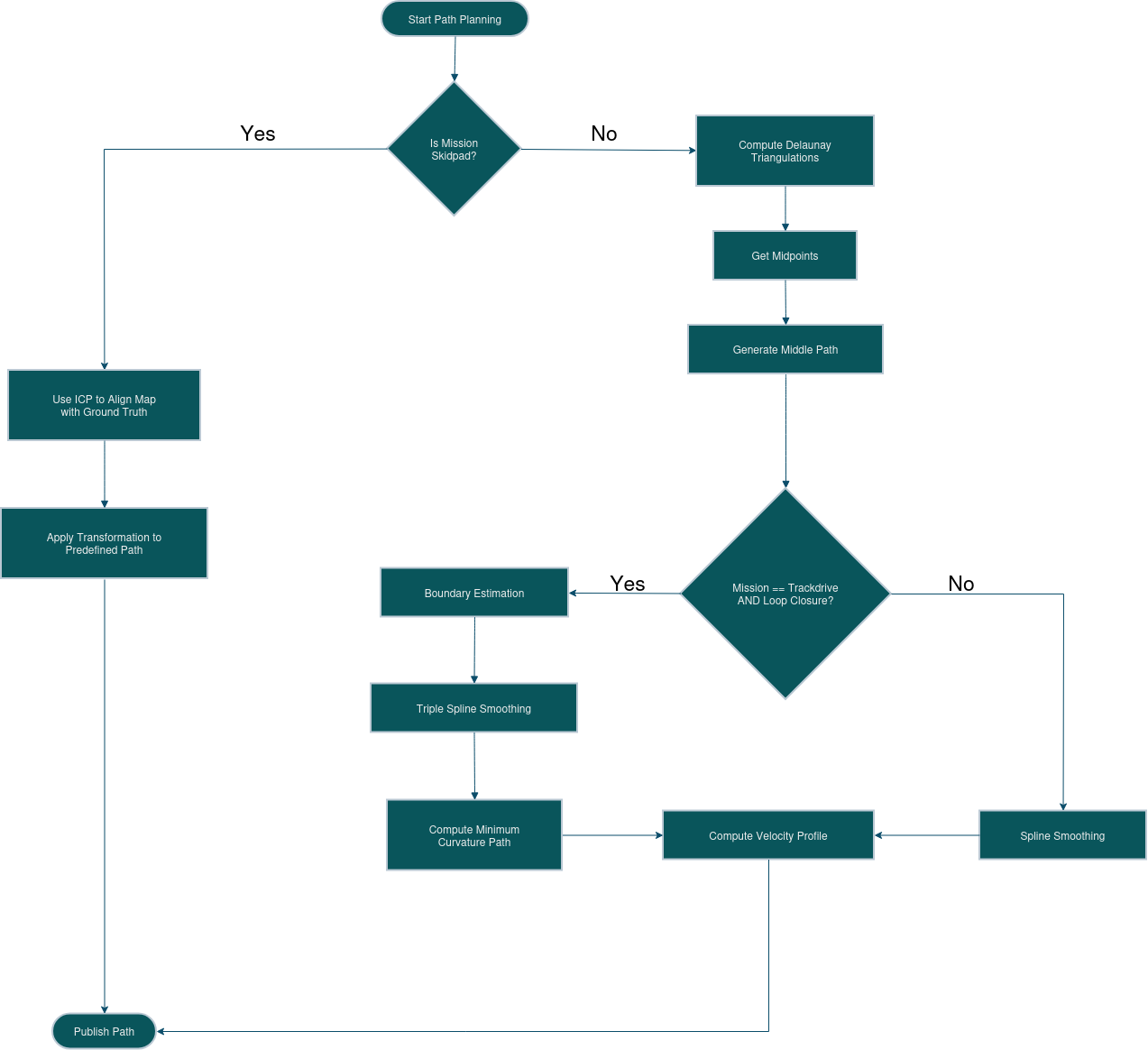
Pipeline Overview
The path planning workflow is determined by the active mission type.
Skidpad mission:
- Load hardcoded path and reference cones from file (once).
- Align the reference cone map to the detected cones using ICP.
- Apply the inverse transformation to the hardcoded path.
- Find the closest point to the vehicle and return the next 70 points.
All other missions (Autocross / Trackdrive / Acceleration):
- Generate a Delaunay triangulation of visible cones (sliding window or full map).
- Extract midpoints from triangulation edges, applying distance constraints.
- Build a neighbour graph connecting midpoints within the same triangle.
- Run a recursive lookahead graph search using an angle+distance cost function to select the best path.
- On loop closure (Trackdrive): fit triple splines to the centerline and boundaries, then run OSQP minimum curvature optimization.
- Compute a velocity profile using Menger curvature, a friction-ellipse model, and forward/backward kinematic passes.
- Publish the path to
/path_planning/path.
 File truncated at 100 lines [see the full file](https://github.com/fs-feup/autonomous-systems/tree/main/src/planning/README.md)
Package Dependencies
| Deps | Name |
|---|---|
| ament_cmake | |
| rclcpp | |
| std_msgs | |
| eufs_msgs | |
| fs_msgs | |
| custom_interfaces | |
| tf2_ros | |
| tf2_geometry_msgs | |
| pacsim | |
| common_lib | |
| std_srvs | |
| nav_msgs | |
| visualization_msgs | |
| geometry_msgs |
System Dependencies
Dependant Packages
Launch files
Messages
Services
Plugins
Recent questions tagged planning at Robotics Stack Exchange
Package Summary
| Version | 0.0.0 |
| License | Apache License 2.0 |
| Build type | AMENT_CMAKE |
| Use | RECOMMENDED |
Repository Summary
| Description | |
| Checkout URI | https://github.com/fs-feup/autonomous-systems.git |
| VCS Type | git |
| VCS Version | main |
| Last Updated | 2026-04-06 |
| Dev Status | UNKNOWN |
| Released | UNRELEASED |
| Contributing |
Help Wanted (-)
Good First Issues (-) Pull Requests to Review (-) |
Package Description
Maintainers
- André
Authors
Planning Module
Package Information
Description
The planning module is the third main module in the autonomous system. It comes after the Localization and Mapping processing and precedes the Control module. It is responsible for processing the cones position and to calculate the best path for the car to follow considering the received track. It then sends the desired path to the control in the form of an ordered path points sequence.
The module operates in two modes:
- Skidpad mission: ICP alignment with predefined paths
- Other missions: Full path generation via Delaunay triangulation, midpoint extraction, (B-spline smoothing), (minimum curvature optimization), and velocity planning
Folder Structure
- adapter_planning: Adapters to change ros2 interfaces according to simulator or environment
- config: Configuration structures for the planning module
- utils: Utility functions for the planning module, including spline fitting
-
planning: Main classes and functions for the planning module
- planning/planning: Top-level ROS 2 node, it orchestrates all sub-modules and handles mission dispatch
-
planning/midpoint_generator:
MidpointGeneratorclass, inserts cones into a Delaunay triangulation, computes midpoints, and builds the neighbour graph -
planning/path_calculation:
PathCalculationclass, it uses Delaunay-based midpoint graph construction, graph search with recursive lookahead, and loop closure -
planning/colorpoint:
Colorpointclass, assigns yellow/blue labels to cone pairs using cross-product side determination -
planning/smoothing:
PathSmoothingclass, B-spline smoothing and OSQP-based minimum curvature optimization -
planning/velocity_planning:
VelocityPlanningclass, curvature-based speed targets with friction-ellipse acceleration and braking limiters -
planning/skidpad:
Skidpadclass, ICP-based alignment of a hardcoded path to the detected cone map
Launch Configurations
- eufs.launch.py: Launches the planning node with the necessary parameters for the EUFS simulator.
- vehicle.launch.py: Launches the planning node with the necessary parameters for the 03 vehicle.
- pacsim.launch.py: Launches the planning node with the necessary parameters for the PacSim simulator.
Important Dependencies
-
CGAL: Computational Geometry Algorithms Library, used for Delaunay triangulation in
MidpointGenerator. -
GSL: GNU Scientific Library, used for B-spline fitting in
PathSmoothing. -
OSQP: Operator Splitting QP Solver, used for minimum curvature path optimization in
PathSmoothing. -
PCL: Point Cloud Library, used for ICP alignment in
Skidpad. -
Eigen: Linear algebra library, used for transformation matrices in
Skidpad.
How to Run
Install Dependencies
# Initialize submodules
git submodule update --init --recursive
# Build and install osqp
./src/planning/dependencies_install.sh
Compiling
MAKEFLAGS=-j2 colcon build --packages-up-to planning --cmake-args -G Ninja
Testing
colcon test --packages-select planning # use --event-handlers console_direct+ for immediate output
To check test results:
colcon test-result --all --verbose
Running
Choose one of the launch files in the launch directory. Each file’s name indicates the context in which it should be used:
source ./install/setup.bash
ros2 launch planning planning.launch.py
Each launch file exposes arguments that control visualization publishing, input source, and algorithm parameters. To change a value, edit the launch file and recompile.
Design
Pipeline Overview
The path planning workflow is determined by the active mission type.
Skidpad mission:
- Load hardcoded path and reference cones from file (once).
- Align the reference cone map to the detected cones using ICP.
- Apply the inverse transformation to the hardcoded path.
- Find the closest point to the vehicle and return the next 70 points.
All other missions (Autocross / Trackdrive / Acceleration):
- Generate a Delaunay triangulation of visible cones (sliding window or full map).
- Extract midpoints from triangulation edges, applying distance constraints.
- Build a neighbour graph connecting midpoints within the same triangle.
- Run a recursive lookahead graph search using an angle+distance cost function to select the best path.
- On loop closure (Trackdrive): fit triple splines to the centerline and boundaries, then run OSQP minimum curvature optimization.
- Compute a velocity profile using Menger curvature, a friction-ellipse model, and forward/backward kinematic passes.
- Publish the path to
/path_planning/path.
File truncated at 100 lines [see the full file](https://github.com/fs-feup/autonomous-systems/tree/main/src/planning/README.md)
Package Dependencies
| Deps | Name |
|---|---|
| ament_cmake | |
| rclcpp | |
| std_msgs | |
| eufs_msgs | |
| fs_msgs | |
| custom_interfaces | |
| tf2_ros | |
| tf2_geometry_msgs | |
| pacsim | |
| common_lib | |
| std_srvs | |
| nav_msgs | |
| visualization_msgs | |
| geometry_msgs |
System Dependencies
Dependant Packages
Launch files
Messages
Services
Plugins
Recent questions tagged planning at Robotics Stack Exchange
Package Summary
| Version | 0.0.0 |
| License | Apache License 2.0 |
| Build type | AMENT_CMAKE |
| Use | RECOMMENDED |
Repository Summary
| Description | |
| Checkout URI | https://github.com/fs-feup/autonomous-systems.git |
| VCS Type | git |
| VCS Version | main |
| Last Updated | 2026-04-06 |
| Dev Status | UNKNOWN |
| Released | UNRELEASED |
| Contributing |
Help Wanted (-)
Good First Issues (-) Pull Requests to Review (-) |
Package Description
Maintainers
- André
Authors
Planning Module
Package Information
Description
The planning module is the third main module in the autonomous system. It comes after the Localization and Mapping processing and precedes the Control module. It is responsible for processing the cones position and to calculate the best path for the car to follow considering the received track. It then sends the desired path to the control in the form of an ordered path points sequence.
The module operates in two modes:
- Skidpad mission: ICP alignment with predefined paths
- Other missions: Full path generation via Delaunay triangulation, midpoint extraction, (B-spline smoothing), (minimum curvature optimization), and velocity planning
Folder Structure
- adapter_planning: Adapters to change ros2 interfaces according to simulator or environment
- config: Configuration structures for the planning module
- utils: Utility functions for the planning module, including spline fitting
-
planning: Main classes and functions for the planning module
- planning/planning: Top-level ROS 2 node, it orchestrates all sub-modules and handles mission dispatch
-
planning/midpoint_generator:
MidpointGeneratorclass, inserts cones into a Delaunay triangulation, computes midpoints, and builds the neighbour graph -
planning/path_calculation:
PathCalculationclass, it uses Delaunay-based midpoint graph construction, graph search with recursive lookahead, and loop closure -
planning/colorpoint:
Colorpointclass, assigns yellow/blue labels to cone pairs using cross-product side determination -
planning/smoothing:
PathSmoothingclass, B-spline smoothing and OSQP-based minimum curvature optimization -
planning/velocity_planning:
VelocityPlanningclass, curvature-based speed targets with friction-ellipse acceleration and braking limiters -
planning/skidpad:
Skidpadclass, ICP-based alignment of a hardcoded path to the detected cone map
Launch Configurations
- eufs.launch.py: Launches the planning node with the necessary parameters for the EUFS simulator.
- vehicle.launch.py: Launches the planning node with the necessary parameters for the 03 vehicle.
- pacsim.launch.py: Launches the planning node with the necessary parameters for the PacSim simulator.
Important Dependencies
-
CGAL: Computational Geometry Algorithms Library, used for Delaunay triangulation in
MidpointGenerator. -
GSL: GNU Scientific Library, used for B-spline fitting in
PathSmoothing. -
OSQP: Operator Splitting QP Solver, used for minimum curvature path optimization in
PathSmoothing. -
PCL: Point Cloud Library, used for ICP alignment in
Skidpad. -
Eigen: Linear algebra library, used for transformation matrices in
Skidpad.
How to Run
Install Dependencies
# Initialize submodules
git submodule update --init --recursive
# Build and install osqp
./src/planning/dependencies_install.sh
Compiling
MAKEFLAGS=-j2 colcon build --packages-up-to planning --cmake-args -G Ninja
Testing
colcon test --packages-select planning # use --event-handlers console_direct+ for immediate output
To check test results:
colcon test-result --all --verbose
Running
Choose one of the launch files in the launch directory. Each file’s name indicates the context in which it should be used:
source ./install/setup.bash
ros2 launch planning planning.launch.py
Each launch file exposes arguments that control visualization publishing, input source, and algorithm parameters. To change a value, edit the launch file and recompile.
Design
Pipeline Overview
The path planning workflow is determined by the active mission type.
Skidpad mission:
- Load hardcoded path and reference cones from file (once).
- Align the reference cone map to the detected cones using ICP.
- Apply the inverse transformation to the hardcoded path.
- Find the closest point to the vehicle and return the next 70 points.
All other missions (Autocross / Trackdrive / Acceleration):
- Generate a Delaunay triangulation of visible cones (sliding window or full map).
- Extract midpoints from triangulation edges, applying distance constraints.
- Build a neighbour graph connecting midpoints within the same triangle.
- Run a recursive lookahead graph search using an angle+distance cost function to select the best path.
- On loop closure (Trackdrive): fit triple splines to the centerline and boundaries, then run OSQP minimum curvature optimization.
- Compute a velocity profile using Menger curvature, a friction-ellipse model, and forward/backward kinematic passes.
- Publish the path to
/path_planning/path.
File truncated at 100 lines [see the full file](https://github.com/fs-feup/autonomous-systems/tree/main/src/planning/README.md)
Package Dependencies
| Deps | Name |
|---|---|
| ament_cmake | |
| rclcpp | |
| std_msgs | |
| eufs_msgs | |
| fs_msgs | |
| custom_interfaces | |
| tf2_ros | |
| tf2_geometry_msgs | |
| pacsim | |
| common_lib | |
| std_srvs | |
| nav_msgs | |
| visualization_msgs | |
| geometry_msgs |
System Dependencies
Dependant Packages
Launch files
Messages
Services
Plugins
Recent questions tagged planning at Robotics Stack Exchange
Package Summary
| Version | 0.0.0 |
| License | Apache License 2.0 |
| Build type | AMENT_CMAKE |
| Use | RECOMMENDED |
Repository Summary
| Description | |
| Checkout URI | https://github.com/fs-feup/autonomous-systems.git |
| VCS Type | git |
| VCS Version | main |
| Last Updated | 2026-04-06 |
| Dev Status | UNKNOWN |
| Released | UNRELEASED |
| Contributing |
Help Wanted (-)
Good First Issues (-) Pull Requests to Review (-) |
Package Description
Maintainers
- André
Authors
Planning Module
Package Information
Description
The planning module is the third main module in the autonomous system. It comes after the Localization and Mapping processing and precedes the Control module. It is responsible for processing the cones position and to calculate the best path for the car to follow considering the received track. It then sends the desired path to the control in the form of an ordered path points sequence.
The module operates in two modes:
- Skidpad mission: ICP alignment with predefined paths
- Other missions: Full path generation via Delaunay triangulation, midpoint extraction, (B-spline smoothing), (minimum curvature optimization), and velocity planning
Folder Structure
- adapter_planning: Adapters to change ros2 interfaces according to simulator or environment
- config: Configuration structures for the planning module
- utils: Utility functions for the planning module, including spline fitting
-
planning: Main classes and functions for the planning module
- planning/planning: Top-level ROS 2 node, it orchestrates all sub-modules and handles mission dispatch
-
planning/midpoint_generator:
MidpointGeneratorclass, inserts cones into a Delaunay triangulation, computes midpoints, and builds the neighbour graph -
planning/path_calculation:
PathCalculationclass, it uses Delaunay-based midpoint graph construction, graph search with recursive lookahead, and loop closure -
planning/colorpoint:
Colorpointclass, assigns yellow/blue labels to cone pairs using cross-product side determination -
planning/smoothing:
PathSmoothingclass, B-spline smoothing and OSQP-based minimum curvature optimization -
planning/velocity_planning:
VelocityPlanningclass, curvature-based speed targets with friction-ellipse acceleration and braking limiters -
planning/skidpad:
Skidpadclass, ICP-based alignment of a hardcoded path to the detected cone map
Launch Configurations
- eufs.launch.py: Launches the planning node with the necessary parameters for the EUFS simulator.
- vehicle.launch.py: Launches the planning node with the necessary parameters for the 03 vehicle.
- pacsim.launch.py: Launches the planning node with the necessary parameters for the PacSim simulator.
Important Dependencies
-
CGAL: Computational Geometry Algorithms Library, used for Delaunay triangulation in
MidpointGenerator. -
GSL: GNU Scientific Library, used for B-spline fitting in
PathSmoothing. -
OSQP: Operator Splitting QP Solver, used for minimum curvature path optimization in
PathSmoothing. -
PCL: Point Cloud Library, used for ICP alignment in
Skidpad. -
Eigen: Linear algebra library, used for transformation matrices in
Skidpad.
How to Run
Install Dependencies
# Initialize submodules
git submodule update --init --recursive
# Build and install osqp
./src/planning/dependencies_install.sh
Compiling
MAKEFLAGS=-j2 colcon build --packages-up-to planning --cmake-args -G Ninja
Testing
colcon test --packages-select planning # use --event-handlers console_direct+ for immediate output
To check test results:
colcon test-result --all --verbose
Running
Choose one of the launch files in the launch directory. Each file’s name indicates the context in which it should be used:
source ./install/setup.bash
ros2 launch planning planning.launch.py
Each launch file exposes arguments that control visualization publishing, input source, and algorithm parameters. To change a value, edit the launch file and recompile.
Design
Pipeline Overview
The path planning workflow is determined by the active mission type.
Skidpad mission:
- Load hardcoded path and reference cones from file (once).
- Align the reference cone map to the detected cones using ICP.
- Apply the inverse transformation to the hardcoded path.
- Find the closest point to the vehicle and return the next 70 points.
All other missions (Autocross / Trackdrive / Acceleration):
- Generate a Delaunay triangulation of visible cones (sliding window or full map).
- Extract midpoints from triangulation edges, applying distance constraints.
- Build a neighbour graph connecting midpoints within the same triangle.
- Run a recursive lookahead graph search using an angle+distance cost function to select the best path.
- On loop closure (Trackdrive): fit triple splines to the centerline and boundaries, then run OSQP minimum curvature optimization.
- Compute a velocity profile using Menger curvature, a friction-ellipse model, and forward/backward kinematic passes.
- Publish the path to
/path_planning/path.
File truncated at 100 lines [see the full file](https://github.com/fs-feup/autonomous-systems/tree/main/src/planning/README.md)
Package Dependencies
| Deps | Name |
|---|---|
| ament_cmake | |
| rclcpp | |
| std_msgs | |
| eufs_msgs | |
| fs_msgs | |
| custom_interfaces | |
| tf2_ros | |
| tf2_geometry_msgs | |
| pacsim | |
| common_lib | |
| std_srvs | |
| nav_msgs | |
| visualization_msgs | |
| geometry_msgs |
System Dependencies
Dependant Packages
Launch files
Messages
Services
Plugins
Recent questions tagged planning at Robotics Stack Exchange
Package Summary
| Version | 0.0.0 |
| License | Apache License 2.0 |
| Build type | AMENT_CMAKE |
| Use | RECOMMENDED |
Repository Summary
| Description | |
| Checkout URI | https://github.com/fs-feup/autonomous-systems.git |
| VCS Type | git |
| VCS Version | main |
| Last Updated | 2026-04-06 |
| Dev Status | UNKNOWN |
| Released | UNRELEASED |
| Contributing |
Help Wanted (-)
Good First Issues (-) Pull Requests to Review (-) |
Package Description
Maintainers
- André
Authors
Planning Module
Package Information
Description
The planning module is the third main module in the autonomous system. It comes after the Localization and Mapping processing and precedes the Control module. It is responsible for processing the cones position and to calculate the best path for the car to follow considering the received track. It then sends the desired path to the control in the form of an ordered path points sequence.
The module operates in two modes:
- Skidpad mission: ICP alignment with predefined paths
- Other missions: Full path generation via Delaunay triangulation, midpoint extraction, (B-spline smoothing), (minimum curvature optimization), and velocity planning
Folder Structure
- adapter_planning: Adapters to change ros2 interfaces according to simulator or environment
- config: Configuration structures for the planning module
- utils: Utility functions for the planning module, including spline fitting
-
planning: Main classes and functions for the planning module
- planning/planning: Top-level ROS 2 node, it orchestrates all sub-modules and handles mission dispatch
-
planning/midpoint_generator:
MidpointGeneratorclass, inserts cones into a Delaunay triangulation, computes midpoints, and builds the neighbour graph -
planning/path_calculation:
PathCalculationclass, it uses Delaunay-based midpoint graph construction, graph search with recursive lookahead, and loop closure -
planning/colorpoint:
Colorpointclass, assigns yellow/blue labels to cone pairs using cross-product side determination -
planning/smoothing:
PathSmoothingclass, B-spline smoothing and OSQP-based minimum curvature optimization -
planning/velocity_planning:
VelocityPlanningclass, curvature-based speed targets with friction-ellipse acceleration and braking limiters -
planning/skidpad:
Skidpadclass, ICP-based alignment of a hardcoded path to the detected cone map
Launch Configurations
- eufs.launch.py: Launches the planning node with the necessary parameters for the EUFS simulator.
- vehicle.launch.py: Launches the planning node with the necessary parameters for the 03 vehicle.
- pacsim.launch.py: Launches the planning node with the necessary parameters for the PacSim simulator.
Important Dependencies
-
CGAL: Computational Geometry Algorithms Library, used for Delaunay triangulation in
MidpointGenerator. -
GSL: GNU Scientific Library, used for B-spline fitting in
PathSmoothing. -
OSQP: Operator Splitting QP Solver, used for minimum curvature path optimization in
PathSmoothing. -
PCL: Point Cloud Library, used for ICP alignment in
Skidpad. -
Eigen: Linear algebra library, used for transformation matrices in
Skidpad.
How to Run
Install Dependencies
# Initialize submodules
git submodule update --init --recursive
# Build and install osqp
./src/planning/dependencies_install.sh
Compiling
MAKEFLAGS=-j2 colcon build --packages-up-to planning --cmake-args -G Ninja
Testing
colcon test --packages-select planning # use --event-handlers console_direct+ for immediate output
To check test results:
colcon test-result --all --verbose
Running
Choose one of the launch files in the launch directory. Each file’s name indicates the context in which it should be used:
source ./install/setup.bash
ros2 launch planning planning.launch.py
Each launch file exposes arguments that control visualization publishing, input source, and algorithm parameters. To change a value, edit the launch file and recompile.
Design
Pipeline Overview
The path planning workflow is determined by the active mission type.
Skidpad mission:
- Load hardcoded path and reference cones from file (once).
- Align the reference cone map to the detected cones using ICP.
- Apply the inverse transformation to the hardcoded path.
- Find the closest point to the vehicle and return the next 70 points.
All other missions (Autocross / Trackdrive / Acceleration):
- Generate a Delaunay triangulation of visible cones (sliding window or full map).
- Extract midpoints from triangulation edges, applying distance constraints.
- Build a neighbour graph connecting midpoints within the same triangle.
- Run a recursive lookahead graph search using an angle+distance cost function to select the best path.
- On loop closure (Trackdrive): fit triple splines to the centerline and boundaries, then run OSQP minimum curvature optimization.
- Compute a velocity profile using Menger curvature, a friction-ellipse model, and forward/backward kinematic passes.
- Publish the path to
/path_planning/path.
File truncated at 100 lines [see the full file](https://github.com/fs-feup/autonomous-systems/tree/main/src/planning/README.md)
Package Dependencies
| Deps | Name |
|---|---|
| ament_cmake | |
| rclcpp | |
| std_msgs | |
| eufs_msgs | |
| fs_msgs | |
| custom_interfaces | |
| tf2_ros | |
| tf2_geometry_msgs | |
| pacsim | |
| common_lib | |
| std_srvs | |
| nav_msgs | |
| visualization_msgs | |
| geometry_msgs |
System Dependencies
Dependant Packages
Launch files
Messages
Services
Plugins
Recent questions tagged planning at Robotics Stack Exchange
Package Summary
| Version | 0.0.0 |
| License | Apache License 2.0 |
| Build type | AMENT_CMAKE |
| Use | RECOMMENDED |
Repository Summary
| Description | |
| Checkout URI | https://github.com/fs-feup/autonomous-systems.git |
| VCS Type | git |
| VCS Version | main |
| Last Updated | 2026-04-06 |
| Dev Status | UNKNOWN |
| Released | UNRELEASED |
| Contributing |
Help Wanted (-)
Good First Issues (-) Pull Requests to Review (-) |
Package Description
Maintainers
- André
Authors
Planning Module
Package Information
Description
The planning module is the third main module in the autonomous system. It comes after the Localization and Mapping processing and precedes the Control module. It is responsible for processing the cones position and to calculate the best path for the car to follow considering the received track. It then sends the desired path to the control in the form of an ordered path points sequence.
The module operates in two modes:
- Skidpad mission: ICP alignment with predefined paths
- Other missions: Full path generation via Delaunay triangulation, midpoint extraction, (B-spline smoothing), (minimum curvature optimization), and velocity planning
Folder Structure
- adapter_planning: Adapters to change ros2 interfaces according to simulator or environment
- config: Configuration structures for the planning module
- utils: Utility functions for the planning module, including spline fitting
-
planning: Main classes and functions for the planning module
- planning/planning: Top-level ROS 2 node, it orchestrates all sub-modules and handles mission dispatch
-
planning/midpoint_generator:
MidpointGeneratorclass, inserts cones into a Delaunay triangulation, computes midpoints, and builds the neighbour graph -
planning/path_calculation:
PathCalculationclass, it uses Delaunay-based midpoint graph construction, graph search with recursive lookahead, and loop closure -
planning/colorpoint:
Colorpointclass, assigns yellow/blue labels to cone pairs using cross-product side determination -
planning/smoothing:
PathSmoothingclass, B-spline smoothing and OSQP-based minimum curvature optimization -
planning/velocity_planning:
VelocityPlanningclass, curvature-based speed targets with friction-ellipse acceleration and braking limiters -
planning/skidpad:
Skidpadclass, ICP-based alignment of a hardcoded path to the detected cone map
Launch Configurations
- eufs.launch.py: Launches the planning node with the necessary parameters for the EUFS simulator.
- vehicle.launch.py: Launches the planning node with the necessary parameters for the 03 vehicle.
- pacsim.launch.py: Launches the planning node with the necessary parameters for the PacSim simulator.
Important Dependencies
-
CGAL: Computational Geometry Algorithms Library, used for Delaunay triangulation in
MidpointGenerator. -
GSL: GNU Scientific Library, used for B-spline fitting in
PathSmoothing. -
OSQP: Operator Splitting QP Solver, used for minimum curvature path optimization in
PathSmoothing. -
PCL: Point Cloud Library, used for ICP alignment in
Skidpad. -
Eigen: Linear algebra library, used for transformation matrices in
Skidpad.
How to Run
Install Dependencies
# Initialize submodules
git submodule update --init --recursive
# Build and install osqp
./src/planning/dependencies_install.sh
Compiling
MAKEFLAGS=-j2 colcon build --packages-up-to planning --cmake-args -G Ninja
Testing
colcon test --packages-select planning # use --event-handlers console_direct+ for immediate output
To check test results:
colcon test-result --all --verbose
Running
Choose one of the launch files in the launch directory. Each file’s name indicates the context in which it should be used:
source ./install/setup.bash
ros2 launch planning planning.launch.py
Each launch file exposes arguments that control visualization publishing, input source, and algorithm parameters. To change a value, edit the launch file and recompile.
Design
Pipeline Overview
The path planning workflow is determined by the active mission type.
Skidpad mission:
- Load hardcoded path and reference cones from file (once).
- Align the reference cone map to the detected cones using ICP.
- Apply the inverse transformation to the hardcoded path.
- Find the closest point to the vehicle and return the next 70 points.
All other missions (Autocross / Trackdrive / Acceleration):
- Generate a Delaunay triangulation of visible cones (sliding window or full map).
- Extract midpoints from triangulation edges, applying distance constraints.
- Build a neighbour graph connecting midpoints within the same triangle.
- Run a recursive lookahead graph search using an angle+distance cost function to select the best path.
- On loop closure (Trackdrive): fit triple splines to the centerline and boundaries, then run OSQP minimum curvature optimization.
- Compute a velocity profile using Menger curvature, a friction-ellipse model, and forward/backward kinematic passes.
- Publish the path to
/path_planning/path.
File truncated at 100 lines [see the full file](https://github.com/fs-feup/autonomous-systems/tree/main/src/planning/README.md)
Package Dependencies
| Deps | Name |
|---|---|
| ament_cmake | |
| rclcpp | |
| std_msgs | |
| eufs_msgs | |
| fs_msgs | |
| custom_interfaces | |
| tf2_ros | |
| tf2_geometry_msgs | |
| pacsim | |
| common_lib | |
| std_srvs | |
| nav_msgs | |
| visualization_msgs | |
| geometry_msgs |
System Dependencies
Dependant Packages
Launch files
Messages
Services
Plugins
Recent questions tagged planning at Robotics Stack Exchange
Package Summary
| Version | 0.0.0 |
| License | Apache License 2.0 |
| Build type | AMENT_CMAKE |
| Use | RECOMMENDED |
Repository Summary
| Description | |
| Checkout URI | https://github.com/fs-feup/autonomous-systems.git |
| VCS Type | git |
| VCS Version | main |
| Last Updated | 2026-04-06 |
| Dev Status | UNKNOWN |
| Released | UNRELEASED |
| Contributing |
Help Wanted (-)
Good First Issues (-) Pull Requests to Review (-) |
Package Description
Maintainers
- André
Authors
Planning Module
Package Information
Description
The planning module is the third main module in the autonomous system. It comes after the Localization and Mapping processing and precedes the Control module. It is responsible for processing the cones position and to calculate the best path for the car to follow considering the received track. It then sends the desired path to the control in the form of an ordered path points sequence.
The module operates in two modes:
- Skidpad mission: ICP alignment with predefined paths
- Other missions: Full path generation via Delaunay triangulation, midpoint extraction, (B-spline smoothing), (minimum curvature optimization), and velocity planning
Folder Structure
- adapter_planning: Adapters to change ros2 interfaces according to simulator or environment
- config: Configuration structures for the planning module
- utils: Utility functions for the planning module, including spline fitting
-
planning: Main classes and functions for the planning module
- planning/planning: Top-level ROS 2 node, it orchestrates all sub-modules and handles mission dispatch
-
planning/midpoint_generator:
MidpointGeneratorclass, inserts cones into a Delaunay triangulation, computes midpoints, and builds the neighbour graph -
planning/path_calculation:
PathCalculationclass, it uses Delaunay-based midpoint graph construction, graph search with recursive lookahead, and loop closure -
planning/colorpoint:
Colorpointclass, assigns yellow/blue labels to cone pairs using cross-product side determination -
planning/smoothing:
PathSmoothingclass, B-spline smoothing and OSQP-based minimum curvature optimization -
planning/velocity_planning:
VelocityPlanningclass, curvature-based speed targets with friction-ellipse acceleration and braking limiters -
planning/skidpad:
Skidpadclass, ICP-based alignment of a hardcoded path to the detected cone map
Launch Configurations
- eufs.launch.py: Launches the planning node with the necessary parameters for the EUFS simulator.
- vehicle.launch.py: Launches the planning node with the necessary parameters for the 03 vehicle.
- pacsim.launch.py: Launches the planning node with the necessary parameters for the PacSim simulator.
Important Dependencies
-
CGAL: Computational Geometry Algorithms Library, used for Delaunay triangulation in
MidpointGenerator. -
GSL: GNU Scientific Library, used for B-spline fitting in
PathSmoothing. -
OSQP: Operator Splitting QP Solver, used for minimum curvature path optimization in
PathSmoothing. -
PCL: Point Cloud Library, used for ICP alignment in
Skidpad. -
Eigen: Linear algebra library, used for transformation matrices in
Skidpad.
How to Run
Install Dependencies
# Initialize submodules
git submodule update --init --recursive
# Build and install osqp
./src/planning/dependencies_install.sh
Compiling
MAKEFLAGS=-j2 colcon build --packages-up-to planning --cmake-args -G Ninja
Testing
colcon test --packages-select planning # use --event-handlers console_direct+ for immediate output
To check test results:
colcon test-result --all --verbose
Running
Choose one of the launch files in the launch directory. Each file’s name indicates the context in which it should be used:
source ./install/setup.bash
ros2 launch planning planning.launch.py
Each launch file exposes arguments that control visualization publishing, input source, and algorithm parameters. To change a value, edit the launch file and recompile.
Design
Pipeline Overview
The path planning workflow is determined by the active mission type.
Skidpad mission:
- Load hardcoded path and reference cones from file (once).
- Align the reference cone map to the detected cones using ICP.
- Apply the inverse transformation to the hardcoded path.
- Find the closest point to the vehicle and return the next 70 points.
All other missions (Autocross / Trackdrive / Acceleration):
- Generate a Delaunay triangulation of visible cones (sliding window or full map).
- Extract midpoints from triangulation edges, applying distance constraints.
- Build a neighbour graph connecting midpoints within the same triangle.
- Run a recursive lookahead graph search using an angle+distance cost function to select the best path.
- On loop closure (Trackdrive): fit triple splines to the centerline and boundaries, then run OSQP minimum curvature optimization.
- Compute a velocity profile using Menger curvature, a friction-ellipse model, and forward/backward kinematic passes.
- Publish the path to
/path_planning/path.
File truncated at 100 lines [see the full file](https://github.com/fs-feup/autonomous-systems/tree/main/src/planning/README.md)
Package Dependencies
| Deps | Name |
|---|---|
| ament_cmake | |
| rclcpp | |
| std_msgs | |
| eufs_msgs | |
| fs_msgs | |
| custom_interfaces | |
| tf2_ros | |
| tf2_geometry_msgs | |
| pacsim | |
| common_lib | |
| std_srvs | |
| nav_msgs | |
| visualization_msgs | |
| geometry_msgs |
System Dependencies
Dependant Packages
Launch files
Messages
Services
Plugins
Recent questions tagged planning at Robotics Stack Exchange
Package Summary
| Version | 0.0.0 |
| License | Apache License 2.0 |
| Build type | AMENT_CMAKE |
| Use | RECOMMENDED |
Repository Summary
| Description | |
| Checkout URI | https://github.com/fs-feup/autonomous-systems.git |
| VCS Type | git |
| VCS Version | main |
| Last Updated | 2026-04-06 |
| Dev Status | UNKNOWN |
| Released | UNRELEASED |
| Contributing |
Help Wanted (-)
Good First Issues (-) Pull Requests to Review (-) |
Package Description
Maintainers
- André
Authors
Planning Module
Package Information
Description
The planning module is the third main module in the autonomous system. It comes after the Localization and Mapping processing and precedes the Control module. It is responsible for processing the cones position and to calculate the best path for the car to follow considering the received track. It then sends the desired path to the control in the form of an ordered path points sequence.
The module operates in two modes:
- Skidpad mission: ICP alignment with predefined paths
- Other missions: Full path generation via Delaunay triangulation, midpoint extraction, (B-spline smoothing), (minimum curvature optimization), and velocity planning
Folder Structure
- adapter_planning: Adapters to change ros2 interfaces according to simulator or environment
- config: Configuration structures for the planning module
- utils: Utility functions for the planning module, including spline fitting
-
planning: Main classes and functions for the planning module
- planning/planning: Top-level ROS 2 node, it orchestrates all sub-modules and handles mission dispatch
-
planning/midpoint_generator:
MidpointGeneratorclass, inserts cones into a Delaunay triangulation, computes midpoints, and builds the neighbour graph -
planning/path_calculation:
PathCalculationclass, it uses Delaunay-based midpoint graph construction, graph search with recursive lookahead, and loop closure -
planning/colorpoint:
Colorpointclass, assigns yellow/blue labels to cone pairs using cross-product side determination -
planning/smoothing:
PathSmoothingclass, B-spline smoothing and OSQP-based minimum curvature optimization -
planning/velocity_planning:
VelocityPlanningclass, curvature-based speed targets with friction-ellipse acceleration and braking limiters -
planning/skidpad:
Skidpadclass, ICP-based alignment of a hardcoded path to the detected cone map
Launch Configurations
- eufs.launch.py: Launches the planning node with the necessary parameters for the EUFS simulator.
- vehicle.launch.py: Launches the planning node with the necessary parameters for the 03 vehicle.
- pacsim.launch.py: Launches the planning node with the necessary parameters for the PacSim simulator.
Important Dependencies
-
CGAL: Computational Geometry Algorithms Library, used for Delaunay triangulation in
MidpointGenerator. -
GSL: GNU Scientific Library, used for B-spline fitting in
PathSmoothing. -
OSQP: Operator Splitting QP Solver, used for minimum curvature path optimization in
PathSmoothing. -
PCL: Point Cloud Library, used for ICP alignment in
Skidpad. -
Eigen: Linear algebra library, used for transformation matrices in
Skidpad.
How to Run
Install Dependencies
# Initialize submodules
git submodule update --init --recursive
# Build and install osqp
./src/planning/dependencies_install.sh
Compiling
MAKEFLAGS=-j2 colcon build --packages-up-to planning --cmake-args -G Ninja
Testing
colcon test --packages-select planning # use --event-handlers console_direct+ for immediate output
To check test results:
colcon test-result --all --verbose
Running
Choose one of the launch files in the launch directory. Each file’s name indicates the context in which it should be used:
source ./install/setup.bash
ros2 launch planning planning.launch.py
Each launch file exposes arguments that control visualization publishing, input source, and algorithm parameters. To change a value, edit the launch file and recompile.
Design
Pipeline Overview
The path planning workflow is determined by the active mission type.
Skidpad mission:
- Load hardcoded path and reference cones from file (once).
- Align the reference cone map to the detected cones using ICP.
- Apply the inverse transformation to the hardcoded path.
- Find the closest point to the vehicle and return the next 70 points.
All other missions (Autocross / Trackdrive / Acceleration):
- Generate a Delaunay triangulation of visible cones (sliding window or full map).
- Extract midpoints from triangulation edges, applying distance constraints.
- Build a neighbour graph connecting midpoints within the same triangle.
- Run a recursive lookahead graph search using an angle+distance cost function to select the best path.
- On loop closure (Trackdrive): fit triple splines to the centerline and boundaries, then run OSQP minimum curvature optimization.
- Compute a velocity profile using Menger curvature, a friction-ellipse model, and forward/backward kinematic passes.
- Publish the path to
/path_planning/path.
File truncated at 100 lines [see the full file](https://github.com/fs-feup/autonomous-systems/tree/main/src/planning/README.md)
Package Dependencies
| Deps | Name |
|---|---|
| ament_cmake | |
| rclcpp | |
| std_msgs | |
| eufs_msgs | |
| fs_msgs | |
| custom_interfaces | |
| tf2_ros | |
| tf2_geometry_msgs | |
| pacsim | |
| common_lib | |
| std_srvs | |
| nav_msgs | |
| visualization_msgs | |
| geometry_msgs |
System Dependencies
Dependant Packages
Launch files
Messages
Services
Plugins
Recent questions tagged planning at Robotics Stack Exchange
Package Summary
| Version | 0.0.0 |
| License | Apache License 2.0 |
| Build type | AMENT_CMAKE |
| Use | RECOMMENDED |
Repository Summary
| Description | |
| Checkout URI | https://github.com/fs-feup/autonomous-systems.git |
| VCS Type | git |
| VCS Version | main |
| Last Updated | 2026-04-06 |
| Dev Status | UNKNOWN |
| Released | UNRELEASED |
| Contributing |
Help Wanted (-)
Good First Issues (-) Pull Requests to Review (-) |
Package Description
Maintainers
- André
Authors
Planning Module
Package Information
Description
The planning module is the third main module in the autonomous system. It comes after the Localization and Mapping processing and precedes the Control module. It is responsible for processing the cones position and to calculate the best path for the car to follow considering the received track. It then sends the desired path to the control in the form of an ordered path points sequence.
The module operates in two modes:
- Skidpad mission: ICP alignment with predefined paths
- Other missions: Full path generation via Delaunay triangulation, midpoint extraction, (B-spline smoothing), (minimum curvature optimization), and velocity planning
Folder Structure
- adapter_planning: Adapters to change ros2 interfaces according to simulator or environment
- config: Configuration structures for the planning module
- utils: Utility functions for the planning module, including spline fitting
-
planning: Main classes and functions for the planning module
- planning/planning: Top-level ROS 2 node, it orchestrates all sub-modules and handles mission dispatch
-
planning/midpoint_generator:
MidpointGeneratorclass, inserts cones into a Delaunay triangulation, computes midpoints, and builds the neighbour graph -
planning/path_calculation:
PathCalculationclass, it uses Delaunay-based midpoint graph construction, graph search with recursive lookahead, and loop closure -
planning/colorpoint:
Colorpointclass, assigns yellow/blue labels to cone pairs using cross-product side determination -
planning/smoothing:
PathSmoothingclass, B-spline smoothing and OSQP-based minimum curvature optimization -
planning/velocity_planning:
VelocityPlanningclass, curvature-based speed targets with friction-ellipse acceleration and braking limiters -
planning/skidpad:
Skidpadclass, ICP-based alignment of a hardcoded path to the detected cone map
Launch Configurations
- eufs.launch.py: Launches the planning node with the necessary parameters for the EUFS simulator.
- vehicle.launch.py: Launches the planning node with the necessary parameters for the 03 vehicle.
- pacsim.launch.py: Launches the planning node with the necessary parameters for the PacSim simulator.
Important Dependencies
-
CGAL: Computational Geometry Algorithms Library, used for Delaunay triangulation in
MidpointGenerator. -
GSL: GNU Scientific Library, used for B-spline fitting in
PathSmoothing. -
OSQP: Operator Splitting QP Solver, used for minimum curvature path optimization in
PathSmoothing. -
PCL: Point Cloud Library, used for ICP alignment in
Skidpad. -
Eigen: Linear algebra library, used for transformation matrices in
Skidpad.
How to Run
Install Dependencies
# Initialize submodules
git submodule update --init --recursive
# Build and install osqp
./src/planning/dependencies_install.sh
Compiling
MAKEFLAGS=-j2 colcon build --packages-up-to planning --cmake-args -G Ninja
Testing
colcon test --packages-select planning # use --event-handlers console_direct+ for immediate output
To check test results:
colcon test-result --all --verbose
Running
Choose one of the launch files in the launch directory. Each file’s name indicates the context in which it should be used:
source ./install/setup.bash
ros2 launch planning planning.launch.py
Each launch file exposes arguments that control visualization publishing, input source, and algorithm parameters. To change a value, edit the launch file and recompile.
Design
Pipeline Overview
The path planning workflow is determined by the active mission type.
Skidpad mission:
- Load hardcoded path and reference cones from file (once).
- Align the reference cone map to the detected cones using ICP.
- Apply the inverse transformation to the hardcoded path.
- Find the closest point to the vehicle and return the next 70 points.
All other missions (Autocross / Trackdrive / Acceleration):
- Generate a Delaunay triangulation of visible cones (sliding window or full map).
- Extract midpoints from triangulation edges, applying distance constraints.
- Build a neighbour graph connecting midpoints within the same triangle.
- Run a recursive lookahead graph search using an angle+distance cost function to select the best path.
- On loop closure (Trackdrive): fit triple splines to the centerline and boundaries, then run OSQP minimum curvature optimization.
- Compute a velocity profile using Menger curvature, a friction-ellipse model, and forward/backward kinematic passes.
- Publish the path to
/path_planning/path.
File truncated at 100 lines [see the full file](https://github.com/fs-feup/autonomous-systems/tree/main/src/planning/README.md)
Package Dependencies
| Deps | Name |
|---|---|
| ament_cmake | |
| rclcpp | |
| std_msgs | |
| eufs_msgs | |
| fs_msgs | |
| custom_interfaces | |
| tf2_ros | |
| tf2_geometry_msgs | |
| pacsim | |
| common_lib | |
| std_srvs | |
| nav_msgs | |
| visualization_msgs | |
| geometry_msgs |