 ROS Index

|
ceres_robot repositoryceres_bringup ceres_description ceres_gazebo ceres_localization ceres_navigation ceres_robot ceres_util |
ROS Distro
|
Repository Summary
| Description | |
| Checkout URI | https://github.com/uos/ceres_robot.git |
| VCS Type | git |
| VCS Version | master |
| Last Updated | 2025-05-19 |
| Dev Status | UNKNOWN |
| Released | UNRELEASED |
| Contributing |
Help Wanted (-)
Good First Issues (-) Pull Requests to Review (-) |
Packages
| Name | Version |
|---|---|
| ceres_bringup | 1.0.0 |
| ceres_description | 2.0.0 |
| ceres_gazebo | 2.0.0 |
| ceres_localization | 2.0.0 |
| ceres_navigation | 2.0.0 |
| ceres_robot | 1.0.0 |
| ceres_util | 2.0.0 |
README
Ceres
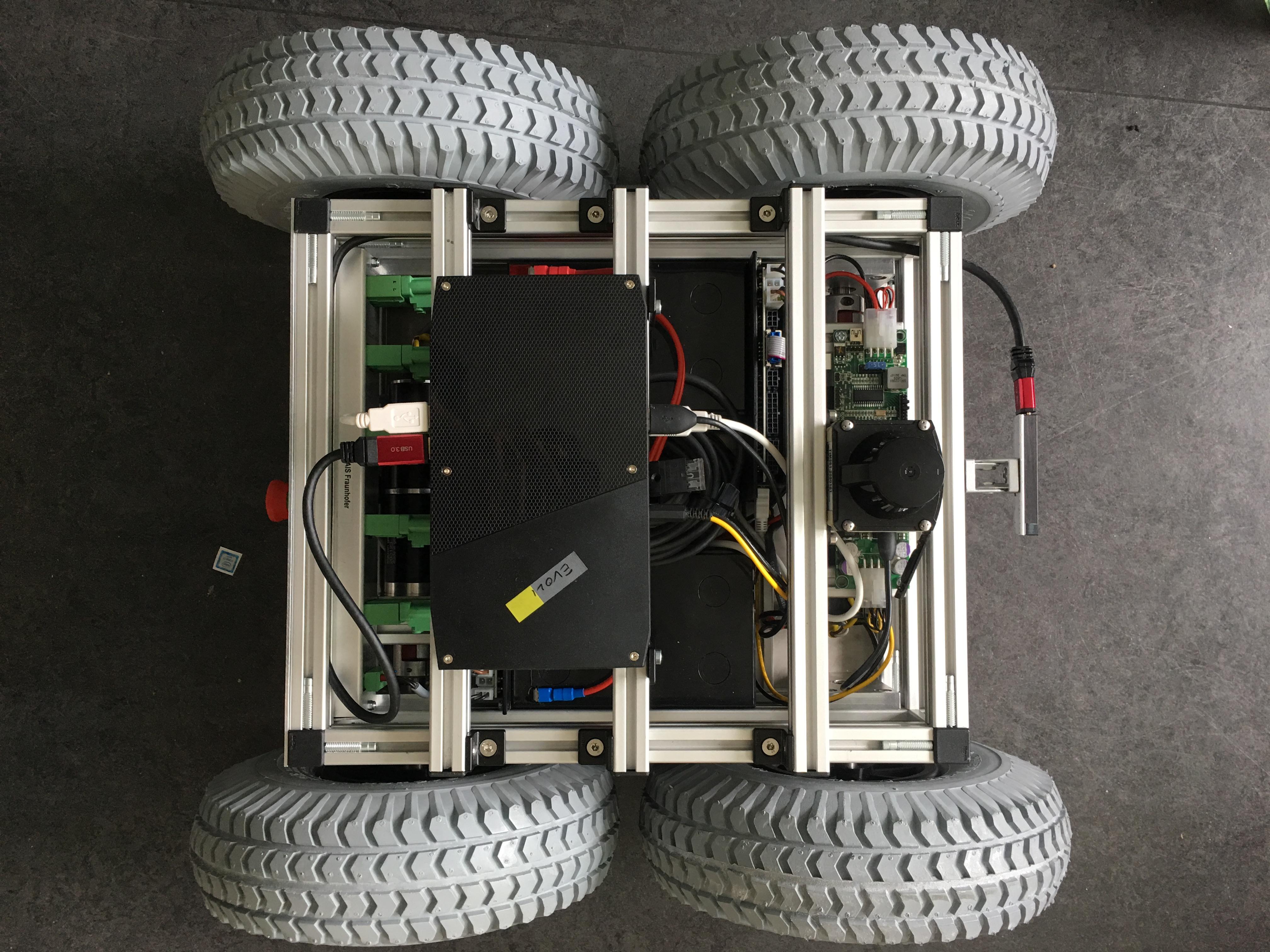
Maintainers
Installation
1. Install wstool
sudo apt install python-wstool
mkdir -p ~/ceres_ws
2. Use wstool to pull all required packages
wstool init src https://raw.githubusercontent.com/uos/uos_rosinstalls/master/ceres-kinetic.rosinstall
wstool update -t src
3. Pico Flexx Royale Libary
- download the royale SDK
libroyale.zipfrom the manufacturers website with the costumer password provided in the pico flexx casing - Extract the linux 64 bit archive from the extracted SDK to
ceres_ws/src/pico_flexx_driver/royale
4. Update UDEV Rules
Install the udev rules for the pico_flexx
cd ~/ceres_ws/src/pico_flexx_driver/royale
sudo cp libroyale-<version_number>-LINUX-64Bit/driver/udev/10-royale-ubuntu.rules /etc/udev/rules.d/
Install the udev rules for the sick tim
sudo cp ~/ceres_ws/src/sick_tim/udev/81-sick-tim3xx.rules /etc/udev/rules.d
Install the udev rules for the phidgets driver
sudo cp ~/ceres_ws/src/phidgets_drivers/phidgets_api/share/udev/99-phidgets.rules /etc/udev/rules.d
Ceres Simulation
Use gazebo with Ceres: roslaunch ceres_gazebo ceres.launch
Ceres Util
We provide a script for an easy remote connection setup in ceres_util/ceres.rc.
Make sure it is sourced in ~/.bashrc
You need to have dig installed for all functionality, install it with sudo apt-get install dnsutils
The script contains the following functions:
-
ceres-host- exports the ROS_MASTER_URI
-
ceres-client [robot_name]- sets your ROS to be a client on computers that have an RZ ID
-
ceres-client-ip [robot_name]- sets your ROS to be a client on computers that do not have an RZ ID
-
ceres-ssh [robot_name]- ssh’s into the given robot
-
ssh-[robot_name]- ssh’s into the given robot
-
cmux- starts a basic tmux session for ceres
Remote Connection
- Example Host:
- flamara
- Example Client:
- your personal laptop
-
ceres-hoston the host machine (in this case on flamara) - start the launch file
roslaunch ceres_bringup ceres.launch -
ceres-client-ip flamaraon your personal laptop - start rviz on the client
CONTRIBUTING
|
|
ceres_robot repositoryceres_bringup ceres_description ceres_gazebo ceres_localization ceres_navigation ceres_robot ceres_util |
ROS Distro
|
Repository Summary
| Description | |
| Checkout URI | https://github.com/uos/ceres_robot.git |
| VCS Type | git |
| VCS Version | master |
| Last Updated | 2025-05-19 |
| Dev Status | UNKNOWN |
| Released | UNRELEASED |
| Contributing |
Help Wanted (-)
Good First Issues (-) Pull Requests to Review (-) |
Packages
| Name | Version |
|---|---|
| ceres_bringup | 1.0.0 |
| ceres_description | 2.0.0 |
| ceres_gazebo | 2.0.0 |
| ceres_localization | 2.0.0 |
| ceres_navigation | 2.0.0 |
| ceres_robot | 1.0.0 |
| ceres_util | 2.0.0 |
README
Ceres
Maintainers
Installation
1. Install wstool
sudo apt install python-wstool
mkdir -p ~/ceres_ws
2. Use wstool to pull all required packages
wstool init src https://raw.githubusercontent.com/uos/uos_rosinstalls/master/ceres-kinetic.rosinstall
wstool update -t src
3. Pico Flexx Royale Libary
- download the royale SDK
libroyale.zipfrom the manufacturers website with the costumer password provided in the pico flexx casing - Extract the linux 64 bit archive from the extracted SDK to
ceres_ws/src/pico_flexx_driver/royale
4. Update UDEV Rules
Install the udev rules for the pico_flexx
cd ~/ceres_ws/src/pico_flexx_driver/royale
sudo cp libroyale-<version_number>-LINUX-64Bit/driver/udev/10-royale-ubuntu.rules /etc/udev/rules.d/
Install the udev rules for the sick tim
sudo cp ~/ceres_ws/src/sick_tim/udev/81-sick-tim3xx.rules /etc/udev/rules.d
Install the udev rules for the phidgets driver
sudo cp ~/ceres_ws/src/phidgets_drivers/phidgets_api/share/udev/99-phidgets.rules /etc/udev/rules.d
Ceres Simulation
Use gazebo with Ceres: roslaunch ceres_gazebo ceres.launch
Ceres Util
We provide a script for an easy remote connection setup in ceres_util/ceres.rc.
Make sure it is sourced in ~/.bashrc
You need to have dig installed for all functionality, install it with sudo apt-get install dnsutils
The script contains the following functions:
-
ceres-host- exports the ROS_MASTER_URI
-
ceres-client [robot_name]- sets your ROS to be a client on computers that have an RZ ID
-
ceres-client-ip [robot_name]- sets your ROS to be a client on computers that do not have an RZ ID
-
ceres-ssh [robot_name]- ssh’s into the given robot
-
ssh-[robot_name]- ssh’s into the given robot
-
cmux- starts a basic tmux session for ceres
Remote Connection
- Example Host:
- flamara
- Example Client:
- your personal laptop
-
ceres-hoston the host machine (in this case on flamara) - start the launch file
roslaunch ceres_bringup ceres.launch -
ceres-client-ip flamaraon your personal laptop - start rviz on the client
CONTRIBUTING
|
|
ceres_robot repositoryceres_bringup ceres_description ceres_gazebo ceres_localization ceres_navigation ceres_robot ceres_util |
ROS Distro
|
Repository Summary
| Description | |
| Checkout URI | https://github.com/uos/ceres_robot.git |
| VCS Type | git |
| VCS Version | master |
| Last Updated | 2025-05-19 |
| Dev Status | UNKNOWN |
| Released | UNRELEASED |
| Contributing |
Help Wanted (-)
Good First Issues (-) Pull Requests to Review (-) |
Packages
| Name | Version |
|---|---|
| ceres_bringup | 1.0.0 |
| ceres_description | 2.0.0 |
| ceres_gazebo | 2.0.0 |
| ceres_localization | 2.0.0 |
| ceres_navigation | 2.0.0 |
| ceres_robot | 1.0.0 |
| ceres_util | 2.0.0 |
README
Ceres
Maintainers
Installation
1. Install wstool
sudo apt install python-wstool
mkdir -p ~/ceres_ws
2. Use wstool to pull all required packages
wstool init src https://raw.githubusercontent.com/uos/uos_rosinstalls/master/ceres-kinetic.rosinstall
wstool update -t src
3. Pico Flexx Royale Libary
- download the royale SDK
libroyale.zipfrom the manufacturers website with the costumer password provided in the pico flexx casing - Extract the linux 64 bit archive from the extracted SDK to
ceres_ws/src/pico_flexx_driver/royale
4. Update UDEV Rules
Install the udev rules for the pico_flexx
cd ~/ceres_ws/src/pico_flexx_driver/royale
sudo cp libroyale-<version_number>-LINUX-64Bit/driver/udev/10-royale-ubuntu.rules /etc/udev/rules.d/
Install the udev rules for the sick tim
sudo cp ~/ceres_ws/src/sick_tim/udev/81-sick-tim3xx.rules /etc/udev/rules.d
Install the udev rules for the phidgets driver
sudo cp ~/ceres_ws/src/phidgets_drivers/phidgets_api/share/udev/99-phidgets.rules /etc/udev/rules.d
Ceres Simulation
Use gazebo with Ceres: roslaunch ceres_gazebo ceres.launch
Ceres Util
We provide a script for an easy remote connection setup in ceres_util/ceres.rc.
Make sure it is sourced in ~/.bashrc
You need to have dig installed for all functionality, install it with sudo apt-get install dnsutils
The script contains the following functions:
-
ceres-host- exports the ROS_MASTER_URI
-
ceres-client [robot_name]- sets your ROS to be a client on computers that have an RZ ID
-
ceres-client-ip [robot_name]- sets your ROS to be a client on computers that do not have an RZ ID
-
ceres-ssh [robot_name]- ssh’s into the given robot
-
ssh-[robot_name]- ssh’s into the given robot
-
cmux- starts a basic tmux session for ceres
Remote Connection
- Example Host:
- flamara
- Example Client:
- your personal laptop
-
ceres-hoston the host machine (in this case on flamara) - start the launch file
roslaunch ceres_bringup ceres.launch -
ceres-client-ip flamaraon your personal laptop - start rviz on the client
CONTRIBUTING
|
|
ceres_robot repositoryceres_bringup ceres_description ceres_gazebo ceres_localization ceres_navigation ceres_robot ceres_util |
ROS Distro
|
Repository Summary
| Description | |
| Checkout URI | https://github.com/uos/ceres_robot.git |
| VCS Type | git |
| VCS Version | master |
| Last Updated | 2025-05-19 |
| Dev Status | UNKNOWN |
| Released | UNRELEASED |
| Contributing |
Help Wanted (-)
Good First Issues (-) Pull Requests to Review (-) |
Packages
| Name | Version |
|---|---|
| ceres_bringup | 1.0.0 |
| ceres_description | 2.0.0 |
| ceres_gazebo | 2.0.0 |
| ceres_localization | 2.0.0 |
| ceres_navigation | 2.0.0 |
| ceres_robot | 1.0.0 |
| ceres_util | 2.0.0 |
README
Ceres
Maintainers
Installation
1. Install wstool
sudo apt install python-wstool
mkdir -p ~/ceres_ws
2. Use wstool to pull all required packages
wstool init src https://raw.githubusercontent.com/uos/uos_rosinstalls/master/ceres-kinetic.rosinstall
wstool update -t src
3. Pico Flexx Royale Libary
- download the royale SDK
libroyale.zipfrom the manufacturers website with the costumer password provided in the pico flexx casing - Extract the linux 64 bit archive from the extracted SDK to
ceres_ws/src/pico_flexx_driver/royale
4. Update UDEV Rules
Install the udev rules for the pico_flexx
cd ~/ceres_ws/src/pico_flexx_driver/royale
sudo cp libroyale-<version_number>-LINUX-64Bit/driver/udev/10-royale-ubuntu.rules /etc/udev/rules.d/
Install the udev rules for the sick tim
sudo cp ~/ceres_ws/src/sick_tim/udev/81-sick-tim3xx.rules /etc/udev/rules.d
Install the udev rules for the phidgets driver
sudo cp ~/ceres_ws/src/phidgets_drivers/phidgets_api/share/udev/99-phidgets.rules /etc/udev/rules.d
Ceres Simulation
Use gazebo with Ceres: roslaunch ceres_gazebo ceres.launch
Ceres Util
We provide a script for an easy remote connection setup in ceres_util/ceres.rc.
Make sure it is sourced in ~/.bashrc
You need to have dig installed for all functionality, install it with sudo apt-get install dnsutils
The script contains the following functions:
-
ceres-host- exports the ROS_MASTER_URI
-
ceres-client [robot_name]- sets your ROS to be a client on computers that have an RZ ID
-
ceres-client-ip [robot_name]- sets your ROS to be a client on computers that do not have an RZ ID
-
ceres-ssh [robot_name]- ssh’s into the given robot
-
ssh-[robot_name]- ssh’s into the given robot
-
cmux- starts a basic tmux session for ceres
Remote Connection
- Example Host:
- flamara
- Example Client:
- your personal laptop
-
ceres-hoston the host machine (in this case on flamara) - start the launch file
roslaunch ceres_bringup ceres.launch -
ceres-client-ip flamaraon your personal laptop - start rviz on the client
CONTRIBUTING
|
|
ceres_robot repositoryceres_bringup ceres_description ceres_gazebo ceres_localization ceres_navigation ceres_robot ceres_util |
ROS Distro
|
Repository Summary
| Description | |
| Checkout URI | https://github.com/uos/ceres_robot.git |
| VCS Type | git |
| VCS Version | master |
| Last Updated | 2025-05-19 |
| Dev Status | UNKNOWN |
| Released | UNRELEASED |
| Contributing |
Help Wanted (-)
Good First Issues (-) Pull Requests to Review (-) |
Packages
| Name | Version |
|---|---|
| ceres_bringup | 1.0.0 |
| ceres_description | 2.0.0 |
| ceres_gazebo | 2.0.0 |
| ceres_localization | 2.0.0 |
| ceres_navigation | 2.0.0 |
| ceres_robot | 1.0.0 |
| ceres_util | 2.0.0 |
README
Ceres
Maintainers
Installation
1. Install wstool
sudo apt install python-wstool
mkdir -p ~/ceres_ws
2. Use wstool to pull all required packages
wstool init src https://raw.githubusercontent.com/uos/uos_rosinstalls/master/ceres-kinetic.rosinstall
wstool update -t src
3. Pico Flexx Royale Libary
- download the royale SDK
libroyale.zipfrom the manufacturers website with the costumer password provided in the pico flexx casing - Extract the linux 64 bit archive from the extracted SDK to
ceres_ws/src/pico_flexx_driver/royale
4. Update UDEV Rules
Install the udev rules for the pico_flexx
cd ~/ceres_ws/src/pico_flexx_driver/royale
sudo cp libroyale-<version_number>-LINUX-64Bit/driver/udev/10-royale-ubuntu.rules /etc/udev/rules.d/
Install the udev rules for the sick tim
sudo cp ~/ceres_ws/src/sick_tim/udev/81-sick-tim3xx.rules /etc/udev/rules.d
Install the udev rules for the phidgets driver
sudo cp ~/ceres_ws/src/phidgets_drivers/phidgets_api/share/udev/99-phidgets.rules /etc/udev/rules.d
Ceres Simulation
Use gazebo with Ceres: roslaunch ceres_gazebo ceres.launch
Ceres Util
We provide a script for an easy remote connection setup in ceres_util/ceres.rc.
Make sure it is sourced in ~/.bashrc
You need to have dig installed for all functionality, install it with sudo apt-get install dnsutils
The script contains the following functions:
-
ceres-host- exports the ROS_MASTER_URI
-
ceres-client [robot_name]- sets your ROS to be a client on computers that have an RZ ID
-
ceres-client-ip [robot_name]- sets your ROS to be a client on computers that do not have an RZ ID
-
ceres-ssh [robot_name]- ssh’s into the given robot
-
ssh-[robot_name]- ssh’s into the given robot
-
cmux- starts a basic tmux session for ceres
Remote Connection
- Example Host:
- flamara
- Example Client:
- your personal laptop
-
ceres-hoston the host machine (in this case on flamara) - start the launch file
roslaunch ceres_bringup ceres.launch -
ceres-client-ip flamaraon your personal laptop - start rviz on the client
CONTRIBUTING
|
|
ceres_robot repositoryceres_bringup ceres_description ceres_gazebo ceres_localization ceres_navigation ceres_robot ceres_util |
ROS Distro
|
Repository Summary
| Description | |
| Checkout URI | https://github.com/uos/ceres_robot.git |
| VCS Type | git |
| VCS Version | master |
| Last Updated | 2025-05-19 |
| Dev Status | UNKNOWN |
| Released | UNRELEASED |
| Contributing |
Help Wanted (-)
Good First Issues (-) Pull Requests to Review (-) |
Packages
| Name | Version |
|---|---|
| ceres_bringup | 1.0.0 |
| ceres_description | 2.0.0 |
| ceres_gazebo | 2.0.0 |
| ceres_localization | 2.0.0 |
| ceres_navigation | 2.0.0 |
| ceres_robot | 1.0.0 |
| ceres_util | 2.0.0 |
README
Ceres
Maintainers
Installation
1. Install wstool
sudo apt install python-wstool
mkdir -p ~/ceres_ws
2. Use wstool to pull all required packages
wstool init src https://raw.githubusercontent.com/uos/uos_rosinstalls/master/ceres-kinetic.rosinstall
wstool update -t src
3. Pico Flexx Royale Libary
- download the royale SDK
libroyale.zipfrom the manufacturers website with the costumer password provided in the pico flexx casing - Extract the linux 64 bit archive from the extracted SDK to
ceres_ws/src/pico_flexx_driver/royale
4. Update UDEV Rules
Install the udev rules for the pico_flexx
cd ~/ceres_ws/src/pico_flexx_driver/royale
sudo cp libroyale-<version_number>-LINUX-64Bit/driver/udev/10-royale-ubuntu.rules /etc/udev/rules.d/
Install the udev rules for the sick tim
sudo cp ~/ceres_ws/src/sick_tim/udev/81-sick-tim3xx.rules /etc/udev/rules.d
Install the udev rules for the phidgets driver
sudo cp ~/ceres_ws/src/phidgets_drivers/phidgets_api/share/udev/99-phidgets.rules /etc/udev/rules.d
Ceres Simulation
Use gazebo with Ceres: roslaunch ceres_gazebo ceres.launch
Ceres Util
We provide a script for an easy remote connection setup in ceres_util/ceres.rc.
Make sure it is sourced in ~/.bashrc
You need to have dig installed for all functionality, install it with sudo apt-get install dnsutils
The script contains the following functions:
-
ceres-host- exports the ROS_MASTER_URI
-
ceres-client [robot_name]- sets your ROS to be a client on computers that have an RZ ID
-
ceres-client-ip [robot_name]- sets your ROS to be a client on computers that do not have an RZ ID
-
ceres-ssh [robot_name]- ssh’s into the given robot
-
ssh-[robot_name]- ssh’s into the given robot
-
cmux- starts a basic tmux session for ceres
Remote Connection
- Example Host:
- flamara
- Example Client:
- your personal laptop
-
ceres-hoston the host machine (in this case on flamara) - start the launch file
roslaunch ceres_bringup ceres.launch -
ceres-client-ip flamaraon your personal laptop - start rviz on the client
CONTRIBUTING
|
|
ceres_robot repositoryceres_bringup ceres_description ceres_gazebo ceres_localization ceres_navigation ceres_robot ceres_util |
ROS Distro
|
Repository Summary
| Description | |
| Checkout URI | https://github.com/uos/ceres_robot.git |
| VCS Type | git |
| VCS Version | master |
| Last Updated | 2025-05-19 |
| Dev Status | UNKNOWN |
| Released | UNRELEASED |
| Contributing |
Help Wanted (-)
Good First Issues (-) Pull Requests to Review (-) |
Packages
| Name | Version |
|---|---|
| ceres_bringup | 1.0.0 |
| ceres_description | 2.0.0 |
| ceres_gazebo | 2.0.0 |
| ceres_localization | 2.0.0 |
| ceres_navigation | 2.0.0 |
| ceres_robot | 1.0.0 |
| ceres_util | 2.0.0 |
README
Ceres
Maintainers
Installation
1. Install wstool
sudo apt install python-wstool
mkdir -p ~/ceres_ws
2. Use wstool to pull all required packages
wstool init src https://raw.githubusercontent.com/uos/uos_rosinstalls/master/ceres-kinetic.rosinstall
wstool update -t src
3. Pico Flexx Royale Libary
- download the royale SDK
libroyale.zipfrom the manufacturers website with the costumer password provided in the pico flexx casing - Extract the linux 64 bit archive from the extracted SDK to
ceres_ws/src/pico_flexx_driver/royale
4. Update UDEV Rules
Install the udev rules for the pico_flexx
cd ~/ceres_ws/src/pico_flexx_driver/royale
sudo cp libroyale-<version_number>-LINUX-64Bit/driver/udev/10-royale-ubuntu.rules /etc/udev/rules.d/
Install the udev rules for the sick tim
sudo cp ~/ceres_ws/src/sick_tim/udev/81-sick-tim3xx.rules /etc/udev/rules.d
Install the udev rules for the phidgets driver
sudo cp ~/ceres_ws/src/phidgets_drivers/phidgets_api/share/udev/99-phidgets.rules /etc/udev/rules.d
Ceres Simulation
Use gazebo with Ceres: roslaunch ceres_gazebo ceres.launch
Ceres Util
We provide a script for an easy remote connection setup in ceres_util/ceres.rc.
Make sure it is sourced in ~/.bashrc
You need to have dig installed for all functionality, install it with sudo apt-get install dnsutils
The script contains the following functions:
-
ceres-host- exports the ROS_MASTER_URI
-
ceres-client [robot_name]- sets your ROS to be a client on computers that have an RZ ID
-
ceres-client-ip [robot_name]- sets your ROS to be a client on computers that do not have an RZ ID
-
ceres-ssh [robot_name]- ssh’s into the given robot
-
ssh-[robot_name]- ssh’s into the given robot
-
cmux- starts a basic tmux session for ceres
Remote Connection
- Example Host:
- flamara
- Example Client:
- your personal laptop
-
ceres-hoston the host machine (in this case on flamara) - start the launch file
roslaunch ceres_bringup ceres.launch -
ceres-client-ip flamaraon your personal laptop - start rviz on the client
CONTRIBUTING
|
|
ceres_robot repositoryceres_bringup ceres_description ceres_gazebo ceres_localization ceres_navigation ceres_robot ceres_util |
ROS Distro
|
Repository Summary
| Description | |
| Checkout URI | https://github.com/uos/ceres_robot.git |
| VCS Type | git |
| VCS Version | master |
| Last Updated | 2025-05-19 |
| Dev Status | UNKNOWN |
| Released | UNRELEASED |
| Contributing |
Help Wanted (-)
Good First Issues (-) Pull Requests to Review (-) |
Packages
| Name | Version |
|---|---|
| ceres_bringup | 1.0.0 |
| ceres_description | 2.0.0 |
| ceres_gazebo | 2.0.0 |
| ceres_localization | 2.0.0 |
| ceres_navigation | 2.0.0 |
| ceres_robot | 1.0.0 |
| ceres_util | 2.0.0 |
README
Ceres
Maintainers
Installation
1. Install wstool
sudo apt install python-wstool
mkdir -p ~/ceres_ws
2. Use wstool to pull all required packages
wstool init src https://raw.githubusercontent.com/uos/uos_rosinstalls/master/ceres-kinetic.rosinstall
wstool update -t src
3. Pico Flexx Royale Libary
- download the royale SDK
libroyale.zipfrom the manufacturers website with the costumer password provided in the pico flexx casing - Extract the linux 64 bit archive from the extracted SDK to
ceres_ws/src/pico_flexx_driver/royale
4. Update UDEV Rules
Install the udev rules for the pico_flexx
cd ~/ceres_ws/src/pico_flexx_driver/royale
sudo cp libroyale-<version_number>-LINUX-64Bit/driver/udev/10-royale-ubuntu.rules /etc/udev/rules.d/
Install the udev rules for the sick tim
sudo cp ~/ceres_ws/src/sick_tim/udev/81-sick-tim3xx.rules /etc/udev/rules.d
Install the udev rules for the phidgets driver
sudo cp ~/ceres_ws/src/phidgets_drivers/phidgets_api/share/udev/99-phidgets.rules /etc/udev/rules.d
Ceres Simulation
Use gazebo with Ceres: roslaunch ceres_gazebo ceres.launch
Ceres Util
We provide a script for an easy remote connection setup in ceres_util/ceres.rc.
Make sure it is sourced in ~/.bashrc
You need to have dig installed for all functionality, install it with sudo apt-get install dnsutils
The script contains the following functions:
-
ceres-host- exports the ROS_MASTER_URI
-
ceres-client [robot_name]- sets your ROS to be a client on computers that have an RZ ID
-
ceres-client-ip [robot_name]- sets your ROS to be a client on computers that do not have an RZ ID
-
ceres-ssh [robot_name]- ssh’s into the given robot
-
ssh-[robot_name]- ssh’s into the given robot
-
cmux- starts a basic tmux session for ceres
Remote Connection
- Example Host:
- flamara
- Example Client:
- your personal laptop
-
ceres-hoston the host machine (in this case on flamara) - start the launch file
roslaunch ceres_bringup ceres.launch -
ceres-client-ip flamaraon your personal laptop - start rviz on the client
CONTRIBUTING
|
|
ceres_robot repositoryceres_bringup ceres_description ceres_gazebo ceres_localization ceres_navigation ceres_robot ceres_util |
ROS Distro
|
Repository Summary
| Description | |
| Checkout URI | https://github.com/uos/ceres_robot.git |
| VCS Type | git |
| VCS Version | master |
| Last Updated | 2025-05-19 |
| Dev Status | UNKNOWN |
| Released | UNRELEASED |
| Contributing |
Help Wanted (-)
Good First Issues (-) Pull Requests to Review (-) |
Packages
| Name | Version |
|---|---|
| ceres_bringup | 1.0.0 |
| ceres_description | 2.0.0 |
| ceres_gazebo | 2.0.0 |
| ceres_localization | 2.0.0 |
| ceres_navigation | 2.0.0 |
| ceres_robot | 1.0.0 |
| ceres_util | 2.0.0 |
README
Ceres
Maintainers
Installation
1. Install wstool
sudo apt install python-wstool
mkdir -p ~/ceres_ws
2. Use wstool to pull all required packages
wstool init src https://raw.githubusercontent.com/uos/uos_rosinstalls/master/ceres-kinetic.rosinstall
wstool update -t src
3. Pico Flexx Royale Libary
- download the royale SDK
libroyale.zipfrom the manufacturers website with the costumer password provided in the pico flexx casing - Extract the linux 64 bit archive from the extracted SDK to
ceres_ws/src/pico_flexx_driver/royale
4. Update UDEV Rules
Install the udev rules for the pico_flexx
cd ~/ceres_ws/src/pico_flexx_driver/royale
sudo cp libroyale-<version_number>-LINUX-64Bit/driver/udev/10-royale-ubuntu.rules /etc/udev/rules.d/
Install the udev rules for the sick tim
sudo cp ~/ceres_ws/src/sick_tim/udev/81-sick-tim3xx.rules /etc/udev/rules.d
Install the udev rules for the phidgets driver
sudo cp ~/ceres_ws/src/phidgets_drivers/phidgets_api/share/udev/99-phidgets.rules /etc/udev/rules.d
Ceres Simulation
Use gazebo with Ceres: roslaunch ceres_gazebo ceres.launch
Ceres Util
We provide a script for an easy remote connection setup in ceres_util/ceres.rc.
Make sure it is sourced in ~/.bashrc
You need to have dig installed for all functionality, install it with sudo apt-get install dnsutils
The script contains the following functions:
-
ceres-host- exports the ROS_MASTER_URI
-
ceres-client [robot_name]- sets your ROS to be a client on computers that have an RZ ID
-
ceres-client-ip [robot_name]- sets your ROS to be a client on computers that do not have an RZ ID
-
ceres-ssh [robot_name]- ssh’s into the given robot
-
ssh-[robot_name]- ssh’s into the given robot
-
cmux- starts a basic tmux session for ceres
Remote Connection
- Example Host:
- flamara
- Example Client:
- your personal laptop
-
ceres-hoston the host machine (in this case on flamara) - start the launch file
roslaunch ceres_bringup ceres.launch -
ceres-client-ip flamaraon your personal laptop - start rviz on the client