 ROS Index
Repository Summary
| Description | |
| Checkout URI | https://github.com/iltlo/feetech_arm_control.git |
| VCS Type | git |
| VCS Version | master |
| Last Updated | 2025-02-14 |
| Dev Status | UNKNOWN |
| Released | UNRELEASED |
| Contributing |
Help Wanted (-)
Good First Issues (-) Pull Requests to Review (-) |
Packages
| Name | Version |
|---|---|
| arm_controller | 0.0.0 |
| arm_hardware_interface | 0.0.0 |
README
Feetech Arm Control
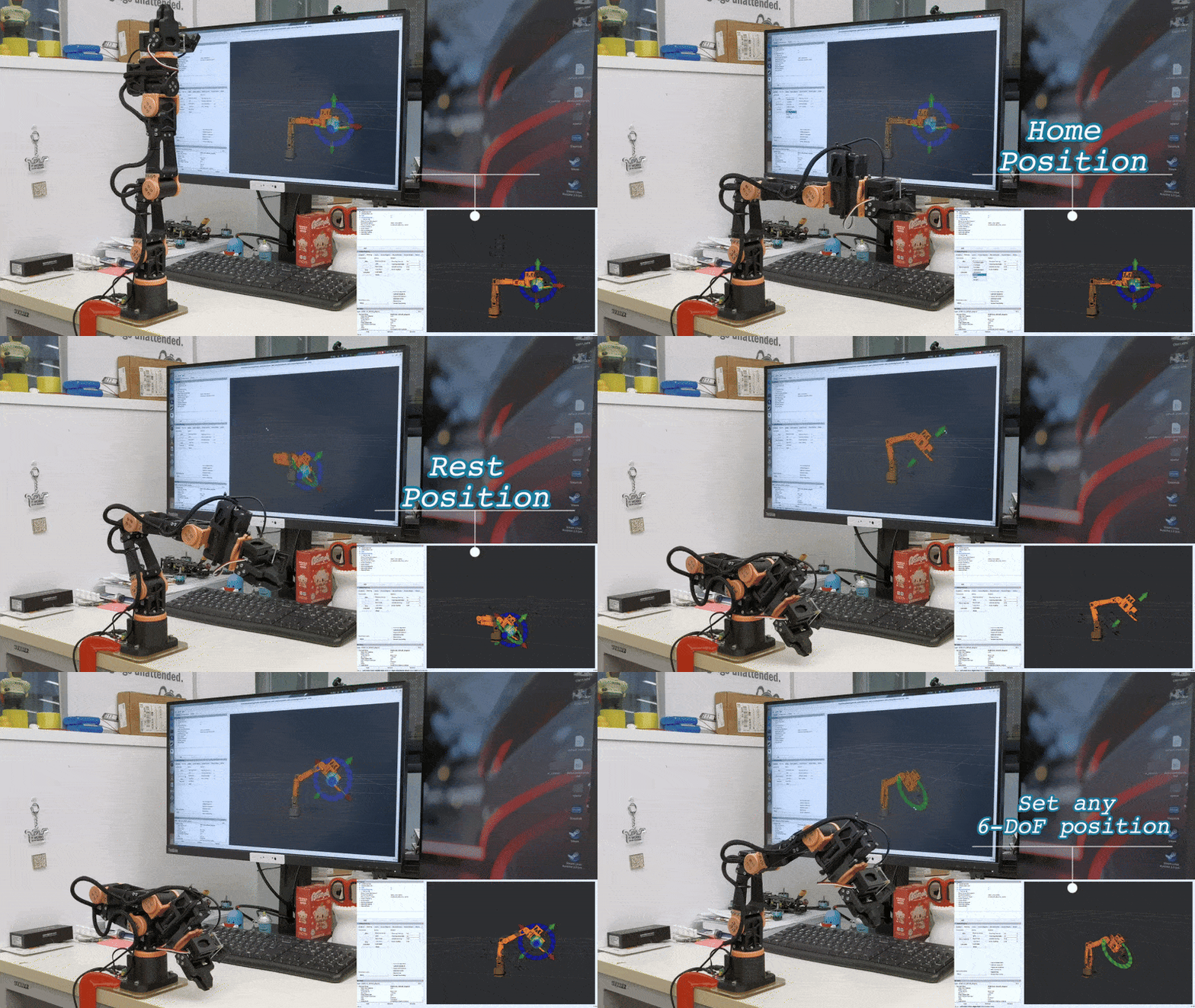
This repository provides a ROS2 hardware interface, URDF model, and MoveIt configuration for controlling a 6-DoF robotic arm using Feetech motors. The 3D model is currently in beta and pending open-source release by Simple Automation, please follow their progress on X!
✨ Features
-
Udev Rules for Serial Communication
- Provides consistent device names.
-
MoveIt 2 Integration
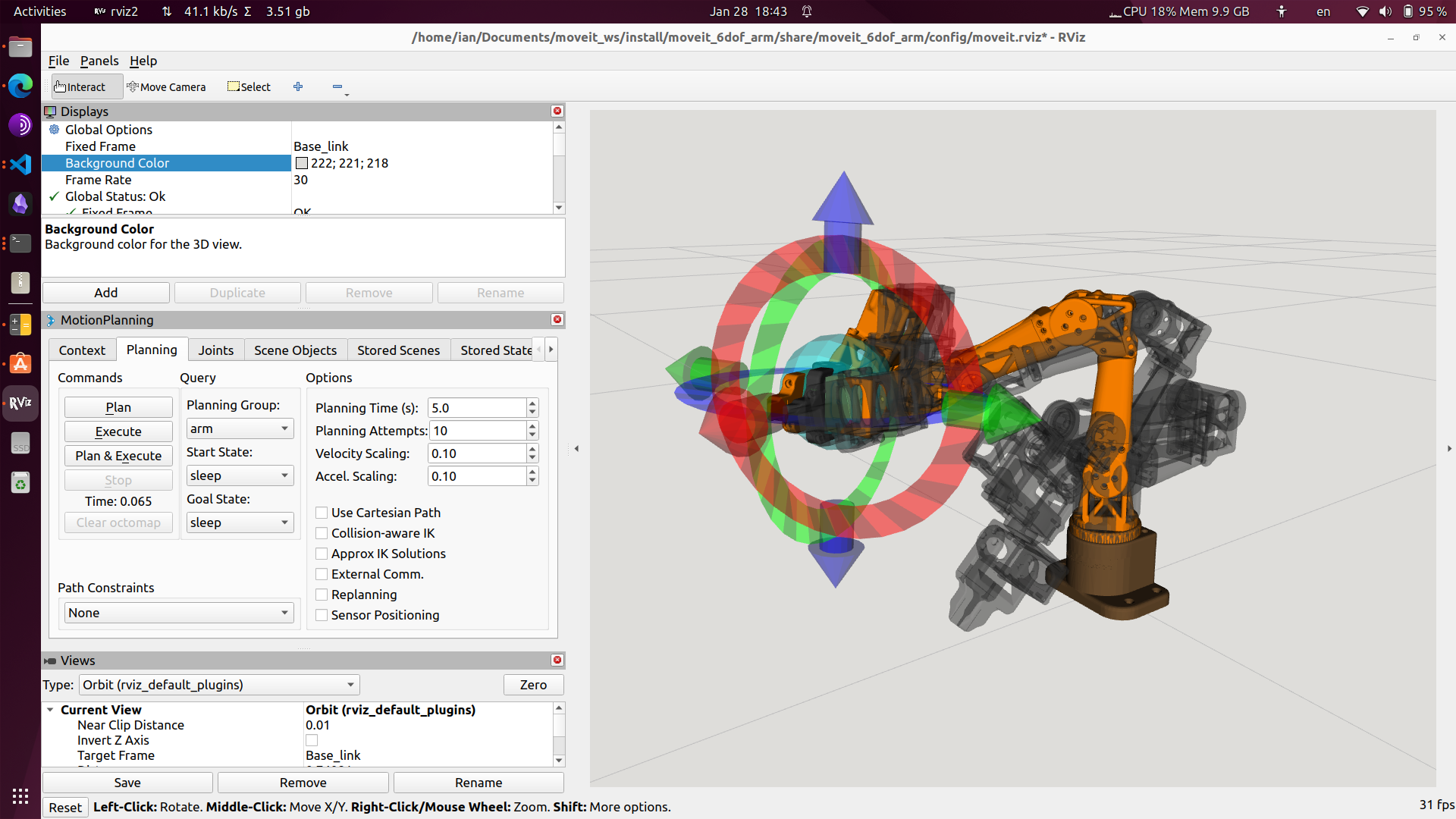
- Supports intuitive end-effector control in RViz.
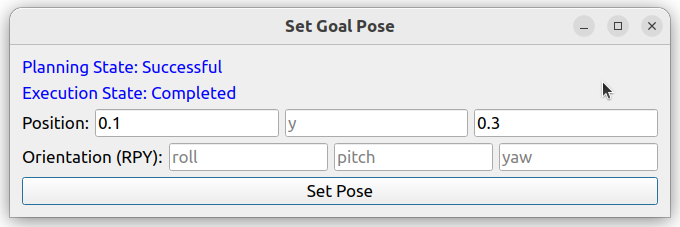
- Includes a GUI for setting goal poses (XYZ & RPY).
-
Simulation & Hardware Compatibility
- Works in both RViz simulation and real-world hardware.
- Publishes actual joint state feedback to a ROS topic.
-
Robot Description & Configuration (Git Submodule)
- Uses URDF/XACRO for robot modeling.
- Includes SRDF for MoveIt 2 configuration.
- Defines joint limits, collision models, and kinematics.
-
TODO
- Display actual joint state feedback in RViz.
- Implement or integrate an IK solver.
🚀 Installation
1️⃣ Clone the repository into your ROS2 workspace:
cd ~/your_ros2_ws/src
git clone https://github.com/iltlo/feetech_arm_control.git
2️⃣ Install dependencies:
cd ~/your_ros2_ws/src/feetech_arm_control
git submodule update --init --recursive
pip install feetech-servo-sdk
3️⃣ Set Up Udev Rules (Mandatory for Serial Communication)
To ensure consistent device naming and prevent permission issues, the Feetech Arm requires a udev rule.
📌 Steps to Install Udev Rules
- Run the setup script:
    cd ~/your_ros2_ws/src/feetech_arm_control/scripts
    chmod +x setup_udev.sh
    sudo ./setup_udev.sh
- Unplug and replug the USB cable to apply the changes.
- Verify the device is detected:
ls -l /dev/ttyARM*
You should see something like:
    lrwxrwxrwx 1 root root 7 Feb 14 00:48 /dev/ttyARM0 -> ttyACM0
    lrwxrwxrwx 1 root root 7 Feb 14 00:52 /dev/ttyARM1 -> ttyACM1
4️⃣ Build and source the workspace:
colcon build && source ~/your_ros2_ws/install/setup.bash
🎮 Usage
🔹 MoveIt! Demo
To run the MoveIt 2 demo for End Effector drag-and-drop control:
ros2 launch arm_moveit_config feetech_moveit.launch.py
To use a Qt5 GUI for controlling the arm pose:
ros2 launch arm_controller ee_goal_control.launch.py
To run with the actual hardware (Optional):
ros2 run arm_hardware_interface hardware_interface
🔹 Display in RViz
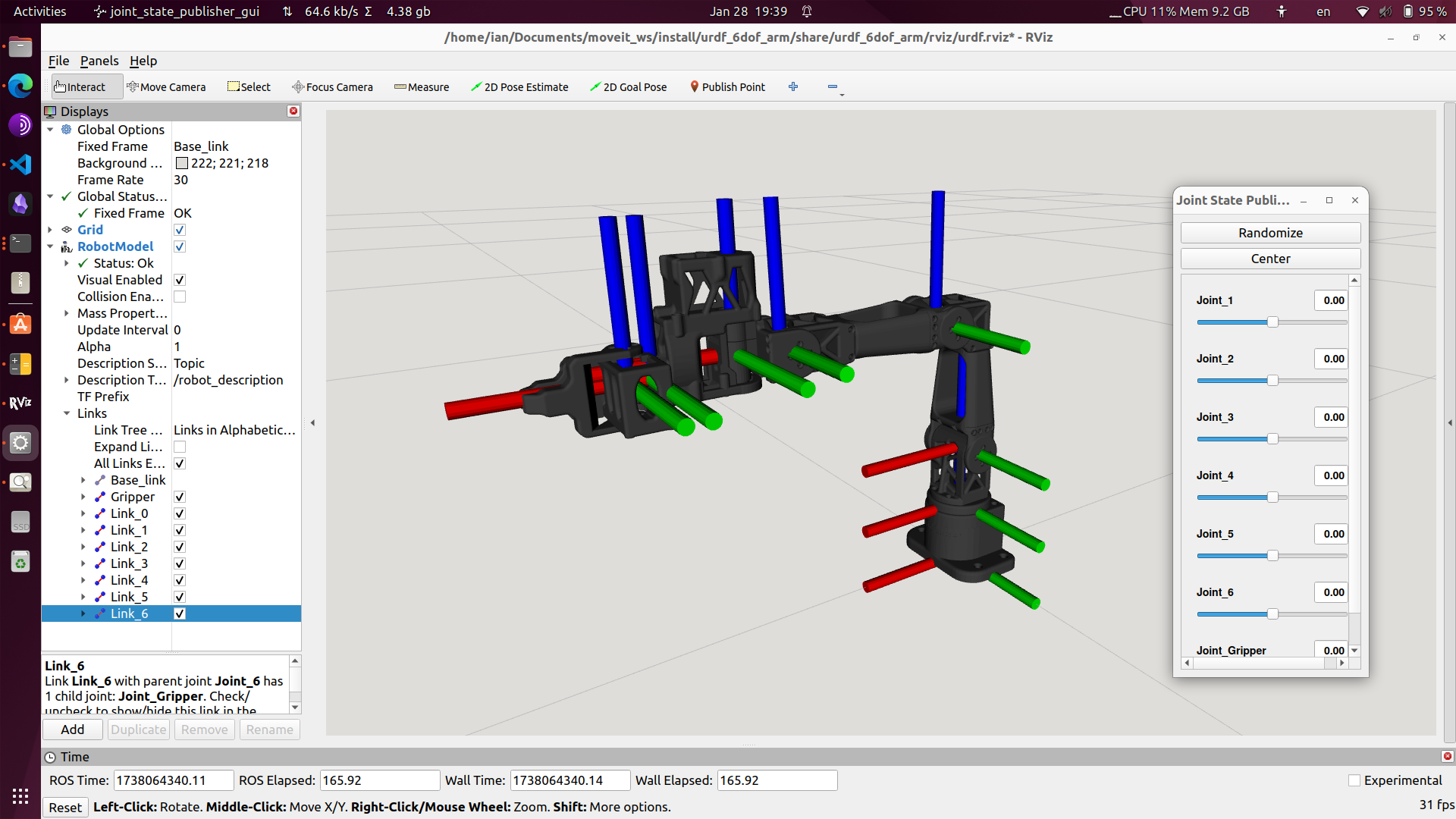
To display the robot model in RViz:
ros2 launch arm_description display.launch.py
File truncated at 100 lines see the full file
CONTRIBUTING
Repository Summary
| Description | |
| Checkout URI | https://github.com/iltlo/feetech_arm_control.git |
| VCS Type | git |
| VCS Version | master |
| Last Updated | 2025-02-14 |
| Dev Status | UNKNOWN |
| Released | UNRELEASED |
| Contributing |
Help Wanted (-)
Good First Issues (-) Pull Requests to Review (-) |
Packages
| Name | Version |
|---|---|
| arm_controller | 0.0.0 |
| arm_hardware_interface | 0.0.0 |
README
Feetech Arm Control
This repository provides a ROS2 hardware interface, URDF model, and MoveIt configuration for controlling a 6-DoF robotic arm using Feetech motors. The 3D model is currently in beta and pending open-source release by Simple Automation, please follow their progress on X!
✨ Features
-
Udev Rules for Serial Communication
- Provides consistent device names.
-
MoveIt 2 Integration
- Supports intuitive end-effector control in RViz.
- Includes a GUI for setting goal poses (XYZ & RPY).
-
Simulation & Hardware Compatibility
- Works in both RViz simulation and real-world hardware.
- Publishes actual joint state feedback to a ROS topic.
-
Robot Description & Configuration (Git Submodule)
- Uses URDF/XACRO for robot modeling.
- Includes SRDF for MoveIt 2 configuration.
- Defines joint limits, collision models, and kinematics.
-
TODO
- Display actual joint state feedback in RViz.
- Implement or integrate an IK solver.
🚀 Installation
1️⃣ Clone the repository into your ROS2 workspace:
cd ~/your_ros2_ws/src
git clone https://github.com/iltlo/feetech_arm_control.git
2️⃣ Install dependencies:
cd ~/your_ros2_ws/src/feetech_arm_control
git submodule update --init --recursive
pip install feetech-servo-sdk
3️⃣ Set Up Udev Rules (Mandatory for Serial Communication)
To ensure consistent device naming and prevent permission issues, the Feetech Arm requires a udev rule.
📌 Steps to Install Udev Rules
- Run the setup script:
    cd ~/your_ros2_ws/src/feetech_arm_control/scripts
    chmod +x setup_udev.sh
    sudo ./setup_udev.sh
- Unplug and replug the USB cable to apply the changes.
- Verify the device is detected:
ls -l /dev/ttyARM*
You should see something like:
    lrwxrwxrwx 1 root root 7 Feb 14 00:48 /dev/ttyARM0 -> ttyACM0
    lrwxrwxrwx 1 root root 7 Feb 14 00:52 /dev/ttyARM1 -> ttyACM1
4️⃣ Build and source the workspace:
colcon build && source ~/your_ros2_ws/install/setup.bash
🎮 Usage
🔹 MoveIt! Demo
To run the MoveIt 2 demo for End Effector drag-and-drop control:
ros2 launch arm_moveit_config feetech_moveit.launch.py
To use a Qt5 GUI for controlling the arm pose:
ros2 launch arm_controller ee_goal_control.launch.py
To run with the actual hardware (Optional):
ros2 run arm_hardware_interface hardware_interface
🔹 Display in RViz
To display the robot model in RViz:
ros2 launch arm_description display.launch.py
File truncated at 100 lines see the full file
CONTRIBUTING
Repository Summary
| Description | |
| Checkout URI | https://github.com/iltlo/feetech_arm_control.git |
| VCS Type | git |
| VCS Version | master |
| Last Updated | 2025-02-14 |
| Dev Status | UNKNOWN |
| Released | UNRELEASED |
| Contributing |
Help Wanted (-)
Good First Issues (-) Pull Requests to Review (-) |
Packages
| Name | Version |
|---|---|
| arm_controller | 0.0.0 |
| arm_hardware_interface | 0.0.0 |
README
Feetech Arm Control
This repository provides a ROS2 hardware interface, URDF model, and MoveIt configuration for controlling a 6-DoF robotic arm using Feetech motors. The 3D model is currently in beta and pending open-source release by Simple Automation, please follow their progress on X!
✨ Features
-
Udev Rules for Serial Communication
- Provides consistent device names.
-
MoveIt 2 Integration
- Supports intuitive end-effector control in RViz.
- Includes a GUI for setting goal poses (XYZ & RPY).
-
Simulation & Hardware Compatibility
- Works in both RViz simulation and real-world hardware.
- Publishes actual joint state feedback to a ROS topic.
-
Robot Description & Configuration (Git Submodule)
- Uses URDF/XACRO for robot modeling.
- Includes SRDF for MoveIt 2 configuration.
- Defines joint limits, collision models, and kinematics.
-
TODO
- Display actual joint state feedback in RViz.
- Implement or integrate an IK solver.
🚀 Installation
1️⃣ Clone the repository into your ROS2 workspace:
cd ~/your_ros2_ws/src
git clone https://github.com/iltlo/feetech_arm_control.git
2️⃣ Install dependencies:
cd ~/your_ros2_ws/src/feetech_arm_control
git submodule update --init --recursive
pip install feetech-servo-sdk
3️⃣ Set Up Udev Rules (Mandatory for Serial Communication)
To ensure consistent device naming and prevent permission issues, the Feetech Arm requires a udev rule.
📌 Steps to Install Udev Rules
- Run the setup script:
    cd ~/your_ros2_ws/src/feetech_arm_control/scripts
    chmod +x setup_udev.sh
    sudo ./setup_udev.sh
- Unplug and replug the USB cable to apply the changes.
- Verify the device is detected:
ls -l /dev/ttyARM*
You should see something like:
    lrwxrwxrwx 1 root root 7 Feb 14 00:48 /dev/ttyARM0 -> ttyACM0
    lrwxrwxrwx 1 root root 7 Feb 14 00:52 /dev/ttyARM1 -> ttyACM1
4️⃣ Build and source the workspace:
colcon build && source ~/your_ros2_ws/install/setup.bash
🎮 Usage
🔹 MoveIt! Demo
To run the MoveIt 2 demo for End Effector drag-and-drop control:
ros2 launch arm_moveit_config feetech_moveit.launch.py
To use a Qt5 GUI for controlling the arm pose:
ros2 launch arm_controller ee_goal_control.launch.py
To run with the actual hardware (Optional):
ros2 run arm_hardware_interface hardware_interface
🔹 Display in RViz
To display the robot model in RViz:
ros2 launch arm_description display.launch.py
File truncated at 100 lines see the full file
CONTRIBUTING
Repository Summary
| Description | |
| Checkout URI | https://github.com/iltlo/feetech_arm_control.git |
| VCS Type | git |
| VCS Version | master |
| Last Updated | 2025-02-14 |
| Dev Status | UNKNOWN |
| Released | UNRELEASED |
| Contributing |
Help Wanted (-)
Good First Issues (-) Pull Requests to Review (-) |
Packages
| Name | Version |
|---|---|
| arm_controller | 0.0.0 |
| arm_hardware_interface | 0.0.0 |
README
Feetech Arm Control
This repository provides a ROS2 hardware interface, URDF model, and MoveIt configuration for controlling a 6-DoF robotic arm using Feetech motors. The 3D model is currently in beta and pending open-source release by Simple Automation, please follow their progress on X!
✨ Features
-
Udev Rules for Serial Communication
- Provides consistent device names.
-
MoveIt 2 Integration
- Supports intuitive end-effector control in RViz.
- Includes a GUI for setting goal poses (XYZ & RPY).
-
Simulation & Hardware Compatibility
- Works in both RViz simulation and real-world hardware.
- Publishes actual joint state feedback to a ROS topic.
-
Robot Description & Configuration (Git Submodule)
- Uses URDF/XACRO for robot modeling.
- Includes SRDF for MoveIt 2 configuration.
- Defines joint limits, collision models, and kinematics.
-
TODO
- Display actual joint state feedback in RViz.
- Implement or integrate an IK solver.
🚀 Installation
1️⃣ Clone the repository into your ROS2 workspace:
cd ~/your_ros2_ws/src
git clone https://github.com/iltlo/feetech_arm_control.git
2️⃣ Install dependencies:
cd ~/your_ros2_ws/src/feetech_arm_control
git submodule update --init --recursive
pip install feetech-servo-sdk
3️⃣ Set Up Udev Rules (Mandatory for Serial Communication)
To ensure consistent device naming and prevent permission issues, the Feetech Arm requires a udev rule.
📌 Steps to Install Udev Rules
- Run the setup script:
    cd ~/your_ros2_ws/src/feetech_arm_control/scripts
    chmod +x setup_udev.sh
    sudo ./setup_udev.sh
- Unplug and replug the USB cable to apply the changes.
- Verify the device is detected:
ls -l /dev/ttyARM*
You should see something like:
    lrwxrwxrwx 1 root root 7 Feb 14 00:48 /dev/ttyARM0 -> ttyACM0
    lrwxrwxrwx 1 root root 7 Feb 14 00:52 /dev/ttyARM1 -> ttyACM1
4️⃣ Build and source the workspace:
colcon build && source ~/your_ros2_ws/install/setup.bash
🎮 Usage
🔹 MoveIt! Demo
To run the MoveIt 2 demo for End Effector drag-and-drop control:
ros2 launch arm_moveit_config feetech_moveit.launch.py
To use a Qt5 GUI for controlling the arm pose:
ros2 launch arm_controller ee_goal_control.launch.py
To run with the actual hardware (Optional):
ros2 run arm_hardware_interface hardware_interface
🔹 Display in RViz
To display the robot model in RViz:
ros2 launch arm_description display.launch.py
File truncated at 100 lines see the full file
CONTRIBUTING
Repository Summary
| Description | |
| Checkout URI | https://github.com/iltlo/feetech_arm_control.git |
| VCS Type | git |
| VCS Version | master |
| Last Updated | 2025-02-14 |
| Dev Status | UNKNOWN |
| Released | UNRELEASED |
| Contributing |
Help Wanted (-)
Good First Issues (-) Pull Requests to Review (-) |
Packages
| Name | Version |
|---|---|
| arm_controller | 0.0.0 |
| arm_hardware_interface | 0.0.0 |
README
Feetech Arm Control
This repository provides a ROS2 hardware interface, URDF model, and MoveIt configuration for controlling a 6-DoF robotic arm using Feetech motors. The 3D model is currently in beta and pending open-source release by Simple Automation, please follow their progress on X!
✨ Features
-
Udev Rules for Serial Communication
- Provides consistent device names.
-
MoveIt 2 Integration
- Supports intuitive end-effector control in RViz.
- Includes a GUI for setting goal poses (XYZ & RPY).
-
Simulation & Hardware Compatibility
- Works in both RViz simulation and real-world hardware.
- Publishes actual joint state feedback to a ROS topic.
-
Robot Description & Configuration (Git Submodule)
- Uses URDF/XACRO for robot modeling.
- Includes SRDF for MoveIt 2 configuration.
- Defines joint limits, collision models, and kinematics.
-
TODO
- Display actual joint state feedback in RViz.
- Implement or integrate an IK solver.
🚀 Installation
1️⃣ Clone the repository into your ROS2 workspace:
cd ~/your_ros2_ws/src
git clone https://github.com/iltlo/feetech_arm_control.git
2️⃣ Install dependencies:
cd ~/your_ros2_ws/src/feetech_arm_control
git submodule update --init --recursive
pip install feetech-servo-sdk
3️⃣ Set Up Udev Rules (Mandatory for Serial Communication)
To ensure consistent device naming and prevent permission issues, the Feetech Arm requires a udev rule.
📌 Steps to Install Udev Rules
- Run the setup script:
    cd ~/your_ros2_ws/src/feetech_arm_control/scripts
    chmod +x setup_udev.sh
    sudo ./setup_udev.sh
- Unplug and replug the USB cable to apply the changes.
- Verify the device is detected:
ls -l /dev/ttyARM*
You should see something like:
    lrwxrwxrwx 1 root root 7 Feb 14 00:48 /dev/ttyARM0 -> ttyACM0
    lrwxrwxrwx 1 root root 7 Feb 14 00:52 /dev/ttyARM1 -> ttyACM1
4️⃣ Build and source the workspace:
colcon build && source ~/your_ros2_ws/install/setup.bash
🎮 Usage
🔹 MoveIt! Demo
To run the MoveIt 2 demo for End Effector drag-and-drop control:
ros2 launch arm_moveit_config feetech_moveit.launch.py
To use a Qt5 GUI for controlling the arm pose:
ros2 launch arm_controller ee_goal_control.launch.py
To run with the actual hardware (Optional):
ros2 run arm_hardware_interface hardware_interface
🔹 Display in RViz
To display the robot model in RViz:
ros2 launch arm_description display.launch.py
File truncated at 100 lines see the full file
CONTRIBUTING
Repository Summary
| Description | |
| Checkout URI | https://github.com/iltlo/feetech_arm_control.git |
| VCS Type | git |
| VCS Version | master |
| Last Updated | 2025-02-14 |
| Dev Status | UNKNOWN |
| Released | UNRELEASED |
| Contributing |
Help Wanted (-)
Good First Issues (-) Pull Requests to Review (-) |
Packages
| Name | Version |
|---|---|
| arm_controller | 0.0.0 |
| arm_hardware_interface | 0.0.0 |
README
Feetech Arm Control
This repository provides a ROS2 hardware interface, URDF model, and MoveIt configuration for controlling a 6-DoF robotic arm using Feetech motors. The 3D model is currently in beta and pending open-source release by Simple Automation, please follow their progress on X!
✨ Features
-
Udev Rules for Serial Communication
- Provides consistent device names.
-
MoveIt 2 Integration
- Supports intuitive end-effector control in RViz.
- Includes a GUI for setting goal poses (XYZ & RPY).
-
Simulation & Hardware Compatibility
- Works in both RViz simulation and real-world hardware.
- Publishes actual joint state feedback to a ROS topic.
-
Robot Description & Configuration (Git Submodule)
- Uses URDF/XACRO for robot modeling.
- Includes SRDF for MoveIt 2 configuration.
- Defines joint limits, collision models, and kinematics.
-
TODO
- Display actual joint state feedback in RViz.
- Implement or integrate an IK solver.
🚀 Installation
1️⃣ Clone the repository into your ROS2 workspace:
cd ~/your_ros2_ws/src
git clone https://github.com/iltlo/feetech_arm_control.git
2️⃣ Install dependencies:
cd ~/your_ros2_ws/src/feetech_arm_control
git submodule update --init --recursive
pip install feetech-servo-sdk
3️⃣ Set Up Udev Rules (Mandatory for Serial Communication)
To ensure consistent device naming and prevent permission issues, the Feetech Arm requires a udev rule.
📌 Steps to Install Udev Rules
- Run the setup script:
    cd ~/your_ros2_ws/src/feetech_arm_control/scripts
    chmod +x setup_udev.sh
    sudo ./setup_udev.sh
- Unplug and replug the USB cable to apply the changes.
- Verify the device is detected:
ls -l /dev/ttyARM*
You should see something like:
    lrwxrwxrwx 1 root root 7 Feb 14 00:48 /dev/ttyARM0 -> ttyACM0
    lrwxrwxrwx 1 root root 7 Feb 14 00:52 /dev/ttyARM1 -> ttyACM1
4️⃣ Build and source the workspace:
colcon build && source ~/your_ros2_ws/install/setup.bash
🎮 Usage
🔹 MoveIt! Demo
To run the MoveIt 2 demo for End Effector drag-and-drop control:
ros2 launch arm_moveit_config feetech_moveit.launch.py
To use a Qt5 GUI for controlling the arm pose:
ros2 launch arm_controller ee_goal_control.launch.py
To run with the actual hardware (Optional):
ros2 run arm_hardware_interface hardware_interface
🔹 Display in RViz
To display the robot model in RViz:
ros2 launch arm_description display.launch.py
File truncated at 100 lines see the full file
CONTRIBUTING
Repository Summary
| Description | |
| Checkout URI | https://github.com/iltlo/feetech_arm_control.git |
| VCS Type | git |
| VCS Version | master |
| Last Updated | 2025-02-14 |
| Dev Status | UNKNOWN |
| Released | UNRELEASED |
| Contributing |
Help Wanted (-)
Good First Issues (-) Pull Requests to Review (-) |
Packages
| Name | Version |
|---|---|
| arm_controller | 0.0.0 |
| arm_hardware_interface | 0.0.0 |
README
Feetech Arm Control
This repository provides a ROS2 hardware interface, URDF model, and MoveIt configuration for controlling a 6-DoF robotic arm using Feetech motors. The 3D model is currently in beta and pending open-source release by Simple Automation, please follow their progress on X!
✨ Features
-
Udev Rules for Serial Communication
- Provides consistent device names.
-
MoveIt 2 Integration
- Supports intuitive end-effector control in RViz.
- Includes a GUI for setting goal poses (XYZ & RPY).
-
Simulation & Hardware Compatibility
- Works in both RViz simulation and real-world hardware.
- Publishes actual joint state feedback to a ROS topic.
-
Robot Description & Configuration (Git Submodule)
- Uses URDF/XACRO for robot modeling.
- Includes SRDF for MoveIt 2 configuration.
- Defines joint limits, collision models, and kinematics.
-
TODO
- Display actual joint state feedback in RViz.
- Implement or integrate an IK solver.
🚀 Installation
1️⃣ Clone the repository into your ROS2 workspace:
cd ~/your_ros2_ws/src
git clone https://github.com/iltlo/feetech_arm_control.git
2️⃣ Install dependencies:
cd ~/your_ros2_ws/src/feetech_arm_control
git submodule update --init --recursive
pip install feetech-servo-sdk
3️⃣ Set Up Udev Rules (Mandatory for Serial Communication)
To ensure consistent device naming and prevent permission issues, the Feetech Arm requires a udev rule.
📌 Steps to Install Udev Rules
- Run the setup script:
    cd ~/your_ros2_ws/src/feetech_arm_control/scripts
    chmod +x setup_udev.sh
    sudo ./setup_udev.sh
- Unplug and replug the USB cable to apply the changes.
- Verify the device is detected:
ls -l /dev/ttyARM*
You should see something like:
    lrwxrwxrwx 1 root root 7 Feb 14 00:48 /dev/ttyARM0 -> ttyACM0
    lrwxrwxrwx 1 root root 7 Feb 14 00:52 /dev/ttyARM1 -> ttyACM1
4️⃣ Build and source the workspace:
colcon build && source ~/your_ros2_ws/install/setup.bash
🎮 Usage
🔹 MoveIt! Demo
To run the MoveIt 2 demo for End Effector drag-and-drop control:
ros2 launch arm_moveit_config feetech_moveit.launch.py
To use a Qt5 GUI for controlling the arm pose:
ros2 launch arm_controller ee_goal_control.launch.py
To run with the actual hardware (Optional):
ros2 run arm_hardware_interface hardware_interface
🔹 Display in RViz
To display the robot model in RViz:
ros2 launch arm_description display.launch.py
File truncated at 100 lines see the full file
CONTRIBUTING
Repository Summary
| Description | |
| Checkout URI | https://github.com/iltlo/feetech_arm_control.git |
| VCS Type | git |
| VCS Version | master |
| Last Updated | 2025-02-14 |
| Dev Status | UNKNOWN |
| Released | UNRELEASED |
| Contributing |
Help Wanted (-)
Good First Issues (-) Pull Requests to Review (-) |
Packages
| Name | Version |
|---|---|
| arm_controller | 0.0.0 |
| arm_hardware_interface | 0.0.0 |
README
Feetech Arm Control
This repository provides a ROS2 hardware interface, URDF model, and MoveIt configuration for controlling a 6-DoF robotic arm using Feetech motors. The 3D model is currently in beta and pending open-source release by Simple Automation, please follow their progress on X!
✨ Features
-
Udev Rules for Serial Communication
- Provides consistent device names.
-
MoveIt 2 Integration
- Supports intuitive end-effector control in RViz.
- Includes a GUI for setting goal poses (XYZ & RPY).
-
Simulation & Hardware Compatibility
- Works in both RViz simulation and real-world hardware.
- Publishes actual joint state feedback to a ROS topic.
-
Robot Description & Configuration (Git Submodule)
- Uses URDF/XACRO for robot modeling.
- Includes SRDF for MoveIt 2 configuration.
- Defines joint limits, collision models, and kinematics.
-
TODO
- Display actual joint state feedback in RViz.
- Implement or integrate an IK solver.
🚀 Installation
1️⃣ Clone the repository into your ROS2 workspace:
cd ~/your_ros2_ws/src
git clone https://github.com/iltlo/feetech_arm_control.git
2️⃣ Install dependencies:
cd ~/your_ros2_ws/src/feetech_arm_control
git submodule update --init --recursive
pip install feetech-servo-sdk
3️⃣ Set Up Udev Rules (Mandatory for Serial Communication)
To ensure consistent device naming and prevent permission issues, the Feetech Arm requires a udev rule.
📌 Steps to Install Udev Rules
- Run the setup script:
    cd ~/your_ros2_ws/src/feetech_arm_control/scripts
    chmod +x setup_udev.sh
    sudo ./setup_udev.sh
- Unplug and replug the USB cable to apply the changes.
- Verify the device is detected:
ls -l /dev/ttyARM*
You should see something like:
    lrwxrwxrwx 1 root root 7 Feb 14 00:48 /dev/ttyARM0 -> ttyACM0
    lrwxrwxrwx 1 root root 7 Feb 14 00:52 /dev/ttyARM1 -> ttyACM1
4️⃣ Build and source the workspace:
colcon build && source ~/your_ros2_ws/install/setup.bash
🎮 Usage
🔹 MoveIt! Demo
To run the MoveIt 2 demo for End Effector drag-and-drop control:
ros2 launch arm_moveit_config feetech_moveit.launch.py
To use a Qt5 GUI for controlling the arm pose:
ros2 launch arm_controller ee_goal_control.launch.py
To run with the actual hardware (Optional):
ros2 run arm_hardware_interface hardware_interface
🔹 Display in RViz
To display the robot model in RViz:
ros2 launch arm_description display.launch.py
File truncated at 100 lines see the full file
CONTRIBUTING
Repository Summary
| Description | |
| Checkout URI | https://github.com/iltlo/feetech_arm_control.git |
| VCS Type | git |
| VCS Version | master |
| Last Updated | 2025-02-14 |
| Dev Status | UNKNOWN |
| Released | UNRELEASED |
| Contributing |
Help Wanted (-)
Good First Issues (-) Pull Requests to Review (-) |
Packages
| Name | Version |
|---|---|
| arm_controller | 0.0.0 |
| arm_hardware_interface | 0.0.0 |
README
Feetech Arm Control
This repository provides a ROS2 hardware interface, URDF model, and MoveIt configuration for controlling a 6-DoF robotic arm using Feetech motors. The 3D model is currently in beta and pending open-source release by Simple Automation, please follow their progress on X!
✨ Features
-
Udev Rules for Serial Communication
- Provides consistent device names.
-
MoveIt 2 Integration
- Supports intuitive end-effector control in RViz.
- Includes a GUI for setting goal poses (XYZ & RPY).
-
Simulation & Hardware Compatibility
- Works in both RViz simulation and real-world hardware.
- Publishes actual joint state feedback to a ROS topic.
-
Robot Description & Configuration (Git Submodule)
- Uses URDF/XACRO for robot modeling.
- Includes SRDF for MoveIt 2 configuration.
- Defines joint limits, collision models, and kinematics.
-
TODO
- Display actual joint state feedback in RViz.
- Implement or integrate an IK solver.
🚀 Installation
1️⃣ Clone the repository into your ROS2 workspace:
cd ~/your_ros2_ws/src
git clone https://github.com/iltlo/feetech_arm_control.git
2️⃣ Install dependencies:
cd ~/your_ros2_ws/src/feetech_arm_control
git submodule update --init --recursive
pip install feetech-servo-sdk
3️⃣ Set Up Udev Rules (Mandatory for Serial Communication)
To ensure consistent device naming and prevent permission issues, the Feetech Arm requires a udev rule.
📌 Steps to Install Udev Rules
- Run the setup script:
    cd ~/your_ros2_ws/src/feetech_arm_control/scripts
    chmod +x setup_udev.sh
    sudo ./setup_udev.sh
- Unplug and replug the USB cable to apply the changes.
- Verify the device is detected:
ls -l /dev/ttyARM*
You should see something like:
    lrwxrwxrwx 1 root root 7 Feb 14 00:48 /dev/ttyARM0 -> ttyACM0
    lrwxrwxrwx 1 root root 7 Feb 14 00:52 /dev/ttyARM1 -> ttyACM1
4️⃣ Build and source the workspace:
colcon build && source ~/your_ros2_ws/install/setup.bash
🎮 Usage
🔹 MoveIt! Demo
To run the MoveIt 2 demo for End Effector drag-and-drop control:
ros2 launch arm_moveit_config feetech_moveit.launch.py
To use a Qt5 GUI for controlling the arm pose:
ros2 launch arm_controller ee_goal_control.launch.py
To run with the actual hardware (Optional):
ros2 run arm_hardware_interface hardware_interface
🔹 Display in RViz
To display the robot model in RViz:
ros2 launch arm_description display.launch.py
File truncated at 100 lines see the full file