 ROS Index
Repository Summary
| Description | |
| Checkout URI | https://github.com/lis-epfl/multi_agent_pkgs.git |
| VCS Type | git |
| VCS Version | master |
| Last Updated | 2025-05-26 |
| Dev Status | UNKNOWN |
| Released | UNRELEASED |
| Contributing |
Help Wanted (-)
Good First Issues (-) Pull Requests to Review (-) |
Packages
| Name | Version |
|---|---|
| decomp_ros_msgs | 0.0.0 |
| decomp_ros_utils | 0.0.0 |
| decomp_util | 1.0.0 |
| env_builder | 0.0.0 |
| env_builder_msgs | 0.0.0 |
| jps3d | 1.0.0 |
| mapping_util | 0.0.0 |
| multi_agent_planner | 0.0.0 |
| multi_agent_planner_msgs | 0.0.0 |
| planner_crazyswarm_bridge | 0.0.0 |
README
Multi-Agent Planning Packages
The code for the paper “High-Speed Motion Planning for Aerial Swarms in Unknown and Cluttered Environments”, by Charbel Toumieh and Dario Floreano, published in IEEE Transactions on Robotics - (pdf, video).
The packages have been tested on Ubuntu 22.04, ROS2 Humble. The simulations have been run on Intel i9-13900K CPU and NVidia RTX 4090 GPU.
This project is continuously under development.
| 10 agents circular exchange (forest) | 10 agents traversing forest / wall / forest |
|---|---|
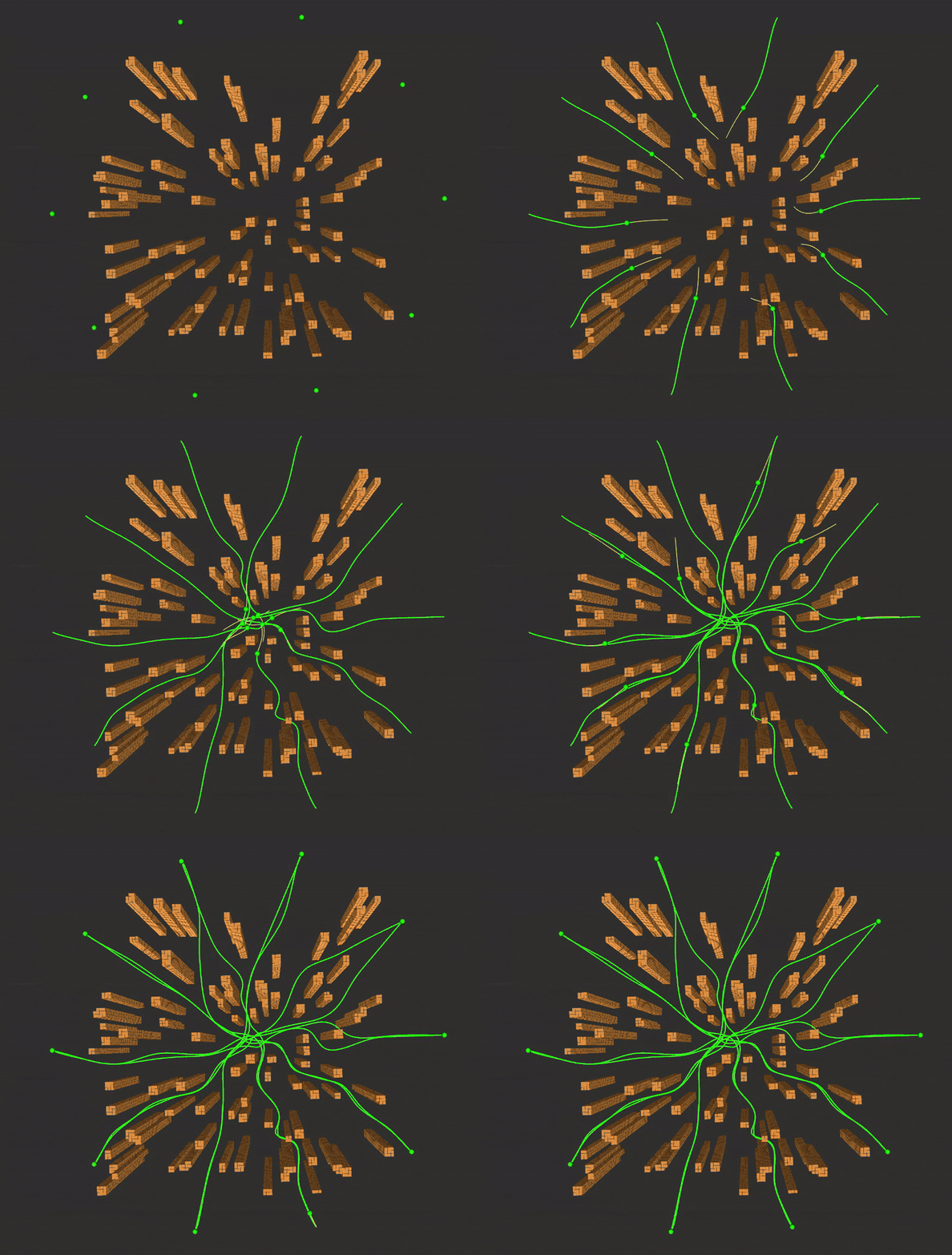 |
 |
| 10 agents traversing loops | Hardware experiments on nano-drones (Crazyflie) |
|---|---|
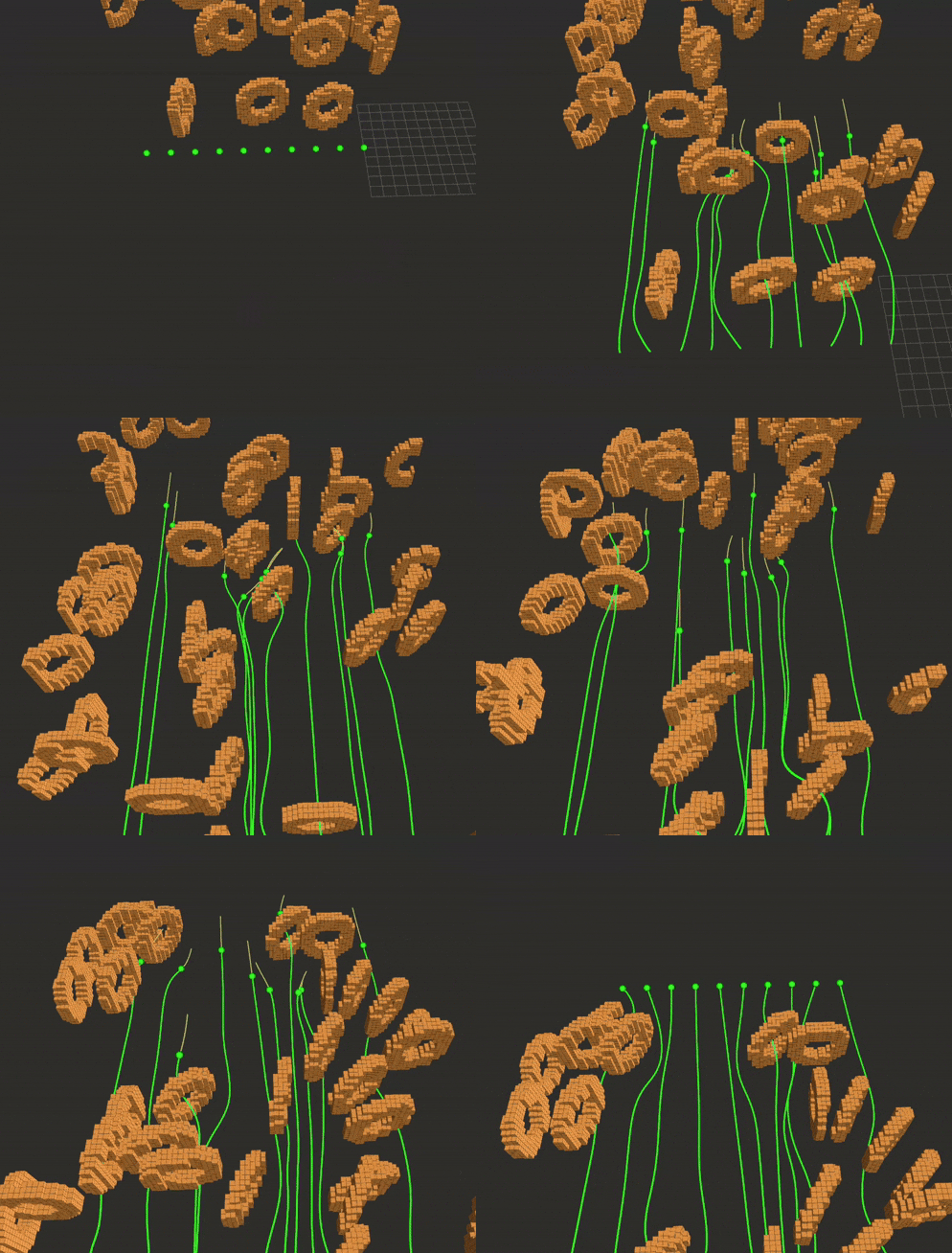 |
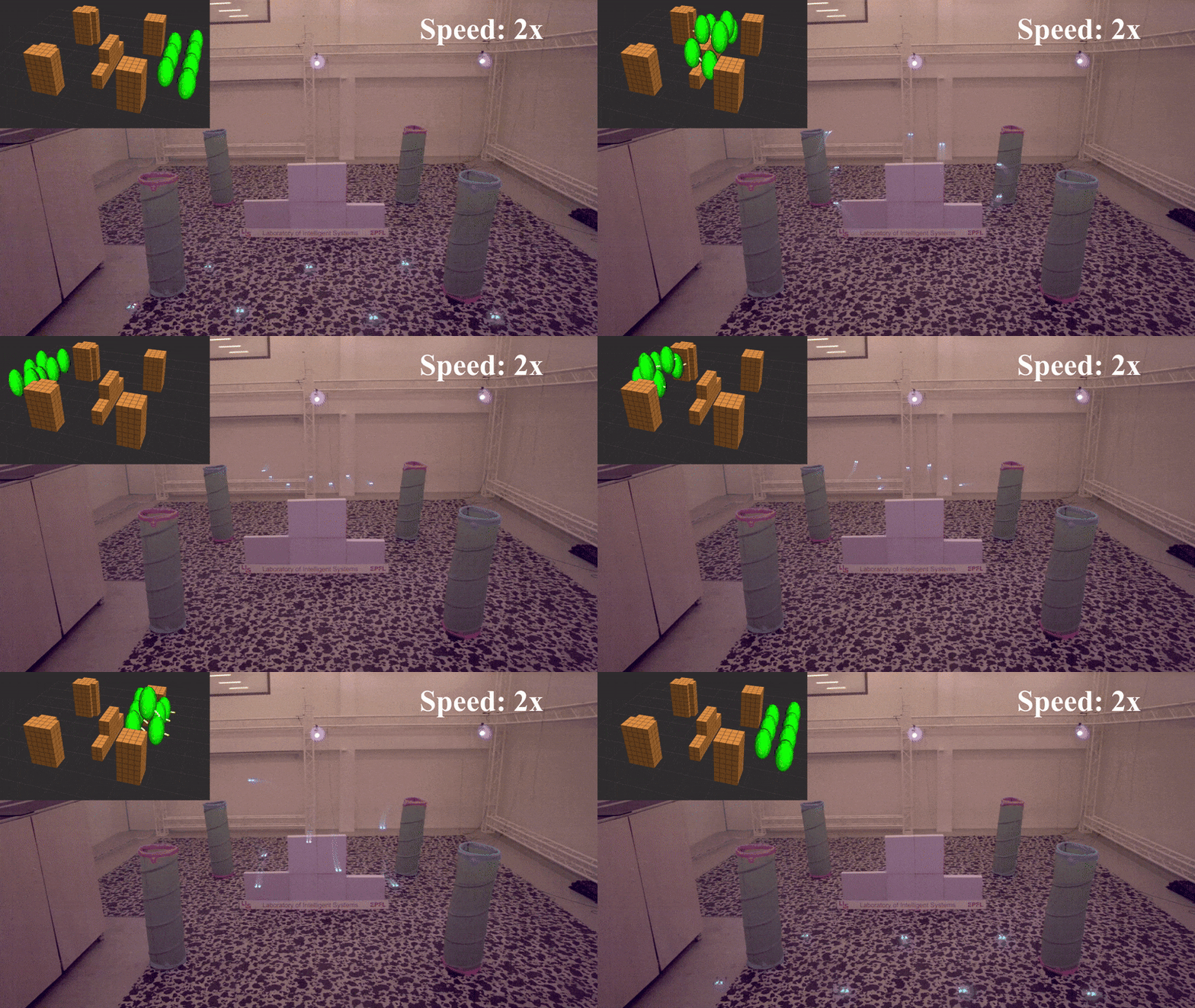 |
To get started you can skip to Getting Started. This repo contains the following packages:
-
convex_decomp_util: package for Safe Corridor generation based on [1] and [2]. -
decomp_ros: package for Safe Corridor generation and visualization based on [3]. -
env_builder: ROS2 package that allows to build an evironment in the form of voxel grid and publishes it in the form of a pointcloud for visualization in rviz2. -
jps3d: a modified version of jps3d that checks for traversibilty when generating a path to make sure we can generate a Safe Corridor around it. -
mapping_util: ROS2 package for voxel grid generation (clearing out voxels that are in the field of view of the drone). -
path_finding_util: package for path finding and path tools such as path shortening. -
voxel_grid_util: package for voxel grid class and raycasting function. -
multi_agent_planner: ROS2 package for multi-agent planning (uses all the other packages).
At the end of this documentation you can find:
- Improvements: improvements to the packages that are yet to be implemented.
- References: references used throughout this text.
- Citation: bibtex citation for latex.
Getting Started
Install gurobi
Download gurobi 10.0.* from this link. Follow the installation instructions in this link. Finally, install the license by going to this link, creating a license and installing it (instructions on how to install it are shown when you create it).
Then, build gurobi and copy the library:
``` shell script cd /opt/gurobi1002/linux64/src/build #Note that the name of the folder gurobi1002 changes according to the Gurobi version sudo make sudo cp libgurobi_c++.a ../../lib/
### Create and build workspace
First install `setup_tools`:

``` shell script
pip install setuptools==65.5.1
Create a ROS2 workspace and clone the repo inside the src folder of the workspace (or simply clone it inside an existing workspace), then build it:
``` shell script mkdir -p ~/ros2_ws/src cd ~/ros2_ws/src git clone https://github.com/lis-epfl/multi_agent_pkgs cd .. colcon build –symlink-install –packages-select jps3d decomp_util convex_decomp_util path_finding_util voxel_grid_util decomp_ros_msgs decomp_ros_utils source install/setup.bash colcon build –symlink-install –packages-select env_builder_msgs env_builder mapping_util multi_agent_planner_msgs multi_agent_planner
## Running the simulation
To switch between a known and unknown envrionment, you can set the variable `free_grid` in the launch file to `true` and `false` respectively.
### Multiple agents in a circular configuration
Launch rviz2 in a terminal (if you didn't build `decomp_ros_util` due to OGRE conflicts, the polyhedra will not appear).

``` shell script
cd ~/ros2_ws
. install/setup.bash
rviz2 -d ~/ros2_ws/src/multi_agent_pkgs/multi_agent_planner/rviz/rviz_config_multi.rviz
Launch the environment in another window (if you want an empty environement replace env_builder.launch.py with env_builder_empty.launch.py):
``` shell script cd ~/ros2_ws . install/setup.bash ros2 launch env_builder env_builder.launch.py
Launch the agents in another window. If you want each agent to run in a different terminal, uncomment the `prefix=['xterm -fa default -fs 10 -hold -e']` line in the launch file:

``` shell script
cd ~/ros2_ws
. install/setup.bash
ros2 launch multi_agent_planner multi_agent_planner_circle.launch.py
Multiple agents going through forest + wall + forest
Launch rviz2 in a terminal (if you didn’t build decomp_ros_util due to OGRE conflicts, the polyhedra will not appear).
``` shell script cd ~/ros2_ws . install/setup.bash rviz2 -d ~/ros2_ws/src/multi_agent_pkgs/multi_agent_planner/rviz/rviz_config_multi.rviz
Launch the environment in another window:

``` shell script
cd ~/ros2_ws
. install/setup.bash
ros2 launch env_builder env_builder.launch.py
Launch the agents in another window. If you want each agent to run in a different terminal, uncomment the prefix=['xterm -fa default -fs 10 -hold -e'] line in the launch file:
``` shell script cd ~/ros2_ws . install/setup.bash ros2 launch multi_agent_planner multi_agent_planner_long.launch.py
```
File truncated at 100 lines see the full file
CONTRIBUTING
Repository Summary
| Description | |
| Checkout URI | https://github.com/lis-epfl/multi_agent_pkgs.git |
| VCS Type | git |
| VCS Version | master |
| Last Updated | 2025-05-26 |
| Dev Status | UNKNOWN |
| Released | UNRELEASED |
| Contributing |
Help Wanted (-)
Good First Issues (-) Pull Requests to Review (-) |
Packages
| Name | Version |
|---|---|
| decomp_ros_msgs | 0.0.0 |
| decomp_ros_utils | 0.0.0 |
| decomp_util | 1.0.0 |
| env_builder | 0.0.0 |
| env_builder_msgs | 0.0.0 |
| jps3d | 1.0.0 |
| mapping_util | 0.0.0 |
| multi_agent_planner | 0.0.0 |
| multi_agent_planner_msgs | 0.0.0 |
| planner_crazyswarm_bridge | 0.0.0 |
README
Multi-Agent Planning Packages
The code for the paper “High-Speed Motion Planning for Aerial Swarms in Unknown and Cluttered Environments”, by Charbel Toumieh and Dario Floreano, published in IEEE Transactions on Robotics - (pdf, video).
The packages have been tested on Ubuntu 22.04, ROS2 Humble. The simulations have been run on Intel i9-13900K CPU and NVidia RTX 4090 GPU.
This project is continuously under development.
| 10 agents circular exchange (forest) | 10 agents traversing forest / wall / forest |
|---|---|
|
|
| 10 agents traversing loops | Hardware experiments on nano-drones (Crazyflie) |
|---|---|
|
|
To get started you can skip to Getting Started. This repo contains the following packages:
-
convex_decomp_util: package for Safe Corridor generation based on [1] and [2]. -
decomp_ros: package for Safe Corridor generation and visualization based on [3]. -
env_builder: ROS2 package that allows to build an evironment in the form of voxel grid and publishes it in the form of a pointcloud for visualization in rviz2. -
jps3d: a modified version of jps3d that checks for traversibilty when generating a path to make sure we can generate a Safe Corridor around it. -
mapping_util: ROS2 package for voxel grid generation (clearing out voxels that are in the field of view of the drone). -
path_finding_util: package for path finding and path tools such as path shortening. -
voxel_grid_util: package for voxel grid class and raycasting function. -
multi_agent_planner: ROS2 package for multi-agent planning (uses all the other packages).
At the end of this documentation you can find:
- Improvements: improvements to the packages that are yet to be implemented.
- References: references used throughout this text.
- Citation: bibtex citation for latex.
Getting Started
Install gurobi
Download gurobi 10.0.* from this link. Follow the installation instructions in this link. Finally, install the license by going to this link, creating a license and installing it (instructions on how to install it are shown when you create it).
Then, build gurobi and copy the library:
``` shell script cd /opt/gurobi1002/linux64/src/build #Note that the name of the folder gurobi1002 changes according to the Gurobi version sudo make sudo cp libgurobi_c++.a ../../lib/
### Create and build workspace
First install `setup_tools`:

``` shell script
pip install setuptools==65.5.1
Create a ROS2 workspace and clone the repo inside the src folder of the workspace (or simply clone it inside an existing workspace), then build it:
``` shell script mkdir -p ~/ros2_ws/src cd ~/ros2_ws/src git clone https://github.com/lis-epfl/multi_agent_pkgs cd .. colcon build –symlink-install –packages-select jps3d decomp_util convex_decomp_util path_finding_util voxel_grid_util decomp_ros_msgs decomp_ros_utils source install/setup.bash colcon build –symlink-install –packages-select env_builder_msgs env_builder mapping_util multi_agent_planner_msgs multi_agent_planner
## Running the simulation
To switch between a known and unknown envrionment, you can set the variable `free_grid` in the launch file to `true` and `false` respectively.
### Multiple agents in a circular configuration
Launch rviz2 in a terminal (if you didn't build `decomp_ros_util` due to OGRE conflicts, the polyhedra will not appear).

``` shell script
cd ~/ros2_ws
. install/setup.bash
rviz2 -d ~/ros2_ws/src/multi_agent_pkgs/multi_agent_planner/rviz/rviz_config_multi.rviz
Launch the environment in another window (if you want an empty environement replace env_builder.launch.py with env_builder_empty.launch.py):
``` shell script cd ~/ros2_ws . install/setup.bash ros2 launch env_builder env_builder.launch.py
Launch the agents in another window. If you want each agent to run in a different terminal, uncomment the `prefix=['xterm -fa default -fs 10 -hold -e']` line in the launch file:

``` shell script
cd ~/ros2_ws
. install/setup.bash
ros2 launch multi_agent_planner multi_agent_planner_circle.launch.py
Multiple agents going through forest + wall + forest
Launch rviz2 in a terminal (if you didn’t build decomp_ros_util due to OGRE conflicts, the polyhedra will not appear).
``` shell script cd ~/ros2_ws . install/setup.bash rviz2 -d ~/ros2_ws/src/multi_agent_pkgs/multi_agent_planner/rviz/rviz_config_multi.rviz
Launch the environment in another window:

``` shell script
cd ~/ros2_ws
. install/setup.bash
ros2 launch env_builder env_builder.launch.py
Launch the agents in another window. If you want each agent to run in a different terminal, uncomment the prefix=['xterm -fa default -fs 10 -hold -e'] line in the launch file:
``` shell script cd ~/ros2_ws . install/setup.bash ros2 launch multi_agent_planner multi_agent_planner_long.launch.py
```
File truncated at 100 lines see the full file
CONTRIBUTING
Repository Summary
| Description | |
| Checkout URI | https://github.com/lis-epfl/multi_agent_pkgs.git |
| VCS Type | git |
| VCS Version | master |
| Last Updated | 2025-05-26 |
| Dev Status | UNKNOWN |
| Released | UNRELEASED |
| Contributing |
Help Wanted (-)
Good First Issues (-) Pull Requests to Review (-) |
Packages
| Name | Version |
|---|---|
| decomp_ros_msgs | 0.0.0 |
| decomp_ros_utils | 0.0.0 |
| decomp_util | 1.0.0 |
| env_builder | 0.0.0 |
| env_builder_msgs | 0.0.0 |
| jps3d | 1.0.0 |
| mapping_util | 0.0.0 |
| multi_agent_planner | 0.0.0 |
| multi_agent_planner_msgs | 0.0.0 |
| planner_crazyswarm_bridge | 0.0.0 |
README
Multi-Agent Planning Packages
The code for the paper “High-Speed Motion Planning for Aerial Swarms in Unknown and Cluttered Environments”, by Charbel Toumieh and Dario Floreano, published in IEEE Transactions on Robotics - (pdf, video).
The packages have been tested on Ubuntu 22.04, ROS2 Humble. The simulations have been run on Intel i9-13900K CPU and NVidia RTX 4090 GPU.
This project is continuously under development.
| 10 agents circular exchange (forest) | 10 agents traversing forest / wall / forest |
|---|---|
|
|
| 10 agents traversing loops | Hardware experiments on nano-drones (Crazyflie) |
|---|---|
|
|
To get started you can skip to Getting Started. This repo contains the following packages:
-
convex_decomp_util: package for Safe Corridor generation based on [1] and [2]. -
decomp_ros: package for Safe Corridor generation and visualization based on [3]. -
env_builder: ROS2 package that allows to build an evironment in the form of voxel grid and publishes it in the form of a pointcloud for visualization in rviz2. -
jps3d: a modified version of jps3d that checks for traversibilty when generating a path to make sure we can generate a Safe Corridor around it. -
mapping_util: ROS2 package for voxel grid generation (clearing out voxels that are in the field of view of the drone). -
path_finding_util: package for path finding and path tools such as path shortening. -
voxel_grid_util: package for voxel grid class and raycasting function. -
multi_agent_planner: ROS2 package for multi-agent planning (uses all the other packages).
At the end of this documentation you can find:
- Improvements: improvements to the packages that are yet to be implemented.
- References: references used throughout this text.
- Citation: bibtex citation for latex.
Getting Started
Install gurobi
Download gurobi 10.0.* from this link. Follow the installation instructions in this link. Finally, install the license by going to this link, creating a license and installing it (instructions on how to install it are shown when you create it).
Then, build gurobi and copy the library:
``` shell script cd /opt/gurobi1002/linux64/src/build #Note that the name of the folder gurobi1002 changes according to the Gurobi version sudo make sudo cp libgurobi_c++.a ../../lib/
### Create and build workspace
First install `setup_tools`:

``` shell script
pip install setuptools==65.5.1
Create a ROS2 workspace and clone the repo inside the src folder of the workspace (or simply clone it inside an existing workspace), then build it:
``` shell script mkdir -p ~/ros2_ws/src cd ~/ros2_ws/src git clone https://github.com/lis-epfl/multi_agent_pkgs cd .. colcon build –symlink-install –packages-select jps3d decomp_util convex_decomp_util path_finding_util voxel_grid_util decomp_ros_msgs decomp_ros_utils source install/setup.bash colcon build –symlink-install –packages-select env_builder_msgs env_builder mapping_util multi_agent_planner_msgs multi_agent_planner
## Running the simulation
To switch between a known and unknown envrionment, you can set the variable `free_grid` in the launch file to `true` and `false` respectively.
### Multiple agents in a circular configuration
Launch rviz2 in a terminal (if you didn't build `decomp_ros_util` due to OGRE conflicts, the polyhedra will not appear).

``` shell script
cd ~/ros2_ws
. install/setup.bash
rviz2 -d ~/ros2_ws/src/multi_agent_pkgs/multi_agent_planner/rviz/rviz_config_multi.rviz
Launch the environment in another window (if you want an empty environement replace env_builder.launch.py with env_builder_empty.launch.py):
``` shell script cd ~/ros2_ws . install/setup.bash ros2 launch env_builder env_builder.launch.py
Launch the agents in another window. If you want each agent to run in a different terminal, uncomment the `prefix=['xterm -fa default -fs 10 -hold -e']` line in the launch file:

``` shell script
cd ~/ros2_ws
. install/setup.bash
ros2 launch multi_agent_planner multi_agent_planner_circle.launch.py
Multiple agents going through forest + wall + forest
Launch rviz2 in a terminal (if you didn’t build decomp_ros_util due to OGRE conflicts, the polyhedra will not appear).
``` shell script cd ~/ros2_ws . install/setup.bash rviz2 -d ~/ros2_ws/src/multi_agent_pkgs/multi_agent_planner/rviz/rviz_config_multi.rviz
Launch the environment in another window:

``` shell script
cd ~/ros2_ws
. install/setup.bash
ros2 launch env_builder env_builder.launch.py
Launch the agents in another window. If you want each agent to run in a different terminal, uncomment the prefix=['xterm -fa default -fs 10 -hold -e'] line in the launch file:
``` shell script cd ~/ros2_ws . install/setup.bash ros2 launch multi_agent_planner multi_agent_planner_long.launch.py
```
File truncated at 100 lines see the full file
CONTRIBUTING
Repository Summary
| Description | |
| Checkout URI | https://github.com/lis-epfl/multi_agent_pkgs.git |
| VCS Type | git |
| VCS Version | master |
| Last Updated | 2025-05-26 |
| Dev Status | UNKNOWN |
| Released | UNRELEASED |
| Contributing |
Help Wanted (-)
Good First Issues (-) Pull Requests to Review (-) |
Packages
| Name | Version |
|---|---|
| decomp_ros_msgs | 0.0.0 |
| decomp_ros_utils | 0.0.0 |
| decomp_util | 1.0.0 |
| env_builder | 0.0.0 |
| env_builder_msgs | 0.0.0 |
| jps3d | 1.0.0 |
| mapping_util | 0.0.0 |
| multi_agent_planner | 0.0.0 |
| multi_agent_planner_msgs | 0.0.0 |
| planner_crazyswarm_bridge | 0.0.0 |
README
Multi-Agent Planning Packages
The code for the paper “High-Speed Motion Planning for Aerial Swarms in Unknown and Cluttered Environments”, by Charbel Toumieh and Dario Floreano, published in IEEE Transactions on Robotics - (pdf, video).
The packages have been tested on Ubuntu 22.04, ROS2 Humble. The simulations have been run on Intel i9-13900K CPU and NVidia RTX 4090 GPU.
This project is continuously under development.
| 10 agents circular exchange (forest) | 10 agents traversing forest / wall / forest |
|---|---|
|
|
| 10 agents traversing loops | Hardware experiments on nano-drones (Crazyflie) |
|---|---|
|
|
To get started you can skip to Getting Started. This repo contains the following packages:
-
convex_decomp_util: package for Safe Corridor generation based on [1] and [2]. -
decomp_ros: package for Safe Corridor generation and visualization based on [3]. -
env_builder: ROS2 package that allows to build an evironment in the form of voxel grid and publishes it in the form of a pointcloud for visualization in rviz2. -
jps3d: a modified version of jps3d that checks for traversibilty when generating a path to make sure we can generate a Safe Corridor around it. -
mapping_util: ROS2 package for voxel grid generation (clearing out voxels that are in the field of view of the drone). -
path_finding_util: package for path finding and path tools such as path shortening. -
voxel_grid_util: package for voxel grid class and raycasting function. -
multi_agent_planner: ROS2 package for multi-agent planning (uses all the other packages).
At the end of this documentation you can find:
- Improvements: improvements to the packages that are yet to be implemented.
- References: references used throughout this text.
- Citation: bibtex citation for latex.
Getting Started
Install gurobi
Download gurobi 10.0.* from this link. Follow the installation instructions in this link. Finally, install the license by going to this link, creating a license and installing it (instructions on how to install it are shown when you create it).
Then, build gurobi and copy the library:
``` shell script cd /opt/gurobi1002/linux64/src/build #Note that the name of the folder gurobi1002 changes according to the Gurobi version sudo make sudo cp libgurobi_c++.a ../../lib/
### Create and build workspace
First install `setup_tools`:

``` shell script
pip install setuptools==65.5.1
Create a ROS2 workspace and clone the repo inside the src folder of the workspace (or simply clone it inside an existing workspace), then build it:
``` shell script mkdir -p ~/ros2_ws/src cd ~/ros2_ws/src git clone https://github.com/lis-epfl/multi_agent_pkgs cd .. colcon build –symlink-install –packages-select jps3d decomp_util convex_decomp_util path_finding_util voxel_grid_util decomp_ros_msgs decomp_ros_utils source install/setup.bash colcon build –symlink-install –packages-select env_builder_msgs env_builder mapping_util multi_agent_planner_msgs multi_agent_planner
## Running the simulation
To switch between a known and unknown envrionment, you can set the variable `free_grid` in the launch file to `true` and `false` respectively.
### Multiple agents in a circular configuration
Launch rviz2 in a terminal (if you didn't build `decomp_ros_util` due to OGRE conflicts, the polyhedra will not appear).

``` shell script
cd ~/ros2_ws
. install/setup.bash
rviz2 -d ~/ros2_ws/src/multi_agent_pkgs/multi_agent_planner/rviz/rviz_config_multi.rviz
Launch the environment in another window (if you want an empty environement replace env_builder.launch.py with env_builder_empty.launch.py):
``` shell script cd ~/ros2_ws . install/setup.bash ros2 launch env_builder env_builder.launch.py
Launch the agents in another window. If you want each agent to run in a different terminal, uncomment the `prefix=['xterm -fa default -fs 10 -hold -e']` line in the launch file:

``` shell script
cd ~/ros2_ws
. install/setup.bash
ros2 launch multi_agent_planner multi_agent_planner_circle.launch.py
Multiple agents going through forest + wall + forest
Launch rviz2 in a terminal (if you didn’t build decomp_ros_util due to OGRE conflicts, the polyhedra will not appear).
``` shell script cd ~/ros2_ws . install/setup.bash rviz2 -d ~/ros2_ws/src/multi_agent_pkgs/multi_agent_planner/rviz/rviz_config_multi.rviz
Launch the environment in another window:

``` shell script
cd ~/ros2_ws
. install/setup.bash
ros2 launch env_builder env_builder.launch.py
Launch the agents in another window. If you want each agent to run in a different terminal, uncomment the prefix=['xterm -fa default -fs 10 -hold -e'] line in the launch file:
``` shell script cd ~/ros2_ws . install/setup.bash ros2 launch multi_agent_planner multi_agent_planner_long.launch.py
```
File truncated at 100 lines see the full file
CONTRIBUTING
Repository Summary
| Description | |
| Checkout URI | https://github.com/lis-epfl/multi_agent_pkgs.git |
| VCS Type | git |
| VCS Version | master |
| Last Updated | 2025-05-26 |
| Dev Status | UNKNOWN |
| Released | UNRELEASED |
| Contributing |
Help Wanted (-)
Good First Issues (-) Pull Requests to Review (-) |
Packages
| Name | Version |
|---|---|
| decomp_ros_msgs | 0.0.0 |
| decomp_ros_utils | 0.0.0 |
| decomp_util | 1.0.0 |
| env_builder | 0.0.0 |
| env_builder_msgs | 0.0.0 |
| jps3d | 1.0.0 |
| mapping_util | 0.0.0 |
| multi_agent_planner | 0.0.0 |
| multi_agent_planner_msgs | 0.0.0 |
| planner_crazyswarm_bridge | 0.0.0 |
README
Multi-Agent Planning Packages
The code for the paper “High-Speed Motion Planning for Aerial Swarms in Unknown and Cluttered Environments”, by Charbel Toumieh and Dario Floreano, published in IEEE Transactions on Robotics - (pdf, video).
The packages have been tested on Ubuntu 22.04, ROS2 Humble. The simulations have been run on Intel i9-13900K CPU and NVidia RTX 4090 GPU.
This project is continuously under development.
| 10 agents circular exchange (forest) | 10 agents traversing forest / wall / forest |
|---|---|
|
|
| 10 agents traversing loops | Hardware experiments on nano-drones (Crazyflie) |
|---|---|
|
|
To get started you can skip to Getting Started. This repo contains the following packages:
-
convex_decomp_util: package for Safe Corridor generation based on [1] and [2]. -
decomp_ros: package for Safe Corridor generation and visualization based on [3]. -
env_builder: ROS2 package that allows to build an evironment in the form of voxel grid and publishes it in the form of a pointcloud for visualization in rviz2. -
jps3d: a modified version of jps3d that checks for traversibilty when generating a path to make sure we can generate a Safe Corridor around it. -
mapping_util: ROS2 package for voxel grid generation (clearing out voxels that are in the field of view of the drone). -
path_finding_util: package for path finding and path tools such as path shortening. -
voxel_grid_util: package for voxel grid class and raycasting function. -
multi_agent_planner: ROS2 package for multi-agent planning (uses all the other packages).
At the end of this documentation you can find:
- Improvements: improvements to the packages that are yet to be implemented.
- References: references used throughout this text.
- Citation: bibtex citation for latex.
Getting Started
Install gurobi
Download gurobi 10.0.* from this link. Follow the installation instructions in this link. Finally, install the license by going to this link, creating a license and installing it (instructions on how to install it are shown when you create it).
Then, build gurobi and copy the library:
``` shell script cd /opt/gurobi1002/linux64/src/build #Note that the name of the folder gurobi1002 changes according to the Gurobi version sudo make sudo cp libgurobi_c++.a ../../lib/
### Create and build workspace
First install `setup_tools`:

``` shell script
pip install setuptools==65.5.1
Create a ROS2 workspace and clone the repo inside the src folder of the workspace (or simply clone it inside an existing workspace), then build it:
``` shell script mkdir -p ~/ros2_ws/src cd ~/ros2_ws/src git clone https://github.com/lis-epfl/multi_agent_pkgs cd .. colcon build –symlink-install –packages-select jps3d decomp_util convex_decomp_util path_finding_util voxel_grid_util decomp_ros_msgs decomp_ros_utils source install/setup.bash colcon build –symlink-install –packages-select env_builder_msgs env_builder mapping_util multi_agent_planner_msgs multi_agent_planner
## Running the simulation
To switch between a known and unknown envrionment, you can set the variable `free_grid` in the launch file to `true` and `false` respectively.
### Multiple agents in a circular configuration
Launch rviz2 in a terminal (if you didn't build `decomp_ros_util` due to OGRE conflicts, the polyhedra will not appear).

``` shell script
cd ~/ros2_ws
. install/setup.bash
rviz2 -d ~/ros2_ws/src/multi_agent_pkgs/multi_agent_planner/rviz/rviz_config_multi.rviz
Launch the environment in another window (if you want an empty environement replace env_builder.launch.py with env_builder_empty.launch.py):
``` shell script cd ~/ros2_ws . install/setup.bash ros2 launch env_builder env_builder.launch.py
Launch the agents in another window. If you want each agent to run in a different terminal, uncomment the `prefix=['xterm -fa default -fs 10 -hold -e']` line in the launch file:

``` shell script
cd ~/ros2_ws
. install/setup.bash
ros2 launch multi_agent_planner multi_agent_planner_circle.launch.py
Multiple agents going through forest + wall + forest
Launch rviz2 in a terminal (if you didn’t build decomp_ros_util due to OGRE conflicts, the polyhedra will not appear).
``` shell script cd ~/ros2_ws . install/setup.bash rviz2 -d ~/ros2_ws/src/multi_agent_pkgs/multi_agent_planner/rviz/rviz_config_multi.rviz
Launch the environment in another window:

``` shell script
cd ~/ros2_ws
. install/setup.bash
ros2 launch env_builder env_builder.launch.py
Launch the agents in another window. If you want each agent to run in a different terminal, uncomment the prefix=['xterm -fa default -fs 10 -hold -e'] line in the launch file:
``` shell script cd ~/ros2_ws . install/setup.bash ros2 launch multi_agent_planner multi_agent_planner_long.launch.py
```
File truncated at 100 lines see the full file
CONTRIBUTING
Repository Summary
| Description | |
| Checkout URI | https://github.com/lis-epfl/multi_agent_pkgs.git |
| VCS Type | git |
| VCS Version | master |
| Last Updated | 2025-05-26 |
| Dev Status | UNKNOWN |
| Released | UNRELEASED |
| Contributing |
Help Wanted (-)
Good First Issues (-) Pull Requests to Review (-) |
Packages
| Name | Version |
|---|---|
| decomp_ros_msgs | 0.0.0 |
| decomp_ros_utils | 0.0.0 |
| decomp_util | 1.0.0 |
| env_builder | 0.0.0 |
| env_builder_msgs | 0.0.0 |
| jps3d | 1.0.0 |
| mapping_util | 0.0.0 |
| multi_agent_planner | 0.0.0 |
| multi_agent_planner_msgs | 0.0.0 |
| planner_crazyswarm_bridge | 0.0.0 |
README
Multi-Agent Planning Packages
The code for the paper “High-Speed Motion Planning for Aerial Swarms in Unknown and Cluttered Environments”, by Charbel Toumieh and Dario Floreano, published in IEEE Transactions on Robotics - (pdf, video).
The packages have been tested on Ubuntu 22.04, ROS2 Humble. The simulations have been run on Intel i9-13900K CPU and NVidia RTX 4090 GPU.
This project is continuously under development.
| 10 agents circular exchange (forest) | 10 agents traversing forest / wall / forest |
|---|---|
|
|
| 10 agents traversing loops | Hardware experiments on nano-drones (Crazyflie) |
|---|---|
|
|
To get started you can skip to Getting Started. This repo contains the following packages:
-
convex_decomp_util: package for Safe Corridor generation based on [1] and [2]. -
decomp_ros: package for Safe Corridor generation and visualization based on [3]. -
env_builder: ROS2 package that allows to build an evironment in the form of voxel grid and publishes it in the form of a pointcloud for visualization in rviz2. -
jps3d: a modified version of jps3d that checks for traversibilty when generating a path to make sure we can generate a Safe Corridor around it. -
mapping_util: ROS2 package for voxel grid generation (clearing out voxels that are in the field of view of the drone). -
path_finding_util: package for path finding and path tools such as path shortening. -
voxel_grid_util: package for voxel grid class and raycasting function. -
multi_agent_planner: ROS2 package for multi-agent planning (uses all the other packages).
At the end of this documentation you can find:
- Improvements: improvements to the packages that are yet to be implemented.
- References: references used throughout this text.
- Citation: bibtex citation for latex.
Getting Started
Install gurobi
Download gurobi 10.0.* from this link. Follow the installation instructions in this link. Finally, install the license by going to this link, creating a license and installing it (instructions on how to install it are shown when you create it).
Then, build gurobi and copy the library:
``` shell script cd /opt/gurobi1002/linux64/src/build #Note that the name of the folder gurobi1002 changes according to the Gurobi version sudo make sudo cp libgurobi_c++.a ../../lib/
### Create and build workspace
First install `setup_tools`:

``` shell script
pip install setuptools==65.5.1
Create a ROS2 workspace and clone the repo inside the src folder of the workspace (or simply clone it inside an existing workspace), then build it:
``` shell script mkdir -p ~/ros2_ws/src cd ~/ros2_ws/src git clone https://github.com/lis-epfl/multi_agent_pkgs cd .. colcon build –symlink-install –packages-select jps3d decomp_util convex_decomp_util path_finding_util voxel_grid_util decomp_ros_msgs decomp_ros_utils source install/setup.bash colcon build –symlink-install –packages-select env_builder_msgs env_builder mapping_util multi_agent_planner_msgs multi_agent_planner
## Running the simulation
To switch between a known and unknown envrionment, you can set the variable `free_grid` in the launch file to `true` and `false` respectively.
### Multiple agents in a circular configuration
Launch rviz2 in a terminal (if you didn't build `decomp_ros_util` due to OGRE conflicts, the polyhedra will not appear).

``` shell script
cd ~/ros2_ws
. install/setup.bash
rviz2 -d ~/ros2_ws/src/multi_agent_pkgs/multi_agent_planner/rviz/rviz_config_multi.rviz
Launch the environment in another window (if you want an empty environement replace env_builder.launch.py with env_builder_empty.launch.py):
``` shell script cd ~/ros2_ws . install/setup.bash ros2 launch env_builder env_builder.launch.py
Launch the agents in another window. If you want each agent to run in a different terminal, uncomment the `prefix=['xterm -fa default -fs 10 -hold -e']` line in the launch file:

``` shell script
cd ~/ros2_ws
. install/setup.bash
ros2 launch multi_agent_planner multi_agent_planner_circle.launch.py
Multiple agents going through forest + wall + forest
Launch rviz2 in a terminal (if you didn’t build decomp_ros_util due to OGRE conflicts, the polyhedra will not appear).
``` shell script cd ~/ros2_ws . install/setup.bash rviz2 -d ~/ros2_ws/src/multi_agent_pkgs/multi_agent_planner/rviz/rviz_config_multi.rviz
Launch the environment in another window:

``` shell script
cd ~/ros2_ws
. install/setup.bash
ros2 launch env_builder env_builder.launch.py
Launch the agents in another window. If you want each agent to run in a different terminal, uncomment the prefix=['xterm -fa default -fs 10 -hold -e'] line in the launch file:
``` shell script cd ~/ros2_ws . install/setup.bash ros2 launch multi_agent_planner multi_agent_planner_long.launch.py
```
File truncated at 100 lines see the full file
CONTRIBUTING
Repository Summary
| Description | |
| Checkout URI | https://github.com/lis-epfl/multi_agent_pkgs.git |
| VCS Type | git |
| VCS Version | master |
| Last Updated | 2025-05-26 |
| Dev Status | UNKNOWN |
| Released | UNRELEASED |
| Contributing |
Help Wanted (-)
Good First Issues (-) Pull Requests to Review (-) |
Packages
| Name | Version |
|---|---|
| decomp_ros_msgs | 0.0.0 |
| decomp_ros_utils | 0.0.0 |
| decomp_util | 1.0.0 |
| env_builder | 0.0.0 |
| env_builder_msgs | 0.0.0 |
| jps3d | 1.0.0 |
| mapping_util | 0.0.0 |
| multi_agent_planner | 0.0.0 |
| multi_agent_planner_msgs | 0.0.0 |
| planner_crazyswarm_bridge | 0.0.0 |
README
Multi-Agent Planning Packages
The code for the paper “High-Speed Motion Planning for Aerial Swarms in Unknown and Cluttered Environments”, by Charbel Toumieh and Dario Floreano, published in IEEE Transactions on Robotics - (pdf, video).
The packages have been tested on Ubuntu 22.04, ROS2 Humble. The simulations have been run on Intel i9-13900K CPU and NVidia RTX 4090 GPU.
This project is continuously under development.
| 10 agents circular exchange (forest) | 10 agents traversing forest / wall / forest |
|---|---|
|
|
| 10 agents traversing loops | Hardware experiments on nano-drones (Crazyflie) |
|---|---|
|
|
To get started you can skip to Getting Started. This repo contains the following packages:
-
convex_decomp_util: package for Safe Corridor generation based on [1] and [2]. -
decomp_ros: package for Safe Corridor generation and visualization based on [3]. -
env_builder: ROS2 package that allows to build an evironment in the form of voxel grid and publishes it in the form of a pointcloud for visualization in rviz2. -
jps3d: a modified version of jps3d that checks for traversibilty when generating a path to make sure we can generate a Safe Corridor around it. -
mapping_util: ROS2 package for voxel grid generation (clearing out voxels that are in the field of view of the drone). -
path_finding_util: package for path finding and path tools such as path shortening. -
voxel_grid_util: package for voxel grid class and raycasting function. -
multi_agent_planner: ROS2 package for multi-agent planning (uses all the other packages).
At the end of this documentation you can find:
- Improvements: improvements to the packages that are yet to be implemented.
- References: references used throughout this text.
- Citation: bibtex citation for latex.
Getting Started
Install gurobi
Download gurobi 10.0.* from this link. Follow the installation instructions in this link. Finally, install the license by going to this link, creating a license and installing it (instructions on how to install it are shown when you create it).
Then, build gurobi and copy the library:
``` shell script cd /opt/gurobi1002/linux64/src/build #Note that the name of the folder gurobi1002 changes according to the Gurobi version sudo make sudo cp libgurobi_c++.a ../../lib/
### Create and build workspace
First install `setup_tools`:

``` shell script
pip install setuptools==65.5.1
Create a ROS2 workspace and clone the repo inside the src folder of the workspace (or simply clone it inside an existing workspace), then build it:
``` shell script mkdir -p ~/ros2_ws/src cd ~/ros2_ws/src git clone https://github.com/lis-epfl/multi_agent_pkgs cd .. colcon build –symlink-install –packages-select jps3d decomp_util convex_decomp_util path_finding_util voxel_grid_util decomp_ros_msgs decomp_ros_utils source install/setup.bash colcon build –symlink-install –packages-select env_builder_msgs env_builder mapping_util multi_agent_planner_msgs multi_agent_planner
## Running the simulation
To switch between a known and unknown envrionment, you can set the variable `free_grid` in the launch file to `true` and `false` respectively.
### Multiple agents in a circular configuration
Launch rviz2 in a terminal (if you didn't build `decomp_ros_util` due to OGRE conflicts, the polyhedra will not appear).

``` shell script
cd ~/ros2_ws
. install/setup.bash
rviz2 -d ~/ros2_ws/src/multi_agent_pkgs/multi_agent_planner/rviz/rviz_config_multi.rviz
Launch the environment in another window (if you want an empty environement replace env_builder.launch.py with env_builder_empty.launch.py):
``` shell script cd ~/ros2_ws . install/setup.bash ros2 launch env_builder env_builder.launch.py
Launch the agents in another window. If you want each agent to run in a different terminal, uncomment the `prefix=['xterm -fa default -fs 10 -hold -e']` line in the launch file:

``` shell script
cd ~/ros2_ws
. install/setup.bash
ros2 launch multi_agent_planner multi_agent_planner_circle.launch.py
Multiple agents going through forest + wall + forest
Launch rviz2 in a terminal (if you didn’t build decomp_ros_util due to OGRE conflicts, the polyhedra will not appear).
``` shell script cd ~/ros2_ws . install/setup.bash rviz2 -d ~/ros2_ws/src/multi_agent_pkgs/multi_agent_planner/rviz/rviz_config_multi.rviz
Launch the environment in another window:

``` shell script
cd ~/ros2_ws
. install/setup.bash
ros2 launch env_builder env_builder.launch.py
Launch the agents in another window. If you want each agent to run in a different terminal, uncomment the prefix=['xterm -fa default -fs 10 -hold -e'] line in the launch file:
``` shell script cd ~/ros2_ws . install/setup.bash ros2 launch multi_agent_planner multi_agent_planner_long.launch.py
```
File truncated at 100 lines see the full file
CONTRIBUTING
Repository Summary
| Description | |
| Checkout URI | https://github.com/lis-epfl/multi_agent_pkgs.git |
| VCS Type | git |
| VCS Version | master |
| Last Updated | 2025-05-26 |
| Dev Status | UNKNOWN |
| Released | UNRELEASED |
| Contributing |
Help Wanted (-)
Good First Issues (-) Pull Requests to Review (-) |
Packages
| Name | Version |
|---|---|
| decomp_ros_msgs | 0.0.0 |
| decomp_ros_utils | 0.0.0 |
| decomp_util | 1.0.0 |
| env_builder | 0.0.0 |
| env_builder_msgs | 0.0.0 |
| jps3d | 1.0.0 |
| mapping_util | 0.0.0 |
| multi_agent_planner | 0.0.0 |
| multi_agent_planner_msgs | 0.0.0 |
| planner_crazyswarm_bridge | 0.0.0 |
README
Multi-Agent Planning Packages
The code for the paper “High-Speed Motion Planning for Aerial Swarms in Unknown and Cluttered Environments”, by Charbel Toumieh and Dario Floreano, published in IEEE Transactions on Robotics - (pdf, video).
The packages have been tested on Ubuntu 22.04, ROS2 Humble. The simulations have been run on Intel i9-13900K CPU and NVidia RTX 4090 GPU.
This project is continuously under development.
| 10 agents circular exchange (forest) | 10 agents traversing forest / wall / forest |
|---|---|
|
|
| 10 agents traversing loops | Hardware experiments on nano-drones (Crazyflie) |
|---|---|
|
|
To get started you can skip to Getting Started. This repo contains the following packages:
-
convex_decomp_util: package for Safe Corridor generation based on [1] and [2]. -
decomp_ros: package for Safe Corridor generation and visualization based on [3]. -
env_builder: ROS2 package that allows to build an evironment in the form of voxel grid and publishes it in the form of a pointcloud for visualization in rviz2. -
jps3d: a modified version of jps3d that checks for traversibilty when generating a path to make sure we can generate a Safe Corridor around it. -
mapping_util: ROS2 package for voxel grid generation (clearing out voxels that are in the field of view of the drone). -
path_finding_util: package for path finding and path tools such as path shortening. -
voxel_grid_util: package for voxel grid class and raycasting function. -
multi_agent_planner: ROS2 package for multi-agent planning (uses all the other packages).
At the end of this documentation you can find:
- Improvements: improvements to the packages that are yet to be implemented.
- References: references used throughout this text.
- Citation: bibtex citation for latex.
Getting Started
Install gurobi
Download gurobi 10.0.* from this link. Follow the installation instructions in this link. Finally, install the license by going to this link, creating a license and installing it (instructions on how to install it are shown when you create it).
Then, build gurobi and copy the library:
``` shell script cd /opt/gurobi1002/linux64/src/build #Note that the name of the folder gurobi1002 changes according to the Gurobi version sudo make sudo cp libgurobi_c++.a ../../lib/
### Create and build workspace
First install `setup_tools`:

``` shell script
pip install setuptools==65.5.1
Create a ROS2 workspace and clone the repo inside the src folder of the workspace (or simply clone it inside an existing workspace), then build it:
``` shell script mkdir -p ~/ros2_ws/src cd ~/ros2_ws/src git clone https://github.com/lis-epfl/multi_agent_pkgs cd .. colcon build –symlink-install –packages-select jps3d decomp_util convex_decomp_util path_finding_util voxel_grid_util decomp_ros_msgs decomp_ros_utils source install/setup.bash colcon build –symlink-install –packages-select env_builder_msgs env_builder mapping_util multi_agent_planner_msgs multi_agent_planner
## Running the simulation
To switch between a known and unknown envrionment, you can set the variable `free_grid` in the launch file to `true` and `false` respectively.
### Multiple agents in a circular configuration
Launch rviz2 in a terminal (if you didn't build `decomp_ros_util` due to OGRE conflicts, the polyhedra will not appear).

``` shell script
cd ~/ros2_ws
. install/setup.bash
rviz2 -d ~/ros2_ws/src/multi_agent_pkgs/multi_agent_planner/rviz/rviz_config_multi.rviz
Launch the environment in another window (if you want an empty environement replace env_builder.launch.py with env_builder_empty.launch.py):
``` shell script cd ~/ros2_ws . install/setup.bash ros2 launch env_builder env_builder.launch.py
Launch the agents in another window. If you want each agent to run in a different terminal, uncomment the `prefix=['xterm -fa default -fs 10 -hold -e']` line in the launch file:

``` shell script
cd ~/ros2_ws
. install/setup.bash
ros2 launch multi_agent_planner multi_agent_planner_circle.launch.py
Multiple agents going through forest + wall + forest
Launch rviz2 in a terminal (if you didn’t build decomp_ros_util due to OGRE conflicts, the polyhedra will not appear).
``` shell script cd ~/ros2_ws . install/setup.bash rviz2 -d ~/ros2_ws/src/multi_agent_pkgs/multi_agent_planner/rviz/rviz_config_multi.rviz
Launch the environment in another window:

``` shell script
cd ~/ros2_ws
. install/setup.bash
ros2 launch env_builder env_builder.launch.py
Launch the agents in another window. If you want each agent to run in a different terminal, uncomment the prefix=['xterm -fa default -fs 10 -hold -e'] line in the launch file:
``` shell script cd ~/ros2_ws . install/setup.bash ros2 launch multi_agent_planner multi_agent_planner_long.launch.py
```
File truncated at 100 lines see the full file
CONTRIBUTING
Repository Summary
| Description | |
| Checkout URI | https://github.com/lis-epfl/multi_agent_pkgs.git |
| VCS Type | git |
| VCS Version | master |
| Last Updated | 2025-05-26 |
| Dev Status | UNKNOWN |
| Released | UNRELEASED |
| Contributing |
Help Wanted (-)
Good First Issues (-) Pull Requests to Review (-) |
Packages
| Name | Version |
|---|---|
| decomp_ros_msgs | 0.0.0 |
| decomp_ros_utils | 0.0.0 |
| decomp_util | 1.0.0 |
| env_builder | 0.0.0 |
| env_builder_msgs | 0.0.0 |
| jps3d | 1.0.0 |
| mapping_util | 0.0.0 |
| multi_agent_planner | 0.0.0 |
| multi_agent_planner_msgs | 0.0.0 |
| planner_crazyswarm_bridge | 0.0.0 |
README
Multi-Agent Planning Packages
The code for the paper “High-Speed Motion Planning for Aerial Swarms in Unknown and Cluttered Environments”, by Charbel Toumieh and Dario Floreano, published in IEEE Transactions on Robotics - (pdf, video).
The packages have been tested on Ubuntu 22.04, ROS2 Humble. The simulations have been run on Intel i9-13900K CPU and NVidia RTX 4090 GPU.
This project is continuously under development.
| 10 agents circular exchange (forest) | 10 agents traversing forest / wall / forest |
|---|---|
|
|
| 10 agents traversing loops | Hardware experiments on nano-drones (Crazyflie) |
|---|---|
|
|
To get started you can skip to Getting Started. This repo contains the following packages:
-
convex_decomp_util: package for Safe Corridor generation based on [1] and [2]. -
decomp_ros: package for Safe Corridor generation and visualization based on [3]. -
env_builder: ROS2 package that allows to build an evironment in the form of voxel grid and publishes it in the form of a pointcloud for visualization in rviz2. -
jps3d: a modified version of jps3d that checks for traversibilty when generating a path to make sure we can generate a Safe Corridor around it. -
mapping_util: ROS2 package for voxel grid generation (clearing out voxels that are in the field of view of the drone). -
path_finding_util: package for path finding and path tools such as path shortening. -
voxel_grid_util: package for voxel grid class and raycasting function. -
multi_agent_planner: ROS2 package for multi-agent planning (uses all the other packages).
At the end of this documentation you can find:
- Improvements: improvements to the packages that are yet to be implemented.
- References: references used throughout this text.
- Citation: bibtex citation for latex.
Getting Started
Install gurobi
Download gurobi 10.0.* from this link. Follow the installation instructions in this link. Finally, install the license by going to this link, creating a license and installing it (instructions on how to install it are shown when you create it).
Then, build gurobi and copy the library:
``` shell script cd /opt/gurobi1002/linux64/src/build #Note that the name of the folder gurobi1002 changes according to the Gurobi version sudo make sudo cp libgurobi_c++.a ../../lib/
### Create and build workspace
First install `setup_tools`:

``` shell script
pip install setuptools==65.5.1
Create a ROS2 workspace and clone the repo inside the src folder of the workspace (or simply clone it inside an existing workspace), then build it:
``` shell script mkdir -p ~/ros2_ws/src cd ~/ros2_ws/src git clone https://github.com/lis-epfl/multi_agent_pkgs cd .. colcon build –symlink-install –packages-select jps3d decomp_util convex_decomp_util path_finding_util voxel_grid_util decomp_ros_msgs decomp_ros_utils source install/setup.bash colcon build –symlink-install –packages-select env_builder_msgs env_builder mapping_util multi_agent_planner_msgs multi_agent_planner
## Running the simulation
To switch between a known and unknown envrionment, you can set the variable `free_grid` in the launch file to `true` and `false` respectively.
### Multiple agents in a circular configuration
Launch rviz2 in a terminal (if you didn't build `decomp_ros_util` due to OGRE conflicts, the polyhedra will not appear).

``` shell script
cd ~/ros2_ws
. install/setup.bash
rviz2 -d ~/ros2_ws/src/multi_agent_pkgs/multi_agent_planner/rviz/rviz_config_multi.rviz
Launch the environment in another window (if you want an empty environement replace env_builder.launch.py with env_builder_empty.launch.py):
``` shell script cd ~/ros2_ws . install/setup.bash ros2 launch env_builder env_builder.launch.py
Launch the agents in another window. If you want each agent to run in a different terminal, uncomment the `prefix=['xterm -fa default -fs 10 -hold -e']` line in the launch file:

``` shell script
cd ~/ros2_ws
. install/setup.bash
ros2 launch multi_agent_planner multi_agent_planner_circle.launch.py
Multiple agents going through forest + wall + forest
Launch rviz2 in a terminal (if you didn’t build decomp_ros_util due to OGRE conflicts, the polyhedra will not appear).
``` shell script cd ~/ros2_ws . install/setup.bash rviz2 -d ~/ros2_ws/src/multi_agent_pkgs/multi_agent_planner/rviz/rviz_config_multi.rviz
Launch the environment in another window:

``` shell script
cd ~/ros2_ws
. install/setup.bash
ros2 launch env_builder env_builder.launch.py
Launch the agents in another window. If you want each agent to run in a different terminal, uncomment the prefix=['xterm -fa default -fs 10 -hold -e'] line in the launch file:
``` shell script cd ~/ros2_ws . install/setup.bash ros2 launch multi_agent_planner multi_agent_planner_long.launch.py
```
File truncated at 100 lines see the full file