 ROS Index

|
playstation-joyinterface-ros2 repositoryp9n p9n_bringup p9n_example p9n_interface p9n_node p9n_test |
ROS Distro
|
Repository Summary
| Description | |
| Checkout URI | https://github.com/harvestx/playstation-joyinterface-ros2.git |
| VCS Type | git |
| VCS Version | humble |
| Last Updated | 2024-02-29 |
| Dev Status | UNKNOWN |
| Released | UNRELEASED |
| Contributing |
Help Wanted (-)
Good First Issues (-) Pull Requests to Review (-) |
Packages
| Name | Version |
|---|---|
| p9n | 1.1.2 |
| p9n_bringup | 1.1.1 |
| p9n_example | 1.1.1 |
| p9n_interface | 1.1.0 |
| p9n_node | 1.0.3 |
| p9n_test | 1.1.1 |
README
PlayStation-JoyInterface-ROS2
PlayStation Joy Controller Interface Package for ROS2.
Supported controllers
| Status | Hardware Name |
|---|---|
| :heavy_check_mark: | DualShock3 |
| :heavy_check_mark: | DualShock4 |
| :heavy_check_mark: | DualSense |
Repository Status
| ROS2 Distro | Branch | Build status |
|---|---|---|
| galactic | galactic |
 |
| humble | humble |
 |
How to use the interface library
- Initialize controller interface with the specific hardware type.
// Initialize Interface
const std::string hw_name = "DualSense";
const auto hw_type = p9n_interface::getHwType(hw_name);
ps_interface =
  std::make_unique<p9n_interface::PlayStationInterface>(hw_type);
- Set
sensor_msg::msg::joyto interface. Then you can access any button state via the interface.
void Example::onJoyCallback(sensor_msgs::msg::Joy::ConstSharedPtr joy_msg) {
  ps_interface->setJoyMsg(joy_msg);  // set joy message to interface

  // When Circle Button Pressed..
  if(ps_interface->pressedCircle()) {
    // You can hook action here
...
Buttons and Interface functions.
| Target | Type | Function Name | Description |
|---|---|---|---|
| Any | bool |
pressedAny(); |
Return true when pressed |
| □ | bool |
pressedSquare(); |
|
| ○ | bool |
pressedCircle(); |
|
| □ | bool |
pressedTriangle(); |
|
| ☓ | bool |
pressedCross(); |
|
| L1 | bool |
pressedL1(); |
|
| R1 | bool |
pressedR1(); |
|
| R2 | bool |
pressedR2(); |
pressedR2Analog() also returns the button status with float
|
| L2 | bool |
pressedL2(); |
pressedL2Analog() also returns the button status with float
|
| Select | bool |
pressedSelect(); |
|
| Start | bool |
pressedStart(); |
|
| PS | bool |
pressedPS(); |
|
| DPad ↑ | bool |
pressedDPadUp(); |
pressedDPadY() also returns the button status with float
|
| DPad ↓ | bool |
pressedDPadDown(); |
pressedDPadY() also returns the button status with float
|
| DPad ← | bool |
pressedDPadLeft(); |
pressedDPadX() also returns the button status with float
|
| DPad → | bool |
pressedDPadRight(); |
pressedDPadX() also returns the button status with float
|
| DPad ← → | float |
pressedDPadX(); |
-1.0 : Right, 1.0 : Left |
| DPad ↑ ↓ | float |
pressedDPadY(); |
-1.0 : Down, 1.0 : Up |
| Left Stick ← → | float |
tiltedStickLX(); |
-1.0 : Right, 1.0 : Left |
| Left Stick ↑ ↓ | float |
tiltedStickLY(); |
-1.0 : Down, 1.0 : Up |
| Left Stick | bool |
isTiltedL(); |
Return true when L stick is tilted |
| Right Stick ← → | float |
tiltedStickRX(); |
-1.0 : Right, 1.0 : Left |
| Right Stick ↑ ↓ | float |
tiltedStickRY(); |
-1.0 : Down, 1.0 : Up |
| Right Stick | bool |
tiltedStickRY(); |
Return true when R stick is tiled |
| R2 | float |
pressedR2Analog(); |
-1.0 : Pressed, 1.0 : Not pressed |
| L2 | float |
pressedL2Analog(); |
-1.0 : Pressed, 1.0 : Not pressed |
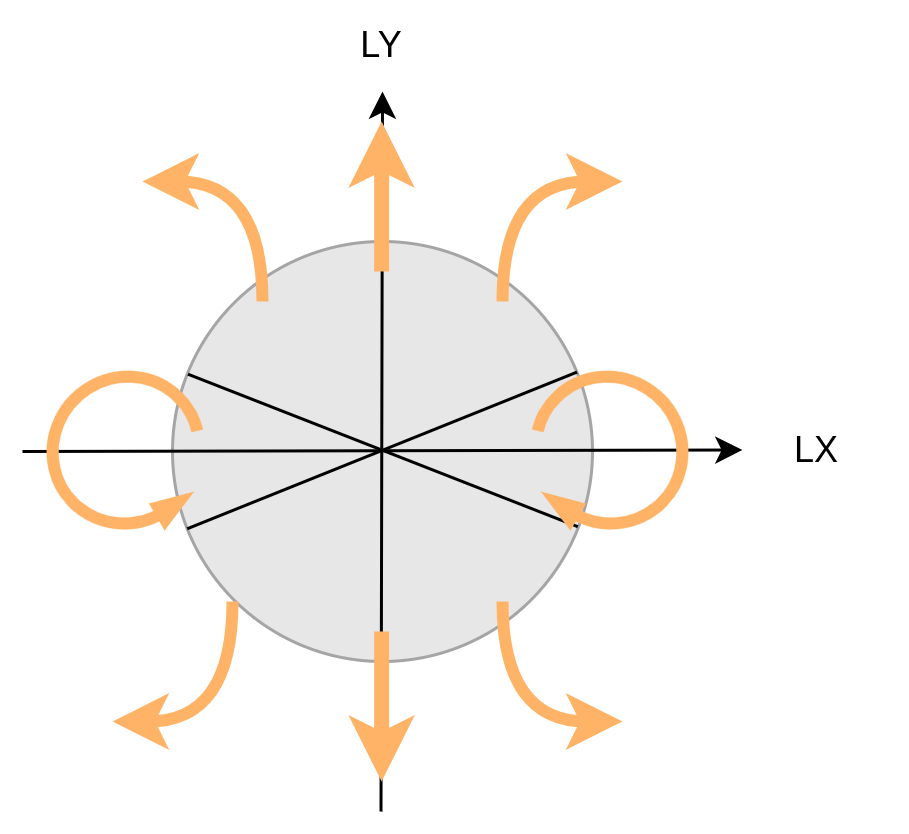
Convert from Left Joy Stick to cmd_vel
teleop_twist_joy_node has cmd_vel publisher.
Velocity is decided as below.
Acknowledgements
We acknowledge attribute and gratitude to the following resources in creating this package.
- ps_ros2_common by @Ar-Ray-code
CONTRIBUTING
|
|
playstation-joyinterface-ros2 repositoryp9n p9n_bringup p9n_example p9n_interface p9n_node p9n_test |
ROS Distro
|
Repository Summary
| Description | |
| Checkout URI | https://github.com/harvestx/playstation-joyinterface-ros2.git |
| VCS Type | git |
| VCS Version | humble |
| Last Updated | 2024-02-29 |
| Dev Status | UNKNOWN |
| Released | UNRELEASED |
| Contributing |
Help Wanted (-)
Good First Issues (-) Pull Requests to Review (-) |
Packages
| Name | Version |
|---|---|
| p9n | 1.1.2 |
| p9n_bringup | 1.1.1 |
| p9n_example | 1.1.1 |
| p9n_interface | 1.1.0 |
| p9n_node | 1.0.3 |
| p9n_test | 1.1.1 |
README
PlayStation-JoyInterface-ROS2
PlayStation Joy Controller Interface Package for ROS2.
Supported controllers
| Status | Hardware Name |
|---|---|
| :heavy_check_mark: | DualShock3 |
| :heavy_check_mark: | DualShock4 |
| :heavy_check_mark: | DualSense |
Repository Status
| ROS2 Distro | Branch | Build status |
|---|---|---|
| galactic | galactic |
|
| humble | humble |
|
How to use the interface library
- Initialize controller interface with the specific hardware type.
// Initialize Interface
const std::string hw_name = "DualSense";
const auto hw_type = p9n_interface::getHwType(hw_name);
ps_interface =
  std::make_unique<p9n_interface::PlayStationInterface>(hw_type);
- Set
sensor_msg::msg::joyto interface. Then you can access any button state via the interface.
void Example::onJoyCallback(sensor_msgs::msg::Joy::ConstSharedPtr joy_msg) {
  ps_interface->setJoyMsg(joy_msg);  // set joy message to interface

  // When Circle Button Pressed..
  if(ps_interface->pressedCircle()) {
    // You can hook action here
...
Buttons and Interface functions.
| Target | Type | Function Name | Description |
|---|---|---|---|
| Any | bool |
pressedAny(); |
Return true when pressed |
| □ | bool |
pressedSquare(); |
|
| ○ | bool |
pressedCircle(); |
|
| □ | bool |
pressedTriangle(); |
|
| ☓ | bool |
pressedCross(); |
|
| L1 | bool |
pressedL1(); |
|
| R1 | bool |
pressedR1(); |
|
| R2 | bool |
pressedR2(); |
pressedR2Analog() also returns the button status with float
|
| L2 | bool |
pressedL2(); |
pressedL2Analog() also returns the button status with float
|
| Select | bool |
pressedSelect(); |
|
| Start | bool |
pressedStart(); |
|
| PS | bool |
pressedPS(); |
|
| DPad ↑ | bool |
pressedDPadUp(); |
pressedDPadY() also returns the button status with float
|
| DPad ↓ | bool |
pressedDPadDown(); |
pressedDPadY() also returns the button status with float
|
| DPad ← | bool |
pressedDPadLeft(); |
pressedDPadX() also returns the button status with float
|
| DPad → | bool |
pressedDPadRight(); |
pressedDPadX() also returns the button status with float
|
| DPad ← → | float |
pressedDPadX(); |
-1.0 : Right, 1.0 : Left |
| DPad ↑ ↓ | float |
pressedDPadY(); |
-1.0 : Down, 1.0 : Up |
| Left Stick ← → | float |
tiltedStickLX(); |
-1.0 : Right, 1.0 : Left |
| Left Stick ↑ ↓ | float |
tiltedStickLY(); |
-1.0 : Down, 1.0 : Up |
| Left Stick | bool |
isTiltedL(); |
Return true when L stick is tilted |
| Right Stick ← → | float |
tiltedStickRX(); |
-1.0 : Right, 1.0 : Left |
| Right Stick ↑ ↓ | float |
tiltedStickRY(); |
-1.0 : Down, 1.0 : Up |
| Right Stick | bool |
tiltedStickRY(); |
Return true when R stick is tiled |
| R2 | float |
pressedR2Analog(); |
-1.0 : Pressed, 1.0 : Not pressed |
| L2 | float |
pressedL2Analog(); |
-1.0 : Pressed, 1.0 : Not pressed |
Convert from Left Joy Stick to cmd_vel
teleop_twist_joy_node has cmd_vel publisher.
Velocity is decided as below.
Acknowledgements
We acknowledge attribute and gratitude to the following resources in creating this package.
- ps_ros2_common by @Ar-Ray-code
CONTRIBUTING
|
|
playstation-joyinterface-ros2 repositoryp9n p9n_bringup p9n_example p9n_interface p9n_node p9n_test |
ROS Distro
|
Repository Summary
| Description | |
| Checkout URI | https://github.com/harvestx/playstation-joyinterface-ros2.git |
| VCS Type | git |
| VCS Version | humble |
| Last Updated | 2024-02-29 |
| Dev Status | UNKNOWN |
| Released | UNRELEASED |
| Contributing |
Help Wanted (-)
Good First Issues (-) Pull Requests to Review (-) |
Packages
| Name | Version |
|---|---|
| p9n | 1.1.2 |
| p9n_bringup | 1.1.1 |
| p9n_example | 1.1.1 |
| p9n_interface | 1.1.0 |
| p9n_node | 1.0.3 |
| p9n_test | 1.1.1 |
README
PlayStation-JoyInterface-ROS2
PlayStation Joy Controller Interface Package for ROS2.
Supported controllers
| Status | Hardware Name |
|---|---|
| :heavy_check_mark: | DualShock3 |
| :heavy_check_mark: | DualShock4 |
| :heavy_check_mark: | DualSense |
Repository Status
| ROS2 Distro | Branch | Build status |
|---|---|---|
| galactic | galactic |
|
| humble | humble |
|
How to use the interface library
- Initialize controller interface with the specific hardware type.
// Initialize Interface
const std::string hw_name = "DualSense";
const auto hw_type = p9n_interface::getHwType(hw_name);
ps_interface =
  std::make_unique<p9n_interface::PlayStationInterface>(hw_type);
- Set
sensor_msg::msg::joyto interface. Then you can access any button state via the interface.
void Example::onJoyCallback(sensor_msgs::msg::Joy::ConstSharedPtr joy_msg) {
  ps_interface->setJoyMsg(joy_msg);  // set joy message to interface

  // When Circle Button Pressed..
  if(ps_interface->pressedCircle()) {
    // You can hook action here
...
Buttons and Interface functions.
| Target | Type | Function Name | Description |
|---|---|---|---|
| Any | bool |
pressedAny(); |
Return true when pressed |
| □ | bool |
pressedSquare(); |
|
| ○ | bool |
pressedCircle(); |
|
| □ | bool |
pressedTriangle(); |
|
| ☓ | bool |
pressedCross(); |
|
| L1 | bool |
pressedL1(); |
|
| R1 | bool |
pressedR1(); |
|
| R2 | bool |
pressedR2(); |
pressedR2Analog() also returns the button status with float
|
| L2 | bool |
pressedL2(); |
pressedL2Analog() also returns the button status with float
|
| Select | bool |
pressedSelect(); |
|
| Start | bool |
pressedStart(); |
|
| PS | bool |
pressedPS(); |
|
| DPad ↑ | bool |
pressedDPadUp(); |
pressedDPadY() also returns the button status with float
|
| DPad ↓ | bool |
pressedDPadDown(); |
pressedDPadY() also returns the button status with float
|
| DPad ← | bool |
pressedDPadLeft(); |
pressedDPadX() also returns the button status with float
|
| DPad → | bool |
pressedDPadRight(); |
pressedDPadX() also returns the button status with float
|
| DPad ← → | float |
pressedDPadX(); |
-1.0 : Right, 1.0 : Left |
| DPad ↑ ↓ | float |
pressedDPadY(); |
-1.0 : Down, 1.0 : Up |
| Left Stick ← → | float |
tiltedStickLX(); |
-1.0 : Right, 1.0 : Left |
| Left Stick ↑ ↓ | float |
tiltedStickLY(); |
-1.0 : Down, 1.0 : Up |
| Left Stick | bool |
isTiltedL(); |
Return true when L stick is tilted |
| Right Stick ← → | float |
tiltedStickRX(); |
-1.0 : Right, 1.0 : Left |
| Right Stick ↑ ↓ | float |
tiltedStickRY(); |
-1.0 : Down, 1.0 : Up |
| Right Stick | bool |
tiltedStickRY(); |
Return true when R stick is tiled |
| R2 | float |
pressedR2Analog(); |
-1.0 : Pressed, 1.0 : Not pressed |
| L2 | float |
pressedL2Analog(); |
-1.0 : Pressed, 1.0 : Not pressed |
Convert from Left Joy Stick to cmd_vel
teleop_twist_joy_node has cmd_vel publisher.
Velocity is decided as below.
Acknowledgements
We acknowledge attribute and gratitude to the following resources in creating this package.
- ps_ros2_common by @Ar-Ray-code
CONTRIBUTING
|
|
playstation-joyinterface-ros2 repositoryp9n p9n_bringup p9n_example p9n_interface p9n_node p9n_test |
ROS Distro
|
Repository Summary
| Description | |
| Checkout URI | https://github.com/harvestx/playstation-joyinterface-ros2.git |
| VCS Type | git |
| VCS Version | humble |
| Last Updated | 2024-02-29 |
| Dev Status | UNKNOWN |
| Released | UNRELEASED |
| Contributing |
Help Wanted (-)
Good First Issues (-) Pull Requests to Review (-) |
Packages
| Name | Version |
|---|---|
| p9n | 1.1.2 |
| p9n_bringup | 1.1.1 |
| p9n_example | 1.1.1 |
| p9n_interface | 1.1.0 |
| p9n_node | 1.0.3 |
| p9n_test | 1.1.1 |
README
PlayStation-JoyInterface-ROS2
PlayStation Joy Controller Interface Package for ROS2.
Supported controllers
| Status | Hardware Name |
|---|---|
| :heavy_check_mark: | DualShock3 |
| :heavy_check_mark: | DualShock4 |
| :heavy_check_mark: | DualSense |
Repository Status
| ROS2 Distro | Branch | Build status |
|---|---|---|
| galactic | galactic |
|
| humble | humble |
|
How to use the interface library
- Initialize controller interface with the specific hardware type.
// Initialize Interface
const std::string hw_name = "DualSense";
const auto hw_type = p9n_interface::getHwType(hw_name);
ps_interface =
  std::make_unique<p9n_interface::PlayStationInterface>(hw_type);
- Set
sensor_msg::msg::joyto interface. Then you can access any button state via the interface.
void Example::onJoyCallback(sensor_msgs::msg::Joy::ConstSharedPtr joy_msg) {
  ps_interface->setJoyMsg(joy_msg);  // set joy message to interface

  // When Circle Button Pressed..
  if(ps_interface->pressedCircle()) {
    // You can hook action here
...
Buttons and Interface functions.
| Target | Type | Function Name | Description |
|---|---|---|---|
| Any | bool |
pressedAny(); |
Return true when pressed |
| □ | bool |
pressedSquare(); |
|
| ○ | bool |
pressedCircle(); |
|
| □ | bool |
pressedTriangle(); |
|
| ☓ | bool |
pressedCross(); |
|
| L1 | bool |
pressedL1(); |
|
| R1 | bool |
pressedR1(); |
|
| R2 | bool |
pressedR2(); |
pressedR2Analog() also returns the button status with float
|
| L2 | bool |
pressedL2(); |
pressedL2Analog() also returns the button status with float
|
| Select | bool |
pressedSelect(); |
|
| Start | bool |
pressedStart(); |
|
| PS | bool |
pressedPS(); |
|
| DPad ↑ | bool |
pressedDPadUp(); |
pressedDPadY() also returns the button status with float
|
| DPad ↓ | bool |
pressedDPadDown(); |
pressedDPadY() also returns the button status with float
|
| DPad ← | bool |
pressedDPadLeft(); |
pressedDPadX() also returns the button status with float
|
| DPad → | bool |
pressedDPadRight(); |
pressedDPadX() also returns the button status with float
|
| DPad ← → | float |
pressedDPadX(); |
-1.0 : Right, 1.0 : Left |
| DPad ↑ ↓ | float |
pressedDPadY(); |
-1.0 : Down, 1.0 : Up |
| Left Stick ← → | float |
tiltedStickLX(); |
-1.0 : Right, 1.0 : Left |
| Left Stick ↑ ↓ | float |
tiltedStickLY(); |
-1.0 : Down, 1.0 : Up |
| Left Stick | bool |
isTiltedL(); |
Return true when L stick is tilted |
| Right Stick ← → | float |
tiltedStickRX(); |
-1.0 : Right, 1.0 : Left |
| Right Stick ↑ ↓ | float |
tiltedStickRY(); |
-1.0 : Down, 1.0 : Up |
| Right Stick | bool |
tiltedStickRY(); |
Return true when R stick is tiled |
| R2 | float |
pressedR2Analog(); |
-1.0 : Pressed, 1.0 : Not pressed |
| L2 | float |
pressedL2Analog(); |
-1.0 : Pressed, 1.0 : Not pressed |
Convert from Left Joy Stick to cmd_vel
teleop_twist_joy_node has cmd_vel publisher.
Velocity is decided as below.
Acknowledgements
We acknowledge attribute and gratitude to the following resources in creating this package.
- ps_ros2_common by @Ar-Ray-code
CONTRIBUTING
|
|
playstation-joyinterface-ros2 repositoryp9n p9n_bringup p9n_example p9n_interface p9n_node p9n_test |
ROS Distro
|
Repository Summary
| Description | |
| Checkout URI | https://github.com/harvestx/playstation-joyinterface-ros2.git |
| VCS Type | git |
| VCS Version | humble |
| Last Updated | 2024-02-29 |
| Dev Status | UNKNOWN |
| Released | UNRELEASED |
| Contributing |
Help Wanted (-)
Good First Issues (-) Pull Requests to Review (-) |
Packages
| Name | Version |
|---|---|
| p9n | 1.1.2 |
| p9n_bringup | 1.1.1 |
| p9n_example | 1.1.1 |
| p9n_interface | 1.1.0 |
| p9n_node | 1.0.3 |
| p9n_test | 1.1.1 |
README
PlayStation-JoyInterface-ROS2
PlayStation Joy Controller Interface Package for ROS2.
Supported controllers
| Status | Hardware Name |
|---|---|
| :heavy_check_mark: | DualShock3 |
| :heavy_check_mark: | DualShock4 |
| :heavy_check_mark: | DualSense |
Repository Status
| ROS2 Distro | Branch | Build status |
|---|---|---|
| galactic | galactic |
|
| humble | humble |
|
How to use the interface library
- Initialize controller interface with the specific hardware type.
// Initialize Interface
const std::string hw_name = "DualSense";
const auto hw_type = p9n_interface::getHwType(hw_name);
ps_interface =
  std::make_unique<p9n_interface::PlayStationInterface>(hw_type);
- Set
sensor_msg::msg::joyto interface. Then you can access any button state via the interface.
void Example::onJoyCallback(sensor_msgs::msg::Joy::ConstSharedPtr joy_msg) {
  ps_interface->setJoyMsg(joy_msg);  // set joy message to interface

  // When Circle Button Pressed..
  if(ps_interface->pressedCircle()) {
    // You can hook action here
...
Buttons and Interface functions.
| Target | Type | Function Name | Description |
|---|---|---|---|
| Any | bool |
pressedAny(); |
Return true when pressed |
| □ | bool |
pressedSquare(); |
|
| ○ | bool |
pressedCircle(); |
|
| □ | bool |
pressedTriangle(); |
|
| ☓ | bool |
pressedCross(); |
|
| L1 | bool |
pressedL1(); |
|
| R1 | bool |
pressedR1(); |
|
| R2 | bool |
pressedR2(); |
pressedR2Analog() also returns the button status with float
|
| L2 | bool |
pressedL2(); |
pressedL2Analog() also returns the button status with float
|
| Select | bool |
pressedSelect(); |
|
| Start | bool |
pressedStart(); |
|
| PS | bool |
pressedPS(); |
|
| DPad ↑ | bool |
pressedDPadUp(); |
pressedDPadY() also returns the button status with float
|
| DPad ↓ | bool |
pressedDPadDown(); |
pressedDPadY() also returns the button status with float
|
| DPad ← | bool |
pressedDPadLeft(); |
pressedDPadX() also returns the button status with float
|
| DPad → | bool |
pressedDPadRight(); |
pressedDPadX() also returns the button status with float
|
| DPad ← → | float |
pressedDPadX(); |
-1.0 : Right, 1.0 : Left |
| DPad ↑ ↓ | float |
pressedDPadY(); |
-1.0 : Down, 1.0 : Up |
| Left Stick ← → | float |
tiltedStickLX(); |
-1.0 : Right, 1.0 : Left |
| Left Stick ↑ ↓ | float |
tiltedStickLY(); |
-1.0 : Down, 1.0 : Up |
| Left Stick | bool |
isTiltedL(); |
Return true when L stick is tilted |
| Right Stick ← → | float |
tiltedStickRX(); |
-1.0 : Right, 1.0 : Left |
| Right Stick ↑ ↓ | float |
tiltedStickRY(); |
-1.0 : Down, 1.0 : Up |
| Right Stick | bool |
tiltedStickRY(); |
Return true when R stick is tiled |
| R2 | float |
pressedR2Analog(); |
-1.0 : Pressed, 1.0 : Not pressed |
| L2 | float |
pressedL2Analog(); |
-1.0 : Pressed, 1.0 : Not pressed |
Convert from Left Joy Stick to cmd_vel
teleop_twist_joy_node has cmd_vel publisher.
Velocity is decided as below.
Acknowledgements
We acknowledge attribute and gratitude to the following resources in creating this package.
- ps_ros2_common by @Ar-Ray-code
CONTRIBUTING
|
|
playstation-joyinterface-ros2 repositoryp9n p9n_bringup p9n_example p9n_interface p9n_node p9n_test |
ROS Distro
|
Repository Summary
| Description | |
| Checkout URI | https://github.com/harvestx/playstation-joyinterface-ros2.git |
| VCS Type | git |
| VCS Version | humble |
| Last Updated | 2024-02-29 |
| Dev Status | UNKNOWN |
| Released | UNRELEASED |
| Contributing |
Help Wanted (-)
Good First Issues (-) Pull Requests to Review (-) |
Packages
| Name | Version |
|---|---|
| p9n | 1.1.2 |
| p9n_bringup | 1.1.1 |
| p9n_example | 1.1.1 |
| p9n_interface | 1.1.0 |
| p9n_node | 1.0.3 |
| p9n_test | 1.1.1 |
README
PlayStation-JoyInterface-ROS2
PlayStation Joy Controller Interface Package for ROS2.
Supported controllers
| Status | Hardware Name |
|---|---|
| :heavy_check_mark: | DualShock3 |
| :heavy_check_mark: | DualShock4 |
| :heavy_check_mark: | DualSense |
Repository Status
| ROS2 Distro | Branch | Build status |
|---|---|---|
| galactic | galactic |
|
| humble | humble |
|
How to use the interface library
- Initialize controller interface with the specific hardware type.
// Initialize Interface
const std::string hw_name = "DualSense";
const auto hw_type = p9n_interface::getHwType(hw_name);
ps_interface =
  std::make_unique<p9n_interface::PlayStationInterface>(hw_type);
- Set
sensor_msg::msg::joyto interface. Then you can access any button state via the interface.
void Example::onJoyCallback(sensor_msgs::msg::Joy::ConstSharedPtr joy_msg) {
  ps_interface->setJoyMsg(joy_msg);  // set joy message to interface

  // When Circle Button Pressed..
  if(ps_interface->pressedCircle()) {
    // You can hook action here
...
Buttons and Interface functions.
| Target | Type | Function Name | Description |
|---|---|---|---|
| Any | bool |
pressedAny(); |
Return true when pressed |
| □ | bool |
pressedSquare(); |
|
| ○ | bool |
pressedCircle(); |
|
| □ | bool |
pressedTriangle(); |
|
| ☓ | bool |
pressedCross(); |
|
| L1 | bool |
pressedL1(); |
|
| R1 | bool |
pressedR1(); |
|
| R2 | bool |
pressedR2(); |
pressedR2Analog() also returns the button status with float
|
| L2 | bool |
pressedL2(); |
pressedL2Analog() also returns the button status with float
|
| Select | bool |
pressedSelect(); |
|
| Start | bool |
pressedStart(); |
|
| PS | bool |
pressedPS(); |
|
| DPad ↑ | bool |
pressedDPadUp(); |
pressedDPadY() also returns the button status with float
|
| DPad ↓ | bool |
pressedDPadDown(); |
pressedDPadY() also returns the button status with float
|
| DPad ← | bool |
pressedDPadLeft(); |
pressedDPadX() also returns the button status with float
|
| DPad → | bool |
pressedDPadRight(); |
pressedDPadX() also returns the button status with float
|
| DPad ← → | float |
pressedDPadX(); |
-1.0 : Right, 1.0 : Left |
| DPad ↑ ↓ | float |
pressedDPadY(); |
-1.0 : Down, 1.0 : Up |
| Left Stick ← → | float |
tiltedStickLX(); |
-1.0 : Right, 1.0 : Left |
| Left Stick ↑ ↓ | float |
tiltedStickLY(); |
-1.0 : Down, 1.0 : Up |
| Left Stick | bool |
isTiltedL(); |
Return true when L stick is tilted |
| Right Stick ← → | float |
tiltedStickRX(); |
-1.0 : Right, 1.0 : Left |
| Right Stick ↑ ↓ | float |
tiltedStickRY(); |
-1.0 : Down, 1.0 : Up |
| Right Stick | bool |
tiltedStickRY(); |
Return true when R stick is tiled |
| R2 | float |
pressedR2Analog(); |
-1.0 : Pressed, 1.0 : Not pressed |
| L2 | float |
pressedL2Analog(); |
-1.0 : Pressed, 1.0 : Not pressed |
Convert from Left Joy Stick to cmd_vel
teleop_twist_joy_node has cmd_vel publisher.
Velocity is decided as below.
Acknowledgements
We acknowledge attribute and gratitude to the following resources in creating this package.
- ps_ros2_common by @Ar-Ray-code
CONTRIBUTING
|
|
playstation-joyinterface-ros2 repositoryp9n p9n_bringup p9n_example p9n_interface p9n_node p9n_test |
ROS Distro
|
Repository Summary
| Description | |
| Checkout URI | https://github.com/harvestx/playstation-joyinterface-ros2.git |
| VCS Type | git |
| VCS Version | humble |
| Last Updated | 2024-02-29 |
| Dev Status | UNKNOWN |
| Released | UNRELEASED |
| Contributing |
Help Wanted (-)
Good First Issues (-) Pull Requests to Review (-) |
Packages
| Name | Version |
|---|---|
| p9n | 1.1.2 |
| p9n_bringup | 1.1.1 |
| p9n_example | 1.1.1 |
| p9n_interface | 1.1.0 |
| p9n_node | 1.0.3 |
| p9n_test | 1.1.1 |
README
PlayStation-JoyInterface-ROS2
PlayStation Joy Controller Interface Package for ROS2.
Supported controllers
| Status | Hardware Name |
|---|---|
| :heavy_check_mark: | DualShock3 |
| :heavy_check_mark: | DualShock4 |
| :heavy_check_mark: | DualSense |
Repository Status
| ROS2 Distro | Branch | Build status |
|---|---|---|
| galactic | galactic |
|
| humble | humble |
|
How to use the interface library
- Initialize controller interface with the specific hardware type.
// Initialize Interface
const std::string hw_name = "DualSense";
const auto hw_type = p9n_interface::getHwType(hw_name);
ps_interface =
  std::make_unique<p9n_interface::PlayStationInterface>(hw_type);
- Set
sensor_msg::msg::joyto interface. Then you can access any button state via the interface.
void Example::onJoyCallback(sensor_msgs::msg::Joy::ConstSharedPtr joy_msg) {
  ps_interface->setJoyMsg(joy_msg);  // set joy message to interface

  // When Circle Button Pressed..
  if(ps_interface->pressedCircle()) {
    // You can hook action here
...
Buttons and Interface functions.
| Target | Type | Function Name | Description |
|---|---|---|---|
| Any | bool |
pressedAny(); |
Return true when pressed |
| □ | bool |
pressedSquare(); |
|
| ○ | bool |
pressedCircle(); |
|
| □ | bool |
pressedTriangle(); |
|
| ☓ | bool |
pressedCross(); |
|
| L1 | bool |
pressedL1(); |
|
| R1 | bool |
pressedR1(); |
|
| R2 | bool |
pressedR2(); |
pressedR2Analog() also returns the button status with float
|
| L2 | bool |
pressedL2(); |
pressedL2Analog() also returns the button status with float
|
| Select | bool |
pressedSelect(); |
|
| Start | bool |
pressedStart(); |
|
| PS | bool |
pressedPS(); |
|
| DPad ↑ | bool |
pressedDPadUp(); |
pressedDPadY() also returns the button status with float
|
| DPad ↓ | bool |
pressedDPadDown(); |
pressedDPadY() also returns the button status with float
|
| DPad ← | bool |
pressedDPadLeft(); |
pressedDPadX() also returns the button status with float
|
| DPad → | bool |
pressedDPadRight(); |
pressedDPadX() also returns the button status with float
|
| DPad ← → | float |
pressedDPadX(); |
-1.0 : Right, 1.0 : Left |
| DPad ↑ ↓ | float |
pressedDPadY(); |
-1.0 : Down, 1.0 : Up |
| Left Stick ← → | float |
tiltedStickLX(); |
-1.0 : Right, 1.0 : Left |
| Left Stick ↑ ↓ | float |
tiltedStickLY(); |
-1.0 : Down, 1.0 : Up |
| Left Stick | bool |
isTiltedL(); |
Return true when L stick is tilted |
| Right Stick ← → | float |
tiltedStickRX(); |
-1.0 : Right, 1.0 : Left |
| Right Stick ↑ ↓ | float |
tiltedStickRY(); |
-1.0 : Down, 1.0 : Up |
| Right Stick | bool |
tiltedStickRY(); |
Return true when R stick is tiled |
| R2 | float |
pressedR2Analog(); |
-1.0 : Pressed, 1.0 : Not pressed |
| L2 | float |
pressedL2Analog(); |
-1.0 : Pressed, 1.0 : Not pressed |
Convert from Left Joy Stick to cmd_vel
teleop_twist_joy_node has cmd_vel publisher.
Velocity is decided as below.
Acknowledgements
We acknowledge attribute and gratitude to the following resources in creating this package.
- ps_ros2_common by @Ar-Ray-code
CONTRIBUTING
|
|
playstation-joyinterface-ros2 repositoryp9n p9n_bringup p9n_example p9n_interface p9n_node p9n_test |
ROS Distro
|
Repository Summary
| Description | |
| Checkout URI | https://github.com/harvestx/playstation-joyinterface-ros2.git |
| VCS Type | git |
| VCS Version | humble |
| Last Updated | 2024-02-29 |
| Dev Status | UNKNOWN |
| Released | UNRELEASED |
| Contributing |
Help Wanted (-)
Good First Issues (-) Pull Requests to Review (-) |
Packages
| Name | Version |
|---|---|
| p9n | 1.1.2 |
| p9n_bringup | 1.1.1 |
| p9n_example | 1.1.1 |
| p9n_interface | 1.1.0 |
| p9n_node | 1.0.3 |
| p9n_test | 1.1.1 |
README
PlayStation-JoyInterface-ROS2
PlayStation Joy Controller Interface Package for ROS2.
Supported controllers
| Status | Hardware Name |
|---|---|
| :heavy_check_mark: | DualShock3 |
| :heavy_check_mark: | DualShock4 |
| :heavy_check_mark: | DualSense |
Repository Status
| ROS2 Distro | Branch | Build status |
|---|---|---|
| galactic | galactic |
|
| humble | humble |
|
How to use the interface library
- Initialize controller interface with the specific hardware type.
// Initialize Interface
const std::string hw_name = "DualSense";
const auto hw_type = p9n_interface::getHwType(hw_name);
ps_interface =
  std::make_unique<p9n_interface::PlayStationInterface>(hw_type);
- Set
sensor_msg::msg::joyto interface. Then you can access any button state via the interface.
void Example::onJoyCallback(sensor_msgs::msg::Joy::ConstSharedPtr joy_msg) {
  ps_interface->setJoyMsg(joy_msg);  // set joy message to interface

  // When Circle Button Pressed..
  if(ps_interface->pressedCircle()) {
    // You can hook action here
...
Buttons and Interface functions.
| Target | Type | Function Name | Description |
|---|---|---|---|
| Any | bool |
pressedAny(); |
Return true when pressed |
| □ | bool |
pressedSquare(); |
|
| ○ | bool |
pressedCircle(); |
|
| □ | bool |
pressedTriangle(); |
|
| ☓ | bool |
pressedCross(); |
|
| L1 | bool |
pressedL1(); |
|
| R1 | bool |
pressedR1(); |
|
| R2 | bool |
pressedR2(); |
pressedR2Analog() also returns the button status with float
|
| L2 | bool |
pressedL2(); |
pressedL2Analog() also returns the button status with float
|
| Select | bool |
pressedSelect(); |
|
| Start | bool |
pressedStart(); |
|
| PS | bool |
pressedPS(); |
|
| DPad ↑ | bool |
pressedDPadUp(); |
pressedDPadY() also returns the button status with float
|
| DPad ↓ | bool |
pressedDPadDown(); |
pressedDPadY() also returns the button status with float
|
| DPad ← | bool |
pressedDPadLeft(); |
pressedDPadX() also returns the button status with float
|
| DPad → | bool |
pressedDPadRight(); |
pressedDPadX() also returns the button status with float
|
| DPad ← → | float |
pressedDPadX(); |
-1.0 : Right, 1.0 : Left |
| DPad ↑ ↓ | float |
pressedDPadY(); |
-1.0 : Down, 1.0 : Up |
| Left Stick ← → | float |
tiltedStickLX(); |
-1.0 : Right, 1.0 : Left |
| Left Stick ↑ ↓ | float |
tiltedStickLY(); |
-1.0 : Down, 1.0 : Up |
| Left Stick | bool |
isTiltedL(); |
Return true when L stick is tilted |
| Right Stick ← → | float |
tiltedStickRX(); |
-1.0 : Right, 1.0 : Left |
| Right Stick ↑ ↓ | float |
tiltedStickRY(); |
-1.0 : Down, 1.0 : Up |
| Right Stick | bool |
tiltedStickRY(); |
Return true when R stick is tiled |
| R2 | float |
pressedR2Analog(); |
-1.0 : Pressed, 1.0 : Not pressed |
| L2 | float |
pressedL2Analog(); |
-1.0 : Pressed, 1.0 : Not pressed |
Convert from Left Joy Stick to cmd_vel
teleop_twist_joy_node has cmd_vel publisher.
Velocity is decided as below.
Acknowledgements
We acknowledge attribute and gratitude to the following resources in creating this package.
- ps_ros2_common by @Ar-Ray-code
CONTRIBUTING
|
|
playstation-joyinterface-ros2 repositoryp9n p9n_bringup p9n_example p9n_interface p9n_node p9n_test |
ROS Distro
|
Repository Summary
| Description | |
| Checkout URI | https://github.com/harvestx/playstation-joyinterface-ros2.git |
| VCS Type | git |
| VCS Version | humble |
| Last Updated | 2024-02-29 |
| Dev Status | UNKNOWN |
| Released | UNRELEASED |
| Contributing |
Help Wanted (-)
Good First Issues (-) Pull Requests to Review (-) |
Packages
| Name | Version |
|---|---|
| p9n | 1.1.2 |
| p9n_bringup | 1.1.1 |
| p9n_example | 1.1.1 |
| p9n_interface | 1.1.0 |
| p9n_node | 1.0.3 |
| p9n_test | 1.1.1 |
README
PlayStation-JoyInterface-ROS2
PlayStation Joy Controller Interface Package for ROS2.
Supported controllers
| Status | Hardware Name |
|---|---|
| :heavy_check_mark: | DualShock3 |
| :heavy_check_mark: | DualShock4 |
| :heavy_check_mark: | DualSense |
Repository Status
| ROS2 Distro | Branch | Build status |
|---|---|---|
| galactic | galactic |
|
| humble | humble |
|
How to use the interface library
- Initialize controller interface with the specific hardware type.
// Initialize Interface
const std::string hw_name = "DualSense";
const auto hw_type = p9n_interface::getHwType(hw_name);
ps_interface =
  std::make_unique<p9n_interface::PlayStationInterface>(hw_type);
- Set
sensor_msg::msg::joyto interface. Then you can access any button state via the interface.
void Example::onJoyCallback(sensor_msgs::msg::Joy::ConstSharedPtr joy_msg) {
  ps_interface->setJoyMsg(joy_msg);  // set joy message to interface

  // When Circle Button Pressed..
  if(ps_interface->pressedCircle()) {
    // You can hook action here
...
Buttons and Interface functions.
| Target | Type | Function Name | Description |
|---|---|---|---|
| Any | bool |
pressedAny(); |
Return true when pressed |
| □ | bool |
pressedSquare(); |
|
| ○ | bool |
pressedCircle(); |
|
| □ | bool |
pressedTriangle(); |
|
| ☓ | bool |
pressedCross(); |
|
| L1 | bool |
pressedL1(); |
|
| R1 | bool |
pressedR1(); |
|
| R2 | bool |
pressedR2(); |
pressedR2Analog() also returns the button status with float
|
| L2 | bool |
pressedL2(); |
pressedL2Analog() also returns the button status with float
|
| Select | bool |
pressedSelect(); |
|
| Start | bool |
pressedStart(); |
|
| PS | bool |
pressedPS(); |
|
| DPad ↑ | bool |
pressedDPadUp(); |
pressedDPadY() also returns the button status with float
|
| DPad ↓ | bool |
pressedDPadDown(); |
pressedDPadY() also returns the button status with float
|
| DPad ← | bool |
pressedDPadLeft(); |
pressedDPadX() also returns the button status with float
|
| DPad → | bool |
pressedDPadRight(); |
pressedDPadX() also returns the button status with float
|
| DPad ← → | float |
pressedDPadX(); |
-1.0 : Right, 1.0 : Left |
| DPad ↑ ↓ | float |
pressedDPadY(); |
-1.0 : Down, 1.0 : Up |
| Left Stick ← → | float |
tiltedStickLX(); |
-1.0 : Right, 1.0 : Left |
| Left Stick ↑ ↓ | float |
tiltedStickLY(); |
-1.0 : Down, 1.0 : Up |
| Left Stick | bool |
isTiltedL(); |
Return true when L stick is tilted |
| Right Stick ← → | float |
tiltedStickRX(); |
-1.0 : Right, 1.0 : Left |
| Right Stick ↑ ↓ | float |
tiltedStickRY(); |
-1.0 : Down, 1.0 : Up |
| Right Stick | bool |
tiltedStickRY(); |
Return true when R stick is tiled |
| R2 | float |
pressedR2Analog(); |
-1.0 : Pressed, 1.0 : Not pressed |
| L2 | float |
pressedL2Analog(); |
-1.0 : Pressed, 1.0 : Not pressed |
Convert from Left Joy Stick to cmd_vel
teleop_twist_joy_node has cmd_vel publisher.
Velocity is decided as below.
Acknowledgements
We acknowledge attribute and gratitude to the following resources in creating this package.
- ps_ros2_common by @Ar-Ray-code