 ROS Index
Repository Summary
| Description | |
| Checkout URI | https://github.com/splintered-reality/py_trees_js.git |
| VCS Type | git |
| VCS Version | release/0.6.x |
| Last Updated | 2025-01-13 |
| Dev Status | MAINTAINED |
| Released | RELEASED |
| Contributing |
Help Wanted (-)
Good First Issues (-) Pull Requests to Review (-) |
Packages
| Name | Version |
|---|---|
| py_trees_js | 0.6.5 |
README
PyTrees Js
[About] [Features] [Preview] [Exmaple - Simple Web App] [Example - PyQt App] [The JSON Specification]
About
Libraries for visualisation of runtime or replayed behaviour trees.
- ./js - a self-contained javascript library to build apps around
- py_trees_js - a python package that makes the js available as a pyqt resource
- py_trees_js.viewer - a demo pyqtwebengine app
See py_trees_ros_viewer for a fully fledged pyqt integration that uses py_trees_js.
Features
- Visualise the runtime state of a behaviour tree
- Collapsible subtrees
- Zoom and scale contents to fit
- Timeline rewind & resume
- Blackboard key-value storage view
- Activity log view
Although designed for py_trees, the js libs (in particular, the interfaces) are not dependent on py_trees and could be used for other behaviour tree applications.
Preview
With VSCode DevContainers and on a PC with an NVIDIA GPU:
- Install VSCode
- Install the NVIDIA Container Toolkit
- Clone and launch the demo:
$ git clone https://github.com/splintered-reality/py_trees_js
$ code .
$ cd py_trees_js

# Reopen the project in the devcontainer
$ (use CTRL-SHIFT-P if you miss VSCode's helper dialog)

# Setup and launch
$ poetry install
$ poetry run py-trees-demo-viewer
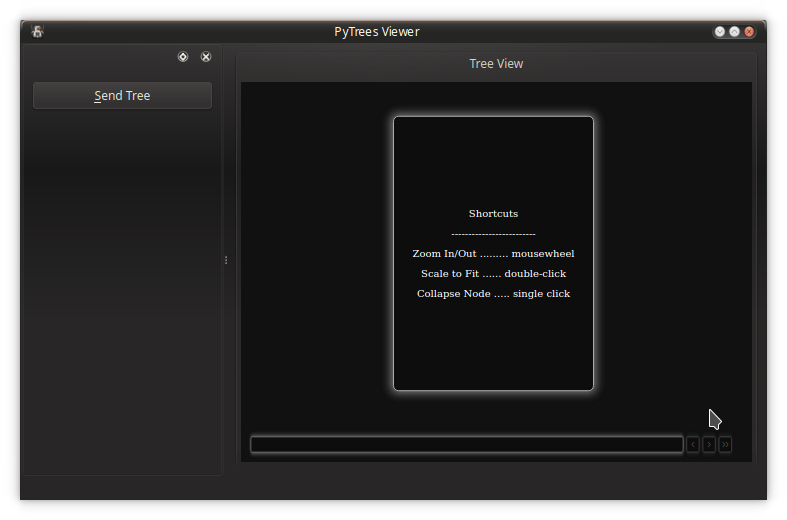
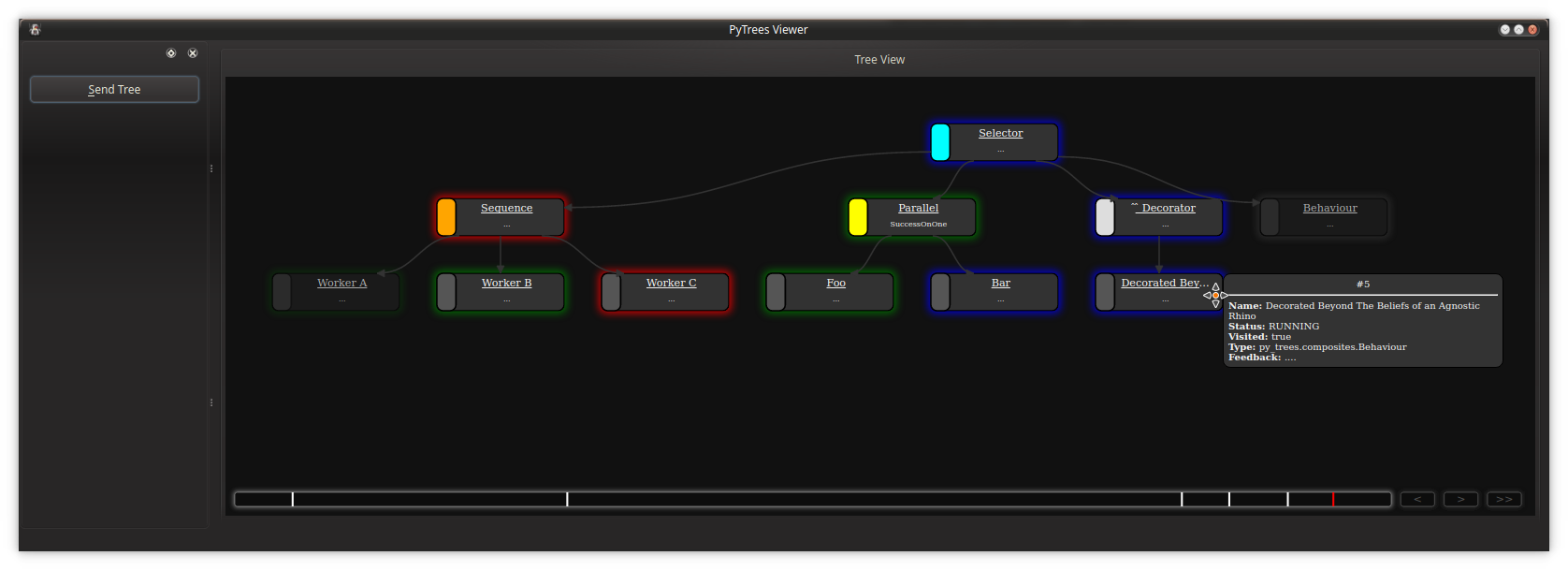
If you do not have a PC that meets those requirements, some alternative options:
- Install Poetry and PyQt on your system or in a venv. Clone and launch.
- If you’re just interested in seeing the demo viewer,
pip install --user py_trees_jsand launch the viewer - Create your own devcontainer with something like the desktop-lite feature. If this works, send me a PR!
Example - Simple Web App
Building a complete application that can render a behaviour tree stream is an effort that can be decomposed into two tasks:
- Creating the web app for rendering trees and visualising a timeline
- Wrapping the web app in a framework and connecting it to an external stream
The first stage is purely an exercise with html, css and javascript. The latter will depend on your use case - it could be a qt-js hybrid application (as exemplified here) for developers, an electron application for cross-platform and mobile deployment or a cloud based service.
This section will walk through how to build a web application with the provided js libraries. An example of wrapping the web app within a Qt-Js application will follow.
To get started, let’s begin with a basic html page with two divs, one for the tree canvas and one for the timeline:
<!doctype html>
<html>
<head>
  <meta charset="utf-8">
  <title>PyTrees Viewer</title>
  <style>
    html {
      height: 100%  /* canvas is intended to fill the screen, cascading heights achieves this */
    }
    body {
      margin: 0;
      overflow:hidden;  /* no scrollbars */
      height: 100%  /* canvas is intended to fill the screen, cascading heights achieves this */
    }
  </style>
</head>
<body>
  <div id="canvas"></div>
  <div id="timeline"></div>
</body>
</html>
Next, bring in the javascript libraries. For exemplar purposes, it is assumed here that the libraries have been made available alongside the html page - how is an integration detail depending on the mode of deployment (see next section for an example).
Note that the py_trees-<version>.js library has only one dependency, jointjs,
but that in turn has a few dependencies of it’s own. The bundled libraries in the js/jointjs folder
of this repository correspond to the requirements for a specific version of jointjs and
File truncated at 100 lines see the full file
CONTRIBUTING
Repository Summary
| Description | |
| Checkout URI | https://github.com/splintered-reality/py_trees_js.git |
| VCS Type | git |
| VCS Version | devel |
| Last Updated | 2025-11-13 |
| Dev Status | MAINTAINED |
| Released | RELEASED |
| Contributing |
Help Wanted (-)
Good First Issues (-) Pull Requests to Review (-) |
Packages
| Name | Version |
|---|---|
| py_trees_js | 0.6.6 |
README
PyTrees Js
[About] [Features] [Preview] [Exmaple - Simple Web App] [Example - PyQt App] [The JSON Specification]
About
Libraries for visualisation of runtime or replayed behaviour trees.
- ./js - a self-contained javascript library to build apps around
- py_trees_js - a python package that makes the js available as a pyqt resource
- py_trees_js.viewer - a demo pyqtwebengine app
See py_trees_ros_viewer for a fully fledged pyqt integration that uses py_trees_js.
Features
- Visualise the runtime state of a behaviour tree
- Collapsible subtrees
- Zoom and scale contents to fit
- Timeline rewind & resume
- Blackboard key-value storage view
- Activity log view
Although designed for py_trees, the js libs (in particular, the interfaces) are not dependent on py_trees and could be used for other behaviour tree applications.
Preview
With VSCode DevContainers and on a PC with an NVIDIA GPU:
- Install VSCode
- Install the NVIDIA Container Toolkit
- Clone and launch the demo:
$ git clone https://github.com/splintered-reality/py_trees_js
$ code .
$ cd py_trees_js

# Reopen the project in the devcontainer
$ (use CTRL-SHIFT-P if you miss VSCode's helper dialog)

# Setup and launch
$ poetry install
$ poetry run py-trees-demo-viewer
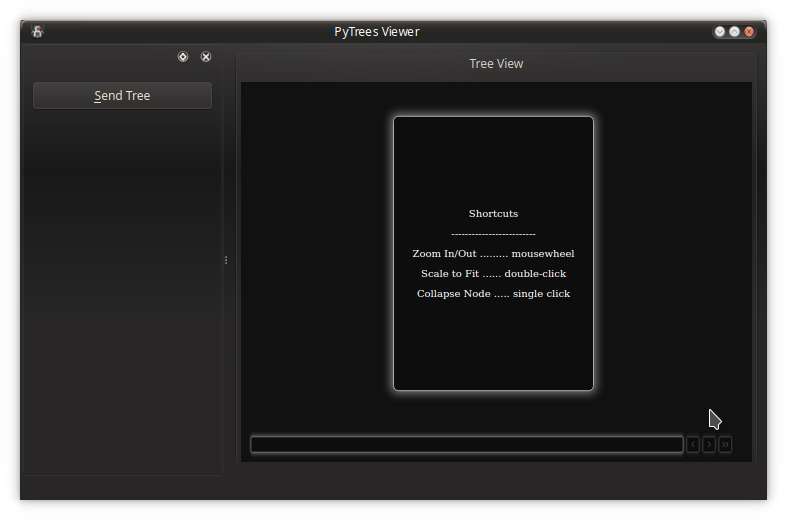

If you do not have a PC that meets those requirements, some alternative options:
- Install Poetry and PyQt on your system or in a venv. Clone and launch.
- If you’re just interested in seeing the demo viewer,
pip install --user py_trees_jsand launch the viewer - Create your own devcontainer with something like the desktop-lite feature. If this works, send me a PR!
Example - Simple Web App
Building a complete application that can render a behaviour tree stream is an effort that can be decomposed into two tasks:
- Creating the web app for rendering trees and visualising a timeline
- Wrapping the web app in a framework and connecting it to an external stream
The first stage is purely an exercise with html, css and javascript. The latter will depend on your use case - it could be a qt-js hybrid application (as exemplified here) for developers, an electron application for cross-platform and mobile deployment or a cloud based service.
This section will walk through how to build a web application with the provided js libraries. An example of wrapping the web app within a Qt-Js application will follow.
To get started, let’s begin with a basic html page with two divs, one for the tree canvas and one for the timeline:
<!doctype html>
<html>
<head>
  <meta charset="utf-8">
  <title>PyTrees Viewer</title>
  <style>
    html {
      height: 100%  /* canvas is intended to fill the screen, cascading heights achieves this */
    }
    body {
      margin: 0;
      overflow:hidden;  /* no scrollbars */
      height: 100%  /* canvas is intended to fill the screen, cascading heights achieves this */
    }
  </style>
</head>
<body>
  <div id="canvas"></div>
  <div id="timeline"></div>
</body>
</html>
Next, bring in the javascript libraries. For exemplar purposes, it is assumed here that the libraries have been made available alongside the html page - how is an integration detail depending on the mode of deployment (see next section for an example).
Note that the py_trees-<version>.js library has only one dependency, jointjs,
but that in turn has a few dependencies of it’s own. The bundled libraries in the js/jointjs folder
of this repository correspond to the requirements for a specific version of jointjs and
File truncated at 100 lines see the full file
CONTRIBUTING
Repository Summary
| Description | |
| Checkout URI | https://github.com/splintered-reality/py_trees_js.git |
| VCS Type | git |
| VCS Version | devel |
| Last Updated | 2025-11-13 |
| Dev Status | MAINTAINED |
| Released | RELEASED |
| Contributing |
Help Wanted (-)
Good First Issues (-) Pull Requests to Review (-) |
Packages
| Name | Version |
|---|---|
| py_trees_js | 0.6.6 |
README
PyTrees Js
[About] [Features] [Preview] [Exmaple - Simple Web App] [Example - PyQt App] [The JSON Specification]
About
Libraries for visualisation of runtime or replayed behaviour trees.
- ./js - a self-contained javascript library to build apps around
- py_trees_js - a python package that makes the js available as a pyqt resource
- py_trees_js.viewer - a demo pyqtwebengine app
See py_trees_ros_viewer for a fully fledged pyqt integration that uses py_trees_js.
Features
- Visualise the runtime state of a behaviour tree
- Collapsible subtrees
- Zoom and scale contents to fit
- Timeline rewind & resume
- Blackboard key-value storage view
- Activity log view
Although designed for py_trees, the js libs (in particular, the interfaces) are not dependent on py_trees and could be used for other behaviour tree applications.
Preview
With VSCode DevContainers and on a PC with an NVIDIA GPU:
- Install VSCode
- Install the NVIDIA Container Toolkit
- Clone and launch the demo:
$ git clone https://github.com/splintered-reality/py_trees_js
$ code .
$ cd py_trees_js

# Reopen the project in the devcontainer
$ (use CTRL-SHIFT-P if you miss VSCode's helper dialog)

# Setup and launch
$ poetry install
$ poetry run py-trees-demo-viewer
If you do not have a PC that meets those requirements, some alternative options:
- Install Poetry and PyQt on your system or in a venv. Clone and launch.
- If you’re just interested in seeing the demo viewer,
pip install --user py_trees_jsand launch the viewer - Create your own devcontainer with something like the desktop-lite feature. If this works, send me a PR!
Example - Simple Web App
Building a complete application that can render a behaviour tree stream is an effort that can be decomposed into two tasks:
- Creating the web app for rendering trees and visualising a timeline
- Wrapping the web app in a framework and connecting it to an external stream
The first stage is purely an exercise with html, css and javascript. The latter will depend on your use case - it could be a qt-js hybrid application (as exemplified here) for developers, an electron application for cross-platform and mobile deployment or a cloud based service.
This section will walk through how to build a web application with the provided js libraries. An example of wrapping the web app within a Qt-Js application will follow.
To get started, let’s begin with a basic html page with two divs, one for the tree canvas and one for the timeline:
<!doctype html>
<html>
<head>
  <meta charset="utf-8">
  <title>PyTrees Viewer</title>
  <style>
    html {
      height: 100%  /* canvas is intended to fill the screen, cascading heights achieves this */
    }
    body {
      margin: 0;
      overflow:hidden;  /* no scrollbars */
      height: 100%  /* canvas is intended to fill the screen, cascading heights achieves this */
    }
  </style>
</head>
<body>
  <div id="canvas"></div>
  <div id="timeline"></div>
</body>
</html>
Next, bring in the javascript libraries. For exemplar purposes, it is assumed here that the libraries have been made available alongside the html page - how is an integration detail depending on the mode of deployment (see next section for an example).
Note that the py_trees-<version>.js library has only one dependency, jointjs,
but that in turn has a few dependencies of it’s own. The bundled libraries in the js/jointjs folder
of this repository correspond to the requirements for a specific version of jointjs and
File truncated at 100 lines see the full file
CONTRIBUTING
Repository Summary
| Description | |
| Checkout URI | https://github.com/splintered-reality/py_trees_js.git |
| VCS Type | git |
| VCS Version | devel |
| Last Updated | 2025-11-13 |
| Dev Status | MAINTAINED |
| Released | RELEASED |
| Contributing |
Help Wanted (-)
Good First Issues (-) Pull Requests to Review (-) |
Packages
| Name | Version |
|---|---|
| py_trees_js | 0.6.6 |
README
PyTrees Js
[About] [Features] [Preview] [Exmaple - Simple Web App] [Example - PyQt App] [The JSON Specification]
About
Libraries for visualisation of runtime or replayed behaviour trees.
- ./js - a self-contained javascript library to build apps around
- py_trees_js - a python package that makes the js available as a pyqt resource
- py_trees_js.viewer - a demo pyqtwebengine app
See py_trees_ros_viewer for a fully fledged pyqt integration that uses py_trees_js.
Features
- Visualise the runtime state of a behaviour tree
- Collapsible subtrees
- Zoom and scale contents to fit
- Timeline rewind & resume
- Blackboard key-value storage view
- Activity log view
Although designed for py_trees, the js libs (in particular, the interfaces) are not dependent on py_trees and could be used for other behaviour tree applications.
Preview
With VSCode DevContainers and on a PC with an NVIDIA GPU:
- Install VSCode
- Install the NVIDIA Container Toolkit
- Clone and launch the demo:
$ git clone https://github.com/splintered-reality/py_trees_js
$ code .
$ cd py_trees_js

# Reopen the project in the devcontainer
$ (use CTRL-SHIFT-P if you miss VSCode's helper dialog)

# Setup and launch
$ poetry install
$ poetry run py-trees-demo-viewer
If you do not have a PC that meets those requirements, some alternative options:
- Install Poetry and PyQt on your system or in a venv. Clone and launch.
- If you’re just interested in seeing the demo viewer,
pip install --user py_trees_jsand launch the viewer - Create your own devcontainer with something like the desktop-lite feature. If this works, send me a PR!
Example - Simple Web App
Building a complete application that can render a behaviour tree stream is an effort that can be decomposed into two tasks:
- Creating the web app for rendering trees and visualising a timeline
- Wrapping the web app in a framework and connecting it to an external stream
The first stage is purely an exercise with html, css and javascript. The latter will depend on your use case - it could be a qt-js hybrid application (as exemplified here) for developers, an electron application for cross-platform and mobile deployment or a cloud based service.
This section will walk through how to build a web application with the provided js libraries. An example of wrapping the web app within a Qt-Js application will follow.
To get started, let’s begin with a basic html page with two divs, one for the tree canvas and one for the timeline:
<!doctype html>
<html>
<head>
  <meta charset="utf-8">
  <title>PyTrees Viewer</title>
  <style>
    html {
      height: 100%  /* canvas is intended to fill the screen, cascading heights achieves this */
    }
    body {
      margin: 0;
      overflow:hidden;  /* no scrollbars */
      height: 100%  /* canvas is intended to fill the screen, cascading heights achieves this */
    }
  </style>
</head>
<body>
  <div id="canvas"></div>
  <div id="timeline"></div>
</body>
</html>
Next, bring in the javascript libraries. For exemplar purposes, it is assumed here that the libraries have been made available alongside the html page - how is an integration detail depending on the mode of deployment (see next section for an example).
Note that the py_trees-<version>.js library has only one dependency, jointjs,
but that in turn has a few dependencies of it’s own. The bundled libraries in the js/jointjs folder
of this repository correspond to the requirements for a specific version of jointjs and
File truncated at 100 lines see the full file
CONTRIBUTING
Repository Summary
| Description | |
| Checkout URI | https://github.com/splintered-reality/py_trees_js.git |
| VCS Type | git |
| VCS Version | release/0.6.x |
| Last Updated | 2025-01-13 |
| Dev Status | MAINTAINED |
| Released | RELEASED |
| Contributing |
Help Wanted (-)
Good First Issues (-) Pull Requests to Review (-) |
Packages
| Name | Version |
|---|---|
| py_trees_js | 0.6.5 |
README
PyTrees Js
[About] [Features] [Preview] [Exmaple - Simple Web App] [Example - PyQt App] [The JSON Specification]
About
Libraries for visualisation of runtime or replayed behaviour trees.
- ./js - a self-contained javascript library to build apps around
- py_trees_js - a python package that makes the js available as a pyqt resource
- py_trees_js.viewer - a demo pyqtwebengine app
See py_trees_ros_viewer for a fully fledged pyqt integration that uses py_trees_js.
Features
- Visualise the runtime state of a behaviour tree
- Collapsible subtrees
- Zoom and scale contents to fit
- Timeline rewind & resume
- Blackboard key-value storage view
- Activity log view
Although designed for py_trees, the js libs (in particular, the interfaces) are not dependent on py_trees and could be used for other behaviour tree applications.
Preview
With VSCode DevContainers and on a PC with an NVIDIA GPU:
- Install VSCode
- Install the NVIDIA Container Toolkit
- Clone and launch the demo:
$ git clone https://github.com/splintered-reality/py_trees_js
$ code .
$ cd py_trees_js

# Reopen the project in the devcontainer
$ (use CTRL-SHIFT-P if you miss VSCode's helper dialog)

# Setup and launch
$ poetry install
$ poetry run py-trees-demo-viewer
If you do not have a PC that meets those requirements, some alternative options:
- Install Poetry and PyQt on your system or in a venv. Clone and launch.
- If you’re just interested in seeing the demo viewer,
pip install --user py_trees_jsand launch the viewer - Create your own devcontainer with something like the desktop-lite feature. If this works, send me a PR!
Example - Simple Web App
Building a complete application that can render a behaviour tree stream is an effort that can be decomposed into two tasks:
- Creating the web app for rendering trees and visualising a timeline
- Wrapping the web app in a framework and connecting it to an external stream
The first stage is purely an exercise with html, css and javascript. The latter will depend on your use case - it could be a qt-js hybrid application (as exemplified here) for developers, an electron application for cross-platform and mobile deployment or a cloud based service.
This section will walk through how to build a web application with the provided js libraries. An example of wrapping the web app within a Qt-Js application will follow.
To get started, let’s begin with a basic html page with two divs, one for the tree canvas and one for the timeline:
<!doctype html>
<html>
<head>
  <meta charset="utf-8">
  <title>PyTrees Viewer</title>
  <style>
    html {
      height: 100%  /* canvas is intended to fill the screen, cascading heights achieves this */
    }
    body {
      margin: 0;
      overflow:hidden;  /* no scrollbars */
      height: 100%  /* canvas is intended to fill the screen, cascading heights achieves this */
    }
  </style>
</head>
<body>
  <div id="canvas"></div>
  <div id="timeline"></div>
</body>
</html>
Next, bring in the javascript libraries. For exemplar purposes, it is assumed here that the libraries have been made available alongside the html page - how is an integration detail depending on the mode of deployment (see next section for an example).
Note that the py_trees-<version>.js library has only one dependency, jointjs,
but that in turn has a few dependencies of it’s own. The bundled libraries in the js/jointjs folder
of this repository correspond to the requirements for a specific version of jointjs and
File truncated at 100 lines see the full file
CONTRIBUTING
Repository Summary
| Description | |
| Checkout URI | https://github.com/splintered-reality/py_trees_js.git |
| VCS Type | git |
| VCS Version | release/0.6.x |
| Last Updated | 2025-01-13 |
| Dev Status | MAINTAINED |
| Released | RELEASED |
| Contributing |
Help Wanted (-)
Good First Issues (-) Pull Requests to Review (-) |
Packages
| Name | Version |
|---|---|
| py_trees_js | 0.6.5 |
README
PyTrees Js
[About] [Features] [Preview] [Exmaple - Simple Web App] [Example - PyQt App] [The JSON Specification]
About
Libraries for visualisation of runtime or replayed behaviour trees.
- ./js - a self-contained javascript library to build apps around
- py_trees_js - a python package that makes the js available as a pyqt resource
- py_trees_js.viewer - a demo pyqtwebengine app
See py_trees_ros_viewer for a fully fledged pyqt integration that uses py_trees_js.
Features
- Visualise the runtime state of a behaviour tree
- Collapsible subtrees
- Zoom and scale contents to fit
- Timeline rewind & resume
- Blackboard key-value storage view
- Activity log view
Although designed for py_trees, the js libs (in particular, the interfaces) are not dependent on py_trees and could be used for other behaviour tree applications.
Preview
With VSCode DevContainers and on a PC with an NVIDIA GPU:
- Install VSCode
- Install the NVIDIA Container Toolkit
- Clone and launch the demo:
$ git clone https://github.com/splintered-reality/py_trees_js
$ code .
$ cd py_trees_js

# Reopen the project in the devcontainer
$ (use CTRL-SHIFT-P if you miss VSCode's helper dialog)

# Setup and launch
$ poetry install
$ poetry run py-trees-demo-viewer
If you do not have a PC that meets those requirements, some alternative options:
- Install Poetry and PyQt on your system or in a venv. Clone and launch.
- If you’re just interested in seeing the demo viewer,
pip install --user py_trees_jsand launch the viewer - Create your own devcontainer with something like the desktop-lite feature. If this works, send me a PR!
Example - Simple Web App
Building a complete application that can render a behaviour tree stream is an effort that can be decomposed into two tasks:
- Creating the web app for rendering trees and visualising a timeline
- Wrapping the web app in a framework and connecting it to an external stream
The first stage is purely an exercise with html, css and javascript. The latter will depend on your use case - it could be a qt-js hybrid application (as exemplified here) for developers, an electron application for cross-platform and mobile deployment or a cloud based service.
This section will walk through how to build a web application with the provided js libraries. An example of wrapping the web app within a Qt-Js application will follow.
To get started, let’s begin with a basic html page with two divs, one for the tree canvas and one for the timeline:
<!doctype html>
<html>
<head>
  <meta charset="utf-8">
  <title>PyTrees Viewer</title>
  <style>
    html {
      height: 100%  /* canvas is intended to fill the screen, cascading heights achieves this */
    }
    body {
      margin: 0;
      overflow:hidden;  /* no scrollbars */
      height: 100%  /* canvas is intended to fill the screen, cascading heights achieves this */
    }
  </style>
</head>
<body>
  <div id="canvas"></div>
  <div id="timeline"></div>
</body>
</html>
Next, bring in the javascript libraries. For exemplar purposes, it is assumed here that the libraries have been made available alongside the html page - how is an integration detail depending on the mode of deployment (see next section for an example).
Note that the py_trees-<version>.js library has only one dependency, jointjs,
but that in turn has a few dependencies of it’s own. The bundled libraries in the js/jointjs folder
of this repository correspond to the requirements for a specific version of jointjs and
File truncated at 100 lines see the full file
CONTRIBUTING
Repository Summary
| Description | |
| Checkout URI | https://github.com/splintered-reality/py_trees_js.git |
| VCS Type | git |
| VCS Version | devel |
| Last Updated | 2025-11-13 |
| Dev Status | MAINTAINED |
| Released | RELEASED |
| Contributing |
Help Wanted (-)
Good First Issues (-) Pull Requests to Review (-) |
Packages
| Name | Version |
|---|---|
| py_trees_js | 0.6.6 |
README
PyTrees Js
[About] [Features] [Preview] [Exmaple - Simple Web App] [Example - PyQt App] [The JSON Specification]
About
Libraries for visualisation of runtime or replayed behaviour trees.
- ./js - a self-contained javascript library to build apps around
- py_trees_js - a python package that makes the js available as a pyqt resource
- py_trees_js.viewer - a demo pyqtwebengine app
See py_trees_ros_viewer for a fully fledged pyqt integration that uses py_trees_js.
Features
- Visualise the runtime state of a behaviour tree
- Collapsible subtrees
- Zoom and scale contents to fit
- Timeline rewind & resume
- Blackboard key-value storage view
- Activity log view
Although designed for py_trees, the js libs (in particular, the interfaces) are not dependent on py_trees and could be used for other behaviour tree applications.
Preview
With VSCode DevContainers and on a PC with an NVIDIA GPU:
- Install VSCode
- Install the NVIDIA Container Toolkit
- Clone and launch the demo:
$ git clone https://github.com/splintered-reality/py_trees_js
$ code .
$ cd py_trees_js

# Reopen the project in the devcontainer
$ (use CTRL-SHIFT-P if you miss VSCode's helper dialog)

# Setup and launch
$ poetry install
$ poetry run py-trees-demo-viewer
If you do not have a PC that meets those requirements, some alternative options:
- Install Poetry and PyQt on your system or in a venv. Clone and launch.
- If you’re just interested in seeing the demo viewer,
pip install --user py_trees_jsand launch the viewer - Create your own devcontainer with something like the desktop-lite feature. If this works, send me a PR!
Example - Simple Web App
Building a complete application that can render a behaviour tree stream is an effort that can be decomposed into two tasks:
- Creating the web app for rendering trees and visualising a timeline
- Wrapping the web app in a framework and connecting it to an external stream
The first stage is purely an exercise with html, css and javascript. The latter will depend on your use case - it could be a qt-js hybrid application (as exemplified here) for developers, an electron application for cross-platform and mobile deployment or a cloud based service.
This section will walk through how to build a web application with the provided js libraries. An example of wrapping the web app within a Qt-Js application will follow.
To get started, let’s begin with a basic html page with two divs, one for the tree canvas and one for the timeline:
<!doctype html>
<html>
<head>
  <meta charset="utf-8">
  <title>PyTrees Viewer</title>
  <style>
    html {
      height: 100%  /* canvas is intended to fill the screen, cascading heights achieves this */
    }
    body {
      margin: 0;
      overflow:hidden;  /* no scrollbars */
      height: 100%  /* canvas is intended to fill the screen, cascading heights achieves this */
    }
  </style>
</head>
<body>
  <div id="canvas"></div>
  <div id="timeline"></div>
</body>
</html>
Next, bring in the javascript libraries. For exemplar purposes, it is assumed here that the libraries have been made available alongside the html page - how is an integration detail depending on the mode of deployment (see next section for an example).
Note that the py_trees-<version>.js library has only one dependency, jointjs,
but that in turn has a few dependencies of it’s own. The bundled libraries in the js/jointjs folder
of this repository correspond to the requirements for a specific version of jointjs and
File truncated at 100 lines see the full file
CONTRIBUTING
Repository Summary
| Description | |
| Checkout URI | https://github.com/splintered-reality/py_trees_js.git |
| VCS Type | git |
| VCS Version | release/0.6.x |
| Last Updated | 2025-01-13 |
| Dev Status | MAINTAINED |
| Released | RELEASED |
| Contributing |
Help Wanted (-)
Good First Issues (-) Pull Requests to Review (-) |
Packages
| Name | Version |
|---|---|
| py_trees_js | 0.6.5 |
README
PyTrees Js
[About] [Features] [Preview] [Exmaple - Simple Web App] [Example - PyQt App] [The JSON Specification]
About
Libraries for visualisation of runtime or replayed behaviour trees.
- ./js - a self-contained javascript library to build apps around
- py_trees_js - a python package that makes the js available as a pyqt resource
- py_trees_js.viewer - a demo pyqtwebengine app
See py_trees_ros_viewer for a fully fledged pyqt integration that uses py_trees_js.
Features
- Visualise the runtime state of a behaviour tree
- Collapsible subtrees
- Zoom and scale contents to fit
- Timeline rewind & resume
- Blackboard key-value storage view
- Activity log view
Although designed for py_trees, the js libs (in particular, the interfaces) are not dependent on py_trees and could be used for other behaviour tree applications.
Preview
With VSCode DevContainers and on a PC with an NVIDIA GPU:
- Install VSCode
- Install the NVIDIA Container Toolkit
- Clone and launch the demo:
$ git clone https://github.com/splintered-reality/py_trees_js
$ code .
$ cd py_trees_js

# Reopen the project in the devcontainer
$ (use CTRL-SHIFT-P if you miss VSCode's helper dialog)

# Setup and launch
$ poetry install
$ poetry run py-trees-demo-viewer
If you do not have a PC that meets those requirements, some alternative options:
- Install Poetry and PyQt on your system or in a venv. Clone and launch.
- If you’re just interested in seeing the demo viewer,
pip install --user py_trees_jsand launch the viewer - Create your own devcontainer with something like the desktop-lite feature. If this works, send me a PR!
Example - Simple Web App
Building a complete application that can render a behaviour tree stream is an effort that can be decomposed into two tasks:
- Creating the web app for rendering trees and visualising a timeline
- Wrapping the web app in a framework and connecting it to an external stream
The first stage is purely an exercise with html, css and javascript. The latter will depend on your use case - it could be a qt-js hybrid application (as exemplified here) for developers, an electron application for cross-platform and mobile deployment or a cloud based service.
This section will walk through how to build a web application with the provided js libraries. An example of wrapping the web app within a Qt-Js application will follow.
To get started, let’s begin with a basic html page with two divs, one for the tree canvas and one for the timeline:
<!doctype html>
<html>
<head>
  <meta charset="utf-8">
  <title>PyTrees Viewer</title>
  <style>
    html {
      height: 100%  /* canvas is intended to fill the screen, cascading heights achieves this */
    }
    body {
      margin: 0;
      overflow:hidden;  /* no scrollbars */
      height: 100%  /* canvas is intended to fill the screen, cascading heights achieves this */
    }
  </style>
</head>
<body>
  <div id="canvas"></div>
  <div id="timeline"></div>
</body>
</html>
Next, bring in the javascript libraries. For exemplar purposes, it is assumed here that the libraries have been made available alongside the html page - how is an integration detail depending on the mode of deployment (see next section for an example).
Note that the py_trees-<version>.js library has only one dependency, jointjs,
but that in turn has a few dependencies of it’s own. The bundled libraries in the js/jointjs folder
of this repository correspond to the requirements for a specific version of jointjs and
File truncated at 100 lines see the full file
CONTRIBUTING
Repository Summary
| Description | |
| Checkout URI | https://github.com/splintered-reality/py_trees_js.git |
| VCS Type | git |
| VCS Version | release/0.6.x |
| Last Updated | 2025-01-13 |
| Dev Status | MAINTAINED |
| Released | RELEASED |
| Contributing |
Help Wanted (-)
Good First Issues (-) Pull Requests to Review (-) |
Packages
| Name | Version |
|---|---|
| py_trees_js | 0.6.5 |
README
PyTrees Js
[About] [Features] [Preview] [Exmaple - Simple Web App] [Example - PyQt App] [The JSON Specification]
About
Libraries for visualisation of runtime or replayed behaviour trees.
- ./js - a self-contained javascript library to build apps around
- py_trees_js - a python package that makes the js available as a pyqt resource
- py_trees_js.viewer - a demo pyqtwebengine app
See py_trees_ros_viewer for a fully fledged pyqt integration that uses py_trees_js.
Features
- Visualise the runtime state of a behaviour tree
- Collapsible subtrees
- Zoom and scale contents to fit
- Timeline rewind & resume
- Blackboard key-value storage view
- Activity log view
Although designed for py_trees, the js libs (in particular, the interfaces) are not dependent on py_trees and could be used for other behaviour tree applications.
Preview
With VSCode DevContainers and on a PC with an NVIDIA GPU:
- Install VSCode
- Install the NVIDIA Container Toolkit
- Clone and launch the demo:
$ git clone https://github.com/splintered-reality/py_trees_js
$ code .
$ cd py_trees_js

# Reopen the project in the devcontainer
$ (use CTRL-SHIFT-P if you miss VSCode's helper dialog)

# Setup and launch
$ poetry install
$ poetry run py-trees-demo-viewer
If you do not have a PC that meets those requirements, some alternative options:
- Install Poetry and PyQt on your system or in a venv. Clone and launch.
- If you’re just interested in seeing the demo viewer,
pip install --user py_trees_jsand launch the viewer - Create your own devcontainer with something like the desktop-lite feature. If this works, send me a PR!
Example - Simple Web App
Building a complete application that can render a behaviour tree stream is an effort that can be decomposed into two tasks:
- Creating the web app for rendering trees and visualising a timeline
- Wrapping the web app in a framework and connecting it to an external stream
The first stage is purely an exercise with html, css and javascript. The latter will depend on your use case - it could be a qt-js hybrid application (as exemplified here) for developers, an electron application for cross-platform and mobile deployment or a cloud based service.
This section will walk through how to build a web application with the provided js libraries. An example of wrapping the web app within a Qt-Js application will follow.
To get started, let’s begin with a basic html page with two divs, one for the tree canvas and one for the timeline:
<!doctype html>
<html>
<head>
  <meta charset="utf-8">
  <title>PyTrees Viewer</title>
  <style>
    html {
      height: 100%  /* canvas is intended to fill the screen, cascading heights achieves this */
    }
    body {
      margin: 0;
      overflow:hidden;  /* no scrollbars */
      height: 100%  /* canvas is intended to fill the screen, cascading heights achieves this */
    }
  </style>
</head>
<body>
  <div id="canvas"></div>
  <div id="timeline"></div>
</body>
</html>
Next, bring in the javascript libraries. For exemplar purposes, it is assumed here that the libraries have been made available alongside the html page - how is an integration detail depending on the mode of deployment (see next section for an example).
Note that the py_trees-<version>.js library has only one dependency, jointjs,
but that in turn has a few dependencies of it’s own. The bundled libraries in the js/jointjs folder
of this repository correspond to the requirements for a specific version of jointjs and
File truncated at 100 lines see the full file