 ROS Index

|
ros2-ackermann-vehicle-gz-sim-harmonic-nav2 repositorysaye_bringup saye_control saye_description saye_msgs |
ROS Distro
|
Repository Summary
| Description | |
| Checkout URI | https://github.com/alitekes1/ros2-ackermann-vehicle-gz-sim-harmonic-nav2.git |
| VCS Type | git |
| VCS Version | main |
| Last Updated | 2026-03-19 |
| Dev Status | UNKNOWN |
| Released | UNRELEASED |
| Contributing |
Help Wanted (-)
Good First Issues (-) Pull Requests to Review (-) |
Packages
| Name | Version |
|---|---|
| saye_bringup | 0.0.0 |
| saye_control | 0.0.0 |
| saye_description | 0.0.0 |
| saye_msgs | 0.0.0 |
README
Ackermann Steering Vehicle Simulation in ROS2 with Gazebo Sim Harmonic
This project features the simulation of a custom vehicle with Ackermann steering capabilities, developed using ROS2 and the Gazebo Sim Harmonic environment. The model integrates a variety of sensors and navigation tools for autonomous operation, making it one of the first implementations of an Ackermann steering vehicle in this simulation framework.
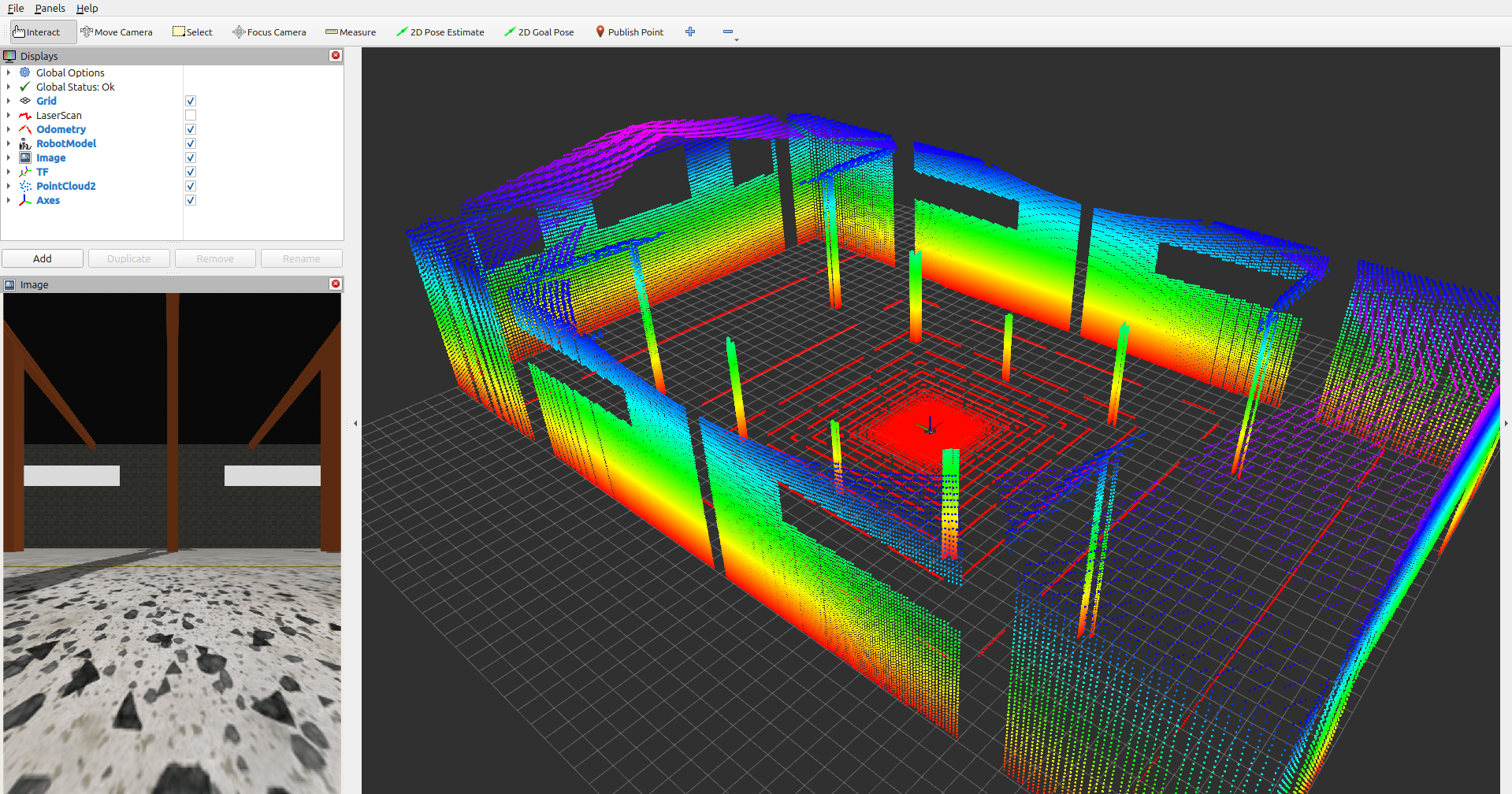
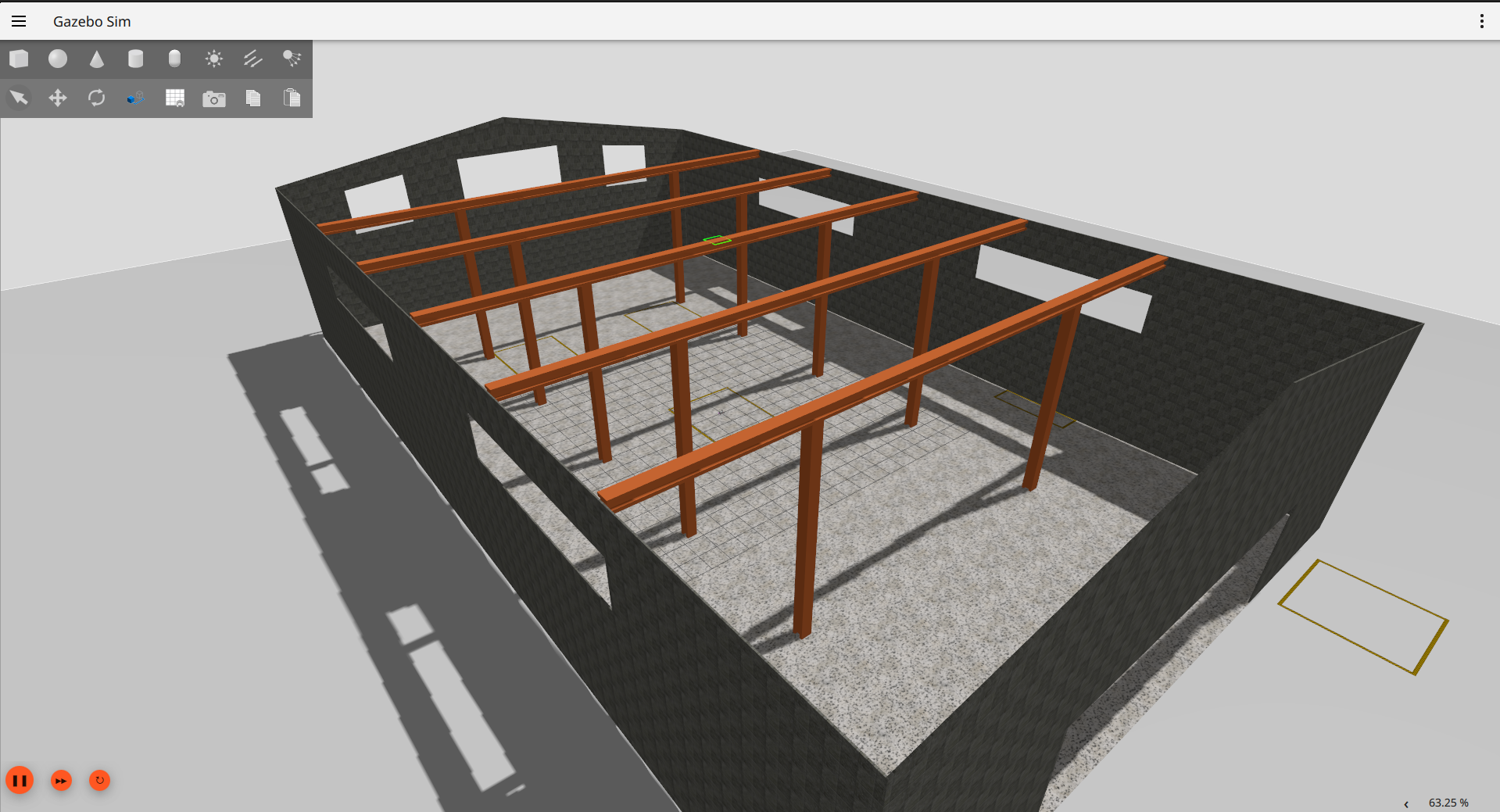
| 3D LiDAR Point Cloud Visualization | Warehouse Environment Model |
|---|---|
 |
 |
If you like this project, consider giving it a ⭐ to show your support!
Table of Contents
- Ackermann Steering Vehicle Simulation in ROS2 with Gazebo Sim Harmonic
- Features
- Requirements
- Local Installation
- Docker Installation
- Usage
- Future Work
- Gallery
- TF Tree
- Star History
Features
1. Ackermann Steering
- A custom vehicle model built with realistic Ackermann steering dynamics for accurate maneuverability.
2. ROS2 Communication
- All sensor data and control signals are fully integrated into the ROS2 ecosystem for seamless interoperability.
3. Sensors
- IMU: Provides orientation and angular velocity.
- Odometry: Ensures accurate vehicle state feedback.
- LiDAR: Mounted for obstacle detection and environmental scanning. Supports 3D point cloud generation for advanced perception tasks.
-
Cameras:
- Front-facing
- Rear-facing
- Left-side
- Right-side
Note: By default, only the front camera is bridged to ROS 2.If you want to use all cameras (left, right, rear) in ROS 2,remove the
#at the beginning of the relevant camera sections insaye_bringup/config/ros_gz_bridge.yamlto activate them (e.g.,/camera/left_raw,/camera/right_raw,/camera/rear_raw).
4. Navigation
- Integrated with the Nav2 stack for autonomous navigation.
- AMCL (Adaptive Monte Carlo Localization) for improved positional accuracy.
- SLAM techniques implemented for real-time mapping and understanding of the environment.
- Fine-tuned parameters for optimized navigation performance.
5. Manual Control (with external joystick)
- Added support for joystick-based manual control in the simulation environment, enabling users to test vehicle movement interactively.
6. Visualization
- Full model and sensor data visualization in RViz2, providing insights into robot states and environmental feedback.
Requirements
- ROS2 (Humble)
- Gazebo Sim Harmonic
- RViz2
- Nav2
Local Installation
- Your need to sure that installation of Gazebo Harmonic and ROS (ros_gz):
sudo apt-get install ros-${ROS_DISTRO}-ros-gz
sudo apt-get install ros-humble-ros-gzharmonic(Only Humble version)
More details about installation Gazebo and ROS: Link - Clone the repository:
mkdir -p ackermann_sim/src && cd ackermann_sim/src
git clone https://github.com/alitekes1/ackermann-vehicle-gzsim-ros2cd .. - Build the project:
colcon build && source install/setup.bash - Set environment variables:
   # Set environment variables for current session
   export GZ_SIM_RESOURCE_PATH=$GZ_SIM_RESOURCE_PATH:/your/path/ackermann_sim/src/ackermann-vehicle-gzsim-ros2/
   export ROS_PACKAGE_PATH=$ROS_PACKAGE_PATH:/your/path/ackermann_sim/src/ackermann-vehicle-gzsim-ros2/
For Permanent Setup:
To make these environment variables permanent, add them to your .bashrc file:
```bash # Add environment variables to .bashrc echo ‘export GZ_SIM_RESOURCE_PATH=$GZ_SIM_RESOURCE_PATH:/your/path/ackermann_sim/src/ackermann-vehicle-gzsim-ros2/’ » ~/.bashrc
File truncated at 100 lines see the full file
CONTRIBUTING
|
|
ros2-ackermann-vehicle-gz-sim-harmonic-nav2 repositorysaye_bringup saye_control saye_description saye_msgs |
ROS Distro
|
Repository Summary
| Description | |
| Checkout URI | https://github.com/alitekes1/ros2-ackermann-vehicle-gz-sim-harmonic-nav2.git |
| VCS Type | git |
| VCS Version | main |
| Last Updated | 2026-03-19 |
| Dev Status | UNKNOWN |
| Released | UNRELEASED |
| Contributing |
Help Wanted (-)
Good First Issues (-) Pull Requests to Review (-) |
Packages
| Name | Version |
|---|---|
| saye_bringup | 0.0.0 |
| saye_control | 0.0.0 |
| saye_description | 0.0.0 |
| saye_msgs | 0.0.0 |
README
Ackermann Steering Vehicle Simulation in ROS2 with Gazebo Sim Harmonic
This project features the simulation of a custom vehicle with Ackermann steering capabilities, developed using ROS2 and the Gazebo Sim Harmonic environment. The model integrates a variety of sensors and navigation tools for autonomous operation, making it one of the first implementations of an Ackermann steering vehicle in this simulation framework.
| 3D LiDAR Point Cloud Visualization | Warehouse Environment Model |
|---|---|
|
|
If you like this project, consider giving it a ⭐ to show your support!
Table of Contents
- Ackermann Steering Vehicle Simulation in ROS2 with Gazebo Sim Harmonic
- Features
- Requirements
- Local Installation
- Docker Installation
- Usage
- Future Work
- Gallery
- TF Tree
- Star History
Features
1. Ackermann Steering
- A custom vehicle model built with realistic Ackermann steering dynamics for accurate maneuverability.
2. ROS2 Communication
- All sensor data and control signals are fully integrated into the ROS2 ecosystem for seamless interoperability.
3. Sensors
- IMU: Provides orientation and angular velocity.
- Odometry: Ensures accurate vehicle state feedback.
- LiDAR: Mounted for obstacle detection and environmental scanning. Supports 3D point cloud generation for advanced perception tasks.
-
Cameras:
- Front-facing
- Rear-facing
- Left-side
- Right-side
Note: By default, only the front camera is bridged to ROS 2.If you want to use all cameras (left, right, rear) in ROS 2,remove the
#at the beginning of the relevant camera sections insaye_bringup/config/ros_gz_bridge.yamlto activate them (e.g.,/camera/left_raw,/camera/right_raw,/camera/rear_raw).
4. Navigation
- Integrated with the Nav2 stack for autonomous navigation.
- AMCL (Adaptive Monte Carlo Localization) for improved positional accuracy.
- SLAM techniques implemented for real-time mapping and understanding of the environment.
- Fine-tuned parameters for optimized navigation performance.
5. Manual Control (with external joystick)
- Added support for joystick-based manual control in the simulation environment, enabling users to test vehicle movement interactively.
6. Visualization
- Full model and sensor data visualization in RViz2, providing insights into robot states and environmental feedback.
Requirements
- ROS2 (Humble)
- Gazebo Sim Harmonic
- RViz2
- Nav2
Local Installation
- Your need to sure that installation of Gazebo Harmonic and ROS (ros_gz):
sudo apt-get install ros-${ROS_DISTRO}-ros-gz
sudo apt-get install ros-humble-ros-gzharmonic(Only Humble version)
More details about installation Gazebo and ROS: Link - Clone the repository:
mkdir -p ackermann_sim/src && cd ackermann_sim/src
git clone https://github.com/alitekes1/ackermann-vehicle-gzsim-ros2cd .. - Build the project:
colcon build && source install/setup.bash - Set environment variables:
   # Set environment variables for current session
   export GZ_SIM_RESOURCE_PATH=$GZ_SIM_RESOURCE_PATH:/your/path/ackermann_sim/src/ackermann-vehicle-gzsim-ros2/
   export ROS_PACKAGE_PATH=$ROS_PACKAGE_PATH:/your/path/ackermann_sim/src/ackermann-vehicle-gzsim-ros2/
For Permanent Setup:
To make these environment variables permanent, add them to your .bashrc file:
```bash # Add environment variables to .bashrc echo ‘export GZ_SIM_RESOURCE_PATH=$GZ_SIM_RESOURCE_PATH:/your/path/ackermann_sim/src/ackermann-vehicle-gzsim-ros2/’ » ~/.bashrc
File truncated at 100 lines see the full file
CONTRIBUTING
|
|
ros2-ackermann-vehicle-gz-sim-harmonic-nav2 repositorysaye_bringup saye_control saye_description saye_msgs |
ROS Distro
|
Repository Summary
| Description | |
| Checkout URI | https://github.com/alitekes1/ros2-ackermann-vehicle-gz-sim-harmonic-nav2.git |
| VCS Type | git |
| VCS Version | main |
| Last Updated | 2026-03-19 |
| Dev Status | UNKNOWN |
| Released | UNRELEASED |
| Contributing |
Help Wanted (-)
Good First Issues (-) Pull Requests to Review (-) |
Packages
| Name | Version |
|---|---|
| saye_bringup | 0.0.0 |
| saye_control | 0.0.0 |
| saye_description | 0.0.0 |
| saye_msgs | 0.0.0 |
README
Ackermann Steering Vehicle Simulation in ROS2 with Gazebo Sim Harmonic
This project features the simulation of a custom vehicle with Ackermann steering capabilities, developed using ROS2 and the Gazebo Sim Harmonic environment. The model integrates a variety of sensors and navigation tools for autonomous operation, making it one of the first implementations of an Ackermann steering vehicle in this simulation framework.
| 3D LiDAR Point Cloud Visualization | Warehouse Environment Model |
|---|---|
|
|
If you like this project, consider giving it a ⭐ to show your support!
Table of Contents
- Ackermann Steering Vehicle Simulation in ROS2 with Gazebo Sim Harmonic
- Features
- Requirements
- Local Installation
- Docker Installation
- Usage
- Future Work
- Gallery
- TF Tree
- Star History
Features
1. Ackermann Steering
- A custom vehicle model built with realistic Ackermann steering dynamics for accurate maneuverability.
2. ROS2 Communication
- All sensor data and control signals are fully integrated into the ROS2 ecosystem for seamless interoperability.
3. Sensors
- IMU: Provides orientation and angular velocity.
- Odometry: Ensures accurate vehicle state feedback.
- LiDAR: Mounted for obstacle detection and environmental scanning. Supports 3D point cloud generation for advanced perception tasks.
-
Cameras:
- Front-facing
- Rear-facing
- Left-side
- Right-side
Note: By default, only the front camera is bridged to ROS 2.If you want to use all cameras (left, right, rear) in ROS 2,remove the
#at the beginning of the relevant camera sections insaye_bringup/config/ros_gz_bridge.yamlto activate them (e.g.,/camera/left_raw,/camera/right_raw,/camera/rear_raw).
4. Navigation
- Integrated with the Nav2 stack for autonomous navigation.
- AMCL (Adaptive Monte Carlo Localization) for improved positional accuracy.
- SLAM techniques implemented for real-time mapping and understanding of the environment.
- Fine-tuned parameters for optimized navigation performance.
5. Manual Control (with external joystick)
- Added support for joystick-based manual control in the simulation environment, enabling users to test vehicle movement interactively.
6. Visualization
- Full model and sensor data visualization in RViz2, providing insights into robot states and environmental feedback.
Requirements
- ROS2 (Humble)
- Gazebo Sim Harmonic
- RViz2
- Nav2
Local Installation
- Your need to sure that installation of Gazebo Harmonic and ROS (ros_gz):
sudo apt-get install ros-${ROS_DISTRO}-ros-gz
sudo apt-get install ros-humble-ros-gzharmonic(Only Humble version)
More details about installation Gazebo and ROS: Link - Clone the repository:
mkdir -p ackermann_sim/src && cd ackermann_sim/src
git clone https://github.com/alitekes1/ackermann-vehicle-gzsim-ros2cd .. - Build the project:
colcon build && source install/setup.bash - Set environment variables:
   # Set environment variables for current session
   export GZ_SIM_RESOURCE_PATH=$GZ_SIM_RESOURCE_PATH:/your/path/ackermann_sim/src/ackermann-vehicle-gzsim-ros2/
   export ROS_PACKAGE_PATH=$ROS_PACKAGE_PATH:/your/path/ackermann_sim/src/ackermann-vehicle-gzsim-ros2/
For Permanent Setup:
To make these environment variables permanent, add them to your .bashrc file:
```bash # Add environment variables to .bashrc echo ‘export GZ_SIM_RESOURCE_PATH=$GZ_SIM_RESOURCE_PATH:/your/path/ackermann_sim/src/ackermann-vehicle-gzsim-ros2/’ » ~/.bashrc
File truncated at 100 lines see the full file
CONTRIBUTING
|
|
ros2-ackermann-vehicle-gz-sim-harmonic-nav2 repositorysaye_bringup saye_control saye_description saye_msgs |
ROS Distro
|
Repository Summary
| Description | |
| Checkout URI | https://github.com/alitekes1/ros2-ackermann-vehicle-gz-sim-harmonic-nav2.git |
| VCS Type | git |
| VCS Version | main |
| Last Updated | 2026-03-19 |
| Dev Status | UNKNOWN |
| Released | UNRELEASED |
| Contributing |
Help Wanted (-)
Good First Issues (-) Pull Requests to Review (-) |
Packages
| Name | Version |
|---|---|
| saye_bringup | 0.0.0 |
| saye_control | 0.0.0 |
| saye_description | 0.0.0 |
| saye_msgs | 0.0.0 |
README
Ackermann Steering Vehicle Simulation in ROS2 with Gazebo Sim Harmonic
This project features the simulation of a custom vehicle with Ackermann steering capabilities, developed using ROS2 and the Gazebo Sim Harmonic environment. The model integrates a variety of sensors and navigation tools for autonomous operation, making it one of the first implementations of an Ackermann steering vehicle in this simulation framework.
| 3D LiDAR Point Cloud Visualization | Warehouse Environment Model |
|---|---|
|
|
If you like this project, consider giving it a ⭐ to show your support!
Table of Contents
- Ackermann Steering Vehicle Simulation in ROS2 with Gazebo Sim Harmonic
- Features
- Requirements
- Local Installation
- Docker Installation
- Usage
- Future Work
- Gallery
- TF Tree
- Star History
Features
1. Ackermann Steering
- A custom vehicle model built with realistic Ackermann steering dynamics for accurate maneuverability.
2. ROS2 Communication
- All sensor data and control signals are fully integrated into the ROS2 ecosystem for seamless interoperability.
3. Sensors
- IMU: Provides orientation and angular velocity.
- Odometry: Ensures accurate vehicle state feedback.
- LiDAR: Mounted for obstacle detection and environmental scanning. Supports 3D point cloud generation for advanced perception tasks.
-
Cameras:
- Front-facing
- Rear-facing
- Left-side
- Right-side
Note: By default, only the front camera is bridged to ROS 2.If you want to use all cameras (left, right, rear) in ROS 2,remove the
#at the beginning of the relevant camera sections insaye_bringup/config/ros_gz_bridge.yamlto activate them (e.g.,/camera/left_raw,/camera/right_raw,/camera/rear_raw).
4. Navigation
- Integrated with the Nav2 stack for autonomous navigation.
- AMCL (Adaptive Monte Carlo Localization) for improved positional accuracy.
- SLAM techniques implemented for real-time mapping and understanding of the environment.
- Fine-tuned parameters for optimized navigation performance.
5. Manual Control (with external joystick)
- Added support for joystick-based manual control in the simulation environment, enabling users to test vehicle movement interactively.
6. Visualization
- Full model and sensor data visualization in RViz2, providing insights into robot states and environmental feedback.
Requirements
- ROS2 (Humble)
- Gazebo Sim Harmonic
- RViz2
- Nav2
Local Installation
- Your need to sure that installation of Gazebo Harmonic and ROS (ros_gz):
sudo apt-get install ros-${ROS_DISTRO}-ros-gz
sudo apt-get install ros-humble-ros-gzharmonic(Only Humble version)
More details about installation Gazebo and ROS: Link - Clone the repository:
mkdir -p ackermann_sim/src && cd ackermann_sim/src
git clone https://github.com/alitekes1/ackermann-vehicle-gzsim-ros2cd .. - Build the project:
colcon build && source install/setup.bash - Set environment variables:
   # Set environment variables for current session
   export GZ_SIM_RESOURCE_PATH=$GZ_SIM_RESOURCE_PATH:/your/path/ackermann_sim/src/ackermann-vehicle-gzsim-ros2/
   export ROS_PACKAGE_PATH=$ROS_PACKAGE_PATH:/your/path/ackermann_sim/src/ackermann-vehicle-gzsim-ros2/
For Permanent Setup:
To make these environment variables permanent, add them to your .bashrc file:
```bash # Add environment variables to .bashrc echo ‘export GZ_SIM_RESOURCE_PATH=$GZ_SIM_RESOURCE_PATH:/your/path/ackermann_sim/src/ackermann-vehicle-gzsim-ros2/’ » ~/.bashrc
File truncated at 100 lines see the full file
CONTRIBUTING
|
|
ros2-ackermann-vehicle-gz-sim-harmonic-nav2 repositorysaye_bringup saye_control saye_description saye_msgs |
ROS Distro
|
Repository Summary
| Description | |
| Checkout URI | https://github.com/alitekes1/ros2-ackermann-vehicle-gz-sim-harmonic-nav2.git |
| VCS Type | git |
| VCS Version | main |
| Last Updated | 2026-03-19 |
| Dev Status | UNKNOWN |
| Released | UNRELEASED |
| Contributing |
Help Wanted (-)
Good First Issues (-) Pull Requests to Review (-) |
Packages
| Name | Version |
|---|---|
| saye_bringup | 0.0.0 |
| saye_control | 0.0.0 |
| saye_description | 0.0.0 |
| saye_msgs | 0.0.0 |
README
Ackermann Steering Vehicle Simulation in ROS2 with Gazebo Sim Harmonic
This project features the simulation of a custom vehicle with Ackermann steering capabilities, developed using ROS2 and the Gazebo Sim Harmonic environment. The model integrates a variety of sensors and navigation tools for autonomous operation, making it one of the first implementations of an Ackermann steering vehicle in this simulation framework.
| 3D LiDAR Point Cloud Visualization | Warehouse Environment Model |
|---|---|
|
|
If you like this project, consider giving it a ⭐ to show your support!
Table of Contents
- Ackermann Steering Vehicle Simulation in ROS2 with Gazebo Sim Harmonic
- Features
- Requirements
- Local Installation
- Docker Installation
- Usage
- Future Work
- Gallery
- TF Tree
- Star History
Features
1. Ackermann Steering
- A custom vehicle model built with realistic Ackermann steering dynamics for accurate maneuverability.
2. ROS2 Communication
- All sensor data and control signals are fully integrated into the ROS2 ecosystem for seamless interoperability.
3. Sensors
- IMU: Provides orientation and angular velocity.
- Odometry: Ensures accurate vehicle state feedback.
- LiDAR: Mounted for obstacle detection and environmental scanning. Supports 3D point cloud generation for advanced perception tasks.
-
Cameras:
- Front-facing
- Rear-facing
- Left-side
- Right-side
Note: By default, only the front camera is bridged to ROS 2.If you want to use all cameras (left, right, rear) in ROS 2,remove the
#at the beginning of the relevant camera sections insaye_bringup/config/ros_gz_bridge.yamlto activate them (e.g.,/camera/left_raw,/camera/right_raw,/camera/rear_raw).
4. Navigation
- Integrated with the Nav2 stack for autonomous navigation.
- AMCL (Adaptive Monte Carlo Localization) for improved positional accuracy.
- SLAM techniques implemented for real-time mapping and understanding of the environment.
- Fine-tuned parameters for optimized navigation performance.
5. Manual Control (with external joystick)
- Added support for joystick-based manual control in the simulation environment, enabling users to test vehicle movement interactively.
6. Visualization
- Full model and sensor data visualization in RViz2, providing insights into robot states and environmental feedback.
Requirements
- ROS2 (Humble)
- Gazebo Sim Harmonic
- RViz2
- Nav2
Local Installation
- Your need to sure that installation of Gazebo Harmonic and ROS (ros_gz):
sudo apt-get install ros-${ROS_DISTRO}-ros-gz
sudo apt-get install ros-humble-ros-gzharmonic(Only Humble version)
More details about installation Gazebo and ROS: Link - Clone the repository:
mkdir -p ackermann_sim/src && cd ackermann_sim/src
git clone https://github.com/alitekes1/ackermann-vehicle-gzsim-ros2cd .. - Build the project:
colcon build && source install/setup.bash - Set environment variables:
   # Set environment variables for current session
   export GZ_SIM_RESOURCE_PATH=$GZ_SIM_RESOURCE_PATH:/your/path/ackermann_sim/src/ackermann-vehicle-gzsim-ros2/
   export ROS_PACKAGE_PATH=$ROS_PACKAGE_PATH:/your/path/ackermann_sim/src/ackermann-vehicle-gzsim-ros2/
For Permanent Setup:
To make these environment variables permanent, add them to your .bashrc file:
```bash # Add environment variables to .bashrc echo ‘export GZ_SIM_RESOURCE_PATH=$GZ_SIM_RESOURCE_PATH:/your/path/ackermann_sim/src/ackermann-vehicle-gzsim-ros2/’ » ~/.bashrc
File truncated at 100 lines see the full file
CONTRIBUTING
|
|
ros2-ackermann-vehicle-gz-sim-harmonic-nav2 repositorysaye_bringup saye_control saye_description saye_msgs |
ROS Distro
|
Repository Summary
| Description | |
| Checkout URI | https://github.com/alitekes1/ros2-ackermann-vehicle-gz-sim-harmonic-nav2.git |
| VCS Type | git |
| VCS Version | main |
| Last Updated | 2026-03-19 |
| Dev Status | UNKNOWN |
| Released | UNRELEASED |
| Contributing |
Help Wanted (-)
Good First Issues (-) Pull Requests to Review (-) |
Packages
| Name | Version |
|---|---|
| saye_bringup | 0.0.0 |
| saye_control | 0.0.0 |
| saye_description | 0.0.0 |
| saye_msgs | 0.0.0 |
README
Ackermann Steering Vehicle Simulation in ROS2 with Gazebo Sim Harmonic
This project features the simulation of a custom vehicle with Ackermann steering capabilities, developed using ROS2 and the Gazebo Sim Harmonic environment. The model integrates a variety of sensors and navigation tools for autonomous operation, making it one of the first implementations of an Ackermann steering vehicle in this simulation framework.
| 3D LiDAR Point Cloud Visualization | Warehouse Environment Model |
|---|---|
|
|
If you like this project, consider giving it a ⭐ to show your support!
Table of Contents
- Ackermann Steering Vehicle Simulation in ROS2 with Gazebo Sim Harmonic
- Features
- Requirements
- Local Installation
- Docker Installation
- Usage
- Future Work
- Gallery
- TF Tree
- Star History
Features
1. Ackermann Steering
- A custom vehicle model built with realistic Ackermann steering dynamics for accurate maneuverability.
2. ROS2 Communication
- All sensor data and control signals are fully integrated into the ROS2 ecosystem for seamless interoperability.
3. Sensors
- IMU: Provides orientation and angular velocity.
- Odometry: Ensures accurate vehicle state feedback.
- LiDAR: Mounted for obstacle detection and environmental scanning. Supports 3D point cloud generation for advanced perception tasks.
-
Cameras:
- Front-facing
- Rear-facing
- Left-side
- Right-side
Note: By default, only the front camera is bridged to ROS 2.If you want to use all cameras (left, right, rear) in ROS 2,remove the
#at the beginning of the relevant camera sections insaye_bringup/config/ros_gz_bridge.yamlto activate them (e.g.,/camera/left_raw,/camera/right_raw,/camera/rear_raw).
4. Navigation
- Integrated with the Nav2 stack for autonomous navigation.
- AMCL (Adaptive Monte Carlo Localization) for improved positional accuracy.
- SLAM techniques implemented for real-time mapping and understanding of the environment.
- Fine-tuned parameters for optimized navigation performance.
5. Manual Control (with external joystick)
- Added support for joystick-based manual control in the simulation environment, enabling users to test vehicle movement interactively.
6. Visualization
- Full model and sensor data visualization in RViz2, providing insights into robot states and environmental feedback.
Requirements
- ROS2 (Humble)
- Gazebo Sim Harmonic
- RViz2
- Nav2
Local Installation
- Your need to sure that installation of Gazebo Harmonic and ROS (ros_gz):
sudo apt-get install ros-${ROS_DISTRO}-ros-gz
sudo apt-get install ros-humble-ros-gzharmonic(Only Humble version)
More details about installation Gazebo and ROS: Link - Clone the repository:
mkdir -p ackermann_sim/src && cd ackermann_sim/src
git clone https://github.com/alitekes1/ackermann-vehicle-gzsim-ros2cd .. - Build the project:
colcon build && source install/setup.bash - Set environment variables:
   # Set environment variables for current session
   export GZ_SIM_RESOURCE_PATH=$GZ_SIM_RESOURCE_PATH:/your/path/ackermann_sim/src/ackermann-vehicle-gzsim-ros2/
   export ROS_PACKAGE_PATH=$ROS_PACKAGE_PATH:/your/path/ackermann_sim/src/ackermann-vehicle-gzsim-ros2/
For Permanent Setup:
To make these environment variables permanent, add them to your .bashrc file:
```bash # Add environment variables to .bashrc echo ‘export GZ_SIM_RESOURCE_PATH=$GZ_SIM_RESOURCE_PATH:/your/path/ackermann_sim/src/ackermann-vehicle-gzsim-ros2/’ » ~/.bashrc
File truncated at 100 lines see the full file
CONTRIBUTING
|
|
ros2-ackermann-vehicle-gz-sim-harmonic-nav2 repositorysaye_bringup saye_control saye_description saye_msgs |
ROS Distro
|
Repository Summary
| Description | |
| Checkout URI | https://github.com/alitekes1/ros2-ackermann-vehicle-gz-sim-harmonic-nav2.git |
| VCS Type | git |
| VCS Version | main |
| Last Updated | 2026-03-19 |
| Dev Status | UNKNOWN |
| Released | UNRELEASED |
| Contributing |
Help Wanted (-)
Good First Issues (-) Pull Requests to Review (-) |
Packages
| Name | Version |
|---|---|
| saye_bringup | 0.0.0 |
| saye_control | 0.0.0 |
| saye_description | 0.0.0 |
| saye_msgs | 0.0.0 |
README
Ackermann Steering Vehicle Simulation in ROS2 with Gazebo Sim Harmonic
This project features the simulation of a custom vehicle with Ackermann steering capabilities, developed using ROS2 and the Gazebo Sim Harmonic environment. The model integrates a variety of sensors and navigation tools for autonomous operation, making it one of the first implementations of an Ackermann steering vehicle in this simulation framework.
| 3D LiDAR Point Cloud Visualization | Warehouse Environment Model |
|---|---|
|
|
If you like this project, consider giving it a ⭐ to show your support!
Table of Contents
- Ackermann Steering Vehicle Simulation in ROS2 with Gazebo Sim Harmonic
- Features
- Requirements
- Local Installation
- Docker Installation
- Usage
- Future Work
- Gallery
- TF Tree
- Star History
Features
1. Ackermann Steering
- A custom vehicle model built with realistic Ackermann steering dynamics for accurate maneuverability.
2. ROS2 Communication
- All sensor data and control signals are fully integrated into the ROS2 ecosystem for seamless interoperability.
3. Sensors
- IMU: Provides orientation and angular velocity.
- Odometry: Ensures accurate vehicle state feedback.
- LiDAR: Mounted for obstacle detection and environmental scanning. Supports 3D point cloud generation for advanced perception tasks.
-
Cameras:
- Front-facing
- Rear-facing
- Left-side
- Right-side
Note: By default, only the front camera is bridged to ROS 2.If you want to use all cameras (left, right, rear) in ROS 2,remove the
#at the beginning of the relevant camera sections insaye_bringup/config/ros_gz_bridge.yamlto activate them (e.g.,/camera/left_raw,/camera/right_raw,/camera/rear_raw).
4. Navigation
- Integrated with the Nav2 stack for autonomous navigation.
- AMCL (Adaptive Monte Carlo Localization) for improved positional accuracy.
- SLAM techniques implemented for real-time mapping and understanding of the environment.
- Fine-tuned parameters for optimized navigation performance.
5. Manual Control (with external joystick)
- Added support for joystick-based manual control in the simulation environment, enabling users to test vehicle movement interactively.
6. Visualization
- Full model and sensor data visualization in RViz2, providing insights into robot states and environmental feedback.
Requirements
- ROS2 (Humble)
- Gazebo Sim Harmonic
- RViz2
- Nav2
Local Installation
- Your need to sure that installation of Gazebo Harmonic and ROS (ros_gz):
sudo apt-get install ros-${ROS_DISTRO}-ros-gz
sudo apt-get install ros-humble-ros-gzharmonic(Only Humble version)
More details about installation Gazebo and ROS: Link - Clone the repository:
mkdir -p ackermann_sim/src && cd ackermann_sim/src
git clone https://github.com/alitekes1/ackermann-vehicle-gzsim-ros2cd .. - Build the project:
colcon build && source install/setup.bash - Set environment variables:
   # Set environment variables for current session
   export GZ_SIM_RESOURCE_PATH=$GZ_SIM_RESOURCE_PATH:/your/path/ackermann_sim/src/ackermann-vehicle-gzsim-ros2/
   export ROS_PACKAGE_PATH=$ROS_PACKAGE_PATH:/your/path/ackermann_sim/src/ackermann-vehicle-gzsim-ros2/
For Permanent Setup:
To make these environment variables permanent, add them to your .bashrc file:
```bash # Add environment variables to .bashrc echo ‘export GZ_SIM_RESOURCE_PATH=$GZ_SIM_RESOURCE_PATH:/your/path/ackermann_sim/src/ackermann-vehicle-gzsim-ros2/’ » ~/.bashrc
File truncated at 100 lines see the full file
CONTRIBUTING
|
|
ros2-ackermann-vehicle-gz-sim-harmonic-nav2 repositorysaye_bringup saye_control saye_description saye_msgs |
ROS Distro
|
Repository Summary
| Description | |
| Checkout URI | https://github.com/alitekes1/ros2-ackermann-vehicle-gz-sim-harmonic-nav2.git |
| VCS Type | git |
| VCS Version | main |
| Last Updated | 2026-03-19 |
| Dev Status | UNKNOWN |
| Released | UNRELEASED |
| Contributing |
Help Wanted (-)
Good First Issues (-) Pull Requests to Review (-) |
Packages
| Name | Version |
|---|---|
| saye_bringup | 0.0.0 |
| saye_control | 0.0.0 |
| saye_description | 0.0.0 |
| saye_msgs | 0.0.0 |
README
Ackermann Steering Vehicle Simulation in ROS2 with Gazebo Sim Harmonic
This project features the simulation of a custom vehicle with Ackermann steering capabilities, developed using ROS2 and the Gazebo Sim Harmonic environment. The model integrates a variety of sensors and navigation tools for autonomous operation, making it one of the first implementations of an Ackermann steering vehicle in this simulation framework.
| 3D LiDAR Point Cloud Visualization | Warehouse Environment Model |
|---|---|
|
|
If you like this project, consider giving it a ⭐ to show your support!
Table of Contents
- Ackermann Steering Vehicle Simulation in ROS2 with Gazebo Sim Harmonic
- Features
- Requirements
- Local Installation
- Docker Installation
- Usage
- Future Work
- Gallery
- TF Tree
- Star History
Features
1. Ackermann Steering
- A custom vehicle model built with realistic Ackermann steering dynamics for accurate maneuverability.
2. ROS2 Communication
- All sensor data and control signals are fully integrated into the ROS2 ecosystem for seamless interoperability.
3. Sensors
- IMU: Provides orientation and angular velocity.
- Odometry: Ensures accurate vehicle state feedback.
- LiDAR: Mounted for obstacle detection and environmental scanning. Supports 3D point cloud generation for advanced perception tasks.
-
Cameras:
- Front-facing
- Rear-facing
- Left-side
- Right-side
Note: By default, only the front camera is bridged to ROS 2.If you want to use all cameras (left, right, rear) in ROS 2,remove the
#at the beginning of the relevant camera sections insaye_bringup/config/ros_gz_bridge.yamlto activate them (e.g.,/camera/left_raw,/camera/right_raw,/camera/rear_raw).
4. Navigation
- Integrated with the Nav2 stack for autonomous navigation.
- AMCL (Adaptive Monte Carlo Localization) for improved positional accuracy.
- SLAM techniques implemented for real-time mapping and understanding of the environment.
- Fine-tuned parameters for optimized navigation performance.
5. Manual Control (with external joystick)
- Added support for joystick-based manual control in the simulation environment, enabling users to test vehicle movement interactively.
6. Visualization
- Full model and sensor data visualization in RViz2, providing insights into robot states and environmental feedback.
Requirements
- ROS2 (Humble)
- Gazebo Sim Harmonic
- RViz2
- Nav2
Local Installation
- Your need to sure that installation of Gazebo Harmonic and ROS (ros_gz):
sudo apt-get install ros-${ROS_DISTRO}-ros-gz
sudo apt-get install ros-humble-ros-gzharmonic(Only Humble version)
More details about installation Gazebo and ROS: Link - Clone the repository:
mkdir -p ackermann_sim/src && cd ackermann_sim/src
git clone https://github.com/alitekes1/ackermann-vehicle-gzsim-ros2cd .. - Build the project:
colcon build && source install/setup.bash - Set environment variables:
   # Set environment variables for current session
   export GZ_SIM_RESOURCE_PATH=$GZ_SIM_RESOURCE_PATH:/your/path/ackermann_sim/src/ackermann-vehicle-gzsim-ros2/
   export ROS_PACKAGE_PATH=$ROS_PACKAGE_PATH:/your/path/ackermann_sim/src/ackermann-vehicle-gzsim-ros2/
For Permanent Setup:
To make these environment variables permanent, add them to your .bashrc file:
```bash # Add environment variables to .bashrc echo ‘export GZ_SIM_RESOURCE_PATH=$GZ_SIM_RESOURCE_PATH:/your/path/ackermann_sim/src/ackermann-vehicle-gzsim-ros2/’ » ~/.bashrc
File truncated at 100 lines see the full file
CONTRIBUTING
|
|
ros2-ackermann-vehicle-gz-sim-harmonic-nav2 repositorysaye_bringup saye_control saye_description saye_msgs |
ROS Distro
|
Repository Summary
| Description | |
| Checkout URI | https://github.com/alitekes1/ros2-ackermann-vehicle-gz-sim-harmonic-nav2.git |
| VCS Type | git |
| VCS Version | main |
| Last Updated | 2026-03-19 |
| Dev Status | UNKNOWN |
| Released | UNRELEASED |
| Contributing |
Help Wanted (-)
Good First Issues (-) Pull Requests to Review (-) |
Packages
| Name | Version |
|---|---|
| saye_bringup | 0.0.0 |
| saye_control | 0.0.0 |
| saye_description | 0.0.0 |
| saye_msgs | 0.0.0 |
README
Ackermann Steering Vehicle Simulation in ROS2 with Gazebo Sim Harmonic
This project features the simulation of a custom vehicle with Ackermann steering capabilities, developed using ROS2 and the Gazebo Sim Harmonic environment. The model integrates a variety of sensors and navigation tools for autonomous operation, making it one of the first implementations of an Ackermann steering vehicle in this simulation framework.
| 3D LiDAR Point Cloud Visualization | Warehouse Environment Model |
|---|---|
|
|
If you like this project, consider giving it a ⭐ to show your support!
Table of Contents
- Ackermann Steering Vehicle Simulation in ROS2 with Gazebo Sim Harmonic
- Features
- Requirements
- Local Installation
- Docker Installation
- Usage
- Future Work
- Gallery
- TF Tree
- Star History
Features
1. Ackermann Steering
- A custom vehicle model built with realistic Ackermann steering dynamics for accurate maneuverability.
2. ROS2 Communication
- All sensor data and control signals are fully integrated into the ROS2 ecosystem for seamless interoperability.
3. Sensors
- IMU: Provides orientation and angular velocity.
- Odometry: Ensures accurate vehicle state feedback.
- LiDAR: Mounted for obstacle detection and environmental scanning. Supports 3D point cloud generation for advanced perception tasks.
-
Cameras:
- Front-facing
- Rear-facing
- Left-side
- Right-side
Note: By default, only the front camera is bridged to ROS 2.If you want to use all cameras (left, right, rear) in ROS 2,remove the
#at the beginning of the relevant camera sections insaye_bringup/config/ros_gz_bridge.yamlto activate them (e.g.,/camera/left_raw,/camera/right_raw,/camera/rear_raw).
4. Navigation
- Integrated with the Nav2 stack for autonomous navigation.
- AMCL (Adaptive Monte Carlo Localization) for improved positional accuracy.
- SLAM techniques implemented for real-time mapping and understanding of the environment.
- Fine-tuned parameters for optimized navigation performance.
5. Manual Control (with external joystick)
- Added support for joystick-based manual control in the simulation environment, enabling users to test vehicle movement interactively.
6. Visualization
- Full model and sensor data visualization in RViz2, providing insights into robot states and environmental feedback.
Requirements
- ROS2 (Humble)
- Gazebo Sim Harmonic
- RViz2
- Nav2
Local Installation
- Your need to sure that installation of Gazebo Harmonic and ROS (ros_gz):
sudo apt-get install ros-${ROS_DISTRO}-ros-gz
sudo apt-get install ros-humble-ros-gzharmonic(Only Humble version)
More details about installation Gazebo and ROS: Link - Clone the repository:
mkdir -p ackermann_sim/src && cd ackermann_sim/src
git clone https://github.com/alitekes1/ackermann-vehicle-gzsim-ros2cd .. - Build the project:
colcon build && source install/setup.bash - Set environment variables:
   # Set environment variables for current session
   export GZ_SIM_RESOURCE_PATH=$GZ_SIM_RESOURCE_PATH:/your/path/ackermann_sim/src/ackermann-vehicle-gzsim-ros2/
   export ROS_PACKAGE_PATH=$ROS_PACKAGE_PATH:/your/path/ackermann_sim/src/ackermann-vehicle-gzsim-ros2/
For Permanent Setup:
To make these environment variables permanent, add them to your .bashrc file:
```bash # Add environment variables to .bashrc echo ‘export GZ_SIM_RESOURCE_PATH=$GZ_SIM_RESOURCE_PATH:/your/path/ackermann_sim/src/ackermann-vehicle-gzsim-ros2/’ » ~/.bashrc
File truncated at 100 lines see the full file