 ROS Index

|
ros2-tools-to-use-unity-like-gazebo repositorydiffbot_description unity_diffbot_sim unity_ros2_scripts velocity_pub |
ROS Distro
|
Repository Summary
| Description | |
| Checkout URI | https://github.com/hijimasa/ros2-tools-to-use-unity-like-gazebo.git |
| VCS Type | git |
| VCS Version | main |
| Last Updated | 2024-12-04 |
| Dev Status | UNKNOWN |
| Released | UNRELEASED |
| Contributing |
Help Wanted (-)
Good First Issues (-) Pull Requests to Review (-) |
Packages
| Name | Version |
|---|---|
| diffbot_description | 0.0.0 |
| unity_diffbot_sim | 0.0.0 |
| unity_ros2_scripts | 0.0.0 |
| velocity_pub | 0.0.0 |
README
ros2-tools-to-use-unity-like-gazebo
English | 日本語
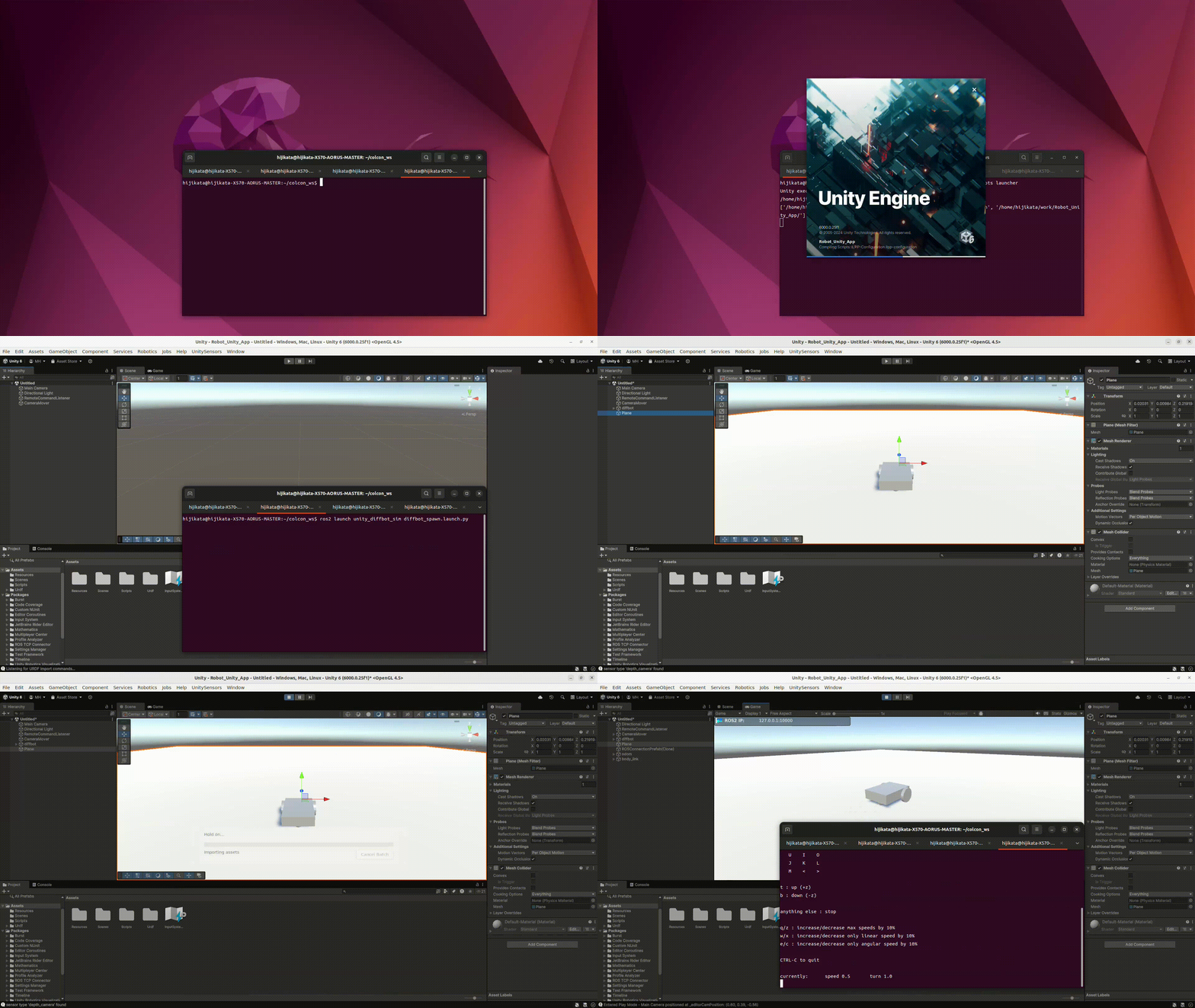
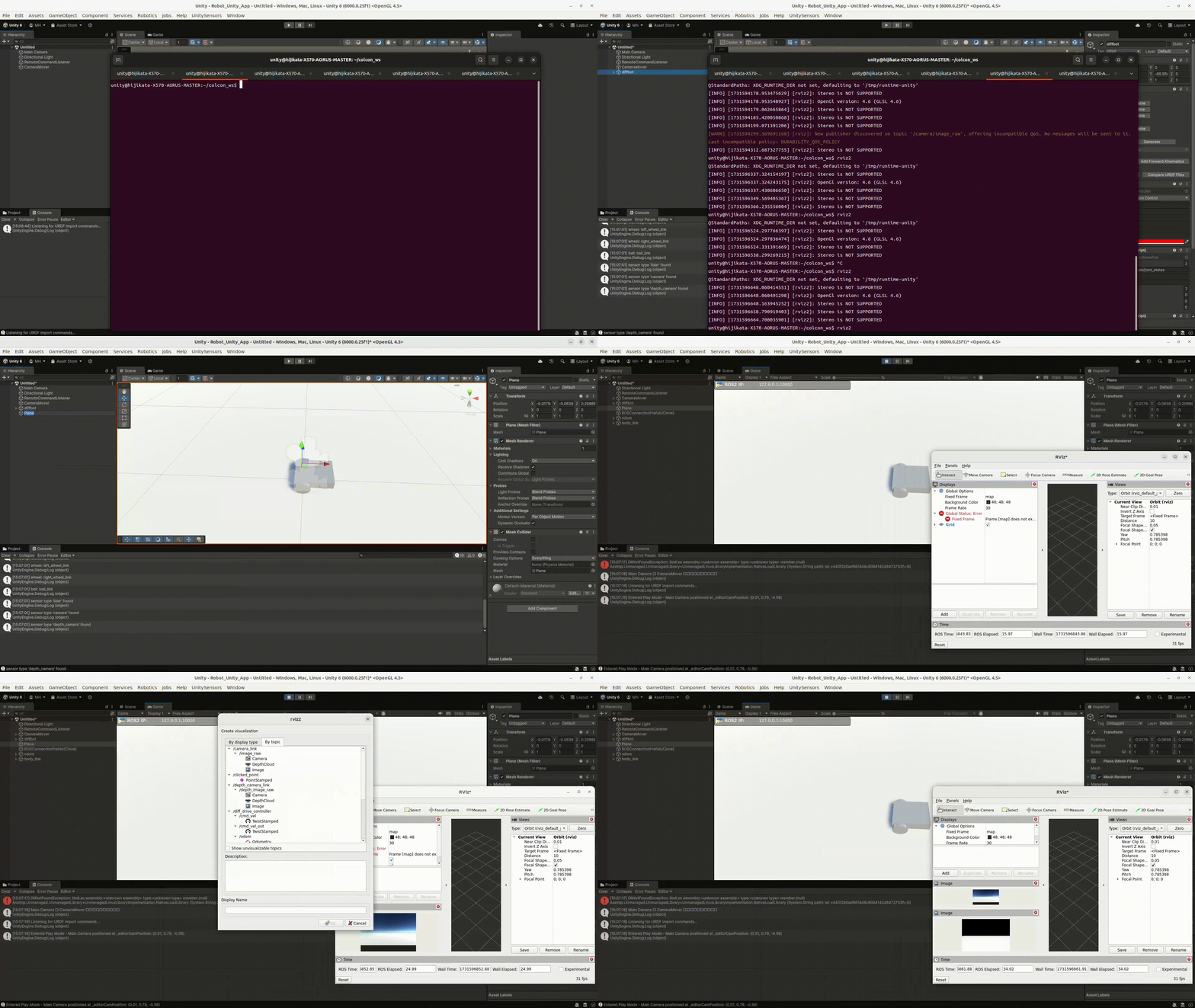
This repository shows how to control the robot from ros2_control to make Unity easier to use. “unity_ros2_scripts” has the python script to launch and control Unity.
The features of this repository are below:
- This shows how to control a robot on Unity with ros2_control.
- This provides a Dockerfile where Unity and ROS2 Humble can coexist.
- This currently supports prismatic and rotational joints using position and velocity control.
- This sends joint status (position, velocity and effort) to ros2_control from Unity.
- This spawns URDF model at the desired timing and position.
- This sets stiffness, damping and friction from URDF description.
Prerequisite
- Docker
- Unity account
Prepare Docker container
- Clone this repository
git clone https://github.com/hijimasa/ros2-tools-to-use-unity-like-gazebo.git
- Initialize Git submodule
   cd ros2-tools-to-use-unity-like-gazebo/
   git submodule update --init --recursive
- Move to docker directory
cd docker
- Build docker image
./build-dokcer-image.bash
- Run docker container
./run-docker-container.bash
- Run UnityHub
unityhub
- Sign in Unity
How to Use
Tips: Use below command to launch another docker terminal
docker exec -it ros-humble-unity /bin/bash
- launch Unity.
ros2 run unity_ros2_scripts launcher
- Import URDF.
ros2 launch unity_diffbot_sim diffbot_spawn.launch.py
- launch ros_tcp_endpoint
ros2 run ros_tcp_endpoint default_server_endpoint --ros-args -p ROS_IP:=0.0.0.0
-
Add “3D Object Plane” to use ground plane.
-
Run Simulation
-
launch teleop_twist_keyboard
ros2 run teleop_twist_keyboard teleop_twist_keyboard
CONTRIBUTING
|
|
ros2-tools-to-use-unity-like-gazebo repositorydiffbot_description unity_diffbot_sim unity_ros2_scripts velocity_pub |
ROS Distro
|
Repository Summary
| Description | |
| Checkout URI | https://github.com/hijimasa/ros2-tools-to-use-unity-like-gazebo.git |
| VCS Type | git |
| VCS Version | main |
| Last Updated | 2024-12-04 |
| Dev Status | UNKNOWN |
| Released | UNRELEASED |
| Contributing |
Help Wanted (-)
Good First Issues (-) Pull Requests to Review (-) |
Packages
| Name | Version |
|---|---|
| diffbot_description | 0.0.0 |
| unity_diffbot_sim | 0.0.0 |
| unity_ros2_scripts | 0.0.0 |
| velocity_pub | 0.0.0 |
README
ros2-tools-to-use-unity-like-gazebo
English | 日本語
This repository shows how to control the robot from ros2_control to make Unity easier to use. “unity_ros2_scripts” has the python script to launch and control Unity.
The features of this repository are below:
- This shows how to control a robot on Unity with ros2_control.
- This provides a Dockerfile where Unity and ROS2 Humble can coexist.
- This currently supports prismatic and rotational joints using position and velocity control.
- This sends joint status (position, velocity and effort) to ros2_control from Unity.
- This spawns URDF model at the desired timing and position.
- This sets stiffness, damping and friction from URDF description.
Prerequisite
- Docker
- Unity account
Prepare Docker container
- Clone this repository
git clone https://github.com/hijimasa/ros2-tools-to-use-unity-like-gazebo.git
- Initialize Git submodule
   cd ros2-tools-to-use-unity-like-gazebo/
   git submodule update --init --recursive
- Move to docker directory
cd docker
- Build docker image
./build-dokcer-image.bash
- Run docker container
./run-docker-container.bash
- Run UnityHub
unityhub
- Sign in Unity
How to Use
Tips: Use below command to launch another docker terminal
docker exec -it ros-humble-unity /bin/bash
- launch Unity.
ros2 run unity_ros2_scripts launcher
- Import URDF.
ros2 launch unity_diffbot_sim diffbot_spawn.launch.py
- launch ros_tcp_endpoint
ros2 run ros_tcp_endpoint default_server_endpoint --ros-args -p ROS_IP:=0.0.0.0
-
Add “3D Object Plane” to use ground plane.
-
Run Simulation
-
launch teleop_twist_keyboard
ros2 run teleop_twist_keyboard teleop_twist_keyboard
CONTRIBUTING
|
|
ros2-tools-to-use-unity-like-gazebo repositorydiffbot_description unity_diffbot_sim unity_ros2_scripts velocity_pub |
ROS Distro
|
Repository Summary
| Description | |
| Checkout URI | https://github.com/hijimasa/ros2-tools-to-use-unity-like-gazebo.git |
| VCS Type | git |
| VCS Version | main |
| Last Updated | 2024-12-04 |
| Dev Status | UNKNOWN |
| Released | UNRELEASED |
| Contributing |
Help Wanted (-)
Good First Issues (-) Pull Requests to Review (-) |
Packages
| Name | Version |
|---|---|
| diffbot_description | 0.0.0 |
| unity_diffbot_sim | 0.0.0 |
| unity_ros2_scripts | 0.0.0 |
| velocity_pub | 0.0.0 |
README
ros2-tools-to-use-unity-like-gazebo
English | 日本語
This repository shows how to control the robot from ros2_control to make Unity easier to use. “unity_ros2_scripts” has the python script to launch and control Unity.
The features of this repository are below:
- This shows how to control a robot on Unity with ros2_control.
- This provides a Dockerfile where Unity and ROS2 Humble can coexist.
- This currently supports prismatic and rotational joints using position and velocity control.
- This sends joint status (position, velocity and effort) to ros2_control from Unity.
- This spawns URDF model at the desired timing and position.
- This sets stiffness, damping and friction from URDF description.
Prerequisite
- Docker
- Unity account
Prepare Docker container
- Clone this repository
git clone https://github.com/hijimasa/ros2-tools-to-use-unity-like-gazebo.git
- Initialize Git submodule
   cd ros2-tools-to-use-unity-like-gazebo/
   git submodule update --init --recursive
- Move to docker directory
cd docker
- Build docker image
./build-dokcer-image.bash
- Run docker container
./run-docker-container.bash
- Run UnityHub
unityhub
- Sign in Unity
How to Use
Tips: Use below command to launch another docker terminal
docker exec -it ros-humble-unity /bin/bash
- launch Unity.
ros2 run unity_ros2_scripts launcher
- Import URDF.
ros2 launch unity_diffbot_sim diffbot_spawn.launch.py
- launch ros_tcp_endpoint
ros2 run ros_tcp_endpoint default_server_endpoint --ros-args -p ROS_IP:=0.0.0.0
-
Add “3D Object Plane” to use ground plane.
-
Run Simulation
-
launch teleop_twist_keyboard
ros2 run teleop_twist_keyboard teleop_twist_keyboard
CONTRIBUTING
|
|
ros2-tools-to-use-unity-like-gazebo repositorydiffbot_description unity_diffbot_sim unity_ros2_scripts velocity_pub |
ROS Distro
|
Repository Summary
| Description | |
| Checkout URI | https://github.com/hijimasa/ros2-tools-to-use-unity-like-gazebo.git |
| VCS Type | git |
| VCS Version | main |
| Last Updated | 2024-12-04 |
| Dev Status | UNKNOWN |
| Released | UNRELEASED |
| Contributing |
Help Wanted (-)
Good First Issues (-) Pull Requests to Review (-) |
Packages
| Name | Version |
|---|---|
| diffbot_description | 0.0.0 |
| unity_diffbot_sim | 0.0.0 |
| unity_ros2_scripts | 0.0.0 |
| velocity_pub | 0.0.0 |
README
ros2-tools-to-use-unity-like-gazebo
English | 日本語
This repository shows how to control the robot from ros2_control to make Unity easier to use. “unity_ros2_scripts” has the python script to launch and control Unity.
The features of this repository are below:
- This shows how to control a robot on Unity with ros2_control.
- This provides a Dockerfile where Unity and ROS2 Humble can coexist.
- This currently supports prismatic and rotational joints using position and velocity control.
- This sends joint status (position, velocity and effort) to ros2_control from Unity.
- This spawns URDF model at the desired timing and position.
- This sets stiffness, damping and friction from URDF description.
Prerequisite
- Docker
- Unity account
Prepare Docker container
- Clone this repository
git clone https://github.com/hijimasa/ros2-tools-to-use-unity-like-gazebo.git
- Initialize Git submodule
   cd ros2-tools-to-use-unity-like-gazebo/
   git submodule update --init --recursive
- Move to docker directory
cd docker
- Build docker image
./build-dokcer-image.bash
- Run docker container
./run-docker-container.bash
- Run UnityHub
unityhub
- Sign in Unity
How to Use
Tips: Use below command to launch another docker terminal
docker exec -it ros-humble-unity /bin/bash
- launch Unity.
ros2 run unity_ros2_scripts launcher
- Import URDF.
ros2 launch unity_diffbot_sim diffbot_spawn.launch.py
- launch ros_tcp_endpoint
ros2 run ros_tcp_endpoint default_server_endpoint --ros-args -p ROS_IP:=0.0.0.0
-
Add “3D Object Plane” to use ground plane.
-
Run Simulation
-
launch teleop_twist_keyboard
ros2 run teleop_twist_keyboard teleop_twist_keyboard
CONTRIBUTING
|
|
ros2-tools-to-use-unity-like-gazebo repositorydiffbot_description unity_diffbot_sim unity_ros2_scripts velocity_pub |
ROS Distro
|
Repository Summary
| Description | |
| Checkout URI | https://github.com/hijimasa/ros2-tools-to-use-unity-like-gazebo.git |
| VCS Type | git |
| VCS Version | main |
| Last Updated | 2024-12-04 |
| Dev Status | UNKNOWN |
| Released | UNRELEASED |
| Contributing |
Help Wanted (-)
Good First Issues (-) Pull Requests to Review (-) |
Packages
| Name | Version |
|---|---|
| diffbot_description | 0.0.0 |
| unity_diffbot_sim | 0.0.0 |
| unity_ros2_scripts | 0.0.0 |
| velocity_pub | 0.0.0 |
README
ros2-tools-to-use-unity-like-gazebo
English | 日本語
This repository shows how to control the robot from ros2_control to make Unity easier to use. “unity_ros2_scripts” has the python script to launch and control Unity.
The features of this repository are below:
- This shows how to control a robot on Unity with ros2_control.
- This provides a Dockerfile where Unity and ROS2 Humble can coexist.
- This currently supports prismatic and rotational joints using position and velocity control.
- This sends joint status (position, velocity and effort) to ros2_control from Unity.
- This spawns URDF model at the desired timing and position.
- This sets stiffness, damping and friction from URDF description.
Prerequisite
- Docker
- Unity account
Prepare Docker container
- Clone this repository
git clone https://github.com/hijimasa/ros2-tools-to-use-unity-like-gazebo.git
- Initialize Git submodule
   cd ros2-tools-to-use-unity-like-gazebo/
   git submodule update --init --recursive
- Move to docker directory
cd docker
- Build docker image
./build-dokcer-image.bash
- Run docker container
./run-docker-container.bash
- Run UnityHub
unityhub
- Sign in Unity
How to Use
Tips: Use below command to launch another docker terminal
docker exec -it ros-humble-unity /bin/bash
- launch Unity.
ros2 run unity_ros2_scripts launcher
- Import URDF.
ros2 launch unity_diffbot_sim diffbot_spawn.launch.py
- launch ros_tcp_endpoint
ros2 run ros_tcp_endpoint default_server_endpoint --ros-args -p ROS_IP:=0.0.0.0
-
Add “3D Object Plane” to use ground plane.
-
Run Simulation
-
launch teleop_twist_keyboard
ros2 run teleop_twist_keyboard teleop_twist_keyboard
CONTRIBUTING
|
|
ros2-tools-to-use-unity-like-gazebo repositorydiffbot_description unity_diffbot_sim unity_ros2_scripts velocity_pub |
ROS Distro
|
Repository Summary
| Description | |
| Checkout URI | https://github.com/hijimasa/ros2-tools-to-use-unity-like-gazebo.git |
| VCS Type | git |
| VCS Version | main |
| Last Updated | 2024-12-04 |
| Dev Status | UNKNOWN |
| Released | UNRELEASED |
| Contributing |
Help Wanted (-)
Good First Issues (-) Pull Requests to Review (-) |
Packages
| Name | Version |
|---|---|
| diffbot_description | 0.0.0 |
| unity_diffbot_sim | 0.0.0 |
| unity_ros2_scripts | 0.0.0 |
| velocity_pub | 0.0.0 |
README
ros2-tools-to-use-unity-like-gazebo
English | 日本語
This repository shows how to control the robot from ros2_control to make Unity easier to use. “unity_ros2_scripts” has the python script to launch and control Unity.
The features of this repository are below:
- This shows how to control a robot on Unity with ros2_control.
- This provides a Dockerfile where Unity and ROS2 Humble can coexist.
- This currently supports prismatic and rotational joints using position and velocity control.
- This sends joint status (position, velocity and effort) to ros2_control from Unity.
- This spawns URDF model at the desired timing and position.
- This sets stiffness, damping and friction from URDF description.
Prerequisite
- Docker
- Unity account
Prepare Docker container
- Clone this repository
git clone https://github.com/hijimasa/ros2-tools-to-use-unity-like-gazebo.git
- Initialize Git submodule
   cd ros2-tools-to-use-unity-like-gazebo/
   git submodule update --init --recursive
- Move to docker directory
cd docker
- Build docker image
./build-dokcer-image.bash
- Run docker container
./run-docker-container.bash
- Run UnityHub
unityhub
- Sign in Unity
How to Use
Tips: Use below command to launch another docker terminal
docker exec -it ros-humble-unity /bin/bash
- launch Unity.
ros2 run unity_ros2_scripts launcher
- Import URDF.
ros2 launch unity_diffbot_sim diffbot_spawn.launch.py
- launch ros_tcp_endpoint
ros2 run ros_tcp_endpoint default_server_endpoint --ros-args -p ROS_IP:=0.0.0.0
-
Add “3D Object Plane” to use ground plane.
-
Run Simulation
-
launch teleop_twist_keyboard
ros2 run teleop_twist_keyboard teleop_twist_keyboard
CONTRIBUTING
|
|
ros2-tools-to-use-unity-like-gazebo repositorydiffbot_description unity_diffbot_sim unity_ros2_scripts velocity_pub |
ROS Distro
|
Repository Summary
| Description | |
| Checkout URI | https://github.com/hijimasa/ros2-tools-to-use-unity-like-gazebo.git |
| VCS Type | git |
| VCS Version | main |
| Last Updated | 2024-12-04 |
| Dev Status | UNKNOWN |
| Released | UNRELEASED |
| Contributing |
Help Wanted (-)
Good First Issues (-) Pull Requests to Review (-) |
Packages
| Name | Version |
|---|---|
| diffbot_description | 0.0.0 |
| unity_diffbot_sim | 0.0.0 |
| unity_ros2_scripts | 0.0.0 |
| velocity_pub | 0.0.0 |
README
ros2-tools-to-use-unity-like-gazebo
English | 日本語
This repository shows how to control the robot from ros2_control to make Unity easier to use. “unity_ros2_scripts” has the python script to launch and control Unity.
The features of this repository are below:
- This shows how to control a robot on Unity with ros2_control.
- This provides a Dockerfile where Unity and ROS2 Humble can coexist.
- This currently supports prismatic and rotational joints using position and velocity control.
- This sends joint status (position, velocity and effort) to ros2_control from Unity.
- This spawns URDF model at the desired timing and position.
- This sets stiffness, damping and friction from URDF description.
Prerequisite
- Docker
- Unity account
Prepare Docker container
- Clone this repository
git clone https://github.com/hijimasa/ros2-tools-to-use-unity-like-gazebo.git
- Initialize Git submodule
   cd ros2-tools-to-use-unity-like-gazebo/
   git submodule update --init --recursive
- Move to docker directory
cd docker
- Build docker image
./build-dokcer-image.bash
- Run docker container
./run-docker-container.bash
- Run UnityHub
unityhub
- Sign in Unity
How to Use
Tips: Use below command to launch another docker terminal
docker exec -it ros-humble-unity /bin/bash
- launch Unity.
ros2 run unity_ros2_scripts launcher
- Import URDF.
ros2 launch unity_diffbot_sim diffbot_spawn.launch.py
- launch ros_tcp_endpoint
ros2 run ros_tcp_endpoint default_server_endpoint --ros-args -p ROS_IP:=0.0.0.0
-
Add “3D Object Plane” to use ground plane.
-
Run Simulation
-
launch teleop_twist_keyboard
ros2 run teleop_twist_keyboard teleop_twist_keyboard
CONTRIBUTING
|
|
ros2-tools-to-use-unity-like-gazebo repositorydiffbot_description unity_diffbot_sim unity_ros2_scripts velocity_pub |
ROS Distro
|
Repository Summary
| Description | |
| Checkout URI | https://github.com/hijimasa/ros2-tools-to-use-unity-like-gazebo.git |
| VCS Type | git |
| VCS Version | main |
| Last Updated | 2024-12-04 |
| Dev Status | UNKNOWN |
| Released | UNRELEASED |
| Contributing |
Help Wanted (-)
Good First Issues (-) Pull Requests to Review (-) |
Packages
| Name | Version |
|---|---|
| diffbot_description | 0.0.0 |
| unity_diffbot_sim | 0.0.0 |
| unity_ros2_scripts | 0.0.0 |
| velocity_pub | 0.0.0 |
README
ros2-tools-to-use-unity-like-gazebo
English | 日本語
This repository shows how to control the robot from ros2_control to make Unity easier to use. “unity_ros2_scripts” has the python script to launch and control Unity.
The features of this repository are below:
- This shows how to control a robot on Unity with ros2_control.
- This provides a Dockerfile where Unity and ROS2 Humble can coexist.
- This currently supports prismatic and rotational joints using position and velocity control.
- This sends joint status (position, velocity and effort) to ros2_control from Unity.
- This spawns URDF model at the desired timing and position.
- This sets stiffness, damping and friction from URDF description.
Prerequisite
- Docker
- Unity account
Prepare Docker container
- Clone this repository
git clone https://github.com/hijimasa/ros2-tools-to-use-unity-like-gazebo.git
- Initialize Git submodule
   cd ros2-tools-to-use-unity-like-gazebo/
   git submodule update --init --recursive
- Move to docker directory
cd docker
- Build docker image
./build-dokcer-image.bash
- Run docker container
./run-docker-container.bash
- Run UnityHub
unityhub
- Sign in Unity
How to Use
Tips: Use below command to launch another docker terminal
docker exec -it ros-humble-unity /bin/bash
- launch Unity.
ros2 run unity_ros2_scripts launcher
- Import URDF.
ros2 launch unity_diffbot_sim diffbot_spawn.launch.py
- launch ros_tcp_endpoint
ros2 run ros_tcp_endpoint default_server_endpoint --ros-args -p ROS_IP:=0.0.0.0
-
Add “3D Object Plane” to use ground plane.
-
Run Simulation
-
launch teleop_twist_keyboard
ros2 run teleop_twist_keyboard teleop_twist_keyboard
CONTRIBUTING
|
|
ros2-tools-to-use-unity-like-gazebo repositorydiffbot_description unity_diffbot_sim unity_ros2_scripts velocity_pub |
ROS Distro
|
Repository Summary
| Description | |
| Checkout URI | https://github.com/hijimasa/ros2-tools-to-use-unity-like-gazebo.git |
| VCS Type | git |
| VCS Version | main |
| Last Updated | 2024-12-04 |
| Dev Status | UNKNOWN |
| Released | UNRELEASED |
| Contributing |
Help Wanted (-)
Good First Issues (-) Pull Requests to Review (-) |
Packages
| Name | Version |
|---|---|
| diffbot_description | 0.0.0 |
| unity_diffbot_sim | 0.0.0 |
| unity_ros2_scripts | 0.0.0 |
| velocity_pub | 0.0.0 |
README
ros2-tools-to-use-unity-like-gazebo
English | 日本語
This repository shows how to control the robot from ros2_control to make Unity easier to use. “unity_ros2_scripts” has the python script to launch and control Unity.
The features of this repository are below:
- This shows how to control a robot on Unity with ros2_control.
- This provides a Dockerfile where Unity and ROS2 Humble can coexist.
- This currently supports prismatic and rotational joints using position and velocity control.
- This sends joint status (position, velocity and effort) to ros2_control from Unity.
- This spawns URDF model at the desired timing and position.
- This sets stiffness, damping and friction from URDF description.
Prerequisite
- Docker
- Unity account
Prepare Docker container
- Clone this repository
git clone https://github.com/hijimasa/ros2-tools-to-use-unity-like-gazebo.git
- Initialize Git submodule
   cd ros2-tools-to-use-unity-like-gazebo/
   git submodule update --init --recursive
- Move to docker directory
cd docker
- Build docker image
./build-dokcer-image.bash
- Run docker container
./run-docker-container.bash
- Run UnityHub
unityhub
- Sign in Unity
How to Use
Tips: Use below command to launch another docker terminal
docker exec -it ros-humble-unity /bin/bash
- launch Unity.
ros2 run unity_ros2_scripts launcher
- Import URDF.
ros2 launch unity_diffbot_sim diffbot_spawn.launch.py
- launch ros_tcp_endpoint
ros2 run ros_tcp_endpoint default_server_endpoint --ros-args -p ROS_IP:=0.0.0.0
-
Add “3D Object Plane” to use ground plane.
-
Run Simulation
-
launch teleop_twist_keyboard
ros2 run teleop_twist_keyboard teleop_twist_keyboard