 ROS Index
Repository Summary
| Description | |
| Checkout URI | https://github.com/dominikn/ros2_docker_examples.git |
| VCS Type | git |
| VCS Version | main |
| Last Updated | 2021-07-13 |
| Dev Status | UNKNOWN |
| Released | UNRELEASED |
| Contributing |
Help Wanted (-)
Good First Issues (-) Pull Requests to Review (-) |
Packages
| Name | Version |
|---|---|
| my_demo_pkg | 0.0.0 |
| my_turtle_bringup | 0.0.0 |
README
ros2_docker_examples
This repo shows few different ways to deal with ROS 2 node interconnectivity depending whether you:
- use nodes on a single machine or on multiple machines
- use nodes with or without docker
- connect ROS 2 nodes over LAN or WAN
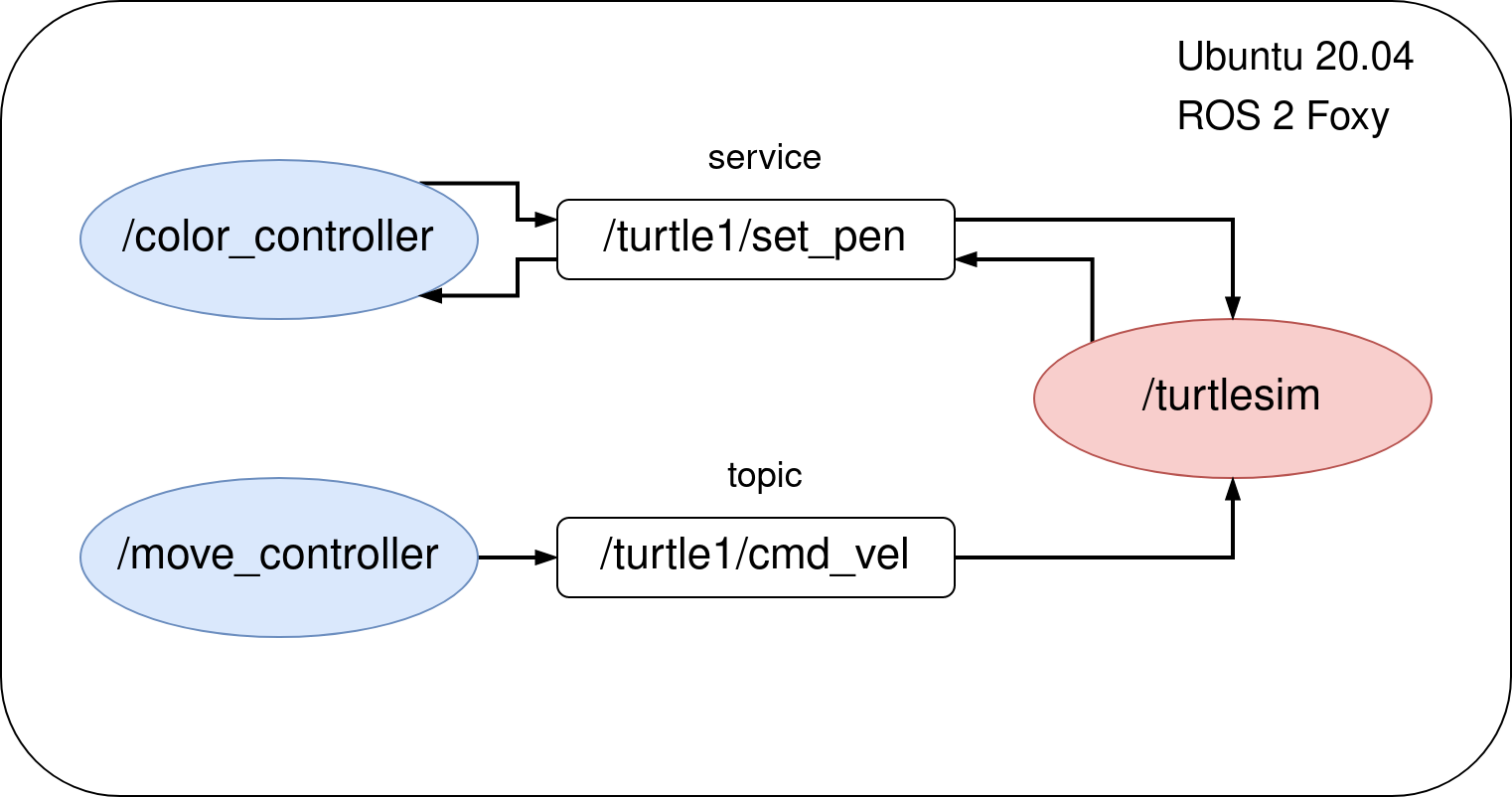
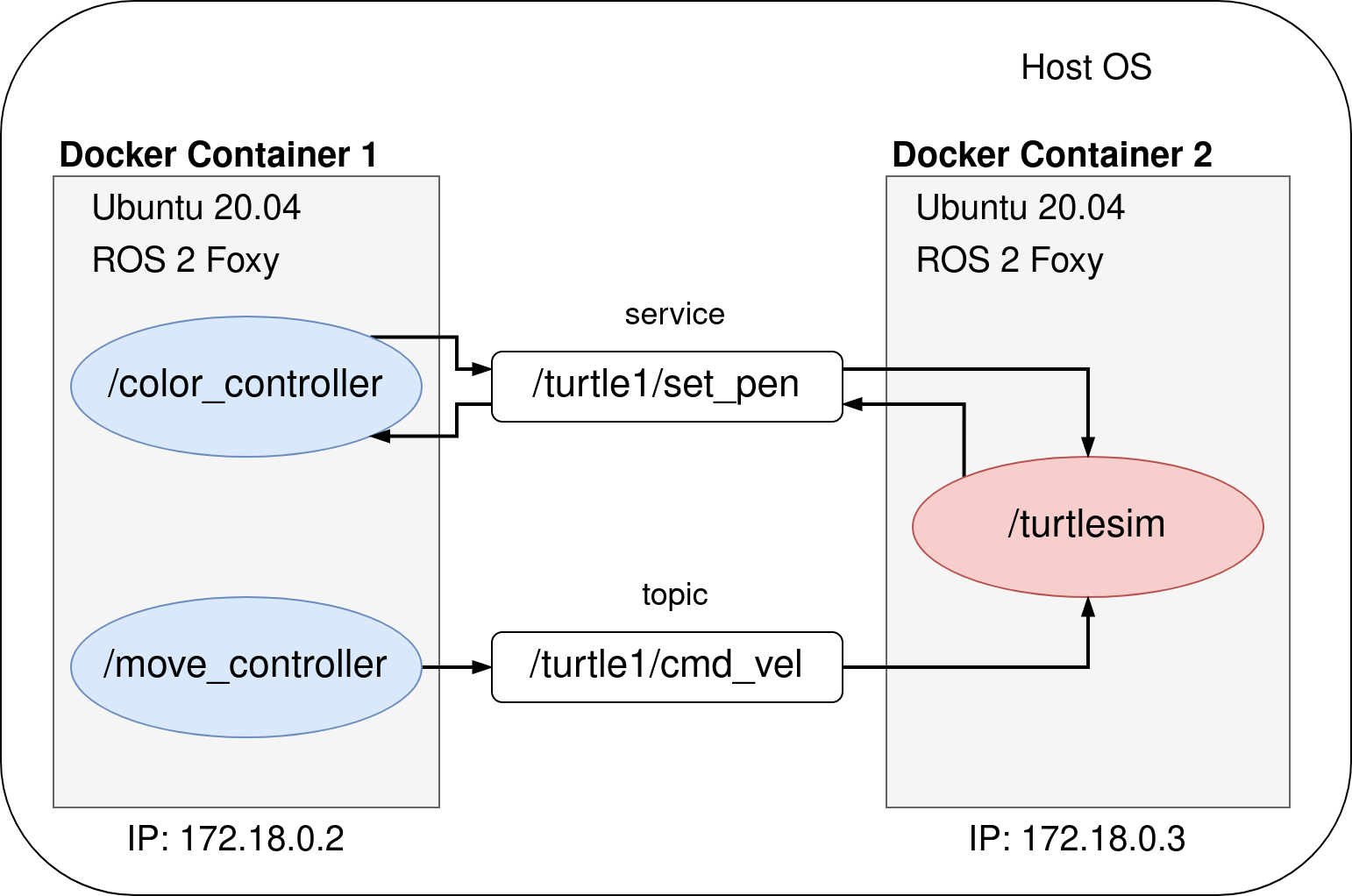
To focus purely on connectivity, not on running fancy ROS 2 software or robots in Gazebo, I will go through different scenarios based on a simple ROS 2 system containing of 3 nodes:
-
/turtlesim- a very simple, simulator for learning ROS where you simulate … a turtle :) -
/move_controller- node for controlling the movement of the turtle -
/color_controller- node that is changing the color of the line drawn by a turtle each second
The solution is scalable, so what you will learn can be applied in very complex distributed ROS 2 systems as well!
Below, there are 4 example use cases using the same code base, launched in different architecture scenarios.
Before you start …
Make sure you have Docker and Docker-Compose installed on your laptop.
The official instruction is the best tutorial but here’s a quick rundown for you (for Linux):
sudo -E apt-get -y install apt-transport-https ca-certificates software-properties-common && \
curl -sL https://download.docker.com/linux/ubuntu/gpg | sudo apt-key add - && \
arch=$(dpkg --print-architecture) && \
sudo -E add-apt-repository "deb [arch=${arch}] https://download.docker.com/linux/ubuntu $(lsb_release -cs) stable" && \
sudo -E apt-get update && \
sudo -E apt-get -y install docker-ce docker-compose
sudo systemctl daemon-reload
sudo systemctl restart docker
ROS 2 Foxy installed on your laptop is needed only for [Eg. 0] section.
[Eg. 0] Running without Docker
cd ros2_ws
colcon build

source /opt/ros/foxy/setup.bash
source install/setup.bash # full path might be: ~/ros2_docker_examples/ros2_ws/install/setup.bash

ros2 launch my_turtle_bringup turtlesim_demo.launch.py
[Eg. 1] Running in a single container
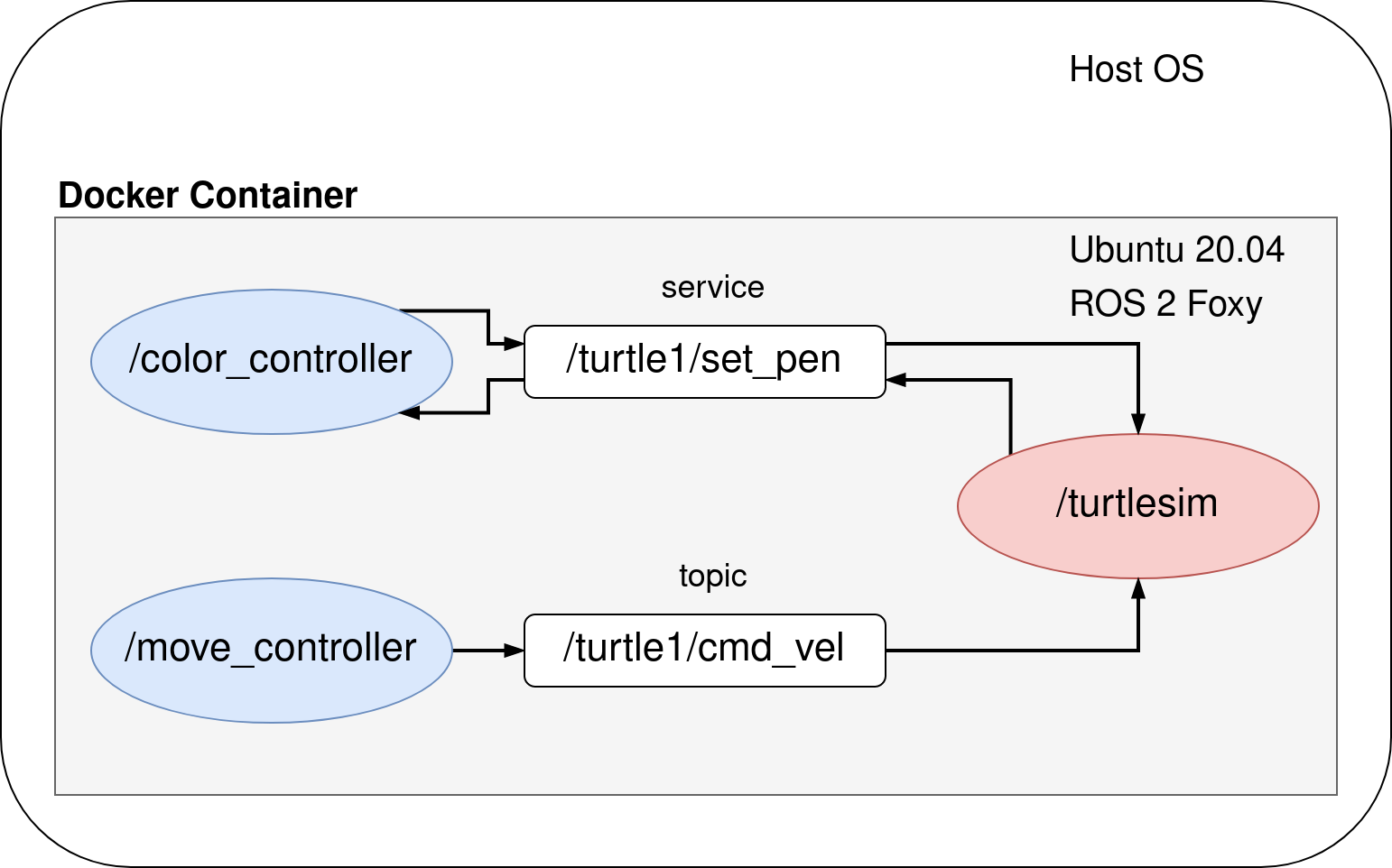
Please stay in ros2_docker_examples/ directory while executing those commands:
sudo chmod +x eg1/ros_entrypoint.sh

docker build -t turtle_demo -f eg1/Dockerfile .

xhost local:root

sudo docker run --rm -it \
--env DISPLAY \
--volume /tmp/.X11-unix:/tmp/.X11-unix:rw \
turtle_demo \
ros2 launch my_turtle_bringup turtlesim_demo.launch.py
[Eg. 2] Running in two containers (using docker-compose)
cd eg2
docker-compose up --build
[Eg. 3] PROBLEM: Running on two computers in different networks
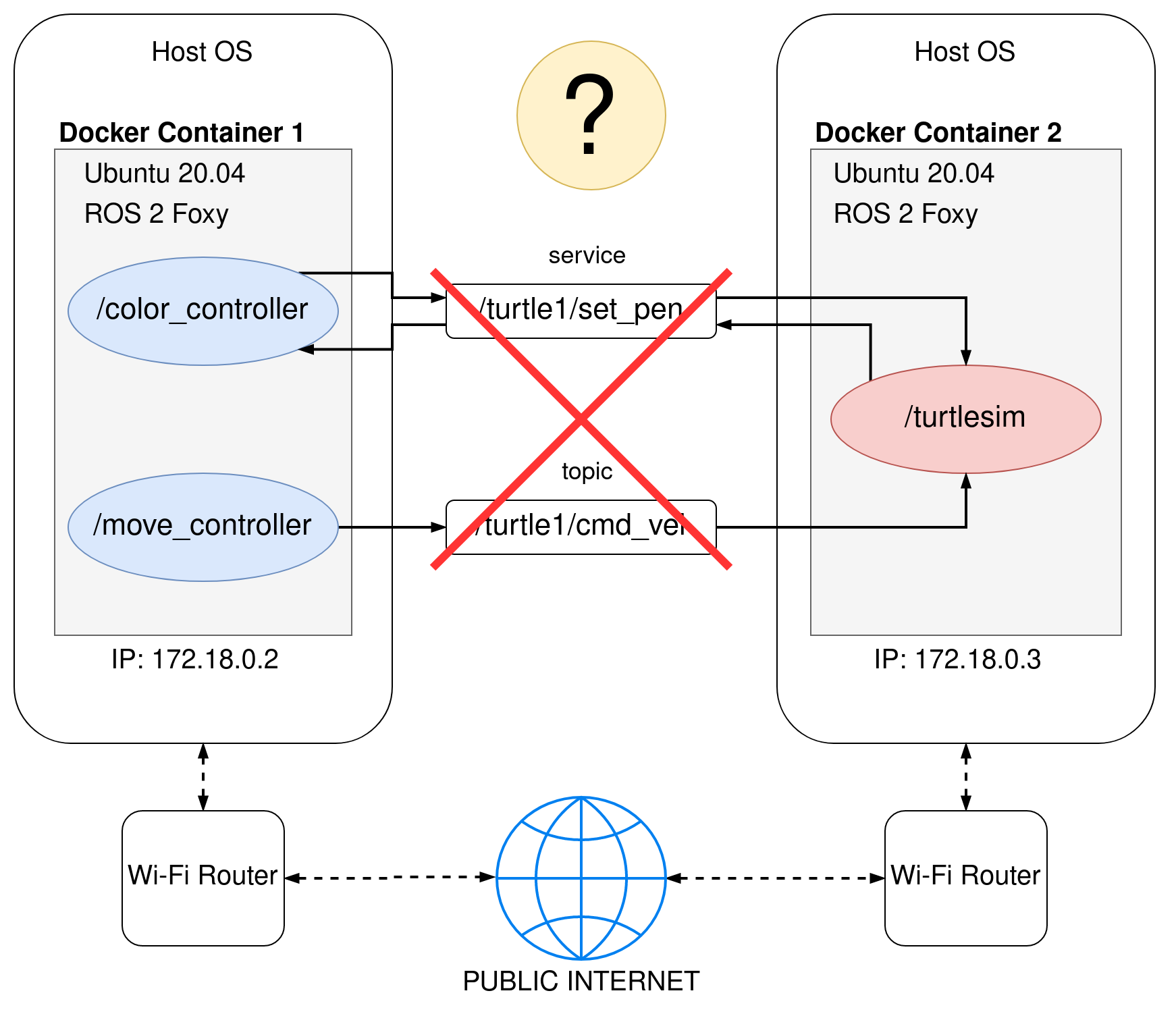
Because two ROS 2 devices are in different networks, DDS can not perform auto-discovery.
Also devices can not reach each other because they do not have neither public nor static IP addresses and are behind Wi-Fi router NAT.
[Eg. 3] SOLUTION: Connecting ROS 2 machines using VPN
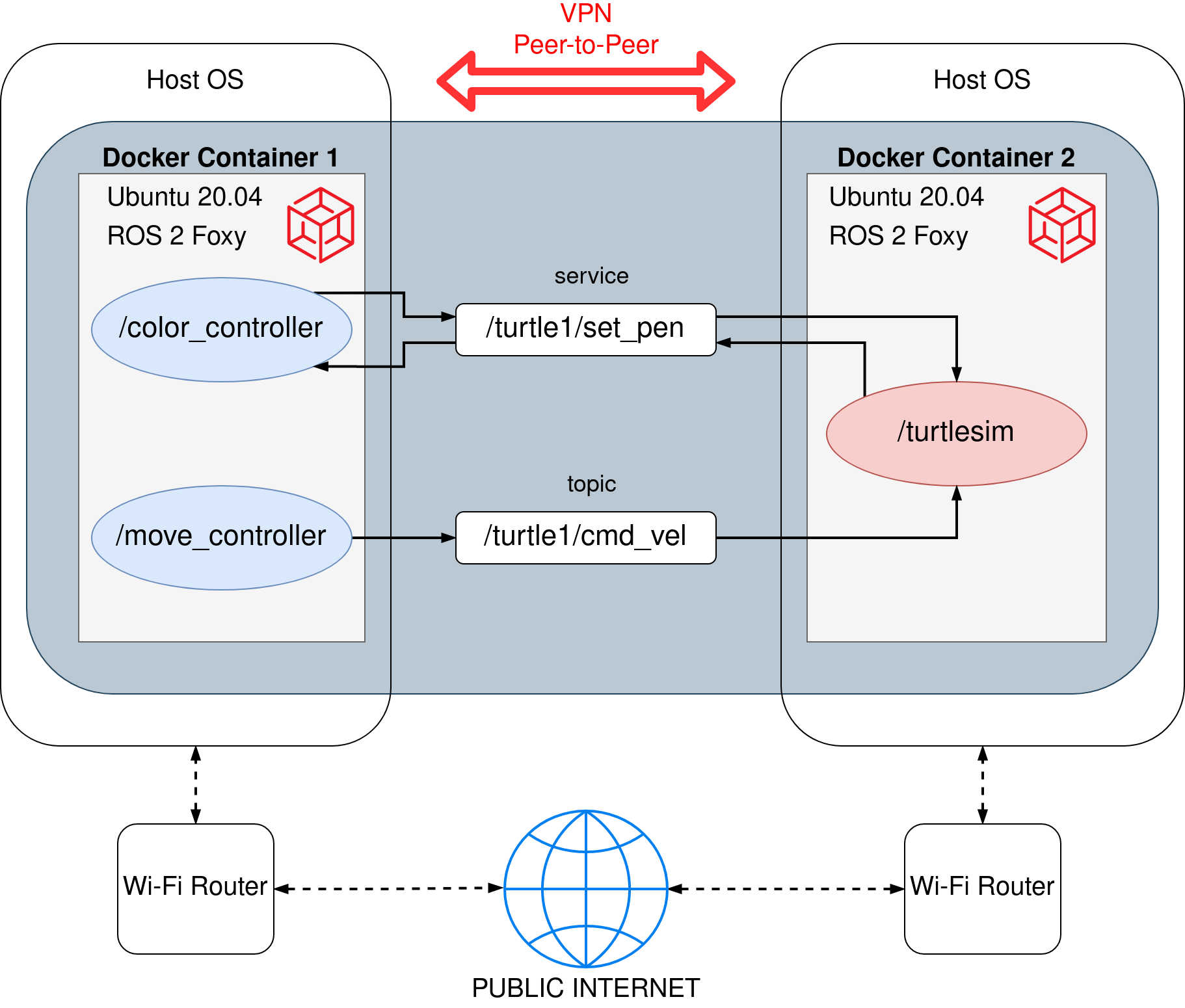
Ready to use example is available in eg3/ folder. There are two separate subfolders with a docker-compose.yml file which should be launched on two separate devices from different networks.
File truncated at 100 lines see the full file
CONTRIBUTING
Repository Summary
| Description | |
| Checkout URI | https://github.com/dominikn/ros2_docker_examples.git |
| VCS Type | git |
| VCS Version | main |
| Last Updated | 2021-07-13 |
| Dev Status | UNKNOWN |
| Released | UNRELEASED |
| Contributing |
Help Wanted (-)
Good First Issues (-) Pull Requests to Review (-) |
Packages
| Name | Version |
|---|---|
| my_demo_pkg | 0.0.0 |
| my_turtle_bringup | 0.0.0 |
README
ros2_docker_examples
This repo shows few different ways to deal with ROS 2 node interconnectivity depending whether you:
- use nodes on a single machine or on multiple machines
- use nodes with or without docker
- connect ROS 2 nodes over LAN or WAN
To focus purely on connectivity, not on running fancy ROS 2 software or robots in Gazebo, I will go through different scenarios based on a simple ROS 2 system containing of 3 nodes:
-
/turtlesim- a very simple, simulator for learning ROS where you simulate … a turtle :) -
/move_controller- node for controlling the movement of the turtle -
/color_controller- node that is changing the color of the line drawn by a turtle each second
The solution is scalable, so what you will learn can be applied in very complex distributed ROS 2 systems as well!
Below, there are 4 example use cases using the same code base, launched in different architecture scenarios.
Before you start …
Make sure you have Docker and Docker-Compose installed on your laptop.
The official instruction is the best tutorial but here’s a quick rundown for you (for Linux):
sudo -E apt-get -y install apt-transport-https ca-certificates software-properties-common && \
curl -sL https://download.docker.com/linux/ubuntu/gpg | sudo apt-key add - && \
arch=$(dpkg --print-architecture) && \
sudo -E add-apt-repository "deb [arch=${arch}] https://download.docker.com/linux/ubuntu $(lsb_release -cs) stable" && \
sudo -E apt-get update && \
sudo -E apt-get -y install docker-ce docker-compose
sudo systemctl daemon-reload
sudo systemctl restart docker
ROS 2 Foxy installed on your laptop is needed only for [Eg. 0] section.
[Eg. 0] Running without Docker
cd ros2_ws
colcon build

source /opt/ros/foxy/setup.bash
source install/setup.bash # full path might be: ~/ros2_docker_examples/ros2_ws/install/setup.bash

ros2 launch my_turtle_bringup turtlesim_demo.launch.py
[Eg. 1] Running in a single container
Please stay in ros2_docker_examples/ directory while executing those commands:
sudo chmod +x eg1/ros_entrypoint.sh

docker build -t turtle_demo -f eg1/Dockerfile .

xhost local:root

sudo docker run --rm -it \
--env DISPLAY \
--volume /tmp/.X11-unix:/tmp/.X11-unix:rw \
turtle_demo \
ros2 launch my_turtle_bringup turtlesim_demo.launch.py
[Eg. 2] Running in two containers (using docker-compose)
cd eg2
docker-compose up --build
[Eg. 3] PROBLEM: Running on two computers in different networks
Because two ROS 2 devices are in different networks, DDS can not perform auto-discovery.
Also devices can not reach each other because they do not have neither public nor static IP addresses and are behind Wi-Fi router NAT.
[Eg. 3] SOLUTION: Connecting ROS 2 machines using VPN
Ready to use example is available in eg3/ folder. There are two separate subfolders with a docker-compose.yml file which should be launched on two separate devices from different networks.
File truncated at 100 lines see the full file
CONTRIBUTING
Repository Summary
| Description | |
| Checkout URI | https://github.com/dominikn/ros2_docker_examples.git |
| VCS Type | git |
| VCS Version | main |
| Last Updated | 2021-07-13 |
| Dev Status | UNKNOWN |
| Released | UNRELEASED |
| Contributing |
Help Wanted (-)
Good First Issues (-) Pull Requests to Review (-) |
Packages
| Name | Version |
|---|---|
| my_demo_pkg | 0.0.0 |
| my_turtle_bringup | 0.0.0 |
README
ros2_docker_examples
This repo shows few different ways to deal with ROS 2 node interconnectivity depending whether you:
- use nodes on a single machine or on multiple machines
- use nodes with or without docker
- connect ROS 2 nodes over LAN or WAN
To focus purely on connectivity, not on running fancy ROS 2 software or robots in Gazebo, I will go through different scenarios based on a simple ROS 2 system containing of 3 nodes:
-
/turtlesim- a very simple, simulator for learning ROS where you simulate … a turtle :) -
/move_controller- node for controlling the movement of the turtle -
/color_controller- node that is changing the color of the line drawn by a turtle each second
The solution is scalable, so what you will learn can be applied in very complex distributed ROS 2 systems as well!
Below, there are 4 example use cases using the same code base, launched in different architecture scenarios.
Before you start …
Make sure you have Docker and Docker-Compose installed on your laptop.
The official instruction is the best tutorial but here’s a quick rundown for you (for Linux):
sudo -E apt-get -y install apt-transport-https ca-certificates software-properties-common && \
curl -sL https://download.docker.com/linux/ubuntu/gpg | sudo apt-key add - && \
arch=$(dpkg --print-architecture) && \
sudo -E add-apt-repository "deb [arch=${arch}] https://download.docker.com/linux/ubuntu $(lsb_release -cs) stable" && \
sudo -E apt-get update && \
sudo -E apt-get -y install docker-ce docker-compose
sudo systemctl daemon-reload
sudo systemctl restart docker
ROS 2 Foxy installed on your laptop is needed only for [Eg. 0] section.
[Eg. 0] Running without Docker
cd ros2_ws
colcon build

source /opt/ros/foxy/setup.bash
source install/setup.bash # full path might be: ~/ros2_docker_examples/ros2_ws/install/setup.bash

ros2 launch my_turtle_bringup turtlesim_demo.launch.py
[Eg. 1] Running in a single container
Please stay in ros2_docker_examples/ directory while executing those commands:
sudo chmod +x eg1/ros_entrypoint.sh

docker build -t turtle_demo -f eg1/Dockerfile .

xhost local:root

sudo docker run --rm -it \
--env DISPLAY \
--volume /tmp/.X11-unix:/tmp/.X11-unix:rw \
turtle_demo \
ros2 launch my_turtle_bringup turtlesim_demo.launch.py
[Eg. 2] Running in two containers (using docker-compose)
cd eg2
docker-compose up --build
[Eg. 3] PROBLEM: Running on two computers in different networks
Because two ROS 2 devices are in different networks, DDS can not perform auto-discovery.
Also devices can not reach each other because they do not have neither public nor static IP addresses and are behind Wi-Fi router NAT.
[Eg. 3] SOLUTION: Connecting ROS 2 machines using VPN
Ready to use example is available in eg3/ folder. There are two separate subfolders with a docker-compose.yml file which should be launched on two separate devices from different networks.
File truncated at 100 lines see the full file
CONTRIBUTING
Repository Summary
| Description | |
| Checkout URI | https://github.com/dominikn/ros2_docker_examples.git |
| VCS Type | git |
| VCS Version | main |
| Last Updated | 2021-07-13 |
| Dev Status | UNKNOWN |
| Released | UNRELEASED |
| Contributing |
Help Wanted (-)
Good First Issues (-) Pull Requests to Review (-) |
Packages
| Name | Version |
|---|---|
| my_demo_pkg | 0.0.0 |
| my_turtle_bringup | 0.0.0 |
README
ros2_docker_examples
This repo shows few different ways to deal with ROS 2 node interconnectivity depending whether you:
- use nodes on a single machine or on multiple machines
- use nodes with or without docker
- connect ROS 2 nodes over LAN or WAN
To focus purely on connectivity, not on running fancy ROS 2 software or robots in Gazebo, I will go through different scenarios based on a simple ROS 2 system containing of 3 nodes:
-
/turtlesim- a very simple, simulator for learning ROS where you simulate … a turtle :) -
/move_controller- node for controlling the movement of the turtle -
/color_controller- node that is changing the color of the line drawn by a turtle each second
The solution is scalable, so what you will learn can be applied in very complex distributed ROS 2 systems as well!
Below, there are 4 example use cases using the same code base, launched in different architecture scenarios.
Before you start …
Make sure you have Docker and Docker-Compose installed on your laptop.
The official instruction is the best tutorial but here’s a quick rundown for you (for Linux):
sudo -E apt-get -y install apt-transport-https ca-certificates software-properties-common && \
curl -sL https://download.docker.com/linux/ubuntu/gpg | sudo apt-key add - && \
arch=$(dpkg --print-architecture) && \
sudo -E add-apt-repository "deb [arch=${arch}] https://download.docker.com/linux/ubuntu $(lsb_release -cs) stable" && \
sudo -E apt-get update && \
sudo -E apt-get -y install docker-ce docker-compose
sudo systemctl daemon-reload
sudo systemctl restart docker
ROS 2 Foxy installed on your laptop is needed only for [Eg. 0] section.
[Eg. 0] Running without Docker
cd ros2_ws
colcon build

source /opt/ros/foxy/setup.bash
source install/setup.bash # full path might be: ~/ros2_docker_examples/ros2_ws/install/setup.bash

ros2 launch my_turtle_bringup turtlesim_demo.launch.py
[Eg. 1] Running in a single container
Please stay in ros2_docker_examples/ directory while executing those commands:
sudo chmod +x eg1/ros_entrypoint.sh

docker build -t turtle_demo -f eg1/Dockerfile .

xhost local:root

sudo docker run --rm -it \
--env DISPLAY \
--volume /tmp/.X11-unix:/tmp/.X11-unix:rw \
turtle_demo \
ros2 launch my_turtle_bringup turtlesim_demo.launch.py
[Eg. 2] Running in two containers (using docker-compose)
cd eg2
docker-compose up --build
[Eg. 3] PROBLEM: Running on two computers in different networks
Because two ROS 2 devices are in different networks, DDS can not perform auto-discovery.
Also devices can not reach each other because they do not have neither public nor static IP addresses and are behind Wi-Fi router NAT.
[Eg. 3] SOLUTION: Connecting ROS 2 machines using VPN
Ready to use example is available in eg3/ folder. There are two separate subfolders with a docker-compose.yml file which should be launched on two separate devices from different networks.
File truncated at 100 lines see the full file
CONTRIBUTING
Repository Summary
| Description | |
| Checkout URI | https://github.com/dominikn/ros2_docker_examples.git |
| VCS Type | git |
| VCS Version | main |
| Last Updated | 2021-07-13 |
| Dev Status | UNKNOWN |
| Released | UNRELEASED |
| Contributing |
Help Wanted (-)
Good First Issues (-) Pull Requests to Review (-) |
Packages
| Name | Version |
|---|---|
| my_demo_pkg | 0.0.0 |
| my_turtle_bringup | 0.0.0 |
README
ros2_docker_examples
This repo shows few different ways to deal with ROS 2 node interconnectivity depending whether you:
- use nodes on a single machine or on multiple machines
- use nodes with or without docker
- connect ROS 2 nodes over LAN or WAN
To focus purely on connectivity, not on running fancy ROS 2 software or robots in Gazebo, I will go through different scenarios based on a simple ROS 2 system containing of 3 nodes:
-
/turtlesim- a very simple, simulator for learning ROS where you simulate … a turtle :) -
/move_controller- node for controlling the movement of the turtle -
/color_controller- node that is changing the color of the line drawn by a turtle each second
The solution is scalable, so what you will learn can be applied in very complex distributed ROS 2 systems as well!
Below, there are 4 example use cases using the same code base, launched in different architecture scenarios.
Before you start …
Make sure you have Docker and Docker-Compose installed on your laptop.
The official instruction is the best tutorial but here’s a quick rundown for you (for Linux):
sudo -E apt-get -y install apt-transport-https ca-certificates software-properties-common && \
curl -sL https://download.docker.com/linux/ubuntu/gpg | sudo apt-key add - && \
arch=$(dpkg --print-architecture) && \
sudo -E add-apt-repository "deb [arch=${arch}] https://download.docker.com/linux/ubuntu $(lsb_release -cs) stable" && \
sudo -E apt-get update && \
sudo -E apt-get -y install docker-ce docker-compose
sudo systemctl daemon-reload
sudo systemctl restart docker
ROS 2 Foxy installed on your laptop is needed only for [Eg. 0] section.
[Eg. 0] Running without Docker
cd ros2_ws
colcon build

source /opt/ros/foxy/setup.bash
source install/setup.bash # full path might be: ~/ros2_docker_examples/ros2_ws/install/setup.bash

ros2 launch my_turtle_bringup turtlesim_demo.launch.py
[Eg. 1] Running in a single container
Please stay in ros2_docker_examples/ directory while executing those commands:
sudo chmod +x eg1/ros_entrypoint.sh

docker build -t turtle_demo -f eg1/Dockerfile .

xhost local:root

sudo docker run --rm -it \
--env DISPLAY \
--volume /tmp/.X11-unix:/tmp/.X11-unix:rw \
turtle_demo \
ros2 launch my_turtle_bringup turtlesim_demo.launch.py
[Eg. 2] Running in two containers (using docker-compose)
cd eg2
docker-compose up --build
[Eg. 3] PROBLEM: Running on two computers in different networks
Because two ROS 2 devices are in different networks, DDS can not perform auto-discovery.
Also devices can not reach each other because they do not have neither public nor static IP addresses and are behind Wi-Fi router NAT.
[Eg. 3] SOLUTION: Connecting ROS 2 machines using VPN
Ready to use example is available in eg3/ folder. There are two separate subfolders with a docker-compose.yml file which should be launched on two separate devices from different networks.
File truncated at 100 lines see the full file
CONTRIBUTING
Repository Summary
| Description | |
| Checkout URI | https://github.com/dominikn/ros2_docker_examples.git |
| VCS Type | git |
| VCS Version | main |
| Last Updated | 2021-07-13 |
| Dev Status | UNKNOWN |
| Released | UNRELEASED |
| Contributing |
Help Wanted (-)
Good First Issues (-) Pull Requests to Review (-) |
Packages
| Name | Version |
|---|---|
| my_demo_pkg | 0.0.0 |
| my_turtle_bringup | 0.0.0 |
README
ros2_docker_examples
This repo shows few different ways to deal with ROS 2 node interconnectivity depending whether you:
- use nodes on a single machine or on multiple machines
- use nodes with or without docker
- connect ROS 2 nodes over LAN or WAN
To focus purely on connectivity, not on running fancy ROS 2 software or robots in Gazebo, I will go through different scenarios based on a simple ROS 2 system containing of 3 nodes:
-
/turtlesim- a very simple, simulator for learning ROS where you simulate … a turtle :) -
/move_controller- node for controlling the movement of the turtle -
/color_controller- node that is changing the color of the line drawn by a turtle each second
The solution is scalable, so what you will learn can be applied in very complex distributed ROS 2 systems as well!
Below, there are 4 example use cases using the same code base, launched in different architecture scenarios.
Before you start …
Make sure you have Docker and Docker-Compose installed on your laptop.
The official instruction is the best tutorial but here’s a quick rundown for you (for Linux):
sudo -E apt-get -y install apt-transport-https ca-certificates software-properties-common && \
curl -sL https://download.docker.com/linux/ubuntu/gpg | sudo apt-key add - && \
arch=$(dpkg --print-architecture) && \
sudo -E add-apt-repository "deb [arch=${arch}] https://download.docker.com/linux/ubuntu $(lsb_release -cs) stable" && \
sudo -E apt-get update && \
sudo -E apt-get -y install docker-ce docker-compose
sudo systemctl daemon-reload
sudo systemctl restart docker
ROS 2 Foxy installed on your laptop is needed only for [Eg. 0] section.
[Eg. 0] Running without Docker
cd ros2_ws
colcon build

source /opt/ros/foxy/setup.bash
source install/setup.bash # full path might be: ~/ros2_docker_examples/ros2_ws/install/setup.bash

ros2 launch my_turtle_bringup turtlesim_demo.launch.py
[Eg. 1] Running in a single container
Please stay in ros2_docker_examples/ directory while executing those commands:
sudo chmod +x eg1/ros_entrypoint.sh

docker build -t turtle_demo -f eg1/Dockerfile .

xhost local:root

sudo docker run --rm -it \
--env DISPLAY \
--volume /tmp/.X11-unix:/tmp/.X11-unix:rw \
turtle_demo \
ros2 launch my_turtle_bringup turtlesim_demo.launch.py
[Eg. 2] Running in two containers (using docker-compose)
cd eg2
docker-compose up --build
[Eg. 3] PROBLEM: Running on two computers in different networks
Because two ROS 2 devices are in different networks, DDS can not perform auto-discovery.
Also devices can not reach each other because they do not have neither public nor static IP addresses and are behind Wi-Fi router NAT.
[Eg. 3] SOLUTION: Connecting ROS 2 machines using VPN
Ready to use example is available in eg3/ folder. There are two separate subfolders with a docker-compose.yml file which should be launched on two separate devices from different networks.
File truncated at 100 lines see the full file
CONTRIBUTING
Repository Summary
| Description | |
| Checkout URI | https://github.com/dominikn/ros2_docker_examples.git |
| VCS Type | git |
| VCS Version | main |
| Last Updated | 2021-07-13 |
| Dev Status | UNKNOWN |
| Released | UNRELEASED |
| Contributing |
Help Wanted (-)
Good First Issues (-) Pull Requests to Review (-) |
Packages
| Name | Version |
|---|---|
| my_demo_pkg | 0.0.0 |
| my_turtle_bringup | 0.0.0 |
README
ros2_docker_examples
This repo shows few different ways to deal with ROS 2 node interconnectivity depending whether you:
- use nodes on a single machine or on multiple machines
- use nodes with or without docker
- connect ROS 2 nodes over LAN or WAN
To focus purely on connectivity, not on running fancy ROS 2 software or robots in Gazebo, I will go through different scenarios based on a simple ROS 2 system containing of 3 nodes:
-
/turtlesim- a very simple, simulator for learning ROS where you simulate … a turtle :) -
/move_controller- node for controlling the movement of the turtle -
/color_controller- node that is changing the color of the line drawn by a turtle each second
The solution is scalable, so what you will learn can be applied in very complex distributed ROS 2 systems as well!
Below, there are 4 example use cases using the same code base, launched in different architecture scenarios.
Before you start …
Make sure you have Docker and Docker-Compose installed on your laptop.
The official instruction is the best tutorial but here’s a quick rundown for you (for Linux):
sudo -E apt-get -y install apt-transport-https ca-certificates software-properties-common && \
curl -sL https://download.docker.com/linux/ubuntu/gpg | sudo apt-key add - && \
arch=$(dpkg --print-architecture) && \
sudo -E add-apt-repository "deb [arch=${arch}] https://download.docker.com/linux/ubuntu $(lsb_release -cs) stable" && \
sudo -E apt-get update && \
sudo -E apt-get -y install docker-ce docker-compose
sudo systemctl daemon-reload
sudo systemctl restart docker
ROS 2 Foxy installed on your laptop is needed only for [Eg. 0] section.
[Eg. 0] Running without Docker
cd ros2_ws
colcon build

source /opt/ros/foxy/setup.bash
source install/setup.bash # full path might be: ~/ros2_docker_examples/ros2_ws/install/setup.bash

ros2 launch my_turtle_bringup turtlesim_demo.launch.py
[Eg. 1] Running in a single container
Please stay in ros2_docker_examples/ directory while executing those commands:
sudo chmod +x eg1/ros_entrypoint.sh

docker build -t turtle_demo -f eg1/Dockerfile .

xhost local:root

sudo docker run --rm -it \
--env DISPLAY \
--volume /tmp/.X11-unix:/tmp/.X11-unix:rw \
turtle_demo \
ros2 launch my_turtle_bringup turtlesim_demo.launch.py
[Eg. 2] Running in two containers (using docker-compose)
cd eg2
docker-compose up --build
[Eg. 3] PROBLEM: Running on two computers in different networks
Because two ROS 2 devices are in different networks, DDS can not perform auto-discovery.
Also devices can not reach each other because they do not have neither public nor static IP addresses and are behind Wi-Fi router NAT.
[Eg. 3] SOLUTION: Connecting ROS 2 machines using VPN
Ready to use example is available in eg3/ folder. There are two separate subfolders with a docker-compose.yml file which should be launched on two separate devices from different networks.
File truncated at 100 lines see the full file
CONTRIBUTING
Repository Summary
| Description | |
| Checkout URI | https://github.com/dominikn/ros2_docker_examples.git |
| VCS Type | git |
| VCS Version | main |
| Last Updated | 2021-07-13 |
| Dev Status | UNKNOWN |
| Released | UNRELEASED |
| Contributing |
Help Wanted (-)
Good First Issues (-) Pull Requests to Review (-) |
Packages
| Name | Version |
|---|---|
| my_demo_pkg | 0.0.0 |
| my_turtle_bringup | 0.0.0 |
README
ros2_docker_examples
This repo shows few different ways to deal with ROS 2 node interconnectivity depending whether you:
- use nodes on a single machine or on multiple machines
- use nodes with or without docker
- connect ROS 2 nodes over LAN or WAN
To focus purely on connectivity, not on running fancy ROS 2 software or robots in Gazebo, I will go through different scenarios based on a simple ROS 2 system containing of 3 nodes:
-
/turtlesim- a very simple, simulator for learning ROS where you simulate … a turtle :) -
/move_controller- node for controlling the movement of the turtle -
/color_controller- node that is changing the color of the line drawn by a turtle each second
The solution is scalable, so what you will learn can be applied in very complex distributed ROS 2 systems as well!
Below, there are 4 example use cases using the same code base, launched in different architecture scenarios.
Before you start …
Make sure you have Docker and Docker-Compose installed on your laptop.
The official instruction is the best tutorial but here’s a quick rundown for you (for Linux):
sudo -E apt-get -y install apt-transport-https ca-certificates software-properties-common && \
curl -sL https://download.docker.com/linux/ubuntu/gpg | sudo apt-key add - && \
arch=$(dpkg --print-architecture) && \
sudo -E add-apt-repository "deb [arch=${arch}] https://download.docker.com/linux/ubuntu $(lsb_release -cs) stable" && \
sudo -E apt-get update && \
sudo -E apt-get -y install docker-ce docker-compose
sudo systemctl daemon-reload
sudo systemctl restart docker
ROS 2 Foxy installed on your laptop is needed only for [Eg. 0] section.
[Eg. 0] Running without Docker
cd ros2_ws
colcon build

source /opt/ros/foxy/setup.bash
source install/setup.bash # full path might be: ~/ros2_docker_examples/ros2_ws/install/setup.bash

ros2 launch my_turtle_bringup turtlesim_demo.launch.py
[Eg. 1] Running in a single container
Please stay in ros2_docker_examples/ directory while executing those commands:
sudo chmod +x eg1/ros_entrypoint.sh

docker build -t turtle_demo -f eg1/Dockerfile .

xhost local:root

sudo docker run --rm -it \
--env DISPLAY \
--volume /tmp/.X11-unix:/tmp/.X11-unix:rw \
turtle_demo \
ros2 launch my_turtle_bringup turtlesim_demo.launch.py
[Eg. 2] Running in two containers (using docker-compose)
cd eg2
docker-compose up --build
[Eg. 3] PROBLEM: Running on two computers in different networks
Because two ROS 2 devices are in different networks, DDS can not perform auto-discovery.
Also devices can not reach each other because they do not have neither public nor static IP addresses and are behind Wi-Fi router NAT.
[Eg. 3] SOLUTION: Connecting ROS 2 machines using VPN
Ready to use example is available in eg3/ folder. There are two separate subfolders with a docker-compose.yml file which should be launched on two separate devices from different networks.
File truncated at 100 lines see the full file
CONTRIBUTING
Repository Summary
| Description | |
| Checkout URI | https://github.com/dominikn/ros2_docker_examples.git |
| VCS Type | git |
| VCS Version | main |
| Last Updated | 2021-07-13 |
| Dev Status | UNKNOWN |
| Released | UNRELEASED |
| Contributing |
Help Wanted (-)
Good First Issues (-) Pull Requests to Review (-) |
Packages
| Name | Version |
|---|---|
| my_demo_pkg | 0.0.0 |
| my_turtle_bringup | 0.0.0 |
README
ros2_docker_examples
This repo shows few different ways to deal with ROS 2 node interconnectivity depending whether you:
- use nodes on a single machine or on multiple machines
- use nodes with or without docker
- connect ROS 2 nodes over LAN or WAN
To focus purely on connectivity, not on running fancy ROS 2 software or robots in Gazebo, I will go through different scenarios based on a simple ROS 2 system containing of 3 nodes:
-
/turtlesim- a very simple, simulator for learning ROS where you simulate … a turtle :) -
/move_controller- node for controlling the movement of the turtle -
/color_controller- node that is changing the color of the line drawn by a turtle each second
The solution is scalable, so what you will learn can be applied in very complex distributed ROS 2 systems as well!
Below, there are 4 example use cases using the same code base, launched in different architecture scenarios.
Before you start …
Make sure you have Docker and Docker-Compose installed on your laptop.
The official instruction is the best tutorial but here’s a quick rundown for you (for Linux):
sudo -E apt-get -y install apt-transport-https ca-certificates software-properties-common && \
curl -sL https://download.docker.com/linux/ubuntu/gpg | sudo apt-key add - && \
arch=$(dpkg --print-architecture) && \
sudo -E add-apt-repository "deb [arch=${arch}] https://download.docker.com/linux/ubuntu $(lsb_release -cs) stable" && \
sudo -E apt-get update && \
sudo -E apt-get -y install docker-ce docker-compose
sudo systemctl daemon-reload
sudo systemctl restart docker
ROS 2 Foxy installed on your laptop is needed only for [Eg. 0] section.
[Eg. 0] Running without Docker
cd ros2_ws
colcon build

source /opt/ros/foxy/setup.bash
source install/setup.bash # full path might be: ~/ros2_docker_examples/ros2_ws/install/setup.bash

ros2 launch my_turtle_bringup turtlesim_demo.launch.py
[Eg. 1] Running in a single container
Please stay in ros2_docker_examples/ directory while executing those commands:
sudo chmod +x eg1/ros_entrypoint.sh

docker build -t turtle_demo -f eg1/Dockerfile .

xhost local:root

sudo docker run --rm -it \
--env DISPLAY \
--volume /tmp/.X11-unix:/tmp/.X11-unix:rw \
turtle_demo \
ros2 launch my_turtle_bringup turtlesim_demo.launch.py
[Eg. 2] Running in two containers (using docker-compose)
cd eg2
docker-compose up --build
[Eg. 3] PROBLEM: Running on two computers in different networks
Because two ROS 2 devices are in different networks, DDS can not perform auto-discovery.
Also devices can not reach each other because they do not have neither public nor static IP addresses and are behind Wi-Fi router NAT.
[Eg. 3] SOLUTION: Connecting ROS 2 machines using VPN
Ready to use example is available in eg3/ folder. There are two separate subfolders with a docker-compose.yml file which should be launched on two separate devices from different networks.
File truncated at 100 lines see the full file