 ROS Index
Repository Summary
| Description | |
| Checkout URI | https://github.com/paolofrance/ros2_fanuc_interface.git |
| VCS Type | git |
| VCS Version | paolo |
| Last Updated | 2025-06-18 |
| Dev Status | UNKNOWN |
| Released | UNRELEASED |
| Contributing |
Help Wanted (-)
Good First Issues (-) Pull Requests to Review (-) |
Packages
| Name | Version |
|---|---|
| crx_description | 0.0.0 |
| crx10ia_l_moveit_config | 0.3.0 |
| crx10ia_moveit_config | 0.3.0 |
| crx20ia_l_moveit_config | 0.3.0 |
| crx25ia_moveit_config | 0.3.0 |
| crx30ia_moveit_config | 0.3.0 |
| crx5ia_moveit_config | 0.3.0 |
| fanuc_control | 0.0.0 |
| fanuc_eth_ip | 0.0.0 |
| fanuc_rmi | 0.0.0 |
| fanuc_srvs | 0.0.0 |
| fanuc_srvs_msgs | 0.0.0 |
README
Fanuc_CRX_ROS2_Driver
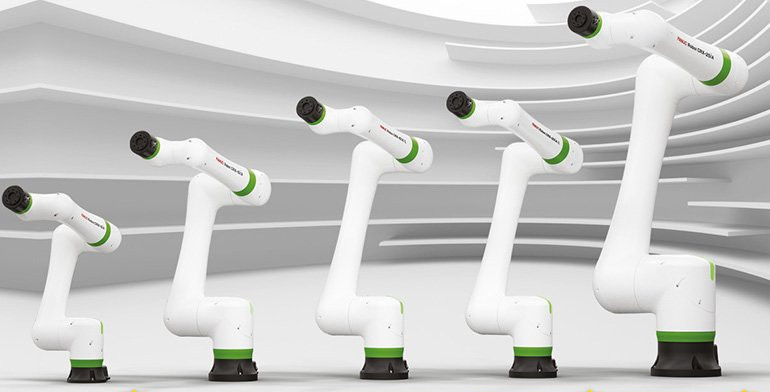
This repository implements a ros2 hardware interface for the CRX family Fanuc robots. The code was tested on real hardware on Fanuc CRX-10iA/L, CRX-20iA/L, and CRX-25iA with R30iB Mini Plus controller.
Additional information regarding implementation and performances evaluation can be found here
OS: Ubuntu 22.04
ROS: Humble (see the branch rolling for the rolling distro)
Outline
- Prerequisites
- Content
- Installation on the remote PC
- Setting up your CRX robot
- Usage
- DPM
- Known issues
- Citation
- License
Prerequisites
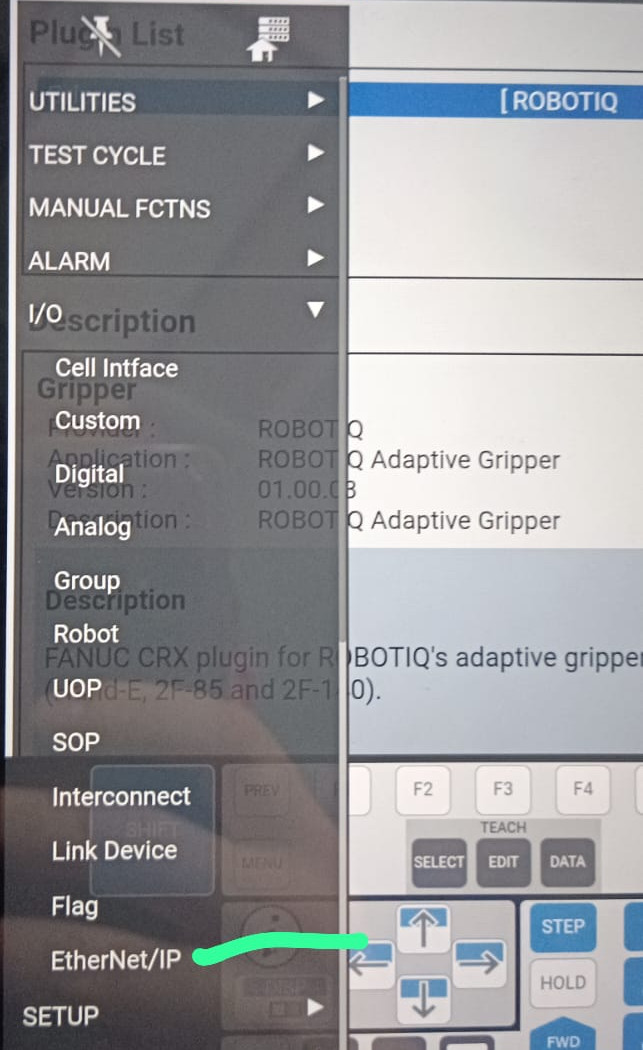
The communication between ROS and the robot happens via EthernetIP. The EtherNet/IP Adapter option must be loaded on your robot controller to use this package.
To check is the EthernetIP module is loaded on your robot, open the FanucTP app and check that the EthernetIP options shows up as in the image below.
Content
| Function | Description |
|---|---|
| fanuc_eth_ip | Implementation of the communication via Ethernet/IP between the remote PC and the Fanuc controller. |
| fanuc_rmi | Implementation of the communication via Remote Motion Interface (RMI) between the remote PC and the Fanuc controller. RMI is used as an alternative communication channel. From our experience, EthernetIP communication gives the best results in terms of real-time control of the robot. |
| ros2_fanuc_interface | ROS2 Hardware Interface. Allows for controlling the robot via Ethernet/IP and RMI. |
| fanuc_srvs | Services to call TP programs and allows for interaction with the Fanuc controller. Most of the services require TP programs to be written and running as Background Logics, that read Registers to start an action. More details will be added in future releases. |
Installation on the remote PC
Install EIPScanner
The communication between the external pc and the Fanuc controller happens by means of the Ethernet/IP protocol.
In particular, this package relies on the implementation provided in EIPScanner.
Please, download it from here, and follow the instructions here to install it.
NOTE: a previous version of this driver used a python driver for the Ethernet/IP communication. Please refer to the python-driver branch.
Package installation and dependencies
Install additional ros2_control and Moveit!
sudo apt update
sudo apt upgrade
sudo apt install ros-<distro>-moveit
sudo apt install ros-<distro>-moveit-planners-chomp
sudo apt install ros-<distro>-ros2-control
sudo apt install ros-<distro>-ros2-controllers
Install the current repo:
cd <to-your-src>
git clone https://github.com/paolofrance/ros2_fanuc_interface
cd ..
colcon build --symlink-install
Setting up your CRX robot
The EtherNet/IP Adapter option must be loaded on your robot controller to use this package.
Setting up the robot network
The robot controller and the external PC must be under the same network:
- Set your PC’s IP address as static
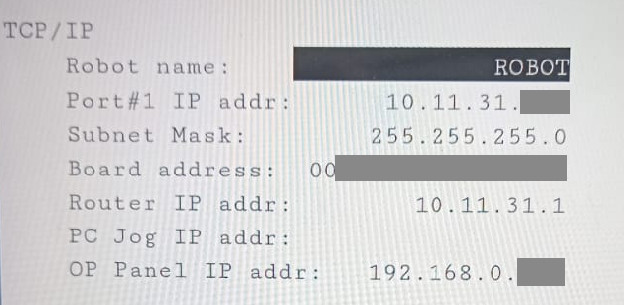
- On the robot controller, in [MENU]->[SETUP]->[HOSTCOMM]->[TCP/IP], make sure the configuration looks like the image below, where Port#1 IP address must be under the same network of your PC.
- Make sure you can ping the robot from your PC.
TP program installation
To actually move the robot, you need a teach-pendant (TP) program running on the robot controller.
- Copy the TP programs from this folder to your robot controller.
- Set the TP to AUTO mode.
- Load and run the program ROS2.TP.
DPM input setup (optional)
File truncated at 100 lines see the full file
CONTRIBUTING
Repository Summary
| Description | |
| Checkout URI | https://github.com/paolofrance/ros2_fanuc_interface.git |
| VCS Type | git |
| VCS Version | paolo |
| Last Updated | 2025-06-18 |
| Dev Status | UNKNOWN |
| Released | UNRELEASED |
| Contributing |
Help Wanted (-)
Good First Issues (-) Pull Requests to Review (-) |
Packages
| Name | Version |
|---|---|
| crx_description | 0.0.0 |
| crx10ia_l_moveit_config | 0.3.0 |
| crx10ia_moveit_config | 0.3.0 |
| crx20ia_l_moveit_config | 0.3.0 |
| crx25ia_moveit_config | 0.3.0 |
| crx30ia_moveit_config | 0.3.0 |
| crx5ia_moveit_config | 0.3.0 |
| fanuc_control | 0.0.0 |
| fanuc_eth_ip | 0.0.0 |
| fanuc_rmi | 0.0.0 |
| fanuc_srvs | 0.0.0 |
| fanuc_srvs_msgs | 0.0.0 |
README
Fanuc_CRX_ROS2_Driver
This repository implements a ros2 hardware interface for the CRX family Fanuc robots. The code was tested on real hardware on Fanuc CRX-10iA/L, CRX-20iA/L, and CRX-25iA with R30iB Mini Plus controller.
Additional information regarding implementation and performances evaluation can be found here
OS: Ubuntu 22.04
ROS: Humble (see the branch rolling for the rolling distro)
Outline
- Prerequisites
- Content
- Installation on the remote PC
- Setting up your CRX robot
- Usage
- DPM
- Known issues
- Citation
- License
Prerequisites
The communication between ROS and the robot happens via EthernetIP. The EtherNet/IP Adapter option must be loaded on your robot controller to use this package.
To check is the EthernetIP module is loaded on your robot, open the FanucTP app and check that the EthernetIP options shows up as in the image below.
Content
| Function | Description |
|---|---|
| fanuc_eth_ip | Implementation of the communication via Ethernet/IP between the remote PC and the Fanuc controller. |
| fanuc_rmi | Implementation of the communication via Remote Motion Interface (RMI) between the remote PC and the Fanuc controller. RMI is used as an alternative communication channel. From our experience, EthernetIP communication gives the best results in terms of real-time control of the robot. |
| ros2_fanuc_interface | ROS2 Hardware Interface. Allows for controlling the robot via Ethernet/IP and RMI. |
| fanuc_srvs | Services to call TP programs and allows for interaction with the Fanuc controller. Most of the services require TP programs to be written and running as Background Logics, that read Registers to start an action. More details will be added in future releases. |
Installation on the remote PC
Install EIPScanner
The communication between the external pc and the Fanuc controller happens by means of the Ethernet/IP protocol.
In particular, this package relies on the implementation provided in EIPScanner.
Please, download it from here, and follow the instructions here to install it.
NOTE: a previous version of this driver used a python driver for the Ethernet/IP communication. Please refer to the python-driver branch.
Package installation and dependencies
Install additional ros2_control and Moveit!
sudo apt update
sudo apt upgrade
sudo apt install ros-<distro>-moveit
sudo apt install ros-<distro>-moveit-planners-chomp
sudo apt install ros-<distro>-ros2-control
sudo apt install ros-<distro>-ros2-controllers
Install the current repo:
cd <to-your-src>
git clone https://github.com/paolofrance/ros2_fanuc_interface
cd ..
colcon build --symlink-install
Setting up your CRX robot
The EtherNet/IP Adapter option must be loaded on your robot controller to use this package.
Setting up the robot network
The robot controller and the external PC must be under the same network:
- Set your PC’s IP address as static
- On the robot controller, in [MENU]->[SETUP]->[HOSTCOMM]->[TCP/IP], make sure the configuration looks like the image below, where Port#1 IP address must be under the same network of your PC.
- Make sure you can ping the robot from your PC.
TP program installation
To actually move the robot, you need a teach-pendant (TP) program running on the robot controller.
- Copy the TP programs from this folder to your robot controller.
- Set the TP to AUTO mode.
- Load and run the program ROS2.TP.
DPM input setup (optional)
File truncated at 100 lines see the full file
CONTRIBUTING
Repository Summary
| Description | |
| Checkout URI | https://github.com/paolofrance/ros2_fanuc_interface.git |
| VCS Type | git |
| VCS Version | paolo |
| Last Updated | 2025-06-18 |
| Dev Status | UNKNOWN |
| Released | UNRELEASED |
| Contributing |
Help Wanted (-)
Good First Issues (-) Pull Requests to Review (-) |
Packages
| Name | Version |
|---|---|
| crx_description | 0.0.0 |
| crx10ia_l_moveit_config | 0.3.0 |
| crx10ia_moveit_config | 0.3.0 |
| crx20ia_l_moveit_config | 0.3.0 |
| crx25ia_moveit_config | 0.3.0 |
| crx30ia_moveit_config | 0.3.0 |
| crx5ia_moveit_config | 0.3.0 |
| fanuc_control | 0.0.0 |
| fanuc_eth_ip | 0.0.0 |
| fanuc_rmi | 0.0.0 |
| fanuc_srvs | 0.0.0 |
| fanuc_srvs_msgs | 0.0.0 |
README
Fanuc_CRX_ROS2_Driver
This repository implements a ros2 hardware interface for the CRX family Fanuc robots. The code was tested on real hardware on Fanuc CRX-10iA/L, CRX-20iA/L, and CRX-25iA with R30iB Mini Plus controller.
Additional information regarding implementation and performances evaluation can be found here
OS: Ubuntu 22.04
ROS: Humble (see the branch rolling for the rolling distro)
Outline
- Prerequisites
- Content
- Installation on the remote PC
- Setting up your CRX robot
- Usage
- DPM
- Known issues
- Citation
- License
Prerequisites
The communication between ROS and the robot happens via EthernetIP. The EtherNet/IP Adapter option must be loaded on your robot controller to use this package.
To check is the EthernetIP module is loaded on your robot, open the FanucTP app and check that the EthernetIP options shows up as in the image below.
Content
| Function | Description |
|---|---|
| fanuc_eth_ip | Implementation of the communication via Ethernet/IP between the remote PC and the Fanuc controller. |
| fanuc_rmi | Implementation of the communication via Remote Motion Interface (RMI) between the remote PC and the Fanuc controller. RMI is used as an alternative communication channel. From our experience, EthernetIP communication gives the best results in terms of real-time control of the robot. |
| ros2_fanuc_interface | ROS2 Hardware Interface. Allows for controlling the robot via Ethernet/IP and RMI. |
| fanuc_srvs | Services to call TP programs and allows for interaction with the Fanuc controller. Most of the services require TP programs to be written and running as Background Logics, that read Registers to start an action. More details will be added in future releases. |
Installation on the remote PC
Install EIPScanner
The communication between the external pc and the Fanuc controller happens by means of the Ethernet/IP protocol.
In particular, this package relies on the implementation provided in EIPScanner.
Please, download it from here, and follow the instructions here to install it.
NOTE: a previous version of this driver used a python driver for the Ethernet/IP communication. Please refer to the python-driver branch.
Package installation and dependencies
Install additional ros2_control and Moveit!
sudo apt update
sudo apt upgrade
sudo apt install ros-<distro>-moveit
sudo apt install ros-<distro>-moveit-planners-chomp
sudo apt install ros-<distro>-ros2-control
sudo apt install ros-<distro>-ros2-controllers
Install the current repo:
cd <to-your-src>
git clone https://github.com/paolofrance/ros2_fanuc_interface
cd ..
colcon build --symlink-install
Setting up your CRX robot
The EtherNet/IP Adapter option must be loaded on your robot controller to use this package.
Setting up the robot network
The robot controller and the external PC must be under the same network:
- Set your PC’s IP address as static
- On the robot controller, in [MENU]->[SETUP]->[HOSTCOMM]->[TCP/IP], make sure the configuration looks like the image below, where Port#1 IP address must be under the same network of your PC.
- Make sure you can ping the robot from your PC.
TP program installation
To actually move the robot, you need a teach-pendant (TP) program running on the robot controller.
- Copy the TP programs from this folder to your robot controller.
- Set the TP to AUTO mode.
- Load and run the program ROS2.TP.
DPM input setup (optional)
File truncated at 100 lines see the full file
CONTRIBUTING
Repository Summary
| Description | |
| Checkout URI | https://github.com/paolofrance/ros2_fanuc_interface.git |
| VCS Type | git |
| VCS Version | paolo |
| Last Updated | 2025-06-18 |
| Dev Status | UNKNOWN |
| Released | UNRELEASED |
| Contributing |
Help Wanted (-)
Good First Issues (-) Pull Requests to Review (-) |
Packages
| Name | Version |
|---|---|
| crx_description | 0.0.0 |
| crx10ia_l_moveit_config | 0.3.0 |
| crx10ia_moveit_config | 0.3.0 |
| crx20ia_l_moveit_config | 0.3.0 |
| crx25ia_moveit_config | 0.3.0 |
| crx30ia_moveit_config | 0.3.0 |
| crx5ia_moveit_config | 0.3.0 |
| fanuc_control | 0.0.0 |
| fanuc_eth_ip | 0.0.0 |
| fanuc_rmi | 0.0.0 |
| fanuc_srvs | 0.0.0 |
| fanuc_srvs_msgs | 0.0.0 |
README
Fanuc_CRX_ROS2_Driver
This repository implements a ros2 hardware interface for the CRX family Fanuc robots. The code was tested on real hardware on Fanuc CRX-10iA/L, CRX-20iA/L, and CRX-25iA with R30iB Mini Plus controller.
Additional information regarding implementation and performances evaluation can be found here
OS: Ubuntu 22.04
ROS: Humble (see the branch rolling for the rolling distro)
Outline
- Prerequisites
- Content
- Installation on the remote PC
- Setting up your CRX robot
- Usage
- DPM
- Known issues
- Citation
- License
Prerequisites
The communication between ROS and the robot happens via EthernetIP. The EtherNet/IP Adapter option must be loaded on your robot controller to use this package.
To check is the EthernetIP module is loaded on your robot, open the FanucTP app and check that the EthernetIP options shows up as in the image below.
Content
| Function | Description |
|---|---|
| fanuc_eth_ip | Implementation of the communication via Ethernet/IP between the remote PC and the Fanuc controller. |
| fanuc_rmi | Implementation of the communication via Remote Motion Interface (RMI) between the remote PC and the Fanuc controller. RMI is used as an alternative communication channel. From our experience, EthernetIP communication gives the best results in terms of real-time control of the robot. |
| ros2_fanuc_interface | ROS2 Hardware Interface. Allows for controlling the robot via Ethernet/IP and RMI. |
| fanuc_srvs | Services to call TP programs and allows for interaction with the Fanuc controller. Most of the services require TP programs to be written and running as Background Logics, that read Registers to start an action. More details will be added in future releases. |
Installation on the remote PC
Install EIPScanner
The communication between the external pc and the Fanuc controller happens by means of the Ethernet/IP protocol.
In particular, this package relies on the implementation provided in EIPScanner.
Please, download it from here, and follow the instructions here to install it.
NOTE: a previous version of this driver used a python driver for the Ethernet/IP communication. Please refer to the python-driver branch.
Package installation and dependencies
Install additional ros2_control and Moveit!
sudo apt update
sudo apt upgrade
sudo apt install ros-<distro>-moveit
sudo apt install ros-<distro>-moveit-planners-chomp
sudo apt install ros-<distro>-ros2-control
sudo apt install ros-<distro>-ros2-controllers
Install the current repo:
cd <to-your-src>
git clone https://github.com/paolofrance/ros2_fanuc_interface
cd ..
colcon build --symlink-install
Setting up your CRX robot
The EtherNet/IP Adapter option must be loaded on your robot controller to use this package.
Setting up the robot network
The robot controller and the external PC must be under the same network:
- Set your PC’s IP address as static
- On the robot controller, in [MENU]->[SETUP]->[HOSTCOMM]->[TCP/IP], make sure the configuration looks like the image below, where Port#1 IP address must be under the same network of your PC.
- Make sure you can ping the robot from your PC.
TP program installation
To actually move the robot, you need a teach-pendant (TP) program running on the robot controller.
- Copy the TP programs from this folder to your robot controller.
- Set the TP to AUTO mode.
- Load and run the program ROS2.TP.
DPM input setup (optional)
File truncated at 100 lines see the full file
CONTRIBUTING
Repository Summary
| Description | |
| Checkout URI | https://github.com/paolofrance/ros2_fanuc_interface.git |
| VCS Type | git |
| VCS Version | paolo |
| Last Updated | 2025-06-18 |
| Dev Status | UNKNOWN |
| Released | UNRELEASED |
| Contributing |
Help Wanted (-)
Good First Issues (-) Pull Requests to Review (-) |
Packages
| Name | Version |
|---|---|
| crx_description | 0.0.0 |
| crx10ia_l_moveit_config | 0.3.0 |
| crx10ia_moveit_config | 0.3.0 |
| crx20ia_l_moveit_config | 0.3.0 |
| crx25ia_moveit_config | 0.3.0 |
| crx30ia_moveit_config | 0.3.0 |
| crx5ia_moveit_config | 0.3.0 |
| fanuc_control | 0.0.0 |
| fanuc_eth_ip | 0.0.0 |
| fanuc_rmi | 0.0.0 |
| fanuc_srvs | 0.0.0 |
| fanuc_srvs_msgs | 0.0.0 |
README
Fanuc_CRX_ROS2_Driver
This repository implements a ros2 hardware interface for the CRX family Fanuc robots. The code was tested on real hardware on Fanuc CRX-10iA/L, CRX-20iA/L, and CRX-25iA with R30iB Mini Plus controller.
Additional information regarding implementation and performances evaluation can be found here
OS: Ubuntu 22.04
ROS: Humble (see the branch rolling for the rolling distro)
Outline
- Prerequisites
- Content
- Installation on the remote PC
- Setting up your CRX robot
- Usage
- DPM
- Known issues
- Citation
- License
Prerequisites
The communication between ROS and the robot happens via EthernetIP. The EtherNet/IP Adapter option must be loaded on your robot controller to use this package.
To check is the EthernetIP module is loaded on your robot, open the FanucTP app and check that the EthernetIP options shows up as in the image below.
Content
| Function | Description |
|---|---|
| fanuc_eth_ip | Implementation of the communication via Ethernet/IP between the remote PC and the Fanuc controller. |
| fanuc_rmi | Implementation of the communication via Remote Motion Interface (RMI) between the remote PC and the Fanuc controller. RMI is used as an alternative communication channel. From our experience, EthernetIP communication gives the best results in terms of real-time control of the robot. |
| ros2_fanuc_interface | ROS2 Hardware Interface. Allows for controlling the robot via Ethernet/IP and RMI. |
| fanuc_srvs | Services to call TP programs and allows for interaction with the Fanuc controller. Most of the services require TP programs to be written and running as Background Logics, that read Registers to start an action. More details will be added in future releases. |
Installation on the remote PC
Install EIPScanner
The communication between the external pc and the Fanuc controller happens by means of the Ethernet/IP protocol.
In particular, this package relies on the implementation provided in EIPScanner.
Please, download it from here, and follow the instructions here to install it.
NOTE: a previous version of this driver used a python driver for the Ethernet/IP communication. Please refer to the python-driver branch.
Package installation and dependencies
Install additional ros2_control and Moveit!
sudo apt update
sudo apt upgrade
sudo apt install ros-<distro>-moveit
sudo apt install ros-<distro>-moveit-planners-chomp
sudo apt install ros-<distro>-ros2-control
sudo apt install ros-<distro>-ros2-controllers
Install the current repo:
cd <to-your-src>
git clone https://github.com/paolofrance/ros2_fanuc_interface
cd ..
colcon build --symlink-install
Setting up your CRX robot
The EtherNet/IP Adapter option must be loaded on your robot controller to use this package.
Setting up the robot network
The robot controller and the external PC must be under the same network:
- Set your PC’s IP address as static
- On the robot controller, in [MENU]->[SETUP]->[HOSTCOMM]->[TCP/IP], make sure the configuration looks like the image below, where Port#1 IP address must be under the same network of your PC.
- Make sure you can ping the robot from your PC.
TP program installation
To actually move the robot, you need a teach-pendant (TP) program running on the robot controller.
- Copy the TP programs from this folder to your robot controller.
- Set the TP to AUTO mode.
- Load and run the program ROS2.TP.
DPM input setup (optional)
File truncated at 100 lines see the full file
CONTRIBUTING
Repository Summary
| Description | |
| Checkout URI | https://github.com/paolofrance/ros2_fanuc_interface.git |
| VCS Type | git |
| VCS Version | paolo |
| Last Updated | 2025-06-18 |
| Dev Status | UNKNOWN |
| Released | UNRELEASED |
| Contributing |
Help Wanted (-)
Good First Issues (-) Pull Requests to Review (-) |
Packages
| Name | Version |
|---|---|
| crx_description | 0.0.0 |
| crx10ia_l_moveit_config | 0.3.0 |
| crx10ia_moveit_config | 0.3.0 |
| crx20ia_l_moveit_config | 0.3.0 |
| crx25ia_moveit_config | 0.3.0 |
| crx30ia_moveit_config | 0.3.0 |
| crx5ia_moveit_config | 0.3.0 |
| fanuc_control | 0.0.0 |
| fanuc_eth_ip | 0.0.0 |
| fanuc_rmi | 0.0.0 |
| fanuc_srvs | 0.0.0 |
| fanuc_srvs_msgs | 0.0.0 |
README
Fanuc_CRX_ROS2_Driver
This repository implements a ros2 hardware interface for the CRX family Fanuc robots. The code was tested on real hardware on Fanuc CRX-10iA/L, CRX-20iA/L, and CRX-25iA with R30iB Mini Plus controller.
Additional information regarding implementation and performances evaluation can be found here
OS: Ubuntu 22.04
ROS: Humble (see the branch rolling for the rolling distro)
Outline
- Prerequisites
- Content
- Installation on the remote PC
- Setting up your CRX robot
- Usage
- DPM
- Known issues
- Citation
- License
Prerequisites
The communication between ROS and the robot happens via EthernetIP. The EtherNet/IP Adapter option must be loaded on your robot controller to use this package.
To check is the EthernetIP module is loaded on your robot, open the FanucTP app and check that the EthernetIP options shows up as in the image below.
Content
| Function | Description |
|---|---|
| fanuc_eth_ip | Implementation of the communication via Ethernet/IP between the remote PC and the Fanuc controller. |
| fanuc_rmi | Implementation of the communication via Remote Motion Interface (RMI) between the remote PC and the Fanuc controller. RMI is used as an alternative communication channel. From our experience, EthernetIP communication gives the best results in terms of real-time control of the robot. |
| ros2_fanuc_interface | ROS2 Hardware Interface. Allows for controlling the robot via Ethernet/IP and RMI. |
| fanuc_srvs | Services to call TP programs and allows for interaction with the Fanuc controller. Most of the services require TP programs to be written and running as Background Logics, that read Registers to start an action. More details will be added in future releases. |
Installation on the remote PC
Install EIPScanner
The communication between the external pc and the Fanuc controller happens by means of the Ethernet/IP protocol.
In particular, this package relies on the implementation provided in EIPScanner.
Please, download it from here, and follow the instructions here to install it.
NOTE: a previous version of this driver used a python driver for the Ethernet/IP communication. Please refer to the python-driver branch.
Package installation and dependencies
Install additional ros2_control and Moveit!
sudo apt update
sudo apt upgrade
sudo apt install ros-<distro>-moveit
sudo apt install ros-<distro>-moveit-planners-chomp
sudo apt install ros-<distro>-ros2-control
sudo apt install ros-<distro>-ros2-controllers
Install the current repo:
cd <to-your-src>
git clone https://github.com/paolofrance/ros2_fanuc_interface
cd ..
colcon build --symlink-install
Setting up your CRX robot
The EtherNet/IP Adapter option must be loaded on your robot controller to use this package.
Setting up the robot network
The robot controller and the external PC must be under the same network:
- Set your PC’s IP address as static
- On the robot controller, in [MENU]->[SETUP]->[HOSTCOMM]->[TCP/IP], make sure the configuration looks like the image below, where Port#1 IP address must be under the same network of your PC.
- Make sure you can ping the robot from your PC.
TP program installation
To actually move the robot, you need a teach-pendant (TP) program running on the robot controller.
- Copy the TP programs from this folder to your robot controller.
- Set the TP to AUTO mode.
- Load and run the program ROS2.TP.
DPM input setup (optional)
File truncated at 100 lines see the full file
CONTRIBUTING
Repository Summary
| Description | |
| Checkout URI | https://github.com/paolofrance/ros2_fanuc_interface.git |
| VCS Type | git |
| VCS Version | paolo |
| Last Updated | 2025-06-18 |
| Dev Status | UNKNOWN |
| Released | UNRELEASED |
| Contributing |
Help Wanted (-)
Good First Issues (-) Pull Requests to Review (-) |
Packages
| Name | Version |
|---|---|
| crx_description | 0.0.0 |
| crx10ia_l_moveit_config | 0.3.0 |
| crx10ia_moveit_config | 0.3.0 |
| crx20ia_l_moveit_config | 0.3.0 |
| crx25ia_moveit_config | 0.3.0 |
| crx30ia_moveit_config | 0.3.0 |
| crx5ia_moveit_config | 0.3.0 |
| fanuc_control | 0.0.0 |
| fanuc_eth_ip | 0.0.0 |
| fanuc_rmi | 0.0.0 |
| fanuc_srvs | 0.0.0 |
| fanuc_srvs_msgs | 0.0.0 |
README
Fanuc_CRX_ROS2_Driver
This repository implements a ros2 hardware interface for the CRX family Fanuc robots. The code was tested on real hardware on Fanuc CRX-10iA/L, CRX-20iA/L, and CRX-25iA with R30iB Mini Plus controller.
Additional information regarding implementation and performances evaluation can be found here
OS: Ubuntu 22.04
ROS: Humble (see the branch rolling for the rolling distro)
Outline
- Prerequisites
- Content
- Installation on the remote PC
- Setting up your CRX robot
- Usage
- DPM
- Known issues
- Citation
- License
Prerequisites
The communication between ROS and the robot happens via EthernetIP. The EtherNet/IP Adapter option must be loaded on your robot controller to use this package.
To check is the EthernetIP module is loaded on your robot, open the FanucTP app and check that the EthernetIP options shows up as in the image below.
Content
| Function | Description |
|---|---|
| fanuc_eth_ip | Implementation of the communication via Ethernet/IP between the remote PC and the Fanuc controller. |
| fanuc_rmi | Implementation of the communication via Remote Motion Interface (RMI) between the remote PC and the Fanuc controller. RMI is used as an alternative communication channel. From our experience, EthernetIP communication gives the best results in terms of real-time control of the robot. |
| ros2_fanuc_interface | ROS2 Hardware Interface. Allows for controlling the robot via Ethernet/IP and RMI. |
| fanuc_srvs | Services to call TP programs and allows for interaction with the Fanuc controller. Most of the services require TP programs to be written and running as Background Logics, that read Registers to start an action. More details will be added in future releases. |
Installation on the remote PC
Install EIPScanner
The communication between the external pc and the Fanuc controller happens by means of the Ethernet/IP protocol.
In particular, this package relies on the implementation provided in EIPScanner.
Please, download it from here, and follow the instructions here to install it.
NOTE: a previous version of this driver used a python driver for the Ethernet/IP communication. Please refer to the python-driver branch.
Package installation and dependencies
Install additional ros2_control and Moveit!
sudo apt update
sudo apt upgrade
sudo apt install ros-<distro>-moveit
sudo apt install ros-<distro>-moveit-planners-chomp
sudo apt install ros-<distro>-ros2-control
sudo apt install ros-<distro>-ros2-controllers
Install the current repo:
cd <to-your-src>
git clone https://github.com/paolofrance/ros2_fanuc_interface
cd ..
colcon build --symlink-install
Setting up your CRX robot
The EtherNet/IP Adapter option must be loaded on your robot controller to use this package.
Setting up the robot network
The robot controller and the external PC must be under the same network:
- Set your PC’s IP address as static
- On the robot controller, in [MENU]->[SETUP]->[HOSTCOMM]->[TCP/IP], make sure the configuration looks like the image below, where Port#1 IP address must be under the same network of your PC.
- Make sure you can ping the robot from your PC.
TP program installation
To actually move the robot, you need a teach-pendant (TP) program running on the robot controller.
- Copy the TP programs from this folder to your robot controller.
- Set the TP to AUTO mode.
- Load and run the program ROS2.TP.
DPM input setup (optional)
File truncated at 100 lines see the full file
CONTRIBUTING
Repository Summary
| Description | |
| Checkout URI | https://github.com/paolofrance/ros2_fanuc_interface.git |
| VCS Type | git |
| VCS Version | paolo |
| Last Updated | 2025-06-18 |
| Dev Status | UNKNOWN |
| Released | UNRELEASED |
| Contributing |
Help Wanted (-)
Good First Issues (-) Pull Requests to Review (-) |
Packages
| Name | Version |
|---|---|
| crx_description | 0.0.0 |
| crx10ia_l_moveit_config | 0.3.0 |
| crx10ia_moveit_config | 0.3.0 |
| crx20ia_l_moveit_config | 0.3.0 |
| crx25ia_moveit_config | 0.3.0 |
| crx30ia_moveit_config | 0.3.0 |
| crx5ia_moveit_config | 0.3.0 |
| fanuc_control | 0.0.0 |
| fanuc_eth_ip | 0.0.0 |
| fanuc_rmi | 0.0.0 |
| fanuc_srvs | 0.0.0 |
| fanuc_srvs_msgs | 0.0.0 |
README
Fanuc_CRX_ROS2_Driver
This repository implements a ros2 hardware interface for the CRX family Fanuc robots. The code was tested on real hardware on Fanuc CRX-10iA/L, CRX-20iA/L, and CRX-25iA with R30iB Mini Plus controller.
Additional information regarding implementation and performances evaluation can be found here
OS: Ubuntu 22.04
ROS: Humble (see the branch rolling for the rolling distro)
Outline
- Prerequisites
- Content
- Installation on the remote PC
- Setting up your CRX robot
- Usage
- DPM
- Known issues
- Citation
- License
Prerequisites
The communication between ROS and the robot happens via EthernetIP. The EtherNet/IP Adapter option must be loaded on your robot controller to use this package.
To check is the EthernetIP module is loaded on your robot, open the FanucTP app and check that the EthernetIP options shows up as in the image below.
Content
| Function | Description |
|---|---|
| fanuc_eth_ip | Implementation of the communication via Ethernet/IP between the remote PC and the Fanuc controller. |
| fanuc_rmi | Implementation of the communication via Remote Motion Interface (RMI) between the remote PC and the Fanuc controller. RMI is used as an alternative communication channel. From our experience, EthernetIP communication gives the best results in terms of real-time control of the robot. |
| ros2_fanuc_interface | ROS2 Hardware Interface. Allows for controlling the robot via Ethernet/IP and RMI. |
| fanuc_srvs | Services to call TP programs and allows for interaction with the Fanuc controller. Most of the services require TP programs to be written and running as Background Logics, that read Registers to start an action. More details will be added in future releases. |
Installation on the remote PC
Install EIPScanner
The communication between the external pc and the Fanuc controller happens by means of the Ethernet/IP protocol.
In particular, this package relies on the implementation provided in EIPScanner.
Please, download it from here, and follow the instructions here to install it.
NOTE: a previous version of this driver used a python driver for the Ethernet/IP communication. Please refer to the python-driver branch.
Package installation and dependencies
Install additional ros2_control and Moveit!
sudo apt update
sudo apt upgrade
sudo apt install ros-<distro>-moveit
sudo apt install ros-<distro>-moveit-planners-chomp
sudo apt install ros-<distro>-ros2-control
sudo apt install ros-<distro>-ros2-controllers
Install the current repo:
cd <to-your-src>
git clone https://github.com/paolofrance/ros2_fanuc_interface
cd ..
colcon build --symlink-install
Setting up your CRX robot
The EtherNet/IP Adapter option must be loaded on your robot controller to use this package.
Setting up the robot network
The robot controller and the external PC must be under the same network:
- Set your PC’s IP address as static
- On the robot controller, in [MENU]->[SETUP]->[HOSTCOMM]->[TCP/IP], make sure the configuration looks like the image below, where Port#1 IP address must be under the same network of your PC.
- Make sure you can ping the robot from your PC.
TP program installation
To actually move the robot, you need a teach-pendant (TP) program running on the robot controller.
- Copy the TP programs from this folder to your robot controller.
- Set the TP to AUTO mode.
- Load and run the program ROS2.TP.
DPM input setup (optional)
File truncated at 100 lines see the full file
CONTRIBUTING
Repository Summary
| Description | |
| Checkout URI | https://github.com/paolofrance/ros2_fanuc_interface.git |
| VCS Type | git |
| VCS Version | paolo |
| Last Updated | 2025-06-18 |
| Dev Status | UNKNOWN |
| Released | UNRELEASED |
| Contributing |
Help Wanted (-)
Good First Issues (-) Pull Requests to Review (-) |
Packages
| Name | Version |
|---|---|
| crx_description | 0.0.0 |
| crx10ia_l_moveit_config | 0.3.0 |
| crx10ia_moveit_config | 0.3.0 |
| crx20ia_l_moveit_config | 0.3.0 |
| crx25ia_moveit_config | 0.3.0 |
| crx30ia_moveit_config | 0.3.0 |
| crx5ia_moveit_config | 0.3.0 |
| fanuc_control | 0.0.0 |
| fanuc_eth_ip | 0.0.0 |
| fanuc_rmi | 0.0.0 |
| fanuc_srvs | 0.0.0 |
| fanuc_srvs_msgs | 0.0.0 |
README
Fanuc_CRX_ROS2_Driver
This repository implements a ros2 hardware interface for the CRX family Fanuc robots. The code was tested on real hardware on Fanuc CRX-10iA/L, CRX-20iA/L, and CRX-25iA with R30iB Mini Plus controller.
Additional information regarding implementation and performances evaluation can be found here
OS: Ubuntu 22.04
ROS: Humble (see the branch rolling for the rolling distro)
Outline
- Prerequisites
- Content
- Installation on the remote PC
- Setting up your CRX robot
- Usage
- DPM
- Known issues
- Citation
- License
Prerequisites
The communication between ROS and the robot happens via EthernetIP. The EtherNet/IP Adapter option must be loaded on your robot controller to use this package.
To check is the EthernetIP module is loaded on your robot, open the FanucTP app and check that the EthernetIP options shows up as in the image below.
Content
| Function | Description |
|---|---|
| fanuc_eth_ip | Implementation of the communication via Ethernet/IP between the remote PC and the Fanuc controller. |
| fanuc_rmi | Implementation of the communication via Remote Motion Interface (RMI) between the remote PC and the Fanuc controller. RMI is used as an alternative communication channel. From our experience, EthernetIP communication gives the best results in terms of real-time control of the robot. |
| ros2_fanuc_interface | ROS2 Hardware Interface. Allows for controlling the robot via Ethernet/IP and RMI. |
| fanuc_srvs | Services to call TP programs and allows for interaction with the Fanuc controller. Most of the services require TP programs to be written and running as Background Logics, that read Registers to start an action. More details will be added in future releases. |
Installation on the remote PC
Install EIPScanner
The communication between the external pc and the Fanuc controller happens by means of the Ethernet/IP protocol.
In particular, this package relies on the implementation provided in EIPScanner.
Please, download it from here, and follow the instructions here to install it.
NOTE: a previous version of this driver used a python driver for the Ethernet/IP communication. Please refer to the python-driver branch.
Package installation and dependencies
Install additional ros2_control and Moveit!
sudo apt update
sudo apt upgrade
sudo apt install ros-<distro>-moveit
sudo apt install ros-<distro>-moveit-planners-chomp
sudo apt install ros-<distro>-ros2-control
sudo apt install ros-<distro>-ros2-controllers
Install the current repo:
cd <to-your-src>
git clone https://github.com/paolofrance/ros2_fanuc_interface
cd ..
colcon build --symlink-install
Setting up your CRX robot
The EtherNet/IP Adapter option must be loaded on your robot controller to use this package.
Setting up the robot network
The robot controller and the external PC must be under the same network:
- Set your PC’s IP address as static
- On the robot controller, in [MENU]->[SETUP]->[HOSTCOMM]->[TCP/IP], make sure the configuration looks like the image below, where Port#1 IP address must be under the same network of your PC.
- Make sure you can ping the robot from your PC.
TP program installation
To actually move the robot, you need a teach-pendant (TP) program running on the robot controller.
- Copy the TP programs from this folder to your robot controller.
- Set the TP to AUTO mode.
- Load and run the program ROS2.TP.
DPM input setup (optional)
File truncated at 100 lines see the full file