 ROS Index
Repository Summary
| Description | |
| Checkout URI | https://github.com/selfpatch/ros2_medkit.git |
| VCS Type | git |
| VCS Version | main |
| Last Updated | 2026-03-04 |
| Dev Status | DEVELOPED |
| Released | UNRELEASED |
| Contributing |
Help Wanted (-)
Good First Issues (-) Pull Requests to Review (-) |
Packages
| Name | Version |
|---|---|
| ros2_medkit_diagnostic_bridge | 0.3.0 |
| ros2_medkit_fault_manager | 0.3.0 |
| ros2_medkit_fault_reporter | 0.3.0 |
| ros2_medkit_gateway | 0.3.0 |
| ros2_medkit_integration_tests | 0.3.0 |
| ros2_medkit_msgs | 0.3.0 |
| ros2_medkit_serialization | 0.3.0 |
README
ros2_medkit








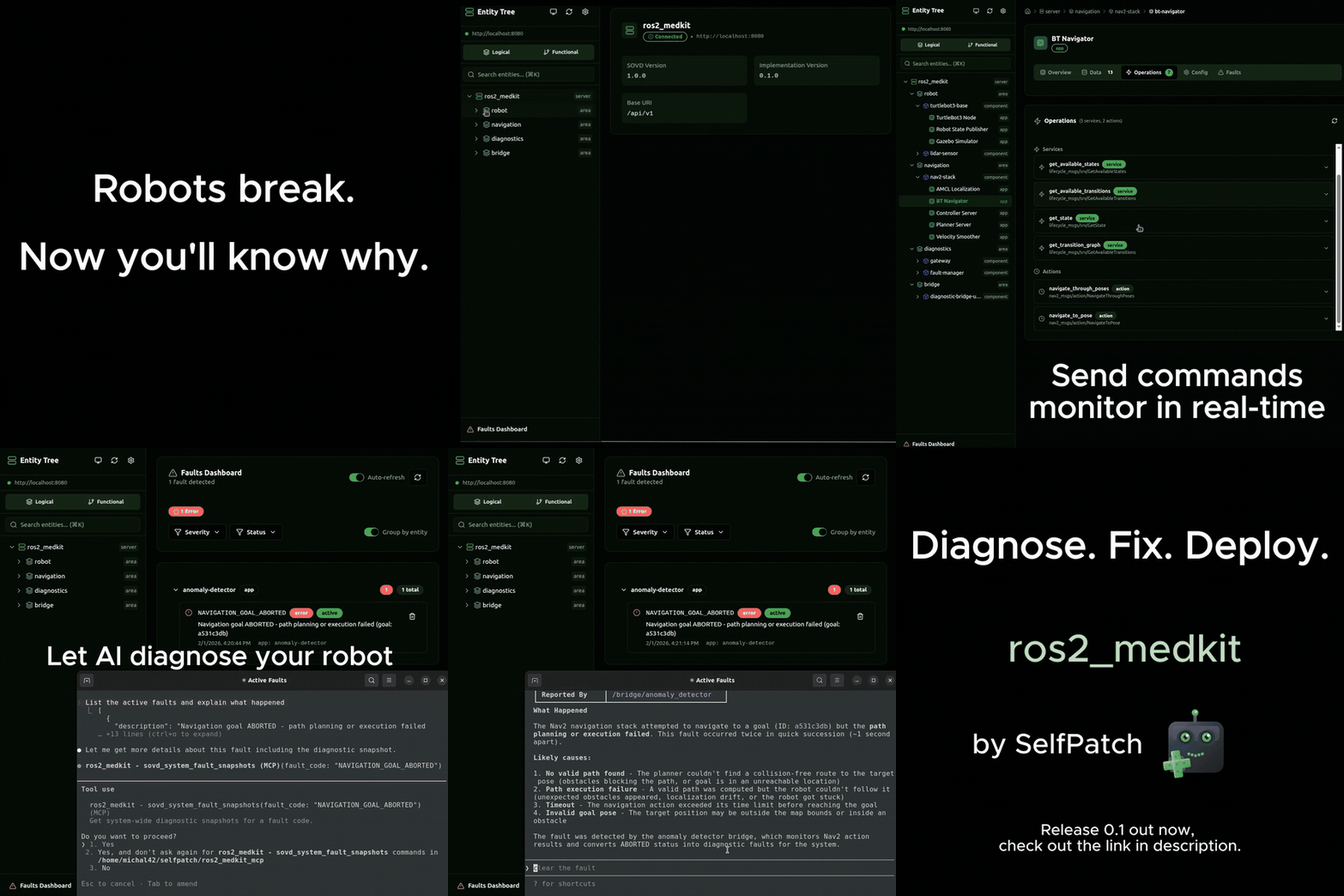
Automotive-grade diagnostics for ROS 2 robots.
When your robot fails, find out why — in minutes, not hours.
Fault correlation · Black-box recording · REST API · AI via MCP
🚀 Quick Start
Try the full demo (Docker, no ROS 2 needed):
git clone https://github.com/selfpatch/selfpatch_demos.git
cd selfpatch_demos/demos/turtlebot3_integration
./run-demo.sh --headless
# → API: http://localhost:8080/api/v1/  Web UI: http://localhost:3000
Build from source (ROS 2 Jazzy, Humble, or Rolling):
git clone --recurse-submodules https://github.com/selfpatch/ros2_medkit.git
cd ros2_medkit
rosdep install --from-paths src --ignore-src -r -y
colcon build --symlink-install && source install/setup.bash
ros2 launch ros2_medkit_gateway gateway.launch.py
# → http://localhost:8080/api/v1/areas
For more examples, see our Postman collection.
✨ Features
| Feature | Status | Description |
|---|---|---|
| 🔍 Discovery | Available | Automatically discover running nodes, topics, services, and actions |
| 📊 Data | Available | Read and write topic data via REST |
| ⚙️ Operations | Available | Call services and actions with execution tracking |
| 🔧 Configurations | Available | Read, write, and reset node parameters |
| 🚨 Faults | Available | Query, inspect, and clear faults with environment data and snapshots |
| 📦 Bulk Data | Available | Upload, download, and manage files (calibration, firmware, rosbags) |
| 📡 Subscriptions | Available | Stream live data and fault events via SSE |
| 🔄 Software Updates | Available | Async prepare/execute lifecycle with pluggable backends |
| 🔒 Authentication | Available | JWT-based RBAC (viewer, operator, configurator, admin) |
| 📋 Logs | Available | Log sources, entries, and configuration |
| 🔁 Entity Lifecycle | Planned | Start, restart, shutdown control |
| 🔐 Modes & Locking | Planned | Target mode control and resource locking |
| 📝 Scripts | Planned | Diagnostic script upload and execution |
| 🧹 Clear Data | Planned | Clear cached and learned diagnostic data |
| 📞 Communication Logs | Planned | Protocol-level communication logging |
📖 Overview
ros2_medkit models a robot as a diagnostic entity tree:
| Entity | Description | Example |
|---|---|---|
| Area | Physical or logical domain |
base, arm, safety, navigation
|
| Component | Hardware or software component within an area |
motor_controller, lidar_driver
|
| Function | Capability provided by one or more components |
localization, obstacle_detection
|
| App | Deployable software unit | node, container, process |
Compatible with the SOVD (Service-Oriented Vehicle Diagnostics) model — same concepts across robots, vehicles, and embedded systems.
📋 Requirements
- OS: Ubuntu 24.04 LTS (Jazzy / Rolling) or Ubuntu 22.04 LTS (Humble)
- ROS 2: Jazzy Jalisco, Humble Hawksbill, or Rolling (experimental)
- Compiler: GCC 11+ (C++17 support)
- Build System: colcon + ament_cmake
📚 Documentation
💬 Community
We’d love to have you join our community!
- 💬 Discord — Join our server for discussions, help, and announcements
File truncated at 100 lines see the full file
CONTRIBUTING
Contributing to ros2_medkit
Thanks for your interest in contributing to ros2_medkit! This guide explains how to report issues, suggest features, and contribute code.
How to Report Issues
Did you find a bug?
- Ensure the bug was not already reported by searching Issues
- If you can’t find an existing issue, open a new one and select the Bug report template
- Fill in all sections of the template:
- Steps to reproduce - numbered steps to recreate the issue
- Expected behavior - what you expected to happen
- Actual behavior - what actually happened, including error messages or stack traces
- Environment - ros2_medkit version, ROS 2 distro, OS
- Additional information - logs, snippets, or screenshots if helpful
Do you want to suggest a feature or improvement?
- Check if the feature has already been suggested in Issues
- If not, open a new issue and select the Feature request / General issue template
- Fill in all sections:
- Proposal - describe the change or feature you’d like to see
- Motivation - why is this important? Who does it benefit?
- Alternatives considered - other options or implementations you considered
- Additional context - any other context or screenshots
How to Contribute Code
Development Workflow
- Fork the repository and clone your fork locally
- Install pre-commit hooks (one-time setup):
   pip install pre-commit
   pre-commit install
-
Create a branch from
mainwith a descriptive name:-
feature/short-descriptionfor new features -
fix/short-descriptionfor bug fixes -
docs/short-descriptionfor documentation changes
-
- Make your changes following the project’s coding standards
- Test your changes locally (see Build and Test section below)
-
Commit your changes with clear, descriptive commit messages
- Pre-commit hooks will automatically check formatting
- Push your branch to your fork
-
Open a Pull Request against the
mainbranch of this repository
Commit Messages
- Use clear and descriptive commit messages
- Start with a verb in imperative mood (e.g., “Add”, “Fix”, “Update”, “Remove”)
- Keep the first line under 72 characters
- Add a blank line followed by a more detailed explanation if needed
Examples:
Add support for SOVD entity mapping

Fix memory leak in diagnostic tree traversal

Update documentation for colcon build process
Build and Test Requirements
Before opening or updating a Pull Request, you must:
- Build the project successfully:
colcon build
- Run all tests:
   colcon test
   colcon test-result --verbose
- Ensure all tests pass locally
- Fix any build warnings or test failures
Pull Request Checklist
Before submitting your PR, ensure:
- Code follows the repository’s style and conventions
- Build succeeds without warnings
- All tests pass locally
- New tests are added for new functionality
- Existing tests are updated if behavior changes
- Documentation is updated where applicable
- PR description clearly explains what changed and why
- Related issue is referenced (e.g., “Fixes #123”)
Code Review Process
- The project maintainers will review pull requests as time permits
- Address review feedback promptly
- Keep discussions professional and constructive
File truncated at 100 lines see the full file
Repository Summary
| Description | |
| Checkout URI | https://github.com/selfpatch/ros2_medkit.git |
| VCS Type | git |
| VCS Version | main |
| Last Updated | 2026-03-04 |
| Dev Status | DEVELOPED |
| Released | UNRELEASED |
| Contributing |
Help Wanted (-)
Good First Issues (-) Pull Requests to Review (-) |
Packages
| Name | Version |
|---|---|
| ros2_medkit_diagnostic_bridge | 0.3.0 |
| ros2_medkit_fault_manager | 0.3.0 |
| ros2_medkit_fault_reporter | 0.3.0 |
| ros2_medkit_gateway | 0.3.0 |
| ros2_medkit_integration_tests | 0.3.0 |
| ros2_medkit_msgs | 0.3.0 |
| ros2_medkit_serialization | 0.3.0 |
README
ros2_medkit
Automotive-grade diagnostics for ROS 2 robots.
When your robot fails, find out why — in minutes, not hours.
Fault correlation · Black-box recording · REST API · AI via MCP
🚀 Quick Start
Try the full demo (Docker, no ROS 2 needed):
git clone https://github.com/selfpatch/selfpatch_demos.git
cd selfpatch_demos/demos/turtlebot3_integration
./run-demo.sh --headless
# → API: http://localhost:8080/api/v1/  Web UI: http://localhost:3000
Build from source (ROS 2 Jazzy, Humble, or Rolling):
git clone --recurse-submodules https://github.com/selfpatch/ros2_medkit.git
cd ros2_medkit
rosdep install --from-paths src --ignore-src -r -y
colcon build --symlink-install && source install/setup.bash
ros2 launch ros2_medkit_gateway gateway.launch.py
# → http://localhost:8080/api/v1/areas
For more examples, see our Postman collection.
✨ Features
| Feature | Status | Description |
|---|---|---|
| 🔍 Discovery | Available | Automatically discover running nodes, topics, services, and actions |
| 📊 Data | Available | Read and write topic data via REST |
| ⚙️ Operations | Available | Call services and actions with execution tracking |
| 🔧 Configurations | Available | Read, write, and reset node parameters |
| 🚨 Faults | Available | Query, inspect, and clear faults with environment data and snapshots |
| 📦 Bulk Data | Available | Upload, download, and manage files (calibration, firmware, rosbags) |
| 📡 Subscriptions | Available | Stream live data and fault events via SSE |
| 🔄 Software Updates | Available | Async prepare/execute lifecycle with pluggable backends |
| 🔒 Authentication | Available | JWT-based RBAC (viewer, operator, configurator, admin) |
| 📋 Logs | Available | Log sources, entries, and configuration |
| 🔁 Entity Lifecycle | Planned | Start, restart, shutdown control |
| 🔐 Modes & Locking | Planned | Target mode control and resource locking |
| 📝 Scripts | Planned | Diagnostic script upload and execution |
| 🧹 Clear Data | Planned | Clear cached and learned diagnostic data |
| 📞 Communication Logs | Planned | Protocol-level communication logging |
📖 Overview
ros2_medkit models a robot as a diagnostic entity tree:
| Entity | Description | Example |
|---|---|---|
| Area | Physical or logical domain |
base, arm, safety, navigation
|
| Component | Hardware or software component within an area |
motor_controller, lidar_driver
|
| Function | Capability provided by one or more components |
localization, obstacle_detection
|
| App | Deployable software unit | node, container, process |
Compatible with the SOVD (Service-Oriented Vehicle Diagnostics) model — same concepts across robots, vehicles, and embedded systems.
📋 Requirements
- OS: Ubuntu 24.04 LTS (Jazzy / Rolling) or Ubuntu 22.04 LTS (Humble)
- ROS 2: Jazzy Jalisco, Humble Hawksbill, or Rolling (experimental)
- Compiler: GCC 11+ (C++17 support)
- Build System: colcon + ament_cmake
📚 Documentation
💬 Community
We’d love to have you join our community!
- 💬 Discord — Join our server for discussions, help, and announcements
File truncated at 100 lines see the full file
CONTRIBUTING
Contributing to ros2_medkit
Thanks for your interest in contributing to ros2_medkit! This guide explains how to report issues, suggest features, and contribute code.
How to Report Issues
Did you find a bug?
- Ensure the bug was not already reported by searching Issues
- If you can’t find an existing issue, open a new one and select the Bug report template
- Fill in all sections of the template:
- Steps to reproduce - numbered steps to recreate the issue
- Expected behavior - what you expected to happen
- Actual behavior - what actually happened, including error messages or stack traces
- Environment - ros2_medkit version, ROS 2 distro, OS
- Additional information - logs, snippets, or screenshots if helpful
Do you want to suggest a feature or improvement?
- Check if the feature has already been suggested in Issues
- If not, open a new issue and select the Feature request / General issue template
- Fill in all sections:
- Proposal - describe the change or feature you’d like to see
- Motivation - why is this important? Who does it benefit?
- Alternatives considered - other options or implementations you considered
- Additional context - any other context or screenshots
How to Contribute Code
Development Workflow
- Fork the repository and clone your fork locally
- Install pre-commit hooks (one-time setup):
   pip install pre-commit
   pre-commit install
-
Create a branch from
mainwith a descriptive name:-
feature/short-descriptionfor new features -
fix/short-descriptionfor bug fixes -
docs/short-descriptionfor documentation changes
-
- Make your changes following the project’s coding standards
- Test your changes locally (see Build and Test section below)
-
Commit your changes with clear, descriptive commit messages
- Pre-commit hooks will automatically check formatting
- Push your branch to your fork
-
Open a Pull Request against the
mainbranch of this repository
Commit Messages
- Use clear and descriptive commit messages
- Start with a verb in imperative mood (e.g., “Add”, “Fix”, “Update”, “Remove”)
- Keep the first line under 72 characters
- Add a blank line followed by a more detailed explanation if needed
Examples:
Add support for SOVD entity mapping

Fix memory leak in diagnostic tree traversal

Update documentation for colcon build process
Build and Test Requirements
Before opening or updating a Pull Request, you must:
- Build the project successfully:
colcon build
- Run all tests:
   colcon test
   colcon test-result --verbose
- Ensure all tests pass locally
- Fix any build warnings or test failures
Pull Request Checklist
Before submitting your PR, ensure:
- Code follows the repository’s style and conventions
- Build succeeds without warnings
- All tests pass locally
- New tests are added for new functionality
- Existing tests are updated if behavior changes
- Documentation is updated where applicable
- PR description clearly explains what changed and why
- Related issue is referenced (e.g., “Fixes #123”)
Code Review Process
- The project maintainers will review pull requests as time permits
- Address review feedback promptly
- Keep discussions professional and constructive
File truncated at 100 lines see the full file
Repository Summary
| Description | |
| Checkout URI | https://github.com/selfpatch/ros2_medkit.git |
| VCS Type | git |
| VCS Version | main |
| Last Updated | 2026-03-04 |
| Dev Status | DEVELOPED |
| Released | UNRELEASED |
| Contributing |
Help Wanted (-)
Good First Issues (-) Pull Requests to Review (-) |
Packages
| Name | Version |
|---|---|
| ros2_medkit_diagnostic_bridge | 0.3.0 |
| ros2_medkit_fault_manager | 0.3.0 |
| ros2_medkit_fault_reporter | 0.3.0 |
| ros2_medkit_gateway | 0.3.0 |
| ros2_medkit_integration_tests | 0.3.0 |
| ros2_medkit_msgs | 0.3.0 |
| ros2_medkit_serialization | 0.3.0 |
README
ros2_medkit
Automotive-grade diagnostics for ROS 2 robots.
When your robot fails, find out why — in minutes, not hours.
Fault correlation · Black-box recording · REST API · AI via MCP
🚀 Quick Start
Try the full demo (Docker, no ROS 2 needed):
git clone https://github.com/selfpatch/selfpatch_demos.git
cd selfpatch_demos/demos/turtlebot3_integration
./run-demo.sh --headless
# → API: http://localhost:8080/api/v1/  Web UI: http://localhost:3000
Build from source (ROS 2 Jazzy, Humble, or Rolling):
git clone --recurse-submodules https://github.com/selfpatch/ros2_medkit.git
cd ros2_medkit
rosdep install --from-paths src --ignore-src -r -y
colcon build --symlink-install && source install/setup.bash
ros2 launch ros2_medkit_gateway gateway.launch.py
# → http://localhost:8080/api/v1/areas
For more examples, see our Postman collection.
✨ Features
| Feature | Status | Description |
|---|---|---|
| 🔍 Discovery | Available | Automatically discover running nodes, topics, services, and actions |
| 📊 Data | Available | Read and write topic data via REST |
| ⚙️ Operations | Available | Call services and actions with execution tracking |
| 🔧 Configurations | Available | Read, write, and reset node parameters |
| 🚨 Faults | Available | Query, inspect, and clear faults with environment data and snapshots |
| 📦 Bulk Data | Available | Upload, download, and manage files (calibration, firmware, rosbags) |
| 📡 Subscriptions | Available | Stream live data and fault events via SSE |
| 🔄 Software Updates | Available | Async prepare/execute lifecycle with pluggable backends |
| 🔒 Authentication | Available | JWT-based RBAC (viewer, operator, configurator, admin) |
| 📋 Logs | Available | Log sources, entries, and configuration |
| 🔁 Entity Lifecycle | Planned | Start, restart, shutdown control |
| 🔐 Modes & Locking | Planned | Target mode control and resource locking |
| 📝 Scripts | Planned | Diagnostic script upload and execution |
| 🧹 Clear Data | Planned | Clear cached and learned diagnostic data |
| 📞 Communication Logs | Planned | Protocol-level communication logging |
📖 Overview
ros2_medkit models a robot as a diagnostic entity tree:
| Entity | Description | Example |
|---|---|---|
| Area | Physical or logical domain |
base, arm, safety, navigation
|
| Component | Hardware or software component within an area |
motor_controller, lidar_driver
|
| Function | Capability provided by one or more components |
localization, obstacle_detection
|
| App | Deployable software unit | node, container, process |
Compatible with the SOVD (Service-Oriented Vehicle Diagnostics) model — same concepts across robots, vehicles, and embedded systems.
📋 Requirements
- OS: Ubuntu 24.04 LTS (Jazzy / Rolling) or Ubuntu 22.04 LTS (Humble)
- ROS 2: Jazzy Jalisco, Humble Hawksbill, or Rolling (experimental)
- Compiler: GCC 11+ (C++17 support)
- Build System: colcon + ament_cmake
📚 Documentation
💬 Community
We’d love to have you join our community!
- 💬 Discord — Join our server for discussions, help, and announcements
File truncated at 100 lines see the full file
CONTRIBUTING
Contributing to ros2_medkit
Thanks for your interest in contributing to ros2_medkit! This guide explains how to report issues, suggest features, and contribute code.
How to Report Issues
Did you find a bug?
- Ensure the bug was not already reported by searching Issues
- If you can’t find an existing issue, open a new one and select the Bug report template
- Fill in all sections of the template:
- Steps to reproduce - numbered steps to recreate the issue
- Expected behavior - what you expected to happen
- Actual behavior - what actually happened, including error messages or stack traces
- Environment - ros2_medkit version, ROS 2 distro, OS
- Additional information - logs, snippets, or screenshots if helpful
Do you want to suggest a feature or improvement?
- Check if the feature has already been suggested in Issues
- If not, open a new issue and select the Feature request / General issue template
- Fill in all sections:
- Proposal - describe the change or feature you’d like to see
- Motivation - why is this important? Who does it benefit?
- Alternatives considered - other options or implementations you considered
- Additional context - any other context or screenshots
How to Contribute Code
Development Workflow
- Fork the repository and clone your fork locally
- Install pre-commit hooks (one-time setup):
   pip install pre-commit
   pre-commit install
-
Create a branch from
mainwith a descriptive name:-
feature/short-descriptionfor new features -
fix/short-descriptionfor bug fixes -
docs/short-descriptionfor documentation changes
-
- Make your changes following the project’s coding standards
- Test your changes locally (see Build and Test section below)
-
Commit your changes with clear, descriptive commit messages
- Pre-commit hooks will automatically check formatting
- Push your branch to your fork
-
Open a Pull Request against the
mainbranch of this repository
Commit Messages
- Use clear and descriptive commit messages
- Start with a verb in imperative mood (e.g., “Add”, “Fix”, “Update”, “Remove”)
- Keep the first line under 72 characters
- Add a blank line followed by a more detailed explanation if needed
Examples:
Add support for SOVD entity mapping

Fix memory leak in diagnostic tree traversal

Update documentation for colcon build process
Build and Test Requirements
Before opening or updating a Pull Request, you must:
- Build the project successfully:
colcon build
- Run all tests:
   colcon test
   colcon test-result --verbose
- Ensure all tests pass locally
- Fix any build warnings or test failures
Pull Request Checklist
Before submitting your PR, ensure:
- Code follows the repository’s style and conventions
- Build succeeds without warnings
- All tests pass locally
- New tests are added for new functionality
- Existing tests are updated if behavior changes
- Documentation is updated where applicable
- PR description clearly explains what changed and why
- Related issue is referenced (e.g., “Fixes #123”)
Code Review Process
- The project maintainers will review pull requests as time permits
- Address review feedback promptly
- Keep discussions professional and constructive
File truncated at 100 lines see the full file
Repository Summary
| Description | |
| Checkout URI | https://github.com/selfpatch/ros2_medkit.git |
| VCS Type | git |
| VCS Version | main |
| Last Updated | 2026-03-04 |
| Dev Status | DEVELOPED |
| Released | UNRELEASED |
| Contributing |
Help Wanted (-)
Good First Issues (-) Pull Requests to Review (-) |
Packages
| Name | Version |
|---|---|
| ros2_medkit_diagnostic_bridge | 0.3.0 |
| ros2_medkit_fault_manager | 0.3.0 |
| ros2_medkit_fault_reporter | 0.3.0 |
| ros2_medkit_gateway | 0.3.0 |
| ros2_medkit_integration_tests | 0.3.0 |
| ros2_medkit_msgs | 0.3.0 |
| ros2_medkit_serialization | 0.3.0 |
README
ros2_medkit
Automotive-grade diagnostics for ROS 2 robots.
When your robot fails, find out why — in minutes, not hours.
Fault correlation · Black-box recording · REST API · AI via MCP
🚀 Quick Start
Try the full demo (Docker, no ROS 2 needed):
git clone https://github.com/selfpatch/selfpatch_demos.git
cd selfpatch_demos/demos/turtlebot3_integration
./run-demo.sh --headless
# → API: http://localhost:8080/api/v1/  Web UI: http://localhost:3000
Build from source (ROS 2 Jazzy, Humble, or Rolling):
git clone --recurse-submodules https://github.com/selfpatch/ros2_medkit.git
cd ros2_medkit
rosdep install --from-paths src --ignore-src -r -y
colcon build --symlink-install && source install/setup.bash
ros2 launch ros2_medkit_gateway gateway.launch.py
# → http://localhost:8080/api/v1/areas
For more examples, see our Postman collection.
✨ Features
| Feature | Status | Description |
|---|---|---|
| 🔍 Discovery | Available | Automatically discover running nodes, topics, services, and actions |
| 📊 Data | Available | Read and write topic data via REST |
| ⚙️ Operations | Available | Call services and actions with execution tracking |
| 🔧 Configurations | Available | Read, write, and reset node parameters |
| 🚨 Faults | Available | Query, inspect, and clear faults with environment data and snapshots |
| 📦 Bulk Data | Available | Upload, download, and manage files (calibration, firmware, rosbags) |
| 📡 Subscriptions | Available | Stream live data and fault events via SSE |
| 🔄 Software Updates | Available | Async prepare/execute lifecycle with pluggable backends |
| 🔒 Authentication | Available | JWT-based RBAC (viewer, operator, configurator, admin) |
| 📋 Logs | Available | Log sources, entries, and configuration |
| 🔁 Entity Lifecycle | Planned | Start, restart, shutdown control |
| 🔐 Modes & Locking | Planned | Target mode control and resource locking |
| 📝 Scripts | Planned | Diagnostic script upload and execution |
| 🧹 Clear Data | Planned | Clear cached and learned diagnostic data |
| 📞 Communication Logs | Planned | Protocol-level communication logging |
📖 Overview
ros2_medkit models a robot as a diagnostic entity tree:
| Entity | Description | Example |
|---|---|---|
| Area | Physical or logical domain |
base, arm, safety, navigation
|
| Component | Hardware or software component within an area |
motor_controller, lidar_driver
|
| Function | Capability provided by one or more components |
localization, obstacle_detection
|
| App | Deployable software unit | node, container, process |
Compatible with the SOVD (Service-Oriented Vehicle Diagnostics) model — same concepts across robots, vehicles, and embedded systems.
📋 Requirements
- OS: Ubuntu 24.04 LTS (Jazzy / Rolling) or Ubuntu 22.04 LTS (Humble)
- ROS 2: Jazzy Jalisco, Humble Hawksbill, or Rolling (experimental)
- Compiler: GCC 11+ (C++17 support)
- Build System: colcon + ament_cmake
📚 Documentation
💬 Community
We’d love to have you join our community!
- 💬 Discord — Join our server for discussions, help, and announcements
File truncated at 100 lines see the full file
CONTRIBUTING
Contributing to ros2_medkit
Thanks for your interest in contributing to ros2_medkit! This guide explains how to report issues, suggest features, and contribute code.
How to Report Issues
Did you find a bug?
- Ensure the bug was not already reported by searching Issues
- If you can’t find an existing issue, open a new one and select the Bug report template
- Fill in all sections of the template:
- Steps to reproduce - numbered steps to recreate the issue
- Expected behavior - what you expected to happen
- Actual behavior - what actually happened, including error messages or stack traces
- Environment - ros2_medkit version, ROS 2 distro, OS
- Additional information - logs, snippets, or screenshots if helpful
Do you want to suggest a feature or improvement?
- Check if the feature has already been suggested in Issues
- If not, open a new issue and select the Feature request / General issue template
- Fill in all sections:
- Proposal - describe the change or feature you’d like to see
- Motivation - why is this important? Who does it benefit?
- Alternatives considered - other options or implementations you considered
- Additional context - any other context or screenshots
How to Contribute Code
Development Workflow
- Fork the repository and clone your fork locally
- Install pre-commit hooks (one-time setup):
   pip install pre-commit
   pre-commit install
-
Create a branch from
mainwith a descriptive name:-
feature/short-descriptionfor new features -
fix/short-descriptionfor bug fixes -
docs/short-descriptionfor documentation changes
-
- Make your changes following the project’s coding standards
- Test your changes locally (see Build and Test section below)
-
Commit your changes with clear, descriptive commit messages
- Pre-commit hooks will automatically check formatting
- Push your branch to your fork
-
Open a Pull Request against the
mainbranch of this repository
Commit Messages
- Use clear and descriptive commit messages
- Start with a verb in imperative mood (e.g., “Add”, “Fix”, “Update”, “Remove”)
- Keep the first line under 72 characters
- Add a blank line followed by a more detailed explanation if needed
Examples:
Add support for SOVD entity mapping

Fix memory leak in diagnostic tree traversal

Update documentation for colcon build process
Build and Test Requirements
Before opening or updating a Pull Request, you must:
- Build the project successfully:
colcon build
- Run all tests:
   colcon test
   colcon test-result --verbose
- Ensure all tests pass locally
- Fix any build warnings or test failures
Pull Request Checklist
Before submitting your PR, ensure:
- Code follows the repository’s style and conventions
- Build succeeds without warnings
- All tests pass locally
- New tests are added for new functionality
- Existing tests are updated if behavior changes
- Documentation is updated where applicable
- PR description clearly explains what changed and why
- Related issue is referenced (e.g., “Fixes #123”)
Code Review Process
- The project maintainers will review pull requests as time permits
- Address review feedback promptly
- Keep discussions professional and constructive
File truncated at 100 lines see the full file
Repository Summary
| Description | |
| Checkout URI | https://github.com/selfpatch/ros2_medkit.git |
| VCS Type | git |
| VCS Version | main |
| Last Updated | 2026-03-04 |
| Dev Status | DEVELOPED |
| Released | UNRELEASED |
| Contributing |
Help Wanted (-)
Good First Issues (-) Pull Requests to Review (-) |
Packages
| Name | Version |
|---|---|
| ros2_medkit_diagnostic_bridge | 0.3.0 |
| ros2_medkit_fault_manager | 0.3.0 |
| ros2_medkit_fault_reporter | 0.3.0 |
| ros2_medkit_gateway | 0.3.0 |
| ros2_medkit_integration_tests | 0.3.0 |
| ros2_medkit_msgs | 0.3.0 |
| ros2_medkit_serialization | 0.3.0 |
README
ros2_medkit
Automotive-grade diagnostics for ROS 2 robots.
When your robot fails, find out why — in minutes, not hours.
Fault correlation · Black-box recording · REST API · AI via MCP
🚀 Quick Start
Try the full demo (Docker, no ROS 2 needed):
git clone https://github.com/selfpatch/selfpatch_demos.git
cd selfpatch_demos/demos/turtlebot3_integration
./run-demo.sh --headless
# → API: http://localhost:8080/api/v1/  Web UI: http://localhost:3000
Build from source (ROS 2 Jazzy, Humble, or Rolling):
git clone --recurse-submodules https://github.com/selfpatch/ros2_medkit.git
cd ros2_medkit
rosdep install --from-paths src --ignore-src -r -y
colcon build --symlink-install && source install/setup.bash
ros2 launch ros2_medkit_gateway gateway.launch.py
# → http://localhost:8080/api/v1/areas
For more examples, see our Postman collection.
✨ Features
| Feature | Status | Description |
|---|---|---|
| 🔍 Discovery | Available | Automatically discover running nodes, topics, services, and actions |
| 📊 Data | Available | Read and write topic data via REST |
| ⚙️ Operations | Available | Call services and actions with execution tracking |
| 🔧 Configurations | Available | Read, write, and reset node parameters |
| 🚨 Faults | Available | Query, inspect, and clear faults with environment data and snapshots |
| 📦 Bulk Data | Available | Upload, download, and manage files (calibration, firmware, rosbags) |
| 📡 Subscriptions | Available | Stream live data and fault events via SSE |
| 🔄 Software Updates | Available | Async prepare/execute lifecycle with pluggable backends |
| 🔒 Authentication | Available | JWT-based RBAC (viewer, operator, configurator, admin) |
| 📋 Logs | Available | Log sources, entries, and configuration |
| 🔁 Entity Lifecycle | Planned | Start, restart, shutdown control |
| 🔐 Modes & Locking | Planned | Target mode control and resource locking |
| 📝 Scripts | Planned | Diagnostic script upload and execution |
| 🧹 Clear Data | Planned | Clear cached and learned diagnostic data |
| 📞 Communication Logs | Planned | Protocol-level communication logging |
📖 Overview
ros2_medkit models a robot as a diagnostic entity tree:
| Entity | Description | Example |
|---|---|---|
| Area | Physical or logical domain |
base, arm, safety, navigation
|
| Component | Hardware or software component within an area |
motor_controller, lidar_driver
|
| Function | Capability provided by one or more components |
localization, obstacle_detection
|
| App | Deployable software unit | node, container, process |
Compatible with the SOVD (Service-Oriented Vehicle Diagnostics) model — same concepts across robots, vehicles, and embedded systems.
📋 Requirements
- OS: Ubuntu 24.04 LTS (Jazzy / Rolling) or Ubuntu 22.04 LTS (Humble)
- ROS 2: Jazzy Jalisco, Humble Hawksbill, or Rolling (experimental)
- Compiler: GCC 11+ (C++17 support)
- Build System: colcon + ament_cmake
📚 Documentation
💬 Community
We’d love to have you join our community!
- 💬 Discord — Join our server for discussions, help, and announcements
File truncated at 100 lines see the full file
CONTRIBUTING
Contributing to ros2_medkit
Thanks for your interest in contributing to ros2_medkit! This guide explains how to report issues, suggest features, and contribute code.
How to Report Issues
Did you find a bug?
- Ensure the bug was not already reported by searching Issues
- If you can’t find an existing issue, open a new one and select the Bug report template
- Fill in all sections of the template:
- Steps to reproduce - numbered steps to recreate the issue
- Expected behavior - what you expected to happen
- Actual behavior - what actually happened, including error messages or stack traces
- Environment - ros2_medkit version, ROS 2 distro, OS
- Additional information - logs, snippets, or screenshots if helpful
Do you want to suggest a feature or improvement?
- Check if the feature has already been suggested in Issues
- If not, open a new issue and select the Feature request / General issue template
- Fill in all sections:
- Proposal - describe the change or feature you’d like to see
- Motivation - why is this important? Who does it benefit?
- Alternatives considered - other options or implementations you considered
- Additional context - any other context or screenshots
How to Contribute Code
Development Workflow
- Fork the repository and clone your fork locally
- Install pre-commit hooks (one-time setup):
   pip install pre-commit
   pre-commit install
-
Create a branch from
mainwith a descriptive name:-
feature/short-descriptionfor new features -
fix/short-descriptionfor bug fixes -
docs/short-descriptionfor documentation changes
-
- Make your changes following the project’s coding standards
- Test your changes locally (see Build and Test section below)
-
Commit your changes with clear, descriptive commit messages
- Pre-commit hooks will automatically check formatting
- Push your branch to your fork
-
Open a Pull Request against the
mainbranch of this repository
Commit Messages
- Use clear and descriptive commit messages
- Start with a verb in imperative mood (e.g., “Add”, “Fix”, “Update”, “Remove”)
- Keep the first line under 72 characters
- Add a blank line followed by a more detailed explanation if needed
Examples:
Add support for SOVD entity mapping

Fix memory leak in diagnostic tree traversal

Update documentation for colcon build process
Build and Test Requirements
Before opening or updating a Pull Request, you must:
- Build the project successfully:
colcon build
- Run all tests:
   colcon test
   colcon test-result --verbose
- Ensure all tests pass locally
- Fix any build warnings or test failures
Pull Request Checklist
Before submitting your PR, ensure:
- Code follows the repository’s style and conventions
- Build succeeds without warnings
- All tests pass locally
- New tests are added for new functionality
- Existing tests are updated if behavior changes
- Documentation is updated where applicable
- PR description clearly explains what changed and why
- Related issue is referenced (e.g., “Fixes #123”)
Code Review Process
- The project maintainers will review pull requests as time permits
- Address review feedback promptly
- Keep discussions professional and constructive
File truncated at 100 lines see the full file
Repository Summary
| Description | |
| Checkout URI | https://github.com/selfpatch/ros2_medkit.git |
| VCS Type | git |
| VCS Version | main |
| Last Updated | 2026-03-04 |
| Dev Status | DEVELOPED |
| Released | UNRELEASED |
| Contributing |
Help Wanted (-)
Good First Issues (-) Pull Requests to Review (-) |
Packages
| Name | Version |
|---|---|
| ros2_medkit_diagnostic_bridge | 0.3.0 |
| ros2_medkit_fault_manager | 0.3.0 |
| ros2_medkit_fault_reporter | 0.3.0 |
| ros2_medkit_gateway | 0.3.0 |
| ros2_medkit_integration_tests | 0.3.0 |
| ros2_medkit_msgs | 0.3.0 |
| ros2_medkit_serialization | 0.3.0 |
README
ros2_medkit
Automotive-grade diagnostics for ROS 2 robots.
When your robot fails, find out why — in minutes, not hours.
Fault correlation · Black-box recording · REST API · AI via MCP
🚀 Quick Start
Try the full demo (Docker, no ROS 2 needed):
git clone https://github.com/selfpatch/selfpatch_demos.git
cd selfpatch_demos/demos/turtlebot3_integration
./run-demo.sh --headless
# → API: http://localhost:8080/api/v1/  Web UI: http://localhost:3000
Build from source (ROS 2 Jazzy, Humble, or Rolling):
git clone --recurse-submodules https://github.com/selfpatch/ros2_medkit.git
cd ros2_medkit
rosdep install --from-paths src --ignore-src -r -y
colcon build --symlink-install && source install/setup.bash
ros2 launch ros2_medkit_gateway gateway.launch.py
# → http://localhost:8080/api/v1/areas
For more examples, see our Postman collection.
✨ Features
| Feature | Status | Description |
|---|---|---|
| 🔍 Discovery | Available | Automatically discover running nodes, topics, services, and actions |
| 📊 Data | Available | Read and write topic data via REST |
| ⚙️ Operations | Available | Call services and actions with execution tracking |
| 🔧 Configurations | Available | Read, write, and reset node parameters |
| 🚨 Faults | Available | Query, inspect, and clear faults with environment data and snapshots |
| 📦 Bulk Data | Available | Upload, download, and manage files (calibration, firmware, rosbags) |
| 📡 Subscriptions | Available | Stream live data and fault events via SSE |
| 🔄 Software Updates | Available | Async prepare/execute lifecycle with pluggable backends |
| 🔒 Authentication | Available | JWT-based RBAC (viewer, operator, configurator, admin) |
| 📋 Logs | Available | Log sources, entries, and configuration |
| 🔁 Entity Lifecycle | Planned | Start, restart, shutdown control |
| 🔐 Modes & Locking | Planned | Target mode control and resource locking |
| 📝 Scripts | Planned | Diagnostic script upload and execution |
| 🧹 Clear Data | Planned | Clear cached and learned diagnostic data |
| 📞 Communication Logs | Planned | Protocol-level communication logging |
📖 Overview
ros2_medkit models a robot as a diagnostic entity tree:
| Entity | Description | Example |
|---|---|---|
| Area | Physical or logical domain |
base, arm, safety, navigation
|
| Component | Hardware or software component within an area |
motor_controller, lidar_driver
|
| Function | Capability provided by one or more components |
localization, obstacle_detection
|
| App | Deployable software unit | node, container, process |
Compatible with the SOVD (Service-Oriented Vehicle Diagnostics) model — same concepts across robots, vehicles, and embedded systems.
📋 Requirements
- OS: Ubuntu 24.04 LTS (Jazzy / Rolling) or Ubuntu 22.04 LTS (Humble)
- ROS 2: Jazzy Jalisco, Humble Hawksbill, or Rolling (experimental)
- Compiler: GCC 11+ (C++17 support)
- Build System: colcon + ament_cmake
📚 Documentation
💬 Community
We’d love to have you join our community!
- 💬 Discord — Join our server for discussions, help, and announcements
File truncated at 100 lines see the full file
CONTRIBUTING
Contributing to ros2_medkit
Thanks for your interest in contributing to ros2_medkit! This guide explains how to report issues, suggest features, and contribute code.
How to Report Issues
Did you find a bug?
- Ensure the bug was not already reported by searching Issues
- If you can’t find an existing issue, open a new one and select the Bug report template
- Fill in all sections of the template:
- Steps to reproduce - numbered steps to recreate the issue
- Expected behavior - what you expected to happen
- Actual behavior - what actually happened, including error messages or stack traces
- Environment - ros2_medkit version, ROS 2 distro, OS
- Additional information - logs, snippets, or screenshots if helpful
Do you want to suggest a feature or improvement?
- Check if the feature has already been suggested in Issues
- If not, open a new issue and select the Feature request / General issue template
- Fill in all sections:
- Proposal - describe the change or feature you’d like to see
- Motivation - why is this important? Who does it benefit?
- Alternatives considered - other options or implementations you considered
- Additional context - any other context or screenshots
How to Contribute Code
Development Workflow
- Fork the repository and clone your fork locally
- Install pre-commit hooks (one-time setup):
   pip install pre-commit
   pre-commit install
-
Create a branch from
mainwith a descriptive name:-
feature/short-descriptionfor new features -
fix/short-descriptionfor bug fixes -
docs/short-descriptionfor documentation changes
-
- Make your changes following the project’s coding standards
- Test your changes locally (see Build and Test section below)
-
Commit your changes with clear, descriptive commit messages
- Pre-commit hooks will automatically check formatting
- Push your branch to your fork
-
Open a Pull Request against the
mainbranch of this repository
Commit Messages
- Use clear and descriptive commit messages
- Start with a verb in imperative mood (e.g., “Add”, “Fix”, “Update”, “Remove”)
- Keep the first line under 72 characters
- Add a blank line followed by a more detailed explanation if needed
Examples:
Add support for SOVD entity mapping

Fix memory leak in diagnostic tree traversal

Update documentation for colcon build process
Build and Test Requirements
Before opening or updating a Pull Request, you must:
- Build the project successfully:
colcon build
- Run all tests:
   colcon test
   colcon test-result --verbose
- Ensure all tests pass locally
- Fix any build warnings or test failures
Pull Request Checklist
Before submitting your PR, ensure:
- Code follows the repository’s style and conventions
- Build succeeds without warnings
- All tests pass locally
- New tests are added for new functionality
- Existing tests are updated if behavior changes
- Documentation is updated where applicable
- PR description clearly explains what changed and why
- Related issue is referenced (e.g., “Fixes #123”)
Code Review Process
- The project maintainers will review pull requests as time permits
- Address review feedback promptly
- Keep discussions professional and constructive
File truncated at 100 lines see the full file
Repository Summary
| Description | |
| Checkout URI | https://github.com/selfpatch/ros2_medkit.git |
| VCS Type | git |
| VCS Version | main |
| Last Updated | 2026-03-04 |
| Dev Status | DEVELOPED |
| Released | UNRELEASED |
| Contributing |
Help Wanted (-)
Good First Issues (-) Pull Requests to Review (-) |
Packages
| Name | Version |
|---|---|
| ros2_medkit_diagnostic_bridge | 0.3.0 |
| ros2_medkit_fault_manager | 0.3.0 |
| ros2_medkit_fault_reporter | 0.3.0 |
| ros2_medkit_gateway | 0.3.0 |
| ros2_medkit_integration_tests | 0.3.0 |
| ros2_medkit_msgs | 0.3.0 |
| ros2_medkit_serialization | 0.3.0 |
README
ros2_medkit
Automotive-grade diagnostics for ROS 2 robots.
When your robot fails, find out why — in minutes, not hours.
Fault correlation · Black-box recording · REST API · AI via MCP
🚀 Quick Start
Try the full demo (Docker, no ROS 2 needed):
git clone https://github.com/selfpatch/selfpatch_demos.git
cd selfpatch_demos/demos/turtlebot3_integration
./run-demo.sh --headless
# → API: http://localhost:8080/api/v1/  Web UI: http://localhost:3000
Build from source (ROS 2 Jazzy, Humble, or Rolling):
git clone --recurse-submodules https://github.com/selfpatch/ros2_medkit.git
cd ros2_medkit
rosdep install --from-paths src --ignore-src -r -y
colcon build --symlink-install && source install/setup.bash
ros2 launch ros2_medkit_gateway gateway.launch.py
# → http://localhost:8080/api/v1/areas
For more examples, see our Postman collection.
✨ Features
| Feature | Status | Description |
|---|---|---|
| 🔍 Discovery | Available | Automatically discover running nodes, topics, services, and actions |
| 📊 Data | Available | Read and write topic data via REST |
| ⚙️ Operations | Available | Call services and actions with execution tracking |
| 🔧 Configurations | Available | Read, write, and reset node parameters |
| 🚨 Faults | Available | Query, inspect, and clear faults with environment data and snapshots |
| 📦 Bulk Data | Available | Upload, download, and manage files (calibration, firmware, rosbags) |
| 📡 Subscriptions | Available | Stream live data and fault events via SSE |
| 🔄 Software Updates | Available | Async prepare/execute lifecycle with pluggable backends |
| 🔒 Authentication | Available | JWT-based RBAC (viewer, operator, configurator, admin) |
| 📋 Logs | Available | Log sources, entries, and configuration |
| 🔁 Entity Lifecycle | Planned | Start, restart, shutdown control |
| 🔐 Modes & Locking | Planned | Target mode control and resource locking |
| 📝 Scripts | Planned | Diagnostic script upload and execution |
| 🧹 Clear Data | Planned | Clear cached and learned diagnostic data |
| 📞 Communication Logs | Planned | Protocol-level communication logging |
📖 Overview
ros2_medkit models a robot as a diagnostic entity tree:
| Entity | Description | Example |
|---|---|---|
| Area | Physical or logical domain |
base, arm, safety, navigation
|
| Component | Hardware or software component within an area |
motor_controller, lidar_driver
|
| Function | Capability provided by one or more components |
localization, obstacle_detection
|
| App | Deployable software unit | node, container, process |
Compatible with the SOVD (Service-Oriented Vehicle Diagnostics) model — same concepts across robots, vehicles, and embedded systems.
📋 Requirements
- OS: Ubuntu 24.04 LTS (Jazzy / Rolling) or Ubuntu 22.04 LTS (Humble)
- ROS 2: Jazzy Jalisco, Humble Hawksbill, or Rolling (experimental)
- Compiler: GCC 11+ (C++17 support)
- Build System: colcon + ament_cmake
📚 Documentation
💬 Community
We’d love to have you join our community!
- 💬 Discord — Join our server for discussions, help, and announcements
File truncated at 100 lines see the full file
CONTRIBUTING
Contributing to ros2_medkit
Thanks for your interest in contributing to ros2_medkit! This guide explains how to report issues, suggest features, and contribute code.
How to Report Issues
Did you find a bug?
- Ensure the bug was not already reported by searching Issues
- If you can’t find an existing issue, open a new one and select the Bug report template
- Fill in all sections of the template:
- Steps to reproduce - numbered steps to recreate the issue
- Expected behavior - what you expected to happen
- Actual behavior - what actually happened, including error messages or stack traces
- Environment - ros2_medkit version, ROS 2 distro, OS
- Additional information - logs, snippets, or screenshots if helpful
Do you want to suggest a feature or improvement?
- Check if the feature has already been suggested in Issues
- If not, open a new issue and select the Feature request / General issue template
- Fill in all sections:
- Proposal - describe the change or feature you’d like to see
- Motivation - why is this important? Who does it benefit?
- Alternatives considered - other options or implementations you considered
- Additional context - any other context or screenshots
How to Contribute Code
Development Workflow
- Fork the repository and clone your fork locally
- Install pre-commit hooks (one-time setup):
   pip install pre-commit
   pre-commit install
-
Create a branch from
mainwith a descriptive name:-
feature/short-descriptionfor new features -
fix/short-descriptionfor bug fixes -
docs/short-descriptionfor documentation changes
-
- Make your changes following the project’s coding standards
- Test your changes locally (see Build and Test section below)
-
Commit your changes with clear, descriptive commit messages
- Pre-commit hooks will automatically check formatting
- Push your branch to your fork
-
Open a Pull Request against the
mainbranch of this repository
Commit Messages
- Use clear and descriptive commit messages
- Start with a verb in imperative mood (e.g., “Add”, “Fix”, “Update”, “Remove”)
- Keep the first line under 72 characters
- Add a blank line followed by a more detailed explanation if needed
Examples:
Add support for SOVD entity mapping

Fix memory leak in diagnostic tree traversal

Update documentation for colcon build process
Build and Test Requirements
Before opening or updating a Pull Request, you must:
- Build the project successfully:
colcon build
- Run all tests:
   colcon test
   colcon test-result --verbose
- Ensure all tests pass locally
- Fix any build warnings or test failures
Pull Request Checklist
Before submitting your PR, ensure:
- Code follows the repository’s style and conventions
- Build succeeds without warnings
- All tests pass locally
- New tests are added for new functionality
- Existing tests are updated if behavior changes
- Documentation is updated where applicable
- PR description clearly explains what changed and why
- Related issue is referenced (e.g., “Fixes #123”)
Code Review Process
- The project maintainers will review pull requests as time permits
- Address review feedback promptly
- Keep discussions professional and constructive
File truncated at 100 lines see the full file
Repository Summary
| Description | |
| Checkout URI | https://github.com/selfpatch/ros2_medkit.git |
| VCS Type | git |
| VCS Version | main |
| Last Updated | 2026-03-04 |
| Dev Status | DEVELOPED |
| Released | UNRELEASED |
| Contributing |
Help Wanted (-)
Good First Issues (-) Pull Requests to Review (-) |
Packages
| Name | Version |
|---|---|
| ros2_medkit_diagnostic_bridge | 0.3.0 |
| ros2_medkit_fault_manager | 0.3.0 |
| ros2_medkit_fault_reporter | 0.3.0 |
| ros2_medkit_gateway | 0.3.0 |
| ros2_medkit_integration_tests | 0.3.0 |
| ros2_medkit_msgs | 0.3.0 |
| ros2_medkit_serialization | 0.3.0 |
README
ros2_medkit
Automotive-grade diagnostics for ROS 2 robots.
When your robot fails, find out why — in minutes, not hours.
Fault correlation · Black-box recording · REST API · AI via MCP
🚀 Quick Start
Try the full demo (Docker, no ROS 2 needed):
git clone https://github.com/selfpatch/selfpatch_demos.git
cd selfpatch_demos/demos/turtlebot3_integration
./run-demo.sh --headless
# → API: http://localhost:8080/api/v1/  Web UI: http://localhost:3000
Build from source (ROS 2 Jazzy, Humble, or Rolling):
git clone --recurse-submodules https://github.com/selfpatch/ros2_medkit.git
cd ros2_medkit
rosdep install --from-paths src --ignore-src -r -y
colcon build --symlink-install && source install/setup.bash
ros2 launch ros2_medkit_gateway gateway.launch.py
# → http://localhost:8080/api/v1/areas
For more examples, see our Postman collection.
✨ Features
| Feature | Status | Description |
|---|---|---|
| 🔍 Discovery | Available | Automatically discover running nodes, topics, services, and actions |
| 📊 Data | Available | Read and write topic data via REST |
| ⚙️ Operations | Available | Call services and actions with execution tracking |
| 🔧 Configurations | Available | Read, write, and reset node parameters |
| 🚨 Faults | Available | Query, inspect, and clear faults with environment data and snapshots |
| 📦 Bulk Data | Available | Upload, download, and manage files (calibration, firmware, rosbags) |
| 📡 Subscriptions | Available | Stream live data and fault events via SSE |
| 🔄 Software Updates | Available | Async prepare/execute lifecycle with pluggable backends |
| 🔒 Authentication | Available | JWT-based RBAC (viewer, operator, configurator, admin) |
| 📋 Logs | Available | Log sources, entries, and configuration |
| 🔁 Entity Lifecycle | Planned | Start, restart, shutdown control |
| 🔐 Modes & Locking | Planned | Target mode control and resource locking |
| 📝 Scripts | Planned | Diagnostic script upload and execution |
| 🧹 Clear Data | Planned | Clear cached and learned diagnostic data |
| 📞 Communication Logs | Planned | Protocol-level communication logging |
📖 Overview
ros2_medkit models a robot as a diagnostic entity tree:
| Entity | Description | Example |
|---|---|---|
| Area | Physical or logical domain |
base, arm, safety, navigation
|
| Component | Hardware or software component within an area |
motor_controller, lidar_driver
|
| Function | Capability provided by one or more components |
localization, obstacle_detection
|
| App | Deployable software unit | node, container, process |
Compatible with the SOVD (Service-Oriented Vehicle Diagnostics) model — same concepts across robots, vehicles, and embedded systems.
📋 Requirements
- OS: Ubuntu 24.04 LTS (Jazzy / Rolling) or Ubuntu 22.04 LTS (Humble)
- ROS 2: Jazzy Jalisco, Humble Hawksbill, or Rolling (experimental)
- Compiler: GCC 11+ (C++17 support)
- Build System: colcon + ament_cmake
📚 Documentation
💬 Community
We’d love to have you join our community!
- 💬 Discord — Join our server for discussions, help, and announcements
File truncated at 100 lines see the full file
CONTRIBUTING
Contributing to ros2_medkit
Thanks for your interest in contributing to ros2_medkit! This guide explains how to report issues, suggest features, and contribute code.
How to Report Issues
Did you find a bug?
- Ensure the bug was not already reported by searching Issues
- If you can’t find an existing issue, open a new one and select the Bug report template
- Fill in all sections of the template:
- Steps to reproduce - numbered steps to recreate the issue
- Expected behavior - what you expected to happen
- Actual behavior - what actually happened, including error messages or stack traces
- Environment - ros2_medkit version, ROS 2 distro, OS
- Additional information - logs, snippets, or screenshots if helpful
Do you want to suggest a feature or improvement?
- Check if the feature has already been suggested in Issues
- If not, open a new issue and select the Feature request / General issue template
- Fill in all sections:
- Proposal - describe the change or feature you’d like to see
- Motivation - why is this important? Who does it benefit?
- Alternatives considered - other options or implementations you considered
- Additional context - any other context or screenshots
How to Contribute Code
Development Workflow
- Fork the repository and clone your fork locally
- Install pre-commit hooks (one-time setup):
   pip install pre-commit
   pre-commit install
-
Create a branch from
mainwith a descriptive name:-
feature/short-descriptionfor new features -
fix/short-descriptionfor bug fixes -
docs/short-descriptionfor documentation changes
-
- Make your changes following the project’s coding standards
- Test your changes locally (see Build and Test section below)
-
Commit your changes with clear, descriptive commit messages
- Pre-commit hooks will automatically check formatting
- Push your branch to your fork
-
Open a Pull Request against the
mainbranch of this repository
Commit Messages
- Use clear and descriptive commit messages
- Start with a verb in imperative mood (e.g., “Add”, “Fix”, “Update”, “Remove”)
- Keep the first line under 72 characters
- Add a blank line followed by a more detailed explanation if needed
Examples:
Add support for SOVD entity mapping

Fix memory leak in diagnostic tree traversal

Update documentation for colcon build process
Build and Test Requirements
Before opening or updating a Pull Request, you must:
- Build the project successfully:
colcon build
- Run all tests:
   colcon test
   colcon test-result --verbose
- Ensure all tests pass locally
- Fix any build warnings or test failures
Pull Request Checklist
Before submitting your PR, ensure:
- Code follows the repository’s style and conventions
- Build succeeds without warnings
- All tests pass locally
- New tests are added for new functionality
- Existing tests are updated if behavior changes
- Documentation is updated where applicable
- PR description clearly explains what changed and why
- Related issue is referenced (e.g., “Fixes #123”)
Code Review Process
- The project maintainers will review pull requests as time permits
- Address review feedback promptly
- Keep discussions professional and constructive
File truncated at 100 lines see the full file
Repository Summary
| Description | |
| Checkout URI | https://github.com/selfpatch/ros2_medkit.git |
| VCS Type | git |
| VCS Version | main |
| Last Updated | 2026-03-04 |
| Dev Status | DEVELOPED |
| Released | UNRELEASED |
| Contributing |
Help Wanted (-)
Good First Issues (-) Pull Requests to Review (-) |
Packages
| Name | Version |
|---|---|
| ros2_medkit_diagnostic_bridge | 0.3.0 |
| ros2_medkit_fault_manager | 0.3.0 |
| ros2_medkit_fault_reporter | 0.3.0 |
| ros2_medkit_gateway | 0.3.0 |
| ros2_medkit_integration_tests | 0.3.0 |
| ros2_medkit_msgs | 0.3.0 |
| ros2_medkit_serialization | 0.3.0 |
README
ros2_medkit
Automotive-grade diagnostics for ROS 2 robots.
When your robot fails, find out why — in minutes, not hours.
Fault correlation · Black-box recording · REST API · AI via MCP
🚀 Quick Start
Try the full demo (Docker, no ROS 2 needed):
git clone https://github.com/selfpatch/selfpatch_demos.git
cd selfpatch_demos/demos/turtlebot3_integration
./run-demo.sh --headless
# → API: http://localhost:8080/api/v1/  Web UI: http://localhost:3000
Build from source (ROS 2 Jazzy, Humble, or Rolling):
git clone --recurse-submodules https://github.com/selfpatch/ros2_medkit.git
cd ros2_medkit
rosdep install --from-paths src --ignore-src -r -y
colcon build --symlink-install && source install/setup.bash
ros2 launch ros2_medkit_gateway gateway.launch.py
# → http://localhost:8080/api/v1/areas
For more examples, see our Postman collection.
✨ Features
| Feature | Status | Description |
|---|---|---|
| 🔍 Discovery | Available | Automatically discover running nodes, topics, services, and actions |
| 📊 Data | Available | Read and write topic data via REST |
| ⚙️ Operations | Available | Call services and actions with execution tracking |
| 🔧 Configurations | Available | Read, write, and reset node parameters |
| 🚨 Faults | Available | Query, inspect, and clear faults with environment data and snapshots |
| 📦 Bulk Data | Available | Upload, download, and manage files (calibration, firmware, rosbags) |
| 📡 Subscriptions | Available | Stream live data and fault events via SSE |
| 🔄 Software Updates | Available | Async prepare/execute lifecycle with pluggable backends |
| 🔒 Authentication | Available | JWT-based RBAC (viewer, operator, configurator, admin) |
| 📋 Logs | Available | Log sources, entries, and configuration |
| 🔁 Entity Lifecycle | Planned | Start, restart, shutdown control |
| 🔐 Modes & Locking | Planned | Target mode control and resource locking |
| 📝 Scripts | Planned | Diagnostic script upload and execution |
| 🧹 Clear Data | Planned | Clear cached and learned diagnostic data |
| 📞 Communication Logs | Planned | Protocol-level communication logging |
📖 Overview
ros2_medkit models a robot as a diagnostic entity tree:
| Entity | Description | Example |
|---|---|---|
| Area | Physical or logical domain |
base, arm, safety, navigation
|
| Component | Hardware or software component within an area |
motor_controller, lidar_driver
|
| Function | Capability provided by one or more components |
localization, obstacle_detection
|
| App | Deployable software unit | node, container, process |
Compatible with the SOVD (Service-Oriented Vehicle Diagnostics) model — same concepts across robots, vehicles, and embedded systems.
📋 Requirements
- OS: Ubuntu 24.04 LTS (Jazzy / Rolling) or Ubuntu 22.04 LTS (Humble)
- ROS 2: Jazzy Jalisco, Humble Hawksbill, or Rolling (experimental)
- Compiler: GCC 11+ (C++17 support)
- Build System: colcon + ament_cmake
📚 Documentation
💬 Community
We’d love to have you join our community!
- 💬 Discord — Join our server for discussions, help, and announcements
File truncated at 100 lines see the full file
CONTRIBUTING
Contributing to ros2_medkit
Thanks for your interest in contributing to ros2_medkit! This guide explains how to report issues, suggest features, and contribute code.
How to Report Issues
Did you find a bug?
- Ensure the bug was not already reported by searching Issues
- If you can’t find an existing issue, open a new one and select the Bug report template
- Fill in all sections of the template:
- Steps to reproduce - numbered steps to recreate the issue
- Expected behavior - what you expected to happen
- Actual behavior - what actually happened, including error messages or stack traces
- Environment - ros2_medkit version, ROS 2 distro, OS
- Additional information - logs, snippets, or screenshots if helpful
Do you want to suggest a feature or improvement?
- Check if the feature has already been suggested in Issues
- If not, open a new issue and select the Feature request / General issue template
- Fill in all sections:
- Proposal - describe the change or feature you’d like to see
- Motivation - why is this important? Who does it benefit?
- Alternatives considered - other options or implementations you considered
- Additional context - any other context or screenshots
How to Contribute Code
Development Workflow
- Fork the repository and clone your fork locally
- Install pre-commit hooks (one-time setup):
   pip install pre-commit
   pre-commit install
-
Create a branch from
mainwith a descriptive name:-
feature/short-descriptionfor new features -
fix/short-descriptionfor bug fixes -
docs/short-descriptionfor documentation changes
-
- Make your changes following the project’s coding standards
- Test your changes locally (see Build and Test section below)
-
Commit your changes with clear, descriptive commit messages
- Pre-commit hooks will automatically check formatting
- Push your branch to your fork
-
Open a Pull Request against the
mainbranch of this repository
Commit Messages
- Use clear and descriptive commit messages
- Start with a verb in imperative mood (e.g., “Add”, “Fix”, “Update”, “Remove”)
- Keep the first line under 72 characters
- Add a blank line followed by a more detailed explanation if needed
Examples:
Add support for SOVD entity mapping

Fix memory leak in diagnostic tree traversal

Update documentation for colcon build process
Build and Test Requirements
Before opening or updating a Pull Request, you must:
- Build the project successfully:
colcon build
- Run all tests:
   colcon test
   colcon test-result --verbose
- Ensure all tests pass locally
- Fix any build warnings or test failures
Pull Request Checklist
Before submitting your PR, ensure:
- Code follows the repository’s style and conventions
- Build succeeds without warnings
- All tests pass locally
- New tests are added for new functionality
- Existing tests are updated if behavior changes
- Documentation is updated where applicable
- PR description clearly explains what changed and why
- Related issue is referenced (e.g., “Fixes #123”)
Code Review Process
- The project maintainers will review pull requests as time permits
- Address review feedback promptly
- Keep discussions professional and constructive
File truncated at 100 lines see the full file