 ROS Index
Repository Summary
| Description | |
| Checkout URI | https://github.com/mjavadzallaghi/ros2webots.git |
| VCS Type | git |
| VCS Version | main |
| Last Updated | 2024-04-17 |
| Dev Status | UNKNOWN |
| Released | UNRELEASED |
| Contributing |
Help Wanted (-)
Good First Issues (-) Pull Requests to Review (-) |
Packages
| Name | Version |
|---|---|
| ros2webots_rosbot | 0.0.1 |
| ros2webots_turtlebot | 0.0.1 |
README
ros2webots
Simulation on Webots, Development with ROS2!
In
``` repo, we are creating simulated robots and environments in Webots, that are controlled by ROS2. The whole simulation (Webots world setup + ROS2-based software of the robot) is done in one ROS2 package.
Currently the repo hosts two ROS2 packages:
-
```ros2webots_rosbot
```: A rosbot is used in this world. The future development and simulation feature improvement will be mainly done in this package, as rosbot has many sensors like Camera, Lidar, and IMU; Also, the
```ros2webots_rosbot
``` package building is done by
```ament_cmake
```, that makes it easier for C++ based development.

-
```ros2webots_turtlebot
```: The world has a turtlebot, and package has been build using
```ament_python
``` for initial ROS2+Webots interface setup tests.
## Demo
- ROSBot with a way point tracker

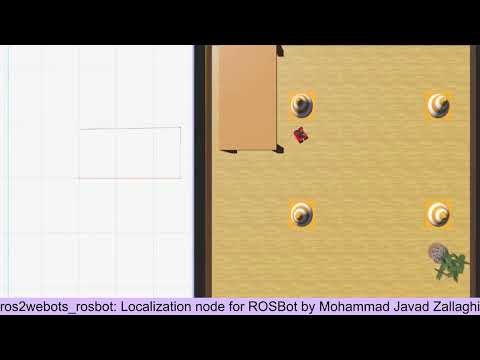
- ROSbot localization node
[](https://www.youtube.com/watch?v=x2v0zY_rH44)
- Controlling the rosbot by keyboard

## Installation
### Install directly
I assume you have installed Ubuntu 22.04 as OS or installed on Windows WSL2.
1. Install [ROS2 iron](https://docs.ros.org/en/iron/Installation.html)
2. Install [Webots](https://cyberbotics.com/doc/guide/installing-webots). If you are working on WSL2, then you can install Webots on windows as
```webots_ros2
``` package can find your installation by a
```WEBOTS_HOME
``` variable. Don't worry, eveything is explain the the reference of step 3.
3. Install [
```webots_ros2
```](https://docs.ros.org/en/iron/Tutorials/Advanced/Simulators/Webots/Simulation-Webots.html) package.
4. Clone the repo whereever you want:
git clone https://github.com/MJavadZallaghi/ros2webots.git
5. change directory to the workspace of the cloned package:
cd ros2webots
6. Source your ros2 installation:
source /opt/ros/iron/setup.bash
7. Build the package.
colcon build
8. Source
```ros2webots
``` installed packages:
source install/setup.bash
8. Check the installation:
ros2 pkg list |grep ros2webots
You must see this package:
```ros2webots_rosbot
Install using Docker
Docker image of the ros2webots package is under construction!
Run the simulations
- sim 1: rosbot controlled by a waypoint tracker
- Run the rosbot wprld in terminal and see how the Football ball are being passed by the ROSBot:
ros2 launch ros2webots_rosbot rosbot_world_launch.py
Roadmap
- Visualized the rosbot using rviz2 of foxglove with it’s frames, sensor data, etc.
- Implment IMU + Wheel based locallization fir the rosbot and visualize its path.
- Implement KF for the IMU acceleration fussion with odometry data and increase the localization accuracy.
- Develop a mapping node for the rosbot for environment mapping.
- Implement a go-to-point controller for the ROSbot
Support and Feedback
For any support and feedback, email MohammadJavadZallaghi@gmail.com or use issues section of this repo.
License
Authors
Acknowledgements
-
ros2webotsis created based on the Webots and ROS2 interface, that is possible by usingwebots_ros2package.webots_ros2is a package that provides the necessary interfaces to simulate a robot in the Webots open-source 3D robots simulator. (https://github.com/cyberbotics/webots_ros2)
CONTRIBUTING
Repository Summary
| Description | |
| Checkout URI | https://github.com/mjavadzallaghi/ros2webots.git |
| VCS Type | git |
| VCS Version | main |
| Last Updated | 2024-04-17 |
| Dev Status | UNKNOWN |
| Released | UNRELEASED |
| Contributing |
Help Wanted (-)
Good First Issues (-) Pull Requests to Review (-) |
Packages
| Name | Version |
|---|---|
| ros2webots_rosbot | 0.0.1 |
| ros2webots_turtlebot | 0.0.1 |
README
ros2webots
Simulation on Webots, Development with ROS2!
In
``` repo, we are creating simulated robots and environments in Webots, that are controlled by ROS2. The whole simulation (Webots world setup + ROS2-based software of the robot) is done in one ROS2 package.
Currently the repo hosts two ROS2 packages:
-
```ros2webots_rosbot
```: A rosbot is used in this world. The future development and simulation feature improvement will be mainly done in this package, as rosbot has many sensors like Camera, Lidar, and IMU; Also, the
```ros2webots_rosbot
``` package building is done by
```ament_cmake
```, that makes it easier for C++ based development.

-
```ros2webots_turtlebot
```: The world has a turtlebot, and package has been build using
```ament_python
``` for initial ROS2+Webots interface setup tests.
## Demo
- ROSBot with a way point tracker

- ROSbot localization node
[](https://www.youtube.com/watch?v=x2v0zY_rH44)
- Controlling the rosbot by keyboard

## Installation
### Install directly
I assume you have installed Ubuntu 22.04 as OS or installed on Windows WSL2.
1. Install [ROS2 iron](https://docs.ros.org/en/iron/Installation.html)
2. Install [Webots](https://cyberbotics.com/doc/guide/installing-webots). If you are working on WSL2, then you can install Webots on windows as
```webots_ros2
``` package can find your installation by a
```WEBOTS_HOME
``` variable. Don't worry, eveything is explain the the reference of step 3.
3. Install [
```webots_ros2
```](https://docs.ros.org/en/iron/Tutorials/Advanced/Simulators/Webots/Simulation-Webots.html) package.
4. Clone the repo whereever you want:
git clone https://github.com/MJavadZallaghi/ros2webots.git
5. change directory to the workspace of the cloned package:
cd ros2webots
6. Source your ros2 installation:
source /opt/ros/iron/setup.bash
7. Build the package.
colcon build
8. Source
```ros2webots
``` installed packages:
source install/setup.bash
8. Check the installation:
ros2 pkg list |grep ros2webots
You must see this package:
```ros2webots_rosbot
Install using Docker
Docker image of the ros2webots package is under construction!
Run the simulations
- sim 1: rosbot controlled by a waypoint tracker
- Run the rosbot wprld in terminal and see how the Football ball are being passed by the ROSBot:
ros2 launch ros2webots_rosbot rosbot_world_launch.py
Roadmap
- Visualized the rosbot using rviz2 of foxglove with it’s frames, sensor data, etc.
- Implment IMU + Wheel based locallization fir the rosbot and visualize its path.
- Implement KF for the IMU acceleration fussion with odometry data and increase the localization accuracy.
- Develop a mapping node for the rosbot for environment mapping.
- Implement a go-to-point controller for the ROSbot
Support and Feedback
For any support and feedback, email MohammadJavadZallaghi@gmail.com or use issues section of this repo.
License
Authors
Acknowledgements
-
ros2webotsis created based on the Webots and ROS2 interface, that is possible by usingwebots_ros2package.webots_ros2is a package that provides the necessary interfaces to simulate a robot in the Webots open-source 3D robots simulator. (https://github.com/cyberbotics/webots_ros2)
CONTRIBUTING
Repository Summary
| Description | |
| Checkout URI | https://github.com/mjavadzallaghi/ros2webots.git |
| VCS Type | git |
| VCS Version | main |
| Last Updated | 2024-04-17 |
| Dev Status | UNKNOWN |
| Released | UNRELEASED |
| Contributing |
Help Wanted (-)
Good First Issues (-) Pull Requests to Review (-) |
Packages
| Name | Version |
|---|---|
| ros2webots_rosbot | 0.0.1 |
| ros2webots_turtlebot | 0.0.1 |
README
ros2webots
Simulation on Webots, Development with ROS2!
In
``` repo, we are creating simulated robots and environments in Webots, that are controlled by ROS2. The whole simulation (Webots world setup + ROS2-based software of the robot) is done in one ROS2 package.
Currently the repo hosts two ROS2 packages:
-
```ros2webots_rosbot
```: A rosbot is used in this world. The future development and simulation feature improvement will be mainly done in this package, as rosbot has many sensors like Camera, Lidar, and IMU; Also, the
```ros2webots_rosbot
``` package building is done by
```ament_cmake
```, that makes it easier for C++ based development.

-
```ros2webots_turtlebot
```: The world has a turtlebot, and package has been build using
```ament_python
``` for initial ROS2+Webots interface setup tests.
## Demo
- ROSBot with a way point tracker

- ROSbot localization node
[](https://www.youtube.com/watch?v=x2v0zY_rH44)
- Controlling the rosbot by keyboard

## Installation
### Install directly
I assume you have installed Ubuntu 22.04 as OS or installed on Windows WSL2.
1. Install [ROS2 iron](https://docs.ros.org/en/iron/Installation.html)
2. Install [Webots](https://cyberbotics.com/doc/guide/installing-webots). If you are working on WSL2, then you can install Webots on windows as
```webots_ros2
``` package can find your installation by a
```WEBOTS_HOME
``` variable. Don't worry, eveything is explain the the reference of step 3.
3. Install [
```webots_ros2
```](https://docs.ros.org/en/iron/Tutorials/Advanced/Simulators/Webots/Simulation-Webots.html) package.
4. Clone the repo whereever you want:
git clone https://github.com/MJavadZallaghi/ros2webots.git
5. change directory to the workspace of the cloned package:
cd ros2webots
6. Source your ros2 installation:
source /opt/ros/iron/setup.bash
7. Build the package.
colcon build
8. Source
```ros2webots
``` installed packages:
source install/setup.bash
8. Check the installation:
ros2 pkg list |grep ros2webots
You must see this package:
```ros2webots_rosbot
Install using Docker
Docker image of the ros2webots package is under construction!
Run the simulations
- sim 1: rosbot controlled by a waypoint tracker
- Run the rosbot wprld in terminal and see how the Football ball are being passed by the ROSBot:
ros2 launch ros2webots_rosbot rosbot_world_launch.py
Roadmap
- Visualized the rosbot using rviz2 of foxglove with it’s frames, sensor data, etc.
- Implment IMU + Wheel based locallization fir the rosbot and visualize its path.
- Implement KF for the IMU acceleration fussion with odometry data and increase the localization accuracy.
- Develop a mapping node for the rosbot for environment mapping.
- Implement a go-to-point controller for the ROSbot
Support and Feedback
For any support and feedback, email MohammadJavadZallaghi@gmail.com or use issues section of this repo.
License
Authors
Acknowledgements
-
ros2webotsis created based on the Webots and ROS2 interface, that is possible by usingwebots_ros2package.webots_ros2is a package that provides the necessary interfaces to simulate a robot in the Webots open-source 3D robots simulator. (https://github.com/cyberbotics/webots_ros2)
CONTRIBUTING
Repository Summary
| Description | |
| Checkout URI | https://github.com/mjavadzallaghi/ros2webots.git |
| VCS Type | git |
| VCS Version | main |
| Last Updated | 2024-04-17 |
| Dev Status | UNKNOWN |
| Released | UNRELEASED |
| Contributing |
Help Wanted (-)
Good First Issues (-) Pull Requests to Review (-) |
Packages
| Name | Version |
|---|---|
| ros2webots_rosbot | 0.0.1 |
| ros2webots_turtlebot | 0.0.1 |
README
ros2webots
Simulation on Webots, Development with ROS2!
In
``` repo, we are creating simulated robots and environments in Webots, that are controlled by ROS2. The whole simulation (Webots world setup + ROS2-based software of the robot) is done in one ROS2 package.
Currently the repo hosts two ROS2 packages:
-
```ros2webots_rosbot
```: A rosbot is used in this world. The future development and simulation feature improvement will be mainly done in this package, as rosbot has many sensors like Camera, Lidar, and IMU; Also, the
```ros2webots_rosbot
``` package building is done by
```ament_cmake
```, that makes it easier for C++ based development.

-
```ros2webots_turtlebot
```: The world has a turtlebot, and package has been build using
```ament_python
``` for initial ROS2+Webots interface setup tests.
## Demo
- ROSBot with a way point tracker

- ROSbot localization node
[](https://www.youtube.com/watch?v=x2v0zY_rH44)
- Controlling the rosbot by keyboard

## Installation
### Install directly
I assume you have installed Ubuntu 22.04 as OS or installed on Windows WSL2.
1. Install [ROS2 iron](https://docs.ros.org/en/iron/Installation.html)
2. Install [Webots](https://cyberbotics.com/doc/guide/installing-webots). If you are working on WSL2, then you can install Webots on windows as
```webots_ros2
``` package can find your installation by a
```WEBOTS_HOME
``` variable. Don't worry, eveything is explain the the reference of step 3.
3. Install [
```webots_ros2
```](https://docs.ros.org/en/iron/Tutorials/Advanced/Simulators/Webots/Simulation-Webots.html) package.
4. Clone the repo whereever you want:
git clone https://github.com/MJavadZallaghi/ros2webots.git
5. change directory to the workspace of the cloned package:
cd ros2webots
6. Source your ros2 installation:
source /opt/ros/iron/setup.bash
7. Build the package.
colcon build
8. Source
```ros2webots
``` installed packages:
source install/setup.bash
8. Check the installation:
ros2 pkg list |grep ros2webots
You must see this package:
```ros2webots_rosbot
Install using Docker
Docker image of the ros2webots package is under construction!
Run the simulations
- sim 1: rosbot controlled by a waypoint tracker
- Run the rosbot wprld in terminal and see how the Football ball are being passed by the ROSBot:
ros2 launch ros2webots_rosbot rosbot_world_launch.py
Roadmap
- Visualized the rosbot using rviz2 of foxglove with it’s frames, sensor data, etc.
- Implment IMU + Wheel based locallization fir the rosbot and visualize its path.
- Implement KF for the IMU acceleration fussion with odometry data and increase the localization accuracy.
- Develop a mapping node for the rosbot for environment mapping.
- Implement a go-to-point controller for the ROSbot
Support and Feedback
For any support and feedback, email MohammadJavadZallaghi@gmail.com or use issues section of this repo.
License
Authors
Acknowledgements
-
ros2webotsis created based on the Webots and ROS2 interface, that is possible by usingwebots_ros2package.webots_ros2is a package that provides the necessary interfaces to simulate a robot in the Webots open-source 3D robots simulator. (https://github.com/cyberbotics/webots_ros2)
CONTRIBUTING
Repository Summary
| Description | |
| Checkout URI | https://github.com/mjavadzallaghi/ros2webots.git |
| VCS Type | git |
| VCS Version | main |
| Last Updated | 2024-04-17 |
| Dev Status | UNKNOWN |
| Released | UNRELEASED |
| Contributing |
Help Wanted (-)
Good First Issues (-) Pull Requests to Review (-) |
Packages
| Name | Version |
|---|---|
| ros2webots_rosbot | 0.0.1 |
| ros2webots_turtlebot | 0.0.1 |
README
ros2webots
Simulation on Webots, Development with ROS2!
In
``` repo, we are creating simulated robots and environments in Webots, that are controlled by ROS2. The whole simulation (Webots world setup + ROS2-based software of the robot) is done in one ROS2 package.
Currently the repo hosts two ROS2 packages:
-
```ros2webots_rosbot
```: A rosbot is used in this world. The future development and simulation feature improvement will be mainly done in this package, as rosbot has many sensors like Camera, Lidar, and IMU; Also, the
```ros2webots_rosbot
``` package building is done by
```ament_cmake
```, that makes it easier for C++ based development.

-
```ros2webots_turtlebot
```: The world has a turtlebot, and package has been build using
```ament_python
``` for initial ROS2+Webots interface setup tests.
## Demo
- ROSBot with a way point tracker

- ROSbot localization node
[](https://www.youtube.com/watch?v=x2v0zY_rH44)
- Controlling the rosbot by keyboard

## Installation
### Install directly
I assume you have installed Ubuntu 22.04 as OS or installed on Windows WSL2.
1. Install [ROS2 iron](https://docs.ros.org/en/iron/Installation.html)
2. Install [Webots](https://cyberbotics.com/doc/guide/installing-webots). If you are working on WSL2, then you can install Webots on windows as
```webots_ros2
``` package can find your installation by a
```WEBOTS_HOME
``` variable. Don't worry, eveything is explain the the reference of step 3.
3. Install [
```webots_ros2
```](https://docs.ros.org/en/iron/Tutorials/Advanced/Simulators/Webots/Simulation-Webots.html) package.
4. Clone the repo whereever you want:
git clone https://github.com/MJavadZallaghi/ros2webots.git
5. change directory to the workspace of the cloned package:
cd ros2webots
6. Source your ros2 installation:
source /opt/ros/iron/setup.bash
7. Build the package.
colcon build
8. Source
```ros2webots
``` installed packages:
source install/setup.bash
8. Check the installation:
ros2 pkg list |grep ros2webots
You must see this package:
```ros2webots_rosbot
Install using Docker
Docker image of the ros2webots package is under construction!
Run the simulations
- sim 1: rosbot controlled by a waypoint tracker
- Run the rosbot wprld in terminal and see how the Football ball are being passed by the ROSBot:
ros2 launch ros2webots_rosbot rosbot_world_launch.py
Roadmap
- Visualized the rosbot using rviz2 of foxglove with it’s frames, sensor data, etc.
- Implment IMU + Wheel based locallization fir the rosbot and visualize its path.
- Implement KF for the IMU acceleration fussion with odometry data and increase the localization accuracy.
- Develop a mapping node for the rosbot for environment mapping.
- Implement a go-to-point controller for the ROSbot
Support and Feedback
For any support and feedback, email MohammadJavadZallaghi@gmail.com or use issues section of this repo.
License
Authors
Acknowledgements
-
ros2webotsis created based on the Webots and ROS2 interface, that is possible by usingwebots_ros2package.webots_ros2is a package that provides the necessary interfaces to simulate a robot in the Webots open-source 3D robots simulator. (https://github.com/cyberbotics/webots_ros2)
CONTRIBUTING
Repository Summary
| Description | |
| Checkout URI | https://github.com/mjavadzallaghi/ros2webots.git |
| VCS Type | git |
| VCS Version | main |
| Last Updated | 2024-04-17 |
| Dev Status | UNKNOWN |
| Released | UNRELEASED |
| Contributing |
Help Wanted (-)
Good First Issues (-) Pull Requests to Review (-) |
Packages
| Name | Version |
|---|---|
| ros2webots_rosbot | 0.0.1 |
| ros2webots_turtlebot | 0.0.1 |
README
ros2webots
Simulation on Webots, Development with ROS2!
In
``` repo, we are creating simulated robots and environments in Webots, that are controlled by ROS2. The whole simulation (Webots world setup + ROS2-based software of the robot) is done in one ROS2 package.
Currently the repo hosts two ROS2 packages:
-
```ros2webots_rosbot
```: A rosbot is used in this world. The future development and simulation feature improvement will be mainly done in this package, as rosbot has many sensors like Camera, Lidar, and IMU; Also, the
```ros2webots_rosbot
``` package building is done by
```ament_cmake
```, that makes it easier for C++ based development.

-
```ros2webots_turtlebot
```: The world has a turtlebot, and package has been build using
```ament_python
``` for initial ROS2+Webots interface setup tests.
## Demo
- ROSBot with a way point tracker

- ROSbot localization node
[](https://www.youtube.com/watch?v=x2v0zY_rH44)
- Controlling the rosbot by keyboard

## Installation
### Install directly
I assume you have installed Ubuntu 22.04 as OS or installed on Windows WSL2.
1. Install [ROS2 iron](https://docs.ros.org/en/iron/Installation.html)
2. Install [Webots](https://cyberbotics.com/doc/guide/installing-webots). If you are working on WSL2, then you can install Webots on windows as
```webots_ros2
``` package can find your installation by a
```WEBOTS_HOME
``` variable. Don't worry, eveything is explain the the reference of step 3.
3. Install [
```webots_ros2
```](https://docs.ros.org/en/iron/Tutorials/Advanced/Simulators/Webots/Simulation-Webots.html) package.
4. Clone the repo whereever you want:
git clone https://github.com/MJavadZallaghi/ros2webots.git
5. change directory to the workspace of the cloned package:
cd ros2webots
6. Source your ros2 installation:
source /opt/ros/iron/setup.bash
7. Build the package.
colcon build
8. Source
```ros2webots
``` installed packages:
source install/setup.bash
8. Check the installation:
ros2 pkg list |grep ros2webots
You must see this package:
```ros2webots_rosbot
Install using Docker
Docker image of the ros2webots package is under construction!
Run the simulations
- sim 1: rosbot controlled by a waypoint tracker
- Run the rosbot wprld in terminal and see how the Football ball are being passed by the ROSBot:
ros2 launch ros2webots_rosbot rosbot_world_launch.py
Roadmap
- Visualized the rosbot using rviz2 of foxglove with it’s frames, sensor data, etc.
- Implment IMU + Wheel based locallization fir the rosbot and visualize its path.
- Implement KF for the IMU acceleration fussion with odometry data and increase the localization accuracy.
- Develop a mapping node for the rosbot for environment mapping.
- Implement a go-to-point controller for the ROSbot
Support and Feedback
For any support and feedback, email MohammadJavadZallaghi@gmail.com or use issues section of this repo.
License
Authors
Acknowledgements
-
ros2webotsis created based on the Webots and ROS2 interface, that is possible by usingwebots_ros2package.webots_ros2is a package that provides the necessary interfaces to simulate a robot in the Webots open-source 3D robots simulator. (https://github.com/cyberbotics/webots_ros2)
CONTRIBUTING
Repository Summary
| Description | |
| Checkout URI | https://github.com/mjavadzallaghi/ros2webots.git |
| VCS Type | git |
| VCS Version | main |
| Last Updated | 2024-04-17 |
| Dev Status | UNKNOWN |
| Released | UNRELEASED |
| Contributing |
Help Wanted (-)
Good First Issues (-) Pull Requests to Review (-) |
Packages
| Name | Version |
|---|---|
| ros2webots_rosbot | 0.0.1 |
| ros2webots_turtlebot | 0.0.1 |
README
ros2webots
Simulation on Webots, Development with ROS2!
In
``` repo, we are creating simulated robots and environments in Webots, that are controlled by ROS2. The whole simulation (Webots world setup + ROS2-based software of the robot) is done in one ROS2 package.
Currently the repo hosts two ROS2 packages:
-
```ros2webots_rosbot
```: A rosbot is used in this world. The future development and simulation feature improvement will be mainly done in this package, as rosbot has many sensors like Camera, Lidar, and IMU; Also, the
```ros2webots_rosbot
``` package building is done by
```ament_cmake
```, that makes it easier for C++ based development.

-
```ros2webots_turtlebot
```: The world has a turtlebot, and package has been build using
```ament_python
``` for initial ROS2+Webots interface setup tests.
## Demo
- ROSBot with a way point tracker

- ROSbot localization node
[](https://www.youtube.com/watch?v=x2v0zY_rH44)
- Controlling the rosbot by keyboard

## Installation
### Install directly
I assume you have installed Ubuntu 22.04 as OS or installed on Windows WSL2.
1. Install [ROS2 iron](https://docs.ros.org/en/iron/Installation.html)
2. Install [Webots](https://cyberbotics.com/doc/guide/installing-webots). If you are working on WSL2, then you can install Webots on windows as
```webots_ros2
``` package can find your installation by a
```WEBOTS_HOME
``` variable. Don't worry, eveything is explain the the reference of step 3.
3. Install [
```webots_ros2
```](https://docs.ros.org/en/iron/Tutorials/Advanced/Simulators/Webots/Simulation-Webots.html) package.
4. Clone the repo whereever you want:
git clone https://github.com/MJavadZallaghi/ros2webots.git
5. change directory to the workspace of the cloned package:
cd ros2webots
6. Source your ros2 installation:
source /opt/ros/iron/setup.bash
7. Build the package.
colcon build
8. Source
```ros2webots
``` installed packages:
source install/setup.bash
8. Check the installation:
ros2 pkg list |grep ros2webots
You must see this package:
```ros2webots_rosbot
Install using Docker
Docker image of the ros2webots package is under construction!
Run the simulations
- sim 1: rosbot controlled by a waypoint tracker
- Run the rosbot wprld in terminal and see how the Football ball are being passed by the ROSBot:
ros2 launch ros2webots_rosbot rosbot_world_launch.py
Roadmap
- Visualized the rosbot using rviz2 of foxglove with it’s frames, sensor data, etc.
- Implment IMU + Wheel based locallization fir the rosbot and visualize its path.
- Implement KF for the IMU acceleration fussion with odometry data and increase the localization accuracy.
- Develop a mapping node for the rosbot for environment mapping.
- Implement a go-to-point controller for the ROSbot
Support and Feedback
For any support and feedback, email MohammadJavadZallaghi@gmail.com or use issues section of this repo.
License
Authors
Acknowledgements
-
ros2webotsis created based on the Webots and ROS2 interface, that is possible by usingwebots_ros2package.webots_ros2is a package that provides the necessary interfaces to simulate a robot in the Webots open-source 3D robots simulator. (https://github.com/cyberbotics/webots_ros2)
CONTRIBUTING
Repository Summary
| Description | |
| Checkout URI | https://github.com/mjavadzallaghi/ros2webots.git |
| VCS Type | git |
| VCS Version | main |
| Last Updated | 2024-04-17 |
| Dev Status | UNKNOWN |
| Released | UNRELEASED |
| Contributing |
Help Wanted (-)
Good First Issues (-) Pull Requests to Review (-) |
Packages
| Name | Version |
|---|---|
| ros2webots_rosbot | 0.0.1 |
| ros2webots_turtlebot | 0.0.1 |
README
ros2webots
Simulation on Webots, Development with ROS2!
In
``` repo, we are creating simulated robots and environments in Webots, that are controlled by ROS2. The whole simulation (Webots world setup + ROS2-based software of the robot) is done in one ROS2 package.
Currently the repo hosts two ROS2 packages:
-
```ros2webots_rosbot
```: A rosbot is used in this world. The future development and simulation feature improvement will be mainly done in this package, as rosbot has many sensors like Camera, Lidar, and IMU; Also, the
```ros2webots_rosbot
``` package building is done by
```ament_cmake
```, that makes it easier for C++ based development.

-
```ros2webots_turtlebot
```: The world has a turtlebot, and package has been build using
```ament_python
``` for initial ROS2+Webots interface setup tests.
## Demo
- ROSBot with a way point tracker

- ROSbot localization node
[](https://www.youtube.com/watch?v=x2v0zY_rH44)
- Controlling the rosbot by keyboard

## Installation
### Install directly
I assume you have installed Ubuntu 22.04 as OS or installed on Windows WSL2.
1. Install [ROS2 iron](https://docs.ros.org/en/iron/Installation.html)
2. Install [Webots](https://cyberbotics.com/doc/guide/installing-webots). If you are working on WSL2, then you can install Webots on windows as
```webots_ros2
``` package can find your installation by a
```WEBOTS_HOME
``` variable. Don't worry, eveything is explain the the reference of step 3.
3. Install [
```webots_ros2
```](https://docs.ros.org/en/iron/Tutorials/Advanced/Simulators/Webots/Simulation-Webots.html) package.
4. Clone the repo whereever you want:
git clone https://github.com/MJavadZallaghi/ros2webots.git
5. change directory to the workspace of the cloned package:
cd ros2webots
6. Source your ros2 installation:
source /opt/ros/iron/setup.bash
7. Build the package.
colcon build
8. Source
```ros2webots
``` installed packages:
source install/setup.bash
8. Check the installation:
ros2 pkg list |grep ros2webots
You must see this package:
```ros2webots_rosbot
Install using Docker
Docker image of the ros2webots package is under construction!
Run the simulations
- sim 1: rosbot controlled by a waypoint tracker
- Run the rosbot wprld in terminal and see how the Football ball are being passed by the ROSBot:
ros2 launch ros2webots_rosbot rosbot_world_launch.py
Roadmap
- Visualized the rosbot using rviz2 of foxglove with it’s frames, sensor data, etc.
- Implment IMU + Wheel based locallization fir the rosbot and visualize its path.
- Implement KF for the IMU acceleration fussion with odometry data and increase the localization accuracy.
- Develop a mapping node for the rosbot for environment mapping.
- Implement a go-to-point controller for the ROSbot
Support and Feedback
For any support and feedback, email MohammadJavadZallaghi@gmail.com or use issues section of this repo.
License
Authors
Acknowledgements
-
ros2webotsis created based on the Webots and ROS2 interface, that is possible by usingwebots_ros2package.webots_ros2is a package that provides the necessary interfaces to simulate a robot in the Webots open-source 3D robots simulator. (https://github.com/cyberbotics/webots_ros2)
CONTRIBUTING
Repository Summary
| Description | |
| Checkout URI | https://github.com/mjavadzallaghi/ros2webots.git |
| VCS Type | git |
| VCS Version | main |
| Last Updated | 2024-04-17 |
| Dev Status | UNKNOWN |
| Released | UNRELEASED |
| Contributing |
Help Wanted (-)
Good First Issues (-) Pull Requests to Review (-) |
Packages
| Name | Version |
|---|---|
| ros2webots_rosbot | 0.0.1 |
| ros2webots_turtlebot | 0.0.1 |
README
ros2webots
Simulation on Webots, Development with ROS2!
In
``` repo, we are creating simulated robots and environments in Webots, that are controlled by ROS2. The whole simulation (Webots world setup + ROS2-based software of the robot) is done in one ROS2 package.
Currently the repo hosts two ROS2 packages:
-
```ros2webots_rosbot
```: A rosbot is used in this world. The future development and simulation feature improvement will be mainly done in this package, as rosbot has many sensors like Camera, Lidar, and IMU; Also, the
```ros2webots_rosbot
``` package building is done by
```ament_cmake
```, that makes it easier for C++ based development.

-
```ros2webots_turtlebot
```: The world has a turtlebot, and package has been build using
```ament_python
``` for initial ROS2+Webots interface setup tests.
## Demo
- ROSBot with a way point tracker

- ROSbot localization node
[](https://www.youtube.com/watch?v=x2v0zY_rH44)
- Controlling the rosbot by keyboard

## Installation
### Install directly
I assume you have installed Ubuntu 22.04 as OS or installed on Windows WSL2.
1. Install [ROS2 iron](https://docs.ros.org/en/iron/Installation.html)
2. Install [Webots](https://cyberbotics.com/doc/guide/installing-webots). If you are working on WSL2, then you can install Webots on windows as
```webots_ros2
``` package can find your installation by a
```WEBOTS_HOME
``` variable. Don't worry, eveything is explain the the reference of step 3.
3. Install [
```webots_ros2
```](https://docs.ros.org/en/iron/Tutorials/Advanced/Simulators/Webots/Simulation-Webots.html) package.
4. Clone the repo whereever you want:
git clone https://github.com/MJavadZallaghi/ros2webots.git
5. change directory to the workspace of the cloned package:
cd ros2webots
6. Source your ros2 installation:
source /opt/ros/iron/setup.bash
7. Build the package.
colcon build
8. Source
```ros2webots
``` installed packages:
source install/setup.bash
8. Check the installation:
ros2 pkg list |grep ros2webots
You must see this package:
```ros2webots_rosbot
Install using Docker
Docker image of the ros2webots package is under construction!
Run the simulations
- sim 1: rosbot controlled by a waypoint tracker
- Run the rosbot wprld in terminal and see how the Football ball are being passed by the ROSBot:
ros2 launch ros2webots_rosbot rosbot_world_launch.py
Roadmap
- Visualized the rosbot using rviz2 of foxglove with it’s frames, sensor data, etc.
- Implment IMU + Wheel based locallization fir the rosbot and visualize its path.
- Implement KF for the IMU acceleration fussion with odometry data and increase the localization accuracy.
- Develop a mapping node for the rosbot for environment mapping.
- Implement a go-to-point controller for the ROSbot
Support and Feedback
For any support and feedback, email MohammadJavadZallaghi@gmail.com or use issues section of this repo.
License
Authors
Acknowledgements
-
ros2webotsis created based on the Webots and ROS2 interface, that is possible by usingwebots_ros2package.webots_ros2is a package that provides the necessary interfaces to simulate a robot in the Webots open-source 3D robots simulator. (https://github.com/cyberbotics/webots_ros2)