 ROS Index

|
rosbot_ros repositoryrosbot rosbot_bringup rosbot_controller rosbot_description rosbot_gazebo rosbot_hardware_interfaces rosbot_joy rosbot_localization rosbot_utils |
ROS Distro
|
Repository Summary
| Description | |
| Checkout URI | https://github.com/husarion/rosbot_ros.git |
| VCS Type | git |
| VCS Version | humble |
| Last Updated | 2025-12-09 |
| Dev Status | DEVELOPED |
| Released | UNRELEASED |
| Contributing |
Help Wanted (-)
Good First Issues (-) Pull Requests to Review (-) |
Packages
| Name | Version |
|---|---|
| rosbot | 0.15.2 |
| rosbot_bringup | 0.15.2 |
| rosbot_controller | 0.15.2 |
| rosbot_description | 0.15.2 |
| rosbot_gazebo | 0.15.2 |
| rosbot_hardware_interfaces | 0.15.2 |
| rosbot_joy | 0.15.2 |
| rosbot_localization | 0.15.2 |
| rosbot_utils | 0.15.2 |
README
ROSbot ROS
ROS 2 packages for Husarion ROSbot Series.
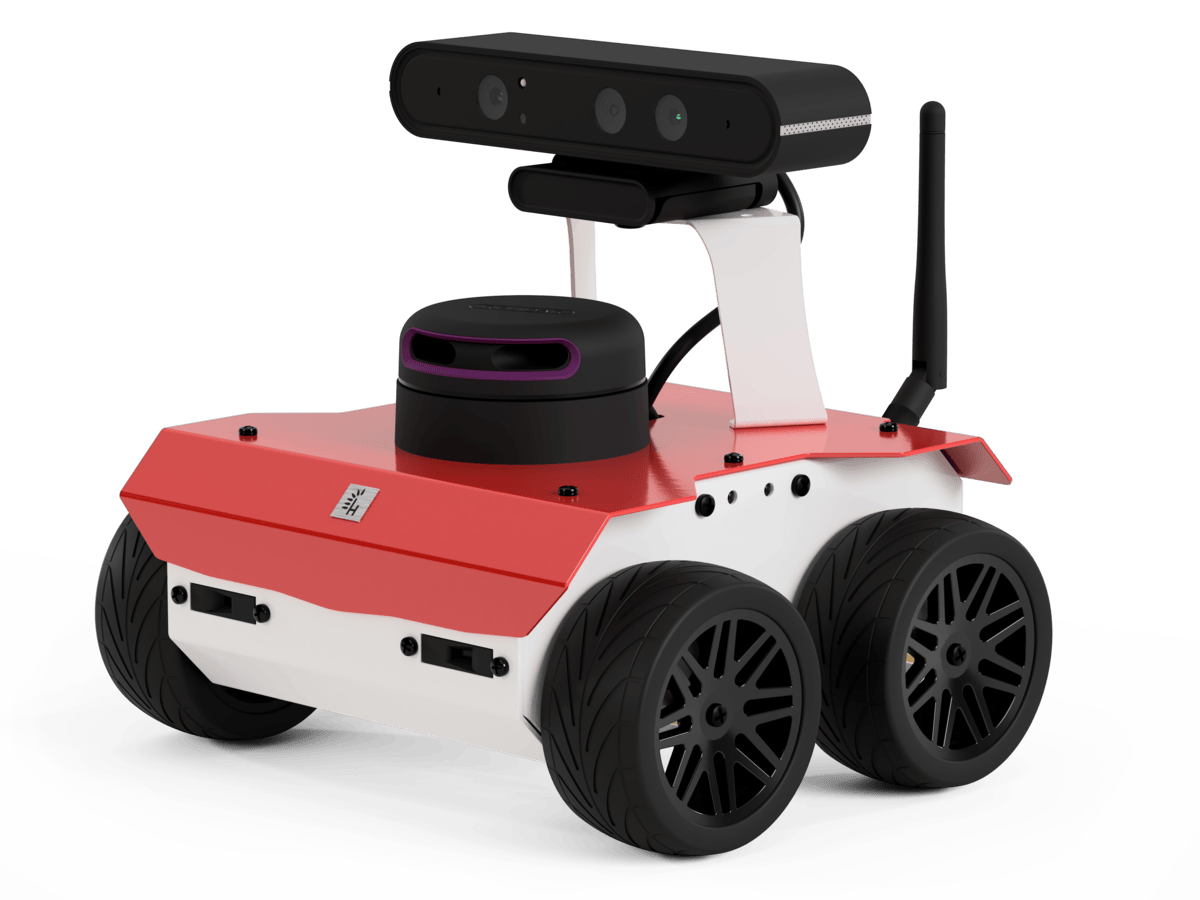
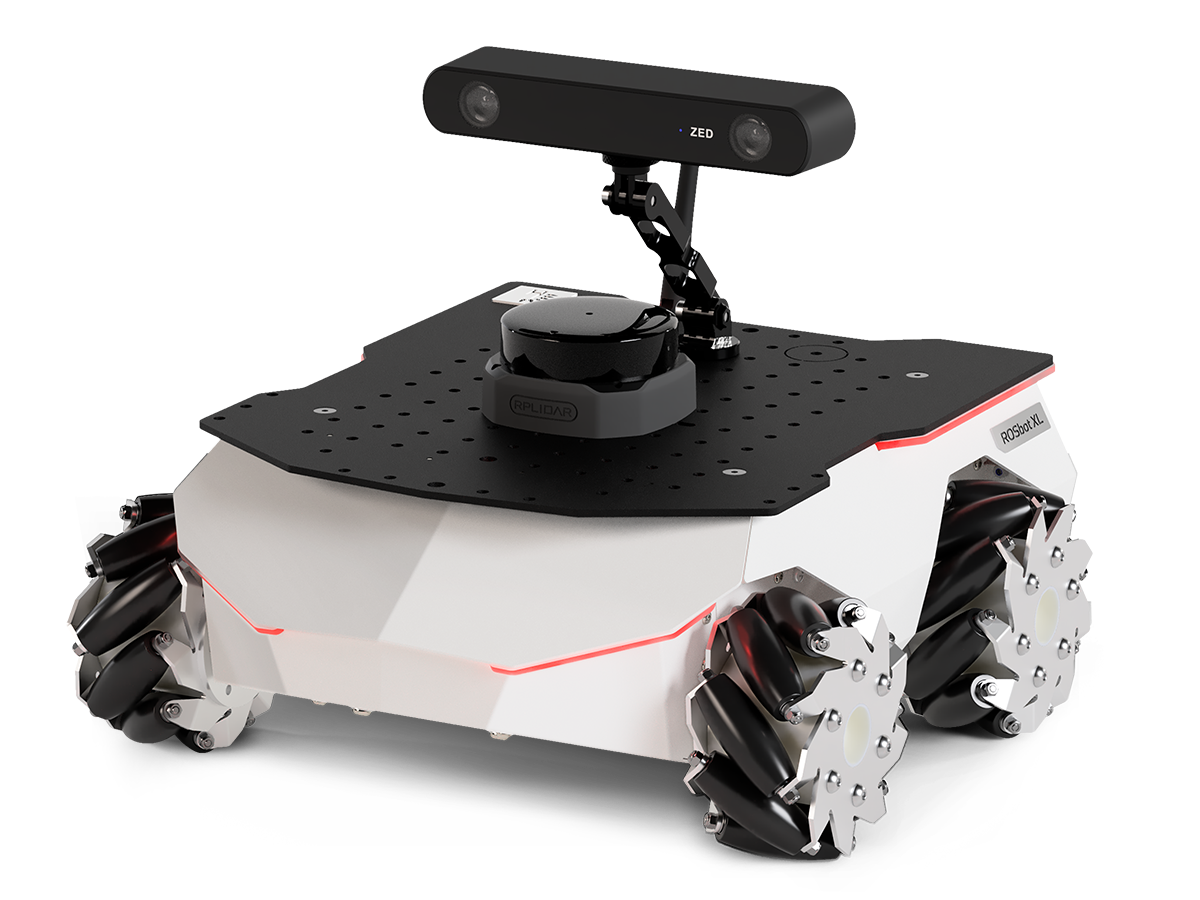
📚 ROS API
Documentation is available in ROS_API.md.
🚀 Quick Start
⚙️ Prerequisites
- Install all necessary tools:
   sudo apt-get update
   sudo apt-get install -y python3-pip ros-dev-tools
- Create a workspace folder and clone the rosbot_ros repository:
   mkdir rosbot_ws
   cd rosbot_ws
   git clone -b humble https://github.com/husarion/rosbot_ros.git src/rosbot_ros
Configure environment
The repository is used to run the code both on the real robot and in the simulation. Specify HUSARION_ROS_BUILD_TYPE the variable according to your needs.
Real robot:
export HUSARION_ROS_BUILD_TYPE=hardware
Simulation:
export HUSARION_ROS_BUILD_TYPE=simulation
Build
source /opt/ros/$ROS_DISTRO/setup.bash

vcs import src < src/rosbot_ros/rosbot/rosbot_${HUSARION_ROS_BUILD_TYPE}.repos
vcs import src < src/rosbot_ros/rosbot/manipulator.repos # For ROSbot XL manipulation package

sudo rosdep init
rosdep update --rosdistro $ROS_DISTRO
rosdep install -i --from-path src --rosdistro $ROS_DISTRO -y

colcon build --symlink-install --packages-up-to rosbot --cmake-args -DCMAKE_BUILD_TYPE=Release
Run the Robot
For ROSbot XL, you can specify a particular configuration using the launch configuration argument. If you are using the manipulation configuration, please refer to MANIPULATOR.md for detailed instructions.
Real robot:
source install/setup.bash
ros2 launch rosbot_bringup bringup.launch.py robot_model:=<rosbot/rosbot_xl>
[!NOTE] To run the software on real ROSbots, communication with the CORE2 is required. Ensure the firmware is updated before running the micro-ROS agent. For detailed instructions, refer to the rosbot_ros2_firmware repository.
sudo su
source install/setup.bash
ros2 run rosbot_utils flash_firmware --robot-model <rosbot/rosbot_xl>
exit
Simulation:
source install/setup.bash
ros2 launch rosbot_gazebo simulation.launch.py robot_model:=<rosbot/rosbot_xl>
Launch Arguments
| Symbol | Meaning |
|---|---|
| 🤖 | Available for physical robot |
| 🖥️ | Available in simulation |
| 🤖 | 🖥️ | Argument | Description
Type: Default |
| — | — | ——————- | ————————————————————————————————————————————————————————————————– |
File truncated at 100 lines see the full file
CONTRIBUTING
Developer info and tools
USB-A connection
You can connect with the ROSbot hardware on your own computer. To establish a connection, connect your computer to the robot using a USB-A cable. Then build the code locally and specify via the serial_port argument which processor should be used to establish the connection.
ros2 launch rosbot_bringup bringup.launch.py serial_port:=/dev/ttyUSB0
The hardware checks the connection via USB-A only during initialization and when btn1 or btn2 is pressed, so while executing the above command, hold down the reset button together with bnt1/bnt2 and release the reset button. After establishing a connection, you can release bnt1/bnt2.
pre-commit
pre-commit configuration prepares plenty of tests helping for developing and contributing. Usage:
# install pre-commit
pip install pre-commit

# initialize pre-commit workspace
pre-commit install

# manually run tests
pre-commit run -a
After initialization pre-commit configuration will applied on every commit.
|
|
rosbot_ros repositoryrosbot rosbot_bringup rosbot_controller rosbot_description rosbot_gazebo rosbot_hardware_interfaces rosbot_joy rosbot_localization rosbot_moveit rosbot_utils |
ROS Distro
|
Repository Summary
| Description | |
| Checkout URI | https://github.com/husarion/rosbot_ros.git |
| VCS Type | git |
| VCS Version | jazzy |
| Last Updated | 2026-03-16 |
| Dev Status | DEVELOPED |
| Released | RELEASED |
| Contributing |
Help Wanted (-)
Good First Issues (-) Pull Requests to Review (-) |
Packages
| Name | Version |
|---|---|
| rosbot | 0.18.8 |
| rosbot_bringup | 0.18.8 |
| rosbot_controller | 0.18.8 |
| rosbot_description | 0.18.8 |
| rosbot_gazebo | 0.18.8 |
| rosbot_hardware_interfaces | 0.18.8 |
| rosbot_joy | 0.18.8 |
| rosbot_localization | 0.18.8 |
| rosbot_moveit | 0.18.8 |
| rosbot_utils | 0.18.8 |
README
ROSbot ROS
ROS 2 packages for Husarion ROSbot Series.
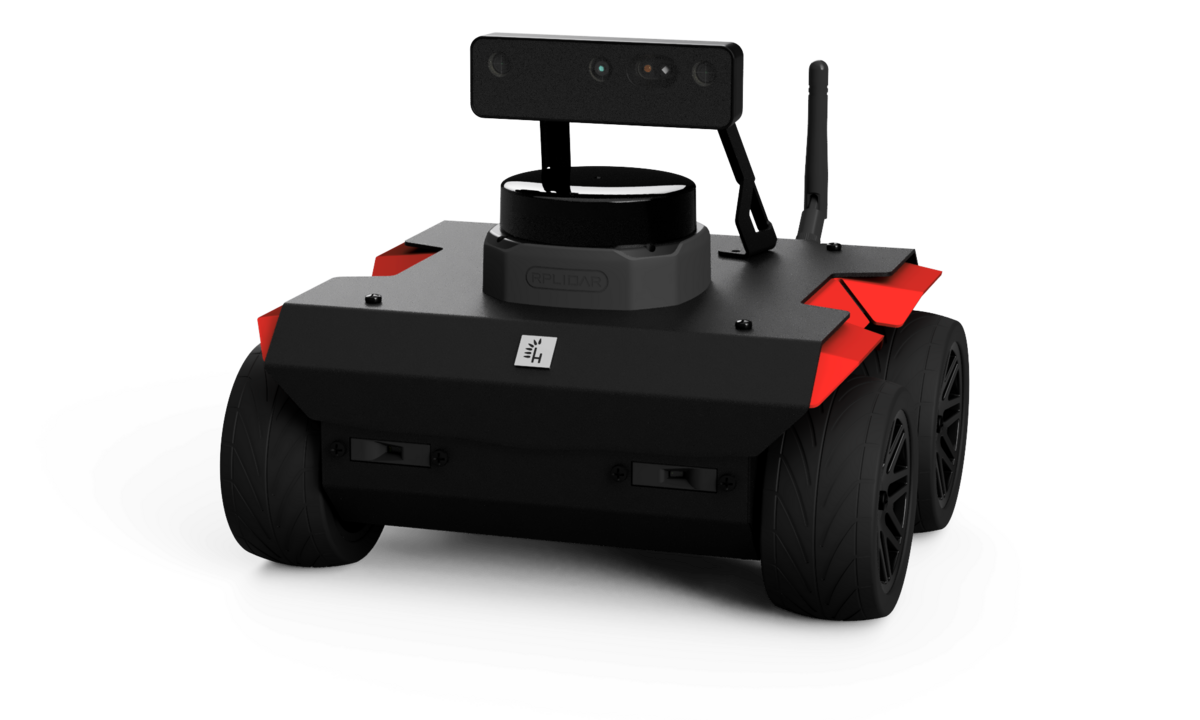
📚 ROS API
Documentation is available in ROS_API.md.
🚀 Quick Start
⚙️ Prerequisites
- Install all necessary tools:
   sudo apt-get update
   sudo apt-get install -y python3-pip ros-dev-tools
- Create a workspace folder and clone the rosbot_ros repository:
   mkdir rosbot_ws
   cd rosbot_ws
   git clone -b jazzy https://github.com/husarion/rosbot_ros.git src/rosbot_ros
Build
source /opt/ros/$ROS_DISTRO/setup.bash

vcs import src < src/rosbot_ros/rosbot/rosbot_hardware.repos
vcs import src < src/rosbot_ros/rosbot/rosbot_simulation.repos

# Optional: speed up build by removing unnecessary packages
# For hardware build only, remove simulation package:
# rm -rf src/rosbot_ros/rosbot_gazebo
# For simulation build only, remove hardware package:
# rm -rf src/rosbot_ros/rosbot_bringup

export PIP_BREAK_SYSTEM_PACKAGES=1
sudo rosdep init
rosdep update --rosdistro $ROS_DISTRO
rosdep install -i --from-path src --rosdistro $ROS_DISTRO -y

colcon build --symlink-install --cmake-args -DCMAKE_BUILD_TYPE=Release
Run the Robot
For ROSbot XL, you can specify a particular configuration using the launch configuration argument. If you are using the manipulation configuration, please refer to MANIPULATOR.md for detailed instructions.
Real robot:
source install/setup.bash
ros2 launch rosbot_bringup bringup.yaml robot_model:=<rosbot/rosbot_xl>
[!NOTE] To run the software on real ROSbots, communication with the CORE2 is required. Ensure the firmware is updated before running the micro-ROS agent. For detailed instructions, refer to the rosbot_ros2_firmware repository.
sudo su
source install/setup.bash
ros2 run rosbot_utils flash_firmware --robot-model <rosbot/rosbot_xl>
exit
Simulation:
source install/setup.bash
ros2 launch rosbot_gazebo simulation.yaml robot_model:=<rosbot/rosbot_xl>
Launch Arguments
| Symbol | Meaning |
|---|---|
| 🤖 | Available for physical robot |
| 🖥️ | Available in simulation |
| 🤖 | 🖥️ | Argument | Description Type: Default
|
|---|---|---|---|
| ✅ | ✅ | arm_activate |
Whether to activate the manipulator arm on startup.. bool: False (True for simulation) |
| ✅ | ✅ | config_dir |
Path to the common configuration directory. You can create such common configuration directory with ros2 run rosbot_utils create_config_dir {directory}. string: ""
|
| ✅ | ✅ | configuration |
Specify configuration packages. Currently only ROSbot XL has available packages. Packages: basic, telepresence, autonomy, manipulation, manipulation_pro, custom. string: basic
|
| ✅ | ✅ | joy_vel |
The topic name to which velocity commands will be published. string: cmd_vel
|
| ✅ | ✅ | mecanum |
Whether to use mecanum drive controller, otherwise use diff drive. bool: False
|
| ✅ | ✅ | namespace |
Add namespace to all launched nodes. string: env(ROBOT_NAMESPACE)
|
| ✅ | ✅ | robot_model |
Specify robot model. string: env(ROBOT_MODEL) (choices: rosbot, rosbot_xl) |
| ✅ | ❌ | manipulator_serial_port |
Port to connect to the manipulator. string: /dev/ttyUSB0
|
| ✅ | ❌ | microros |
Automatically connect with hardware using microros. bool: True
|
File truncated at 100 lines see the full file
CONTRIBUTING
Developer info and tools
USB-B connection
You can connect with the ROSbot hardware on your own computer. To establish a connection, connect your computer to the robot using a USB-B cable. Then build the code locally and specify via the serial_port argument which processor should be used to establish the connection.
ros2 launch rosbot_bringup bringup.yaml serial_port:=/dev/ttyUSB0
The hardware checks the connection via USB-B only during initialization and when btn1 or btn2 is pressed, so while executing the above command, hold down the reset button together with bnt1/bnt2 and release the reset button. After establishing a connection, you can release bnt1/bnt2.
pre-commit
pre-commit configuration prepares plenty of tests helping for developing and contributing. Usage:
# install pre-commit
pip install pre-commit

# initialize pre-commit workspace
pre-commit install

# manually run tests
pre-commit run -a
After initialization pre-commit configuration will applied on every commit.
|
|
rosbot_ros repositoryrosbot rosbot_bringup rosbot_controller rosbot_description rosbot_gazebo rosbot_hardware_interfaces rosbot_joy rosbot_localization rosbot_utils |
ROS Distro
|
Repository Summary
| Description | |
| Checkout URI | https://github.com/husarion/rosbot_ros.git |
| VCS Type | git |
| VCS Version | humble |
| Last Updated | 2025-12-09 |
| Dev Status | DEVELOPED |
| Released | UNRELEASED |
| Contributing |
Help Wanted (-)
Good First Issues (-) Pull Requests to Review (-) |
Packages
| Name | Version |
|---|---|
| rosbot | 0.15.2 |
| rosbot_bringup | 0.15.2 |
| rosbot_controller | 0.15.2 |
| rosbot_description | 0.15.2 |
| rosbot_gazebo | 0.15.2 |
| rosbot_hardware_interfaces | 0.15.2 |
| rosbot_joy | 0.15.2 |
| rosbot_localization | 0.15.2 |
| rosbot_utils | 0.15.2 |
README
ROSbot ROS
ROS 2 packages for Husarion ROSbot Series.
📚 ROS API
Documentation is available in ROS_API.md.
🚀 Quick Start
⚙️ Prerequisites
- Install all necessary tools:
   sudo apt-get update
   sudo apt-get install -y python3-pip ros-dev-tools
- Create a workspace folder and clone the rosbot_ros repository:
   mkdir rosbot_ws
   cd rosbot_ws
   git clone -b humble https://github.com/husarion/rosbot_ros.git src/rosbot_ros
Configure environment
The repository is used to run the code both on the real robot and in the simulation. Specify HUSARION_ROS_BUILD_TYPE the variable according to your needs.
Real robot:
export HUSARION_ROS_BUILD_TYPE=hardware
Simulation:
export HUSARION_ROS_BUILD_TYPE=simulation
Build
source /opt/ros/$ROS_DISTRO/setup.bash

vcs import src < src/rosbot_ros/rosbot/rosbot_${HUSARION_ROS_BUILD_TYPE}.repos
vcs import src < src/rosbot_ros/rosbot/manipulator.repos # For ROSbot XL manipulation package

sudo rosdep init
rosdep update --rosdistro $ROS_DISTRO
rosdep install -i --from-path src --rosdistro $ROS_DISTRO -y

colcon build --symlink-install --packages-up-to rosbot --cmake-args -DCMAKE_BUILD_TYPE=Release
Run the Robot
For ROSbot XL, you can specify a particular configuration using the launch configuration argument. If you are using the manipulation configuration, please refer to MANIPULATOR.md for detailed instructions.
Real robot:
source install/setup.bash
ros2 launch rosbot_bringup bringup.launch.py robot_model:=<rosbot/rosbot_xl>
[!NOTE] To run the software on real ROSbots, communication with the CORE2 is required. Ensure the firmware is updated before running the micro-ROS agent. For detailed instructions, refer to the rosbot_ros2_firmware repository.
sudo su
source install/setup.bash
ros2 run rosbot_utils flash_firmware --robot-model <rosbot/rosbot_xl>
exit
Simulation:
source install/setup.bash
ros2 launch rosbot_gazebo simulation.launch.py robot_model:=<rosbot/rosbot_xl>
Launch Arguments
| Symbol | Meaning |
|---|---|
| 🤖 | Available for physical robot |
| 🖥️ | Available in simulation |
| 🤖 | 🖥️ | Argument | Description
Type: Default |
| — | — | ——————- | ————————————————————————————————————————————————————————————————– |
File truncated at 100 lines see the full file
CONTRIBUTING
Developer info and tools
USB-A connection
You can connect with the ROSbot hardware on your own computer. To establish a connection, connect your computer to the robot using a USB-A cable. Then build the code locally and specify via the serial_port argument which processor should be used to establish the connection.
ros2 launch rosbot_bringup bringup.launch.py serial_port:=/dev/ttyUSB0
The hardware checks the connection via USB-A only during initialization and when btn1 or btn2 is pressed, so while executing the above command, hold down the reset button together with bnt1/bnt2 and release the reset button. After establishing a connection, you can release bnt1/bnt2.
pre-commit
pre-commit configuration prepares plenty of tests helping for developing and contributing. Usage:
# install pre-commit
pip install pre-commit

# initialize pre-commit workspace
pre-commit install

# manually run tests
pre-commit run -a
After initialization pre-commit configuration will applied on every commit.
|
|
rosbot_ros repositoryrosbot rosbot_bringup rosbot_controller rosbot_description rosbot_gazebo rosbot_hardware_interfaces rosbot_joy rosbot_localization rosbot_utils |
ROS Distro
|
Repository Summary
| Description | |
| Checkout URI | https://github.com/husarion/rosbot_ros.git |
| VCS Type | git |
| VCS Version | humble |
| Last Updated | 2025-12-09 |
| Dev Status | DEVELOPED |
| Released | UNRELEASED |
| Contributing |
Help Wanted (-)
Good First Issues (-) Pull Requests to Review (-) |
Packages
| Name | Version |
|---|---|
| rosbot | 0.15.2 |
| rosbot_bringup | 0.15.2 |
| rosbot_controller | 0.15.2 |
| rosbot_description | 0.15.2 |
| rosbot_gazebo | 0.15.2 |
| rosbot_hardware_interfaces | 0.15.2 |
| rosbot_joy | 0.15.2 |
| rosbot_localization | 0.15.2 |
| rosbot_utils | 0.15.2 |
README
ROSbot ROS
ROS 2 packages for Husarion ROSbot Series.
📚 ROS API
Documentation is available in ROS_API.md.
🚀 Quick Start
⚙️ Prerequisites
- Install all necessary tools:
   sudo apt-get update
   sudo apt-get install -y python3-pip ros-dev-tools
- Create a workspace folder and clone the rosbot_ros repository:
   mkdir rosbot_ws
   cd rosbot_ws
   git clone -b humble https://github.com/husarion/rosbot_ros.git src/rosbot_ros
Configure environment
The repository is used to run the code both on the real robot and in the simulation. Specify HUSARION_ROS_BUILD_TYPE the variable according to your needs.
Real robot:
export HUSARION_ROS_BUILD_TYPE=hardware
Simulation:
export HUSARION_ROS_BUILD_TYPE=simulation
Build
source /opt/ros/$ROS_DISTRO/setup.bash

vcs import src < src/rosbot_ros/rosbot/rosbot_${HUSARION_ROS_BUILD_TYPE}.repos
vcs import src < src/rosbot_ros/rosbot/manipulator.repos # For ROSbot XL manipulation package

sudo rosdep init
rosdep update --rosdistro $ROS_DISTRO
rosdep install -i --from-path src --rosdistro $ROS_DISTRO -y

colcon build --symlink-install --packages-up-to rosbot --cmake-args -DCMAKE_BUILD_TYPE=Release
Run the Robot
For ROSbot XL, you can specify a particular configuration using the launch configuration argument. If you are using the manipulation configuration, please refer to MANIPULATOR.md for detailed instructions.
Real robot:
source install/setup.bash
ros2 launch rosbot_bringup bringup.launch.py robot_model:=<rosbot/rosbot_xl>
[!NOTE] To run the software on real ROSbots, communication with the CORE2 is required. Ensure the firmware is updated before running the micro-ROS agent. For detailed instructions, refer to the rosbot_ros2_firmware repository.
sudo su
source install/setup.bash
ros2 run rosbot_utils flash_firmware --robot-model <rosbot/rosbot_xl>
exit
Simulation:
source install/setup.bash
ros2 launch rosbot_gazebo simulation.launch.py robot_model:=<rosbot/rosbot_xl>
Launch Arguments
| Symbol | Meaning |
|---|---|
| 🤖 | Available for physical robot |
| 🖥️ | Available in simulation |
| 🤖 | 🖥️ | Argument | Description
Type: Default |
| — | — | ——————- | ————————————————————————————————————————————————————————————————– |
File truncated at 100 lines see the full file
CONTRIBUTING
Developer info and tools
USB-A connection
You can connect with the ROSbot hardware on your own computer. To establish a connection, connect your computer to the robot using a USB-A cable. Then build the code locally and specify via the serial_port argument which processor should be used to establish the connection.
ros2 launch rosbot_bringup bringup.launch.py serial_port:=/dev/ttyUSB0
The hardware checks the connection via USB-A only during initialization and when btn1 or btn2 is pressed, so while executing the above command, hold down the reset button together with bnt1/bnt2 and release the reset button. After establishing a connection, you can release bnt1/bnt2.
pre-commit
pre-commit configuration prepares plenty of tests helping for developing and contributing. Usage:
# install pre-commit
pip install pre-commit

# initialize pre-commit workspace
pre-commit install

# manually run tests
pre-commit run -a
After initialization pre-commit configuration will applied on every commit.
|
|
rosbot_ros repositoryrosbot rosbot_bringup rosbot_controller rosbot_description rosbot_gazebo rosbot_hardware_interfaces rosbot_joy rosbot_localization rosbot_moveit rosbot_utils |
ROS Distro
|
Repository Summary
| Description | |
| Checkout URI | https://github.com/husarion/rosbot_ros.git |
| VCS Type | git |
| VCS Version | jazzy |
| Last Updated | 2026-03-16 |
| Dev Status | DEVELOPED |
| Released | UNRELEASED |
| Contributing |
Help Wanted (-)
Good First Issues (-) Pull Requests to Review (-) |
Packages
| Name | Version |
|---|---|
| rosbot | 0.18.8 |
| rosbot_bringup | 0.18.8 |
| rosbot_controller | 0.18.8 |
| rosbot_description | 0.18.8 |
| rosbot_gazebo | 0.18.8 |
| rosbot_hardware_interfaces | 0.18.8 |
| rosbot_joy | 0.18.8 |
| rosbot_localization | 0.18.8 |
| rosbot_moveit | 0.18.8 |
| rosbot_utils | 0.18.8 |
README
ROSbot ROS
ROS 2 packages for Husarion ROSbot Series.
📚 ROS API
Documentation is available in ROS_API.md.
🚀 Quick Start
⚙️ Prerequisites
- Install all necessary tools:
   sudo apt-get update
   sudo apt-get install -y python3-pip ros-dev-tools
- Create a workspace folder and clone the rosbot_ros repository:
   mkdir rosbot_ws
   cd rosbot_ws
   git clone -b jazzy https://github.com/husarion/rosbot_ros.git src/rosbot_ros
Build
source /opt/ros/$ROS_DISTRO/setup.bash

vcs import src < src/rosbot_ros/rosbot/rosbot_hardware.repos
vcs import src < src/rosbot_ros/rosbot/rosbot_simulation.repos

# Optional: speed up build by removing unnecessary packages
# For hardware build only, remove simulation package:
# rm -rf src/rosbot_ros/rosbot_gazebo
# For simulation build only, remove hardware package:
# rm -rf src/rosbot_ros/rosbot_bringup

export PIP_BREAK_SYSTEM_PACKAGES=1
sudo rosdep init
rosdep update --rosdistro $ROS_DISTRO
rosdep install -i --from-path src --rosdistro $ROS_DISTRO -y

colcon build --symlink-install --cmake-args -DCMAKE_BUILD_TYPE=Release
Run the Robot
For ROSbot XL, you can specify a particular configuration using the launch configuration argument. If you are using the manipulation configuration, please refer to MANIPULATOR.md for detailed instructions.
Real robot:
source install/setup.bash
ros2 launch rosbot_bringup bringup.yaml robot_model:=<rosbot/rosbot_xl>
[!NOTE] To run the software on real ROSbots, communication with the CORE2 is required. Ensure the firmware is updated before running the micro-ROS agent. For detailed instructions, refer to the rosbot_ros2_firmware repository.
sudo su
source install/setup.bash
ros2 run rosbot_utils flash_firmware --robot-model <rosbot/rosbot_xl>
exit
Simulation:
source install/setup.bash
ros2 launch rosbot_gazebo simulation.yaml robot_model:=<rosbot/rosbot_xl>
Launch Arguments
| Symbol | Meaning |
|---|---|
| 🤖 | Available for physical robot |
| 🖥️ | Available in simulation |
| 🤖 | 🖥️ | Argument | Description Type: Default
|
|---|---|---|---|
| ✅ | ✅ | arm_activate |
Whether to activate the manipulator arm on startup.. bool: False (True for simulation) |
| ✅ | ✅ | config_dir |
Path to the common configuration directory. You can create such common configuration directory with ros2 run rosbot_utils create_config_dir {directory}. string: ""
|
| ✅ | ✅ | configuration |
Specify configuration packages. Currently only ROSbot XL has available packages. Packages: basic, telepresence, autonomy, manipulation, manipulation_pro, custom. string: basic
|
| ✅ | ✅ | joy_vel |
The topic name to which velocity commands will be published. string: cmd_vel
|
| ✅ | ✅ | mecanum |
Whether to use mecanum drive controller, otherwise use diff drive. bool: False
|
| ✅ | ✅ | namespace |
Add namespace to all launched nodes. string: env(ROBOT_NAMESPACE)
|
| ✅ | ✅ | robot_model |
Specify robot model. string: env(ROBOT_MODEL) (choices: rosbot, rosbot_xl) |
| ✅ | ❌ | manipulator_serial_port |
Port to connect to the manipulator. string: /dev/ttyUSB0
|
| ✅ | ❌ | microros |
Automatically connect with hardware using microros. bool: True
|
File truncated at 100 lines see the full file
CONTRIBUTING
Developer info and tools
USB-B connection
You can connect with the ROSbot hardware on your own computer. To establish a connection, connect your computer to the robot using a USB-B cable. Then build the code locally and specify via the serial_port argument which processor should be used to establish the connection.
ros2 launch rosbot_bringup bringup.yaml serial_port:=/dev/ttyUSB0
The hardware checks the connection via USB-B only during initialization and when btn1 or btn2 is pressed, so while executing the above command, hold down the reset button together with bnt1/bnt2 and release the reset button. After establishing a connection, you can release bnt1/bnt2.
pre-commit
pre-commit configuration prepares plenty of tests helping for developing and contributing. Usage:
# install pre-commit
pip install pre-commit

# initialize pre-commit workspace
pre-commit install

# manually run tests
pre-commit run -a
After initialization pre-commit configuration will applied on every commit.
|
|
rosbot_ros repositoryrosbot rosbot_bringup rosbot_controller rosbot_description rosbot_gazebo rosbot_hardware_interfaces rosbot_joy rosbot_localization rosbot_utils |
ROS Distro
|
Repository Summary
| Description | |
| Checkout URI | https://github.com/husarion/rosbot_ros.git |
| VCS Type | git |
| VCS Version | humble |
| Last Updated | 2025-12-09 |
| Dev Status | DEVELOPED |
| Released | UNRELEASED |
| Contributing |
Help Wanted (-)
Good First Issues (-) Pull Requests to Review (-) |
Packages
| Name | Version |
|---|---|
| rosbot | 0.15.2 |
| rosbot_bringup | 0.15.2 |
| rosbot_controller | 0.15.2 |
| rosbot_description | 0.15.2 |
| rosbot_gazebo | 0.15.2 |
| rosbot_hardware_interfaces | 0.15.2 |
| rosbot_joy | 0.15.2 |
| rosbot_localization | 0.15.2 |
| rosbot_utils | 0.15.2 |
README
ROSbot ROS
ROS 2 packages for Husarion ROSbot Series.
📚 ROS API
Documentation is available in ROS_API.md.
🚀 Quick Start
⚙️ Prerequisites
- Install all necessary tools:
   sudo apt-get update
   sudo apt-get install -y python3-pip ros-dev-tools
- Create a workspace folder and clone the rosbot_ros repository:
   mkdir rosbot_ws
   cd rosbot_ws
   git clone -b humble https://github.com/husarion/rosbot_ros.git src/rosbot_ros
Configure environment
The repository is used to run the code both on the real robot and in the simulation. Specify HUSARION_ROS_BUILD_TYPE the variable according to your needs.
Real robot:
export HUSARION_ROS_BUILD_TYPE=hardware
Simulation:
export HUSARION_ROS_BUILD_TYPE=simulation
Build
source /opt/ros/$ROS_DISTRO/setup.bash

vcs import src < src/rosbot_ros/rosbot/rosbot_${HUSARION_ROS_BUILD_TYPE}.repos
vcs import src < src/rosbot_ros/rosbot/manipulator.repos # For ROSbot XL manipulation package

sudo rosdep init
rosdep update --rosdistro $ROS_DISTRO
rosdep install -i --from-path src --rosdistro $ROS_DISTRO -y

colcon build --symlink-install --packages-up-to rosbot --cmake-args -DCMAKE_BUILD_TYPE=Release
Run the Robot
For ROSbot XL, you can specify a particular configuration using the launch configuration argument. If you are using the manipulation configuration, please refer to MANIPULATOR.md for detailed instructions.
Real robot:
source install/setup.bash
ros2 launch rosbot_bringup bringup.launch.py robot_model:=<rosbot/rosbot_xl>
[!NOTE] To run the software on real ROSbots, communication with the CORE2 is required. Ensure the firmware is updated before running the micro-ROS agent. For detailed instructions, refer to the rosbot_ros2_firmware repository.
sudo su
source install/setup.bash
ros2 run rosbot_utils flash_firmware --robot-model <rosbot/rosbot_xl>
exit
Simulation:
source install/setup.bash
ros2 launch rosbot_gazebo simulation.launch.py robot_model:=<rosbot/rosbot_xl>
Launch Arguments
| Symbol | Meaning |
|---|---|
| 🤖 | Available for physical robot |
| 🖥️ | Available in simulation |
| 🤖 | 🖥️ | Argument | Description
Type: Default |
| — | — | ——————- | ————————————————————————————————————————————————————————————————– |
File truncated at 100 lines see the full file
CONTRIBUTING
Developer info and tools
USB-A connection
You can connect with the ROSbot hardware on your own computer. To establish a connection, connect your computer to the robot using a USB-A cable. Then build the code locally and specify via the serial_port argument which processor should be used to establish the connection.
ros2 launch rosbot_bringup bringup.launch.py serial_port:=/dev/ttyUSB0
The hardware checks the connection via USB-A only during initialization and when btn1 or btn2 is pressed, so while executing the above command, hold down the reset button together with bnt1/bnt2 and release the reset button. After establishing a connection, you can release bnt1/bnt2.
pre-commit
pre-commit configuration prepares plenty of tests helping for developing and contributing. Usage:
# install pre-commit
pip install pre-commit

# initialize pre-commit workspace
pre-commit install

# manually run tests
pre-commit run -a
After initialization pre-commit configuration will applied on every commit.
|
|
rosbot_ros repositoryrosbot rosbot_bringup rosbot_controller rosbot_description rosbot_gazebo rosbot_hardware_interfaces rosbot_joy rosbot_localization rosbot_utils |
ROS Distro
|
Repository Summary
| Description | |
| Checkout URI | https://github.com/husarion/rosbot_ros.git |
| VCS Type | git |
| VCS Version | humble |
| Last Updated | 2025-12-09 |
| Dev Status | DEVELOPED |
| Released | UNRELEASED |
| Contributing |
Help Wanted (-)
Good First Issues (-) Pull Requests to Review (-) |
Packages
| Name | Version |
|---|---|
| rosbot | 0.15.2 |
| rosbot_bringup | 0.15.2 |
| rosbot_controller | 0.15.2 |
| rosbot_description | 0.15.2 |
| rosbot_gazebo | 0.15.2 |
| rosbot_hardware_interfaces | 0.15.2 |
| rosbot_joy | 0.15.2 |
| rosbot_localization | 0.15.2 |
| rosbot_utils | 0.15.2 |
README
ROSbot ROS
ROS 2 packages for Husarion ROSbot Series.
📚 ROS API
Documentation is available in ROS_API.md.
🚀 Quick Start
⚙️ Prerequisites
- Install all necessary tools:
   sudo apt-get update
   sudo apt-get install -y python3-pip ros-dev-tools
- Create a workspace folder and clone the rosbot_ros repository:
   mkdir rosbot_ws
   cd rosbot_ws
   git clone -b humble https://github.com/husarion/rosbot_ros.git src/rosbot_ros
Configure environment
The repository is used to run the code both on the real robot and in the simulation. Specify HUSARION_ROS_BUILD_TYPE the variable according to your needs.
Real robot:
export HUSARION_ROS_BUILD_TYPE=hardware
Simulation:
export HUSARION_ROS_BUILD_TYPE=simulation
Build
source /opt/ros/$ROS_DISTRO/setup.bash

vcs import src < src/rosbot_ros/rosbot/rosbot_${HUSARION_ROS_BUILD_TYPE}.repos
vcs import src < src/rosbot_ros/rosbot/manipulator.repos # For ROSbot XL manipulation package

sudo rosdep init
rosdep update --rosdistro $ROS_DISTRO
rosdep install -i --from-path src --rosdistro $ROS_DISTRO -y

colcon build --symlink-install --packages-up-to rosbot --cmake-args -DCMAKE_BUILD_TYPE=Release
Run the Robot
For ROSbot XL, you can specify a particular configuration using the launch configuration argument. If you are using the manipulation configuration, please refer to MANIPULATOR.md for detailed instructions.
Real robot:
source install/setup.bash
ros2 launch rosbot_bringup bringup.launch.py robot_model:=<rosbot/rosbot_xl>
[!NOTE] To run the software on real ROSbots, communication with the CORE2 is required. Ensure the firmware is updated before running the micro-ROS agent. For detailed instructions, refer to the rosbot_ros2_firmware repository.
sudo su
source install/setup.bash
ros2 run rosbot_utils flash_firmware --robot-model <rosbot/rosbot_xl>
exit
Simulation:
source install/setup.bash
ros2 launch rosbot_gazebo simulation.launch.py robot_model:=<rosbot/rosbot_xl>
Launch Arguments
| Symbol | Meaning |
|---|---|
| 🤖 | Available for physical robot |
| 🖥️ | Available in simulation |
| 🤖 | 🖥️ | Argument | Description
Type: Default |
| — | — | ——————- | ————————————————————————————————————————————————————————————————– |
File truncated at 100 lines see the full file
CONTRIBUTING
Developer info and tools
USB-A connection
You can connect with the ROSbot hardware on your own computer. To establish a connection, connect your computer to the robot using a USB-A cable. Then build the code locally and specify via the serial_port argument which processor should be used to establish the connection.
ros2 launch rosbot_bringup bringup.launch.py serial_port:=/dev/ttyUSB0
The hardware checks the connection via USB-A only during initialization and when btn1 or btn2 is pressed, so while executing the above command, hold down the reset button together with bnt1/bnt2 and release the reset button. After establishing a connection, you can release bnt1/bnt2.
pre-commit
pre-commit configuration prepares plenty of tests helping for developing and contributing. Usage:
# install pre-commit
pip install pre-commit

# initialize pre-commit workspace
pre-commit install

# manually run tests
pre-commit run -a
After initialization pre-commit configuration will applied on every commit.
|
|
rosbot_ros repositoryrosbot rosbot_bringup rosbot_controller rosbot_description rosbot_gazebo rosbot_hardware_interfaces rosbot_joy rosbot_localization rosbot_utils |
ROS Distro
|
Repository Summary
| Description | |
| Checkout URI | https://github.com/husarion/rosbot_ros.git |
| VCS Type | git |
| VCS Version | humble |
| Last Updated | 2025-12-09 |
| Dev Status | DEVELOPED |
| Released | UNRELEASED |
| Contributing |
Help Wanted (-)
Good First Issues (-) Pull Requests to Review (-) |
Packages
| Name | Version |
|---|---|
| rosbot | 0.15.2 |
| rosbot_bringup | 0.15.2 |
| rosbot_controller | 0.15.2 |
| rosbot_description | 0.15.2 |
| rosbot_gazebo | 0.15.2 |
| rosbot_hardware_interfaces | 0.15.2 |
| rosbot_joy | 0.15.2 |
| rosbot_localization | 0.15.2 |
| rosbot_utils | 0.15.2 |
README
ROSbot ROS
ROS 2 packages for Husarion ROSbot Series.
📚 ROS API
Documentation is available in ROS_API.md.
🚀 Quick Start
⚙️ Prerequisites
- Install all necessary tools:
   sudo apt-get update
   sudo apt-get install -y python3-pip ros-dev-tools
- Create a workspace folder and clone the rosbot_ros repository:
   mkdir rosbot_ws
   cd rosbot_ws
   git clone -b humble https://github.com/husarion/rosbot_ros.git src/rosbot_ros
Configure environment
The repository is used to run the code both on the real robot and in the simulation. Specify HUSARION_ROS_BUILD_TYPE the variable according to your needs.
Real robot:
export HUSARION_ROS_BUILD_TYPE=hardware
Simulation:
export HUSARION_ROS_BUILD_TYPE=simulation
Build
source /opt/ros/$ROS_DISTRO/setup.bash

vcs import src < src/rosbot_ros/rosbot/rosbot_${HUSARION_ROS_BUILD_TYPE}.repos
vcs import src < src/rosbot_ros/rosbot/manipulator.repos # For ROSbot XL manipulation package

sudo rosdep init
rosdep update --rosdistro $ROS_DISTRO
rosdep install -i --from-path src --rosdistro $ROS_DISTRO -y

colcon build --symlink-install --packages-up-to rosbot --cmake-args -DCMAKE_BUILD_TYPE=Release
Run the Robot
For ROSbot XL, you can specify a particular configuration using the launch configuration argument. If you are using the manipulation configuration, please refer to MANIPULATOR.md for detailed instructions.
Real robot:
source install/setup.bash
ros2 launch rosbot_bringup bringup.launch.py robot_model:=<rosbot/rosbot_xl>
[!NOTE] To run the software on real ROSbots, communication with the CORE2 is required. Ensure the firmware is updated before running the micro-ROS agent. For detailed instructions, refer to the rosbot_ros2_firmware repository.
sudo su
source install/setup.bash
ros2 run rosbot_utils flash_firmware --robot-model <rosbot/rosbot_xl>
exit
Simulation:
source install/setup.bash
ros2 launch rosbot_gazebo simulation.launch.py robot_model:=<rosbot/rosbot_xl>
Launch Arguments
| Symbol | Meaning |
|---|---|
| 🤖 | Available for physical robot |
| 🖥️ | Available in simulation |
| 🤖 | 🖥️ | Argument | Description
Type: Default |
| — | — | ——————- | ————————————————————————————————————————————————————————————————– |
File truncated at 100 lines see the full file
CONTRIBUTING
Developer info and tools
USB-A connection
You can connect with the ROSbot hardware on your own computer. To establish a connection, connect your computer to the robot using a USB-A cable. Then build the code locally and specify via the serial_port argument which processor should be used to establish the connection.
ros2 launch rosbot_bringup bringup.launch.py serial_port:=/dev/ttyUSB0
The hardware checks the connection via USB-A only during initialization and when btn1 or btn2 is pressed, so while executing the above command, hold down the reset button together with bnt1/bnt2 and release the reset button. After establishing a connection, you can release bnt1/bnt2.
pre-commit
pre-commit configuration prepares plenty of tests helping for developing and contributing. Usage:
# install pre-commit
pip install pre-commit

# initialize pre-commit workspace
pre-commit install

# manually run tests
pre-commit run -a
After initialization pre-commit configuration will applied on every commit.
|
|
rosbot_ros repositoryrosbot rosbot_bringup rosbot_controller rosbot_description rosbot_gazebo rosbot_hardware_interfaces rosbot_joy rosbot_localization rosbot_utils |
ROS Distro
|
Repository Summary
| Description | |
| Checkout URI | https://github.com/husarion/rosbot_ros.git |
| VCS Type | git |
| VCS Version | humble |
| Last Updated | 2025-12-09 |
| Dev Status | DEVELOPED |
| Released | UNRELEASED |
| Contributing |
Help Wanted (-)
Good First Issues (-) Pull Requests to Review (-) |
Packages
| Name | Version |
|---|---|
| rosbot | 0.15.2 |
| rosbot_bringup | 0.15.2 |
| rosbot_controller | 0.15.2 |
| rosbot_description | 0.15.2 |
| rosbot_gazebo | 0.15.2 |
| rosbot_hardware_interfaces | 0.15.2 |
| rosbot_joy | 0.15.2 |
| rosbot_localization | 0.15.2 |
| rosbot_utils | 0.15.2 |
README
ROSbot ROS
ROS 2 packages for Husarion ROSbot Series.
📚 ROS API
Documentation is available in ROS_API.md.
🚀 Quick Start
⚙️ Prerequisites
- Install all necessary tools:
   sudo apt-get update
   sudo apt-get install -y python3-pip ros-dev-tools
- Create a workspace folder and clone the rosbot_ros repository:
   mkdir rosbot_ws
   cd rosbot_ws
   git clone -b humble https://github.com/husarion/rosbot_ros.git src/rosbot_ros
Configure environment
The repository is used to run the code both on the real robot and in the simulation. Specify HUSARION_ROS_BUILD_TYPE the variable according to your needs.
Real robot:
export HUSARION_ROS_BUILD_TYPE=hardware
Simulation:
export HUSARION_ROS_BUILD_TYPE=simulation
Build
source /opt/ros/$ROS_DISTRO/setup.bash

vcs import src < src/rosbot_ros/rosbot/rosbot_${HUSARION_ROS_BUILD_TYPE}.repos
vcs import src < src/rosbot_ros/rosbot/manipulator.repos # For ROSbot XL manipulation package

sudo rosdep init
rosdep update --rosdistro $ROS_DISTRO
rosdep install -i --from-path src --rosdistro $ROS_DISTRO -y

colcon build --symlink-install --packages-up-to rosbot --cmake-args -DCMAKE_BUILD_TYPE=Release
Run the Robot
For ROSbot XL, you can specify a particular configuration using the launch configuration argument. If you are using the manipulation configuration, please refer to MANIPULATOR.md for detailed instructions.
Real robot:
source install/setup.bash
ros2 launch rosbot_bringup bringup.launch.py robot_model:=<rosbot/rosbot_xl>
[!NOTE] To run the software on real ROSbots, communication with the CORE2 is required. Ensure the firmware is updated before running the micro-ROS agent. For detailed instructions, refer to the rosbot_ros2_firmware repository.
sudo su
source install/setup.bash
ros2 run rosbot_utils flash_firmware --robot-model <rosbot/rosbot_xl>
exit
Simulation:
source install/setup.bash
ros2 launch rosbot_gazebo simulation.launch.py robot_model:=<rosbot/rosbot_xl>
Launch Arguments
| Symbol | Meaning |
|---|---|
| 🤖 | Available for physical robot |
| 🖥️ | Available in simulation |
| 🤖 | 🖥️ | Argument | Description
Type: Default |
| — | — | ——————- | ————————————————————————————————————————————————————————————————– |
File truncated at 100 lines see the full file
CONTRIBUTING
Developer info and tools
USB-A connection
You can connect with the ROSbot hardware on your own computer. To establish a connection, connect your computer to the robot using a USB-A cable. Then build the code locally and specify via the serial_port argument which processor should be used to establish the connection.
ros2 launch rosbot_bringup bringup.launch.py serial_port:=/dev/ttyUSB0
The hardware checks the connection via USB-A only during initialization and when btn1 or btn2 is pressed, so while executing the above command, hold down the reset button together with bnt1/bnt2 and release the reset button. After establishing a connection, you can release bnt1/bnt2.
pre-commit
pre-commit configuration prepares plenty of tests helping for developing and contributing. Usage:
# install pre-commit
pip install pre-commit

# initialize pre-commit workspace
pre-commit install

# manually run tests
pre-commit run -a
After initialization pre-commit configuration will applied on every commit.