 ROS Index
Repository Summary
| Description | |
| Checkout URI | https://github.com/naivehobo/rrtplanner.git |
| VCS Type | git |
| VCS Version | master |
| Last Updated | 2022-04-10 |
| Dev Status | UNKNOWN |
| Released | UNRELEASED |
| Contributing |
Help Wanted (-)
Good First Issues (-) Pull Requests to Review (-) |
README
Rapidly Exploring Random Tree (RRT) Planner
ROS package for a 2D path planner using the Rapidly Exploring Random Trees (RRT) algorithm. This repository contains two packages.
roslaunch planner rrt_planner.launch
Installation
Clone this repository in a catkin workspace and run the following command to build the packages:
catkin build
Planner
The planner package provides an implementation of the RRT algorithm.
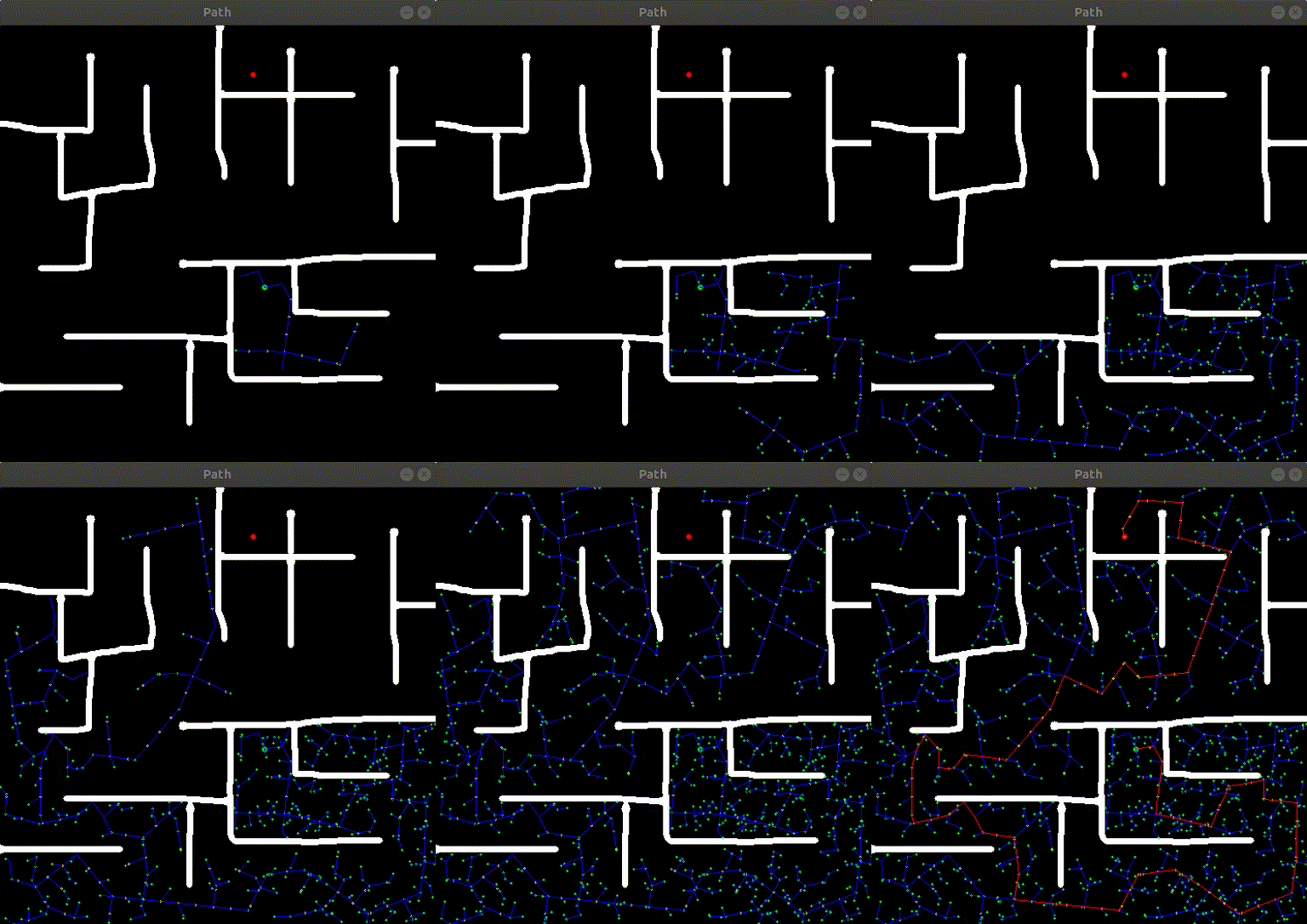
To run the rrt planner node:
roslaunch planner rrt_planner_node.launch
The following parameters can be set in the launch file:
-
map_topic (default: "/map"): Topic where the map is published (type: nav_msgs/OccupancyGrid) -
goal_topic (default: "/goal"): Topic where goal is published (type: geometry_msgs/Pose2D) -
pose_topic (default: "/pose"): Topic where starting position is published (type: geometry_msgs/Pose2D) -
max_vertices (default: 1500): Maximum vertices to be added to graph after which goal search should be stopped -
step_size (default: 20): Size of steps. Bigger steps means smaller graphs but more time and vice versa
Mapping
The mapping package provides a minimalistic GUI to draw obstacles in a 2D environment and choose starting position and goal.
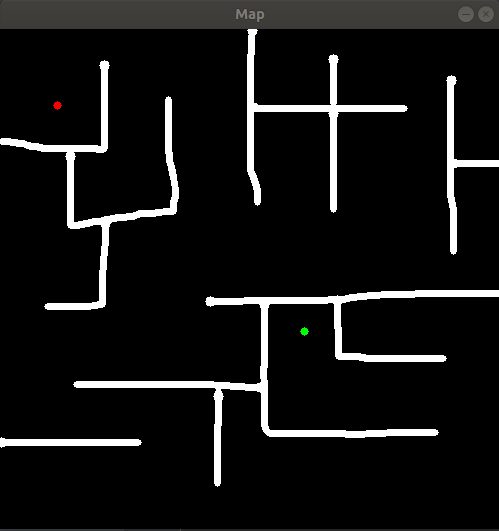
To run the mapping node:
roslaunch mapping mapping_node.launch
The following parameters can be set in the launch file:
-
map_topic (default: "/map"): Topic where the map should be published (type: nav_msgs/OccupancyGrid) -
goal_topic (default: "/goal"): Topic where goal should be published (type: geometry_msgs/Pose2D) -
pose_topic (default: "/pose"): Topic where starting position should be published (type: geometry_msgs/Pose2D) -
height (default: 500): Height of map -
width (default: 500): Width of map -
resolution (default: 0.05): Resolution of map -
save_map (default: "none"): If this parameter is set, the created map will be stored to this path -
load_map (default: "none"): If this parameter is set, map will be loaded from an image file at this path
When running the mapping node:
- Press ‘q’ to quit
- Press ‘s’ to save and move on
- Press numbers to the keyboard to change width of paint brush
- Right-click to toggle between eraser and paint brush
CONTRIBUTING
Repository Summary
| Description | |
| Checkout URI | https://github.com/naivehobo/rrtplanner.git |
| VCS Type | git |
| VCS Version | master |
| Last Updated | 2022-04-10 |
| Dev Status | UNKNOWN |
| Released | UNRELEASED |
| Contributing |
Help Wanted (-)
Good First Issues (-) Pull Requests to Review (-) |
README
Rapidly Exploring Random Tree (RRT) Planner
ROS package for a 2D path planner using the Rapidly Exploring Random Trees (RRT) algorithm. This repository contains two packages.
roslaunch planner rrt_planner.launch
Installation
Clone this repository in a catkin workspace and run the following command to build the packages:
catkin build
Planner
The planner package provides an implementation of the RRT algorithm.
To run the rrt planner node:
roslaunch planner rrt_planner_node.launch
The following parameters can be set in the launch file:
-
map_topic (default: "/map"): Topic where the map is published (type: nav_msgs/OccupancyGrid) -
goal_topic (default: "/goal"): Topic where goal is published (type: geometry_msgs/Pose2D) -
pose_topic (default: "/pose"): Topic where starting position is published (type: geometry_msgs/Pose2D) -
max_vertices (default: 1500): Maximum vertices to be added to graph after which goal search should be stopped -
step_size (default: 20): Size of steps. Bigger steps means smaller graphs but more time and vice versa
Mapping
The mapping package provides a minimalistic GUI to draw obstacles in a 2D environment and choose starting position and goal.
To run the mapping node:
roslaunch mapping mapping_node.launch
The following parameters can be set in the launch file:
-
map_topic (default: "/map"): Topic where the map should be published (type: nav_msgs/OccupancyGrid) -
goal_topic (default: "/goal"): Topic where goal should be published (type: geometry_msgs/Pose2D) -
pose_topic (default: "/pose"): Topic where starting position should be published (type: geometry_msgs/Pose2D) -
height (default: 500): Height of map -
width (default: 500): Width of map -
resolution (default: 0.05): Resolution of map -
save_map (default: "none"): If this parameter is set, the created map will be stored to this path -
load_map (default: "none"): If this parameter is set, map will be loaded from an image file at this path
When running the mapping node:
- Press ‘q’ to quit
- Press ‘s’ to save and move on
- Press numbers to the keyboard to change width of paint brush
- Right-click to toggle between eraser and paint brush
CONTRIBUTING
Repository Summary
| Description | |
| Checkout URI | https://github.com/naivehobo/rrtplanner.git |
| VCS Type | git |
| VCS Version | master |
| Last Updated | 2022-04-10 |
| Dev Status | UNKNOWN |
| Released | UNRELEASED |
| Contributing |
Help Wanted (-)
Good First Issues (-) Pull Requests to Review (-) |
README
Rapidly Exploring Random Tree (RRT) Planner
ROS package for a 2D path planner using the Rapidly Exploring Random Trees (RRT) algorithm. This repository contains two packages.
roslaunch planner rrt_planner.launch
Installation
Clone this repository in a catkin workspace and run the following command to build the packages:
catkin build
Planner
The planner package provides an implementation of the RRT algorithm.
To run the rrt planner node:
roslaunch planner rrt_planner_node.launch
The following parameters can be set in the launch file:
-
map_topic (default: "/map"): Topic where the map is published (type: nav_msgs/OccupancyGrid) -
goal_topic (default: "/goal"): Topic where goal is published (type: geometry_msgs/Pose2D) -
pose_topic (default: "/pose"): Topic where starting position is published (type: geometry_msgs/Pose2D) -
max_vertices (default: 1500): Maximum vertices to be added to graph after which goal search should be stopped -
step_size (default: 20): Size of steps. Bigger steps means smaller graphs but more time and vice versa
Mapping
The mapping package provides a minimalistic GUI to draw obstacles in a 2D environment and choose starting position and goal.
To run the mapping node:
roslaunch mapping mapping_node.launch
The following parameters can be set in the launch file:
-
map_topic (default: "/map"): Topic where the map should be published (type: nav_msgs/OccupancyGrid) -
goal_topic (default: "/goal"): Topic where goal should be published (type: geometry_msgs/Pose2D) -
pose_topic (default: "/pose"): Topic where starting position should be published (type: geometry_msgs/Pose2D) -
height (default: 500): Height of map -
width (default: 500): Width of map -
resolution (default: 0.05): Resolution of map -
save_map (default: "none"): If this parameter is set, the created map will be stored to this path -
load_map (default: "none"): If this parameter is set, map will be loaded from an image file at this path
When running the mapping node:
- Press ‘q’ to quit
- Press ‘s’ to save and move on
- Press numbers to the keyboard to change width of paint brush
- Right-click to toggle between eraser and paint brush
CONTRIBUTING
Repository Summary
| Description | |
| Checkout URI | https://github.com/naivehobo/rrtplanner.git |
| VCS Type | git |
| VCS Version | master |
| Last Updated | 2022-04-10 |
| Dev Status | UNKNOWN |
| Released | UNRELEASED |
| Contributing |
Help Wanted (-)
Good First Issues (-) Pull Requests to Review (-) |
README
Rapidly Exploring Random Tree (RRT) Planner
ROS package for a 2D path planner using the Rapidly Exploring Random Trees (RRT) algorithm. This repository contains two packages.
roslaunch planner rrt_planner.launch
Installation
Clone this repository in a catkin workspace and run the following command to build the packages:
catkin build
Planner
The planner package provides an implementation of the RRT algorithm.
To run the rrt planner node:
roslaunch planner rrt_planner_node.launch
The following parameters can be set in the launch file:
-
map_topic (default: "/map"): Topic where the map is published (type: nav_msgs/OccupancyGrid) -
goal_topic (default: "/goal"): Topic where goal is published (type: geometry_msgs/Pose2D) -
pose_topic (default: "/pose"): Topic where starting position is published (type: geometry_msgs/Pose2D) -
max_vertices (default: 1500): Maximum vertices to be added to graph after which goal search should be stopped -
step_size (default: 20): Size of steps. Bigger steps means smaller graphs but more time and vice versa
Mapping
The mapping package provides a minimalistic GUI to draw obstacles in a 2D environment and choose starting position and goal.
To run the mapping node:
roslaunch mapping mapping_node.launch
The following parameters can be set in the launch file:
-
map_topic (default: "/map"): Topic where the map should be published (type: nav_msgs/OccupancyGrid) -
goal_topic (default: "/goal"): Topic where goal should be published (type: geometry_msgs/Pose2D) -
pose_topic (default: "/pose"): Topic where starting position should be published (type: geometry_msgs/Pose2D) -
height (default: 500): Height of map -
width (default: 500): Width of map -
resolution (default: 0.05): Resolution of map -
save_map (default: "none"): If this parameter is set, the created map will be stored to this path -
load_map (default: "none"): If this parameter is set, map will be loaded from an image file at this path
When running the mapping node:
- Press ‘q’ to quit
- Press ‘s’ to save and move on
- Press numbers to the keyboard to change width of paint brush
- Right-click to toggle between eraser and paint brush
CONTRIBUTING
Repository Summary
| Description | |
| Checkout URI | https://github.com/naivehobo/rrtplanner.git |
| VCS Type | git |
| VCS Version | master |
| Last Updated | 2022-04-10 |
| Dev Status | UNKNOWN |
| Released | UNRELEASED |
| Contributing |
Help Wanted (-)
Good First Issues (-) Pull Requests to Review (-) |
README
Rapidly Exploring Random Tree (RRT) Planner
ROS package for a 2D path planner using the Rapidly Exploring Random Trees (RRT) algorithm. This repository contains two packages.
roslaunch planner rrt_planner.launch
Installation
Clone this repository in a catkin workspace and run the following command to build the packages:
catkin build
Planner
The planner package provides an implementation of the RRT algorithm.
To run the rrt planner node:
roslaunch planner rrt_planner_node.launch
The following parameters can be set in the launch file:
-
map_topic (default: "/map"): Topic where the map is published (type: nav_msgs/OccupancyGrid) -
goal_topic (default: "/goal"): Topic where goal is published (type: geometry_msgs/Pose2D) -
pose_topic (default: "/pose"): Topic where starting position is published (type: geometry_msgs/Pose2D) -
max_vertices (default: 1500): Maximum vertices to be added to graph after which goal search should be stopped -
step_size (default: 20): Size of steps. Bigger steps means smaller graphs but more time and vice versa
Mapping
The mapping package provides a minimalistic GUI to draw obstacles in a 2D environment and choose starting position and goal.
To run the mapping node:
roslaunch mapping mapping_node.launch
The following parameters can be set in the launch file:
-
map_topic (default: "/map"): Topic where the map should be published (type: nav_msgs/OccupancyGrid) -
goal_topic (default: "/goal"): Topic where goal should be published (type: geometry_msgs/Pose2D) -
pose_topic (default: "/pose"): Topic where starting position should be published (type: geometry_msgs/Pose2D) -
height (default: 500): Height of map -
width (default: 500): Width of map -
resolution (default: 0.05): Resolution of map -
save_map (default: "none"): If this parameter is set, the created map will be stored to this path -
load_map (default: "none"): If this parameter is set, map will be loaded from an image file at this path
When running the mapping node:
- Press ‘q’ to quit
- Press ‘s’ to save and move on
- Press numbers to the keyboard to change width of paint brush
- Right-click to toggle between eraser and paint brush
CONTRIBUTING
Repository Summary
| Description | |
| Checkout URI | https://github.com/naivehobo/rrtplanner.git |
| VCS Type | git |
| VCS Version | master |
| Last Updated | 2022-04-10 |
| Dev Status | UNKNOWN |
| Released | UNRELEASED |
| Contributing |
Help Wanted (-)
Good First Issues (-) Pull Requests to Review (-) |
README
Rapidly Exploring Random Tree (RRT) Planner
ROS package for a 2D path planner using the Rapidly Exploring Random Trees (RRT) algorithm. This repository contains two packages.
roslaunch planner rrt_planner.launch
Installation
Clone this repository in a catkin workspace and run the following command to build the packages:
catkin build
Planner
The planner package provides an implementation of the RRT algorithm.
To run the rrt planner node:
roslaunch planner rrt_planner_node.launch
The following parameters can be set in the launch file:
-
map_topic (default: "/map"): Topic where the map is published (type: nav_msgs/OccupancyGrid) -
goal_topic (default: "/goal"): Topic where goal is published (type: geometry_msgs/Pose2D) -
pose_topic (default: "/pose"): Topic where starting position is published (type: geometry_msgs/Pose2D) -
max_vertices (default: 1500): Maximum vertices to be added to graph after which goal search should be stopped -
step_size (default: 20): Size of steps. Bigger steps means smaller graphs but more time and vice versa
Mapping
The mapping package provides a minimalistic GUI to draw obstacles in a 2D environment and choose starting position and goal.
To run the mapping node:
roslaunch mapping mapping_node.launch
The following parameters can be set in the launch file:
-
map_topic (default: "/map"): Topic where the map should be published (type: nav_msgs/OccupancyGrid) -
goal_topic (default: "/goal"): Topic where goal should be published (type: geometry_msgs/Pose2D) -
pose_topic (default: "/pose"): Topic where starting position should be published (type: geometry_msgs/Pose2D) -
height (default: 500): Height of map -
width (default: 500): Width of map -
resolution (default: 0.05): Resolution of map -
save_map (default: "none"): If this parameter is set, the created map will be stored to this path -
load_map (default: "none"): If this parameter is set, map will be loaded from an image file at this path
When running the mapping node:
- Press ‘q’ to quit
- Press ‘s’ to save and move on
- Press numbers to the keyboard to change width of paint brush
- Right-click to toggle between eraser and paint brush
CONTRIBUTING
Repository Summary
| Description | |
| Checkout URI | https://github.com/naivehobo/rrtplanner.git |
| VCS Type | git |
| VCS Version | master |
| Last Updated | 2022-04-10 |
| Dev Status | UNKNOWN |
| Released | UNRELEASED |
| Contributing |
Help Wanted (-)
Good First Issues (-) Pull Requests to Review (-) |
README
Rapidly Exploring Random Tree (RRT) Planner
ROS package for a 2D path planner using the Rapidly Exploring Random Trees (RRT) algorithm. This repository contains two packages.
roslaunch planner rrt_planner.launch
Installation
Clone this repository in a catkin workspace and run the following command to build the packages:
catkin build
Planner
The planner package provides an implementation of the RRT algorithm.
To run the rrt planner node:
roslaunch planner rrt_planner_node.launch
The following parameters can be set in the launch file:
-
map_topic (default: "/map"): Topic where the map is published (type: nav_msgs/OccupancyGrid) -
goal_topic (default: "/goal"): Topic where goal is published (type: geometry_msgs/Pose2D) -
pose_topic (default: "/pose"): Topic where starting position is published (type: geometry_msgs/Pose2D) -
max_vertices (default: 1500): Maximum vertices to be added to graph after which goal search should be stopped -
step_size (default: 20): Size of steps. Bigger steps means smaller graphs but more time and vice versa
Mapping
The mapping package provides a minimalistic GUI to draw obstacles in a 2D environment and choose starting position and goal.
To run the mapping node:
roslaunch mapping mapping_node.launch
The following parameters can be set in the launch file:
-
map_topic (default: "/map"): Topic where the map should be published (type: nav_msgs/OccupancyGrid) -
goal_topic (default: "/goal"): Topic where goal should be published (type: geometry_msgs/Pose2D) -
pose_topic (default: "/pose"): Topic where starting position should be published (type: geometry_msgs/Pose2D) -
height (default: 500): Height of map -
width (default: 500): Width of map -
resolution (default: 0.05): Resolution of map -
save_map (default: "none"): If this parameter is set, the created map will be stored to this path -
load_map (default: "none"): If this parameter is set, map will be loaded from an image file at this path
When running the mapping node:
- Press ‘q’ to quit
- Press ‘s’ to save and move on
- Press numbers to the keyboard to change width of paint brush
- Right-click to toggle between eraser and paint brush
CONTRIBUTING
Repository Summary
| Description | |
| Checkout URI | https://github.com/naivehobo/rrtplanner.git |
| VCS Type | git |
| VCS Version | master |
| Last Updated | 2022-04-10 |
| Dev Status | UNKNOWN |
| Released | UNRELEASED |
| Contributing |
Help Wanted (-)
Good First Issues (-) Pull Requests to Review (-) |
README
Rapidly Exploring Random Tree (RRT) Planner
ROS package for a 2D path planner using the Rapidly Exploring Random Trees (RRT) algorithm. This repository contains two packages.
roslaunch planner rrt_planner.launch
Installation
Clone this repository in a catkin workspace and run the following command to build the packages:
catkin build
Planner
The planner package provides an implementation of the RRT algorithm.
To run the rrt planner node:
roslaunch planner rrt_planner_node.launch
The following parameters can be set in the launch file:
-
map_topic (default: "/map"): Topic where the map is published (type: nav_msgs/OccupancyGrid) -
goal_topic (default: "/goal"): Topic where goal is published (type: geometry_msgs/Pose2D) -
pose_topic (default: "/pose"): Topic where starting position is published (type: geometry_msgs/Pose2D) -
max_vertices (default: 1500): Maximum vertices to be added to graph after which goal search should be stopped -
step_size (default: 20): Size of steps. Bigger steps means smaller graphs but more time and vice versa
Mapping
The mapping package provides a minimalistic GUI to draw obstacles in a 2D environment and choose starting position and goal.
To run the mapping node:
roslaunch mapping mapping_node.launch
The following parameters can be set in the launch file:
-
map_topic (default: "/map"): Topic where the map should be published (type: nav_msgs/OccupancyGrid) -
goal_topic (default: "/goal"): Topic where goal should be published (type: geometry_msgs/Pose2D) -
pose_topic (default: "/pose"): Topic where starting position should be published (type: geometry_msgs/Pose2D) -
height (default: 500): Height of map -
width (default: 500): Width of map -
resolution (default: 0.05): Resolution of map -
save_map (default: "none"): If this parameter is set, the created map will be stored to this path -
load_map (default: "none"): If this parameter is set, map will be loaded from an image file at this path
When running the mapping node:
- Press ‘q’ to quit
- Press ‘s’ to save and move on
- Press numbers to the keyboard to change width of paint brush
- Right-click to toggle between eraser and paint brush
CONTRIBUTING
Repository Summary
| Description | |
| Checkout URI | https://github.com/naivehobo/rrtplanner.git |
| VCS Type | git |
| VCS Version | master |
| Last Updated | 2022-04-10 |
| Dev Status | UNKNOWN |
| Released | UNRELEASED |
| Contributing |
Help Wanted (-)
Good First Issues (-) Pull Requests to Review (-) |
README
Rapidly Exploring Random Tree (RRT) Planner
ROS package for a 2D path planner using the Rapidly Exploring Random Trees (RRT) algorithm. This repository contains two packages.
roslaunch planner rrt_planner.launch
Installation
Clone this repository in a catkin workspace and run the following command to build the packages:
catkin build
Planner
The planner package provides an implementation of the RRT algorithm.
To run the rrt planner node:
roslaunch planner rrt_planner_node.launch
The following parameters can be set in the launch file:
-
map_topic (default: "/map"): Topic where the map is published (type: nav_msgs/OccupancyGrid) -
goal_topic (default: "/goal"): Topic where goal is published (type: geometry_msgs/Pose2D) -
pose_topic (default: "/pose"): Topic where starting position is published (type: geometry_msgs/Pose2D) -
max_vertices (default: 1500): Maximum vertices to be added to graph after which goal search should be stopped -
step_size (default: 20): Size of steps. Bigger steps means smaller graphs but more time and vice versa
Mapping
The mapping package provides a minimalistic GUI to draw obstacles in a 2D environment and choose starting position and goal.
To run the mapping node:
roslaunch mapping mapping_node.launch
The following parameters can be set in the launch file:
-
map_topic (default: "/map"): Topic where the map should be published (type: nav_msgs/OccupancyGrid) -
goal_topic (default: "/goal"): Topic where goal should be published (type: geometry_msgs/Pose2D) -
pose_topic (default: "/pose"): Topic where starting position should be published (type: geometry_msgs/Pose2D) -
height (default: 500): Height of map -
width (default: 500): Width of map -
resolution (default: 0.05): Resolution of map -
save_map (default: "none"): If this parameter is set, the created map will be stored to this path -
load_map (default: "none"): If this parameter is set, map will be loaded from an image file at this path
When running the mapping node:
- Press ‘q’ to quit
- Press ‘s’ to save and move on
- Press numbers to the keyboard to change width of paint brush
- Right-click to toggle between eraser and paint brush