 ROS Index
Repository Summary
| Description | |
| Checkout URI | https://github.com/namo-robotics/ros2_system_webview.git |
| VCS Type | git |
| VCS Version | main |
| Last Updated | 2026-03-26 |
| Dev Status | DEVELOPED |
| Released | RELEASED |
| Contributing |
Help Wanted (-)
Good First Issues (-) Pull Requests to Review (-) |
Packages
| Name | Version |
|---|---|
| system_webview | 0.0.3 |
README
system_webview
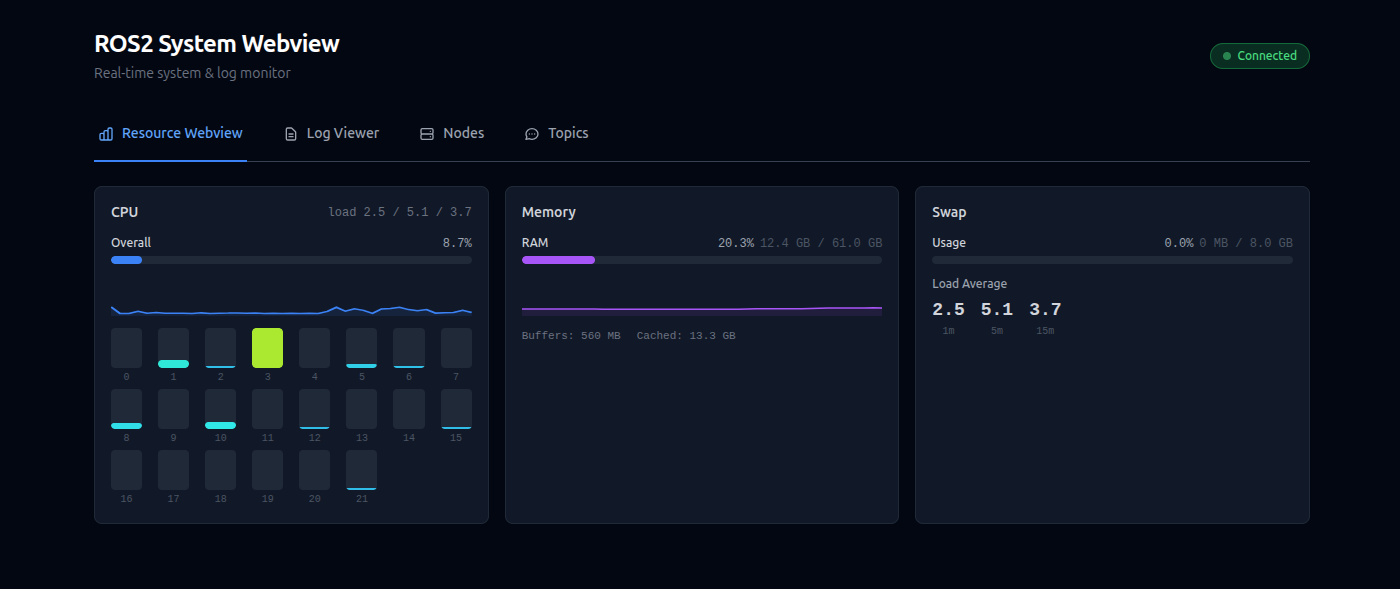
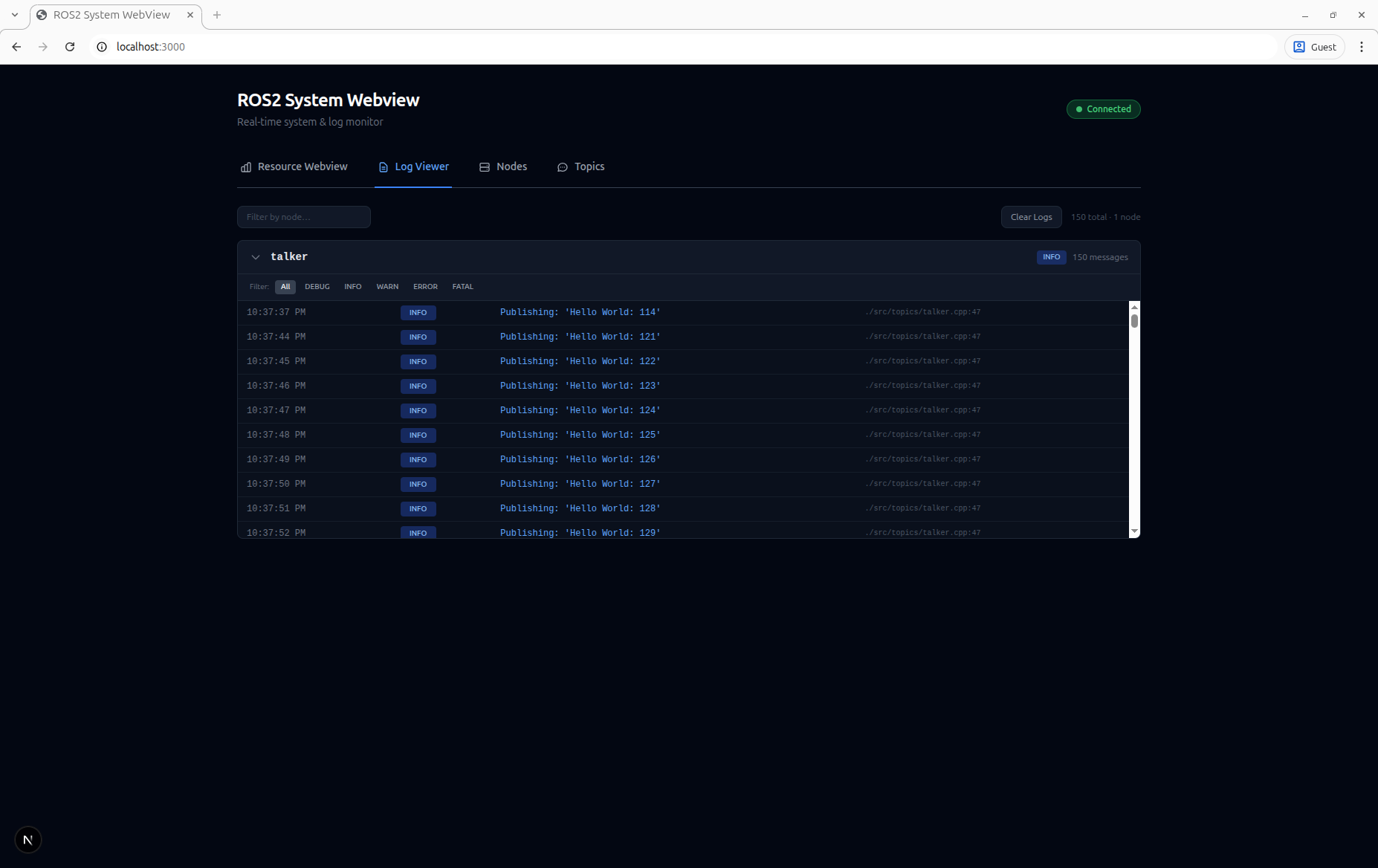
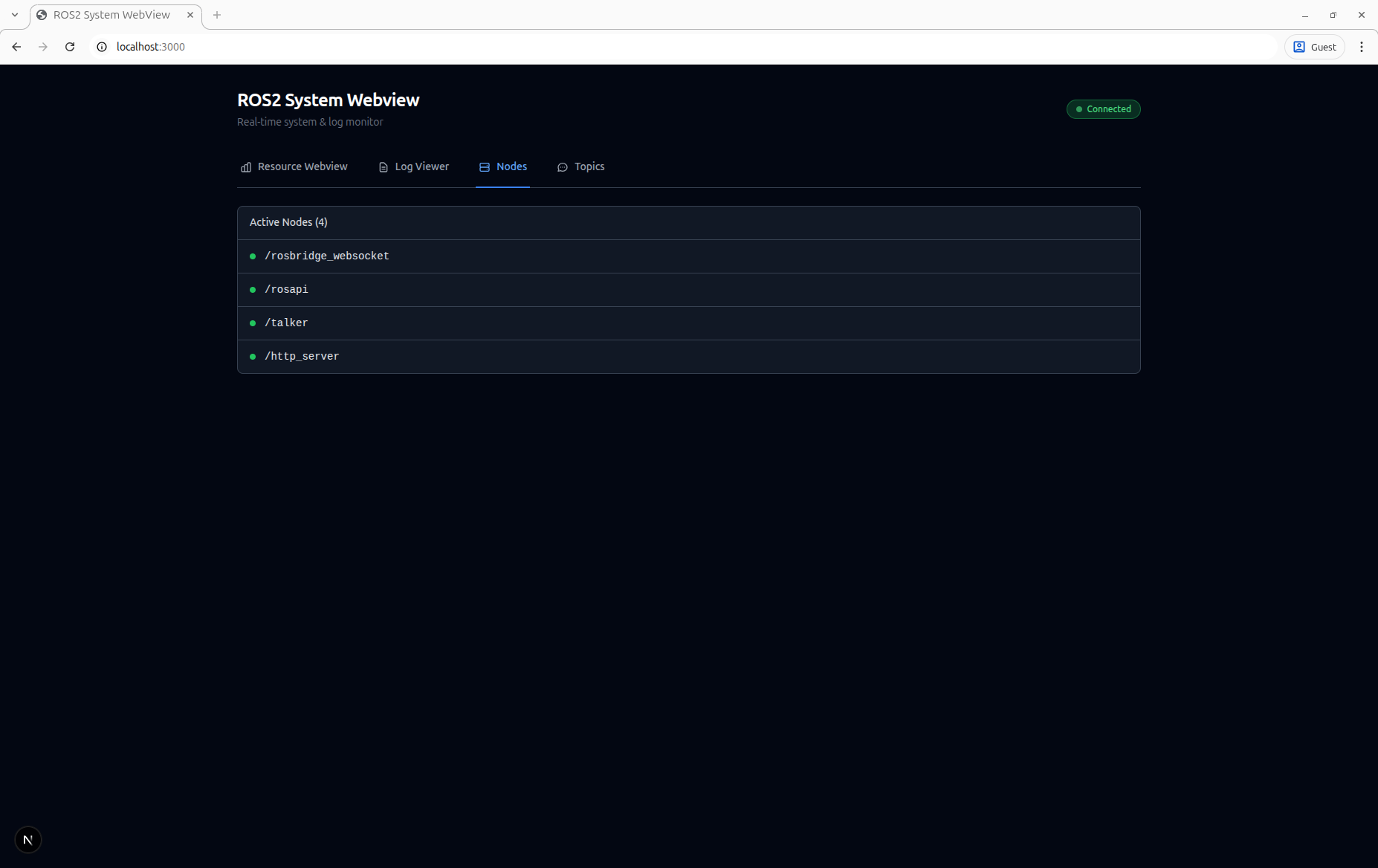
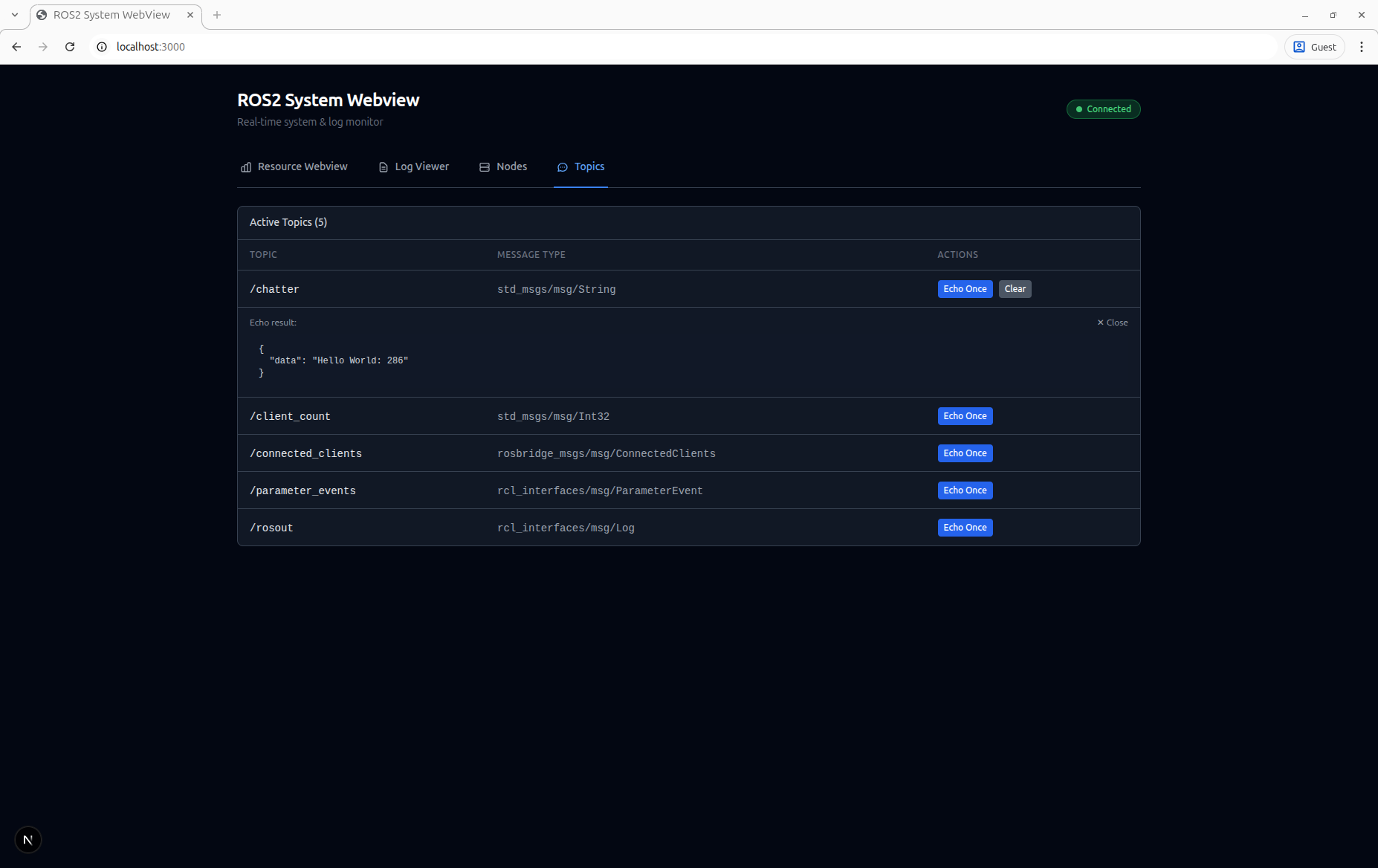
A real-time system monitoring dashboard for ROS 2. It provides a web-based UI that displays live CPU, memory, network bandwidth, USB bus utilization, and load average statistics, a scrollable /rosout log viewer, and interactive node and topic browsers — all served from a single ROS 2 node.

Features
Resource Monitor
Log Viewer
Node Viewer
Topic Viewer
Enabling Real-Time USB Monitoring
By default, the dashboard shows claimed USB bandwidth based on device speeds. For actual real-time USB traffic monitoring (useful for detecting camera saturation), enable usbmon:
# Load the usbmon kernel module
sudo modprobe usbmon

# Mount debugfs (skip if already mounted)
mountpoint -q /sys/kernel/debug || sudo mount -t debugfs none /sys/kernel/debug

# Verify usbmon is available
sudo ls /sys/kernel/debug/usb/usbmon/
When usbmon is available and the process has read access, USB bus cards will show a “📊 Live” badge with actual bandwidth usage. Without it, only claimed bandwidth is displayed.
Note: The http_server process needs read access to
/sys/kernel/debug/usb/usbmon/0u. Run with sudo or adjust permissions as needed.
Architecture
flowchart TB
    subgraph Browser["Browser (http://hostname:2525)"]
        direction LR
        Stats["System Stats<br/>(polls /api/system)"]
        Logs["/rosout Log Viewer<br/>(WebSocket → rosbridge :9090)"]
    end

    subgraph Backend
        direction LR
        HTTP["http_server<br/>(C++ node)<br/>:2525"]
        ROS["rosbridge_server<br/>(WebSocket node)<br/>:9090"]
    end

    subgraph System
        direction LR
        Proc["/proc/stat<br/>/proc/meminfo<br/>/proc/loadavg"]
        Graph["ROS 2 graph"]
    end

    Stats -->|HTTP GET| HTTP
    Logs -->|ws://| ROS
    HTTP --> Proc
    ROS --> Graph
Prerequisites
- ROS 2 (Humble, Iron, or Jazzy)
- colcon build tool
- Node.js ≥ 18 and npm (used at build time to compile the frontend)
- cpp-httplib development headers
Install system dependencies (Ubuntu)
sudo apt update
sudo apt install ros-${ROS_DISTRO}-rosbridge-server libcpp-httplib-dev nodejs npm
Note: If your distro’s Node.js is too old, use nvm to install a recent version.
Building
Clone into a colcon workspace and build:
```bash mkdir -p ~/ros2_ws/src cd ~/ros2_ws/src git clone https://github.com/namo-robotics/ros2_system_webview.git
cd ~/ros2_ws source /opt/ros/${ROS_DISTRO}/setup.bash colcon build source install/setup.bash
File truncated at 100 lines see the full file
CONTRIBUTING
Repository Summary
| Description | |
| Checkout URI | https://github.com/namo-robotics/ros2_system_webview.git |
| VCS Type | git |
| VCS Version | main |
| Last Updated | 2026-03-26 |
| Dev Status | DEVELOPED |
| Released | RELEASED |
| Contributing |
Help Wanted (-)
Good First Issues (-) Pull Requests to Review (-) |
Packages
| Name | Version |
|---|---|
| system_webview | 0.0.3 |
README
system_webview
A real-time system monitoring dashboard for ROS 2. It provides a web-based UI that displays live CPU, memory, network bandwidth, USB bus utilization, and load average statistics, a scrollable /rosout log viewer, and interactive node and topic browsers — all served from a single ROS 2 node.
Features
Resource Monitor
Log Viewer
Node Viewer
Topic Viewer
Enabling Real-Time USB Monitoring
By default, the dashboard shows claimed USB bandwidth based on device speeds. For actual real-time USB traffic monitoring (useful for detecting camera saturation), enable usbmon:
# Load the usbmon kernel module
sudo modprobe usbmon

# Mount debugfs (skip if already mounted)
mountpoint -q /sys/kernel/debug || sudo mount -t debugfs none /sys/kernel/debug

# Verify usbmon is available
sudo ls /sys/kernel/debug/usb/usbmon/
When usbmon is available and the process has read access, USB bus cards will show a “📊 Live” badge with actual bandwidth usage. Without it, only claimed bandwidth is displayed.
Note: The http_server process needs read access to
/sys/kernel/debug/usb/usbmon/0u. Run with sudo or adjust permissions as needed.
Architecture
flowchart TB
    subgraph Browser["Browser (http://hostname:2525)"]
        direction LR
        Stats["System Stats<br/>(polls /api/system)"]
        Logs["/rosout Log Viewer<br/>(WebSocket → rosbridge :9090)"]
    end

    subgraph Backend
        direction LR
        HTTP["http_server<br/>(C++ node)<br/>:2525"]
        ROS["rosbridge_server<br/>(WebSocket node)<br/>:9090"]
    end

    subgraph System
        direction LR
        Proc["/proc/stat<br/>/proc/meminfo<br/>/proc/loadavg"]
        Graph["ROS 2 graph"]
    end

    Stats -->|HTTP GET| HTTP
    Logs -->|ws://| ROS
    HTTP --> Proc
    ROS --> Graph
Prerequisites
- ROS 2 (Humble, Iron, or Jazzy)
- colcon build tool
- Node.js ≥ 18 and npm (used at build time to compile the frontend)
- cpp-httplib development headers
Install system dependencies (Ubuntu)
sudo apt update
sudo apt install ros-${ROS_DISTRO}-rosbridge-server libcpp-httplib-dev nodejs npm
Note: If your distro’s Node.js is too old, use nvm to install a recent version.
Building
Clone into a colcon workspace and build:
```bash mkdir -p ~/ros2_ws/src cd ~/ros2_ws/src git clone https://github.com/namo-robotics/ros2_system_webview.git
cd ~/ros2_ws source /opt/ros/${ROS_DISTRO}/setup.bash colcon build source install/setup.bash
File truncated at 100 lines see the full file
CONTRIBUTING
Repository Summary
| Description | |
| Checkout URI | https://github.com/namo-robotics/ros2_system_webview.git |
| VCS Type | git |
| VCS Version | main |
| Last Updated | 2026-03-26 |
| Dev Status | DEVELOPED |
| Released | UNRELEASED |
| Contributing |
Help Wanted (-)
Good First Issues (-) Pull Requests to Review (-) |
Packages
| Name | Version |
|---|---|
| system_webview | 0.0.3 |
README
system_webview
A real-time system monitoring dashboard for ROS 2. It provides a web-based UI that displays live CPU, memory, network bandwidth, USB bus utilization, and load average statistics, a scrollable /rosout log viewer, and interactive node and topic browsers — all served from a single ROS 2 node.
Features
Resource Monitor
Log Viewer
Node Viewer
Topic Viewer
Enabling Real-Time USB Monitoring
By default, the dashboard shows claimed USB bandwidth based on device speeds. For actual real-time USB traffic monitoring (useful for detecting camera saturation), enable usbmon:
# Load the usbmon kernel module
sudo modprobe usbmon

# Mount debugfs (skip if already mounted)
mountpoint -q /sys/kernel/debug || sudo mount -t debugfs none /sys/kernel/debug

# Verify usbmon is available
sudo ls /sys/kernel/debug/usb/usbmon/
When usbmon is available and the process has read access, USB bus cards will show a “📊 Live” badge with actual bandwidth usage. Without it, only claimed bandwidth is displayed.
Note: The http_server process needs read access to
/sys/kernel/debug/usb/usbmon/0u. Run with sudo or adjust permissions as needed.
Architecture
flowchart TB
    subgraph Browser["Browser (http://hostname:2525)"]
        direction LR
        Stats["System Stats<br/>(polls /api/system)"]
        Logs["/rosout Log Viewer<br/>(WebSocket → rosbridge :9090)"]
    end

    subgraph Backend
        direction LR
        HTTP["http_server<br/>(C++ node)<br/>:2525"]
        ROS["rosbridge_server<br/>(WebSocket node)<br/>:9090"]
    end

    subgraph System
        direction LR
        Proc["/proc/stat<br/>/proc/meminfo<br/>/proc/loadavg"]
        Graph["ROS 2 graph"]
    end

    Stats -->|HTTP GET| HTTP
    Logs -->|ws://| ROS
    HTTP --> Proc
    ROS --> Graph
Prerequisites
- ROS 2 (Humble, Iron, or Jazzy)
- colcon build tool
- Node.js ≥ 18 and npm (used at build time to compile the frontend)
- cpp-httplib development headers
Install system dependencies (Ubuntu)
sudo apt update
sudo apt install ros-${ROS_DISTRO}-rosbridge-server libcpp-httplib-dev nodejs npm
Note: If your distro’s Node.js is too old, use nvm to install a recent version.
Building
Clone into a colcon workspace and build:
```bash mkdir -p ~/ros2_ws/src cd ~/ros2_ws/src git clone https://github.com/namo-robotics/ros2_system_webview.git
cd ~/ros2_ws source /opt/ros/${ROS_DISTRO}/setup.bash colcon build source install/setup.bash
File truncated at 100 lines see the full file
CONTRIBUTING
Repository Summary
| Description | |
| Checkout URI | https://github.com/namo-robotics/ros2_system_webview.git |
| VCS Type | git |
| VCS Version | main |
| Last Updated | 2026-03-26 |
| Dev Status | DEVELOPED |
| Released | RELEASED |
| Contributing |
Help Wanted (-)
Good First Issues (-) Pull Requests to Review (-) |
Packages
| Name | Version |
|---|---|
| system_webview | 0.0.3 |
README
system_webview
A real-time system monitoring dashboard for ROS 2. It provides a web-based UI that displays live CPU, memory, network bandwidth, USB bus utilization, and load average statistics, a scrollable /rosout log viewer, and interactive node and topic browsers — all served from a single ROS 2 node.
Features
Resource Monitor
Log Viewer
Node Viewer
Topic Viewer
Enabling Real-Time USB Monitoring
By default, the dashboard shows claimed USB bandwidth based on device speeds. For actual real-time USB traffic monitoring (useful for detecting camera saturation), enable usbmon:
# Load the usbmon kernel module
sudo modprobe usbmon

# Mount debugfs (skip if already mounted)
mountpoint -q /sys/kernel/debug || sudo mount -t debugfs none /sys/kernel/debug

# Verify usbmon is available
sudo ls /sys/kernel/debug/usb/usbmon/
When usbmon is available and the process has read access, USB bus cards will show a “📊 Live” badge with actual bandwidth usage. Without it, only claimed bandwidth is displayed.
Note: The http_server process needs read access to
/sys/kernel/debug/usb/usbmon/0u. Run with sudo or adjust permissions as needed.
Architecture
flowchart TB
    subgraph Browser["Browser (http://hostname:2525)"]
        direction LR
        Stats["System Stats<br/>(polls /api/system)"]
        Logs["/rosout Log Viewer<br/>(WebSocket → rosbridge :9090)"]
    end

    subgraph Backend
        direction LR
        HTTP["http_server<br/>(C++ node)<br/>:2525"]
        ROS["rosbridge_server<br/>(WebSocket node)<br/>:9090"]
    end

    subgraph System
        direction LR
        Proc["/proc/stat<br/>/proc/meminfo<br/>/proc/loadavg"]
        Graph["ROS 2 graph"]
    end

    Stats -->|HTTP GET| HTTP
    Logs -->|ws://| ROS
    HTTP --> Proc
    ROS --> Graph
Prerequisites
- ROS 2 (Humble, Iron, or Jazzy)
- colcon build tool
- Node.js ≥ 18 and npm (used at build time to compile the frontend)
- cpp-httplib development headers
Install system dependencies (Ubuntu)
sudo apt update
sudo apt install ros-${ROS_DISTRO}-rosbridge-server libcpp-httplib-dev nodejs npm
Note: If your distro’s Node.js is too old, use nvm to install a recent version.
Building
Clone into a colcon workspace and build:
```bash mkdir -p ~/ros2_ws/src cd ~/ros2_ws/src git clone https://github.com/namo-robotics/ros2_system_webview.git
cd ~/ros2_ws source /opt/ros/${ROS_DISTRO}/setup.bash colcon build source install/setup.bash
File truncated at 100 lines see the full file
CONTRIBUTING
Repository Summary
| Description | |
| Checkout URI | https://github.com/namo-robotics/ros2_system_webview.git |
| VCS Type | git |
| VCS Version | main |
| Last Updated | 2026-03-26 |
| Dev Status | DEVELOPED |
| Released | RELEASED |
| Contributing |
Help Wanted (-)
Good First Issues (-) Pull Requests to Review (-) |
Packages
| Name | Version |
|---|---|
| system_webview | 0.0.3 |
README
system_webview
A real-time system monitoring dashboard for ROS 2. It provides a web-based UI that displays live CPU, memory, network bandwidth, USB bus utilization, and load average statistics, a scrollable /rosout log viewer, and interactive node and topic browsers — all served from a single ROS 2 node.
Features
Resource Monitor
Log Viewer
Node Viewer
Topic Viewer
Enabling Real-Time USB Monitoring
By default, the dashboard shows claimed USB bandwidth based on device speeds. For actual real-time USB traffic monitoring (useful for detecting camera saturation), enable usbmon:
# Load the usbmon kernel module
sudo modprobe usbmon

# Mount debugfs (skip if already mounted)
mountpoint -q /sys/kernel/debug || sudo mount -t debugfs none /sys/kernel/debug

# Verify usbmon is available
sudo ls /sys/kernel/debug/usb/usbmon/
When usbmon is available and the process has read access, USB bus cards will show a “📊 Live” badge with actual bandwidth usage. Without it, only claimed bandwidth is displayed.
Note: The http_server process needs read access to
/sys/kernel/debug/usb/usbmon/0u. Run with sudo or adjust permissions as needed.
Architecture
flowchart TB
    subgraph Browser["Browser (http://hostname:2525)"]
        direction LR
        Stats["System Stats<br/>(polls /api/system)"]
        Logs["/rosout Log Viewer<br/>(WebSocket → rosbridge :9090)"]
    end

    subgraph Backend
        direction LR
        HTTP["http_server<br/>(C++ node)<br/>:2525"]
        ROS["rosbridge_server<br/>(WebSocket node)<br/>:9090"]
    end

    subgraph System
        direction LR
        Proc["/proc/stat<br/>/proc/meminfo<br/>/proc/loadavg"]
        Graph["ROS 2 graph"]
    end

    Stats -->|HTTP GET| HTTP
    Logs -->|ws://| ROS
    HTTP --> Proc
    ROS --> Graph
Prerequisites
- ROS 2 (Humble, Iron, or Jazzy)
- colcon build tool
- Node.js ≥ 18 and npm (used at build time to compile the frontend)
- cpp-httplib development headers
Install system dependencies (Ubuntu)
sudo apt update
sudo apt install ros-${ROS_DISTRO}-rosbridge-server libcpp-httplib-dev nodejs npm
Note: If your distro’s Node.js is too old, use nvm to install a recent version.
Building
Clone into a colcon workspace and build:
```bash mkdir -p ~/ros2_ws/src cd ~/ros2_ws/src git clone https://github.com/namo-robotics/ros2_system_webview.git
cd ~/ros2_ws source /opt/ros/${ROS_DISTRO}/setup.bash colcon build source install/setup.bash
File truncated at 100 lines see the full file
CONTRIBUTING
Repository Summary
| Description | |
| Checkout URI | https://github.com/namo-robotics/ros2_system_webview.git |
| VCS Type | git |
| VCS Version | main |
| Last Updated | 2026-03-26 |
| Dev Status | DEVELOPED |
| Released | RELEASED |
| Contributing |
Help Wanted (-)
Good First Issues (-) Pull Requests to Review (-) |
Packages
| Name | Version |
|---|---|
| system_webview | 0.0.3 |
README
system_webview
A real-time system monitoring dashboard for ROS 2. It provides a web-based UI that displays live CPU, memory, network bandwidth, USB bus utilization, and load average statistics, a scrollable /rosout log viewer, and interactive node and topic browsers — all served from a single ROS 2 node.
Features
Resource Monitor
Log Viewer
Node Viewer
Topic Viewer
Enabling Real-Time USB Monitoring
By default, the dashboard shows claimed USB bandwidth based on device speeds. For actual real-time USB traffic monitoring (useful for detecting camera saturation), enable usbmon:
# Load the usbmon kernel module
sudo modprobe usbmon

# Mount debugfs (skip if already mounted)
mountpoint -q /sys/kernel/debug || sudo mount -t debugfs none /sys/kernel/debug

# Verify usbmon is available
sudo ls /sys/kernel/debug/usb/usbmon/
When usbmon is available and the process has read access, USB bus cards will show a “📊 Live” badge with actual bandwidth usage. Without it, only claimed bandwidth is displayed.
Note: The http_server process needs read access to
/sys/kernel/debug/usb/usbmon/0u. Run with sudo or adjust permissions as needed.
Architecture
flowchart TB
    subgraph Browser["Browser (http://hostname:2525)"]
        direction LR
        Stats["System Stats<br/>(polls /api/system)"]
        Logs["/rosout Log Viewer<br/>(WebSocket → rosbridge :9090)"]
    end

    subgraph Backend
        direction LR
        HTTP["http_server<br/>(C++ node)<br/>:2525"]
        ROS["rosbridge_server<br/>(WebSocket node)<br/>:9090"]
    end

    subgraph System
        direction LR
        Proc["/proc/stat<br/>/proc/meminfo<br/>/proc/loadavg"]
        Graph["ROS 2 graph"]
    end

    Stats -->|HTTP GET| HTTP
    Logs -->|ws://| ROS
    HTTP --> Proc
    ROS --> Graph
Prerequisites
- ROS 2 (Humble, Iron, or Jazzy)
- colcon build tool
- Node.js ≥ 18 and npm (used at build time to compile the frontend)
- cpp-httplib development headers
Install system dependencies (Ubuntu)
sudo apt update
sudo apt install ros-${ROS_DISTRO}-rosbridge-server libcpp-httplib-dev nodejs npm
Note: If your distro’s Node.js is too old, use nvm to install a recent version.
Building
Clone into a colcon workspace and build:
```bash mkdir -p ~/ros2_ws/src cd ~/ros2_ws/src git clone https://github.com/namo-robotics/ros2_system_webview.git
cd ~/ros2_ws source /opt/ros/${ROS_DISTRO}/setup.bash colcon build source install/setup.bash
File truncated at 100 lines see the full file
CONTRIBUTING
Repository Summary
| Description | |
| Checkout URI | https://github.com/namo-robotics/ros2_system_webview.git |
| VCS Type | git |
| VCS Version | main |
| Last Updated | 2026-03-26 |
| Dev Status | DEVELOPED |
| Released | RELEASED |
| Contributing |
Help Wanted (-)
Good First Issues (-) Pull Requests to Review (-) |
Packages
| Name | Version |
|---|---|
| system_webview | 0.0.3 |
README
system_webview
A real-time system monitoring dashboard for ROS 2. It provides a web-based UI that displays live CPU, memory, network bandwidth, USB bus utilization, and load average statistics, a scrollable /rosout log viewer, and interactive node and topic browsers — all served from a single ROS 2 node.
Features
Resource Monitor
Log Viewer
Node Viewer
Topic Viewer
Enabling Real-Time USB Monitoring
By default, the dashboard shows claimed USB bandwidth based on device speeds. For actual real-time USB traffic monitoring (useful for detecting camera saturation), enable usbmon:
# Load the usbmon kernel module
sudo modprobe usbmon

# Mount debugfs (skip if already mounted)
mountpoint -q /sys/kernel/debug || sudo mount -t debugfs none /sys/kernel/debug

# Verify usbmon is available
sudo ls /sys/kernel/debug/usb/usbmon/
When usbmon is available and the process has read access, USB bus cards will show a “📊 Live” badge with actual bandwidth usage. Without it, only claimed bandwidth is displayed.
Note: The http_server process needs read access to
/sys/kernel/debug/usb/usbmon/0u. Run with sudo or adjust permissions as needed.
Architecture
flowchart TB
    subgraph Browser["Browser (http://hostname:2525)"]
        direction LR
        Stats["System Stats<br/>(polls /api/system)"]
        Logs["/rosout Log Viewer<br/>(WebSocket → rosbridge :9090)"]
    end

    subgraph Backend
        direction LR
        HTTP["http_server<br/>(C++ node)<br/>:2525"]
        ROS["rosbridge_server<br/>(WebSocket node)<br/>:9090"]
    end

    subgraph System
        direction LR
        Proc["/proc/stat<br/>/proc/meminfo<br/>/proc/loadavg"]
        Graph["ROS 2 graph"]
    end

    Stats -->|HTTP GET| HTTP
    Logs -->|ws://| ROS
    HTTP --> Proc
    ROS --> Graph
Prerequisites
- ROS 2 (Humble, Iron, or Jazzy)
- colcon build tool
- Node.js ≥ 18 and npm (used at build time to compile the frontend)
- cpp-httplib development headers
Install system dependencies (Ubuntu)
sudo apt update
sudo apt install ros-${ROS_DISTRO}-rosbridge-server libcpp-httplib-dev nodejs npm
Note: If your distro’s Node.js is too old, use nvm to install a recent version.
Building
Clone into a colcon workspace and build:
```bash mkdir -p ~/ros2_ws/src cd ~/ros2_ws/src git clone https://github.com/namo-robotics/ros2_system_webview.git
cd ~/ros2_ws source /opt/ros/${ROS_DISTRO}/setup.bash colcon build source install/setup.bash
File truncated at 100 lines see the full file
CONTRIBUTING
Repository Summary
| Description | |
| Checkout URI | https://github.com/namo-robotics/ros2_system_webview.git |
| VCS Type | git |
| VCS Version | main |
| Last Updated | 2026-03-26 |
| Dev Status | DEVELOPED |
| Released | RELEASED |
| Contributing |
Help Wanted (-)
Good First Issues (-) Pull Requests to Review (-) |
Packages
| Name | Version |
|---|---|
| system_webview | 0.0.3 |
README
system_webview
A real-time system monitoring dashboard for ROS 2. It provides a web-based UI that displays live CPU, memory, network bandwidth, USB bus utilization, and load average statistics, a scrollable /rosout log viewer, and interactive node and topic browsers — all served from a single ROS 2 node.
Features
Resource Monitor
Log Viewer
Node Viewer
Topic Viewer
Enabling Real-Time USB Monitoring
By default, the dashboard shows claimed USB bandwidth based on device speeds. For actual real-time USB traffic monitoring (useful for detecting camera saturation), enable usbmon:
# Load the usbmon kernel module
sudo modprobe usbmon

# Mount debugfs (skip if already mounted)
mountpoint -q /sys/kernel/debug || sudo mount -t debugfs none /sys/kernel/debug

# Verify usbmon is available
sudo ls /sys/kernel/debug/usb/usbmon/
When usbmon is available and the process has read access, USB bus cards will show a “📊 Live” badge with actual bandwidth usage. Without it, only claimed bandwidth is displayed.
Note: The http_server process needs read access to
/sys/kernel/debug/usb/usbmon/0u. Run with sudo or adjust permissions as needed.
Architecture
flowchart TB
    subgraph Browser["Browser (http://hostname:2525)"]
        direction LR
        Stats["System Stats<br/>(polls /api/system)"]
        Logs["/rosout Log Viewer<br/>(WebSocket → rosbridge :9090)"]
    end

    subgraph Backend
        direction LR
        HTTP["http_server<br/>(C++ node)<br/>:2525"]
        ROS["rosbridge_server<br/>(WebSocket node)<br/>:9090"]
    end

    subgraph System
        direction LR
        Proc["/proc/stat<br/>/proc/meminfo<br/>/proc/loadavg"]
        Graph["ROS 2 graph"]
    end

    Stats -->|HTTP GET| HTTP
    Logs -->|ws://| ROS
    HTTP --> Proc
    ROS --> Graph
Prerequisites
- ROS 2 (Humble, Iron, or Jazzy)
- colcon build tool
- Node.js ≥ 18 and npm (used at build time to compile the frontend)
- cpp-httplib development headers
Install system dependencies (Ubuntu)
sudo apt update
sudo apt install ros-${ROS_DISTRO}-rosbridge-server libcpp-httplib-dev nodejs npm
Note: If your distro’s Node.js is too old, use nvm to install a recent version.
Building
Clone into a colcon workspace and build:
```bash mkdir -p ~/ros2_ws/src cd ~/ros2_ws/src git clone https://github.com/namo-robotics/ros2_system_webview.git
cd ~/ros2_ws source /opt/ros/${ROS_DISTRO}/setup.bash colcon build source install/setup.bash
File truncated at 100 lines see the full file
CONTRIBUTING
Repository Summary
| Description | |
| Checkout URI | https://github.com/namo-robotics/ros2_system_webview.git |
| VCS Type | git |
| VCS Version | main |
| Last Updated | 2026-03-26 |
| Dev Status | DEVELOPED |
| Released | RELEASED |
| Contributing |
Help Wanted (-)
Good First Issues (-) Pull Requests to Review (-) |
Packages
| Name | Version |
|---|---|
| system_webview | 0.0.3 |
README
system_webview
A real-time system monitoring dashboard for ROS 2. It provides a web-based UI that displays live CPU, memory, network bandwidth, USB bus utilization, and load average statistics, a scrollable /rosout log viewer, and interactive node and topic browsers — all served from a single ROS 2 node.
Features
Resource Monitor
Log Viewer
Node Viewer
Topic Viewer
Enabling Real-Time USB Monitoring
By default, the dashboard shows claimed USB bandwidth based on device speeds. For actual real-time USB traffic monitoring (useful for detecting camera saturation), enable usbmon:
# Load the usbmon kernel module
sudo modprobe usbmon

# Mount debugfs (skip if already mounted)
mountpoint -q /sys/kernel/debug || sudo mount -t debugfs none /sys/kernel/debug

# Verify usbmon is available
sudo ls /sys/kernel/debug/usb/usbmon/
When usbmon is available and the process has read access, USB bus cards will show a “📊 Live” badge with actual bandwidth usage. Without it, only claimed bandwidth is displayed.
Note: The http_server process needs read access to
/sys/kernel/debug/usb/usbmon/0u. Run with sudo or adjust permissions as needed.
Architecture
flowchart TB
    subgraph Browser["Browser (http://hostname:2525)"]
        direction LR
        Stats["System Stats<br/>(polls /api/system)"]
        Logs["/rosout Log Viewer<br/>(WebSocket → rosbridge :9090)"]
    end

    subgraph Backend
        direction LR
        HTTP["http_server<br/>(C++ node)<br/>:2525"]
        ROS["rosbridge_server<br/>(WebSocket node)<br/>:9090"]
    end

    subgraph System
        direction LR
        Proc["/proc/stat<br/>/proc/meminfo<br/>/proc/loadavg"]
        Graph["ROS 2 graph"]
    end

    Stats -->|HTTP GET| HTTP
    Logs -->|ws://| ROS
    HTTP --> Proc
    ROS --> Graph
Prerequisites
- ROS 2 (Humble, Iron, or Jazzy)
- colcon build tool
- Node.js ≥ 18 and npm (used at build time to compile the frontend)
- cpp-httplib development headers
Install system dependencies (Ubuntu)
sudo apt update
sudo apt install ros-${ROS_DISTRO}-rosbridge-server libcpp-httplib-dev nodejs npm
Note: If your distro’s Node.js is too old, use nvm to install a recent version.
Building
Clone into a colcon workspace and build:
```bash mkdir -p ~/ros2_ws/src cd ~/ros2_ws/src git clone https://github.com/namo-robotics/ros2_system_webview.git
cd ~/ros2_ws source /opt/ros/${ROS_DISTRO}/setup.bash colcon build source install/setup.bash
File truncated at 100 lines see the full file