 ROS Index
Repository Summary
| Description | |
| Checkout URI | https://github.com/ycheng517/tabletop-handybot.git |
| VCS Type | git |
| VCS Version | main |
| Last Updated | 2024-05-31 |
| Dev Status | UNKNOWN |
| Released | UNRELEASED |
| Contributing |
Help Wanted (-)
Good First Issues (-) Pull Requests to Review (-) |
Packages
| Name | Version |
|---|---|
| tabletop_handybot | 0.1.0 |
README
Tabletop HandyBot
A low-cost AI powered robotic arm assistant that listens to your voice commands and can carry out a variety of tabletop tasks. Currently it can pick and place arbitrary objects presented in front of it. The total BOM is around $2300 USD.
Video Demo
System Architecture
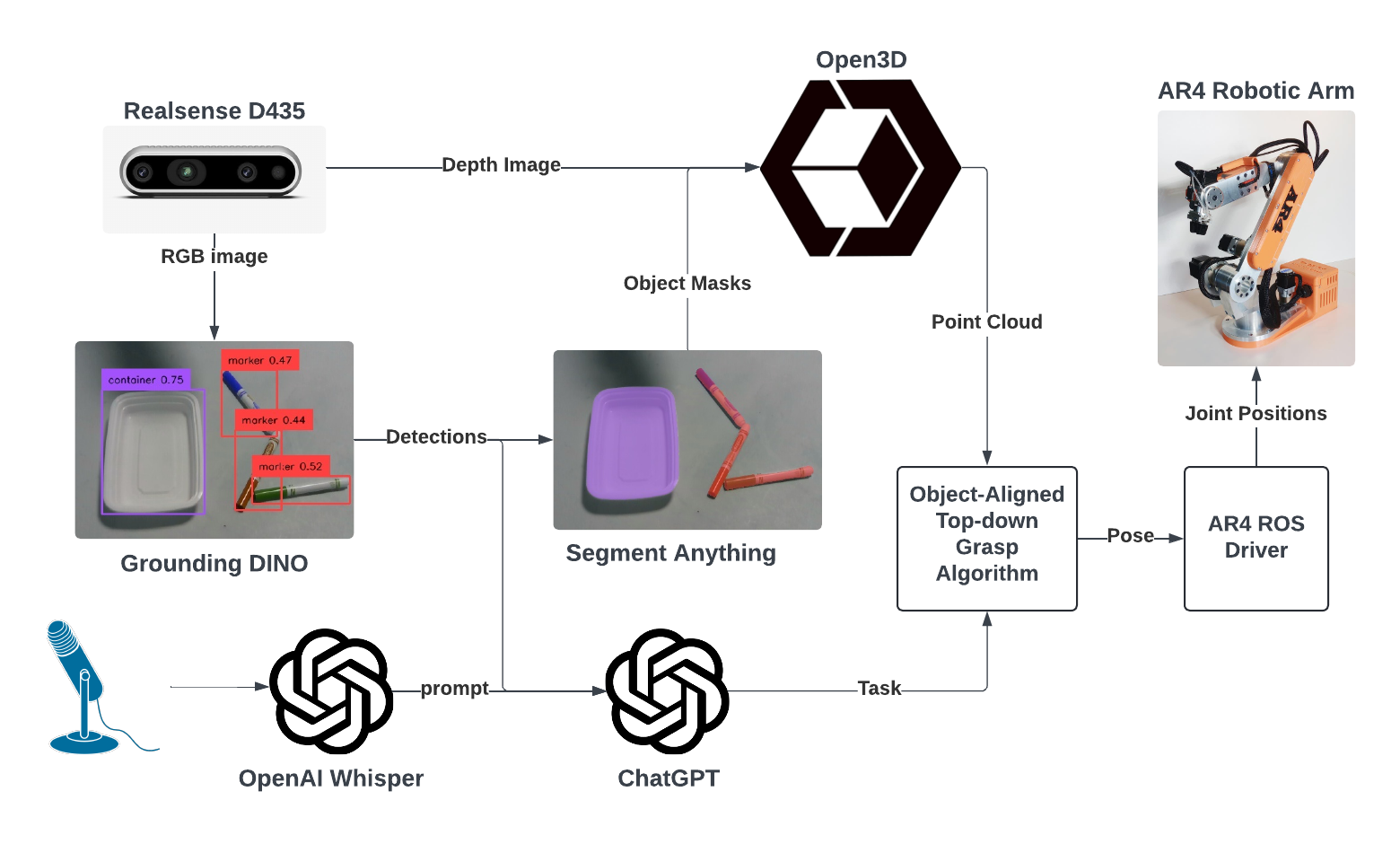
Technology Used
-
AR4 Robot: a $2000 robot arm that can lift 5lb dumbbells
- ar4_ros_driver: ROS driver for the arm
-
Realsense D435: a reliable $300 RGBD camera
- realsense-ros: ROS wrapper for the camera
- Whisper Mic: Convenient library for using OpenAI Whisper with a microphone
- Grounding DINO A SOTA zero-shot object detector that can detect any object.
- Segment Anything: A SOTA zero-shot object segmentation model that can segment any object.
- OpenAI Assistants: an API that calls ChatGPT with specific instructions and function calls
Setup
Pre-requisites
You should have ROS 2 Iron installed on Ubuntu 22.04.
The follow hardware is is used. The use of other hardware will require adapting the codebase.
You should be able to run ar4_ros_driver with the gripper, and successfully perform hand-eye calibration.
Install
Import dependent repos
vcs import . --input tabletop-handybot.repos
Create a virtual environment, i.e.
pyenv virtualenv 3.10.12 handybot
Go to the ./Grounded-Segment-Anything/Grounded-Segment-Anything/ sub-directory
and setup Grounded-Segment-Anything
in the virtualenv. Ensure you can run the grounded_sam.ipynb
notebook.
Install Python dependencies not in the ROS Index
pip install -r requirements.txt
Build and source the project
colcon build
source install/setup.bash
Run
Launch the AR4
ros2 launch ar_hardware_interface ar_hardware.launch.py calibrate:=True include_gripper:=True
Launch all other programs
ros2 launch tabletop_handybot run.launch.py
If all things are looking good, then you can try publishing a prompt to the
/prompt topic for the robot to execute, i.e:
ros2 topic pub --once /prompt std_msgs/msg/String "data: 'put the marker in the container'"
If you have a microphone attached to the computer, you can publish a message
to the /listen topic, and then say your prompt.
File truncated at 100 lines see the full file
CONTRIBUTING
Repository Summary
| Description | |
| Checkout URI | https://github.com/ycheng517/tabletop-handybot.git |
| VCS Type | git |
| VCS Version | main |
| Last Updated | 2024-05-31 |
| Dev Status | UNKNOWN |
| Released | UNRELEASED |
| Contributing |
Help Wanted (-)
Good First Issues (-) Pull Requests to Review (-) |
Packages
| Name | Version |
|---|---|
| tabletop_handybot | 0.1.0 |
README
Tabletop HandyBot
A low-cost AI powered robotic arm assistant that listens to your voice commands and can carry out a variety of tabletop tasks. Currently it can pick and place arbitrary objects presented in front of it. The total BOM is around $2300 USD.
Video Demo
System Architecture
Technology Used
-
AR4 Robot: a $2000 robot arm that can lift 5lb dumbbells
- ar4_ros_driver: ROS driver for the arm
-
Realsense D435: a reliable $300 RGBD camera
- realsense-ros: ROS wrapper for the camera
- Whisper Mic: Convenient library for using OpenAI Whisper with a microphone
- Grounding DINO A SOTA zero-shot object detector that can detect any object.
- Segment Anything: A SOTA zero-shot object segmentation model that can segment any object.
- OpenAI Assistants: an API that calls ChatGPT with specific instructions and function calls
Setup
Pre-requisites
You should have ROS 2 Iron installed on Ubuntu 22.04.
The follow hardware is is used. The use of other hardware will require adapting the codebase.
You should be able to run ar4_ros_driver with the gripper, and successfully perform hand-eye calibration.
Install
Import dependent repos
vcs import . --input tabletop-handybot.repos
Create a virtual environment, i.e.
pyenv virtualenv 3.10.12 handybot
Go to the ./Grounded-Segment-Anything/Grounded-Segment-Anything/ sub-directory
and setup Grounded-Segment-Anything
in the virtualenv. Ensure you can run the grounded_sam.ipynb
notebook.
Install Python dependencies not in the ROS Index
pip install -r requirements.txt
Build and source the project
colcon build
source install/setup.bash
Run
Launch the AR4
ros2 launch ar_hardware_interface ar_hardware.launch.py calibrate:=True include_gripper:=True
Launch all other programs
ros2 launch tabletop_handybot run.launch.py
If all things are looking good, then you can try publishing a prompt to the
/prompt topic for the robot to execute, i.e:
ros2 topic pub --once /prompt std_msgs/msg/String "data: 'put the marker in the container'"
If you have a microphone attached to the computer, you can publish a message
to the /listen topic, and then say your prompt.
File truncated at 100 lines see the full file
CONTRIBUTING
Repository Summary
| Description | |
| Checkout URI | https://github.com/ycheng517/tabletop-handybot.git |
| VCS Type | git |
| VCS Version | main |
| Last Updated | 2024-05-31 |
| Dev Status | UNKNOWN |
| Released | UNRELEASED |
| Contributing |
Help Wanted (-)
Good First Issues (-) Pull Requests to Review (-) |
Packages
| Name | Version |
|---|---|
| tabletop_handybot | 0.1.0 |
README
Tabletop HandyBot
A low-cost AI powered robotic arm assistant that listens to your voice commands and can carry out a variety of tabletop tasks. Currently it can pick and place arbitrary objects presented in front of it. The total BOM is around $2300 USD.
Video Demo
System Architecture
Technology Used
-
AR4 Robot: a $2000 robot arm that can lift 5lb dumbbells
- ar4_ros_driver: ROS driver for the arm
-
Realsense D435: a reliable $300 RGBD camera
- realsense-ros: ROS wrapper for the camera
- Whisper Mic: Convenient library for using OpenAI Whisper with a microphone
- Grounding DINO A SOTA zero-shot object detector that can detect any object.
- Segment Anything: A SOTA zero-shot object segmentation model that can segment any object.
- OpenAI Assistants: an API that calls ChatGPT with specific instructions and function calls
Setup
Pre-requisites
You should have ROS 2 Iron installed on Ubuntu 22.04.
The follow hardware is is used. The use of other hardware will require adapting the codebase.
You should be able to run ar4_ros_driver with the gripper, and successfully perform hand-eye calibration.
Install
Import dependent repos
vcs import . --input tabletop-handybot.repos
Create a virtual environment, i.e.
pyenv virtualenv 3.10.12 handybot
Go to the ./Grounded-Segment-Anything/Grounded-Segment-Anything/ sub-directory
and setup Grounded-Segment-Anything
in the virtualenv. Ensure you can run the grounded_sam.ipynb
notebook.
Install Python dependencies not in the ROS Index
pip install -r requirements.txt
Build and source the project
colcon build
source install/setup.bash
Run
Launch the AR4
ros2 launch ar_hardware_interface ar_hardware.launch.py calibrate:=True include_gripper:=True
Launch all other programs
ros2 launch tabletop_handybot run.launch.py
If all things are looking good, then you can try publishing a prompt to the
/prompt topic for the robot to execute, i.e:
ros2 topic pub --once /prompt std_msgs/msg/String "data: 'put the marker in the container'"
If you have a microphone attached to the computer, you can publish a message
to the /listen topic, and then say your prompt.
File truncated at 100 lines see the full file
CONTRIBUTING
Repository Summary
| Description | |
| Checkout URI | https://github.com/ycheng517/tabletop-handybot.git |
| VCS Type | git |
| VCS Version | main |
| Last Updated | 2024-05-31 |
| Dev Status | UNKNOWN |
| Released | UNRELEASED |
| Contributing |
Help Wanted (-)
Good First Issues (-) Pull Requests to Review (-) |
Packages
| Name | Version |
|---|---|
| tabletop_handybot | 0.1.0 |
README
Tabletop HandyBot
A low-cost AI powered robotic arm assistant that listens to your voice commands and can carry out a variety of tabletop tasks. Currently it can pick and place arbitrary objects presented in front of it. The total BOM is around $2300 USD.
Video Demo
System Architecture
Technology Used
-
AR4 Robot: a $2000 robot arm that can lift 5lb dumbbells
- ar4_ros_driver: ROS driver for the arm
-
Realsense D435: a reliable $300 RGBD camera
- realsense-ros: ROS wrapper for the camera
- Whisper Mic: Convenient library for using OpenAI Whisper with a microphone
- Grounding DINO A SOTA zero-shot object detector that can detect any object.
- Segment Anything: A SOTA zero-shot object segmentation model that can segment any object.
- OpenAI Assistants: an API that calls ChatGPT with specific instructions and function calls
Setup
Pre-requisites
You should have ROS 2 Iron installed on Ubuntu 22.04.
The follow hardware is is used. The use of other hardware will require adapting the codebase.
You should be able to run ar4_ros_driver with the gripper, and successfully perform hand-eye calibration.
Install
Import dependent repos
vcs import . --input tabletop-handybot.repos
Create a virtual environment, i.e.
pyenv virtualenv 3.10.12 handybot
Go to the ./Grounded-Segment-Anything/Grounded-Segment-Anything/ sub-directory
and setup Grounded-Segment-Anything
in the virtualenv. Ensure you can run the grounded_sam.ipynb
notebook.
Install Python dependencies not in the ROS Index
pip install -r requirements.txt
Build and source the project
colcon build
source install/setup.bash
Run
Launch the AR4
ros2 launch ar_hardware_interface ar_hardware.launch.py calibrate:=True include_gripper:=True
Launch all other programs
ros2 launch tabletop_handybot run.launch.py
If all things are looking good, then you can try publishing a prompt to the
/prompt topic for the robot to execute, i.e:
ros2 topic pub --once /prompt std_msgs/msg/String "data: 'put the marker in the container'"
If you have a microphone attached to the computer, you can publish a message
to the /listen topic, and then say your prompt.
File truncated at 100 lines see the full file
CONTRIBUTING
Repository Summary
| Description | |
| Checkout URI | https://github.com/ycheng517/tabletop-handybot.git |
| VCS Type | git |
| VCS Version | main |
| Last Updated | 2024-05-31 |
| Dev Status | UNKNOWN |
| Released | UNRELEASED |
| Contributing |
Help Wanted (-)
Good First Issues (-) Pull Requests to Review (-) |
Packages
| Name | Version |
|---|---|
| tabletop_handybot | 0.1.0 |
README
Tabletop HandyBot
A low-cost AI powered robotic arm assistant that listens to your voice commands and can carry out a variety of tabletop tasks. Currently it can pick and place arbitrary objects presented in front of it. The total BOM is around $2300 USD.
Video Demo
System Architecture
Technology Used
-
AR4 Robot: a $2000 robot arm that can lift 5lb dumbbells
- ar4_ros_driver: ROS driver for the arm
-
Realsense D435: a reliable $300 RGBD camera
- realsense-ros: ROS wrapper for the camera
- Whisper Mic: Convenient library for using OpenAI Whisper with a microphone
- Grounding DINO A SOTA zero-shot object detector that can detect any object.
- Segment Anything: A SOTA zero-shot object segmentation model that can segment any object.
- OpenAI Assistants: an API that calls ChatGPT with specific instructions and function calls
Setup
Pre-requisites
You should have ROS 2 Iron installed on Ubuntu 22.04.
The follow hardware is is used. The use of other hardware will require adapting the codebase.
You should be able to run ar4_ros_driver with the gripper, and successfully perform hand-eye calibration.
Install
Import dependent repos
vcs import . --input tabletop-handybot.repos
Create a virtual environment, i.e.
pyenv virtualenv 3.10.12 handybot
Go to the ./Grounded-Segment-Anything/Grounded-Segment-Anything/ sub-directory
and setup Grounded-Segment-Anything
in the virtualenv. Ensure you can run the grounded_sam.ipynb
notebook.
Install Python dependencies not in the ROS Index
pip install -r requirements.txt
Build and source the project
colcon build
source install/setup.bash
Run
Launch the AR4
ros2 launch ar_hardware_interface ar_hardware.launch.py calibrate:=True include_gripper:=True
Launch all other programs
ros2 launch tabletop_handybot run.launch.py
If all things are looking good, then you can try publishing a prompt to the
/prompt topic for the robot to execute, i.e:
ros2 topic pub --once /prompt std_msgs/msg/String "data: 'put the marker in the container'"
If you have a microphone attached to the computer, you can publish a message
to the /listen topic, and then say your prompt.
File truncated at 100 lines see the full file
CONTRIBUTING
Repository Summary
| Description | |
| Checkout URI | https://github.com/ycheng517/tabletop-handybot.git |
| VCS Type | git |
| VCS Version | main |
| Last Updated | 2024-05-31 |
| Dev Status | UNKNOWN |
| Released | UNRELEASED |
| Contributing |
Help Wanted (-)
Good First Issues (-) Pull Requests to Review (-) |
Packages
| Name | Version |
|---|---|
| tabletop_handybot | 0.1.0 |
README
Tabletop HandyBot
A low-cost AI powered robotic arm assistant that listens to your voice commands and can carry out a variety of tabletop tasks. Currently it can pick and place arbitrary objects presented in front of it. The total BOM is around $2300 USD.
Video Demo
System Architecture
Technology Used
-
AR4 Robot: a $2000 robot arm that can lift 5lb dumbbells
- ar4_ros_driver: ROS driver for the arm
-
Realsense D435: a reliable $300 RGBD camera
- realsense-ros: ROS wrapper for the camera
- Whisper Mic: Convenient library for using OpenAI Whisper with a microphone
- Grounding DINO A SOTA zero-shot object detector that can detect any object.
- Segment Anything: A SOTA zero-shot object segmentation model that can segment any object.
- OpenAI Assistants: an API that calls ChatGPT with specific instructions and function calls
Setup
Pre-requisites
You should have ROS 2 Iron installed on Ubuntu 22.04.
The follow hardware is is used. The use of other hardware will require adapting the codebase.
You should be able to run ar4_ros_driver with the gripper, and successfully perform hand-eye calibration.
Install
Import dependent repos
vcs import . --input tabletop-handybot.repos
Create a virtual environment, i.e.
pyenv virtualenv 3.10.12 handybot
Go to the ./Grounded-Segment-Anything/Grounded-Segment-Anything/ sub-directory
and setup Grounded-Segment-Anything
in the virtualenv. Ensure you can run the grounded_sam.ipynb
notebook.
Install Python dependencies not in the ROS Index
pip install -r requirements.txt
Build and source the project
colcon build
source install/setup.bash
Run
Launch the AR4
ros2 launch ar_hardware_interface ar_hardware.launch.py calibrate:=True include_gripper:=True
Launch all other programs
ros2 launch tabletop_handybot run.launch.py
If all things are looking good, then you can try publishing a prompt to the
/prompt topic for the robot to execute, i.e:
ros2 topic pub --once /prompt std_msgs/msg/String "data: 'put the marker in the container'"
If you have a microphone attached to the computer, you can publish a message
to the /listen topic, and then say your prompt.
File truncated at 100 lines see the full file
CONTRIBUTING
Repository Summary
| Description | |
| Checkout URI | https://github.com/ycheng517/tabletop-handybot.git |
| VCS Type | git |
| VCS Version | main |
| Last Updated | 2024-05-31 |
| Dev Status | UNKNOWN |
| Released | UNRELEASED |
| Contributing |
Help Wanted (-)
Good First Issues (-) Pull Requests to Review (-) |
Packages
| Name | Version |
|---|---|
| tabletop_handybot | 0.1.0 |
README
Tabletop HandyBot
A low-cost AI powered robotic arm assistant that listens to your voice commands and can carry out a variety of tabletop tasks. Currently it can pick and place arbitrary objects presented in front of it. The total BOM is around $2300 USD.
Video Demo
System Architecture
Technology Used
-
AR4 Robot: a $2000 robot arm that can lift 5lb dumbbells
- ar4_ros_driver: ROS driver for the arm
-
Realsense D435: a reliable $300 RGBD camera
- realsense-ros: ROS wrapper for the camera
- Whisper Mic: Convenient library for using OpenAI Whisper with a microphone
- Grounding DINO A SOTA zero-shot object detector that can detect any object.
- Segment Anything: A SOTA zero-shot object segmentation model that can segment any object.
- OpenAI Assistants: an API that calls ChatGPT with specific instructions and function calls
Setup
Pre-requisites
You should have ROS 2 Iron installed on Ubuntu 22.04.
The follow hardware is is used. The use of other hardware will require adapting the codebase.
You should be able to run ar4_ros_driver with the gripper, and successfully perform hand-eye calibration.
Install
Import dependent repos
vcs import . --input tabletop-handybot.repos
Create a virtual environment, i.e.
pyenv virtualenv 3.10.12 handybot
Go to the ./Grounded-Segment-Anything/Grounded-Segment-Anything/ sub-directory
and setup Grounded-Segment-Anything
in the virtualenv. Ensure you can run the grounded_sam.ipynb
notebook.
Install Python dependencies not in the ROS Index
pip install -r requirements.txt
Build and source the project
colcon build
source install/setup.bash
Run
Launch the AR4
ros2 launch ar_hardware_interface ar_hardware.launch.py calibrate:=True include_gripper:=True
Launch all other programs
ros2 launch tabletop_handybot run.launch.py
If all things are looking good, then you can try publishing a prompt to the
/prompt topic for the robot to execute, i.e:
ros2 topic pub --once /prompt std_msgs/msg/String "data: 'put the marker in the container'"
If you have a microphone attached to the computer, you can publish a message
to the /listen topic, and then say your prompt.
File truncated at 100 lines see the full file
CONTRIBUTING
Repository Summary
| Description | |
| Checkout URI | https://github.com/ycheng517/tabletop-handybot.git |
| VCS Type | git |
| VCS Version | main |
| Last Updated | 2024-05-31 |
| Dev Status | UNKNOWN |
| Released | UNRELEASED |
| Contributing |
Help Wanted (-)
Good First Issues (-) Pull Requests to Review (-) |
Packages
| Name | Version |
|---|---|
| tabletop_handybot | 0.1.0 |
README
Tabletop HandyBot
A low-cost AI powered robotic arm assistant that listens to your voice commands and can carry out a variety of tabletop tasks. Currently it can pick and place arbitrary objects presented in front of it. The total BOM is around $2300 USD.
Video Demo
System Architecture
Technology Used
-
AR4 Robot: a $2000 robot arm that can lift 5lb dumbbells
- ar4_ros_driver: ROS driver for the arm
-
Realsense D435: a reliable $300 RGBD camera
- realsense-ros: ROS wrapper for the camera
- Whisper Mic: Convenient library for using OpenAI Whisper with a microphone
- Grounding DINO A SOTA zero-shot object detector that can detect any object.
- Segment Anything: A SOTA zero-shot object segmentation model that can segment any object.
- OpenAI Assistants: an API that calls ChatGPT with specific instructions and function calls
Setup
Pre-requisites
You should have ROS 2 Iron installed on Ubuntu 22.04.
The follow hardware is is used. The use of other hardware will require adapting the codebase.
You should be able to run ar4_ros_driver with the gripper, and successfully perform hand-eye calibration.
Install
Import dependent repos
vcs import . --input tabletop-handybot.repos
Create a virtual environment, i.e.
pyenv virtualenv 3.10.12 handybot
Go to the ./Grounded-Segment-Anything/Grounded-Segment-Anything/ sub-directory
and setup Grounded-Segment-Anything
in the virtualenv. Ensure you can run the grounded_sam.ipynb
notebook.
Install Python dependencies not in the ROS Index
pip install -r requirements.txt
Build and source the project
colcon build
source install/setup.bash
Run
Launch the AR4
ros2 launch ar_hardware_interface ar_hardware.launch.py calibrate:=True include_gripper:=True
Launch all other programs
ros2 launch tabletop_handybot run.launch.py
If all things are looking good, then you can try publishing a prompt to the
/prompt topic for the robot to execute, i.e:
ros2 topic pub --once /prompt std_msgs/msg/String "data: 'put the marker in the container'"
If you have a microphone attached to the computer, you can publish a message
to the /listen topic, and then say your prompt.
File truncated at 100 lines see the full file
CONTRIBUTING
Repository Summary
| Description | |
| Checkout URI | https://github.com/ycheng517/tabletop-handybot.git |
| VCS Type | git |
| VCS Version | main |
| Last Updated | 2024-05-31 |
| Dev Status | UNKNOWN |
| Released | UNRELEASED |
| Contributing |
Help Wanted (-)
Good First Issues (-) Pull Requests to Review (-) |
Packages
| Name | Version |
|---|---|
| tabletop_handybot | 0.1.0 |
README
Tabletop HandyBot
A low-cost AI powered robotic arm assistant that listens to your voice commands and can carry out a variety of tabletop tasks. Currently it can pick and place arbitrary objects presented in front of it. The total BOM is around $2300 USD.
Video Demo
System Architecture
Technology Used
-
AR4 Robot: a $2000 robot arm that can lift 5lb dumbbells
- ar4_ros_driver: ROS driver for the arm
-
Realsense D435: a reliable $300 RGBD camera
- realsense-ros: ROS wrapper for the camera
- Whisper Mic: Convenient library for using OpenAI Whisper with a microphone
- Grounding DINO A SOTA zero-shot object detector that can detect any object.
- Segment Anything: A SOTA zero-shot object segmentation model that can segment any object.
- OpenAI Assistants: an API that calls ChatGPT with specific instructions and function calls
Setup
Pre-requisites
You should have ROS 2 Iron installed on Ubuntu 22.04.
The follow hardware is is used. The use of other hardware will require adapting the codebase.
You should be able to run ar4_ros_driver with the gripper, and successfully perform hand-eye calibration.
Install
Import dependent repos
vcs import . --input tabletop-handybot.repos
Create a virtual environment, i.e.
pyenv virtualenv 3.10.12 handybot
Go to the ./Grounded-Segment-Anything/Grounded-Segment-Anything/ sub-directory
and setup Grounded-Segment-Anything
in the virtualenv. Ensure you can run the grounded_sam.ipynb
notebook.
Install Python dependencies not in the ROS Index
pip install -r requirements.txt
Build and source the project
colcon build
source install/setup.bash
Run
Launch the AR4
ros2 launch ar_hardware_interface ar_hardware.launch.py calibrate:=True include_gripper:=True
Launch all other programs
ros2 launch tabletop_handybot run.launch.py
If all things are looking good, then you can try publishing a prompt to the
/prompt topic for the robot to execute, i.e:
ros2 topic pub --once /prompt std_msgs/msg/String "data: 'put the marker in the container'"
If you have a microphone attached to the computer, you can publish a message
to the /listen topic, and then say your prompt.
File truncated at 100 lines see the full file