 ROS Index
No version for distro humble showing github. Known supported distros are highlighted in the buttons above.

Repository Summary
| Description | |
| Checkout URI | https://github.com/tentone/tello-ros2.git |
| VCS Type | git |
| VCS Version | main |
| Last Updated | 2023-01-09 |
| Dev Status | UNKNOWN |
| Released | UNRELEASED |
| Contributing |
Help Wanted (-)
Good First Issues (-) Pull Requests to Review (-) |
Packages
| Name | Version |
|---|---|
| orbslam2 | 0.0.1 |
| tello | 0.0.1 |
| tello_control | 0.0.1 |
| tello_msg | 0.0.1 |
README
DJI Tello ROS2
- DJI Tello driver for ROS 2 based on DJITelloPy that uses the official SDK for the drone.
- Can be used to control multiple drones both using the swarm functionality (only for Tello EDU) or using multiple WLAN with regular Tello drones.
- This project was developed as a way of learning ROS 2 and evaluate the viability of moving other in progress projects from ROS 1 to ROS 2.
- Ii is recommended to update the Tello firmware to the latest version available
- Project workspace is divided into sub-workspaces that contain different logic.
-
tellopackage is the main package, includes access to the drone information, camera image and control. -
tello_msgpackage defines custom messages to access specific Tello data.- Defines the
TelloStatus,TelloIDandTelloWifiConfigmessages
- Defines the
-
tello_controlpackage is a sample control package that displays the drone image and provides keyboard control.- T used for takeoff, L to land the drone, F to flip forward, E for emergency stop, WASD and arrows to control the drone movement.
-
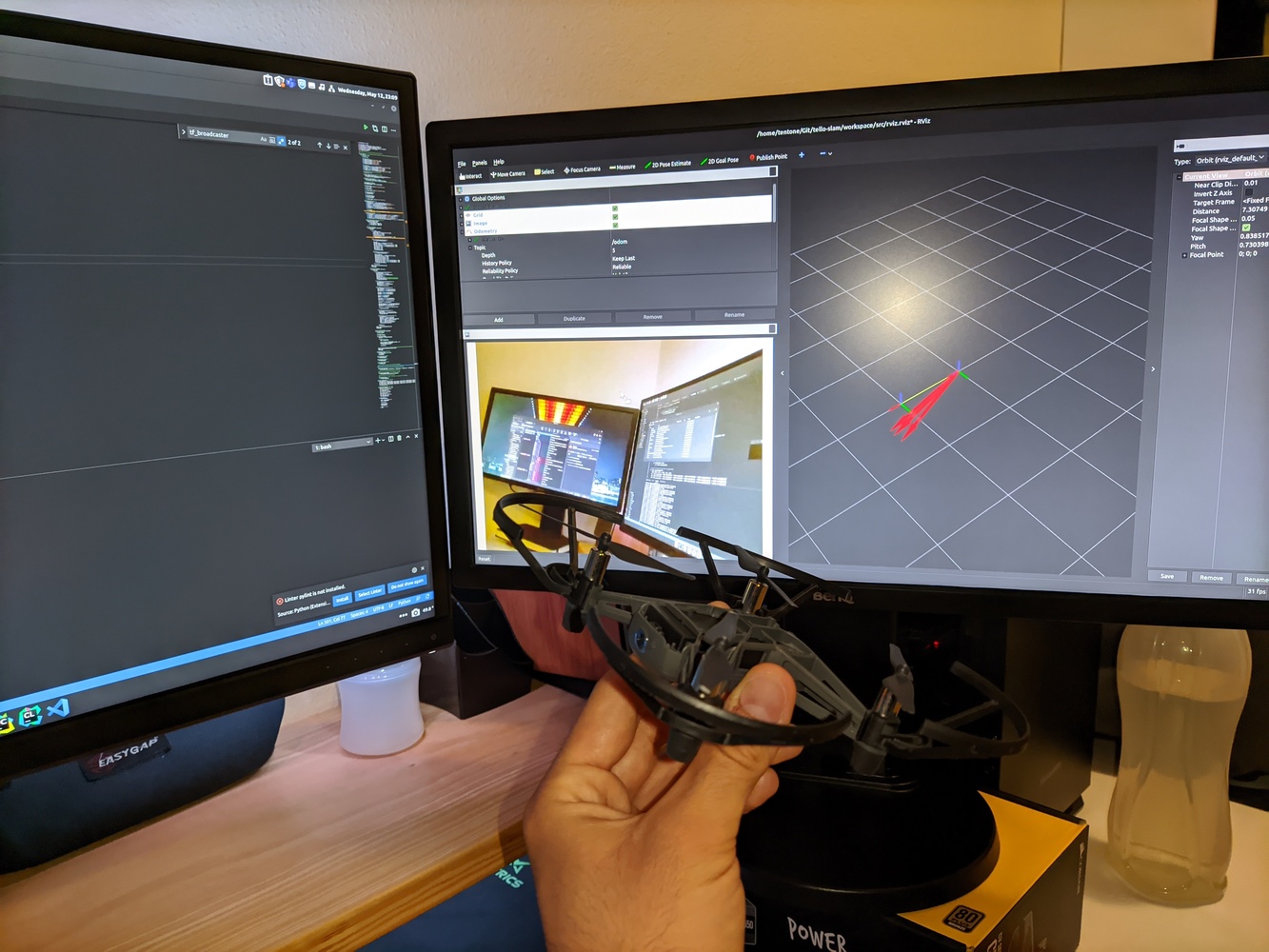
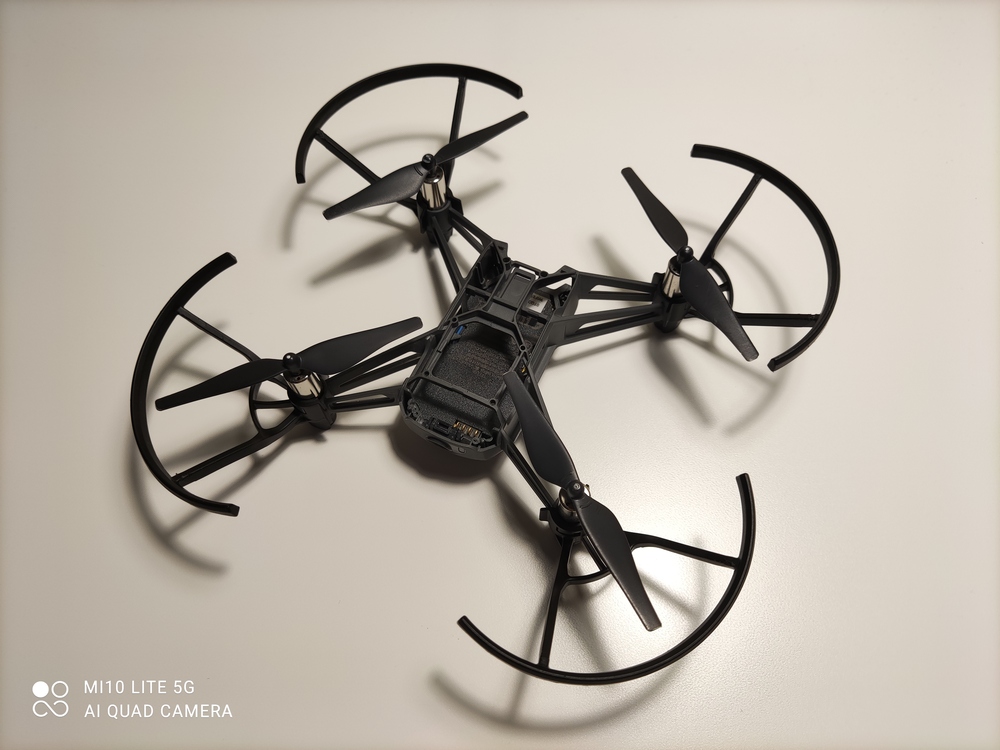
- Bellow is the list of topics published and consumed by the
tellopackage - The list of published topics alongside their description and frequency. These topics are only published when some node subscribed to them, otherwise they are not processed.
| Topic | Type | Description | Frequency |
|---|---|---|---|
| /image_raw | sensor_msgs/Image | Image of the Tello camera | 30hz |
| /camera_info | sensor_msgs/CameraInfo | Camera information (size, calibration, etc) | 2hz |
| /status | tello_msg/TelloStatus | Status of the drone (wifi strength, batery, temperature, etc) | 2hz |
| /id | tello_msg/TelloID | Identification of the drone w/ serial number and firmware | 2hz |
| /imu | sensor_msgs/Imu | Imu data capture from the drone | 10hz |
| /battery | sensor_msgs/BatteryState | Battery status | 2hz |
| /temperature | sensor_msgs/Temperature | Temperature of the drone | 2hz |
| /odom | nav_msgs/Odometry | Odometry (only orientation and speed) | 10hz |
| /tf | geometry_msgs/TransformStamped | Transform from base to drone tf, prefer a external publisher. | 10hz |
- The list of topics subscribed by the node, these topics can be renamed in the launch file.
| Topic | Type | Description |
|---|---|---|
| \emergency | std_msgs/Empty | When received the drone instantly shuts its motors off (even when flying), used for safety purposes |
| \takeoff | std_msgs/Empty | Drone takeoff message, make sure that the drone has space to takeoff safely before usage. |
| \land | std_msgs/Empty | Land the drone. |
| \control | geometry_msgs/Twist | Control the drone analogically. Linear values should range from -100 to 100, speed can be set in x, y, z for movement in 3D space. Angular rotation is performed in the z coordinate. Coordinates are relative to the drone position (x always relative to the direction of the drone) |
| \flip | std_msgs/String | Do a flip with the drone in a direction specified. Possible directions can be “r” for right, “l” for left, “f” for forward or “b” for backward. |
| \wifi_config | tello_msg/TelloWifiConfig | Configure the wifi credential that should be used by the drone. The drone will be restarted after the credentials are changed. |
- The list of parameters used to configure the node. These should be defined on a launch file.
| Name | Type | Description | Default |
|---|---|---|---|
| connect_timeout | float | Time (seconds) until the node is killed if connection to the drone is not available. | 10.0 |
| tello_ip | string | IP of the tello drone. When using multiple drones multiple nodes with different IP can be launched. | ‘192.168.10.1’ |
| tf_base | string | Base tf to be used when publishing data | ‘map’ |
| tf_drone | string | Name of the drone tf to use when publishing data | ‘drone’ |
| tf_pub | boolean | If true a static TF from tf_base to tf_drone is published | False |
| camera_info_file | string | Path to a YAML camera calibration file (obtained with the calibration tool) | ’’ |
Camera Calibration
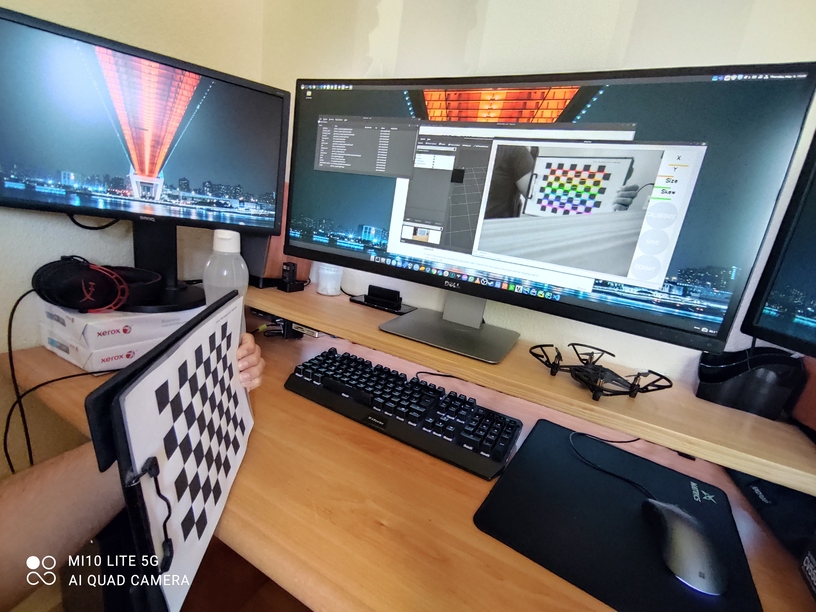
- To allow the drone to be used for 3D vision tasks, as for example monocular SLAM the camera should be first calibrated.
- A sample calibration file is provided with parameters captures from the drone used for testing but it is recommended to perform individual calibrations for each drone used.
- Calibration can be achieved using the camera_calibration package. Calibration pattern can be generated using the calib.io pattern generator tool.
ros2 run camera_calibration cameracalibrator --size 7x9 --square 0.16 image:=/image_raw camera:=/camera_info
- Take as many frame as possible and measure your check board grid size to ensure good accuracy in the process. When the process ends a
calibrationdata.tar.gzwill be created in the/tmppath.
Launch File
- Launch files in ROS2 are now defined using python code. To launch the main node of the project add the following code to your
launch.pyfile.
Node(
    package='tello',
    executable='tello',
    namespace='/',
    name='tello',
    parameters=[
        {'tello_ip': '192.168.10.1'}
    ],
    remappings=[
        ('/image_raw', 'camera')
    ],
    respawn=True
)
Overheating Problems
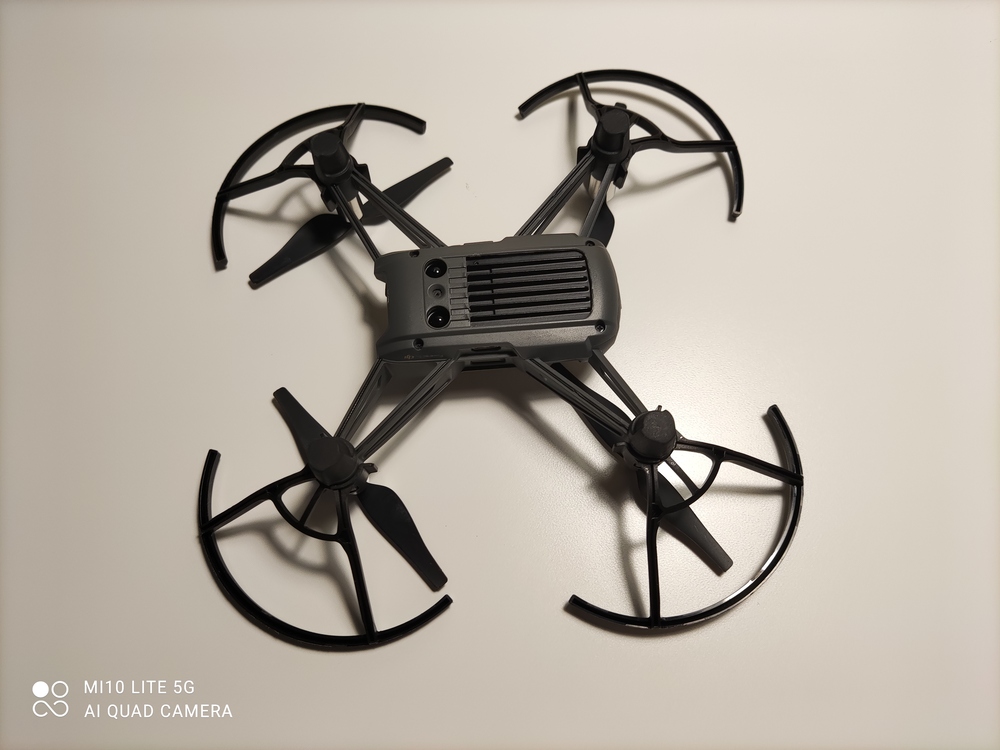
- The motor drivers in the DJI Tello overheat after a while when the drone is not flying. To cool down the drivers i have removed the plastic section on top of the heat spreader (as seen in the picture).
- If you are comfortable with leaving the PCB exposed removing the plastic cover should result in even better thermals.
- If possible place the drone on top of an old computer fan or use a laptop cooler to prevent the drone from shutting down due to overheating.
Install
File truncated at 100 lines see the full file
CONTRIBUTING
No version for distro jazzy showing github. Known supported distros are highlighted in the buttons above.
Repository Summary
| Description | |
| Checkout URI | https://github.com/tentone/tello-ros2.git |
| VCS Type | git |
| VCS Version | main |
| Last Updated | 2023-01-09 |
| Dev Status | UNKNOWN |
| Released | UNRELEASED |
| Contributing |
Help Wanted (-)
Good First Issues (-) Pull Requests to Review (-) |
Packages
| Name | Version |
|---|---|
| orbslam2 | 0.0.1 |
| tello | 0.0.1 |
| tello_control | 0.0.1 |
| tello_msg | 0.0.1 |
README
DJI Tello ROS2
- DJI Tello driver for ROS 2 based on DJITelloPy that uses the official SDK for the drone.
- Can be used to control multiple drones both using the swarm functionality (only for Tello EDU) or using multiple WLAN with regular Tello drones.
- This project was developed as a way of learning ROS 2 and evaluate the viability of moving other in progress projects from ROS 1 to ROS 2.
- Ii is recommended to update the Tello firmware to the latest version available
- Project workspace is divided into sub-workspaces that contain different logic.
-
tellopackage is the main package, includes access to the drone information, camera image and control. -
tello_msgpackage defines custom messages to access specific Tello data.- Defines the
TelloStatus,TelloIDandTelloWifiConfigmessages
- Defines the
-
tello_controlpackage is a sample control package that displays the drone image and provides keyboard control.- T used for takeoff, L to land the drone, F to flip forward, E for emergency stop, WASD and arrows to control the drone movement.
-
- Bellow is the list of topics published and consumed by the
tellopackage - The list of published topics alongside their description and frequency. These topics are only published when some node subscribed to them, otherwise they are not processed.
| Topic | Type | Description | Frequency |
|---|---|---|---|
| /image_raw | sensor_msgs/Image | Image of the Tello camera | 30hz |
| /camera_info | sensor_msgs/CameraInfo | Camera information (size, calibration, etc) | 2hz |
| /status | tello_msg/TelloStatus | Status of the drone (wifi strength, batery, temperature, etc) | 2hz |
| /id | tello_msg/TelloID | Identification of the drone w/ serial number and firmware | 2hz |
| /imu | sensor_msgs/Imu | Imu data capture from the drone | 10hz |
| /battery | sensor_msgs/BatteryState | Battery status | 2hz |
| /temperature | sensor_msgs/Temperature | Temperature of the drone | 2hz |
| /odom | nav_msgs/Odometry | Odometry (only orientation and speed) | 10hz |
| /tf | geometry_msgs/TransformStamped | Transform from base to drone tf, prefer a external publisher. | 10hz |
- The list of topics subscribed by the node, these topics can be renamed in the launch file.
| Topic | Type | Description |
|---|---|---|
| \emergency | std_msgs/Empty | When received the drone instantly shuts its motors off (even when flying), used for safety purposes |
| \takeoff | std_msgs/Empty | Drone takeoff message, make sure that the drone has space to takeoff safely before usage. |
| \land | std_msgs/Empty | Land the drone. |
| \control | geometry_msgs/Twist | Control the drone analogically. Linear values should range from -100 to 100, speed can be set in x, y, z for movement in 3D space. Angular rotation is performed in the z coordinate. Coordinates are relative to the drone position (x always relative to the direction of the drone) |
| \flip | std_msgs/String | Do a flip with the drone in a direction specified. Possible directions can be “r” for right, “l” for left, “f” for forward or “b” for backward. |
| \wifi_config | tello_msg/TelloWifiConfig | Configure the wifi credential that should be used by the drone. The drone will be restarted after the credentials are changed. |
- The list of parameters used to configure the node. These should be defined on a launch file.
| Name | Type | Description | Default |
|---|---|---|---|
| connect_timeout | float | Time (seconds) until the node is killed if connection to the drone is not available. | 10.0 |
| tello_ip | string | IP of the tello drone. When using multiple drones multiple nodes with different IP can be launched. | ‘192.168.10.1’ |
| tf_base | string | Base tf to be used when publishing data | ‘map’ |
| tf_drone | string | Name of the drone tf to use when publishing data | ‘drone’ |
| tf_pub | boolean | If true a static TF from tf_base to tf_drone is published | False |
| camera_info_file | string | Path to a YAML camera calibration file (obtained with the calibration tool) | ’’ |
Camera Calibration
- To allow the drone to be used for 3D vision tasks, as for example monocular SLAM the camera should be first calibrated.
- A sample calibration file is provided with parameters captures from the drone used for testing but it is recommended to perform individual calibrations for each drone used.
- Calibration can be achieved using the camera_calibration package. Calibration pattern can be generated using the calib.io pattern generator tool.
ros2 run camera_calibration cameracalibrator --size 7x9 --square 0.16 image:=/image_raw camera:=/camera_info
- Take as many frame as possible and measure your check board grid size to ensure good accuracy in the process. When the process ends a
calibrationdata.tar.gzwill be created in the/tmppath.
Launch File
- Launch files in ROS2 are now defined using python code. To launch the main node of the project add the following code to your
launch.pyfile.
Node(
    package='tello',
    executable='tello',
    namespace='/',
    name='tello',
    parameters=[
        {'tello_ip': '192.168.10.1'}
    ],
    remappings=[
        ('/image_raw', 'camera')
    ],
    respawn=True
)
Overheating Problems
- The motor drivers in the DJI Tello overheat after a while when the drone is not flying. To cool down the drivers i have removed the plastic section on top of the heat spreader (as seen in the picture).
- If you are comfortable with leaving the PCB exposed removing the plastic cover should result in even better thermals.
- If possible place the drone on top of an old computer fan or use a laptop cooler to prevent the drone from shutting down due to overheating.
Install
File truncated at 100 lines see the full file
CONTRIBUTING
No version for distro kilted showing github. Known supported distros are highlighted in the buttons above.
Repository Summary
| Description | |
| Checkout URI | https://github.com/tentone/tello-ros2.git |
| VCS Type | git |
| VCS Version | main |
| Last Updated | 2023-01-09 |
| Dev Status | UNKNOWN |
| Released | UNRELEASED |
| Contributing |
Help Wanted (-)
Good First Issues (-) Pull Requests to Review (-) |
Packages
| Name | Version |
|---|---|
| orbslam2 | 0.0.1 |
| tello | 0.0.1 |
| tello_control | 0.0.1 |
| tello_msg | 0.0.1 |
README
DJI Tello ROS2
- DJI Tello driver for ROS 2 based on DJITelloPy that uses the official SDK for the drone.
- Can be used to control multiple drones both using the swarm functionality (only for Tello EDU) or using multiple WLAN with regular Tello drones.
- This project was developed as a way of learning ROS 2 and evaluate the viability of moving other in progress projects from ROS 1 to ROS 2.
- Ii is recommended to update the Tello firmware to the latest version available
- Project workspace is divided into sub-workspaces that contain different logic.
-
tellopackage is the main package, includes access to the drone information, camera image and control. -
tello_msgpackage defines custom messages to access specific Tello data.- Defines the
TelloStatus,TelloIDandTelloWifiConfigmessages
- Defines the
-
tello_controlpackage is a sample control package that displays the drone image and provides keyboard control.- T used for takeoff, L to land the drone, F to flip forward, E for emergency stop, WASD and arrows to control the drone movement.
-
- Bellow is the list of topics published and consumed by the
tellopackage - The list of published topics alongside their description and frequency. These topics are only published when some node subscribed to them, otherwise they are not processed.
| Topic | Type | Description | Frequency |
|---|---|---|---|
| /image_raw | sensor_msgs/Image | Image of the Tello camera | 30hz |
| /camera_info | sensor_msgs/CameraInfo | Camera information (size, calibration, etc) | 2hz |
| /status | tello_msg/TelloStatus | Status of the drone (wifi strength, batery, temperature, etc) | 2hz |
| /id | tello_msg/TelloID | Identification of the drone w/ serial number and firmware | 2hz |
| /imu | sensor_msgs/Imu | Imu data capture from the drone | 10hz |
| /battery | sensor_msgs/BatteryState | Battery status | 2hz |
| /temperature | sensor_msgs/Temperature | Temperature of the drone | 2hz |
| /odom | nav_msgs/Odometry | Odometry (only orientation and speed) | 10hz |
| /tf | geometry_msgs/TransformStamped | Transform from base to drone tf, prefer a external publisher. | 10hz |
- The list of topics subscribed by the node, these topics can be renamed in the launch file.
| Topic | Type | Description |
|---|---|---|
| \emergency | std_msgs/Empty | When received the drone instantly shuts its motors off (even when flying), used for safety purposes |
| \takeoff | std_msgs/Empty | Drone takeoff message, make sure that the drone has space to takeoff safely before usage. |
| \land | std_msgs/Empty | Land the drone. |
| \control | geometry_msgs/Twist | Control the drone analogically. Linear values should range from -100 to 100, speed can be set in x, y, z for movement in 3D space. Angular rotation is performed in the z coordinate. Coordinates are relative to the drone position (x always relative to the direction of the drone) |
| \flip | std_msgs/String | Do a flip with the drone in a direction specified. Possible directions can be “r” for right, “l” for left, “f” for forward or “b” for backward. |
| \wifi_config | tello_msg/TelloWifiConfig | Configure the wifi credential that should be used by the drone. The drone will be restarted after the credentials are changed. |
- The list of parameters used to configure the node. These should be defined on a launch file.
| Name | Type | Description | Default |
|---|---|---|---|
| connect_timeout | float | Time (seconds) until the node is killed if connection to the drone is not available. | 10.0 |
| tello_ip | string | IP of the tello drone. When using multiple drones multiple nodes with different IP can be launched. | ‘192.168.10.1’ |
| tf_base | string | Base tf to be used when publishing data | ‘map’ |
| tf_drone | string | Name of the drone tf to use when publishing data | ‘drone’ |
| tf_pub | boolean | If true a static TF from tf_base to tf_drone is published | False |
| camera_info_file | string | Path to a YAML camera calibration file (obtained with the calibration tool) | ’’ |
Camera Calibration
- To allow the drone to be used for 3D vision tasks, as for example monocular SLAM the camera should be first calibrated.
- A sample calibration file is provided with parameters captures from the drone used for testing but it is recommended to perform individual calibrations for each drone used.
- Calibration can be achieved using the camera_calibration package. Calibration pattern can be generated using the calib.io pattern generator tool.
ros2 run camera_calibration cameracalibrator --size 7x9 --square 0.16 image:=/image_raw camera:=/camera_info
- Take as many frame as possible and measure your check board grid size to ensure good accuracy in the process. When the process ends a
calibrationdata.tar.gzwill be created in the/tmppath.
Launch File
- Launch files in ROS2 are now defined using python code. To launch the main node of the project add the following code to your
launch.pyfile.
Node(
    package='tello',
    executable='tello',
    namespace='/',
    name='tello',
    parameters=[
        {'tello_ip': '192.168.10.1'}
    ],
    remappings=[
        ('/image_raw', 'camera')
    ],
    respawn=True
)
Overheating Problems
- The motor drivers in the DJI Tello overheat after a while when the drone is not flying. To cool down the drivers i have removed the plastic section on top of the heat spreader (as seen in the picture).
- If you are comfortable with leaving the PCB exposed removing the plastic cover should result in even better thermals.
- If possible place the drone on top of an old computer fan or use a laptop cooler to prevent the drone from shutting down due to overheating.
Install
File truncated at 100 lines see the full file
CONTRIBUTING
No version for distro rolling showing github. Known supported distros are highlighted in the buttons above.
Repository Summary
| Description | |
| Checkout URI | https://github.com/tentone/tello-ros2.git |
| VCS Type | git |
| VCS Version | main |
| Last Updated | 2023-01-09 |
| Dev Status | UNKNOWN |
| Released | UNRELEASED |
| Contributing |
Help Wanted (-)
Good First Issues (-) Pull Requests to Review (-) |
Packages
| Name | Version |
|---|---|
| orbslam2 | 0.0.1 |
| tello | 0.0.1 |
| tello_control | 0.0.1 |
| tello_msg | 0.0.1 |
README
DJI Tello ROS2
- DJI Tello driver for ROS 2 based on DJITelloPy that uses the official SDK for the drone.
- Can be used to control multiple drones both using the swarm functionality (only for Tello EDU) or using multiple WLAN with regular Tello drones.
- This project was developed as a way of learning ROS 2 and evaluate the viability of moving other in progress projects from ROS 1 to ROS 2.
- Ii is recommended to update the Tello firmware to the latest version available
- Project workspace is divided into sub-workspaces that contain different logic.
-
tellopackage is the main package, includes access to the drone information, camera image and control. -
tello_msgpackage defines custom messages to access specific Tello data.- Defines the
TelloStatus,TelloIDandTelloWifiConfigmessages
- Defines the
-
tello_controlpackage is a sample control package that displays the drone image and provides keyboard control.- T used for takeoff, L to land the drone, F to flip forward, E for emergency stop, WASD and arrows to control the drone movement.
-
- Bellow is the list of topics published and consumed by the
tellopackage - The list of published topics alongside their description and frequency. These topics are only published when some node subscribed to them, otherwise they are not processed.
| Topic | Type | Description | Frequency |
|---|---|---|---|
| /image_raw | sensor_msgs/Image | Image of the Tello camera | 30hz |
| /camera_info | sensor_msgs/CameraInfo | Camera information (size, calibration, etc) | 2hz |
| /status | tello_msg/TelloStatus | Status of the drone (wifi strength, batery, temperature, etc) | 2hz |
| /id | tello_msg/TelloID | Identification of the drone w/ serial number and firmware | 2hz |
| /imu | sensor_msgs/Imu | Imu data capture from the drone | 10hz |
| /battery | sensor_msgs/BatteryState | Battery status | 2hz |
| /temperature | sensor_msgs/Temperature | Temperature of the drone | 2hz |
| /odom | nav_msgs/Odometry | Odometry (only orientation and speed) | 10hz |
| /tf | geometry_msgs/TransformStamped | Transform from base to drone tf, prefer a external publisher. | 10hz |
- The list of topics subscribed by the node, these topics can be renamed in the launch file.
| Topic | Type | Description |
|---|---|---|
| \emergency | std_msgs/Empty | When received the drone instantly shuts its motors off (even when flying), used for safety purposes |
| \takeoff | std_msgs/Empty | Drone takeoff message, make sure that the drone has space to takeoff safely before usage. |
| \land | std_msgs/Empty | Land the drone. |
| \control | geometry_msgs/Twist | Control the drone analogically. Linear values should range from -100 to 100, speed can be set in x, y, z for movement in 3D space. Angular rotation is performed in the z coordinate. Coordinates are relative to the drone position (x always relative to the direction of the drone) |
| \flip | std_msgs/String | Do a flip with the drone in a direction specified. Possible directions can be “r” for right, “l” for left, “f” for forward or “b” for backward. |
| \wifi_config | tello_msg/TelloWifiConfig | Configure the wifi credential that should be used by the drone. The drone will be restarted after the credentials are changed. |
- The list of parameters used to configure the node. These should be defined on a launch file.
| Name | Type | Description | Default |
|---|---|---|---|
| connect_timeout | float | Time (seconds) until the node is killed if connection to the drone is not available. | 10.0 |
| tello_ip | string | IP of the tello drone. When using multiple drones multiple nodes with different IP can be launched. | ‘192.168.10.1’ |
| tf_base | string | Base tf to be used when publishing data | ‘map’ |
| tf_drone | string | Name of the drone tf to use when publishing data | ‘drone’ |
| tf_pub | boolean | If true a static TF from tf_base to tf_drone is published | False |
| camera_info_file | string | Path to a YAML camera calibration file (obtained with the calibration tool) | ’’ |
Camera Calibration
- To allow the drone to be used for 3D vision tasks, as for example monocular SLAM the camera should be first calibrated.
- A sample calibration file is provided with parameters captures from the drone used for testing but it is recommended to perform individual calibrations for each drone used.
- Calibration can be achieved using the camera_calibration package. Calibration pattern can be generated using the calib.io pattern generator tool.
ros2 run camera_calibration cameracalibrator --size 7x9 --square 0.16 image:=/image_raw camera:=/camera_info
- Take as many frame as possible and measure your check board grid size to ensure good accuracy in the process. When the process ends a
calibrationdata.tar.gzwill be created in the/tmppath.
Launch File
- Launch files in ROS2 are now defined using python code. To launch the main node of the project add the following code to your
launch.pyfile.
Node(
    package='tello',
    executable='tello',
    namespace='/',
    name='tello',
    parameters=[
        {'tello_ip': '192.168.10.1'}
    ],
    remappings=[
        ('/image_raw', 'camera')
    ],
    respawn=True
)
Overheating Problems
- The motor drivers in the DJI Tello overheat after a while when the drone is not flying. To cool down the drivers i have removed the plastic section on top of the heat spreader (as seen in the picture).
- If you are comfortable with leaving the PCB exposed removing the plastic cover should result in even better thermals.
- If possible place the drone on top of an old computer fan or use a laptop cooler to prevent the drone from shutting down due to overheating.
Install
File truncated at 100 lines see the full file
CONTRIBUTING
Repository Summary
| Description | |
| Checkout URI | https://github.com/tentone/tello-ros2.git |
| VCS Type | git |
| VCS Version | main |
| Last Updated | 2023-01-09 |
| Dev Status | UNKNOWN |
| Released | UNRELEASED |
| Contributing |
Help Wanted (-)
Good First Issues (-) Pull Requests to Review (-) |
Packages
| Name | Version |
|---|---|
| orbslam2 | 0.0.1 |
| tello | 0.0.1 |
| tello_control | 0.0.1 |
| tello_msg | 0.0.1 |
README
DJI Tello ROS2
- DJI Tello driver for ROS 2 based on DJITelloPy that uses the official SDK for the drone.
- Can be used to control multiple drones both using the swarm functionality (only for Tello EDU) or using multiple WLAN with regular Tello drones.
- This project was developed as a way of learning ROS 2 and evaluate the viability of moving other in progress projects from ROS 1 to ROS 2.
- Ii is recommended to update the Tello firmware to the latest version available
- Project workspace is divided into sub-workspaces that contain different logic.
-
tellopackage is the main package, includes access to the drone information, camera image and control. -
tello_msgpackage defines custom messages to access specific Tello data.- Defines the
TelloStatus,TelloIDandTelloWifiConfigmessages
- Defines the
-
tello_controlpackage is a sample control package that displays the drone image and provides keyboard control.- T used for takeoff, L to land the drone, F to flip forward, E for emergency stop, WASD and arrows to control the drone movement.
-
- Bellow is the list of topics published and consumed by the
tellopackage - The list of published topics alongside their description and frequency. These topics are only published when some node subscribed to them, otherwise they are not processed.
| Topic | Type | Description | Frequency |
|---|---|---|---|
| /image_raw | sensor_msgs/Image | Image of the Tello camera | 30hz |
| /camera_info | sensor_msgs/CameraInfo | Camera information (size, calibration, etc) | 2hz |
| /status | tello_msg/TelloStatus | Status of the drone (wifi strength, batery, temperature, etc) | 2hz |
| /id | tello_msg/TelloID | Identification of the drone w/ serial number and firmware | 2hz |
| /imu | sensor_msgs/Imu | Imu data capture from the drone | 10hz |
| /battery | sensor_msgs/BatteryState | Battery status | 2hz |
| /temperature | sensor_msgs/Temperature | Temperature of the drone | 2hz |
| /odom | nav_msgs/Odometry | Odometry (only orientation and speed) | 10hz |
| /tf | geometry_msgs/TransformStamped | Transform from base to drone tf, prefer a external publisher. | 10hz |
- The list of topics subscribed by the node, these topics can be renamed in the launch file.
| Topic | Type | Description |
|---|---|---|
| \emergency | std_msgs/Empty | When received the drone instantly shuts its motors off (even when flying), used for safety purposes |
| \takeoff | std_msgs/Empty | Drone takeoff message, make sure that the drone has space to takeoff safely before usage. |
| \land | std_msgs/Empty | Land the drone. |
| \control | geometry_msgs/Twist | Control the drone analogically. Linear values should range from -100 to 100, speed can be set in x, y, z for movement in 3D space. Angular rotation is performed in the z coordinate. Coordinates are relative to the drone position (x always relative to the direction of the drone) |
| \flip | std_msgs/String | Do a flip with the drone in a direction specified. Possible directions can be “r” for right, “l” for left, “f” for forward or “b” for backward. |
| \wifi_config | tello_msg/TelloWifiConfig | Configure the wifi credential that should be used by the drone. The drone will be restarted after the credentials are changed. |
- The list of parameters used to configure the node. These should be defined on a launch file.
| Name | Type | Description | Default |
|---|---|---|---|
| connect_timeout | float | Time (seconds) until the node is killed if connection to the drone is not available. | 10.0 |
| tello_ip | string | IP of the tello drone. When using multiple drones multiple nodes with different IP can be launched. | ‘192.168.10.1’ |
| tf_base | string | Base tf to be used when publishing data | ‘map’ |
| tf_drone | string | Name of the drone tf to use when publishing data | ‘drone’ |
| tf_pub | boolean | If true a static TF from tf_base to tf_drone is published | False |
| camera_info_file | string | Path to a YAML camera calibration file (obtained with the calibration tool) | ’’ |
Camera Calibration
- To allow the drone to be used for 3D vision tasks, as for example monocular SLAM the camera should be first calibrated.
- A sample calibration file is provided with parameters captures from the drone used for testing but it is recommended to perform individual calibrations for each drone used.
- Calibration can be achieved using the camera_calibration package. Calibration pattern can be generated using the calib.io pattern generator tool.
ros2 run camera_calibration cameracalibrator --size 7x9 --square 0.16 image:=/image_raw camera:=/camera_info
- Take as many frame as possible and measure your check board grid size to ensure good accuracy in the process. When the process ends a
calibrationdata.tar.gzwill be created in the/tmppath.
Launch File
- Launch files in ROS2 are now defined using python code. To launch the main node of the project add the following code to your
launch.pyfile.
Node(
    package='tello',
    executable='tello',
    namespace='/',
    name='tello',
    parameters=[
        {'tello_ip': '192.168.10.1'}
    ],
    remappings=[
        ('/image_raw', 'camera')
    ],
    respawn=True
)
Overheating Problems
- The motor drivers in the DJI Tello overheat after a while when the drone is not flying. To cool down the drivers i have removed the plastic section on top of the heat spreader (as seen in the picture).
- If you are comfortable with leaving the PCB exposed removing the plastic cover should result in even better thermals.
- If possible place the drone on top of an old computer fan or use a laptop cooler to prevent the drone from shutting down due to overheating.
Install
File truncated at 100 lines see the full file
CONTRIBUTING
No version for distro galactic showing github. Known supported distros are highlighted in the buttons above.
Repository Summary
| Description | |
| Checkout URI | https://github.com/tentone/tello-ros2.git |
| VCS Type | git |
| VCS Version | main |
| Last Updated | 2023-01-09 |
| Dev Status | UNKNOWN |
| Released | UNRELEASED |
| Contributing |
Help Wanted (-)
Good First Issues (-) Pull Requests to Review (-) |
Packages
| Name | Version |
|---|---|
| orbslam2 | 0.0.1 |
| tello | 0.0.1 |
| tello_control | 0.0.1 |
| tello_msg | 0.0.1 |
README
DJI Tello ROS2
- DJI Tello driver for ROS 2 based on DJITelloPy that uses the official SDK for the drone.
- Can be used to control multiple drones both using the swarm functionality (only for Tello EDU) or using multiple WLAN with regular Tello drones.
- This project was developed as a way of learning ROS 2 and evaluate the viability of moving other in progress projects from ROS 1 to ROS 2.
- Ii is recommended to update the Tello firmware to the latest version available
- Project workspace is divided into sub-workspaces that contain different logic.
-
tellopackage is the main package, includes access to the drone information, camera image and control. -
tello_msgpackage defines custom messages to access specific Tello data.- Defines the
TelloStatus,TelloIDandTelloWifiConfigmessages
- Defines the
-
tello_controlpackage is a sample control package that displays the drone image and provides keyboard control.- T used for takeoff, L to land the drone, F to flip forward, E for emergency stop, WASD and arrows to control the drone movement.
-
- Bellow is the list of topics published and consumed by the
tellopackage - The list of published topics alongside their description and frequency. These topics are only published when some node subscribed to them, otherwise they are not processed.
| Topic | Type | Description | Frequency |
|---|---|---|---|
| /image_raw | sensor_msgs/Image | Image of the Tello camera | 30hz |
| /camera_info | sensor_msgs/CameraInfo | Camera information (size, calibration, etc) | 2hz |
| /status | tello_msg/TelloStatus | Status of the drone (wifi strength, batery, temperature, etc) | 2hz |
| /id | tello_msg/TelloID | Identification of the drone w/ serial number and firmware | 2hz |
| /imu | sensor_msgs/Imu | Imu data capture from the drone | 10hz |
| /battery | sensor_msgs/BatteryState | Battery status | 2hz |
| /temperature | sensor_msgs/Temperature | Temperature of the drone | 2hz |
| /odom | nav_msgs/Odometry | Odometry (only orientation and speed) | 10hz |
| /tf | geometry_msgs/TransformStamped | Transform from base to drone tf, prefer a external publisher. | 10hz |
- The list of topics subscribed by the node, these topics can be renamed in the launch file.
| Topic | Type | Description |
|---|---|---|
| \emergency | std_msgs/Empty | When received the drone instantly shuts its motors off (even when flying), used for safety purposes |
| \takeoff | std_msgs/Empty | Drone takeoff message, make sure that the drone has space to takeoff safely before usage. |
| \land | std_msgs/Empty | Land the drone. |
| \control | geometry_msgs/Twist | Control the drone analogically. Linear values should range from -100 to 100, speed can be set in x, y, z for movement in 3D space. Angular rotation is performed in the z coordinate. Coordinates are relative to the drone position (x always relative to the direction of the drone) |
| \flip | std_msgs/String | Do a flip with the drone in a direction specified. Possible directions can be “r” for right, “l” for left, “f” for forward or “b” for backward. |
| \wifi_config | tello_msg/TelloWifiConfig | Configure the wifi credential that should be used by the drone. The drone will be restarted after the credentials are changed. |
- The list of parameters used to configure the node. These should be defined on a launch file.
| Name | Type | Description | Default |
|---|---|---|---|
| connect_timeout | float | Time (seconds) until the node is killed if connection to the drone is not available. | 10.0 |
| tello_ip | string | IP of the tello drone. When using multiple drones multiple nodes with different IP can be launched. | ‘192.168.10.1’ |
| tf_base | string | Base tf to be used when publishing data | ‘map’ |
| tf_drone | string | Name of the drone tf to use when publishing data | ‘drone’ |
| tf_pub | boolean | If true a static TF from tf_base to tf_drone is published | False |
| camera_info_file | string | Path to a YAML camera calibration file (obtained with the calibration tool) | ’’ |
Camera Calibration
- To allow the drone to be used for 3D vision tasks, as for example monocular SLAM the camera should be first calibrated.
- A sample calibration file is provided with parameters captures from the drone used for testing but it is recommended to perform individual calibrations for each drone used.
- Calibration can be achieved using the camera_calibration package. Calibration pattern can be generated using the calib.io pattern generator tool.
ros2 run camera_calibration cameracalibrator --size 7x9 --square 0.16 image:=/image_raw camera:=/camera_info
- Take as many frame as possible and measure your check board grid size to ensure good accuracy in the process. When the process ends a
calibrationdata.tar.gzwill be created in the/tmppath.
Launch File
- Launch files in ROS2 are now defined using python code. To launch the main node of the project add the following code to your
launch.pyfile.
Node(
    package='tello',
    executable='tello',
    namespace='/',
    name='tello',
    parameters=[
        {'tello_ip': '192.168.10.1'}
    ],
    remappings=[
        ('/image_raw', 'camera')
    ],
    respawn=True
)
Overheating Problems
- The motor drivers in the DJI Tello overheat after a while when the drone is not flying. To cool down the drivers i have removed the plastic section on top of the heat spreader (as seen in the picture).
- If you are comfortable with leaving the PCB exposed removing the plastic cover should result in even better thermals.
- If possible place the drone on top of an old computer fan or use a laptop cooler to prevent the drone from shutting down due to overheating.
Install
File truncated at 100 lines see the full file
CONTRIBUTING
No version for distro iron showing github. Known supported distros are highlighted in the buttons above.
Repository Summary
| Description | |
| Checkout URI | https://github.com/tentone/tello-ros2.git |
| VCS Type | git |
| VCS Version | main |
| Last Updated | 2023-01-09 |
| Dev Status | UNKNOWN |
| Released | UNRELEASED |
| Contributing |
Help Wanted (-)
Good First Issues (-) Pull Requests to Review (-) |
Packages
| Name | Version |
|---|---|
| orbslam2 | 0.0.1 |
| tello | 0.0.1 |
| tello_control | 0.0.1 |
| tello_msg | 0.0.1 |
README
DJI Tello ROS2
- DJI Tello driver for ROS 2 based on DJITelloPy that uses the official SDK for the drone.
- Can be used to control multiple drones both using the swarm functionality (only for Tello EDU) or using multiple WLAN with regular Tello drones.
- This project was developed as a way of learning ROS 2 and evaluate the viability of moving other in progress projects from ROS 1 to ROS 2.
- Ii is recommended to update the Tello firmware to the latest version available
- Project workspace is divided into sub-workspaces that contain different logic.
-
tellopackage is the main package, includes access to the drone information, camera image and control. -
tello_msgpackage defines custom messages to access specific Tello data.- Defines the
TelloStatus,TelloIDandTelloWifiConfigmessages
- Defines the
-
tello_controlpackage is a sample control package that displays the drone image and provides keyboard control.- T used for takeoff, L to land the drone, F to flip forward, E for emergency stop, WASD and arrows to control the drone movement.
-
- Bellow is the list of topics published and consumed by the
tellopackage - The list of published topics alongside their description and frequency. These topics are only published when some node subscribed to them, otherwise they are not processed.
| Topic | Type | Description | Frequency |
|---|---|---|---|
| /image_raw | sensor_msgs/Image | Image of the Tello camera | 30hz |
| /camera_info | sensor_msgs/CameraInfo | Camera information (size, calibration, etc) | 2hz |
| /status | tello_msg/TelloStatus | Status of the drone (wifi strength, batery, temperature, etc) | 2hz |
| /id | tello_msg/TelloID | Identification of the drone w/ serial number and firmware | 2hz |
| /imu | sensor_msgs/Imu | Imu data capture from the drone | 10hz |
| /battery | sensor_msgs/BatteryState | Battery status | 2hz |
| /temperature | sensor_msgs/Temperature | Temperature of the drone | 2hz |
| /odom | nav_msgs/Odometry | Odometry (only orientation and speed) | 10hz |
| /tf | geometry_msgs/TransformStamped | Transform from base to drone tf, prefer a external publisher. | 10hz |
- The list of topics subscribed by the node, these topics can be renamed in the launch file.
| Topic | Type | Description |
|---|---|---|
| \emergency | std_msgs/Empty | When received the drone instantly shuts its motors off (even when flying), used for safety purposes |
| \takeoff | std_msgs/Empty | Drone takeoff message, make sure that the drone has space to takeoff safely before usage. |
| \land | std_msgs/Empty | Land the drone. |
| \control | geometry_msgs/Twist | Control the drone analogically. Linear values should range from -100 to 100, speed can be set in x, y, z for movement in 3D space. Angular rotation is performed in the z coordinate. Coordinates are relative to the drone position (x always relative to the direction of the drone) |
| \flip | std_msgs/String | Do a flip with the drone in a direction specified. Possible directions can be “r” for right, “l” for left, “f” for forward or “b” for backward. |
| \wifi_config | tello_msg/TelloWifiConfig | Configure the wifi credential that should be used by the drone. The drone will be restarted after the credentials are changed. |
- The list of parameters used to configure the node. These should be defined on a launch file.
| Name | Type | Description | Default |
|---|---|---|---|
| connect_timeout | float | Time (seconds) until the node is killed if connection to the drone is not available. | 10.0 |
| tello_ip | string | IP of the tello drone. When using multiple drones multiple nodes with different IP can be launched. | ‘192.168.10.1’ |
| tf_base | string | Base tf to be used when publishing data | ‘map’ |
| tf_drone | string | Name of the drone tf to use when publishing data | ‘drone’ |
| tf_pub | boolean | If true a static TF from tf_base to tf_drone is published | False |
| camera_info_file | string | Path to a YAML camera calibration file (obtained with the calibration tool) | ’’ |
Camera Calibration
- To allow the drone to be used for 3D vision tasks, as for example monocular SLAM the camera should be first calibrated.
- A sample calibration file is provided with parameters captures from the drone used for testing but it is recommended to perform individual calibrations for each drone used.
- Calibration can be achieved using the camera_calibration package. Calibration pattern can be generated using the calib.io pattern generator tool.
ros2 run camera_calibration cameracalibrator --size 7x9 --square 0.16 image:=/image_raw camera:=/camera_info
- Take as many frame as possible and measure your check board grid size to ensure good accuracy in the process. When the process ends a
calibrationdata.tar.gzwill be created in the/tmppath.
Launch File
- Launch files in ROS2 are now defined using python code. To launch the main node of the project add the following code to your
launch.pyfile.
Node(
    package='tello',
    executable='tello',
    namespace='/',
    name='tello',
    parameters=[
        {'tello_ip': '192.168.10.1'}
    ],
    remappings=[
        ('/image_raw', 'camera')
    ],
    respawn=True
)
Overheating Problems
- The motor drivers in the DJI Tello overheat after a while when the drone is not flying. To cool down the drivers i have removed the plastic section on top of the heat spreader (as seen in the picture).
- If you are comfortable with leaving the PCB exposed removing the plastic cover should result in even better thermals.
- If possible place the drone on top of an old computer fan or use a laptop cooler to prevent the drone from shutting down due to overheating.
Install
File truncated at 100 lines see the full file
CONTRIBUTING
No version for distro melodic showing github. Known supported distros are highlighted in the buttons above.
Repository Summary
| Description | |
| Checkout URI | https://github.com/tentone/tello-ros2.git |
| VCS Type | git |
| VCS Version | main |
| Last Updated | 2023-01-09 |
| Dev Status | UNKNOWN |
| Released | UNRELEASED |
| Contributing |
Help Wanted (-)
Good First Issues (-) Pull Requests to Review (-) |
Packages
| Name | Version |
|---|---|
| orbslam2 | 0.0.1 |
| tello | 0.0.1 |
| tello_control | 0.0.1 |
| tello_msg | 0.0.1 |
README
DJI Tello ROS2
- DJI Tello driver for ROS 2 based on DJITelloPy that uses the official SDK for the drone.
- Can be used to control multiple drones both using the swarm functionality (only for Tello EDU) or using multiple WLAN with regular Tello drones.
- This project was developed as a way of learning ROS 2 and evaluate the viability of moving other in progress projects from ROS 1 to ROS 2.
- Ii is recommended to update the Tello firmware to the latest version available
- Project workspace is divided into sub-workspaces that contain different logic.
-
tellopackage is the main package, includes access to the drone information, camera image and control. -
tello_msgpackage defines custom messages to access specific Tello data.- Defines the
TelloStatus,TelloIDandTelloWifiConfigmessages
- Defines the
-
tello_controlpackage is a sample control package that displays the drone image and provides keyboard control.- T used for takeoff, L to land the drone, F to flip forward, E for emergency stop, WASD and arrows to control the drone movement.
-
- Bellow is the list of topics published and consumed by the
tellopackage - The list of published topics alongside their description and frequency. These topics are only published when some node subscribed to them, otherwise they are not processed.
| Topic | Type | Description | Frequency |
|---|---|---|---|
| /image_raw | sensor_msgs/Image | Image of the Tello camera | 30hz |
| /camera_info | sensor_msgs/CameraInfo | Camera information (size, calibration, etc) | 2hz |
| /status | tello_msg/TelloStatus | Status of the drone (wifi strength, batery, temperature, etc) | 2hz |
| /id | tello_msg/TelloID | Identification of the drone w/ serial number and firmware | 2hz |
| /imu | sensor_msgs/Imu | Imu data capture from the drone | 10hz |
| /battery | sensor_msgs/BatteryState | Battery status | 2hz |
| /temperature | sensor_msgs/Temperature | Temperature of the drone | 2hz |
| /odom | nav_msgs/Odometry | Odometry (only orientation and speed) | 10hz |
| /tf | geometry_msgs/TransformStamped | Transform from base to drone tf, prefer a external publisher. | 10hz |
- The list of topics subscribed by the node, these topics can be renamed in the launch file.
| Topic | Type | Description |
|---|---|---|
| \emergency | std_msgs/Empty | When received the drone instantly shuts its motors off (even when flying), used for safety purposes |
| \takeoff | std_msgs/Empty | Drone takeoff message, make sure that the drone has space to takeoff safely before usage. |
| \land | std_msgs/Empty | Land the drone. |
| \control | geometry_msgs/Twist | Control the drone analogically. Linear values should range from -100 to 100, speed can be set in x, y, z for movement in 3D space. Angular rotation is performed in the z coordinate. Coordinates are relative to the drone position (x always relative to the direction of the drone) |
| \flip | std_msgs/String | Do a flip with the drone in a direction specified. Possible directions can be “r” for right, “l” for left, “f” for forward or “b” for backward. |
| \wifi_config | tello_msg/TelloWifiConfig | Configure the wifi credential that should be used by the drone. The drone will be restarted after the credentials are changed. |
- The list of parameters used to configure the node. These should be defined on a launch file.
| Name | Type | Description | Default |
|---|---|---|---|
| connect_timeout | float | Time (seconds) until the node is killed if connection to the drone is not available. | 10.0 |
| tello_ip | string | IP of the tello drone. When using multiple drones multiple nodes with different IP can be launched. | ‘192.168.10.1’ |
| tf_base | string | Base tf to be used when publishing data | ‘map’ |
| tf_drone | string | Name of the drone tf to use when publishing data | ‘drone’ |
| tf_pub | boolean | If true a static TF from tf_base to tf_drone is published | False |
| camera_info_file | string | Path to a YAML camera calibration file (obtained with the calibration tool) | ’’ |
Camera Calibration
- To allow the drone to be used for 3D vision tasks, as for example monocular SLAM the camera should be first calibrated.
- A sample calibration file is provided with parameters captures from the drone used for testing but it is recommended to perform individual calibrations for each drone used.
- Calibration can be achieved using the camera_calibration package. Calibration pattern can be generated using the calib.io pattern generator tool.
ros2 run camera_calibration cameracalibrator --size 7x9 --square 0.16 image:=/image_raw camera:=/camera_info
- Take as many frame as possible and measure your check board grid size to ensure good accuracy in the process. When the process ends a
calibrationdata.tar.gzwill be created in the/tmppath.
Launch File
- Launch files in ROS2 are now defined using python code. To launch the main node of the project add the following code to your
launch.pyfile.
Node(
    package='tello',
    executable='tello',
    namespace='/',
    name='tello',
    parameters=[
        {'tello_ip': '192.168.10.1'}
    ],
    remappings=[
        ('/image_raw', 'camera')
    ],
    respawn=True
)
Overheating Problems
- The motor drivers in the DJI Tello overheat after a while when the drone is not flying. To cool down the drivers i have removed the plastic section on top of the heat spreader (as seen in the picture).
- If you are comfortable with leaving the PCB exposed removing the plastic cover should result in even better thermals.
- If possible place the drone on top of an old computer fan or use a laptop cooler to prevent the drone from shutting down due to overheating.
Install
File truncated at 100 lines see the full file
CONTRIBUTING
No version for distro noetic showing github. Known supported distros are highlighted in the buttons above.
Repository Summary
| Description | |
| Checkout URI | https://github.com/tentone/tello-ros2.git |
| VCS Type | git |
| VCS Version | main |
| Last Updated | 2023-01-09 |
| Dev Status | UNKNOWN |
| Released | UNRELEASED |
| Contributing |
Help Wanted (-)
Good First Issues (-) Pull Requests to Review (-) |
Packages
| Name | Version |
|---|---|
| orbslam2 | 0.0.1 |
| tello | 0.0.1 |
| tello_control | 0.0.1 |
| tello_msg | 0.0.1 |
README
DJI Tello ROS2
- DJI Tello driver for ROS 2 based on DJITelloPy that uses the official SDK for the drone.
- Can be used to control multiple drones both using the swarm functionality (only for Tello EDU) or using multiple WLAN with regular Tello drones.
- This project was developed as a way of learning ROS 2 and evaluate the viability of moving other in progress projects from ROS 1 to ROS 2.
- Ii is recommended to update the Tello firmware to the latest version available
- Project workspace is divided into sub-workspaces that contain different logic.
-
tellopackage is the main package, includes access to the drone information, camera image and control. -
tello_msgpackage defines custom messages to access specific Tello data.- Defines the
TelloStatus,TelloIDandTelloWifiConfigmessages
- Defines the
-
tello_controlpackage is a sample control package that displays the drone image and provides keyboard control.- T used for takeoff, L to land the drone, F to flip forward, E for emergency stop, WASD and arrows to control the drone movement.
-
- Bellow is the list of topics published and consumed by the
tellopackage - The list of published topics alongside their description and frequency. These topics are only published when some node subscribed to them, otherwise they are not processed.
| Topic | Type | Description | Frequency |
|---|---|---|---|
| /image_raw | sensor_msgs/Image | Image of the Tello camera | 30hz |
| /camera_info | sensor_msgs/CameraInfo | Camera information (size, calibration, etc) | 2hz |
| /status | tello_msg/TelloStatus | Status of the drone (wifi strength, batery, temperature, etc) | 2hz |
| /id | tello_msg/TelloID | Identification of the drone w/ serial number and firmware | 2hz |
| /imu | sensor_msgs/Imu | Imu data capture from the drone | 10hz |
| /battery | sensor_msgs/BatteryState | Battery status | 2hz |
| /temperature | sensor_msgs/Temperature | Temperature of the drone | 2hz |
| /odom | nav_msgs/Odometry | Odometry (only orientation and speed) | 10hz |
| /tf | geometry_msgs/TransformStamped | Transform from base to drone tf, prefer a external publisher. | 10hz |
- The list of topics subscribed by the node, these topics can be renamed in the launch file.
| Topic | Type | Description |
|---|---|---|
| \emergency | std_msgs/Empty | When received the drone instantly shuts its motors off (even when flying), used for safety purposes |
| \takeoff | std_msgs/Empty | Drone takeoff message, make sure that the drone has space to takeoff safely before usage. |
| \land | std_msgs/Empty | Land the drone. |
| \control | geometry_msgs/Twist | Control the drone analogically. Linear values should range from -100 to 100, speed can be set in x, y, z for movement in 3D space. Angular rotation is performed in the z coordinate. Coordinates are relative to the drone position (x always relative to the direction of the drone) |
| \flip | std_msgs/String | Do a flip with the drone in a direction specified. Possible directions can be “r” for right, “l” for left, “f” for forward or “b” for backward. |
| \wifi_config | tello_msg/TelloWifiConfig | Configure the wifi credential that should be used by the drone. The drone will be restarted after the credentials are changed. |
- The list of parameters used to configure the node. These should be defined on a launch file.
| Name | Type | Description | Default |
|---|---|---|---|
| connect_timeout | float | Time (seconds) until the node is killed if connection to the drone is not available. | 10.0 |
| tello_ip | string | IP of the tello drone. When using multiple drones multiple nodes with different IP can be launched. | ‘192.168.10.1’ |
| tf_base | string | Base tf to be used when publishing data | ‘map’ |
| tf_drone | string | Name of the drone tf to use when publishing data | ‘drone’ |
| tf_pub | boolean | If true a static TF from tf_base to tf_drone is published | False |
| camera_info_file | string | Path to a YAML camera calibration file (obtained with the calibration tool) | ’’ |
Camera Calibration
- To allow the drone to be used for 3D vision tasks, as for example monocular SLAM the camera should be first calibrated.
- A sample calibration file is provided with parameters captures from the drone used for testing but it is recommended to perform individual calibrations for each drone used.
- Calibration can be achieved using the camera_calibration package. Calibration pattern can be generated using the calib.io pattern generator tool.
ros2 run camera_calibration cameracalibrator --size 7x9 --square 0.16 image:=/image_raw camera:=/camera_info
- Take as many frame as possible and measure your check board grid size to ensure good accuracy in the process. When the process ends a
calibrationdata.tar.gzwill be created in the/tmppath.
Launch File
- Launch files in ROS2 are now defined using python code. To launch the main node of the project add the following code to your
launch.pyfile.
Node(
    package='tello',
    executable='tello',
    namespace='/',
    name='tello',
    parameters=[
        {'tello_ip': '192.168.10.1'}
    ],
    remappings=[
        ('/image_raw', 'camera')
    ],
    respawn=True
)
Overheating Problems
- The motor drivers in the DJI Tello overheat after a while when the drone is not flying. To cool down the drivers i have removed the plastic section on top of the heat spreader (as seen in the picture).
- If you are comfortable with leaving the PCB exposed removing the plastic cover should result in even better thermals.
- If possible place the drone on top of an old computer fan or use a laptop cooler to prevent the drone from shutting down due to overheating.
Install
File truncated at 100 lines see the full file