 ROS Index
Repository Summary
| Description | |
| Checkout URI | https://github.com/fdcl-gwu/uav_simulator.git |
| VCS Type | git |
| VCS Version | main |
| Last Updated | 2024-09-02 |
| Dev Status | UNKNOWN |
| Released | UNRELEASED |
| Contributing |
Help Wanted (-)
Good First Issues (-) Pull Requests to Review (-) |
Packages
| Name | Version |
|---|---|
| fdcl_uav | 0.0.0 |
| uav_gazebo | 0.0.0 |
| uav_control_plugin | 0.0.0 |
README
 |
 |
|---|---|
 |
tag:ros2-iron |
Python - Gazebo Simulation Environment for a UAV with Geometric Control
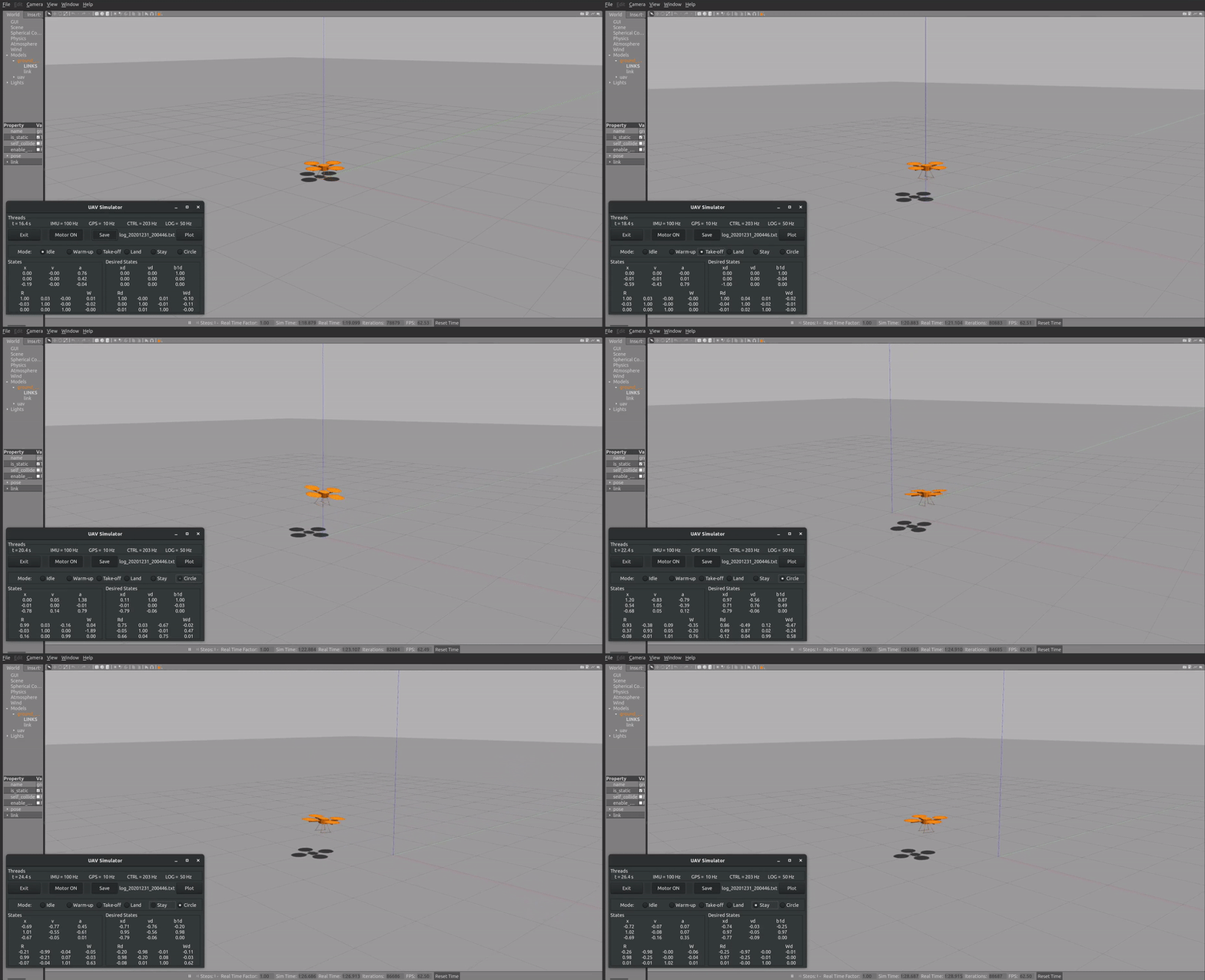
This repository includes Python codes for the position control a UAV in a Gazebo simulation environment, using geometric controllers.
Features
- Developed using Python
- Uses a geometric controller that works great with aggressive maneuvers
- Uses Gazebo as the physics engine
- Has a nice GUI for controlling the UAV
- Estimator, controller, and trajectory generators are in their own ROS nodes. If you need to test your own estimator, controller, or a trajectory, you only need to modify the respective node.
Why Python?
- Python makes developing/debugging easier and shorter (no compiling)
- Can easily find open-source modules or libraries for different tasks
Which controller is used for the UAV control?
- A geometric controller with decoupled-yaw attitude control is used
- The controller is published in:
    @InProceedings{Gamagedara2019b,
        title={Geometric controls of a quadrotor uav with decoupled yaw control},
        author={Gamagedara, Kanishke and Bisheban, Mahdis and Kaufman, Evan and Lee, Taeyoung},
        booktitle={2019 American Control Conference (ACC)},
        pages={3285--3290},
        year={2019},
        organization={IEEE}
    }
- Implementation of the same controller in C++ and Matlab can be found at https://github.com/fdcl-gwu/uav_geometric_control
Which estimator is used for the state estimation?
- The estimator defined in the following paper is implemented here (except for the sensor bias estimation terms):
    @InProceedings{Gamagedara2019a,
        author    = {Kanishke Gamagedara and Taeyoung Lee and Murray R. Snyder},
        title     = {Real-time Kinematics {GPS} Based Telemetry System for Airborne Measurements of Ship Air Wake},
        booktitle = {{AIAA} Scitech 2019 Forum},
        year      = {2019},
        month     = {jan},
        publisher = {American Institute of Aeronautics and Astronautics},
        doi       = {10.2514/6.2019-2377}
    }
- Matlab implementation of the above controller can be found at https://github.com/fdcl-gwu/dkf-comparison.
- Note that the Matlab implementation has a delayed Kalman filter that has not been implemented here. Only the non-delayed parts inside
DelayedKalmanFilter.mis utilized here.
Setting-up
Releases
The current main branch has been tested to work on Ubuntu 22.04, running ROS2-Iron. Check releases for different OS/ROS versions.
- v1.0: Ubuntu 18.04 with ROS-Melodic
- v2.0: Ubuntu 20.04 with ROS-Noetic
- v3.0: Ubuntu 22.04 with ROS2-Iron
:bangbang: If you are trying to use an older release, please checkout that release, and use setup instructions there. Each release has different instructions.
:bangbang: If you are running this on a virtual machine, please make sure that Gazebo can run at real-time speed. It is known that this simulation exhibits unintended behavior if the “real-time factor” of the Gazebo simulation is not closer to 1.0 (See issue #3).
Setting-up the repository
- Clone the repository.
git clone https://github.com/fdcl-gwu/uav_simulator.git
- Update the submodules.
    cd uav_simulator
    git submodule update --init --recursive
Dependencies
You have to options here:
- Installing everything locally
- Running a docker container
Installing everything locally is probably the most straight-forward way, but you have to instal dependencies manually, or may have to deal with package version changes. Docker solves this by streamlining all the dependencies, up-to the OS. For example, if you are on Ubuntu 22.04 and want to test the ROS-Melodic version, docker will be the only way.
If you want to install everything locally, follow Local Install. If you want to run a docker container instead, skip to Docker Setup.
Local Install
-
ROS2: this repository has been developed using ROS2 Iron, on Ubuntu 22.04. If you are on a different version of Ubunto or ROS, please check the previous releases before installing dependencies. We recommend installing the ROS2 full version.
-
Python modules: these libraries must be installed in the system
- NumPy
File truncated at 100 lines see the full file
CONTRIBUTING
Repository Summary
| Description | |
| Checkout URI | https://github.com/fdcl-gwu/uav_simulator.git |
| VCS Type | git |
| VCS Version | main |
| Last Updated | 2024-09-02 |
| Dev Status | UNKNOWN |
| Released | UNRELEASED |
| Contributing |
Help Wanted (-)
Good First Issues (-) Pull Requests to Review (-) |
Packages
| Name | Version |
|---|---|
| fdcl_uav | 0.0.0 |
| uav_gazebo | 0.0.0 |
| uav_control_plugin | 0.0.0 |
README
|
|
|---|---|
|
tag:ros2-iron |
Python - Gazebo Simulation Environment for a UAV with Geometric Control
This repository includes Python codes for the position control a UAV in a Gazebo simulation environment, using geometric controllers.
Features
- Developed using Python
- Uses a geometric controller that works great with aggressive maneuvers
- Uses Gazebo as the physics engine
- Has a nice GUI for controlling the UAV
- Estimator, controller, and trajectory generators are in their own ROS nodes. If you need to test your own estimator, controller, or a trajectory, you only need to modify the respective node.
Why Python?
- Python makes developing/debugging easier and shorter (no compiling)
- Can easily find open-source modules or libraries for different tasks
Which controller is used for the UAV control?
- A geometric controller with decoupled-yaw attitude control is used
- The controller is published in:
    @InProceedings{Gamagedara2019b,
        title={Geometric controls of a quadrotor uav with decoupled yaw control},
        author={Gamagedara, Kanishke and Bisheban, Mahdis and Kaufman, Evan and Lee, Taeyoung},
        booktitle={2019 American Control Conference (ACC)},
        pages={3285--3290},
        year={2019},
        organization={IEEE}
    }
- Implementation of the same controller in C++ and Matlab can be found at https://github.com/fdcl-gwu/uav_geometric_control
Which estimator is used for the state estimation?
- The estimator defined in the following paper is implemented here (except for the sensor bias estimation terms):
    @InProceedings{Gamagedara2019a,
        author    = {Kanishke Gamagedara and Taeyoung Lee and Murray R. Snyder},
        title     = {Real-time Kinematics {GPS} Based Telemetry System for Airborne Measurements of Ship Air Wake},
        booktitle = {{AIAA} Scitech 2019 Forum},
        year      = {2019},
        month     = {jan},
        publisher = {American Institute of Aeronautics and Astronautics},
        doi       = {10.2514/6.2019-2377}
    }
- Matlab implementation of the above controller can be found at https://github.com/fdcl-gwu/dkf-comparison.
- Note that the Matlab implementation has a delayed Kalman filter that has not been implemented here. Only the non-delayed parts inside
DelayedKalmanFilter.mis utilized here.
Setting-up
Releases
The current main branch has been tested to work on Ubuntu 22.04, running ROS2-Iron. Check releases for different OS/ROS versions.
- v1.0: Ubuntu 18.04 with ROS-Melodic
- v2.0: Ubuntu 20.04 with ROS-Noetic
- v3.0: Ubuntu 22.04 with ROS2-Iron
:bangbang: If you are trying to use an older release, please checkout that release, and use setup instructions there. Each release has different instructions.
:bangbang: If you are running this on a virtual machine, please make sure that Gazebo can run at real-time speed. It is known that this simulation exhibits unintended behavior if the “real-time factor” of the Gazebo simulation is not closer to 1.0 (See issue #3).
Setting-up the repository
- Clone the repository.
git clone https://github.com/fdcl-gwu/uav_simulator.git
- Update the submodules.
    cd uav_simulator
    git submodule update --init --recursive
Dependencies
You have to options here:
- Installing everything locally
- Running a docker container
Installing everything locally is probably the most straight-forward way, but you have to instal dependencies manually, or may have to deal with package version changes. Docker solves this by streamlining all the dependencies, up-to the OS. For example, if you are on Ubuntu 22.04 and want to test the ROS-Melodic version, docker will be the only way.
If you want to install everything locally, follow Local Install. If you want to run a docker container instead, skip to Docker Setup.
Local Install
-
ROS2: this repository has been developed using ROS2 Iron, on Ubuntu 22.04. If you are on a different version of Ubunto or ROS, please check the previous releases before installing dependencies. We recommend installing the ROS2 full version.
-
Python modules: these libraries must be installed in the system
- NumPy
File truncated at 100 lines see the full file
CONTRIBUTING
Repository Summary
| Description | |
| Checkout URI | https://github.com/fdcl-gwu/uav_simulator.git |
| VCS Type | git |
| VCS Version | main |
| Last Updated | 2024-09-02 |
| Dev Status | UNKNOWN |
| Released | UNRELEASED |
| Contributing |
Help Wanted (-)
Good First Issues (-) Pull Requests to Review (-) |
Packages
| Name | Version |
|---|---|
| fdcl_uav | 0.0.0 |
| uav_gazebo | 0.0.0 |
| uav_control_plugin | 0.0.0 |
README
|
|
|---|---|
|
tag:ros2-iron |
Python - Gazebo Simulation Environment for a UAV with Geometric Control
This repository includes Python codes for the position control a UAV in a Gazebo simulation environment, using geometric controllers.
Features
- Developed using Python
- Uses a geometric controller that works great with aggressive maneuvers
- Uses Gazebo as the physics engine
- Has a nice GUI for controlling the UAV
- Estimator, controller, and trajectory generators are in their own ROS nodes. If you need to test your own estimator, controller, or a trajectory, you only need to modify the respective node.
Why Python?
- Python makes developing/debugging easier and shorter (no compiling)
- Can easily find open-source modules or libraries for different tasks
Which controller is used for the UAV control?
- A geometric controller with decoupled-yaw attitude control is used
- The controller is published in:
    @InProceedings{Gamagedara2019b,
        title={Geometric controls of a quadrotor uav with decoupled yaw control},
        author={Gamagedara, Kanishke and Bisheban, Mahdis and Kaufman, Evan and Lee, Taeyoung},
        booktitle={2019 American Control Conference (ACC)},
        pages={3285--3290},
        year={2019},
        organization={IEEE}
    }
- Implementation of the same controller in C++ and Matlab can be found at https://github.com/fdcl-gwu/uav_geometric_control
Which estimator is used for the state estimation?
- The estimator defined in the following paper is implemented here (except for the sensor bias estimation terms):
    @InProceedings{Gamagedara2019a,
        author    = {Kanishke Gamagedara and Taeyoung Lee and Murray R. Snyder},
        title     = {Real-time Kinematics {GPS} Based Telemetry System for Airborne Measurements of Ship Air Wake},
        booktitle = {{AIAA} Scitech 2019 Forum},
        year      = {2019},
        month     = {jan},
        publisher = {American Institute of Aeronautics and Astronautics},
        doi       = {10.2514/6.2019-2377}
    }
- Matlab implementation of the above controller can be found at https://github.com/fdcl-gwu/dkf-comparison.
- Note that the Matlab implementation has a delayed Kalman filter that has not been implemented here. Only the non-delayed parts inside
DelayedKalmanFilter.mis utilized here.
Setting-up
Releases
The current main branch has been tested to work on Ubuntu 22.04, running ROS2-Iron. Check releases for different OS/ROS versions.
- v1.0: Ubuntu 18.04 with ROS-Melodic
- v2.0: Ubuntu 20.04 with ROS-Noetic
- v3.0: Ubuntu 22.04 with ROS2-Iron
:bangbang: If you are trying to use an older release, please checkout that release, and use setup instructions there. Each release has different instructions.
:bangbang: If you are running this on a virtual machine, please make sure that Gazebo can run at real-time speed. It is known that this simulation exhibits unintended behavior if the “real-time factor” of the Gazebo simulation is not closer to 1.0 (See issue #3).
Setting-up the repository
- Clone the repository.
git clone https://github.com/fdcl-gwu/uav_simulator.git
- Update the submodules.
    cd uav_simulator
    git submodule update --init --recursive
Dependencies
You have to options here:
- Installing everything locally
- Running a docker container
Installing everything locally is probably the most straight-forward way, but you have to instal dependencies manually, or may have to deal with package version changes. Docker solves this by streamlining all the dependencies, up-to the OS. For example, if you are on Ubuntu 22.04 and want to test the ROS-Melodic version, docker will be the only way.
If you want to install everything locally, follow Local Install. If you want to run a docker container instead, skip to Docker Setup.
Local Install
-
ROS2: this repository has been developed using ROS2 Iron, on Ubuntu 22.04. If you are on a different version of Ubunto or ROS, please check the previous releases before installing dependencies. We recommend installing the ROS2 full version.
-
Python modules: these libraries must be installed in the system
- NumPy
File truncated at 100 lines see the full file
CONTRIBUTING
Repository Summary
| Description | |
| Checkout URI | https://github.com/fdcl-gwu/uav_simulator.git |
| VCS Type | git |
| VCS Version | main |
| Last Updated | 2024-09-02 |
| Dev Status | UNKNOWN |
| Released | UNRELEASED |
| Contributing |
Help Wanted (-)
Good First Issues (-) Pull Requests to Review (-) |
Packages
| Name | Version |
|---|---|
| fdcl_uav | 0.0.0 |
| uav_gazebo | 0.0.0 |
| uav_control_plugin | 0.0.0 |
README
|
|
|---|---|
|
tag:ros2-iron |
Python - Gazebo Simulation Environment for a UAV with Geometric Control
This repository includes Python codes for the position control a UAV in a Gazebo simulation environment, using geometric controllers.
Features
- Developed using Python
- Uses a geometric controller that works great with aggressive maneuvers
- Uses Gazebo as the physics engine
- Has a nice GUI for controlling the UAV
- Estimator, controller, and trajectory generators are in their own ROS nodes. If you need to test your own estimator, controller, or a trajectory, you only need to modify the respective node.
Why Python?
- Python makes developing/debugging easier and shorter (no compiling)
- Can easily find open-source modules or libraries for different tasks
Which controller is used for the UAV control?
- A geometric controller with decoupled-yaw attitude control is used
- The controller is published in:
    @InProceedings{Gamagedara2019b,
        title={Geometric controls of a quadrotor uav with decoupled yaw control},
        author={Gamagedara, Kanishke and Bisheban, Mahdis and Kaufman, Evan and Lee, Taeyoung},
        booktitle={2019 American Control Conference (ACC)},
        pages={3285--3290},
        year={2019},
        organization={IEEE}
    }
- Implementation of the same controller in C++ and Matlab can be found at https://github.com/fdcl-gwu/uav_geometric_control
Which estimator is used for the state estimation?
- The estimator defined in the following paper is implemented here (except for the sensor bias estimation terms):
    @InProceedings{Gamagedara2019a,
        author    = {Kanishke Gamagedara and Taeyoung Lee and Murray R. Snyder},
        title     = {Real-time Kinematics {GPS} Based Telemetry System for Airborne Measurements of Ship Air Wake},
        booktitle = {{AIAA} Scitech 2019 Forum},
        year      = {2019},
        month     = {jan},
        publisher = {American Institute of Aeronautics and Astronautics},
        doi       = {10.2514/6.2019-2377}
    }
- Matlab implementation of the above controller can be found at https://github.com/fdcl-gwu/dkf-comparison.
- Note that the Matlab implementation has a delayed Kalman filter that has not been implemented here. Only the non-delayed parts inside
DelayedKalmanFilter.mis utilized here.
Setting-up
Releases
The current main branch has been tested to work on Ubuntu 22.04, running ROS2-Iron. Check releases for different OS/ROS versions.
- v1.0: Ubuntu 18.04 with ROS-Melodic
- v2.0: Ubuntu 20.04 with ROS-Noetic
- v3.0: Ubuntu 22.04 with ROS2-Iron
:bangbang: If you are trying to use an older release, please checkout that release, and use setup instructions there. Each release has different instructions.
:bangbang: If you are running this on a virtual machine, please make sure that Gazebo can run at real-time speed. It is known that this simulation exhibits unintended behavior if the “real-time factor” of the Gazebo simulation is not closer to 1.0 (See issue #3).
Setting-up the repository
- Clone the repository.
git clone https://github.com/fdcl-gwu/uav_simulator.git
- Update the submodules.
    cd uav_simulator
    git submodule update --init --recursive
Dependencies
You have to options here:
- Installing everything locally
- Running a docker container
Installing everything locally is probably the most straight-forward way, but you have to instal dependencies manually, or may have to deal with package version changes. Docker solves this by streamlining all the dependencies, up-to the OS. For example, if you are on Ubuntu 22.04 and want to test the ROS-Melodic version, docker will be the only way.
If you want to install everything locally, follow Local Install. If you want to run a docker container instead, skip to Docker Setup.
Local Install
-
ROS2: this repository has been developed using ROS2 Iron, on Ubuntu 22.04. If you are on a different version of Ubunto or ROS, please check the previous releases before installing dependencies. We recommend installing the ROS2 full version.
-
Python modules: these libraries must be installed in the system
- NumPy
File truncated at 100 lines see the full file
CONTRIBUTING
Repository Summary
| Description | |
| Checkout URI | https://github.com/fdcl-gwu/uav_simulator.git |
| VCS Type | git |
| VCS Version | main |
| Last Updated | 2024-09-02 |
| Dev Status | UNKNOWN |
| Released | UNRELEASED |
| Contributing |
Help Wanted (-)
Good First Issues (-) Pull Requests to Review (-) |
Packages
| Name | Version |
|---|---|
| fdcl_uav | 0.0.0 |
| uav_gazebo | 0.0.0 |
| uav_control_plugin | 0.0.0 |
README
|
|
|---|---|
|
tag:ros2-iron |
Python - Gazebo Simulation Environment for a UAV with Geometric Control
This repository includes Python codes for the position control a UAV in a Gazebo simulation environment, using geometric controllers.
Features
- Developed using Python
- Uses a geometric controller that works great with aggressive maneuvers
- Uses Gazebo as the physics engine
- Has a nice GUI for controlling the UAV
- Estimator, controller, and trajectory generators are in their own ROS nodes. If you need to test your own estimator, controller, or a trajectory, you only need to modify the respective node.
Why Python?
- Python makes developing/debugging easier and shorter (no compiling)
- Can easily find open-source modules or libraries for different tasks
Which controller is used for the UAV control?
- A geometric controller with decoupled-yaw attitude control is used
- The controller is published in:
    @InProceedings{Gamagedara2019b,
        title={Geometric controls of a quadrotor uav with decoupled yaw control},
        author={Gamagedara, Kanishke and Bisheban, Mahdis and Kaufman, Evan and Lee, Taeyoung},
        booktitle={2019 American Control Conference (ACC)},
        pages={3285--3290},
        year={2019},
        organization={IEEE}
    }
- Implementation of the same controller in C++ and Matlab can be found at https://github.com/fdcl-gwu/uav_geometric_control
Which estimator is used for the state estimation?
- The estimator defined in the following paper is implemented here (except for the sensor bias estimation terms):
    @InProceedings{Gamagedara2019a,
        author    = {Kanishke Gamagedara and Taeyoung Lee and Murray R. Snyder},
        title     = {Real-time Kinematics {GPS} Based Telemetry System for Airborne Measurements of Ship Air Wake},
        booktitle = {{AIAA} Scitech 2019 Forum},
        year      = {2019},
        month     = {jan},
        publisher = {American Institute of Aeronautics and Astronautics},
        doi       = {10.2514/6.2019-2377}
    }
- Matlab implementation of the above controller can be found at https://github.com/fdcl-gwu/dkf-comparison.
- Note that the Matlab implementation has a delayed Kalman filter that has not been implemented here. Only the non-delayed parts inside
DelayedKalmanFilter.mis utilized here.
Setting-up
Releases
The current main branch has been tested to work on Ubuntu 22.04, running ROS2-Iron. Check releases for different OS/ROS versions.
- v1.0: Ubuntu 18.04 with ROS-Melodic
- v2.0: Ubuntu 20.04 with ROS-Noetic
- v3.0: Ubuntu 22.04 with ROS2-Iron
:bangbang: If you are trying to use an older release, please checkout that release, and use setup instructions there. Each release has different instructions.
:bangbang: If you are running this on a virtual machine, please make sure that Gazebo can run at real-time speed. It is known that this simulation exhibits unintended behavior if the “real-time factor” of the Gazebo simulation is not closer to 1.0 (See issue #3).
Setting-up the repository
- Clone the repository.
git clone https://github.com/fdcl-gwu/uav_simulator.git
- Update the submodules.
    cd uav_simulator
    git submodule update --init --recursive
Dependencies
You have to options here:
- Installing everything locally
- Running a docker container
Installing everything locally is probably the most straight-forward way, but you have to instal dependencies manually, or may have to deal with package version changes. Docker solves this by streamlining all the dependencies, up-to the OS. For example, if you are on Ubuntu 22.04 and want to test the ROS-Melodic version, docker will be the only way.
If you want to install everything locally, follow Local Install. If you want to run a docker container instead, skip to Docker Setup.
Local Install
-
ROS2: this repository has been developed using ROS2 Iron, on Ubuntu 22.04. If you are on a different version of Ubunto or ROS, please check the previous releases before installing dependencies. We recommend installing the ROS2 full version.
-
Python modules: these libraries must be installed in the system
- NumPy
File truncated at 100 lines see the full file
CONTRIBUTING
Repository Summary
| Description | |
| Checkout URI | https://github.com/fdcl-gwu/uav_simulator.git |
| VCS Type | git |
| VCS Version | main |
| Last Updated | 2024-09-02 |
| Dev Status | UNKNOWN |
| Released | UNRELEASED |
| Contributing |
Help Wanted (-)
Good First Issues (-) Pull Requests to Review (-) |
Packages
| Name | Version |
|---|---|
| fdcl_uav | 0.0.0 |
| uav_gazebo | 0.0.0 |
| uav_control_plugin | 0.0.0 |
README
|
|
|---|---|
|
tag:ros2-iron |
Python - Gazebo Simulation Environment for a UAV with Geometric Control
This repository includes Python codes for the position control a UAV in a Gazebo simulation environment, using geometric controllers.
Features
- Developed using Python
- Uses a geometric controller that works great with aggressive maneuvers
- Uses Gazebo as the physics engine
- Has a nice GUI for controlling the UAV
- Estimator, controller, and trajectory generators are in their own ROS nodes. If you need to test your own estimator, controller, or a trajectory, you only need to modify the respective node.
Why Python?
- Python makes developing/debugging easier and shorter (no compiling)
- Can easily find open-source modules or libraries for different tasks
Which controller is used for the UAV control?
- A geometric controller with decoupled-yaw attitude control is used
- The controller is published in:
    @InProceedings{Gamagedara2019b,
        title={Geometric controls of a quadrotor uav with decoupled yaw control},
        author={Gamagedara, Kanishke and Bisheban, Mahdis and Kaufman, Evan and Lee, Taeyoung},
        booktitle={2019 American Control Conference (ACC)},
        pages={3285--3290},
        year={2019},
        organization={IEEE}
    }
- Implementation of the same controller in C++ and Matlab can be found at https://github.com/fdcl-gwu/uav_geometric_control
Which estimator is used for the state estimation?
- The estimator defined in the following paper is implemented here (except for the sensor bias estimation terms):
    @InProceedings{Gamagedara2019a,
        author    = {Kanishke Gamagedara and Taeyoung Lee and Murray R. Snyder},
        title     = {Real-time Kinematics {GPS} Based Telemetry System for Airborne Measurements of Ship Air Wake},
        booktitle = {{AIAA} Scitech 2019 Forum},
        year      = {2019},
        month     = {jan},
        publisher = {American Institute of Aeronautics and Astronautics},
        doi       = {10.2514/6.2019-2377}
    }
- Matlab implementation of the above controller can be found at https://github.com/fdcl-gwu/dkf-comparison.
- Note that the Matlab implementation has a delayed Kalman filter that has not been implemented here. Only the non-delayed parts inside
DelayedKalmanFilter.mis utilized here.
Setting-up
Releases
The current main branch has been tested to work on Ubuntu 22.04, running ROS2-Iron. Check releases for different OS/ROS versions.
- v1.0: Ubuntu 18.04 with ROS-Melodic
- v2.0: Ubuntu 20.04 with ROS-Noetic
- v3.0: Ubuntu 22.04 with ROS2-Iron
:bangbang: If you are trying to use an older release, please checkout that release, and use setup instructions there. Each release has different instructions.
:bangbang: If you are running this on a virtual machine, please make sure that Gazebo can run at real-time speed. It is known that this simulation exhibits unintended behavior if the “real-time factor” of the Gazebo simulation is not closer to 1.0 (See issue #3).
Setting-up the repository
- Clone the repository.
git clone https://github.com/fdcl-gwu/uav_simulator.git
- Update the submodules.
    cd uav_simulator
    git submodule update --init --recursive
Dependencies
You have to options here:
- Installing everything locally
- Running a docker container
Installing everything locally is probably the most straight-forward way, but you have to instal dependencies manually, or may have to deal with package version changes. Docker solves this by streamlining all the dependencies, up-to the OS. For example, if you are on Ubuntu 22.04 and want to test the ROS-Melodic version, docker will be the only way.
If you want to install everything locally, follow Local Install. If you want to run a docker container instead, skip to Docker Setup.
Local Install
-
ROS2: this repository has been developed using ROS2 Iron, on Ubuntu 22.04. If you are on a different version of Ubunto or ROS, please check the previous releases before installing dependencies. We recommend installing the ROS2 full version.
-
Python modules: these libraries must be installed in the system
- NumPy
File truncated at 100 lines see the full file
CONTRIBUTING
Repository Summary
| Description | |
| Checkout URI | https://github.com/fdcl-gwu/uav_simulator.git |
| VCS Type | git |
| VCS Version | main |
| Last Updated | 2024-09-02 |
| Dev Status | UNKNOWN |
| Released | UNRELEASED |
| Contributing |
Help Wanted (-)
Good First Issues (-) Pull Requests to Review (-) |
Packages
| Name | Version |
|---|---|
| fdcl_uav | 0.0.0 |
| uav_gazebo | 0.0.0 |
| uav_control_plugin | 0.0.0 |
README
|
|
|---|---|
|
tag:ros2-iron |
Python - Gazebo Simulation Environment for a UAV with Geometric Control
This repository includes Python codes for the position control a UAV in a Gazebo simulation environment, using geometric controllers.
Features
- Developed using Python
- Uses a geometric controller that works great with aggressive maneuvers
- Uses Gazebo as the physics engine
- Has a nice GUI for controlling the UAV
- Estimator, controller, and trajectory generators are in their own ROS nodes. If you need to test your own estimator, controller, or a trajectory, you only need to modify the respective node.
Why Python?
- Python makes developing/debugging easier and shorter (no compiling)
- Can easily find open-source modules or libraries for different tasks
Which controller is used for the UAV control?
- A geometric controller with decoupled-yaw attitude control is used
- The controller is published in:
    @InProceedings{Gamagedara2019b,
        title={Geometric controls of a quadrotor uav with decoupled yaw control},
        author={Gamagedara, Kanishke and Bisheban, Mahdis and Kaufman, Evan and Lee, Taeyoung},
        booktitle={2019 American Control Conference (ACC)},
        pages={3285--3290},
        year={2019},
        organization={IEEE}
    }
- Implementation of the same controller in C++ and Matlab can be found at https://github.com/fdcl-gwu/uav_geometric_control
Which estimator is used for the state estimation?
- The estimator defined in the following paper is implemented here (except for the sensor bias estimation terms):
    @InProceedings{Gamagedara2019a,
        author    = {Kanishke Gamagedara and Taeyoung Lee and Murray R. Snyder},
        title     = {Real-time Kinematics {GPS} Based Telemetry System for Airborne Measurements of Ship Air Wake},
        booktitle = {{AIAA} Scitech 2019 Forum},
        year      = {2019},
        month     = {jan},
        publisher = {American Institute of Aeronautics and Astronautics},
        doi       = {10.2514/6.2019-2377}
    }
- Matlab implementation of the above controller can be found at https://github.com/fdcl-gwu/dkf-comparison.
- Note that the Matlab implementation has a delayed Kalman filter that has not been implemented here. Only the non-delayed parts inside
DelayedKalmanFilter.mis utilized here.
Setting-up
Releases
The current main branch has been tested to work on Ubuntu 22.04, running ROS2-Iron. Check releases for different OS/ROS versions.
- v1.0: Ubuntu 18.04 with ROS-Melodic
- v2.0: Ubuntu 20.04 with ROS-Noetic
- v3.0: Ubuntu 22.04 with ROS2-Iron
:bangbang: If you are trying to use an older release, please checkout that release, and use setup instructions there. Each release has different instructions.
:bangbang: If you are running this on a virtual machine, please make sure that Gazebo can run at real-time speed. It is known that this simulation exhibits unintended behavior if the “real-time factor” of the Gazebo simulation is not closer to 1.0 (See issue #3).
Setting-up the repository
- Clone the repository.
git clone https://github.com/fdcl-gwu/uav_simulator.git
- Update the submodules.
    cd uav_simulator
    git submodule update --init --recursive
Dependencies
You have to options here:
- Installing everything locally
- Running a docker container
Installing everything locally is probably the most straight-forward way, but you have to instal dependencies manually, or may have to deal with package version changes. Docker solves this by streamlining all the dependencies, up-to the OS. For example, if you are on Ubuntu 22.04 and want to test the ROS-Melodic version, docker will be the only way.
If you want to install everything locally, follow Local Install. If you want to run a docker container instead, skip to Docker Setup.
Local Install
-
ROS2: this repository has been developed using ROS2 Iron, on Ubuntu 22.04. If you are on a different version of Ubunto or ROS, please check the previous releases before installing dependencies. We recommend installing the ROS2 full version.
-
Python modules: these libraries must be installed in the system
- NumPy
File truncated at 100 lines see the full file
CONTRIBUTING
Repository Summary
| Description | |
| Checkout URI | https://github.com/fdcl-gwu/uav_simulator.git |
| VCS Type | git |
| VCS Version | main |
| Last Updated | 2024-09-02 |
| Dev Status | UNKNOWN |
| Released | UNRELEASED |
| Contributing |
Help Wanted (-)
Good First Issues (-) Pull Requests to Review (-) |
Packages
| Name | Version |
|---|---|
| fdcl_uav | 0.0.0 |
| uav_gazebo | 0.0.0 |
| uav_control_plugin | 0.0.0 |
README
|
|
|---|---|
|
tag:ros2-iron |
Python - Gazebo Simulation Environment for a UAV with Geometric Control
This repository includes Python codes for the position control a UAV in a Gazebo simulation environment, using geometric controllers.
Features
- Developed using Python
- Uses a geometric controller that works great with aggressive maneuvers
- Uses Gazebo as the physics engine
- Has a nice GUI for controlling the UAV
- Estimator, controller, and trajectory generators are in their own ROS nodes. If you need to test your own estimator, controller, or a trajectory, you only need to modify the respective node.
Why Python?
- Python makes developing/debugging easier and shorter (no compiling)
- Can easily find open-source modules or libraries for different tasks
Which controller is used for the UAV control?
- A geometric controller with decoupled-yaw attitude control is used
- The controller is published in:
    @InProceedings{Gamagedara2019b,
        title={Geometric controls of a quadrotor uav with decoupled yaw control},
        author={Gamagedara, Kanishke and Bisheban, Mahdis and Kaufman, Evan and Lee, Taeyoung},
        booktitle={2019 American Control Conference (ACC)},
        pages={3285--3290},
        year={2019},
        organization={IEEE}
    }
- Implementation of the same controller in C++ and Matlab can be found at https://github.com/fdcl-gwu/uav_geometric_control
Which estimator is used for the state estimation?
- The estimator defined in the following paper is implemented here (except for the sensor bias estimation terms):
    @InProceedings{Gamagedara2019a,
        author    = {Kanishke Gamagedara and Taeyoung Lee and Murray R. Snyder},
        title     = {Real-time Kinematics {GPS} Based Telemetry System for Airborne Measurements of Ship Air Wake},
        booktitle = {{AIAA} Scitech 2019 Forum},
        year      = {2019},
        month     = {jan},
        publisher = {American Institute of Aeronautics and Astronautics},
        doi       = {10.2514/6.2019-2377}
    }
- Matlab implementation of the above controller can be found at https://github.com/fdcl-gwu/dkf-comparison.
- Note that the Matlab implementation has a delayed Kalman filter that has not been implemented here. Only the non-delayed parts inside
DelayedKalmanFilter.mis utilized here.
Setting-up
Releases
The current main branch has been tested to work on Ubuntu 22.04, running ROS2-Iron. Check releases for different OS/ROS versions.
- v1.0: Ubuntu 18.04 with ROS-Melodic
- v2.0: Ubuntu 20.04 with ROS-Noetic
- v3.0: Ubuntu 22.04 with ROS2-Iron
:bangbang: If you are trying to use an older release, please checkout that release, and use setup instructions there. Each release has different instructions.
:bangbang: If you are running this on a virtual machine, please make sure that Gazebo can run at real-time speed. It is known that this simulation exhibits unintended behavior if the “real-time factor” of the Gazebo simulation is not closer to 1.0 (See issue #3).
Setting-up the repository
- Clone the repository.
git clone https://github.com/fdcl-gwu/uav_simulator.git
- Update the submodules.
    cd uav_simulator
    git submodule update --init --recursive
Dependencies
You have to options here:
- Installing everything locally
- Running a docker container
Installing everything locally is probably the most straight-forward way, but you have to instal dependencies manually, or may have to deal with package version changes. Docker solves this by streamlining all the dependencies, up-to the OS. For example, if you are on Ubuntu 22.04 and want to test the ROS-Melodic version, docker will be the only way.
If you want to install everything locally, follow Local Install. If you want to run a docker container instead, skip to Docker Setup.
Local Install
-
ROS2: this repository has been developed using ROS2 Iron, on Ubuntu 22.04. If you are on a different version of Ubunto or ROS, please check the previous releases before installing dependencies. We recommend installing the ROS2 full version.
-
Python modules: these libraries must be installed in the system
- NumPy
File truncated at 100 lines see the full file
CONTRIBUTING
Repository Summary
| Description | |
| Checkout URI | https://github.com/fdcl-gwu/uav_simulator.git |
| VCS Type | git |
| VCS Version | main |
| Last Updated | 2024-09-02 |
| Dev Status | UNKNOWN |
| Released | UNRELEASED |
| Contributing |
Help Wanted (-)
Good First Issues (-) Pull Requests to Review (-) |
Packages
| Name | Version |
|---|---|
| fdcl_uav | 0.0.0 |
| uav_gazebo | 0.0.0 |
| uav_control_plugin | 0.0.0 |
README
|
|
|---|---|
|
tag:ros2-iron |
Python - Gazebo Simulation Environment for a UAV with Geometric Control
This repository includes Python codes for the position control a UAV in a Gazebo simulation environment, using geometric controllers.
Features
- Developed using Python
- Uses a geometric controller that works great with aggressive maneuvers
- Uses Gazebo as the physics engine
- Has a nice GUI for controlling the UAV
- Estimator, controller, and trajectory generators are in their own ROS nodes. If you need to test your own estimator, controller, or a trajectory, you only need to modify the respective node.
Why Python?
- Python makes developing/debugging easier and shorter (no compiling)
- Can easily find open-source modules or libraries for different tasks
Which controller is used for the UAV control?
- A geometric controller with decoupled-yaw attitude control is used
- The controller is published in:
    @InProceedings{Gamagedara2019b,
        title={Geometric controls of a quadrotor uav with decoupled yaw control},
        author={Gamagedara, Kanishke and Bisheban, Mahdis and Kaufman, Evan and Lee, Taeyoung},
        booktitle={2019 American Control Conference (ACC)},
        pages={3285--3290},
        year={2019},
        organization={IEEE}
    }
- Implementation of the same controller in C++ and Matlab can be found at https://github.com/fdcl-gwu/uav_geometric_control
Which estimator is used for the state estimation?
- The estimator defined in the following paper is implemented here (except for the sensor bias estimation terms):
    @InProceedings{Gamagedara2019a,
        author    = {Kanishke Gamagedara and Taeyoung Lee and Murray R. Snyder},
        title     = {Real-time Kinematics {GPS} Based Telemetry System for Airborne Measurements of Ship Air Wake},
        booktitle = {{AIAA} Scitech 2019 Forum},
        year      = {2019},
        month     = {jan},
        publisher = {American Institute of Aeronautics and Astronautics},
        doi       = {10.2514/6.2019-2377}
    }
- Matlab implementation of the above controller can be found at https://github.com/fdcl-gwu/dkf-comparison.
- Note that the Matlab implementation has a delayed Kalman filter that has not been implemented here. Only the non-delayed parts inside
DelayedKalmanFilter.mis utilized here.
Setting-up
Releases
The current main branch has been tested to work on Ubuntu 22.04, running ROS2-Iron. Check releases for different OS/ROS versions.
- v1.0: Ubuntu 18.04 with ROS-Melodic
- v2.0: Ubuntu 20.04 with ROS-Noetic
- v3.0: Ubuntu 22.04 with ROS2-Iron
:bangbang: If you are trying to use an older release, please checkout that release, and use setup instructions there. Each release has different instructions.
:bangbang: If you are running this on a virtual machine, please make sure that Gazebo can run at real-time speed. It is known that this simulation exhibits unintended behavior if the “real-time factor” of the Gazebo simulation is not closer to 1.0 (See issue #3).
Setting-up the repository
- Clone the repository.
git clone https://github.com/fdcl-gwu/uav_simulator.git
- Update the submodules.
    cd uav_simulator
    git submodule update --init --recursive
Dependencies
You have to options here:
- Installing everything locally
- Running a docker container
Installing everything locally is probably the most straight-forward way, but you have to instal dependencies manually, or may have to deal with package version changes. Docker solves this by streamlining all the dependencies, up-to the OS. For example, if you are on Ubuntu 22.04 and want to test the ROS-Melodic version, docker will be the only way.
If you want to install everything locally, follow Local Install. If you want to run a docker container instead, skip to Docker Setup.
Local Install
-
ROS2: this repository has been developed using ROS2 Iron, on Ubuntu 22.04. If you are on a different version of Ubunto or ROS, please check the previous releases before installing dependencies. We recommend installing the ROS2 full version.
-
Python modules: these libraries must be installed in the system
- NumPy
File truncated at 100 lines see the full file