 ROS Index
No version for distro humble showing melodic. Known supported distros are highlighted in the buttons above.

Repository Summary
| Description | Diagnose CPU temperature in ROS |
| Checkout URI | https://github.com/yotabits/cpu_temperature_diagnostics.git |
| VCS Type | git |
| VCS Version | melodic-release |
| Last Updated | 2021-08-18 |
| Dev Status | MAINTAINED |
| Released | RELEASED |
| Contributing |
Help Wanted (-)
Good First Issues (-) Pull Requests to Review (-) |
Packages
| Name | Version |
|---|---|
| cpu_temperature_diagnostics | 0.0.1 |
README
cpu_temperature_diagnostics
Collect CPU temperature informations and republish them as diagnostics
Getting started
- Launch the node with the provided example launch file
roslaunch cpu_temperature_diagnostics cpu_temperature_diagnostics.launch
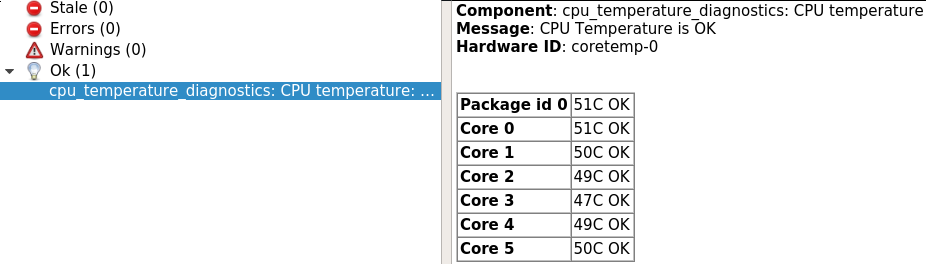
- Viewing the data
rosrun rqt_runtime_monitor rqt_runtime_monitor
Launch file example
<launch>
      <node name="cpu_temperature_diagnostics" pkg="cpu_temperature_diagnostics" type="cpu_temperature_diagnostics_node" respawn="false">
            <!--Allows to specify the expect prefix for the sensor chips used to get CPU temperature
                  To know the value run the command "sensors" on Intel platform it's "coretemp"
            This parameter is mandatory-->
            <param name="prefix" value="coretemp" />

            <!-- Allow to override the sensor provided maximum acceptable temperature. This is useful if you run in
                  a very hot environement and temperatures over max are acceptable. You can also lower the value for a cooler running system -->
            <param name="max_temp_override" value="75" />


            <!-- Allow to override the sensor provided critical temperature. This is useful if you run in
                  a very hot environement and temperatures over max are acceptable. You can also lower the value for a cooler running system -->
            <param name="critical_temp_override" value="85" />

      </node>
</launch>
CONTRIBUTING
No version for distro jazzy showing melodic. Known supported distros are highlighted in the buttons above.
Repository Summary
| Description | Diagnose CPU temperature in ROS |
| Checkout URI | https://github.com/yotabits/cpu_temperature_diagnostics.git |
| VCS Type | git |
| VCS Version | melodic-release |
| Last Updated | 2021-08-18 |
| Dev Status | MAINTAINED |
| Released | RELEASED |
| Contributing |
Help Wanted (-)
Good First Issues (-) Pull Requests to Review (-) |
Packages
| Name | Version |
|---|---|
| cpu_temperature_diagnostics | 0.0.1 |
README
cpu_temperature_diagnostics
Collect CPU temperature informations and republish them as diagnostics
Getting started
- Launch the node with the provided example launch file
roslaunch cpu_temperature_diagnostics cpu_temperature_diagnostics.launch
- Viewing the data
rosrun rqt_runtime_monitor rqt_runtime_monitor
Launch file example
<launch>
      <node name="cpu_temperature_diagnostics" pkg="cpu_temperature_diagnostics" type="cpu_temperature_diagnostics_node" respawn="false">
            <!--Allows to specify the expect prefix for the sensor chips used to get CPU temperature
                  To know the value run the command "sensors" on Intel platform it's "coretemp"
            This parameter is mandatory-->
            <param name="prefix" value="coretemp" />

            <!-- Allow to override the sensor provided maximum acceptable temperature. This is useful if you run in
                  a very hot environement and temperatures over max are acceptable. You can also lower the value for a cooler running system -->
            <param name="max_temp_override" value="75" />


            <!-- Allow to override the sensor provided critical temperature. This is useful if you run in
                  a very hot environement and temperatures over max are acceptable. You can also lower the value for a cooler running system -->
            <param name="critical_temp_override" value="85" />

      </node>
</launch>
CONTRIBUTING
No version for distro kilted showing melodic. Known supported distros are highlighted in the buttons above.
Repository Summary
| Description | Diagnose CPU temperature in ROS |
| Checkout URI | https://github.com/yotabits/cpu_temperature_diagnostics.git |
| VCS Type | git |
| VCS Version | melodic-release |
| Last Updated | 2021-08-18 |
| Dev Status | MAINTAINED |
| Released | RELEASED |
| Contributing |
Help Wanted (-)
Good First Issues (-) Pull Requests to Review (-) |
Packages
| Name | Version |
|---|---|
| cpu_temperature_diagnostics | 0.0.1 |
README
cpu_temperature_diagnostics
Collect CPU temperature informations and republish them as diagnostics
Getting started
- Launch the node with the provided example launch file
roslaunch cpu_temperature_diagnostics cpu_temperature_diagnostics.launch
- Viewing the data
rosrun rqt_runtime_monitor rqt_runtime_monitor
Launch file example
<launch>
      <node name="cpu_temperature_diagnostics" pkg="cpu_temperature_diagnostics" type="cpu_temperature_diagnostics_node" respawn="false">
            <!--Allows to specify the expect prefix for the sensor chips used to get CPU temperature
                  To know the value run the command "sensors" on Intel platform it's "coretemp"
            This parameter is mandatory-->
            <param name="prefix" value="coretemp" />

            <!-- Allow to override the sensor provided maximum acceptable temperature. This is useful if you run in
                  a very hot environement and temperatures over max are acceptable. You can also lower the value for a cooler running system -->
            <param name="max_temp_override" value="75" />


            <!-- Allow to override the sensor provided critical temperature. This is useful if you run in
                  a very hot environement and temperatures over max are acceptable. You can also lower the value for a cooler running system -->
            <param name="critical_temp_override" value="85" />

      </node>
</launch>
CONTRIBUTING
No version for distro rolling showing melodic. Known supported distros are highlighted in the buttons above.
Repository Summary
| Description | Diagnose CPU temperature in ROS |
| Checkout URI | https://github.com/yotabits/cpu_temperature_diagnostics.git |
| VCS Type | git |
| VCS Version | melodic-release |
| Last Updated | 2021-08-18 |
| Dev Status | MAINTAINED |
| Released | RELEASED |
| Contributing |
Help Wanted (-)
Good First Issues (-) Pull Requests to Review (-) |
Packages
| Name | Version |
|---|---|
| cpu_temperature_diagnostics | 0.0.1 |
README
cpu_temperature_diagnostics
Collect CPU temperature informations and republish them as diagnostics
Getting started
- Launch the node with the provided example launch file
roslaunch cpu_temperature_diagnostics cpu_temperature_diagnostics.launch
- Viewing the data
rosrun rqt_runtime_monitor rqt_runtime_monitor
Launch file example
<launch>
      <node name="cpu_temperature_diagnostics" pkg="cpu_temperature_diagnostics" type="cpu_temperature_diagnostics_node" respawn="false">
            <!--Allows to specify the expect prefix for the sensor chips used to get CPU temperature
                  To know the value run the command "sensors" on Intel platform it's "coretemp"
            This parameter is mandatory-->
            <param name="prefix" value="coretemp" />

            <!-- Allow to override the sensor provided maximum acceptable temperature. This is useful if you run in
                  a very hot environement and temperatures over max are acceptable. You can also lower the value for a cooler running system -->
            <param name="max_temp_override" value="75" />


            <!-- Allow to override the sensor provided critical temperature. This is useful if you run in
                  a very hot environement and temperatures over max are acceptable. You can also lower the value for a cooler running system -->
            <param name="critical_temp_override" value="85" />

      </node>
</launch>
CONTRIBUTING
No version for distro github showing melodic. Known supported distros are highlighted in the buttons above.
Repository Summary
| Description | Diagnose CPU temperature in ROS |
| Checkout URI | https://github.com/yotabits/cpu_temperature_diagnostics.git |
| VCS Type | git |
| VCS Version | melodic-release |
| Last Updated | 2021-08-18 |
| Dev Status | MAINTAINED |
| Released | RELEASED |
| Contributing |
Help Wanted (-)
Good First Issues (-) Pull Requests to Review (-) |
Packages
| Name | Version |
|---|---|
| cpu_temperature_diagnostics | 0.0.1 |
README
cpu_temperature_diagnostics
Collect CPU temperature informations and republish them as diagnostics
Getting started
- Launch the node with the provided example launch file
roslaunch cpu_temperature_diagnostics cpu_temperature_diagnostics.launch
- Viewing the data
rosrun rqt_runtime_monitor rqt_runtime_monitor
Launch file example
<launch>
      <node name="cpu_temperature_diagnostics" pkg="cpu_temperature_diagnostics" type="cpu_temperature_diagnostics_node" respawn="false">
            <!--Allows to specify the expect prefix for the sensor chips used to get CPU temperature
                  To know the value run the command "sensors" on Intel platform it's "coretemp"
            This parameter is mandatory-->
            <param name="prefix" value="coretemp" />

            <!-- Allow to override the sensor provided maximum acceptable temperature. This is useful if you run in
                  a very hot environement and temperatures over max are acceptable. You can also lower the value for a cooler running system -->
            <param name="max_temp_override" value="75" />


            <!-- Allow to override the sensor provided critical temperature. This is useful if you run in
                  a very hot environement and temperatures over max are acceptable. You can also lower the value for a cooler running system -->
            <param name="critical_temp_override" value="85" />

      </node>
</launch>
CONTRIBUTING
No version for distro galactic showing melodic. Known supported distros are highlighted in the buttons above.
Repository Summary
| Description | Diagnose CPU temperature in ROS |
| Checkout URI | https://github.com/yotabits/cpu_temperature_diagnostics.git |
| VCS Type | git |
| VCS Version | melodic-release |
| Last Updated | 2021-08-18 |
| Dev Status | MAINTAINED |
| Released | RELEASED |
| Contributing |
Help Wanted (-)
Good First Issues (-) Pull Requests to Review (-) |
Packages
| Name | Version |
|---|---|
| cpu_temperature_diagnostics | 0.0.1 |
README
cpu_temperature_diagnostics
Collect CPU temperature informations and republish them as diagnostics
Getting started
- Launch the node with the provided example launch file
roslaunch cpu_temperature_diagnostics cpu_temperature_diagnostics.launch
- Viewing the data
rosrun rqt_runtime_monitor rqt_runtime_monitor
Launch file example
<launch>
      <node name="cpu_temperature_diagnostics" pkg="cpu_temperature_diagnostics" type="cpu_temperature_diagnostics_node" respawn="false">
            <!--Allows to specify the expect prefix for the sensor chips used to get CPU temperature
                  To know the value run the command "sensors" on Intel platform it's "coretemp"
            This parameter is mandatory-->
            <param name="prefix" value="coretemp" />

            <!-- Allow to override the sensor provided maximum acceptable temperature. This is useful if you run in
                  a very hot environement and temperatures over max are acceptable. You can also lower the value for a cooler running system -->
            <param name="max_temp_override" value="75" />


            <!-- Allow to override the sensor provided critical temperature. This is useful if you run in
                  a very hot environement and temperatures over max are acceptable. You can also lower the value for a cooler running system -->
            <param name="critical_temp_override" value="85" />

      </node>
</launch>
CONTRIBUTING
No version for distro iron showing melodic. Known supported distros are highlighted in the buttons above.
Repository Summary
| Description | Diagnose CPU temperature in ROS |
| Checkout URI | https://github.com/yotabits/cpu_temperature_diagnostics.git |
| VCS Type | git |
| VCS Version | melodic-release |
| Last Updated | 2021-08-18 |
| Dev Status | MAINTAINED |
| Released | RELEASED |
| Contributing |
Help Wanted (-)
Good First Issues (-) Pull Requests to Review (-) |
Packages
| Name | Version |
|---|---|
| cpu_temperature_diagnostics | 0.0.1 |
README
cpu_temperature_diagnostics
Collect CPU temperature informations and republish them as diagnostics
Getting started
- Launch the node with the provided example launch file
roslaunch cpu_temperature_diagnostics cpu_temperature_diagnostics.launch
- Viewing the data
rosrun rqt_runtime_monitor rqt_runtime_monitor
Launch file example
<launch>
      <node name="cpu_temperature_diagnostics" pkg="cpu_temperature_diagnostics" type="cpu_temperature_diagnostics_node" respawn="false">
            <!--Allows to specify the expect prefix for the sensor chips used to get CPU temperature
                  To know the value run the command "sensors" on Intel platform it's "coretemp"
            This parameter is mandatory-->
            <param name="prefix" value="coretemp" />

            <!-- Allow to override the sensor provided maximum acceptable temperature. This is useful if you run in
                  a very hot environement and temperatures over max are acceptable. You can also lower the value for a cooler running system -->
            <param name="max_temp_override" value="75" />


            <!-- Allow to override the sensor provided critical temperature. This is useful if you run in
                  a very hot environement and temperatures over max are acceptable. You can also lower the value for a cooler running system -->
            <param name="critical_temp_override" value="85" />

      </node>
</launch>
CONTRIBUTING
Repository Summary
| Description | Diagnose CPU temperature in ROS |
| Checkout URI | https://github.com/yotabits/cpu_temperature_diagnostics.git |
| VCS Type | git |
| VCS Version | melodic-release |
| Last Updated | 2021-08-18 |
| Dev Status | MAINTAINED |
| Released | RELEASED |
| Contributing |
Help Wanted (-)
Good First Issues (-) Pull Requests to Review (-) |
Packages
| Name | Version |
|---|---|
| cpu_temperature_diagnostics | 0.0.1 |
README
cpu_temperature_diagnostics
Collect CPU temperature informations and republish them as diagnostics
Getting started
- Launch the node with the provided example launch file
roslaunch cpu_temperature_diagnostics cpu_temperature_diagnostics.launch
- Viewing the data
rosrun rqt_runtime_monitor rqt_runtime_monitor
Launch file example
<launch>
      <node name="cpu_temperature_diagnostics" pkg="cpu_temperature_diagnostics" type="cpu_temperature_diagnostics_node" respawn="false">
            <!--Allows to specify the expect prefix for the sensor chips used to get CPU temperature
                  To know the value run the command "sensors" on Intel platform it's "coretemp"
            This parameter is mandatory-->
            <param name="prefix" value="coretemp" />

            <!-- Allow to override the sensor provided maximum acceptable temperature. This is useful if you run in
                  a very hot environement and temperatures over max are acceptable. You can also lower the value for a cooler running system -->
            <param name="max_temp_override" value="75" />


            <!-- Allow to override the sensor provided critical temperature. This is useful if you run in
                  a very hot environement and temperatures over max are acceptable. You can also lower the value for a cooler running system -->
            <param name="critical_temp_override" value="85" />

      </node>
</launch>
CONTRIBUTING
No version for distro noetic showing melodic. Known supported distros are highlighted in the buttons above.
Repository Summary
| Description | Diagnose CPU temperature in ROS |
| Checkout URI | https://github.com/yotabits/cpu_temperature_diagnostics.git |
| VCS Type | git |
| VCS Version | melodic-release |
| Last Updated | 2021-08-18 |
| Dev Status | MAINTAINED |
| Released | RELEASED |
| Contributing |
Help Wanted (-)
Good First Issues (-) Pull Requests to Review (-) |
Packages
| Name | Version |
|---|---|
| cpu_temperature_diagnostics | 0.0.1 |
README
cpu_temperature_diagnostics
Collect CPU temperature informations and republish them as diagnostics
Getting started
- Launch the node with the provided example launch file
roslaunch cpu_temperature_diagnostics cpu_temperature_diagnostics.launch
- Viewing the data
rosrun rqt_runtime_monitor rqt_runtime_monitor
Launch file example
<launch>
      <node name="cpu_temperature_diagnostics" pkg="cpu_temperature_diagnostics" type="cpu_temperature_diagnostics_node" respawn="false">
            <!--Allows to specify the expect prefix for the sensor chips used to get CPU temperature
                  To know the value run the command "sensors" on Intel platform it's "coretemp"
            This parameter is mandatory-->
            <param name="prefix" value="coretemp" />

            <!-- Allow to override the sensor provided maximum acceptable temperature. This is useful if you run in
                  a very hot environement and temperatures over max are acceptable. You can also lower the value for a cooler running system -->
            <param name="max_temp_override" value="75" />


            <!-- Allow to override the sensor provided critical temperature. This is useful if you run in
                  a very hot environement and temperatures over max are acceptable. You can also lower the value for a cooler running system -->
            <param name="critical_temp_override" value="85" />

      </node>
</launch>