 ROS Index
Repository Summary
| Description | |
| Checkout URI | https://github.com/elephantrobotics/mycobot_ros2.git |
| VCS Type | git |
| VCS Version | humble |
| Last Updated | 2026-02-09 |
| Dev Status | UNKNOWN |
| Released | UNRELEASED |
| Contributing |
Help Wanted (-)
Good First Issues (-) Pull Requests to Review (-) |
Packages
| Name | Version |
|---|---|
| mybuddy | 0.0.0 |
| mecharm | 0.0.0 |
| mecharm_communication | 0.0.0 |
| mecharm_interfaces | 0.0.0 |
| mecharm_pi | 0.0.0 |
| myarm_300 | 0.0.1 |
| myarm_c650 | 0.0.1 |
| myarm_m750 | 0.0.1 |
| mycobot_280 | 0.0.1 |
| mycobot_280_arduino | 0.0.1 |
| mycobot_280_moveit2 | 0.3.0 |
| mycobot_280_moveit2_control | 0.0.1 |
| mycobot_280_rdkx5 | 0.0.1 |
| mycobot_280_riscv | 0.0.1 |
| mycobot_280_x3pi | 0.0.1 |
| mycobot_280arduino_moveit2 | 0.3.0 |
| mycobot_280jn | 0.0.1 |
| mycobot_280pi | 0.0.1 |
| mycobot_280rdkx5_moveit2 | 0.3.0 |
| mycobot_interfaces | 0.0.0 |
| mycobot_320 | 0.0.1 |
| mycobot_320_riscv | 0.0.1 |
| mycobot_320pi | 0.0.1 |
| mycobot_communication | 0.1.0 |
| mycobot_description | 0.4.0 |
| mycobot_600 | 0.0.1 |
| mycobot_630 | 0.0.1 |
| mycobot_630_moveit2 | 0.3.0 |
| mycobot_pro450_interfaces | 1.0.0 |
| mycobot_pro_450 | 0.0.1 |
| pro450_moveit2 | 1.0.0 |
| pro450_moveit2_control | 1.0.0 |
| mypalletizer_260 | 0.0.0 |
| mypalletizer_260_pi | 0.0.0 |
| mypalletizer_communication | 0.0.0 |
| mypalletizer_interfaces | 0.0.0 |
| ultraarm | 0.0.0 |
README
mycobot_ros2


| 中文文档 | English Documentation |
myCobot ROS2 package
Notes:
- Make sure that
Atomis flashed into the top Atom andTransponderorminirobotis flashed into the base Basic .The tool download address: https://github.com/elephantrobotics/myCobot/tree/main/Software - Supported ROS2 versions:
- Ubuntu 20.04 / ROS2 Foxy - branch
foxy - Ubuntu 20.04 / ROS2 Galactic - branch
galactic - Ubuntu 22.04 / ROS2 Humble - branch
humble - Orin Nano Ubunut 20.04 / ROS2 Foxy - branch
foxy - LimoPro Orin Nano Ubunut 20.04 / ROS2 Foxy - branch
foxy - PC Virtual Machine Ubunut 20.04 / ROS2 Foxy - branch
foxy
- Ubuntu 20.04 / ROS2 Foxy - branch
Installation
1.1 Pre-Requriements
For using this package, the Python api library should be installed first.
pip install pymycobot --user
1.2 Package Download and Install
Install ros package in your src folder of your Colcon workspace.
$ cd ~/colcon_ws/src
# For the humble branch
$ git clone -b humble --depth 1 https://github.com/elephantrobotics/mycobot_ros2.git
# For the foxy branch
$ git clone -b foxy --depth 1 https://github.com/elephantrobotics/mycobot_ros2.git
# For the galactic branch
$ git clone -b galactic --depth 1 https://github.com/elephantrobotics/mycobot_ros2.git
$ cd ~/colcon_ws
$ vcs import src < src/warehouse_ros_mongo.repos
$ sudo apt-get update && rosdep install --from-paths src --ignore-src -y
$ colcon build
$ source ~/colcon_ws/install/setup.bash
$ sudo echo 'source ~/colcon_ws/install/setup.bash' >> ~/.bashrc
Troubleshooting
- On ROS2 Humble if slider_control does not show GUI properly, update file
/opt/ros/humble/lib/python3.10/site-packages/joint_state_publisher_gui/joint_state_publisher_gui.pyfrom here: https://github.com/ros/joint_state_publisher/blob/ros2/joint_state_publisher_gui/joint_state_publisher_gui/joint_state_publisher_gui.py
URDF Model Graph
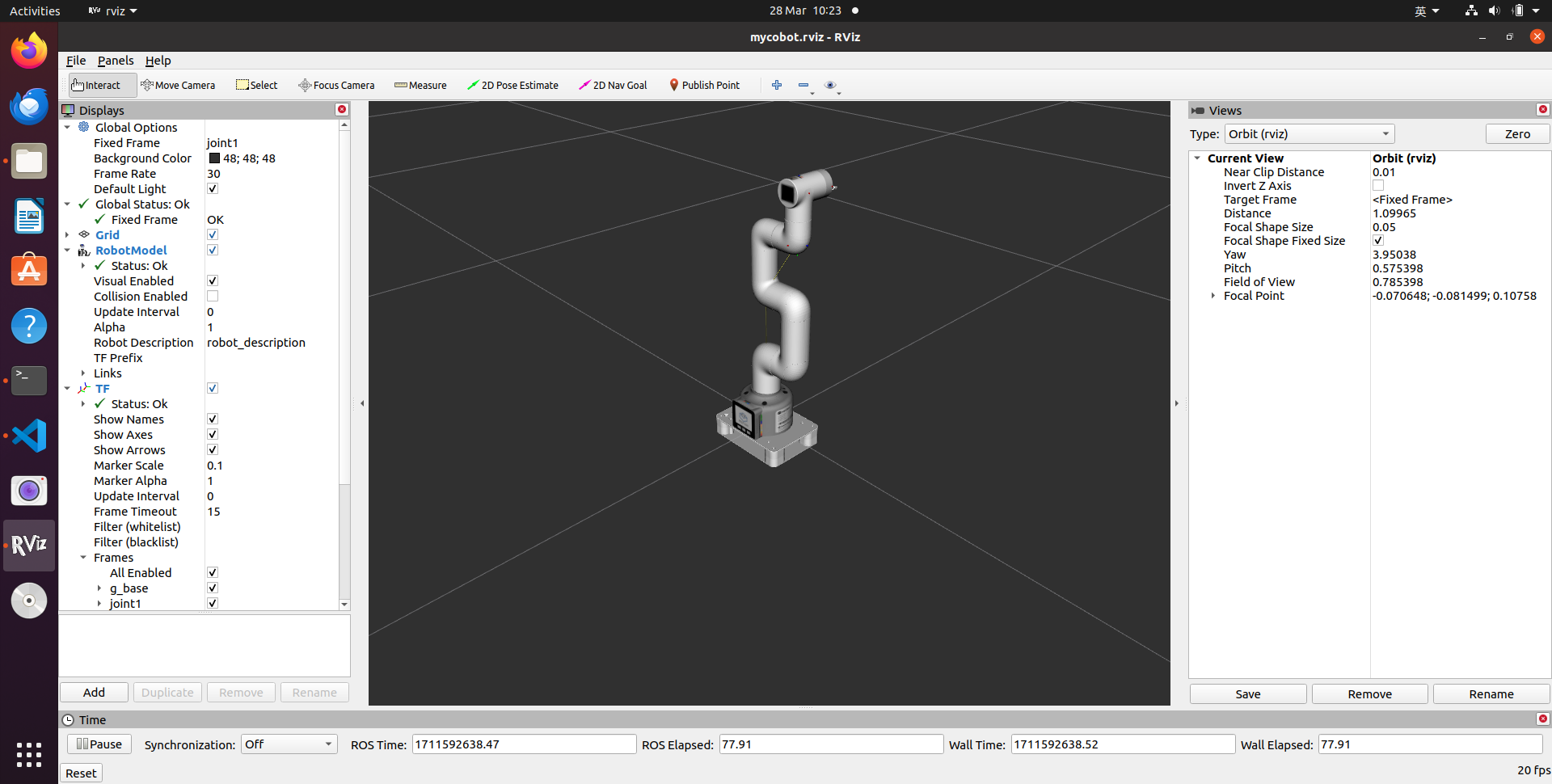
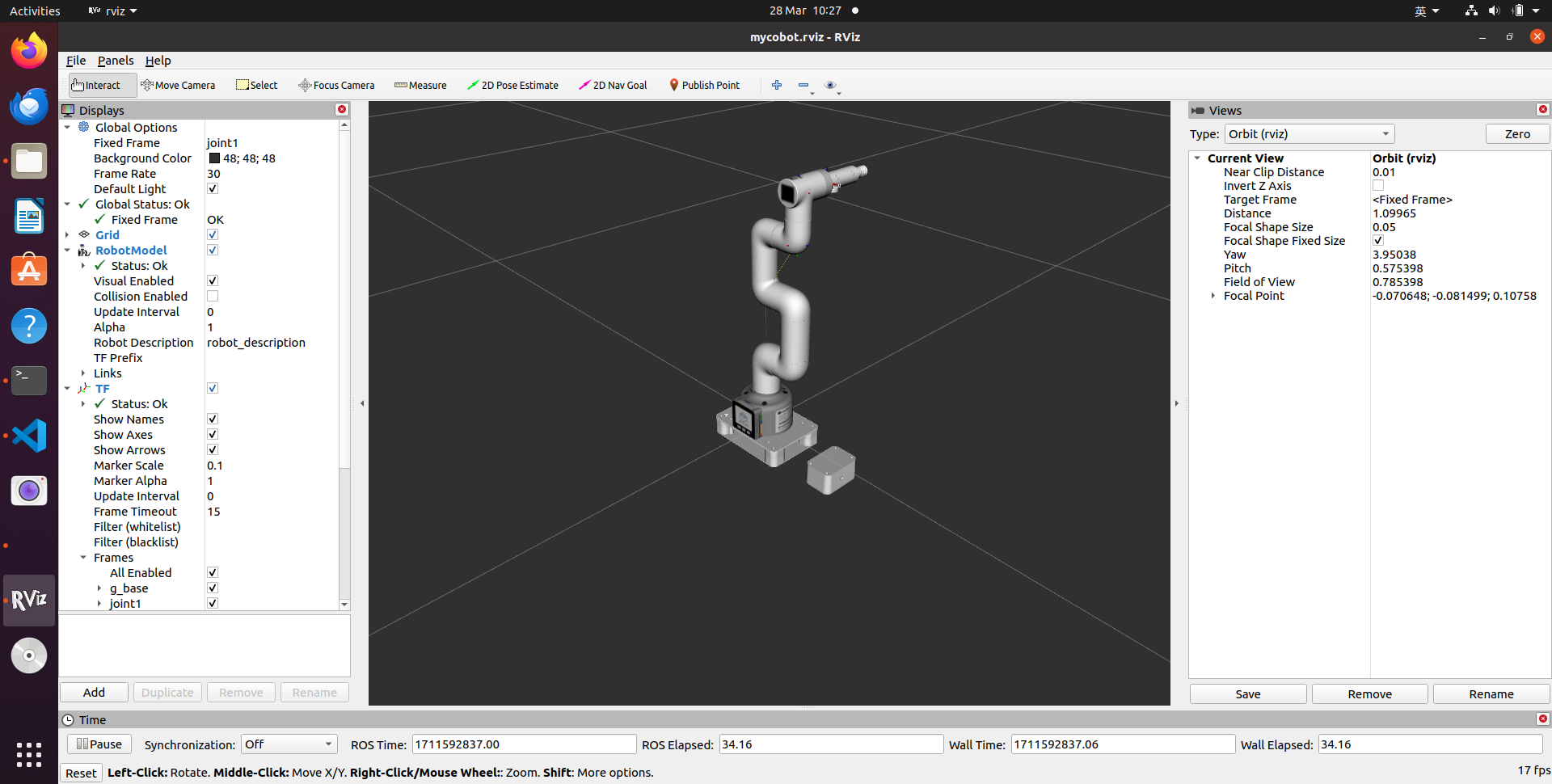
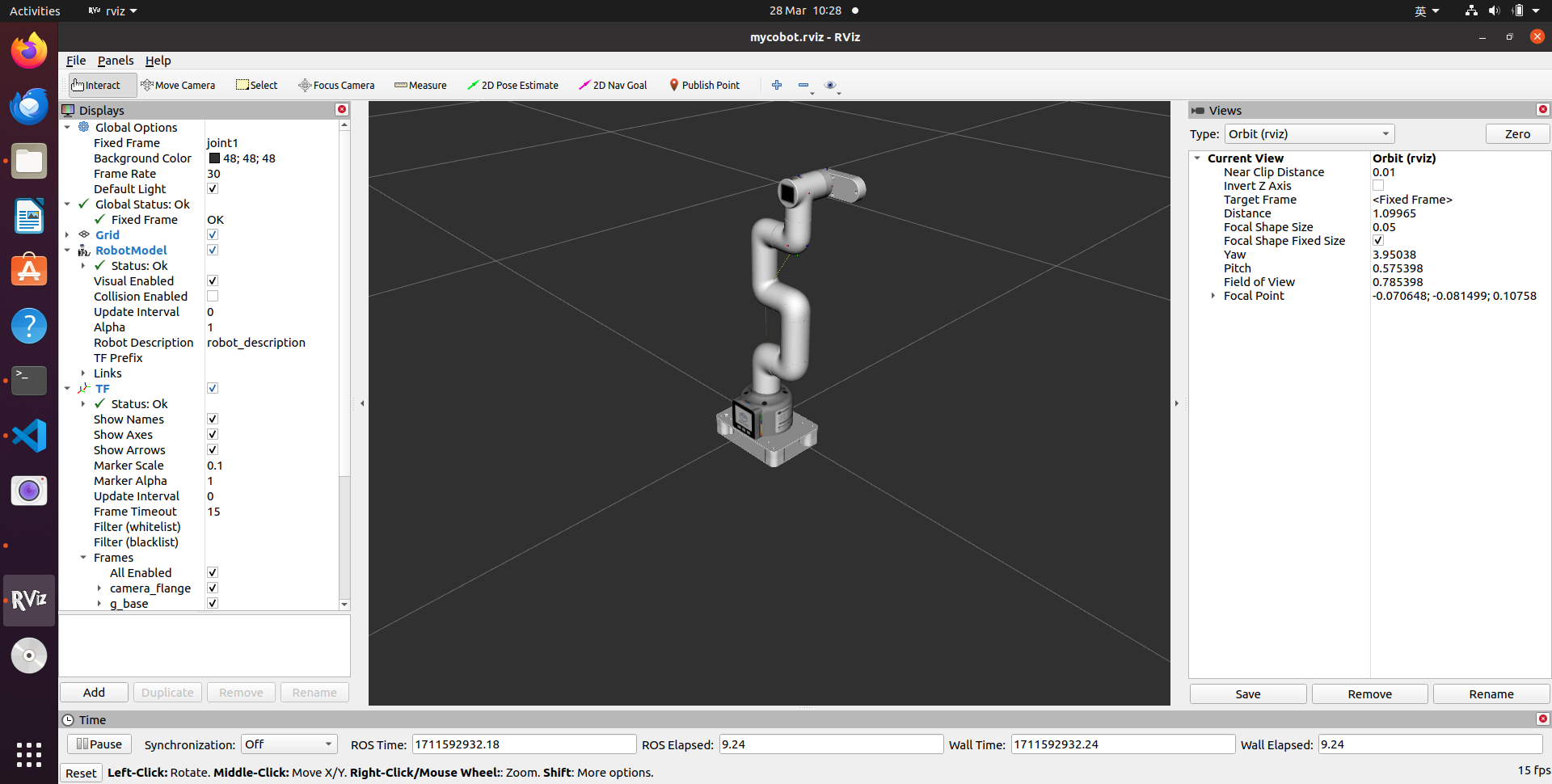
mycobot 280 m5 camera flange & pump
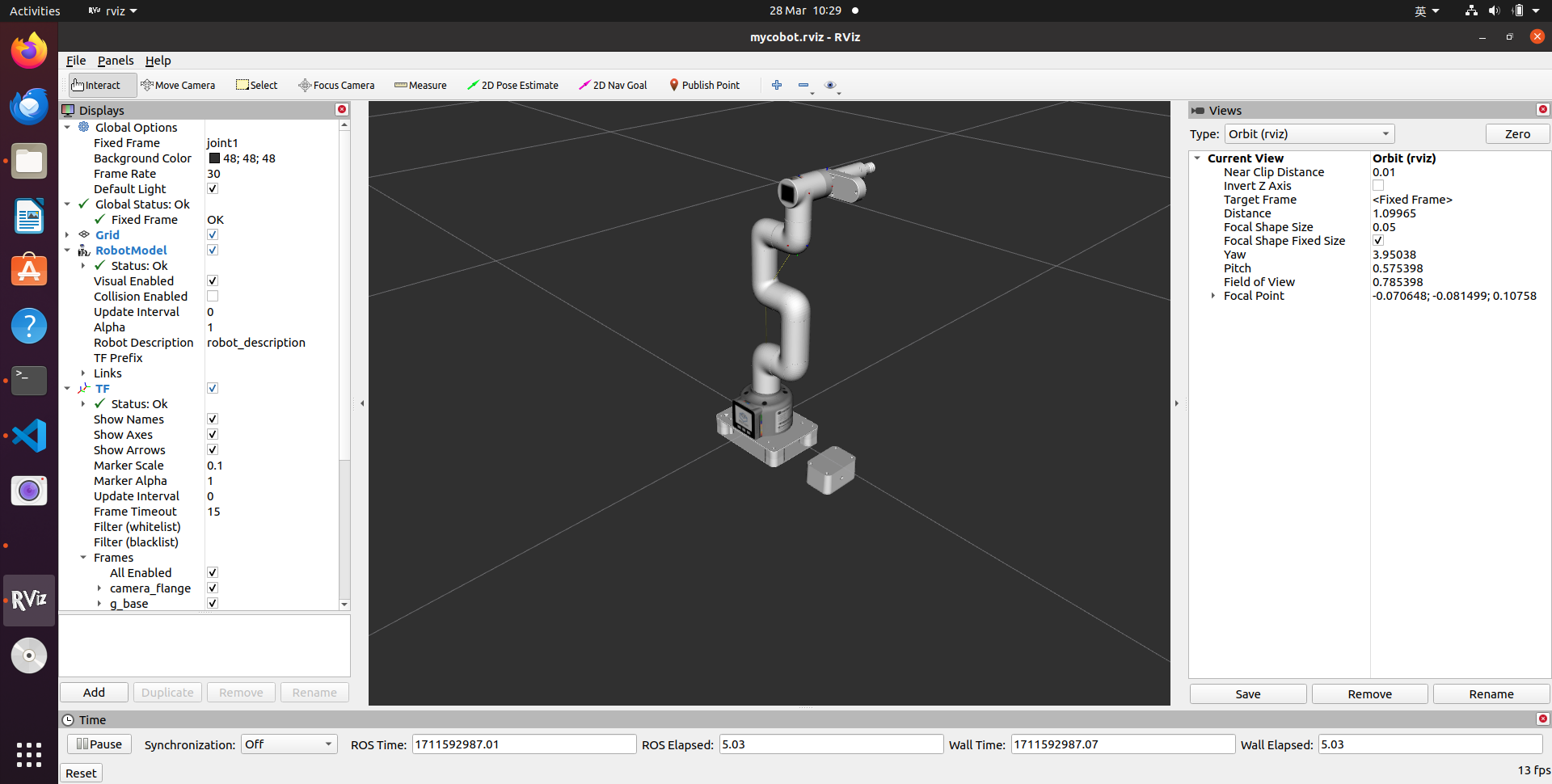
mycobot 280 m5 adaptive gripper
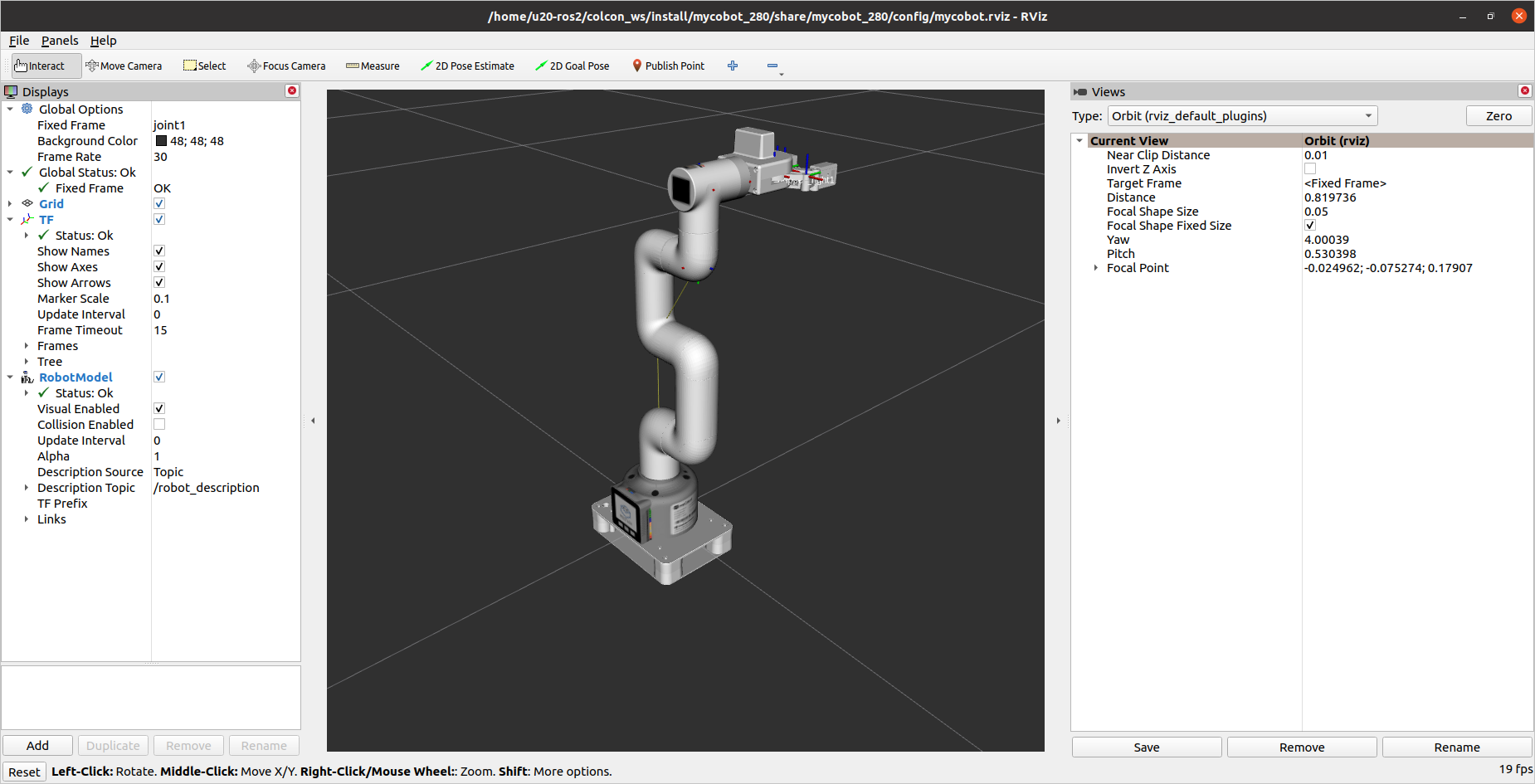
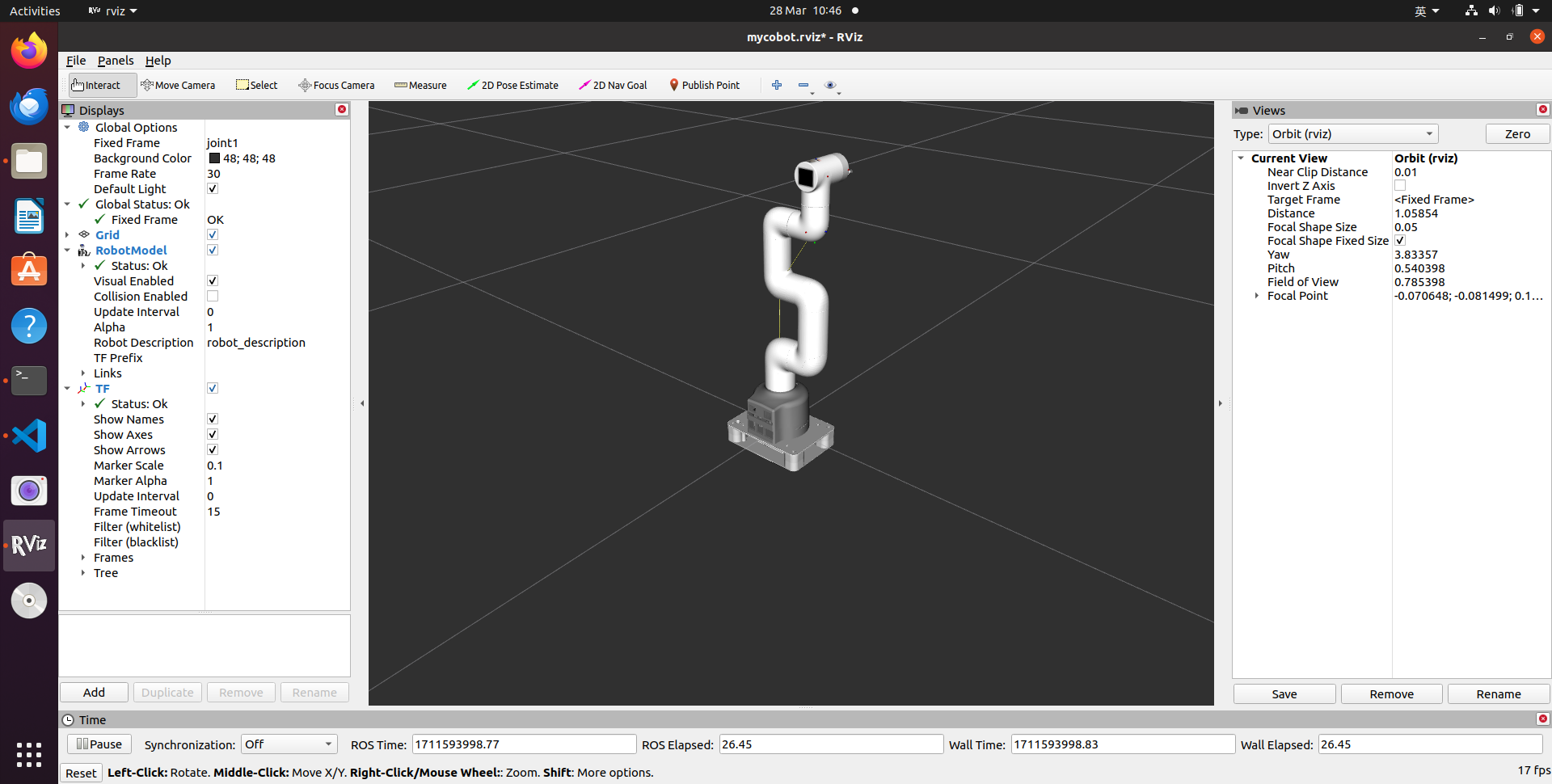
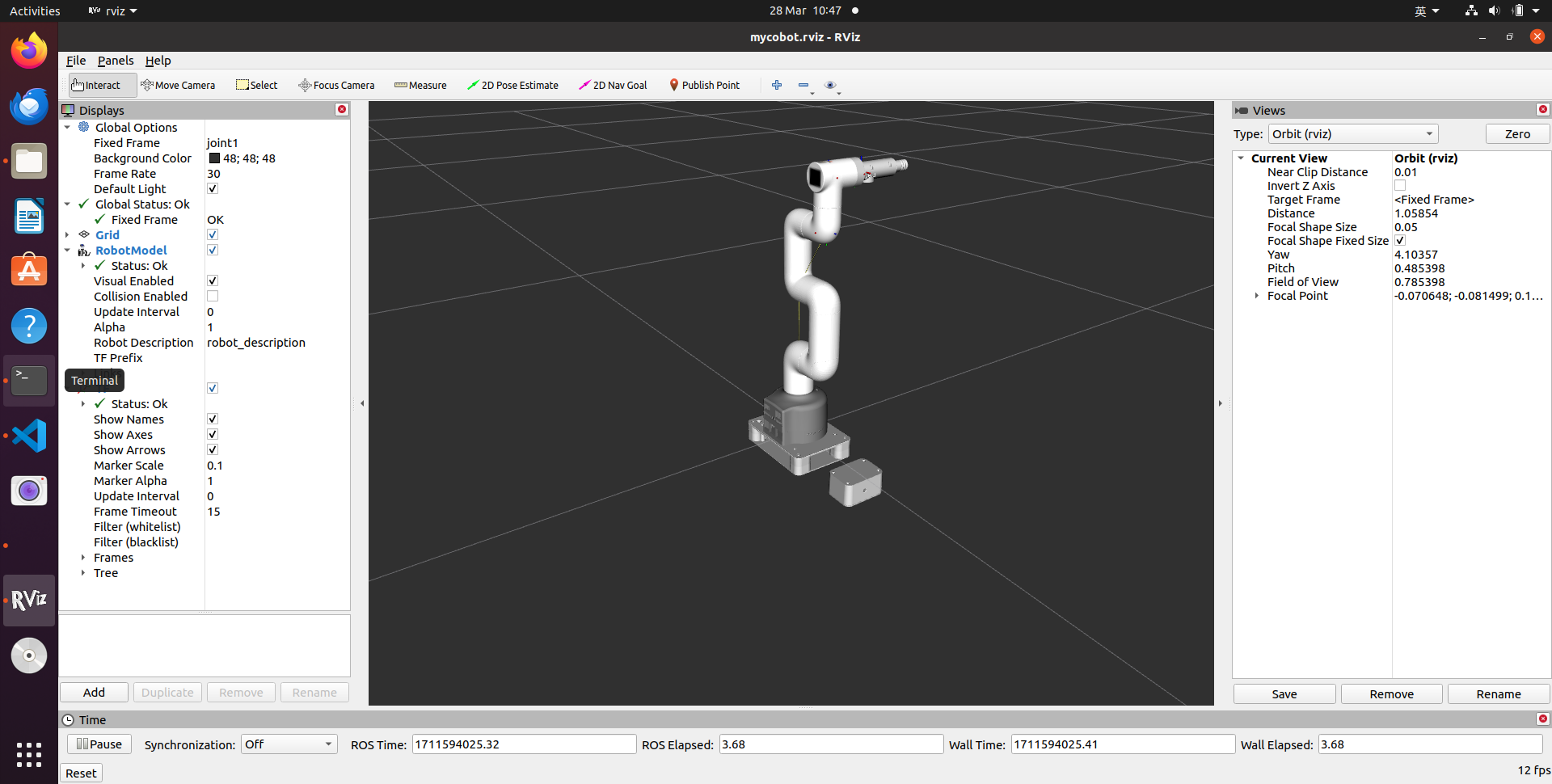
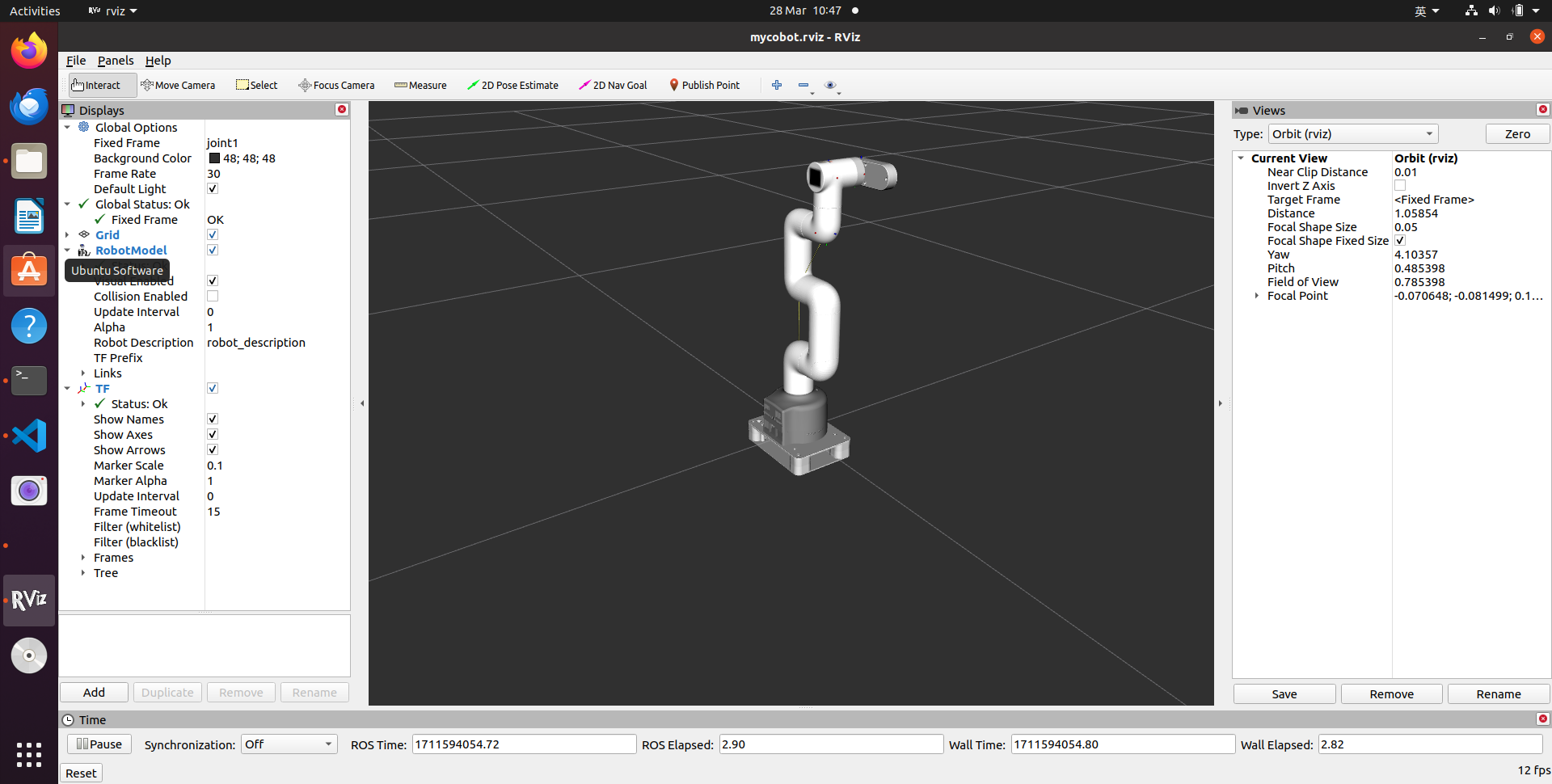
mycobot 280 pi camera flange & pump
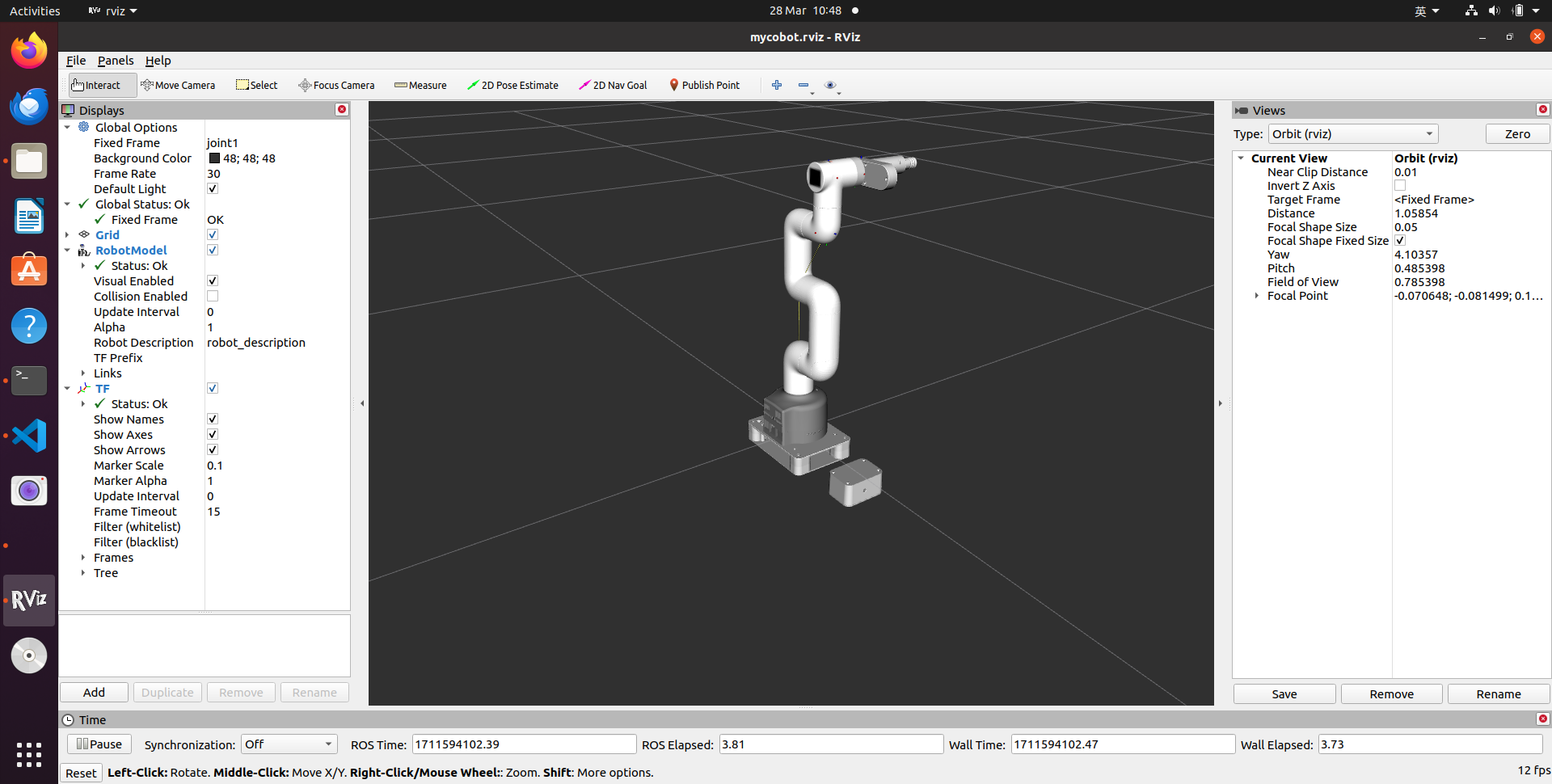
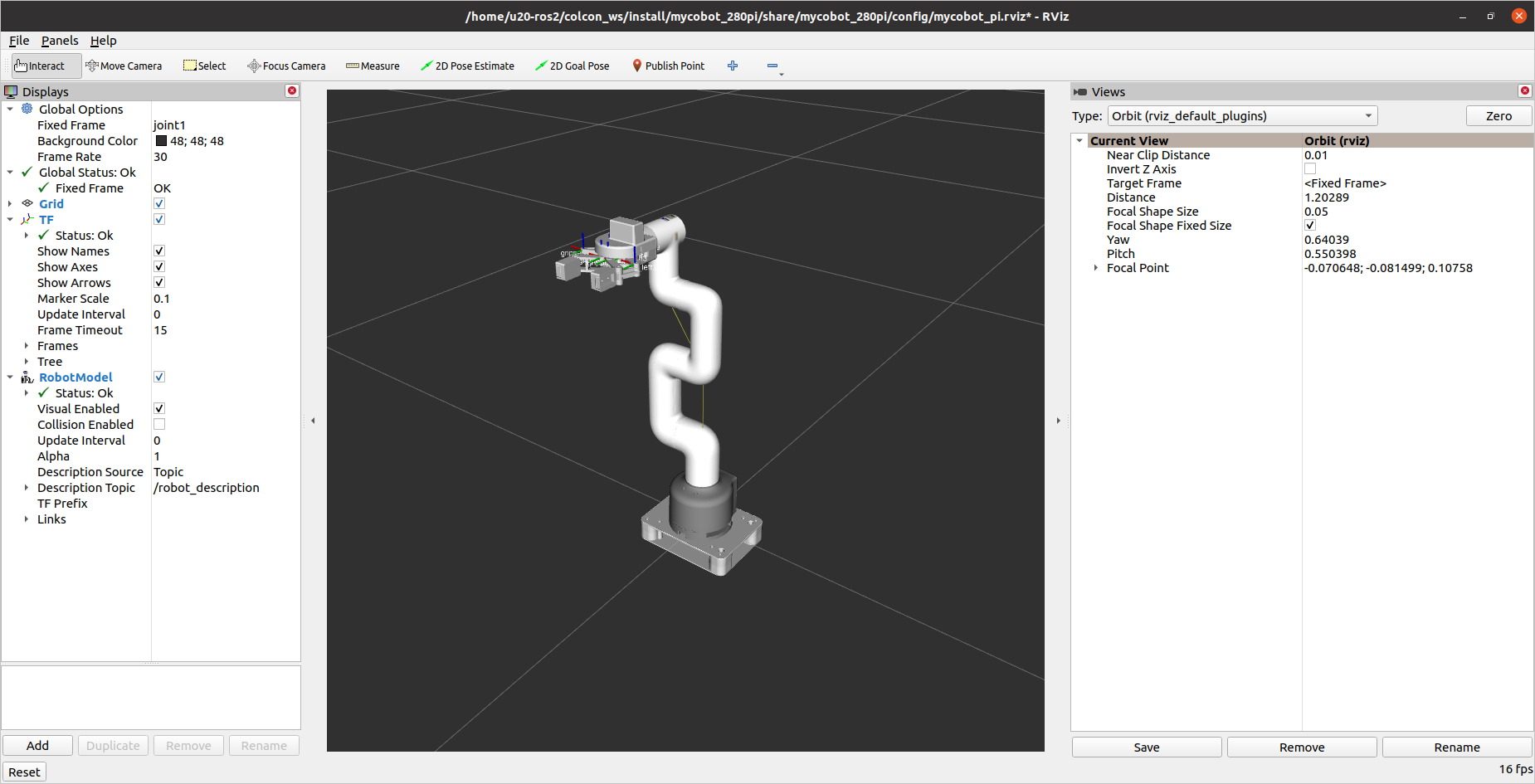
mycobot 280 pi adaptive gripper
File truncated at 100 lines see the full file
CONTRIBUTING
Repository Summary
| Description | |
| Checkout URI | https://github.com/elephantrobotics/mycobot_ros2.git |
| VCS Type | git |
| VCS Version | humble |
| Last Updated | 2026-02-09 |
| Dev Status | UNKNOWN |
| Released | UNRELEASED |
| Contributing |
Help Wanted (-)
Good First Issues (-) Pull Requests to Review (-) |
Packages
| Name | Version |
|---|---|
| mybuddy | 0.0.0 |
| mecharm | 0.0.0 |
| mecharm_communication | 0.0.0 |
| mecharm_interfaces | 0.0.0 |
| mecharm_pi | 0.0.0 |
| myarm_300 | 0.0.1 |
| myarm_c650 | 0.0.1 |
| myarm_m750 | 0.0.1 |
| mycobot_280 | 0.0.1 |
| mycobot_280_arduino | 0.0.1 |
| mycobot_280_moveit2 | 0.3.0 |
| mycobot_280_moveit2_control | 0.0.1 |
| mycobot_280_rdkx5 | 0.0.1 |
| mycobot_280_riscv | 0.0.1 |
| mycobot_280_x3pi | 0.0.1 |
| mycobot_280arduino_moveit2 | 0.3.0 |
| mycobot_280jn | 0.0.1 |
| mycobot_280pi | 0.0.1 |
| mycobot_280rdkx5_moveit2 | 0.3.0 |
| mycobot_interfaces | 0.0.0 |
| mycobot_320 | 0.0.1 |
| mycobot_320_riscv | 0.0.1 |
| mycobot_320pi | 0.0.1 |
| mycobot_communication | 0.1.0 |
| mycobot_description | 0.4.0 |
| mycobot_600 | 0.0.1 |
| mycobot_630 | 0.0.1 |
| mycobot_630_moveit2 | 0.3.0 |
| mycobot_pro450_interfaces | 1.0.0 |
| mycobot_pro_450 | 0.0.1 |
| pro450_moveit2 | 1.0.0 |
| pro450_moveit2_control | 1.0.0 |
| mypalletizer_260 | 0.0.0 |
| mypalletizer_260_pi | 0.0.0 |
| mypalletizer_communication | 0.0.0 |
| mypalletizer_interfaces | 0.0.0 |
| ultraarm | 0.0.0 |
README
mycobot_ros2
| 中文文档 | English Documentation |
myCobot ROS2 package
Notes:
- Make sure that
Atomis flashed into the top Atom andTransponderorminirobotis flashed into the base Basic .The tool download address: https://github.com/elephantrobotics/myCobot/tree/main/Software - Supported ROS2 versions:
- Ubuntu 20.04 / ROS2 Foxy - branch
foxy - Ubuntu 20.04 / ROS2 Galactic - branch
galactic - Ubuntu 22.04 / ROS2 Humble - branch
humble - Orin Nano Ubunut 20.04 / ROS2 Foxy - branch
foxy - LimoPro Orin Nano Ubunut 20.04 / ROS2 Foxy - branch
foxy - PC Virtual Machine Ubunut 20.04 / ROS2 Foxy - branch
foxy
- Ubuntu 20.04 / ROS2 Foxy - branch
Installation
1.1 Pre-Requriements
For using this package, the Python api library should be installed first.
pip install pymycobot --user
1.2 Package Download and Install
Install ros package in your src folder of your Colcon workspace.
$ cd ~/colcon_ws/src
# For the humble branch
$ git clone -b humble --depth 1 https://github.com/elephantrobotics/mycobot_ros2.git
# For the foxy branch
$ git clone -b foxy --depth 1 https://github.com/elephantrobotics/mycobot_ros2.git
# For the galactic branch
$ git clone -b galactic --depth 1 https://github.com/elephantrobotics/mycobot_ros2.git
$ cd ~/colcon_ws
$ vcs import src < src/warehouse_ros_mongo.repos
$ sudo apt-get update && rosdep install --from-paths src --ignore-src -y
$ colcon build
$ source ~/colcon_ws/install/setup.bash
$ sudo echo 'source ~/colcon_ws/install/setup.bash' >> ~/.bashrc
Troubleshooting
- On ROS2 Humble if slider_control does not show GUI properly, update file
/opt/ros/humble/lib/python3.10/site-packages/joint_state_publisher_gui/joint_state_publisher_gui.pyfrom here: https://github.com/ros/joint_state_publisher/blob/ros2/joint_state_publisher_gui/joint_state_publisher_gui/joint_state_publisher_gui.py
URDF Model Graph
mycobot 280 m5 camera flange & pump
mycobot 280 m5 adaptive gripper
mycobot 280 pi camera flange & pump
mycobot 280 pi adaptive gripper
File truncated at 100 lines see the full file
CONTRIBUTING
Repository Summary
| Description | |
| Checkout URI | https://github.com/elephantrobotics/mycobot_ros2.git |
| VCS Type | git |
| VCS Version | humble |
| Last Updated | 2026-02-09 |
| Dev Status | UNKNOWN |
| Released | UNRELEASED |
| Contributing |
Help Wanted (-)
Good First Issues (-) Pull Requests to Review (-) |
Packages
| Name | Version |
|---|---|
| mybuddy | 0.0.0 |
| mecharm | 0.0.0 |
| mecharm_communication | 0.0.0 |
| mecharm_interfaces | 0.0.0 |
| mecharm_pi | 0.0.0 |
| myarm_300 | 0.0.1 |
| myarm_c650 | 0.0.1 |
| myarm_m750 | 0.0.1 |
| mycobot_280 | 0.0.1 |
| mycobot_280_arduino | 0.0.1 |
| mycobot_280_moveit2 | 0.3.0 |
| mycobot_280_moveit2_control | 0.0.1 |
| mycobot_280_rdkx5 | 0.0.1 |
| mycobot_280_riscv | 0.0.1 |
| mycobot_280_x3pi | 0.0.1 |
| mycobot_280arduino_moveit2 | 0.3.0 |
| mycobot_280jn | 0.0.1 |
| mycobot_280pi | 0.0.1 |
| mycobot_280rdkx5_moveit2 | 0.3.0 |
| mycobot_interfaces | 0.0.0 |
| mycobot_320 | 0.0.1 |
| mycobot_320_riscv | 0.0.1 |
| mycobot_320pi | 0.0.1 |
| mycobot_communication | 0.1.0 |
| mycobot_description | 0.4.0 |
| mycobot_600 | 0.0.1 |
| mycobot_630 | 0.0.1 |
| mycobot_630_moveit2 | 0.3.0 |
| mycobot_pro450_interfaces | 1.0.0 |
| mycobot_pro_450 | 0.0.1 |
| pro450_moveit2 | 1.0.0 |
| pro450_moveit2_control | 1.0.0 |
| mypalletizer_260 | 0.0.0 |
| mypalletizer_260_pi | 0.0.0 |
| mypalletizer_communication | 0.0.0 |
| mypalletizer_interfaces | 0.0.0 |
| ultraarm | 0.0.0 |
README
mycobot_ros2
| 中文文档 | English Documentation |
myCobot ROS2 package
Notes:
- Make sure that
Atomis flashed into the top Atom andTransponderorminirobotis flashed into the base Basic .The tool download address: https://github.com/elephantrobotics/myCobot/tree/main/Software - Supported ROS2 versions:
- Ubuntu 20.04 / ROS2 Foxy - branch
foxy - Ubuntu 20.04 / ROS2 Galactic - branch
galactic - Ubuntu 22.04 / ROS2 Humble - branch
humble - Orin Nano Ubunut 20.04 / ROS2 Foxy - branch
foxy - LimoPro Orin Nano Ubunut 20.04 / ROS2 Foxy - branch
foxy - PC Virtual Machine Ubunut 20.04 / ROS2 Foxy - branch
foxy
- Ubuntu 20.04 / ROS2 Foxy - branch
Installation
1.1 Pre-Requriements
For using this package, the Python api library should be installed first.
pip install pymycobot --user
1.2 Package Download and Install
Install ros package in your src folder of your Colcon workspace.
$ cd ~/colcon_ws/src
# For the humble branch
$ git clone -b humble --depth 1 https://github.com/elephantrobotics/mycobot_ros2.git
# For the foxy branch
$ git clone -b foxy --depth 1 https://github.com/elephantrobotics/mycobot_ros2.git
# For the galactic branch
$ git clone -b galactic --depth 1 https://github.com/elephantrobotics/mycobot_ros2.git
$ cd ~/colcon_ws
$ vcs import src < src/warehouse_ros_mongo.repos
$ sudo apt-get update && rosdep install --from-paths src --ignore-src -y
$ colcon build
$ source ~/colcon_ws/install/setup.bash
$ sudo echo 'source ~/colcon_ws/install/setup.bash' >> ~/.bashrc
Troubleshooting
- On ROS2 Humble if slider_control does not show GUI properly, update file
/opt/ros/humble/lib/python3.10/site-packages/joint_state_publisher_gui/joint_state_publisher_gui.pyfrom here: https://github.com/ros/joint_state_publisher/blob/ros2/joint_state_publisher_gui/joint_state_publisher_gui/joint_state_publisher_gui.py
URDF Model Graph
mycobot 280 m5 camera flange & pump
mycobot 280 m5 adaptive gripper
mycobot 280 pi camera flange & pump
mycobot 280 pi adaptive gripper
File truncated at 100 lines see the full file
CONTRIBUTING
Repository Summary
| Description | |
| Checkout URI | https://github.com/elephantrobotics/mycobot_ros2.git |
| VCS Type | git |
| VCS Version | humble |
| Last Updated | 2026-02-09 |
| Dev Status | UNKNOWN |
| Released | UNRELEASED |
| Contributing |
Help Wanted (-)
Good First Issues (-) Pull Requests to Review (-) |
Packages
| Name | Version |
|---|---|
| mybuddy | 0.0.0 |
| mecharm | 0.0.0 |
| mecharm_communication | 0.0.0 |
| mecharm_interfaces | 0.0.0 |
| mecharm_pi | 0.0.0 |
| myarm_300 | 0.0.1 |
| myarm_c650 | 0.0.1 |
| myarm_m750 | 0.0.1 |
| mycobot_280 | 0.0.1 |
| mycobot_280_arduino | 0.0.1 |
| mycobot_280_moveit2 | 0.3.0 |
| mycobot_280_moveit2_control | 0.0.1 |
| mycobot_280_rdkx5 | 0.0.1 |
| mycobot_280_riscv | 0.0.1 |
| mycobot_280_x3pi | 0.0.1 |
| mycobot_280arduino_moveit2 | 0.3.0 |
| mycobot_280jn | 0.0.1 |
| mycobot_280pi | 0.0.1 |
| mycobot_280rdkx5_moveit2 | 0.3.0 |
| mycobot_interfaces | 0.0.0 |
| mycobot_320 | 0.0.1 |
| mycobot_320_riscv | 0.0.1 |
| mycobot_320pi | 0.0.1 |
| mycobot_communication | 0.1.0 |
| mycobot_description | 0.4.0 |
| mycobot_600 | 0.0.1 |
| mycobot_630 | 0.0.1 |
| mycobot_630_moveit2 | 0.3.0 |
| mycobot_pro450_interfaces | 1.0.0 |
| mycobot_pro_450 | 0.0.1 |
| pro450_moveit2 | 1.0.0 |
| pro450_moveit2_control | 1.0.0 |
| mypalletizer_260 | 0.0.0 |
| mypalletizer_260_pi | 0.0.0 |
| mypalletizer_communication | 0.0.0 |
| mypalletizer_interfaces | 0.0.0 |
| ultraarm | 0.0.0 |
README
mycobot_ros2
| 中文文档 | English Documentation |
myCobot ROS2 package
Notes:
- Make sure that
Atomis flashed into the top Atom andTransponderorminirobotis flashed into the base Basic .The tool download address: https://github.com/elephantrobotics/myCobot/tree/main/Software - Supported ROS2 versions:
- Ubuntu 20.04 / ROS2 Foxy - branch
foxy - Ubuntu 20.04 / ROS2 Galactic - branch
galactic - Ubuntu 22.04 / ROS2 Humble - branch
humble - Orin Nano Ubunut 20.04 / ROS2 Foxy - branch
foxy - LimoPro Orin Nano Ubunut 20.04 / ROS2 Foxy - branch
foxy - PC Virtual Machine Ubunut 20.04 / ROS2 Foxy - branch
foxy
- Ubuntu 20.04 / ROS2 Foxy - branch
Installation
1.1 Pre-Requriements
For using this package, the Python api library should be installed first.
pip install pymycobot --user
1.2 Package Download and Install
Install ros package in your src folder of your Colcon workspace.
$ cd ~/colcon_ws/src
# For the humble branch
$ git clone -b humble --depth 1 https://github.com/elephantrobotics/mycobot_ros2.git
# For the foxy branch
$ git clone -b foxy --depth 1 https://github.com/elephantrobotics/mycobot_ros2.git
# For the galactic branch
$ git clone -b galactic --depth 1 https://github.com/elephantrobotics/mycobot_ros2.git
$ cd ~/colcon_ws
$ vcs import src < src/warehouse_ros_mongo.repos
$ sudo apt-get update && rosdep install --from-paths src --ignore-src -y
$ colcon build
$ source ~/colcon_ws/install/setup.bash
$ sudo echo 'source ~/colcon_ws/install/setup.bash' >> ~/.bashrc
Troubleshooting
- On ROS2 Humble if slider_control does not show GUI properly, update file
/opt/ros/humble/lib/python3.10/site-packages/joint_state_publisher_gui/joint_state_publisher_gui.pyfrom here: https://github.com/ros/joint_state_publisher/blob/ros2/joint_state_publisher_gui/joint_state_publisher_gui/joint_state_publisher_gui.py
URDF Model Graph
mycobot 280 m5 camera flange & pump
mycobot 280 m5 adaptive gripper
mycobot 280 pi camera flange & pump
mycobot 280 pi adaptive gripper
File truncated at 100 lines see the full file
CONTRIBUTING
Repository Summary
| Description | |
| Checkout URI | https://github.com/elephantrobotics/mycobot_ros2.git |
| VCS Type | git |
| VCS Version | humble |
| Last Updated | 2026-02-09 |
| Dev Status | UNKNOWN |
| Released | UNRELEASED |
| Contributing |
Help Wanted (-)
Good First Issues (-) Pull Requests to Review (-) |
Packages
| Name | Version |
|---|---|
| mybuddy | 0.0.0 |
| mecharm | 0.0.0 |
| mecharm_communication | 0.0.0 |
| mecharm_interfaces | 0.0.0 |
| mecharm_pi | 0.0.0 |
| myarm_300 | 0.0.1 |
| myarm_c650 | 0.0.1 |
| myarm_m750 | 0.0.1 |
| mycobot_280 | 0.0.1 |
| mycobot_280_arduino | 0.0.1 |
| mycobot_280_moveit2 | 0.3.0 |
| mycobot_280_moveit2_control | 0.0.1 |
| mycobot_280_rdkx5 | 0.0.1 |
| mycobot_280_riscv | 0.0.1 |
| mycobot_280_x3pi | 0.0.1 |
| mycobot_280arduino_moveit2 | 0.3.0 |
| mycobot_280jn | 0.0.1 |
| mycobot_280pi | 0.0.1 |
| mycobot_280rdkx5_moveit2 | 0.3.0 |
| mycobot_interfaces | 0.0.0 |
| mycobot_320 | 0.0.1 |
| mycobot_320_riscv | 0.0.1 |
| mycobot_320pi | 0.0.1 |
| mycobot_communication | 0.1.0 |
| mycobot_description | 0.4.0 |
| mycobot_600 | 0.0.1 |
| mycobot_630 | 0.0.1 |
| mycobot_630_moveit2 | 0.3.0 |
| mycobot_pro450_interfaces | 1.0.0 |
| mycobot_pro_450 | 0.0.1 |
| pro450_moveit2 | 1.0.0 |
| pro450_moveit2_control | 1.0.0 |
| mypalletizer_260 | 0.0.0 |
| mypalletizer_260_pi | 0.0.0 |
| mypalletizer_communication | 0.0.0 |
| mypalletizer_interfaces | 0.0.0 |
| ultraarm | 0.0.0 |
README
mycobot_ros2
| 中文文档 | English Documentation |
myCobot ROS2 package
Notes:
- Make sure that
Atomis flashed into the top Atom andTransponderorminirobotis flashed into the base Basic .The tool download address: https://github.com/elephantrobotics/myCobot/tree/main/Software - Supported ROS2 versions:
- Ubuntu 20.04 / ROS2 Foxy - branch
foxy - Ubuntu 20.04 / ROS2 Galactic - branch
galactic - Ubuntu 22.04 / ROS2 Humble - branch
humble - Orin Nano Ubunut 20.04 / ROS2 Foxy - branch
foxy - LimoPro Orin Nano Ubunut 20.04 / ROS2 Foxy - branch
foxy - PC Virtual Machine Ubunut 20.04 / ROS2 Foxy - branch
foxy
- Ubuntu 20.04 / ROS2 Foxy - branch
Installation
1.1 Pre-Requriements
For using this package, the Python api library should be installed first.
pip install pymycobot --user
1.2 Package Download and Install
Install ros package in your src folder of your Colcon workspace.
$ cd ~/colcon_ws/src
# For the humble branch
$ git clone -b humble --depth 1 https://github.com/elephantrobotics/mycobot_ros2.git
# For the foxy branch
$ git clone -b foxy --depth 1 https://github.com/elephantrobotics/mycobot_ros2.git
# For the galactic branch
$ git clone -b galactic --depth 1 https://github.com/elephantrobotics/mycobot_ros2.git
$ cd ~/colcon_ws
$ vcs import src < src/warehouse_ros_mongo.repos
$ sudo apt-get update && rosdep install --from-paths src --ignore-src -y
$ colcon build
$ source ~/colcon_ws/install/setup.bash
$ sudo echo 'source ~/colcon_ws/install/setup.bash' >> ~/.bashrc
Troubleshooting
- On ROS2 Humble if slider_control does not show GUI properly, update file
/opt/ros/humble/lib/python3.10/site-packages/joint_state_publisher_gui/joint_state_publisher_gui.pyfrom here: https://github.com/ros/joint_state_publisher/blob/ros2/joint_state_publisher_gui/joint_state_publisher_gui/joint_state_publisher_gui.py
URDF Model Graph
mycobot 280 m5 camera flange & pump
mycobot 280 m5 adaptive gripper
mycobot 280 pi camera flange & pump
mycobot 280 pi adaptive gripper
File truncated at 100 lines see the full file
CONTRIBUTING
Repository Summary
| Description | |
| Checkout URI | https://github.com/elephantrobotics/mycobot_ros2.git |
| VCS Type | git |
| VCS Version | humble |
| Last Updated | 2026-02-09 |
| Dev Status | UNKNOWN |
| Released | UNRELEASED |
| Contributing |
Help Wanted (-)
Good First Issues (-) Pull Requests to Review (-) |
Packages
| Name | Version |
|---|---|
| mybuddy | 0.0.0 |
| mecharm | 0.0.0 |
| mecharm_communication | 0.0.0 |
| mecharm_interfaces | 0.0.0 |
| mecharm_pi | 0.0.0 |
| myarm_300 | 0.0.1 |
| myarm_c650 | 0.0.1 |
| myarm_m750 | 0.0.1 |
| mycobot_280 | 0.0.1 |
| mycobot_280_arduino | 0.0.1 |
| mycobot_280_moveit2 | 0.3.0 |
| mycobot_280_moveit2_control | 0.0.1 |
| mycobot_280_rdkx5 | 0.0.1 |
| mycobot_280_riscv | 0.0.1 |
| mycobot_280_x3pi | 0.0.1 |
| mycobot_280arduino_moveit2 | 0.3.0 |
| mycobot_280jn | 0.0.1 |
| mycobot_280pi | 0.0.1 |
| mycobot_280rdkx5_moveit2 | 0.3.0 |
| mycobot_interfaces | 0.0.0 |
| mycobot_320 | 0.0.1 |
| mycobot_320_riscv | 0.0.1 |
| mycobot_320pi | 0.0.1 |
| mycobot_communication | 0.1.0 |
| mycobot_description | 0.4.0 |
| mycobot_600 | 0.0.1 |
| mycobot_630 | 0.0.1 |
| mycobot_630_moveit2 | 0.3.0 |
| mycobot_pro450_interfaces | 1.0.0 |
| mycobot_pro_450 | 0.0.1 |
| pro450_moveit2 | 1.0.0 |
| pro450_moveit2_control | 1.0.0 |
| mypalletizer_260 | 0.0.0 |
| mypalletizer_260_pi | 0.0.0 |
| mypalletizer_communication | 0.0.0 |
| mypalletizer_interfaces | 0.0.0 |
| ultraarm | 0.0.0 |
README
mycobot_ros2
| 中文文档 | English Documentation |
myCobot ROS2 package
Notes:
- Make sure that
Atomis flashed into the top Atom andTransponderorminirobotis flashed into the base Basic .The tool download address: https://github.com/elephantrobotics/myCobot/tree/main/Software - Supported ROS2 versions:
- Ubuntu 20.04 / ROS2 Foxy - branch
foxy - Ubuntu 20.04 / ROS2 Galactic - branch
galactic - Ubuntu 22.04 / ROS2 Humble - branch
humble - Orin Nano Ubunut 20.04 / ROS2 Foxy - branch
foxy - LimoPro Orin Nano Ubunut 20.04 / ROS2 Foxy - branch
foxy - PC Virtual Machine Ubunut 20.04 / ROS2 Foxy - branch
foxy
- Ubuntu 20.04 / ROS2 Foxy - branch
Installation
1.1 Pre-Requriements
For using this package, the Python api library should be installed first.
pip install pymycobot --user
1.2 Package Download and Install
Install ros package in your src folder of your Colcon workspace.
$ cd ~/colcon_ws/src
# For the humble branch
$ git clone -b humble --depth 1 https://github.com/elephantrobotics/mycobot_ros2.git
# For the foxy branch
$ git clone -b foxy --depth 1 https://github.com/elephantrobotics/mycobot_ros2.git
# For the galactic branch
$ git clone -b galactic --depth 1 https://github.com/elephantrobotics/mycobot_ros2.git
$ cd ~/colcon_ws
$ vcs import src < src/warehouse_ros_mongo.repos
$ sudo apt-get update && rosdep install --from-paths src --ignore-src -y
$ colcon build
$ source ~/colcon_ws/install/setup.bash
$ sudo echo 'source ~/colcon_ws/install/setup.bash' >> ~/.bashrc
Troubleshooting
- On ROS2 Humble if slider_control does not show GUI properly, update file
/opt/ros/humble/lib/python3.10/site-packages/joint_state_publisher_gui/joint_state_publisher_gui.pyfrom here: https://github.com/ros/joint_state_publisher/blob/ros2/joint_state_publisher_gui/joint_state_publisher_gui/joint_state_publisher_gui.py
URDF Model Graph
mycobot 280 m5 camera flange & pump
mycobot 280 m5 adaptive gripper
mycobot 280 pi camera flange & pump
mycobot 280 pi adaptive gripper
File truncated at 100 lines see the full file
CONTRIBUTING
Repository Summary
| Description | |
| Checkout URI | https://github.com/elephantrobotics/mycobot_ros2.git |
| VCS Type | git |
| VCS Version | humble |
| Last Updated | 2026-02-09 |
| Dev Status | UNKNOWN |
| Released | UNRELEASED |
| Contributing |
Help Wanted (-)
Good First Issues (-) Pull Requests to Review (-) |
Packages
| Name | Version |
|---|---|
| mybuddy | 0.0.0 |
| mecharm | 0.0.0 |
| mecharm_communication | 0.0.0 |
| mecharm_interfaces | 0.0.0 |
| mecharm_pi | 0.0.0 |
| myarm_300 | 0.0.1 |
| myarm_c650 | 0.0.1 |
| myarm_m750 | 0.0.1 |
| mycobot_280 | 0.0.1 |
| mycobot_280_arduino | 0.0.1 |
| mycobot_280_moveit2 | 0.3.0 |
| mycobot_280_moveit2_control | 0.0.1 |
| mycobot_280_rdkx5 | 0.0.1 |
| mycobot_280_riscv | 0.0.1 |
| mycobot_280_x3pi | 0.0.1 |
| mycobot_280arduino_moveit2 | 0.3.0 |
| mycobot_280jn | 0.0.1 |
| mycobot_280pi | 0.0.1 |
| mycobot_280rdkx5_moveit2 | 0.3.0 |
| mycobot_interfaces | 0.0.0 |
| mycobot_320 | 0.0.1 |
| mycobot_320_riscv | 0.0.1 |
| mycobot_320pi | 0.0.1 |
| mycobot_communication | 0.1.0 |
| mycobot_description | 0.4.0 |
| mycobot_600 | 0.0.1 |
| mycobot_630 | 0.0.1 |
| mycobot_630_moveit2 | 0.3.0 |
| mycobot_pro450_interfaces | 1.0.0 |
| mycobot_pro_450 | 0.0.1 |
| pro450_moveit2 | 1.0.0 |
| pro450_moveit2_control | 1.0.0 |
| mypalletizer_260 | 0.0.0 |
| mypalletizer_260_pi | 0.0.0 |
| mypalletizer_communication | 0.0.0 |
| mypalletizer_interfaces | 0.0.0 |
| ultraarm | 0.0.0 |
README
mycobot_ros2
| 中文文档 | English Documentation |
myCobot ROS2 package
Notes:
- Make sure that
Atomis flashed into the top Atom andTransponderorminirobotis flashed into the base Basic .The tool download address: https://github.com/elephantrobotics/myCobot/tree/main/Software - Supported ROS2 versions:
- Ubuntu 20.04 / ROS2 Foxy - branch
foxy - Ubuntu 20.04 / ROS2 Galactic - branch
galactic - Ubuntu 22.04 / ROS2 Humble - branch
humble - Orin Nano Ubunut 20.04 / ROS2 Foxy - branch
foxy - LimoPro Orin Nano Ubunut 20.04 / ROS2 Foxy - branch
foxy - PC Virtual Machine Ubunut 20.04 / ROS2 Foxy - branch
foxy
- Ubuntu 20.04 / ROS2 Foxy - branch
Installation
1.1 Pre-Requriements
For using this package, the Python api library should be installed first.
pip install pymycobot --user
1.2 Package Download and Install
Install ros package in your src folder of your Colcon workspace.
$ cd ~/colcon_ws/src
# For the humble branch
$ git clone -b humble --depth 1 https://github.com/elephantrobotics/mycobot_ros2.git
# For the foxy branch
$ git clone -b foxy --depth 1 https://github.com/elephantrobotics/mycobot_ros2.git
# For the galactic branch
$ git clone -b galactic --depth 1 https://github.com/elephantrobotics/mycobot_ros2.git
$ cd ~/colcon_ws
$ vcs import src < src/warehouse_ros_mongo.repos
$ sudo apt-get update && rosdep install --from-paths src --ignore-src -y
$ colcon build
$ source ~/colcon_ws/install/setup.bash
$ sudo echo 'source ~/colcon_ws/install/setup.bash' >> ~/.bashrc
Troubleshooting
- On ROS2 Humble if slider_control does not show GUI properly, update file
/opt/ros/humble/lib/python3.10/site-packages/joint_state_publisher_gui/joint_state_publisher_gui.pyfrom here: https://github.com/ros/joint_state_publisher/blob/ros2/joint_state_publisher_gui/joint_state_publisher_gui/joint_state_publisher_gui.py
URDF Model Graph
mycobot 280 m5 camera flange & pump
mycobot 280 m5 adaptive gripper
mycobot 280 pi camera flange & pump
mycobot 280 pi adaptive gripper
File truncated at 100 lines see the full file
CONTRIBUTING
Repository Summary
| Description | |
| Checkout URI | https://github.com/elephantrobotics/mycobot_ros2.git |
| VCS Type | git |
| VCS Version | humble |
| Last Updated | 2026-02-09 |
| Dev Status | UNKNOWN |
| Released | UNRELEASED |
| Contributing |
Help Wanted (-)
Good First Issues (-) Pull Requests to Review (-) |
Packages
| Name | Version |
|---|---|
| mybuddy | 0.0.0 |
| mecharm | 0.0.0 |
| mecharm_communication | 0.0.0 |
| mecharm_interfaces | 0.0.0 |
| mecharm_pi | 0.0.0 |
| myarm_300 | 0.0.1 |
| myarm_c650 | 0.0.1 |
| myarm_m750 | 0.0.1 |
| mycobot_280 | 0.0.1 |
| mycobot_280_arduino | 0.0.1 |
| mycobot_280_moveit2 | 0.3.0 |
| mycobot_280_moveit2_control | 0.0.1 |
| mycobot_280_rdkx5 | 0.0.1 |
| mycobot_280_riscv | 0.0.1 |
| mycobot_280_x3pi | 0.0.1 |
| mycobot_280arduino_moveit2 | 0.3.0 |
| mycobot_280jn | 0.0.1 |
| mycobot_280pi | 0.0.1 |
| mycobot_280rdkx5_moveit2 | 0.3.0 |
| mycobot_interfaces | 0.0.0 |
| mycobot_320 | 0.0.1 |
| mycobot_320_riscv | 0.0.1 |
| mycobot_320pi | 0.0.1 |
| mycobot_communication | 0.1.0 |
| mycobot_description | 0.4.0 |
| mycobot_600 | 0.0.1 |
| mycobot_630 | 0.0.1 |
| mycobot_630_moveit2 | 0.3.0 |
| mycobot_pro450_interfaces | 1.0.0 |
| mycobot_pro_450 | 0.0.1 |
| pro450_moveit2 | 1.0.0 |
| pro450_moveit2_control | 1.0.0 |
| mypalletizer_260 | 0.0.0 |
| mypalletizer_260_pi | 0.0.0 |
| mypalletizer_communication | 0.0.0 |
| mypalletizer_interfaces | 0.0.0 |
| ultraarm | 0.0.0 |
README
mycobot_ros2
| 中文文档 | English Documentation |
myCobot ROS2 package
Notes:
- Make sure that
Atomis flashed into the top Atom andTransponderorminirobotis flashed into the base Basic .The tool download address: https://github.com/elephantrobotics/myCobot/tree/main/Software - Supported ROS2 versions:
- Ubuntu 20.04 / ROS2 Foxy - branch
foxy - Ubuntu 20.04 / ROS2 Galactic - branch
galactic - Ubuntu 22.04 / ROS2 Humble - branch
humble - Orin Nano Ubunut 20.04 / ROS2 Foxy - branch
foxy - LimoPro Orin Nano Ubunut 20.04 / ROS2 Foxy - branch
foxy - PC Virtual Machine Ubunut 20.04 / ROS2 Foxy - branch
foxy
- Ubuntu 20.04 / ROS2 Foxy - branch
Installation
1.1 Pre-Requriements
For using this package, the Python api library should be installed first.
pip install pymycobot --user
1.2 Package Download and Install
Install ros package in your src folder of your Colcon workspace.
$ cd ~/colcon_ws/src
# For the humble branch
$ git clone -b humble --depth 1 https://github.com/elephantrobotics/mycobot_ros2.git
# For the foxy branch
$ git clone -b foxy --depth 1 https://github.com/elephantrobotics/mycobot_ros2.git
# For the galactic branch
$ git clone -b galactic --depth 1 https://github.com/elephantrobotics/mycobot_ros2.git
$ cd ~/colcon_ws
$ vcs import src < src/warehouse_ros_mongo.repos
$ sudo apt-get update && rosdep install --from-paths src --ignore-src -y
$ colcon build
$ source ~/colcon_ws/install/setup.bash
$ sudo echo 'source ~/colcon_ws/install/setup.bash' >> ~/.bashrc
Troubleshooting
- On ROS2 Humble if slider_control does not show GUI properly, update file
/opt/ros/humble/lib/python3.10/site-packages/joint_state_publisher_gui/joint_state_publisher_gui.pyfrom here: https://github.com/ros/joint_state_publisher/blob/ros2/joint_state_publisher_gui/joint_state_publisher_gui/joint_state_publisher_gui.py
URDF Model Graph
mycobot 280 m5 camera flange & pump
mycobot 280 m5 adaptive gripper
mycobot 280 pi camera flange & pump
mycobot 280 pi adaptive gripper
File truncated at 100 lines see the full file
CONTRIBUTING
Repository Summary
| Description | |
| Checkout URI | https://github.com/elephantrobotics/mycobot_ros2.git |
| VCS Type | git |
| VCS Version | humble |
| Last Updated | 2026-02-09 |
| Dev Status | UNKNOWN |
| Released | UNRELEASED |
| Contributing |
Help Wanted (-)
Good First Issues (-) Pull Requests to Review (-) |
Packages
| Name | Version |
|---|---|
| mybuddy | 0.0.0 |
| mecharm | 0.0.0 |
| mecharm_communication | 0.0.0 |
| mecharm_interfaces | 0.0.0 |
| mecharm_pi | 0.0.0 |
| myarm_300 | 0.0.1 |
| myarm_c650 | 0.0.1 |
| myarm_m750 | 0.0.1 |
| mycobot_280 | 0.0.1 |
| mycobot_280_arduino | 0.0.1 |
| mycobot_280_moveit2 | 0.3.0 |
| mycobot_280_moveit2_control | 0.0.1 |
| mycobot_280_rdkx5 | 0.0.1 |
| mycobot_280_riscv | 0.0.1 |
| mycobot_280_x3pi | 0.0.1 |
| mycobot_280arduino_moveit2 | 0.3.0 |
| mycobot_280jn | 0.0.1 |
| mycobot_280pi | 0.0.1 |
| mycobot_280rdkx5_moveit2 | 0.3.0 |
| mycobot_interfaces | 0.0.0 |
| mycobot_320 | 0.0.1 |
| mycobot_320_riscv | 0.0.1 |
| mycobot_320pi | 0.0.1 |
| mycobot_communication | 0.1.0 |
| mycobot_description | 0.4.0 |
| mycobot_600 | 0.0.1 |
| mycobot_630 | 0.0.1 |
| mycobot_630_moveit2 | 0.3.0 |
| mycobot_pro450_interfaces | 1.0.0 |
| mycobot_pro_450 | 0.0.1 |
| pro450_moveit2 | 1.0.0 |
| pro450_moveit2_control | 1.0.0 |
| mypalletizer_260 | 0.0.0 |
| mypalletizer_260_pi | 0.0.0 |
| mypalletizer_communication | 0.0.0 |
| mypalletizer_interfaces | 0.0.0 |
| ultraarm | 0.0.0 |
README
mycobot_ros2
| 中文文档 | English Documentation |
myCobot ROS2 package
Notes:
- Make sure that
Atomis flashed into the top Atom andTransponderorminirobotis flashed into the base Basic .The tool download address: https://github.com/elephantrobotics/myCobot/tree/main/Software - Supported ROS2 versions:
- Ubuntu 20.04 / ROS2 Foxy - branch
foxy - Ubuntu 20.04 / ROS2 Galactic - branch
galactic - Ubuntu 22.04 / ROS2 Humble - branch
humble - Orin Nano Ubunut 20.04 / ROS2 Foxy - branch
foxy - LimoPro Orin Nano Ubunut 20.04 / ROS2 Foxy - branch
foxy - PC Virtual Machine Ubunut 20.04 / ROS2 Foxy - branch
foxy
- Ubuntu 20.04 / ROS2 Foxy - branch
Installation
1.1 Pre-Requriements
For using this package, the Python api library should be installed first.
pip install pymycobot --user
1.2 Package Download and Install
Install ros package in your src folder of your Colcon workspace.
$ cd ~/colcon_ws/src
# For the humble branch
$ git clone -b humble --depth 1 https://github.com/elephantrobotics/mycobot_ros2.git
# For the foxy branch
$ git clone -b foxy --depth 1 https://github.com/elephantrobotics/mycobot_ros2.git
# For the galactic branch
$ git clone -b galactic --depth 1 https://github.com/elephantrobotics/mycobot_ros2.git
$ cd ~/colcon_ws
$ vcs import src < src/warehouse_ros_mongo.repos
$ sudo apt-get update && rosdep install --from-paths src --ignore-src -y
$ colcon build
$ source ~/colcon_ws/install/setup.bash
$ sudo echo 'source ~/colcon_ws/install/setup.bash' >> ~/.bashrc
Troubleshooting
- On ROS2 Humble if slider_control does not show GUI properly, update file
/opt/ros/humble/lib/python3.10/site-packages/joint_state_publisher_gui/joint_state_publisher_gui.pyfrom here: https://github.com/ros/joint_state_publisher/blob/ros2/joint_state_publisher_gui/joint_state_publisher_gui/joint_state_publisher_gui.py
URDF Model Graph
mycobot 280 m5 camera flange & pump
mycobot 280 m5 adaptive gripper
mycobot 280 pi camera flange & pump
mycobot 280 pi adaptive gripper
File truncated at 100 lines see the full file