 ROS Index
Repository Summary
| Description | |
| Checkout URI | https://github.com/acceleration-robotics/ros2-igt.git |
| VCS Type | git |
| VCS Version | main |
| Last Updated | 2021-08-24 |
| Dev Status | UNKNOWN |
| Released | UNRELEASED |
| Contributing |
Help Wanted (-)
Good First Issues (-) Pull Requests to Review (-) |
Packages
| Name | Version |
|---|---|
| igt_ignition | 0.0.0 |
| igt_nav | 0.0.0 |
README
Igt One
Installation
- Install Ignition-Edifice or greater.
-
Build ros_ign packages for foxy from source as the binaries on apt are only supported for Ignition-Citadel as of now so some features might not work with the package from apt.
- Create a workspace
mkdir -p colcon_ws/src && cd colcon_ws/src
- Clone the repo
- Build the workspace & source the setup
colcon build --symlink-install

source install/setup.bash
Launch
Ign-Gazebo
ros2 launch igt_ignition igt_ignition.launch.py
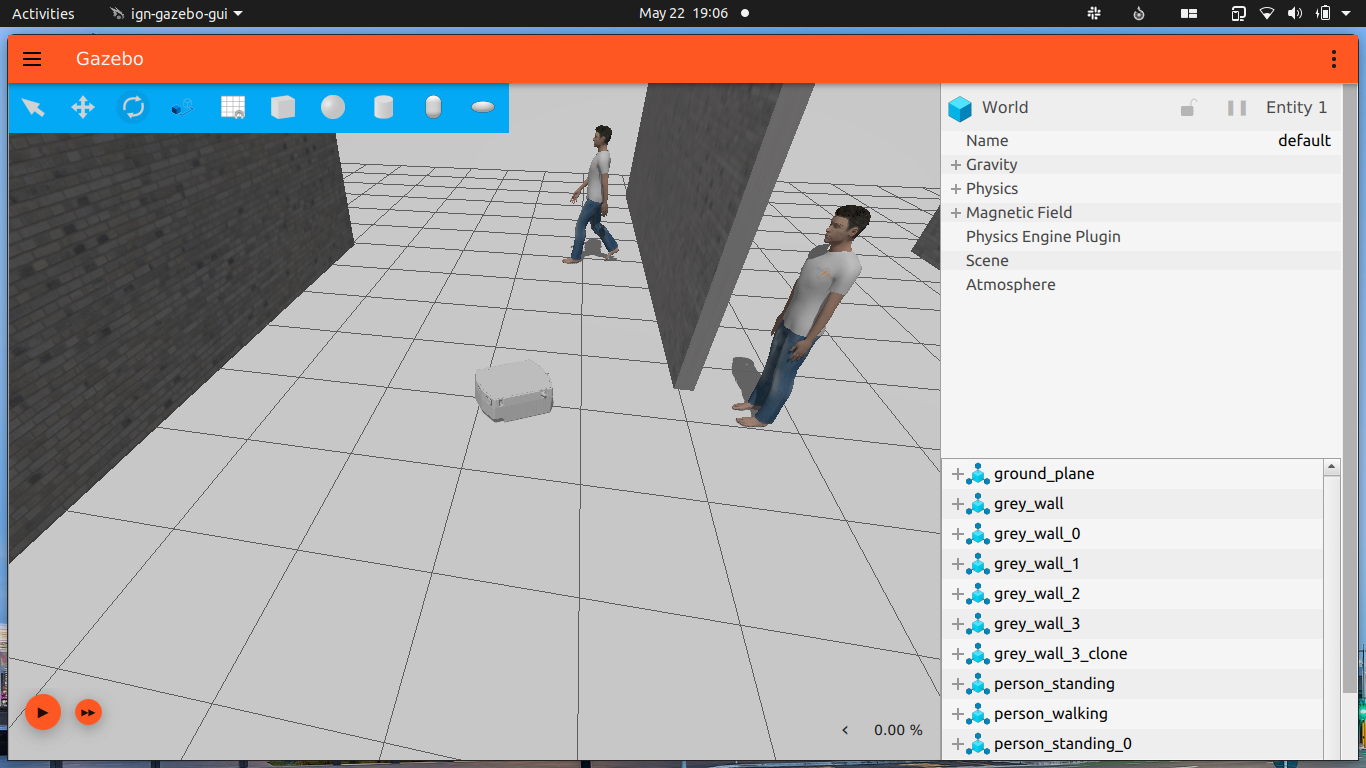
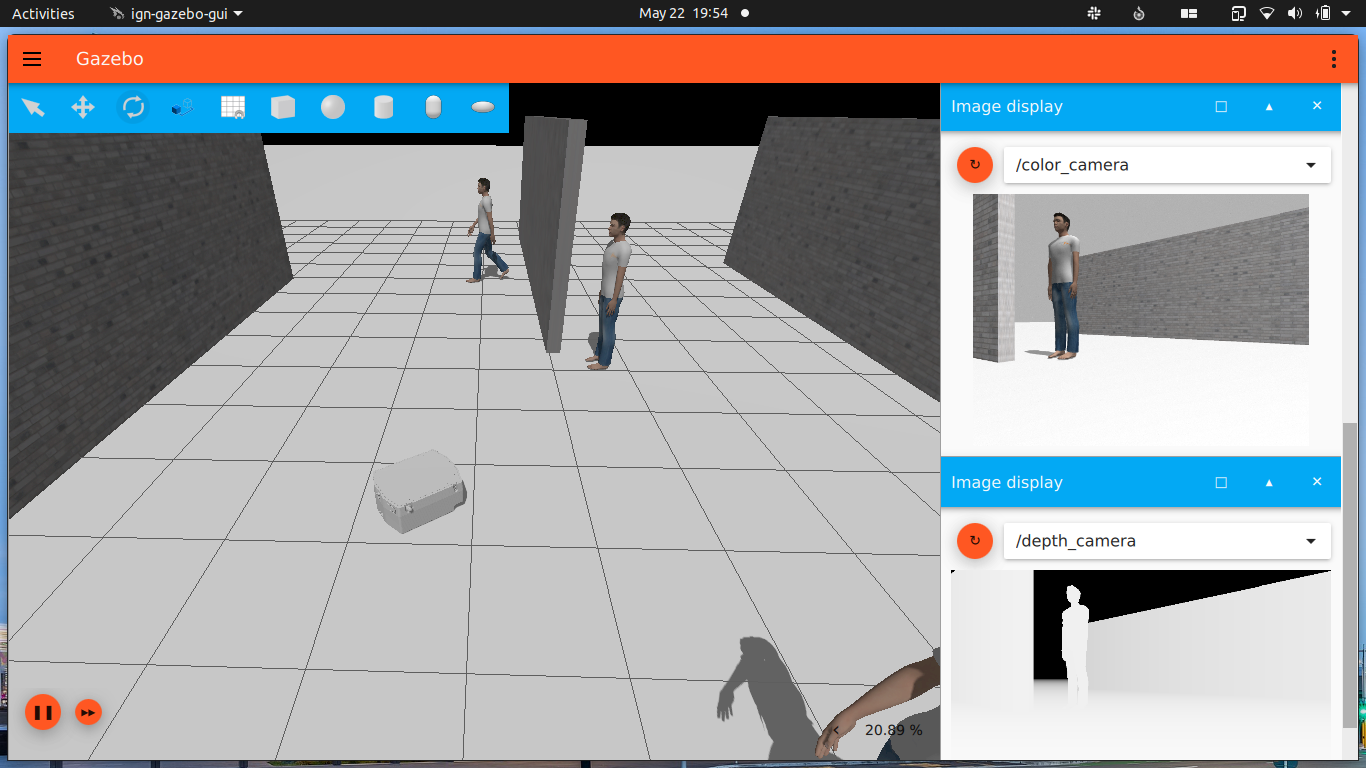
Launch with ros_ign_bridge for teleop
ros2 launch igt_ignition igt_ignition.launch.py with_bridge:=true
Make sure you UNPAUSE physics by clicking “play” button in bottom left corner of ignition
and then open another terminal and run
ros2 run teleop_twist_keyboard teleop_twist_keyboard
Publish velocities using ign topic
ign topic -t "/model/igt_one/cmd_vel" -m ignition.msgs.Twist -p "linear: {x: 2.0}, angular: {z: 0.0}"
Subscribe to topics using ign topic
ign topic -t "/igt_one/laserscan" -e
ign topic -t "/model/igt_one/odometry" -e
Navigation
Mapping with Slam Toolbox
- Install slam_toolbox from apt for ros2 foxy using:
sudo apt install ros-foxy-slam-toolbox
- Launch the simulation in ignition gazebo with ros_ign_bridge using:
ros2 launch igt_ignition igt_ignition.launch.py with_bridge:=true
-
Make sure you UNPAUSE physics by clicking “play” button in bottom left corner of ignition
-
Open another terminal and launch slam_toolbox for mapping and rviz2 using
online_sync_launch.pyfromigt_navpackage:
ros2 launch igt_nav online_sync_launch.py
- Open another terminal and run the ros2
teleop_twist_keyboardnode using:
ros2 run teleop_twist_keyboard teleop_twist_keyboard
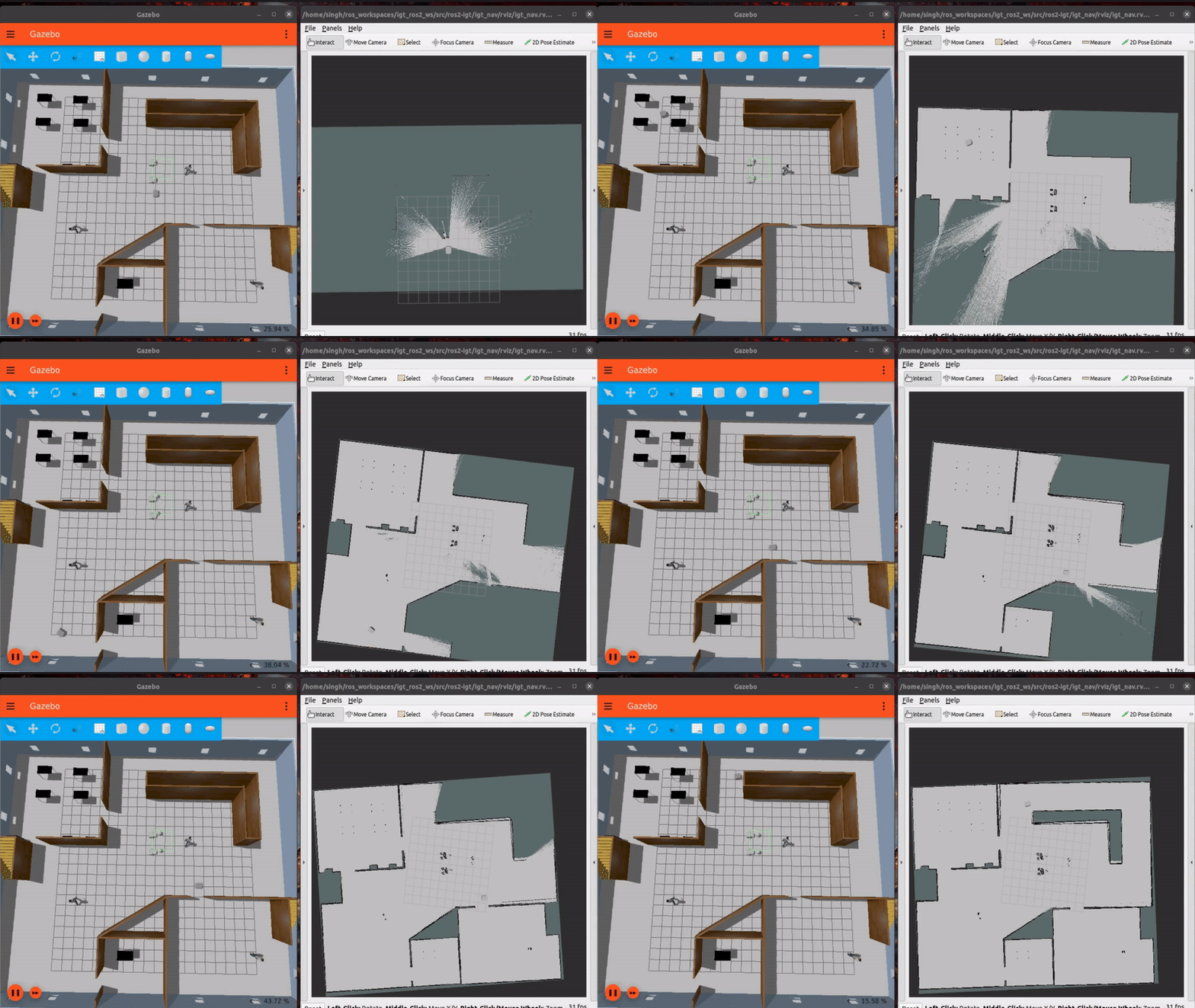
- Use teleop to control the bot and map the world (as shown in the gif below). Save the map using:
ros2 run nav2_map_server map_saver_cli -f name_of_map_file
Navigation2
- Install navstack2 for ros foxy.
- Launch the simulation in ignition gazebo using:
ros2 launch igt_ignition igt_ignition.launch.py with_bridge:=true
-
Make sure you UNPAUSE physics by clicking “play” button in bottom left corner of ignition
-
Launch navigation2 using
navigation2.launch.pylaunch file:
ros2 launch igt_nav navigation2.launch.py
File truncated at 100 lines see the full file
CONTRIBUTING
Repository Summary
| Description | |
| Checkout URI | https://github.com/acceleration-robotics/ros2-igt.git |
| VCS Type | git |
| VCS Version | main |
| Last Updated | 2021-08-24 |
| Dev Status | UNKNOWN |
| Released | UNRELEASED |
| Contributing |
Help Wanted (-)
Good First Issues (-) Pull Requests to Review (-) |
Packages
| Name | Version |
|---|---|
| igt_ignition | 0.0.0 |
| igt_nav | 0.0.0 |
README
Igt One
Installation
- Install Ignition-Edifice or greater.
-
Build ros_ign packages for foxy from source as the binaries on apt are only supported for Ignition-Citadel as of now so some features might not work with the package from apt.
- Create a workspace
mkdir -p colcon_ws/src && cd colcon_ws/src
- Clone the repo
- Build the workspace & source the setup
colcon build --symlink-install

source install/setup.bash
Launch
Ign-Gazebo
ros2 launch igt_ignition igt_ignition.launch.py
Launch with ros_ign_bridge for teleop
ros2 launch igt_ignition igt_ignition.launch.py with_bridge:=true
Make sure you UNPAUSE physics by clicking “play” button in bottom left corner of ignition
and then open another terminal and run
ros2 run teleop_twist_keyboard teleop_twist_keyboard
Publish velocities using ign topic
ign topic -t "/model/igt_one/cmd_vel" -m ignition.msgs.Twist -p "linear: {x: 2.0}, angular: {z: 0.0}"
Subscribe to topics using ign topic
ign topic -t "/igt_one/laserscan" -e
ign topic -t "/model/igt_one/odometry" -e
Navigation
Mapping with Slam Toolbox
- Install slam_toolbox from apt for ros2 foxy using:
sudo apt install ros-foxy-slam-toolbox
- Launch the simulation in ignition gazebo with ros_ign_bridge using:
ros2 launch igt_ignition igt_ignition.launch.py with_bridge:=true
-
Make sure you UNPAUSE physics by clicking “play” button in bottom left corner of ignition
-
Open another terminal and launch slam_toolbox for mapping and rviz2 using
online_sync_launch.pyfromigt_navpackage:
ros2 launch igt_nav online_sync_launch.py
- Open another terminal and run the ros2
teleop_twist_keyboardnode using:
ros2 run teleop_twist_keyboard teleop_twist_keyboard
- Use teleop to control the bot and map the world (as shown in the gif below). Save the map using:
ros2 run nav2_map_server map_saver_cli -f name_of_map_file
Navigation2
- Install navstack2 for ros foxy.
- Launch the simulation in ignition gazebo using:
ros2 launch igt_ignition igt_ignition.launch.py with_bridge:=true
-
Make sure you UNPAUSE physics by clicking “play” button in bottom left corner of ignition
-
Launch navigation2 using
navigation2.launch.pylaunch file:
ros2 launch igt_nav navigation2.launch.py
File truncated at 100 lines see the full file
CONTRIBUTING
Repository Summary
| Description | |
| Checkout URI | https://github.com/acceleration-robotics/ros2-igt.git |
| VCS Type | git |
| VCS Version | main |
| Last Updated | 2021-08-24 |
| Dev Status | UNKNOWN |
| Released | UNRELEASED |
| Contributing |
Help Wanted (-)
Good First Issues (-) Pull Requests to Review (-) |
Packages
| Name | Version |
|---|---|
| igt_ignition | 0.0.0 |
| igt_nav | 0.0.0 |
README
Igt One
Installation
- Install Ignition-Edifice or greater.
-
Build ros_ign packages for foxy from source as the binaries on apt are only supported for Ignition-Citadel as of now so some features might not work with the package from apt.
- Create a workspace
mkdir -p colcon_ws/src && cd colcon_ws/src
- Clone the repo
- Build the workspace & source the setup
colcon build --symlink-install

source install/setup.bash
Launch
Ign-Gazebo
ros2 launch igt_ignition igt_ignition.launch.py
Launch with ros_ign_bridge for teleop
ros2 launch igt_ignition igt_ignition.launch.py with_bridge:=true
Make sure you UNPAUSE physics by clicking “play” button in bottom left corner of ignition
and then open another terminal and run
ros2 run teleop_twist_keyboard teleop_twist_keyboard
Publish velocities using ign topic
ign topic -t "/model/igt_one/cmd_vel" -m ignition.msgs.Twist -p "linear: {x: 2.0}, angular: {z: 0.0}"
Subscribe to topics using ign topic
ign topic -t "/igt_one/laserscan" -e
ign topic -t "/model/igt_one/odometry" -e
Navigation
Mapping with Slam Toolbox
- Install slam_toolbox from apt for ros2 foxy using:
sudo apt install ros-foxy-slam-toolbox
- Launch the simulation in ignition gazebo with ros_ign_bridge using:
ros2 launch igt_ignition igt_ignition.launch.py with_bridge:=true
-
Make sure you UNPAUSE physics by clicking “play” button in bottom left corner of ignition
-
Open another terminal and launch slam_toolbox for mapping and rviz2 using
online_sync_launch.pyfromigt_navpackage:
ros2 launch igt_nav online_sync_launch.py
- Open another terminal and run the ros2
teleop_twist_keyboardnode using:
ros2 run teleop_twist_keyboard teleop_twist_keyboard
- Use teleop to control the bot and map the world (as shown in the gif below). Save the map using:
ros2 run nav2_map_server map_saver_cli -f name_of_map_file
Navigation2
- Install navstack2 for ros foxy.
- Launch the simulation in ignition gazebo using:
ros2 launch igt_ignition igt_ignition.launch.py with_bridge:=true
-
Make sure you UNPAUSE physics by clicking “play” button in bottom left corner of ignition
-
Launch navigation2 using
navigation2.launch.pylaunch file:
ros2 launch igt_nav navigation2.launch.py
File truncated at 100 lines see the full file
CONTRIBUTING
Repository Summary
| Description | |
| Checkout URI | https://github.com/acceleration-robotics/ros2-igt.git |
| VCS Type | git |
| VCS Version | main |
| Last Updated | 2021-08-24 |
| Dev Status | UNKNOWN |
| Released | UNRELEASED |
| Contributing |
Help Wanted (-)
Good First Issues (-) Pull Requests to Review (-) |
Packages
| Name | Version |
|---|---|
| igt_ignition | 0.0.0 |
| igt_nav | 0.0.0 |
README
Igt One
Installation
- Install Ignition-Edifice or greater.
-
Build ros_ign packages for foxy from source as the binaries on apt are only supported for Ignition-Citadel as of now so some features might not work with the package from apt.
- Create a workspace
mkdir -p colcon_ws/src && cd colcon_ws/src
- Clone the repo
- Build the workspace & source the setup
colcon build --symlink-install

source install/setup.bash
Launch
Ign-Gazebo
ros2 launch igt_ignition igt_ignition.launch.py
Launch with ros_ign_bridge for teleop
ros2 launch igt_ignition igt_ignition.launch.py with_bridge:=true
Make sure you UNPAUSE physics by clicking “play” button in bottom left corner of ignition
and then open another terminal and run
ros2 run teleop_twist_keyboard teleop_twist_keyboard
Publish velocities using ign topic
ign topic -t "/model/igt_one/cmd_vel" -m ignition.msgs.Twist -p "linear: {x: 2.0}, angular: {z: 0.0}"
Subscribe to topics using ign topic
ign topic -t "/igt_one/laserscan" -e
ign topic -t "/model/igt_one/odometry" -e
Navigation
Mapping with Slam Toolbox
- Install slam_toolbox from apt for ros2 foxy using:
sudo apt install ros-foxy-slam-toolbox
- Launch the simulation in ignition gazebo with ros_ign_bridge using:
ros2 launch igt_ignition igt_ignition.launch.py with_bridge:=true
-
Make sure you UNPAUSE physics by clicking “play” button in bottom left corner of ignition
-
Open another terminal and launch slam_toolbox for mapping and rviz2 using
online_sync_launch.pyfromigt_navpackage:
ros2 launch igt_nav online_sync_launch.py
- Open another terminal and run the ros2
teleop_twist_keyboardnode using:
ros2 run teleop_twist_keyboard teleop_twist_keyboard
- Use teleop to control the bot and map the world (as shown in the gif below). Save the map using:
ros2 run nav2_map_server map_saver_cli -f name_of_map_file
Navigation2
- Install navstack2 for ros foxy.
- Launch the simulation in ignition gazebo using:
ros2 launch igt_ignition igt_ignition.launch.py with_bridge:=true
-
Make sure you UNPAUSE physics by clicking “play” button in bottom left corner of ignition
-
Launch navigation2 using
navigation2.launch.pylaunch file:
ros2 launch igt_nav navigation2.launch.py
File truncated at 100 lines see the full file
CONTRIBUTING
Repository Summary
| Description | |
| Checkout URI | https://github.com/acceleration-robotics/ros2-igt.git |
| VCS Type | git |
| VCS Version | main |
| Last Updated | 2021-08-24 |
| Dev Status | UNKNOWN |
| Released | UNRELEASED |
| Contributing |
Help Wanted (-)
Good First Issues (-) Pull Requests to Review (-) |
Packages
| Name | Version |
|---|---|
| igt_ignition | 0.0.0 |
| igt_nav | 0.0.0 |
README
Igt One
Installation
- Install Ignition-Edifice or greater.
-
Build ros_ign packages for foxy from source as the binaries on apt are only supported for Ignition-Citadel as of now so some features might not work with the package from apt.
- Create a workspace
mkdir -p colcon_ws/src && cd colcon_ws/src
- Clone the repo
- Build the workspace & source the setup
colcon build --symlink-install

source install/setup.bash
Launch
Ign-Gazebo
ros2 launch igt_ignition igt_ignition.launch.py
Launch with ros_ign_bridge for teleop
ros2 launch igt_ignition igt_ignition.launch.py with_bridge:=true
Make sure you UNPAUSE physics by clicking “play” button in bottom left corner of ignition
and then open another terminal and run
ros2 run teleop_twist_keyboard teleop_twist_keyboard
Publish velocities using ign topic
ign topic -t "/model/igt_one/cmd_vel" -m ignition.msgs.Twist -p "linear: {x: 2.0}, angular: {z: 0.0}"
Subscribe to topics using ign topic
ign topic -t "/igt_one/laserscan" -e
ign topic -t "/model/igt_one/odometry" -e
Navigation
Mapping with Slam Toolbox
- Install slam_toolbox from apt for ros2 foxy using:
sudo apt install ros-foxy-slam-toolbox
- Launch the simulation in ignition gazebo with ros_ign_bridge using:
ros2 launch igt_ignition igt_ignition.launch.py with_bridge:=true
-
Make sure you UNPAUSE physics by clicking “play” button in bottom left corner of ignition
-
Open another terminal and launch slam_toolbox for mapping and rviz2 using
online_sync_launch.pyfromigt_navpackage:
ros2 launch igt_nav online_sync_launch.py
- Open another terminal and run the ros2
teleop_twist_keyboardnode using:
ros2 run teleop_twist_keyboard teleop_twist_keyboard
- Use teleop to control the bot and map the world (as shown in the gif below). Save the map using:
ros2 run nav2_map_server map_saver_cli -f name_of_map_file
Navigation2
- Install navstack2 for ros foxy.
- Launch the simulation in ignition gazebo using:
ros2 launch igt_ignition igt_ignition.launch.py with_bridge:=true
-
Make sure you UNPAUSE physics by clicking “play” button in bottom left corner of ignition
-
Launch navigation2 using
navigation2.launch.pylaunch file:
ros2 launch igt_nav navigation2.launch.py
File truncated at 100 lines see the full file
CONTRIBUTING
Repository Summary
| Description | |
| Checkout URI | https://github.com/acceleration-robotics/ros2-igt.git |
| VCS Type | git |
| VCS Version | main |
| Last Updated | 2021-08-24 |
| Dev Status | UNKNOWN |
| Released | UNRELEASED |
| Contributing |
Help Wanted (-)
Good First Issues (-) Pull Requests to Review (-) |
Packages
| Name | Version |
|---|---|
| igt_ignition | 0.0.0 |
| igt_nav | 0.0.0 |
README
Igt One
Installation
- Install Ignition-Edifice or greater.
-
Build ros_ign packages for foxy from source as the binaries on apt are only supported for Ignition-Citadel as of now so some features might not work with the package from apt.
- Create a workspace
mkdir -p colcon_ws/src && cd colcon_ws/src
- Clone the repo
- Build the workspace & source the setup
colcon build --symlink-install

source install/setup.bash
Launch
Ign-Gazebo
ros2 launch igt_ignition igt_ignition.launch.py
Launch with ros_ign_bridge for teleop
ros2 launch igt_ignition igt_ignition.launch.py with_bridge:=true
Make sure you UNPAUSE physics by clicking “play” button in bottom left corner of ignition
and then open another terminal and run
ros2 run teleop_twist_keyboard teleop_twist_keyboard
Publish velocities using ign topic
ign topic -t "/model/igt_one/cmd_vel" -m ignition.msgs.Twist -p "linear: {x: 2.0}, angular: {z: 0.0}"
Subscribe to topics using ign topic
ign topic -t "/igt_one/laserscan" -e
ign topic -t "/model/igt_one/odometry" -e
Navigation
Mapping with Slam Toolbox
- Install slam_toolbox from apt for ros2 foxy using:
sudo apt install ros-foxy-slam-toolbox
- Launch the simulation in ignition gazebo with ros_ign_bridge using:
ros2 launch igt_ignition igt_ignition.launch.py with_bridge:=true
-
Make sure you UNPAUSE physics by clicking “play” button in bottom left corner of ignition
-
Open another terminal and launch slam_toolbox for mapping and rviz2 using
online_sync_launch.pyfromigt_navpackage:
ros2 launch igt_nav online_sync_launch.py
- Open another terminal and run the ros2
teleop_twist_keyboardnode using:
ros2 run teleop_twist_keyboard teleop_twist_keyboard
- Use teleop to control the bot and map the world (as shown in the gif below). Save the map using:
ros2 run nav2_map_server map_saver_cli -f name_of_map_file
Navigation2
- Install navstack2 for ros foxy.
- Launch the simulation in ignition gazebo using:
ros2 launch igt_ignition igt_ignition.launch.py with_bridge:=true
-
Make sure you UNPAUSE physics by clicking “play” button in bottom left corner of ignition
-
Launch navigation2 using
navigation2.launch.pylaunch file:
ros2 launch igt_nav navigation2.launch.py
File truncated at 100 lines see the full file
CONTRIBUTING
Repository Summary
| Description | |
| Checkout URI | https://github.com/acceleration-robotics/ros2-igt.git |
| VCS Type | git |
| VCS Version | main |
| Last Updated | 2021-08-24 |
| Dev Status | UNKNOWN |
| Released | UNRELEASED |
| Contributing |
Help Wanted (-)
Good First Issues (-) Pull Requests to Review (-) |
Packages
| Name | Version |
|---|---|
| igt_ignition | 0.0.0 |
| igt_nav | 0.0.0 |
README
Igt One
Installation
- Install Ignition-Edifice or greater.
-
Build ros_ign packages for foxy from source as the binaries on apt are only supported for Ignition-Citadel as of now so some features might not work with the package from apt.
- Create a workspace
mkdir -p colcon_ws/src && cd colcon_ws/src
- Clone the repo
- Build the workspace & source the setup
colcon build --symlink-install

source install/setup.bash
Launch
Ign-Gazebo
ros2 launch igt_ignition igt_ignition.launch.py
Launch with ros_ign_bridge for teleop
ros2 launch igt_ignition igt_ignition.launch.py with_bridge:=true
Make sure you UNPAUSE physics by clicking “play” button in bottom left corner of ignition
and then open another terminal and run
ros2 run teleop_twist_keyboard teleop_twist_keyboard
Publish velocities using ign topic
ign topic -t "/model/igt_one/cmd_vel" -m ignition.msgs.Twist -p "linear: {x: 2.0}, angular: {z: 0.0}"
Subscribe to topics using ign topic
ign topic -t "/igt_one/laserscan" -e
ign topic -t "/model/igt_one/odometry" -e
Navigation
Mapping with Slam Toolbox
- Install slam_toolbox from apt for ros2 foxy using:
sudo apt install ros-foxy-slam-toolbox
- Launch the simulation in ignition gazebo with ros_ign_bridge using:
ros2 launch igt_ignition igt_ignition.launch.py with_bridge:=true
-
Make sure you UNPAUSE physics by clicking “play” button in bottom left corner of ignition
-
Open another terminal and launch slam_toolbox for mapping and rviz2 using
online_sync_launch.pyfromigt_navpackage:
ros2 launch igt_nav online_sync_launch.py
- Open another terminal and run the ros2
teleop_twist_keyboardnode using:
ros2 run teleop_twist_keyboard teleop_twist_keyboard
- Use teleop to control the bot and map the world (as shown in the gif below). Save the map using:
ros2 run nav2_map_server map_saver_cli -f name_of_map_file
Navigation2
- Install navstack2 for ros foxy.
- Launch the simulation in ignition gazebo using:
ros2 launch igt_ignition igt_ignition.launch.py with_bridge:=true
-
Make sure you UNPAUSE physics by clicking “play” button in bottom left corner of ignition
-
Launch navigation2 using
navigation2.launch.pylaunch file:
ros2 launch igt_nav navigation2.launch.py
File truncated at 100 lines see the full file
CONTRIBUTING
Repository Summary
| Description | |
| Checkout URI | https://github.com/acceleration-robotics/ros2-igt.git |
| VCS Type | git |
| VCS Version | main |
| Last Updated | 2021-08-24 |
| Dev Status | UNKNOWN |
| Released | UNRELEASED |
| Contributing |
Help Wanted (-)
Good First Issues (-) Pull Requests to Review (-) |
Packages
| Name | Version |
|---|---|
| igt_ignition | 0.0.0 |
| igt_nav | 0.0.0 |
README
Igt One
Installation
- Install Ignition-Edifice or greater.
-
Build ros_ign packages for foxy from source as the binaries on apt are only supported for Ignition-Citadel as of now so some features might not work with the package from apt.
- Create a workspace
mkdir -p colcon_ws/src && cd colcon_ws/src
- Clone the repo
- Build the workspace & source the setup
colcon build --symlink-install

source install/setup.bash
Launch
Ign-Gazebo
ros2 launch igt_ignition igt_ignition.launch.py
Launch with ros_ign_bridge for teleop
ros2 launch igt_ignition igt_ignition.launch.py with_bridge:=true
Make sure you UNPAUSE physics by clicking “play” button in bottom left corner of ignition
and then open another terminal and run
ros2 run teleop_twist_keyboard teleop_twist_keyboard
Publish velocities using ign topic
ign topic -t "/model/igt_one/cmd_vel" -m ignition.msgs.Twist -p "linear: {x: 2.0}, angular: {z: 0.0}"
Subscribe to topics using ign topic
ign topic -t "/igt_one/laserscan" -e
ign topic -t "/model/igt_one/odometry" -e
Navigation
Mapping with Slam Toolbox
- Install slam_toolbox from apt for ros2 foxy using:
sudo apt install ros-foxy-slam-toolbox
- Launch the simulation in ignition gazebo with ros_ign_bridge using:
ros2 launch igt_ignition igt_ignition.launch.py with_bridge:=true
-
Make sure you UNPAUSE physics by clicking “play” button in bottom left corner of ignition
-
Open another terminal and launch slam_toolbox for mapping and rviz2 using
online_sync_launch.pyfromigt_navpackage:
ros2 launch igt_nav online_sync_launch.py
- Open another terminal and run the ros2
teleop_twist_keyboardnode using:
ros2 run teleop_twist_keyboard teleop_twist_keyboard
- Use teleop to control the bot and map the world (as shown in the gif below). Save the map using:
ros2 run nav2_map_server map_saver_cli -f name_of_map_file
Navigation2
- Install navstack2 for ros foxy.
- Launch the simulation in ignition gazebo using:
ros2 launch igt_ignition igt_ignition.launch.py with_bridge:=true
-
Make sure you UNPAUSE physics by clicking “play” button in bottom left corner of ignition
-
Launch navigation2 using
navigation2.launch.pylaunch file:
ros2 launch igt_nav navigation2.launch.py
File truncated at 100 lines see the full file
CONTRIBUTING
Repository Summary
| Description | |
| Checkout URI | https://github.com/acceleration-robotics/ros2-igt.git |
| VCS Type | git |
| VCS Version | main |
| Last Updated | 2021-08-24 |
| Dev Status | UNKNOWN |
| Released | UNRELEASED |
| Contributing |
Help Wanted (-)
Good First Issues (-) Pull Requests to Review (-) |
Packages
| Name | Version |
|---|---|
| igt_ignition | 0.0.0 |
| igt_nav | 0.0.0 |
README
Igt One
Installation
- Install Ignition-Edifice or greater.
-
Build ros_ign packages for foxy from source as the binaries on apt are only supported for Ignition-Citadel as of now so some features might not work with the package from apt.
- Create a workspace
mkdir -p colcon_ws/src && cd colcon_ws/src
- Clone the repo
- Build the workspace & source the setup
colcon build --symlink-install

source install/setup.bash
Launch
Ign-Gazebo
ros2 launch igt_ignition igt_ignition.launch.py
Launch with ros_ign_bridge for teleop
ros2 launch igt_ignition igt_ignition.launch.py with_bridge:=true
Make sure you UNPAUSE physics by clicking “play” button in bottom left corner of ignition
and then open another terminal and run
ros2 run teleop_twist_keyboard teleop_twist_keyboard
Publish velocities using ign topic
ign topic -t "/model/igt_one/cmd_vel" -m ignition.msgs.Twist -p "linear: {x: 2.0}, angular: {z: 0.0}"
Subscribe to topics using ign topic
ign topic -t "/igt_one/laserscan" -e
ign topic -t "/model/igt_one/odometry" -e
Navigation
Mapping with Slam Toolbox
- Install slam_toolbox from apt for ros2 foxy using:
sudo apt install ros-foxy-slam-toolbox
- Launch the simulation in ignition gazebo with ros_ign_bridge using:
ros2 launch igt_ignition igt_ignition.launch.py with_bridge:=true
-
Make sure you UNPAUSE physics by clicking “play” button in bottom left corner of ignition
-
Open another terminal and launch slam_toolbox for mapping and rviz2 using
online_sync_launch.pyfromigt_navpackage:
ros2 launch igt_nav online_sync_launch.py
- Open another terminal and run the ros2
teleop_twist_keyboardnode using:
ros2 run teleop_twist_keyboard teleop_twist_keyboard
- Use teleop to control the bot and map the world (as shown in the gif below). Save the map using:
ros2 run nav2_map_server map_saver_cli -f name_of_map_file
Navigation2
- Install navstack2 for ros foxy.
- Launch the simulation in ignition gazebo using:
ros2 launch igt_ignition igt_ignition.launch.py with_bridge:=true
-
Make sure you UNPAUSE physics by clicking “play” button in bottom left corner of ignition
-
Launch navigation2 using
navigation2.launch.pylaunch file:
ros2 launch igt_nav navigation2.launch.py
File truncated at 100 lines see the full file