 ROS Index
Repository Summary
| Description | |
| Checkout URI | https://github.com/harunteper/auna.git |
| VCS Type | git |
| VCS Version | main |
| Last Updated | 2026-09-14 |
| Dev Status | UNKNOWN |
| Released | UNRELEASED |
| Contributing |
Help Wanted (-)
Good First Issues (-) Pull Requests to Review (-) |
Packages
| Name | Version |
|---|---|
| auna_cacc | 1.0.0 |
| auna_comm | 1.0.0 |
| auna_control | 1.0.0 |
| auna_ekf | 1.0.0 |
| auna_f110 | 1.0.0 |
| auna_gazebo | 1.0.0 |
| auna_ground_truth | 1.0.0 |
| auna_its_msgs | 1.0.0 |
| auna_msgs | 1.0.0 |
| auna_nav2 | 1.0.0 |
| auna_omnet | 1.0.0 |
| auna_teleoperation | 1.0.0 |
| auna_template | 1.0.0 |
| auna_tf | 1.0.0 |
| auna_wallfollowing | 1.0.0 |
| auna_waypoints | 1.0.0 |
README
AuNa: Autonomous Navigation System Simulator


AuNa is an open-source ROS 2 framework and simulation testbed for reproducible autonomous-navigation and multi-robot experiments. It packages the pieces normally assembled by hand for each new study — robot models, a Gazebo world, Nav2, a cooperative controller, V2X messaging, localization and visualization — into a single Docker Compose deployment, so that an entire cooperative-driving scenario starts from one command and runs the same way on another machine.
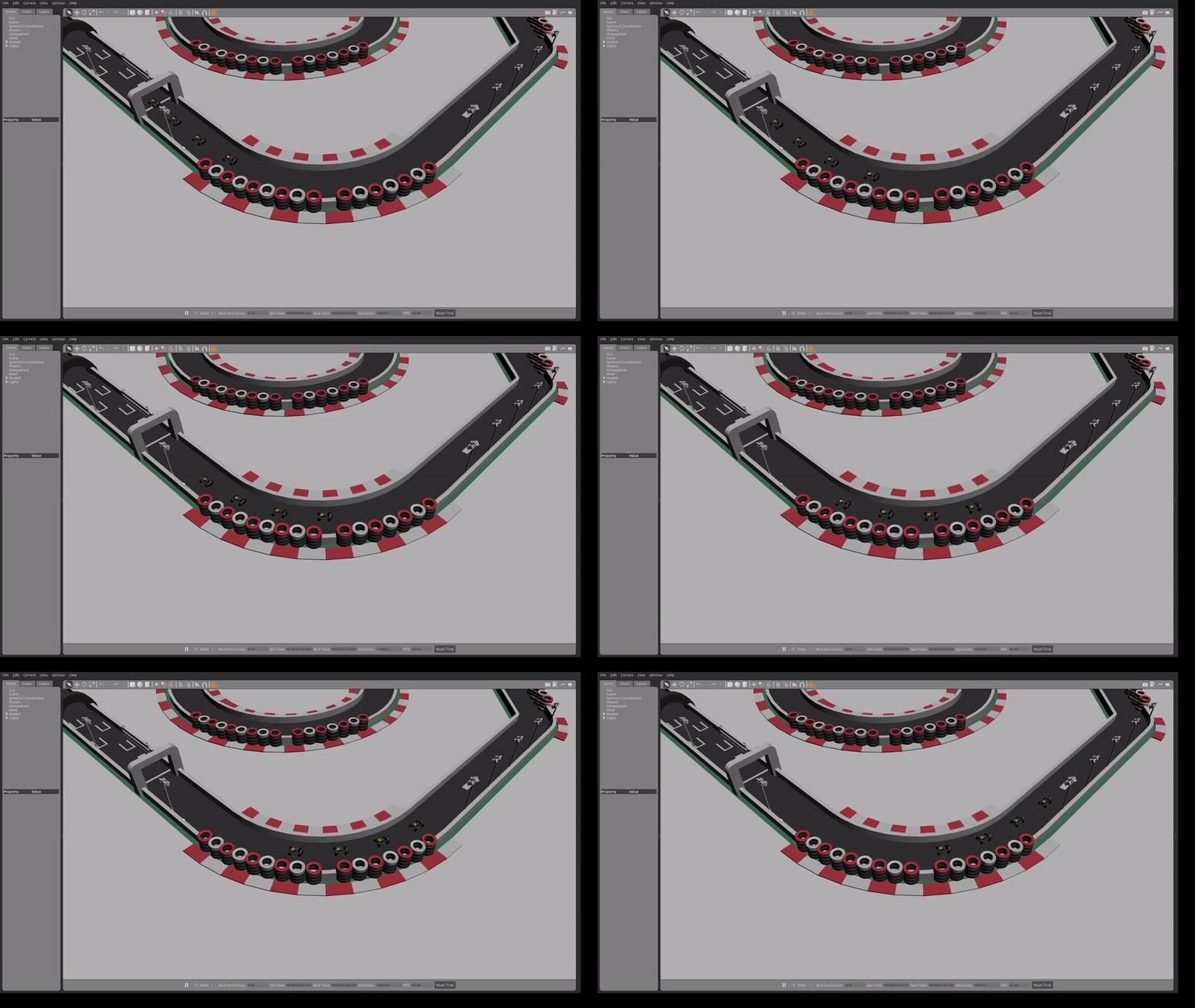
Who it is for. Robotics and vehicular-networking researchers, students, and ROS 2 developers who need a working multi-robot autonomous-driving scenario as a starting point rather than a from-scratch integration effort.
The problem it addresses. Cooperative-driving experiments span robotics, control, and communication, and each of those layers has its own simulator. Standing up one consistent scenario across them — with several robots, correct namespacing, transforms, and a repeatable environment — is a substantial integration task that is typically redone per project and rarely reproducible across machines. AuNa provides that integration as maintained infrastructure.
Capabilities
-
Multi-robot Gazebo simulation — namespaced robots (
robot1,robot2, …) spawned into shared worlds, with per-robot navigation and control stacks. - Nav2 integration — path planning, obstacle avoidance, waypoint following, and a custom behavior tree.
- CACC / platooning — a Cooperative Adaptive Cruise Control controller for maintaining inter-vehicle distance in a platoon.
- Wall following — a LiDAR-based PID wall-following controller.
- V2X communication — ETSI ITS-G5 CAM message handling, with optional OMNeT++ network simulation in place of direct message exchange.
- Localization — EKF sensor fusion and ground-truth pose publishing for comparison against estimated state.
-
Runtime control switching — an RViz panel selects each robot’s input
source (
wallfollowing,teleop,nav2,cacc, orOFF) while running. - Reproducible deployment — Docker Compose profiles define complete scenarios; no manual ROS 2 installation is required.
- Physical platform support — an F1TENTH-class package for running the same stack on scaled hardware.
Quick start
Prerequisites: Docker with Compose v2 support, and an X11 display for the Gazebo and RViz windows.
git clone https://github.com/HarunTeper/AuNa.git
cd AuNa
Select the world in the .env file, then launch a scenario profile. The world
and the profile must match:
# Racing scenario — 1 robot on a racetrack
# set WORLD_NAME=racetrack_decorated in .env
docker compose --profile racing up
# Platooning scenario — 3 robots in an open arena
# set WORLD_NAME=arena in .env
docker compose --profile platooning up
Gazebo and RViz start automatically. In the RViz control panel, enter a robot
namespace (robot1, robot2, robot3) and select an input source to begin
autonomous control. On the racetrack, wallfollowing drives the single robot;
in the arena, cacc makes robot2 and robot3 follow robot1.
The first run builds the container images and takes several minutes.
Architecture
AuNa is a ROS 2 workspace under packages/src/, with configuration, worlds,
maps, and waypoints shared through auna_common/. Each Docker Compose service
runs one ROS 2 node or launch file; a scenario profile composes the services
that make up a complete experiment, replicated per robot namespace.
LiDAR / odometry ─┐
                  ├─→ localization (auna_ekf, auna_ground_truth, auna_tf)
Gazebo world ─────┘                │
                                   ▼
       ┌────────── control sources (one active per robot) ──────────┐
       │  auna_nav2   auna_cacc   auna_wallfollowing   teleop       │
       └────────────────────────────┬───────────────────────────────┘
                                    ▼
                    auna_control (command multiplexer)
                                    ▼
                          robot in Gazebo / F1TENTH

       auna_comm ── CAM / V2X messages ── auna_omnet (optional network sim)
File truncated at 100 lines see the full file
CONTRIBUTING
Contributing to AuNa
Thanks for your interest in AuNa. This document covers the development workflow, what to test before opening a pull request, and the expectations that are specific to a multi-robot ROS 2 project.
By contributing, you agree that your contribution is licensed under the MIT License, the license of this repository.
Getting set up
AuNa is developed inside Docker; a local ROS 2 installation is not required.
git clone https://github.com/YOUR_USERNAME/AuNa.git
cd AuNa
docker compose run development
The development service builds and sources the workspace on startup. Inside
the container, the workspace lives under packages/.
Alternatively, .devcontainer/ provides the same environment for VS Code.
Build and test
From inside the development container:
cd packages
colcon build --symlink-install
colcon test
colcon test-result --verbose
To work on a single package:
colcon build --packages-select auna_wallfollowing
colcon test --packages-select auna_wallfollowing
scripts/run_quality_checks.sh runs copyright-header insertion, linting, and
tests in one pass; see scripts/README.md.
CI runs the same colcon build and test on ROS 2 Humble and separately verifies that the Docker image builds. Both must pass before a pull request is merged.
Coding style
-
C++: C++17, following the
ROS 2 C++ style guide.
Classes in
PascalCase, functions and variables insnake_case, member variables with a trailing underscore (publisher_), constants inUPPER_SNAKE_CASE. Formatting is defined by.clang-format. -
Python: PEP 8, checked against
.flake8. -
Copyright headers: every source file carries the MIT header. Run
scripts/add_copyright.shto add it to new files.
Linting runs as part of colcon test via ament_lint_auto, so a clean test run
also means a clean lint.
Expectations for ROS 2 package changes
- Node parameters must be declared with
declare_parameterand given a sensible default; add the parameter to the matching file underauna_common/config/with a comment explaining it. - Do not hardcode topic names, frame IDs, or robot indices. Topics belong in
parameters or in
auna_common/config/, and nodes must work under any robot namespace. - Launch files are Python (
.launch.py) and should accept the namespace and robot index used by the rest of the stack. - Changing an existing topic, service, or message is a breaking change. Say so explicitly in the pull request and explain why it is necessary — other packages and saved configurations depend on these interfaces.
- New dependencies go in
package.xmlas well asCMakeLists.txt, so thatrosdepcan resolve them in CI.
Testing multi-robot, Gazebo, and Docker changes
Automated tests cannot cover simulation behavior, so describe what you ran.
-
Algorithm changes (controllers, filters, estimators): add a unit test
where the logic can be isolated from ROS interfaces. See
packages/src/auna_wallfollowing/test/for an example that tests a control law directly. -
Multi-robot changes: run the platooning scenario
(
WORLD_NAME=arena,docker compose --profile platooning up) and confirm all three robots spawn, are correctly namespaced, and respond to their own control input only. - Gazebo or world changes: launch both worlds and confirm the robots spawn at sane poses and that transforms and the map align in RViz.
-
Docker or Compose changes: rebuild from scratch
(
docker compose build --no-cache) and start at least one full scenario profile. Note whether any profile membership changed — a service added to a scenario profile changes what every user of that profile runs. - Parameter changes: state the previous and new default and why the change is safe for existing users.
Reporting issues
File truncated at 100 lines see the full file
Repository Summary
| Description | |
| Checkout URI | https://github.com/harunteper/auna.git |
| VCS Type | git |
| VCS Version | main |
| Last Updated | 2026-09-14 |
| Dev Status | UNKNOWN |
| Released | UNRELEASED |
| Contributing |
Help Wanted (-)
Good First Issues (-) Pull Requests to Review (-) |
Packages
| Name | Version |
|---|---|
| auna_cacc | 1.0.0 |
| auna_comm | 1.0.0 |
| auna_control | 1.0.0 |
| auna_ekf | 1.0.0 |
| auna_f110 | 1.0.0 |
| auna_gazebo | 1.0.0 |
| auna_ground_truth | 1.0.0 |
| auna_its_msgs | 1.0.0 |
| auna_msgs | 1.0.0 |
| auna_nav2 | 1.0.0 |
| auna_omnet | 1.0.0 |
| auna_teleoperation | 1.0.0 |
| auna_template | 1.0.0 |
| auna_tf | 1.0.0 |
| auna_wallfollowing | 1.0.0 |
| auna_waypoints | 1.0.0 |
README
AuNa: Autonomous Navigation System Simulator
AuNa is an open-source ROS 2 framework and simulation testbed for reproducible autonomous-navigation and multi-robot experiments. It packages the pieces normally assembled by hand for each new study — robot models, a Gazebo world, Nav2, a cooperative controller, V2X messaging, localization and visualization — into a single Docker Compose deployment, so that an entire cooperative-driving scenario starts from one command and runs the same way on another machine.
Who it is for. Robotics and vehicular-networking researchers, students, and ROS 2 developers who need a working multi-robot autonomous-driving scenario as a starting point rather than a from-scratch integration effort.
The problem it addresses. Cooperative-driving experiments span robotics, control, and communication, and each of those layers has its own simulator. Standing up one consistent scenario across them — with several robots, correct namespacing, transforms, and a repeatable environment — is a substantial integration task that is typically redone per project and rarely reproducible across machines. AuNa provides that integration as maintained infrastructure.
Capabilities
-
Multi-robot Gazebo simulation — namespaced robots (
robot1,robot2, …) spawned into shared worlds, with per-robot navigation and control stacks. - Nav2 integration — path planning, obstacle avoidance, waypoint following, and a custom behavior tree.
- CACC / platooning — a Cooperative Adaptive Cruise Control controller for maintaining inter-vehicle distance in a platoon.
- Wall following — a LiDAR-based PID wall-following controller.
- V2X communication — ETSI ITS-G5 CAM message handling, with optional OMNeT++ network simulation in place of direct message exchange.
- Localization — EKF sensor fusion and ground-truth pose publishing for comparison against estimated state.
-
Runtime control switching — an RViz panel selects each robot’s input
source (
wallfollowing,teleop,nav2,cacc, orOFF) while running. - Reproducible deployment — Docker Compose profiles define complete scenarios; no manual ROS 2 installation is required.
- Physical platform support — an F1TENTH-class package for running the same stack on scaled hardware.
Quick start
Prerequisites: Docker with Compose v2 support, and an X11 display for the Gazebo and RViz windows.
git clone https://github.com/HarunTeper/AuNa.git
cd AuNa
Select the world in the .env file, then launch a scenario profile. The world
and the profile must match:
# Racing scenario — 1 robot on a racetrack
# set WORLD_NAME=racetrack_decorated in .env
docker compose --profile racing up
# Platooning scenario — 3 robots in an open arena
# set WORLD_NAME=arena in .env
docker compose --profile platooning up
Gazebo and RViz start automatically. In the RViz control panel, enter a robot
namespace (robot1, robot2, robot3) and select an input source to begin
autonomous control. On the racetrack, wallfollowing drives the single robot;
in the arena, cacc makes robot2 and robot3 follow robot1.
The first run builds the container images and takes several minutes.
Architecture
AuNa is a ROS 2 workspace under packages/src/, with configuration, worlds,
maps, and waypoints shared through auna_common/. Each Docker Compose service
runs one ROS 2 node or launch file; a scenario profile composes the services
that make up a complete experiment, replicated per robot namespace.
LiDAR / odometry ─┐
                  ├─→ localization (auna_ekf, auna_ground_truth, auna_tf)
Gazebo world ─────┘                │
                                   ▼
       ┌────────── control sources (one active per robot) ──────────┐
       │  auna_nav2   auna_cacc   auna_wallfollowing   teleop       │
       └────────────────────────────┬───────────────────────────────┘
                                    ▼
                    auna_control (command multiplexer)
                                    ▼
                          robot in Gazebo / F1TENTH

       auna_comm ── CAM / V2X messages ── auna_omnet (optional network sim)
File truncated at 100 lines see the full file
CONTRIBUTING
Contributing to AuNa
Thanks for your interest in AuNa. This document covers the development workflow, what to test before opening a pull request, and the expectations that are specific to a multi-robot ROS 2 project.
By contributing, you agree that your contribution is licensed under the MIT License, the license of this repository.
Getting set up
AuNa is developed inside Docker; a local ROS 2 installation is not required.
git clone https://github.com/YOUR_USERNAME/AuNa.git
cd AuNa
docker compose run development
The development service builds and sources the workspace on startup. Inside
the container, the workspace lives under packages/.
Alternatively, .devcontainer/ provides the same environment for VS Code.
Build and test
From inside the development container:
cd packages
colcon build --symlink-install
colcon test
colcon test-result --verbose
To work on a single package:
colcon build --packages-select auna_wallfollowing
colcon test --packages-select auna_wallfollowing
scripts/run_quality_checks.sh runs copyright-header insertion, linting, and
tests in one pass; see scripts/README.md.
CI runs the same colcon build and test on ROS 2 Humble and separately verifies that the Docker image builds. Both must pass before a pull request is merged.
Coding style
-
C++: C++17, following the
ROS 2 C++ style guide.
Classes in
PascalCase, functions and variables insnake_case, member variables with a trailing underscore (publisher_), constants inUPPER_SNAKE_CASE. Formatting is defined by.clang-format. -
Python: PEP 8, checked against
.flake8. -
Copyright headers: every source file carries the MIT header. Run
scripts/add_copyright.shto add it to new files.
Linting runs as part of colcon test via ament_lint_auto, so a clean test run
also means a clean lint.
Expectations for ROS 2 package changes
- Node parameters must be declared with
declare_parameterand given a sensible default; add the parameter to the matching file underauna_common/config/with a comment explaining it. - Do not hardcode topic names, frame IDs, or robot indices. Topics belong in
parameters or in
auna_common/config/, and nodes must work under any robot namespace. - Launch files are Python (
.launch.py) and should accept the namespace and robot index used by the rest of the stack. - Changing an existing topic, service, or message is a breaking change. Say so explicitly in the pull request and explain why it is necessary — other packages and saved configurations depend on these interfaces.
- New dependencies go in
package.xmlas well asCMakeLists.txt, so thatrosdepcan resolve them in CI.
Testing multi-robot, Gazebo, and Docker changes
Automated tests cannot cover simulation behavior, so describe what you ran.
-
Algorithm changes (controllers, filters, estimators): add a unit test
where the logic can be isolated from ROS interfaces. See
packages/src/auna_wallfollowing/test/for an example that tests a control law directly. -
Multi-robot changes: run the platooning scenario
(
WORLD_NAME=arena,docker compose --profile platooning up) and confirm all three robots spawn, are correctly namespaced, and respond to their own control input only. - Gazebo or world changes: launch both worlds and confirm the robots spawn at sane poses and that transforms and the map align in RViz.
-
Docker or Compose changes: rebuild from scratch
(
docker compose build --no-cache) and start at least one full scenario profile. Note whether any profile membership changed — a service added to a scenario profile changes what every user of that profile runs. - Parameter changes: state the previous and new default and why the change is safe for existing users.
Reporting issues
File truncated at 100 lines see the full file
Repository Summary
| Description | |
| Checkout URI | https://github.com/harunteper/auna.git |
| VCS Type | git |
| VCS Version | main |
| Last Updated | 2026-09-14 |
| Dev Status | UNKNOWN |
| Released | UNRELEASED |
| Contributing |
Help Wanted (-)
Good First Issues (-) Pull Requests to Review (-) |
Packages
| Name | Version |
|---|---|
| auna_cacc | 1.0.0 |
| auna_comm | 1.0.0 |
| auna_control | 1.0.0 |
| auna_ekf | 1.0.0 |
| auna_f110 | 1.0.0 |
| auna_gazebo | 1.0.0 |
| auna_ground_truth | 1.0.0 |
| auna_its_msgs | 1.0.0 |
| auna_msgs | 1.0.0 |
| auna_nav2 | 1.0.0 |
| auna_omnet | 1.0.0 |
| auna_teleoperation | 1.0.0 |
| auna_template | 1.0.0 |
| auna_tf | 1.0.0 |
| auna_wallfollowing | 1.0.0 |
| auna_waypoints | 1.0.0 |
README
AuNa: Autonomous Navigation System Simulator
AuNa is an open-source ROS 2 framework and simulation testbed for reproducible autonomous-navigation and multi-robot experiments. It packages the pieces normally assembled by hand for each new study — robot models, a Gazebo world, Nav2, a cooperative controller, V2X messaging, localization and visualization — into a single Docker Compose deployment, so that an entire cooperative-driving scenario starts from one command and runs the same way on another machine.
Who it is for. Robotics and vehicular-networking researchers, students, and ROS 2 developers who need a working multi-robot autonomous-driving scenario as a starting point rather than a from-scratch integration effort.
The problem it addresses. Cooperative-driving experiments span robotics, control, and communication, and each of those layers has its own simulator. Standing up one consistent scenario across them — with several robots, correct namespacing, transforms, and a repeatable environment — is a substantial integration task that is typically redone per project and rarely reproducible across machines. AuNa provides that integration as maintained infrastructure.
Capabilities
-
Multi-robot Gazebo simulation — namespaced robots (
robot1,robot2, …) spawned into shared worlds, with per-robot navigation and control stacks. - Nav2 integration — path planning, obstacle avoidance, waypoint following, and a custom behavior tree.
- CACC / platooning — a Cooperative Adaptive Cruise Control controller for maintaining inter-vehicle distance in a platoon.
- Wall following — a LiDAR-based PID wall-following controller.
- V2X communication — ETSI ITS-G5 CAM message handling, with optional OMNeT++ network simulation in place of direct message exchange.
- Localization — EKF sensor fusion and ground-truth pose publishing for comparison against estimated state.
-
Runtime control switching — an RViz panel selects each robot’s input
source (
wallfollowing,teleop,nav2,cacc, orOFF) while running. - Reproducible deployment — Docker Compose profiles define complete scenarios; no manual ROS 2 installation is required.
- Physical platform support — an F1TENTH-class package for running the same stack on scaled hardware.
Quick start
Prerequisites: Docker with Compose v2 support, and an X11 display for the Gazebo and RViz windows.
git clone https://github.com/HarunTeper/AuNa.git
cd AuNa
Select the world in the .env file, then launch a scenario profile. The world
and the profile must match:
# Racing scenario — 1 robot on a racetrack
# set WORLD_NAME=racetrack_decorated in .env
docker compose --profile racing up
# Platooning scenario — 3 robots in an open arena
# set WORLD_NAME=arena in .env
docker compose --profile platooning up
Gazebo and RViz start automatically. In the RViz control panel, enter a robot
namespace (robot1, robot2, robot3) and select an input source to begin
autonomous control. On the racetrack, wallfollowing drives the single robot;
in the arena, cacc makes robot2 and robot3 follow robot1.
The first run builds the container images and takes several minutes.
Architecture
AuNa is a ROS 2 workspace under packages/src/, with configuration, worlds,
maps, and waypoints shared through auna_common/. Each Docker Compose service
runs one ROS 2 node or launch file; a scenario profile composes the services
that make up a complete experiment, replicated per robot namespace.
LiDAR / odometry ─┐
                  ├─→ localization (auna_ekf, auna_ground_truth, auna_tf)
Gazebo world ─────┘                │
                                   ▼
       ┌────────── control sources (one active per robot) ──────────┐
       │  auna_nav2   auna_cacc   auna_wallfollowing   teleop       │
       └────────────────────────────┬───────────────────────────────┘
                                    ▼
                    auna_control (command multiplexer)
                                    ▼
                          robot in Gazebo / F1TENTH

       auna_comm ── CAM / V2X messages ── auna_omnet (optional network sim)
File truncated at 100 lines see the full file
CONTRIBUTING
Contributing to AuNa
Thanks for your interest in AuNa. This document covers the development workflow, what to test before opening a pull request, and the expectations that are specific to a multi-robot ROS 2 project.
By contributing, you agree that your contribution is licensed under the MIT License, the license of this repository.
Getting set up
AuNa is developed inside Docker; a local ROS 2 installation is not required.
git clone https://github.com/YOUR_USERNAME/AuNa.git
cd AuNa
docker compose run development
The development service builds and sources the workspace on startup. Inside
the container, the workspace lives under packages/.
Alternatively, .devcontainer/ provides the same environment for VS Code.
Build and test
From inside the development container:
cd packages
colcon build --symlink-install
colcon test
colcon test-result --verbose
To work on a single package:
colcon build --packages-select auna_wallfollowing
colcon test --packages-select auna_wallfollowing
scripts/run_quality_checks.sh runs copyright-header insertion, linting, and
tests in one pass; see scripts/README.md.
CI runs the same colcon build and test on ROS 2 Humble and separately verifies that the Docker image builds. Both must pass before a pull request is merged.
Coding style
-
C++: C++17, following the
ROS 2 C++ style guide.
Classes in
PascalCase, functions and variables insnake_case, member variables with a trailing underscore (publisher_), constants inUPPER_SNAKE_CASE. Formatting is defined by.clang-format. -
Python: PEP 8, checked against
.flake8. -
Copyright headers: every source file carries the MIT header. Run
scripts/add_copyright.shto add it to new files.
Linting runs as part of colcon test via ament_lint_auto, so a clean test run
also means a clean lint.
Expectations for ROS 2 package changes
- Node parameters must be declared with
declare_parameterand given a sensible default; add the parameter to the matching file underauna_common/config/with a comment explaining it. - Do not hardcode topic names, frame IDs, or robot indices. Topics belong in
parameters or in
auna_common/config/, and nodes must work under any robot namespace. - Launch files are Python (
.launch.py) and should accept the namespace and robot index used by the rest of the stack. - Changing an existing topic, service, or message is a breaking change. Say so explicitly in the pull request and explain why it is necessary — other packages and saved configurations depend on these interfaces.
- New dependencies go in
package.xmlas well asCMakeLists.txt, so thatrosdepcan resolve them in CI.
Testing multi-robot, Gazebo, and Docker changes
Automated tests cannot cover simulation behavior, so describe what you ran.
-
Algorithm changes (controllers, filters, estimators): add a unit test
where the logic can be isolated from ROS interfaces. See
packages/src/auna_wallfollowing/test/for an example that tests a control law directly. -
Multi-robot changes: run the platooning scenario
(
WORLD_NAME=arena,docker compose --profile platooning up) and confirm all three robots spawn, are correctly namespaced, and respond to their own control input only. - Gazebo or world changes: launch both worlds and confirm the robots spawn at sane poses and that transforms and the map align in RViz.
-
Docker or Compose changes: rebuild from scratch
(
docker compose build --no-cache) and start at least one full scenario profile. Note whether any profile membership changed — a service added to a scenario profile changes what every user of that profile runs. - Parameter changes: state the previous and new default and why the change is safe for existing users.
Reporting issues
File truncated at 100 lines see the full file
Repository Summary
| Description | |
| Checkout URI | https://github.com/harunteper/auna.git |
| VCS Type | git |
| VCS Version | main |
| Last Updated | 2026-09-14 |
| Dev Status | UNKNOWN |
| Released | UNRELEASED |
| Contributing |
Help Wanted (-)
Good First Issues (-) Pull Requests to Review (-) |
Packages
| Name | Version |
|---|---|
| auna_cacc | 1.0.0 |
| auna_comm | 1.0.0 |
| auna_control | 1.0.0 |
| auna_ekf | 1.0.0 |
| auna_f110 | 1.0.0 |
| auna_gazebo | 1.0.0 |
| auna_ground_truth | 1.0.0 |
| auna_its_msgs | 1.0.0 |
| auna_msgs | 1.0.0 |
| auna_nav2 | 1.0.0 |
| auna_omnet | 1.0.0 |
| auna_teleoperation | 1.0.0 |
| auna_template | 1.0.0 |
| auna_tf | 1.0.0 |
| auna_wallfollowing | 1.0.0 |
| auna_waypoints | 1.0.0 |
README
AuNa: Autonomous Navigation System Simulator
AuNa is an open-source ROS 2 framework and simulation testbed for reproducible autonomous-navigation and multi-robot experiments. It packages the pieces normally assembled by hand for each new study — robot models, a Gazebo world, Nav2, a cooperative controller, V2X messaging, localization and visualization — into a single Docker Compose deployment, so that an entire cooperative-driving scenario starts from one command and runs the same way on another machine.
Who it is for. Robotics and vehicular-networking researchers, students, and ROS 2 developers who need a working multi-robot autonomous-driving scenario as a starting point rather than a from-scratch integration effort.
The problem it addresses. Cooperative-driving experiments span robotics, control, and communication, and each of those layers has its own simulator. Standing up one consistent scenario across them — with several robots, correct namespacing, transforms, and a repeatable environment — is a substantial integration task that is typically redone per project and rarely reproducible across machines. AuNa provides that integration as maintained infrastructure.
Capabilities
-
Multi-robot Gazebo simulation — namespaced robots (
robot1,robot2, …) spawned into shared worlds, with per-robot navigation and control stacks. - Nav2 integration — path planning, obstacle avoidance, waypoint following, and a custom behavior tree.
- CACC / platooning — a Cooperative Adaptive Cruise Control controller for maintaining inter-vehicle distance in a platoon.
- Wall following — a LiDAR-based PID wall-following controller.
- V2X communication — ETSI ITS-G5 CAM message handling, with optional OMNeT++ network simulation in place of direct message exchange.
- Localization — EKF sensor fusion and ground-truth pose publishing for comparison against estimated state.
-
Runtime control switching — an RViz panel selects each robot’s input
source (
wallfollowing,teleop,nav2,cacc, orOFF) while running. - Reproducible deployment — Docker Compose profiles define complete scenarios; no manual ROS 2 installation is required.
- Physical platform support — an F1TENTH-class package for running the same stack on scaled hardware.
Quick start
Prerequisites: Docker with Compose v2 support, and an X11 display for the Gazebo and RViz windows.
git clone https://github.com/HarunTeper/AuNa.git
cd AuNa
Select the world in the .env file, then launch a scenario profile. The world
and the profile must match:
# Racing scenario — 1 robot on a racetrack
# set WORLD_NAME=racetrack_decorated in .env
docker compose --profile racing up
# Platooning scenario — 3 robots in an open arena
# set WORLD_NAME=arena in .env
docker compose --profile platooning up
Gazebo and RViz start automatically. In the RViz control panel, enter a robot
namespace (robot1, robot2, robot3) and select an input source to begin
autonomous control. On the racetrack, wallfollowing drives the single robot;
in the arena, cacc makes robot2 and robot3 follow robot1.
The first run builds the container images and takes several minutes.
Architecture
AuNa is a ROS 2 workspace under packages/src/, with configuration, worlds,
maps, and waypoints shared through auna_common/. Each Docker Compose service
runs one ROS 2 node or launch file; a scenario profile composes the services
that make up a complete experiment, replicated per robot namespace.
LiDAR / odometry ─┐
                  ├─→ localization (auna_ekf, auna_ground_truth, auna_tf)
Gazebo world ─────┘                │
                                   ▼
       ┌────────── control sources (one active per robot) ──────────┐
       │  auna_nav2   auna_cacc   auna_wallfollowing   teleop       │
       └────────────────────────────┬───────────────────────────────┘
                                    ▼
                    auna_control (command multiplexer)
                                    ▼
                          robot in Gazebo / F1TENTH

       auna_comm ── CAM / V2X messages ── auna_omnet (optional network sim)
File truncated at 100 lines see the full file
CONTRIBUTING
Contributing to AuNa
Thanks for your interest in AuNa. This document covers the development workflow, what to test before opening a pull request, and the expectations that are specific to a multi-robot ROS 2 project.
By contributing, you agree that your contribution is licensed under the MIT License, the license of this repository.
Getting set up
AuNa is developed inside Docker; a local ROS 2 installation is not required.
git clone https://github.com/YOUR_USERNAME/AuNa.git
cd AuNa
docker compose run development
The development service builds and sources the workspace on startup. Inside
the container, the workspace lives under packages/.
Alternatively, .devcontainer/ provides the same environment for VS Code.
Build and test
From inside the development container:
cd packages
colcon build --symlink-install
colcon test
colcon test-result --verbose
To work on a single package:
colcon build --packages-select auna_wallfollowing
colcon test --packages-select auna_wallfollowing
scripts/run_quality_checks.sh runs copyright-header insertion, linting, and
tests in one pass; see scripts/README.md.
CI runs the same colcon build and test on ROS 2 Humble and separately verifies that the Docker image builds. Both must pass before a pull request is merged.
Coding style
-
C++: C++17, following the
ROS 2 C++ style guide.
Classes in
PascalCase, functions and variables insnake_case, member variables with a trailing underscore (publisher_), constants inUPPER_SNAKE_CASE. Formatting is defined by.clang-format. -
Python: PEP 8, checked against
.flake8. -
Copyright headers: every source file carries the MIT header. Run
scripts/add_copyright.shto add it to new files.
Linting runs as part of colcon test via ament_lint_auto, so a clean test run
also means a clean lint.
Expectations for ROS 2 package changes
- Node parameters must be declared with
declare_parameterand given a sensible default; add the parameter to the matching file underauna_common/config/with a comment explaining it. - Do not hardcode topic names, frame IDs, or robot indices. Topics belong in
parameters or in
auna_common/config/, and nodes must work under any robot namespace. - Launch files are Python (
.launch.py) and should accept the namespace and robot index used by the rest of the stack. - Changing an existing topic, service, or message is a breaking change. Say so explicitly in the pull request and explain why it is necessary — other packages and saved configurations depend on these interfaces.
- New dependencies go in
package.xmlas well asCMakeLists.txt, so thatrosdepcan resolve them in CI.
Testing multi-robot, Gazebo, and Docker changes
Automated tests cannot cover simulation behavior, so describe what you ran.
-
Algorithm changes (controllers, filters, estimators): add a unit test
where the logic can be isolated from ROS interfaces. See
packages/src/auna_wallfollowing/test/for an example that tests a control law directly. -
Multi-robot changes: run the platooning scenario
(
WORLD_NAME=arena,docker compose --profile platooning up) and confirm all three robots spawn, are correctly namespaced, and respond to their own control input only. - Gazebo or world changes: launch both worlds and confirm the robots spawn at sane poses and that transforms and the map align in RViz.
-
Docker or Compose changes: rebuild from scratch
(
docker compose build --no-cache) and start at least one full scenario profile. Note whether any profile membership changed — a service added to a scenario profile changes what every user of that profile runs. - Parameter changes: state the previous and new default and why the change is safe for existing users.
Reporting issues
File truncated at 100 lines see the full file
Repository Summary
| Description | |
| Checkout URI | https://github.com/harunteper/auna.git |
| VCS Type | git |
| VCS Version | main |
| Last Updated | 2026-09-14 |
| Dev Status | UNKNOWN |
| Released | UNRELEASED |
| Contributing |
Help Wanted (-)
Good First Issues (-) Pull Requests to Review (-) |
Packages
| Name | Version |
|---|---|
| auna_cacc | 1.0.0 |
| auna_comm | 1.0.0 |
| auna_control | 1.0.0 |
| auna_ekf | 1.0.0 |
| auna_f110 | 1.0.0 |
| auna_gazebo | 1.0.0 |
| auna_ground_truth | 1.0.0 |
| auna_its_msgs | 1.0.0 |
| auna_msgs | 1.0.0 |
| auna_nav2 | 1.0.0 |
| auna_omnet | 1.0.0 |
| auna_teleoperation | 1.0.0 |
| auna_template | 1.0.0 |
| auna_tf | 1.0.0 |
| auna_wallfollowing | 1.0.0 |
| auna_waypoints | 1.0.0 |
README
AuNa: Autonomous Navigation System Simulator
AuNa is an open-source ROS 2 framework and simulation testbed for reproducible autonomous-navigation and multi-robot experiments. It packages the pieces normally assembled by hand for each new study — robot models, a Gazebo world, Nav2, a cooperative controller, V2X messaging, localization and visualization — into a single Docker Compose deployment, so that an entire cooperative-driving scenario starts from one command and runs the same way on another machine.
Who it is for. Robotics and vehicular-networking researchers, students, and ROS 2 developers who need a working multi-robot autonomous-driving scenario as a starting point rather than a from-scratch integration effort.
The problem it addresses. Cooperative-driving experiments span robotics, control, and communication, and each of those layers has its own simulator. Standing up one consistent scenario across them — with several robots, correct namespacing, transforms, and a repeatable environment — is a substantial integration task that is typically redone per project and rarely reproducible across machines. AuNa provides that integration as maintained infrastructure.
Capabilities
-
Multi-robot Gazebo simulation — namespaced robots (
robot1,robot2, …) spawned into shared worlds, with per-robot navigation and control stacks. - Nav2 integration — path planning, obstacle avoidance, waypoint following, and a custom behavior tree.
- CACC / platooning — a Cooperative Adaptive Cruise Control controller for maintaining inter-vehicle distance in a platoon.
- Wall following — a LiDAR-based PID wall-following controller.
- V2X communication — ETSI ITS-G5 CAM message handling, with optional OMNeT++ network simulation in place of direct message exchange.
- Localization — EKF sensor fusion and ground-truth pose publishing for comparison against estimated state.
-
Runtime control switching — an RViz panel selects each robot’s input
source (
wallfollowing,teleop,nav2,cacc, orOFF) while running. - Reproducible deployment — Docker Compose profiles define complete scenarios; no manual ROS 2 installation is required.
- Physical platform support — an F1TENTH-class package for running the same stack on scaled hardware.
Quick start
Prerequisites: Docker with Compose v2 support, and an X11 display for the Gazebo and RViz windows.
git clone https://github.com/HarunTeper/AuNa.git
cd AuNa
Select the world in the .env file, then launch a scenario profile. The world
and the profile must match:
# Racing scenario — 1 robot on a racetrack
# set WORLD_NAME=racetrack_decorated in .env
docker compose --profile racing up
# Platooning scenario — 3 robots in an open arena
# set WORLD_NAME=arena in .env
docker compose --profile platooning up
Gazebo and RViz start automatically. In the RViz control panel, enter a robot
namespace (robot1, robot2, robot3) and select an input source to begin
autonomous control. On the racetrack, wallfollowing drives the single robot;
in the arena, cacc makes robot2 and robot3 follow robot1.
The first run builds the container images and takes several minutes.
Architecture
AuNa is a ROS 2 workspace under packages/src/, with configuration, worlds,
maps, and waypoints shared through auna_common/. Each Docker Compose service
runs one ROS 2 node or launch file; a scenario profile composes the services
that make up a complete experiment, replicated per robot namespace.
LiDAR / odometry ─┐
                  ├─→ localization (auna_ekf, auna_ground_truth, auna_tf)
Gazebo world ─────┘                │
                                   ▼
       ┌────────── control sources (one active per robot) ──────────┐
       │  auna_nav2   auna_cacc   auna_wallfollowing   teleop       │
       └────────────────────────────┬───────────────────────────────┘
                                    ▼
                    auna_control (command multiplexer)
                                    ▼
                          robot in Gazebo / F1TENTH

       auna_comm ── CAM / V2X messages ── auna_omnet (optional network sim)
File truncated at 100 lines see the full file
CONTRIBUTING
Contributing to AuNa
Thanks for your interest in AuNa. This document covers the development workflow, what to test before opening a pull request, and the expectations that are specific to a multi-robot ROS 2 project.
By contributing, you agree that your contribution is licensed under the MIT License, the license of this repository.
Getting set up
AuNa is developed inside Docker; a local ROS 2 installation is not required.
git clone https://github.com/YOUR_USERNAME/AuNa.git
cd AuNa
docker compose run development
The development service builds and sources the workspace on startup. Inside
the container, the workspace lives under packages/.
Alternatively, .devcontainer/ provides the same environment for VS Code.
Build and test
From inside the development container:
cd packages
colcon build --symlink-install
colcon test
colcon test-result --verbose
To work on a single package:
colcon build --packages-select auna_wallfollowing
colcon test --packages-select auna_wallfollowing
scripts/run_quality_checks.sh runs copyright-header insertion, linting, and
tests in one pass; see scripts/README.md.
CI runs the same colcon build and test on ROS 2 Humble and separately verifies that the Docker image builds. Both must pass before a pull request is merged.
Coding style
-
C++: C++17, following the
ROS 2 C++ style guide.
Classes in
PascalCase, functions and variables insnake_case, member variables with a trailing underscore (publisher_), constants inUPPER_SNAKE_CASE. Formatting is defined by.clang-format. -
Python: PEP 8, checked against
.flake8. -
Copyright headers: every source file carries the MIT header. Run
scripts/add_copyright.shto add it to new files.
Linting runs as part of colcon test via ament_lint_auto, so a clean test run
also means a clean lint.
Expectations for ROS 2 package changes
- Node parameters must be declared with
declare_parameterand given a sensible default; add the parameter to the matching file underauna_common/config/with a comment explaining it. - Do not hardcode topic names, frame IDs, or robot indices. Topics belong in
parameters or in
auna_common/config/, and nodes must work under any robot namespace. - Launch files are Python (
.launch.py) and should accept the namespace and robot index used by the rest of the stack. - Changing an existing topic, service, or message is a breaking change. Say so explicitly in the pull request and explain why it is necessary — other packages and saved configurations depend on these interfaces.
- New dependencies go in
package.xmlas well asCMakeLists.txt, so thatrosdepcan resolve them in CI.
Testing multi-robot, Gazebo, and Docker changes
Automated tests cannot cover simulation behavior, so describe what you ran.
-
Algorithm changes (controllers, filters, estimators): add a unit test
where the logic can be isolated from ROS interfaces. See
packages/src/auna_wallfollowing/test/for an example that tests a control law directly. -
Multi-robot changes: run the platooning scenario
(
WORLD_NAME=arena,docker compose --profile platooning up) and confirm all three robots spawn, are correctly namespaced, and respond to their own control input only. - Gazebo or world changes: launch both worlds and confirm the robots spawn at sane poses and that transforms and the map align in RViz.
-
Docker or Compose changes: rebuild from scratch
(
docker compose build --no-cache) and start at least one full scenario profile. Note whether any profile membership changed — a service added to a scenario profile changes what every user of that profile runs. - Parameter changes: state the previous and new default and why the change is safe for existing users.
Reporting issues
File truncated at 100 lines see the full file
Repository Summary
| Description | |
| Checkout URI | https://github.com/harunteper/auna.git |
| VCS Type | git |
| VCS Version | main |
| Last Updated | 2026-09-14 |
| Dev Status | UNKNOWN |
| Released | UNRELEASED |
| Contributing |
Help Wanted (-)
Good First Issues (-) Pull Requests to Review (-) |
Packages
| Name | Version |
|---|---|
| auna_cacc | 1.0.0 |
| auna_comm | 1.0.0 |
| auna_control | 1.0.0 |
| auna_ekf | 1.0.0 |
| auna_f110 | 1.0.0 |
| auna_gazebo | 1.0.0 |
| auna_ground_truth | 1.0.0 |
| auna_its_msgs | 1.0.0 |
| auna_msgs | 1.0.0 |
| auna_nav2 | 1.0.0 |
| auna_omnet | 1.0.0 |
| auna_teleoperation | 1.0.0 |
| auna_template | 1.0.0 |
| auna_tf | 1.0.0 |
| auna_wallfollowing | 1.0.0 |
| auna_waypoints | 1.0.0 |
README
AuNa: Autonomous Navigation System Simulator
AuNa is an open-source ROS 2 framework and simulation testbed for reproducible autonomous-navigation and multi-robot experiments. It packages the pieces normally assembled by hand for each new study — robot models, a Gazebo world, Nav2, a cooperative controller, V2X messaging, localization and visualization — into a single Docker Compose deployment, so that an entire cooperative-driving scenario starts from one command and runs the same way on another machine.
Who it is for. Robotics and vehicular-networking researchers, students, and ROS 2 developers who need a working multi-robot autonomous-driving scenario as a starting point rather than a from-scratch integration effort.
The problem it addresses. Cooperative-driving experiments span robotics, control, and communication, and each of those layers has its own simulator. Standing up one consistent scenario across them — with several robots, correct namespacing, transforms, and a repeatable environment — is a substantial integration task that is typically redone per project and rarely reproducible across machines. AuNa provides that integration as maintained infrastructure.
Capabilities
-
Multi-robot Gazebo simulation — namespaced robots (
robot1,robot2, …) spawned into shared worlds, with per-robot navigation and control stacks. - Nav2 integration — path planning, obstacle avoidance, waypoint following, and a custom behavior tree.
- CACC / platooning — a Cooperative Adaptive Cruise Control controller for maintaining inter-vehicle distance in a platoon.
- Wall following — a LiDAR-based PID wall-following controller.
- V2X communication — ETSI ITS-G5 CAM message handling, with optional OMNeT++ network simulation in place of direct message exchange.
- Localization — EKF sensor fusion and ground-truth pose publishing for comparison against estimated state.
-
Runtime control switching — an RViz panel selects each robot’s input
source (
wallfollowing,teleop,nav2,cacc, orOFF) while running. - Reproducible deployment — Docker Compose profiles define complete scenarios; no manual ROS 2 installation is required.
- Physical platform support — an F1TENTH-class package for running the same stack on scaled hardware.
Quick start
Prerequisites: Docker with Compose v2 support, and an X11 display for the Gazebo and RViz windows.
git clone https://github.com/HarunTeper/AuNa.git
cd AuNa
Select the world in the .env file, then launch a scenario profile. The world
and the profile must match:
# Racing scenario — 1 robot on a racetrack
# set WORLD_NAME=racetrack_decorated in .env
docker compose --profile racing up
# Platooning scenario — 3 robots in an open arena
# set WORLD_NAME=arena in .env
docker compose --profile platooning up
Gazebo and RViz start automatically. In the RViz control panel, enter a robot
namespace (robot1, robot2, robot3) and select an input source to begin
autonomous control. On the racetrack, wallfollowing drives the single robot;
in the arena, cacc makes robot2 and robot3 follow robot1.
The first run builds the container images and takes several minutes.
Architecture
AuNa is a ROS 2 workspace under packages/src/, with configuration, worlds,
maps, and waypoints shared through auna_common/. Each Docker Compose service
runs one ROS 2 node or launch file; a scenario profile composes the services
that make up a complete experiment, replicated per robot namespace.
LiDAR / odometry ─┐
                  ├─→ localization (auna_ekf, auna_ground_truth, auna_tf)
Gazebo world ─────┘                │
                                   ▼
       ┌────────── control sources (one active per robot) ──────────┐
       │  auna_nav2   auna_cacc   auna_wallfollowing   teleop       │
       └────────────────────────────┬───────────────────────────────┘
                                    ▼
                    auna_control (command multiplexer)
                                    ▼
                          robot in Gazebo / F1TENTH

       auna_comm ── CAM / V2X messages ── auna_omnet (optional network sim)
File truncated at 100 lines see the full file
CONTRIBUTING
Contributing to AuNa
Thanks for your interest in AuNa. This document covers the development workflow, what to test before opening a pull request, and the expectations that are specific to a multi-robot ROS 2 project.
By contributing, you agree that your contribution is licensed under the MIT License, the license of this repository.
Getting set up
AuNa is developed inside Docker; a local ROS 2 installation is not required.
git clone https://github.com/YOUR_USERNAME/AuNa.git
cd AuNa
docker compose run development
The development service builds and sources the workspace on startup. Inside
the container, the workspace lives under packages/.
Alternatively, .devcontainer/ provides the same environment for VS Code.
Build and test
From inside the development container:
cd packages
colcon build --symlink-install
colcon test
colcon test-result --verbose
To work on a single package:
colcon build --packages-select auna_wallfollowing
colcon test --packages-select auna_wallfollowing
scripts/run_quality_checks.sh runs copyright-header insertion, linting, and
tests in one pass; see scripts/README.md.
CI runs the same colcon build and test on ROS 2 Humble and separately verifies that the Docker image builds. Both must pass before a pull request is merged.
Coding style
-
C++: C++17, following the
ROS 2 C++ style guide.
Classes in
PascalCase, functions and variables insnake_case, member variables with a trailing underscore (publisher_), constants inUPPER_SNAKE_CASE. Formatting is defined by.clang-format. -
Python: PEP 8, checked against
.flake8. -
Copyright headers: every source file carries the MIT header. Run
scripts/add_copyright.shto add it to new files.
Linting runs as part of colcon test via ament_lint_auto, so a clean test run
also means a clean lint.
Expectations for ROS 2 package changes
- Node parameters must be declared with
declare_parameterand given a sensible default; add the parameter to the matching file underauna_common/config/with a comment explaining it. - Do not hardcode topic names, frame IDs, or robot indices. Topics belong in
parameters or in
auna_common/config/, and nodes must work under any robot namespace. - Launch files are Python (
.launch.py) and should accept the namespace and robot index used by the rest of the stack. - Changing an existing topic, service, or message is a breaking change. Say so explicitly in the pull request and explain why it is necessary — other packages and saved configurations depend on these interfaces.
- New dependencies go in
package.xmlas well asCMakeLists.txt, so thatrosdepcan resolve them in CI.
Testing multi-robot, Gazebo, and Docker changes
Automated tests cannot cover simulation behavior, so describe what you ran.
-
Algorithm changes (controllers, filters, estimators): add a unit test
where the logic can be isolated from ROS interfaces. See
packages/src/auna_wallfollowing/test/for an example that tests a control law directly. -
Multi-robot changes: run the platooning scenario
(
WORLD_NAME=arena,docker compose --profile platooning up) and confirm all three robots spawn, are correctly namespaced, and respond to their own control input only. - Gazebo or world changes: launch both worlds and confirm the robots spawn at sane poses and that transforms and the map align in RViz.
-
Docker or Compose changes: rebuild from scratch
(
docker compose build --no-cache) and start at least one full scenario profile. Note whether any profile membership changed — a service added to a scenario profile changes what every user of that profile runs. - Parameter changes: state the previous and new default and why the change is safe for existing users.
Reporting issues
File truncated at 100 lines see the full file
Repository Summary
| Description | |
| Checkout URI | https://github.com/harunteper/auna.git |
| VCS Type | git |
| VCS Version | main |
| Last Updated | 2026-09-14 |
| Dev Status | UNKNOWN |
| Released | UNRELEASED |
| Contributing |
Help Wanted (-)
Good First Issues (-) Pull Requests to Review (-) |
Packages
| Name | Version |
|---|---|
| auna_cacc | 1.0.0 |
| auna_comm | 1.0.0 |
| auna_control | 1.0.0 |
| auna_ekf | 1.0.0 |
| auna_f110 | 1.0.0 |
| auna_gazebo | 1.0.0 |
| auna_ground_truth | 1.0.0 |
| auna_its_msgs | 1.0.0 |
| auna_msgs | 1.0.0 |
| auna_nav2 | 1.0.0 |
| auna_omnet | 1.0.0 |
| auna_teleoperation | 1.0.0 |
| auna_template | 1.0.0 |
| auna_tf | 1.0.0 |
| auna_wallfollowing | 1.0.0 |
| auna_waypoints | 1.0.0 |
README
AuNa: Autonomous Navigation System Simulator
AuNa is an open-source ROS 2 framework and simulation testbed for reproducible autonomous-navigation and multi-robot experiments. It packages the pieces normally assembled by hand for each new study — robot models, a Gazebo world, Nav2, a cooperative controller, V2X messaging, localization and visualization — into a single Docker Compose deployment, so that an entire cooperative-driving scenario starts from one command and runs the same way on another machine.
Who it is for. Robotics and vehicular-networking researchers, students, and ROS 2 developers who need a working multi-robot autonomous-driving scenario as a starting point rather than a from-scratch integration effort.
The problem it addresses. Cooperative-driving experiments span robotics, control, and communication, and each of those layers has its own simulator. Standing up one consistent scenario across them — with several robots, correct namespacing, transforms, and a repeatable environment — is a substantial integration task that is typically redone per project and rarely reproducible across machines. AuNa provides that integration as maintained infrastructure.
Capabilities
-
Multi-robot Gazebo simulation — namespaced robots (
robot1,robot2, …) spawned into shared worlds, with per-robot navigation and control stacks. - Nav2 integration — path planning, obstacle avoidance, waypoint following, and a custom behavior tree.
- CACC / platooning — a Cooperative Adaptive Cruise Control controller for maintaining inter-vehicle distance in a platoon.
- Wall following — a LiDAR-based PID wall-following controller.
- V2X communication — ETSI ITS-G5 CAM message handling, with optional OMNeT++ network simulation in place of direct message exchange.
- Localization — EKF sensor fusion and ground-truth pose publishing for comparison against estimated state.
-
Runtime control switching — an RViz panel selects each robot’s input
source (
wallfollowing,teleop,nav2,cacc, orOFF) while running. - Reproducible deployment — Docker Compose profiles define complete scenarios; no manual ROS 2 installation is required.
- Physical platform support — an F1TENTH-class package for running the same stack on scaled hardware.
Quick start
Prerequisites: Docker with Compose v2 support, and an X11 display for the Gazebo and RViz windows.
git clone https://github.com/HarunTeper/AuNa.git
cd AuNa
Select the world in the .env file, then launch a scenario profile. The world
and the profile must match:
# Racing scenario — 1 robot on a racetrack
# set WORLD_NAME=racetrack_decorated in .env
docker compose --profile racing up
# Platooning scenario — 3 robots in an open arena
# set WORLD_NAME=arena in .env
docker compose --profile platooning up
Gazebo and RViz start automatically. In the RViz control panel, enter a robot
namespace (robot1, robot2, robot3) and select an input source to begin
autonomous control. On the racetrack, wallfollowing drives the single robot;
in the arena, cacc makes robot2 and robot3 follow robot1.
The first run builds the container images and takes several minutes.
Architecture
AuNa is a ROS 2 workspace under packages/src/, with configuration, worlds,
maps, and waypoints shared through auna_common/. Each Docker Compose service
runs one ROS 2 node or launch file; a scenario profile composes the services
that make up a complete experiment, replicated per robot namespace.
LiDAR / odometry ─┐
                  ├─→ localization (auna_ekf, auna_ground_truth, auna_tf)
Gazebo world ─────┘                │
                                   ▼
       ┌────────── control sources (one active per robot) ──────────┐
       │  auna_nav2   auna_cacc   auna_wallfollowing   teleop       │
       └────────────────────────────┬───────────────────────────────┘
                                    ▼
                    auna_control (command multiplexer)
                                    ▼
                          robot in Gazebo / F1TENTH

       auna_comm ── CAM / V2X messages ── auna_omnet (optional network sim)
File truncated at 100 lines see the full file
CONTRIBUTING
Contributing to AuNa
Thanks for your interest in AuNa. This document covers the development workflow, what to test before opening a pull request, and the expectations that are specific to a multi-robot ROS 2 project.
By contributing, you agree that your contribution is licensed under the MIT License, the license of this repository.
Getting set up
AuNa is developed inside Docker; a local ROS 2 installation is not required.
git clone https://github.com/YOUR_USERNAME/AuNa.git
cd AuNa
docker compose run development
The development service builds and sources the workspace on startup. Inside
the container, the workspace lives under packages/.
Alternatively, .devcontainer/ provides the same environment for VS Code.
Build and test
From inside the development container:
cd packages
colcon build --symlink-install
colcon test
colcon test-result --verbose
To work on a single package:
colcon build --packages-select auna_wallfollowing
colcon test --packages-select auna_wallfollowing
scripts/run_quality_checks.sh runs copyright-header insertion, linting, and
tests in one pass; see scripts/README.md.
CI runs the same colcon build and test on ROS 2 Humble and separately verifies that the Docker image builds. Both must pass before a pull request is merged.
Coding style
-
C++: C++17, following the
ROS 2 C++ style guide.
Classes in
PascalCase, functions and variables insnake_case, member variables with a trailing underscore (publisher_), constants inUPPER_SNAKE_CASE. Formatting is defined by.clang-format. -
Python: PEP 8, checked against
.flake8. -
Copyright headers: every source file carries the MIT header. Run
scripts/add_copyright.shto add it to new files.
Linting runs as part of colcon test via ament_lint_auto, so a clean test run
also means a clean lint.
Expectations for ROS 2 package changes
- Node parameters must be declared with
declare_parameterand given a sensible default; add the parameter to the matching file underauna_common/config/with a comment explaining it. - Do not hardcode topic names, frame IDs, or robot indices. Topics belong in
parameters or in
auna_common/config/, and nodes must work under any robot namespace. - Launch files are Python (
.launch.py) and should accept the namespace and robot index used by the rest of the stack. - Changing an existing topic, service, or message is a breaking change. Say so explicitly in the pull request and explain why it is necessary — other packages and saved configurations depend on these interfaces.
- New dependencies go in
package.xmlas well asCMakeLists.txt, so thatrosdepcan resolve them in CI.
Testing multi-robot, Gazebo, and Docker changes
Automated tests cannot cover simulation behavior, so describe what you ran.
-
Algorithm changes (controllers, filters, estimators): add a unit test
where the logic can be isolated from ROS interfaces. See
packages/src/auna_wallfollowing/test/for an example that tests a control law directly. -
Multi-robot changes: run the platooning scenario
(
WORLD_NAME=arena,docker compose --profile platooning up) and confirm all three robots spawn, are correctly namespaced, and respond to their own control input only. - Gazebo or world changes: launch both worlds and confirm the robots spawn at sane poses and that transforms and the map align in RViz.
-
Docker or Compose changes: rebuild from scratch
(
docker compose build --no-cache) and start at least one full scenario profile. Note whether any profile membership changed — a service added to a scenario profile changes what every user of that profile runs. - Parameter changes: state the previous and new default and why the change is safe for existing users.
Reporting issues
File truncated at 100 lines see the full file
Repository Summary
| Description | |
| Checkout URI | https://github.com/harunteper/auna.git |
| VCS Type | git |
| VCS Version | main |
| Last Updated | 2026-09-14 |
| Dev Status | UNKNOWN |
| Released | UNRELEASED |
| Contributing |
Help Wanted (-)
Good First Issues (-) Pull Requests to Review (-) |
Packages
| Name | Version |
|---|---|
| auna_cacc | 1.0.0 |
| auna_comm | 1.0.0 |
| auna_control | 1.0.0 |
| auna_ekf | 1.0.0 |
| auna_f110 | 1.0.0 |
| auna_gazebo | 1.0.0 |
| auna_ground_truth | 1.0.0 |
| auna_its_msgs | 1.0.0 |
| auna_msgs | 1.0.0 |
| auna_nav2 | 1.0.0 |
| auna_omnet | 1.0.0 |
| auna_teleoperation | 1.0.0 |
| auna_template | 1.0.0 |
| auna_tf | 1.0.0 |
| auna_wallfollowing | 1.0.0 |
| auna_waypoints | 1.0.0 |
README
AuNa: Autonomous Navigation System Simulator
AuNa is an open-source ROS 2 framework and simulation testbed for reproducible autonomous-navigation and multi-robot experiments. It packages the pieces normally assembled by hand for each new study — robot models, a Gazebo world, Nav2, a cooperative controller, V2X messaging, localization and visualization — into a single Docker Compose deployment, so that an entire cooperative-driving scenario starts from one command and runs the same way on another machine.
Who it is for. Robotics and vehicular-networking researchers, students, and ROS 2 developers who need a working multi-robot autonomous-driving scenario as a starting point rather than a from-scratch integration effort.
The problem it addresses. Cooperative-driving experiments span robotics, control, and communication, and each of those layers has its own simulator. Standing up one consistent scenario across them — with several robots, correct namespacing, transforms, and a repeatable environment — is a substantial integration task that is typically redone per project and rarely reproducible across machines. AuNa provides that integration as maintained infrastructure.
Capabilities
-
Multi-robot Gazebo simulation — namespaced robots (
robot1,robot2, …) spawned into shared worlds, with per-robot navigation and control stacks. - Nav2 integration — path planning, obstacle avoidance, waypoint following, and a custom behavior tree.
- CACC / platooning — a Cooperative Adaptive Cruise Control controller for maintaining inter-vehicle distance in a platoon.
- Wall following — a LiDAR-based PID wall-following controller.
- V2X communication — ETSI ITS-G5 CAM message handling, with optional OMNeT++ network simulation in place of direct message exchange.
- Localization — EKF sensor fusion and ground-truth pose publishing for comparison against estimated state.
-
Runtime control switching — an RViz panel selects each robot’s input
source (
wallfollowing,teleop,nav2,cacc, orOFF) while running. - Reproducible deployment — Docker Compose profiles define complete scenarios; no manual ROS 2 installation is required.
- Physical platform support — an F1TENTH-class package for running the same stack on scaled hardware.
Quick start
Prerequisites: Docker with Compose v2 support, and an X11 display for the Gazebo and RViz windows.
git clone https://github.com/HarunTeper/AuNa.git
cd AuNa
Select the world in the .env file, then launch a scenario profile. The world
and the profile must match:
# Racing scenario — 1 robot on a racetrack
# set WORLD_NAME=racetrack_decorated in .env
docker compose --profile racing up
# Platooning scenario — 3 robots in an open arena
# set WORLD_NAME=arena in .env
docker compose --profile platooning up
Gazebo and RViz start automatically. In the RViz control panel, enter a robot
namespace (robot1, robot2, robot3) and select an input source to begin
autonomous control. On the racetrack, wallfollowing drives the single robot;
in the arena, cacc makes robot2 and robot3 follow robot1.
The first run builds the container images and takes several minutes.
Architecture
AuNa is a ROS 2 workspace under packages/src/, with configuration, worlds,
maps, and waypoints shared through auna_common/. Each Docker Compose service
runs one ROS 2 node or launch file; a scenario profile composes the services
that make up a complete experiment, replicated per robot namespace.
LiDAR / odometry ─┐
                  ├─→ localization (auna_ekf, auna_ground_truth, auna_tf)
Gazebo world ─────┘                │
                                   ▼
       ┌────────── control sources (one active per robot) ──────────┐
       │  auna_nav2   auna_cacc   auna_wallfollowing   teleop       │
       └────────────────────────────┬───────────────────────────────┘
                                    ▼
                    auna_control (command multiplexer)
                                    ▼
                          robot in Gazebo / F1TENTH

       auna_comm ── CAM / V2X messages ── auna_omnet (optional network sim)
File truncated at 100 lines see the full file
CONTRIBUTING
Contributing to AuNa
Thanks for your interest in AuNa. This document covers the development workflow, what to test before opening a pull request, and the expectations that are specific to a multi-robot ROS 2 project.
By contributing, you agree that your contribution is licensed under the MIT License, the license of this repository.
Getting set up
AuNa is developed inside Docker; a local ROS 2 installation is not required.
git clone https://github.com/YOUR_USERNAME/AuNa.git
cd AuNa
docker compose run development
The development service builds and sources the workspace on startup. Inside
the container, the workspace lives under packages/.
Alternatively, .devcontainer/ provides the same environment for VS Code.
Build and test
From inside the development container:
cd packages
colcon build --symlink-install
colcon test
colcon test-result --verbose
To work on a single package:
colcon build --packages-select auna_wallfollowing
colcon test --packages-select auna_wallfollowing
scripts/run_quality_checks.sh runs copyright-header insertion, linting, and
tests in one pass; see scripts/README.md.
CI runs the same colcon build and test on ROS 2 Humble and separately verifies that the Docker image builds. Both must pass before a pull request is merged.
Coding style
-
C++: C++17, following the
ROS 2 C++ style guide.
Classes in
PascalCase, functions and variables insnake_case, member variables with a trailing underscore (publisher_), constants inUPPER_SNAKE_CASE. Formatting is defined by.clang-format. -
Python: PEP 8, checked against
.flake8. -
Copyright headers: every source file carries the MIT header. Run
scripts/add_copyright.shto add it to new files.
Linting runs as part of colcon test via ament_lint_auto, so a clean test run
also means a clean lint.
Expectations for ROS 2 package changes
- Node parameters must be declared with
declare_parameterand given a sensible default; add the parameter to the matching file underauna_common/config/with a comment explaining it. - Do not hardcode topic names, frame IDs, or robot indices. Topics belong in
parameters or in
auna_common/config/, and nodes must work under any robot namespace. - Launch files are Python (
.launch.py) and should accept the namespace and robot index used by the rest of the stack. - Changing an existing topic, service, or message is a breaking change. Say so explicitly in the pull request and explain why it is necessary — other packages and saved configurations depend on these interfaces.
- New dependencies go in
package.xmlas well asCMakeLists.txt, so thatrosdepcan resolve them in CI.
Testing multi-robot, Gazebo, and Docker changes
Automated tests cannot cover simulation behavior, so describe what you ran.
-
Algorithm changes (controllers, filters, estimators): add a unit test
where the logic can be isolated from ROS interfaces. See
packages/src/auna_wallfollowing/test/for an example that tests a control law directly. -
Multi-robot changes: run the platooning scenario
(
WORLD_NAME=arena,docker compose --profile platooning up) and confirm all three robots spawn, are correctly namespaced, and respond to their own control input only. - Gazebo or world changes: launch both worlds and confirm the robots spawn at sane poses and that transforms and the map align in RViz.
-
Docker or Compose changes: rebuild from scratch
(
docker compose build --no-cache) and start at least one full scenario profile. Note whether any profile membership changed — a service added to a scenario profile changes what every user of that profile runs. - Parameter changes: state the previous and new default and why the change is safe for existing users.
Reporting issues
File truncated at 100 lines see the full file
Repository Summary
| Description | |
| Checkout URI | https://github.com/harunteper/auna.git |
| VCS Type | git |
| VCS Version | main |
| Last Updated | 2026-09-14 |
| Dev Status | UNKNOWN |
| Released | UNRELEASED |
| Contributing |
Help Wanted (-)
Good First Issues (-) Pull Requests to Review (-) |
Packages
| Name | Version |
|---|---|
| auna_cacc | 1.0.0 |
| auna_comm | 1.0.0 |
| auna_control | 1.0.0 |
| auna_ekf | 1.0.0 |
| auna_f110 | 1.0.0 |
| auna_gazebo | 1.0.0 |
| auna_ground_truth | 1.0.0 |
| auna_its_msgs | 1.0.0 |
| auna_msgs | 1.0.0 |
| auna_nav2 | 1.0.0 |
| auna_omnet | 1.0.0 |
| auna_teleoperation | 1.0.0 |
| auna_template | 1.0.0 |
| auna_tf | 1.0.0 |
| auna_wallfollowing | 1.0.0 |
| auna_waypoints | 1.0.0 |
README
AuNa: Autonomous Navigation System Simulator
AuNa is an open-source ROS 2 framework and simulation testbed for reproducible autonomous-navigation and multi-robot experiments. It packages the pieces normally assembled by hand for each new study — robot models, a Gazebo world, Nav2, a cooperative controller, V2X messaging, localization and visualization — into a single Docker Compose deployment, so that an entire cooperative-driving scenario starts from one command and runs the same way on another machine.
Who it is for. Robotics and vehicular-networking researchers, students, and ROS 2 developers who need a working multi-robot autonomous-driving scenario as a starting point rather than a from-scratch integration effort.
The problem it addresses. Cooperative-driving experiments span robotics, control, and communication, and each of those layers has its own simulator. Standing up one consistent scenario across them — with several robots, correct namespacing, transforms, and a repeatable environment — is a substantial integration task that is typically redone per project and rarely reproducible across machines. AuNa provides that integration as maintained infrastructure.
Capabilities
-
Multi-robot Gazebo simulation — namespaced robots (
robot1,robot2, …) spawned into shared worlds, with per-robot navigation and control stacks. - Nav2 integration — path planning, obstacle avoidance, waypoint following, and a custom behavior tree.
- CACC / platooning — a Cooperative Adaptive Cruise Control controller for maintaining inter-vehicle distance in a platoon.
- Wall following — a LiDAR-based PID wall-following controller.
- V2X communication — ETSI ITS-G5 CAM message handling, with optional OMNeT++ network simulation in place of direct message exchange.
- Localization — EKF sensor fusion and ground-truth pose publishing for comparison against estimated state.
-
Runtime control switching — an RViz panel selects each robot’s input
source (
wallfollowing,teleop,nav2,cacc, orOFF) while running. - Reproducible deployment — Docker Compose profiles define complete scenarios; no manual ROS 2 installation is required.
- Physical platform support — an F1TENTH-class package for running the same stack on scaled hardware.
Quick start
Prerequisites: Docker with Compose v2 support, and an X11 display for the Gazebo and RViz windows.
git clone https://github.com/HarunTeper/AuNa.git
cd AuNa
Select the world in the .env file, then launch a scenario profile. The world
and the profile must match:
# Racing scenario — 1 robot on a racetrack
# set WORLD_NAME=racetrack_decorated in .env
docker compose --profile racing up
# Platooning scenario — 3 robots in an open arena
# set WORLD_NAME=arena in .env
docker compose --profile platooning up
Gazebo and RViz start automatically. In the RViz control panel, enter a robot
namespace (robot1, robot2, robot3) and select an input source to begin
autonomous control. On the racetrack, wallfollowing drives the single robot;
in the arena, cacc makes robot2 and robot3 follow robot1.
The first run builds the container images and takes several minutes.
Architecture
AuNa is a ROS 2 workspace under packages/src/, with configuration, worlds,
maps, and waypoints shared through auna_common/. Each Docker Compose service
runs one ROS 2 node or launch file; a scenario profile composes the services
that make up a complete experiment, replicated per robot namespace.
LiDAR / odometry ─┐
                  ├─→ localization (auna_ekf, auna_ground_truth, auna_tf)
Gazebo world ─────┘                │
                                   ▼
       ┌────────── control sources (one active per robot) ──────────┐
       │  auna_nav2   auna_cacc   auna_wallfollowing   teleop       │
       └────────────────────────────┬───────────────────────────────┘
                                    ▼
                    auna_control (command multiplexer)
                                    ▼
                          robot in Gazebo / F1TENTH

       auna_comm ── CAM / V2X messages ── auna_omnet (optional network sim)
File truncated at 100 lines see the full file
CONTRIBUTING
Contributing to AuNa
Thanks for your interest in AuNa. This document covers the development workflow, what to test before opening a pull request, and the expectations that are specific to a multi-robot ROS 2 project.
By contributing, you agree that your contribution is licensed under the MIT License, the license of this repository.
Getting set up
AuNa is developed inside Docker; a local ROS 2 installation is not required.
git clone https://github.com/YOUR_USERNAME/AuNa.git
cd AuNa
docker compose run development
The development service builds and sources the workspace on startup. Inside
the container, the workspace lives under packages/.
Alternatively, .devcontainer/ provides the same environment for VS Code.
Build and test
From inside the development container:
cd packages
colcon build --symlink-install
colcon test
colcon test-result --verbose
To work on a single package:
colcon build --packages-select auna_wallfollowing
colcon test --packages-select auna_wallfollowing
scripts/run_quality_checks.sh runs copyright-header insertion, linting, and
tests in one pass; see scripts/README.md.
CI runs the same colcon build and test on ROS 2 Humble and separately verifies that the Docker image builds. Both must pass before a pull request is merged.
Coding style
-
C++: C++17, following the
ROS 2 C++ style guide.
Classes in
PascalCase, functions and variables insnake_case, member variables with a trailing underscore (publisher_), constants inUPPER_SNAKE_CASE. Formatting is defined by.clang-format. -
Python: PEP 8, checked against
.flake8. -
Copyright headers: every source file carries the MIT header. Run
scripts/add_copyright.shto add it to new files.
Linting runs as part of colcon test via ament_lint_auto, so a clean test run
also means a clean lint.
Expectations for ROS 2 package changes
- Node parameters must be declared with
declare_parameterand given a sensible default; add the parameter to the matching file underauna_common/config/with a comment explaining it. - Do not hardcode topic names, frame IDs, or robot indices. Topics belong in
parameters or in
auna_common/config/, and nodes must work under any robot namespace. - Launch files are Python (
.launch.py) and should accept the namespace and robot index used by the rest of the stack. - Changing an existing topic, service, or message is a breaking change. Say so explicitly in the pull request and explain why it is necessary — other packages and saved configurations depend on these interfaces.
- New dependencies go in
package.xmlas well asCMakeLists.txt, so thatrosdepcan resolve them in CI.
Testing multi-robot, Gazebo, and Docker changes
Automated tests cannot cover simulation behavior, so describe what you ran.
-
Algorithm changes (controllers, filters, estimators): add a unit test
where the logic can be isolated from ROS interfaces. See
packages/src/auna_wallfollowing/test/for an example that tests a control law directly. -
Multi-robot changes: run the platooning scenario
(
WORLD_NAME=arena,docker compose --profile platooning up) and confirm all three robots spawn, are correctly namespaced, and respond to their own control input only. - Gazebo or world changes: launch both worlds and confirm the robots spawn at sane poses and that transforms and the map align in RViz.
-
Docker or Compose changes: rebuild from scratch
(
docker compose build --no-cache) and start at least one full scenario profile. Note whether any profile membership changed — a service added to a scenario profile changes what every user of that profile runs. - Parameter changes: state the previous and new default and why the change is safe for existing users.
Reporting issues
File truncated at 100 lines see the full file
Repository Summary
| Description | |
| Checkout URI | https://github.com/harunteper/auna.git |
| VCS Type | git |
| VCS Version | main |
| Last Updated | 2026-09-14 |
| Dev Status | UNKNOWN |
| Released | UNRELEASED |
| Contributing |
Help Wanted (-)
Good First Issues (-) Pull Requests to Review (-) |
Packages
| Name | Version |
|---|---|
| auna_cacc | 1.0.0 |
| auna_comm | 1.0.0 |
| auna_control | 1.0.0 |
| auna_ekf | 1.0.0 |
| auna_f110 | 1.0.0 |
| auna_gazebo | 1.0.0 |
| auna_ground_truth | 1.0.0 |
| auna_its_msgs | 1.0.0 |
| auna_msgs | 1.0.0 |
| auna_nav2 | 1.0.0 |
| auna_omnet | 1.0.0 |
| auna_teleoperation | 1.0.0 |
| auna_template | 1.0.0 |
| auna_tf | 1.0.0 |
| auna_wallfollowing | 1.0.0 |
| auna_waypoints | 1.0.0 |
README
AuNa: Autonomous Navigation System Simulator
AuNa is an open-source ROS 2 framework and simulation testbed for reproducible autonomous-navigation and multi-robot experiments. It packages the pieces normally assembled by hand for each new study — robot models, a Gazebo world, Nav2, a cooperative controller, V2X messaging, localization and visualization — into a single Docker Compose deployment, so that an entire cooperative-driving scenario starts from one command and runs the same way on another machine.
Who it is for. Robotics and vehicular-networking researchers, students, and ROS 2 developers who need a working multi-robot autonomous-driving scenario as a starting point rather than a from-scratch integration effort.
The problem it addresses. Cooperative-driving experiments span robotics, control, and communication, and each of those layers has its own simulator. Standing up one consistent scenario across them — with several robots, correct namespacing, transforms, and a repeatable environment — is a substantial integration task that is typically redone per project and rarely reproducible across machines. AuNa provides that integration as maintained infrastructure.
Capabilities
-
Multi-robot Gazebo simulation — namespaced robots (
robot1,robot2, …) spawned into shared worlds, with per-robot navigation and control stacks. - Nav2 integration — path planning, obstacle avoidance, waypoint following, and a custom behavior tree.
- CACC / platooning — a Cooperative Adaptive Cruise Control controller for maintaining inter-vehicle distance in a platoon.
- Wall following — a LiDAR-based PID wall-following controller.
- V2X communication — ETSI ITS-G5 CAM message handling, with optional OMNeT++ network simulation in place of direct message exchange.
- Localization — EKF sensor fusion and ground-truth pose publishing for comparison against estimated state.
-
Runtime control switching — an RViz panel selects each robot’s input
source (
wallfollowing,teleop,nav2,cacc, orOFF) while running. - Reproducible deployment — Docker Compose profiles define complete scenarios; no manual ROS 2 installation is required.
- Physical platform support — an F1TENTH-class package for running the same stack on scaled hardware.
Quick start
Prerequisites: Docker with Compose v2 support, and an X11 display for the Gazebo and RViz windows.
git clone https://github.com/HarunTeper/AuNa.git
cd AuNa
Select the world in the .env file, then launch a scenario profile. The world
and the profile must match:
# Racing scenario — 1 robot on a racetrack
# set WORLD_NAME=racetrack_decorated in .env
docker compose --profile racing up
# Platooning scenario — 3 robots in an open arena
# set WORLD_NAME=arena in .env
docker compose --profile platooning up
Gazebo and RViz start automatically. In the RViz control panel, enter a robot
namespace (robot1, robot2, robot3) and select an input source to begin
autonomous control. On the racetrack, wallfollowing drives the single robot;
in the arena, cacc makes robot2 and robot3 follow robot1.
The first run builds the container images and takes several minutes.
Architecture
AuNa is a ROS 2 workspace under packages/src/, with configuration, worlds,
maps, and waypoints shared through auna_common/. Each Docker Compose service
runs one ROS 2 node or launch file; a scenario profile composes the services
that make up a complete experiment, replicated per robot namespace.
LiDAR / odometry ─┐
                  ├─→ localization (auna_ekf, auna_ground_truth, auna_tf)
Gazebo world ─────┘                │
                                   ▼
       ┌────────── control sources (one active per robot) ──────────┐
       │  auna_nav2   auna_cacc   auna_wallfollowing   teleop       │
       └────────────────────────────┬───────────────────────────────┘
                                    ▼
                    auna_control (command multiplexer)
                                    ▼
                          robot in Gazebo / F1TENTH

       auna_comm ── CAM / V2X messages ── auna_omnet (optional network sim)
File truncated at 100 lines see the full file
CONTRIBUTING
Contributing to AuNa
Thanks for your interest in AuNa. This document covers the development workflow, what to test before opening a pull request, and the expectations that are specific to a multi-robot ROS 2 project.
By contributing, you agree that your contribution is licensed under the MIT License, the license of this repository.
Getting set up
AuNa is developed inside Docker; a local ROS 2 installation is not required.
git clone https://github.com/YOUR_USERNAME/AuNa.git
cd AuNa
docker compose run development
The development service builds and sources the workspace on startup. Inside
the container, the workspace lives under packages/.
Alternatively, .devcontainer/ provides the same environment for VS Code.
Build and test
From inside the development container:
cd packages
colcon build --symlink-install
colcon test
colcon test-result --verbose
To work on a single package:
colcon build --packages-select auna_wallfollowing
colcon test --packages-select auna_wallfollowing
scripts/run_quality_checks.sh runs copyright-header insertion, linting, and
tests in one pass; see scripts/README.md.
CI runs the same colcon build and test on ROS 2 Humble and separately verifies that the Docker image builds. Both must pass before a pull request is merged.
Coding style
-
C++: C++17, following the
ROS 2 C++ style guide.
Classes in
PascalCase, functions and variables insnake_case, member variables with a trailing underscore (publisher_), constants inUPPER_SNAKE_CASE. Formatting is defined by.clang-format. -
Python: PEP 8, checked against
.flake8. -
Copyright headers: every source file carries the MIT header. Run
scripts/add_copyright.shto add it to new files.
Linting runs as part of colcon test via ament_lint_auto, so a clean test run
also means a clean lint.
Expectations for ROS 2 package changes
- Node parameters must be declared with
declare_parameterand given a sensible default; add the parameter to the matching file underauna_common/config/with a comment explaining it. - Do not hardcode topic names, frame IDs, or robot indices. Topics belong in
parameters or in
auna_common/config/, and nodes must work under any robot namespace. - Launch files are Python (
.launch.py) and should accept the namespace and robot index used by the rest of the stack. - Changing an existing topic, service, or message is a breaking change. Say so explicitly in the pull request and explain why it is necessary — other packages and saved configurations depend on these interfaces.
- New dependencies go in
package.xmlas well asCMakeLists.txt, so thatrosdepcan resolve them in CI.
Testing multi-robot, Gazebo, and Docker changes
Automated tests cannot cover simulation behavior, so describe what you ran.
-
Algorithm changes (controllers, filters, estimators): add a unit test
where the logic can be isolated from ROS interfaces. See
packages/src/auna_wallfollowing/test/for an example that tests a control law directly. -
Multi-robot changes: run the platooning scenario
(
WORLD_NAME=arena,docker compose --profile platooning up) and confirm all three robots spawn, are correctly namespaced, and respond to their own control input only. - Gazebo or world changes: launch both worlds and confirm the robots spawn at sane poses and that transforms and the map align in RViz.
-
Docker or Compose changes: rebuild from scratch
(
docker compose build --no-cache) and start at least one full scenario profile. Note whether any profile membership changed — a service added to a scenario profile changes what every user of that profile runs. - Parameter changes: state the previous and new default and why the change is safe for existing users.
Reporting issues
File truncated at 100 lines see the full file