 ROS Index
Repository Summary
| Description | |
| Checkout URI | https://github.com/copper-project/copper-rs.git |
| VCS Type | git |
| VCS Version | master |
| Last Updated | 2026-04-29 |
| Dev Status | UNKNOWN |
| Released | UNRELEASED |
| Contributing |
Help Wanted (-)
Good First Issues (-) Pull Requests to Review (-) |
Packages
README
 Copper Runtime & SDK







Why Copper
Rust-first – ergonomic & safe
Sub-microsecond latency – zero-alloc, data-oriented runtime
Deterministic replay – every run, bit-for-bit identical
Interoperable with ROS2 – bridges via Zenoh opening the path for a progressive migration.
Runs anywhere – from Linux servers, workstations, SBC to bare-metal MPUs
Built to ship – one stack from simulation to production Already showing up in: ✈️ Flying | 🚗 Driving | 🌊 Swimming | 🚀 Spacefaring | 🤖 Humanoids ### Try Copper In 30 Seconds No setup required. Open one of the live demos in your browser: the simulator runs on the left and the live Copper monitor runs on the right. These are not mockups: BalanceBot is the exact same application that runs on a Raspberry Pi physical robot, and Flight Controller is the same control stack we run on a microcontroller (STM32H7) on real drones. Copper lets that same graph be recompiled for embedded hardware, a local workstation, or the browser.
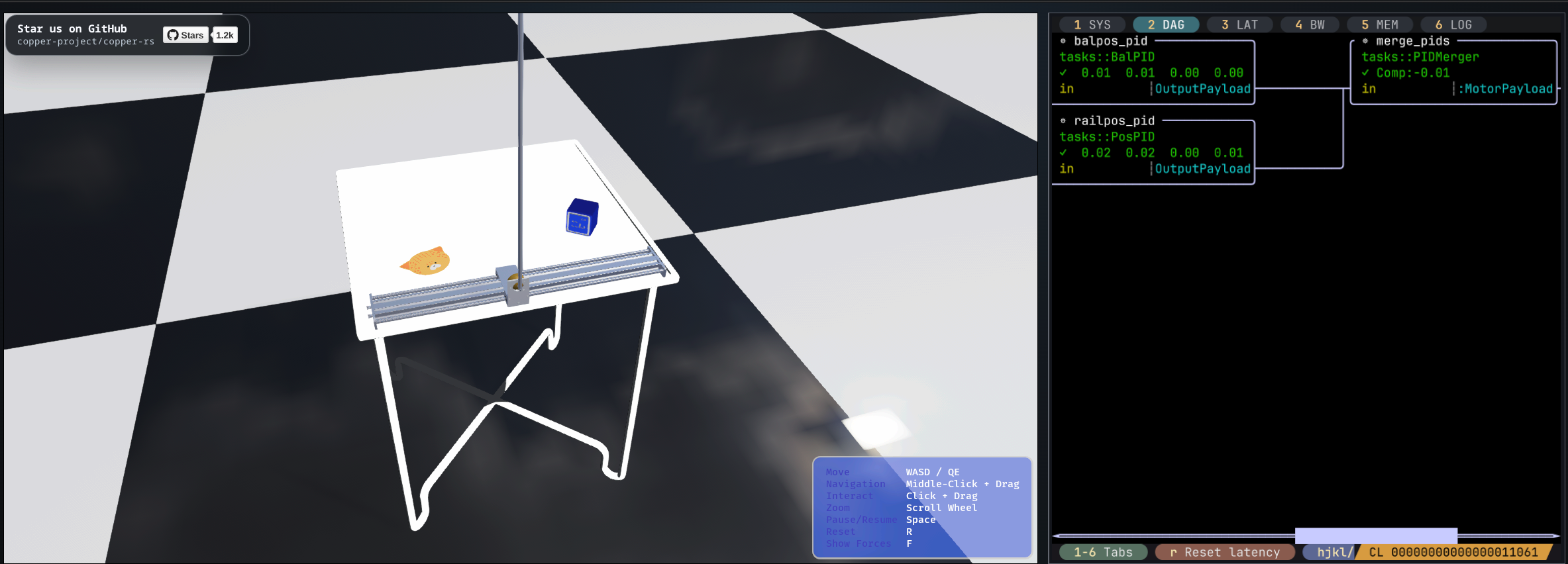
BalanceBot Self-balancing robot sim with a live Copper DAG and latency monitor. |
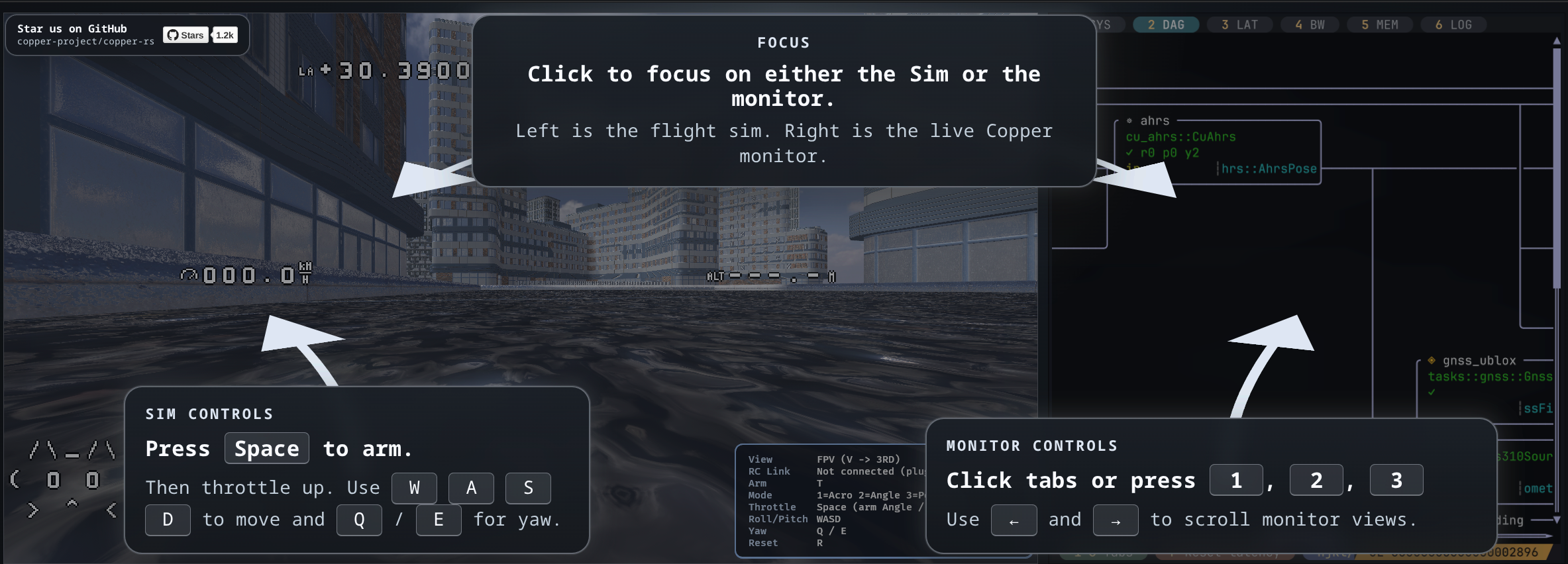
Flight Controller Quadcopter flight sim with the same live Copper monitor. |
CONTRIBUTING
Contributing to Copper-rs
First off, thank you for considering contributing to Copper-rs! We welcome contributions from everyone. This document provides guidelines for contributing to the project.
Getting Started
Prerequisites
- Rust: Copper’s minimum supported Rust version is 1.95. Install the latest stable Rust toolchain with rustup.
curl --proto '=https' --tlsv1.2 -sSf [https://sh.rustup.rs](https://sh.rustup.rs) | sh
- just: We use just as a command runner for common development tasks. Install it via cargo or your package manager:
cargo install just
- cargo-nextest: For running tests efficiently.
cargo install cargo-nextest
- typos: For spell checking.
cargo install typos-cli
- Platform-Specific Dependencies: Depending on your operating system and the features you intend to work with, you might need additional dependencies. For Ubuntu 22.04, please checkout our Dockerfile.
Using justfile (Recommended)
The project includes a justfile that mirrors the CI workflow. This is the recommended way to run checks locally before submitting a PR:
# Run the default PR pipeline (format + lint + tests for std/no_std)
just pr-check

# Same as above (default target)
just

# Run lint checks (fmt-check + typos + clippy for std and no_std)
just lint

# Run unit tests (std + no_std)
just test

# Run CI-aligned std checks (build/tests/templates)
just std-ci

# Run CI-aligned embedded/no_std checks
just nostd-ci

# Run in release mode
just std-ci release

# Run with CUDA features
just std-ci cuda-release
The just pr-check command runs:
- Formatting (
just fmt) - Lint checks (
just lint: format check + typos + std/no_std clippy) - Unit tests (
just test: std + no_std)
The just std-ci command remains CI-aligned for std paths, including:
- Format check (
just fmt-check) - Typos check (
typos -c .config/_typos.toml) - Clippy with
--deny warnings - Build with all features
- Unit tests with cargo-nextest
- Project generation tests (debug mode only)
Platform Support Tiers
The public platform list lives in the Supported Platforms wiki page. For contribution and release purposes, platform support is tied to the validation we actually run. Do not promote a platform to a stronger support tier unless the matching CI or release validation exists.
| Tier | Platform / target | Current validation scope |
|---|---|---|
| Tier 1: CI-tested and release-blocking | Linux x86_64 | Full std workspace build/test/clippy, feature coverage, generated template builds, and the cu-caterpillar determinism regression. |
| Tier 1: CI-tested and release-blocking | macOS GitHub runner | Std workspace build/test and generated template builds. CUDA is excluded, and clippy is not currently part of the macOS PR gate. |
| Tier 1: CI-tested and release-blocking | Windows x86_64 | Core crates build/test only. The full workspace is not currently a Windows support guarantee. |
| Tier 1: CI-tested and release-blocking | Core no_std
|
Core build/tests with default features disabled. |
| Tier 1: CI-tested and release-blocking | Embedded crates and RP2350 skeleton | Embedded-only crate build/clippy plus RP2350 firmware/host skeleton cross-build and clippy coverage. This is compile-time validation, not hardware-in-the-loop validation. |
| Tier 2: expected to work | Linux aarch64, SBCs, and Jetson-class targets | Documented deployment path and project intent, but not equivalent to the full PR CI matrix. |
| Tier 2: expected to work | Other maintained embedded targets | Expected when using maintained embedded crates and supported HAL/resource patterns. Board-specific behavior depends on separate hardware validation. |
| Tier 3: experimental | Android arm64 | Listed as a deployment target, but not currently covered by release-blocking CI. |
| Tier 3: experimental | Linux armv7 and riscv64 | Listed as deployment targets, but not currently covered by release-blocking CI. |
| Tier 3: experimental | Bare-metal boards beyond maintained examples | Experimental unless they have explicit CI, release-checklist, or hardware validation coverage. |
When changing shared runtime, macro, trait, logging, replay, resource, or embedded-facing code, consider the Tier 1 surfaces affected by the change. In practice, this usually means running just std-ci for host/runtime changes and just nostd-ci for no_std or embedded-facing changes before requesting review.
Prek hooks (Recommended)
To mirror the CI lint steps locally, you can install prek hooks that run formatting and typos checks on each commit.
- Install
prek
    cargo binstall install prek
    # or
    cargo install install prek
- Reinstall the git hooks if you previously executed
pre-commit install
File truncated at 100 lines see the full file
Repository Summary
| Description | |
| Checkout URI | https://github.com/copper-project/copper-rs.git |
| VCS Type | git |
| VCS Version | master |
| Last Updated | 2026-04-29 |
| Dev Status | UNKNOWN |
| Released | UNRELEASED |
| Contributing |
Help Wanted (-)
Good First Issues (-) Pull Requests to Review (-) |
Packages
README
Copper Runtime & SDK
Why Copper
Rust-first – ergonomic & safe
Sub-microsecond latency – zero-alloc, data-oriented runtime
Deterministic replay – every run, bit-for-bit identical
Interoperable with ROS2 – bridges via Zenoh opening the path for a progressive migration.
Runs anywhere – from Linux servers, workstations, SBC to bare-metal MPUs
Built to ship – one stack from simulation to production Already showing up in: ✈️ Flying | 🚗 Driving | 🌊 Swimming | 🚀 Spacefaring | 🤖 Humanoids ### Try Copper In 30 Seconds No setup required. Open one of the live demos in your browser: the simulator runs on the left and the live Copper monitor runs on the right. These are not mockups: BalanceBot is the exact same application that runs on a Raspberry Pi physical robot, and Flight Controller is the same control stack we run on a microcontroller (STM32H7) on real drones. Copper lets that same graph be recompiled for embedded hardware, a local workstation, or the browser.
|
BalanceBot Self-balancing robot sim with a live Copper DAG and latency monitor. |
Flight Controller Quadcopter flight sim with the same live Copper monitor. |
CONTRIBUTING
Contributing to Copper-rs
First off, thank you for considering contributing to Copper-rs! We welcome contributions from everyone. This document provides guidelines for contributing to the project.
Getting Started
Prerequisites
- Rust: Copper’s minimum supported Rust version is 1.95. Install the latest stable Rust toolchain with rustup.
curl --proto '=https' --tlsv1.2 -sSf [https://sh.rustup.rs](https://sh.rustup.rs) | sh
- just: We use just as a command runner for common development tasks. Install it via cargo or your package manager:
cargo install just
- cargo-nextest: For running tests efficiently.
cargo install cargo-nextest
- typos: For spell checking.
cargo install typos-cli
- Platform-Specific Dependencies: Depending on your operating system and the features you intend to work with, you might need additional dependencies. For Ubuntu 22.04, please checkout our Dockerfile.
Using justfile (Recommended)
The project includes a justfile that mirrors the CI workflow. This is the recommended way to run checks locally before submitting a PR:
# Run the default PR pipeline (format + lint + tests for std/no_std)
just pr-check

# Same as above (default target)
just

# Run lint checks (fmt-check + typos + clippy for std and no_std)
just lint

# Run unit tests (std + no_std)
just test

# Run CI-aligned std checks (build/tests/templates)
just std-ci

# Run CI-aligned embedded/no_std checks
just nostd-ci

# Run in release mode
just std-ci release

# Run with CUDA features
just std-ci cuda-release
The just pr-check command runs:
- Formatting (
just fmt) - Lint checks (
just lint: format check + typos + std/no_std clippy) - Unit tests (
just test: std + no_std)
The just std-ci command remains CI-aligned for std paths, including:
- Format check (
just fmt-check) - Typos check (
typos -c .config/_typos.toml) - Clippy with
--deny warnings - Build with all features
- Unit tests with cargo-nextest
- Project generation tests (debug mode only)
Platform Support Tiers
The public platform list lives in the Supported Platforms wiki page. For contribution and release purposes, platform support is tied to the validation we actually run. Do not promote a platform to a stronger support tier unless the matching CI or release validation exists.
| Tier | Platform / target | Current validation scope |
|---|---|---|
| Tier 1: CI-tested and release-blocking | Linux x86_64 | Full std workspace build/test/clippy, feature coverage, generated template builds, and the cu-caterpillar determinism regression. |
| Tier 1: CI-tested and release-blocking | macOS GitHub runner | Std workspace build/test and generated template builds. CUDA is excluded, and clippy is not currently part of the macOS PR gate. |
| Tier 1: CI-tested and release-blocking | Windows x86_64 | Core crates build/test only. The full workspace is not currently a Windows support guarantee. |
| Tier 1: CI-tested and release-blocking | Core no_std
|
Core build/tests with default features disabled. |
| Tier 1: CI-tested and release-blocking | Embedded crates and RP2350 skeleton | Embedded-only crate build/clippy plus RP2350 firmware/host skeleton cross-build and clippy coverage. This is compile-time validation, not hardware-in-the-loop validation. |
| Tier 2: expected to work | Linux aarch64, SBCs, and Jetson-class targets | Documented deployment path and project intent, but not equivalent to the full PR CI matrix. |
| Tier 2: expected to work | Other maintained embedded targets | Expected when using maintained embedded crates and supported HAL/resource patterns. Board-specific behavior depends on separate hardware validation. |
| Tier 3: experimental | Android arm64 | Listed as a deployment target, but not currently covered by release-blocking CI. |
| Tier 3: experimental | Linux armv7 and riscv64 | Listed as deployment targets, but not currently covered by release-blocking CI. |
| Tier 3: experimental | Bare-metal boards beyond maintained examples | Experimental unless they have explicit CI, release-checklist, or hardware validation coverage. |
When changing shared runtime, macro, trait, logging, replay, resource, or embedded-facing code, consider the Tier 1 surfaces affected by the change. In practice, this usually means running just std-ci for host/runtime changes and just nostd-ci for no_std or embedded-facing changes before requesting review.
Prek hooks (Recommended)
To mirror the CI lint steps locally, you can install prek hooks that run formatting and typos checks on each commit.
- Install
prek
    cargo binstall install prek
    # or
    cargo install install prek
- Reinstall the git hooks if you previously executed
pre-commit install
File truncated at 100 lines see the full file
Repository Summary
| Description | |
| Checkout URI | https://github.com/copper-project/copper-rs.git |
| VCS Type | git |
| VCS Version | master |
| Last Updated | 2026-04-29 |
| Dev Status | UNKNOWN |
| Released | UNRELEASED |
| Contributing |
Help Wanted (-)
Good First Issues (-) Pull Requests to Review (-) |
Packages
README
Copper Runtime & SDK
Why Copper
Rust-first – ergonomic & safe
Sub-microsecond latency – zero-alloc, data-oriented runtime
Deterministic replay – every run, bit-for-bit identical
Interoperable with ROS2 – bridges via Zenoh opening the path for a progressive migration.
Runs anywhere – from Linux servers, workstations, SBC to bare-metal MPUs
Built to ship – one stack from simulation to production Already showing up in: ✈️ Flying | 🚗 Driving | 🌊 Swimming | 🚀 Spacefaring | 🤖 Humanoids ### Try Copper In 30 Seconds No setup required. Open one of the live demos in your browser: the simulator runs on the left and the live Copper monitor runs on the right. These are not mockups: BalanceBot is the exact same application that runs on a Raspberry Pi physical robot, and Flight Controller is the same control stack we run on a microcontroller (STM32H7) on real drones. Copper lets that same graph be recompiled for embedded hardware, a local workstation, or the browser.
|
BalanceBot Self-balancing robot sim with a live Copper DAG and latency monitor. |
Flight Controller Quadcopter flight sim with the same live Copper monitor. |
CONTRIBUTING
Contributing to Copper-rs
First off, thank you for considering contributing to Copper-rs! We welcome contributions from everyone. This document provides guidelines for contributing to the project.
Getting Started
Prerequisites
- Rust: Copper’s minimum supported Rust version is 1.95. Install the latest stable Rust toolchain with rustup.
curl --proto '=https' --tlsv1.2 -sSf [https://sh.rustup.rs](https://sh.rustup.rs) | sh
- just: We use just as a command runner for common development tasks. Install it via cargo or your package manager:
cargo install just
- cargo-nextest: For running tests efficiently.
cargo install cargo-nextest
- typos: For spell checking.
cargo install typos-cli
- Platform-Specific Dependencies: Depending on your operating system and the features you intend to work with, you might need additional dependencies. For Ubuntu 22.04, please checkout our Dockerfile.
Using justfile (Recommended)
The project includes a justfile that mirrors the CI workflow. This is the recommended way to run checks locally before submitting a PR:
# Run the default PR pipeline (format + lint + tests for std/no_std)
just pr-check

# Same as above (default target)
just

# Run lint checks (fmt-check + typos + clippy for std and no_std)
just lint

# Run unit tests (std + no_std)
just test

# Run CI-aligned std checks (build/tests/templates)
just std-ci

# Run CI-aligned embedded/no_std checks
just nostd-ci

# Run in release mode
just std-ci release

# Run with CUDA features
just std-ci cuda-release
The just pr-check command runs:
- Formatting (
just fmt) - Lint checks (
just lint: format check + typos + std/no_std clippy) - Unit tests (
just test: std + no_std)
The just std-ci command remains CI-aligned for std paths, including:
- Format check (
just fmt-check) - Typos check (
typos -c .config/_typos.toml) - Clippy with
--deny warnings - Build with all features
- Unit tests with cargo-nextest
- Project generation tests (debug mode only)
Platform Support Tiers
The public platform list lives in the Supported Platforms wiki page. For contribution and release purposes, platform support is tied to the validation we actually run. Do not promote a platform to a stronger support tier unless the matching CI or release validation exists.
| Tier | Platform / target | Current validation scope |
|---|---|---|
| Tier 1: CI-tested and release-blocking | Linux x86_64 | Full std workspace build/test/clippy, feature coverage, generated template builds, and the cu-caterpillar determinism regression. |
| Tier 1: CI-tested and release-blocking | macOS GitHub runner | Std workspace build/test and generated template builds. CUDA is excluded, and clippy is not currently part of the macOS PR gate. |
| Tier 1: CI-tested and release-blocking | Windows x86_64 | Core crates build/test only. The full workspace is not currently a Windows support guarantee. |
| Tier 1: CI-tested and release-blocking | Core no_std
|
Core build/tests with default features disabled. |
| Tier 1: CI-tested and release-blocking | Embedded crates and RP2350 skeleton | Embedded-only crate build/clippy plus RP2350 firmware/host skeleton cross-build and clippy coverage. This is compile-time validation, not hardware-in-the-loop validation. |
| Tier 2: expected to work | Linux aarch64, SBCs, and Jetson-class targets | Documented deployment path and project intent, but not equivalent to the full PR CI matrix. |
| Tier 2: expected to work | Other maintained embedded targets | Expected when using maintained embedded crates and supported HAL/resource patterns. Board-specific behavior depends on separate hardware validation. |
| Tier 3: experimental | Android arm64 | Listed as a deployment target, but not currently covered by release-blocking CI. |
| Tier 3: experimental | Linux armv7 and riscv64 | Listed as deployment targets, but not currently covered by release-blocking CI. |
| Tier 3: experimental | Bare-metal boards beyond maintained examples | Experimental unless they have explicit CI, release-checklist, or hardware validation coverage. |
When changing shared runtime, macro, trait, logging, replay, resource, or embedded-facing code, consider the Tier 1 surfaces affected by the change. In practice, this usually means running just std-ci for host/runtime changes and just nostd-ci for no_std or embedded-facing changes before requesting review.
Prek hooks (Recommended)
To mirror the CI lint steps locally, you can install prek hooks that run formatting and typos checks on each commit.
- Install
prek
    cargo binstall install prek
    # or
    cargo install install prek
- Reinstall the git hooks if you previously executed
pre-commit install
File truncated at 100 lines see the full file
Repository Summary
| Description | |
| Checkout URI | https://github.com/copper-project/copper-rs.git |
| VCS Type | git |
| VCS Version | master |
| Last Updated | 2026-04-29 |
| Dev Status | UNKNOWN |
| Released | UNRELEASED |
| Contributing |
Help Wanted (-)
Good First Issues (-) Pull Requests to Review (-) |
Packages
README
Copper Runtime & SDK
Why Copper
Rust-first – ergonomic & safe
Sub-microsecond latency – zero-alloc, data-oriented runtime
Deterministic replay – every run, bit-for-bit identical
Interoperable with ROS2 – bridges via Zenoh opening the path for a progressive migration.
Runs anywhere – from Linux servers, workstations, SBC to bare-metal MPUs
Built to ship – one stack from simulation to production Already showing up in: ✈️ Flying | 🚗 Driving | 🌊 Swimming | 🚀 Spacefaring | 🤖 Humanoids ### Try Copper In 30 Seconds No setup required. Open one of the live demos in your browser: the simulator runs on the left and the live Copper monitor runs on the right. These are not mockups: BalanceBot is the exact same application that runs on a Raspberry Pi physical robot, and Flight Controller is the same control stack we run on a microcontroller (STM32H7) on real drones. Copper lets that same graph be recompiled for embedded hardware, a local workstation, or the browser.
|
BalanceBot Self-balancing robot sim with a live Copper DAG and latency monitor. |
Flight Controller Quadcopter flight sim with the same live Copper monitor. |
CONTRIBUTING
Contributing to Copper-rs
First off, thank you for considering contributing to Copper-rs! We welcome contributions from everyone. This document provides guidelines for contributing to the project.
Getting Started
Prerequisites
- Rust: Copper’s minimum supported Rust version is 1.95. Install the latest stable Rust toolchain with rustup.
curl --proto '=https' --tlsv1.2 -sSf [https://sh.rustup.rs](https://sh.rustup.rs) | sh
- just: We use just as a command runner for common development tasks. Install it via cargo or your package manager:
cargo install just
- cargo-nextest: For running tests efficiently.
cargo install cargo-nextest
- typos: For spell checking.
cargo install typos-cli
- Platform-Specific Dependencies: Depending on your operating system and the features you intend to work with, you might need additional dependencies. For Ubuntu 22.04, please checkout our Dockerfile.
Using justfile (Recommended)
The project includes a justfile that mirrors the CI workflow. This is the recommended way to run checks locally before submitting a PR:
# Run the default PR pipeline (format + lint + tests for std/no_std)
just pr-check

# Same as above (default target)
just

# Run lint checks (fmt-check + typos + clippy for std and no_std)
just lint

# Run unit tests (std + no_std)
just test

# Run CI-aligned std checks (build/tests/templates)
just std-ci

# Run CI-aligned embedded/no_std checks
just nostd-ci

# Run in release mode
just std-ci release

# Run with CUDA features
just std-ci cuda-release
The just pr-check command runs:
- Formatting (
just fmt) - Lint checks (
just lint: format check + typos + std/no_std clippy) - Unit tests (
just test: std + no_std)
The just std-ci command remains CI-aligned for std paths, including:
- Format check (
just fmt-check) - Typos check (
typos -c .config/_typos.toml) - Clippy with
--deny warnings - Build with all features
- Unit tests with cargo-nextest
- Project generation tests (debug mode only)
Platform Support Tiers
The public platform list lives in the Supported Platforms wiki page. For contribution and release purposes, platform support is tied to the validation we actually run. Do not promote a platform to a stronger support tier unless the matching CI or release validation exists.
| Tier | Platform / target | Current validation scope |
|---|---|---|
| Tier 1: CI-tested and release-blocking | Linux x86_64 | Full std workspace build/test/clippy, feature coverage, generated template builds, and the cu-caterpillar determinism regression. |
| Tier 1: CI-tested and release-blocking | macOS GitHub runner | Std workspace build/test and generated template builds. CUDA is excluded, and clippy is not currently part of the macOS PR gate. |
| Tier 1: CI-tested and release-blocking | Windows x86_64 | Core crates build/test only. The full workspace is not currently a Windows support guarantee. |
| Tier 1: CI-tested and release-blocking | Core no_std
|
Core build/tests with default features disabled. |
| Tier 1: CI-tested and release-blocking | Embedded crates and RP2350 skeleton | Embedded-only crate build/clippy plus RP2350 firmware/host skeleton cross-build and clippy coverage. This is compile-time validation, not hardware-in-the-loop validation. |
| Tier 2: expected to work | Linux aarch64, SBCs, and Jetson-class targets | Documented deployment path and project intent, but not equivalent to the full PR CI matrix. |
| Tier 2: expected to work | Other maintained embedded targets | Expected when using maintained embedded crates and supported HAL/resource patterns. Board-specific behavior depends on separate hardware validation. |
| Tier 3: experimental | Android arm64 | Listed as a deployment target, but not currently covered by release-blocking CI. |
| Tier 3: experimental | Linux armv7 and riscv64 | Listed as deployment targets, but not currently covered by release-blocking CI. |
| Tier 3: experimental | Bare-metal boards beyond maintained examples | Experimental unless they have explicit CI, release-checklist, or hardware validation coverage. |
When changing shared runtime, macro, trait, logging, replay, resource, or embedded-facing code, consider the Tier 1 surfaces affected by the change. In practice, this usually means running just std-ci for host/runtime changes and just nostd-ci for no_std or embedded-facing changes before requesting review.
Prek hooks (Recommended)
To mirror the CI lint steps locally, you can install prek hooks that run formatting and typos checks on each commit.
- Install
prek
    cargo binstall install prek
    # or
    cargo install install prek
- Reinstall the git hooks if you previously executed
pre-commit install
File truncated at 100 lines see the full file
Repository Summary
| Description | |
| Checkout URI | https://github.com/copper-project/copper-rs.git |
| VCS Type | git |
| VCS Version | master |
| Last Updated | 2026-04-29 |
| Dev Status | UNKNOWN |
| Released | UNRELEASED |
| Contributing |
Help Wanted (-)
Good First Issues (-) Pull Requests to Review (-) |
Packages
README
Copper Runtime & SDK
Why Copper
Rust-first – ergonomic & safe
Sub-microsecond latency – zero-alloc, data-oriented runtime
Deterministic replay – every run, bit-for-bit identical
Interoperable with ROS2 – bridges via Zenoh opening the path for a progressive migration.
Runs anywhere – from Linux servers, workstations, SBC to bare-metal MPUs
Built to ship – one stack from simulation to production Already showing up in: ✈️ Flying | 🚗 Driving | 🌊 Swimming | 🚀 Spacefaring | 🤖 Humanoids ### Try Copper In 30 Seconds No setup required. Open one of the live demos in your browser: the simulator runs on the left and the live Copper monitor runs on the right. These are not mockups: BalanceBot is the exact same application that runs on a Raspberry Pi physical robot, and Flight Controller is the same control stack we run on a microcontroller (STM32H7) on real drones. Copper lets that same graph be recompiled for embedded hardware, a local workstation, or the browser.
|
BalanceBot Self-balancing robot sim with a live Copper DAG and latency monitor. |
Flight Controller Quadcopter flight sim with the same live Copper monitor. |
CONTRIBUTING
Contributing to Copper-rs
First off, thank you for considering contributing to Copper-rs! We welcome contributions from everyone. This document provides guidelines for contributing to the project.
Getting Started
Prerequisites
- Rust: Copper’s minimum supported Rust version is 1.95. Install the latest stable Rust toolchain with rustup.
curl --proto '=https' --tlsv1.2 -sSf [https://sh.rustup.rs](https://sh.rustup.rs) | sh
- just: We use just as a command runner for common development tasks. Install it via cargo or your package manager:
cargo install just
- cargo-nextest: For running tests efficiently.
cargo install cargo-nextest
- typos: For spell checking.
cargo install typos-cli
- Platform-Specific Dependencies: Depending on your operating system and the features you intend to work with, you might need additional dependencies. For Ubuntu 22.04, please checkout our Dockerfile.
Using justfile (Recommended)
The project includes a justfile that mirrors the CI workflow. This is the recommended way to run checks locally before submitting a PR:
# Run the default PR pipeline (format + lint + tests for std/no_std)
just pr-check

# Same as above (default target)
just

# Run lint checks (fmt-check + typos + clippy for std and no_std)
just lint

# Run unit tests (std + no_std)
just test

# Run CI-aligned std checks (build/tests/templates)
just std-ci

# Run CI-aligned embedded/no_std checks
just nostd-ci

# Run in release mode
just std-ci release

# Run with CUDA features
just std-ci cuda-release
The just pr-check command runs:
- Formatting (
just fmt) - Lint checks (
just lint: format check + typos + std/no_std clippy) - Unit tests (
just test: std + no_std)
The just std-ci command remains CI-aligned for std paths, including:
- Format check (
just fmt-check) - Typos check (
typos -c .config/_typos.toml) - Clippy with
--deny warnings - Build with all features
- Unit tests with cargo-nextest
- Project generation tests (debug mode only)
Platform Support Tiers
The public platform list lives in the Supported Platforms wiki page. For contribution and release purposes, platform support is tied to the validation we actually run. Do not promote a platform to a stronger support tier unless the matching CI or release validation exists.
| Tier | Platform / target | Current validation scope |
|---|---|---|
| Tier 1: CI-tested and release-blocking | Linux x86_64 | Full std workspace build/test/clippy, feature coverage, generated template builds, and the cu-caterpillar determinism regression. |
| Tier 1: CI-tested and release-blocking | macOS GitHub runner | Std workspace build/test and generated template builds. CUDA is excluded, and clippy is not currently part of the macOS PR gate. |
| Tier 1: CI-tested and release-blocking | Windows x86_64 | Core crates build/test only. The full workspace is not currently a Windows support guarantee. |
| Tier 1: CI-tested and release-blocking | Core no_std
|
Core build/tests with default features disabled. |
| Tier 1: CI-tested and release-blocking | Embedded crates and RP2350 skeleton | Embedded-only crate build/clippy plus RP2350 firmware/host skeleton cross-build and clippy coverage. This is compile-time validation, not hardware-in-the-loop validation. |
| Tier 2: expected to work | Linux aarch64, SBCs, and Jetson-class targets | Documented deployment path and project intent, but not equivalent to the full PR CI matrix. |
| Tier 2: expected to work | Other maintained embedded targets | Expected when using maintained embedded crates and supported HAL/resource patterns. Board-specific behavior depends on separate hardware validation. |
| Tier 3: experimental | Android arm64 | Listed as a deployment target, but not currently covered by release-blocking CI. |
| Tier 3: experimental | Linux armv7 and riscv64 | Listed as deployment targets, but not currently covered by release-blocking CI. |
| Tier 3: experimental | Bare-metal boards beyond maintained examples | Experimental unless they have explicit CI, release-checklist, or hardware validation coverage. |
When changing shared runtime, macro, trait, logging, replay, resource, or embedded-facing code, consider the Tier 1 surfaces affected by the change. In practice, this usually means running just std-ci for host/runtime changes and just nostd-ci for no_std or embedded-facing changes before requesting review.
Prek hooks (Recommended)
To mirror the CI lint steps locally, you can install prek hooks that run formatting and typos checks on each commit.
- Install
prek
    cargo binstall install prek
    # or
    cargo install install prek
- Reinstall the git hooks if you previously executed
pre-commit install
File truncated at 100 lines see the full file
Repository Summary
| Description | |
| Checkout URI | https://github.com/copper-project/copper-rs.git |
| VCS Type | git |
| VCS Version | master |
| Last Updated | 2026-04-29 |
| Dev Status | UNKNOWN |
| Released | UNRELEASED |
| Contributing |
Help Wanted (-)
Good First Issues (-) Pull Requests to Review (-) |
Packages
README
Copper Runtime & SDK
Why Copper
Rust-first – ergonomic & safe
Sub-microsecond latency – zero-alloc, data-oriented runtime
Deterministic replay – every run, bit-for-bit identical
Interoperable with ROS2 – bridges via Zenoh opening the path for a progressive migration.
Runs anywhere – from Linux servers, workstations, SBC to bare-metal MPUs
Built to ship – one stack from simulation to production Already showing up in: ✈️ Flying | 🚗 Driving | 🌊 Swimming | 🚀 Spacefaring | 🤖 Humanoids ### Try Copper In 30 Seconds No setup required. Open one of the live demos in your browser: the simulator runs on the left and the live Copper monitor runs on the right. These are not mockups: BalanceBot is the exact same application that runs on a Raspberry Pi physical robot, and Flight Controller is the same control stack we run on a microcontroller (STM32H7) on real drones. Copper lets that same graph be recompiled for embedded hardware, a local workstation, or the browser.
|
BalanceBot Self-balancing robot sim with a live Copper DAG and latency monitor. |
Flight Controller Quadcopter flight sim with the same live Copper monitor. |
CONTRIBUTING
Contributing to Copper-rs
First off, thank you for considering contributing to Copper-rs! We welcome contributions from everyone. This document provides guidelines for contributing to the project.
Getting Started
Prerequisites
- Rust: Copper’s minimum supported Rust version is 1.95. Install the latest stable Rust toolchain with rustup.
curl --proto '=https' --tlsv1.2 -sSf [https://sh.rustup.rs](https://sh.rustup.rs) | sh
- just: We use just as a command runner for common development tasks. Install it via cargo or your package manager:
cargo install just
- cargo-nextest: For running tests efficiently.
cargo install cargo-nextest
- typos: For spell checking.
cargo install typos-cli
- Platform-Specific Dependencies: Depending on your operating system and the features you intend to work with, you might need additional dependencies. For Ubuntu 22.04, please checkout our Dockerfile.
Using justfile (Recommended)
The project includes a justfile that mirrors the CI workflow. This is the recommended way to run checks locally before submitting a PR:
# Run the default PR pipeline (format + lint + tests for std/no_std)
just pr-check

# Same as above (default target)
just

# Run lint checks (fmt-check + typos + clippy for std and no_std)
just lint

# Run unit tests (std + no_std)
just test

# Run CI-aligned std checks (build/tests/templates)
just std-ci

# Run CI-aligned embedded/no_std checks
just nostd-ci

# Run in release mode
just std-ci release

# Run with CUDA features
just std-ci cuda-release
The just pr-check command runs:
- Formatting (
just fmt) - Lint checks (
just lint: format check + typos + std/no_std clippy) - Unit tests (
just test: std + no_std)
The just std-ci command remains CI-aligned for std paths, including:
- Format check (
just fmt-check) - Typos check (
typos -c .config/_typos.toml) - Clippy with
--deny warnings - Build with all features
- Unit tests with cargo-nextest
- Project generation tests (debug mode only)
Platform Support Tiers
The public platform list lives in the Supported Platforms wiki page. For contribution and release purposes, platform support is tied to the validation we actually run. Do not promote a platform to a stronger support tier unless the matching CI or release validation exists.
| Tier | Platform / target | Current validation scope |
|---|---|---|
| Tier 1: CI-tested and release-blocking | Linux x86_64 | Full std workspace build/test/clippy, feature coverage, generated template builds, and the cu-caterpillar determinism regression. |
| Tier 1: CI-tested and release-blocking | macOS GitHub runner | Std workspace build/test and generated template builds. CUDA is excluded, and clippy is not currently part of the macOS PR gate. |
| Tier 1: CI-tested and release-blocking | Windows x86_64 | Core crates build/test only. The full workspace is not currently a Windows support guarantee. |
| Tier 1: CI-tested and release-blocking | Core no_std
|
Core build/tests with default features disabled. |
| Tier 1: CI-tested and release-blocking | Embedded crates and RP2350 skeleton | Embedded-only crate build/clippy plus RP2350 firmware/host skeleton cross-build and clippy coverage. This is compile-time validation, not hardware-in-the-loop validation. |
| Tier 2: expected to work | Linux aarch64, SBCs, and Jetson-class targets | Documented deployment path and project intent, but not equivalent to the full PR CI matrix. |
| Tier 2: expected to work | Other maintained embedded targets | Expected when using maintained embedded crates and supported HAL/resource patterns. Board-specific behavior depends on separate hardware validation. |
| Tier 3: experimental | Android arm64 | Listed as a deployment target, but not currently covered by release-blocking CI. |
| Tier 3: experimental | Linux armv7 and riscv64 | Listed as deployment targets, but not currently covered by release-blocking CI. |
| Tier 3: experimental | Bare-metal boards beyond maintained examples | Experimental unless they have explicit CI, release-checklist, or hardware validation coverage. |
When changing shared runtime, macro, trait, logging, replay, resource, or embedded-facing code, consider the Tier 1 surfaces affected by the change. In practice, this usually means running just std-ci for host/runtime changes and just nostd-ci for no_std or embedded-facing changes before requesting review.
Prek hooks (Recommended)
To mirror the CI lint steps locally, you can install prek hooks that run formatting and typos checks on each commit.
- Install
prek
    cargo binstall install prek
    # or
    cargo install install prek
- Reinstall the git hooks if you previously executed
pre-commit install
File truncated at 100 lines see the full file
Repository Summary
| Description | |
| Checkout URI | https://github.com/copper-project/copper-rs.git |
| VCS Type | git |
| VCS Version | master |
| Last Updated | 2026-04-29 |
| Dev Status | UNKNOWN |
| Released | UNRELEASED |
| Contributing |
Help Wanted (-)
Good First Issues (-) Pull Requests to Review (-) |
Packages
README
Copper Runtime & SDK
Why Copper
Rust-first – ergonomic & safe
Sub-microsecond latency – zero-alloc, data-oriented runtime
Deterministic replay – every run, bit-for-bit identical
Interoperable with ROS2 – bridges via Zenoh opening the path for a progressive migration.
Runs anywhere – from Linux servers, workstations, SBC to bare-metal MPUs
Built to ship – one stack from simulation to production Already showing up in: ✈️ Flying | 🚗 Driving | 🌊 Swimming | 🚀 Spacefaring | 🤖 Humanoids ### Try Copper In 30 Seconds No setup required. Open one of the live demos in your browser: the simulator runs on the left and the live Copper monitor runs on the right. These are not mockups: BalanceBot is the exact same application that runs on a Raspberry Pi physical robot, and Flight Controller is the same control stack we run on a microcontroller (STM32H7) on real drones. Copper lets that same graph be recompiled for embedded hardware, a local workstation, or the browser.
|
BalanceBot Self-balancing robot sim with a live Copper DAG and latency monitor. |
Flight Controller Quadcopter flight sim with the same live Copper monitor. |
CONTRIBUTING
Contributing to Copper-rs
First off, thank you for considering contributing to Copper-rs! We welcome contributions from everyone. This document provides guidelines for contributing to the project.
Getting Started
Prerequisites
- Rust: Copper’s minimum supported Rust version is 1.95. Install the latest stable Rust toolchain with rustup.
curl --proto '=https' --tlsv1.2 -sSf [https://sh.rustup.rs](https://sh.rustup.rs) | sh
- just: We use just as a command runner for common development tasks. Install it via cargo or your package manager:
cargo install just
- cargo-nextest: For running tests efficiently.
cargo install cargo-nextest
- typos: For spell checking.
cargo install typos-cli
- Platform-Specific Dependencies: Depending on your operating system and the features you intend to work with, you might need additional dependencies. For Ubuntu 22.04, please checkout our Dockerfile.
Using justfile (Recommended)
The project includes a justfile that mirrors the CI workflow. This is the recommended way to run checks locally before submitting a PR:
# Run the default PR pipeline (format + lint + tests for std/no_std)
just pr-check

# Same as above (default target)
just

# Run lint checks (fmt-check + typos + clippy for std and no_std)
just lint

# Run unit tests (std + no_std)
just test

# Run CI-aligned std checks (build/tests/templates)
just std-ci

# Run CI-aligned embedded/no_std checks
just nostd-ci

# Run in release mode
just std-ci release

# Run with CUDA features
just std-ci cuda-release
The just pr-check command runs:
- Formatting (
just fmt) - Lint checks (
just lint: format check + typos + std/no_std clippy) - Unit tests (
just test: std + no_std)
The just std-ci command remains CI-aligned for std paths, including:
- Format check (
just fmt-check) - Typos check (
typos -c .config/_typos.toml) - Clippy with
--deny warnings - Build with all features
- Unit tests with cargo-nextest
- Project generation tests (debug mode only)
Platform Support Tiers
The public platform list lives in the Supported Platforms wiki page. For contribution and release purposes, platform support is tied to the validation we actually run. Do not promote a platform to a stronger support tier unless the matching CI or release validation exists.
| Tier | Platform / target | Current validation scope |
|---|---|---|
| Tier 1: CI-tested and release-blocking | Linux x86_64 | Full std workspace build/test/clippy, feature coverage, generated template builds, and the cu-caterpillar determinism regression. |
| Tier 1: CI-tested and release-blocking | macOS GitHub runner | Std workspace build/test and generated template builds. CUDA is excluded, and clippy is not currently part of the macOS PR gate. |
| Tier 1: CI-tested and release-blocking | Windows x86_64 | Core crates build/test only. The full workspace is not currently a Windows support guarantee. |
| Tier 1: CI-tested and release-blocking | Core no_std
|
Core build/tests with default features disabled. |
| Tier 1: CI-tested and release-blocking | Embedded crates and RP2350 skeleton | Embedded-only crate build/clippy plus RP2350 firmware/host skeleton cross-build and clippy coverage. This is compile-time validation, not hardware-in-the-loop validation. |
| Tier 2: expected to work | Linux aarch64, SBCs, and Jetson-class targets | Documented deployment path and project intent, but not equivalent to the full PR CI matrix. |
| Tier 2: expected to work | Other maintained embedded targets | Expected when using maintained embedded crates and supported HAL/resource patterns. Board-specific behavior depends on separate hardware validation. |
| Tier 3: experimental | Android arm64 | Listed as a deployment target, but not currently covered by release-blocking CI. |
| Tier 3: experimental | Linux armv7 and riscv64 | Listed as deployment targets, but not currently covered by release-blocking CI. |
| Tier 3: experimental | Bare-metal boards beyond maintained examples | Experimental unless they have explicit CI, release-checklist, or hardware validation coverage. |
When changing shared runtime, macro, trait, logging, replay, resource, or embedded-facing code, consider the Tier 1 surfaces affected by the change. In practice, this usually means running just std-ci for host/runtime changes and just nostd-ci for no_std or embedded-facing changes before requesting review.
Prek hooks (Recommended)
To mirror the CI lint steps locally, you can install prek hooks that run formatting and typos checks on each commit.
- Install
prek
    cargo binstall install prek
    # or
    cargo install install prek
- Reinstall the git hooks if you previously executed
pre-commit install
File truncated at 100 lines see the full file
Repository Summary
| Description | |
| Checkout URI | https://github.com/copper-project/copper-rs.git |
| VCS Type | git |
| VCS Version | master |
| Last Updated | 2026-04-29 |
| Dev Status | UNKNOWN |
| Released | UNRELEASED |
| Contributing |
Help Wanted (-)
Good First Issues (-) Pull Requests to Review (-) |
Packages
README
Copper Runtime & SDK
Why Copper
Rust-first – ergonomic & safe
Sub-microsecond latency – zero-alloc, data-oriented runtime
Deterministic replay – every run, bit-for-bit identical
Interoperable with ROS2 – bridges via Zenoh opening the path for a progressive migration.
Runs anywhere – from Linux servers, workstations, SBC to bare-metal MPUs
Built to ship – one stack from simulation to production Already showing up in: ✈️ Flying | 🚗 Driving | 🌊 Swimming | 🚀 Spacefaring | 🤖 Humanoids ### Try Copper In 30 Seconds No setup required. Open one of the live demos in your browser: the simulator runs on the left and the live Copper monitor runs on the right. These are not mockups: BalanceBot is the exact same application that runs on a Raspberry Pi physical robot, and Flight Controller is the same control stack we run on a microcontroller (STM32H7) on real drones. Copper lets that same graph be recompiled for embedded hardware, a local workstation, or the browser.
|
BalanceBot Self-balancing robot sim with a live Copper DAG and latency monitor. |
Flight Controller Quadcopter flight sim with the same live Copper monitor. |
CONTRIBUTING
Contributing to Copper-rs
First off, thank you for considering contributing to Copper-rs! We welcome contributions from everyone. This document provides guidelines for contributing to the project.
Getting Started
Prerequisites
- Rust: Copper’s minimum supported Rust version is 1.95. Install the latest stable Rust toolchain with rustup.
curl --proto '=https' --tlsv1.2 -sSf [https://sh.rustup.rs](https://sh.rustup.rs) | sh
- just: We use just as a command runner for common development tasks. Install it via cargo or your package manager:
cargo install just
- cargo-nextest: For running tests efficiently.
cargo install cargo-nextest
- typos: For spell checking.
cargo install typos-cli
- Platform-Specific Dependencies: Depending on your operating system and the features you intend to work with, you might need additional dependencies. For Ubuntu 22.04, please checkout our Dockerfile.
Using justfile (Recommended)
The project includes a justfile that mirrors the CI workflow. This is the recommended way to run checks locally before submitting a PR:
# Run the default PR pipeline (format + lint + tests for std/no_std)
just pr-check

# Same as above (default target)
just

# Run lint checks (fmt-check + typos + clippy for std and no_std)
just lint

# Run unit tests (std + no_std)
just test

# Run CI-aligned std checks (build/tests/templates)
just std-ci

# Run CI-aligned embedded/no_std checks
just nostd-ci

# Run in release mode
just std-ci release

# Run with CUDA features
just std-ci cuda-release
The just pr-check command runs:
- Formatting (
just fmt) - Lint checks (
just lint: format check + typos + std/no_std clippy) - Unit tests (
just test: std + no_std)
The just std-ci command remains CI-aligned for std paths, including:
- Format check (
just fmt-check) - Typos check (
typos -c .config/_typos.toml) - Clippy with
--deny warnings - Build with all features
- Unit tests with cargo-nextest
- Project generation tests (debug mode only)
Platform Support Tiers
The public platform list lives in the Supported Platforms wiki page. For contribution and release purposes, platform support is tied to the validation we actually run. Do not promote a platform to a stronger support tier unless the matching CI or release validation exists.
| Tier | Platform / target | Current validation scope |
|---|---|---|
| Tier 1: CI-tested and release-blocking | Linux x86_64 | Full std workspace build/test/clippy, feature coverage, generated template builds, and the cu-caterpillar determinism regression. |
| Tier 1: CI-tested and release-blocking | macOS GitHub runner | Std workspace build/test and generated template builds. CUDA is excluded, and clippy is not currently part of the macOS PR gate. |
| Tier 1: CI-tested and release-blocking | Windows x86_64 | Core crates build/test only. The full workspace is not currently a Windows support guarantee. |
| Tier 1: CI-tested and release-blocking | Core no_std
|
Core build/tests with default features disabled. |
| Tier 1: CI-tested and release-blocking | Embedded crates and RP2350 skeleton | Embedded-only crate build/clippy plus RP2350 firmware/host skeleton cross-build and clippy coverage. This is compile-time validation, not hardware-in-the-loop validation. |
| Tier 2: expected to work | Linux aarch64, SBCs, and Jetson-class targets | Documented deployment path and project intent, but not equivalent to the full PR CI matrix. |
| Tier 2: expected to work | Other maintained embedded targets | Expected when using maintained embedded crates and supported HAL/resource patterns. Board-specific behavior depends on separate hardware validation. |
| Tier 3: experimental | Android arm64 | Listed as a deployment target, but not currently covered by release-blocking CI. |
| Tier 3: experimental | Linux armv7 and riscv64 | Listed as deployment targets, but not currently covered by release-blocking CI. |
| Tier 3: experimental | Bare-metal boards beyond maintained examples | Experimental unless they have explicit CI, release-checklist, or hardware validation coverage. |
When changing shared runtime, macro, trait, logging, replay, resource, or embedded-facing code, consider the Tier 1 surfaces affected by the change. In practice, this usually means running just std-ci for host/runtime changes and just nostd-ci for no_std or embedded-facing changes before requesting review.
Prek hooks (Recommended)
To mirror the CI lint steps locally, you can install prek hooks that run formatting and typos checks on each commit.
- Install
prek
    cargo binstall install prek
    # or
    cargo install install prek
- Reinstall the git hooks if you previously executed
pre-commit install
File truncated at 100 lines see the full file
Repository Summary
| Description | |
| Checkout URI | https://github.com/copper-project/copper-rs.git |
| VCS Type | git |
| VCS Version | master |
| Last Updated | 2026-04-29 |
| Dev Status | UNKNOWN |
| Released | UNRELEASED |
| Contributing |
Help Wanted (-)
Good First Issues (-) Pull Requests to Review (-) |
Packages
README
Copper Runtime & SDK
Why Copper
Rust-first – ergonomic & safe
Sub-microsecond latency – zero-alloc, data-oriented runtime
Deterministic replay – every run, bit-for-bit identical
Interoperable with ROS2 – bridges via Zenoh opening the path for a progressive migration.
Runs anywhere – from Linux servers, workstations, SBC to bare-metal MPUs
Built to ship – one stack from simulation to production Already showing up in: ✈️ Flying | 🚗 Driving | 🌊 Swimming | 🚀 Spacefaring | 🤖 Humanoids ### Try Copper In 30 Seconds No setup required. Open one of the live demos in your browser: the simulator runs on the left and the live Copper monitor runs on the right. These are not mockups: BalanceBot is the exact same application that runs on a Raspberry Pi physical robot, and Flight Controller is the same control stack we run on a microcontroller (STM32H7) on real drones. Copper lets that same graph be recompiled for embedded hardware, a local workstation, or the browser.
|
BalanceBot Self-balancing robot sim with a live Copper DAG and latency monitor. |
Flight Controller Quadcopter flight sim with the same live Copper monitor. |
CONTRIBUTING
Contributing to Copper-rs
First off, thank you for considering contributing to Copper-rs! We welcome contributions from everyone. This document provides guidelines for contributing to the project.
Getting Started
Prerequisites
- Rust: Copper’s minimum supported Rust version is 1.95. Install the latest stable Rust toolchain with rustup.
curl --proto '=https' --tlsv1.2 -sSf [https://sh.rustup.rs](https://sh.rustup.rs) | sh
- just: We use just as a command runner for common development tasks. Install it via cargo or your package manager:
cargo install just
- cargo-nextest: For running tests efficiently.
cargo install cargo-nextest
- typos: For spell checking.
cargo install typos-cli
- Platform-Specific Dependencies: Depending on your operating system and the features you intend to work with, you might need additional dependencies. For Ubuntu 22.04, please checkout our Dockerfile.
Using justfile (Recommended)
The project includes a justfile that mirrors the CI workflow. This is the recommended way to run checks locally before submitting a PR:
# Run the default PR pipeline (format + lint + tests for std/no_std)
just pr-check

# Same as above (default target)
just

# Run lint checks (fmt-check + typos + clippy for std and no_std)
just lint

# Run unit tests (std + no_std)
just test

# Run CI-aligned std checks (build/tests/templates)
just std-ci

# Run CI-aligned embedded/no_std checks
just nostd-ci

# Run in release mode
just std-ci release

# Run with CUDA features
just std-ci cuda-release
The just pr-check command runs:
- Formatting (
just fmt) - Lint checks (
just lint: format check + typos + std/no_std clippy) - Unit tests (
just test: std + no_std)
The just std-ci command remains CI-aligned for std paths, including:
- Format check (
just fmt-check) - Typos check (
typos -c .config/_typos.toml) - Clippy with
--deny warnings - Build with all features
- Unit tests with cargo-nextest
- Project generation tests (debug mode only)
Platform Support Tiers
The public platform list lives in the Supported Platforms wiki page. For contribution and release purposes, platform support is tied to the validation we actually run. Do not promote a platform to a stronger support tier unless the matching CI or release validation exists.
| Tier | Platform / target | Current validation scope |
|---|---|---|
| Tier 1: CI-tested and release-blocking | Linux x86_64 | Full std workspace build/test/clippy, feature coverage, generated template builds, and the cu-caterpillar determinism regression. |
| Tier 1: CI-tested and release-blocking | macOS GitHub runner | Std workspace build/test and generated template builds. CUDA is excluded, and clippy is not currently part of the macOS PR gate. |
| Tier 1: CI-tested and release-blocking | Windows x86_64 | Core crates build/test only. The full workspace is not currently a Windows support guarantee. |
| Tier 1: CI-tested and release-blocking | Core no_std
|
Core build/tests with default features disabled. |
| Tier 1: CI-tested and release-blocking | Embedded crates and RP2350 skeleton | Embedded-only crate build/clippy plus RP2350 firmware/host skeleton cross-build and clippy coverage. This is compile-time validation, not hardware-in-the-loop validation. |
| Tier 2: expected to work | Linux aarch64, SBCs, and Jetson-class targets | Documented deployment path and project intent, but not equivalent to the full PR CI matrix. |
| Tier 2: expected to work | Other maintained embedded targets | Expected when using maintained embedded crates and supported HAL/resource patterns. Board-specific behavior depends on separate hardware validation. |
| Tier 3: experimental | Android arm64 | Listed as a deployment target, but not currently covered by release-blocking CI. |
| Tier 3: experimental | Linux armv7 and riscv64 | Listed as deployment targets, but not currently covered by release-blocking CI. |
| Tier 3: experimental | Bare-metal boards beyond maintained examples | Experimental unless they have explicit CI, release-checklist, or hardware validation coverage. |
When changing shared runtime, macro, trait, logging, replay, resource, or embedded-facing code, consider the Tier 1 surfaces affected by the change. In practice, this usually means running just std-ci for host/runtime changes and just nostd-ci for no_std or embedded-facing changes before requesting review.
Prek hooks (Recommended)
To mirror the CI lint steps locally, you can install prek hooks that run formatting and typos checks on each commit.
- Install
prek
    cargo binstall install prek
    # or
    cargo install install prek
- Reinstall the git hooks if you previously executed
pre-commit install
File truncated at 100 lines see the full file