 ROS Index

|
dropbear repositorydropbear_detailed_urdf dropbear_simplified_urdf dropbear dropbear_urdf |
ROS Distro
|
Repository Summary
| Description | |
| Checkout URI | https://github.com/hyperspawn/dropbear.git |
| VCS Type | git |
| VCS Version | main |
| Last Updated | 2026-09-27 |
| Dev Status | UNKNOWN |
| Released | UNRELEASED |
| Contributing |
Help Wanted (-)
Good First Issues (-) Pull Requests to Review (-) |
Packages
| Name | Version |
|---|---|
| dropbear_detailed_urdf | 0.0.0 |
| dropbear_simplified_urdf | 0.0.0 |
| dropbear | 0.0.0 |
| dropbear_urdf | 0.0.0 |
README
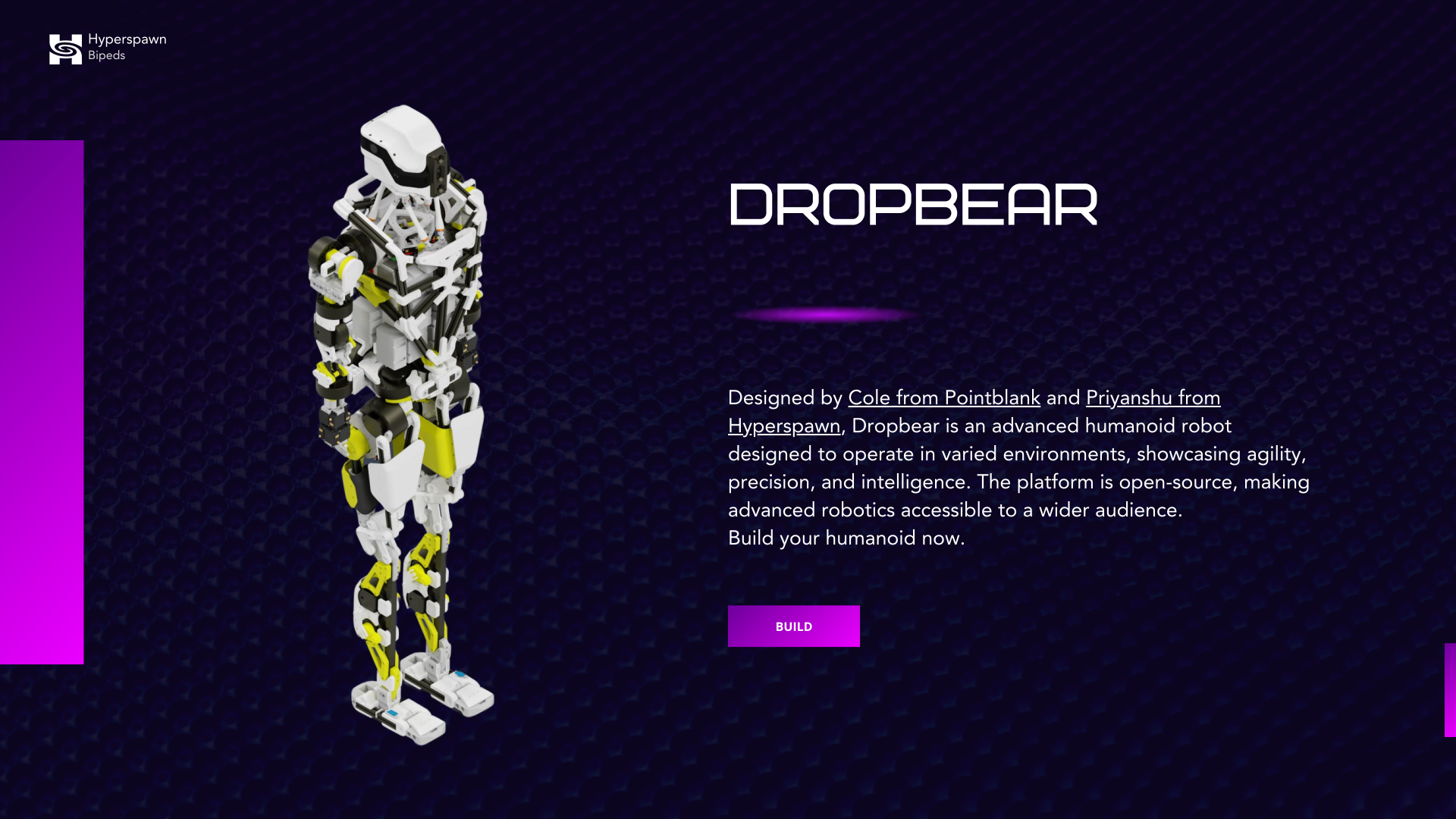
Dropbear
A humanoid you can build, understand, and make your own.
Dropbear is a full-size humanoid robotics project by Hyperspawn and Pointblank. Mechanical designs, printable parts, robot models, and control research give you places to start across the whole robot—from a single assembly on your workbench to locomotion experiments in simulation.
The aim is to make building and using a humanoid feel approachable: find the parts, see how they fit, try a movement, understand what happened, and keep improving it. The platform brings the build and robot tools into one place.
Open the platform → · Try the simulator · Explore the hardware · Join the community
Start with something you can do today
| I want to… | Start here | First step |
|---|---|---|
| Explore Dropbear | Browser simulator | Open the scene and explore the robot before setting up a development environment. |
| Build my own | Build platform | Open the Workshop, choose an assembly, and review its parts and prints. |
| Print a part or assemble a limb | Printable parts | Choose a subassembly and open its prepared .3mf plates or individual STL files. |
| Work on walking | Locomotion | Follow the setup guide, load a published checkpoint, and use the interactive viewer. |
| Observe connected controllers | dropbear_control | Run the local dashboard, open /?live=1, and use the Devices view for receive-only leg state and firmware diagnostics. |
| Change the mechanical design | Hardware | Open the full assembly or a component in CAD. |
You can begin with a head, an arm, or a simulated robot. Each is a useful project in its own right.
Connected robot control and firmware
Use robit-man/dropbear_control for the browser digital twin, live USB leg observation, raw serial diagnostics, controller health, and guarded firmware compilation/upload. Its physical command channel remains locked behind staged acknowledgements; live observation starts as receive-only.
git clone https://github.com/robit-man/dropbear_control.git
cd dropbear_control
python3 web/serve.py 8000
Open http://localhost:8000/?live=1&renderer=swiftshader. Select Connected ESP32 devices to inspect both leg streams, compile a trusted firmware source, or review an upload before its physical safety interlock is released.
The controller sources live in Control System/Low Level Control:
| Firmware | Use |
|---|---|
firmware_full_libs_neck.ino |
Recommended universal Behemoth image. One build supports left leg, right leg, center IMU, or head/neck roles, exposes the role-named captive portal, boots leg output stopped, and guards web motion with an expiring three-stage interlock. |
esp32_devkitc_v4_hybrid.ino |
Hybrid leg controller retained for existing PWM/CAN deployments. |
esp32_devkit_v1_observation_safe.ino |
Observation-only migration image. Motion commands stay disabled while five AS5600 and six motor-native CAN angles are reported. |
esp32_devkit_v1.ino |
Legacy/development leg controller. Keep it for compatibility and comparison; use Behemoth for new universal deployments. |
Read the low-level firmware guide and Behemoth role/commissioning guide before selecting an image. The tracked partitions.csv gives the application 2.5 MiB while retaining the Arduino default SPIFFS settings region at 0x290000. The dropbear_control uploader reads the connected ESP32 partition table first and refuses a mismatched layout.
From files to a robot on your workbench
The design is split into subassemblies so you can inspect, print, assemble, and revise one part at a time. The hardware repository includes full-robot STEP and Fusion archives, alongside separate arms, legs, head, pelvis, and torso designs. The print repository organizes parts and plates by assembly.
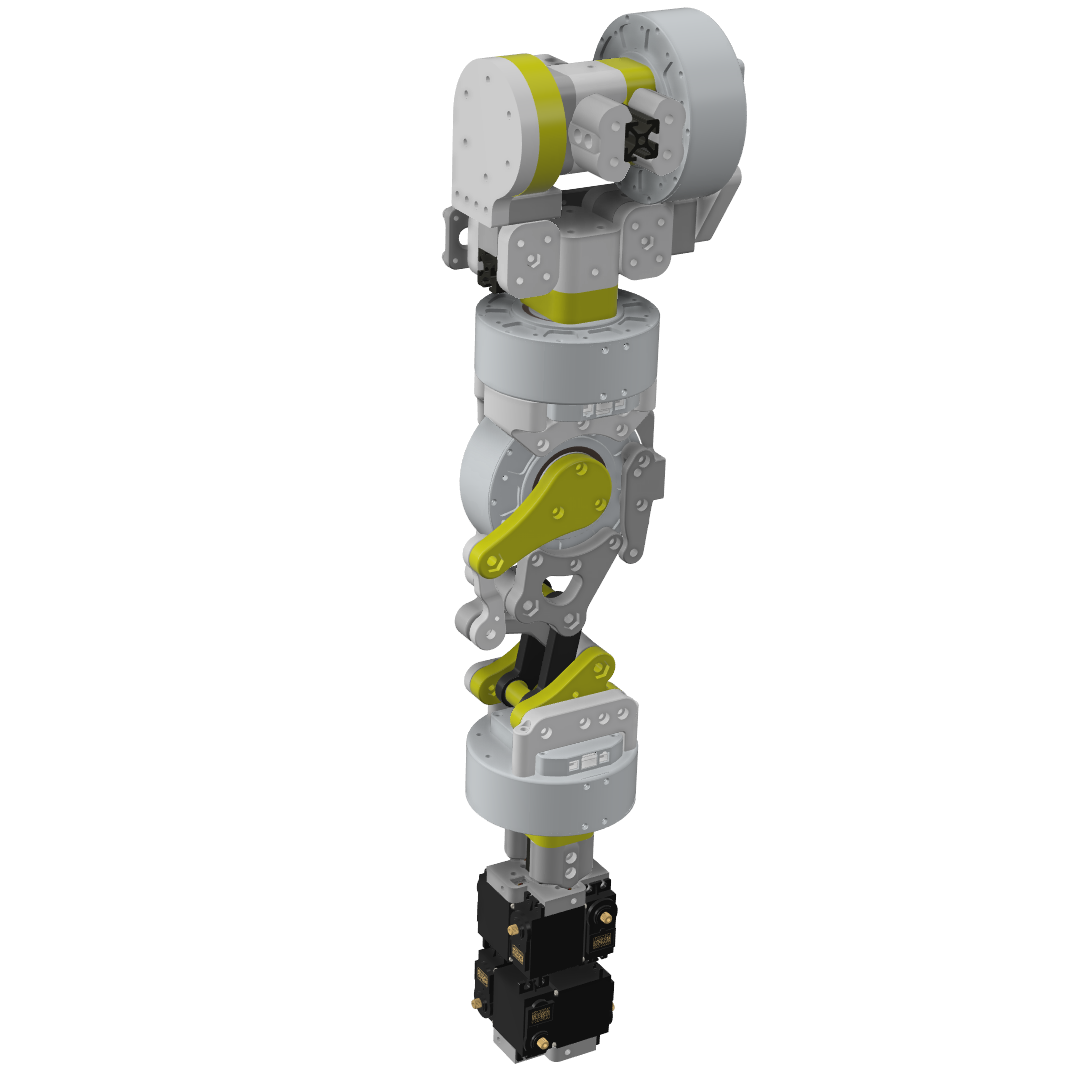
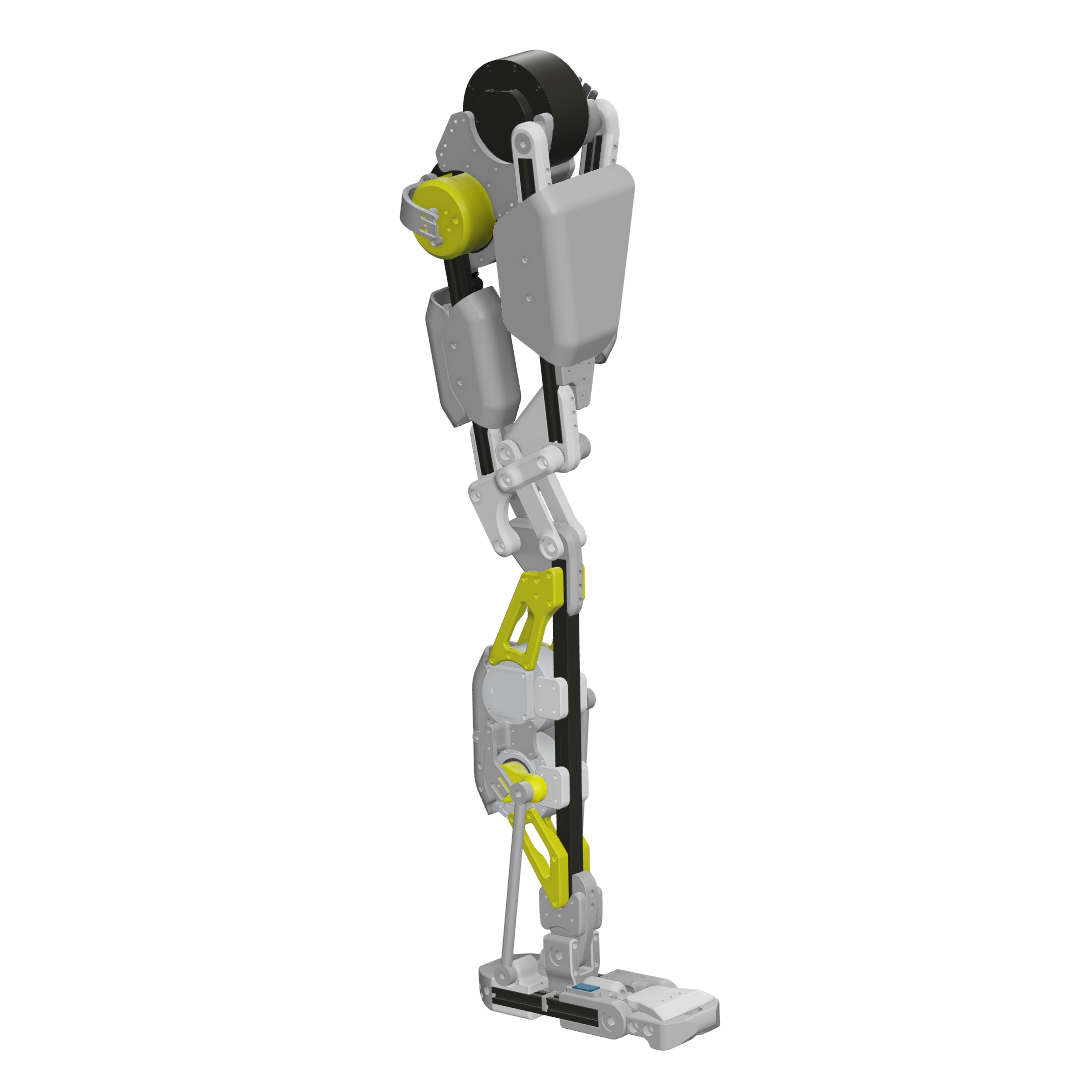
Right arm and right leg CAD renders from the hardware repository.
- Choose your assembly. Use the Workshop and CAD files to understand the parts and how they connect.
- Plan the parts and prints. Review the bill of materials, then select the matching print files and settings. You can print them yourself or use a print service.
- Assemble and document. Follow the relevant assembly documentation. Keep track of the design revision, substitutions, and anything the next builder should know.
- Bring up one subsystem at a time. Review the current low-level control source and use dropbear_control for versioned observation, health, compile, and guarded upload. Establish wiring, joint directions, limits, and calibration before attempting coordinated motion.
Build files, documentation, and control software are evolving at different speeds. Match revisions across them before ordering parts or powering an assembly. Use the BOM to develop a budget for your chosen configuration and local suppliers.
Walking you can inspect and reproduce
The Dropbear locomotion project publishes an Isaac Lab training environment, robot USD, policy checkpoints, evaluation reports, and an interactive viewer. You can load a policy, steer a simulated Dropbear, inspect its motion, and continue training.
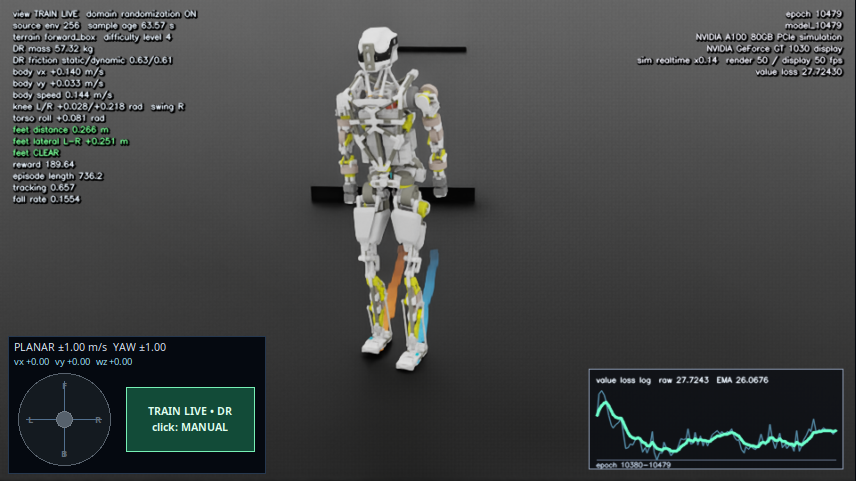
Isaac Lab simulation, with a training environment mirrored into the live viewer.
The published v0.1.0 flat-ground policy completed 128 simulation trials with zero falls: 32 each for forward, backward, left, and right commands. Each trial ran for 20 seconds on a plane, with pushes disabled and a commanded speed of 0.20 m/s. Backward and lateral speed tracking remain areas for improvement. Read the evaluation results.
The v0.2.0 terrain checkpoint is experimental, adding terrain observations and low-obstacle training. These are simulation releases; physical walking and robustness require separate validation.
Run the locomotion quick start →
Find the part of the project you need
This repository is the project’s front door and contains the original hardware, software, and media. More focused work lives in the repositories below.
| Area | Repository | What you will find |
|---|---|---|
| Mechanical design | dropbear_hardware | Full assembly CAD and mechanical subassemblies. |
| 3D printing | dropbear_printables | Prepared print plates, individual parts, and print guidance. |
| Parts and sourcing | dropbear_bom | Purchased components and assembly-level cost estimates. |
| Build documentation | dropbear_docs | Assembly guides and sections for electronics, calibration, testing, and operation. |
| Robot descriptions | dropbear_urdf · dropbear_mjcf | Robot models and meshes for visualization and simulation. |
| Simulation workspace | dropbear_sim | Links and submodules for the simulation projects. |
| Locomotion research | dropbear-locomotion | Training, published policies, live viewing, and evaluations. |
| Embedded control | Current low-level control · dropbear_control | Versioned ESP32/CAN firmware plus the connected-robot dashboard, diagnostics, compile, and guarded upload workflow. |
| Motor tools | myactuator-can | MyActuator driver and diagnostics work. |
File truncated at 100 lines see the full file
CONTRIBUTING
|
|
dropbear repositorydropbear_detailed_urdf dropbear_simplified_urdf dropbear dropbear_urdf |
ROS Distro
|
Repository Summary
| Description | |
| Checkout URI | https://github.com/hyperspawn/dropbear.git |
| VCS Type | git |
| VCS Version | main |
| Last Updated | 2026-09-27 |
| Dev Status | UNKNOWN |
| Released | UNRELEASED |
| Contributing |
Help Wanted (-)
Good First Issues (-) Pull Requests to Review (-) |
Packages
| Name | Version |
|---|---|
| dropbear_detailed_urdf | 0.0.0 |
| dropbear_simplified_urdf | 0.0.0 |
| dropbear | 0.0.0 |
| dropbear_urdf | 0.0.0 |
README
Dropbear
A humanoid you can build, understand, and make your own.
Dropbear is a full-size humanoid robotics project by Hyperspawn and Pointblank. Mechanical designs, printable parts, robot models, and control research give you places to start across the whole robot—from a single assembly on your workbench to locomotion experiments in simulation.
The aim is to make building and using a humanoid feel approachable: find the parts, see how they fit, try a movement, understand what happened, and keep improving it. The platform brings the build and robot tools into one place.
Open the platform → · Try the simulator · Explore the hardware · Join the community
Start with something you can do today
| I want to… | Start here | First step |
|---|---|---|
| Explore Dropbear | Browser simulator | Open the scene and explore the robot before setting up a development environment. |
| Build my own | Build platform | Open the Workshop, choose an assembly, and review its parts and prints. |
| Print a part or assemble a limb | Printable parts | Choose a subassembly and open its prepared .3mf plates or individual STL files. |
| Work on walking | Locomotion | Follow the setup guide, load a published checkpoint, and use the interactive viewer. |
| Observe connected controllers | dropbear_control | Run the local dashboard, open /?live=1, and use the Devices view for receive-only leg state and firmware diagnostics. |
| Change the mechanical design | Hardware | Open the full assembly or a component in CAD. |
You can begin with a head, an arm, or a simulated robot. Each is a useful project in its own right.
Connected robot control and firmware
Use robit-man/dropbear_control for the browser digital twin, live USB leg observation, raw serial diagnostics, controller health, and guarded firmware compilation/upload. Its physical command channel remains locked behind staged acknowledgements; live observation starts as receive-only.
git clone https://github.com/robit-man/dropbear_control.git
cd dropbear_control
python3 web/serve.py 8000
Open http://localhost:8000/?live=1&renderer=swiftshader. Select Connected ESP32 devices to inspect both leg streams, compile a trusted firmware source, or review an upload before its physical safety interlock is released.
The controller sources live in Control System/Low Level Control:
| Firmware | Use |
|---|---|
firmware_full_libs_neck.ino |
Recommended universal Behemoth image. One build supports left leg, right leg, center IMU, or head/neck roles, exposes the role-named captive portal, boots leg output stopped, and guards web motion with an expiring three-stage interlock. |
esp32_devkitc_v4_hybrid.ino |
Hybrid leg controller retained for existing PWM/CAN deployments. |
esp32_devkit_v1_observation_safe.ino |
Observation-only migration image. Motion commands stay disabled while five AS5600 and six motor-native CAN angles are reported. |
esp32_devkit_v1.ino |
Legacy/development leg controller. Keep it for compatibility and comparison; use Behemoth for new universal deployments. |
Read the low-level firmware guide and Behemoth role/commissioning guide before selecting an image. The tracked partitions.csv gives the application 2.5 MiB while retaining the Arduino default SPIFFS settings region at 0x290000. The dropbear_control uploader reads the connected ESP32 partition table first and refuses a mismatched layout.
From files to a robot on your workbench
The design is split into subassemblies so you can inspect, print, assemble, and revise one part at a time. The hardware repository includes full-robot STEP and Fusion archives, alongside separate arms, legs, head, pelvis, and torso designs. The print repository organizes parts and plates by assembly.
Right arm and right leg CAD renders from the hardware repository.
- Choose your assembly. Use the Workshop and CAD files to understand the parts and how they connect.
- Plan the parts and prints. Review the bill of materials, then select the matching print files and settings. You can print them yourself or use a print service.
- Assemble and document. Follow the relevant assembly documentation. Keep track of the design revision, substitutions, and anything the next builder should know.
- Bring up one subsystem at a time. Review the current low-level control source and use dropbear_control for versioned observation, health, compile, and guarded upload. Establish wiring, joint directions, limits, and calibration before attempting coordinated motion.
Build files, documentation, and control software are evolving at different speeds. Match revisions across them before ordering parts or powering an assembly. Use the BOM to develop a budget for your chosen configuration and local suppliers.
Walking you can inspect and reproduce
The Dropbear locomotion project publishes an Isaac Lab training environment, robot USD, policy checkpoints, evaluation reports, and an interactive viewer. You can load a policy, steer a simulated Dropbear, inspect its motion, and continue training.
Isaac Lab simulation, with a training environment mirrored into the live viewer.
The published v0.1.0 flat-ground policy completed 128 simulation trials with zero falls: 32 each for forward, backward, left, and right commands. Each trial ran for 20 seconds on a plane, with pushes disabled and a commanded speed of 0.20 m/s. Backward and lateral speed tracking remain areas for improvement. Read the evaluation results.
The v0.2.0 terrain checkpoint is experimental, adding terrain observations and low-obstacle training. These are simulation releases; physical walking and robustness require separate validation.
Run the locomotion quick start →
Find the part of the project you need
This repository is the project’s front door and contains the original hardware, software, and media. More focused work lives in the repositories below.
| Area | Repository | What you will find |
|---|---|---|
| Mechanical design | dropbear_hardware | Full assembly CAD and mechanical subassemblies. |
| 3D printing | dropbear_printables | Prepared print plates, individual parts, and print guidance. |
| Parts and sourcing | dropbear_bom | Purchased components and assembly-level cost estimates. |
| Build documentation | dropbear_docs | Assembly guides and sections for electronics, calibration, testing, and operation. |
| Robot descriptions | dropbear_urdf · dropbear_mjcf | Robot models and meshes for visualization and simulation. |
| Simulation workspace | dropbear_sim | Links and submodules for the simulation projects. |
| Locomotion research | dropbear-locomotion | Training, published policies, live viewing, and evaluations. |
| Embedded control | Current low-level control · dropbear_control | Versioned ESP32/CAN firmware plus the connected-robot dashboard, diagnostics, compile, and guarded upload workflow. |
| Motor tools | myactuator-can | MyActuator driver and diagnostics work. |
File truncated at 100 lines see the full file
CONTRIBUTING
|
|
dropbear repositorydropbear_detailed_urdf dropbear_simplified_urdf dropbear dropbear_urdf |
ROS Distro
|
Repository Summary
| Description | |
| Checkout URI | https://github.com/hyperspawn/dropbear.git |
| VCS Type | git |
| VCS Version | main |
| Last Updated | 2026-09-27 |
| Dev Status | UNKNOWN |
| Released | UNRELEASED |
| Contributing |
Help Wanted (-)
Good First Issues (-) Pull Requests to Review (-) |
Packages
| Name | Version |
|---|---|
| dropbear_detailed_urdf | 0.0.0 |
| dropbear_simplified_urdf | 0.0.0 |
| dropbear | 0.0.0 |
| dropbear_urdf | 0.0.0 |
README
Dropbear
A humanoid you can build, understand, and make your own.
Dropbear is a full-size humanoid robotics project by Hyperspawn and Pointblank. Mechanical designs, printable parts, robot models, and control research give you places to start across the whole robot—from a single assembly on your workbench to locomotion experiments in simulation.
The aim is to make building and using a humanoid feel approachable: find the parts, see how they fit, try a movement, understand what happened, and keep improving it. The platform brings the build and robot tools into one place.
Open the platform → · Try the simulator · Explore the hardware · Join the community
Start with something you can do today
| I want to… | Start here | First step |
|---|---|---|
| Explore Dropbear | Browser simulator | Open the scene and explore the robot before setting up a development environment. |
| Build my own | Build platform | Open the Workshop, choose an assembly, and review its parts and prints. |
| Print a part or assemble a limb | Printable parts | Choose a subassembly and open its prepared .3mf plates or individual STL files. |
| Work on walking | Locomotion | Follow the setup guide, load a published checkpoint, and use the interactive viewer. |
| Observe connected controllers | dropbear_control | Run the local dashboard, open /?live=1, and use the Devices view for receive-only leg state and firmware diagnostics. |
| Change the mechanical design | Hardware | Open the full assembly or a component in CAD. |
You can begin with a head, an arm, or a simulated robot. Each is a useful project in its own right.
Connected robot control and firmware
Use robit-man/dropbear_control for the browser digital twin, live USB leg observation, raw serial diagnostics, controller health, and guarded firmware compilation/upload. Its physical command channel remains locked behind staged acknowledgements; live observation starts as receive-only.
git clone https://github.com/robit-man/dropbear_control.git
cd dropbear_control
python3 web/serve.py 8000
Open http://localhost:8000/?live=1&renderer=swiftshader. Select Connected ESP32 devices to inspect both leg streams, compile a trusted firmware source, or review an upload before its physical safety interlock is released.
The controller sources live in Control System/Low Level Control:
| Firmware | Use |
|---|---|
firmware_full_libs_neck.ino |
Recommended universal Behemoth image. One build supports left leg, right leg, center IMU, or head/neck roles, exposes the role-named captive portal, boots leg output stopped, and guards web motion with an expiring three-stage interlock. |
esp32_devkitc_v4_hybrid.ino |
Hybrid leg controller retained for existing PWM/CAN deployments. |
esp32_devkit_v1_observation_safe.ino |
Observation-only migration image. Motion commands stay disabled while five AS5600 and six motor-native CAN angles are reported. |
esp32_devkit_v1.ino |
Legacy/development leg controller. Keep it for compatibility and comparison; use Behemoth for new universal deployments. |
Read the low-level firmware guide and Behemoth role/commissioning guide before selecting an image. The tracked partitions.csv gives the application 2.5 MiB while retaining the Arduino default SPIFFS settings region at 0x290000. The dropbear_control uploader reads the connected ESP32 partition table first and refuses a mismatched layout.
From files to a robot on your workbench
The design is split into subassemblies so you can inspect, print, assemble, and revise one part at a time. The hardware repository includes full-robot STEP and Fusion archives, alongside separate arms, legs, head, pelvis, and torso designs. The print repository organizes parts and plates by assembly.
Right arm and right leg CAD renders from the hardware repository.
- Choose your assembly. Use the Workshop and CAD files to understand the parts and how they connect.
- Plan the parts and prints. Review the bill of materials, then select the matching print files and settings. You can print them yourself or use a print service.
- Assemble and document. Follow the relevant assembly documentation. Keep track of the design revision, substitutions, and anything the next builder should know.
- Bring up one subsystem at a time. Review the current low-level control source and use dropbear_control for versioned observation, health, compile, and guarded upload. Establish wiring, joint directions, limits, and calibration before attempting coordinated motion.
Build files, documentation, and control software are evolving at different speeds. Match revisions across them before ordering parts or powering an assembly. Use the BOM to develop a budget for your chosen configuration and local suppliers.
Walking you can inspect and reproduce
The Dropbear locomotion project publishes an Isaac Lab training environment, robot USD, policy checkpoints, evaluation reports, and an interactive viewer. You can load a policy, steer a simulated Dropbear, inspect its motion, and continue training.
Isaac Lab simulation, with a training environment mirrored into the live viewer.
The published v0.1.0 flat-ground policy completed 128 simulation trials with zero falls: 32 each for forward, backward, left, and right commands. Each trial ran for 20 seconds on a plane, with pushes disabled and a commanded speed of 0.20 m/s. Backward and lateral speed tracking remain areas for improvement. Read the evaluation results.
The v0.2.0 terrain checkpoint is experimental, adding terrain observations and low-obstacle training. These are simulation releases; physical walking and robustness require separate validation.
Run the locomotion quick start →
Find the part of the project you need
This repository is the project’s front door and contains the original hardware, software, and media. More focused work lives in the repositories below.
| Area | Repository | What you will find |
|---|---|---|
| Mechanical design | dropbear_hardware | Full assembly CAD and mechanical subassemblies. |
| 3D printing | dropbear_printables | Prepared print plates, individual parts, and print guidance. |
| Parts and sourcing | dropbear_bom | Purchased components and assembly-level cost estimates. |
| Build documentation | dropbear_docs | Assembly guides and sections for electronics, calibration, testing, and operation. |
| Robot descriptions | dropbear_urdf · dropbear_mjcf | Robot models and meshes for visualization and simulation. |
| Simulation workspace | dropbear_sim | Links and submodules for the simulation projects. |
| Locomotion research | dropbear-locomotion | Training, published policies, live viewing, and evaluations. |
| Embedded control | Current low-level control · dropbear_control | Versioned ESP32/CAN firmware plus the connected-robot dashboard, diagnostics, compile, and guarded upload workflow. |
| Motor tools | myactuator-can | MyActuator driver and diagnostics work. |
File truncated at 100 lines see the full file
CONTRIBUTING
|
|
dropbear repositorydropbear_detailed_urdf dropbear_simplified_urdf dropbear dropbear_urdf |
ROS Distro
|
Repository Summary
| Description | |
| Checkout URI | https://github.com/hyperspawn/dropbear.git |
| VCS Type | git |
| VCS Version | main |
| Last Updated | 2026-09-27 |
| Dev Status | UNKNOWN |
| Released | UNRELEASED |
| Contributing |
Help Wanted (-)
Good First Issues (-) Pull Requests to Review (-) |
Packages
| Name | Version |
|---|---|
| dropbear_detailed_urdf | 0.0.0 |
| dropbear_simplified_urdf | 0.0.0 |
| dropbear | 0.0.0 |
| dropbear_urdf | 0.0.0 |
README
Dropbear
A humanoid you can build, understand, and make your own.
Dropbear is a full-size humanoid robotics project by Hyperspawn and Pointblank. Mechanical designs, printable parts, robot models, and control research give you places to start across the whole robot—from a single assembly on your workbench to locomotion experiments in simulation.
The aim is to make building and using a humanoid feel approachable: find the parts, see how they fit, try a movement, understand what happened, and keep improving it. The platform brings the build and robot tools into one place.
Open the platform → · Try the simulator · Explore the hardware · Join the community
Start with something you can do today
| I want to… | Start here | First step |
|---|---|---|
| Explore Dropbear | Browser simulator | Open the scene and explore the robot before setting up a development environment. |
| Build my own | Build platform | Open the Workshop, choose an assembly, and review its parts and prints. |
| Print a part or assemble a limb | Printable parts | Choose a subassembly and open its prepared .3mf plates or individual STL files. |
| Work on walking | Locomotion | Follow the setup guide, load a published checkpoint, and use the interactive viewer. |
| Observe connected controllers | dropbear_control | Run the local dashboard, open /?live=1, and use the Devices view for receive-only leg state and firmware diagnostics. |
| Change the mechanical design | Hardware | Open the full assembly or a component in CAD. |
You can begin with a head, an arm, or a simulated robot. Each is a useful project in its own right.
Connected robot control and firmware
Use robit-man/dropbear_control for the browser digital twin, live USB leg observation, raw serial diagnostics, controller health, and guarded firmware compilation/upload. Its physical command channel remains locked behind staged acknowledgements; live observation starts as receive-only.
git clone https://github.com/robit-man/dropbear_control.git
cd dropbear_control
python3 web/serve.py 8000
Open http://localhost:8000/?live=1&renderer=swiftshader. Select Connected ESP32 devices to inspect both leg streams, compile a trusted firmware source, or review an upload before its physical safety interlock is released.
The controller sources live in Control System/Low Level Control:
| Firmware | Use |
|---|---|
firmware_full_libs_neck.ino |
Recommended universal Behemoth image. One build supports left leg, right leg, center IMU, or head/neck roles, exposes the role-named captive portal, boots leg output stopped, and guards web motion with an expiring three-stage interlock. |
esp32_devkitc_v4_hybrid.ino |
Hybrid leg controller retained for existing PWM/CAN deployments. |
esp32_devkit_v1_observation_safe.ino |
Observation-only migration image. Motion commands stay disabled while five AS5600 and six motor-native CAN angles are reported. |
esp32_devkit_v1.ino |
Legacy/development leg controller. Keep it for compatibility and comparison; use Behemoth for new universal deployments. |
Read the low-level firmware guide and Behemoth role/commissioning guide before selecting an image. The tracked partitions.csv gives the application 2.5 MiB while retaining the Arduino default SPIFFS settings region at 0x290000. The dropbear_control uploader reads the connected ESP32 partition table first and refuses a mismatched layout.
From files to a robot on your workbench
The design is split into subassemblies so you can inspect, print, assemble, and revise one part at a time. The hardware repository includes full-robot STEP and Fusion archives, alongside separate arms, legs, head, pelvis, and torso designs. The print repository organizes parts and plates by assembly.
Right arm and right leg CAD renders from the hardware repository.
- Choose your assembly. Use the Workshop and CAD files to understand the parts and how they connect.
- Plan the parts and prints. Review the bill of materials, then select the matching print files and settings. You can print them yourself or use a print service.
- Assemble and document. Follow the relevant assembly documentation. Keep track of the design revision, substitutions, and anything the next builder should know.
- Bring up one subsystem at a time. Review the current low-level control source and use dropbear_control for versioned observation, health, compile, and guarded upload. Establish wiring, joint directions, limits, and calibration before attempting coordinated motion.
Build files, documentation, and control software are evolving at different speeds. Match revisions across them before ordering parts or powering an assembly. Use the BOM to develop a budget for your chosen configuration and local suppliers.
Walking you can inspect and reproduce
The Dropbear locomotion project publishes an Isaac Lab training environment, robot USD, policy checkpoints, evaluation reports, and an interactive viewer. You can load a policy, steer a simulated Dropbear, inspect its motion, and continue training.
Isaac Lab simulation, with a training environment mirrored into the live viewer.
The published v0.1.0 flat-ground policy completed 128 simulation trials with zero falls: 32 each for forward, backward, left, and right commands. Each trial ran for 20 seconds on a plane, with pushes disabled and a commanded speed of 0.20 m/s. Backward and lateral speed tracking remain areas for improvement. Read the evaluation results.
The v0.2.0 terrain checkpoint is experimental, adding terrain observations and low-obstacle training. These are simulation releases; physical walking and robustness require separate validation.
Run the locomotion quick start →
Find the part of the project you need
This repository is the project’s front door and contains the original hardware, software, and media. More focused work lives in the repositories below.
| Area | Repository | What you will find |
|---|---|---|
| Mechanical design | dropbear_hardware | Full assembly CAD and mechanical subassemblies. |
| 3D printing | dropbear_printables | Prepared print plates, individual parts, and print guidance. |
| Parts and sourcing | dropbear_bom | Purchased components and assembly-level cost estimates. |
| Build documentation | dropbear_docs | Assembly guides and sections for electronics, calibration, testing, and operation. |
| Robot descriptions | dropbear_urdf · dropbear_mjcf | Robot models and meshes for visualization and simulation. |
| Simulation workspace | dropbear_sim | Links and submodules for the simulation projects. |
| Locomotion research | dropbear-locomotion | Training, published policies, live viewing, and evaluations. |
| Embedded control | Current low-level control · dropbear_control | Versioned ESP32/CAN firmware plus the connected-robot dashboard, diagnostics, compile, and guarded upload workflow. |
| Motor tools | myactuator-can | MyActuator driver and diagnostics work. |
File truncated at 100 lines see the full file
CONTRIBUTING
|
|
dropbear repositorydropbear_detailed_urdf dropbear_simplified_urdf dropbear dropbear_urdf |
ROS Distro
|
Repository Summary
| Description | |
| Checkout URI | https://github.com/hyperspawn/dropbear.git |
| VCS Type | git |
| VCS Version | main |
| Last Updated | 2026-09-27 |
| Dev Status | UNKNOWN |
| Released | UNRELEASED |
| Contributing |
Help Wanted (-)
Good First Issues (-) Pull Requests to Review (-) |
Packages
| Name | Version |
|---|---|
| dropbear_detailed_urdf | 0.0.0 |
| dropbear_simplified_urdf | 0.0.0 |
| dropbear | 0.0.0 |
| dropbear_urdf | 0.0.0 |
README
Dropbear
A humanoid you can build, understand, and make your own.
Dropbear is a full-size humanoid robotics project by Hyperspawn and Pointblank. Mechanical designs, printable parts, robot models, and control research give you places to start across the whole robot—from a single assembly on your workbench to locomotion experiments in simulation.
The aim is to make building and using a humanoid feel approachable: find the parts, see how they fit, try a movement, understand what happened, and keep improving it. The platform brings the build and robot tools into one place.
Open the platform → · Try the simulator · Explore the hardware · Join the community
Start with something you can do today
| I want to… | Start here | First step |
|---|---|---|
| Explore Dropbear | Browser simulator | Open the scene and explore the robot before setting up a development environment. |
| Build my own | Build platform | Open the Workshop, choose an assembly, and review its parts and prints. |
| Print a part or assemble a limb | Printable parts | Choose a subassembly and open its prepared .3mf plates or individual STL files. |
| Work on walking | Locomotion | Follow the setup guide, load a published checkpoint, and use the interactive viewer. |
| Observe connected controllers | dropbear_control | Run the local dashboard, open /?live=1, and use the Devices view for receive-only leg state and firmware diagnostics. |
| Change the mechanical design | Hardware | Open the full assembly or a component in CAD. |
You can begin with a head, an arm, or a simulated robot. Each is a useful project in its own right.
Connected robot control and firmware
Use robit-man/dropbear_control for the browser digital twin, live USB leg observation, raw serial diagnostics, controller health, and guarded firmware compilation/upload. Its physical command channel remains locked behind staged acknowledgements; live observation starts as receive-only.
git clone https://github.com/robit-man/dropbear_control.git
cd dropbear_control
python3 web/serve.py 8000
Open http://localhost:8000/?live=1&renderer=swiftshader. Select Connected ESP32 devices to inspect both leg streams, compile a trusted firmware source, or review an upload before its physical safety interlock is released.
The controller sources live in Control System/Low Level Control:
| Firmware | Use |
|---|---|
firmware_full_libs_neck.ino |
Recommended universal Behemoth image. One build supports left leg, right leg, center IMU, or head/neck roles, exposes the role-named captive portal, boots leg output stopped, and guards web motion with an expiring three-stage interlock. |
esp32_devkitc_v4_hybrid.ino |
Hybrid leg controller retained for existing PWM/CAN deployments. |
esp32_devkit_v1_observation_safe.ino |
Observation-only migration image. Motion commands stay disabled while five AS5600 and six motor-native CAN angles are reported. |
esp32_devkit_v1.ino |
Legacy/development leg controller. Keep it for compatibility and comparison; use Behemoth for new universal deployments. |
Read the low-level firmware guide and Behemoth role/commissioning guide before selecting an image. The tracked partitions.csv gives the application 2.5 MiB while retaining the Arduino default SPIFFS settings region at 0x290000. The dropbear_control uploader reads the connected ESP32 partition table first and refuses a mismatched layout.
From files to a robot on your workbench
The design is split into subassemblies so you can inspect, print, assemble, and revise one part at a time. The hardware repository includes full-robot STEP and Fusion archives, alongside separate arms, legs, head, pelvis, and torso designs. The print repository organizes parts and plates by assembly.
Right arm and right leg CAD renders from the hardware repository.
- Choose your assembly. Use the Workshop and CAD files to understand the parts and how they connect.
- Plan the parts and prints. Review the bill of materials, then select the matching print files and settings. You can print them yourself or use a print service.
- Assemble and document. Follow the relevant assembly documentation. Keep track of the design revision, substitutions, and anything the next builder should know.
- Bring up one subsystem at a time. Review the current low-level control source and use dropbear_control for versioned observation, health, compile, and guarded upload. Establish wiring, joint directions, limits, and calibration before attempting coordinated motion.
Build files, documentation, and control software are evolving at different speeds. Match revisions across them before ordering parts or powering an assembly. Use the BOM to develop a budget for your chosen configuration and local suppliers.
Walking you can inspect and reproduce
The Dropbear locomotion project publishes an Isaac Lab training environment, robot USD, policy checkpoints, evaluation reports, and an interactive viewer. You can load a policy, steer a simulated Dropbear, inspect its motion, and continue training.
Isaac Lab simulation, with a training environment mirrored into the live viewer.
The published v0.1.0 flat-ground policy completed 128 simulation trials with zero falls: 32 each for forward, backward, left, and right commands. Each trial ran for 20 seconds on a plane, with pushes disabled and a commanded speed of 0.20 m/s. Backward and lateral speed tracking remain areas for improvement. Read the evaluation results.
The v0.2.0 terrain checkpoint is experimental, adding terrain observations and low-obstacle training. These are simulation releases; physical walking and robustness require separate validation.
Run the locomotion quick start →
Find the part of the project you need
This repository is the project’s front door and contains the original hardware, software, and media. More focused work lives in the repositories below.
| Area | Repository | What you will find |
|---|---|---|
| Mechanical design | dropbear_hardware | Full assembly CAD and mechanical subassemblies. |
| 3D printing | dropbear_printables | Prepared print plates, individual parts, and print guidance. |
| Parts and sourcing | dropbear_bom | Purchased components and assembly-level cost estimates. |
| Build documentation | dropbear_docs | Assembly guides and sections for electronics, calibration, testing, and operation. |
| Robot descriptions | dropbear_urdf · dropbear_mjcf | Robot models and meshes for visualization and simulation. |
| Simulation workspace | dropbear_sim | Links and submodules for the simulation projects. |
| Locomotion research | dropbear-locomotion | Training, published policies, live viewing, and evaluations. |
| Embedded control | Current low-level control · dropbear_control | Versioned ESP32/CAN firmware plus the connected-robot dashboard, diagnostics, compile, and guarded upload workflow. |
| Motor tools | myactuator-can | MyActuator driver and diagnostics work. |
File truncated at 100 lines see the full file
CONTRIBUTING
|
|
dropbear repositorydropbear_detailed_urdf dropbear_simplified_urdf dropbear dropbear_urdf |
ROS Distro
|
Repository Summary
| Description | |
| Checkout URI | https://github.com/hyperspawn/dropbear.git |
| VCS Type | git |
| VCS Version | main |
| Last Updated | 2026-09-27 |
| Dev Status | UNKNOWN |
| Released | UNRELEASED |
| Contributing |
Help Wanted (-)
Good First Issues (-) Pull Requests to Review (-) |
Packages
| Name | Version |
|---|---|
| dropbear_detailed_urdf | 0.0.0 |
| dropbear_simplified_urdf | 0.0.0 |
| dropbear | 0.0.0 |
| dropbear_urdf | 0.0.0 |
README
Dropbear
A humanoid you can build, understand, and make your own.
Dropbear is a full-size humanoid robotics project by Hyperspawn and Pointblank. Mechanical designs, printable parts, robot models, and control research give you places to start across the whole robot—from a single assembly on your workbench to locomotion experiments in simulation.
The aim is to make building and using a humanoid feel approachable: find the parts, see how they fit, try a movement, understand what happened, and keep improving it. The platform brings the build and robot tools into one place.
Open the platform → · Try the simulator · Explore the hardware · Join the community
Start with something you can do today
| I want to… | Start here | First step |
|---|---|---|
| Explore Dropbear | Browser simulator | Open the scene and explore the robot before setting up a development environment. |
| Build my own | Build platform | Open the Workshop, choose an assembly, and review its parts and prints. |
| Print a part or assemble a limb | Printable parts | Choose a subassembly and open its prepared .3mf plates or individual STL files. |
| Work on walking | Locomotion | Follow the setup guide, load a published checkpoint, and use the interactive viewer. |
| Observe connected controllers | dropbear_control | Run the local dashboard, open /?live=1, and use the Devices view for receive-only leg state and firmware diagnostics. |
| Change the mechanical design | Hardware | Open the full assembly or a component in CAD. |
You can begin with a head, an arm, or a simulated robot. Each is a useful project in its own right.
Connected robot control and firmware
Use robit-man/dropbear_control for the browser digital twin, live USB leg observation, raw serial diagnostics, controller health, and guarded firmware compilation/upload. Its physical command channel remains locked behind staged acknowledgements; live observation starts as receive-only.
git clone https://github.com/robit-man/dropbear_control.git
cd dropbear_control
python3 web/serve.py 8000
Open http://localhost:8000/?live=1&renderer=swiftshader. Select Connected ESP32 devices to inspect both leg streams, compile a trusted firmware source, or review an upload before its physical safety interlock is released.
The controller sources live in Control System/Low Level Control:
| Firmware | Use |
|---|---|
firmware_full_libs_neck.ino |
Recommended universal Behemoth image. One build supports left leg, right leg, center IMU, or head/neck roles, exposes the role-named captive portal, boots leg output stopped, and guards web motion with an expiring three-stage interlock. |
esp32_devkitc_v4_hybrid.ino |
Hybrid leg controller retained for existing PWM/CAN deployments. |
esp32_devkit_v1_observation_safe.ino |
Observation-only migration image. Motion commands stay disabled while five AS5600 and six motor-native CAN angles are reported. |
esp32_devkit_v1.ino |
Legacy/development leg controller. Keep it for compatibility and comparison; use Behemoth for new universal deployments. |
Read the low-level firmware guide and Behemoth role/commissioning guide before selecting an image. The tracked partitions.csv gives the application 2.5 MiB while retaining the Arduino default SPIFFS settings region at 0x290000. The dropbear_control uploader reads the connected ESP32 partition table first and refuses a mismatched layout.
From files to a robot on your workbench
The design is split into subassemblies so you can inspect, print, assemble, and revise one part at a time. The hardware repository includes full-robot STEP and Fusion archives, alongside separate arms, legs, head, pelvis, and torso designs. The print repository organizes parts and plates by assembly.
Right arm and right leg CAD renders from the hardware repository.
- Choose your assembly. Use the Workshop and CAD files to understand the parts and how they connect.
- Plan the parts and prints. Review the bill of materials, then select the matching print files and settings. You can print them yourself or use a print service.
- Assemble and document. Follow the relevant assembly documentation. Keep track of the design revision, substitutions, and anything the next builder should know.
- Bring up one subsystem at a time. Review the current low-level control source and use dropbear_control for versioned observation, health, compile, and guarded upload. Establish wiring, joint directions, limits, and calibration before attempting coordinated motion.
Build files, documentation, and control software are evolving at different speeds. Match revisions across them before ordering parts or powering an assembly. Use the BOM to develop a budget for your chosen configuration and local suppliers.
Walking you can inspect and reproduce
The Dropbear locomotion project publishes an Isaac Lab training environment, robot USD, policy checkpoints, evaluation reports, and an interactive viewer. You can load a policy, steer a simulated Dropbear, inspect its motion, and continue training.
Isaac Lab simulation, with a training environment mirrored into the live viewer.
The published v0.1.0 flat-ground policy completed 128 simulation trials with zero falls: 32 each for forward, backward, left, and right commands. Each trial ran for 20 seconds on a plane, with pushes disabled and a commanded speed of 0.20 m/s. Backward and lateral speed tracking remain areas for improvement. Read the evaluation results.
The v0.2.0 terrain checkpoint is experimental, adding terrain observations and low-obstacle training. These are simulation releases; physical walking and robustness require separate validation.
Run the locomotion quick start →
Find the part of the project you need
This repository is the project’s front door and contains the original hardware, software, and media. More focused work lives in the repositories below.
| Area | Repository | What you will find |
|---|---|---|
| Mechanical design | dropbear_hardware | Full assembly CAD and mechanical subassemblies. |
| 3D printing | dropbear_printables | Prepared print plates, individual parts, and print guidance. |
| Parts and sourcing | dropbear_bom | Purchased components and assembly-level cost estimates. |
| Build documentation | dropbear_docs | Assembly guides and sections for electronics, calibration, testing, and operation. |
| Robot descriptions | dropbear_urdf · dropbear_mjcf | Robot models and meshes for visualization and simulation. |
| Simulation workspace | dropbear_sim | Links and submodules for the simulation projects. |
| Locomotion research | dropbear-locomotion | Training, published policies, live viewing, and evaluations. |
| Embedded control | Current low-level control · dropbear_control | Versioned ESP32/CAN firmware plus the connected-robot dashboard, diagnostics, compile, and guarded upload workflow. |
| Motor tools | myactuator-can | MyActuator driver and diagnostics work. |
File truncated at 100 lines see the full file
CONTRIBUTING
|
|
dropbear repositorydropbear_detailed_urdf dropbear_simplified_urdf dropbear dropbear_urdf |
ROS Distro
|
Repository Summary
| Description | |
| Checkout URI | https://github.com/hyperspawn/dropbear.git |
| VCS Type | git |
| VCS Version | main |
| Last Updated | 2026-09-27 |
| Dev Status | UNKNOWN |
| Released | UNRELEASED |
| Contributing |
Help Wanted (-)
Good First Issues (-) Pull Requests to Review (-) |
Packages
| Name | Version |
|---|---|
| dropbear_detailed_urdf | 0.0.0 |
| dropbear_simplified_urdf | 0.0.0 |
| dropbear | 0.0.0 |
| dropbear_urdf | 0.0.0 |
README
Dropbear
A humanoid you can build, understand, and make your own.
Dropbear is a full-size humanoid robotics project by Hyperspawn and Pointblank. Mechanical designs, printable parts, robot models, and control research give you places to start across the whole robot—from a single assembly on your workbench to locomotion experiments in simulation.
The aim is to make building and using a humanoid feel approachable: find the parts, see how they fit, try a movement, understand what happened, and keep improving it. The platform brings the build and robot tools into one place.
Open the platform → · Try the simulator · Explore the hardware · Join the community
Start with something you can do today
| I want to… | Start here | First step |
|---|---|---|
| Explore Dropbear | Browser simulator | Open the scene and explore the robot before setting up a development environment. |
| Build my own | Build platform | Open the Workshop, choose an assembly, and review its parts and prints. |
| Print a part or assemble a limb | Printable parts | Choose a subassembly and open its prepared .3mf plates or individual STL files. |
| Work on walking | Locomotion | Follow the setup guide, load a published checkpoint, and use the interactive viewer. |
| Observe connected controllers | dropbear_control | Run the local dashboard, open /?live=1, and use the Devices view for receive-only leg state and firmware diagnostics. |
| Change the mechanical design | Hardware | Open the full assembly or a component in CAD. |
You can begin with a head, an arm, or a simulated robot. Each is a useful project in its own right.
Connected robot control and firmware
Use robit-man/dropbear_control for the browser digital twin, live USB leg observation, raw serial diagnostics, controller health, and guarded firmware compilation/upload. Its physical command channel remains locked behind staged acknowledgements; live observation starts as receive-only.
git clone https://github.com/robit-man/dropbear_control.git
cd dropbear_control
python3 web/serve.py 8000
Open http://localhost:8000/?live=1&renderer=swiftshader. Select Connected ESP32 devices to inspect both leg streams, compile a trusted firmware source, or review an upload before its physical safety interlock is released.
The controller sources live in Control System/Low Level Control:
| Firmware | Use |
|---|---|
firmware_full_libs_neck.ino |
Recommended universal Behemoth image. One build supports left leg, right leg, center IMU, or head/neck roles, exposes the role-named captive portal, boots leg output stopped, and guards web motion with an expiring three-stage interlock. |
esp32_devkitc_v4_hybrid.ino |
Hybrid leg controller retained for existing PWM/CAN deployments. |
esp32_devkit_v1_observation_safe.ino |
Observation-only migration image. Motion commands stay disabled while five AS5600 and six motor-native CAN angles are reported. |
esp32_devkit_v1.ino |
Legacy/development leg controller. Keep it for compatibility and comparison; use Behemoth for new universal deployments. |
Read the low-level firmware guide and Behemoth role/commissioning guide before selecting an image. The tracked partitions.csv gives the application 2.5 MiB while retaining the Arduino default SPIFFS settings region at 0x290000. The dropbear_control uploader reads the connected ESP32 partition table first and refuses a mismatched layout.
From files to a robot on your workbench
The design is split into subassemblies so you can inspect, print, assemble, and revise one part at a time. The hardware repository includes full-robot STEP and Fusion archives, alongside separate arms, legs, head, pelvis, and torso designs. The print repository organizes parts and plates by assembly.
Right arm and right leg CAD renders from the hardware repository.
- Choose your assembly. Use the Workshop and CAD files to understand the parts and how they connect.
- Plan the parts and prints. Review the bill of materials, then select the matching print files and settings. You can print them yourself or use a print service.
- Assemble and document. Follow the relevant assembly documentation. Keep track of the design revision, substitutions, and anything the next builder should know.
- Bring up one subsystem at a time. Review the current low-level control source and use dropbear_control for versioned observation, health, compile, and guarded upload. Establish wiring, joint directions, limits, and calibration before attempting coordinated motion.
Build files, documentation, and control software are evolving at different speeds. Match revisions across them before ordering parts or powering an assembly. Use the BOM to develop a budget for your chosen configuration and local suppliers.
Walking you can inspect and reproduce
The Dropbear locomotion project publishes an Isaac Lab training environment, robot USD, policy checkpoints, evaluation reports, and an interactive viewer. You can load a policy, steer a simulated Dropbear, inspect its motion, and continue training.
Isaac Lab simulation, with a training environment mirrored into the live viewer.
The published v0.1.0 flat-ground policy completed 128 simulation trials with zero falls: 32 each for forward, backward, left, and right commands. Each trial ran for 20 seconds on a plane, with pushes disabled and a commanded speed of 0.20 m/s. Backward and lateral speed tracking remain areas for improvement. Read the evaluation results.
The v0.2.0 terrain checkpoint is experimental, adding terrain observations and low-obstacle training. These are simulation releases; physical walking and robustness require separate validation.
Run the locomotion quick start →
Find the part of the project you need
This repository is the project’s front door and contains the original hardware, software, and media. More focused work lives in the repositories below.
| Area | Repository | What you will find |
|---|---|---|
| Mechanical design | dropbear_hardware | Full assembly CAD and mechanical subassemblies. |
| 3D printing | dropbear_printables | Prepared print plates, individual parts, and print guidance. |
| Parts and sourcing | dropbear_bom | Purchased components and assembly-level cost estimates. |
| Build documentation | dropbear_docs | Assembly guides and sections for electronics, calibration, testing, and operation. |
| Robot descriptions | dropbear_urdf · dropbear_mjcf | Robot models and meshes for visualization and simulation. |
| Simulation workspace | dropbear_sim | Links and submodules for the simulation projects. |
| Locomotion research | dropbear-locomotion | Training, published policies, live viewing, and evaluations. |
| Embedded control | Current low-level control · dropbear_control | Versioned ESP32/CAN firmware plus the connected-robot dashboard, diagnostics, compile, and guarded upload workflow. |
| Motor tools | myactuator-can | MyActuator driver and diagnostics work. |
File truncated at 100 lines see the full file
CONTRIBUTING
|
|
dropbear repositorydropbear_detailed_urdf dropbear_simplified_urdf dropbear dropbear_urdf |
ROS Distro
|
Repository Summary
| Description | |
| Checkout URI | https://github.com/hyperspawn/dropbear.git |
| VCS Type | git |
| VCS Version | main |
| Last Updated | 2026-09-27 |
| Dev Status | UNKNOWN |
| Released | UNRELEASED |
| Contributing |
Help Wanted (-)
Good First Issues (-) Pull Requests to Review (-) |
Packages
| Name | Version |
|---|---|
| dropbear_detailed_urdf | 0.0.0 |
| dropbear_simplified_urdf | 0.0.0 |
| dropbear | 0.0.0 |
| dropbear_urdf | 0.0.0 |
README
Dropbear
A humanoid you can build, understand, and make your own.
Dropbear is a full-size humanoid robotics project by Hyperspawn and Pointblank. Mechanical designs, printable parts, robot models, and control research give you places to start across the whole robot—from a single assembly on your workbench to locomotion experiments in simulation.
The aim is to make building and using a humanoid feel approachable: find the parts, see how they fit, try a movement, understand what happened, and keep improving it. The platform brings the build and robot tools into one place.
Open the platform → · Try the simulator · Explore the hardware · Join the community
Start with something you can do today
| I want to… | Start here | First step |
|---|---|---|
| Explore Dropbear | Browser simulator | Open the scene and explore the robot before setting up a development environment. |
| Build my own | Build platform | Open the Workshop, choose an assembly, and review its parts and prints. |
| Print a part or assemble a limb | Printable parts | Choose a subassembly and open its prepared .3mf plates or individual STL files. |
| Work on walking | Locomotion | Follow the setup guide, load a published checkpoint, and use the interactive viewer. |
| Observe connected controllers | dropbear_control | Run the local dashboard, open /?live=1, and use the Devices view for receive-only leg state and firmware diagnostics. |
| Change the mechanical design | Hardware | Open the full assembly or a component in CAD. |
You can begin with a head, an arm, or a simulated robot. Each is a useful project in its own right.
Connected robot control and firmware
Use robit-man/dropbear_control for the browser digital twin, live USB leg observation, raw serial diagnostics, controller health, and guarded firmware compilation/upload. Its physical command channel remains locked behind staged acknowledgements; live observation starts as receive-only.
git clone https://github.com/robit-man/dropbear_control.git
cd dropbear_control
python3 web/serve.py 8000
Open http://localhost:8000/?live=1&renderer=swiftshader. Select Connected ESP32 devices to inspect both leg streams, compile a trusted firmware source, or review an upload before its physical safety interlock is released.
The controller sources live in Control System/Low Level Control:
| Firmware | Use |
|---|---|
firmware_full_libs_neck.ino |
Recommended universal Behemoth image. One build supports left leg, right leg, center IMU, or head/neck roles, exposes the role-named captive portal, boots leg output stopped, and guards web motion with an expiring three-stage interlock. |
esp32_devkitc_v4_hybrid.ino |
Hybrid leg controller retained for existing PWM/CAN deployments. |
esp32_devkit_v1_observation_safe.ino |
Observation-only migration image. Motion commands stay disabled while five AS5600 and six motor-native CAN angles are reported. |
esp32_devkit_v1.ino |
Legacy/development leg controller. Keep it for compatibility and comparison; use Behemoth for new universal deployments. |
Read the low-level firmware guide and Behemoth role/commissioning guide before selecting an image. The tracked partitions.csv gives the application 2.5 MiB while retaining the Arduino default SPIFFS settings region at 0x290000. The dropbear_control uploader reads the connected ESP32 partition table first and refuses a mismatched layout.
From files to a robot on your workbench
The design is split into subassemblies so you can inspect, print, assemble, and revise one part at a time. The hardware repository includes full-robot STEP and Fusion archives, alongside separate arms, legs, head, pelvis, and torso designs. The print repository organizes parts and plates by assembly.
Right arm and right leg CAD renders from the hardware repository.
- Choose your assembly. Use the Workshop and CAD files to understand the parts and how they connect.
- Plan the parts and prints. Review the bill of materials, then select the matching print files and settings. You can print them yourself or use a print service.
- Assemble and document. Follow the relevant assembly documentation. Keep track of the design revision, substitutions, and anything the next builder should know.
- Bring up one subsystem at a time. Review the current low-level control source and use dropbear_control for versioned observation, health, compile, and guarded upload. Establish wiring, joint directions, limits, and calibration before attempting coordinated motion.
Build files, documentation, and control software are evolving at different speeds. Match revisions across them before ordering parts or powering an assembly. Use the BOM to develop a budget for your chosen configuration and local suppliers.
Walking you can inspect and reproduce
The Dropbear locomotion project publishes an Isaac Lab training environment, robot USD, policy checkpoints, evaluation reports, and an interactive viewer. You can load a policy, steer a simulated Dropbear, inspect its motion, and continue training.
Isaac Lab simulation, with a training environment mirrored into the live viewer.
The published v0.1.0 flat-ground policy completed 128 simulation trials with zero falls: 32 each for forward, backward, left, and right commands. Each trial ran for 20 seconds on a plane, with pushes disabled and a commanded speed of 0.20 m/s. Backward and lateral speed tracking remain areas for improvement. Read the evaluation results.
The v0.2.0 terrain checkpoint is experimental, adding terrain observations and low-obstacle training. These are simulation releases; physical walking and robustness require separate validation.
Run the locomotion quick start →
Find the part of the project you need
This repository is the project’s front door and contains the original hardware, software, and media. More focused work lives in the repositories below.
| Area | Repository | What you will find |
|---|---|---|
| Mechanical design | dropbear_hardware | Full assembly CAD and mechanical subassemblies. |
| 3D printing | dropbear_printables | Prepared print plates, individual parts, and print guidance. |
| Parts and sourcing | dropbear_bom | Purchased components and assembly-level cost estimates. |
| Build documentation | dropbear_docs | Assembly guides and sections for electronics, calibration, testing, and operation. |
| Robot descriptions | dropbear_urdf · dropbear_mjcf | Robot models and meshes for visualization and simulation. |
| Simulation workspace | dropbear_sim | Links and submodules for the simulation projects. |
| Locomotion research | dropbear-locomotion | Training, published policies, live viewing, and evaluations. |
| Embedded control | Current low-level control · dropbear_control | Versioned ESP32/CAN firmware plus the connected-robot dashboard, diagnostics, compile, and guarded upload workflow. |
| Motor tools | myactuator-can | MyActuator driver and diagnostics work. |
File truncated at 100 lines see the full file
CONTRIBUTING
|
|
dropbear repositorydropbear_detailed_urdf dropbear_simplified_urdf dropbear dropbear_urdf |
ROS Distro
|
Repository Summary
| Description | |
| Checkout URI | https://github.com/hyperspawn/dropbear.git |
| VCS Type | git |
| VCS Version | main |
| Last Updated | 2026-09-27 |
| Dev Status | UNKNOWN |
| Released | UNRELEASED |
| Contributing |
Help Wanted (-)
Good First Issues (-) Pull Requests to Review (-) |
Packages
| Name | Version |
|---|---|
| dropbear_detailed_urdf | 0.0.0 |
| dropbear_simplified_urdf | 0.0.0 |
| dropbear | 0.0.0 |
| dropbear_urdf | 0.0.0 |
README
Dropbear
A humanoid you can build, understand, and make your own.
Dropbear is a full-size humanoid robotics project by Hyperspawn and Pointblank. Mechanical designs, printable parts, robot models, and control research give you places to start across the whole robot—from a single assembly on your workbench to locomotion experiments in simulation.
The aim is to make building and using a humanoid feel approachable: find the parts, see how they fit, try a movement, understand what happened, and keep improving it. The platform brings the build and robot tools into one place.
Open the platform → · Try the simulator · Explore the hardware · Join the community
Start with something you can do today
| I want to… | Start here | First step |
|---|---|---|
| Explore Dropbear | Browser simulator | Open the scene and explore the robot before setting up a development environment. |
| Build my own | Build platform | Open the Workshop, choose an assembly, and review its parts and prints. |
| Print a part or assemble a limb | Printable parts | Choose a subassembly and open its prepared .3mf plates or individual STL files. |
| Work on walking | Locomotion | Follow the setup guide, load a published checkpoint, and use the interactive viewer. |
| Observe connected controllers | dropbear_control | Run the local dashboard, open /?live=1, and use the Devices view for receive-only leg state and firmware diagnostics. |
| Change the mechanical design | Hardware | Open the full assembly or a component in CAD. |
You can begin with a head, an arm, or a simulated robot. Each is a useful project in its own right.
Connected robot control and firmware
Use robit-man/dropbear_control for the browser digital twin, live USB leg observation, raw serial diagnostics, controller health, and guarded firmware compilation/upload. Its physical command channel remains locked behind staged acknowledgements; live observation starts as receive-only.
git clone https://github.com/robit-man/dropbear_control.git
cd dropbear_control
python3 web/serve.py 8000
Open http://localhost:8000/?live=1&renderer=swiftshader. Select Connected ESP32 devices to inspect both leg streams, compile a trusted firmware source, or review an upload before its physical safety interlock is released.
The controller sources live in Control System/Low Level Control:
| Firmware | Use |
|---|---|
firmware_full_libs_neck.ino |
Recommended universal Behemoth image. One build supports left leg, right leg, center IMU, or head/neck roles, exposes the role-named captive portal, boots leg output stopped, and guards web motion with an expiring three-stage interlock. |
esp32_devkitc_v4_hybrid.ino |
Hybrid leg controller retained for existing PWM/CAN deployments. |
esp32_devkit_v1_observation_safe.ino |
Observation-only migration image. Motion commands stay disabled while five AS5600 and six motor-native CAN angles are reported. |
esp32_devkit_v1.ino |
Legacy/development leg controller. Keep it for compatibility and comparison; use Behemoth for new universal deployments. |
Read the low-level firmware guide and Behemoth role/commissioning guide before selecting an image. The tracked partitions.csv gives the application 2.5 MiB while retaining the Arduino default SPIFFS settings region at 0x290000. The dropbear_control uploader reads the connected ESP32 partition table first and refuses a mismatched layout.
From files to a robot on your workbench
The design is split into subassemblies so you can inspect, print, assemble, and revise one part at a time. The hardware repository includes full-robot STEP and Fusion archives, alongside separate arms, legs, head, pelvis, and torso designs. The print repository organizes parts and plates by assembly.
Right arm and right leg CAD renders from the hardware repository.
- Choose your assembly. Use the Workshop and CAD files to understand the parts and how they connect.
- Plan the parts and prints. Review the bill of materials, then select the matching print files and settings. You can print them yourself or use a print service.
- Assemble and document. Follow the relevant assembly documentation. Keep track of the design revision, substitutions, and anything the next builder should know.
- Bring up one subsystem at a time. Review the current low-level control source and use dropbear_control for versioned observation, health, compile, and guarded upload. Establish wiring, joint directions, limits, and calibration before attempting coordinated motion.
Build files, documentation, and control software are evolving at different speeds. Match revisions across them before ordering parts or powering an assembly. Use the BOM to develop a budget for your chosen configuration and local suppliers.
Walking you can inspect and reproduce
The Dropbear locomotion project publishes an Isaac Lab training environment, robot USD, policy checkpoints, evaluation reports, and an interactive viewer. You can load a policy, steer a simulated Dropbear, inspect its motion, and continue training.
Isaac Lab simulation, with a training environment mirrored into the live viewer.
The published v0.1.0 flat-ground policy completed 128 simulation trials with zero falls: 32 each for forward, backward, left, and right commands. Each trial ran for 20 seconds on a plane, with pushes disabled and a commanded speed of 0.20 m/s. Backward and lateral speed tracking remain areas for improvement. Read the evaluation results.
The v0.2.0 terrain checkpoint is experimental, adding terrain observations and low-obstacle training. These are simulation releases; physical walking and robustness require separate validation.
Run the locomotion quick start →
Find the part of the project you need
This repository is the project’s front door and contains the original hardware, software, and media. More focused work lives in the repositories below.
| Area | Repository | What you will find |
|---|---|---|
| Mechanical design | dropbear_hardware | Full assembly CAD and mechanical subassemblies. |
| 3D printing | dropbear_printables | Prepared print plates, individual parts, and print guidance. |
| Parts and sourcing | dropbear_bom | Purchased components and assembly-level cost estimates. |
| Build documentation | dropbear_docs | Assembly guides and sections for electronics, calibration, testing, and operation. |
| Robot descriptions | dropbear_urdf · dropbear_mjcf | Robot models and meshes for visualization and simulation. |
| Simulation workspace | dropbear_sim | Links and submodules for the simulation projects. |
| Locomotion research | dropbear-locomotion | Training, published policies, live viewing, and evaluations. |
| Embedded control | Current low-level control · dropbear_control | Versioned ESP32/CAN firmware plus the connected-robot dashboard, diagnostics, compile, and guarded upload workflow. |
| Motor tools | myactuator-can | MyActuator driver and diagnostics work. |
File truncated at 100 lines see the full file
CONTRIBUTING
|
|
dropbear repositorydropbear_detailed_urdf dropbear_simplified_urdf dropbear dropbear_urdf |
ROS Distro
|
Repository Summary
| Description | |
| Checkout URI | https://github.com/hyperspawn/dropbear.git |
| VCS Type | git |
| VCS Version | main |
| Last Updated | 2026-09-27 |
| Dev Status | UNKNOWN |
| Released | UNRELEASED |
| Contributing |
Help Wanted (-)
Good First Issues (-) Pull Requests to Review (-) |
Packages
| Name | Version |
|---|---|
| dropbear_detailed_urdf | 0.0.0 |
| dropbear_simplified_urdf | 0.0.0 |
| dropbear | 0.0.0 |
| dropbear_urdf | 0.0.0 |
README
Dropbear
A humanoid you can build, understand, and make your own.
Dropbear is a full-size humanoid robotics project by Hyperspawn and Pointblank. Mechanical designs, printable parts, robot models, and control research give you places to start across the whole robot—from a single assembly on your workbench to locomotion experiments in simulation.
The aim is to make building and using a humanoid feel approachable: find the parts, see how they fit, try a movement, understand what happened, and keep improving it. The platform brings the build and robot tools into one place.
Open the platform → · Try the simulator · Explore the hardware · Join the community
Start with something you can do today
| I want to… | Start here | First step |
|---|---|---|
| Explore Dropbear | Browser simulator | Open the scene and explore the robot before setting up a development environment. |
| Build my own | Build platform | Open the Workshop, choose an assembly, and review its parts and prints. |
| Print a part or assemble a limb | Printable parts | Choose a subassembly and open its prepared .3mf plates or individual STL files. |
| Work on walking | Locomotion | Follow the setup guide, load a published checkpoint, and use the interactive viewer. |
| Observe connected controllers | dropbear_control | Run the local dashboard, open /?live=1, and use the Devices view for receive-only leg state and firmware diagnostics. |
| Change the mechanical design | Hardware | Open the full assembly or a component in CAD. |
You can begin with a head, an arm, or a simulated robot. Each is a useful project in its own right.
Connected robot control and firmware
Use robit-man/dropbear_control for the browser digital twin, live USB leg observation, raw serial diagnostics, controller health, and guarded firmware compilation/upload. Its physical command channel remains locked behind staged acknowledgements; live observation starts as receive-only.
git clone https://github.com/robit-man/dropbear_control.git
cd dropbear_control
python3 web/serve.py 8000
Open http://localhost:8000/?live=1&renderer=swiftshader. Select Connected ESP32 devices to inspect both leg streams, compile a trusted firmware source, or review an upload before its physical safety interlock is released.
The controller sources live in Control System/Low Level Control:
| Firmware | Use |
|---|---|
firmware_full_libs_neck.ino |
Recommended universal Behemoth image. One build supports left leg, right leg, center IMU, or head/neck roles, exposes the role-named captive portal, boots leg output stopped, and guards web motion with an expiring three-stage interlock. |
esp32_devkitc_v4_hybrid.ino |
Hybrid leg controller retained for existing PWM/CAN deployments. |
esp32_devkit_v1_observation_safe.ino |
Observation-only migration image. Motion commands stay disabled while five AS5600 and six motor-native CAN angles are reported. |
esp32_devkit_v1.ino |
Legacy/development leg controller. Keep it for compatibility and comparison; use Behemoth for new universal deployments. |
Read the low-level firmware guide and Behemoth role/commissioning guide before selecting an image. The tracked partitions.csv gives the application 2.5 MiB while retaining the Arduino default SPIFFS settings region at 0x290000. The dropbear_control uploader reads the connected ESP32 partition table first and refuses a mismatched layout.
From files to a robot on your workbench
The design is split into subassemblies so you can inspect, print, assemble, and revise one part at a time. The hardware repository includes full-robot STEP and Fusion archives, alongside separate arms, legs, head, pelvis, and torso designs. The print repository organizes parts and plates by assembly.
Right arm and right leg CAD renders from the hardware repository.
- Choose your assembly. Use the Workshop and CAD files to understand the parts and how they connect.
- Plan the parts and prints. Review the bill of materials, then select the matching print files and settings. You can print them yourself or use a print service.
- Assemble and document. Follow the relevant assembly documentation. Keep track of the design revision, substitutions, and anything the next builder should know.
- Bring up one subsystem at a time. Review the current low-level control source and use dropbear_control for versioned observation, health, compile, and guarded upload. Establish wiring, joint directions, limits, and calibration before attempting coordinated motion.
Build files, documentation, and control software are evolving at different speeds. Match revisions across them before ordering parts or powering an assembly. Use the BOM to develop a budget for your chosen configuration and local suppliers.
Walking you can inspect and reproduce
The Dropbear locomotion project publishes an Isaac Lab training environment, robot USD, policy checkpoints, evaluation reports, and an interactive viewer. You can load a policy, steer a simulated Dropbear, inspect its motion, and continue training.
Isaac Lab simulation, with a training environment mirrored into the live viewer.
The published v0.1.0 flat-ground policy completed 128 simulation trials with zero falls: 32 each for forward, backward, left, and right commands. Each trial ran for 20 seconds on a plane, with pushes disabled and a commanded speed of 0.20 m/s. Backward and lateral speed tracking remain areas for improvement. Read the evaluation results.
The v0.2.0 terrain checkpoint is experimental, adding terrain observations and low-obstacle training. These are simulation releases; physical walking and robustness require separate validation.
Run the locomotion quick start →
Find the part of the project you need
This repository is the project’s front door and contains the original hardware, software, and media. More focused work lives in the repositories below.
| Area | Repository | What you will find |
|---|---|---|
| Mechanical design | dropbear_hardware | Full assembly CAD and mechanical subassemblies. |
| 3D printing | dropbear_printables | Prepared print plates, individual parts, and print guidance. |
| Parts and sourcing | dropbear_bom | Purchased components and assembly-level cost estimates. |
| Build documentation | dropbear_docs | Assembly guides and sections for electronics, calibration, testing, and operation. |
| Robot descriptions | dropbear_urdf · dropbear_mjcf | Robot models and meshes for visualization and simulation. |
| Simulation workspace | dropbear_sim | Links and submodules for the simulation projects. |
| Locomotion research | dropbear-locomotion | Training, published policies, live viewing, and evaluations. |
| Embedded control | Current low-level control · dropbear_control | Versioned ESP32/CAN firmware plus the connected-robot dashboard, diagnostics, compile, and guarded upload workflow. |
| Motor tools | myactuator-can | MyActuator driver and diagnostics work. |
File truncated at 100 lines see the full file