 ROS Index
Repository Summary
| Description | |
| Checkout URI | https://github.com/tue-robotics/ed.git |
| VCS Type | git |
| VCS Version | master |
| Last Updated | 2026-10-13 |
| Dev Status | UNKNOWN |
| Released | UNRELEASED |
| Contributing |
Help Wanted (-)
Good First Issues (-) Pull Requests to Review (-) |
Packages
| Name | Version |
|---|---|
| ed | 0.0.0 |
README
ED: Environment Descriptor

Introduction
ED - Environment Description - is a 3D geometric, object-based world representation system for robots. At the moment different ED modules exist which enable robots to localize themselves, update positions of known objects based on recent sensor data, segment and store newly encountered objects and visualize all this through a web-based GUI.
Tutorials
All ED tutorials can be found in the ed_tutorials package: https://github.com/tue-robotics/ed_tutorials
Why use ED?
- ED is one re-usable environment description that can be used for a multitude of needed functionalities. Instead of having different environment representations for localization, navigation, manipulation, interaction, etc, you now only need one. An improvement in this single, central world model will reflect in the performances of the separate robot capabilities.
- ED is an object-based, geometrical world representation. As opposed to occupancy grids, octomaps, high-density monolithic meshes and the like, ED allows the user to use object-based, semantic statements such as ‘inspect the objects on top of the table’ or to ‘navigate to the couch’, while the geometrical representation allows the robot to still avoid obstacles - known and unknown - that it encounters on its path.
- The world geometry and objects can easily be specified with a set of easily accessible human-readable files, re-usable models, heightmaps, primitives, etc.
- ED has a plugin system. In itself, ED is ‘just’ a data structure containing a world representation. Functionality is added through plugins, which run concurrently and query and update the world model in a thread-safe manner. This makes the system easily extendable.
- ED’s default localization module consists of a fast particle filter implementation and sensor models which always take into account the most recent state of the world. This means that if the world representation improves while the robot is running, localization becomes better. The localization module is more efficient and accurate than the well-known AMCL-module and no separate occupancy grid is needed.
- The sensor_integration module enables object updates: using data from a depth sensor such as the Kinect, positions of known objects, such as pieces of furniture, can be updated. This allows the robot to successfully interact with its environment, even if the world model specified by the user contains errors.
- The sensor_integration module also enables object segmentation: the geometrical knowledge about the world enables fast, reliable and efficient object segmentation. This enables the robot to “find all objects on top of the table” or “inside the cabinet”.
- Though not yet released, ED has modules for real-time, on-line generation of costmaps that can be used directly by existing navigation modules such as MoveBase. Whenever the world model representation changes, the costmaps will instantly reflect the change.
- ED can be visualized using a web-based GUI. This enables users to monitor the state of the world using a large variety of systems, including PC’s, smart phones and tablets.
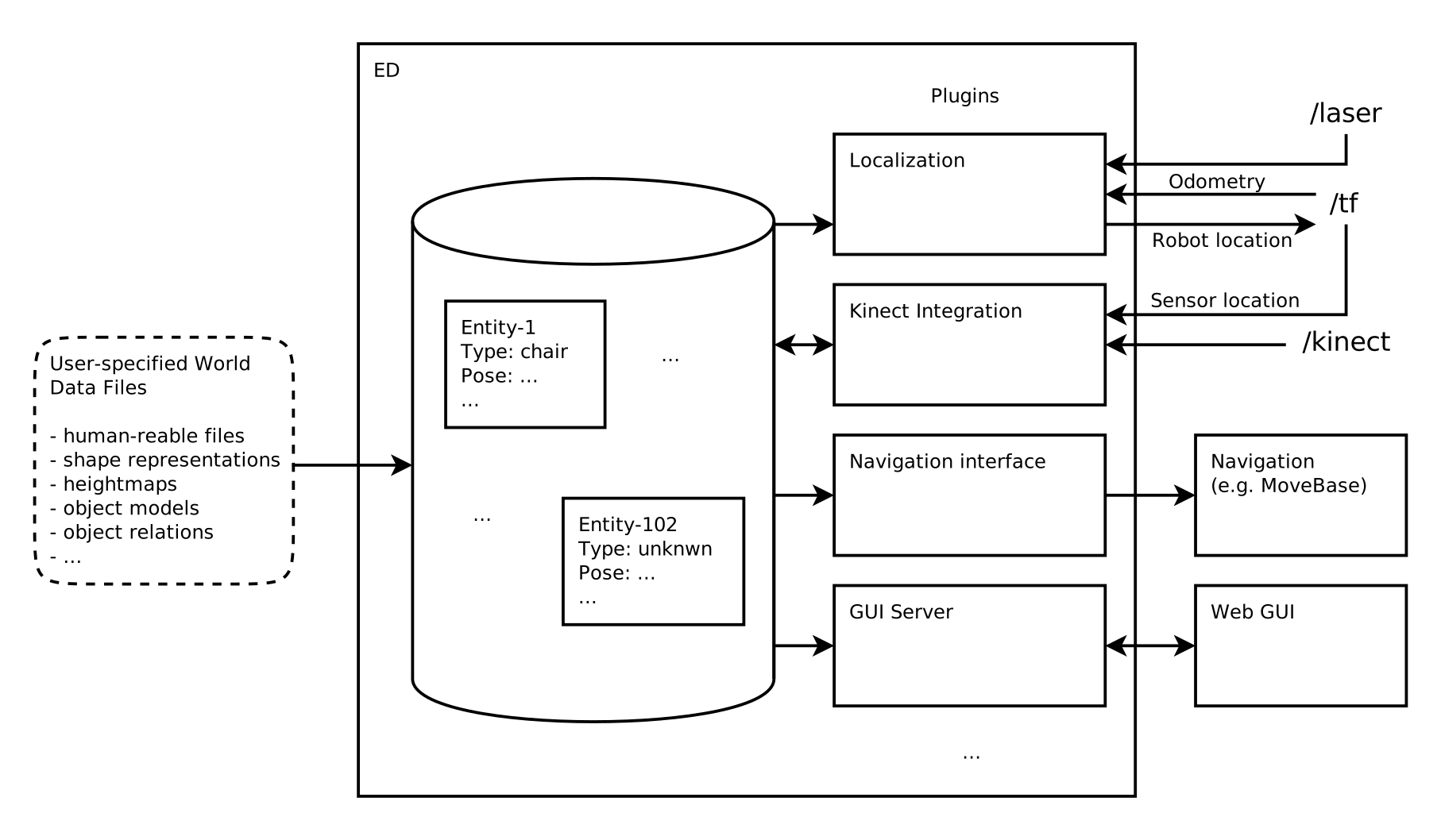 ED Overview
Installation
Requirements:
- Ubuntu (22.04 or newer)
- ROS 2 (Humble or newer)
We assume you have successfully installed ROS 2 and set-up a colcon workspace. Check out the following packages in your workspace:
cd <your_colcon_workspace>/src

git clone https://github.com/tue-robotics/ed.git
git -C ed submodule update --init --recursive
git clone https://github.com/tue-robotics/ed_object_models.git
git clone https://github.com/tue-robotics/ed_msgs.git
git clone https://github.com/tue-robotics/code_profiler.git
git clone https://github.com/tue-robotics/geolib2.git
git clone https://github.com/tue-robotics/rgbd.git
git clone https://github.com/tue-robotics/rosconsole_bridge.git
git clone https://github.com/tue-robotics/tue_config.git
git clone https://github.com/tue-robotics/tue_serialization.git
The interface (message/service) packages live in those same repositories: ed_msgs provides ed_interfaces, rgbd provides rgbd_interfaces and tue_serialization provides tue_serialization_interfaces.
ED is able to read (a subset of) SDF, therefore the SDF library is used. On ROS 2 it comes from the sdformat_vendor package, so no external apt source is needed.
Install the other dependencies by resolving them via rosdep.
This should be sufficient to successfully compile ED:
cd <your_colcon_workspace>
colcon build --packages-up-to ed
Running the tests additionally needs the tue-robotics ament_lint fork and tue_lint_config in the workspace, since the linters are invoked with options that are not in upstream ament_cmake_clang_format/ament_cmake_clang_tidy:
colcon test --packages-select ed && colcon test-result --verbose
Running
The server takes a configuration file naming the static world and the plugins to load.
config/example.yaml is a documented starting point:
ros2 run ed ed <path-to-ed>/config/example.yaml
A running server can be reconfigured with the same kind of file:
ros2 run ed configure <path-to-ed>/config/example.yaml
Each plugin entry names a pluginlib class (type), not a library file. ros2 run ed list_plugins
prints every ed::Plugin available in the workspace, so the entry to write for an extension package
can be looked up there.
Migrating a dependent package
The ROS 2 port changed parts of ED’s public C++ API — accessors renamed to
camelBack, ShowVolumes/NodeType turned into scoped enums, several
constructors made explicit, and unsigned long replaced by std::uint64_t.
docs/api_changes_lint_cleanup.md lists every
change with the exact replacement, plus the ones that were deliberately left
alone. docs/migrate_to_ros2.md covers the
catkin → ament side.
ED Extensions
Localization
A fast particle filter implementation and sensor models for robot localization which always take into account the most recent state of the world.
- https://github.com/tue-robotics/ed_localization.git
Visualization
Extension for visualizing the current world model state. The GUI server exposes ROS API’s that can be used by various clients. Example clients are the ed_rviz_publisher of the ed_gui_server package and the ed_rviz_plugins/WorldModel. display.
- https://github.com/tue-robotics/ed_gui_server.git
- https://github.com/tue-robotics/ed_rviz_plugins.git
Sensor integration
File truncated at 100 lines see the full file
CONTRIBUTING
Repository Summary
| Description | |
| Checkout URI | https://github.com/tue-robotics/ed.git |
| VCS Type | git |
| VCS Version | master |
| Last Updated | 2026-10-13 |
| Dev Status | UNKNOWN |
| Released | UNRELEASED |
| Contributing |
Help Wanted (-)
Good First Issues (-) Pull Requests to Review (-) |
Packages
| Name | Version |
|---|---|
| ed | 0.0.0 |
README
ED: Environment Descriptor
Introduction
ED - Environment Description - is a 3D geometric, object-based world representation system for robots. At the moment different ED modules exist which enable robots to localize themselves, update positions of known objects based on recent sensor data, segment and store newly encountered objects and visualize all this through a web-based GUI.
Tutorials
All ED tutorials can be found in the ed_tutorials package: https://github.com/tue-robotics/ed_tutorials
Why use ED?
- ED is one re-usable environment description that can be used for a multitude of needed functionalities. Instead of having different environment representations for localization, navigation, manipulation, interaction, etc, you now only need one. An improvement in this single, central world model will reflect in the performances of the separate robot capabilities.
- ED is an object-based, geometrical world representation. As opposed to occupancy grids, octomaps, high-density monolithic meshes and the like, ED allows the user to use object-based, semantic statements such as ‘inspect the objects on top of the table’ or to ‘navigate to the couch’, while the geometrical representation allows the robot to still avoid obstacles - known and unknown - that it encounters on its path.
- The world geometry and objects can easily be specified with a set of easily accessible human-readable files, re-usable models, heightmaps, primitives, etc.
- ED has a plugin system. In itself, ED is ‘just’ a data structure containing a world representation. Functionality is added through plugins, which run concurrently and query and update the world model in a thread-safe manner. This makes the system easily extendable.
- ED’s default localization module consists of a fast particle filter implementation and sensor models which always take into account the most recent state of the world. This means that if the world representation improves while the robot is running, localization becomes better. The localization module is more efficient and accurate than the well-known AMCL-module and no separate occupancy grid is needed.
- The sensor_integration module enables object updates: using data from a depth sensor such as the Kinect, positions of known objects, such as pieces of furniture, can be updated. This allows the robot to successfully interact with its environment, even if the world model specified by the user contains errors.
- The sensor_integration module also enables object segmentation: the geometrical knowledge about the world enables fast, reliable and efficient object segmentation. This enables the robot to “find all objects on top of the table” or “inside the cabinet”.
- Though not yet released, ED has modules for real-time, on-line generation of costmaps that can be used directly by existing navigation modules such as MoveBase. Whenever the world model representation changes, the costmaps will instantly reflect the change.
- ED can be visualized using a web-based GUI. This enables users to monitor the state of the world using a large variety of systems, including PC’s, smart phones and tablets.
ED Overview
Installation
Requirements:
- Ubuntu (22.04 or newer)
- ROS 2 (Humble or newer)
We assume you have successfully installed ROS 2 and set-up a colcon workspace. Check out the following packages in your workspace:
cd <your_colcon_workspace>/src

git clone https://github.com/tue-robotics/ed.git
git -C ed submodule update --init --recursive
git clone https://github.com/tue-robotics/ed_object_models.git
git clone https://github.com/tue-robotics/ed_msgs.git
git clone https://github.com/tue-robotics/code_profiler.git
git clone https://github.com/tue-robotics/geolib2.git
git clone https://github.com/tue-robotics/rgbd.git
git clone https://github.com/tue-robotics/rosconsole_bridge.git
git clone https://github.com/tue-robotics/tue_config.git
git clone https://github.com/tue-robotics/tue_serialization.git
The interface (message/service) packages live in those same repositories: ed_msgs provides ed_interfaces, rgbd provides rgbd_interfaces and tue_serialization provides tue_serialization_interfaces.
ED is able to read (a subset of) SDF, therefore the SDF library is used. On ROS 2 it comes from the sdformat_vendor package, so no external apt source is needed.
Install the other dependencies by resolving them via rosdep.
This should be sufficient to successfully compile ED:
cd <your_colcon_workspace>
colcon build --packages-up-to ed
Running the tests additionally needs the tue-robotics ament_lint fork and tue_lint_config in the workspace, since the linters are invoked with options that are not in upstream ament_cmake_clang_format/ament_cmake_clang_tidy:
colcon test --packages-select ed && colcon test-result --verbose
Running
The server takes a configuration file naming the static world and the plugins to load.
config/example.yaml is a documented starting point:
ros2 run ed ed <path-to-ed>/config/example.yaml
A running server can be reconfigured with the same kind of file:
ros2 run ed configure <path-to-ed>/config/example.yaml
Each plugin entry names a pluginlib class (type), not a library file. ros2 run ed list_plugins
prints every ed::Plugin available in the workspace, so the entry to write for an extension package
can be looked up there.
Migrating a dependent package
The ROS 2 port changed parts of ED’s public C++ API — accessors renamed to
camelBack, ShowVolumes/NodeType turned into scoped enums, several
constructors made explicit, and unsigned long replaced by std::uint64_t.
docs/api_changes_lint_cleanup.md lists every
change with the exact replacement, plus the ones that were deliberately left
alone. docs/migrate_to_ros2.md covers the
catkin → ament side.
ED Extensions
Localization
A fast particle filter implementation and sensor models for robot localization which always take into account the most recent state of the world.
- https://github.com/tue-robotics/ed_localization.git
Visualization
Extension for visualizing the current world model state. The GUI server exposes ROS API’s that can be used by various clients. Example clients are the ed_rviz_publisher of the ed_gui_server package and the ed_rviz_plugins/WorldModel. display.
- https://github.com/tue-robotics/ed_gui_server.git
- https://github.com/tue-robotics/ed_rviz_plugins.git
Sensor integration
File truncated at 100 lines see the full file
CONTRIBUTING
Repository Summary
| Description | |
| Checkout URI | https://github.com/tue-robotics/ed.git |
| VCS Type | git |
| VCS Version | master |
| Last Updated | 2026-10-13 |
| Dev Status | UNKNOWN |
| Released | UNRELEASED |
| Contributing |
Help Wanted (-)
Good First Issues (-) Pull Requests to Review (-) |
Packages
| Name | Version |
|---|---|
| ed | 0.0.0 |
README
ED: Environment Descriptor
Introduction
ED - Environment Description - is a 3D geometric, object-based world representation system for robots. At the moment different ED modules exist which enable robots to localize themselves, update positions of known objects based on recent sensor data, segment and store newly encountered objects and visualize all this through a web-based GUI.
Tutorials
All ED tutorials can be found in the ed_tutorials package: https://github.com/tue-robotics/ed_tutorials
Why use ED?
- ED is one re-usable environment description that can be used for a multitude of needed functionalities. Instead of having different environment representations for localization, navigation, manipulation, interaction, etc, you now only need one. An improvement in this single, central world model will reflect in the performances of the separate robot capabilities.
- ED is an object-based, geometrical world representation. As opposed to occupancy grids, octomaps, high-density monolithic meshes and the like, ED allows the user to use object-based, semantic statements such as ‘inspect the objects on top of the table’ or to ‘navigate to the couch’, while the geometrical representation allows the robot to still avoid obstacles - known and unknown - that it encounters on its path.
- The world geometry and objects can easily be specified with a set of easily accessible human-readable files, re-usable models, heightmaps, primitives, etc.
- ED has a plugin system. In itself, ED is ‘just’ a data structure containing a world representation. Functionality is added through plugins, which run concurrently and query and update the world model in a thread-safe manner. This makes the system easily extendable.
- ED’s default localization module consists of a fast particle filter implementation and sensor models which always take into account the most recent state of the world. This means that if the world representation improves while the robot is running, localization becomes better. The localization module is more efficient and accurate than the well-known AMCL-module and no separate occupancy grid is needed.
- The sensor_integration module enables object updates: using data from a depth sensor such as the Kinect, positions of known objects, such as pieces of furniture, can be updated. This allows the robot to successfully interact with its environment, even if the world model specified by the user contains errors.
- The sensor_integration module also enables object segmentation: the geometrical knowledge about the world enables fast, reliable and efficient object segmentation. This enables the robot to “find all objects on top of the table” or “inside the cabinet”.
- Though not yet released, ED has modules for real-time, on-line generation of costmaps that can be used directly by existing navigation modules such as MoveBase. Whenever the world model representation changes, the costmaps will instantly reflect the change.
- ED can be visualized using a web-based GUI. This enables users to monitor the state of the world using a large variety of systems, including PC’s, smart phones and tablets.
ED Overview
Installation
Requirements:
- Ubuntu (22.04 or newer)
- ROS 2 (Humble or newer)
We assume you have successfully installed ROS 2 and set-up a colcon workspace. Check out the following packages in your workspace:
cd <your_colcon_workspace>/src

git clone https://github.com/tue-robotics/ed.git
git -C ed submodule update --init --recursive
git clone https://github.com/tue-robotics/ed_object_models.git
git clone https://github.com/tue-robotics/ed_msgs.git
git clone https://github.com/tue-robotics/code_profiler.git
git clone https://github.com/tue-robotics/geolib2.git
git clone https://github.com/tue-robotics/rgbd.git
git clone https://github.com/tue-robotics/rosconsole_bridge.git
git clone https://github.com/tue-robotics/tue_config.git
git clone https://github.com/tue-robotics/tue_serialization.git
The interface (message/service) packages live in those same repositories: ed_msgs provides ed_interfaces, rgbd provides rgbd_interfaces and tue_serialization provides tue_serialization_interfaces.
ED is able to read (a subset of) SDF, therefore the SDF library is used. On ROS 2 it comes from the sdformat_vendor package, so no external apt source is needed.
Install the other dependencies by resolving them via rosdep.
This should be sufficient to successfully compile ED:
cd <your_colcon_workspace>
colcon build --packages-up-to ed
Running the tests additionally needs the tue-robotics ament_lint fork and tue_lint_config in the workspace, since the linters are invoked with options that are not in upstream ament_cmake_clang_format/ament_cmake_clang_tidy:
colcon test --packages-select ed && colcon test-result --verbose
Running
The server takes a configuration file naming the static world and the plugins to load.
config/example.yaml is a documented starting point:
ros2 run ed ed <path-to-ed>/config/example.yaml
A running server can be reconfigured with the same kind of file:
ros2 run ed configure <path-to-ed>/config/example.yaml
Each plugin entry names a pluginlib class (type), not a library file. ros2 run ed list_plugins
prints every ed::Plugin available in the workspace, so the entry to write for an extension package
can be looked up there.
Migrating a dependent package
The ROS 2 port changed parts of ED’s public C++ API — accessors renamed to
camelBack, ShowVolumes/NodeType turned into scoped enums, several
constructors made explicit, and unsigned long replaced by std::uint64_t.
docs/api_changes_lint_cleanup.md lists every
change with the exact replacement, plus the ones that were deliberately left
alone. docs/migrate_to_ros2.md covers the
catkin → ament side.
ED Extensions
Localization
A fast particle filter implementation and sensor models for robot localization which always take into account the most recent state of the world.
- https://github.com/tue-robotics/ed_localization.git
Visualization
Extension for visualizing the current world model state. The GUI server exposes ROS API’s that can be used by various clients. Example clients are the ed_rviz_publisher of the ed_gui_server package and the ed_rviz_plugins/WorldModel. display.
- https://github.com/tue-robotics/ed_gui_server.git
- https://github.com/tue-robotics/ed_rviz_plugins.git
Sensor integration
File truncated at 100 lines see the full file
CONTRIBUTING
Repository Summary
| Description | |
| Checkout URI | https://github.com/tue-robotics/ed.git |
| VCS Type | git |
| VCS Version | master |
| Last Updated | 2026-10-13 |
| Dev Status | UNKNOWN |
| Released | UNRELEASED |
| Contributing |
Help Wanted (-)
Good First Issues (-) Pull Requests to Review (-) |
Packages
| Name | Version |
|---|---|
| ed | 0.0.0 |
README
ED: Environment Descriptor
Introduction
ED - Environment Description - is a 3D geometric, object-based world representation system for robots. At the moment different ED modules exist which enable robots to localize themselves, update positions of known objects based on recent sensor data, segment and store newly encountered objects and visualize all this through a web-based GUI.
Tutorials
All ED tutorials can be found in the ed_tutorials package: https://github.com/tue-robotics/ed_tutorials
Why use ED?
- ED is one re-usable environment description that can be used for a multitude of needed functionalities. Instead of having different environment representations for localization, navigation, manipulation, interaction, etc, you now only need one. An improvement in this single, central world model will reflect in the performances of the separate robot capabilities.
- ED is an object-based, geometrical world representation. As opposed to occupancy grids, octomaps, high-density monolithic meshes and the like, ED allows the user to use object-based, semantic statements such as ‘inspect the objects on top of the table’ or to ‘navigate to the couch’, while the geometrical representation allows the robot to still avoid obstacles - known and unknown - that it encounters on its path.
- The world geometry and objects can easily be specified with a set of easily accessible human-readable files, re-usable models, heightmaps, primitives, etc.
- ED has a plugin system. In itself, ED is ‘just’ a data structure containing a world representation. Functionality is added through plugins, which run concurrently and query and update the world model in a thread-safe manner. This makes the system easily extendable.
- ED’s default localization module consists of a fast particle filter implementation and sensor models which always take into account the most recent state of the world. This means that if the world representation improves while the robot is running, localization becomes better. The localization module is more efficient and accurate than the well-known AMCL-module and no separate occupancy grid is needed.
- The sensor_integration module enables object updates: using data from a depth sensor such as the Kinect, positions of known objects, such as pieces of furniture, can be updated. This allows the robot to successfully interact with its environment, even if the world model specified by the user contains errors.
- The sensor_integration module also enables object segmentation: the geometrical knowledge about the world enables fast, reliable and efficient object segmentation. This enables the robot to “find all objects on top of the table” or “inside the cabinet”.
- Though not yet released, ED has modules for real-time, on-line generation of costmaps that can be used directly by existing navigation modules such as MoveBase. Whenever the world model representation changes, the costmaps will instantly reflect the change.
- ED can be visualized using a web-based GUI. This enables users to monitor the state of the world using a large variety of systems, including PC’s, smart phones and tablets.
ED Overview
Installation
Requirements:
- Ubuntu (22.04 or newer)
- ROS 2 (Humble or newer)
We assume you have successfully installed ROS 2 and set-up a colcon workspace. Check out the following packages in your workspace:
cd <your_colcon_workspace>/src

git clone https://github.com/tue-robotics/ed.git
git -C ed submodule update --init --recursive
git clone https://github.com/tue-robotics/ed_object_models.git
git clone https://github.com/tue-robotics/ed_msgs.git
git clone https://github.com/tue-robotics/code_profiler.git
git clone https://github.com/tue-robotics/geolib2.git
git clone https://github.com/tue-robotics/rgbd.git
git clone https://github.com/tue-robotics/rosconsole_bridge.git
git clone https://github.com/tue-robotics/tue_config.git
git clone https://github.com/tue-robotics/tue_serialization.git
The interface (message/service) packages live in those same repositories: ed_msgs provides ed_interfaces, rgbd provides rgbd_interfaces and tue_serialization provides tue_serialization_interfaces.
ED is able to read (a subset of) SDF, therefore the SDF library is used. On ROS 2 it comes from the sdformat_vendor package, so no external apt source is needed.
Install the other dependencies by resolving them via rosdep.
This should be sufficient to successfully compile ED:
cd <your_colcon_workspace>
colcon build --packages-up-to ed
Running the tests additionally needs the tue-robotics ament_lint fork and tue_lint_config in the workspace, since the linters are invoked with options that are not in upstream ament_cmake_clang_format/ament_cmake_clang_tidy:
colcon test --packages-select ed && colcon test-result --verbose
Running
The server takes a configuration file naming the static world and the plugins to load.
config/example.yaml is a documented starting point:
ros2 run ed ed <path-to-ed>/config/example.yaml
A running server can be reconfigured with the same kind of file:
ros2 run ed configure <path-to-ed>/config/example.yaml
Each plugin entry names a pluginlib class (type), not a library file. ros2 run ed list_plugins
prints every ed::Plugin available in the workspace, so the entry to write for an extension package
can be looked up there.
Migrating a dependent package
The ROS 2 port changed parts of ED’s public C++ API — accessors renamed to
camelBack, ShowVolumes/NodeType turned into scoped enums, several
constructors made explicit, and unsigned long replaced by std::uint64_t.
docs/api_changes_lint_cleanup.md lists every
change with the exact replacement, plus the ones that were deliberately left
alone. docs/migrate_to_ros2.md covers the
catkin → ament side.
ED Extensions
Localization
A fast particle filter implementation and sensor models for robot localization which always take into account the most recent state of the world.
- https://github.com/tue-robotics/ed_localization.git
Visualization
Extension for visualizing the current world model state. The GUI server exposes ROS API’s that can be used by various clients. Example clients are the ed_rviz_publisher of the ed_gui_server package and the ed_rviz_plugins/WorldModel. display.
- https://github.com/tue-robotics/ed_gui_server.git
- https://github.com/tue-robotics/ed_rviz_plugins.git
Sensor integration
File truncated at 100 lines see the full file
CONTRIBUTING
Repository Summary
| Description | |
| Checkout URI | https://github.com/tue-robotics/ed.git |
| VCS Type | git |
| VCS Version | master |
| Last Updated | 2026-10-13 |
| Dev Status | UNKNOWN |
| Released | UNRELEASED |
| Contributing |
Help Wanted (-)
Good First Issues (-) Pull Requests to Review (-) |
Packages
| Name | Version |
|---|---|
| ed | 0.0.0 |
README
ED: Environment Descriptor
Introduction
ED - Environment Description - is a 3D geometric, object-based world representation system for robots. At the moment different ED modules exist which enable robots to localize themselves, update positions of known objects based on recent sensor data, segment and store newly encountered objects and visualize all this through a web-based GUI.
Tutorials
All ED tutorials can be found in the ed_tutorials package: https://github.com/tue-robotics/ed_tutorials
Why use ED?
- ED is one re-usable environment description that can be used for a multitude of needed functionalities. Instead of having different environment representations for localization, navigation, manipulation, interaction, etc, you now only need one. An improvement in this single, central world model will reflect in the performances of the separate robot capabilities.
- ED is an object-based, geometrical world representation. As opposed to occupancy grids, octomaps, high-density monolithic meshes and the like, ED allows the user to use object-based, semantic statements such as ‘inspect the objects on top of the table’ or to ‘navigate to the couch’, while the geometrical representation allows the robot to still avoid obstacles - known and unknown - that it encounters on its path.
- The world geometry and objects can easily be specified with a set of easily accessible human-readable files, re-usable models, heightmaps, primitives, etc.
- ED has a plugin system. In itself, ED is ‘just’ a data structure containing a world representation. Functionality is added through plugins, which run concurrently and query and update the world model in a thread-safe manner. This makes the system easily extendable.
- ED’s default localization module consists of a fast particle filter implementation and sensor models which always take into account the most recent state of the world. This means that if the world representation improves while the robot is running, localization becomes better. The localization module is more efficient and accurate than the well-known AMCL-module and no separate occupancy grid is needed.
- The sensor_integration module enables object updates: using data from a depth sensor such as the Kinect, positions of known objects, such as pieces of furniture, can be updated. This allows the robot to successfully interact with its environment, even if the world model specified by the user contains errors.
- The sensor_integration module also enables object segmentation: the geometrical knowledge about the world enables fast, reliable and efficient object segmentation. This enables the robot to “find all objects on top of the table” or “inside the cabinet”.
- Though not yet released, ED has modules for real-time, on-line generation of costmaps that can be used directly by existing navigation modules such as MoveBase. Whenever the world model representation changes, the costmaps will instantly reflect the change.
- ED can be visualized using a web-based GUI. This enables users to monitor the state of the world using a large variety of systems, including PC’s, smart phones and tablets.
ED Overview
Installation
Requirements:
- Ubuntu (22.04 or newer)
- ROS 2 (Humble or newer)
We assume you have successfully installed ROS 2 and set-up a colcon workspace. Check out the following packages in your workspace:
cd <your_colcon_workspace>/src

git clone https://github.com/tue-robotics/ed.git
git -C ed submodule update --init --recursive
git clone https://github.com/tue-robotics/ed_object_models.git
git clone https://github.com/tue-robotics/ed_msgs.git
git clone https://github.com/tue-robotics/code_profiler.git
git clone https://github.com/tue-robotics/geolib2.git
git clone https://github.com/tue-robotics/rgbd.git
git clone https://github.com/tue-robotics/rosconsole_bridge.git
git clone https://github.com/tue-robotics/tue_config.git
git clone https://github.com/tue-robotics/tue_serialization.git
The interface (message/service) packages live in those same repositories: ed_msgs provides ed_interfaces, rgbd provides rgbd_interfaces and tue_serialization provides tue_serialization_interfaces.
ED is able to read (a subset of) SDF, therefore the SDF library is used. On ROS 2 it comes from the sdformat_vendor package, so no external apt source is needed.
Install the other dependencies by resolving them via rosdep.
This should be sufficient to successfully compile ED:
cd <your_colcon_workspace>
colcon build --packages-up-to ed
Running the tests additionally needs the tue-robotics ament_lint fork and tue_lint_config in the workspace, since the linters are invoked with options that are not in upstream ament_cmake_clang_format/ament_cmake_clang_tidy:
colcon test --packages-select ed && colcon test-result --verbose
Running
The server takes a configuration file naming the static world and the plugins to load.
config/example.yaml is a documented starting point:
ros2 run ed ed <path-to-ed>/config/example.yaml
A running server can be reconfigured with the same kind of file:
ros2 run ed configure <path-to-ed>/config/example.yaml
Each plugin entry names a pluginlib class (type), not a library file. ros2 run ed list_plugins
prints every ed::Plugin available in the workspace, so the entry to write for an extension package
can be looked up there.
Migrating a dependent package
The ROS 2 port changed parts of ED’s public C++ API — accessors renamed to
camelBack, ShowVolumes/NodeType turned into scoped enums, several
constructors made explicit, and unsigned long replaced by std::uint64_t.
docs/api_changes_lint_cleanup.md lists every
change with the exact replacement, plus the ones that were deliberately left
alone. docs/migrate_to_ros2.md covers the
catkin → ament side.
ED Extensions
Localization
A fast particle filter implementation and sensor models for robot localization which always take into account the most recent state of the world.
- https://github.com/tue-robotics/ed_localization.git
Visualization
Extension for visualizing the current world model state. The GUI server exposes ROS API’s that can be used by various clients. Example clients are the ed_rviz_publisher of the ed_gui_server package and the ed_rviz_plugins/WorldModel. display.
- https://github.com/tue-robotics/ed_gui_server.git
- https://github.com/tue-robotics/ed_rviz_plugins.git
Sensor integration
File truncated at 100 lines see the full file
CONTRIBUTING
Repository Summary
| Description | |
| Checkout URI | https://github.com/tue-robotics/ed.git |
| VCS Type | git |
| VCS Version | master |
| Last Updated | 2026-10-13 |
| Dev Status | UNKNOWN |
| Released | UNRELEASED |
| Contributing |
Help Wanted (-)
Good First Issues (-) Pull Requests to Review (-) |
Packages
| Name | Version |
|---|---|
| ed | 0.0.0 |
README
ED: Environment Descriptor
Introduction
ED - Environment Description - is a 3D geometric, object-based world representation system for robots. At the moment different ED modules exist which enable robots to localize themselves, update positions of known objects based on recent sensor data, segment and store newly encountered objects and visualize all this through a web-based GUI.
Tutorials
All ED tutorials can be found in the ed_tutorials package: https://github.com/tue-robotics/ed_tutorials
Why use ED?
- ED is one re-usable environment description that can be used for a multitude of needed functionalities. Instead of having different environment representations for localization, navigation, manipulation, interaction, etc, you now only need one. An improvement in this single, central world model will reflect in the performances of the separate robot capabilities.
- ED is an object-based, geometrical world representation. As opposed to occupancy grids, octomaps, high-density monolithic meshes and the like, ED allows the user to use object-based, semantic statements such as ‘inspect the objects on top of the table’ or to ‘navigate to the couch’, while the geometrical representation allows the robot to still avoid obstacles - known and unknown - that it encounters on its path.
- The world geometry and objects can easily be specified with a set of easily accessible human-readable files, re-usable models, heightmaps, primitives, etc.
- ED has a plugin system. In itself, ED is ‘just’ a data structure containing a world representation. Functionality is added through plugins, which run concurrently and query and update the world model in a thread-safe manner. This makes the system easily extendable.
- ED’s default localization module consists of a fast particle filter implementation and sensor models which always take into account the most recent state of the world. This means that if the world representation improves while the robot is running, localization becomes better. The localization module is more efficient and accurate than the well-known AMCL-module and no separate occupancy grid is needed.
- The sensor_integration module enables object updates: using data from a depth sensor such as the Kinect, positions of known objects, such as pieces of furniture, can be updated. This allows the robot to successfully interact with its environment, even if the world model specified by the user contains errors.
- The sensor_integration module also enables object segmentation: the geometrical knowledge about the world enables fast, reliable and efficient object segmentation. This enables the robot to “find all objects on top of the table” or “inside the cabinet”.
- Though not yet released, ED has modules for real-time, on-line generation of costmaps that can be used directly by existing navigation modules such as MoveBase. Whenever the world model representation changes, the costmaps will instantly reflect the change.
- ED can be visualized using a web-based GUI. This enables users to monitor the state of the world using a large variety of systems, including PC’s, smart phones and tablets.
ED Overview
Installation
Requirements:
- Ubuntu (22.04 or newer)
- ROS 2 (Humble or newer)
We assume you have successfully installed ROS 2 and set-up a colcon workspace. Check out the following packages in your workspace:
cd <your_colcon_workspace>/src

git clone https://github.com/tue-robotics/ed.git
git -C ed submodule update --init --recursive
git clone https://github.com/tue-robotics/ed_object_models.git
git clone https://github.com/tue-robotics/ed_msgs.git
git clone https://github.com/tue-robotics/code_profiler.git
git clone https://github.com/tue-robotics/geolib2.git
git clone https://github.com/tue-robotics/rgbd.git
git clone https://github.com/tue-robotics/rosconsole_bridge.git
git clone https://github.com/tue-robotics/tue_config.git
git clone https://github.com/tue-robotics/tue_serialization.git
The interface (message/service) packages live in those same repositories: ed_msgs provides ed_interfaces, rgbd provides rgbd_interfaces and tue_serialization provides tue_serialization_interfaces.
ED is able to read (a subset of) SDF, therefore the SDF library is used. On ROS 2 it comes from the sdformat_vendor package, so no external apt source is needed.
Install the other dependencies by resolving them via rosdep.
This should be sufficient to successfully compile ED:
cd <your_colcon_workspace>
colcon build --packages-up-to ed
Running the tests additionally needs the tue-robotics ament_lint fork and tue_lint_config in the workspace, since the linters are invoked with options that are not in upstream ament_cmake_clang_format/ament_cmake_clang_tidy:
colcon test --packages-select ed && colcon test-result --verbose
Running
The server takes a configuration file naming the static world and the plugins to load.
config/example.yaml is a documented starting point:
ros2 run ed ed <path-to-ed>/config/example.yaml
A running server can be reconfigured with the same kind of file:
ros2 run ed configure <path-to-ed>/config/example.yaml
Each plugin entry names a pluginlib class (type), not a library file. ros2 run ed list_plugins
prints every ed::Plugin available in the workspace, so the entry to write for an extension package
can be looked up there.
Migrating a dependent package
The ROS 2 port changed parts of ED’s public C++ API — accessors renamed to
camelBack, ShowVolumes/NodeType turned into scoped enums, several
constructors made explicit, and unsigned long replaced by std::uint64_t.
docs/api_changes_lint_cleanup.md lists every
change with the exact replacement, plus the ones that were deliberately left
alone. docs/migrate_to_ros2.md covers the
catkin → ament side.
ED Extensions
Localization
A fast particle filter implementation and sensor models for robot localization which always take into account the most recent state of the world.
- https://github.com/tue-robotics/ed_localization.git
Visualization
Extension for visualizing the current world model state. The GUI server exposes ROS API’s that can be used by various clients. Example clients are the ed_rviz_publisher of the ed_gui_server package and the ed_rviz_plugins/WorldModel. display.
- https://github.com/tue-robotics/ed_gui_server.git
- https://github.com/tue-robotics/ed_rviz_plugins.git
Sensor integration
File truncated at 100 lines see the full file
CONTRIBUTING
Repository Summary
| Description | |
| Checkout URI | https://github.com/tue-robotics/ed.git |
| VCS Type | git |
| VCS Version | master |
| Last Updated | 2026-10-13 |
| Dev Status | UNKNOWN |
| Released | UNRELEASED |
| Contributing |
Help Wanted (-)
Good First Issues (-) Pull Requests to Review (-) |
Packages
| Name | Version |
|---|---|
| ed | 0.0.0 |
README
ED: Environment Descriptor
Introduction
ED - Environment Description - is a 3D geometric, object-based world representation system for robots. At the moment different ED modules exist which enable robots to localize themselves, update positions of known objects based on recent sensor data, segment and store newly encountered objects and visualize all this through a web-based GUI.
Tutorials
All ED tutorials can be found in the ed_tutorials package: https://github.com/tue-robotics/ed_tutorials
Why use ED?
- ED is one re-usable environment description that can be used for a multitude of needed functionalities. Instead of having different environment representations for localization, navigation, manipulation, interaction, etc, you now only need one. An improvement in this single, central world model will reflect in the performances of the separate robot capabilities.
- ED is an object-based, geometrical world representation. As opposed to occupancy grids, octomaps, high-density monolithic meshes and the like, ED allows the user to use object-based, semantic statements such as ‘inspect the objects on top of the table’ or to ‘navigate to the couch’, while the geometrical representation allows the robot to still avoid obstacles - known and unknown - that it encounters on its path.
- The world geometry and objects can easily be specified with a set of easily accessible human-readable files, re-usable models, heightmaps, primitives, etc.
- ED has a plugin system. In itself, ED is ‘just’ a data structure containing a world representation. Functionality is added through plugins, which run concurrently and query and update the world model in a thread-safe manner. This makes the system easily extendable.
- ED’s default localization module consists of a fast particle filter implementation and sensor models which always take into account the most recent state of the world. This means that if the world representation improves while the robot is running, localization becomes better. The localization module is more efficient and accurate than the well-known AMCL-module and no separate occupancy grid is needed.
- The sensor_integration module enables object updates: using data from a depth sensor such as the Kinect, positions of known objects, such as pieces of furniture, can be updated. This allows the robot to successfully interact with its environment, even if the world model specified by the user contains errors.
- The sensor_integration module also enables object segmentation: the geometrical knowledge about the world enables fast, reliable and efficient object segmentation. This enables the robot to “find all objects on top of the table” or “inside the cabinet”.
- Though not yet released, ED has modules for real-time, on-line generation of costmaps that can be used directly by existing navigation modules such as MoveBase. Whenever the world model representation changes, the costmaps will instantly reflect the change.
- ED can be visualized using a web-based GUI. This enables users to monitor the state of the world using a large variety of systems, including PC’s, smart phones and tablets.
ED Overview
Installation
Requirements:
- Ubuntu (22.04 or newer)
- ROS 2 (Humble or newer)
We assume you have successfully installed ROS 2 and set-up a colcon workspace. Check out the following packages in your workspace:
cd <your_colcon_workspace>/src

git clone https://github.com/tue-robotics/ed.git
git -C ed submodule update --init --recursive
git clone https://github.com/tue-robotics/ed_object_models.git
git clone https://github.com/tue-robotics/ed_msgs.git
git clone https://github.com/tue-robotics/code_profiler.git
git clone https://github.com/tue-robotics/geolib2.git
git clone https://github.com/tue-robotics/rgbd.git
git clone https://github.com/tue-robotics/rosconsole_bridge.git
git clone https://github.com/tue-robotics/tue_config.git
git clone https://github.com/tue-robotics/tue_serialization.git
The interface (message/service) packages live in those same repositories: ed_msgs provides ed_interfaces, rgbd provides rgbd_interfaces and tue_serialization provides tue_serialization_interfaces.
ED is able to read (a subset of) SDF, therefore the SDF library is used. On ROS 2 it comes from the sdformat_vendor package, so no external apt source is needed.
Install the other dependencies by resolving them via rosdep.
This should be sufficient to successfully compile ED:
cd <your_colcon_workspace>
colcon build --packages-up-to ed
Running the tests additionally needs the tue-robotics ament_lint fork and tue_lint_config in the workspace, since the linters are invoked with options that are not in upstream ament_cmake_clang_format/ament_cmake_clang_tidy:
colcon test --packages-select ed && colcon test-result --verbose
Running
The server takes a configuration file naming the static world and the plugins to load.
config/example.yaml is a documented starting point:
ros2 run ed ed <path-to-ed>/config/example.yaml
A running server can be reconfigured with the same kind of file:
ros2 run ed configure <path-to-ed>/config/example.yaml
Each plugin entry names a pluginlib class (type), not a library file. ros2 run ed list_plugins
prints every ed::Plugin available in the workspace, so the entry to write for an extension package
can be looked up there.
Migrating a dependent package
The ROS 2 port changed parts of ED’s public C++ API — accessors renamed to
camelBack, ShowVolumes/NodeType turned into scoped enums, several
constructors made explicit, and unsigned long replaced by std::uint64_t.
docs/api_changes_lint_cleanup.md lists every
change with the exact replacement, plus the ones that were deliberately left
alone. docs/migrate_to_ros2.md covers the
catkin → ament side.
ED Extensions
Localization
A fast particle filter implementation and sensor models for robot localization which always take into account the most recent state of the world.
- https://github.com/tue-robotics/ed_localization.git
Visualization
Extension for visualizing the current world model state. The GUI server exposes ROS API’s that can be used by various clients. Example clients are the ed_rviz_publisher of the ed_gui_server package and the ed_rviz_plugins/WorldModel. display.
- https://github.com/tue-robotics/ed_gui_server.git
- https://github.com/tue-robotics/ed_rviz_plugins.git
Sensor integration
File truncated at 100 lines see the full file
CONTRIBUTING
Repository Summary
| Description | |
| Checkout URI | https://github.com/tue-robotics/ed.git |
| VCS Type | git |
| VCS Version | master |
| Last Updated | 2026-10-13 |
| Dev Status | UNKNOWN |
| Released | UNRELEASED |
| Contributing |
Help Wanted (-)
Good First Issues (-) Pull Requests to Review (-) |
Packages
| Name | Version |
|---|---|
| ed | 0.0.0 |
README
ED: Environment Descriptor
Introduction
ED - Environment Description - is a 3D geometric, object-based world representation system for robots. At the moment different ED modules exist which enable robots to localize themselves, update positions of known objects based on recent sensor data, segment and store newly encountered objects and visualize all this through a web-based GUI.
Tutorials
All ED tutorials can be found in the ed_tutorials package: https://github.com/tue-robotics/ed_tutorials
Why use ED?
- ED is one re-usable environment description that can be used for a multitude of needed functionalities. Instead of having different environment representations for localization, navigation, manipulation, interaction, etc, you now only need one. An improvement in this single, central world model will reflect in the performances of the separate robot capabilities.
- ED is an object-based, geometrical world representation. As opposed to occupancy grids, octomaps, high-density monolithic meshes and the like, ED allows the user to use object-based, semantic statements such as ‘inspect the objects on top of the table’ or to ‘navigate to the couch’, while the geometrical representation allows the robot to still avoid obstacles - known and unknown - that it encounters on its path.
- The world geometry and objects can easily be specified with a set of easily accessible human-readable files, re-usable models, heightmaps, primitives, etc.
- ED has a plugin system. In itself, ED is ‘just’ a data structure containing a world representation. Functionality is added through plugins, which run concurrently and query and update the world model in a thread-safe manner. This makes the system easily extendable.
- ED’s default localization module consists of a fast particle filter implementation and sensor models which always take into account the most recent state of the world. This means that if the world representation improves while the robot is running, localization becomes better. The localization module is more efficient and accurate than the well-known AMCL-module and no separate occupancy grid is needed.
- The sensor_integration module enables object updates: using data from a depth sensor such as the Kinect, positions of known objects, such as pieces of furniture, can be updated. This allows the robot to successfully interact with its environment, even if the world model specified by the user contains errors.
- The sensor_integration module also enables object segmentation: the geometrical knowledge about the world enables fast, reliable and efficient object segmentation. This enables the robot to “find all objects on top of the table” or “inside the cabinet”.
- Though not yet released, ED has modules for real-time, on-line generation of costmaps that can be used directly by existing navigation modules such as MoveBase. Whenever the world model representation changes, the costmaps will instantly reflect the change.
- ED can be visualized using a web-based GUI. This enables users to monitor the state of the world using a large variety of systems, including PC’s, smart phones and tablets.
ED Overview
Installation
Requirements:
- Ubuntu (22.04 or newer)
- ROS 2 (Humble or newer)
We assume you have successfully installed ROS 2 and set-up a colcon workspace. Check out the following packages in your workspace:
cd <your_colcon_workspace>/src

git clone https://github.com/tue-robotics/ed.git
git -C ed submodule update --init --recursive
git clone https://github.com/tue-robotics/ed_object_models.git
git clone https://github.com/tue-robotics/ed_msgs.git
git clone https://github.com/tue-robotics/code_profiler.git
git clone https://github.com/tue-robotics/geolib2.git
git clone https://github.com/tue-robotics/rgbd.git
git clone https://github.com/tue-robotics/rosconsole_bridge.git
git clone https://github.com/tue-robotics/tue_config.git
git clone https://github.com/tue-robotics/tue_serialization.git
The interface (message/service) packages live in those same repositories: ed_msgs provides ed_interfaces, rgbd provides rgbd_interfaces and tue_serialization provides tue_serialization_interfaces.
ED is able to read (a subset of) SDF, therefore the SDF library is used. On ROS 2 it comes from the sdformat_vendor package, so no external apt source is needed.
Install the other dependencies by resolving them via rosdep.
This should be sufficient to successfully compile ED:
cd <your_colcon_workspace>
colcon build --packages-up-to ed
Running the tests additionally needs the tue-robotics ament_lint fork and tue_lint_config in the workspace, since the linters are invoked with options that are not in upstream ament_cmake_clang_format/ament_cmake_clang_tidy:
colcon test --packages-select ed && colcon test-result --verbose
Running
The server takes a configuration file naming the static world and the plugins to load.
config/example.yaml is a documented starting point:
ros2 run ed ed <path-to-ed>/config/example.yaml
A running server can be reconfigured with the same kind of file:
ros2 run ed configure <path-to-ed>/config/example.yaml
Each plugin entry names a pluginlib class (type), not a library file. ros2 run ed list_plugins
prints every ed::Plugin available in the workspace, so the entry to write for an extension package
can be looked up there.
Migrating a dependent package
The ROS 2 port changed parts of ED’s public C++ API — accessors renamed to
camelBack, ShowVolumes/NodeType turned into scoped enums, several
constructors made explicit, and unsigned long replaced by std::uint64_t.
docs/api_changes_lint_cleanup.md lists every
change with the exact replacement, plus the ones that were deliberately left
alone. docs/migrate_to_ros2.md covers the
catkin → ament side.
ED Extensions
Localization
A fast particle filter implementation and sensor models for robot localization which always take into account the most recent state of the world.
- https://github.com/tue-robotics/ed_localization.git
Visualization
Extension for visualizing the current world model state. The GUI server exposes ROS API’s that can be used by various clients. Example clients are the ed_rviz_publisher of the ed_gui_server package and the ed_rviz_plugins/WorldModel. display.
- https://github.com/tue-robotics/ed_gui_server.git
- https://github.com/tue-robotics/ed_rviz_plugins.git
Sensor integration
File truncated at 100 lines see the full file
CONTRIBUTING
Repository Summary
| Description | |
| Checkout URI | https://github.com/tue-robotics/ed.git |
| VCS Type | git |
| VCS Version | master |
| Last Updated | 2026-10-13 |
| Dev Status | UNKNOWN |
| Released | UNRELEASED |
| Contributing |
Help Wanted (-)
Good First Issues (-) Pull Requests to Review (-) |
Packages
| Name | Version |
|---|---|
| ed | 0.0.0 |
README
ED: Environment Descriptor
Introduction
ED - Environment Description - is a 3D geometric, object-based world representation system for robots. At the moment different ED modules exist which enable robots to localize themselves, update positions of known objects based on recent sensor data, segment and store newly encountered objects and visualize all this through a web-based GUI.
Tutorials
All ED tutorials can be found in the ed_tutorials package: https://github.com/tue-robotics/ed_tutorials
Why use ED?
- ED is one re-usable environment description that can be used for a multitude of needed functionalities. Instead of having different environment representations for localization, navigation, manipulation, interaction, etc, you now only need one. An improvement in this single, central world model will reflect in the performances of the separate robot capabilities.
- ED is an object-based, geometrical world representation. As opposed to occupancy grids, octomaps, high-density monolithic meshes and the like, ED allows the user to use object-based, semantic statements such as ‘inspect the objects on top of the table’ or to ‘navigate to the couch’, while the geometrical representation allows the robot to still avoid obstacles - known and unknown - that it encounters on its path.
- The world geometry and objects can easily be specified with a set of easily accessible human-readable files, re-usable models, heightmaps, primitives, etc.
- ED has a plugin system. In itself, ED is ‘just’ a data structure containing a world representation. Functionality is added through plugins, which run concurrently and query and update the world model in a thread-safe manner. This makes the system easily extendable.
- ED’s default localization module consists of a fast particle filter implementation and sensor models which always take into account the most recent state of the world. This means that if the world representation improves while the robot is running, localization becomes better. The localization module is more efficient and accurate than the well-known AMCL-module and no separate occupancy grid is needed.
- The sensor_integration module enables object updates: using data from a depth sensor such as the Kinect, positions of known objects, such as pieces of furniture, can be updated. This allows the robot to successfully interact with its environment, even if the world model specified by the user contains errors.
- The sensor_integration module also enables object segmentation: the geometrical knowledge about the world enables fast, reliable and efficient object segmentation. This enables the robot to “find all objects on top of the table” or “inside the cabinet”.
- Though not yet released, ED has modules for real-time, on-line generation of costmaps that can be used directly by existing navigation modules such as MoveBase. Whenever the world model representation changes, the costmaps will instantly reflect the change.
- ED can be visualized using a web-based GUI. This enables users to monitor the state of the world using a large variety of systems, including PC’s, smart phones and tablets.
ED Overview
Installation
Requirements:
- Ubuntu (22.04 or newer)
- ROS 2 (Humble or newer)
We assume you have successfully installed ROS 2 and set-up a colcon workspace. Check out the following packages in your workspace:
cd <your_colcon_workspace>/src

git clone https://github.com/tue-robotics/ed.git
git -C ed submodule update --init --recursive
git clone https://github.com/tue-robotics/ed_object_models.git
git clone https://github.com/tue-robotics/ed_msgs.git
git clone https://github.com/tue-robotics/code_profiler.git
git clone https://github.com/tue-robotics/geolib2.git
git clone https://github.com/tue-robotics/rgbd.git
git clone https://github.com/tue-robotics/rosconsole_bridge.git
git clone https://github.com/tue-robotics/tue_config.git
git clone https://github.com/tue-robotics/tue_serialization.git
The interface (message/service) packages live in those same repositories: ed_msgs provides ed_interfaces, rgbd provides rgbd_interfaces and tue_serialization provides tue_serialization_interfaces.
ED is able to read (a subset of) SDF, therefore the SDF library is used. On ROS 2 it comes from the sdformat_vendor package, so no external apt source is needed.
Install the other dependencies by resolving them via rosdep.
This should be sufficient to successfully compile ED:
cd <your_colcon_workspace>
colcon build --packages-up-to ed
Running the tests additionally needs the tue-robotics ament_lint fork and tue_lint_config in the workspace, since the linters are invoked with options that are not in upstream ament_cmake_clang_format/ament_cmake_clang_tidy:
colcon test --packages-select ed && colcon test-result --verbose
Running
The server takes a configuration file naming the static world and the plugins to load.
config/example.yaml is a documented starting point:
ros2 run ed ed <path-to-ed>/config/example.yaml
A running server can be reconfigured with the same kind of file:
ros2 run ed configure <path-to-ed>/config/example.yaml
Each plugin entry names a pluginlib class (type), not a library file. ros2 run ed list_plugins
prints every ed::Plugin available in the workspace, so the entry to write for an extension package
can be looked up there.
Migrating a dependent package
The ROS 2 port changed parts of ED’s public C++ API — accessors renamed to
camelBack, ShowVolumes/NodeType turned into scoped enums, several
constructors made explicit, and unsigned long replaced by std::uint64_t.
docs/api_changes_lint_cleanup.md lists every
change with the exact replacement, plus the ones that were deliberately left
alone. docs/migrate_to_ros2.md covers the
catkin → ament side.
ED Extensions
Localization
A fast particle filter implementation and sensor models for robot localization which always take into account the most recent state of the world.
- https://github.com/tue-robotics/ed_localization.git
Visualization
Extension for visualizing the current world model state. The GUI server exposes ROS API’s that can be used by various clients. Example clients are the ed_rviz_publisher of the ed_gui_server package and the ed_rviz_plugins/WorldModel. display.
- https://github.com/tue-robotics/ed_gui_server.git
- https://github.com/tue-robotics/ed_rviz_plugins.git
Sensor integration
File truncated at 100 lines see the full file
CONTRIBUTING
Repository Summary
| Description | |
| Checkout URI | https://github.com/tue-robotics/ed.git |
| VCS Type | git |
| VCS Version | master |
| Last Updated | 2026-10-13 |
| Dev Status | UNKNOWN |
| Released | UNRELEASED |
| Contributing |
Help Wanted (-)
Good First Issues (-) Pull Requests to Review (-) |
Packages
| Name | Version |
|---|---|
| ed | 0.0.0 |
README
ED: Environment Descriptor
Introduction
ED - Environment Description - is a 3D geometric, object-based world representation system for robots. At the moment different ED modules exist which enable robots to localize themselves, update positions of known objects based on recent sensor data, segment and store newly encountered objects and visualize all this through a web-based GUI.
Tutorials
All ED tutorials can be found in the ed_tutorials package: https://github.com/tue-robotics/ed_tutorials
Why use ED?
- ED is one re-usable environment description that can be used for a multitude of needed functionalities. Instead of having different environment representations for localization, navigation, manipulation, interaction, etc, you now only need one. An improvement in this single, central world model will reflect in the performances of the separate robot capabilities.
- ED is an object-based, geometrical world representation. As opposed to occupancy grids, octomaps, high-density monolithic meshes and the like, ED allows the user to use object-based, semantic statements such as ‘inspect the objects on top of the table’ or to ‘navigate to the couch’, while the geometrical representation allows the robot to still avoid obstacles - known and unknown - that it encounters on its path.
- The world geometry and objects can easily be specified with a set of easily accessible human-readable files, re-usable models, heightmaps, primitives, etc.
- ED has a plugin system. In itself, ED is ‘just’ a data structure containing a world representation. Functionality is added through plugins, which run concurrently and query and update the world model in a thread-safe manner. This makes the system easily extendable.
- ED’s default localization module consists of a fast particle filter implementation and sensor models which always take into account the most recent state of the world. This means that if the world representation improves while the robot is running, localization becomes better. The localization module is more efficient and accurate than the well-known AMCL-module and no separate occupancy grid is needed.
- The sensor_integration module enables object updates: using data from a depth sensor such as the Kinect, positions of known objects, such as pieces of furniture, can be updated. This allows the robot to successfully interact with its environment, even if the world model specified by the user contains errors.
- The sensor_integration module also enables object segmentation: the geometrical knowledge about the world enables fast, reliable and efficient object segmentation. This enables the robot to “find all objects on top of the table” or “inside the cabinet”.
- Though not yet released, ED has modules for real-time, on-line generation of costmaps that can be used directly by existing navigation modules such as MoveBase. Whenever the world model representation changes, the costmaps will instantly reflect the change.
- ED can be visualized using a web-based GUI. This enables users to monitor the state of the world using a large variety of systems, including PC’s, smart phones and tablets.
ED Overview
Installation
Requirements:
- Ubuntu (22.04 or newer)
- ROS 2 (Humble or newer)
We assume you have successfully installed ROS 2 and set-up a colcon workspace. Check out the following packages in your workspace:
cd <your_colcon_workspace>/src

git clone https://github.com/tue-robotics/ed.git
git -C ed submodule update --init --recursive
git clone https://github.com/tue-robotics/ed_object_models.git
git clone https://github.com/tue-robotics/ed_msgs.git
git clone https://github.com/tue-robotics/code_profiler.git
git clone https://github.com/tue-robotics/geolib2.git
git clone https://github.com/tue-robotics/rgbd.git
git clone https://github.com/tue-robotics/rosconsole_bridge.git
git clone https://github.com/tue-robotics/tue_config.git
git clone https://github.com/tue-robotics/tue_serialization.git
The interface (message/service) packages live in those same repositories: ed_msgs provides ed_interfaces, rgbd provides rgbd_interfaces and tue_serialization provides tue_serialization_interfaces.
ED is able to read (a subset of) SDF, therefore the SDF library is used. On ROS 2 it comes from the sdformat_vendor package, so no external apt source is needed.
Install the other dependencies by resolving them via rosdep.
This should be sufficient to successfully compile ED:
cd <your_colcon_workspace>
colcon build --packages-up-to ed
Running the tests additionally needs the tue-robotics ament_lint fork and tue_lint_config in the workspace, since the linters are invoked with options that are not in upstream ament_cmake_clang_format/ament_cmake_clang_tidy:
colcon test --packages-select ed && colcon test-result --verbose
Running
The server takes a configuration file naming the static world and the plugins to load.
config/example.yaml is a documented starting point:
ros2 run ed ed <path-to-ed>/config/example.yaml
A running server can be reconfigured with the same kind of file:
ros2 run ed configure <path-to-ed>/config/example.yaml
Each plugin entry names a pluginlib class (type), not a library file. ros2 run ed list_plugins
prints every ed::Plugin available in the workspace, so the entry to write for an extension package
can be looked up there.
Migrating a dependent package
The ROS 2 port changed parts of ED’s public C++ API — accessors renamed to
camelBack, ShowVolumes/NodeType turned into scoped enums, several
constructors made explicit, and unsigned long replaced by std::uint64_t.
docs/api_changes_lint_cleanup.md lists every
change with the exact replacement, plus the ones that were deliberately left
alone. docs/migrate_to_ros2.md covers the
catkin → ament side.
ED Extensions
Localization
A fast particle filter implementation and sensor models for robot localization which always take into account the most recent state of the world.
- https://github.com/tue-robotics/ed_localization.git
Visualization
Extension for visualizing the current world model state. The GUI server exposes ROS API’s that can be used by various clients. Example clients are the ed_rviz_publisher of the ed_gui_server package and the ed_rviz_plugins/WorldModel. display.
- https://github.com/tue-robotics/ed_gui_server.git
- https://github.com/tue-robotics/ed_rviz_plugins.git
Sensor integration
File truncated at 100 lines see the full file