 ROS Index

|
isaac-ros2-control-sample repositorydiffbot_description franka_moveit_config isaac_diffbot_sim moveit_resources_panda_description velocity_pub |
ROS Distro
|
Repository Summary
| Description | |
| Checkout URI | https://github.com/hijimasa/isaac-ros2-control-sample.git |
| VCS Type | git |
| VCS Version | main |
| Last Updated | 2026-07-14 |
| Dev Status | UNKNOWN |
| Released | UNRELEASED |
| Contributing |
Help Wanted (-)
Good First Issues (-) Pull Requests to Review (-) |
Packages
| Name | Version |
|---|---|
| diffbot_description | 0.0.0 |
| franka_moveit_config | 0.3.0 |
| isaac_diffbot_sim | 0.0.0 |
| moveit_resources_panda_description | 2.0.6 |
| velocity_pub | 0.0.0 |
README
isaac-ros2-control-sample
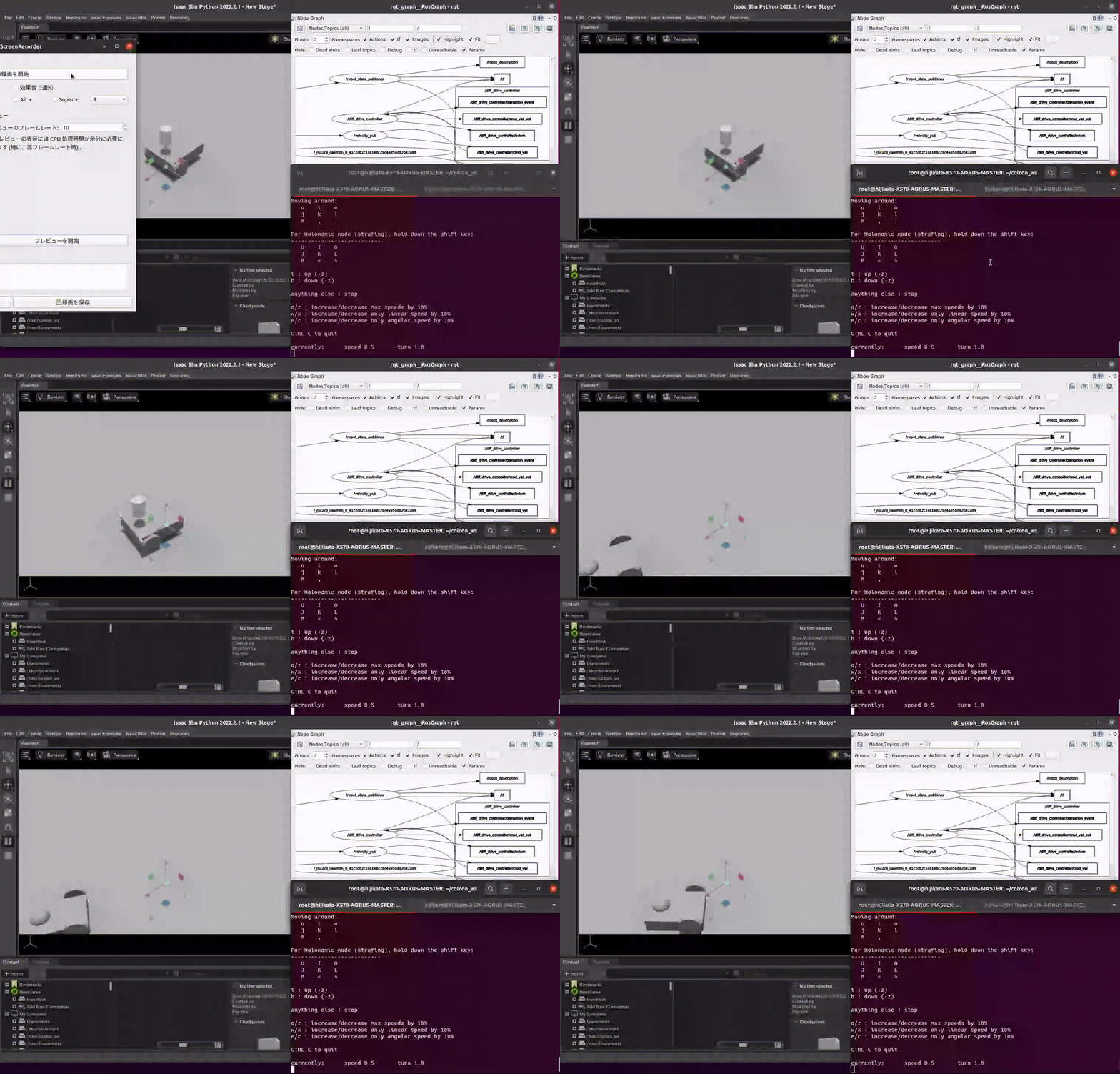
- ros2_control Demo
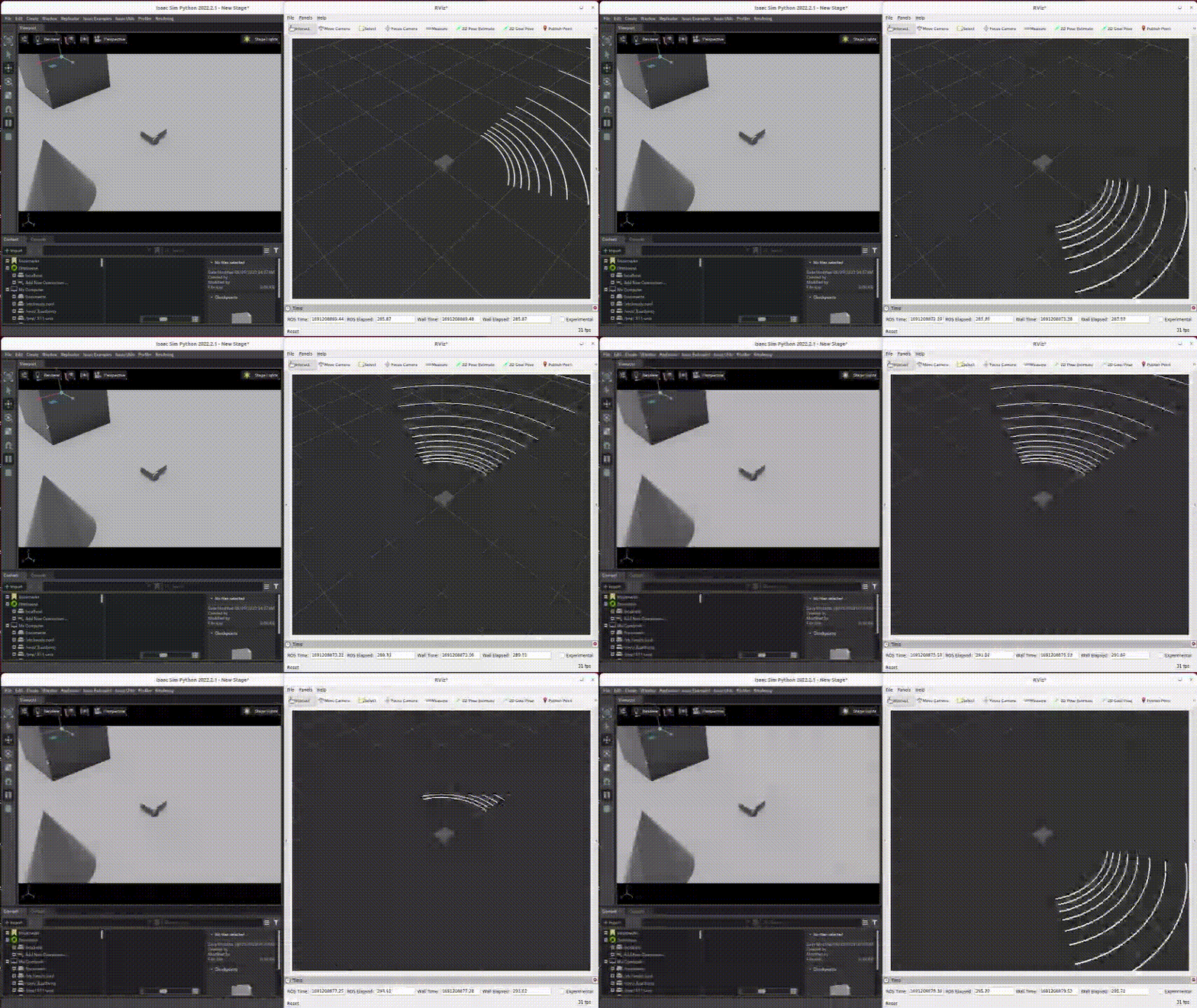
- LiDAR output Demo
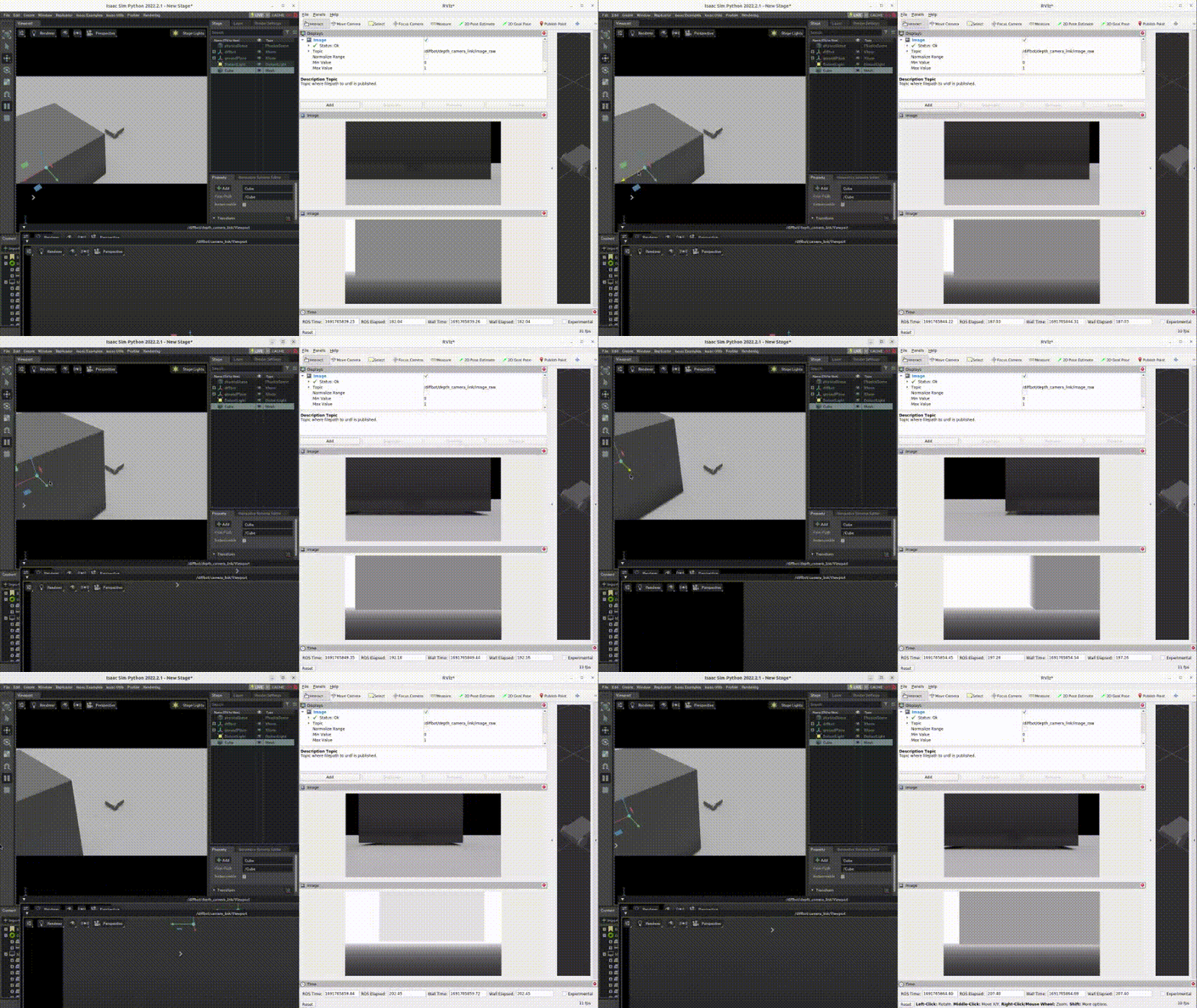
- Camera output Demo
- Arm robot Demo
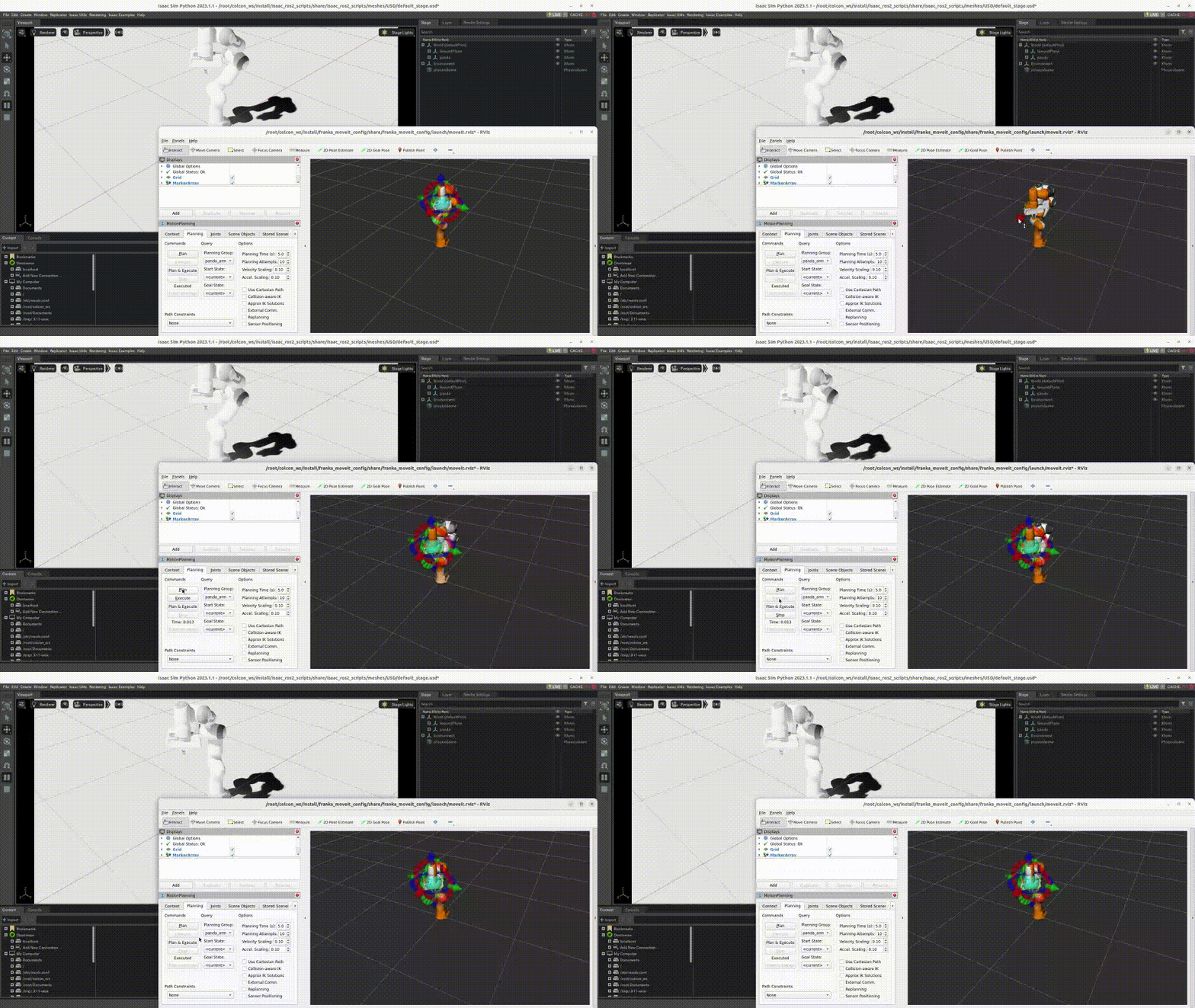
This repository shows how to control the robot from ros2_control to make Isaac Sim easier to use. Important packages are “topic_based_ros2_control” and “isaac_ros2_scripts”. “topic_based_ros2_control” provide hardware_interface class and send the commands from ros2_control to “isaac_ros2_scripts”. “isaac_ros2_scripts” is needed bacause Isaac Sim needs specific python environment. “isaac_ros2_scripts” has the python script to launch and control Isaac Sim.
The features of this repository are below:
- This shows how to control a robot on Isaac Sim with ros2_control.
- This provides a Dockerfile where Isaac Sim and ROS 2 Jazzy can coexist.
- This currently supports prismatic and rotational joints using position and velocity control.
- This sends joint status (position, velocity and effort) to ros2_control from Isaac Sim.
- This launches sensors from URDF description.
- This spawns URDF model at the desired timing and position.
- This launchs sensors and controller at the desired timing.
- This sets stiffness, damping and friction from URDF description.
Supported Versions
| Branch / Tag | Isaac Sim | ROS 2 |
|---|---|---|
main |
6.0.1 | Jazzy |
For Isaac Sim 5.x, use the commit tagged before the Isaac Sim 6 migration
(d03e96e and earlier).
Prerequisite
- Docker
- Isaac Sim Docker Image (Tested using image based on nvcr.io/nvidia/isaac-sim:6.0.1)
- NVIDIA Driver 575 or later
[!IMPORTANT] Isaac Sim 6 is built with CUDA 12.9. With older host drivers (e.g. 555), most features appear to work but the RTX LiDAR silently publishes no data (
CUDA Driver CALL FAILED ... the provided PTX was compiled with an
unsupported toolchain.
appears in the log). Upgrade the host driver to 575 or later.
How to use
-
Install Docker and pull Isaac Sim Docker Image. refer to https://docs.omniverse.nvidia.com/app_isaacsim/app_isaacsim/install_container.html
-
Clone the repo to your ros2 workspace
git clone https://github.com/hijimasa/isaac-ros2-control-sample.git
- Get git submodules
   cd isaac-ros2-control-sample
   git submodule update --init --recursive
- Build a docker image with shell script.
   cd docker
   ./build_docker_image.sh
- Launch a docker container
./launch_docker.sh
- Build ros2 source codes
colcon build && source install/setup.sh
-
Launch the package
7.1. For Mobile Robot
- To launch simulator
ros2 run isaac_ros2_scripts launcher
- To spawn robot (another terminal)
   docker exec -it isaac-sim /bin/bash
   ros2 launch isaac_diffbot_sim diffbot_spawn.launch.py
- To launch teleop_twist_keyboard (another terminal)
   docker exec -it isaac-sim /bin/bash
   ros2 run teleop_twist_keyboard teleop_twist_keyboard
7.2. For Arm Robot
- To launch simulator
```bash
File truncated at 100 lines see the full file
CONTRIBUTING
|
|
isaac-ros2-control-sample repositorydiffbot_description franka_moveit_config isaac_diffbot_sim moveit_resources_panda_description velocity_pub |
ROS Distro
|
Repository Summary
| Description | |
| Checkout URI | https://github.com/hijimasa/isaac-ros2-control-sample.git |
| VCS Type | git |
| VCS Version | main |
| Last Updated | 2026-07-14 |
| Dev Status | UNKNOWN |
| Released | UNRELEASED |
| Contributing |
Help Wanted (-)
Good First Issues (-) Pull Requests to Review (-) |
Packages
| Name | Version |
|---|---|
| diffbot_description | 0.0.0 |
| franka_moveit_config | 0.3.0 |
| isaac_diffbot_sim | 0.0.0 |
| moveit_resources_panda_description | 2.0.6 |
| velocity_pub | 0.0.0 |
README
isaac-ros2-control-sample
- ros2_control Demo
- LiDAR output Demo
- Camera output Demo
- Arm robot Demo
This repository shows how to control the robot from ros2_control to make Isaac Sim easier to use. Important packages are “topic_based_ros2_control” and “isaac_ros2_scripts”. “topic_based_ros2_control” provide hardware_interface class and send the commands from ros2_control to “isaac_ros2_scripts”. “isaac_ros2_scripts” is needed bacause Isaac Sim needs specific python environment. “isaac_ros2_scripts” has the python script to launch and control Isaac Sim.
The features of this repository are below:
- This shows how to control a robot on Isaac Sim with ros2_control.
- This provides a Dockerfile where Isaac Sim and ROS 2 Jazzy can coexist.
- This currently supports prismatic and rotational joints using position and velocity control.
- This sends joint status (position, velocity and effort) to ros2_control from Isaac Sim.
- This launches sensors from URDF description.
- This spawns URDF model at the desired timing and position.
- This launchs sensors and controller at the desired timing.
- This sets stiffness, damping and friction from URDF description.
Supported Versions
| Branch / Tag | Isaac Sim | ROS 2 |
|---|---|---|
main |
6.0.1 | Jazzy |
For Isaac Sim 5.x, use the commit tagged before the Isaac Sim 6 migration
(d03e96e and earlier).
Prerequisite
- Docker
- Isaac Sim Docker Image (Tested using image based on nvcr.io/nvidia/isaac-sim:6.0.1)
- NVIDIA Driver 575 or later
[!IMPORTANT] Isaac Sim 6 is built with CUDA 12.9. With older host drivers (e.g. 555), most features appear to work but the RTX LiDAR silently publishes no data (
CUDA Driver CALL FAILED ... the provided PTX was compiled with an
unsupported toolchain.
appears in the log). Upgrade the host driver to 575 or later.
How to use
-
Install Docker and pull Isaac Sim Docker Image. refer to https://docs.omniverse.nvidia.com/app_isaacsim/app_isaacsim/install_container.html
-
Clone the repo to your ros2 workspace
git clone https://github.com/hijimasa/isaac-ros2-control-sample.git
- Get git submodules
   cd isaac-ros2-control-sample
   git submodule update --init --recursive
- Build a docker image with shell script.
   cd docker
   ./build_docker_image.sh
- Launch a docker container
./launch_docker.sh
- Build ros2 source codes
colcon build && source install/setup.sh
-
Launch the package
7.1. For Mobile Robot
- To launch simulator
ros2 run isaac_ros2_scripts launcher
- To spawn robot (another terminal)
   docker exec -it isaac-sim /bin/bash
   ros2 launch isaac_diffbot_sim diffbot_spawn.launch.py
- To launch teleop_twist_keyboard (another terminal)
   docker exec -it isaac-sim /bin/bash
   ros2 run teleop_twist_keyboard teleop_twist_keyboard
7.2. For Arm Robot
- To launch simulator
```bash
File truncated at 100 lines see the full file
CONTRIBUTING
|
|
isaac-ros2-control-sample repositorydiffbot_description franka_moveit_config isaac_diffbot_sim moveit_resources_panda_description velocity_pub |
ROS Distro
|
Repository Summary
| Description | |
| Checkout URI | https://github.com/hijimasa/isaac-ros2-control-sample.git |
| VCS Type | git |
| VCS Version | main |
| Last Updated | 2026-07-14 |
| Dev Status | UNKNOWN |
| Released | UNRELEASED |
| Contributing |
Help Wanted (-)
Good First Issues (-) Pull Requests to Review (-) |
Packages
| Name | Version |
|---|---|
| diffbot_description | 0.0.0 |
| franka_moveit_config | 0.3.0 |
| isaac_diffbot_sim | 0.0.0 |
| moveit_resources_panda_description | 2.0.6 |
| velocity_pub | 0.0.0 |
README
isaac-ros2-control-sample
- ros2_control Demo
- LiDAR output Demo
- Camera output Demo
- Arm robot Demo
This repository shows how to control the robot from ros2_control to make Isaac Sim easier to use. Important packages are “topic_based_ros2_control” and “isaac_ros2_scripts”. “topic_based_ros2_control” provide hardware_interface class and send the commands from ros2_control to “isaac_ros2_scripts”. “isaac_ros2_scripts” is needed bacause Isaac Sim needs specific python environment. “isaac_ros2_scripts” has the python script to launch and control Isaac Sim.
The features of this repository are below:
- This shows how to control a robot on Isaac Sim with ros2_control.
- This provides a Dockerfile where Isaac Sim and ROS 2 Jazzy can coexist.
- This currently supports prismatic and rotational joints using position and velocity control.
- This sends joint status (position, velocity and effort) to ros2_control from Isaac Sim.
- This launches sensors from URDF description.
- This spawns URDF model at the desired timing and position.
- This launchs sensors and controller at the desired timing.
- This sets stiffness, damping and friction from URDF description.
Supported Versions
| Branch / Tag | Isaac Sim | ROS 2 |
|---|---|---|
main |
6.0.1 | Jazzy |
For Isaac Sim 5.x, use the commit tagged before the Isaac Sim 6 migration
(d03e96e and earlier).
Prerequisite
- Docker
- Isaac Sim Docker Image (Tested using image based on nvcr.io/nvidia/isaac-sim:6.0.1)
- NVIDIA Driver 575 or later
[!IMPORTANT] Isaac Sim 6 is built with CUDA 12.9. With older host drivers (e.g. 555), most features appear to work but the RTX LiDAR silently publishes no data (
CUDA Driver CALL FAILED ... the provided PTX was compiled with an
unsupported toolchain.
appears in the log). Upgrade the host driver to 575 or later.
How to use
-
Install Docker and pull Isaac Sim Docker Image. refer to https://docs.omniverse.nvidia.com/app_isaacsim/app_isaacsim/install_container.html
-
Clone the repo to your ros2 workspace
git clone https://github.com/hijimasa/isaac-ros2-control-sample.git
- Get git submodules
   cd isaac-ros2-control-sample
   git submodule update --init --recursive
- Build a docker image with shell script.
   cd docker
   ./build_docker_image.sh
- Launch a docker container
./launch_docker.sh
- Build ros2 source codes
colcon build && source install/setup.sh
-
Launch the package
7.1. For Mobile Robot
- To launch simulator
ros2 run isaac_ros2_scripts launcher
- To spawn robot (another terminal)
   docker exec -it isaac-sim /bin/bash
   ros2 launch isaac_diffbot_sim diffbot_spawn.launch.py
- To launch teleop_twist_keyboard (another terminal)
   docker exec -it isaac-sim /bin/bash
   ros2 run teleop_twist_keyboard teleop_twist_keyboard
7.2. For Arm Robot
- To launch simulator
```bash
File truncated at 100 lines see the full file
CONTRIBUTING
|
|
isaac-ros2-control-sample repositorydiffbot_description franka_moveit_config isaac_diffbot_sim moveit_resources_panda_description velocity_pub |
ROS Distro
|
Repository Summary
| Description | |
| Checkout URI | https://github.com/hijimasa/isaac-ros2-control-sample.git |
| VCS Type | git |
| VCS Version | main |
| Last Updated | 2026-07-14 |
| Dev Status | UNKNOWN |
| Released | UNRELEASED |
| Contributing |
Help Wanted (-)
Good First Issues (-) Pull Requests to Review (-) |
Packages
| Name | Version |
|---|---|
| diffbot_description | 0.0.0 |
| franka_moveit_config | 0.3.0 |
| isaac_diffbot_sim | 0.0.0 |
| moveit_resources_panda_description | 2.0.6 |
| velocity_pub | 0.0.0 |
README
isaac-ros2-control-sample
- ros2_control Demo
- LiDAR output Demo
- Camera output Demo
- Arm robot Demo
This repository shows how to control the robot from ros2_control to make Isaac Sim easier to use. Important packages are “topic_based_ros2_control” and “isaac_ros2_scripts”. “topic_based_ros2_control” provide hardware_interface class and send the commands from ros2_control to “isaac_ros2_scripts”. “isaac_ros2_scripts” is needed bacause Isaac Sim needs specific python environment. “isaac_ros2_scripts” has the python script to launch and control Isaac Sim.
The features of this repository are below:
- This shows how to control a robot on Isaac Sim with ros2_control.
- This provides a Dockerfile where Isaac Sim and ROS 2 Jazzy can coexist.
- This currently supports prismatic and rotational joints using position and velocity control.
- This sends joint status (position, velocity and effort) to ros2_control from Isaac Sim.
- This launches sensors from URDF description.
- This spawns URDF model at the desired timing and position.
- This launchs sensors and controller at the desired timing.
- This sets stiffness, damping and friction from URDF description.
Supported Versions
| Branch / Tag | Isaac Sim | ROS 2 |
|---|---|---|
main |
6.0.1 | Jazzy |
For Isaac Sim 5.x, use the commit tagged before the Isaac Sim 6 migration
(d03e96e and earlier).
Prerequisite
- Docker
- Isaac Sim Docker Image (Tested using image based on nvcr.io/nvidia/isaac-sim:6.0.1)
- NVIDIA Driver 575 or later
[!IMPORTANT] Isaac Sim 6 is built with CUDA 12.9. With older host drivers (e.g. 555), most features appear to work but the RTX LiDAR silently publishes no data (
CUDA Driver CALL FAILED ... the provided PTX was compiled with an
unsupported toolchain.
appears in the log). Upgrade the host driver to 575 or later.
How to use
-
Install Docker and pull Isaac Sim Docker Image. refer to https://docs.omniverse.nvidia.com/app_isaacsim/app_isaacsim/install_container.html
-
Clone the repo to your ros2 workspace
git clone https://github.com/hijimasa/isaac-ros2-control-sample.git
- Get git submodules
   cd isaac-ros2-control-sample
   git submodule update --init --recursive
- Build a docker image with shell script.
   cd docker
   ./build_docker_image.sh
- Launch a docker container
./launch_docker.sh
- Build ros2 source codes
colcon build && source install/setup.sh
-
Launch the package
7.1. For Mobile Robot
- To launch simulator
ros2 run isaac_ros2_scripts launcher
- To spawn robot (another terminal)
   docker exec -it isaac-sim /bin/bash
   ros2 launch isaac_diffbot_sim diffbot_spawn.launch.py
- To launch teleop_twist_keyboard (another terminal)
   docker exec -it isaac-sim /bin/bash
   ros2 run teleop_twist_keyboard teleop_twist_keyboard
7.2. For Arm Robot
- To launch simulator
```bash
File truncated at 100 lines see the full file
CONTRIBUTING
|
|
isaac-ros2-control-sample repositorydiffbot_description franka_moveit_config isaac_diffbot_sim moveit_resources_panda_description velocity_pub |
ROS Distro
|
Repository Summary
| Description | |
| Checkout URI | https://github.com/hijimasa/isaac-ros2-control-sample.git |
| VCS Type | git |
| VCS Version | main |
| Last Updated | 2026-07-14 |
| Dev Status | UNKNOWN |
| Released | UNRELEASED |
| Contributing |
Help Wanted (-)
Good First Issues (-) Pull Requests to Review (-) |
Packages
| Name | Version |
|---|---|
| diffbot_description | 0.0.0 |
| franka_moveit_config | 0.3.0 |
| isaac_diffbot_sim | 0.0.0 |
| moveit_resources_panda_description | 2.0.6 |
| velocity_pub | 0.0.0 |
README
isaac-ros2-control-sample
- ros2_control Demo
- LiDAR output Demo
- Camera output Demo
- Arm robot Demo
This repository shows how to control the robot from ros2_control to make Isaac Sim easier to use. Important packages are “topic_based_ros2_control” and “isaac_ros2_scripts”. “topic_based_ros2_control” provide hardware_interface class and send the commands from ros2_control to “isaac_ros2_scripts”. “isaac_ros2_scripts” is needed bacause Isaac Sim needs specific python environment. “isaac_ros2_scripts” has the python script to launch and control Isaac Sim.
The features of this repository are below:
- This shows how to control a robot on Isaac Sim with ros2_control.
- This provides a Dockerfile where Isaac Sim and ROS 2 Jazzy can coexist.
- This currently supports prismatic and rotational joints using position and velocity control.
- This sends joint status (position, velocity and effort) to ros2_control from Isaac Sim.
- This launches sensors from URDF description.
- This spawns URDF model at the desired timing and position.
- This launchs sensors and controller at the desired timing.
- This sets stiffness, damping and friction from URDF description.
Supported Versions
| Branch / Tag | Isaac Sim | ROS 2 |
|---|---|---|
main |
6.0.1 | Jazzy |
For Isaac Sim 5.x, use the commit tagged before the Isaac Sim 6 migration
(d03e96e and earlier).
Prerequisite
- Docker
- Isaac Sim Docker Image (Tested using image based on nvcr.io/nvidia/isaac-sim:6.0.1)
- NVIDIA Driver 575 or later
[!IMPORTANT] Isaac Sim 6 is built with CUDA 12.9. With older host drivers (e.g. 555), most features appear to work but the RTX LiDAR silently publishes no data (
CUDA Driver CALL FAILED ... the provided PTX was compiled with an
unsupported toolchain.
appears in the log). Upgrade the host driver to 575 or later.
How to use
-
Install Docker and pull Isaac Sim Docker Image. refer to https://docs.omniverse.nvidia.com/app_isaacsim/app_isaacsim/install_container.html
-
Clone the repo to your ros2 workspace
git clone https://github.com/hijimasa/isaac-ros2-control-sample.git
- Get git submodules
   cd isaac-ros2-control-sample
   git submodule update --init --recursive
- Build a docker image with shell script.
   cd docker
   ./build_docker_image.sh
- Launch a docker container
./launch_docker.sh
- Build ros2 source codes
colcon build && source install/setup.sh
-
Launch the package
7.1. For Mobile Robot
- To launch simulator
ros2 run isaac_ros2_scripts launcher
- To spawn robot (another terminal)
   docker exec -it isaac-sim /bin/bash
   ros2 launch isaac_diffbot_sim diffbot_spawn.launch.py
- To launch teleop_twist_keyboard (another terminal)
   docker exec -it isaac-sim /bin/bash
   ros2 run teleop_twist_keyboard teleop_twist_keyboard
7.2. For Arm Robot
- To launch simulator
```bash
File truncated at 100 lines see the full file
CONTRIBUTING
|
|
isaac-ros2-control-sample repositorydiffbot_description franka_moveit_config isaac_diffbot_sim moveit_resources_panda_description velocity_pub |
ROS Distro
|
Repository Summary
| Description | |
| Checkout URI | https://github.com/hijimasa/isaac-ros2-control-sample.git |
| VCS Type | git |
| VCS Version | main |
| Last Updated | 2026-07-14 |
| Dev Status | UNKNOWN |
| Released | UNRELEASED |
| Contributing |
Help Wanted (-)
Good First Issues (-) Pull Requests to Review (-) |
Packages
| Name | Version |
|---|---|
| diffbot_description | 0.0.0 |
| franka_moveit_config | 0.3.0 |
| isaac_diffbot_sim | 0.0.0 |
| moveit_resources_panda_description | 2.0.6 |
| velocity_pub | 0.0.0 |
README
isaac-ros2-control-sample
- ros2_control Demo
- LiDAR output Demo
- Camera output Demo
- Arm robot Demo
This repository shows how to control the robot from ros2_control to make Isaac Sim easier to use. Important packages are “topic_based_ros2_control” and “isaac_ros2_scripts”. “topic_based_ros2_control” provide hardware_interface class and send the commands from ros2_control to “isaac_ros2_scripts”. “isaac_ros2_scripts” is needed bacause Isaac Sim needs specific python environment. “isaac_ros2_scripts” has the python script to launch and control Isaac Sim.
The features of this repository are below:
- This shows how to control a robot on Isaac Sim with ros2_control.
- This provides a Dockerfile where Isaac Sim and ROS 2 Jazzy can coexist.
- This currently supports prismatic and rotational joints using position and velocity control.
- This sends joint status (position, velocity and effort) to ros2_control from Isaac Sim.
- This launches sensors from URDF description.
- This spawns URDF model at the desired timing and position.
- This launchs sensors and controller at the desired timing.
- This sets stiffness, damping and friction from URDF description.
Supported Versions
| Branch / Tag | Isaac Sim | ROS 2 |
|---|---|---|
main |
6.0.1 | Jazzy |
For Isaac Sim 5.x, use the commit tagged before the Isaac Sim 6 migration
(d03e96e and earlier).
Prerequisite
- Docker
- Isaac Sim Docker Image (Tested using image based on nvcr.io/nvidia/isaac-sim:6.0.1)
- NVIDIA Driver 575 or later
[!IMPORTANT] Isaac Sim 6 is built with CUDA 12.9. With older host drivers (e.g. 555), most features appear to work but the RTX LiDAR silently publishes no data (
CUDA Driver CALL FAILED ... the provided PTX was compiled with an
unsupported toolchain.
appears in the log). Upgrade the host driver to 575 or later.
How to use
-
Install Docker and pull Isaac Sim Docker Image. refer to https://docs.omniverse.nvidia.com/app_isaacsim/app_isaacsim/install_container.html
-
Clone the repo to your ros2 workspace
git clone https://github.com/hijimasa/isaac-ros2-control-sample.git
- Get git submodules
   cd isaac-ros2-control-sample
   git submodule update --init --recursive
- Build a docker image with shell script.
   cd docker
   ./build_docker_image.sh
- Launch a docker container
./launch_docker.sh
- Build ros2 source codes
colcon build && source install/setup.sh
-
Launch the package
7.1. For Mobile Robot
- To launch simulator
ros2 run isaac_ros2_scripts launcher
- To spawn robot (another terminal)
   docker exec -it isaac-sim /bin/bash
   ros2 launch isaac_diffbot_sim diffbot_spawn.launch.py
- To launch teleop_twist_keyboard (another terminal)
   docker exec -it isaac-sim /bin/bash
   ros2 run teleop_twist_keyboard teleop_twist_keyboard
7.2. For Arm Robot
- To launch simulator
```bash
File truncated at 100 lines see the full file
CONTRIBUTING
|
|
isaac-ros2-control-sample repositorydiffbot_description franka_moveit_config isaac_diffbot_sim moveit_resources_panda_description velocity_pub |
ROS Distro
|
Repository Summary
| Description | |
| Checkout URI | https://github.com/hijimasa/isaac-ros2-control-sample.git |
| VCS Type | git |
| VCS Version | main |
| Last Updated | 2026-07-14 |
| Dev Status | UNKNOWN |
| Released | UNRELEASED |
| Contributing |
Help Wanted (-)
Good First Issues (-) Pull Requests to Review (-) |
Packages
| Name | Version |
|---|---|
| diffbot_description | 0.0.0 |
| franka_moveit_config | 0.3.0 |
| isaac_diffbot_sim | 0.0.0 |
| moveit_resources_panda_description | 2.0.6 |
| velocity_pub | 0.0.0 |
README
isaac-ros2-control-sample
- ros2_control Demo
- LiDAR output Demo
- Camera output Demo
- Arm robot Demo
This repository shows how to control the robot from ros2_control to make Isaac Sim easier to use. Important packages are “topic_based_ros2_control” and “isaac_ros2_scripts”. “topic_based_ros2_control” provide hardware_interface class and send the commands from ros2_control to “isaac_ros2_scripts”. “isaac_ros2_scripts” is needed bacause Isaac Sim needs specific python environment. “isaac_ros2_scripts” has the python script to launch and control Isaac Sim.
The features of this repository are below:
- This shows how to control a robot on Isaac Sim with ros2_control.
- This provides a Dockerfile where Isaac Sim and ROS 2 Jazzy can coexist.
- This currently supports prismatic and rotational joints using position and velocity control.
- This sends joint status (position, velocity and effort) to ros2_control from Isaac Sim.
- This launches sensors from URDF description.
- This spawns URDF model at the desired timing and position.
- This launchs sensors and controller at the desired timing.
- This sets stiffness, damping and friction from URDF description.
Supported Versions
| Branch / Tag | Isaac Sim | ROS 2 |
|---|---|---|
main |
6.0.1 | Jazzy |
For Isaac Sim 5.x, use the commit tagged before the Isaac Sim 6 migration
(d03e96e and earlier).
Prerequisite
- Docker
- Isaac Sim Docker Image (Tested using image based on nvcr.io/nvidia/isaac-sim:6.0.1)
- NVIDIA Driver 575 or later
[!IMPORTANT] Isaac Sim 6 is built with CUDA 12.9. With older host drivers (e.g. 555), most features appear to work but the RTX LiDAR silently publishes no data (
CUDA Driver CALL FAILED ... the provided PTX was compiled with an
unsupported toolchain.
appears in the log). Upgrade the host driver to 575 or later.
How to use
-
Install Docker and pull Isaac Sim Docker Image. refer to https://docs.omniverse.nvidia.com/app_isaacsim/app_isaacsim/install_container.html
-
Clone the repo to your ros2 workspace
git clone https://github.com/hijimasa/isaac-ros2-control-sample.git
- Get git submodules
   cd isaac-ros2-control-sample
   git submodule update --init --recursive
- Build a docker image with shell script.
   cd docker
   ./build_docker_image.sh
- Launch a docker container
./launch_docker.sh
- Build ros2 source codes
colcon build && source install/setup.sh
-
Launch the package
7.1. For Mobile Robot
- To launch simulator
ros2 run isaac_ros2_scripts launcher
- To spawn robot (another terminal)
   docker exec -it isaac-sim /bin/bash
   ros2 launch isaac_diffbot_sim diffbot_spawn.launch.py
- To launch teleop_twist_keyboard (another terminal)
   docker exec -it isaac-sim /bin/bash
   ros2 run teleop_twist_keyboard teleop_twist_keyboard
7.2. For Arm Robot
- To launch simulator
```bash
File truncated at 100 lines see the full file
CONTRIBUTING
|
|
isaac-ros2-control-sample repositorydiffbot_description franka_moveit_config isaac_diffbot_sim moveit_resources_panda_description velocity_pub |
ROS Distro
|
Repository Summary
| Description | |
| Checkout URI | https://github.com/hijimasa/isaac-ros2-control-sample.git |
| VCS Type | git |
| VCS Version | main |
| Last Updated | 2026-07-14 |
| Dev Status | UNKNOWN |
| Released | UNRELEASED |
| Contributing |
Help Wanted (-)
Good First Issues (-) Pull Requests to Review (-) |
Packages
| Name | Version |
|---|---|
| diffbot_description | 0.0.0 |
| franka_moveit_config | 0.3.0 |
| isaac_diffbot_sim | 0.0.0 |
| moveit_resources_panda_description | 2.0.6 |
| velocity_pub | 0.0.0 |
README
isaac-ros2-control-sample
- ros2_control Demo
- LiDAR output Demo
- Camera output Demo
- Arm robot Demo
This repository shows how to control the robot from ros2_control to make Isaac Sim easier to use. Important packages are “topic_based_ros2_control” and “isaac_ros2_scripts”. “topic_based_ros2_control” provide hardware_interface class and send the commands from ros2_control to “isaac_ros2_scripts”. “isaac_ros2_scripts” is needed bacause Isaac Sim needs specific python environment. “isaac_ros2_scripts” has the python script to launch and control Isaac Sim.
The features of this repository are below:
- This shows how to control a robot on Isaac Sim with ros2_control.
- This provides a Dockerfile where Isaac Sim and ROS 2 Jazzy can coexist.
- This currently supports prismatic and rotational joints using position and velocity control.
- This sends joint status (position, velocity and effort) to ros2_control from Isaac Sim.
- This launches sensors from URDF description.
- This spawns URDF model at the desired timing and position.
- This launchs sensors and controller at the desired timing.
- This sets stiffness, damping and friction from URDF description.
Supported Versions
| Branch / Tag | Isaac Sim | ROS 2 |
|---|---|---|
main |
6.0.1 | Jazzy |
For Isaac Sim 5.x, use the commit tagged before the Isaac Sim 6 migration
(d03e96e and earlier).
Prerequisite
- Docker
- Isaac Sim Docker Image (Tested using image based on nvcr.io/nvidia/isaac-sim:6.0.1)
- NVIDIA Driver 575 or later
[!IMPORTANT] Isaac Sim 6 is built with CUDA 12.9. With older host drivers (e.g. 555), most features appear to work but the RTX LiDAR silently publishes no data (
CUDA Driver CALL FAILED ... the provided PTX was compiled with an
unsupported toolchain.
appears in the log). Upgrade the host driver to 575 or later.
How to use
-
Install Docker and pull Isaac Sim Docker Image. refer to https://docs.omniverse.nvidia.com/app_isaacsim/app_isaacsim/install_container.html
-
Clone the repo to your ros2 workspace
git clone https://github.com/hijimasa/isaac-ros2-control-sample.git
- Get git submodules
   cd isaac-ros2-control-sample
   git submodule update --init --recursive
- Build a docker image with shell script.
   cd docker
   ./build_docker_image.sh
- Launch a docker container
./launch_docker.sh
- Build ros2 source codes
colcon build && source install/setup.sh
-
Launch the package
7.1. For Mobile Robot
- To launch simulator
ros2 run isaac_ros2_scripts launcher
- To spawn robot (another terminal)
   docker exec -it isaac-sim /bin/bash
   ros2 launch isaac_diffbot_sim diffbot_spawn.launch.py
- To launch teleop_twist_keyboard (another terminal)
   docker exec -it isaac-sim /bin/bash
   ros2 run teleop_twist_keyboard teleop_twist_keyboard
7.2. For Arm Robot
- To launch simulator
```bash
File truncated at 100 lines see the full file
CONTRIBUTING
|
|
isaac-ros2-control-sample repositorydiffbot_description franka_moveit_config isaac_diffbot_sim moveit_resources_panda_description velocity_pub |
ROS Distro
|
Repository Summary
| Description | |
| Checkout URI | https://github.com/hijimasa/isaac-ros2-control-sample.git |
| VCS Type | git |
| VCS Version | main |
| Last Updated | 2026-07-14 |
| Dev Status | UNKNOWN |
| Released | UNRELEASED |
| Contributing |
Help Wanted (-)
Good First Issues (-) Pull Requests to Review (-) |
Packages
| Name | Version |
|---|---|
| diffbot_description | 0.0.0 |
| franka_moveit_config | 0.3.0 |
| isaac_diffbot_sim | 0.0.0 |
| moveit_resources_panda_description | 2.0.6 |
| velocity_pub | 0.0.0 |
README
isaac-ros2-control-sample
- ros2_control Demo
- LiDAR output Demo
- Camera output Demo
- Arm robot Demo
This repository shows how to control the robot from ros2_control to make Isaac Sim easier to use. Important packages are “topic_based_ros2_control” and “isaac_ros2_scripts”. “topic_based_ros2_control” provide hardware_interface class and send the commands from ros2_control to “isaac_ros2_scripts”. “isaac_ros2_scripts” is needed bacause Isaac Sim needs specific python environment. “isaac_ros2_scripts” has the python script to launch and control Isaac Sim.
The features of this repository are below:
- This shows how to control a robot on Isaac Sim with ros2_control.
- This provides a Dockerfile where Isaac Sim and ROS 2 Jazzy can coexist.
- This currently supports prismatic and rotational joints using position and velocity control.
- This sends joint status (position, velocity and effort) to ros2_control from Isaac Sim.
- This launches sensors from URDF description.
- This spawns URDF model at the desired timing and position.
- This launchs sensors and controller at the desired timing.
- This sets stiffness, damping and friction from URDF description.
Supported Versions
| Branch / Tag | Isaac Sim | ROS 2 |
|---|---|---|
main |
6.0.1 | Jazzy |
For Isaac Sim 5.x, use the commit tagged before the Isaac Sim 6 migration
(d03e96e and earlier).
Prerequisite
- Docker
- Isaac Sim Docker Image (Tested using image based on nvcr.io/nvidia/isaac-sim:6.0.1)
- NVIDIA Driver 575 or later
[!IMPORTANT] Isaac Sim 6 is built with CUDA 12.9. With older host drivers (e.g. 555), most features appear to work but the RTX LiDAR silently publishes no data (
CUDA Driver CALL FAILED ... the provided PTX was compiled with an
unsupported toolchain.
appears in the log). Upgrade the host driver to 575 or later.
How to use
-
Install Docker and pull Isaac Sim Docker Image. refer to https://docs.omniverse.nvidia.com/app_isaacsim/app_isaacsim/install_container.html
-
Clone the repo to your ros2 workspace
git clone https://github.com/hijimasa/isaac-ros2-control-sample.git
- Get git submodules
   cd isaac-ros2-control-sample
   git submodule update --init --recursive
- Build a docker image with shell script.
   cd docker
   ./build_docker_image.sh
- Launch a docker container
./launch_docker.sh
- Build ros2 source codes
colcon build && source install/setup.sh
-
Launch the package
7.1. For Mobile Robot
- To launch simulator
ros2 run isaac_ros2_scripts launcher
- To spawn robot (another terminal)
   docker exec -it isaac-sim /bin/bash
   ros2 launch isaac_diffbot_sim diffbot_spawn.launch.py
- To launch teleop_twist_keyboard (another terminal)
   docker exec -it isaac-sim /bin/bash
   ros2 run teleop_twist_keyboard teleop_twist_keyboard
7.2. For Arm Robot
- To launch simulator
```bash
File truncated at 100 lines see the full file
CONTRIBUTING
|
|
isaac-ros2-control-sample repositorydiffbot_description franka_moveit_config isaac_diffbot_sim moveit_resources_panda_description velocity_pub |
ROS Distro
|
Repository Summary
| Description | |
| Checkout URI | https://github.com/hijimasa/isaac-ros2-control-sample.git |
| VCS Type | git |
| VCS Version | main |
| Last Updated | 2026-07-14 |
| Dev Status | UNKNOWN |
| Released | UNRELEASED |
| Contributing |
Help Wanted (-)
Good First Issues (-) Pull Requests to Review (-) |
Packages
| Name | Version |
|---|---|
| diffbot_description | 0.0.0 |
| franka_moveit_config | 0.3.0 |
| isaac_diffbot_sim | 0.0.0 |
| moveit_resources_panda_description | 2.0.6 |
| velocity_pub | 0.0.0 |
README
isaac-ros2-control-sample
- ros2_control Demo
- LiDAR output Demo
- Camera output Demo
- Arm robot Demo
This repository shows how to control the robot from ros2_control to make Isaac Sim easier to use. Important packages are “topic_based_ros2_control” and “isaac_ros2_scripts”. “topic_based_ros2_control” provide hardware_interface class and send the commands from ros2_control to “isaac_ros2_scripts”. “isaac_ros2_scripts” is needed bacause Isaac Sim needs specific python environment. “isaac_ros2_scripts” has the python script to launch and control Isaac Sim.
The features of this repository are below:
- This shows how to control a robot on Isaac Sim with ros2_control.
- This provides a Dockerfile where Isaac Sim and ROS 2 Jazzy can coexist.
- This currently supports prismatic and rotational joints using position and velocity control.
- This sends joint status (position, velocity and effort) to ros2_control from Isaac Sim.
- This launches sensors from URDF description.
- This spawns URDF model at the desired timing and position.
- This launchs sensors and controller at the desired timing.
- This sets stiffness, damping and friction from URDF description.
Supported Versions
| Branch / Tag | Isaac Sim | ROS 2 |
|---|---|---|
main |
6.0.1 | Jazzy |
For Isaac Sim 5.x, use the commit tagged before the Isaac Sim 6 migration
(d03e96e and earlier).
Prerequisite
- Docker
- Isaac Sim Docker Image (Tested using image based on nvcr.io/nvidia/isaac-sim:6.0.1)
- NVIDIA Driver 575 or later
[!IMPORTANT] Isaac Sim 6 is built with CUDA 12.9. With older host drivers (e.g. 555), most features appear to work but the RTX LiDAR silently publishes no data (
CUDA Driver CALL FAILED ... the provided PTX was compiled with an
unsupported toolchain.
appears in the log). Upgrade the host driver to 575 or later.
How to use
-
Install Docker and pull Isaac Sim Docker Image. refer to https://docs.omniverse.nvidia.com/app_isaacsim/app_isaacsim/install_container.html
-
Clone the repo to your ros2 workspace
git clone https://github.com/hijimasa/isaac-ros2-control-sample.git
- Get git submodules
   cd isaac-ros2-control-sample
   git submodule update --init --recursive
- Build a docker image with shell script.
   cd docker
   ./build_docker_image.sh
- Launch a docker container
./launch_docker.sh
- Build ros2 source codes
colcon build && source install/setup.sh
-
Launch the package
7.1. For Mobile Robot
- To launch simulator
ros2 run isaac_ros2_scripts launcher
- To spawn robot (another terminal)
   docker exec -it isaac-sim /bin/bash
   ros2 launch isaac_diffbot_sim diffbot_spawn.launch.py
- To launch teleop_twist_keyboard (another terminal)
   docker exec -it isaac-sim /bin/bash
   ros2 run teleop_twist_keyboard teleop_twist_keyboard
7.2. For Arm Robot
- To launch simulator
```bash
File truncated at 100 lines see the full file