 ROS Index
Repository Summary
| Description | |
| Checkout URI | https://github.com/rsasaki0109/lidar_localization_ros2.git |
| VCS Type | git |
| VCS Version | main |
| Last Updated | 2026-10-23 |
| Dev Status | UNKNOWN |
| Released | UNRELEASED |
| Contributing |
Help Wanted (-)
Good First Issues (-) Pull Requests to Review (-) |
Packages
| Name | Version |
|---|---|
| lidar_localization_ros2 | 1.3.0 |
README
lidar_localization_ros2
Map-based 3D LiDAR localization for ROS 2 and Nav2.




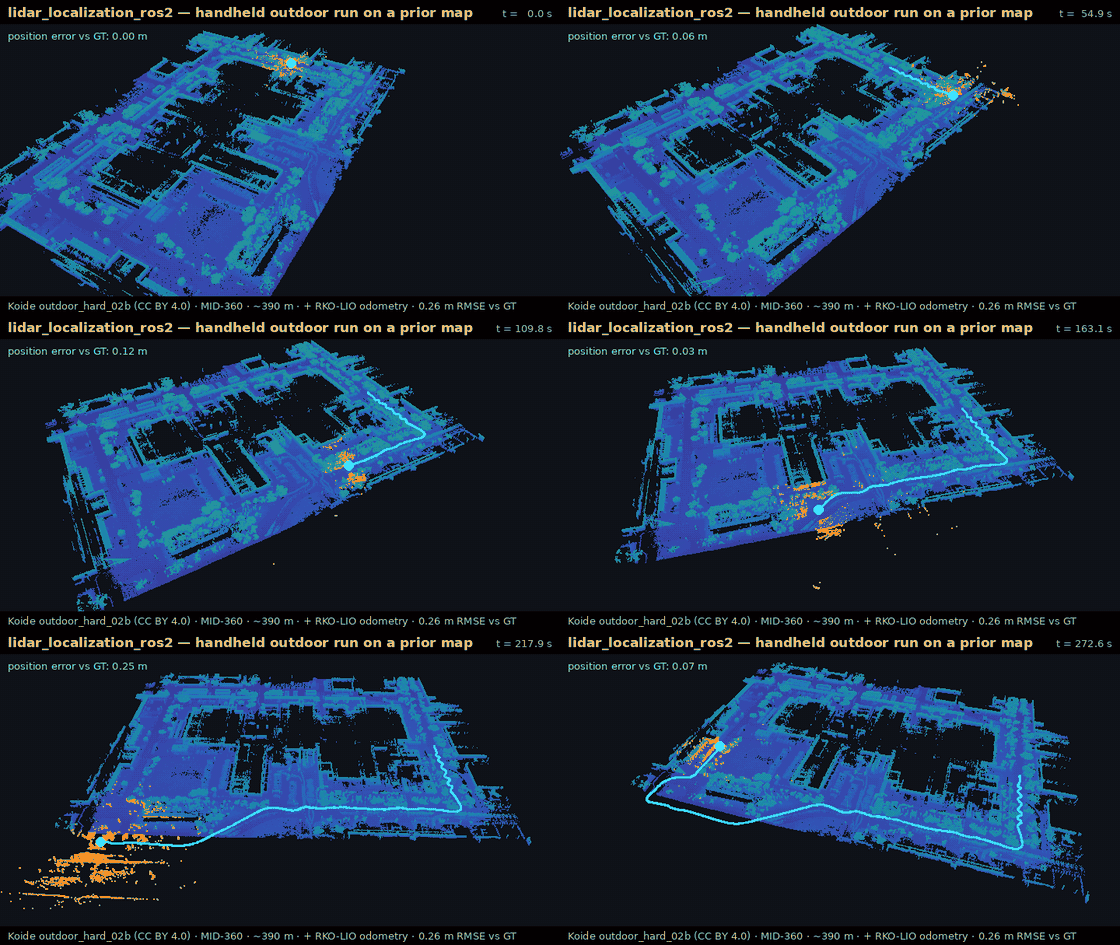
Handheld Livox MID-360, ~390 m outdoors on a prior map, including stretches where the scans do not match the map and a section outside it. Each scan is matched to the map with NDT; RKO-LIO odometry predicts the motion between scans and carries the pose where matching fails. The error is 0.26 m RMSE for the whole run, in an offline replay started from the ground-truth pose (Koide Hard Point Cloud Localization Dataset outdoor_hard_02b, CC BY 4.0). How this was made · more runs
Give it a point cloud map (.pcd or .ply) and a LiDAR stream; it publishes the
robot pose in the map. It finds the starting pose by itself, uses odometry and IMU when
you have them, and works standalone or as the localization source for Nav2.
Where to start
| You want to | Go to |
|---|---|
| Localize your robot on a map you already have | Install, then Quick start |
| Run it on a Unitree Go2 or another MID-360 robot | Go2 / MID-360 in five minutes |
| Navigate with Nav2 | Nav2 |
| Try it without a robot | Run the public dataset |
| See how accurate it is | Benchmark |
| Fix a bringup that does not work | Troubleshooting |
Install
ROS 2 Jazzy is the main target; Humble is supported.
mkdir -p ~/lidarloc_ws/src
cd ~/lidarloc_ws/src
git clone https://github.com/rsasaki0109/lidar_localization_ros2.git
cd lidar_localization_ros2
scripts/bootstrap_colcon_workspace.sh --build
source ~/lidarloc_ws/install/setup.bash
This builds ndt_omp_ros2 and this package, about 30 minutes on an 8-core machine. small_gicp is optional. For a manual or no-sudo build, see local build.
No ROS install? Build the Docker image and check it in one command:
docker build -f docker/Dockerfile -t lidar_localization_ros2 .
docker run --rm lidar_localization_ros2 /ws/src/lidar_localization_ros2/docker/smoke_status.sh
Quick start
- Start the LiDAR driver, and odometry if you have it.
- Run quickstart with your map:
ros2 run lidar_localization_ros2 quickstart.py --map /absolute/path/to/map.pcd
- Check that it is tracking:
ros2 run lidar_localization_ros2 check_lidar_localization_bringup.py --profile standalone
Quickstart finds the cloud and IMU topics, /clock, an odom -> base TF and the
LiDAR frame, and prints what it picked on its Discovery: line. Then it starts the
localizer and RViz. On the first run it searches the whole map for the robot; next time
it restores the pose saved for the same map. If the search finds no safe match, it asks
you for 2D Pose Estimate in RViz (press P, click the robot, drag along its
heading) instead of guessing.
While it runs, the terminal prints one line whenever tracking starts, weakens, is lost or comes back, with what to do about it, and RViz shows the same status above the robot:
[localization_status]: Tracking.
[localization_status]: Tracking lost: no scan has matched the map for 4 s. If it does not recover, set 2D Pose Estimate in RViz.
What each line means: reading the status line.
Useful options:
-
--dry-runshows what it would start, without starting it. -
--profile mid360uses the Livox MID-360 preset. -
--initial-pose X Y Z QX QY QZ QWskips the search when you know the pose. -
--no-rvizfor a headless robot;--no-statusturns the status line off.
File truncated at 100 lines see the full file
CONTRIBUTING
Repository Summary
| Description | |
| Checkout URI | https://github.com/rsasaki0109/lidar_localization_ros2.git |
| VCS Type | git |
| VCS Version | main |
| Last Updated | 2026-10-23 |
| Dev Status | UNKNOWN |
| Released | UNRELEASED |
| Contributing |
Help Wanted (-)
Good First Issues (-) Pull Requests to Review (-) |
Packages
| Name | Version |
|---|---|
| lidar_localization_ros2 | 1.3.0 |
README
lidar_localization_ros2
Map-based 3D LiDAR localization for ROS 2 and Nav2.
Handheld Livox MID-360, ~390 m outdoors on a prior map, including stretches where the scans do not match the map and a section outside it. Each scan is matched to the map with NDT; RKO-LIO odometry predicts the motion between scans and carries the pose where matching fails. The error is 0.26 m RMSE for the whole run, in an offline replay started from the ground-truth pose (Koide Hard Point Cloud Localization Dataset outdoor_hard_02b, CC BY 4.0). How this was made · more runs
Give it a point cloud map (.pcd or .ply) and a LiDAR stream; it publishes the
robot pose in the map. It finds the starting pose by itself, uses odometry and IMU when
you have them, and works standalone or as the localization source for Nav2.
Where to start
| You want to | Go to |
|---|---|
| Localize your robot on a map you already have | Install, then Quick start |
| Run it on a Unitree Go2 or another MID-360 robot | Go2 / MID-360 in five minutes |
| Navigate with Nav2 | Nav2 |
| Try it without a robot | Run the public dataset |
| See how accurate it is | Benchmark |
| Fix a bringup that does not work | Troubleshooting |
Install
ROS 2 Jazzy is the main target; Humble is supported.
mkdir -p ~/lidarloc_ws/src
cd ~/lidarloc_ws/src
git clone https://github.com/rsasaki0109/lidar_localization_ros2.git
cd lidar_localization_ros2
scripts/bootstrap_colcon_workspace.sh --build
source ~/lidarloc_ws/install/setup.bash
This builds ndt_omp_ros2 and this package, about 30 minutes on an 8-core machine. small_gicp is optional. For a manual or no-sudo build, see local build.
No ROS install? Build the Docker image and check it in one command:
docker build -f docker/Dockerfile -t lidar_localization_ros2 .
docker run --rm lidar_localization_ros2 /ws/src/lidar_localization_ros2/docker/smoke_status.sh
Quick start
- Start the LiDAR driver, and odometry if you have it.
- Run quickstart with your map:
ros2 run lidar_localization_ros2 quickstart.py --map /absolute/path/to/map.pcd
- Check that it is tracking:
ros2 run lidar_localization_ros2 check_lidar_localization_bringup.py --profile standalone
Quickstart finds the cloud and IMU topics, /clock, an odom -> base TF and the
LiDAR frame, and prints what it picked on its Discovery: line. Then it starts the
localizer and RViz. On the first run it searches the whole map for the robot; next time
it restores the pose saved for the same map. If the search finds no safe match, it asks
you for 2D Pose Estimate in RViz (press P, click the robot, drag along its
heading) instead of guessing.
While it runs, the terminal prints one line whenever tracking starts, weakens, is lost or comes back, with what to do about it, and RViz shows the same status above the robot:
[localization_status]: Tracking.
[localization_status]: Tracking lost: no scan has matched the map for 4 s. If it does not recover, set 2D Pose Estimate in RViz.
What each line means: reading the status line.
Useful options:
-
--dry-runshows what it would start, without starting it. -
--profile mid360uses the Livox MID-360 preset. -
--initial-pose X Y Z QX QY QZ QWskips the search when you know the pose. -
--no-rvizfor a headless robot;--no-statusturns the status line off.
File truncated at 100 lines see the full file
CONTRIBUTING
Repository Summary
| Description | |
| Checkout URI | https://github.com/rsasaki0109/lidar_localization_ros2.git |
| VCS Type | git |
| VCS Version | main |
| Last Updated | 2026-10-23 |
| Dev Status | UNKNOWN |
| Released | UNRELEASED |
| Contributing |
Help Wanted (-)
Good First Issues (-) Pull Requests to Review (-) |
Packages
| Name | Version |
|---|---|
| lidar_localization_ros2 | 1.3.0 |
README
lidar_localization_ros2
Map-based 3D LiDAR localization for ROS 2 and Nav2.
Handheld Livox MID-360, ~390 m outdoors on a prior map, including stretches where the scans do not match the map and a section outside it. Each scan is matched to the map with NDT; RKO-LIO odometry predicts the motion between scans and carries the pose where matching fails. The error is 0.26 m RMSE for the whole run, in an offline replay started from the ground-truth pose (Koide Hard Point Cloud Localization Dataset outdoor_hard_02b, CC BY 4.0). How this was made · more runs
Give it a point cloud map (.pcd or .ply) and a LiDAR stream; it publishes the
robot pose in the map. It finds the starting pose by itself, uses odometry and IMU when
you have them, and works standalone or as the localization source for Nav2.
Where to start
| You want to | Go to |
|---|---|
| Localize your robot on a map you already have | Install, then Quick start |
| Run it on a Unitree Go2 or another MID-360 robot | Go2 / MID-360 in five minutes |
| Navigate with Nav2 | Nav2 |
| Try it without a robot | Run the public dataset |
| See how accurate it is | Benchmark |
| Fix a bringup that does not work | Troubleshooting |
Install
ROS 2 Jazzy is the main target; Humble is supported.
mkdir -p ~/lidarloc_ws/src
cd ~/lidarloc_ws/src
git clone https://github.com/rsasaki0109/lidar_localization_ros2.git
cd lidar_localization_ros2
scripts/bootstrap_colcon_workspace.sh --build
source ~/lidarloc_ws/install/setup.bash
This builds ndt_omp_ros2 and this package, about 30 minutes on an 8-core machine. small_gicp is optional. For a manual or no-sudo build, see local build.
No ROS install? Build the Docker image and check it in one command:
docker build -f docker/Dockerfile -t lidar_localization_ros2 .
docker run --rm lidar_localization_ros2 /ws/src/lidar_localization_ros2/docker/smoke_status.sh
Quick start
- Start the LiDAR driver, and odometry if you have it.
- Run quickstart with your map:
ros2 run lidar_localization_ros2 quickstart.py --map /absolute/path/to/map.pcd
- Check that it is tracking:
ros2 run lidar_localization_ros2 check_lidar_localization_bringup.py --profile standalone
Quickstart finds the cloud and IMU topics, /clock, an odom -> base TF and the
LiDAR frame, and prints what it picked on its Discovery: line. Then it starts the
localizer and RViz. On the first run it searches the whole map for the robot; next time
it restores the pose saved for the same map. If the search finds no safe match, it asks
you for 2D Pose Estimate in RViz (press P, click the robot, drag along its
heading) instead of guessing.
While it runs, the terminal prints one line whenever tracking starts, weakens, is lost or comes back, with what to do about it, and RViz shows the same status above the robot:
[localization_status]: Tracking.
[localization_status]: Tracking lost: no scan has matched the map for 4 s. If it does not recover, set 2D Pose Estimate in RViz.
What each line means: reading the status line.
Useful options:
-
--dry-runshows what it would start, without starting it. -
--profile mid360uses the Livox MID-360 preset. -
--initial-pose X Y Z QX QY QZ QWskips the search when you know the pose. -
--no-rvizfor a headless robot;--no-statusturns the status line off.
File truncated at 100 lines see the full file
CONTRIBUTING
Repository Summary
| Description | |
| Checkout URI | https://github.com/rsasaki0109/lidar_localization_ros2.git |
| VCS Type | git |
| VCS Version | main |
| Last Updated | 2026-10-23 |
| Dev Status | UNKNOWN |
| Released | UNRELEASED |
| Contributing |
Help Wanted (-)
Good First Issues (-) Pull Requests to Review (-) |
Packages
| Name | Version |
|---|---|
| lidar_localization_ros2 | 1.3.0 |
README
lidar_localization_ros2
Map-based 3D LiDAR localization for ROS 2 and Nav2.
Handheld Livox MID-360, ~390 m outdoors on a prior map, including stretches where the scans do not match the map and a section outside it. Each scan is matched to the map with NDT; RKO-LIO odometry predicts the motion between scans and carries the pose where matching fails. The error is 0.26 m RMSE for the whole run, in an offline replay started from the ground-truth pose (Koide Hard Point Cloud Localization Dataset outdoor_hard_02b, CC BY 4.0). How this was made · more runs
Give it a point cloud map (.pcd or .ply) and a LiDAR stream; it publishes the
robot pose in the map. It finds the starting pose by itself, uses odometry and IMU when
you have them, and works standalone or as the localization source for Nav2.
Where to start
| You want to | Go to |
|---|---|
| Localize your robot on a map you already have | Install, then Quick start |
| Run it on a Unitree Go2 or another MID-360 robot | Go2 / MID-360 in five minutes |
| Navigate with Nav2 | Nav2 |
| Try it without a robot | Run the public dataset |
| See how accurate it is | Benchmark |
| Fix a bringup that does not work | Troubleshooting |
Install
ROS 2 Jazzy is the main target; Humble is supported.
mkdir -p ~/lidarloc_ws/src
cd ~/lidarloc_ws/src
git clone https://github.com/rsasaki0109/lidar_localization_ros2.git
cd lidar_localization_ros2
scripts/bootstrap_colcon_workspace.sh --build
source ~/lidarloc_ws/install/setup.bash
This builds ndt_omp_ros2 and this package, about 30 minutes on an 8-core machine. small_gicp is optional. For a manual or no-sudo build, see local build.
No ROS install? Build the Docker image and check it in one command:
docker build -f docker/Dockerfile -t lidar_localization_ros2 .
docker run --rm lidar_localization_ros2 /ws/src/lidar_localization_ros2/docker/smoke_status.sh
Quick start
- Start the LiDAR driver, and odometry if you have it.
- Run quickstart with your map:
ros2 run lidar_localization_ros2 quickstart.py --map /absolute/path/to/map.pcd
- Check that it is tracking:
ros2 run lidar_localization_ros2 check_lidar_localization_bringup.py --profile standalone
Quickstart finds the cloud and IMU topics, /clock, an odom -> base TF and the
LiDAR frame, and prints what it picked on its Discovery: line. Then it starts the
localizer and RViz. On the first run it searches the whole map for the robot; next time
it restores the pose saved for the same map. If the search finds no safe match, it asks
you for 2D Pose Estimate in RViz (press P, click the robot, drag along its
heading) instead of guessing.
While it runs, the terminal prints one line whenever tracking starts, weakens, is lost or comes back, with what to do about it, and RViz shows the same status above the robot:
[localization_status]: Tracking.
[localization_status]: Tracking lost: no scan has matched the map for 4 s. If it does not recover, set 2D Pose Estimate in RViz.
What each line means: reading the status line.
Useful options:
-
--dry-runshows what it would start, without starting it. -
--profile mid360uses the Livox MID-360 preset. -
--initial-pose X Y Z QX QY QZ QWskips the search when you know the pose. -
--no-rvizfor a headless robot;--no-statusturns the status line off.
File truncated at 100 lines see the full file
CONTRIBUTING
Repository Summary
| Description | |
| Checkout URI | https://github.com/rsasaki0109/lidar_localization_ros2.git |
| VCS Type | git |
| VCS Version | main |
| Last Updated | 2026-10-23 |
| Dev Status | UNKNOWN |
| Released | UNRELEASED |
| Contributing |
Help Wanted (-)
Good First Issues (-) Pull Requests to Review (-) |
Packages
| Name | Version |
|---|---|
| lidar_localization_ros2 | 1.3.0 |
README
lidar_localization_ros2
Map-based 3D LiDAR localization for ROS 2 and Nav2.
Handheld Livox MID-360, ~390 m outdoors on a prior map, including stretches where the scans do not match the map and a section outside it. Each scan is matched to the map with NDT; RKO-LIO odometry predicts the motion between scans and carries the pose where matching fails. The error is 0.26 m RMSE for the whole run, in an offline replay started from the ground-truth pose (Koide Hard Point Cloud Localization Dataset outdoor_hard_02b, CC BY 4.0). How this was made · more runs
Give it a point cloud map (.pcd or .ply) and a LiDAR stream; it publishes the
robot pose in the map. It finds the starting pose by itself, uses odometry and IMU when
you have them, and works standalone or as the localization source for Nav2.
Where to start
| You want to | Go to |
|---|---|
| Localize your robot on a map you already have | Install, then Quick start |
| Run it on a Unitree Go2 or another MID-360 robot | Go2 / MID-360 in five minutes |
| Navigate with Nav2 | Nav2 |
| Try it without a robot | Run the public dataset |
| See how accurate it is | Benchmark |
| Fix a bringup that does not work | Troubleshooting |
Install
ROS 2 Jazzy is the main target; Humble is supported.
mkdir -p ~/lidarloc_ws/src
cd ~/lidarloc_ws/src
git clone https://github.com/rsasaki0109/lidar_localization_ros2.git
cd lidar_localization_ros2
scripts/bootstrap_colcon_workspace.sh --build
source ~/lidarloc_ws/install/setup.bash
This builds ndt_omp_ros2 and this package, about 30 minutes on an 8-core machine. small_gicp is optional. For a manual or no-sudo build, see local build.
No ROS install? Build the Docker image and check it in one command:
docker build -f docker/Dockerfile -t lidar_localization_ros2 .
docker run --rm lidar_localization_ros2 /ws/src/lidar_localization_ros2/docker/smoke_status.sh
Quick start
- Start the LiDAR driver, and odometry if you have it.
- Run quickstart with your map:
ros2 run lidar_localization_ros2 quickstart.py --map /absolute/path/to/map.pcd
- Check that it is tracking:
ros2 run lidar_localization_ros2 check_lidar_localization_bringup.py --profile standalone
Quickstart finds the cloud and IMU topics, /clock, an odom -> base TF and the
LiDAR frame, and prints what it picked on its Discovery: line. Then it starts the
localizer and RViz. On the first run it searches the whole map for the robot; next time
it restores the pose saved for the same map. If the search finds no safe match, it asks
you for 2D Pose Estimate in RViz (press P, click the robot, drag along its
heading) instead of guessing.
While it runs, the terminal prints one line whenever tracking starts, weakens, is lost or comes back, with what to do about it, and RViz shows the same status above the robot:
[localization_status]: Tracking.
[localization_status]: Tracking lost: no scan has matched the map for 4 s. If it does not recover, set 2D Pose Estimate in RViz.
What each line means: reading the status line.
Useful options:
-
--dry-runshows what it would start, without starting it. -
--profile mid360uses the Livox MID-360 preset. -
--initial-pose X Y Z QX QY QZ QWskips the search when you know the pose. -
--no-rvizfor a headless robot;--no-statusturns the status line off.
File truncated at 100 lines see the full file
CONTRIBUTING
Repository Summary
| Description | |
| Checkout URI | https://github.com/rsasaki0109/lidar_localization_ros2.git |
| VCS Type | git |
| VCS Version | main |
| Last Updated | 2026-10-23 |
| Dev Status | UNKNOWN |
| Released | UNRELEASED |
| Contributing |
Help Wanted (-)
Good First Issues (-) Pull Requests to Review (-) |
Packages
| Name | Version |
|---|---|
| lidar_localization_ros2 | 1.3.0 |
README
lidar_localization_ros2
Map-based 3D LiDAR localization for ROS 2 and Nav2.
Handheld Livox MID-360, ~390 m outdoors on a prior map, including stretches where the scans do not match the map and a section outside it. Each scan is matched to the map with NDT; RKO-LIO odometry predicts the motion between scans and carries the pose where matching fails. The error is 0.26 m RMSE for the whole run, in an offline replay started from the ground-truth pose (Koide Hard Point Cloud Localization Dataset outdoor_hard_02b, CC BY 4.0). How this was made · more runs
Give it a point cloud map (.pcd or .ply) and a LiDAR stream; it publishes the
robot pose in the map. It finds the starting pose by itself, uses odometry and IMU when
you have them, and works standalone or as the localization source for Nav2.
Where to start
| You want to | Go to |
|---|---|
| Localize your robot on a map you already have | Install, then Quick start |
| Run it on a Unitree Go2 or another MID-360 robot | Go2 / MID-360 in five minutes |
| Navigate with Nav2 | Nav2 |
| Try it without a robot | Run the public dataset |
| See how accurate it is | Benchmark |
| Fix a bringup that does not work | Troubleshooting |
Install
ROS 2 Jazzy is the main target; Humble is supported.
mkdir -p ~/lidarloc_ws/src
cd ~/lidarloc_ws/src
git clone https://github.com/rsasaki0109/lidar_localization_ros2.git
cd lidar_localization_ros2
scripts/bootstrap_colcon_workspace.sh --build
source ~/lidarloc_ws/install/setup.bash
This builds ndt_omp_ros2 and this package, about 30 minutes on an 8-core machine. small_gicp is optional. For a manual or no-sudo build, see local build.
No ROS install? Build the Docker image and check it in one command:
docker build -f docker/Dockerfile -t lidar_localization_ros2 .
docker run --rm lidar_localization_ros2 /ws/src/lidar_localization_ros2/docker/smoke_status.sh
Quick start
- Start the LiDAR driver, and odometry if you have it.
- Run quickstart with your map:
ros2 run lidar_localization_ros2 quickstart.py --map /absolute/path/to/map.pcd
- Check that it is tracking:
ros2 run lidar_localization_ros2 check_lidar_localization_bringup.py --profile standalone
Quickstart finds the cloud and IMU topics, /clock, an odom -> base TF and the
LiDAR frame, and prints what it picked on its Discovery: line. Then it starts the
localizer and RViz. On the first run it searches the whole map for the robot; next time
it restores the pose saved for the same map. If the search finds no safe match, it asks
you for 2D Pose Estimate in RViz (press P, click the robot, drag along its
heading) instead of guessing.
While it runs, the terminal prints one line whenever tracking starts, weakens, is lost or comes back, with what to do about it, and RViz shows the same status above the robot:
[localization_status]: Tracking.
[localization_status]: Tracking lost: no scan has matched the map for 4 s. If it does not recover, set 2D Pose Estimate in RViz.
What each line means: reading the status line.
Useful options:
-
--dry-runshows what it would start, without starting it. -
--profile mid360uses the Livox MID-360 preset. -
--initial-pose X Y Z QX QY QZ QWskips the search when you know the pose. -
--no-rvizfor a headless robot;--no-statusturns the status line off.
File truncated at 100 lines see the full file
CONTRIBUTING
Repository Summary
| Description | |
| Checkout URI | https://github.com/rsasaki0109/lidar_localization_ros2.git |
| VCS Type | git |
| VCS Version | main |
| Last Updated | 2026-10-23 |
| Dev Status | UNKNOWN |
| Released | UNRELEASED |
| Contributing |
Help Wanted (-)
Good First Issues (-) Pull Requests to Review (-) |
Packages
| Name | Version |
|---|---|
| lidar_localization_ros2 | 1.3.0 |
README
lidar_localization_ros2
Map-based 3D LiDAR localization for ROS 2 and Nav2.
Handheld Livox MID-360, ~390 m outdoors on a prior map, including stretches where the scans do not match the map and a section outside it. Each scan is matched to the map with NDT; RKO-LIO odometry predicts the motion between scans and carries the pose where matching fails. The error is 0.26 m RMSE for the whole run, in an offline replay started from the ground-truth pose (Koide Hard Point Cloud Localization Dataset outdoor_hard_02b, CC BY 4.0). How this was made · more runs
Give it a point cloud map (.pcd or .ply) and a LiDAR stream; it publishes the
robot pose in the map. It finds the starting pose by itself, uses odometry and IMU when
you have them, and works standalone or as the localization source for Nav2.
Where to start
| You want to | Go to |
|---|---|
| Localize your robot on a map you already have | Install, then Quick start |
| Run it on a Unitree Go2 or another MID-360 robot | Go2 / MID-360 in five minutes |
| Navigate with Nav2 | Nav2 |
| Try it without a robot | Run the public dataset |
| See how accurate it is | Benchmark |
| Fix a bringup that does not work | Troubleshooting |
Install
ROS 2 Jazzy is the main target; Humble is supported.
mkdir -p ~/lidarloc_ws/src
cd ~/lidarloc_ws/src
git clone https://github.com/rsasaki0109/lidar_localization_ros2.git
cd lidar_localization_ros2
scripts/bootstrap_colcon_workspace.sh --build
source ~/lidarloc_ws/install/setup.bash
This builds ndt_omp_ros2 and this package, about 30 minutes on an 8-core machine. small_gicp is optional. For a manual or no-sudo build, see local build.
No ROS install? Build the Docker image and check it in one command:
docker build -f docker/Dockerfile -t lidar_localization_ros2 .
docker run --rm lidar_localization_ros2 /ws/src/lidar_localization_ros2/docker/smoke_status.sh
Quick start
- Start the LiDAR driver, and odometry if you have it.
- Run quickstart with your map:
ros2 run lidar_localization_ros2 quickstart.py --map /absolute/path/to/map.pcd
- Check that it is tracking:
ros2 run lidar_localization_ros2 check_lidar_localization_bringup.py --profile standalone
Quickstart finds the cloud and IMU topics, /clock, an odom -> base TF and the
LiDAR frame, and prints what it picked on its Discovery: line. Then it starts the
localizer and RViz. On the first run it searches the whole map for the robot; next time
it restores the pose saved for the same map. If the search finds no safe match, it asks
you for 2D Pose Estimate in RViz (press P, click the robot, drag along its
heading) instead of guessing.
While it runs, the terminal prints one line whenever tracking starts, weakens, is lost or comes back, with what to do about it, and RViz shows the same status above the robot:
[localization_status]: Tracking.
[localization_status]: Tracking lost: no scan has matched the map for 4 s. If it does not recover, set 2D Pose Estimate in RViz.
What each line means: reading the status line.
Useful options:
-
--dry-runshows what it would start, without starting it. -
--profile mid360uses the Livox MID-360 preset. -
--initial-pose X Y Z QX QY QZ QWskips the search when you know the pose. -
--no-rvizfor a headless robot;--no-statusturns the status line off.
File truncated at 100 lines see the full file
CONTRIBUTING
Repository Summary
| Description | |
| Checkout URI | https://github.com/rsasaki0109/lidar_localization_ros2.git |
| VCS Type | git |
| VCS Version | main |
| Last Updated | 2026-10-23 |
| Dev Status | UNKNOWN |
| Released | UNRELEASED |
| Contributing |
Help Wanted (-)
Good First Issues (-) Pull Requests to Review (-) |
Packages
| Name | Version |
|---|---|
| lidar_localization_ros2 | 1.3.0 |
README
lidar_localization_ros2
Map-based 3D LiDAR localization for ROS 2 and Nav2.
Handheld Livox MID-360, ~390 m outdoors on a prior map, including stretches where the scans do not match the map and a section outside it. Each scan is matched to the map with NDT; RKO-LIO odometry predicts the motion between scans and carries the pose where matching fails. The error is 0.26 m RMSE for the whole run, in an offline replay started from the ground-truth pose (Koide Hard Point Cloud Localization Dataset outdoor_hard_02b, CC BY 4.0). How this was made · more runs
Give it a point cloud map (.pcd or .ply) and a LiDAR stream; it publishes the
robot pose in the map. It finds the starting pose by itself, uses odometry and IMU when
you have them, and works standalone or as the localization source for Nav2.
Where to start
| You want to | Go to |
|---|---|
| Localize your robot on a map you already have | Install, then Quick start |
| Run it on a Unitree Go2 or another MID-360 robot | Go2 / MID-360 in five minutes |
| Navigate with Nav2 | Nav2 |
| Try it without a robot | Run the public dataset |
| See how accurate it is | Benchmark |
| Fix a bringup that does not work | Troubleshooting |
Install
ROS 2 Jazzy is the main target; Humble is supported.
mkdir -p ~/lidarloc_ws/src
cd ~/lidarloc_ws/src
git clone https://github.com/rsasaki0109/lidar_localization_ros2.git
cd lidar_localization_ros2
scripts/bootstrap_colcon_workspace.sh --build
source ~/lidarloc_ws/install/setup.bash
This builds ndt_omp_ros2 and this package, about 30 minutes on an 8-core machine. small_gicp is optional. For a manual or no-sudo build, see local build.
No ROS install? Build the Docker image and check it in one command:
docker build -f docker/Dockerfile -t lidar_localization_ros2 .
docker run --rm lidar_localization_ros2 /ws/src/lidar_localization_ros2/docker/smoke_status.sh
Quick start
- Start the LiDAR driver, and odometry if you have it.
- Run quickstart with your map:
ros2 run lidar_localization_ros2 quickstart.py --map /absolute/path/to/map.pcd
- Check that it is tracking:
ros2 run lidar_localization_ros2 check_lidar_localization_bringup.py --profile standalone
Quickstart finds the cloud and IMU topics, /clock, an odom -> base TF and the
LiDAR frame, and prints what it picked on its Discovery: line. Then it starts the
localizer and RViz. On the first run it searches the whole map for the robot; next time
it restores the pose saved for the same map. If the search finds no safe match, it asks
you for 2D Pose Estimate in RViz (press P, click the robot, drag along its
heading) instead of guessing.
While it runs, the terminal prints one line whenever tracking starts, weakens, is lost or comes back, with what to do about it, and RViz shows the same status above the robot:
[localization_status]: Tracking.
[localization_status]: Tracking lost: no scan has matched the map for 4 s. If it does not recover, set 2D Pose Estimate in RViz.
What each line means: reading the status line.
Useful options:
-
--dry-runshows what it would start, without starting it. -
--profile mid360uses the Livox MID-360 preset. -
--initial-pose X Y Z QX QY QZ QWskips the search when you know the pose. -
--no-rvizfor a headless robot;--no-statusturns the status line off.
File truncated at 100 lines see the full file
CONTRIBUTING
Repository Summary
| Description | |
| Checkout URI | https://github.com/rsasaki0109/lidar_localization_ros2.git |
| VCS Type | git |
| VCS Version | main |
| Last Updated | 2026-10-23 |
| Dev Status | UNKNOWN |
| Released | UNRELEASED |
| Contributing |
Help Wanted (-)
Good First Issues (-) Pull Requests to Review (-) |
Packages
| Name | Version |
|---|---|
| lidar_localization_ros2 | 1.3.0 |
README
lidar_localization_ros2
Map-based 3D LiDAR localization for ROS 2 and Nav2.
Handheld Livox MID-360, ~390 m outdoors on a prior map, including stretches where the scans do not match the map and a section outside it. Each scan is matched to the map with NDT; RKO-LIO odometry predicts the motion between scans and carries the pose where matching fails. The error is 0.26 m RMSE for the whole run, in an offline replay started from the ground-truth pose (Koide Hard Point Cloud Localization Dataset outdoor_hard_02b, CC BY 4.0). How this was made · more runs
Give it a point cloud map (.pcd or .ply) and a LiDAR stream; it publishes the
robot pose in the map. It finds the starting pose by itself, uses odometry and IMU when
you have them, and works standalone or as the localization source for Nav2.
Where to start
| You want to | Go to |
|---|---|
| Localize your robot on a map you already have | Install, then Quick start |
| Run it on a Unitree Go2 or another MID-360 robot | Go2 / MID-360 in five minutes |
| Navigate with Nav2 | Nav2 |
| Try it without a robot | Run the public dataset |
| See how accurate it is | Benchmark |
| Fix a bringup that does not work | Troubleshooting |
Install
ROS 2 Jazzy is the main target; Humble is supported.
mkdir -p ~/lidarloc_ws/src
cd ~/lidarloc_ws/src
git clone https://github.com/rsasaki0109/lidar_localization_ros2.git
cd lidar_localization_ros2
scripts/bootstrap_colcon_workspace.sh --build
source ~/lidarloc_ws/install/setup.bash
This builds ndt_omp_ros2 and this package, about 30 minutes on an 8-core machine. small_gicp is optional. For a manual or no-sudo build, see local build.
No ROS install? Build the Docker image and check it in one command:
docker build -f docker/Dockerfile -t lidar_localization_ros2 .
docker run --rm lidar_localization_ros2 /ws/src/lidar_localization_ros2/docker/smoke_status.sh
Quick start
- Start the LiDAR driver, and odometry if you have it.
- Run quickstart with your map:
ros2 run lidar_localization_ros2 quickstart.py --map /absolute/path/to/map.pcd
- Check that it is tracking:
ros2 run lidar_localization_ros2 check_lidar_localization_bringup.py --profile standalone
Quickstart finds the cloud and IMU topics, /clock, an odom -> base TF and the
LiDAR frame, and prints what it picked on its Discovery: line. Then it starts the
localizer and RViz. On the first run it searches the whole map for the robot; next time
it restores the pose saved for the same map. If the search finds no safe match, it asks
you for 2D Pose Estimate in RViz (press P, click the robot, drag along its
heading) instead of guessing.
While it runs, the terminal prints one line whenever tracking starts, weakens, is lost or comes back, with what to do about it, and RViz shows the same status above the robot:
[localization_status]: Tracking.
[localization_status]: Tracking lost: no scan has matched the map for 4 s. If it does not recover, set 2D Pose Estimate in RViz.
What each line means: reading the status line.
Useful options:
-
--dry-runshows what it would start, without starting it. -
--profile mid360uses the Livox MID-360 preset. -
--initial-pose X Y Z QX QY QZ QWskips the search when you know the pose. -
--no-rvizfor a headless robot;--no-statusturns the status line off.
File truncated at 100 lines see the full file
CONTRIBUTING
Repository Summary
| Description | |
| Checkout URI | https://github.com/rsasaki0109/lidar_localization_ros2.git |
| VCS Type | git |
| VCS Version | main |
| Last Updated | 2026-10-23 |
| Dev Status | UNKNOWN |
| Released | UNRELEASED |
| Contributing |
Help Wanted (-)
Good First Issues (-) Pull Requests to Review (-) |
Packages
| Name | Version |
|---|---|
| lidar_localization_ros2 | 1.3.0 |
README
lidar_localization_ros2
Map-based 3D LiDAR localization for ROS 2 and Nav2.
Handheld Livox MID-360, ~390 m outdoors on a prior map, including stretches where the scans do not match the map and a section outside it. Each scan is matched to the map with NDT; RKO-LIO odometry predicts the motion between scans and carries the pose where matching fails. The error is 0.26 m RMSE for the whole run, in an offline replay started from the ground-truth pose (Koide Hard Point Cloud Localization Dataset outdoor_hard_02b, CC BY 4.0). How this was made · more runs
Give it a point cloud map (.pcd or .ply) and a LiDAR stream; it publishes the
robot pose in the map. It finds the starting pose by itself, uses odometry and IMU when
you have them, and works standalone or as the localization source for Nav2.
Where to start
| You want to | Go to |
|---|---|
| Localize your robot on a map you already have | Install, then Quick start |
| Run it on a Unitree Go2 or another MID-360 robot | Go2 / MID-360 in five minutes |
| Navigate with Nav2 | Nav2 |
| Try it without a robot | Run the public dataset |
| See how accurate it is | Benchmark |
| Fix a bringup that does not work | Troubleshooting |
Install
ROS 2 Jazzy is the main target; Humble is supported.
mkdir -p ~/lidarloc_ws/src
cd ~/lidarloc_ws/src
git clone https://github.com/rsasaki0109/lidar_localization_ros2.git
cd lidar_localization_ros2
scripts/bootstrap_colcon_workspace.sh --build
source ~/lidarloc_ws/install/setup.bash
This builds ndt_omp_ros2 and this package, about 30 minutes on an 8-core machine. small_gicp is optional. For a manual or no-sudo build, see local build.
No ROS install? Build the Docker image and check it in one command:
docker build -f docker/Dockerfile -t lidar_localization_ros2 .
docker run --rm lidar_localization_ros2 /ws/src/lidar_localization_ros2/docker/smoke_status.sh
Quick start
- Start the LiDAR driver, and odometry if you have it.
- Run quickstart with your map:
ros2 run lidar_localization_ros2 quickstart.py --map /absolute/path/to/map.pcd
- Check that it is tracking:
ros2 run lidar_localization_ros2 check_lidar_localization_bringup.py --profile standalone
Quickstart finds the cloud and IMU topics, /clock, an odom -> base TF and the
LiDAR frame, and prints what it picked on its Discovery: line. Then it starts the
localizer and RViz. On the first run it searches the whole map for the robot; next time
it restores the pose saved for the same map. If the search finds no safe match, it asks
you for 2D Pose Estimate in RViz (press P, click the robot, drag along its
heading) instead of guessing.
While it runs, the terminal prints one line whenever tracking starts, weakens, is lost or comes back, with what to do about it, and RViz shows the same status above the robot:
[localization_status]: Tracking.
[localization_status]: Tracking lost: no scan has matched the map for 4 s. If it does not recover, set 2D Pose Estimate in RViz.
What each line means: reading the status line.
Useful options:
-
--dry-runshows what it would start, without starting it. -
--profile mid360uses the Livox MID-360 preset. -
--initial-pose X Y Z QX QY QZ QWskips the search when you know the pose. -
--no-rvizfor a headless robot;--no-statusturns the status line off.
File truncated at 100 lines see the full file