 ROS Index
Repository Summary
| Description | |
| Checkout URI | https://github.com/rsasaki0109/lidarslam_ros2.git |
| VCS Type | git |
| VCS Version | develop |
| Last Updated | 2026-10-23 |
| Dev Status | UNKNOWN |
| Released | UNRELEASED |
| Contributing |
Help Wanted (-)
Good First Issues (-) Pull Requests to Review (-) |
Packages
| Name | Version |
|---|---|
| glim_clean_room_phase3d | 0.1.0 |
| lidarslam_registration_plugin_template | 0.1.0 |
| graph_based_slam | 0.10.1 |
| lidarslam | 0.10.1 |
| lidarslam_default_plugins | 0.6.0 |
| lidarslam_fake_registration_plugins | 0.6.0 |
| lidarslam_msgs | 0.10.1 |
| lidarslam_plugin_interfaces | 0.6.0 |
| lidarslam_registration_loader | 0.6.0 |
| scanmatcher | 0.10.1 |
README
lidar_slam_ros2




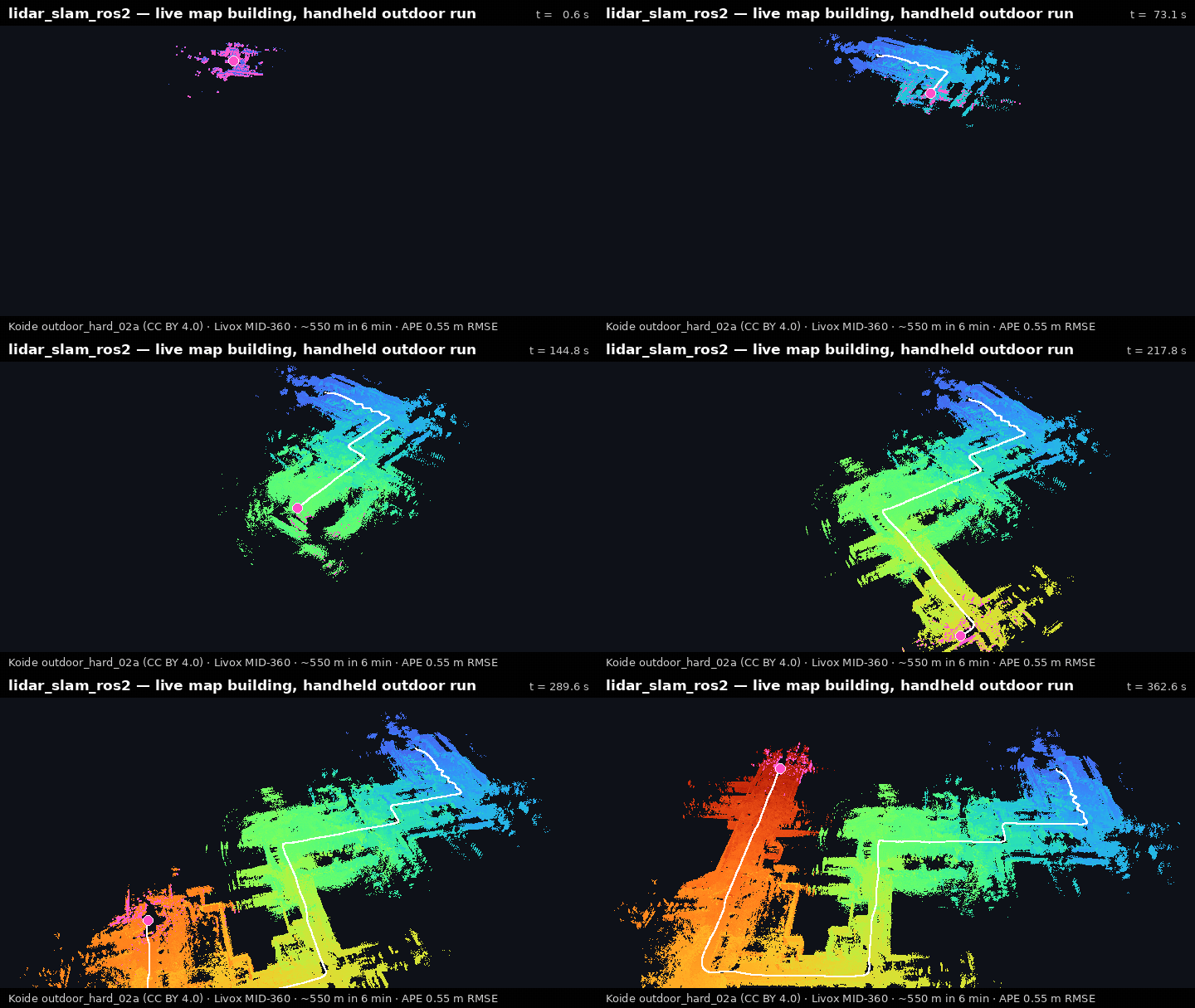
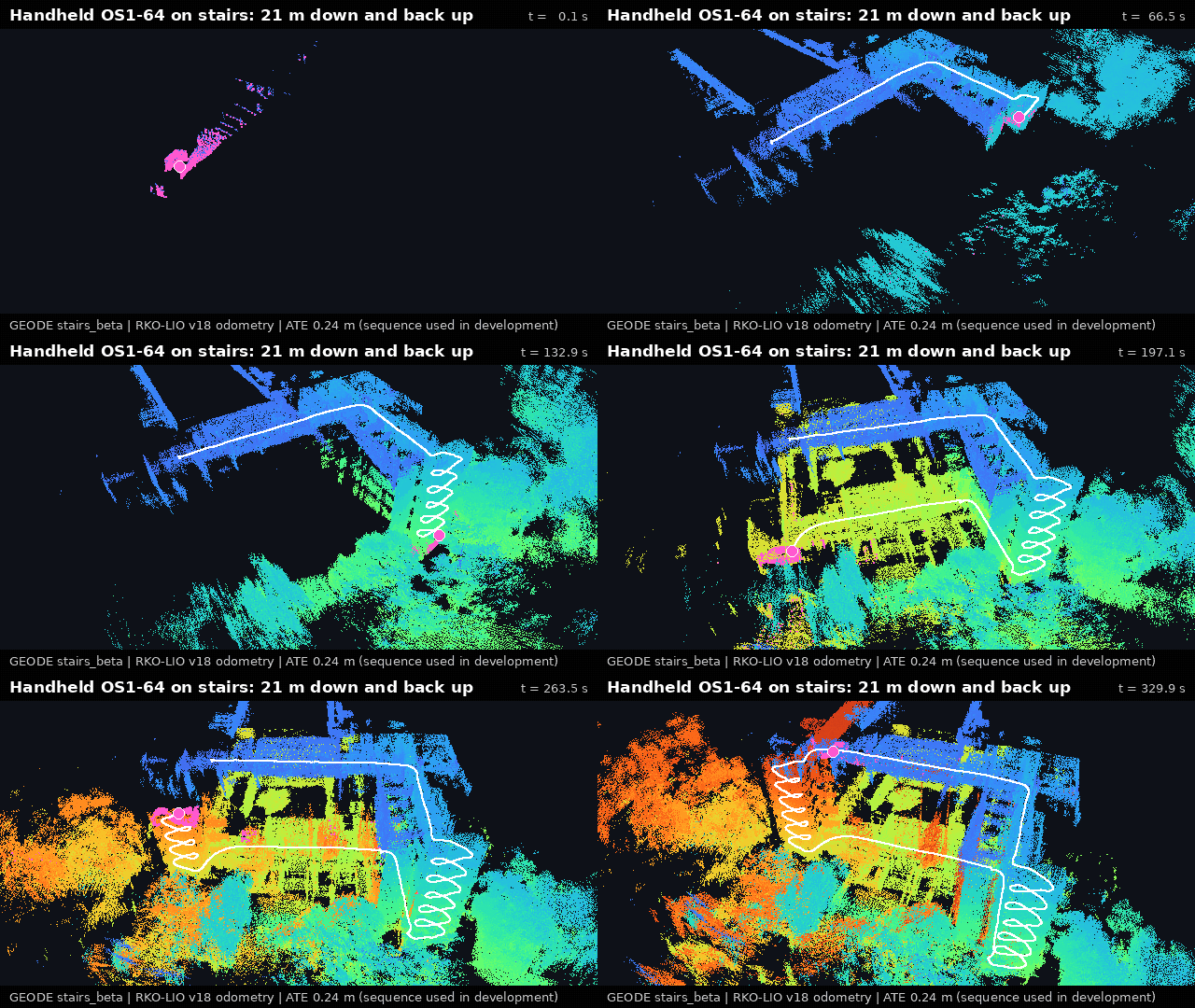
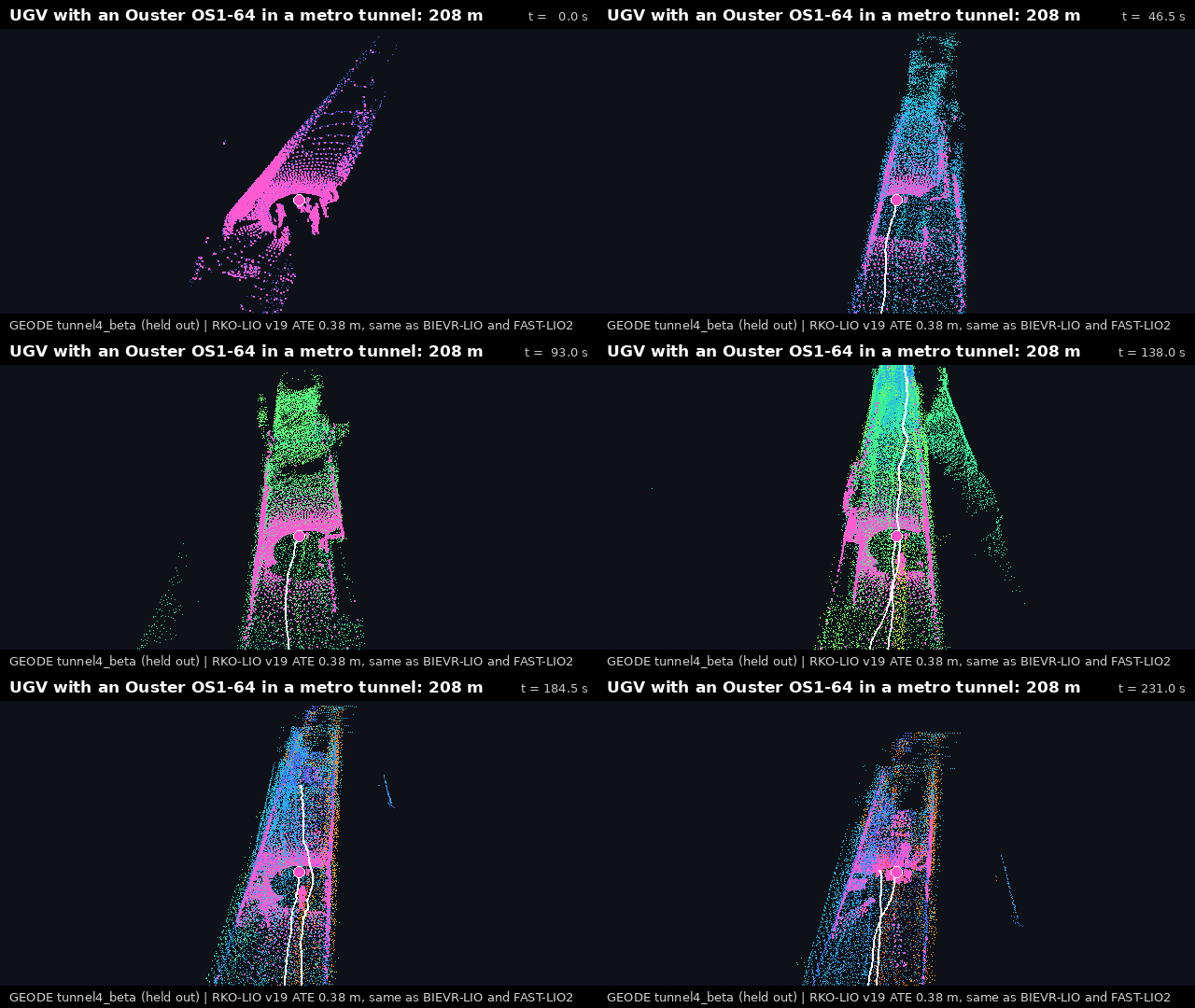
Outdoor walk, APE 0.55 m (Koide, CC BY 4.0) · camera-coloured park (RTK-SLAM, CC BY 4.0) · stairs, ATE 0.24 m on development data · held-out metro tunnel, 0.38 m like BIEVR-LIO and FAST-LIO2 (GEODE). How these were made.
Turn a rosbag into a map you can actually drive on. ROS 2 LiDAR SLAM that writes an Autoware-compatible map bundle: pointcloud_map/, map_projector_info.yaml and lanelet2. RKO-LIO (MIT) + graph_based_slam (BSD-2), no GPL on the default workflow. 日本語クイックスタート · release notes v0.10.0 · next v0.10.1
Quickstart
Choose your shortest path
| Goal | Start here | Safety and cost boundary |
|---|---|---|
| See a verified map, no build | Default if unsure: Docker demo | Stable v0.10.0-humble; needs Docker; host writes stay in ./lidarslam_output. |
| Map my own rosbag |
Own-bag route: lidarslam-map doctor /path/to/rosbag2
|
Read-only diagnosis first; then lidarslam-map start /path/to/rosbag2 writes a new output. |
| Build from source or contribute |
Source quickstart: bash scripts/source_quickstart.sh --dry-run
|
Release v0.10.0; needs ROS 2, 8 GiB, and roughly 30 minutes. |
Try it with Docker (one command, no build)
docker run --rm -e LIDARSLAM_HOST_UID="$(id -u)" -e LIDARSLAM_HOST_GID="$(id -g)" \
  -v "$PWD/lidarslam_output:/lidarslam_ws/output" \
  ghcr.io/rsasaki0109/lidar_slam_ros2:v0.10.0-humble
The 517 MB MID-360 demo writes lidarslam_output/mid360_demo/ as your user. Other platforms: Getting Started.
Map your own bag (one command after install)
lidarslam-map start /path/to/rosbag2
Run lidarslam-map with no arguments for a guided start, or lidarslam-map doctor first: it uses no network and writes no files. See supported inputs.
Build + verified demo from source (one helper)
mkdir -p ~/ros2_ws/src
cd ~/ros2_ws/src
git clone --recursive https://github.com/rsasaki0109/lidar_slam_ros2.git
cd lidar_slam_ros2
bash scripts/source_quickstart.sh
The helper detects Humble/Jazzy, installs the dependencies, builds the six maintained packages and runs the verified demo (--dry-run, --build-only). It prints a lidarslam-map path that auto-activates this build. Needs ROS 2, 8 GiB and about 30 minutes. Before handoff: python3 scripts/check_first_map_verification_package.py --json, continue only on READY.
Use your own bag
For an Ouster, Velodyne, RoboSense or other PointCloud2 bag, do not edit this package’s launch files or YAML first: run lidarslam-map doctor, then lidarslam-map start. It checks topics, frames, fields, timestamps, a maintained profile and calibration, and stops unsafe inputs with a stable reason code and one next action. Maintained inputs: PointCloud2+Imu, PointCloud2+NavSatFix, VelodyneScan+Applanix GSOF49.
-
Docker, no ROS:
bash scripts/docker_map_bag.sh /absolute/path/to/rosbag2mounts the bag read-only (Docker Own-Bag Map). -
After a run:
lidarslam-map view,lidarslam-map sessions,lidarslam-map compare day1 day2,lidarslam-map support day1,lidarslam-map merge day1 day2 --output-dir site_project. -
Report on a fixed output:
lidarslam-map report /path/to/output/mid360_demo --json(first-map validation guide). -
Automation:
lidarslam-map run(Operator workflows). Localization: Localize On The Map.
Why lidarslam_ros2
-
Autoware-compatible output:
verify_autoware_map.pyprintsmap_verify: PASSon every saved bundle. - lanelet2 auto-generation from the SLAM trajectory, validated for Autoware routing.
- Surveyed ground truth: per-dataset APE thresholds gate every release in CI (accuracy).
- Loop closure, GPL-free: Scan Context, BEV / SOLiD / Triangle descriptors and 3D-BBS verification (opt-in).
- Tunnels and fog: radar fusion maps a ~500 m tunnel; without radar, an Ouster preset holds all ten ENWIDE sequences; on GEODE’s 13 held-out tunnel bags, no failure but not the most accurate (comparison, guide).
- Deterministic offline mapping: byte-identical trajectories, loop edges and submaps.
- Refined maps: plane bundle adjustment under holdout-validated thresholds (evidence).
flowchart LR
    bag(["rosbag2"]) --> rko["RKO-LIO<br/>LiDAR-inertial odometry"]
    rko --> gbs["graph_based_slam<br/>loop closure + graph optimization"]
    gbs --> bundle["Autoware map bundle<br/>pointcloud_map · lanelet2 · projector info"]
Camera-coloured point-cloud maps
The pipeline refines each camera pose against the LiDAR map, then projects the pixels onto it. On the park walk at the top (RTK-SLAM Stadtgarten 2; MP4 · GIF) the refinement cuts the held-out epipolar error from 4.02 to 0.67 px (tool, release reference).

python3 tools/colored_map/colored_map_pipeline.py \
  <bag> output/<run>/traj_corrected.tum output/<run>/colored_map \
  --raw-traj output/<run>/traj_raw.tum \
  --extrinsic configs/gaussian_splatting/<lidar_camera_extrinsic>.yaml
Moving rigs: --refine-spatiotemporal-calibration (design). Regression gates: Benchmarking.
Open-source benchmark results
On the same HILTI 2022 exp04 LiDAR/IMU input and CPU-only host, the competitive
File truncated at 100 lines see the full file
CONTRIBUTING
Contributing
Thanks for contributing to lidarslam_ros2.
This repository is trying to be a practical default for ROS 2 LiDAR SLAM and Autoware pointcloud-map generation. Contributions are most useful when they are easy to reproduce, easy to compare, and clearly scoped.
Participation is governed by the Code of Conduct. The Governance, Support, and Security policies explain decisions, help routes, and private vulnerability reporting.
What To Send
Useful contributions include:
- bug fixes in the default permissive workflow
- Autoware pointcloud-map integration fixes
- benchmark results with reproducible commands and artifacts
- parameter improvements backed by logs and trajectory metrics
- documentation improvements that reduce setup time
Default Workflow Policy
The default and recommended workflow in this repository is permissive-license only. Contributions that change the default path should preserve that property.
Current default path:
RKO-LIO + graph_based_slam- local Scan Context implementation
- Autoware-compatible pointcloud map output
Research frontends with other licenses can still be discussed, but they should not silently become the default path.
Repository Layout
Keep the repository root limited to project metadata and primary entry-point
documents. Place commands under scripts/, incident-specific utilities under
scripts/recovery/, offline libraries under tools/, and small research
outputs under docs/research/artifacts/. Do not commit colcon manifests or
other generated build products. See the
repository layout guide for the complete map.
Autoware Naming And Trademark Guidance
Keep Autoware references descriptive.
Preferred wording:
Autoware-compatible pointcloud mappointcloud-map workflow for Autowareworks with Autowarebuilt on Autoware
Avoid branding this repository or a derived product as if it were an official Autoware product or a Foundation-approved distribution.
Avoid wording such as:
-
Autoware-readyas a product tag line official AutowareAutoware <product-name>certified by Autowareendorsed by the Autoware Foundation
If in doubt, prefer compatibility language over product-name language.
Before Opening An Issue
Please collect the smallest reproducible case you can. Use the structured bug, feature, sensor-support, benchmark, or Autoware issue form that best matches the request. Usage questions must include the diagnostic bundle listed in SUPPORT.md.
If you completed a first map from the public docs without live maintainer guidance, use the independent first-map validation form. Passing reports may count toward the v1.0 three-user gate; failed attempts are recorded as onboarding findings and are just as valuable.
For bug reports, keep ordinary doctor <bag> --json output local because it
contains the bag path and local commands. Instead run and review:
lidarslam-map doctor <rosbag2_dir> --public-json
Paste that complete public-doctor-evidence-v1 path-free JSON, a redacted
command shape, expected/observed behavior, and either one reviewed support ZIP
from an existing session or an explicit no-session/no-ZIP statement with the
first finding code. Never attach a bag, map, trajectory, raw log/data,
parameter file, terminal history, or private-site image.
For Autoware-related reports, include:
- projector type and whether an origin exists, with every coordinate and
MGRS/grid identifier and precise origin value replaced by
REDACTED
File truncated at 100 lines see the full file
Repository Summary
| Description | |
| Checkout URI | https://github.com/rsasaki0109/lidarslam_ros2.git |
| VCS Type | git |
| VCS Version | develop |
| Last Updated | 2026-10-23 |
| Dev Status | UNKNOWN |
| Released | UNRELEASED |
| Contributing |
Help Wanted (-)
Good First Issues (-) Pull Requests to Review (-) |
Packages
| Name | Version |
|---|---|
| glim_clean_room_phase3d | 0.1.0 |
| lidarslam_registration_plugin_template | 0.1.0 |
| graph_based_slam | 0.10.1 |
| lidarslam | 0.10.1 |
| lidarslam_default_plugins | 0.6.0 |
| lidarslam_fake_registration_plugins | 0.6.0 |
| lidarslam_msgs | 0.10.1 |
| lidarslam_plugin_interfaces | 0.6.0 |
| lidarslam_registration_loader | 0.6.0 |
| scanmatcher | 0.10.1 |
README
lidar_slam_ros2
Outdoor walk, APE 0.55 m (Koide, CC BY 4.0) · camera-coloured park (RTK-SLAM, CC BY 4.0) · stairs, ATE 0.24 m on development data · held-out metro tunnel, 0.38 m like BIEVR-LIO and FAST-LIO2 (GEODE). How these were made.
Turn a rosbag into a map you can actually drive on. ROS 2 LiDAR SLAM that writes an Autoware-compatible map bundle: pointcloud_map/, map_projector_info.yaml and lanelet2. RKO-LIO (MIT) + graph_based_slam (BSD-2), no GPL on the default workflow. 日本語クイックスタート · release notes v0.10.0 · next v0.10.1
Quickstart
Choose your shortest path
| Goal | Start here | Safety and cost boundary |
|---|---|---|
| See a verified map, no build | Default if unsure: Docker demo | Stable v0.10.0-humble; needs Docker; host writes stay in ./lidarslam_output. |
| Map my own rosbag |
Own-bag route: lidarslam-map doctor /path/to/rosbag2
|
Read-only diagnosis first; then lidarslam-map start /path/to/rosbag2 writes a new output. |
| Build from source or contribute |
Source quickstart: bash scripts/source_quickstart.sh --dry-run
|
Release v0.10.0; needs ROS 2, 8 GiB, and roughly 30 minutes. |
Try it with Docker (one command, no build)
docker run --rm -e LIDARSLAM_HOST_UID="$(id -u)" -e LIDARSLAM_HOST_GID="$(id -g)" \
  -v "$PWD/lidarslam_output:/lidarslam_ws/output" \
  ghcr.io/rsasaki0109/lidar_slam_ros2:v0.10.0-humble
The 517 MB MID-360 demo writes lidarslam_output/mid360_demo/ as your user. Other platforms: Getting Started.
Map your own bag (one command after install)
lidarslam-map start /path/to/rosbag2
Run lidarslam-map with no arguments for a guided start, or lidarslam-map doctor first: it uses no network and writes no files. See supported inputs.
Build + verified demo from source (one helper)
mkdir -p ~/ros2_ws/src
cd ~/ros2_ws/src
git clone --recursive https://github.com/rsasaki0109/lidar_slam_ros2.git
cd lidar_slam_ros2
bash scripts/source_quickstart.sh
The helper detects Humble/Jazzy, installs the dependencies, builds the six maintained packages and runs the verified demo (--dry-run, --build-only). It prints a lidarslam-map path that auto-activates this build. Needs ROS 2, 8 GiB and about 30 minutes. Before handoff: python3 scripts/check_first_map_verification_package.py --json, continue only on READY.
Use your own bag
For an Ouster, Velodyne, RoboSense or other PointCloud2 bag, do not edit this package’s launch files or YAML first: run lidarslam-map doctor, then lidarslam-map start. It checks topics, frames, fields, timestamps, a maintained profile and calibration, and stops unsafe inputs with a stable reason code and one next action. Maintained inputs: PointCloud2+Imu, PointCloud2+NavSatFix, VelodyneScan+Applanix GSOF49.
-
Docker, no ROS:
bash scripts/docker_map_bag.sh /absolute/path/to/rosbag2mounts the bag read-only (Docker Own-Bag Map). -
After a run:
lidarslam-map view,lidarslam-map sessions,lidarslam-map compare day1 day2,lidarslam-map support day1,lidarslam-map merge day1 day2 --output-dir site_project. -
Report on a fixed output:
lidarslam-map report /path/to/output/mid360_demo --json(first-map validation guide). -
Automation:
lidarslam-map run(Operator workflows). Localization: Localize On The Map.
Why lidarslam_ros2
-
Autoware-compatible output:
verify_autoware_map.pyprintsmap_verify: PASSon every saved bundle. - lanelet2 auto-generation from the SLAM trajectory, validated for Autoware routing.
- Surveyed ground truth: per-dataset APE thresholds gate every release in CI (accuracy).
- Loop closure, GPL-free: Scan Context, BEV / SOLiD / Triangle descriptors and 3D-BBS verification (opt-in).
- Tunnels and fog: radar fusion maps a ~500 m tunnel; without radar, an Ouster preset holds all ten ENWIDE sequences; on GEODE’s 13 held-out tunnel bags, no failure but not the most accurate (comparison, guide).
- Deterministic offline mapping: byte-identical trajectories, loop edges and submaps.
- Refined maps: plane bundle adjustment under holdout-validated thresholds (evidence).
flowchart LR
    bag(["rosbag2"]) --> rko["RKO-LIO<br/>LiDAR-inertial odometry"]
    rko --> gbs["graph_based_slam<br/>loop closure + graph optimization"]
    gbs --> bundle["Autoware map bundle<br/>pointcloud_map · lanelet2 · projector info"]
Camera-coloured point-cloud maps
The pipeline refines each camera pose against the LiDAR map, then projects the pixels onto it. On the park walk at the top (RTK-SLAM Stadtgarten 2; MP4 · GIF) the refinement cuts the held-out epipolar error from 4.02 to 0.67 px (tool, release reference).
python3 tools/colored_map/colored_map_pipeline.py \
  <bag> output/<run>/traj_corrected.tum output/<run>/colored_map \
  --raw-traj output/<run>/traj_raw.tum \
  --extrinsic configs/gaussian_splatting/<lidar_camera_extrinsic>.yaml
Moving rigs: --refine-spatiotemporal-calibration (design). Regression gates: Benchmarking.
Open-source benchmark results
On the same HILTI 2022 exp04 LiDAR/IMU input and CPU-only host, the competitive
File truncated at 100 lines see the full file
CONTRIBUTING
Contributing
Thanks for contributing to lidarslam_ros2.
This repository is trying to be a practical default for ROS 2 LiDAR SLAM and Autoware pointcloud-map generation. Contributions are most useful when they are easy to reproduce, easy to compare, and clearly scoped.
Participation is governed by the Code of Conduct. The Governance, Support, and Security policies explain decisions, help routes, and private vulnerability reporting.
What To Send
Useful contributions include:
- bug fixes in the default permissive workflow
- Autoware pointcloud-map integration fixes
- benchmark results with reproducible commands and artifacts
- parameter improvements backed by logs and trajectory metrics
- documentation improvements that reduce setup time
Default Workflow Policy
The default and recommended workflow in this repository is permissive-license only. Contributions that change the default path should preserve that property.
Current default path:
RKO-LIO + graph_based_slam- local Scan Context implementation
- Autoware-compatible pointcloud map output
Research frontends with other licenses can still be discussed, but they should not silently become the default path.
Repository Layout
Keep the repository root limited to project metadata and primary entry-point
documents. Place commands under scripts/, incident-specific utilities under
scripts/recovery/, offline libraries under tools/, and small research
outputs under docs/research/artifacts/. Do not commit colcon manifests or
other generated build products. See the
repository layout guide for the complete map.
Autoware Naming And Trademark Guidance
Keep Autoware references descriptive.
Preferred wording:
Autoware-compatible pointcloud mappointcloud-map workflow for Autowareworks with Autowarebuilt on Autoware
Avoid branding this repository or a derived product as if it were an official Autoware product or a Foundation-approved distribution.
Avoid wording such as:
-
Autoware-readyas a product tag line official AutowareAutoware <product-name>certified by Autowareendorsed by the Autoware Foundation
If in doubt, prefer compatibility language over product-name language.
Before Opening An Issue
Please collect the smallest reproducible case you can. Use the structured bug, feature, sensor-support, benchmark, or Autoware issue form that best matches the request. Usage questions must include the diagnostic bundle listed in SUPPORT.md.
If you completed a first map from the public docs without live maintainer guidance, use the independent first-map validation form. Passing reports may count toward the v1.0 three-user gate; failed attempts are recorded as onboarding findings and are just as valuable.
For bug reports, keep ordinary doctor <bag> --json output local because it
contains the bag path and local commands. Instead run and review:
lidarslam-map doctor <rosbag2_dir> --public-json
Paste that complete public-doctor-evidence-v1 path-free JSON, a redacted
command shape, expected/observed behavior, and either one reviewed support ZIP
from an existing session or an explicit no-session/no-ZIP statement with the
first finding code. Never attach a bag, map, trajectory, raw log/data,
parameter file, terminal history, or private-site image.
For Autoware-related reports, include:
- projector type and whether an origin exists, with every coordinate and
MGRS/grid identifier and precise origin value replaced by
REDACTED
File truncated at 100 lines see the full file
Repository Summary
| Description | |
| Checkout URI | https://github.com/rsasaki0109/lidarslam_ros2.git |
| VCS Type | git |
| VCS Version | develop |
| Last Updated | 2026-10-23 |
| Dev Status | UNKNOWN |
| Released | UNRELEASED |
| Contributing |
Help Wanted (-)
Good First Issues (-) Pull Requests to Review (-) |
Packages
| Name | Version |
|---|---|
| glim_clean_room_phase3d | 0.1.0 |
| lidarslam_registration_plugin_template | 0.1.0 |
| graph_based_slam | 0.10.1 |
| lidarslam | 0.10.1 |
| lidarslam_default_plugins | 0.6.0 |
| lidarslam_fake_registration_plugins | 0.6.0 |
| lidarslam_msgs | 0.10.1 |
| lidarslam_plugin_interfaces | 0.6.0 |
| lidarslam_registration_loader | 0.6.0 |
| scanmatcher | 0.10.1 |
README
lidar_slam_ros2
Outdoor walk, APE 0.55 m (Koide, CC BY 4.0) · camera-coloured park (RTK-SLAM, CC BY 4.0) · stairs, ATE 0.24 m on development data · held-out metro tunnel, 0.38 m like BIEVR-LIO and FAST-LIO2 (GEODE). How these were made.
Turn a rosbag into a map you can actually drive on. ROS 2 LiDAR SLAM that writes an Autoware-compatible map bundle: pointcloud_map/, map_projector_info.yaml and lanelet2. RKO-LIO (MIT) + graph_based_slam (BSD-2), no GPL on the default workflow. 日本語クイックスタート · release notes v0.10.0 · next v0.10.1
Quickstart
Choose your shortest path
| Goal | Start here | Safety and cost boundary |
|---|---|---|
| See a verified map, no build | Default if unsure: Docker demo | Stable v0.10.0-humble; needs Docker; host writes stay in ./lidarslam_output. |
| Map my own rosbag |
Own-bag route: lidarslam-map doctor /path/to/rosbag2
|
Read-only diagnosis first; then lidarslam-map start /path/to/rosbag2 writes a new output. |
| Build from source or contribute |
Source quickstart: bash scripts/source_quickstart.sh --dry-run
|
Release v0.10.0; needs ROS 2, 8 GiB, and roughly 30 minutes. |
Try it with Docker (one command, no build)
docker run --rm -e LIDARSLAM_HOST_UID="$(id -u)" -e LIDARSLAM_HOST_GID="$(id -g)" \
  -v "$PWD/lidarslam_output:/lidarslam_ws/output" \
  ghcr.io/rsasaki0109/lidar_slam_ros2:v0.10.0-humble
The 517 MB MID-360 demo writes lidarslam_output/mid360_demo/ as your user. Other platforms: Getting Started.
Map your own bag (one command after install)
lidarslam-map start /path/to/rosbag2
Run lidarslam-map with no arguments for a guided start, or lidarslam-map doctor first: it uses no network and writes no files. See supported inputs.
Build + verified demo from source (one helper)
mkdir -p ~/ros2_ws/src
cd ~/ros2_ws/src
git clone --recursive https://github.com/rsasaki0109/lidar_slam_ros2.git
cd lidar_slam_ros2
bash scripts/source_quickstart.sh
The helper detects Humble/Jazzy, installs the dependencies, builds the six maintained packages and runs the verified demo (--dry-run, --build-only). It prints a lidarslam-map path that auto-activates this build. Needs ROS 2, 8 GiB and about 30 minutes. Before handoff: python3 scripts/check_first_map_verification_package.py --json, continue only on READY.
Use your own bag
For an Ouster, Velodyne, RoboSense or other PointCloud2 bag, do not edit this package’s launch files or YAML first: run lidarslam-map doctor, then lidarslam-map start. It checks topics, frames, fields, timestamps, a maintained profile and calibration, and stops unsafe inputs with a stable reason code and one next action. Maintained inputs: PointCloud2+Imu, PointCloud2+NavSatFix, VelodyneScan+Applanix GSOF49.
-
Docker, no ROS:
bash scripts/docker_map_bag.sh /absolute/path/to/rosbag2mounts the bag read-only (Docker Own-Bag Map). -
After a run:
lidarslam-map view,lidarslam-map sessions,lidarslam-map compare day1 day2,lidarslam-map support day1,lidarslam-map merge day1 day2 --output-dir site_project. -
Report on a fixed output:
lidarslam-map report /path/to/output/mid360_demo --json(first-map validation guide). -
Automation:
lidarslam-map run(Operator workflows). Localization: Localize On The Map.
Why lidarslam_ros2
-
Autoware-compatible output:
verify_autoware_map.pyprintsmap_verify: PASSon every saved bundle. - lanelet2 auto-generation from the SLAM trajectory, validated for Autoware routing.
- Surveyed ground truth: per-dataset APE thresholds gate every release in CI (accuracy).
- Loop closure, GPL-free: Scan Context, BEV / SOLiD / Triangle descriptors and 3D-BBS verification (opt-in).
- Tunnels and fog: radar fusion maps a ~500 m tunnel; without radar, an Ouster preset holds all ten ENWIDE sequences; on GEODE’s 13 held-out tunnel bags, no failure but not the most accurate (comparison, guide).
- Deterministic offline mapping: byte-identical trajectories, loop edges and submaps.
- Refined maps: plane bundle adjustment under holdout-validated thresholds (evidence).
flowchart LR
    bag(["rosbag2"]) --> rko["RKO-LIO<br/>LiDAR-inertial odometry"]
    rko --> gbs["graph_based_slam<br/>loop closure + graph optimization"]
    gbs --> bundle["Autoware map bundle<br/>pointcloud_map · lanelet2 · projector info"]
Camera-coloured point-cloud maps
The pipeline refines each camera pose against the LiDAR map, then projects the pixels onto it. On the park walk at the top (RTK-SLAM Stadtgarten 2; MP4 · GIF) the refinement cuts the held-out epipolar error from 4.02 to 0.67 px (tool, release reference).
python3 tools/colored_map/colored_map_pipeline.py \
  <bag> output/<run>/traj_corrected.tum output/<run>/colored_map \
  --raw-traj output/<run>/traj_raw.tum \
  --extrinsic configs/gaussian_splatting/<lidar_camera_extrinsic>.yaml
Moving rigs: --refine-spatiotemporal-calibration (design). Regression gates: Benchmarking.
Open-source benchmark results
On the same HILTI 2022 exp04 LiDAR/IMU input and CPU-only host, the competitive
File truncated at 100 lines see the full file
CONTRIBUTING
Contributing
Thanks for contributing to lidarslam_ros2.
This repository is trying to be a practical default for ROS 2 LiDAR SLAM and Autoware pointcloud-map generation. Contributions are most useful when they are easy to reproduce, easy to compare, and clearly scoped.
Participation is governed by the Code of Conduct. The Governance, Support, and Security policies explain decisions, help routes, and private vulnerability reporting.
What To Send
Useful contributions include:
- bug fixes in the default permissive workflow
- Autoware pointcloud-map integration fixes
- benchmark results with reproducible commands and artifacts
- parameter improvements backed by logs and trajectory metrics
- documentation improvements that reduce setup time
Default Workflow Policy
The default and recommended workflow in this repository is permissive-license only. Contributions that change the default path should preserve that property.
Current default path:
RKO-LIO + graph_based_slam- local Scan Context implementation
- Autoware-compatible pointcloud map output
Research frontends with other licenses can still be discussed, but they should not silently become the default path.
Repository Layout
Keep the repository root limited to project metadata and primary entry-point
documents. Place commands under scripts/, incident-specific utilities under
scripts/recovery/, offline libraries under tools/, and small research
outputs under docs/research/artifacts/. Do not commit colcon manifests or
other generated build products. See the
repository layout guide for the complete map.
Autoware Naming And Trademark Guidance
Keep Autoware references descriptive.
Preferred wording:
Autoware-compatible pointcloud mappointcloud-map workflow for Autowareworks with Autowarebuilt on Autoware
Avoid branding this repository or a derived product as if it were an official Autoware product or a Foundation-approved distribution.
Avoid wording such as:
-
Autoware-readyas a product tag line official AutowareAutoware <product-name>certified by Autowareendorsed by the Autoware Foundation
If in doubt, prefer compatibility language over product-name language.
Before Opening An Issue
Please collect the smallest reproducible case you can. Use the structured bug, feature, sensor-support, benchmark, or Autoware issue form that best matches the request. Usage questions must include the diagnostic bundle listed in SUPPORT.md.
If you completed a first map from the public docs without live maintainer guidance, use the independent first-map validation form. Passing reports may count toward the v1.0 three-user gate; failed attempts are recorded as onboarding findings and are just as valuable.
For bug reports, keep ordinary doctor <bag> --json output local because it
contains the bag path and local commands. Instead run and review:
lidarslam-map doctor <rosbag2_dir> --public-json
Paste that complete public-doctor-evidence-v1 path-free JSON, a redacted
command shape, expected/observed behavior, and either one reviewed support ZIP
from an existing session or an explicit no-session/no-ZIP statement with the
first finding code. Never attach a bag, map, trajectory, raw log/data,
parameter file, terminal history, or private-site image.
For Autoware-related reports, include:
- projector type and whether an origin exists, with every coordinate and
MGRS/grid identifier and precise origin value replaced by
REDACTED
File truncated at 100 lines see the full file
Repository Summary
| Description | |
| Checkout URI | https://github.com/rsasaki0109/lidarslam_ros2.git |
| VCS Type | git |
| VCS Version | develop |
| Last Updated | 2026-10-23 |
| Dev Status | UNKNOWN |
| Released | UNRELEASED |
| Contributing |
Help Wanted (-)
Good First Issues (-) Pull Requests to Review (-) |
Packages
| Name | Version |
|---|---|
| glim_clean_room_phase3d | 0.1.0 |
| lidarslam_registration_plugin_template | 0.1.0 |
| graph_based_slam | 0.10.1 |
| lidarslam | 0.10.1 |
| lidarslam_default_plugins | 0.6.0 |
| lidarslam_fake_registration_plugins | 0.6.0 |
| lidarslam_msgs | 0.10.1 |
| lidarslam_plugin_interfaces | 0.6.0 |
| lidarslam_registration_loader | 0.6.0 |
| scanmatcher | 0.10.1 |
README
lidar_slam_ros2
Outdoor walk, APE 0.55 m (Koide, CC BY 4.0) · camera-coloured park (RTK-SLAM, CC BY 4.0) · stairs, ATE 0.24 m on development data · held-out metro tunnel, 0.38 m like BIEVR-LIO and FAST-LIO2 (GEODE). How these were made.
Turn a rosbag into a map you can actually drive on. ROS 2 LiDAR SLAM that writes an Autoware-compatible map bundle: pointcloud_map/, map_projector_info.yaml and lanelet2. RKO-LIO (MIT) + graph_based_slam (BSD-2), no GPL on the default workflow. 日本語クイックスタート · release notes v0.10.0 · next v0.10.1
Quickstart
Choose your shortest path
| Goal | Start here | Safety and cost boundary |
|---|---|---|
| See a verified map, no build | Default if unsure: Docker demo | Stable v0.10.0-humble; needs Docker; host writes stay in ./lidarslam_output. |
| Map my own rosbag |
Own-bag route: lidarslam-map doctor /path/to/rosbag2
|
Read-only diagnosis first; then lidarslam-map start /path/to/rosbag2 writes a new output. |
| Build from source or contribute |
Source quickstart: bash scripts/source_quickstart.sh --dry-run
|
Release v0.10.0; needs ROS 2, 8 GiB, and roughly 30 minutes. |
Try it with Docker (one command, no build)
docker run --rm -e LIDARSLAM_HOST_UID="$(id -u)" -e LIDARSLAM_HOST_GID="$(id -g)" \
  -v "$PWD/lidarslam_output:/lidarslam_ws/output" \
  ghcr.io/rsasaki0109/lidar_slam_ros2:v0.10.0-humble
The 517 MB MID-360 demo writes lidarslam_output/mid360_demo/ as your user. Other platforms: Getting Started.
Map your own bag (one command after install)
lidarslam-map start /path/to/rosbag2
Run lidarslam-map with no arguments for a guided start, or lidarslam-map doctor first: it uses no network and writes no files. See supported inputs.
Build + verified demo from source (one helper)
mkdir -p ~/ros2_ws/src
cd ~/ros2_ws/src
git clone --recursive https://github.com/rsasaki0109/lidar_slam_ros2.git
cd lidar_slam_ros2
bash scripts/source_quickstart.sh
The helper detects Humble/Jazzy, installs the dependencies, builds the six maintained packages and runs the verified demo (--dry-run, --build-only). It prints a lidarslam-map path that auto-activates this build. Needs ROS 2, 8 GiB and about 30 minutes. Before handoff: python3 scripts/check_first_map_verification_package.py --json, continue only on READY.
Use your own bag
For an Ouster, Velodyne, RoboSense or other PointCloud2 bag, do not edit this package’s launch files or YAML first: run lidarslam-map doctor, then lidarslam-map start. It checks topics, frames, fields, timestamps, a maintained profile and calibration, and stops unsafe inputs with a stable reason code and one next action. Maintained inputs: PointCloud2+Imu, PointCloud2+NavSatFix, VelodyneScan+Applanix GSOF49.
-
Docker, no ROS:
bash scripts/docker_map_bag.sh /absolute/path/to/rosbag2mounts the bag read-only (Docker Own-Bag Map). -
After a run:
lidarslam-map view,lidarslam-map sessions,lidarslam-map compare day1 day2,lidarslam-map support day1,lidarslam-map merge day1 day2 --output-dir site_project. -
Report on a fixed output:
lidarslam-map report /path/to/output/mid360_demo --json(first-map validation guide). -
Automation:
lidarslam-map run(Operator workflows). Localization: Localize On The Map.
Why lidarslam_ros2
-
Autoware-compatible output:
verify_autoware_map.pyprintsmap_verify: PASSon every saved bundle. - lanelet2 auto-generation from the SLAM trajectory, validated for Autoware routing.
- Surveyed ground truth: per-dataset APE thresholds gate every release in CI (accuracy).
- Loop closure, GPL-free: Scan Context, BEV / SOLiD / Triangle descriptors and 3D-BBS verification (opt-in).
- Tunnels and fog: radar fusion maps a ~500 m tunnel; without radar, an Ouster preset holds all ten ENWIDE sequences; on GEODE’s 13 held-out tunnel bags, no failure but not the most accurate (comparison, guide).
- Deterministic offline mapping: byte-identical trajectories, loop edges and submaps.
- Refined maps: plane bundle adjustment under holdout-validated thresholds (evidence).
flowchart LR
    bag(["rosbag2"]) --> rko["RKO-LIO<br/>LiDAR-inertial odometry"]
    rko --> gbs["graph_based_slam<br/>loop closure + graph optimization"]
    gbs --> bundle["Autoware map bundle<br/>pointcloud_map · lanelet2 · projector info"]
Camera-coloured point-cloud maps
The pipeline refines each camera pose against the LiDAR map, then projects the pixels onto it. On the park walk at the top (RTK-SLAM Stadtgarten 2; MP4 · GIF) the refinement cuts the held-out epipolar error from 4.02 to 0.67 px (tool, release reference).
python3 tools/colored_map/colored_map_pipeline.py \
  <bag> output/<run>/traj_corrected.tum output/<run>/colored_map \
  --raw-traj output/<run>/traj_raw.tum \
  --extrinsic configs/gaussian_splatting/<lidar_camera_extrinsic>.yaml
Moving rigs: --refine-spatiotemporal-calibration (design). Regression gates: Benchmarking.
Open-source benchmark results
On the same HILTI 2022 exp04 LiDAR/IMU input and CPU-only host, the competitive
File truncated at 100 lines see the full file
CONTRIBUTING
Contributing
Thanks for contributing to lidarslam_ros2.
This repository is trying to be a practical default for ROS 2 LiDAR SLAM and Autoware pointcloud-map generation. Contributions are most useful when they are easy to reproduce, easy to compare, and clearly scoped.
Participation is governed by the Code of Conduct. The Governance, Support, and Security policies explain decisions, help routes, and private vulnerability reporting.
What To Send
Useful contributions include:
- bug fixes in the default permissive workflow
- Autoware pointcloud-map integration fixes
- benchmark results with reproducible commands and artifacts
- parameter improvements backed by logs and trajectory metrics
- documentation improvements that reduce setup time
Default Workflow Policy
The default and recommended workflow in this repository is permissive-license only. Contributions that change the default path should preserve that property.
Current default path:
RKO-LIO + graph_based_slam- local Scan Context implementation
- Autoware-compatible pointcloud map output
Research frontends with other licenses can still be discussed, but they should not silently become the default path.
Repository Layout
Keep the repository root limited to project metadata and primary entry-point
documents. Place commands under scripts/, incident-specific utilities under
scripts/recovery/, offline libraries under tools/, and small research
outputs under docs/research/artifacts/. Do not commit colcon manifests or
other generated build products. See the
repository layout guide for the complete map.
Autoware Naming And Trademark Guidance
Keep Autoware references descriptive.
Preferred wording:
Autoware-compatible pointcloud mappointcloud-map workflow for Autowareworks with Autowarebuilt on Autoware
Avoid branding this repository or a derived product as if it were an official Autoware product or a Foundation-approved distribution.
Avoid wording such as:
-
Autoware-readyas a product tag line official AutowareAutoware <product-name>certified by Autowareendorsed by the Autoware Foundation
If in doubt, prefer compatibility language over product-name language.
Before Opening An Issue
Please collect the smallest reproducible case you can. Use the structured bug, feature, sensor-support, benchmark, or Autoware issue form that best matches the request. Usage questions must include the diagnostic bundle listed in SUPPORT.md.
If you completed a first map from the public docs without live maintainer guidance, use the independent first-map validation form. Passing reports may count toward the v1.0 three-user gate; failed attempts are recorded as onboarding findings and are just as valuable.
For bug reports, keep ordinary doctor <bag> --json output local because it
contains the bag path and local commands. Instead run and review:
lidarslam-map doctor <rosbag2_dir> --public-json
Paste that complete public-doctor-evidence-v1 path-free JSON, a redacted
command shape, expected/observed behavior, and either one reviewed support ZIP
from an existing session or an explicit no-session/no-ZIP statement with the
first finding code. Never attach a bag, map, trajectory, raw log/data,
parameter file, terminal history, or private-site image.
For Autoware-related reports, include:
- projector type and whether an origin exists, with every coordinate and
MGRS/grid identifier and precise origin value replaced by
REDACTED
File truncated at 100 lines see the full file
Repository Summary
| Description | |
| Checkout URI | https://github.com/rsasaki0109/lidarslam_ros2.git |
| VCS Type | git |
| VCS Version | develop |
| Last Updated | 2026-10-23 |
| Dev Status | UNKNOWN |
| Released | UNRELEASED |
| Contributing |
Help Wanted (-)
Good First Issues (-) Pull Requests to Review (-) |
Packages
| Name | Version |
|---|---|
| glim_clean_room_phase3d | 0.1.0 |
| lidarslam_registration_plugin_template | 0.1.0 |
| graph_based_slam | 0.10.1 |
| lidarslam | 0.10.1 |
| lidarslam_default_plugins | 0.6.0 |
| lidarslam_fake_registration_plugins | 0.6.0 |
| lidarslam_msgs | 0.10.1 |
| lidarslam_plugin_interfaces | 0.6.0 |
| lidarslam_registration_loader | 0.6.0 |
| scanmatcher | 0.10.1 |
README
lidar_slam_ros2
Outdoor walk, APE 0.55 m (Koide, CC BY 4.0) · camera-coloured park (RTK-SLAM, CC BY 4.0) · stairs, ATE 0.24 m on development data · held-out metro tunnel, 0.38 m like BIEVR-LIO and FAST-LIO2 (GEODE). How these were made.
Turn a rosbag into a map you can actually drive on. ROS 2 LiDAR SLAM that writes an Autoware-compatible map bundle: pointcloud_map/, map_projector_info.yaml and lanelet2. RKO-LIO (MIT) + graph_based_slam (BSD-2), no GPL on the default workflow. 日本語クイックスタート · release notes v0.10.0 · next v0.10.1
Quickstart
Choose your shortest path
| Goal | Start here | Safety and cost boundary |
|---|---|---|
| See a verified map, no build | Default if unsure: Docker demo | Stable v0.10.0-humble; needs Docker; host writes stay in ./lidarslam_output. |
| Map my own rosbag |
Own-bag route: lidarslam-map doctor /path/to/rosbag2
|
Read-only diagnosis first; then lidarslam-map start /path/to/rosbag2 writes a new output. |
| Build from source or contribute |
Source quickstart: bash scripts/source_quickstart.sh --dry-run
|
Release v0.10.0; needs ROS 2, 8 GiB, and roughly 30 minutes. |
Try it with Docker (one command, no build)
docker run --rm -e LIDARSLAM_HOST_UID="$(id -u)" -e LIDARSLAM_HOST_GID="$(id -g)" \
  -v "$PWD/lidarslam_output:/lidarslam_ws/output" \
  ghcr.io/rsasaki0109/lidar_slam_ros2:v0.10.0-humble
The 517 MB MID-360 demo writes lidarslam_output/mid360_demo/ as your user. Other platforms: Getting Started.
Map your own bag (one command after install)
lidarslam-map start /path/to/rosbag2
Run lidarslam-map with no arguments for a guided start, or lidarslam-map doctor first: it uses no network and writes no files. See supported inputs.
Build + verified demo from source (one helper)
mkdir -p ~/ros2_ws/src
cd ~/ros2_ws/src
git clone --recursive https://github.com/rsasaki0109/lidar_slam_ros2.git
cd lidar_slam_ros2
bash scripts/source_quickstart.sh
The helper detects Humble/Jazzy, installs the dependencies, builds the six maintained packages and runs the verified demo (--dry-run, --build-only). It prints a lidarslam-map path that auto-activates this build. Needs ROS 2, 8 GiB and about 30 minutes. Before handoff: python3 scripts/check_first_map_verification_package.py --json, continue only on READY.
Use your own bag
For an Ouster, Velodyne, RoboSense or other PointCloud2 bag, do not edit this package’s launch files or YAML first: run lidarslam-map doctor, then lidarslam-map start. It checks topics, frames, fields, timestamps, a maintained profile and calibration, and stops unsafe inputs with a stable reason code and one next action. Maintained inputs: PointCloud2+Imu, PointCloud2+NavSatFix, VelodyneScan+Applanix GSOF49.
-
Docker, no ROS:
bash scripts/docker_map_bag.sh /absolute/path/to/rosbag2mounts the bag read-only (Docker Own-Bag Map). -
After a run:
lidarslam-map view,lidarslam-map sessions,lidarslam-map compare day1 day2,lidarslam-map support day1,lidarslam-map merge day1 day2 --output-dir site_project. -
Report on a fixed output:
lidarslam-map report /path/to/output/mid360_demo --json(first-map validation guide). -
Automation:
lidarslam-map run(Operator workflows). Localization: Localize On The Map.
Why lidarslam_ros2
-
Autoware-compatible output:
verify_autoware_map.pyprintsmap_verify: PASSon every saved bundle. - lanelet2 auto-generation from the SLAM trajectory, validated for Autoware routing.
- Surveyed ground truth: per-dataset APE thresholds gate every release in CI (accuracy).
- Loop closure, GPL-free: Scan Context, BEV / SOLiD / Triangle descriptors and 3D-BBS verification (opt-in).
- Tunnels and fog: radar fusion maps a ~500 m tunnel; without radar, an Ouster preset holds all ten ENWIDE sequences; on GEODE’s 13 held-out tunnel bags, no failure but not the most accurate (comparison, guide).
- Deterministic offline mapping: byte-identical trajectories, loop edges and submaps.
- Refined maps: plane bundle adjustment under holdout-validated thresholds (evidence).
flowchart LR
    bag(["rosbag2"]) --> rko["RKO-LIO<br/>LiDAR-inertial odometry"]
    rko --> gbs["graph_based_slam<br/>loop closure + graph optimization"]
    gbs --> bundle["Autoware map bundle<br/>pointcloud_map · lanelet2 · projector info"]
Camera-coloured point-cloud maps
The pipeline refines each camera pose against the LiDAR map, then projects the pixels onto it. On the park walk at the top (RTK-SLAM Stadtgarten 2; MP4 · GIF) the refinement cuts the held-out epipolar error from 4.02 to 0.67 px (tool, release reference).
python3 tools/colored_map/colored_map_pipeline.py \
  <bag> output/<run>/traj_corrected.tum output/<run>/colored_map \
  --raw-traj output/<run>/traj_raw.tum \
  --extrinsic configs/gaussian_splatting/<lidar_camera_extrinsic>.yaml
Moving rigs: --refine-spatiotemporal-calibration (design). Regression gates: Benchmarking.
Open-source benchmark results
On the same HILTI 2022 exp04 LiDAR/IMU input and CPU-only host, the competitive
File truncated at 100 lines see the full file
CONTRIBUTING
Contributing
Thanks for contributing to lidarslam_ros2.
This repository is trying to be a practical default for ROS 2 LiDAR SLAM and Autoware pointcloud-map generation. Contributions are most useful when they are easy to reproduce, easy to compare, and clearly scoped.
Participation is governed by the Code of Conduct. The Governance, Support, and Security policies explain decisions, help routes, and private vulnerability reporting.
What To Send
Useful contributions include:
- bug fixes in the default permissive workflow
- Autoware pointcloud-map integration fixes
- benchmark results with reproducible commands and artifacts
- parameter improvements backed by logs and trajectory metrics
- documentation improvements that reduce setup time
Default Workflow Policy
The default and recommended workflow in this repository is permissive-license only. Contributions that change the default path should preserve that property.
Current default path:
RKO-LIO + graph_based_slam- local Scan Context implementation
- Autoware-compatible pointcloud map output
Research frontends with other licenses can still be discussed, but they should not silently become the default path.
Repository Layout
Keep the repository root limited to project metadata and primary entry-point
documents. Place commands under scripts/, incident-specific utilities under
scripts/recovery/, offline libraries under tools/, and small research
outputs under docs/research/artifacts/. Do not commit colcon manifests or
other generated build products. See the
repository layout guide for the complete map.
Autoware Naming And Trademark Guidance
Keep Autoware references descriptive.
Preferred wording:
Autoware-compatible pointcloud mappointcloud-map workflow for Autowareworks with Autowarebuilt on Autoware
Avoid branding this repository or a derived product as if it were an official Autoware product or a Foundation-approved distribution.
Avoid wording such as:
-
Autoware-readyas a product tag line official AutowareAutoware <product-name>certified by Autowareendorsed by the Autoware Foundation
If in doubt, prefer compatibility language over product-name language.
Before Opening An Issue
Please collect the smallest reproducible case you can. Use the structured bug, feature, sensor-support, benchmark, or Autoware issue form that best matches the request. Usage questions must include the diagnostic bundle listed in SUPPORT.md.
If you completed a first map from the public docs without live maintainer guidance, use the independent first-map validation form. Passing reports may count toward the v1.0 three-user gate; failed attempts are recorded as onboarding findings and are just as valuable.
For bug reports, keep ordinary doctor <bag> --json output local because it
contains the bag path and local commands. Instead run and review:
lidarslam-map doctor <rosbag2_dir> --public-json
Paste that complete public-doctor-evidence-v1 path-free JSON, a redacted
command shape, expected/observed behavior, and either one reviewed support ZIP
from an existing session or an explicit no-session/no-ZIP statement with the
first finding code. Never attach a bag, map, trajectory, raw log/data,
parameter file, terminal history, or private-site image.
For Autoware-related reports, include:
- projector type and whether an origin exists, with every coordinate and
MGRS/grid identifier and precise origin value replaced by
REDACTED
File truncated at 100 lines see the full file
Repository Summary
| Description | |
| Checkout URI | https://github.com/rsasaki0109/lidarslam_ros2.git |
| VCS Type | git |
| VCS Version | develop |
| Last Updated | 2026-10-23 |
| Dev Status | UNKNOWN |
| Released | UNRELEASED |
| Contributing |
Help Wanted (-)
Good First Issues (-) Pull Requests to Review (-) |
Packages
| Name | Version |
|---|---|
| glim_clean_room_phase3d | 0.1.0 |
| lidarslam_registration_plugin_template | 0.1.0 |
| graph_based_slam | 0.10.1 |
| lidarslam | 0.10.1 |
| lidarslam_default_plugins | 0.6.0 |
| lidarslam_fake_registration_plugins | 0.6.0 |
| lidarslam_msgs | 0.10.1 |
| lidarslam_plugin_interfaces | 0.6.0 |
| lidarslam_registration_loader | 0.6.0 |
| scanmatcher | 0.10.1 |
README
lidar_slam_ros2
Outdoor walk, APE 0.55 m (Koide, CC BY 4.0) · camera-coloured park (RTK-SLAM, CC BY 4.0) · stairs, ATE 0.24 m on development data · held-out metro tunnel, 0.38 m like BIEVR-LIO and FAST-LIO2 (GEODE). How these were made.
Turn a rosbag into a map you can actually drive on. ROS 2 LiDAR SLAM that writes an Autoware-compatible map bundle: pointcloud_map/, map_projector_info.yaml and lanelet2. RKO-LIO (MIT) + graph_based_slam (BSD-2), no GPL on the default workflow. 日本語クイックスタート · release notes v0.10.0 · next v0.10.1
Quickstart
Choose your shortest path
| Goal | Start here | Safety and cost boundary |
|---|---|---|
| See a verified map, no build | Default if unsure: Docker demo | Stable v0.10.0-humble; needs Docker; host writes stay in ./lidarslam_output. |
| Map my own rosbag |
Own-bag route: lidarslam-map doctor /path/to/rosbag2
|
Read-only diagnosis first; then lidarslam-map start /path/to/rosbag2 writes a new output. |
| Build from source or contribute |
Source quickstart: bash scripts/source_quickstart.sh --dry-run
|
Release v0.10.0; needs ROS 2, 8 GiB, and roughly 30 minutes. |
Try it with Docker (one command, no build)
docker run --rm -e LIDARSLAM_HOST_UID="$(id -u)" -e LIDARSLAM_HOST_GID="$(id -g)" \
  -v "$PWD/lidarslam_output:/lidarslam_ws/output" \
  ghcr.io/rsasaki0109/lidar_slam_ros2:v0.10.0-humble
The 517 MB MID-360 demo writes lidarslam_output/mid360_demo/ as your user. Other platforms: Getting Started.
Map your own bag (one command after install)
lidarslam-map start /path/to/rosbag2
Run lidarslam-map with no arguments for a guided start, or lidarslam-map doctor first: it uses no network and writes no files. See supported inputs.
Build + verified demo from source (one helper)
mkdir -p ~/ros2_ws/src
cd ~/ros2_ws/src
git clone --recursive https://github.com/rsasaki0109/lidar_slam_ros2.git
cd lidar_slam_ros2
bash scripts/source_quickstart.sh
The helper detects Humble/Jazzy, installs the dependencies, builds the six maintained packages and runs the verified demo (--dry-run, --build-only). It prints a lidarslam-map path that auto-activates this build. Needs ROS 2, 8 GiB and about 30 minutes. Before handoff: python3 scripts/check_first_map_verification_package.py --json, continue only on READY.
Use your own bag
For an Ouster, Velodyne, RoboSense or other PointCloud2 bag, do not edit this package’s launch files or YAML first: run lidarslam-map doctor, then lidarslam-map start. It checks topics, frames, fields, timestamps, a maintained profile and calibration, and stops unsafe inputs with a stable reason code and one next action. Maintained inputs: PointCloud2+Imu, PointCloud2+NavSatFix, VelodyneScan+Applanix GSOF49.
-
Docker, no ROS:
bash scripts/docker_map_bag.sh /absolute/path/to/rosbag2mounts the bag read-only (Docker Own-Bag Map). -
After a run:
lidarslam-map view,lidarslam-map sessions,lidarslam-map compare day1 day2,lidarslam-map support day1,lidarslam-map merge day1 day2 --output-dir site_project. -
Report on a fixed output:
lidarslam-map report /path/to/output/mid360_demo --json(first-map validation guide). -
Automation:
lidarslam-map run(Operator workflows). Localization: Localize On The Map.
Why lidarslam_ros2
-
Autoware-compatible output:
verify_autoware_map.pyprintsmap_verify: PASSon every saved bundle. - lanelet2 auto-generation from the SLAM trajectory, validated for Autoware routing.
- Surveyed ground truth: per-dataset APE thresholds gate every release in CI (accuracy).
- Loop closure, GPL-free: Scan Context, BEV / SOLiD / Triangle descriptors and 3D-BBS verification (opt-in).
- Tunnels and fog: radar fusion maps a ~500 m tunnel; without radar, an Ouster preset holds all ten ENWIDE sequences; on GEODE’s 13 held-out tunnel bags, no failure but not the most accurate (comparison, guide).
- Deterministic offline mapping: byte-identical trajectories, loop edges and submaps.
- Refined maps: plane bundle adjustment under holdout-validated thresholds (evidence).
flowchart LR
    bag(["rosbag2"]) --> rko["RKO-LIO<br/>LiDAR-inertial odometry"]
    rko --> gbs["graph_based_slam<br/>loop closure + graph optimization"]
    gbs --> bundle["Autoware map bundle<br/>pointcloud_map · lanelet2 · projector info"]
Camera-coloured point-cloud maps
The pipeline refines each camera pose against the LiDAR map, then projects the pixels onto it. On the park walk at the top (RTK-SLAM Stadtgarten 2; MP4 · GIF) the refinement cuts the held-out epipolar error from 4.02 to 0.67 px (tool, release reference).
python3 tools/colored_map/colored_map_pipeline.py \
  <bag> output/<run>/traj_corrected.tum output/<run>/colored_map \
  --raw-traj output/<run>/traj_raw.tum \
  --extrinsic configs/gaussian_splatting/<lidar_camera_extrinsic>.yaml
Moving rigs: --refine-spatiotemporal-calibration (design). Regression gates: Benchmarking.
Open-source benchmark results
On the same HILTI 2022 exp04 LiDAR/IMU input and CPU-only host, the competitive
File truncated at 100 lines see the full file
CONTRIBUTING
Contributing
Thanks for contributing to lidarslam_ros2.
This repository is trying to be a practical default for ROS 2 LiDAR SLAM and Autoware pointcloud-map generation. Contributions are most useful when they are easy to reproduce, easy to compare, and clearly scoped.
Participation is governed by the Code of Conduct. The Governance, Support, and Security policies explain decisions, help routes, and private vulnerability reporting.
What To Send
Useful contributions include:
- bug fixes in the default permissive workflow
- Autoware pointcloud-map integration fixes
- benchmark results with reproducible commands and artifacts
- parameter improvements backed by logs and trajectory metrics
- documentation improvements that reduce setup time
Default Workflow Policy
The default and recommended workflow in this repository is permissive-license only. Contributions that change the default path should preserve that property.
Current default path:
RKO-LIO + graph_based_slam- local Scan Context implementation
- Autoware-compatible pointcloud map output
Research frontends with other licenses can still be discussed, but they should not silently become the default path.
Repository Layout
Keep the repository root limited to project metadata and primary entry-point
documents. Place commands under scripts/, incident-specific utilities under
scripts/recovery/, offline libraries under tools/, and small research
outputs under docs/research/artifacts/. Do not commit colcon manifests or
other generated build products. See the
repository layout guide for the complete map.
Autoware Naming And Trademark Guidance
Keep Autoware references descriptive.
Preferred wording:
Autoware-compatible pointcloud mappointcloud-map workflow for Autowareworks with Autowarebuilt on Autoware
Avoid branding this repository or a derived product as if it were an official Autoware product or a Foundation-approved distribution.
Avoid wording such as:
-
Autoware-readyas a product tag line official AutowareAutoware <product-name>certified by Autowareendorsed by the Autoware Foundation
If in doubt, prefer compatibility language over product-name language.
Before Opening An Issue
Please collect the smallest reproducible case you can. Use the structured bug, feature, sensor-support, benchmark, or Autoware issue form that best matches the request. Usage questions must include the diagnostic bundle listed in SUPPORT.md.
If you completed a first map from the public docs without live maintainer guidance, use the independent first-map validation form. Passing reports may count toward the v1.0 three-user gate; failed attempts are recorded as onboarding findings and are just as valuable.
For bug reports, keep ordinary doctor <bag> --json output local because it
contains the bag path and local commands. Instead run and review:
lidarslam-map doctor <rosbag2_dir> --public-json
Paste that complete public-doctor-evidence-v1 path-free JSON, a redacted
command shape, expected/observed behavior, and either one reviewed support ZIP
from an existing session or an explicit no-session/no-ZIP statement with the
first finding code. Never attach a bag, map, trajectory, raw log/data,
parameter file, terminal history, or private-site image.
For Autoware-related reports, include:
- projector type and whether an origin exists, with every coordinate and
MGRS/grid identifier and precise origin value replaced by
REDACTED
File truncated at 100 lines see the full file
Repository Summary
| Description | |
| Checkout URI | https://github.com/rsasaki0109/lidarslam_ros2.git |
| VCS Type | git |
| VCS Version | develop |
| Last Updated | 2026-10-23 |
| Dev Status | UNKNOWN |
| Released | UNRELEASED |
| Contributing |
Help Wanted (-)
Good First Issues (-) Pull Requests to Review (-) |
Packages
| Name | Version |
|---|---|
| glim_clean_room_phase3d | 0.1.0 |
| lidarslam_registration_plugin_template | 0.1.0 |
| graph_based_slam | 0.10.1 |
| lidarslam | 0.10.1 |
| lidarslam_default_plugins | 0.6.0 |
| lidarslam_fake_registration_plugins | 0.6.0 |
| lidarslam_msgs | 0.10.1 |
| lidarslam_plugin_interfaces | 0.6.0 |
| lidarslam_registration_loader | 0.6.0 |
| scanmatcher | 0.10.1 |
README
lidar_slam_ros2
Outdoor walk, APE 0.55 m (Koide, CC BY 4.0) · camera-coloured park (RTK-SLAM, CC BY 4.0) · stairs, ATE 0.24 m on development data · held-out metro tunnel, 0.38 m like BIEVR-LIO and FAST-LIO2 (GEODE). How these were made.
Turn a rosbag into a map you can actually drive on. ROS 2 LiDAR SLAM that writes an Autoware-compatible map bundle: pointcloud_map/, map_projector_info.yaml and lanelet2. RKO-LIO (MIT) + graph_based_slam (BSD-2), no GPL on the default workflow. 日本語クイックスタート · release notes v0.10.0 · next v0.10.1
Quickstart
Choose your shortest path
| Goal | Start here | Safety and cost boundary |
|---|---|---|
| See a verified map, no build | Default if unsure: Docker demo | Stable v0.10.0-humble; needs Docker; host writes stay in ./lidarslam_output. |
| Map my own rosbag |
Own-bag route: lidarslam-map doctor /path/to/rosbag2
|
Read-only diagnosis first; then lidarslam-map start /path/to/rosbag2 writes a new output. |
| Build from source or contribute |
Source quickstart: bash scripts/source_quickstart.sh --dry-run
|
Release v0.10.0; needs ROS 2, 8 GiB, and roughly 30 minutes. |
Try it with Docker (one command, no build)
docker run --rm -e LIDARSLAM_HOST_UID="$(id -u)" -e LIDARSLAM_HOST_GID="$(id -g)" \
  -v "$PWD/lidarslam_output:/lidarslam_ws/output" \
  ghcr.io/rsasaki0109/lidar_slam_ros2:v0.10.0-humble
The 517 MB MID-360 demo writes lidarslam_output/mid360_demo/ as your user. Other platforms: Getting Started.
Map your own bag (one command after install)
lidarslam-map start /path/to/rosbag2
Run lidarslam-map with no arguments for a guided start, or lidarslam-map doctor first: it uses no network and writes no files. See supported inputs.
Build + verified demo from source (one helper)
mkdir -p ~/ros2_ws/src
cd ~/ros2_ws/src
git clone --recursive https://github.com/rsasaki0109/lidar_slam_ros2.git
cd lidar_slam_ros2
bash scripts/source_quickstart.sh
The helper detects Humble/Jazzy, installs the dependencies, builds the six maintained packages and runs the verified demo (--dry-run, --build-only). It prints a lidarslam-map path that auto-activates this build. Needs ROS 2, 8 GiB and about 30 minutes. Before handoff: python3 scripts/check_first_map_verification_package.py --json, continue only on READY.
Use your own bag
For an Ouster, Velodyne, RoboSense or other PointCloud2 bag, do not edit this package’s launch files or YAML first: run lidarslam-map doctor, then lidarslam-map start. It checks topics, frames, fields, timestamps, a maintained profile and calibration, and stops unsafe inputs with a stable reason code and one next action. Maintained inputs: PointCloud2+Imu, PointCloud2+NavSatFix, VelodyneScan+Applanix GSOF49.
-
Docker, no ROS:
bash scripts/docker_map_bag.sh /absolute/path/to/rosbag2mounts the bag read-only (Docker Own-Bag Map). -
After a run:
lidarslam-map view,lidarslam-map sessions,lidarslam-map compare day1 day2,lidarslam-map support day1,lidarslam-map merge day1 day2 --output-dir site_project. -
Report on a fixed output:
lidarslam-map report /path/to/output/mid360_demo --json(first-map validation guide). -
Automation:
lidarslam-map run(Operator workflows). Localization: Localize On The Map.
Why lidarslam_ros2
-
Autoware-compatible output:
verify_autoware_map.pyprintsmap_verify: PASSon every saved bundle. - lanelet2 auto-generation from the SLAM trajectory, validated for Autoware routing.
- Surveyed ground truth: per-dataset APE thresholds gate every release in CI (accuracy).
- Loop closure, GPL-free: Scan Context, BEV / SOLiD / Triangle descriptors and 3D-BBS verification (opt-in).
- Tunnels and fog: radar fusion maps a ~500 m tunnel; without radar, an Ouster preset holds all ten ENWIDE sequences; on GEODE’s 13 held-out tunnel bags, no failure but not the most accurate (comparison, guide).
- Deterministic offline mapping: byte-identical trajectories, loop edges and submaps.
- Refined maps: plane bundle adjustment under holdout-validated thresholds (evidence).
flowchart LR
    bag(["rosbag2"]) --> rko["RKO-LIO<br/>LiDAR-inertial odometry"]
    rko --> gbs["graph_based_slam<br/>loop closure + graph optimization"]
    gbs --> bundle["Autoware map bundle<br/>pointcloud_map · lanelet2 · projector info"]
Camera-coloured point-cloud maps
The pipeline refines each camera pose against the LiDAR map, then projects the pixels onto it. On the park walk at the top (RTK-SLAM Stadtgarten 2; MP4 · GIF) the refinement cuts the held-out epipolar error from 4.02 to 0.67 px (tool, release reference).
python3 tools/colored_map/colored_map_pipeline.py \
  <bag> output/<run>/traj_corrected.tum output/<run>/colored_map \
  --raw-traj output/<run>/traj_raw.tum \
  --extrinsic configs/gaussian_splatting/<lidar_camera_extrinsic>.yaml
Moving rigs: --refine-spatiotemporal-calibration (design). Regression gates: Benchmarking.
Open-source benchmark results
On the same HILTI 2022 exp04 LiDAR/IMU input and CPU-only host, the competitive
File truncated at 100 lines see the full file
CONTRIBUTING
Contributing
Thanks for contributing to lidarslam_ros2.
This repository is trying to be a practical default for ROS 2 LiDAR SLAM and Autoware pointcloud-map generation. Contributions are most useful when they are easy to reproduce, easy to compare, and clearly scoped.
Participation is governed by the Code of Conduct. The Governance, Support, and Security policies explain decisions, help routes, and private vulnerability reporting.
What To Send
Useful contributions include:
- bug fixes in the default permissive workflow
- Autoware pointcloud-map integration fixes
- benchmark results with reproducible commands and artifacts
- parameter improvements backed by logs and trajectory metrics
- documentation improvements that reduce setup time
Default Workflow Policy
The default and recommended workflow in this repository is permissive-license only. Contributions that change the default path should preserve that property.
Current default path:
RKO-LIO + graph_based_slam- local Scan Context implementation
- Autoware-compatible pointcloud map output
Research frontends with other licenses can still be discussed, but they should not silently become the default path.
Repository Layout
Keep the repository root limited to project metadata and primary entry-point
documents. Place commands under scripts/, incident-specific utilities under
scripts/recovery/, offline libraries under tools/, and small research
outputs under docs/research/artifacts/. Do not commit colcon manifests or
other generated build products. See the
repository layout guide for the complete map.
Autoware Naming And Trademark Guidance
Keep Autoware references descriptive.
Preferred wording:
Autoware-compatible pointcloud mappointcloud-map workflow for Autowareworks with Autowarebuilt on Autoware
Avoid branding this repository or a derived product as if it were an official Autoware product or a Foundation-approved distribution.
Avoid wording such as:
-
Autoware-readyas a product tag line official AutowareAutoware <product-name>certified by Autowareendorsed by the Autoware Foundation
If in doubt, prefer compatibility language over product-name language.
Before Opening An Issue
Please collect the smallest reproducible case you can. Use the structured bug, feature, sensor-support, benchmark, or Autoware issue form that best matches the request. Usage questions must include the diagnostic bundle listed in SUPPORT.md.
If you completed a first map from the public docs without live maintainer guidance, use the independent first-map validation form. Passing reports may count toward the v1.0 three-user gate; failed attempts are recorded as onboarding findings and are just as valuable.
For bug reports, keep ordinary doctor <bag> --json output local because it
contains the bag path and local commands. Instead run and review:
lidarslam-map doctor <rosbag2_dir> --public-json
Paste that complete public-doctor-evidence-v1 path-free JSON, a redacted
command shape, expected/observed behavior, and either one reviewed support ZIP
from an existing session or an explicit no-session/no-ZIP statement with the
first finding code. Never attach a bag, map, trajectory, raw log/data,
parameter file, terminal history, or private-site image.
For Autoware-related reports, include:
- projector type and whether an origin exists, with every coordinate and
MGRS/grid identifier and precise origin value replaced by
REDACTED
File truncated at 100 lines see the full file
Repository Summary
| Description | |
| Checkout URI | https://github.com/rsasaki0109/lidarslam_ros2.git |
| VCS Type | git |
| VCS Version | develop |
| Last Updated | 2026-10-23 |
| Dev Status | UNKNOWN |
| Released | UNRELEASED |
| Contributing |
Help Wanted (-)
Good First Issues (-) Pull Requests to Review (-) |
Packages
| Name | Version |
|---|---|
| glim_clean_room_phase3d | 0.1.0 |
| lidarslam_registration_plugin_template | 0.1.0 |
| graph_based_slam | 0.10.1 |
| lidarslam | 0.10.1 |
| lidarslam_default_plugins | 0.6.0 |
| lidarslam_fake_registration_plugins | 0.6.0 |
| lidarslam_msgs | 0.10.1 |
| lidarslam_plugin_interfaces | 0.6.0 |
| lidarslam_registration_loader | 0.6.0 |
| scanmatcher | 0.10.1 |
README
lidar_slam_ros2
Outdoor walk, APE 0.55 m (Koide, CC BY 4.0) · camera-coloured park (RTK-SLAM, CC BY 4.0) · stairs, ATE 0.24 m on development data · held-out metro tunnel, 0.38 m like BIEVR-LIO and FAST-LIO2 (GEODE). How these were made.
Turn a rosbag into a map you can actually drive on. ROS 2 LiDAR SLAM that writes an Autoware-compatible map bundle: pointcloud_map/, map_projector_info.yaml and lanelet2. RKO-LIO (MIT) + graph_based_slam (BSD-2), no GPL on the default workflow. 日本語クイックスタート · release notes v0.10.0 · next v0.10.1
Quickstart
Choose your shortest path
| Goal | Start here | Safety and cost boundary |
|---|---|---|
| See a verified map, no build | Default if unsure: Docker demo | Stable v0.10.0-humble; needs Docker; host writes stay in ./lidarslam_output. |
| Map my own rosbag |
Own-bag route: lidarslam-map doctor /path/to/rosbag2
|
Read-only diagnosis first; then lidarslam-map start /path/to/rosbag2 writes a new output. |
| Build from source or contribute |
Source quickstart: bash scripts/source_quickstart.sh --dry-run
|
Release v0.10.0; needs ROS 2, 8 GiB, and roughly 30 minutes. |
Try it with Docker (one command, no build)
docker run --rm -e LIDARSLAM_HOST_UID="$(id -u)" -e LIDARSLAM_HOST_GID="$(id -g)" \
  -v "$PWD/lidarslam_output:/lidarslam_ws/output" \
  ghcr.io/rsasaki0109/lidar_slam_ros2:v0.10.0-humble
The 517 MB MID-360 demo writes lidarslam_output/mid360_demo/ as your user. Other platforms: Getting Started.
Map your own bag (one command after install)
lidarslam-map start /path/to/rosbag2
Run lidarslam-map with no arguments for a guided start, or lidarslam-map doctor first: it uses no network and writes no files. See supported inputs.
Build + verified demo from source (one helper)
mkdir -p ~/ros2_ws/src
cd ~/ros2_ws/src
git clone --recursive https://github.com/rsasaki0109/lidar_slam_ros2.git
cd lidar_slam_ros2
bash scripts/source_quickstart.sh
The helper detects Humble/Jazzy, installs the dependencies, builds the six maintained packages and runs the verified demo (--dry-run, --build-only). It prints a lidarslam-map path that auto-activates this build. Needs ROS 2, 8 GiB and about 30 minutes. Before handoff: python3 scripts/check_first_map_verification_package.py --json, continue only on READY.
Use your own bag
For an Ouster, Velodyne, RoboSense or other PointCloud2 bag, do not edit this package’s launch files or YAML first: run lidarslam-map doctor, then lidarslam-map start. It checks topics, frames, fields, timestamps, a maintained profile and calibration, and stops unsafe inputs with a stable reason code and one next action. Maintained inputs: PointCloud2+Imu, PointCloud2+NavSatFix, VelodyneScan+Applanix GSOF49.
-
Docker, no ROS:
bash scripts/docker_map_bag.sh /absolute/path/to/rosbag2mounts the bag read-only (Docker Own-Bag Map). -
After a run:
lidarslam-map view,lidarslam-map sessions,lidarslam-map compare day1 day2,lidarslam-map support day1,lidarslam-map merge day1 day2 --output-dir site_project. -
Report on a fixed output:
lidarslam-map report /path/to/output/mid360_demo --json(first-map validation guide). -
Automation:
lidarslam-map run(Operator workflows). Localization: Localize On The Map.
Why lidarslam_ros2
-
Autoware-compatible output:
verify_autoware_map.pyprintsmap_verify: PASSon every saved bundle. - lanelet2 auto-generation from the SLAM trajectory, validated for Autoware routing.
- Surveyed ground truth: per-dataset APE thresholds gate every release in CI (accuracy).
- Loop closure, GPL-free: Scan Context, BEV / SOLiD / Triangle descriptors and 3D-BBS verification (opt-in).
- Tunnels and fog: radar fusion maps a ~500 m tunnel; without radar, an Ouster preset holds all ten ENWIDE sequences; on GEODE’s 13 held-out tunnel bags, no failure but not the most accurate (comparison, guide).
- Deterministic offline mapping: byte-identical trajectories, loop edges and submaps.
- Refined maps: plane bundle adjustment under holdout-validated thresholds (evidence).
flowchart LR
    bag(["rosbag2"]) --> rko["RKO-LIO<br/>LiDAR-inertial odometry"]
    rko --> gbs["graph_based_slam<br/>loop closure + graph optimization"]
    gbs --> bundle["Autoware map bundle<br/>pointcloud_map · lanelet2 · projector info"]
Camera-coloured point-cloud maps
The pipeline refines each camera pose against the LiDAR map, then projects the pixels onto it. On the park walk at the top (RTK-SLAM Stadtgarten 2; MP4 · GIF) the refinement cuts the held-out epipolar error from 4.02 to 0.67 px (tool, release reference).
python3 tools/colored_map/colored_map_pipeline.py \
  <bag> output/<run>/traj_corrected.tum output/<run>/colored_map \
  --raw-traj output/<run>/traj_raw.tum \
  --extrinsic configs/gaussian_splatting/<lidar_camera_extrinsic>.yaml
Moving rigs: --refine-spatiotemporal-calibration (design). Regression gates: Benchmarking.
Open-source benchmark results
On the same HILTI 2022 exp04 LiDAR/IMU input and CPU-only host, the competitive
File truncated at 100 lines see the full file
CONTRIBUTING
Contributing
Thanks for contributing to lidarslam_ros2.
This repository is trying to be a practical default for ROS 2 LiDAR SLAM and Autoware pointcloud-map generation. Contributions are most useful when they are easy to reproduce, easy to compare, and clearly scoped.
Participation is governed by the Code of Conduct. The Governance, Support, and Security policies explain decisions, help routes, and private vulnerability reporting.
What To Send
Useful contributions include:
- bug fixes in the default permissive workflow
- Autoware pointcloud-map integration fixes
- benchmark results with reproducible commands and artifacts
- parameter improvements backed by logs and trajectory metrics
- documentation improvements that reduce setup time
Default Workflow Policy
The default and recommended workflow in this repository is permissive-license only. Contributions that change the default path should preserve that property.
Current default path:
RKO-LIO + graph_based_slam- local Scan Context implementation
- Autoware-compatible pointcloud map output
Research frontends with other licenses can still be discussed, but they should not silently become the default path.
Repository Layout
Keep the repository root limited to project metadata and primary entry-point
documents. Place commands under scripts/, incident-specific utilities under
scripts/recovery/, offline libraries under tools/, and small research
outputs under docs/research/artifacts/. Do not commit colcon manifests or
other generated build products. See the
repository layout guide for the complete map.
Autoware Naming And Trademark Guidance
Keep Autoware references descriptive.
Preferred wording:
Autoware-compatible pointcloud mappointcloud-map workflow for Autowareworks with Autowarebuilt on Autoware
Avoid branding this repository or a derived product as if it were an official Autoware product or a Foundation-approved distribution.
Avoid wording such as:
-
Autoware-readyas a product tag line official AutowareAutoware <product-name>certified by Autowareendorsed by the Autoware Foundation
If in doubt, prefer compatibility language over product-name language.
Before Opening An Issue
Please collect the smallest reproducible case you can. Use the structured bug, feature, sensor-support, benchmark, or Autoware issue form that best matches the request. Usage questions must include the diagnostic bundle listed in SUPPORT.md.
If you completed a first map from the public docs without live maintainer guidance, use the independent first-map validation form. Passing reports may count toward the v1.0 three-user gate; failed attempts are recorded as onboarding findings and are just as valuable.
For bug reports, keep ordinary doctor <bag> --json output local because it
contains the bag path and local commands. Instead run and review:
lidarslam-map doctor <rosbag2_dir> --public-json
Paste that complete public-doctor-evidence-v1 path-free JSON, a redacted
command shape, expected/observed behavior, and either one reviewed support ZIP
from an existing session or an explicit no-session/no-ZIP statement with the
first finding code. Never attach a bag, map, trajectory, raw log/data,
parameter file, terminal history, or private-site image.
For Autoware-related reports, include:
- projector type and whether an origin exists, with every coordinate and
MGRS/grid identifier and precise origin value replaced by
REDACTED
File truncated at 100 lines see the full file
Repository Summary
| Description | |
| Checkout URI | https://github.com/rsasaki0109/lidarslam_ros2.git |
| VCS Type | git |
| VCS Version | develop |
| Last Updated | 2026-10-23 |
| Dev Status | UNKNOWN |
| Released | UNRELEASED |
| Contributing |
Help Wanted (-)
Good First Issues (-) Pull Requests to Review (-) |
Packages
| Name | Version |
|---|---|
| glim_clean_room_phase3d | 0.1.0 |
| lidarslam_registration_plugin_template | 0.1.0 |
| graph_based_slam | 0.10.1 |
| lidarslam | 0.10.1 |
| lidarslam_default_plugins | 0.6.0 |
| lidarslam_fake_registration_plugins | 0.6.0 |
| lidarslam_msgs | 0.10.1 |
| lidarslam_plugin_interfaces | 0.6.0 |
| lidarslam_registration_loader | 0.6.0 |
| scanmatcher | 0.10.1 |
README
lidar_slam_ros2
Outdoor walk, APE 0.55 m (Koide, CC BY 4.0) · camera-coloured park (RTK-SLAM, CC BY 4.0) · stairs, ATE 0.24 m on development data · held-out metro tunnel, 0.38 m like BIEVR-LIO and FAST-LIO2 (GEODE). How these were made.
Turn a rosbag into a map you can actually drive on. ROS 2 LiDAR SLAM that writes an Autoware-compatible map bundle: pointcloud_map/, map_projector_info.yaml and lanelet2. RKO-LIO (MIT) + graph_based_slam (BSD-2), no GPL on the default workflow. 日本語クイックスタート · release notes v0.10.0 · next v0.10.1
Quickstart
Choose your shortest path
| Goal | Start here | Safety and cost boundary |
|---|---|---|
| See a verified map, no build | Default if unsure: Docker demo | Stable v0.10.0-humble; needs Docker; host writes stay in ./lidarslam_output. |
| Map my own rosbag |
Own-bag route: lidarslam-map doctor /path/to/rosbag2
|
Read-only diagnosis first; then lidarslam-map start /path/to/rosbag2 writes a new output. |
| Build from source or contribute |
Source quickstart: bash scripts/source_quickstart.sh --dry-run
|
Release v0.10.0; needs ROS 2, 8 GiB, and roughly 30 minutes. |
Try it with Docker (one command, no build)
docker run --rm -e LIDARSLAM_HOST_UID="$(id -u)" -e LIDARSLAM_HOST_GID="$(id -g)" \
  -v "$PWD/lidarslam_output:/lidarslam_ws/output" \
  ghcr.io/rsasaki0109/lidar_slam_ros2:v0.10.0-humble
The 517 MB MID-360 demo writes lidarslam_output/mid360_demo/ as your user. Other platforms: Getting Started.
Map your own bag (one command after install)
lidarslam-map start /path/to/rosbag2
Run lidarslam-map with no arguments for a guided start, or lidarslam-map doctor first: it uses no network and writes no files. See supported inputs.
Build + verified demo from source (one helper)
mkdir -p ~/ros2_ws/src
cd ~/ros2_ws/src
git clone --recursive https://github.com/rsasaki0109/lidar_slam_ros2.git
cd lidar_slam_ros2
bash scripts/source_quickstart.sh
The helper detects Humble/Jazzy, installs the dependencies, builds the six maintained packages and runs the verified demo (--dry-run, --build-only). It prints a lidarslam-map path that auto-activates this build. Needs ROS 2, 8 GiB and about 30 minutes. Before handoff: python3 scripts/check_first_map_verification_package.py --json, continue only on READY.
Use your own bag
For an Ouster, Velodyne, RoboSense or other PointCloud2 bag, do not edit this package’s launch files or YAML first: run lidarslam-map doctor, then lidarslam-map start. It checks topics, frames, fields, timestamps, a maintained profile and calibration, and stops unsafe inputs with a stable reason code and one next action. Maintained inputs: PointCloud2+Imu, PointCloud2+NavSatFix, VelodyneScan+Applanix GSOF49.
-
Docker, no ROS:
bash scripts/docker_map_bag.sh /absolute/path/to/rosbag2mounts the bag read-only (Docker Own-Bag Map). -
After a run:
lidarslam-map view,lidarslam-map sessions,lidarslam-map compare day1 day2,lidarslam-map support day1,lidarslam-map merge day1 day2 --output-dir site_project. -
Report on a fixed output:
lidarslam-map report /path/to/output/mid360_demo --json(first-map validation guide). -
Automation:
lidarslam-map run(Operator workflows). Localization: Localize On The Map.
Why lidarslam_ros2
-
Autoware-compatible output:
verify_autoware_map.pyprintsmap_verify: PASSon every saved bundle. - lanelet2 auto-generation from the SLAM trajectory, validated for Autoware routing.
- Surveyed ground truth: per-dataset APE thresholds gate every release in CI (accuracy).
- Loop closure, GPL-free: Scan Context, BEV / SOLiD / Triangle descriptors and 3D-BBS verification (opt-in).
- Tunnels and fog: radar fusion maps a ~500 m tunnel; without radar, an Ouster preset holds all ten ENWIDE sequences; on GEODE’s 13 held-out tunnel bags, no failure but not the most accurate (comparison, guide).
- Deterministic offline mapping: byte-identical trajectories, loop edges and submaps.
- Refined maps: plane bundle adjustment under holdout-validated thresholds (evidence).
flowchart LR
    bag(["rosbag2"]) --> rko["RKO-LIO<br/>LiDAR-inertial odometry"]
    rko --> gbs["graph_based_slam<br/>loop closure + graph optimization"]
    gbs --> bundle["Autoware map bundle<br/>pointcloud_map · lanelet2 · projector info"]
Camera-coloured point-cloud maps
The pipeline refines each camera pose against the LiDAR map, then projects the pixels onto it. On the park walk at the top (RTK-SLAM Stadtgarten 2; MP4 · GIF) the refinement cuts the held-out epipolar error from 4.02 to 0.67 px (tool, release reference).
python3 tools/colored_map/colored_map_pipeline.py \
  <bag> output/<run>/traj_corrected.tum output/<run>/colored_map \
  --raw-traj output/<run>/traj_raw.tum \
  --extrinsic configs/gaussian_splatting/<lidar_camera_extrinsic>.yaml
Moving rigs: --refine-spatiotemporal-calibration (design). Regression gates: Benchmarking.
Open-source benchmark results
On the same HILTI 2022 exp04 LiDAR/IMU input and CPU-only host, the competitive
File truncated at 100 lines see the full file
CONTRIBUTING
Contributing
Thanks for contributing to lidarslam_ros2.
This repository is trying to be a practical default for ROS 2 LiDAR SLAM and Autoware pointcloud-map generation. Contributions are most useful when they are easy to reproduce, easy to compare, and clearly scoped.
Participation is governed by the Code of Conduct. The Governance, Support, and Security policies explain decisions, help routes, and private vulnerability reporting.
What To Send
Useful contributions include:
- bug fixes in the default permissive workflow
- Autoware pointcloud-map integration fixes
- benchmark results with reproducible commands and artifacts
- parameter improvements backed by logs and trajectory metrics
- documentation improvements that reduce setup time
Default Workflow Policy
The default and recommended workflow in this repository is permissive-license only. Contributions that change the default path should preserve that property.
Current default path:
RKO-LIO + graph_based_slam- local Scan Context implementation
- Autoware-compatible pointcloud map output
Research frontends with other licenses can still be discussed, but they should not silently become the default path.
Repository Layout
Keep the repository root limited to project metadata and primary entry-point
documents. Place commands under scripts/, incident-specific utilities under
scripts/recovery/, offline libraries under tools/, and small research
outputs under docs/research/artifacts/. Do not commit colcon manifests or
other generated build products. See the
repository layout guide for the complete map.
Autoware Naming And Trademark Guidance
Keep Autoware references descriptive.
Preferred wording:
Autoware-compatible pointcloud mappointcloud-map workflow for Autowareworks with Autowarebuilt on Autoware
Avoid branding this repository or a derived product as if it were an official Autoware product or a Foundation-approved distribution.
Avoid wording such as:
-
Autoware-readyas a product tag line official AutowareAutoware <product-name>certified by Autowareendorsed by the Autoware Foundation
If in doubt, prefer compatibility language over product-name language.
Before Opening An Issue
Please collect the smallest reproducible case you can. Use the structured bug, feature, sensor-support, benchmark, or Autoware issue form that best matches the request. Usage questions must include the diagnostic bundle listed in SUPPORT.md.
If you completed a first map from the public docs without live maintainer guidance, use the independent first-map validation form. Passing reports may count toward the v1.0 three-user gate; failed attempts are recorded as onboarding findings and are just as valuable.
For bug reports, keep ordinary doctor <bag> --json output local because it
contains the bag path and local commands. Instead run and review:
lidarslam-map doctor <rosbag2_dir> --public-json
Paste that complete public-doctor-evidence-v1 path-free JSON, a redacted
command shape, expected/observed behavior, and either one reviewed support ZIP
from an existing session or an explicit no-session/no-ZIP statement with the
first finding code. Never attach a bag, map, trajectory, raw log/data,
parameter file, terminal history, or private-site image.
For Autoware-related reports, include:
- projector type and whether an origin exists, with every coordinate and
MGRS/grid identifier and precise origin value replaced by
REDACTED
File truncated at 100 lines see the full file
Repository Summary
| Description | |
| Checkout URI | https://github.com/rsasaki0109/lidarslam_ros2.git |
| VCS Type | git |
| VCS Version | develop |
| Last Updated | 2026-10-23 |
| Dev Status | UNKNOWN |
| Released | UNRELEASED |
| Contributing |
Help Wanted (-)
Good First Issues (-) Pull Requests to Review (-) |
Packages
| Name | Version |
|---|---|
| glim_clean_room_phase3d | 0.1.0 |
| lidarslam_registration_plugin_template | 0.1.0 |
| graph_based_slam | 0.10.1 |
| lidarslam | 0.10.1 |
| lidarslam_default_plugins | 0.6.0 |
| lidarslam_fake_registration_plugins | 0.6.0 |
| lidarslam_msgs | 0.10.1 |
| lidarslam_plugin_interfaces | 0.6.0 |
| lidarslam_registration_loader | 0.6.0 |
| scanmatcher | 0.10.1 |
README
lidar_slam_ros2
Outdoor walk, APE 0.55 m (Koide, CC BY 4.0) · camera-coloured park (RTK-SLAM, CC BY 4.0) · stairs, ATE 0.24 m on development data · held-out metro tunnel, 0.38 m like BIEVR-LIO and FAST-LIO2 (GEODE). How these were made.
Turn a rosbag into a map you can actually drive on. ROS 2 LiDAR SLAM that writes an Autoware-compatible map bundle: pointcloud_map/, map_projector_info.yaml and lanelet2. RKO-LIO (MIT) + graph_based_slam (BSD-2), no GPL on the default workflow. 日本語クイックスタート · release notes v0.10.0 · next v0.10.1
Quickstart
Choose your shortest path
| Goal | Start here | Safety and cost boundary |
|---|---|---|
| See a verified map, no build | Default if unsure: Docker demo | Stable v0.10.0-humble; needs Docker; host writes stay in ./lidarslam_output. |
| Map my own rosbag |
Own-bag route: lidarslam-map doctor /path/to/rosbag2
|
Read-only diagnosis first; then lidarslam-map start /path/to/rosbag2 writes a new output. |
| Build from source or contribute |
Source quickstart: bash scripts/source_quickstart.sh --dry-run
|
Release v0.10.0; needs ROS 2, 8 GiB, and roughly 30 minutes. |
Try it with Docker (one command, no build)
docker run --rm -e LIDARSLAM_HOST_UID="$(id -u)" -e LIDARSLAM_HOST_GID="$(id -g)" \
  -v "$PWD/lidarslam_output:/lidarslam_ws/output" \
  ghcr.io/rsasaki0109/lidar_slam_ros2:v0.10.0-humble
The 517 MB MID-360 demo writes lidarslam_output/mid360_demo/ as your user. Other platforms: Getting Started.
Map your own bag (one command after install)
lidarslam-map start /path/to/rosbag2
Run lidarslam-map with no arguments for a guided start, or lidarslam-map doctor first: it uses no network and writes no files. See supported inputs.
Build + verified demo from source (one helper)
mkdir -p ~/ros2_ws/src
cd ~/ros2_ws/src
git clone --recursive https://github.com/rsasaki0109/lidar_slam_ros2.git
cd lidar_slam_ros2
bash scripts/source_quickstart.sh
The helper detects Humble/Jazzy, installs the dependencies, builds the six maintained packages and runs the verified demo (--dry-run, --build-only). It prints a lidarslam-map path that auto-activates this build. Needs ROS 2, 8 GiB and about 30 minutes. Before handoff: python3 scripts/check_first_map_verification_package.py --json, continue only on READY.
Use your own bag
For an Ouster, Velodyne, RoboSense or other PointCloud2 bag, do not edit this package’s launch files or YAML first: run lidarslam-map doctor, then lidarslam-map start. It checks topics, frames, fields, timestamps, a maintained profile and calibration, and stops unsafe inputs with a stable reason code and one next action. Maintained inputs: PointCloud2+Imu, PointCloud2+NavSatFix, VelodyneScan+Applanix GSOF49.
-
Docker, no ROS:
bash scripts/docker_map_bag.sh /absolute/path/to/rosbag2mounts the bag read-only (Docker Own-Bag Map). -
After a run:
lidarslam-map view,lidarslam-map sessions,lidarslam-map compare day1 day2,lidarslam-map support day1,lidarslam-map merge day1 day2 --output-dir site_project. -
Report on a fixed output:
lidarslam-map report /path/to/output/mid360_demo --json(first-map validation guide). -
Automation:
lidarslam-map run(Operator workflows). Localization: Localize On The Map.
Why lidarslam_ros2
-
Autoware-compatible output:
verify_autoware_map.pyprintsmap_verify: PASSon every saved bundle. - lanelet2 auto-generation from the SLAM trajectory, validated for Autoware routing.
- Surveyed ground truth: per-dataset APE thresholds gate every release in CI (accuracy).
- Loop closure, GPL-free: Scan Context, BEV / SOLiD / Triangle descriptors and 3D-BBS verification (opt-in).
- Tunnels and fog: radar fusion maps a ~500 m tunnel; without radar, an Ouster preset holds all ten ENWIDE sequences; on GEODE’s 13 held-out tunnel bags, no failure but not the most accurate (comparison, guide).
- Deterministic offline mapping: byte-identical trajectories, loop edges and submaps.
- Refined maps: plane bundle adjustment under holdout-validated thresholds (evidence).
flowchart LR
    bag(["rosbag2"]) --> rko["RKO-LIO<br/>LiDAR-inertial odometry"]
    rko --> gbs["graph_based_slam<br/>loop closure + graph optimization"]
    gbs --> bundle["Autoware map bundle<br/>pointcloud_map · lanelet2 · projector info"]
Camera-coloured point-cloud maps
The pipeline refines each camera pose against the LiDAR map, then projects the pixels onto it. On the park walk at the top (RTK-SLAM Stadtgarten 2; MP4 · GIF) the refinement cuts the held-out epipolar error from 4.02 to 0.67 px (tool, release reference).
python3 tools/colored_map/colored_map_pipeline.py \
  <bag> output/<run>/traj_corrected.tum output/<run>/colored_map \
  --raw-traj output/<run>/traj_raw.tum \
  --extrinsic configs/gaussian_splatting/<lidar_camera_extrinsic>.yaml
Moving rigs: --refine-spatiotemporal-calibration (design). Regression gates: Benchmarking.
Open-source benchmark results
On the same HILTI 2022 exp04 LiDAR/IMU input and CPU-only host, the competitive
File truncated at 100 lines see the full file
CONTRIBUTING
Contributing
Thanks for contributing to lidarslam_ros2.
This repository is trying to be a practical default for ROS 2 LiDAR SLAM and Autoware pointcloud-map generation. Contributions are most useful when they are easy to reproduce, easy to compare, and clearly scoped.
Participation is governed by the Code of Conduct. The Governance, Support, and Security policies explain decisions, help routes, and private vulnerability reporting.
What To Send
Useful contributions include:
- bug fixes in the default permissive workflow
- Autoware pointcloud-map integration fixes
- benchmark results with reproducible commands and artifacts
- parameter improvements backed by logs and trajectory metrics
- documentation improvements that reduce setup time
Default Workflow Policy
The default and recommended workflow in this repository is permissive-license only. Contributions that change the default path should preserve that property.
Current default path:
RKO-LIO + graph_based_slam- local Scan Context implementation
- Autoware-compatible pointcloud map output
Research frontends with other licenses can still be discussed, but they should not silently become the default path.
Repository Layout
Keep the repository root limited to project metadata and primary entry-point
documents. Place commands under scripts/, incident-specific utilities under
scripts/recovery/, offline libraries under tools/, and small research
outputs under docs/research/artifacts/. Do not commit colcon manifests or
other generated build products. See the
repository layout guide for the complete map.
Autoware Naming And Trademark Guidance
Keep Autoware references descriptive.
Preferred wording:
Autoware-compatible pointcloud mappointcloud-map workflow for Autowareworks with Autowarebuilt on Autoware
Avoid branding this repository or a derived product as if it were an official Autoware product or a Foundation-approved distribution.
Avoid wording such as:
-
Autoware-readyas a product tag line official AutowareAutoware <product-name>certified by Autowareendorsed by the Autoware Foundation
If in doubt, prefer compatibility language over product-name language.
Before Opening An Issue
Please collect the smallest reproducible case you can. Use the structured bug, feature, sensor-support, benchmark, or Autoware issue form that best matches the request. Usage questions must include the diagnostic bundle listed in SUPPORT.md.
If you completed a first map from the public docs without live maintainer guidance, use the independent first-map validation form. Passing reports may count toward the v1.0 three-user gate; failed attempts are recorded as onboarding findings and are just as valuable.
For bug reports, keep ordinary doctor <bag> --json output local because it
contains the bag path and local commands. Instead run and review:
lidarslam-map doctor <rosbag2_dir> --public-json
Paste that complete public-doctor-evidence-v1 path-free JSON, a redacted
command shape, expected/observed behavior, and either one reviewed support ZIP
from an existing session or an explicit no-session/no-ZIP statement with the
first finding code. Never attach a bag, map, trajectory, raw log/data,
parameter file, terminal history, or private-site image.
For Autoware-related reports, include:
- projector type and whether an origin exists, with every coordinate and
MGRS/grid identifier and precise origin value replaced by
REDACTED
File truncated at 100 lines see the full file