 ROS Index
Repository Summary
| Description | |
| Checkout URI | https://github.com/zauberzeug/nicegui.git |
| VCS Type | git |
| VCS Version | main |
| Last Updated | 2026-10-24 |
| Dev Status | UNKNOWN |
| Released | UNRELEASED |
| Contributing |
Help Wanted (-)
Good First Issues (-) Pull Requests to Review (-) |
README
NiceGUI
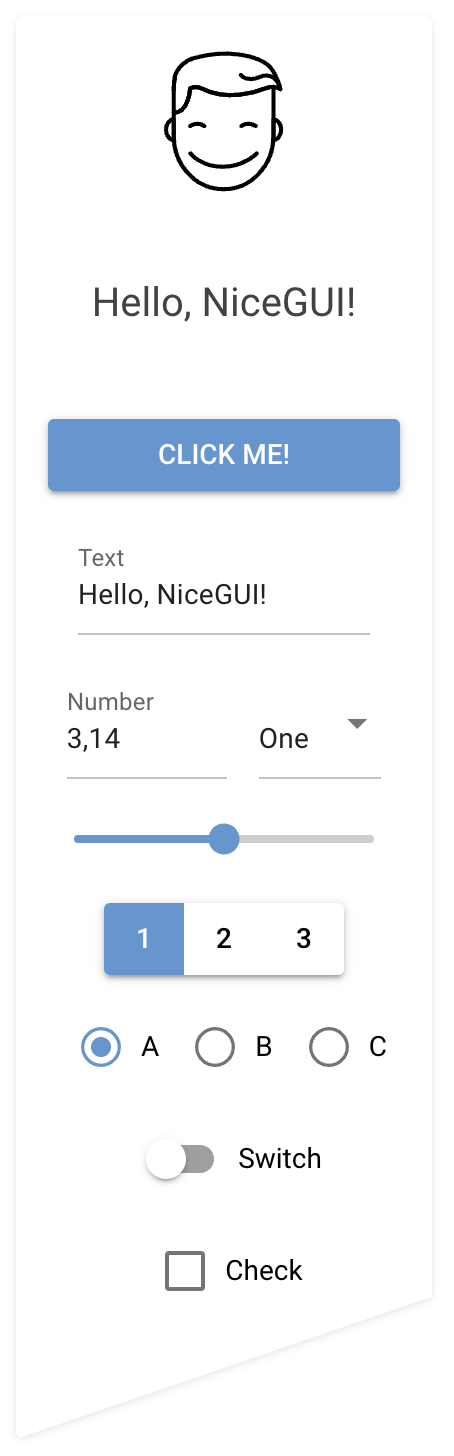
NiceGUI is an easy-to-use, Python-based UI framework, which shows up in your web browser. You can create buttons, dialogs, Markdown, 3D scenes, plots and much more.
It is great for micro web apps, dashboards, robotics projects, smart home solutions and similar use cases. You can also use it in development, for example when tweaking/configuring a machine learning algorithm or tuning motor controllers.
NiceGUI is available as PyPI package, Docker image and on conda-forge as well as GitHub.









Features
- browser-based graphical user interface
- implicit reload on code change
- acts as webserver (accessed by the browser) or in native mode (eg. desktop window)
- standard GUI elements like label, button, checkbox, switch, slider, input, file upload, …
- simple grouping with rows, columns, cards and dialogs
- general-purpose HTML and Markdown elements
- powerful high-level elements to
- plot graphs and charts,
- render 3D scenes,
- get steering events via virtual joysticks
- annotate and overlay images
- interact with tables
- navigate foldable tree structures
- embed video and audio files
- built-in timer to refresh data in intervals (even every 10 ms)
- straight-forward data binding and refreshable functions to write even less code
- notifications, dialogs and menus to provide state of the art user interaction
- shared and individual web pages
- easy-to-use per-user and general persistence
- ability to add custom routes and data responses
- capture keyboard input for global shortcuts etc.
- customize look by defining primary, secondary and accent colors
- live-cycle events and session data
- runs in Jupyter Notebooks and allows Python’s interactive mode
- auto-complete support for Tailwind CSS
- SVG, Base64 and emoji favicon support
- testing framework based on pytest
Installation
python3 -m pip install nicegui
Usage
Write your nice GUI in a file main.py:
from nicegui import ui

ui.label('Hello NiceGUI!')
ui.button('BUTTON', on_click=lambda: ui.notify('button was pressed'))

ui.run()
Launch it with:
python3 main.py
The GUI is now available through http://localhost:8080/ in your browser. Note: NiceGUI will automatically reload the page when you modify the code.
Documentation and Examples
The documentation is hosted at https://nicegui.io/documentation and provides plenty of live demos.
The whole content of https://nicegui.io is implemented with NiceGUI itself
and can be started locally with docker run -p 8080:8080 zauberzeug/nicegui or by executing main.py from this repository.
You may also have a look at our in-depth examples of what you can do with NiceGUI.
In our wiki we have a list of great NiceGUI projects from the community, a section with Tutorials and a growing list of FAQs.
When building NiceGUI projects with AI assistants, point them at nicegui/llms.md — a concise reference that ships with the package (also served at https://nicegui.io/llms.txt).
Why?
We at Zauberzeug like Streamlit but find it does too much magic when it comes to state handling. In search for an alternative nice library to write simple graphical user interfaces in Python we discovered JustPy.
File truncated at 100 lines see the full file
CONTRIBUTING
Contributing to NiceGUI
We’re thrilled that you’re interested in contributing to NiceGUI! Here are some guidelines that will help you get started.
We follow a Code of Conduct. By participating, you agree to abide by its terms.
About NiceGUI
NiceGUI is a Python library for building web-based user interfaces with minimal code. It’s designed to be simple, powerful, and fun to use.
Project Structure
-
nicegui/- Core library code (public API) -
nicegui/elements/- Built-in UI elements -
nicegui/functions/- Utility functions -
examples/- Standalone example applications -
website/- Documentation site (nicegui.io) -
tests/- Test suite -
main.py- Runs the documentation website locally
Tech Stack
- Python 3.10+ - Core language
- FastAPI/Starlette - Web framework
- Vue 3 - Frontend framework
- Quasar - UI component framework
- Tailwind CSS 4 - Styling
- pytest - Testing framework
Ways to contribute
There are several ways to help out, depending on what you want to do:
- Report a bug or request a feature → see Reporting issues
- Report a security vulnerability → see Reporting security vulnerabilities
- Beta-test the development version → see Beta-testing
- Contribute code or documentation → see Contributing code and documentation
- Create video or tutorial content → see Video and tutorial content
For non-trivial work, please discuss your approach with maintainers before implementing. If you’re unsure, present options and trade-offs first. For larger changes, work step-by-step and confirm direction with maintainers along the way.
Reporting issues
[!IMPORTANT] If you’ve found a security vulnerability, do not open a public issue. See Reporting security vulnerabilities instead.
If you encounter a bug or other issue with NiceGUI, please open a new issue using one of the templates. Provide a clear and concise description of the problem, including any relevant error messages and code snippets. If possible, include steps to reproduce the issue.
Reporting security vulnerabilities
Security issues are handled through GitHub’s private vulnerability reporting, not public issues, so we can discuss and patch in a secure workspace before disclosure.
See SECURITY.md for the full policy and the supported reporting channels.
Beta-testing
If you have an existing NiceGUI project, you can help us catch regressions before they ship by running it against the development version:
pip install -U git+https://github.com/zauberzeug/nicegui.git@main
If anything breaks, behaves worse than the current release, or feels off, please open an issue.
Contributing code and documentation
We are excited that you want to contribute to NiceGUI. We’re always looking for bug fixes, performance improvements, new features, and documentation improvements.
Set up your environment
First, fork the repository on GitHub and clone your fork locally:
git clone https://github.com/YOUR_USERNAME/nicegui.git
cd nicegui
Then pick a development setup that fits your workflow:
Option 1: Dev Container — the simplest way. Start our Dev Container in VS Code:
- Ensure you have VS Code, Docker and the Dev Containers extension installed.
- Open the project root directory in VS Code.
- Press
F1, typeDev Containers: Open Folder in Container, and hit enter (or use the bottom-left corner icon in VS Code to reopen in container). - Wait until the image has been built. (On first launch, watch the terminal for a GitHub authentication prompt.)
- Happy coding.
Option 2: Locally — you need Python 3.10+ and uv installed.
Install uv:
File truncated at 100 lines see the full file
Repository Summary
| Description | |
| Checkout URI | https://github.com/zauberzeug/nicegui.git |
| VCS Type | git |
| VCS Version | main |
| Last Updated | 2026-10-24 |
| Dev Status | UNKNOWN |
| Released | UNRELEASED |
| Contributing |
Help Wanted (-)
Good First Issues (-) Pull Requests to Review (-) |
README
NiceGUI
NiceGUI is an easy-to-use, Python-based UI framework, which shows up in your web browser. You can create buttons, dialogs, Markdown, 3D scenes, plots and much more.
It is great for micro web apps, dashboards, robotics projects, smart home solutions and similar use cases. You can also use it in development, for example when tweaking/configuring a machine learning algorithm or tuning motor controllers.
NiceGUI is available as PyPI package, Docker image and on conda-forge as well as GitHub.
Features
- browser-based graphical user interface
- implicit reload on code change
- acts as webserver (accessed by the browser) or in native mode (eg. desktop window)
- standard GUI elements like label, button, checkbox, switch, slider, input, file upload, …
- simple grouping with rows, columns, cards and dialogs
- general-purpose HTML and Markdown elements
- powerful high-level elements to
- plot graphs and charts,
- render 3D scenes,
- get steering events via virtual joysticks
- annotate and overlay images
- interact with tables
- navigate foldable tree structures
- embed video and audio files
- built-in timer to refresh data in intervals (even every 10 ms)
- straight-forward data binding and refreshable functions to write even less code
- notifications, dialogs and menus to provide state of the art user interaction
- shared and individual web pages
- easy-to-use per-user and general persistence
- ability to add custom routes and data responses
- capture keyboard input for global shortcuts etc.
- customize look by defining primary, secondary and accent colors
- live-cycle events and session data
- runs in Jupyter Notebooks and allows Python’s interactive mode
- auto-complete support for Tailwind CSS
- SVG, Base64 and emoji favicon support
- testing framework based on pytest
Installation
python3 -m pip install nicegui
Usage
Write your nice GUI in a file main.py:
from nicegui import ui

ui.label('Hello NiceGUI!')
ui.button('BUTTON', on_click=lambda: ui.notify('button was pressed'))

ui.run()
Launch it with:
python3 main.py
The GUI is now available through http://localhost:8080/ in your browser. Note: NiceGUI will automatically reload the page when you modify the code.
Documentation and Examples
The documentation is hosted at https://nicegui.io/documentation and provides plenty of live demos.
The whole content of https://nicegui.io is implemented with NiceGUI itself
and can be started locally with docker run -p 8080:8080 zauberzeug/nicegui or by executing main.py from this repository.
You may also have a look at our in-depth examples of what you can do with NiceGUI.
In our wiki we have a list of great NiceGUI projects from the community, a section with Tutorials and a growing list of FAQs.
When building NiceGUI projects with AI assistants, point them at nicegui/llms.md — a concise reference that ships with the package (also served at https://nicegui.io/llms.txt).
Why?
We at Zauberzeug like Streamlit but find it does too much magic when it comes to state handling. In search for an alternative nice library to write simple graphical user interfaces in Python we discovered JustPy.
File truncated at 100 lines see the full file
CONTRIBUTING
Contributing to NiceGUI
We’re thrilled that you’re interested in contributing to NiceGUI! Here are some guidelines that will help you get started.
We follow a Code of Conduct. By participating, you agree to abide by its terms.
About NiceGUI
NiceGUI is a Python library for building web-based user interfaces with minimal code. It’s designed to be simple, powerful, and fun to use.
Project Structure
-
nicegui/- Core library code (public API) -
nicegui/elements/- Built-in UI elements -
nicegui/functions/- Utility functions -
examples/- Standalone example applications -
website/- Documentation site (nicegui.io) -
tests/- Test suite -
main.py- Runs the documentation website locally
Tech Stack
- Python 3.10+ - Core language
- FastAPI/Starlette - Web framework
- Vue 3 - Frontend framework
- Quasar - UI component framework
- Tailwind CSS 4 - Styling
- pytest - Testing framework
Ways to contribute
There are several ways to help out, depending on what you want to do:
- Report a bug or request a feature → see Reporting issues
- Report a security vulnerability → see Reporting security vulnerabilities
- Beta-test the development version → see Beta-testing
- Contribute code or documentation → see Contributing code and documentation
- Create video or tutorial content → see Video and tutorial content
For non-trivial work, please discuss your approach with maintainers before implementing. If you’re unsure, present options and trade-offs first. For larger changes, work step-by-step and confirm direction with maintainers along the way.
Reporting issues
[!IMPORTANT] If you’ve found a security vulnerability, do not open a public issue. See Reporting security vulnerabilities instead.
If you encounter a bug or other issue with NiceGUI, please open a new issue using one of the templates. Provide a clear and concise description of the problem, including any relevant error messages and code snippets. If possible, include steps to reproduce the issue.
Reporting security vulnerabilities
Security issues are handled through GitHub’s private vulnerability reporting, not public issues, so we can discuss and patch in a secure workspace before disclosure.
See SECURITY.md for the full policy and the supported reporting channels.
Beta-testing
If you have an existing NiceGUI project, you can help us catch regressions before they ship by running it against the development version:
pip install -U git+https://github.com/zauberzeug/nicegui.git@main
If anything breaks, behaves worse than the current release, or feels off, please open an issue.
Contributing code and documentation
We are excited that you want to contribute to NiceGUI. We’re always looking for bug fixes, performance improvements, new features, and documentation improvements.
Set up your environment
First, fork the repository on GitHub and clone your fork locally:
git clone https://github.com/YOUR_USERNAME/nicegui.git
cd nicegui
Then pick a development setup that fits your workflow:
Option 1: Dev Container — the simplest way. Start our Dev Container in VS Code:
- Ensure you have VS Code, Docker and the Dev Containers extension installed.
- Open the project root directory in VS Code.
- Press
F1, typeDev Containers: Open Folder in Container, and hit enter (or use the bottom-left corner icon in VS Code to reopen in container). - Wait until the image has been built. (On first launch, watch the terminal for a GitHub authentication prompt.)
- Happy coding.
Option 2: Locally — you need Python 3.10+ and uv installed.
Install uv:
File truncated at 100 lines see the full file
Repository Summary
| Description | |
| Checkout URI | https://github.com/zauberzeug/nicegui.git |
| VCS Type | git |
| VCS Version | main |
| Last Updated | 2026-10-24 |
| Dev Status | UNKNOWN |
| Released | UNRELEASED |
| Contributing |
Help Wanted (-)
Good First Issues (-) Pull Requests to Review (-) |
README
NiceGUI
NiceGUI is an easy-to-use, Python-based UI framework, which shows up in your web browser. You can create buttons, dialogs, Markdown, 3D scenes, plots and much more.
It is great for micro web apps, dashboards, robotics projects, smart home solutions and similar use cases. You can also use it in development, for example when tweaking/configuring a machine learning algorithm or tuning motor controllers.
NiceGUI is available as PyPI package, Docker image and on conda-forge as well as GitHub.
Features
- browser-based graphical user interface
- implicit reload on code change
- acts as webserver (accessed by the browser) or in native mode (eg. desktop window)
- standard GUI elements like label, button, checkbox, switch, slider, input, file upload, …
- simple grouping with rows, columns, cards and dialogs
- general-purpose HTML and Markdown elements
- powerful high-level elements to
- plot graphs and charts,
- render 3D scenes,
- get steering events via virtual joysticks
- annotate and overlay images
- interact with tables
- navigate foldable tree structures
- embed video and audio files
- built-in timer to refresh data in intervals (even every 10 ms)
- straight-forward data binding and refreshable functions to write even less code
- notifications, dialogs and menus to provide state of the art user interaction
- shared and individual web pages
- easy-to-use per-user and general persistence
- ability to add custom routes and data responses
- capture keyboard input for global shortcuts etc.
- customize look by defining primary, secondary and accent colors
- live-cycle events and session data
- runs in Jupyter Notebooks and allows Python’s interactive mode
- auto-complete support for Tailwind CSS
- SVG, Base64 and emoji favicon support
- testing framework based on pytest
Installation
python3 -m pip install nicegui
Usage
Write your nice GUI in a file main.py:
from nicegui import ui

ui.label('Hello NiceGUI!')
ui.button('BUTTON', on_click=lambda: ui.notify('button was pressed'))

ui.run()
Launch it with:
python3 main.py
The GUI is now available through http://localhost:8080/ in your browser. Note: NiceGUI will automatically reload the page when you modify the code.
Documentation and Examples
The documentation is hosted at https://nicegui.io/documentation and provides plenty of live demos.
The whole content of https://nicegui.io is implemented with NiceGUI itself
and can be started locally with docker run -p 8080:8080 zauberzeug/nicegui or by executing main.py from this repository.
You may also have a look at our in-depth examples of what you can do with NiceGUI.
In our wiki we have a list of great NiceGUI projects from the community, a section with Tutorials and a growing list of FAQs.
When building NiceGUI projects with AI assistants, point them at nicegui/llms.md — a concise reference that ships with the package (also served at https://nicegui.io/llms.txt).
Why?
We at Zauberzeug like Streamlit but find it does too much magic when it comes to state handling. In search for an alternative nice library to write simple graphical user interfaces in Python we discovered JustPy.
File truncated at 100 lines see the full file
CONTRIBUTING
Contributing to NiceGUI
We’re thrilled that you’re interested in contributing to NiceGUI! Here are some guidelines that will help you get started.
We follow a Code of Conduct. By participating, you agree to abide by its terms.
About NiceGUI
NiceGUI is a Python library for building web-based user interfaces with minimal code. It’s designed to be simple, powerful, and fun to use.
Project Structure
-
nicegui/- Core library code (public API) -
nicegui/elements/- Built-in UI elements -
nicegui/functions/- Utility functions -
examples/- Standalone example applications -
website/- Documentation site (nicegui.io) -
tests/- Test suite -
main.py- Runs the documentation website locally
Tech Stack
- Python 3.10+ - Core language
- FastAPI/Starlette - Web framework
- Vue 3 - Frontend framework
- Quasar - UI component framework
- Tailwind CSS 4 - Styling
- pytest - Testing framework
Ways to contribute
There are several ways to help out, depending on what you want to do:
- Report a bug or request a feature → see Reporting issues
- Report a security vulnerability → see Reporting security vulnerabilities
- Beta-test the development version → see Beta-testing
- Contribute code or documentation → see Contributing code and documentation
- Create video or tutorial content → see Video and tutorial content
For non-trivial work, please discuss your approach with maintainers before implementing. If you’re unsure, present options and trade-offs first. For larger changes, work step-by-step and confirm direction with maintainers along the way.
Reporting issues
[!IMPORTANT] If you’ve found a security vulnerability, do not open a public issue. See Reporting security vulnerabilities instead.
If you encounter a bug or other issue with NiceGUI, please open a new issue using one of the templates. Provide a clear and concise description of the problem, including any relevant error messages and code snippets. If possible, include steps to reproduce the issue.
Reporting security vulnerabilities
Security issues are handled through GitHub’s private vulnerability reporting, not public issues, so we can discuss and patch in a secure workspace before disclosure.
See SECURITY.md for the full policy and the supported reporting channels.
Beta-testing
If you have an existing NiceGUI project, you can help us catch regressions before they ship by running it against the development version:
pip install -U git+https://github.com/zauberzeug/nicegui.git@main
If anything breaks, behaves worse than the current release, or feels off, please open an issue.
Contributing code and documentation
We are excited that you want to contribute to NiceGUI. We’re always looking for bug fixes, performance improvements, new features, and documentation improvements.
Set up your environment
First, fork the repository on GitHub and clone your fork locally:
git clone https://github.com/YOUR_USERNAME/nicegui.git
cd nicegui
Then pick a development setup that fits your workflow:
Option 1: Dev Container — the simplest way. Start our Dev Container in VS Code:
- Ensure you have VS Code, Docker and the Dev Containers extension installed.
- Open the project root directory in VS Code.
- Press
F1, typeDev Containers: Open Folder in Container, and hit enter (or use the bottom-left corner icon in VS Code to reopen in container). - Wait until the image has been built. (On first launch, watch the terminal for a GitHub authentication prompt.)
- Happy coding.
Option 2: Locally — you need Python 3.10+ and uv installed.
Install uv:
File truncated at 100 lines see the full file
Repository Summary
| Description | |
| Checkout URI | https://github.com/zauberzeug/nicegui.git |
| VCS Type | git |
| VCS Version | main |
| Last Updated | 2026-10-24 |
| Dev Status | UNKNOWN |
| Released | UNRELEASED |
| Contributing |
Help Wanted (-)
Good First Issues (-) Pull Requests to Review (-) |
README
NiceGUI
NiceGUI is an easy-to-use, Python-based UI framework, which shows up in your web browser. You can create buttons, dialogs, Markdown, 3D scenes, plots and much more.
It is great for micro web apps, dashboards, robotics projects, smart home solutions and similar use cases. You can also use it in development, for example when tweaking/configuring a machine learning algorithm or tuning motor controllers.
NiceGUI is available as PyPI package, Docker image and on conda-forge as well as GitHub.
Features
- browser-based graphical user interface
- implicit reload on code change
- acts as webserver (accessed by the browser) or in native mode (eg. desktop window)
- standard GUI elements like label, button, checkbox, switch, slider, input, file upload, …
- simple grouping with rows, columns, cards and dialogs
- general-purpose HTML and Markdown elements
- powerful high-level elements to
- plot graphs and charts,
- render 3D scenes,
- get steering events via virtual joysticks
- annotate and overlay images
- interact with tables
- navigate foldable tree structures
- embed video and audio files
- built-in timer to refresh data in intervals (even every 10 ms)
- straight-forward data binding and refreshable functions to write even less code
- notifications, dialogs and menus to provide state of the art user interaction
- shared and individual web pages
- easy-to-use per-user and general persistence
- ability to add custom routes and data responses
- capture keyboard input for global shortcuts etc.
- customize look by defining primary, secondary and accent colors
- live-cycle events and session data
- runs in Jupyter Notebooks and allows Python’s interactive mode
- auto-complete support for Tailwind CSS
- SVG, Base64 and emoji favicon support
- testing framework based on pytest
Installation
python3 -m pip install nicegui
Usage
Write your nice GUI in a file main.py:
from nicegui import ui

ui.label('Hello NiceGUI!')
ui.button('BUTTON', on_click=lambda: ui.notify('button was pressed'))

ui.run()
Launch it with:
python3 main.py
The GUI is now available through http://localhost:8080/ in your browser. Note: NiceGUI will automatically reload the page when you modify the code.
Documentation and Examples
The documentation is hosted at https://nicegui.io/documentation and provides plenty of live demos.
The whole content of https://nicegui.io is implemented with NiceGUI itself
and can be started locally with docker run -p 8080:8080 zauberzeug/nicegui or by executing main.py from this repository.
You may also have a look at our in-depth examples of what you can do with NiceGUI.
In our wiki we have a list of great NiceGUI projects from the community, a section with Tutorials and a growing list of FAQs.
When building NiceGUI projects with AI assistants, point them at nicegui/llms.md — a concise reference that ships with the package (also served at https://nicegui.io/llms.txt).
Why?
We at Zauberzeug like Streamlit but find it does too much magic when it comes to state handling. In search for an alternative nice library to write simple graphical user interfaces in Python we discovered JustPy.
File truncated at 100 lines see the full file
CONTRIBUTING
Contributing to NiceGUI
We’re thrilled that you’re interested in contributing to NiceGUI! Here are some guidelines that will help you get started.
We follow a Code of Conduct. By participating, you agree to abide by its terms.
About NiceGUI
NiceGUI is a Python library for building web-based user interfaces with minimal code. It’s designed to be simple, powerful, and fun to use.
Project Structure
-
nicegui/- Core library code (public API) -
nicegui/elements/- Built-in UI elements -
nicegui/functions/- Utility functions -
examples/- Standalone example applications -
website/- Documentation site (nicegui.io) -
tests/- Test suite -
main.py- Runs the documentation website locally
Tech Stack
- Python 3.10+ - Core language
- FastAPI/Starlette - Web framework
- Vue 3 - Frontend framework
- Quasar - UI component framework
- Tailwind CSS 4 - Styling
- pytest - Testing framework
Ways to contribute
There are several ways to help out, depending on what you want to do:
- Report a bug or request a feature → see Reporting issues
- Report a security vulnerability → see Reporting security vulnerabilities
- Beta-test the development version → see Beta-testing
- Contribute code or documentation → see Contributing code and documentation
- Create video or tutorial content → see Video and tutorial content
For non-trivial work, please discuss your approach with maintainers before implementing. If you’re unsure, present options and trade-offs first. For larger changes, work step-by-step and confirm direction with maintainers along the way.
Reporting issues
[!IMPORTANT] If you’ve found a security vulnerability, do not open a public issue. See Reporting security vulnerabilities instead.
If you encounter a bug or other issue with NiceGUI, please open a new issue using one of the templates. Provide a clear and concise description of the problem, including any relevant error messages and code snippets. If possible, include steps to reproduce the issue.
Reporting security vulnerabilities
Security issues are handled through GitHub’s private vulnerability reporting, not public issues, so we can discuss and patch in a secure workspace before disclosure.
See SECURITY.md for the full policy and the supported reporting channels.
Beta-testing
If you have an existing NiceGUI project, you can help us catch regressions before they ship by running it against the development version:
pip install -U git+https://github.com/zauberzeug/nicegui.git@main
If anything breaks, behaves worse than the current release, or feels off, please open an issue.
Contributing code and documentation
We are excited that you want to contribute to NiceGUI. We’re always looking for bug fixes, performance improvements, new features, and documentation improvements.
Set up your environment
First, fork the repository on GitHub and clone your fork locally:
git clone https://github.com/YOUR_USERNAME/nicegui.git
cd nicegui
Then pick a development setup that fits your workflow:
Option 1: Dev Container — the simplest way. Start our Dev Container in VS Code:
- Ensure you have VS Code, Docker and the Dev Containers extension installed.
- Open the project root directory in VS Code.
- Press
F1, typeDev Containers: Open Folder in Container, and hit enter (or use the bottom-left corner icon in VS Code to reopen in container). - Wait until the image has been built. (On first launch, watch the terminal for a GitHub authentication prompt.)
- Happy coding.
Option 2: Locally — you need Python 3.10+ and uv installed.
Install uv:
File truncated at 100 lines see the full file
Repository Summary
| Description | |
| Checkout URI | https://github.com/zauberzeug/nicegui.git |
| VCS Type | git |
| VCS Version | main |
| Last Updated | 2026-10-24 |
| Dev Status | UNKNOWN |
| Released | UNRELEASED |
| Contributing |
Help Wanted (-)
Good First Issues (-) Pull Requests to Review (-) |
README
NiceGUI
NiceGUI is an easy-to-use, Python-based UI framework, which shows up in your web browser. You can create buttons, dialogs, Markdown, 3D scenes, plots and much more.
It is great for micro web apps, dashboards, robotics projects, smart home solutions and similar use cases. You can also use it in development, for example when tweaking/configuring a machine learning algorithm or tuning motor controllers.
NiceGUI is available as PyPI package, Docker image and on conda-forge as well as GitHub.
Features
- browser-based graphical user interface
- implicit reload on code change
- acts as webserver (accessed by the browser) or in native mode (eg. desktop window)
- standard GUI elements like label, button, checkbox, switch, slider, input, file upload, …
- simple grouping with rows, columns, cards and dialogs
- general-purpose HTML and Markdown elements
- powerful high-level elements to
- plot graphs and charts,
- render 3D scenes,
- get steering events via virtual joysticks
- annotate and overlay images
- interact with tables
- navigate foldable tree structures
- embed video and audio files
- built-in timer to refresh data in intervals (even every 10 ms)
- straight-forward data binding and refreshable functions to write even less code
- notifications, dialogs and menus to provide state of the art user interaction
- shared and individual web pages
- easy-to-use per-user and general persistence
- ability to add custom routes and data responses
- capture keyboard input for global shortcuts etc.
- customize look by defining primary, secondary and accent colors
- live-cycle events and session data
- runs in Jupyter Notebooks and allows Python’s interactive mode
- auto-complete support for Tailwind CSS
- SVG, Base64 and emoji favicon support
- testing framework based on pytest
Installation
python3 -m pip install nicegui
Usage
Write your nice GUI in a file main.py:
from nicegui import ui

ui.label('Hello NiceGUI!')
ui.button('BUTTON', on_click=lambda: ui.notify('button was pressed'))

ui.run()
Launch it with:
python3 main.py
The GUI is now available through http://localhost:8080/ in your browser. Note: NiceGUI will automatically reload the page when you modify the code.
Documentation and Examples
The documentation is hosted at https://nicegui.io/documentation and provides plenty of live demos.
The whole content of https://nicegui.io is implemented with NiceGUI itself
and can be started locally with docker run -p 8080:8080 zauberzeug/nicegui or by executing main.py from this repository.
You may also have a look at our in-depth examples of what you can do with NiceGUI.
In our wiki we have a list of great NiceGUI projects from the community, a section with Tutorials and a growing list of FAQs.
When building NiceGUI projects with AI assistants, point them at nicegui/llms.md — a concise reference that ships with the package (also served at https://nicegui.io/llms.txt).
Why?
We at Zauberzeug like Streamlit but find it does too much magic when it comes to state handling. In search for an alternative nice library to write simple graphical user interfaces in Python we discovered JustPy.
File truncated at 100 lines see the full file
CONTRIBUTING
Contributing to NiceGUI
We’re thrilled that you’re interested in contributing to NiceGUI! Here are some guidelines that will help you get started.
We follow a Code of Conduct. By participating, you agree to abide by its terms.
About NiceGUI
NiceGUI is a Python library for building web-based user interfaces with minimal code. It’s designed to be simple, powerful, and fun to use.
Project Structure
-
nicegui/- Core library code (public API) -
nicegui/elements/- Built-in UI elements -
nicegui/functions/- Utility functions -
examples/- Standalone example applications -
website/- Documentation site (nicegui.io) -
tests/- Test suite -
main.py- Runs the documentation website locally
Tech Stack
- Python 3.10+ - Core language
- FastAPI/Starlette - Web framework
- Vue 3 - Frontend framework
- Quasar - UI component framework
- Tailwind CSS 4 - Styling
- pytest - Testing framework
Ways to contribute
There are several ways to help out, depending on what you want to do:
- Report a bug or request a feature → see Reporting issues
- Report a security vulnerability → see Reporting security vulnerabilities
- Beta-test the development version → see Beta-testing
- Contribute code or documentation → see Contributing code and documentation
- Create video or tutorial content → see Video and tutorial content
For non-trivial work, please discuss your approach with maintainers before implementing. If you’re unsure, present options and trade-offs first. For larger changes, work step-by-step and confirm direction with maintainers along the way.
Reporting issues
[!IMPORTANT] If you’ve found a security vulnerability, do not open a public issue. See Reporting security vulnerabilities instead.
If you encounter a bug or other issue with NiceGUI, please open a new issue using one of the templates. Provide a clear and concise description of the problem, including any relevant error messages and code snippets. If possible, include steps to reproduce the issue.
Reporting security vulnerabilities
Security issues are handled through GitHub’s private vulnerability reporting, not public issues, so we can discuss and patch in a secure workspace before disclosure.
See SECURITY.md for the full policy and the supported reporting channels.
Beta-testing
If you have an existing NiceGUI project, you can help us catch regressions before they ship by running it against the development version:
pip install -U git+https://github.com/zauberzeug/nicegui.git@main
If anything breaks, behaves worse than the current release, or feels off, please open an issue.
Contributing code and documentation
We are excited that you want to contribute to NiceGUI. We’re always looking for bug fixes, performance improvements, new features, and documentation improvements.
Set up your environment
First, fork the repository on GitHub and clone your fork locally:
git clone https://github.com/YOUR_USERNAME/nicegui.git
cd nicegui
Then pick a development setup that fits your workflow:
Option 1: Dev Container — the simplest way. Start our Dev Container in VS Code:
- Ensure you have VS Code, Docker and the Dev Containers extension installed.
- Open the project root directory in VS Code.
- Press
F1, typeDev Containers: Open Folder in Container, and hit enter (or use the bottom-left corner icon in VS Code to reopen in container). - Wait until the image has been built. (On first launch, watch the terminal for a GitHub authentication prompt.)
- Happy coding.
Option 2: Locally — you need Python 3.10+ and uv installed.
Install uv:
File truncated at 100 lines see the full file
Repository Summary
| Description | |
| Checkout URI | https://github.com/zauberzeug/nicegui.git |
| VCS Type | git |
| VCS Version | main |
| Last Updated | 2026-10-24 |
| Dev Status | UNKNOWN |
| Released | UNRELEASED |
| Contributing |
Help Wanted (-)
Good First Issues (-) Pull Requests to Review (-) |
README
NiceGUI
NiceGUI is an easy-to-use, Python-based UI framework, which shows up in your web browser. You can create buttons, dialogs, Markdown, 3D scenes, plots and much more.
It is great for micro web apps, dashboards, robotics projects, smart home solutions and similar use cases. You can also use it in development, for example when tweaking/configuring a machine learning algorithm or tuning motor controllers.
NiceGUI is available as PyPI package, Docker image and on conda-forge as well as GitHub.
Features
- browser-based graphical user interface
- implicit reload on code change
- acts as webserver (accessed by the browser) or in native mode (eg. desktop window)
- standard GUI elements like label, button, checkbox, switch, slider, input, file upload, …
- simple grouping with rows, columns, cards and dialogs
- general-purpose HTML and Markdown elements
- powerful high-level elements to
- plot graphs and charts,
- render 3D scenes,
- get steering events via virtual joysticks
- annotate and overlay images
- interact with tables
- navigate foldable tree structures
- embed video and audio files
- built-in timer to refresh data in intervals (even every 10 ms)
- straight-forward data binding and refreshable functions to write even less code
- notifications, dialogs and menus to provide state of the art user interaction
- shared and individual web pages
- easy-to-use per-user and general persistence
- ability to add custom routes and data responses
- capture keyboard input for global shortcuts etc.
- customize look by defining primary, secondary and accent colors
- live-cycle events and session data
- runs in Jupyter Notebooks and allows Python’s interactive mode
- auto-complete support for Tailwind CSS
- SVG, Base64 and emoji favicon support
- testing framework based on pytest
Installation
python3 -m pip install nicegui
Usage
Write your nice GUI in a file main.py:
from nicegui import ui

ui.label('Hello NiceGUI!')
ui.button('BUTTON', on_click=lambda: ui.notify('button was pressed'))

ui.run()
Launch it with:
python3 main.py
The GUI is now available through http://localhost:8080/ in your browser. Note: NiceGUI will automatically reload the page when you modify the code.
Documentation and Examples
The documentation is hosted at https://nicegui.io/documentation and provides plenty of live demos.
The whole content of https://nicegui.io is implemented with NiceGUI itself
and can be started locally with docker run -p 8080:8080 zauberzeug/nicegui or by executing main.py from this repository.
You may also have a look at our in-depth examples of what you can do with NiceGUI.
In our wiki we have a list of great NiceGUI projects from the community, a section with Tutorials and a growing list of FAQs.
When building NiceGUI projects with AI assistants, point them at nicegui/llms.md — a concise reference that ships with the package (also served at https://nicegui.io/llms.txt).
Why?
We at Zauberzeug like Streamlit but find it does too much magic when it comes to state handling. In search for an alternative nice library to write simple graphical user interfaces in Python we discovered JustPy.
File truncated at 100 lines see the full file
CONTRIBUTING
Contributing to NiceGUI
We’re thrilled that you’re interested in contributing to NiceGUI! Here are some guidelines that will help you get started.
We follow a Code of Conduct. By participating, you agree to abide by its terms.
About NiceGUI
NiceGUI is a Python library for building web-based user interfaces with minimal code. It’s designed to be simple, powerful, and fun to use.
Project Structure
-
nicegui/- Core library code (public API) -
nicegui/elements/- Built-in UI elements -
nicegui/functions/- Utility functions -
examples/- Standalone example applications -
website/- Documentation site (nicegui.io) -
tests/- Test suite -
main.py- Runs the documentation website locally
Tech Stack
- Python 3.10+ - Core language
- FastAPI/Starlette - Web framework
- Vue 3 - Frontend framework
- Quasar - UI component framework
- Tailwind CSS 4 - Styling
- pytest - Testing framework
Ways to contribute
There are several ways to help out, depending on what you want to do:
- Report a bug or request a feature → see Reporting issues
- Report a security vulnerability → see Reporting security vulnerabilities
- Beta-test the development version → see Beta-testing
- Contribute code or documentation → see Contributing code and documentation
- Create video or tutorial content → see Video and tutorial content
For non-trivial work, please discuss your approach with maintainers before implementing. If you’re unsure, present options and trade-offs first. For larger changes, work step-by-step and confirm direction with maintainers along the way.
Reporting issues
[!IMPORTANT] If you’ve found a security vulnerability, do not open a public issue. See Reporting security vulnerabilities instead.
If you encounter a bug or other issue with NiceGUI, please open a new issue using one of the templates. Provide a clear and concise description of the problem, including any relevant error messages and code snippets. If possible, include steps to reproduce the issue.
Reporting security vulnerabilities
Security issues are handled through GitHub’s private vulnerability reporting, not public issues, so we can discuss and patch in a secure workspace before disclosure.
See SECURITY.md for the full policy and the supported reporting channels.
Beta-testing
If you have an existing NiceGUI project, you can help us catch regressions before they ship by running it against the development version:
pip install -U git+https://github.com/zauberzeug/nicegui.git@main
If anything breaks, behaves worse than the current release, or feels off, please open an issue.
Contributing code and documentation
We are excited that you want to contribute to NiceGUI. We’re always looking for bug fixes, performance improvements, new features, and documentation improvements.
Set up your environment
First, fork the repository on GitHub and clone your fork locally:
git clone https://github.com/YOUR_USERNAME/nicegui.git
cd nicegui
Then pick a development setup that fits your workflow:
Option 1: Dev Container — the simplest way. Start our Dev Container in VS Code:
- Ensure you have VS Code, Docker and the Dev Containers extension installed.
- Open the project root directory in VS Code.
- Press
F1, typeDev Containers: Open Folder in Container, and hit enter (or use the bottom-left corner icon in VS Code to reopen in container). - Wait until the image has been built. (On first launch, watch the terminal for a GitHub authentication prompt.)
- Happy coding.
Option 2: Locally — you need Python 3.10+ and uv installed.
Install uv:
File truncated at 100 lines see the full file
Repository Summary
| Description | |
| Checkout URI | https://github.com/zauberzeug/nicegui.git |
| VCS Type | git |
| VCS Version | main |
| Last Updated | 2026-10-24 |
| Dev Status | UNKNOWN |
| Released | UNRELEASED |
| Contributing |
Help Wanted (-)
Good First Issues (-) Pull Requests to Review (-) |
README
NiceGUI
NiceGUI is an easy-to-use, Python-based UI framework, which shows up in your web browser. You can create buttons, dialogs, Markdown, 3D scenes, plots and much more.
It is great for micro web apps, dashboards, robotics projects, smart home solutions and similar use cases. You can also use it in development, for example when tweaking/configuring a machine learning algorithm or tuning motor controllers.
NiceGUI is available as PyPI package, Docker image and on conda-forge as well as GitHub.
Features
- browser-based graphical user interface
- implicit reload on code change
- acts as webserver (accessed by the browser) or in native mode (eg. desktop window)
- standard GUI elements like label, button, checkbox, switch, slider, input, file upload, …
- simple grouping with rows, columns, cards and dialogs
- general-purpose HTML and Markdown elements
- powerful high-level elements to
- plot graphs and charts,
- render 3D scenes,
- get steering events via virtual joysticks
- annotate and overlay images
- interact with tables
- navigate foldable tree structures
- embed video and audio files
- built-in timer to refresh data in intervals (even every 10 ms)
- straight-forward data binding and refreshable functions to write even less code
- notifications, dialogs and menus to provide state of the art user interaction
- shared and individual web pages
- easy-to-use per-user and general persistence
- ability to add custom routes and data responses
- capture keyboard input for global shortcuts etc.
- customize look by defining primary, secondary and accent colors
- live-cycle events and session data
- runs in Jupyter Notebooks and allows Python’s interactive mode
- auto-complete support for Tailwind CSS
- SVG, Base64 and emoji favicon support
- testing framework based on pytest
Installation
python3 -m pip install nicegui
Usage
Write your nice GUI in a file main.py:
from nicegui import ui

ui.label('Hello NiceGUI!')
ui.button('BUTTON', on_click=lambda: ui.notify('button was pressed'))

ui.run()
Launch it with:
python3 main.py
The GUI is now available through http://localhost:8080/ in your browser. Note: NiceGUI will automatically reload the page when you modify the code.
Documentation and Examples
The documentation is hosted at https://nicegui.io/documentation and provides plenty of live demos.
The whole content of https://nicegui.io is implemented with NiceGUI itself
and can be started locally with docker run -p 8080:8080 zauberzeug/nicegui or by executing main.py from this repository.
You may also have a look at our in-depth examples of what you can do with NiceGUI.
In our wiki we have a list of great NiceGUI projects from the community, a section with Tutorials and a growing list of FAQs.
When building NiceGUI projects with AI assistants, point them at nicegui/llms.md — a concise reference that ships with the package (also served at https://nicegui.io/llms.txt).
Why?
We at Zauberzeug like Streamlit but find it does too much magic when it comes to state handling. In search for an alternative nice library to write simple graphical user interfaces in Python we discovered JustPy.
File truncated at 100 lines see the full file
CONTRIBUTING
Contributing to NiceGUI
We’re thrilled that you’re interested in contributing to NiceGUI! Here are some guidelines that will help you get started.
We follow a Code of Conduct. By participating, you agree to abide by its terms.
About NiceGUI
NiceGUI is a Python library for building web-based user interfaces with minimal code. It’s designed to be simple, powerful, and fun to use.
Project Structure
-
nicegui/- Core library code (public API) -
nicegui/elements/- Built-in UI elements -
nicegui/functions/- Utility functions -
examples/- Standalone example applications -
website/- Documentation site (nicegui.io) -
tests/- Test suite -
main.py- Runs the documentation website locally
Tech Stack
- Python 3.10+ - Core language
- FastAPI/Starlette - Web framework
- Vue 3 - Frontend framework
- Quasar - UI component framework
- Tailwind CSS 4 - Styling
- pytest - Testing framework
Ways to contribute
There are several ways to help out, depending on what you want to do:
- Report a bug or request a feature → see Reporting issues
- Report a security vulnerability → see Reporting security vulnerabilities
- Beta-test the development version → see Beta-testing
- Contribute code or documentation → see Contributing code and documentation
- Create video or tutorial content → see Video and tutorial content
For non-trivial work, please discuss your approach with maintainers before implementing. If you’re unsure, present options and trade-offs first. For larger changes, work step-by-step and confirm direction with maintainers along the way.
Reporting issues
[!IMPORTANT] If you’ve found a security vulnerability, do not open a public issue. See Reporting security vulnerabilities instead.
If you encounter a bug or other issue with NiceGUI, please open a new issue using one of the templates. Provide a clear and concise description of the problem, including any relevant error messages and code snippets. If possible, include steps to reproduce the issue.
Reporting security vulnerabilities
Security issues are handled through GitHub’s private vulnerability reporting, not public issues, so we can discuss and patch in a secure workspace before disclosure.
See SECURITY.md for the full policy and the supported reporting channels.
Beta-testing
If you have an existing NiceGUI project, you can help us catch regressions before they ship by running it against the development version:
pip install -U git+https://github.com/zauberzeug/nicegui.git@main
If anything breaks, behaves worse than the current release, or feels off, please open an issue.
Contributing code and documentation
We are excited that you want to contribute to NiceGUI. We’re always looking for bug fixes, performance improvements, new features, and documentation improvements.
Set up your environment
First, fork the repository on GitHub and clone your fork locally:
git clone https://github.com/YOUR_USERNAME/nicegui.git
cd nicegui
Then pick a development setup that fits your workflow:
Option 1: Dev Container — the simplest way. Start our Dev Container in VS Code:
- Ensure you have VS Code, Docker and the Dev Containers extension installed.
- Open the project root directory in VS Code.
- Press
F1, typeDev Containers: Open Folder in Container, and hit enter (or use the bottom-left corner icon in VS Code to reopen in container). - Wait until the image has been built. (On first launch, watch the terminal for a GitHub authentication prompt.)
- Happy coding.
Option 2: Locally — you need Python 3.10+ and uv installed.
Install uv:
File truncated at 100 lines see the full file
Repository Summary
| Description | |
| Checkout URI | https://github.com/zauberzeug/nicegui.git |
| VCS Type | git |
| VCS Version | main |
| Last Updated | 2026-10-24 |
| Dev Status | UNKNOWN |
| Released | UNRELEASED |
| Contributing |
Help Wanted (-)
Good First Issues (-) Pull Requests to Review (-) |
README
NiceGUI
NiceGUI is an easy-to-use, Python-based UI framework, which shows up in your web browser. You can create buttons, dialogs, Markdown, 3D scenes, plots and much more.
It is great for micro web apps, dashboards, robotics projects, smart home solutions and similar use cases. You can also use it in development, for example when tweaking/configuring a machine learning algorithm or tuning motor controllers.
NiceGUI is available as PyPI package, Docker image and on conda-forge as well as GitHub.
Features
- browser-based graphical user interface
- implicit reload on code change
- acts as webserver (accessed by the browser) or in native mode (eg. desktop window)
- standard GUI elements like label, button, checkbox, switch, slider, input, file upload, …
- simple grouping with rows, columns, cards and dialogs
- general-purpose HTML and Markdown elements
- powerful high-level elements to
- plot graphs and charts,
- render 3D scenes,
- get steering events via virtual joysticks
- annotate and overlay images
- interact with tables
- navigate foldable tree structures
- embed video and audio files
- built-in timer to refresh data in intervals (even every 10 ms)
- straight-forward data binding and refreshable functions to write even less code
- notifications, dialogs and menus to provide state of the art user interaction
- shared and individual web pages
- easy-to-use per-user and general persistence
- ability to add custom routes and data responses
- capture keyboard input for global shortcuts etc.
- customize look by defining primary, secondary and accent colors
- live-cycle events and session data
- runs in Jupyter Notebooks and allows Python’s interactive mode
- auto-complete support for Tailwind CSS
- SVG, Base64 and emoji favicon support
- testing framework based on pytest
Installation
python3 -m pip install nicegui
Usage
Write your nice GUI in a file main.py:
from nicegui import ui

ui.label('Hello NiceGUI!')
ui.button('BUTTON', on_click=lambda: ui.notify('button was pressed'))

ui.run()
Launch it with:
python3 main.py
The GUI is now available through http://localhost:8080/ in your browser. Note: NiceGUI will automatically reload the page when you modify the code.
Documentation and Examples
The documentation is hosted at https://nicegui.io/documentation and provides plenty of live demos.
The whole content of https://nicegui.io is implemented with NiceGUI itself
and can be started locally with docker run -p 8080:8080 zauberzeug/nicegui or by executing main.py from this repository.
You may also have a look at our in-depth examples of what you can do with NiceGUI.
In our wiki we have a list of great NiceGUI projects from the community, a section with Tutorials and a growing list of FAQs.
When building NiceGUI projects with AI assistants, point them at nicegui/llms.md — a concise reference that ships with the package (also served at https://nicegui.io/llms.txt).
Why?
We at Zauberzeug like Streamlit but find it does too much magic when it comes to state handling. In search for an alternative nice library to write simple graphical user interfaces in Python we discovered JustPy.
File truncated at 100 lines see the full file
CONTRIBUTING
Contributing to NiceGUI
We’re thrilled that you’re interested in contributing to NiceGUI! Here are some guidelines that will help you get started.
We follow a Code of Conduct. By participating, you agree to abide by its terms.
About NiceGUI
NiceGUI is a Python library for building web-based user interfaces with minimal code. It’s designed to be simple, powerful, and fun to use.
Project Structure
-
nicegui/- Core library code (public API) -
nicegui/elements/- Built-in UI elements -
nicegui/functions/- Utility functions -
examples/- Standalone example applications -
website/- Documentation site (nicegui.io) -
tests/- Test suite -
main.py- Runs the documentation website locally
Tech Stack
- Python 3.10+ - Core language
- FastAPI/Starlette - Web framework
- Vue 3 - Frontend framework
- Quasar - UI component framework
- Tailwind CSS 4 - Styling
- pytest - Testing framework
Ways to contribute
There are several ways to help out, depending on what you want to do:
- Report a bug or request a feature → see Reporting issues
- Report a security vulnerability → see Reporting security vulnerabilities
- Beta-test the development version → see Beta-testing
- Contribute code or documentation → see Contributing code and documentation
- Create video or tutorial content → see Video and tutorial content
For non-trivial work, please discuss your approach with maintainers before implementing. If you’re unsure, present options and trade-offs first. For larger changes, work step-by-step and confirm direction with maintainers along the way.
Reporting issues
[!IMPORTANT] If you’ve found a security vulnerability, do not open a public issue. See Reporting security vulnerabilities instead.
If you encounter a bug or other issue with NiceGUI, please open a new issue using one of the templates. Provide a clear and concise description of the problem, including any relevant error messages and code snippets. If possible, include steps to reproduce the issue.
Reporting security vulnerabilities
Security issues are handled through GitHub’s private vulnerability reporting, not public issues, so we can discuss and patch in a secure workspace before disclosure.
See SECURITY.md for the full policy and the supported reporting channels.
Beta-testing
If you have an existing NiceGUI project, you can help us catch regressions before they ship by running it against the development version:
pip install -U git+https://github.com/zauberzeug/nicegui.git@main
If anything breaks, behaves worse than the current release, or feels off, please open an issue.
Contributing code and documentation
We are excited that you want to contribute to NiceGUI. We’re always looking for bug fixes, performance improvements, new features, and documentation improvements.
Set up your environment
First, fork the repository on GitHub and clone your fork locally:
git clone https://github.com/YOUR_USERNAME/nicegui.git
cd nicegui
Then pick a development setup that fits your workflow:
Option 1: Dev Container — the simplest way. Start our Dev Container in VS Code:
- Ensure you have VS Code, Docker and the Dev Containers extension installed.
- Open the project root directory in VS Code.
- Press
F1, typeDev Containers: Open Folder in Container, and hit enter (or use the bottom-left corner icon in VS Code to reopen in container). - Wait until the image has been built. (On first launch, watch the terminal for a GitHub authentication prompt.)
- Happy coding.
Option 2: Locally — you need Python 3.10+ and uv installed.
Install uv:
File truncated at 100 lines see the full file
Repository Summary
| Description | |
| Checkout URI | https://github.com/zauberzeug/nicegui.git |
| VCS Type | git |
| VCS Version | main |
| Last Updated | 2026-10-24 |
| Dev Status | UNKNOWN |
| Released | UNRELEASED |
| Contributing |
Help Wanted (-)
Good First Issues (-) Pull Requests to Review (-) |
README
NiceGUI
NiceGUI is an easy-to-use, Python-based UI framework, which shows up in your web browser. You can create buttons, dialogs, Markdown, 3D scenes, plots and much more.
It is great for micro web apps, dashboards, robotics projects, smart home solutions and similar use cases. You can also use it in development, for example when tweaking/configuring a machine learning algorithm or tuning motor controllers.
NiceGUI is available as PyPI package, Docker image and on conda-forge as well as GitHub.
Features
- browser-based graphical user interface
- implicit reload on code change
- acts as webserver (accessed by the browser) or in native mode (eg. desktop window)
- standard GUI elements like label, button, checkbox, switch, slider, input, file upload, …
- simple grouping with rows, columns, cards and dialogs
- general-purpose HTML and Markdown elements
- powerful high-level elements to
- plot graphs and charts,
- render 3D scenes,
- get steering events via virtual joysticks
- annotate and overlay images
- interact with tables
- navigate foldable tree structures
- embed video and audio files
- built-in timer to refresh data in intervals (even every 10 ms)
- straight-forward data binding and refreshable functions to write even less code
- notifications, dialogs and menus to provide state of the art user interaction
- shared and individual web pages
- easy-to-use per-user and general persistence
- ability to add custom routes and data responses
- capture keyboard input for global shortcuts etc.
- customize look by defining primary, secondary and accent colors
- live-cycle events and session data
- runs in Jupyter Notebooks and allows Python’s interactive mode
- auto-complete support for Tailwind CSS
- SVG, Base64 and emoji favicon support
- testing framework based on pytest
Installation
python3 -m pip install nicegui
Usage
Write your nice GUI in a file main.py:
from nicegui import ui

ui.label('Hello NiceGUI!')
ui.button('BUTTON', on_click=lambda: ui.notify('button was pressed'))

ui.run()
Launch it with:
python3 main.py
The GUI is now available through http://localhost:8080/ in your browser. Note: NiceGUI will automatically reload the page when you modify the code.
Documentation and Examples
The documentation is hosted at https://nicegui.io/documentation and provides plenty of live demos.
The whole content of https://nicegui.io is implemented with NiceGUI itself
and can be started locally with docker run -p 8080:8080 zauberzeug/nicegui or by executing main.py from this repository.
You may also have a look at our in-depth examples of what you can do with NiceGUI.
In our wiki we have a list of great NiceGUI projects from the community, a section with Tutorials and a growing list of FAQs.
When building NiceGUI projects with AI assistants, point them at nicegui/llms.md — a concise reference that ships with the package (also served at https://nicegui.io/llms.txt).
Why?
We at Zauberzeug like Streamlit but find it does too much magic when it comes to state handling. In search for an alternative nice library to write simple graphical user interfaces in Python we discovered JustPy.
File truncated at 100 lines see the full file
CONTRIBUTING
Contributing to NiceGUI
We’re thrilled that you’re interested in contributing to NiceGUI! Here are some guidelines that will help you get started.
We follow a Code of Conduct. By participating, you agree to abide by its terms.
About NiceGUI
NiceGUI is a Python library for building web-based user interfaces with minimal code. It’s designed to be simple, powerful, and fun to use.
Project Structure
-
nicegui/- Core library code (public API) -
nicegui/elements/- Built-in UI elements -
nicegui/functions/- Utility functions -
examples/- Standalone example applications -
website/- Documentation site (nicegui.io) -
tests/- Test suite -
main.py- Runs the documentation website locally
Tech Stack
- Python 3.10+ - Core language
- FastAPI/Starlette - Web framework
- Vue 3 - Frontend framework
- Quasar - UI component framework
- Tailwind CSS 4 - Styling
- pytest - Testing framework
Ways to contribute
There are several ways to help out, depending on what you want to do:
- Report a bug or request a feature → see Reporting issues
- Report a security vulnerability → see Reporting security vulnerabilities
- Beta-test the development version → see Beta-testing
- Contribute code or documentation → see Contributing code and documentation
- Create video or tutorial content → see Video and tutorial content
For non-trivial work, please discuss your approach with maintainers before implementing. If you’re unsure, present options and trade-offs first. For larger changes, work step-by-step and confirm direction with maintainers along the way.
Reporting issues
[!IMPORTANT] If you’ve found a security vulnerability, do not open a public issue. See Reporting security vulnerabilities instead.
If you encounter a bug or other issue with NiceGUI, please open a new issue using one of the templates. Provide a clear and concise description of the problem, including any relevant error messages and code snippets. If possible, include steps to reproduce the issue.
Reporting security vulnerabilities
Security issues are handled through GitHub’s private vulnerability reporting, not public issues, so we can discuss and patch in a secure workspace before disclosure.
See SECURITY.md for the full policy and the supported reporting channels.
Beta-testing
If you have an existing NiceGUI project, you can help us catch regressions before they ship by running it against the development version:
pip install -U git+https://github.com/zauberzeug/nicegui.git@main
If anything breaks, behaves worse than the current release, or feels off, please open an issue.
Contributing code and documentation
We are excited that you want to contribute to NiceGUI. We’re always looking for bug fixes, performance improvements, new features, and documentation improvements.
Set up your environment
First, fork the repository on GitHub and clone your fork locally:
git clone https://github.com/YOUR_USERNAME/nicegui.git
cd nicegui
Then pick a development setup that fits your workflow:
Option 1: Dev Container — the simplest way. Start our Dev Container in VS Code:
- Ensure you have VS Code, Docker and the Dev Containers extension installed.
- Open the project root directory in VS Code.
- Press
F1, typeDev Containers: Open Folder in Container, and hit enter (or use the bottom-left corner icon in VS Code to reopen in container). - Wait until the image has been built. (On first launch, watch the terminal for a GitHub authentication prompt.)
- Happy coding.
Option 2: Locally — you need Python 3.10+ and uv installed.
Install uv:
File truncated at 100 lines see the full file
Repository Summary
| Description | |
| Checkout URI | https://github.com/zauberzeug/nicegui.git |
| VCS Type | git |
| VCS Version | main |
| Last Updated | 2026-10-24 |
| Dev Status | UNKNOWN |
| Released | UNRELEASED |
| Contributing |
Help Wanted (-)
Good First Issues (-) Pull Requests to Review (-) |
README
NiceGUI
NiceGUI is an easy-to-use, Python-based UI framework, which shows up in your web browser. You can create buttons, dialogs, Markdown, 3D scenes, plots and much more.
It is great for micro web apps, dashboards, robotics projects, smart home solutions and similar use cases. You can also use it in development, for example when tweaking/configuring a machine learning algorithm or tuning motor controllers.
NiceGUI is available as PyPI package, Docker image and on conda-forge as well as GitHub.
Features
- browser-based graphical user interface
- implicit reload on code change
- acts as webserver (accessed by the browser) or in native mode (eg. desktop window)
- standard GUI elements like label, button, checkbox, switch, slider, input, file upload, …
- simple grouping with rows, columns, cards and dialogs
- general-purpose HTML and Markdown elements
- powerful high-level elements to
- plot graphs and charts,
- render 3D scenes,
- get steering events via virtual joysticks
- annotate and overlay images
- interact with tables
- navigate foldable tree structures
- embed video and audio files
- built-in timer to refresh data in intervals (even every 10 ms)
- straight-forward data binding and refreshable functions to write even less code
- notifications, dialogs and menus to provide state of the art user interaction
- shared and individual web pages
- easy-to-use per-user and general persistence
- ability to add custom routes and data responses
- capture keyboard input for global shortcuts etc.
- customize look by defining primary, secondary and accent colors
- live-cycle events and session data
- runs in Jupyter Notebooks and allows Python’s interactive mode
- auto-complete support for Tailwind CSS
- SVG, Base64 and emoji favicon support
- testing framework based on pytest
Installation
python3 -m pip install nicegui
Usage
Write your nice GUI in a file main.py:
from nicegui import ui

ui.label('Hello NiceGUI!')
ui.button('BUTTON', on_click=lambda: ui.notify('button was pressed'))

ui.run()
Launch it with:
python3 main.py
The GUI is now available through http://localhost:8080/ in your browser. Note: NiceGUI will automatically reload the page when you modify the code.
Documentation and Examples
The documentation is hosted at https://nicegui.io/documentation and provides plenty of live demos.
The whole content of https://nicegui.io is implemented with NiceGUI itself
and can be started locally with docker run -p 8080:8080 zauberzeug/nicegui or by executing main.py from this repository.
You may also have a look at our in-depth examples of what you can do with NiceGUI.
In our wiki we have a list of great NiceGUI projects from the community, a section with Tutorials and a growing list of FAQs.
When building NiceGUI projects with AI assistants, point them at nicegui/llms.md — a concise reference that ships with the package (also served at https://nicegui.io/llms.txt).
Why?
We at Zauberzeug like Streamlit but find it does too much magic when it comes to state handling. In search for an alternative nice library to write simple graphical user interfaces in Python we discovered JustPy.
File truncated at 100 lines see the full file
CONTRIBUTING
Contributing to NiceGUI
We’re thrilled that you’re interested in contributing to NiceGUI! Here are some guidelines that will help you get started.
We follow a Code of Conduct. By participating, you agree to abide by its terms.
About NiceGUI
NiceGUI is a Python library for building web-based user interfaces with minimal code. It’s designed to be simple, powerful, and fun to use.
Project Structure
-
nicegui/- Core library code (public API) -
nicegui/elements/- Built-in UI elements -
nicegui/functions/- Utility functions -
examples/- Standalone example applications -
website/- Documentation site (nicegui.io) -
tests/- Test suite -
main.py- Runs the documentation website locally
Tech Stack
- Python 3.10+ - Core language
- FastAPI/Starlette - Web framework
- Vue 3 - Frontend framework
- Quasar - UI component framework
- Tailwind CSS 4 - Styling
- pytest - Testing framework
Ways to contribute
There are several ways to help out, depending on what you want to do:
- Report a bug or request a feature → see Reporting issues
- Report a security vulnerability → see Reporting security vulnerabilities
- Beta-test the development version → see Beta-testing
- Contribute code or documentation → see Contributing code and documentation
- Create video or tutorial content → see Video and tutorial content
For non-trivial work, please discuss your approach with maintainers before implementing. If you’re unsure, present options and trade-offs first. For larger changes, work step-by-step and confirm direction with maintainers along the way.
Reporting issues
[!IMPORTANT] If you’ve found a security vulnerability, do not open a public issue. See Reporting security vulnerabilities instead.
If you encounter a bug or other issue with NiceGUI, please open a new issue using one of the templates. Provide a clear and concise description of the problem, including any relevant error messages and code snippets. If possible, include steps to reproduce the issue.
Reporting security vulnerabilities
Security issues are handled through GitHub’s private vulnerability reporting, not public issues, so we can discuss and patch in a secure workspace before disclosure.
See SECURITY.md for the full policy and the supported reporting channels.
Beta-testing
If you have an existing NiceGUI project, you can help us catch regressions before they ship by running it against the development version:
pip install -U git+https://github.com/zauberzeug/nicegui.git@main
If anything breaks, behaves worse than the current release, or feels off, please open an issue.
Contributing code and documentation
We are excited that you want to contribute to NiceGUI. We’re always looking for bug fixes, performance improvements, new features, and documentation improvements.
Set up your environment
First, fork the repository on GitHub and clone your fork locally:
git clone https://github.com/YOUR_USERNAME/nicegui.git
cd nicegui
Then pick a development setup that fits your workflow:
Option 1: Dev Container — the simplest way. Start our Dev Container in VS Code:
- Ensure you have VS Code, Docker and the Dev Containers extension installed.
- Open the project root directory in VS Code.
- Press
F1, typeDev Containers: Open Folder in Container, and hit enter (or use the bottom-left corner icon in VS Code to reopen in container). - Wait until the image has been built. (On first launch, watch the terminal for a GitHub authentication prompt.)
- Happy coding.
Option 2: Locally — you need Python 3.10+ and uv installed.
Install uv:
File truncated at 100 lines see the full file