 ROS Index
Repository Summary
| Description | |
| Checkout URI | https://github.com/ai-winter/ros_motion_planning.git |
| VCS Type | git |
| VCS Version | master |
| Last Updated | 2026-02-19 |
| Dev Status | UNKNOWN |
| Released | UNRELEASED |
| Contributing |
Help Wanted (-)
Good First Issues (-) Pull Requests to Review (-) |
Packages
| Name | Version |
|---|---|
| common | 0.0.0 |
| apf_controller | 0.0.0 |
| controller | 0.0.0 |
| dwa_controller | 1.17.1 |
| lqr_controller | 0.0.0 |
| mpc_controller | 0.0.0 |
| orca_controller | 0.0.0 |
| pid_controller | 1.0.0 |
| rpp_controller | 0.0.0 |
| static_controller | 0.0.0 |
| path_planner | 0.0.0 |
| system_config | 0.0.0 |
| dynamic_rviz_config | 0.0.1 |
| dynamic_xml_config | 0.2.0 |
| gazebo_sfm_plugin | 1.0.0 |
| gazebo_ped_visualizer_plugin | 0.1.0 |
| pedsim_msgs | 0.0.2 |
| voronoi_layer | 0.0.0 |
| spencer_control_msgs | 1.0.8 |
| spencer_human_attribute_msgs | 1.0.8 |
| spencer_social_relation_msgs | 1.0.8 |
| spencer_tracking_msgs | 1.0.8 |
| spencer_vision_msgs | 1.0.8 |
| spencer_tracking_rviz_plugin | 1.0.8 |
| sim_env | 0.0.1 |
README



ROS Motion Planning
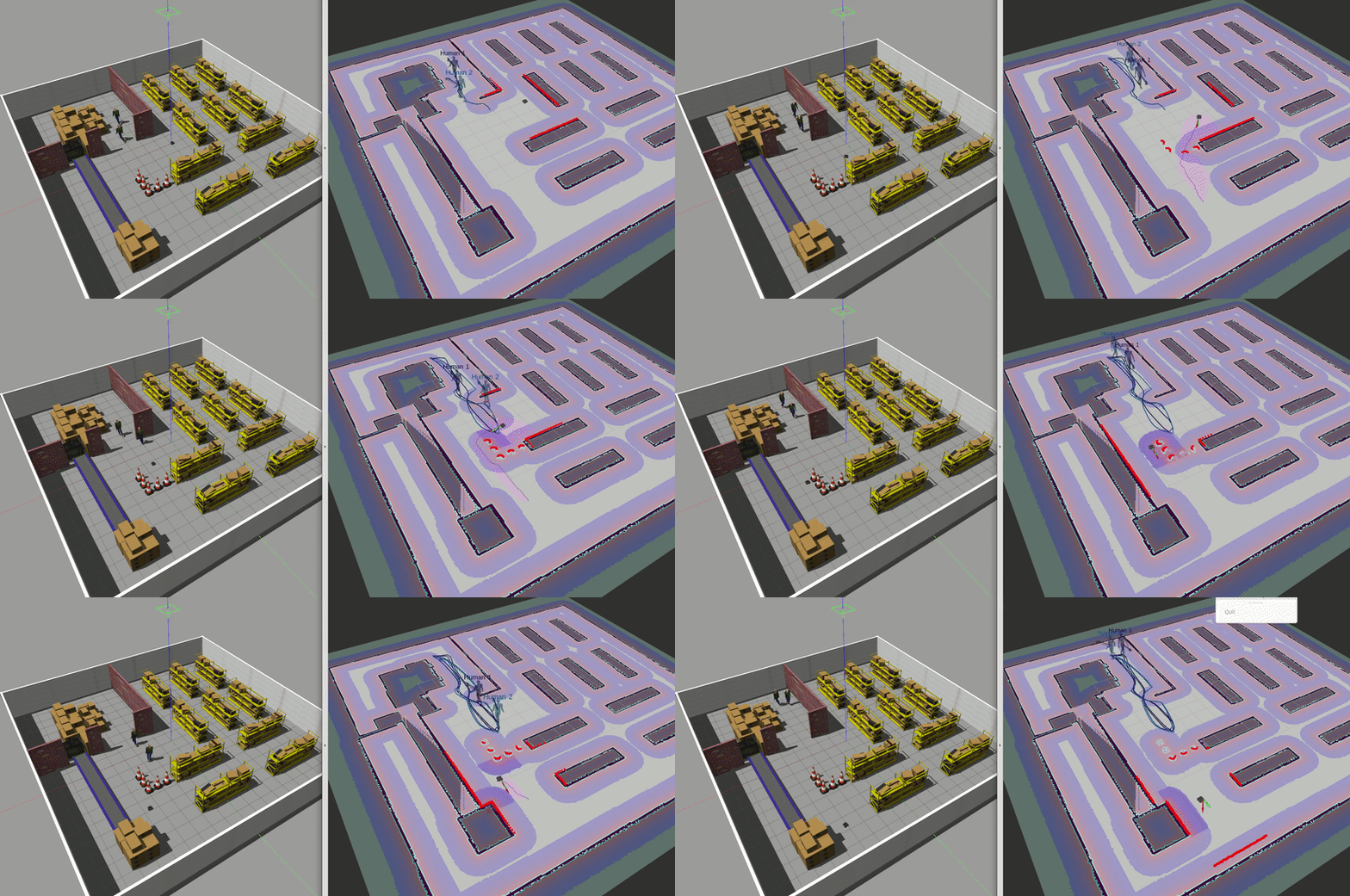
Robot Motion planning is a computational problem that involves finding a sequence of valid configurations to move the robot from the source to the destination. Generally, it includes Path Searching and Trajectory Optimization.
-
Path Searching: Based on path constraints (e.g., avoiding obstacles), to find the optimal sequence for the robot to travel from the source to the destination without collision.
-
Trajectory Optimization: Based on kinematics, dynamics and obstacles, to optimize the trajectory of the motion state from the source to the destination according to the path.
This repository provides the implementation of common Motion Planning algorithms. The theory analysis can be found at motion-planning. Furthermore, we provide Python and MATLAB version.
Your stars, forks and PRs are welcome!
Contents
0. Quick Start within 3 Minutes
Tested on ubuntu 20.04 LTS with ROS Noetic.
-
Install ROS (Desktop-Full Install Recommended).
-
Install git.
sudo apt install git
-
Install dependence
- conan
        pip install conan==1.59.0
        conan remote add conancenter https://center.conan.io
- Other dependence.
        sudo apt install python-is-python3 \
        ros-noetic-amcl \
        ros-noetic-base-local-planner \
        ros-noetic-map-server \
        ros-noetic-move-base \
        ros-noetic-navfn \
        libgoogle-glog-dev
- Clone the reposity.
git clone https://github.com/ai-winter/ros_motion_planning.git
-
Compile the code.
NOTE: Please refer to #48 if you meet libignition dependency error.
    cd scripts/
    ./build.sh  # you may need to install catkin-tools using: sudo apt install python-catkin-tools
- Execute the code.
NOTE: You should open a new terminal or
source ~/.bashrcafter the first time you runbuild.sh.
    cd scripts/
    ./main.sh
> NOTE: Modifying launch files may not have any effect, because they are regenerated by a Python script based on `src/user_config/user_config.yaml` when you run `main.sh`. Therefore, you should modify configurations in `user_config.yaml` instead of launch files.
-
Use 2D Nav Goal in RViz to select the goal.
-
Moving!
-
You can use the other script to shutdown them rapidly.
File truncated at 100 lines see the full file
CONTRIBUTING
Repository Summary
| Description | |
| Checkout URI | https://github.com/ai-winter/ros_motion_planning.git |
| VCS Type | git |
| VCS Version | master |
| Last Updated | 2026-02-19 |
| Dev Status | UNKNOWN |
| Released | UNRELEASED |
| Contributing |
Help Wanted (-)
Good First Issues (-) Pull Requests to Review (-) |
Packages
| Name | Version |
|---|---|
| common | 0.0.0 |
| apf_controller | 0.0.0 |
| controller | 0.0.0 |
| dwa_controller | 1.17.1 |
| lqr_controller | 0.0.0 |
| mpc_controller | 0.0.0 |
| orca_controller | 0.0.0 |
| pid_controller | 1.0.0 |
| rpp_controller | 0.0.0 |
| static_controller | 0.0.0 |
| path_planner | 0.0.0 |
| system_config | 0.0.0 |
| dynamic_rviz_config | 0.0.1 |
| dynamic_xml_config | 0.2.0 |
| gazebo_sfm_plugin | 1.0.0 |
| gazebo_ped_visualizer_plugin | 0.1.0 |
| pedsim_msgs | 0.0.2 |
| voronoi_layer | 0.0.0 |
| spencer_control_msgs | 1.0.8 |
| spencer_human_attribute_msgs | 1.0.8 |
| spencer_social_relation_msgs | 1.0.8 |
| spencer_tracking_msgs | 1.0.8 |
| spencer_vision_msgs | 1.0.8 |
| spencer_tracking_rviz_plugin | 1.0.8 |
| sim_env | 0.0.1 |
README
ROS Motion Planning
Robot Motion planning is a computational problem that involves finding a sequence of valid configurations to move the robot from the source to the destination. Generally, it includes Path Searching and Trajectory Optimization.
-
Path Searching: Based on path constraints (e.g., avoiding obstacles), to find the optimal sequence for the robot to travel from the source to the destination without collision.
-
Trajectory Optimization: Based on kinematics, dynamics and obstacles, to optimize the trajectory of the motion state from the source to the destination according to the path.
This repository provides the implementation of common Motion Planning algorithms. The theory analysis can be found at motion-planning. Furthermore, we provide Python and MATLAB version.
Your stars, forks and PRs are welcome!
Contents
0. Quick Start within 3 Minutes
Tested on ubuntu 20.04 LTS with ROS Noetic.
-
Install ROS (Desktop-Full Install Recommended).
-
Install git.
sudo apt install git
-
Install dependence
- conan
        pip install conan==1.59.0
        conan remote add conancenter https://center.conan.io
- Other dependence.
        sudo apt install python-is-python3 \
        ros-noetic-amcl \
        ros-noetic-base-local-planner \
        ros-noetic-map-server \
        ros-noetic-move-base \
        ros-noetic-navfn \
        libgoogle-glog-dev
- Clone the reposity.
git clone https://github.com/ai-winter/ros_motion_planning.git
-
Compile the code.
NOTE: Please refer to #48 if you meet libignition dependency error.
    cd scripts/
    ./build.sh  # you may need to install catkin-tools using: sudo apt install python-catkin-tools
- Execute the code.
NOTE: You should open a new terminal or
source ~/.bashrcafter the first time you runbuild.sh.
    cd scripts/
    ./main.sh
> NOTE: Modifying launch files may not have any effect, because they are regenerated by a Python script based on `src/user_config/user_config.yaml` when you run `main.sh`. Therefore, you should modify configurations in `user_config.yaml` instead of launch files.
-
Use 2D Nav Goal in RViz to select the goal.
-
Moving!
-
You can use the other script to shutdown them rapidly.
File truncated at 100 lines see the full file
CONTRIBUTING
Repository Summary
| Description | |
| Checkout URI | https://github.com/ai-winter/ros_motion_planning.git |
| VCS Type | git |
| VCS Version | master |
| Last Updated | 2026-02-19 |
| Dev Status | UNKNOWN |
| Released | UNRELEASED |
| Contributing |
Help Wanted (-)
Good First Issues (-) Pull Requests to Review (-) |
Packages
| Name | Version |
|---|---|
| common | 0.0.0 |
| apf_controller | 0.0.0 |
| controller | 0.0.0 |
| dwa_controller | 1.17.1 |
| lqr_controller | 0.0.0 |
| mpc_controller | 0.0.0 |
| orca_controller | 0.0.0 |
| pid_controller | 1.0.0 |
| rpp_controller | 0.0.0 |
| static_controller | 0.0.0 |
| path_planner | 0.0.0 |
| system_config | 0.0.0 |
| dynamic_rviz_config | 0.0.1 |
| dynamic_xml_config | 0.2.0 |
| gazebo_sfm_plugin | 1.0.0 |
| gazebo_ped_visualizer_plugin | 0.1.0 |
| pedsim_msgs | 0.0.2 |
| voronoi_layer | 0.0.0 |
| spencer_control_msgs | 1.0.8 |
| spencer_human_attribute_msgs | 1.0.8 |
| spencer_social_relation_msgs | 1.0.8 |
| spencer_tracking_msgs | 1.0.8 |
| spencer_vision_msgs | 1.0.8 |
| spencer_tracking_rviz_plugin | 1.0.8 |
| sim_env | 0.0.1 |
README
ROS Motion Planning
Robot Motion planning is a computational problem that involves finding a sequence of valid configurations to move the robot from the source to the destination. Generally, it includes Path Searching and Trajectory Optimization.
-
Path Searching: Based on path constraints (e.g., avoiding obstacles), to find the optimal sequence for the robot to travel from the source to the destination without collision.
-
Trajectory Optimization: Based on kinematics, dynamics and obstacles, to optimize the trajectory of the motion state from the source to the destination according to the path.
This repository provides the implementation of common Motion Planning algorithms. The theory analysis can be found at motion-planning. Furthermore, we provide Python and MATLAB version.
Your stars, forks and PRs are welcome!
Contents
0. Quick Start within 3 Minutes
Tested on ubuntu 20.04 LTS with ROS Noetic.
-
Install ROS (Desktop-Full Install Recommended).
-
Install git.
sudo apt install git
-
Install dependence
- conan
        pip install conan==1.59.0
        conan remote add conancenter https://center.conan.io
- Other dependence.
        sudo apt install python-is-python3 \
        ros-noetic-amcl \
        ros-noetic-base-local-planner \
        ros-noetic-map-server \
        ros-noetic-move-base \
        ros-noetic-navfn \
        libgoogle-glog-dev
- Clone the reposity.
git clone https://github.com/ai-winter/ros_motion_planning.git
-
Compile the code.
NOTE: Please refer to #48 if you meet libignition dependency error.
    cd scripts/
    ./build.sh  # you may need to install catkin-tools using: sudo apt install python-catkin-tools
- Execute the code.
NOTE: You should open a new terminal or
source ~/.bashrcafter the first time you runbuild.sh.
    cd scripts/
    ./main.sh
> NOTE: Modifying launch files may not have any effect, because they are regenerated by a Python script based on `src/user_config/user_config.yaml` when you run `main.sh`. Therefore, you should modify configurations in `user_config.yaml` instead of launch files.
-
Use 2D Nav Goal in RViz to select the goal.
-
Moving!
-
You can use the other script to shutdown them rapidly.
File truncated at 100 lines see the full file
CONTRIBUTING
Repository Summary
| Description | |
| Checkout URI | https://github.com/ai-winter/ros_motion_planning.git |
| VCS Type | git |
| VCS Version | master |
| Last Updated | 2026-02-19 |
| Dev Status | UNKNOWN |
| Released | UNRELEASED |
| Contributing |
Help Wanted (-)
Good First Issues (-) Pull Requests to Review (-) |
Packages
| Name | Version |
|---|---|
| common | 0.0.0 |
| apf_controller | 0.0.0 |
| controller | 0.0.0 |
| dwa_controller | 1.17.1 |
| lqr_controller | 0.0.0 |
| mpc_controller | 0.0.0 |
| orca_controller | 0.0.0 |
| pid_controller | 1.0.0 |
| rpp_controller | 0.0.0 |
| static_controller | 0.0.0 |
| path_planner | 0.0.0 |
| system_config | 0.0.0 |
| dynamic_rviz_config | 0.0.1 |
| dynamic_xml_config | 0.2.0 |
| gazebo_sfm_plugin | 1.0.0 |
| gazebo_ped_visualizer_plugin | 0.1.0 |
| pedsim_msgs | 0.0.2 |
| voronoi_layer | 0.0.0 |
| spencer_control_msgs | 1.0.8 |
| spencer_human_attribute_msgs | 1.0.8 |
| spencer_social_relation_msgs | 1.0.8 |
| spencer_tracking_msgs | 1.0.8 |
| spencer_vision_msgs | 1.0.8 |
| spencer_tracking_rviz_plugin | 1.0.8 |
| sim_env | 0.0.1 |
README
ROS Motion Planning
Robot Motion planning is a computational problem that involves finding a sequence of valid configurations to move the robot from the source to the destination. Generally, it includes Path Searching and Trajectory Optimization.
-
Path Searching: Based on path constraints (e.g., avoiding obstacles), to find the optimal sequence for the robot to travel from the source to the destination without collision.
-
Trajectory Optimization: Based on kinematics, dynamics and obstacles, to optimize the trajectory of the motion state from the source to the destination according to the path.
This repository provides the implementation of common Motion Planning algorithms. The theory analysis can be found at motion-planning. Furthermore, we provide Python and MATLAB version.
Your stars, forks and PRs are welcome!
Contents
0. Quick Start within 3 Minutes
Tested on ubuntu 20.04 LTS with ROS Noetic.
-
Install ROS (Desktop-Full Install Recommended).
-
Install git.
sudo apt install git
-
Install dependence
- conan
        pip install conan==1.59.0
        conan remote add conancenter https://center.conan.io
- Other dependence.
        sudo apt install python-is-python3 \
        ros-noetic-amcl \
        ros-noetic-base-local-planner \
        ros-noetic-map-server \
        ros-noetic-move-base \
        ros-noetic-navfn \
        libgoogle-glog-dev
- Clone the reposity.
git clone https://github.com/ai-winter/ros_motion_planning.git
-
Compile the code.
NOTE: Please refer to #48 if you meet libignition dependency error.
    cd scripts/
    ./build.sh  # you may need to install catkin-tools using: sudo apt install python-catkin-tools
- Execute the code.
NOTE: You should open a new terminal or
source ~/.bashrcafter the first time you runbuild.sh.
    cd scripts/
    ./main.sh
> NOTE: Modifying launch files may not have any effect, because they are regenerated by a Python script based on `src/user_config/user_config.yaml` when you run `main.sh`. Therefore, you should modify configurations in `user_config.yaml` instead of launch files.
-
Use 2D Nav Goal in RViz to select the goal.
-
Moving!
-
You can use the other script to shutdown them rapidly.
File truncated at 100 lines see the full file
CONTRIBUTING
Repository Summary
| Description | |
| Checkout URI | https://github.com/ai-winter/ros_motion_planning.git |
| VCS Type | git |
| VCS Version | master |
| Last Updated | 2026-02-19 |
| Dev Status | UNKNOWN |
| Released | UNRELEASED |
| Contributing |
Help Wanted (-)
Good First Issues (-) Pull Requests to Review (-) |
Packages
| Name | Version |
|---|---|
| common | 0.0.0 |
| apf_controller | 0.0.0 |
| controller | 0.0.0 |
| dwa_controller | 1.17.1 |
| lqr_controller | 0.0.0 |
| mpc_controller | 0.0.0 |
| orca_controller | 0.0.0 |
| pid_controller | 1.0.0 |
| rpp_controller | 0.0.0 |
| static_controller | 0.0.0 |
| path_planner | 0.0.0 |
| system_config | 0.0.0 |
| dynamic_rviz_config | 0.0.1 |
| dynamic_xml_config | 0.2.0 |
| gazebo_sfm_plugin | 1.0.0 |
| gazebo_ped_visualizer_plugin | 0.1.0 |
| pedsim_msgs | 0.0.2 |
| voronoi_layer | 0.0.0 |
| spencer_control_msgs | 1.0.8 |
| spencer_human_attribute_msgs | 1.0.8 |
| spencer_social_relation_msgs | 1.0.8 |
| spencer_tracking_msgs | 1.0.8 |
| spencer_vision_msgs | 1.0.8 |
| spencer_tracking_rviz_plugin | 1.0.8 |
| sim_env | 0.0.1 |
README
ROS Motion Planning
Robot Motion planning is a computational problem that involves finding a sequence of valid configurations to move the robot from the source to the destination. Generally, it includes Path Searching and Trajectory Optimization.
-
Path Searching: Based on path constraints (e.g., avoiding obstacles), to find the optimal sequence for the robot to travel from the source to the destination without collision.
-
Trajectory Optimization: Based on kinematics, dynamics and obstacles, to optimize the trajectory of the motion state from the source to the destination according to the path.
This repository provides the implementation of common Motion Planning algorithms. The theory analysis can be found at motion-planning. Furthermore, we provide Python and MATLAB version.
Your stars, forks and PRs are welcome!
Contents
0. Quick Start within 3 Minutes
Tested on ubuntu 20.04 LTS with ROS Noetic.
-
Install ROS (Desktop-Full Install Recommended).
-
Install git.
sudo apt install git
-
Install dependence
- conan
        pip install conan==1.59.0
        conan remote add conancenter https://center.conan.io
- Other dependence.
        sudo apt install python-is-python3 \
        ros-noetic-amcl \
        ros-noetic-base-local-planner \
        ros-noetic-map-server \
        ros-noetic-move-base \
        ros-noetic-navfn \
        libgoogle-glog-dev
- Clone the reposity.
git clone https://github.com/ai-winter/ros_motion_planning.git
-
Compile the code.
NOTE: Please refer to #48 if you meet libignition dependency error.
    cd scripts/
    ./build.sh  # you may need to install catkin-tools using: sudo apt install python-catkin-tools
- Execute the code.
NOTE: You should open a new terminal or
source ~/.bashrcafter the first time you runbuild.sh.
    cd scripts/
    ./main.sh
> NOTE: Modifying launch files may not have any effect, because they are regenerated by a Python script based on `src/user_config/user_config.yaml` when you run `main.sh`. Therefore, you should modify configurations in `user_config.yaml` instead of launch files.
-
Use 2D Nav Goal in RViz to select the goal.
-
Moving!
-
You can use the other script to shutdown them rapidly.
File truncated at 100 lines see the full file
CONTRIBUTING
Repository Summary
| Description | |
| Checkout URI | https://github.com/ai-winter/ros_motion_planning.git |
| VCS Type | git |
| VCS Version | master |
| Last Updated | 2026-02-19 |
| Dev Status | UNKNOWN |
| Released | UNRELEASED |
| Contributing |
Help Wanted (-)
Good First Issues (-) Pull Requests to Review (-) |
Packages
| Name | Version |
|---|---|
| common | 0.0.0 |
| apf_controller | 0.0.0 |
| controller | 0.0.0 |
| dwa_controller | 1.17.1 |
| lqr_controller | 0.0.0 |
| mpc_controller | 0.0.0 |
| orca_controller | 0.0.0 |
| pid_controller | 1.0.0 |
| rpp_controller | 0.0.0 |
| static_controller | 0.0.0 |
| path_planner | 0.0.0 |
| system_config | 0.0.0 |
| dynamic_rviz_config | 0.0.1 |
| dynamic_xml_config | 0.2.0 |
| gazebo_sfm_plugin | 1.0.0 |
| gazebo_ped_visualizer_plugin | 0.1.0 |
| pedsim_msgs | 0.0.2 |
| voronoi_layer | 0.0.0 |
| spencer_control_msgs | 1.0.8 |
| spencer_human_attribute_msgs | 1.0.8 |
| spencer_social_relation_msgs | 1.0.8 |
| spencer_tracking_msgs | 1.0.8 |
| spencer_vision_msgs | 1.0.8 |
| spencer_tracking_rviz_plugin | 1.0.8 |
| sim_env | 0.0.1 |
README
ROS Motion Planning
Robot Motion planning is a computational problem that involves finding a sequence of valid configurations to move the robot from the source to the destination. Generally, it includes Path Searching and Trajectory Optimization.
-
Path Searching: Based on path constraints (e.g., avoiding obstacles), to find the optimal sequence for the robot to travel from the source to the destination without collision.
-
Trajectory Optimization: Based on kinematics, dynamics and obstacles, to optimize the trajectory of the motion state from the source to the destination according to the path.
This repository provides the implementation of common Motion Planning algorithms. The theory analysis can be found at motion-planning. Furthermore, we provide Python and MATLAB version.
Your stars, forks and PRs are welcome!
Contents
0. Quick Start within 3 Minutes
Tested on ubuntu 20.04 LTS with ROS Noetic.
-
Install ROS (Desktop-Full Install Recommended).
-
Install git.
sudo apt install git
-
Install dependence
- conan
        pip install conan==1.59.0
        conan remote add conancenter https://center.conan.io
- Other dependence.
        sudo apt install python-is-python3 \
        ros-noetic-amcl \
        ros-noetic-base-local-planner \
        ros-noetic-map-server \
        ros-noetic-move-base \
        ros-noetic-navfn \
        libgoogle-glog-dev
- Clone the reposity.
git clone https://github.com/ai-winter/ros_motion_planning.git
-
Compile the code.
NOTE: Please refer to #48 if you meet libignition dependency error.
    cd scripts/
    ./build.sh  # you may need to install catkin-tools using: sudo apt install python-catkin-tools
- Execute the code.
NOTE: You should open a new terminal or
source ~/.bashrcafter the first time you runbuild.sh.
    cd scripts/
    ./main.sh
> NOTE: Modifying launch files may not have any effect, because they are regenerated by a Python script based on `src/user_config/user_config.yaml` when you run `main.sh`. Therefore, you should modify configurations in `user_config.yaml` instead of launch files.
-
Use 2D Nav Goal in RViz to select the goal.
-
Moving!
-
You can use the other script to shutdown them rapidly.
File truncated at 100 lines see the full file
CONTRIBUTING
Repository Summary
| Description | |
| Checkout URI | https://github.com/ai-winter/ros_motion_planning.git |
| VCS Type | git |
| VCS Version | master |
| Last Updated | 2026-02-19 |
| Dev Status | UNKNOWN |
| Released | UNRELEASED |
| Contributing |
Help Wanted (-)
Good First Issues (-) Pull Requests to Review (-) |
Packages
| Name | Version |
|---|---|
| common | 0.0.0 |
| apf_controller | 0.0.0 |
| controller | 0.0.0 |
| dwa_controller | 1.17.1 |
| lqr_controller | 0.0.0 |
| mpc_controller | 0.0.0 |
| orca_controller | 0.0.0 |
| pid_controller | 1.0.0 |
| rpp_controller | 0.0.0 |
| static_controller | 0.0.0 |
| path_planner | 0.0.0 |
| system_config | 0.0.0 |
| dynamic_rviz_config | 0.0.1 |
| dynamic_xml_config | 0.2.0 |
| gazebo_sfm_plugin | 1.0.0 |
| gazebo_ped_visualizer_plugin | 0.1.0 |
| pedsim_msgs | 0.0.2 |
| voronoi_layer | 0.0.0 |
| spencer_control_msgs | 1.0.8 |
| spencer_human_attribute_msgs | 1.0.8 |
| spencer_social_relation_msgs | 1.0.8 |
| spencer_tracking_msgs | 1.0.8 |
| spencer_vision_msgs | 1.0.8 |
| spencer_tracking_rviz_plugin | 1.0.8 |
| sim_env | 0.0.1 |
README
ROS Motion Planning
Robot Motion planning is a computational problem that involves finding a sequence of valid configurations to move the robot from the source to the destination. Generally, it includes Path Searching and Trajectory Optimization.
-
Path Searching: Based on path constraints (e.g., avoiding obstacles), to find the optimal sequence for the robot to travel from the source to the destination without collision.
-
Trajectory Optimization: Based on kinematics, dynamics and obstacles, to optimize the trajectory of the motion state from the source to the destination according to the path.
This repository provides the implementation of common Motion Planning algorithms. The theory analysis can be found at motion-planning. Furthermore, we provide Python and MATLAB version.
Your stars, forks and PRs are welcome!
Contents
0. Quick Start within 3 Minutes
Tested on ubuntu 20.04 LTS with ROS Noetic.
-
Install ROS (Desktop-Full Install Recommended).
-
Install git.
sudo apt install git
-
Install dependence
- conan
        pip install conan==1.59.0
        conan remote add conancenter https://center.conan.io
- Other dependence.
        sudo apt install python-is-python3 \
        ros-noetic-amcl \
        ros-noetic-base-local-planner \
        ros-noetic-map-server \
        ros-noetic-move-base \
        ros-noetic-navfn \
        libgoogle-glog-dev
- Clone the reposity.
git clone https://github.com/ai-winter/ros_motion_planning.git
-
Compile the code.
NOTE: Please refer to #48 if you meet libignition dependency error.
    cd scripts/
    ./build.sh  # you may need to install catkin-tools using: sudo apt install python-catkin-tools
- Execute the code.
NOTE: You should open a new terminal or
source ~/.bashrcafter the first time you runbuild.sh.
    cd scripts/
    ./main.sh
> NOTE: Modifying launch files may not have any effect, because they are regenerated by a Python script based on `src/user_config/user_config.yaml` when you run `main.sh`. Therefore, you should modify configurations in `user_config.yaml` instead of launch files.
-
Use 2D Nav Goal in RViz to select the goal.
-
Moving!
-
You can use the other script to shutdown them rapidly.
File truncated at 100 lines see the full file
CONTRIBUTING
Repository Summary
| Description | |
| Checkout URI | https://github.com/ai-winter/ros_motion_planning.git |
| VCS Type | git |
| VCS Version | master |
| Last Updated | 2026-02-19 |
| Dev Status | UNKNOWN |
| Released | UNRELEASED |
| Contributing |
Help Wanted (-)
Good First Issues (-) Pull Requests to Review (-) |
Packages
| Name | Version |
|---|---|
| common | 0.0.0 |
| apf_controller | 0.0.0 |
| controller | 0.0.0 |
| dwa_controller | 1.17.1 |
| lqr_controller | 0.0.0 |
| mpc_controller | 0.0.0 |
| orca_controller | 0.0.0 |
| pid_controller | 1.0.0 |
| rpp_controller | 0.0.0 |
| static_controller | 0.0.0 |
| path_planner | 0.0.0 |
| system_config | 0.0.0 |
| dynamic_rviz_config | 0.0.1 |
| dynamic_xml_config | 0.2.0 |
| gazebo_sfm_plugin | 1.0.0 |
| gazebo_ped_visualizer_plugin | 0.1.0 |
| pedsim_msgs | 0.0.2 |
| voronoi_layer | 0.0.0 |
| spencer_control_msgs | 1.0.8 |
| spencer_human_attribute_msgs | 1.0.8 |
| spencer_social_relation_msgs | 1.0.8 |
| spencer_tracking_msgs | 1.0.8 |
| spencer_vision_msgs | 1.0.8 |
| spencer_tracking_rviz_plugin | 1.0.8 |
| sim_env | 0.0.1 |
README
ROS Motion Planning
Robot Motion planning is a computational problem that involves finding a sequence of valid configurations to move the robot from the source to the destination. Generally, it includes Path Searching and Trajectory Optimization.
-
Path Searching: Based on path constraints (e.g., avoiding obstacles), to find the optimal sequence for the robot to travel from the source to the destination without collision.
-
Trajectory Optimization: Based on kinematics, dynamics and obstacles, to optimize the trajectory of the motion state from the source to the destination according to the path.
This repository provides the implementation of common Motion Planning algorithms. The theory analysis can be found at motion-planning. Furthermore, we provide Python and MATLAB version.
Your stars, forks and PRs are welcome!
Contents
0. Quick Start within 3 Minutes
Tested on ubuntu 20.04 LTS with ROS Noetic.
-
Install ROS (Desktop-Full Install Recommended).
-
Install git.
sudo apt install git
-
Install dependence
- conan
        pip install conan==1.59.0
        conan remote add conancenter https://center.conan.io
- Other dependence.
        sudo apt install python-is-python3 \
        ros-noetic-amcl \
        ros-noetic-base-local-planner \
        ros-noetic-map-server \
        ros-noetic-move-base \
        ros-noetic-navfn \
        libgoogle-glog-dev
- Clone the reposity.
git clone https://github.com/ai-winter/ros_motion_planning.git
-
Compile the code.
NOTE: Please refer to #48 if you meet libignition dependency error.
    cd scripts/
    ./build.sh  # you may need to install catkin-tools using: sudo apt install python-catkin-tools
- Execute the code.
NOTE: You should open a new terminal or
source ~/.bashrcafter the first time you runbuild.sh.
    cd scripts/
    ./main.sh
> NOTE: Modifying launch files may not have any effect, because they are regenerated by a Python script based on `src/user_config/user_config.yaml` when you run `main.sh`. Therefore, you should modify configurations in `user_config.yaml` instead of launch files.
-
Use 2D Nav Goal in RViz to select the goal.
-
Moving!
-
You can use the other script to shutdown them rapidly.
File truncated at 100 lines see the full file
CONTRIBUTING
Repository Summary
| Description | |
| Checkout URI | https://github.com/ai-winter/ros_motion_planning.git |
| VCS Type | git |
| VCS Version | master |
| Last Updated | 2026-02-19 |
| Dev Status | UNKNOWN |
| Released | UNRELEASED |
| Contributing |
Help Wanted (-)
Good First Issues (-) Pull Requests to Review (-) |
Packages
| Name | Version |
|---|---|
| common | 0.0.0 |
| apf_controller | 0.0.0 |
| controller | 0.0.0 |
| dwa_controller | 1.17.1 |
| lqr_controller | 0.0.0 |
| mpc_controller | 0.0.0 |
| orca_controller | 0.0.0 |
| pid_controller | 1.0.0 |
| rpp_controller | 0.0.0 |
| static_controller | 0.0.0 |
| path_planner | 0.0.0 |
| system_config | 0.0.0 |
| dynamic_rviz_config | 0.0.1 |
| dynamic_xml_config | 0.2.0 |
| gazebo_sfm_plugin | 1.0.0 |
| gazebo_ped_visualizer_plugin | 0.1.0 |
| pedsim_msgs | 0.0.2 |
| voronoi_layer | 0.0.0 |
| spencer_control_msgs | 1.0.8 |
| spencer_human_attribute_msgs | 1.0.8 |
| spencer_social_relation_msgs | 1.0.8 |
| spencer_tracking_msgs | 1.0.8 |
| spencer_vision_msgs | 1.0.8 |
| spencer_tracking_rviz_plugin | 1.0.8 |
| sim_env | 0.0.1 |
README
ROS Motion Planning
Robot Motion planning is a computational problem that involves finding a sequence of valid configurations to move the robot from the source to the destination. Generally, it includes Path Searching and Trajectory Optimization.
-
Path Searching: Based on path constraints (e.g., avoiding obstacles), to find the optimal sequence for the robot to travel from the source to the destination without collision.
-
Trajectory Optimization: Based on kinematics, dynamics and obstacles, to optimize the trajectory of the motion state from the source to the destination according to the path.
This repository provides the implementation of common Motion Planning algorithms. The theory analysis can be found at motion-planning. Furthermore, we provide Python and MATLAB version.
Your stars, forks and PRs are welcome!
Contents
0. Quick Start within 3 Minutes
Tested on ubuntu 20.04 LTS with ROS Noetic.
-
Install ROS (Desktop-Full Install Recommended).
-
Install git.
sudo apt install git
-
Install dependence
- conan
        pip install conan==1.59.0
        conan remote add conancenter https://center.conan.io
- Other dependence.
        sudo apt install python-is-python3 \
        ros-noetic-amcl \
        ros-noetic-base-local-planner \
        ros-noetic-map-server \
        ros-noetic-move-base \
        ros-noetic-navfn \
        libgoogle-glog-dev
- Clone the reposity.
git clone https://github.com/ai-winter/ros_motion_planning.git
-
Compile the code.
NOTE: Please refer to #48 if you meet libignition dependency error.
    cd scripts/
    ./build.sh  # you may need to install catkin-tools using: sudo apt install python-catkin-tools
- Execute the code.
NOTE: You should open a new terminal or
source ~/.bashrcafter the first time you runbuild.sh.
    cd scripts/
    ./main.sh
> NOTE: Modifying launch files may not have any effect, because they are regenerated by a Python script based on `src/user_config/user_config.yaml` when you run `main.sh`. Therefore, you should modify configurations in `user_config.yaml` instead of launch files.
-
Use 2D Nav Goal in RViz to select the goal.
-
Moving!
-
You can use the other script to shutdown them rapidly.
File truncated at 100 lines see the full file