 ROS Index
Repository Summary
| Description | |
| Checkout URI | https://github.com/styri-dev/styri.git |
| VCS Type | git |
| VCS Version | main |
| Last Updated | 2026-10-23 |
| Dev Status | DEVELOPED |
| Released | UNRELEASED |
| Contributing |
Help Wanted (-)
Good First Issues (-) Pull Requests to Review (-) |
Packages
| Name | Version |
|---|---|
| styri_bridge | 0.3.0 |
README
Styri
The ROS 2 web dashboard and operator panel that never leaves your network.
Built for the operators running robots on site, not a cloud dashboard miles away. Open-source ROS 2 operator panel that runs on the robot or any Linux box on its network and works in any browser on the LAN. Fully offline, free from the first robot. One command to start.
Website · Quickstart · How it compares · Pricing
Quickstart
Run it on any ROS 2 machine (Humble or Jazzy, amd64 or arm64):
docker run --rm --network host ghcr.io/styri-dev/styri-core:v0.3.0
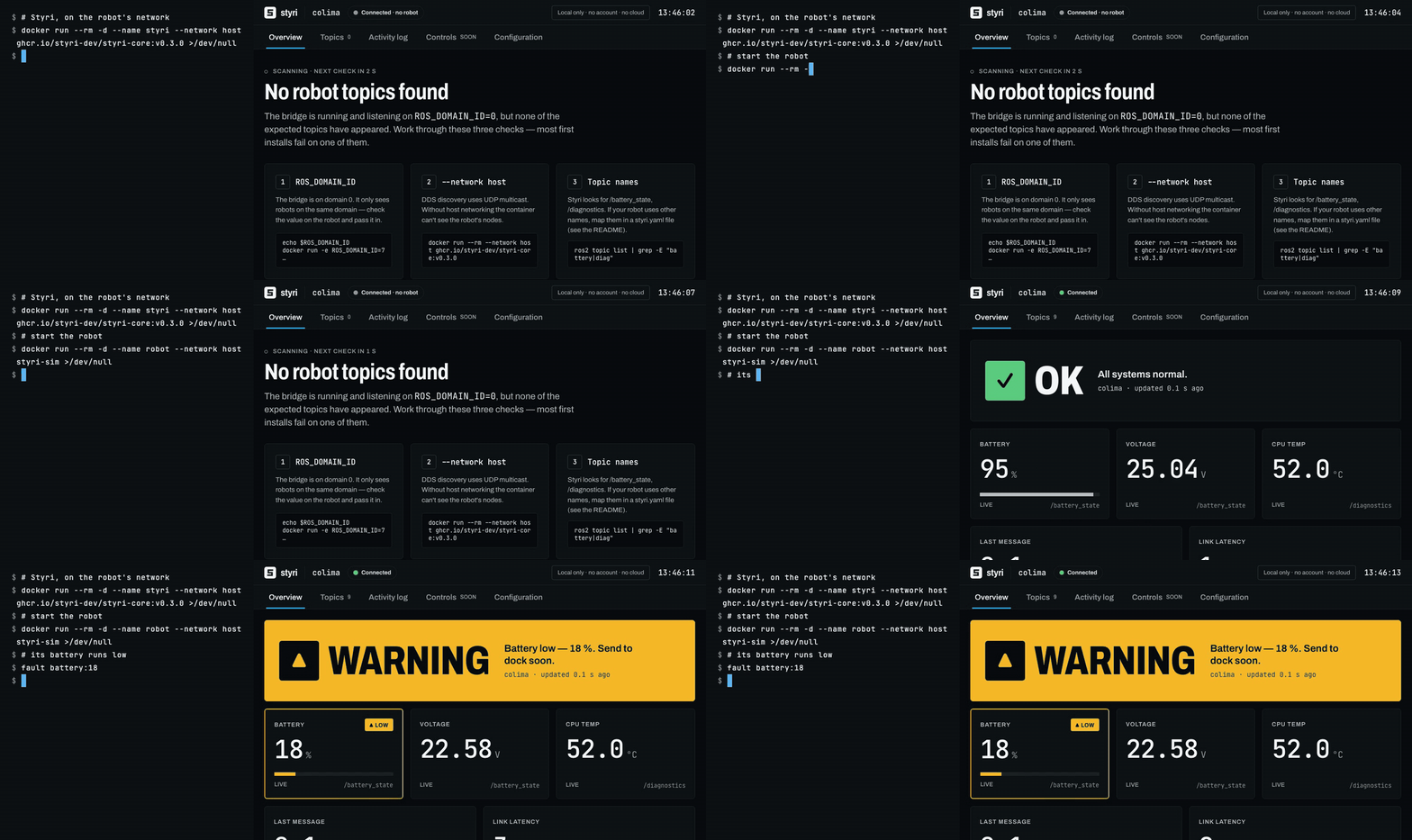
Open http://localhost:8080. Styri finds your robot’s topics over DDS and shows them live.
Host networking lets Styri see DDS discovery on your LAN. Open source: read the code before you run it.
Deploying to a client fleet? We can set it up for you. Talk to us
On a Mac? Run Styri on the robot or any Linux machine on its network, and open the panel from any browser, Mac included. Docker on macOS can’t see a robot on another machine, but docker compose up (below) gives you the full demo with a simulated robot.
No robot handy? Run the simulated robot and the panel together:
docker compose up
What you get
- Overview — robot status, battery, voltage, CPU temperature and link health, readable at a glance on a touchscreen
- Topics — every discovered topic with its rate and last-message age
- Activity log — a local log of connections, warnings and state changes, exportable to CSV
- Honest data — every value shows when it goes stale; disconnects are obvious
Styri Core is read-only: it never publishes to your robot. Controls are on the roadmap.
Nothing phones home
- Every asset is served locally: fonts, icons, scripts. No CDN.
- No telemetry, no license server, no account.
- Unplug the internet and it still works.
Verify it yourself:
sudo tcpdump -i any 'not net 10.0.0.0/8 and not net 172.16.0.0/12 and not net 192.168.0.0/16 and not host 127.0.0.1 and not net 224.0.0.0/4'
Nothing should appear while Styri runs. (DDS discovery uses LAN multicast, 224.0.0.0/4, which never leaves your network.)
Foxglove in the lab. Formant in the cloud. Styri on the floor.
| RViz2 | Foxglove | Formant | Styri | |
|---|---|---|---|---|
| Built for | Engineers | Engineers: data visualization and log analysis | Fleet operations teams, remotely from the cloud | Operators running robots on site |
| Runs in | Desktop / X11 on the robot or forwarded | Desktop app on each machine | Cloud web app; self-hosted on your own servers for restricted sites | Any browser on the robot’s local network |
| Offline use | Fully local | Free and Pro: account sign-in needs internet. Fully offline via standalone license or on-prem deployment on Enterprise | Standard: agent streams to Formant’s cloud; teleop needs Formant and Twilio servers. Air-gapped only via self-hosted on-prem deployment | Fully offline on every tier, including free |
| Install | apt or source build | Desktop install + offline license activation | Agent on each robot (internet needed to install); on-prem means running Formant’s servers | One docker run on the robot or any Linux box on its network |
| Source | Open source | Proprietary | Proprietary | Open-source core |
Foxglove helps engineers analyze robot data. Formant runs fleets from the cloud. Styri helps operators run robots on site — fully offline, from the free tier up.
How it works
ROS 2 nodes ──DDS──▶ Styri bridge ──local WebSocket──▶ Styri panel ──LAN──▶ any browser
                         │
                         └──▶ local activity log (SQLite)
One container: a small bridge subscribes to your ROS 2 topics and serves a static web panel. Nothing leaves the machine except to browsers on your LAN.
Configuration
Pass settings as environment variables, for example
docker run -e ROS_DOMAIN_ID=7 -e STYRI_MIN_VOLTAGE=23.0 --rm --network host ghcr.io/styri-dev/styri-core:v0.3.0.
| Variable | Default | |
|---|---|---|
ROS_DOMAIN_ID |
0 |
Must match the robot |
STYRI_ROBOT_NAME |
the host name | Shown in the header |
STYRI_BATTERY_TOPIC |
/battery_state |
A sensor_msgs/BatteryState topic |
STYRI_DIAGNOSTICS_TOPIC |
/diagnostics |
A diagnostic_msgs/DiagnosticArray topic |
STYRI_MIN_VOLTAGE |
unset | Volts. Below this the Voltage tile turns amber and the status shows a low-voltage warning, whatever the charge reads. Unset, voltage is shown but never judged. |
Map your robot’s topics
Different topic names, another message type, the robot’s own status, or a few
values of your own? Describe them in one styri.yaml and mount it:
File truncated at 100 lines see the full file
CONTRIBUTING
Repository Summary
| Description | |
| Checkout URI | https://github.com/styri-dev/styri.git |
| VCS Type | git |
| VCS Version | main |
| Last Updated | 2026-10-23 |
| Dev Status | DEVELOPED |
| Released | UNRELEASED |
| Contributing |
Help Wanted (-)
Good First Issues (-) Pull Requests to Review (-) |
Packages
| Name | Version |
|---|---|
| styri_bridge | 0.3.0 |
README
Styri
The ROS 2 web dashboard and operator panel that never leaves your network.
Built for the operators running robots on site, not a cloud dashboard miles away. Open-source ROS 2 operator panel that runs on the robot or any Linux box on its network and works in any browser on the LAN. Fully offline, free from the first robot. One command to start.
Website · Quickstart · How it compares · Pricing
Quickstart
Run it on any ROS 2 machine (Humble or Jazzy, amd64 or arm64):
docker run --rm --network host ghcr.io/styri-dev/styri-core:v0.3.0
Open http://localhost:8080. Styri finds your robot’s topics over DDS and shows them live.
Host networking lets Styri see DDS discovery on your LAN. Open source: read the code before you run it.
Deploying to a client fleet? We can set it up for you. Talk to us
On a Mac? Run Styri on the robot or any Linux machine on its network, and open the panel from any browser, Mac included. Docker on macOS can’t see a robot on another machine, but docker compose up (below) gives you the full demo with a simulated robot.
No robot handy? Run the simulated robot and the panel together:
docker compose up
What you get
- Overview — robot status, battery, voltage, CPU temperature and link health, readable at a glance on a touchscreen
- Topics — every discovered topic with its rate and last-message age
- Activity log — a local log of connections, warnings and state changes, exportable to CSV
- Honest data — every value shows when it goes stale; disconnects are obvious
Styri Core is read-only: it never publishes to your robot. Controls are on the roadmap.
Nothing phones home
- Every asset is served locally: fonts, icons, scripts. No CDN.
- No telemetry, no license server, no account.
- Unplug the internet and it still works.
Verify it yourself:
sudo tcpdump -i any 'not net 10.0.0.0/8 and not net 172.16.0.0/12 and not net 192.168.0.0/16 and not host 127.0.0.1 and not net 224.0.0.0/4'
Nothing should appear while Styri runs. (DDS discovery uses LAN multicast, 224.0.0.0/4, which never leaves your network.)
Foxglove in the lab. Formant in the cloud. Styri on the floor.
| RViz2 | Foxglove | Formant | Styri | |
|---|---|---|---|---|
| Built for | Engineers | Engineers: data visualization and log analysis | Fleet operations teams, remotely from the cloud | Operators running robots on site |
| Runs in | Desktop / X11 on the robot or forwarded | Desktop app on each machine | Cloud web app; self-hosted on your own servers for restricted sites | Any browser on the robot’s local network |
| Offline use | Fully local | Free and Pro: account sign-in needs internet. Fully offline via standalone license or on-prem deployment on Enterprise | Standard: agent streams to Formant’s cloud; teleop needs Formant and Twilio servers. Air-gapped only via self-hosted on-prem deployment | Fully offline on every tier, including free |
| Install | apt or source build | Desktop install + offline license activation | Agent on each robot (internet needed to install); on-prem means running Formant’s servers | One docker run on the robot or any Linux box on its network |
| Source | Open source | Proprietary | Proprietary | Open-source core |
Foxglove helps engineers analyze robot data. Formant runs fleets from the cloud. Styri helps operators run robots on site — fully offline, from the free tier up.
How it works
ROS 2 nodes ──DDS──▶ Styri bridge ──local WebSocket──▶ Styri panel ──LAN──▶ any browser
                         │
                         └──▶ local activity log (SQLite)
One container: a small bridge subscribes to your ROS 2 topics and serves a static web panel. Nothing leaves the machine except to browsers on your LAN.
Configuration
Pass settings as environment variables, for example
docker run -e ROS_DOMAIN_ID=7 -e STYRI_MIN_VOLTAGE=23.0 --rm --network host ghcr.io/styri-dev/styri-core:v0.3.0.
| Variable | Default | |
|---|---|---|
ROS_DOMAIN_ID |
0 |
Must match the robot |
STYRI_ROBOT_NAME |
the host name | Shown in the header |
STYRI_BATTERY_TOPIC |
/battery_state |
A sensor_msgs/BatteryState topic |
STYRI_DIAGNOSTICS_TOPIC |
/diagnostics |
A diagnostic_msgs/DiagnosticArray topic |
STYRI_MIN_VOLTAGE |
unset | Volts. Below this the Voltage tile turns amber and the status shows a low-voltage warning, whatever the charge reads. Unset, voltage is shown but never judged. |
Map your robot’s topics
Different topic names, another message type, the robot’s own status, or a few
values of your own? Describe them in one styri.yaml and mount it:
File truncated at 100 lines see the full file
CONTRIBUTING
Repository Summary
| Description | |
| Checkout URI | https://github.com/styri-dev/styri.git |
| VCS Type | git |
| VCS Version | main |
| Last Updated | 2026-10-23 |
| Dev Status | DEVELOPED |
| Released | UNRELEASED |
| Contributing |
Help Wanted (-)
Good First Issues (-) Pull Requests to Review (-) |
Packages
| Name | Version |
|---|---|
| styri_bridge | 0.3.0 |
README
Styri
The ROS 2 web dashboard and operator panel that never leaves your network.
Built for the operators running robots on site, not a cloud dashboard miles away. Open-source ROS 2 operator panel that runs on the robot or any Linux box on its network and works in any browser on the LAN. Fully offline, free from the first robot. One command to start.
Website · Quickstart · How it compares · Pricing
Quickstart
Run it on any ROS 2 machine (Humble or Jazzy, amd64 or arm64):
docker run --rm --network host ghcr.io/styri-dev/styri-core:v0.3.0
Open http://localhost:8080. Styri finds your robot’s topics over DDS and shows them live.
Host networking lets Styri see DDS discovery on your LAN. Open source: read the code before you run it.
Deploying to a client fleet? We can set it up for you. Talk to us
On a Mac? Run Styri on the robot or any Linux machine on its network, and open the panel from any browser, Mac included. Docker on macOS can’t see a robot on another machine, but docker compose up (below) gives you the full demo with a simulated robot.
No robot handy? Run the simulated robot and the panel together:
docker compose up
What you get
- Overview — robot status, battery, voltage, CPU temperature and link health, readable at a glance on a touchscreen
- Topics — every discovered topic with its rate and last-message age
- Activity log — a local log of connections, warnings and state changes, exportable to CSV
- Honest data — every value shows when it goes stale; disconnects are obvious
Styri Core is read-only: it never publishes to your robot. Controls are on the roadmap.
Nothing phones home
- Every asset is served locally: fonts, icons, scripts. No CDN.
- No telemetry, no license server, no account.
- Unplug the internet and it still works.
Verify it yourself:
sudo tcpdump -i any 'not net 10.0.0.0/8 and not net 172.16.0.0/12 and not net 192.168.0.0/16 and not host 127.0.0.1 and not net 224.0.0.0/4'
Nothing should appear while Styri runs. (DDS discovery uses LAN multicast, 224.0.0.0/4, which never leaves your network.)
Foxglove in the lab. Formant in the cloud. Styri on the floor.
| RViz2 | Foxglove | Formant | Styri | |
|---|---|---|---|---|
| Built for | Engineers | Engineers: data visualization and log analysis | Fleet operations teams, remotely from the cloud | Operators running robots on site |
| Runs in | Desktop / X11 on the robot or forwarded | Desktop app on each machine | Cloud web app; self-hosted on your own servers for restricted sites | Any browser on the robot’s local network |
| Offline use | Fully local | Free and Pro: account sign-in needs internet. Fully offline via standalone license or on-prem deployment on Enterprise | Standard: agent streams to Formant’s cloud; teleop needs Formant and Twilio servers. Air-gapped only via self-hosted on-prem deployment | Fully offline on every tier, including free |
| Install | apt or source build | Desktop install + offline license activation | Agent on each robot (internet needed to install); on-prem means running Formant’s servers | One docker run on the robot or any Linux box on its network |
| Source | Open source | Proprietary | Proprietary | Open-source core |
Foxglove helps engineers analyze robot data. Formant runs fleets from the cloud. Styri helps operators run robots on site — fully offline, from the free tier up.
How it works
ROS 2 nodes ──DDS──▶ Styri bridge ──local WebSocket──▶ Styri panel ──LAN──▶ any browser
                         │
                         └──▶ local activity log (SQLite)
One container: a small bridge subscribes to your ROS 2 topics and serves a static web panel. Nothing leaves the machine except to browsers on your LAN.
Configuration
Pass settings as environment variables, for example
docker run -e ROS_DOMAIN_ID=7 -e STYRI_MIN_VOLTAGE=23.0 --rm --network host ghcr.io/styri-dev/styri-core:v0.3.0.
| Variable | Default | |
|---|---|---|
ROS_DOMAIN_ID |
0 |
Must match the robot |
STYRI_ROBOT_NAME |
the host name | Shown in the header |
STYRI_BATTERY_TOPIC |
/battery_state |
A sensor_msgs/BatteryState topic |
STYRI_DIAGNOSTICS_TOPIC |
/diagnostics |
A diagnostic_msgs/DiagnosticArray topic |
STYRI_MIN_VOLTAGE |
unset | Volts. Below this the Voltage tile turns amber and the status shows a low-voltage warning, whatever the charge reads. Unset, voltage is shown but never judged. |
Map your robot’s topics
Different topic names, another message type, the robot’s own status, or a few
values of your own? Describe them in one styri.yaml and mount it:
File truncated at 100 lines see the full file
CONTRIBUTING
Repository Summary
| Description | |
| Checkout URI | https://github.com/styri-dev/styri.git |
| VCS Type | git |
| VCS Version | main |
| Last Updated | 2026-10-23 |
| Dev Status | DEVELOPED |
| Released | UNRELEASED |
| Contributing |
Help Wanted (-)
Good First Issues (-) Pull Requests to Review (-) |
Packages
| Name | Version |
|---|---|
| styri_bridge | 0.3.0 |
README
Styri
The ROS 2 web dashboard and operator panel that never leaves your network.
Built for the operators running robots on site, not a cloud dashboard miles away. Open-source ROS 2 operator panel that runs on the robot or any Linux box on its network and works in any browser on the LAN. Fully offline, free from the first robot. One command to start.
Website · Quickstart · How it compares · Pricing
Quickstart
Run it on any ROS 2 machine (Humble or Jazzy, amd64 or arm64):
docker run --rm --network host ghcr.io/styri-dev/styri-core:v0.3.0
Open http://localhost:8080. Styri finds your robot’s topics over DDS and shows them live.
Host networking lets Styri see DDS discovery on your LAN. Open source: read the code before you run it.
Deploying to a client fleet? We can set it up for you. Talk to us
On a Mac? Run Styri on the robot or any Linux machine on its network, and open the panel from any browser, Mac included. Docker on macOS can’t see a robot on another machine, but docker compose up (below) gives you the full demo with a simulated robot.
No robot handy? Run the simulated robot and the panel together:
docker compose up
What you get
- Overview — robot status, battery, voltage, CPU temperature and link health, readable at a glance on a touchscreen
- Topics — every discovered topic with its rate and last-message age
- Activity log — a local log of connections, warnings and state changes, exportable to CSV
- Honest data — every value shows when it goes stale; disconnects are obvious
Styri Core is read-only: it never publishes to your robot. Controls are on the roadmap.
Nothing phones home
- Every asset is served locally: fonts, icons, scripts. No CDN.
- No telemetry, no license server, no account.
- Unplug the internet and it still works.
Verify it yourself:
sudo tcpdump -i any 'not net 10.0.0.0/8 and not net 172.16.0.0/12 and not net 192.168.0.0/16 and not host 127.0.0.1 and not net 224.0.0.0/4'
Nothing should appear while Styri runs. (DDS discovery uses LAN multicast, 224.0.0.0/4, which never leaves your network.)
Foxglove in the lab. Formant in the cloud. Styri on the floor.
| RViz2 | Foxglove | Formant | Styri | |
|---|---|---|---|---|
| Built for | Engineers | Engineers: data visualization and log analysis | Fleet operations teams, remotely from the cloud | Operators running robots on site |
| Runs in | Desktop / X11 on the robot or forwarded | Desktop app on each machine | Cloud web app; self-hosted on your own servers for restricted sites | Any browser on the robot’s local network |
| Offline use | Fully local | Free and Pro: account sign-in needs internet. Fully offline via standalone license or on-prem deployment on Enterprise | Standard: agent streams to Formant’s cloud; teleop needs Formant and Twilio servers. Air-gapped only via self-hosted on-prem deployment | Fully offline on every tier, including free |
| Install | apt or source build | Desktop install + offline license activation | Agent on each robot (internet needed to install); on-prem means running Formant’s servers | One docker run on the robot or any Linux box on its network |
| Source | Open source | Proprietary | Proprietary | Open-source core |
Foxglove helps engineers analyze robot data. Formant runs fleets from the cloud. Styri helps operators run robots on site — fully offline, from the free tier up.
How it works
ROS 2 nodes ──DDS──▶ Styri bridge ──local WebSocket──▶ Styri panel ──LAN──▶ any browser
                         │
                         └──▶ local activity log (SQLite)
One container: a small bridge subscribes to your ROS 2 topics and serves a static web panel. Nothing leaves the machine except to browsers on your LAN.
Configuration
Pass settings as environment variables, for example
docker run -e ROS_DOMAIN_ID=7 -e STYRI_MIN_VOLTAGE=23.0 --rm --network host ghcr.io/styri-dev/styri-core:v0.3.0.
| Variable | Default | |
|---|---|---|
ROS_DOMAIN_ID |
0 |
Must match the robot |
STYRI_ROBOT_NAME |
the host name | Shown in the header |
STYRI_BATTERY_TOPIC |
/battery_state |
A sensor_msgs/BatteryState topic |
STYRI_DIAGNOSTICS_TOPIC |
/diagnostics |
A diagnostic_msgs/DiagnosticArray topic |
STYRI_MIN_VOLTAGE |
unset | Volts. Below this the Voltage tile turns amber and the status shows a low-voltage warning, whatever the charge reads. Unset, voltage is shown but never judged. |
Map your robot’s topics
Different topic names, another message type, the robot’s own status, or a few
values of your own? Describe them in one styri.yaml and mount it:
File truncated at 100 lines see the full file
CONTRIBUTING
Repository Summary
| Description | |
| Checkout URI | https://github.com/styri-dev/styri.git |
| VCS Type | git |
| VCS Version | main |
| Last Updated | 2026-10-23 |
| Dev Status | DEVELOPED |
| Released | UNRELEASED |
| Contributing |
Help Wanted (-)
Good First Issues (-) Pull Requests to Review (-) |
Packages
| Name | Version |
|---|---|
| styri_bridge | 0.3.0 |
README
Styri
The ROS 2 web dashboard and operator panel that never leaves your network.
Built for the operators running robots on site, not a cloud dashboard miles away. Open-source ROS 2 operator panel that runs on the robot or any Linux box on its network and works in any browser on the LAN. Fully offline, free from the first robot. One command to start.
Website · Quickstart · How it compares · Pricing
Quickstart
Run it on any ROS 2 machine (Humble or Jazzy, amd64 or arm64):
docker run --rm --network host ghcr.io/styri-dev/styri-core:v0.3.0
Open http://localhost:8080. Styri finds your robot’s topics over DDS and shows them live.
Host networking lets Styri see DDS discovery on your LAN. Open source: read the code before you run it.
Deploying to a client fleet? We can set it up for you. Talk to us
On a Mac? Run Styri on the robot or any Linux machine on its network, and open the panel from any browser, Mac included. Docker on macOS can’t see a robot on another machine, but docker compose up (below) gives you the full demo with a simulated robot.
No robot handy? Run the simulated robot and the panel together:
docker compose up
What you get
- Overview — robot status, battery, voltage, CPU temperature and link health, readable at a glance on a touchscreen
- Topics — every discovered topic with its rate and last-message age
- Activity log — a local log of connections, warnings and state changes, exportable to CSV
- Honest data — every value shows when it goes stale; disconnects are obvious
Styri Core is read-only: it never publishes to your robot. Controls are on the roadmap.
Nothing phones home
- Every asset is served locally: fonts, icons, scripts. No CDN.
- No telemetry, no license server, no account.
- Unplug the internet and it still works.
Verify it yourself:
sudo tcpdump -i any 'not net 10.0.0.0/8 and not net 172.16.0.0/12 and not net 192.168.0.0/16 and not host 127.0.0.1 and not net 224.0.0.0/4'
Nothing should appear while Styri runs. (DDS discovery uses LAN multicast, 224.0.0.0/4, which never leaves your network.)
Foxglove in the lab. Formant in the cloud. Styri on the floor.
| RViz2 | Foxglove | Formant | Styri | |
|---|---|---|---|---|
| Built for | Engineers | Engineers: data visualization and log analysis | Fleet operations teams, remotely from the cloud | Operators running robots on site |
| Runs in | Desktop / X11 on the robot or forwarded | Desktop app on each machine | Cloud web app; self-hosted on your own servers for restricted sites | Any browser on the robot’s local network |
| Offline use | Fully local | Free and Pro: account sign-in needs internet. Fully offline via standalone license or on-prem deployment on Enterprise | Standard: agent streams to Formant’s cloud; teleop needs Formant and Twilio servers. Air-gapped only via self-hosted on-prem deployment | Fully offline on every tier, including free |
| Install | apt or source build | Desktop install + offline license activation | Agent on each robot (internet needed to install); on-prem means running Formant’s servers | One docker run on the robot or any Linux box on its network |
| Source | Open source | Proprietary | Proprietary | Open-source core |
Foxglove helps engineers analyze robot data. Formant runs fleets from the cloud. Styri helps operators run robots on site — fully offline, from the free tier up.
How it works
ROS 2 nodes ──DDS──▶ Styri bridge ──local WebSocket──▶ Styri panel ──LAN──▶ any browser
                         │
                         └──▶ local activity log (SQLite)
One container: a small bridge subscribes to your ROS 2 topics and serves a static web panel. Nothing leaves the machine except to browsers on your LAN.
Configuration
Pass settings as environment variables, for example
docker run -e ROS_DOMAIN_ID=7 -e STYRI_MIN_VOLTAGE=23.0 --rm --network host ghcr.io/styri-dev/styri-core:v0.3.0.
| Variable | Default | |
|---|---|---|
ROS_DOMAIN_ID |
0 |
Must match the robot |
STYRI_ROBOT_NAME |
the host name | Shown in the header |
STYRI_BATTERY_TOPIC |
/battery_state |
A sensor_msgs/BatteryState topic |
STYRI_DIAGNOSTICS_TOPIC |
/diagnostics |
A diagnostic_msgs/DiagnosticArray topic |
STYRI_MIN_VOLTAGE |
unset | Volts. Below this the Voltage tile turns amber and the status shows a low-voltage warning, whatever the charge reads. Unset, voltage is shown but never judged. |
Map your robot’s topics
Different topic names, another message type, the robot’s own status, or a few
values of your own? Describe them in one styri.yaml and mount it:
File truncated at 100 lines see the full file
CONTRIBUTING
Repository Summary
| Description | |
| Checkout URI | https://github.com/styri-dev/styri.git |
| VCS Type | git |
| VCS Version | main |
| Last Updated | 2026-10-23 |
| Dev Status | DEVELOPED |
| Released | UNRELEASED |
| Contributing |
Help Wanted (-)
Good First Issues (-) Pull Requests to Review (-) |
Packages
| Name | Version |
|---|---|
| styri_bridge | 0.3.0 |
README
Styri
The ROS 2 web dashboard and operator panel that never leaves your network.
Built for the operators running robots on site, not a cloud dashboard miles away. Open-source ROS 2 operator panel that runs on the robot or any Linux box on its network and works in any browser on the LAN. Fully offline, free from the first robot. One command to start.
Website · Quickstart · How it compares · Pricing
Quickstart
Run it on any ROS 2 machine (Humble or Jazzy, amd64 or arm64):
docker run --rm --network host ghcr.io/styri-dev/styri-core:v0.3.0
Open http://localhost:8080. Styri finds your robot’s topics over DDS and shows them live.
Host networking lets Styri see DDS discovery on your LAN. Open source: read the code before you run it.
Deploying to a client fleet? We can set it up for you. Talk to us
On a Mac? Run Styri on the robot or any Linux machine on its network, and open the panel from any browser, Mac included. Docker on macOS can’t see a robot on another machine, but docker compose up (below) gives you the full demo with a simulated robot.
No robot handy? Run the simulated robot and the panel together:
docker compose up
What you get
- Overview — robot status, battery, voltage, CPU temperature and link health, readable at a glance on a touchscreen
- Topics — every discovered topic with its rate and last-message age
- Activity log — a local log of connections, warnings and state changes, exportable to CSV
- Honest data — every value shows when it goes stale; disconnects are obvious
Styri Core is read-only: it never publishes to your robot. Controls are on the roadmap.
Nothing phones home
- Every asset is served locally: fonts, icons, scripts. No CDN.
- No telemetry, no license server, no account.
- Unplug the internet and it still works.
Verify it yourself:
sudo tcpdump -i any 'not net 10.0.0.0/8 and not net 172.16.0.0/12 and not net 192.168.0.0/16 and not host 127.0.0.1 and not net 224.0.0.0/4'
Nothing should appear while Styri runs. (DDS discovery uses LAN multicast, 224.0.0.0/4, which never leaves your network.)
Foxglove in the lab. Formant in the cloud. Styri on the floor.
| RViz2 | Foxglove | Formant | Styri | |
|---|---|---|---|---|
| Built for | Engineers | Engineers: data visualization and log analysis | Fleet operations teams, remotely from the cloud | Operators running robots on site |
| Runs in | Desktop / X11 on the robot or forwarded | Desktop app on each machine | Cloud web app; self-hosted on your own servers for restricted sites | Any browser on the robot’s local network |
| Offline use | Fully local | Free and Pro: account sign-in needs internet. Fully offline via standalone license or on-prem deployment on Enterprise | Standard: agent streams to Formant’s cloud; teleop needs Formant and Twilio servers. Air-gapped only via self-hosted on-prem deployment | Fully offline on every tier, including free |
| Install | apt or source build | Desktop install + offline license activation | Agent on each robot (internet needed to install); on-prem means running Formant’s servers | One docker run on the robot or any Linux box on its network |
| Source | Open source | Proprietary | Proprietary | Open-source core |
Foxglove helps engineers analyze robot data. Formant runs fleets from the cloud. Styri helps operators run robots on site — fully offline, from the free tier up.
How it works
ROS 2 nodes ──DDS──▶ Styri bridge ──local WebSocket──▶ Styri panel ──LAN──▶ any browser
                         │
                         └──▶ local activity log (SQLite)
One container: a small bridge subscribes to your ROS 2 topics and serves a static web panel. Nothing leaves the machine except to browsers on your LAN.
Configuration
Pass settings as environment variables, for example
docker run -e ROS_DOMAIN_ID=7 -e STYRI_MIN_VOLTAGE=23.0 --rm --network host ghcr.io/styri-dev/styri-core:v0.3.0.
| Variable | Default | |
|---|---|---|
ROS_DOMAIN_ID |
0 |
Must match the robot |
STYRI_ROBOT_NAME |
the host name | Shown in the header |
STYRI_BATTERY_TOPIC |
/battery_state |
A sensor_msgs/BatteryState topic |
STYRI_DIAGNOSTICS_TOPIC |
/diagnostics |
A diagnostic_msgs/DiagnosticArray topic |
STYRI_MIN_VOLTAGE |
unset | Volts. Below this the Voltage tile turns amber and the status shows a low-voltage warning, whatever the charge reads. Unset, voltage is shown but never judged. |
Map your robot’s topics
Different topic names, another message type, the robot’s own status, or a few
values of your own? Describe them in one styri.yaml and mount it:
File truncated at 100 lines see the full file
CONTRIBUTING
Repository Summary
| Description | |
| Checkout URI | https://github.com/styri-dev/styri.git |
| VCS Type | git |
| VCS Version | main |
| Last Updated | 2026-10-23 |
| Dev Status | DEVELOPED |
| Released | UNRELEASED |
| Contributing |
Help Wanted (-)
Good First Issues (-) Pull Requests to Review (-) |
Packages
| Name | Version |
|---|---|
| styri_bridge | 0.3.0 |
README
Styri
The ROS 2 web dashboard and operator panel that never leaves your network.
Built for the operators running robots on site, not a cloud dashboard miles away. Open-source ROS 2 operator panel that runs on the robot or any Linux box on its network and works in any browser on the LAN. Fully offline, free from the first robot. One command to start.
Website · Quickstart · How it compares · Pricing
Quickstart
Run it on any ROS 2 machine (Humble or Jazzy, amd64 or arm64):
docker run --rm --network host ghcr.io/styri-dev/styri-core:v0.3.0
Open http://localhost:8080. Styri finds your robot’s topics over DDS and shows them live.
Host networking lets Styri see DDS discovery on your LAN. Open source: read the code before you run it.
Deploying to a client fleet? We can set it up for you. Talk to us
On a Mac? Run Styri on the robot or any Linux machine on its network, and open the panel from any browser, Mac included. Docker on macOS can’t see a robot on another machine, but docker compose up (below) gives you the full demo with a simulated robot.
No robot handy? Run the simulated robot and the panel together:
docker compose up
What you get
- Overview — robot status, battery, voltage, CPU temperature and link health, readable at a glance on a touchscreen
- Topics — every discovered topic with its rate and last-message age
- Activity log — a local log of connections, warnings and state changes, exportable to CSV
- Honest data — every value shows when it goes stale; disconnects are obvious
Styri Core is read-only: it never publishes to your robot. Controls are on the roadmap.
Nothing phones home
- Every asset is served locally: fonts, icons, scripts. No CDN.
- No telemetry, no license server, no account.
- Unplug the internet and it still works.
Verify it yourself:
sudo tcpdump -i any 'not net 10.0.0.0/8 and not net 172.16.0.0/12 and not net 192.168.0.0/16 and not host 127.0.0.1 and not net 224.0.0.0/4'
Nothing should appear while Styri runs. (DDS discovery uses LAN multicast, 224.0.0.0/4, which never leaves your network.)
Foxglove in the lab. Formant in the cloud. Styri on the floor.
| RViz2 | Foxglove | Formant | Styri | |
|---|---|---|---|---|
| Built for | Engineers | Engineers: data visualization and log analysis | Fleet operations teams, remotely from the cloud | Operators running robots on site |
| Runs in | Desktop / X11 on the robot or forwarded | Desktop app on each machine | Cloud web app; self-hosted on your own servers for restricted sites | Any browser on the robot’s local network |
| Offline use | Fully local | Free and Pro: account sign-in needs internet. Fully offline via standalone license or on-prem deployment on Enterprise | Standard: agent streams to Formant’s cloud; teleop needs Formant and Twilio servers. Air-gapped only via self-hosted on-prem deployment | Fully offline on every tier, including free |
| Install | apt or source build | Desktop install + offline license activation | Agent on each robot (internet needed to install); on-prem means running Formant’s servers | One docker run on the robot or any Linux box on its network |
| Source | Open source | Proprietary | Proprietary | Open-source core |
Foxglove helps engineers analyze robot data. Formant runs fleets from the cloud. Styri helps operators run robots on site — fully offline, from the free tier up.
How it works
ROS 2 nodes ──DDS──▶ Styri bridge ──local WebSocket──▶ Styri panel ──LAN──▶ any browser
                         │
                         └──▶ local activity log (SQLite)
One container: a small bridge subscribes to your ROS 2 topics and serves a static web panel. Nothing leaves the machine except to browsers on your LAN.
Configuration
Pass settings as environment variables, for example
docker run -e ROS_DOMAIN_ID=7 -e STYRI_MIN_VOLTAGE=23.0 --rm --network host ghcr.io/styri-dev/styri-core:v0.3.0.
| Variable | Default | |
|---|---|---|
ROS_DOMAIN_ID |
0 |
Must match the robot |
STYRI_ROBOT_NAME |
the host name | Shown in the header |
STYRI_BATTERY_TOPIC |
/battery_state |
A sensor_msgs/BatteryState topic |
STYRI_DIAGNOSTICS_TOPIC |
/diagnostics |
A diagnostic_msgs/DiagnosticArray topic |
STYRI_MIN_VOLTAGE |
unset | Volts. Below this the Voltage tile turns amber and the status shows a low-voltage warning, whatever the charge reads. Unset, voltage is shown but never judged. |
Map your robot’s topics
Different topic names, another message type, the robot’s own status, or a few
values of your own? Describe them in one styri.yaml and mount it:
File truncated at 100 lines see the full file
CONTRIBUTING
Repository Summary
| Description | |
| Checkout URI | https://github.com/styri-dev/styri.git |
| VCS Type | git |
| VCS Version | main |
| Last Updated | 2026-10-23 |
| Dev Status | DEVELOPED |
| Released | UNRELEASED |
| Contributing |
Help Wanted (-)
Good First Issues (-) Pull Requests to Review (-) |
Packages
| Name | Version |
|---|---|
| styri_bridge | 0.3.0 |
README
Styri
The ROS 2 web dashboard and operator panel that never leaves your network.
Built for the operators running robots on site, not a cloud dashboard miles away. Open-source ROS 2 operator panel that runs on the robot or any Linux box on its network and works in any browser on the LAN. Fully offline, free from the first robot. One command to start.
Website · Quickstart · How it compares · Pricing
Quickstart
Run it on any ROS 2 machine (Humble or Jazzy, amd64 or arm64):
docker run --rm --network host ghcr.io/styri-dev/styri-core:v0.3.0
Open http://localhost:8080. Styri finds your robot’s topics over DDS and shows them live.
Host networking lets Styri see DDS discovery on your LAN. Open source: read the code before you run it.
Deploying to a client fleet? We can set it up for you. Talk to us
On a Mac? Run Styri on the robot or any Linux machine on its network, and open the panel from any browser, Mac included. Docker on macOS can’t see a robot on another machine, but docker compose up (below) gives you the full demo with a simulated robot.
No robot handy? Run the simulated robot and the panel together:
docker compose up
What you get
- Overview — robot status, battery, voltage, CPU temperature and link health, readable at a glance on a touchscreen
- Topics — every discovered topic with its rate and last-message age
- Activity log — a local log of connections, warnings and state changes, exportable to CSV
- Honest data — every value shows when it goes stale; disconnects are obvious
Styri Core is read-only: it never publishes to your robot. Controls are on the roadmap.
Nothing phones home
- Every asset is served locally: fonts, icons, scripts. No CDN.
- No telemetry, no license server, no account.
- Unplug the internet and it still works.
Verify it yourself:
sudo tcpdump -i any 'not net 10.0.0.0/8 and not net 172.16.0.0/12 and not net 192.168.0.0/16 and not host 127.0.0.1 and not net 224.0.0.0/4'
Nothing should appear while Styri runs. (DDS discovery uses LAN multicast, 224.0.0.0/4, which never leaves your network.)
Foxglove in the lab. Formant in the cloud. Styri on the floor.
| RViz2 | Foxglove | Formant | Styri | |
|---|---|---|---|---|
| Built for | Engineers | Engineers: data visualization and log analysis | Fleet operations teams, remotely from the cloud | Operators running robots on site |
| Runs in | Desktop / X11 on the robot or forwarded | Desktop app on each machine | Cloud web app; self-hosted on your own servers for restricted sites | Any browser on the robot’s local network |
| Offline use | Fully local | Free and Pro: account sign-in needs internet. Fully offline via standalone license or on-prem deployment on Enterprise | Standard: agent streams to Formant’s cloud; teleop needs Formant and Twilio servers. Air-gapped only via self-hosted on-prem deployment | Fully offline on every tier, including free |
| Install | apt or source build | Desktop install + offline license activation | Agent on each robot (internet needed to install); on-prem means running Formant’s servers | One docker run on the robot or any Linux box on its network |
| Source | Open source | Proprietary | Proprietary | Open-source core |
Foxglove helps engineers analyze robot data. Formant runs fleets from the cloud. Styri helps operators run robots on site — fully offline, from the free tier up.
How it works
ROS 2 nodes ──DDS──▶ Styri bridge ──local WebSocket──▶ Styri panel ──LAN──▶ any browser
                         │
                         └──▶ local activity log (SQLite)
One container: a small bridge subscribes to your ROS 2 topics and serves a static web panel. Nothing leaves the machine except to browsers on your LAN.
Configuration
Pass settings as environment variables, for example
docker run -e ROS_DOMAIN_ID=7 -e STYRI_MIN_VOLTAGE=23.0 --rm --network host ghcr.io/styri-dev/styri-core:v0.3.0.
| Variable | Default | |
|---|---|---|
ROS_DOMAIN_ID |
0 |
Must match the robot |
STYRI_ROBOT_NAME |
the host name | Shown in the header |
STYRI_BATTERY_TOPIC |
/battery_state |
A sensor_msgs/BatteryState topic |
STYRI_DIAGNOSTICS_TOPIC |
/diagnostics |
A diagnostic_msgs/DiagnosticArray topic |
STYRI_MIN_VOLTAGE |
unset | Volts. Below this the Voltage tile turns amber and the status shows a low-voltage warning, whatever the charge reads. Unset, voltage is shown but never judged. |
Map your robot’s topics
Different topic names, another message type, the robot’s own status, or a few
values of your own? Describe them in one styri.yaml and mount it:
File truncated at 100 lines see the full file
CONTRIBUTING
Repository Summary
| Description | |
| Checkout URI | https://github.com/styri-dev/styri.git |
| VCS Type | git |
| VCS Version | main |
| Last Updated | 2026-10-23 |
| Dev Status | DEVELOPED |
| Released | UNRELEASED |
| Contributing |
Help Wanted (-)
Good First Issues (-) Pull Requests to Review (-) |
Packages
| Name | Version |
|---|---|
| styri_bridge | 0.3.0 |
README
Styri
The ROS 2 web dashboard and operator panel that never leaves your network.
Built for the operators running robots on site, not a cloud dashboard miles away. Open-source ROS 2 operator panel that runs on the robot or any Linux box on its network and works in any browser on the LAN. Fully offline, free from the first robot. One command to start.
Website · Quickstart · How it compares · Pricing
Quickstart
Run it on any ROS 2 machine (Humble or Jazzy, amd64 or arm64):
docker run --rm --network host ghcr.io/styri-dev/styri-core:v0.3.0
Open http://localhost:8080. Styri finds your robot’s topics over DDS and shows them live.
Host networking lets Styri see DDS discovery on your LAN. Open source: read the code before you run it.
Deploying to a client fleet? We can set it up for you. Talk to us
On a Mac? Run Styri on the robot or any Linux machine on its network, and open the panel from any browser, Mac included. Docker on macOS can’t see a robot on another machine, but docker compose up (below) gives you the full demo with a simulated robot.
No robot handy? Run the simulated robot and the panel together:
docker compose up
What you get
- Overview — robot status, battery, voltage, CPU temperature and link health, readable at a glance on a touchscreen
- Topics — every discovered topic with its rate and last-message age
- Activity log — a local log of connections, warnings and state changes, exportable to CSV
- Honest data — every value shows when it goes stale; disconnects are obvious
Styri Core is read-only: it never publishes to your robot. Controls are on the roadmap.
Nothing phones home
- Every asset is served locally: fonts, icons, scripts. No CDN.
- No telemetry, no license server, no account.
- Unplug the internet and it still works.
Verify it yourself:
sudo tcpdump -i any 'not net 10.0.0.0/8 and not net 172.16.0.0/12 and not net 192.168.0.0/16 and not host 127.0.0.1 and not net 224.0.0.0/4'
Nothing should appear while Styri runs. (DDS discovery uses LAN multicast, 224.0.0.0/4, which never leaves your network.)
Foxglove in the lab. Formant in the cloud. Styri on the floor.
| RViz2 | Foxglove | Formant | Styri | |
|---|---|---|---|---|
| Built for | Engineers | Engineers: data visualization and log analysis | Fleet operations teams, remotely from the cloud | Operators running robots on site |
| Runs in | Desktop / X11 on the robot or forwarded | Desktop app on each machine | Cloud web app; self-hosted on your own servers for restricted sites | Any browser on the robot’s local network |
| Offline use | Fully local | Free and Pro: account sign-in needs internet. Fully offline via standalone license or on-prem deployment on Enterprise | Standard: agent streams to Formant’s cloud; teleop needs Formant and Twilio servers. Air-gapped only via self-hosted on-prem deployment | Fully offline on every tier, including free |
| Install | apt or source build | Desktop install + offline license activation | Agent on each robot (internet needed to install); on-prem means running Formant’s servers | One docker run on the robot or any Linux box on its network |
| Source | Open source | Proprietary | Proprietary | Open-source core |
Foxglove helps engineers analyze robot data. Formant runs fleets from the cloud. Styri helps operators run robots on site — fully offline, from the free tier up.
How it works
ROS 2 nodes ──DDS──▶ Styri bridge ──local WebSocket──▶ Styri panel ──LAN──▶ any browser
                         │
                         └──▶ local activity log (SQLite)
One container: a small bridge subscribes to your ROS 2 topics and serves a static web panel. Nothing leaves the machine except to browsers on your LAN.
Configuration
Pass settings as environment variables, for example
docker run -e ROS_DOMAIN_ID=7 -e STYRI_MIN_VOLTAGE=23.0 --rm --network host ghcr.io/styri-dev/styri-core:v0.3.0.
| Variable | Default | |
|---|---|---|
ROS_DOMAIN_ID |
0 |
Must match the robot |
STYRI_ROBOT_NAME |
the host name | Shown in the header |
STYRI_BATTERY_TOPIC |
/battery_state |
A sensor_msgs/BatteryState topic |
STYRI_DIAGNOSTICS_TOPIC |
/diagnostics |
A diagnostic_msgs/DiagnosticArray topic |
STYRI_MIN_VOLTAGE |
unset | Volts. Below this the Voltage tile turns amber and the status shows a low-voltage warning, whatever the charge reads. Unset, voltage is shown but never judged. |
Map your robot’s topics
Different topic names, another message type, the robot’s own status, or a few
values of your own? Describe them in one styri.yaml and mount it:
File truncated at 100 lines see the full file
CONTRIBUTING
Repository Summary
| Description | |
| Checkout URI | https://github.com/styri-dev/styri.git |
| VCS Type | git |
| VCS Version | main |
| Last Updated | 2026-10-23 |
| Dev Status | DEVELOPED |
| Released | UNRELEASED |
| Contributing |
Help Wanted (-)
Good First Issues (-) Pull Requests to Review (-) |
Packages
| Name | Version |
|---|---|
| styri_bridge | 0.3.0 |
README
Styri
The ROS 2 web dashboard and operator panel that never leaves your network.
Built for the operators running robots on site, not a cloud dashboard miles away. Open-source ROS 2 operator panel that runs on the robot or any Linux box on its network and works in any browser on the LAN. Fully offline, free from the first robot. One command to start.
Website · Quickstart · How it compares · Pricing
Quickstart
Run it on any ROS 2 machine (Humble or Jazzy, amd64 or arm64):
docker run --rm --network host ghcr.io/styri-dev/styri-core:v0.3.0
Open http://localhost:8080. Styri finds your robot’s topics over DDS and shows them live.
Host networking lets Styri see DDS discovery on your LAN. Open source: read the code before you run it.
Deploying to a client fleet? We can set it up for you. Talk to us
On a Mac? Run Styri on the robot or any Linux machine on its network, and open the panel from any browser, Mac included. Docker on macOS can’t see a robot on another machine, but docker compose up (below) gives you the full demo with a simulated robot.
No robot handy? Run the simulated robot and the panel together:
docker compose up
What you get
- Overview — robot status, battery, voltage, CPU temperature and link health, readable at a glance on a touchscreen
- Topics — every discovered topic with its rate and last-message age
- Activity log — a local log of connections, warnings and state changes, exportable to CSV
- Honest data — every value shows when it goes stale; disconnects are obvious
Styri Core is read-only: it never publishes to your robot. Controls are on the roadmap.
Nothing phones home
- Every asset is served locally: fonts, icons, scripts. No CDN.
- No telemetry, no license server, no account.
- Unplug the internet and it still works.
Verify it yourself:
sudo tcpdump -i any 'not net 10.0.0.0/8 and not net 172.16.0.0/12 and not net 192.168.0.0/16 and not host 127.0.0.1 and not net 224.0.0.0/4'
Nothing should appear while Styri runs. (DDS discovery uses LAN multicast, 224.0.0.0/4, which never leaves your network.)
Foxglove in the lab. Formant in the cloud. Styri on the floor.
| RViz2 | Foxglove | Formant | Styri | |
|---|---|---|---|---|
| Built for | Engineers | Engineers: data visualization and log analysis | Fleet operations teams, remotely from the cloud | Operators running robots on site |
| Runs in | Desktop / X11 on the robot or forwarded | Desktop app on each machine | Cloud web app; self-hosted on your own servers for restricted sites | Any browser on the robot’s local network |
| Offline use | Fully local | Free and Pro: account sign-in needs internet. Fully offline via standalone license or on-prem deployment on Enterprise | Standard: agent streams to Formant’s cloud; teleop needs Formant and Twilio servers. Air-gapped only via self-hosted on-prem deployment | Fully offline on every tier, including free |
| Install | apt or source build | Desktop install + offline license activation | Agent on each robot (internet needed to install); on-prem means running Formant’s servers | One docker run on the robot or any Linux box on its network |
| Source | Open source | Proprietary | Proprietary | Open-source core |
Foxglove helps engineers analyze robot data. Formant runs fleets from the cloud. Styri helps operators run robots on site — fully offline, from the free tier up.
How it works
ROS 2 nodes ──DDS──▶ Styri bridge ──local WebSocket──▶ Styri panel ──LAN──▶ any browser
                         │
                         └──▶ local activity log (SQLite)
One container: a small bridge subscribes to your ROS 2 topics and serves a static web panel. Nothing leaves the machine except to browsers on your LAN.
Configuration
Pass settings as environment variables, for example
docker run -e ROS_DOMAIN_ID=7 -e STYRI_MIN_VOLTAGE=23.0 --rm --network host ghcr.io/styri-dev/styri-core:v0.3.0.
| Variable | Default | |
|---|---|---|
ROS_DOMAIN_ID |
0 |
Must match the robot |
STYRI_ROBOT_NAME |
the host name | Shown in the header |
STYRI_BATTERY_TOPIC |
/battery_state |
A sensor_msgs/BatteryState topic |
STYRI_DIAGNOSTICS_TOPIC |
/diagnostics |
A diagnostic_msgs/DiagnosticArray topic |
STYRI_MIN_VOLTAGE |
unset | Volts. Below this the Voltage tile turns amber and the status shows a low-voltage warning, whatever the charge reads. Unset, voltage is shown but never judged. |
Map your robot’s topics
Different topic names, another message type, the robot’s own status, or a few
values of your own? Describe them in one styri.yaml and mount it:
File truncated at 100 lines see the full file