 ROS Index
Repository Summary
| Description | |
| Checkout URI | https://github.com/farshad-heravi/web_tf_editor.git |
| VCS Type | git |
| VCS Version | jazzy |
| Last Updated | 2026-09-27 |
| Dev Status | DEVELOPED |
| Released | RELEASED |
| Contributing |
Help Wanted (-)
Good First Issues (-) Pull Requests to Review (-) |
Packages
| Name | Version |
|---|---|
| web_tf_editor | 0.2.0 |
README
web_tf_editor
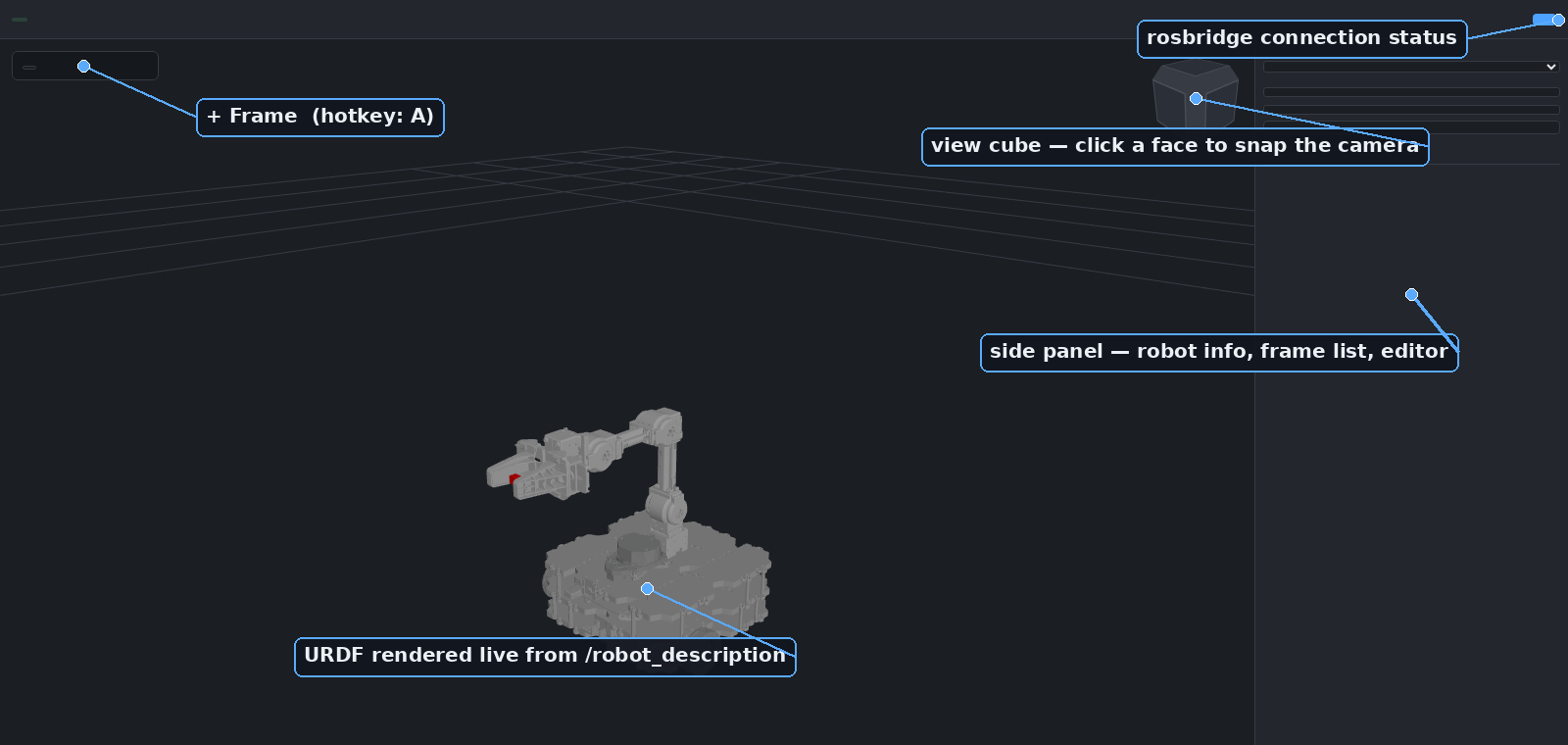
A browser-based, rviz-like viewer for ROS 2 Jazzy. It renders a robot’s URDF, lets you
orbit/pan/zoom the scene, and — unlike rviz — lets you author 3D TF frames interactively:
click a point on the robot (or in empty space), drag to set a direction, then refine with a
6-DoF gizmo. Authored frames are broadcast on /tf so rviz2, MoveIt, or any other ROS 2 node
can consume them immediately.
It’s a normal ROS 2 Jazzy package (colcon build + ros2 launch). The UI is just a web page (no rviz plugin, no X11 forwarding, shareable with a link).
Features
-
Live URDF viewer — loads a robot’s URDF/xacro (from a file path, a ROS topic, or the
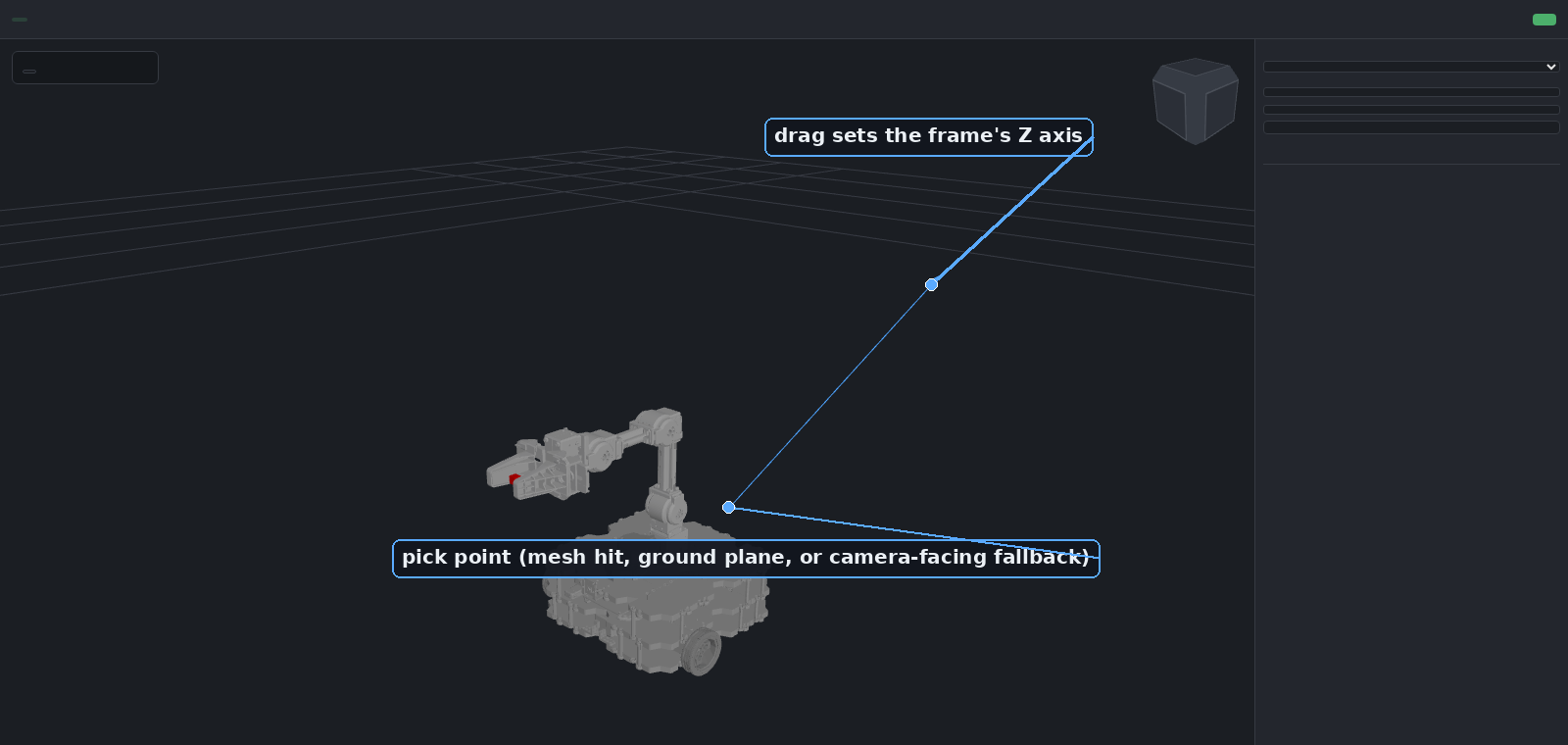
robot_descriptionparameter), drives it from/joint_states, and places the root from/tfwhen an odom→base transform exists. Multiple robots and static scenes can be loaded side by side (each panel “Add robot” call adds a new instance instead of replacing the current one) — see Multiple robots and scenes. - Interactive frame authoring — click anywhere (mesh surface, ground plane, or a camera-facing plane as a fallback) and drag to set the new frame’s Z axis, no typing coordinates by hand.
-
6-DoF gizmo — translate/rotate handles (
T/R) for precise placement once a frame exists. -
Full frame editor — rename, reparent (world pose is preserved across reparenting), edit
position as XYZ and orientation as RPY/quaternion simultaneously (two-way synced), toggle
visibility, publish/unpublish to
/tf. -
Copy-out for ROS — export any frame as YAML or as a ready-to-run
ros2 run tf2_ros static_transform_publisher …command. - rviz-style navigation — orbit/pan/zoom plus a click-to-snap view cube.
Screenshots
 |
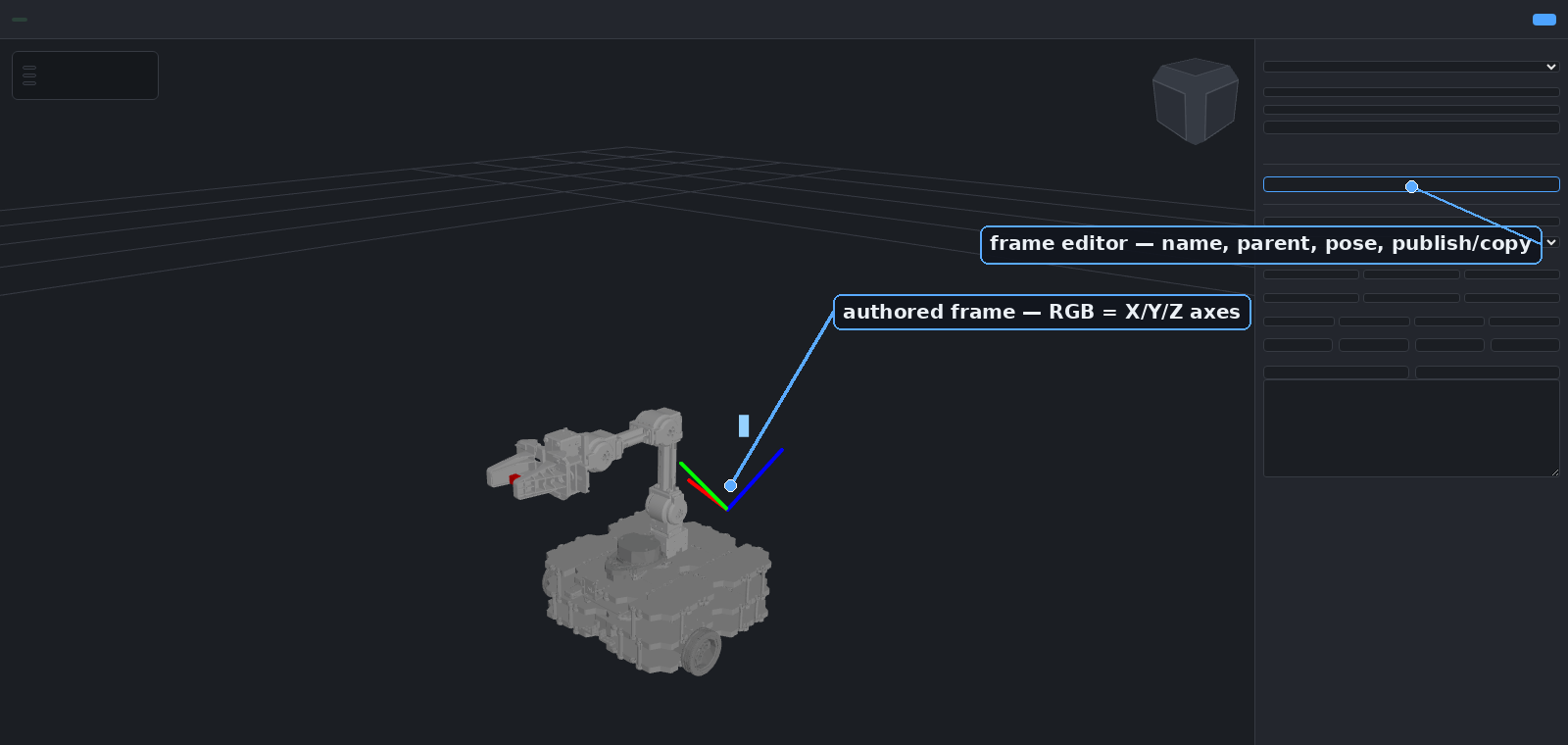 |
| Click a point and drag to set a direction — the new frame’s Z axis follows the drag. | Every frame gets a full editor: reparent, pose, publish, copy out as YAML or a static_transform_publisher command. |
Use cases
-
Sensor/tool extrinsics — eyeball a camera, LiDAR, or gripper offset on the actual mesh
instead of hand-editing numbers in a xacro file, then copy the result straight into a
static_transform_publisherlaunch entry. - MoveIt goal frames — author a grasp or approach frame relative to a link, publish it live, and drive planning against it without restarting anything.
- Calibration sanity checks — visually confirm a frame estimated by an external calibration pipeline lines up with the robot before trusting it downstream.
- Teaching / demos — a lightweight, browser-only way to show TF concepts (parent/child, world-pose-preserving reparenting) without installing rviz.
- Remote / headless robots — inspect and author frames on a robot with no display attached, from any machine on the network.
Architecture
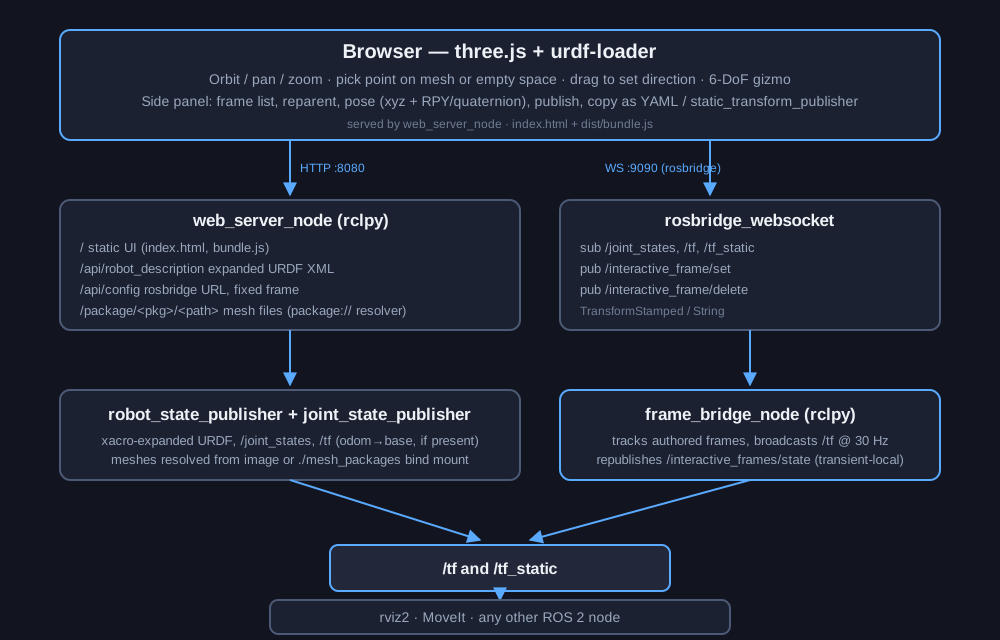
The browser talks to the ROS 2 graph over two channels: plain HTTP for the static UI, the
expanded URDF, and mesh files (web_server_node), and a rosbridge WebSocket for live topics.
Authored frames are sent to frame_bridge_node, which is the single source of truth for
/tf — it broadcasts all authored frames at 30 Hz and republishes them as a transient-local
state topic so a page reload restores them.
Quick start
Requires a sourced ROS 2 Jazzy install on the host, plus this package’s dependencies
(rosbridge_server, robot_state_publisher, joint_state_publisher, xacro, and, for the
default robot, turtlebot3_manipulation_description).
# clone (or symlink) this package into a colcon workspace
mkdir -p ~/ros2_ws/src
ln -s /path/to/interactive_frame_js ~/ros2_ws/src/web_tf_editor
cd ~/ros2_ws

# install missing ROS dependencies
rosdep install --from-paths src --ignore-src -r -y

# build (the pre-built front end in web/dist/ is committed, so no npm is needed here)
colcon build --symlink-install --packages-select web_tf_editor
source install/setup.bash

ros2 launch web_tf_editor web_tf_editor.launch.py
Then open http://localhost:8080. rosbridge listens on ws://localhost:9090. Both ports are
launch arguments (http_port:=, ros_bridge_port:=) if you need to avoid a clash with something
else already running on the host. The web server listens on all interfaces by default and serves
files from any installed package’s share directory; pass bind_address:=127.0.0.1 to keep it
local to the machine.
Default robot is TurtleBot3 + OpenMANIPULATOR-X. To use a different robot:
ros2 launch web_tf_editor web_tf_editor.launch.py urdf:=/path/to/robot.urdf.xacro
This also applies when loading a URDF from a ROS topic or the robot_description parameter via
the panel’s “Add robot” controls, not just via urdf:=.
Meshes
File truncated at 100 lines see the full file
CONTRIBUTING
Repository Summary
| Description | |
| Checkout URI | https://github.com/farshad-heravi/web_tf_editor.git |
| VCS Type | git |
| VCS Version | jazzy |
| Last Updated | 2026-09-27 |
| Dev Status | DEVELOPED |
| Released | RELEASED |
| Contributing |
Help Wanted (-)
Good First Issues (-) Pull Requests to Review (-) |
Packages
| Name | Version |
|---|---|
| web_tf_editor | 0.2.0 |
README
web_tf_editor
A browser-based, rviz-like viewer for ROS 2 Jazzy. It renders a robot’s URDF, lets you
orbit/pan/zoom the scene, and — unlike rviz — lets you author 3D TF frames interactively:
click a point on the robot (or in empty space), drag to set a direction, then refine with a
6-DoF gizmo. Authored frames are broadcast on /tf so rviz2, MoveIt, or any other ROS 2 node
can consume them immediately.
It’s a normal ROS 2 Jazzy package (colcon build + ros2 launch). The UI is just a web page (no rviz plugin, no X11 forwarding, shareable with a link).
Features
-
Live URDF viewer — loads a robot’s URDF/xacro (from a file path, a ROS topic, or the
robot_descriptionparameter), drives it from/joint_states, and places the root from/tfwhen an odom→base transform exists. Multiple robots and static scenes can be loaded side by side (each panel “Add robot” call adds a new instance instead of replacing the current one) — see Multiple robots and scenes. - Interactive frame authoring — click anywhere (mesh surface, ground plane, or a camera-facing plane as a fallback) and drag to set the new frame’s Z axis, no typing coordinates by hand.
-
6-DoF gizmo — translate/rotate handles (
T/R) for precise placement once a frame exists. -
Full frame editor — rename, reparent (world pose is preserved across reparenting), edit
position as XYZ and orientation as RPY/quaternion simultaneously (two-way synced), toggle
visibility, publish/unpublish to
/tf. -
Copy-out for ROS — export any frame as YAML or as a ready-to-run
ros2 run tf2_ros static_transform_publisher …command. - rviz-style navigation — orbit/pan/zoom plus a click-to-snap view cube.
Screenshots
|
|
| Click a point and drag to set a direction — the new frame’s Z axis follows the drag. | Every frame gets a full editor: reparent, pose, publish, copy out as YAML or a static_transform_publisher command. |
Use cases
-
Sensor/tool extrinsics — eyeball a camera, LiDAR, or gripper offset on the actual mesh
instead of hand-editing numbers in a xacro file, then copy the result straight into a
static_transform_publisherlaunch entry. - MoveIt goal frames — author a grasp or approach frame relative to a link, publish it live, and drive planning against it without restarting anything.
- Calibration sanity checks — visually confirm a frame estimated by an external calibration pipeline lines up with the robot before trusting it downstream.
- Teaching / demos — a lightweight, browser-only way to show TF concepts (parent/child, world-pose-preserving reparenting) without installing rviz.
- Remote / headless robots — inspect and author frames on a robot with no display attached, from any machine on the network.
Architecture
The browser talks to the ROS 2 graph over two channels: plain HTTP for the static UI, the
expanded URDF, and mesh files (web_server_node), and a rosbridge WebSocket for live topics.
Authored frames are sent to frame_bridge_node, which is the single source of truth for
/tf — it broadcasts all authored frames at 30 Hz and republishes them as a transient-local
state topic so a page reload restores them.
Quick start
Requires a sourced ROS 2 Jazzy install on the host, plus this package’s dependencies
(rosbridge_server, robot_state_publisher, joint_state_publisher, xacro, and, for the
default robot, turtlebot3_manipulation_description).
# clone (or symlink) this package into a colcon workspace
mkdir -p ~/ros2_ws/src
ln -s /path/to/interactive_frame_js ~/ros2_ws/src/web_tf_editor
cd ~/ros2_ws

# install missing ROS dependencies
rosdep install --from-paths src --ignore-src -r -y

# build (the pre-built front end in web/dist/ is committed, so no npm is needed here)
colcon build --symlink-install --packages-select web_tf_editor
source install/setup.bash

ros2 launch web_tf_editor web_tf_editor.launch.py
Then open http://localhost:8080. rosbridge listens on ws://localhost:9090. Both ports are
launch arguments (http_port:=, ros_bridge_port:=) if you need to avoid a clash with something
else already running on the host. The web server listens on all interfaces by default and serves
files from any installed package’s share directory; pass bind_address:=127.0.0.1 to keep it
local to the machine.
Default robot is TurtleBot3 + OpenMANIPULATOR-X. To use a different robot:
ros2 launch web_tf_editor web_tf_editor.launch.py urdf:=/path/to/robot.urdf.xacro
This also applies when loading a URDF from a ROS topic or the robot_description parameter via
the panel’s “Add robot” controls, not just via urdf:=.
Meshes
File truncated at 100 lines see the full file
CONTRIBUTING
Repository Summary
| Description | |
| Checkout URI | https://github.com/farshad-heravi/web_tf_editor.git |
| VCS Type | git |
| VCS Version | jazzy |
| Last Updated | 2026-09-27 |
| Dev Status | DEVELOPED |
| Released | RELEASED |
| Contributing |
Help Wanted (-)
Good First Issues (-) Pull Requests to Review (-) |
Packages
| Name | Version |
|---|---|
| web_tf_editor | 0.2.0 |
README
web_tf_editor
A browser-based, rviz-like viewer for ROS 2 Jazzy. It renders a robot’s URDF, lets you
orbit/pan/zoom the scene, and — unlike rviz — lets you author 3D TF frames interactively:
click a point on the robot (or in empty space), drag to set a direction, then refine with a
6-DoF gizmo. Authored frames are broadcast on /tf so rviz2, MoveIt, or any other ROS 2 node
can consume them immediately.
It’s a normal ROS 2 Jazzy package (colcon build + ros2 launch). The UI is just a web page (no rviz plugin, no X11 forwarding, shareable with a link).
Features
-
Live URDF viewer — loads a robot’s URDF/xacro (from a file path, a ROS topic, or the
robot_descriptionparameter), drives it from/joint_states, and places the root from/tfwhen an odom→base transform exists. Multiple robots and static scenes can be loaded side by side (each panel “Add robot” call adds a new instance instead of replacing the current one) — see Multiple robots and scenes. - Interactive frame authoring — click anywhere (mesh surface, ground plane, or a camera-facing plane as a fallback) and drag to set the new frame’s Z axis, no typing coordinates by hand.
-
6-DoF gizmo — translate/rotate handles (
T/R) for precise placement once a frame exists. -
Full frame editor — rename, reparent (world pose is preserved across reparenting), edit
position as XYZ and orientation as RPY/quaternion simultaneously (two-way synced), toggle
visibility, publish/unpublish to
/tf. -
Copy-out for ROS — export any frame as YAML or as a ready-to-run
ros2 run tf2_ros static_transform_publisher …command. - rviz-style navigation — orbit/pan/zoom plus a click-to-snap view cube.
Screenshots
|
|
| Click a point and drag to set a direction — the new frame’s Z axis follows the drag. | Every frame gets a full editor: reparent, pose, publish, copy out as YAML or a static_transform_publisher command. |
Use cases
-
Sensor/tool extrinsics — eyeball a camera, LiDAR, or gripper offset on the actual mesh
instead of hand-editing numbers in a xacro file, then copy the result straight into a
static_transform_publisherlaunch entry. - MoveIt goal frames — author a grasp or approach frame relative to a link, publish it live, and drive planning against it without restarting anything.
- Calibration sanity checks — visually confirm a frame estimated by an external calibration pipeline lines up with the robot before trusting it downstream.
- Teaching / demos — a lightweight, browser-only way to show TF concepts (parent/child, world-pose-preserving reparenting) without installing rviz.
- Remote / headless robots — inspect and author frames on a robot with no display attached, from any machine on the network.
Architecture
The browser talks to the ROS 2 graph over two channels: plain HTTP for the static UI, the
expanded URDF, and mesh files (web_server_node), and a rosbridge WebSocket for live topics.
Authored frames are sent to frame_bridge_node, which is the single source of truth for
/tf — it broadcasts all authored frames at 30 Hz and republishes them as a transient-local
state topic so a page reload restores them.
Quick start
Requires a sourced ROS 2 Jazzy install on the host, plus this package’s dependencies
(rosbridge_server, robot_state_publisher, joint_state_publisher, xacro, and, for the
default robot, turtlebot3_manipulation_description).
# clone (or symlink) this package into a colcon workspace
mkdir -p ~/ros2_ws/src
ln -s /path/to/interactive_frame_js ~/ros2_ws/src/web_tf_editor
cd ~/ros2_ws

# install missing ROS dependencies
rosdep install --from-paths src --ignore-src -r -y

# build (the pre-built front end in web/dist/ is committed, so no npm is needed here)
colcon build --symlink-install --packages-select web_tf_editor
source install/setup.bash

ros2 launch web_tf_editor web_tf_editor.launch.py
Then open http://localhost:8080. rosbridge listens on ws://localhost:9090. Both ports are
launch arguments (http_port:=, ros_bridge_port:=) if you need to avoid a clash with something
else already running on the host. The web server listens on all interfaces by default and serves
files from any installed package’s share directory; pass bind_address:=127.0.0.1 to keep it
local to the machine.
Default robot is TurtleBot3 + OpenMANIPULATOR-X. To use a different robot:
ros2 launch web_tf_editor web_tf_editor.launch.py urdf:=/path/to/robot.urdf.xacro
This also applies when loading a URDF from a ROS topic or the robot_description parameter via
the panel’s “Add robot” controls, not just via urdf:=.
Meshes
File truncated at 100 lines see the full file
CONTRIBUTING
Repository Summary
| Description | |
| Checkout URI | https://github.com/farshad-heravi/web_tf_editor.git |
| VCS Type | git |
| VCS Version | jazzy |
| Last Updated | 2026-09-27 |
| Dev Status | DEVELOPED |
| Released | RELEASED |
| Contributing |
Help Wanted (-)
Good First Issues (-) Pull Requests to Review (-) |
Packages
| Name | Version |
|---|---|
| web_tf_editor | 0.2.0 |
README
web_tf_editor
A browser-based, rviz-like viewer for ROS 2 Jazzy. It renders a robot’s URDF, lets you
orbit/pan/zoom the scene, and — unlike rviz — lets you author 3D TF frames interactively:
click a point on the robot (or in empty space), drag to set a direction, then refine with a
6-DoF gizmo. Authored frames are broadcast on /tf so rviz2, MoveIt, or any other ROS 2 node
can consume them immediately.
It’s a normal ROS 2 Jazzy package (colcon build + ros2 launch). The UI is just a web page (no rviz plugin, no X11 forwarding, shareable with a link).
Features
-
Live URDF viewer — loads a robot’s URDF/xacro (from a file path, a ROS topic, or the
robot_descriptionparameter), drives it from/joint_states, and places the root from/tfwhen an odom→base transform exists. Multiple robots and static scenes can be loaded side by side (each panel “Add robot” call adds a new instance instead of replacing the current one) — see Multiple robots and scenes. - Interactive frame authoring — click anywhere (mesh surface, ground plane, or a camera-facing plane as a fallback) and drag to set the new frame’s Z axis, no typing coordinates by hand.
-
6-DoF gizmo — translate/rotate handles (
T/R) for precise placement once a frame exists. -
Full frame editor — rename, reparent (world pose is preserved across reparenting), edit
position as XYZ and orientation as RPY/quaternion simultaneously (two-way synced), toggle
visibility, publish/unpublish to
/tf. -
Copy-out for ROS — export any frame as YAML or as a ready-to-run
ros2 run tf2_ros static_transform_publisher …command. - rviz-style navigation — orbit/pan/zoom plus a click-to-snap view cube.
Screenshots
|
|
| Click a point and drag to set a direction — the new frame’s Z axis follows the drag. | Every frame gets a full editor: reparent, pose, publish, copy out as YAML or a static_transform_publisher command. |
Use cases
-
Sensor/tool extrinsics — eyeball a camera, LiDAR, or gripper offset on the actual mesh
instead of hand-editing numbers in a xacro file, then copy the result straight into a
static_transform_publisherlaunch entry. - MoveIt goal frames — author a grasp or approach frame relative to a link, publish it live, and drive planning against it without restarting anything.
- Calibration sanity checks — visually confirm a frame estimated by an external calibration pipeline lines up with the robot before trusting it downstream.
- Teaching / demos — a lightweight, browser-only way to show TF concepts (parent/child, world-pose-preserving reparenting) without installing rviz.
- Remote / headless robots — inspect and author frames on a robot with no display attached, from any machine on the network.
Architecture
The browser talks to the ROS 2 graph over two channels: plain HTTP for the static UI, the
expanded URDF, and mesh files (web_server_node), and a rosbridge WebSocket for live topics.
Authored frames are sent to frame_bridge_node, which is the single source of truth for
/tf — it broadcasts all authored frames at 30 Hz and republishes them as a transient-local
state topic so a page reload restores them.
Quick start
Requires a sourced ROS 2 Jazzy install on the host, plus this package’s dependencies
(rosbridge_server, robot_state_publisher, joint_state_publisher, xacro, and, for the
default robot, turtlebot3_manipulation_description).
# clone (or symlink) this package into a colcon workspace
mkdir -p ~/ros2_ws/src
ln -s /path/to/interactive_frame_js ~/ros2_ws/src/web_tf_editor
cd ~/ros2_ws

# install missing ROS dependencies
rosdep install --from-paths src --ignore-src -r -y

# build (the pre-built front end in web/dist/ is committed, so no npm is needed here)
colcon build --symlink-install --packages-select web_tf_editor
source install/setup.bash

ros2 launch web_tf_editor web_tf_editor.launch.py
Then open http://localhost:8080. rosbridge listens on ws://localhost:9090. Both ports are
launch arguments (http_port:=, ros_bridge_port:=) if you need to avoid a clash with something
else already running on the host. The web server listens on all interfaces by default and serves
files from any installed package’s share directory; pass bind_address:=127.0.0.1 to keep it
local to the machine.
Default robot is TurtleBot3 + OpenMANIPULATOR-X. To use a different robot:
ros2 launch web_tf_editor web_tf_editor.launch.py urdf:=/path/to/robot.urdf.xacro
This also applies when loading a URDF from a ROS topic or the robot_description parameter via
the panel’s “Add robot” controls, not just via urdf:=.
Meshes
File truncated at 100 lines see the full file
CONTRIBUTING
Repository Summary
| Description | |
| Checkout URI | https://github.com/farshad-heravi/web_tf_editor.git |
| VCS Type | git |
| VCS Version | jazzy |
| Last Updated | 2026-09-27 |
| Dev Status | DEVELOPED |
| Released | RELEASED |
| Contributing |
Help Wanted (-)
Good First Issues (-) Pull Requests to Review (-) |
Packages
| Name | Version |
|---|---|
| web_tf_editor | 0.2.0 |
README
web_tf_editor
A browser-based, rviz-like viewer for ROS 2 Jazzy. It renders a robot’s URDF, lets you
orbit/pan/zoom the scene, and — unlike rviz — lets you author 3D TF frames interactively:
click a point on the robot (or in empty space), drag to set a direction, then refine with a
6-DoF gizmo. Authored frames are broadcast on /tf so rviz2, MoveIt, or any other ROS 2 node
can consume them immediately.
It’s a normal ROS 2 Jazzy package (colcon build + ros2 launch). The UI is just a web page (no rviz plugin, no X11 forwarding, shareable with a link).
Features
-
Live URDF viewer — loads a robot’s URDF/xacro (from a file path, a ROS topic, or the
robot_descriptionparameter), drives it from/joint_states, and places the root from/tfwhen an odom→base transform exists. Multiple robots and static scenes can be loaded side by side (each panel “Add robot” call adds a new instance instead of replacing the current one) — see Multiple robots and scenes. - Interactive frame authoring — click anywhere (mesh surface, ground plane, or a camera-facing plane as a fallback) and drag to set the new frame’s Z axis, no typing coordinates by hand.
-
6-DoF gizmo — translate/rotate handles (
T/R) for precise placement once a frame exists. -
Full frame editor — rename, reparent (world pose is preserved across reparenting), edit
position as XYZ and orientation as RPY/quaternion simultaneously (two-way synced), toggle
visibility, publish/unpublish to
/tf. -
Copy-out for ROS — export any frame as YAML or as a ready-to-run
ros2 run tf2_ros static_transform_publisher …command. - rviz-style navigation — orbit/pan/zoom plus a click-to-snap view cube.
Screenshots
|
|
| Click a point and drag to set a direction — the new frame’s Z axis follows the drag. | Every frame gets a full editor: reparent, pose, publish, copy out as YAML or a static_transform_publisher command. |
Use cases
-
Sensor/tool extrinsics — eyeball a camera, LiDAR, or gripper offset on the actual mesh
instead of hand-editing numbers in a xacro file, then copy the result straight into a
static_transform_publisherlaunch entry. - MoveIt goal frames — author a grasp or approach frame relative to a link, publish it live, and drive planning against it without restarting anything.
- Calibration sanity checks — visually confirm a frame estimated by an external calibration pipeline lines up with the robot before trusting it downstream.
- Teaching / demos — a lightweight, browser-only way to show TF concepts (parent/child, world-pose-preserving reparenting) without installing rviz.
- Remote / headless robots — inspect and author frames on a robot with no display attached, from any machine on the network.
Architecture
The browser talks to the ROS 2 graph over two channels: plain HTTP for the static UI, the
expanded URDF, and mesh files (web_server_node), and a rosbridge WebSocket for live topics.
Authored frames are sent to frame_bridge_node, which is the single source of truth for
/tf — it broadcasts all authored frames at 30 Hz and republishes them as a transient-local
state topic so a page reload restores them.
Quick start
Requires a sourced ROS 2 Jazzy install on the host, plus this package’s dependencies
(rosbridge_server, robot_state_publisher, joint_state_publisher, xacro, and, for the
default robot, turtlebot3_manipulation_description).
# clone (or symlink) this package into a colcon workspace
mkdir -p ~/ros2_ws/src
ln -s /path/to/interactive_frame_js ~/ros2_ws/src/web_tf_editor
cd ~/ros2_ws

# install missing ROS dependencies
rosdep install --from-paths src --ignore-src -r -y

# build (the pre-built front end in web/dist/ is committed, so no npm is needed here)
colcon build --symlink-install --packages-select web_tf_editor
source install/setup.bash

ros2 launch web_tf_editor web_tf_editor.launch.py
Then open http://localhost:8080. rosbridge listens on ws://localhost:9090. Both ports are
launch arguments (http_port:=, ros_bridge_port:=) if you need to avoid a clash with something
else already running on the host. The web server listens on all interfaces by default and serves
files from any installed package’s share directory; pass bind_address:=127.0.0.1 to keep it
local to the machine.
Default robot is TurtleBot3 + OpenMANIPULATOR-X. To use a different robot:
ros2 launch web_tf_editor web_tf_editor.launch.py urdf:=/path/to/robot.urdf.xacro
This also applies when loading a URDF from a ROS topic or the robot_description parameter via
the panel’s “Add robot” controls, not just via urdf:=.
Meshes
File truncated at 100 lines see the full file
CONTRIBUTING
Repository Summary
| Description | |
| Checkout URI | https://github.com/farshad-heravi/web_tf_editor.git |
| VCS Type | git |
| VCS Version | jazzy |
| Last Updated | 2026-09-27 |
| Dev Status | DEVELOPED |
| Released | RELEASED |
| Contributing |
Help Wanted (-)
Good First Issues (-) Pull Requests to Review (-) |
Packages
| Name | Version |
|---|---|
| web_tf_editor | 0.2.0 |
README
web_tf_editor
A browser-based, rviz-like viewer for ROS 2 Jazzy. It renders a robot’s URDF, lets you
orbit/pan/zoom the scene, and — unlike rviz — lets you author 3D TF frames interactively:
click a point on the robot (or in empty space), drag to set a direction, then refine with a
6-DoF gizmo. Authored frames are broadcast on /tf so rviz2, MoveIt, or any other ROS 2 node
can consume them immediately.
It’s a normal ROS 2 Jazzy package (colcon build + ros2 launch). The UI is just a web page (no rviz plugin, no X11 forwarding, shareable with a link).
Features
-
Live URDF viewer — loads a robot’s URDF/xacro (from a file path, a ROS topic, or the
robot_descriptionparameter), drives it from/joint_states, and places the root from/tfwhen an odom→base transform exists. Multiple robots and static scenes can be loaded side by side (each panel “Add robot” call adds a new instance instead of replacing the current one) — see Multiple robots and scenes. - Interactive frame authoring — click anywhere (mesh surface, ground plane, or a camera-facing plane as a fallback) and drag to set the new frame’s Z axis, no typing coordinates by hand.
-
6-DoF gizmo — translate/rotate handles (
T/R) for precise placement once a frame exists. -
Full frame editor — rename, reparent (world pose is preserved across reparenting), edit
position as XYZ and orientation as RPY/quaternion simultaneously (two-way synced), toggle
visibility, publish/unpublish to
/tf. -
Copy-out for ROS — export any frame as YAML or as a ready-to-run
ros2 run tf2_ros static_transform_publisher …command. - rviz-style navigation — orbit/pan/zoom plus a click-to-snap view cube.
Screenshots
|
|
| Click a point and drag to set a direction — the new frame’s Z axis follows the drag. | Every frame gets a full editor: reparent, pose, publish, copy out as YAML or a static_transform_publisher command. |
Use cases
-
Sensor/tool extrinsics — eyeball a camera, LiDAR, or gripper offset on the actual mesh
instead of hand-editing numbers in a xacro file, then copy the result straight into a
static_transform_publisherlaunch entry. - MoveIt goal frames — author a grasp or approach frame relative to a link, publish it live, and drive planning against it without restarting anything.
- Calibration sanity checks — visually confirm a frame estimated by an external calibration pipeline lines up with the robot before trusting it downstream.
- Teaching / demos — a lightweight, browser-only way to show TF concepts (parent/child, world-pose-preserving reparenting) without installing rviz.
- Remote / headless robots — inspect and author frames on a robot with no display attached, from any machine on the network.
Architecture
The browser talks to the ROS 2 graph over two channels: plain HTTP for the static UI, the
expanded URDF, and mesh files (web_server_node), and a rosbridge WebSocket for live topics.
Authored frames are sent to frame_bridge_node, which is the single source of truth for
/tf — it broadcasts all authored frames at 30 Hz and republishes them as a transient-local
state topic so a page reload restores them.
Quick start
Requires a sourced ROS 2 Jazzy install on the host, plus this package’s dependencies
(rosbridge_server, robot_state_publisher, joint_state_publisher, xacro, and, for the
default robot, turtlebot3_manipulation_description).
# clone (or symlink) this package into a colcon workspace
mkdir -p ~/ros2_ws/src
ln -s /path/to/interactive_frame_js ~/ros2_ws/src/web_tf_editor
cd ~/ros2_ws

# install missing ROS dependencies
rosdep install --from-paths src --ignore-src -r -y

# build (the pre-built front end in web/dist/ is committed, so no npm is needed here)
colcon build --symlink-install --packages-select web_tf_editor
source install/setup.bash

ros2 launch web_tf_editor web_tf_editor.launch.py
Then open http://localhost:8080. rosbridge listens on ws://localhost:9090. Both ports are
launch arguments (http_port:=, ros_bridge_port:=) if you need to avoid a clash with something
else already running on the host. The web server listens on all interfaces by default and serves
files from any installed package’s share directory; pass bind_address:=127.0.0.1 to keep it
local to the machine.
Default robot is TurtleBot3 + OpenMANIPULATOR-X. To use a different robot:
ros2 launch web_tf_editor web_tf_editor.launch.py urdf:=/path/to/robot.urdf.xacro
This also applies when loading a URDF from a ROS topic or the robot_description parameter via
the panel’s “Add robot” controls, not just via urdf:=.
Meshes
File truncated at 100 lines see the full file
CONTRIBUTING
Repository Summary
| Description | |
| Checkout URI | https://github.com/farshad-heravi/web_tf_editor.git |
| VCS Type | git |
| VCS Version | jazzy |
| Last Updated | 2026-09-27 |
| Dev Status | DEVELOPED |
| Released | RELEASED |
| Contributing |
Help Wanted (-)
Good First Issues (-) Pull Requests to Review (-) |
Packages
| Name | Version |
|---|---|
| web_tf_editor | 0.2.0 |
README
web_tf_editor
A browser-based, rviz-like viewer for ROS 2 Jazzy. It renders a robot’s URDF, lets you
orbit/pan/zoom the scene, and — unlike rviz — lets you author 3D TF frames interactively:
click a point on the robot (or in empty space), drag to set a direction, then refine with a
6-DoF gizmo. Authored frames are broadcast on /tf so rviz2, MoveIt, or any other ROS 2 node
can consume them immediately.
It’s a normal ROS 2 Jazzy package (colcon build + ros2 launch). The UI is just a web page (no rviz plugin, no X11 forwarding, shareable with a link).
Features
-
Live URDF viewer — loads a robot’s URDF/xacro (from a file path, a ROS topic, or the
robot_descriptionparameter), drives it from/joint_states, and places the root from/tfwhen an odom→base transform exists. Multiple robots and static scenes can be loaded side by side (each panel “Add robot” call adds a new instance instead of replacing the current one) — see Multiple robots and scenes. - Interactive frame authoring — click anywhere (mesh surface, ground plane, or a camera-facing plane as a fallback) and drag to set the new frame’s Z axis, no typing coordinates by hand.
-
6-DoF gizmo — translate/rotate handles (
T/R) for precise placement once a frame exists. -
Full frame editor — rename, reparent (world pose is preserved across reparenting), edit
position as XYZ and orientation as RPY/quaternion simultaneously (two-way synced), toggle
visibility, publish/unpublish to
/tf. -
Copy-out for ROS — export any frame as YAML or as a ready-to-run
ros2 run tf2_ros static_transform_publisher …command. - rviz-style navigation — orbit/pan/zoom plus a click-to-snap view cube.
Screenshots
|
|
| Click a point and drag to set a direction — the new frame’s Z axis follows the drag. | Every frame gets a full editor: reparent, pose, publish, copy out as YAML or a static_transform_publisher command. |
Use cases
-
Sensor/tool extrinsics — eyeball a camera, LiDAR, or gripper offset on the actual mesh
instead of hand-editing numbers in a xacro file, then copy the result straight into a
static_transform_publisherlaunch entry. - MoveIt goal frames — author a grasp or approach frame relative to a link, publish it live, and drive planning against it without restarting anything.
- Calibration sanity checks — visually confirm a frame estimated by an external calibration pipeline lines up with the robot before trusting it downstream.
- Teaching / demos — a lightweight, browser-only way to show TF concepts (parent/child, world-pose-preserving reparenting) without installing rviz.
- Remote / headless robots — inspect and author frames on a robot with no display attached, from any machine on the network.
Architecture
The browser talks to the ROS 2 graph over two channels: plain HTTP for the static UI, the
expanded URDF, and mesh files (web_server_node), and a rosbridge WebSocket for live topics.
Authored frames are sent to frame_bridge_node, which is the single source of truth for
/tf — it broadcasts all authored frames at 30 Hz and republishes them as a transient-local
state topic so a page reload restores them.
Quick start
Requires a sourced ROS 2 Jazzy install on the host, plus this package’s dependencies
(rosbridge_server, robot_state_publisher, joint_state_publisher, xacro, and, for the
default robot, turtlebot3_manipulation_description).
# clone (or symlink) this package into a colcon workspace
mkdir -p ~/ros2_ws/src
ln -s /path/to/interactive_frame_js ~/ros2_ws/src/web_tf_editor
cd ~/ros2_ws

# install missing ROS dependencies
rosdep install --from-paths src --ignore-src -r -y

# build (the pre-built front end in web/dist/ is committed, so no npm is needed here)
colcon build --symlink-install --packages-select web_tf_editor
source install/setup.bash

ros2 launch web_tf_editor web_tf_editor.launch.py
Then open http://localhost:8080. rosbridge listens on ws://localhost:9090. Both ports are
launch arguments (http_port:=, ros_bridge_port:=) if you need to avoid a clash with something
else already running on the host. The web server listens on all interfaces by default and serves
files from any installed package’s share directory; pass bind_address:=127.0.0.1 to keep it
local to the machine.
Default robot is TurtleBot3 + OpenMANIPULATOR-X. To use a different robot:
ros2 launch web_tf_editor web_tf_editor.launch.py urdf:=/path/to/robot.urdf.xacro
This also applies when loading a URDF from a ROS topic or the robot_description parameter via
the panel’s “Add robot” controls, not just via urdf:=.
Meshes
File truncated at 100 lines see the full file
CONTRIBUTING
Repository Summary
| Description | |
| Checkout URI | https://github.com/farshad-heravi/web_tf_editor.git |
| VCS Type | git |
| VCS Version | jazzy |
| Last Updated | 2026-09-27 |
| Dev Status | DEVELOPED |
| Released | RELEASED |
| Contributing |
Help Wanted (-)
Good First Issues (-) Pull Requests to Review (-) |
Packages
| Name | Version |
|---|---|
| web_tf_editor | 0.2.0 |
README
web_tf_editor
A browser-based, rviz-like viewer for ROS 2 Jazzy. It renders a robot’s URDF, lets you
orbit/pan/zoom the scene, and — unlike rviz — lets you author 3D TF frames interactively:
click a point on the robot (or in empty space), drag to set a direction, then refine with a
6-DoF gizmo. Authored frames are broadcast on /tf so rviz2, MoveIt, or any other ROS 2 node
can consume them immediately.
It’s a normal ROS 2 Jazzy package (colcon build + ros2 launch). The UI is just a web page (no rviz plugin, no X11 forwarding, shareable with a link).
Features
-
Live URDF viewer — loads a robot’s URDF/xacro (from a file path, a ROS topic, or the
robot_descriptionparameter), drives it from/joint_states, and places the root from/tfwhen an odom→base transform exists. Multiple robots and static scenes can be loaded side by side (each panel “Add robot” call adds a new instance instead of replacing the current one) — see Multiple robots and scenes. - Interactive frame authoring — click anywhere (mesh surface, ground plane, or a camera-facing plane as a fallback) and drag to set the new frame’s Z axis, no typing coordinates by hand.
-
6-DoF gizmo — translate/rotate handles (
T/R) for precise placement once a frame exists. -
Full frame editor — rename, reparent (world pose is preserved across reparenting), edit
position as XYZ and orientation as RPY/quaternion simultaneously (two-way synced), toggle
visibility, publish/unpublish to
/tf. -
Copy-out for ROS — export any frame as YAML or as a ready-to-run
ros2 run tf2_ros static_transform_publisher …command. - rviz-style navigation — orbit/pan/zoom plus a click-to-snap view cube.
Screenshots
|
|
| Click a point and drag to set a direction — the new frame’s Z axis follows the drag. | Every frame gets a full editor: reparent, pose, publish, copy out as YAML or a static_transform_publisher command. |
Use cases
-
Sensor/tool extrinsics — eyeball a camera, LiDAR, or gripper offset on the actual mesh
instead of hand-editing numbers in a xacro file, then copy the result straight into a
static_transform_publisherlaunch entry. - MoveIt goal frames — author a grasp or approach frame relative to a link, publish it live, and drive planning against it without restarting anything.
- Calibration sanity checks — visually confirm a frame estimated by an external calibration pipeline lines up with the robot before trusting it downstream.
- Teaching / demos — a lightweight, browser-only way to show TF concepts (parent/child, world-pose-preserving reparenting) without installing rviz.
- Remote / headless robots — inspect and author frames on a robot with no display attached, from any machine on the network.
Architecture
The browser talks to the ROS 2 graph over two channels: plain HTTP for the static UI, the
expanded URDF, and mesh files (web_server_node), and a rosbridge WebSocket for live topics.
Authored frames are sent to frame_bridge_node, which is the single source of truth for
/tf — it broadcasts all authored frames at 30 Hz and republishes them as a transient-local
state topic so a page reload restores them.
Quick start
Requires a sourced ROS 2 Jazzy install on the host, plus this package’s dependencies
(rosbridge_server, robot_state_publisher, joint_state_publisher, xacro, and, for the
default robot, turtlebot3_manipulation_description).
# clone (or symlink) this package into a colcon workspace
mkdir -p ~/ros2_ws/src
ln -s /path/to/interactive_frame_js ~/ros2_ws/src/web_tf_editor
cd ~/ros2_ws

# install missing ROS dependencies
rosdep install --from-paths src --ignore-src -r -y

# build (the pre-built front end in web/dist/ is committed, so no npm is needed here)
colcon build --symlink-install --packages-select web_tf_editor
source install/setup.bash

ros2 launch web_tf_editor web_tf_editor.launch.py
Then open http://localhost:8080. rosbridge listens on ws://localhost:9090. Both ports are
launch arguments (http_port:=, ros_bridge_port:=) if you need to avoid a clash with something
else already running on the host. The web server listens on all interfaces by default and serves
files from any installed package’s share directory; pass bind_address:=127.0.0.1 to keep it
local to the machine.
Default robot is TurtleBot3 + OpenMANIPULATOR-X. To use a different robot:
ros2 launch web_tf_editor web_tf_editor.launch.py urdf:=/path/to/robot.urdf.xacro
This also applies when loading a URDF from a ROS topic or the robot_description parameter via
the panel’s “Add robot” controls, not just via urdf:=.
Meshes
File truncated at 100 lines see the full file
CONTRIBUTING
Repository Summary
| Description | |
| Checkout URI | https://github.com/farshad-heravi/web_tf_editor.git |
| VCS Type | git |
| VCS Version | jazzy |
| Last Updated | 2026-09-27 |
| Dev Status | DEVELOPED |
| Released | RELEASED |
| Contributing |
Help Wanted (-)
Good First Issues (-) Pull Requests to Review (-) |
Packages
| Name | Version |
|---|---|
| web_tf_editor | 0.2.0 |
README
web_tf_editor
A browser-based, rviz-like viewer for ROS 2 Jazzy. It renders a robot’s URDF, lets you
orbit/pan/zoom the scene, and — unlike rviz — lets you author 3D TF frames interactively:
click a point on the robot (or in empty space), drag to set a direction, then refine with a
6-DoF gizmo. Authored frames are broadcast on /tf so rviz2, MoveIt, or any other ROS 2 node
can consume them immediately.
It’s a normal ROS 2 Jazzy package (colcon build + ros2 launch). The UI is just a web page (no rviz plugin, no X11 forwarding, shareable with a link).
Features
-
Live URDF viewer — loads a robot’s URDF/xacro (from a file path, a ROS topic, or the
robot_descriptionparameter), drives it from/joint_states, and places the root from/tfwhen an odom→base transform exists. Multiple robots and static scenes can be loaded side by side (each panel “Add robot” call adds a new instance instead of replacing the current one) — see Multiple robots and scenes. - Interactive frame authoring — click anywhere (mesh surface, ground plane, or a camera-facing plane as a fallback) and drag to set the new frame’s Z axis, no typing coordinates by hand.
-
6-DoF gizmo — translate/rotate handles (
T/R) for precise placement once a frame exists. -
Full frame editor — rename, reparent (world pose is preserved across reparenting), edit
position as XYZ and orientation as RPY/quaternion simultaneously (two-way synced), toggle
visibility, publish/unpublish to
/tf. -
Copy-out for ROS — export any frame as YAML or as a ready-to-run
ros2 run tf2_ros static_transform_publisher …command. - rviz-style navigation — orbit/pan/zoom plus a click-to-snap view cube.
Screenshots
|
|
| Click a point and drag to set a direction — the new frame’s Z axis follows the drag. | Every frame gets a full editor: reparent, pose, publish, copy out as YAML or a static_transform_publisher command. |
Use cases
-
Sensor/tool extrinsics — eyeball a camera, LiDAR, or gripper offset on the actual mesh
instead of hand-editing numbers in a xacro file, then copy the result straight into a
static_transform_publisherlaunch entry. - MoveIt goal frames — author a grasp or approach frame relative to a link, publish it live, and drive planning against it without restarting anything.
- Calibration sanity checks — visually confirm a frame estimated by an external calibration pipeline lines up with the robot before trusting it downstream.
- Teaching / demos — a lightweight, browser-only way to show TF concepts (parent/child, world-pose-preserving reparenting) without installing rviz.
- Remote / headless robots — inspect and author frames on a robot with no display attached, from any machine on the network.
Architecture
The browser talks to the ROS 2 graph over two channels: plain HTTP for the static UI, the
expanded URDF, and mesh files (web_server_node), and a rosbridge WebSocket for live topics.
Authored frames are sent to frame_bridge_node, which is the single source of truth for
/tf — it broadcasts all authored frames at 30 Hz and republishes them as a transient-local
state topic so a page reload restores them.
Quick start
Requires a sourced ROS 2 Jazzy install on the host, plus this package’s dependencies
(rosbridge_server, robot_state_publisher, joint_state_publisher, xacro, and, for the
default robot, turtlebot3_manipulation_description).
# clone (or symlink) this package into a colcon workspace
mkdir -p ~/ros2_ws/src
ln -s /path/to/interactive_frame_js ~/ros2_ws/src/web_tf_editor
cd ~/ros2_ws

# install missing ROS dependencies
rosdep install --from-paths src --ignore-src -r -y

# build (the pre-built front end in web/dist/ is committed, so no npm is needed here)
colcon build --symlink-install --packages-select web_tf_editor
source install/setup.bash

ros2 launch web_tf_editor web_tf_editor.launch.py
Then open http://localhost:8080. rosbridge listens on ws://localhost:9090. Both ports are
launch arguments (http_port:=, ros_bridge_port:=) if you need to avoid a clash with something
else already running on the host. The web server listens on all interfaces by default and serves
files from any installed package’s share directory; pass bind_address:=127.0.0.1 to keep it
local to the machine.
Default robot is TurtleBot3 + OpenMANIPULATOR-X. To use a different robot:
ros2 launch web_tf_editor web_tf_editor.launch.py urdf:=/path/to/robot.urdf.xacro
This also applies when loading a URDF from a ROS topic or the robot_description parameter via
the panel’s “Add robot” controls, not just via urdf:=.
Meshes
File truncated at 100 lines see the full file
CONTRIBUTING
Repository Summary
| Description | |
| Checkout URI | https://github.com/farshad-heravi/web_tf_editor.git |
| VCS Type | git |
| VCS Version | jazzy |
| Last Updated | 2026-09-27 |
| Dev Status | DEVELOPED |
| Released | RELEASED |
| Contributing |
Help Wanted (-)
Good First Issues (-) Pull Requests to Review (-) |
Packages
| Name | Version |
|---|---|
| web_tf_editor | 0.2.0 |
README
web_tf_editor
A browser-based, rviz-like viewer for ROS 2 Jazzy. It renders a robot’s URDF, lets you
orbit/pan/zoom the scene, and — unlike rviz — lets you author 3D TF frames interactively:
click a point on the robot (or in empty space), drag to set a direction, then refine with a
6-DoF gizmo. Authored frames are broadcast on /tf so rviz2, MoveIt, or any other ROS 2 node
can consume them immediately.
It’s a normal ROS 2 Jazzy package (colcon build + ros2 launch). The UI is just a web page (no rviz plugin, no X11 forwarding, shareable with a link).
Features
-
Live URDF viewer — loads a robot’s URDF/xacro (from a file path, a ROS topic, or the
robot_descriptionparameter), drives it from/joint_states, and places the root from/tfwhen an odom→base transform exists. Multiple robots and static scenes can be loaded side by side (each panel “Add robot” call adds a new instance instead of replacing the current one) — see Multiple robots and scenes. - Interactive frame authoring — click anywhere (mesh surface, ground plane, or a camera-facing plane as a fallback) and drag to set the new frame’s Z axis, no typing coordinates by hand.
-
6-DoF gizmo — translate/rotate handles (
T/R) for precise placement once a frame exists. -
Full frame editor — rename, reparent (world pose is preserved across reparenting), edit
position as XYZ and orientation as RPY/quaternion simultaneously (two-way synced), toggle
visibility, publish/unpublish to
/tf. -
Copy-out for ROS — export any frame as YAML or as a ready-to-run
ros2 run tf2_ros static_transform_publisher …command. - rviz-style navigation — orbit/pan/zoom plus a click-to-snap view cube.
Screenshots
|
|
| Click a point and drag to set a direction — the new frame’s Z axis follows the drag. | Every frame gets a full editor: reparent, pose, publish, copy out as YAML or a static_transform_publisher command. |
Use cases
-
Sensor/tool extrinsics — eyeball a camera, LiDAR, or gripper offset on the actual mesh
instead of hand-editing numbers in a xacro file, then copy the result straight into a
static_transform_publisherlaunch entry. - MoveIt goal frames — author a grasp or approach frame relative to a link, publish it live, and drive planning against it without restarting anything.
- Calibration sanity checks — visually confirm a frame estimated by an external calibration pipeline lines up with the robot before trusting it downstream.
- Teaching / demos — a lightweight, browser-only way to show TF concepts (parent/child, world-pose-preserving reparenting) without installing rviz.
- Remote / headless robots — inspect and author frames on a robot with no display attached, from any machine on the network.
Architecture
The browser talks to the ROS 2 graph over two channels: plain HTTP for the static UI, the
expanded URDF, and mesh files (web_server_node), and a rosbridge WebSocket for live topics.
Authored frames are sent to frame_bridge_node, which is the single source of truth for
/tf — it broadcasts all authored frames at 30 Hz and republishes them as a transient-local
state topic so a page reload restores them.
Quick start
Requires a sourced ROS 2 Jazzy install on the host, plus this package’s dependencies
(rosbridge_server, robot_state_publisher, joint_state_publisher, xacro, and, for the
default robot, turtlebot3_manipulation_description).
# clone (or symlink) this package into a colcon workspace
mkdir -p ~/ros2_ws/src
ln -s /path/to/interactive_frame_js ~/ros2_ws/src/web_tf_editor
cd ~/ros2_ws

# install missing ROS dependencies
rosdep install --from-paths src --ignore-src -r -y

# build (the pre-built front end in web/dist/ is committed, so no npm is needed here)
colcon build --symlink-install --packages-select web_tf_editor
source install/setup.bash

ros2 launch web_tf_editor web_tf_editor.launch.py
Then open http://localhost:8080. rosbridge listens on ws://localhost:9090. Both ports are
launch arguments (http_port:=, ros_bridge_port:=) if you need to avoid a clash with something
else already running on the host. The web server listens on all interfaces by default and serves
files from any installed package’s share directory; pass bind_address:=127.0.0.1 to keep it
local to the machine.
Default robot is TurtleBot3 + OpenMANIPULATOR-X. To use a different robot:
ros2 launch web_tf_editor web_tf_editor.launch.py urdf:=/path/to/robot.urdf.xacro
This also applies when loading a URDF from a ROS topic or the robot_description parameter via
the panel’s “Add robot” controls, not just via urdf:=.
Meshes
File truncated at 100 lines see the full file