 ROS Index
Repository Summary
| Description | |
| Checkout URI | https://github.com/stereolabs/zed-ros2-wrapper.git |
| VCS Type | git |
| VCS Version | master |
| Last Updated | 2026-10-07 |
| Dev Status | UNKNOWN |
| Released | UNRELEASED |
| Contributing |
Help Wanted (-)
Good First Issues (-) Pull Requests to Review (-) |
Packages
| Name | Version |
|---|---|
| zed_components | 5.5.0 |
| zed_debug | 5.5.0 |
| zed_ros2 | 5.5.0 |
| zed_wrapper | 5.5.0 |
README
 <br \>
ROS 2 wrapper
<br \>
ROS 2 wrapper
ROS 2 packages for using Stereolabs ZED Camera cameras.
Supported on ROS 2 Humble, Jazzy, and Lyrical (LTS), plus Foxy (backward compatibility) and Rolling (developers)
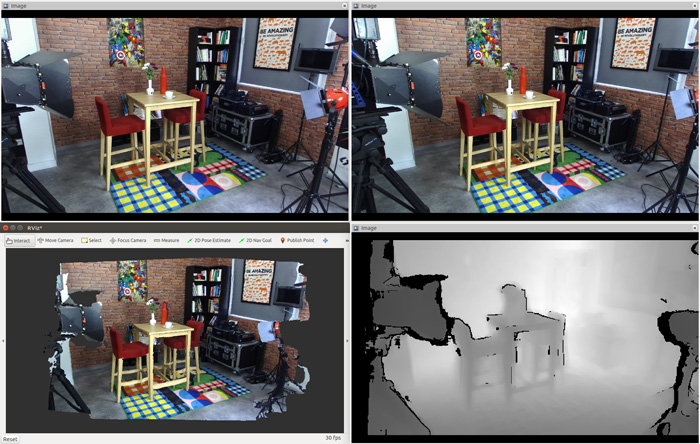
This package enables the use of ZED cameras with ROS 2, providing access to a variety of data types, including:
- Color and grayscale images, both rectified and unrectified
- Depth data
- Colored 3D point clouds
- Position and mapping, with optional GNSS data fusion
- Sensor data
- Detected objects
- Human skeleton data
- And more…
Installation
Prerequisites
- Ubuntu 20.04 (Focal Fossa), Ubuntu 22.04 (Jammy Jellyfish), Ubuntu 24.04 (Noble Numbat), or Ubuntu 26.04 (Resolute Raccoon)
- ZED SDK v5.2 (to support older versions please check the releases)
- CUDA dependency
- A supported ROS 2 distribution (see Supported ROS 2 distributions below):
- Humble Hawksbill on Ubuntu 22.04: LTS [EOL May 2027]
- Jazzy Jalisco on Ubuntu 24.04: LTS [EOL May 2029]
- Lyrical on Ubuntu 26.04: LTS
- Foxy Fitzroy on Ubuntu 20.04: backward compatibility only [EOL reached]
- Rolling Ridley, for developers
Supported ROS 2 distributions
- :white_check_mark: All the current LTS distributions are officially supported: ROS 2 Humble Hawksbill (Ubuntu 22.04), Jazzy Jalisco (Ubuntu 24.04), and Lyrical (Ubuntu 26.04).
- :warning: Foxy Fitzroy (Ubuntu 20.04) is still supported for backward compatibility, with limitations when newer packages are not available for it (Foxy reached its End Of Life).
- :hammer_and_wrench: Rolling Ridley is supported for developers, but we cannot always guarantee that breaking changes introduced in Rolling are supported immediately.
- :grey_question: Non-LTS distributions (e.g. Iron, Kilted) are not officially tested, but they could work.
Build the package
The zed_ros2_wrapper is a colcon package.
:pushpin: Note: If you haven’t set up your colcon workspace yet, please follow this short tutorial.
To install the zed_ros2_wrapper, open a bash terminal, clone the package from GitHub, and build it:
mkdir -p ~/ros2_ws/src/ # create your workspace if it does not exist
cd ~/ros2_ws/src/ #use your current ros2 workspace folder
git clone https://github.com/stereolabs/zed-ros2-wrapper.git
cd ..
sudo apt update
rosdep update
rosdep install --from-paths src --ignore-src -r -y # install dependencies
colcon build --symlink-install --cmake-args=-DCMAKE_BUILD_TYPE=Release --parallel-workers $(nproc) # build the workspace
echo source $(pwd)/install/local_setup.bash >> ~/.bashrc # automatically source the installation in every new bash (optional)
source ~/.bashrc
:pushpin: Note: the dependency
zed_msgsis no longer installed as a submodule of this package; it is available throughaptas a binary package with ROS 2 Humble. When working with ROS 2 Foxy, or other distributions, you can install it from the sources from the zed-ros2-interfaces repository.
:pushpin: Note: If
rosdepis missing, you can install it with:
sudo apt-get install python3-rosdep python3-rosinstall-generator python3-vcstool python3-rosinstall build-essential
:pushpin: Note: The
zed_debugpackage is intended for internal development only. If you don’t need it, you can skip building this package by adding--packages-skip zed_debugto yourcolconcommand.
:pushpin: Note: When using the ZED ROS 2 Wrapper on an NVIDIA Jetson with JP6, you may get the following error when building the package for the first time
CMake Error at /usr/share/cmake-3.22/Modules/FindCUDA.cmake:859 (message):
  Specify CUDA_TOOLKIT_ROOT_DIR
Call Stack (most recent call first):
 /usr/local/zed/zed-config.cmake:72 (find_package)
 CMakeLists.txt:81 (find_package)
You can fix the problem by installing the missing
nvidia-jetpackpackages:
sudo apt install nvidia-jetpack nvidia-jetpack-dev:pushpin: Note: The option
--symlink-installis very important, it allows the use of symlinks instead of copying files to the ROS 2 folders during the installation, where possible. Each package in ROS 2 must be installed, and all the files used by the nodes must be copied into the installation folders. Using symlinks allows you to modify them in your workspace, reflecting the modification during the next executions without issuing a newcolcon buildcommand. This is true only for all the files that don’t need to be compiled (Python scripts, configurations, etc.).:pushpin: Note: If you are using a different console interface like zsh, you have to change the
sourcecommand as follows:echo source $(pwd)/install/local_setup.zsh >> ~/.zshrcandsource ~/.zshrc.
Starting the ZED node
:pushpin: Note: we recommend reading this ROS 2 tuning guide to improve the ROS 2 experience with ZED.
To start the ZED node, open a bash terminal and use the CLI command ros2 launch:
File truncated at 100 lines see the full file
CONTRIBUTING
Submitting your code changes
Code contributions should be made via pull requests to the appropriate repositories:
We ask all contributors to follow the practices explained in ROS 2 documentation.
Before submitting a pull request please perform this list of tasks from the root of your ROS 2 workspace:
-
Automatic code formatting:
$ ament_uncrustify --reformat src -
Build the packages to check for compile errors:
$ colcon build --symlink-install --cmake-args=-DCMAKE_BUILD_TYPE=Release -
Perform the automatic build tests:
$ colcon test -
Analyze and solve eventually reported errors:
$ colcon test-result --verbose -
Repeat steps (1) -> (4) until all reported formatting errors have been resolved.
License
Any contribution that you make to this repository will be under the Apache 2 License, as dictated by that license:
5. Submission of Contributions. Unless You explicitly state otherwise,
   any Contribution intentionally submitted for inclusion in the Work
   by You to the Licensor shall be under the terms and conditions of
   this License, without any additional terms or conditions.
   Notwithstanding the above, nothing herein shall supersede or modify
   the terms of any separate license agreement you may have executed
   with Licensor regarding such Contributions.
Contributors must sign-off each commit by adding a Signed-off-by: ...
line to commit messages to certify that they have the right to submit
the code they are contributing to the project according to the
Developer Certificate of Origin (DCO).
Repository Summary
| Description | |
| Checkout URI | https://github.com/stereolabs/zed-ros2-wrapper.git |
| VCS Type | git |
| VCS Version | master |
| Last Updated | 2026-10-07 |
| Dev Status | UNKNOWN |
| Released | UNRELEASED |
| Contributing |
Help Wanted (-)
Good First Issues (-) Pull Requests to Review (-) |
Packages
| Name | Version |
|---|---|
| zed_components | 5.5.0 |
| zed_debug | 5.5.0 |
| zed_ros2 | 5.5.0 |
| zed_wrapper | 5.5.0 |
README
<br \>
ROS 2 wrapper
ROS 2 packages for using Stereolabs ZED Camera cameras.
Supported on ROS 2 Humble, Jazzy, and Lyrical (LTS), plus Foxy (backward compatibility) and Rolling (developers)
This package enables the use of ZED cameras with ROS 2, providing access to a variety of data types, including:
- Color and grayscale images, both rectified and unrectified
- Depth data
- Colored 3D point clouds
- Position and mapping, with optional GNSS data fusion
- Sensor data
- Detected objects
- Human skeleton data
- And more…
Installation
Prerequisites
- Ubuntu 20.04 (Focal Fossa), Ubuntu 22.04 (Jammy Jellyfish), Ubuntu 24.04 (Noble Numbat), or Ubuntu 26.04 (Resolute Raccoon)
- ZED SDK v5.2 (to support older versions please check the releases)
- CUDA dependency
- A supported ROS 2 distribution (see Supported ROS 2 distributions below):
- Humble Hawksbill on Ubuntu 22.04: LTS [EOL May 2027]
- Jazzy Jalisco on Ubuntu 24.04: LTS [EOL May 2029]
- Lyrical on Ubuntu 26.04: LTS
- Foxy Fitzroy on Ubuntu 20.04: backward compatibility only [EOL reached]
- Rolling Ridley, for developers
Supported ROS 2 distributions
- :white_check_mark: All the current LTS distributions are officially supported: ROS 2 Humble Hawksbill (Ubuntu 22.04), Jazzy Jalisco (Ubuntu 24.04), and Lyrical (Ubuntu 26.04).
- :warning: Foxy Fitzroy (Ubuntu 20.04) is still supported for backward compatibility, with limitations when newer packages are not available for it (Foxy reached its End Of Life).
- :hammer_and_wrench: Rolling Ridley is supported for developers, but we cannot always guarantee that breaking changes introduced in Rolling are supported immediately.
- :grey_question: Non-LTS distributions (e.g. Iron, Kilted) are not officially tested, but they could work.
Build the package
The zed_ros2_wrapper is a colcon package.
:pushpin: Note: If you haven’t set up your colcon workspace yet, please follow this short tutorial.
To install the zed_ros2_wrapper, open a bash terminal, clone the package from GitHub, and build it:
mkdir -p ~/ros2_ws/src/ # create your workspace if it does not exist
cd ~/ros2_ws/src/ #use your current ros2 workspace folder
git clone https://github.com/stereolabs/zed-ros2-wrapper.git
cd ..
sudo apt update
rosdep update
rosdep install --from-paths src --ignore-src -r -y # install dependencies
colcon build --symlink-install --cmake-args=-DCMAKE_BUILD_TYPE=Release --parallel-workers $(nproc) # build the workspace
echo source $(pwd)/install/local_setup.bash >> ~/.bashrc # automatically source the installation in every new bash (optional)
source ~/.bashrc
:pushpin: Note: the dependency
zed_msgsis no longer installed as a submodule of this package; it is available throughaptas a binary package with ROS 2 Humble. When working with ROS 2 Foxy, or other distributions, you can install it from the sources from the zed-ros2-interfaces repository.
:pushpin: Note: If
rosdepis missing, you can install it with:
sudo apt-get install python3-rosdep python3-rosinstall-generator python3-vcstool python3-rosinstall build-essential
:pushpin: Note: The
zed_debugpackage is intended for internal development only. If you don’t need it, you can skip building this package by adding--packages-skip zed_debugto yourcolconcommand.
:pushpin: Note: When using the ZED ROS 2 Wrapper on an NVIDIA Jetson with JP6, you may get the following error when building the package for the first time
CMake Error at /usr/share/cmake-3.22/Modules/FindCUDA.cmake:859 (message):
  Specify CUDA_TOOLKIT_ROOT_DIR
Call Stack (most recent call first):
 /usr/local/zed/zed-config.cmake:72 (find_package)
 CMakeLists.txt:81 (find_package)
You can fix the problem by installing the missing
nvidia-jetpackpackages:
sudo apt install nvidia-jetpack nvidia-jetpack-dev:pushpin: Note: The option
--symlink-installis very important, it allows the use of symlinks instead of copying files to the ROS 2 folders during the installation, where possible. Each package in ROS 2 must be installed, and all the files used by the nodes must be copied into the installation folders. Using symlinks allows you to modify them in your workspace, reflecting the modification during the next executions without issuing a newcolcon buildcommand. This is true only for all the files that don’t need to be compiled (Python scripts, configurations, etc.).:pushpin: Note: If you are using a different console interface like zsh, you have to change the
sourcecommand as follows:echo source $(pwd)/install/local_setup.zsh >> ~/.zshrcandsource ~/.zshrc.
Starting the ZED node
:pushpin: Note: we recommend reading this ROS 2 tuning guide to improve the ROS 2 experience with ZED.
To start the ZED node, open a bash terminal and use the CLI command ros2 launch:
File truncated at 100 lines see the full file
CONTRIBUTING
Submitting your code changes
Code contributions should be made via pull requests to the appropriate repositories:
We ask all contributors to follow the practices explained in ROS 2 documentation.
Before submitting a pull request please perform this list of tasks from the root of your ROS 2 workspace:
-
Automatic code formatting:
$ ament_uncrustify --reformat src -
Build the packages to check for compile errors:
$ colcon build --symlink-install --cmake-args=-DCMAKE_BUILD_TYPE=Release -
Perform the automatic build tests:
$ colcon test -
Analyze and solve eventually reported errors:
$ colcon test-result --verbose -
Repeat steps (1) -> (4) until all reported formatting errors have been resolved.
License
Any contribution that you make to this repository will be under the Apache 2 License, as dictated by that license:
5. Submission of Contributions. Unless You explicitly state otherwise,
   any Contribution intentionally submitted for inclusion in the Work
   by You to the Licensor shall be under the terms and conditions of
   this License, without any additional terms or conditions.
   Notwithstanding the above, nothing herein shall supersede or modify
   the terms of any separate license agreement you may have executed
   with Licensor regarding such Contributions.
Contributors must sign-off each commit by adding a Signed-off-by: ...
line to commit messages to certify that they have the right to submit
the code they are contributing to the project according to the
Developer Certificate of Origin (DCO).
Repository Summary
| Description | |
| Checkout URI | https://github.com/stereolabs/zed-ros2-wrapper.git |
| VCS Type | git |
| VCS Version | master |
| Last Updated | 2026-10-07 |
| Dev Status | UNKNOWN |
| Released | UNRELEASED |
| Contributing |
Help Wanted (-)
Good First Issues (-) Pull Requests to Review (-) |
Packages
| Name | Version |
|---|---|
| zed_components | 5.5.0 |
| zed_debug | 5.5.0 |
| zed_ros2 | 5.5.0 |
| zed_wrapper | 5.5.0 |
README
<br \>
ROS 2 wrapper
ROS 2 packages for using Stereolabs ZED Camera cameras.
Supported on ROS 2 Humble, Jazzy, and Lyrical (LTS), plus Foxy (backward compatibility) and Rolling (developers)
This package enables the use of ZED cameras with ROS 2, providing access to a variety of data types, including:
- Color and grayscale images, both rectified and unrectified
- Depth data
- Colored 3D point clouds
- Position and mapping, with optional GNSS data fusion
- Sensor data
- Detected objects
- Human skeleton data
- And more…
Installation
Prerequisites
- Ubuntu 20.04 (Focal Fossa), Ubuntu 22.04 (Jammy Jellyfish), Ubuntu 24.04 (Noble Numbat), or Ubuntu 26.04 (Resolute Raccoon)
- ZED SDK v5.2 (to support older versions please check the releases)
- CUDA dependency
- A supported ROS 2 distribution (see Supported ROS 2 distributions below):
- Humble Hawksbill on Ubuntu 22.04: LTS [EOL May 2027]
- Jazzy Jalisco on Ubuntu 24.04: LTS [EOL May 2029]
- Lyrical on Ubuntu 26.04: LTS
- Foxy Fitzroy on Ubuntu 20.04: backward compatibility only [EOL reached]
- Rolling Ridley, for developers
Supported ROS 2 distributions
- :white_check_mark: All the current LTS distributions are officially supported: ROS 2 Humble Hawksbill (Ubuntu 22.04), Jazzy Jalisco (Ubuntu 24.04), and Lyrical (Ubuntu 26.04).
- :warning: Foxy Fitzroy (Ubuntu 20.04) is still supported for backward compatibility, with limitations when newer packages are not available for it (Foxy reached its End Of Life).
- :hammer_and_wrench: Rolling Ridley is supported for developers, but we cannot always guarantee that breaking changes introduced in Rolling are supported immediately.
- :grey_question: Non-LTS distributions (e.g. Iron, Kilted) are not officially tested, but they could work.
Build the package
The zed_ros2_wrapper is a colcon package.
:pushpin: Note: If you haven’t set up your colcon workspace yet, please follow this short tutorial.
To install the zed_ros2_wrapper, open a bash terminal, clone the package from GitHub, and build it:
mkdir -p ~/ros2_ws/src/ # create your workspace if it does not exist
cd ~/ros2_ws/src/ #use your current ros2 workspace folder
git clone https://github.com/stereolabs/zed-ros2-wrapper.git
cd ..
sudo apt update
rosdep update
rosdep install --from-paths src --ignore-src -r -y # install dependencies
colcon build --symlink-install --cmake-args=-DCMAKE_BUILD_TYPE=Release --parallel-workers $(nproc) # build the workspace
echo source $(pwd)/install/local_setup.bash >> ~/.bashrc # automatically source the installation in every new bash (optional)
source ~/.bashrc
:pushpin: Note: the dependency
zed_msgsis no longer installed as a submodule of this package; it is available throughaptas a binary package with ROS 2 Humble. When working with ROS 2 Foxy, or other distributions, you can install it from the sources from the zed-ros2-interfaces repository.
:pushpin: Note: If
rosdepis missing, you can install it with:
sudo apt-get install python3-rosdep python3-rosinstall-generator python3-vcstool python3-rosinstall build-essential
:pushpin: Note: The
zed_debugpackage is intended for internal development only. If you don’t need it, you can skip building this package by adding--packages-skip zed_debugto yourcolconcommand.
:pushpin: Note: When using the ZED ROS 2 Wrapper on an NVIDIA Jetson with JP6, you may get the following error when building the package for the first time
CMake Error at /usr/share/cmake-3.22/Modules/FindCUDA.cmake:859 (message):
  Specify CUDA_TOOLKIT_ROOT_DIR
Call Stack (most recent call first):
 /usr/local/zed/zed-config.cmake:72 (find_package)
 CMakeLists.txt:81 (find_package)
You can fix the problem by installing the missing
nvidia-jetpackpackages:
sudo apt install nvidia-jetpack nvidia-jetpack-dev:pushpin: Note: The option
--symlink-installis very important, it allows the use of symlinks instead of copying files to the ROS 2 folders during the installation, where possible. Each package in ROS 2 must be installed, and all the files used by the nodes must be copied into the installation folders. Using symlinks allows you to modify them in your workspace, reflecting the modification during the next executions without issuing a newcolcon buildcommand. This is true only for all the files that don’t need to be compiled (Python scripts, configurations, etc.).:pushpin: Note: If you are using a different console interface like zsh, you have to change the
sourcecommand as follows:echo source $(pwd)/install/local_setup.zsh >> ~/.zshrcandsource ~/.zshrc.
Starting the ZED node
:pushpin: Note: we recommend reading this ROS 2 tuning guide to improve the ROS 2 experience with ZED.
To start the ZED node, open a bash terminal and use the CLI command ros2 launch:
File truncated at 100 lines see the full file
CONTRIBUTING
Submitting your code changes
Code contributions should be made via pull requests to the appropriate repositories:
We ask all contributors to follow the practices explained in ROS 2 documentation.
Before submitting a pull request please perform this list of tasks from the root of your ROS 2 workspace:
-
Automatic code formatting:
$ ament_uncrustify --reformat src -
Build the packages to check for compile errors:
$ colcon build --symlink-install --cmake-args=-DCMAKE_BUILD_TYPE=Release -
Perform the automatic build tests:
$ colcon test -
Analyze and solve eventually reported errors:
$ colcon test-result --verbose -
Repeat steps (1) -> (4) until all reported formatting errors have been resolved.
License
Any contribution that you make to this repository will be under the Apache 2 License, as dictated by that license:
5. Submission of Contributions. Unless You explicitly state otherwise,
   any Contribution intentionally submitted for inclusion in the Work
   by You to the Licensor shall be under the terms and conditions of
   this License, without any additional terms or conditions.
   Notwithstanding the above, nothing herein shall supersede or modify
   the terms of any separate license agreement you may have executed
   with Licensor regarding such Contributions.
Contributors must sign-off each commit by adding a Signed-off-by: ...
line to commit messages to certify that they have the right to submit
the code they are contributing to the project according to the
Developer Certificate of Origin (DCO).
Repository Summary
| Description | |
| Checkout URI | https://github.com/stereolabs/zed-ros2-wrapper.git |
| VCS Type | git |
| VCS Version | master |
| Last Updated | 2026-10-07 |
| Dev Status | UNKNOWN |
| Released | UNRELEASED |
| Contributing |
Help Wanted (-)
Good First Issues (-) Pull Requests to Review (-) |
Packages
| Name | Version |
|---|---|
| zed_components | 5.5.0 |
| zed_debug | 5.5.0 |
| zed_ros2 | 5.5.0 |
| zed_wrapper | 5.5.0 |
README
<br \>
ROS 2 wrapper
ROS 2 packages for using Stereolabs ZED Camera cameras.
Supported on ROS 2 Humble, Jazzy, and Lyrical (LTS), plus Foxy (backward compatibility) and Rolling (developers)
This package enables the use of ZED cameras with ROS 2, providing access to a variety of data types, including:
- Color and grayscale images, both rectified and unrectified
- Depth data
- Colored 3D point clouds
- Position and mapping, with optional GNSS data fusion
- Sensor data
- Detected objects
- Human skeleton data
- And more…
Installation
Prerequisites
- Ubuntu 20.04 (Focal Fossa), Ubuntu 22.04 (Jammy Jellyfish), Ubuntu 24.04 (Noble Numbat), or Ubuntu 26.04 (Resolute Raccoon)
- ZED SDK v5.2 (to support older versions please check the releases)
- CUDA dependency
- A supported ROS 2 distribution (see Supported ROS 2 distributions below):
- Humble Hawksbill on Ubuntu 22.04: LTS [EOL May 2027]
- Jazzy Jalisco on Ubuntu 24.04: LTS [EOL May 2029]
- Lyrical on Ubuntu 26.04: LTS
- Foxy Fitzroy on Ubuntu 20.04: backward compatibility only [EOL reached]
- Rolling Ridley, for developers
Supported ROS 2 distributions
- :white_check_mark: All the current LTS distributions are officially supported: ROS 2 Humble Hawksbill (Ubuntu 22.04), Jazzy Jalisco (Ubuntu 24.04), and Lyrical (Ubuntu 26.04).
- :warning: Foxy Fitzroy (Ubuntu 20.04) is still supported for backward compatibility, with limitations when newer packages are not available for it (Foxy reached its End Of Life).
- :hammer_and_wrench: Rolling Ridley is supported for developers, but we cannot always guarantee that breaking changes introduced in Rolling are supported immediately.
- :grey_question: Non-LTS distributions (e.g. Iron, Kilted) are not officially tested, but they could work.
Build the package
The zed_ros2_wrapper is a colcon package.
:pushpin: Note: If you haven’t set up your colcon workspace yet, please follow this short tutorial.
To install the zed_ros2_wrapper, open a bash terminal, clone the package from GitHub, and build it:
mkdir -p ~/ros2_ws/src/ # create your workspace if it does not exist
cd ~/ros2_ws/src/ #use your current ros2 workspace folder
git clone https://github.com/stereolabs/zed-ros2-wrapper.git
cd ..
sudo apt update
rosdep update
rosdep install --from-paths src --ignore-src -r -y # install dependencies
colcon build --symlink-install --cmake-args=-DCMAKE_BUILD_TYPE=Release --parallel-workers $(nproc) # build the workspace
echo source $(pwd)/install/local_setup.bash >> ~/.bashrc # automatically source the installation in every new bash (optional)
source ~/.bashrc
:pushpin: Note: the dependency
zed_msgsis no longer installed as a submodule of this package; it is available throughaptas a binary package with ROS 2 Humble. When working with ROS 2 Foxy, or other distributions, you can install it from the sources from the zed-ros2-interfaces repository.
:pushpin: Note: If
rosdepis missing, you can install it with:
sudo apt-get install python3-rosdep python3-rosinstall-generator python3-vcstool python3-rosinstall build-essential
:pushpin: Note: The
zed_debugpackage is intended for internal development only. If you don’t need it, you can skip building this package by adding--packages-skip zed_debugto yourcolconcommand.
:pushpin: Note: When using the ZED ROS 2 Wrapper on an NVIDIA Jetson with JP6, you may get the following error when building the package for the first time
CMake Error at /usr/share/cmake-3.22/Modules/FindCUDA.cmake:859 (message):
  Specify CUDA_TOOLKIT_ROOT_DIR
Call Stack (most recent call first):
 /usr/local/zed/zed-config.cmake:72 (find_package)
 CMakeLists.txt:81 (find_package)
You can fix the problem by installing the missing
nvidia-jetpackpackages:
sudo apt install nvidia-jetpack nvidia-jetpack-dev:pushpin: Note: The option
--symlink-installis very important, it allows the use of symlinks instead of copying files to the ROS 2 folders during the installation, where possible. Each package in ROS 2 must be installed, and all the files used by the nodes must be copied into the installation folders. Using symlinks allows you to modify them in your workspace, reflecting the modification during the next executions without issuing a newcolcon buildcommand. This is true only for all the files that don’t need to be compiled (Python scripts, configurations, etc.).:pushpin: Note: If you are using a different console interface like zsh, you have to change the
sourcecommand as follows:echo source $(pwd)/install/local_setup.zsh >> ~/.zshrcandsource ~/.zshrc.
Starting the ZED node
:pushpin: Note: we recommend reading this ROS 2 tuning guide to improve the ROS 2 experience with ZED.
To start the ZED node, open a bash terminal and use the CLI command ros2 launch:
File truncated at 100 lines see the full file
CONTRIBUTING
Submitting your code changes
Code contributions should be made via pull requests to the appropriate repositories:
We ask all contributors to follow the practices explained in ROS 2 documentation.
Before submitting a pull request please perform this list of tasks from the root of your ROS 2 workspace:
-
Automatic code formatting:
$ ament_uncrustify --reformat src -
Build the packages to check for compile errors:
$ colcon build --symlink-install --cmake-args=-DCMAKE_BUILD_TYPE=Release -
Perform the automatic build tests:
$ colcon test -
Analyze and solve eventually reported errors:
$ colcon test-result --verbose -
Repeat steps (1) -> (4) until all reported formatting errors have been resolved.
License
Any contribution that you make to this repository will be under the Apache 2 License, as dictated by that license:
5. Submission of Contributions. Unless You explicitly state otherwise,
   any Contribution intentionally submitted for inclusion in the Work
   by You to the Licensor shall be under the terms and conditions of
   this License, without any additional terms or conditions.
   Notwithstanding the above, nothing herein shall supersede or modify
   the terms of any separate license agreement you may have executed
   with Licensor regarding such Contributions.
Contributors must sign-off each commit by adding a Signed-off-by: ...
line to commit messages to certify that they have the right to submit
the code they are contributing to the project according to the
Developer Certificate of Origin (DCO).
Repository Summary
| Description | |
| Checkout URI | https://github.com/stereolabs/zed-ros2-wrapper.git |
| VCS Type | git |
| VCS Version | master |
| Last Updated | 2026-10-07 |
| Dev Status | UNKNOWN |
| Released | UNRELEASED |
| Contributing |
Help Wanted (-)
Good First Issues (-) Pull Requests to Review (-) |
Packages
| Name | Version |
|---|---|
| zed_components | 5.5.0 |
| zed_debug | 5.5.0 |
| zed_ros2 | 5.5.0 |
| zed_wrapper | 5.5.0 |
README
<br \>
ROS 2 wrapper
ROS 2 packages for using Stereolabs ZED Camera cameras.
Supported on ROS 2 Humble, Jazzy, and Lyrical (LTS), plus Foxy (backward compatibility) and Rolling (developers)
This package enables the use of ZED cameras with ROS 2, providing access to a variety of data types, including:
- Color and grayscale images, both rectified and unrectified
- Depth data
- Colored 3D point clouds
- Position and mapping, with optional GNSS data fusion
- Sensor data
- Detected objects
- Human skeleton data
- And more…
Installation
Prerequisites
- Ubuntu 20.04 (Focal Fossa), Ubuntu 22.04 (Jammy Jellyfish), Ubuntu 24.04 (Noble Numbat), or Ubuntu 26.04 (Resolute Raccoon)
- ZED SDK v5.2 (to support older versions please check the releases)
- CUDA dependency
- A supported ROS 2 distribution (see Supported ROS 2 distributions below):
- Humble Hawksbill on Ubuntu 22.04: LTS [EOL May 2027]
- Jazzy Jalisco on Ubuntu 24.04: LTS [EOL May 2029]
- Lyrical on Ubuntu 26.04: LTS
- Foxy Fitzroy on Ubuntu 20.04: backward compatibility only [EOL reached]
- Rolling Ridley, for developers
Supported ROS 2 distributions
- :white_check_mark: All the current LTS distributions are officially supported: ROS 2 Humble Hawksbill (Ubuntu 22.04), Jazzy Jalisco (Ubuntu 24.04), and Lyrical (Ubuntu 26.04).
- :warning: Foxy Fitzroy (Ubuntu 20.04) is still supported for backward compatibility, with limitations when newer packages are not available for it (Foxy reached its End Of Life).
- :hammer_and_wrench: Rolling Ridley is supported for developers, but we cannot always guarantee that breaking changes introduced in Rolling are supported immediately.
- :grey_question: Non-LTS distributions (e.g. Iron, Kilted) are not officially tested, but they could work.
Build the package
The zed_ros2_wrapper is a colcon package.
:pushpin: Note: If you haven’t set up your colcon workspace yet, please follow this short tutorial.
To install the zed_ros2_wrapper, open a bash terminal, clone the package from GitHub, and build it:
mkdir -p ~/ros2_ws/src/ # create your workspace if it does not exist
cd ~/ros2_ws/src/ #use your current ros2 workspace folder
git clone https://github.com/stereolabs/zed-ros2-wrapper.git
cd ..
sudo apt update
rosdep update
rosdep install --from-paths src --ignore-src -r -y # install dependencies
colcon build --symlink-install --cmake-args=-DCMAKE_BUILD_TYPE=Release --parallel-workers $(nproc) # build the workspace
echo source $(pwd)/install/local_setup.bash >> ~/.bashrc # automatically source the installation in every new bash (optional)
source ~/.bashrc
:pushpin: Note: the dependency
zed_msgsis no longer installed as a submodule of this package; it is available throughaptas a binary package with ROS 2 Humble. When working with ROS 2 Foxy, or other distributions, you can install it from the sources from the zed-ros2-interfaces repository.
:pushpin: Note: If
rosdepis missing, you can install it with:
sudo apt-get install python3-rosdep python3-rosinstall-generator python3-vcstool python3-rosinstall build-essential
:pushpin: Note: The
zed_debugpackage is intended for internal development only. If you don’t need it, you can skip building this package by adding--packages-skip zed_debugto yourcolconcommand.
:pushpin: Note: When using the ZED ROS 2 Wrapper on an NVIDIA Jetson with JP6, you may get the following error when building the package for the first time
CMake Error at /usr/share/cmake-3.22/Modules/FindCUDA.cmake:859 (message):
  Specify CUDA_TOOLKIT_ROOT_DIR
Call Stack (most recent call first):
 /usr/local/zed/zed-config.cmake:72 (find_package)
 CMakeLists.txt:81 (find_package)
You can fix the problem by installing the missing
nvidia-jetpackpackages:
sudo apt install nvidia-jetpack nvidia-jetpack-dev:pushpin: Note: The option
--symlink-installis very important, it allows the use of symlinks instead of copying files to the ROS 2 folders during the installation, where possible. Each package in ROS 2 must be installed, and all the files used by the nodes must be copied into the installation folders. Using symlinks allows you to modify them in your workspace, reflecting the modification during the next executions without issuing a newcolcon buildcommand. This is true only for all the files that don’t need to be compiled (Python scripts, configurations, etc.).:pushpin: Note: If you are using a different console interface like zsh, you have to change the
sourcecommand as follows:echo source $(pwd)/install/local_setup.zsh >> ~/.zshrcandsource ~/.zshrc.
Starting the ZED node
:pushpin: Note: we recommend reading this ROS 2 tuning guide to improve the ROS 2 experience with ZED.
To start the ZED node, open a bash terminal and use the CLI command ros2 launch:
File truncated at 100 lines see the full file
CONTRIBUTING
Submitting your code changes
Code contributions should be made via pull requests to the appropriate repositories:
We ask all contributors to follow the practices explained in ROS 2 documentation.
Before submitting a pull request please perform this list of tasks from the root of your ROS 2 workspace:
-
Automatic code formatting:
$ ament_uncrustify --reformat src -
Build the packages to check for compile errors:
$ colcon build --symlink-install --cmake-args=-DCMAKE_BUILD_TYPE=Release -
Perform the automatic build tests:
$ colcon test -
Analyze and solve eventually reported errors:
$ colcon test-result --verbose -
Repeat steps (1) -> (4) until all reported formatting errors have been resolved.
License
Any contribution that you make to this repository will be under the Apache 2 License, as dictated by that license:
5. Submission of Contributions. Unless You explicitly state otherwise,
   any Contribution intentionally submitted for inclusion in the Work
   by You to the Licensor shall be under the terms and conditions of
   this License, without any additional terms or conditions.
   Notwithstanding the above, nothing herein shall supersede or modify
   the terms of any separate license agreement you may have executed
   with Licensor regarding such Contributions.
Contributors must sign-off each commit by adding a Signed-off-by: ...
line to commit messages to certify that they have the right to submit
the code they are contributing to the project according to the
Developer Certificate of Origin (DCO).
Repository Summary
| Description | |
| Checkout URI | https://github.com/stereolabs/zed-ros2-wrapper.git |
| VCS Type | git |
| VCS Version | master |
| Last Updated | 2026-10-07 |
| Dev Status | UNKNOWN |
| Released | UNRELEASED |
| Contributing |
Help Wanted (-)
Good First Issues (-) Pull Requests to Review (-) |
Packages
| Name | Version |
|---|---|
| zed_components | 5.5.0 |
| zed_debug | 5.5.0 |
| zed_ros2 | 5.5.0 |
| zed_wrapper | 5.5.0 |
README
<br \>
ROS 2 wrapper
ROS 2 packages for using Stereolabs ZED Camera cameras.
Supported on ROS 2 Humble, Jazzy, and Lyrical (LTS), plus Foxy (backward compatibility) and Rolling (developers)
This package enables the use of ZED cameras with ROS 2, providing access to a variety of data types, including:
- Color and grayscale images, both rectified and unrectified
- Depth data
- Colored 3D point clouds
- Position and mapping, with optional GNSS data fusion
- Sensor data
- Detected objects
- Human skeleton data
- And more…
Installation
Prerequisites
- Ubuntu 20.04 (Focal Fossa), Ubuntu 22.04 (Jammy Jellyfish), Ubuntu 24.04 (Noble Numbat), or Ubuntu 26.04 (Resolute Raccoon)
- ZED SDK v5.2 (to support older versions please check the releases)
- CUDA dependency
- A supported ROS 2 distribution (see Supported ROS 2 distributions below):
- Humble Hawksbill on Ubuntu 22.04: LTS [EOL May 2027]
- Jazzy Jalisco on Ubuntu 24.04: LTS [EOL May 2029]
- Lyrical on Ubuntu 26.04: LTS
- Foxy Fitzroy on Ubuntu 20.04: backward compatibility only [EOL reached]
- Rolling Ridley, for developers
Supported ROS 2 distributions
- :white_check_mark: All the current LTS distributions are officially supported: ROS 2 Humble Hawksbill (Ubuntu 22.04), Jazzy Jalisco (Ubuntu 24.04), and Lyrical (Ubuntu 26.04).
- :warning: Foxy Fitzroy (Ubuntu 20.04) is still supported for backward compatibility, with limitations when newer packages are not available for it (Foxy reached its End Of Life).
- :hammer_and_wrench: Rolling Ridley is supported for developers, but we cannot always guarantee that breaking changes introduced in Rolling are supported immediately.
- :grey_question: Non-LTS distributions (e.g. Iron, Kilted) are not officially tested, but they could work.
Build the package
The zed_ros2_wrapper is a colcon package.
:pushpin: Note: If you haven’t set up your colcon workspace yet, please follow this short tutorial.
To install the zed_ros2_wrapper, open a bash terminal, clone the package from GitHub, and build it:
mkdir -p ~/ros2_ws/src/ # create your workspace if it does not exist
cd ~/ros2_ws/src/ #use your current ros2 workspace folder
git clone https://github.com/stereolabs/zed-ros2-wrapper.git
cd ..
sudo apt update
rosdep update
rosdep install --from-paths src --ignore-src -r -y # install dependencies
colcon build --symlink-install --cmake-args=-DCMAKE_BUILD_TYPE=Release --parallel-workers $(nproc) # build the workspace
echo source $(pwd)/install/local_setup.bash >> ~/.bashrc # automatically source the installation in every new bash (optional)
source ~/.bashrc
:pushpin: Note: the dependency
zed_msgsis no longer installed as a submodule of this package; it is available throughaptas a binary package with ROS 2 Humble. When working with ROS 2 Foxy, or other distributions, you can install it from the sources from the zed-ros2-interfaces repository.
:pushpin: Note: If
rosdepis missing, you can install it with:
sudo apt-get install python3-rosdep python3-rosinstall-generator python3-vcstool python3-rosinstall build-essential
:pushpin: Note: The
zed_debugpackage is intended for internal development only. If you don’t need it, you can skip building this package by adding--packages-skip zed_debugto yourcolconcommand.
:pushpin: Note: When using the ZED ROS 2 Wrapper on an NVIDIA Jetson with JP6, you may get the following error when building the package for the first time
CMake Error at /usr/share/cmake-3.22/Modules/FindCUDA.cmake:859 (message):
  Specify CUDA_TOOLKIT_ROOT_DIR
Call Stack (most recent call first):
 /usr/local/zed/zed-config.cmake:72 (find_package)
 CMakeLists.txt:81 (find_package)
You can fix the problem by installing the missing
nvidia-jetpackpackages:
sudo apt install nvidia-jetpack nvidia-jetpack-dev:pushpin: Note: The option
--symlink-installis very important, it allows the use of symlinks instead of copying files to the ROS 2 folders during the installation, where possible. Each package in ROS 2 must be installed, and all the files used by the nodes must be copied into the installation folders. Using symlinks allows you to modify them in your workspace, reflecting the modification during the next executions without issuing a newcolcon buildcommand. This is true only for all the files that don’t need to be compiled (Python scripts, configurations, etc.).:pushpin: Note: If you are using a different console interface like zsh, you have to change the
sourcecommand as follows:echo source $(pwd)/install/local_setup.zsh >> ~/.zshrcandsource ~/.zshrc.
Starting the ZED node
:pushpin: Note: we recommend reading this ROS 2 tuning guide to improve the ROS 2 experience with ZED.
To start the ZED node, open a bash terminal and use the CLI command ros2 launch:
File truncated at 100 lines see the full file
CONTRIBUTING
Submitting your code changes
Code contributions should be made via pull requests to the appropriate repositories:
We ask all contributors to follow the practices explained in ROS 2 documentation.
Before submitting a pull request please perform this list of tasks from the root of your ROS 2 workspace:
-
Automatic code formatting:
$ ament_uncrustify --reformat src -
Build the packages to check for compile errors:
$ colcon build --symlink-install --cmake-args=-DCMAKE_BUILD_TYPE=Release -
Perform the automatic build tests:
$ colcon test -
Analyze and solve eventually reported errors:
$ colcon test-result --verbose -
Repeat steps (1) -> (4) until all reported formatting errors have been resolved.
License
Any contribution that you make to this repository will be under the Apache 2 License, as dictated by that license:
5. Submission of Contributions. Unless You explicitly state otherwise,
   any Contribution intentionally submitted for inclusion in the Work
   by You to the Licensor shall be under the terms and conditions of
   this License, without any additional terms or conditions.
   Notwithstanding the above, nothing herein shall supersede or modify
   the terms of any separate license agreement you may have executed
   with Licensor regarding such Contributions.
Contributors must sign-off each commit by adding a Signed-off-by: ...
line to commit messages to certify that they have the right to submit
the code they are contributing to the project according to the
Developer Certificate of Origin (DCO).
Repository Summary
| Description | |
| Checkout URI | https://github.com/stereolabs/zed-ros2-wrapper.git |
| VCS Type | git |
| VCS Version | master |
| Last Updated | 2026-10-07 |
| Dev Status | UNKNOWN |
| Released | UNRELEASED |
| Contributing |
Help Wanted (-)
Good First Issues (-) Pull Requests to Review (-) |
Packages
| Name | Version |
|---|---|
| zed_components | 5.5.0 |
| zed_debug | 5.5.0 |
| zed_ros2 | 5.5.0 |
| zed_wrapper | 5.5.0 |
README
<br \>
ROS 2 wrapper
ROS 2 packages for using Stereolabs ZED Camera cameras.
Supported on ROS 2 Humble, Jazzy, and Lyrical (LTS), plus Foxy (backward compatibility) and Rolling (developers)
This package enables the use of ZED cameras with ROS 2, providing access to a variety of data types, including:
- Color and grayscale images, both rectified and unrectified
- Depth data
- Colored 3D point clouds
- Position and mapping, with optional GNSS data fusion
- Sensor data
- Detected objects
- Human skeleton data
- And more…
Installation
Prerequisites
- Ubuntu 20.04 (Focal Fossa), Ubuntu 22.04 (Jammy Jellyfish), Ubuntu 24.04 (Noble Numbat), or Ubuntu 26.04 (Resolute Raccoon)
- ZED SDK v5.2 (to support older versions please check the releases)
- CUDA dependency
- A supported ROS 2 distribution (see Supported ROS 2 distributions below):
- Humble Hawksbill on Ubuntu 22.04: LTS [EOL May 2027]
- Jazzy Jalisco on Ubuntu 24.04: LTS [EOL May 2029]
- Lyrical on Ubuntu 26.04: LTS
- Foxy Fitzroy on Ubuntu 20.04: backward compatibility only [EOL reached]
- Rolling Ridley, for developers
Supported ROS 2 distributions
- :white_check_mark: All the current LTS distributions are officially supported: ROS 2 Humble Hawksbill (Ubuntu 22.04), Jazzy Jalisco (Ubuntu 24.04), and Lyrical (Ubuntu 26.04).
- :warning: Foxy Fitzroy (Ubuntu 20.04) is still supported for backward compatibility, with limitations when newer packages are not available for it (Foxy reached its End Of Life).
- :hammer_and_wrench: Rolling Ridley is supported for developers, but we cannot always guarantee that breaking changes introduced in Rolling are supported immediately.
- :grey_question: Non-LTS distributions (e.g. Iron, Kilted) are not officially tested, but they could work.
Build the package
The zed_ros2_wrapper is a colcon package.
:pushpin: Note: If you haven’t set up your colcon workspace yet, please follow this short tutorial.
To install the zed_ros2_wrapper, open a bash terminal, clone the package from GitHub, and build it:
mkdir -p ~/ros2_ws/src/ # create your workspace if it does not exist
cd ~/ros2_ws/src/ #use your current ros2 workspace folder
git clone https://github.com/stereolabs/zed-ros2-wrapper.git
cd ..
sudo apt update
rosdep update
rosdep install --from-paths src --ignore-src -r -y # install dependencies
colcon build --symlink-install --cmake-args=-DCMAKE_BUILD_TYPE=Release --parallel-workers $(nproc) # build the workspace
echo source $(pwd)/install/local_setup.bash >> ~/.bashrc # automatically source the installation in every new bash (optional)
source ~/.bashrc
:pushpin: Note: the dependency
zed_msgsis no longer installed as a submodule of this package; it is available throughaptas a binary package with ROS 2 Humble. When working with ROS 2 Foxy, or other distributions, you can install it from the sources from the zed-ros2-interfaces repository.
:pushpin: Note: If
rosdepis missing, you can install it with:
sudo apt-get install python3-rosdep python3-rosinstall-generator python3-vcstool python3-rosinstall build-essential
:pushpin: Note: The
zed_debugpackage is intended for internal development only. If you don’t need it, you can skip building this package by adding--packages-skip zed_debugto yourcolconcommand.
:pushpin: Note: When using the ZED ROS 2 Wrapper on an NVIDIA Jetson with JP6, you may get the following error when building the package for the first time
CMake Error at /usr/share/cmake-3.22/Modules/FindCUDA.cmake:859 (message):
  Specify CUDA_TOOLKIT_ROOT_DIR
Call Stack (most recent call first):
 /usr/local/zed/zed-config.cmake:72 (find_package)
 CMakeLists.txt:81 (find_package)
You can fix the problem by installing the missing
nvidia-jetpackpackages:
sudo apt install nvidia-jetpack nvidia-jetpack-dev:pushpin: Note: The option
--symlink-installis very important, it allows the use of symlinks instead of copying files to the ROS 2 folders during the installation, where possible. Each package in ROS 2 must be installed, and all the files used by the nodes must be copied into the installation folders. Using symlinks allows you to modify them in your workspace, reflecting the modification during the next executions without issuing a newcolcon buildcommand. This is true only for all the files that don’t need to be compiled (Python scripts, configurations, etc.).:pushpin: Note: If you are using a different console interface like zsh, you have to change the
sourcecommand as follows:echo source $(pwd)/install/local_setup.zsh >> ~/.zshrcandsource ~/.zshrc.
Starting the ZED node
:pushpin: Note: we recommend reading this ROS 2 tuning guide to improve the ROS 2 experience with ZED.
To start the ZED node, open a bash terminal and use the CLI command ros2 launch:
File truncated at 100 lines see the full file
CONTRIBUTING
Submitting your code changes
Code contributions should be made via pull requests to the appropriate repositories:
We ask all contributors to follow the practices explained in ROS 2 documentation.
Before submitting a pull request please perform this list of tasks from the root of your ROS 2 workspace:
-
Automatic code formatting:
$ ament_uncrustify --reformat src -
Build the packages to check for compile errors:
$ colcon build --symlink-install --cmake-args=-DCMAKE_BUILD_TYPE=Release -
Perform the automatic build tests:
$ colcon test -
Analyze and solve eventually reported errors:
$ colcon test-result --verbose -
Repeat steps (1) -> (4) until all reported formatting errors have been resolved.
License
Any contribution that you make to this repository will be under the Apache 2 License, as dictated by that license:
5. Submission of Contributions. Unless You explicitly state otherwise,
   any Contribution intentionally submitted for inclusion in the Work
   by You to the Licensor shall be under the terms and conditions of
   this License, without any additional terms or conditions.
   Notwithstanding the above, nothing herein shall supersede or modify
   the terms of any separate license agreement you may have executed
   with Licensor regarding such Contributions.
Contributors must sign-off each commit by adding a Signed-off-by: ...
line to commit messages to certify that they have the right to submit
the code they are contributing to the project according to the
Developer Certificate of Origin (DCO).
Repository Summary
| Description | |
| Checkout URI | https://github.com/stereolabs/zed-ros2-wrapper.git |
| VCS Type | git |
| VCS Version | master |
| Last Updated | 2026-10-07 |
| Dev Status | UNKNOWN |
| Released | UNRELEASED |
| Contributing |
Help Wanted (-)
Good First Issues (-) Pull Requests to Review (-) |
Packages
| Name | Version |
|---|---|
| zed_components | 5.5.0 |
| zed_debug | 5.5.0 |
| zed_ros2 | 5.5.0 |
| zed_wrapper | 5.5.0 |
README
<br \>
ROS 2 wrapper
ROS 2 packages for using Stereolabs ZED Camera cameras.
Supported on ROS 2 Humble, Jazzy, and Lyrical (LTS), plus Foxy (backward compatibility) and Rolling (developers)
This package enables the use of ZED cameras with ROS 2, providing access to a variety of data types, including:
- Color and grayscale images, both rectified and unrectified
- Depth data
- Colored 3D point clouds
- Position and mapping, with optional GNSS data fusion
- Sensor data
- Detected objects
- Human skeleton data
- And more…
Installation
Prerequisites
- Ubuntu 20.04 (Focal Fossa), Ubuntu 22.04 (Jammy Jellyfish), Ubuntu 24.04 (Noble Numbat), or Ubuntu 26.04 (Resolute Raccoon)
- ZED SDK v5.2 (to support older versions please check the releases)
- CUDA dependency
- A supported ROS 2 distribution (see Supported ROS 2 distributions below):
- Humble Hawksbill on Ubuntu 22.04: LTS [EOL May 2027]
- Jazzy Jalisco on Ubuntu 24.04: LTS [EOL May 2029]
- Lyrical on Ubuntu 26.04: LTS
- Foxy Fitzroy on Ubuntu 20.04: backward compatibility only [EOL reached]
- Rolling Ridley, for developers
Supported ROS 2 distributions
- :white_check_mark: All the current LTS distributions are officially supported: ROS 2 Humble Hawksbill (Ubuntu 22.04), Jazzy Jalisco (Ubuntu 24.04), and Lyrical (Ubuntu 26.04).
- :warning: Foxy Fitzroy (Ubuntu 20.04) is still supported for backward compatibility, with limitations when newer packages are not available for it (Foxy reached its End Of Life).
- :hammer_and_wrench: Rolling Ridley is supported for developers, but we cannot always guarantee that breaking changes introduced in Rolling are supported immediately.
- :grey_question: Non-LTS distributions (e.g. Iron, Kilted) are not officially tested, but they could work.
Build the package
The zed_ros2_wrapper is a colcon package.
:pushpin: Note: If you haven’t set up your colcon workspace yet, please follow this short tutorial.
To install the zed_ros2_wrapper, open a bash terminal, clone the package from GitHub, and build it:
mkdir -p ~/ros2_ws/src/ # create your workspace if it does not exist
cd ~/ros2_ws/src/ #use your current ros2 workspace folder
git clone https://github.com/stereolabs/zed-ros2-wrapper.git
cd ..
sudo apt update
rosdep update
rosdep install --from-paths src --ignore-src -r -y # install dependencies
colcon build --symlink-install --cmake-args=-DCMAKE_BUILD_TYPE=Release --parallel-workers $(nproc) # build the workspace
echo source $(pwd)/install/local_setup.bash >> ~/.bashrc # automatically source the installation in every new bash (optional)
source ~/.bashrc
:pushpin: Note: the dependency
zed_msgsis no longer installed as a submodule of this package; it is available throughaptas a binary package with ROS 2 Humble. When working with ROS 2 Foxy, or other distributions, you can install it from the sources from the zed-ros2-interfaces repository.
:pushpin: Note: If
rosdepis missing, you can install it with:
sudo apt-get install python3-rosdep python3-rosinstall-generator python3-vcstool python3-rosinstall build-essential
:pushpin: Note: The
zed_debugpackage is intended for internal development only. If you don’t need it, you can skip building this package by adding--packages-skip zed_debugto yourcolconcommand.
:pushpin: Note: When using the ZED ROS 2 Wrapper on an NVIDIA Jetson with JP6, you may get the following error when building the package for the first time
CMake Error at /usr/share/cmake-3.22/Modules/FindCUDA.cmake:859 (message):
  Specify CUDA_TOOLKIT_ROOT_DIR
Call Stack (most recent call first):
 /usr/local/zed/zed-config.cmake:72 (find_package)
 CMakeLists.txt:81 (find_package)
You can fix the problem by installing the missing
nvidia-jetpackpackages:
sudo apt install nvidia-jetpack nvidia-jetpack-dev:pushpin: Note: The option
--symlink-installis very important, it allows the use of symlinks instead of copying files to the ROS 2 folders during the installation, where possible. Each package in ROS 2 must be installed, and all the files used by the nodes must be copied into the installation folders. Using symlinks allows you to modify them in your workspace, reflecting the modification during the next executions without issuing a newcolcon buildcommand. This is true only for all the files that don’t need to be compiled (Python scripts, configurations, etc.).:pushpin: Note: If you are using a different console interface like zsh, you have to change the
sourcecommand as follows:echo source $(pwd)/install/local_setup.zsh >> ~/.zshrcandsource ~/.zshrc.
Starting the ZED node
:pushpin: Note: we recommend reading this ROS 2 tuning guide to improve the ROS 2 experience with ZED.
To start the ZED node, open a bash terminal and use the CLI command ros2 launch:
File truncated at 100 lines see the full file
CONTRIBUTING
Submitting your code changes
Code contributions should be made via pull requests to the appropriate repositories:
We ask all contributors to follow the practices explained in ROS 2 documentation.
Before submitting a pull request please perform this list of tasks from the root of your ROS 2 workspace:
-
Automatic code formatting:
$ ament_uncrustify --reformat src -
Build the packages to check for compile errors:
$ colcon build --symlink-install --cmake-args=-DCMAKE_BUILD_TYPE=Release -
Perform the automatic build tests:
$ colcon test -
Analyze and solve eventually reported errors:
$ colcon test-result --verbose -
Repeat steps (1) -> (4) until all reported formatting errors have been resolved.
License
Any contribution that you make to this repository will be under the Apache 2 License, as dictated by that license:
5. Submission of Contributions. Unless You explicitly state otherwise,
   any Contribution intentionally submitted for inclusion in the Work
   by You to the Licensor shall be under the terms and conditions of
   this License, without any additional terms or conditions.
   Notwithstanding the above, nothing herein shall supersede or modify
   the terms of any separate license agreement you may have executed
   with Licensor regarding such Contributions.
Contributors must sign-off each commit by adding a Signed-off-by: ...
line to commit messages to certify that they have the right to submit
the code they are contributing to the project according to the
Developer Certificate of Origin (DCO).
Repository Summary
| Description | |
| Checkout URI | https://github.com/stereolabs/zed-ros2-wrapper.git |
| VCS Type | git |
| VCS Version | master |
| Last Updated | 2026-10-07 |
| Dev Status | UNKNOWN |
| Released | UNRELEASED |
| Contributing |
Help Wanted (-)
Good First Issues (-) Pull Requests to Review (-) |
Packages
| Name | Version |
|---|---|
| zed_components | 5.5.0 |
| zed_debug | 5.5.0 |
| zed_ros2 | 5.5.0 |
| zed_wrapper | 5.5.0 |
README
<br \>
ROS 2 wrapper
ROS 2 packages for using Stereolabs ZED Camera cameras.
Supported on ROS 2 Humble, Jazzy, and Lyrical (LTS), plus Foxy (backward compatibility) and Rolling (developers)
This package enables the use of ZED cameras with ROS 2, providing access to a variety of data types, including:
- Color and grayscale images, both rectified and unrectified
- Depth data
- Colored 3D point clouds
- Position and mapping, with optional GNSS data fusion
- Sensor data
- Detected objects
- Human skeleton data
- And more…
Installation
Prerequisites
- Ubuntu 20.04 (Focal Fossa), Ubuntu 22.04 (Jammy Jellyfish), Ubuntu 24.04 (Noble Numbat), or Ubuntu 26.04 (Resolute Raccoon)
- ZED SDK v5.2 (to support older versions please check the releases)
- CUDA dependency
- A supported ROS 2 distribution (see Supported ROS 2 distributions below):
- Humble Hawksbill on Ubuntu 22.04: LTS [EOL May 2027]
- Jazzy Jalisco on Ubuntu 24.04: LTS [EOL May 2029]
- Lyrical on Ubuntu 26.04: LTS
- Foxy Fitzroy on Ubuntu 20.04: backward compatibility only [EOL reached]
- Rolling Ridley, for developers
Supported ROS 2 distributions
- :white_check_mark: All the current LTS distributions are officially supported: ROS 2 Humble Hawksbill (Ubuntu 22.04), Jazzy Jalisco (Ubuntu 24.04), and Lyrical (Ubuntu 26.04).
- :warning: Foxy Fitzroy (Ubuntu 20.04) is still supported for backward compatibility, with limitations when newer packages are not available for it (Foxy reached its End Of Life).
- :hammer_and_wrench: Rolling Ridley is supported for developers, but we cannot always guarantee that breaking changes introduced in Rolling are supported immediately.
- :grey_question: Non-LTS distributions (e.g. Iron, Kilted) are not officially tested, but they could work.
Build the package
The zed_ros2_wrapper is a colcon package.
:pushpin: Note: If you haven’t set up your colcon workspace yet, please follow this short tutorial.
To install the zed_ros2_wrapper, open a bash terminal, clone the package from GitHub, and build it:
mkdir -p ~/ros2_ws/src/ # create your workspace if it does not exist
cd ~/ros2_ws/src/ #use your current ros2 workspace folder
git clone https://github.com/stereolabs/zed-ros2-wrapper.git
cd ..
sudo apt update
rosdep update
rosdep install --from-paths src --ignore-src -r -y # install dependencies
colcon build --symlink-install --cmake-args=-DCMAKE_BUILD_TYPE=Release --parallel-workers $(nproc) # build the workspace
echo source $(pwd)/install/local_setup.bash >> ~/.bashrc # automatically source the installation in every new bash (optional)
source ~/.bashrc
:pushpin: Note: the dependency
zed_msgsis no longer installed as a submodule of this package; it is available throughaptas a binary package with ROS 2 Humble. When working with ROS 2 Foxy, or other distributions, you can install it from the sources from the zed-ros2-interfaces repository.
:pushpin: Note: If
rosdepis missing, you can install it with:
sudo apt-get install python3-rosdep python3-rosinstall-generator python3-vcstool python3-rosinstall build-essential
:pushpin: Note: The
zed_debugpackage is intended for internal development only. If you don’t need it, you can skip building this package by adding--packages-skip zed_debugto yourcolconcommand.
:pushpin: Note: When using the ZED ROS 2 Wrapper on an NVIDIA Jetson with JP6, you may get the following error when building the package for the first time
CMake Error at /usr/share/cmake-3.22/Modules/FindCUDA.cmake:859 (message):
  Specify CUDA_TOOLKIT_ROOT_DIR
Call Stack (most recent call first):
 /usr/local/zed/zed-config.cmake:72 (find_package)
 CMakeLists.txt:81 (find_package)
You can fix the problem by installing the missing
nvidia-jetpackpackages:
sudo apt install nvidia-jetpack nvidia-jetpack-dev:pushpin: Note: The option
--symlink-installis very important, it allows the use of symlinks instead of copying files to the ROS 2 folders during the installation, where possible. Each package in ROS 2 must be installed, and all the files used by the nodes must be copied into the installation folders. Using symlinks allows you to modify them in your workspace, reflecting the modification during the next executions without issuing a newcolcon buildcommand. This is true only for all the files that don’t need to be compiled (Python scripts, configurations, etc.).:pushpin: Note: If you are using a different console interface like zsh, you have to change the
sourcecommand as follows:echo source $(pwd)/install/local_setup.zsh >> ~/.zshrcandsource ~/.zshrc.
Starting the ZED node
:pushpin: Note: we recommend reading this ROS 2 tuning guide to improve the ROS 2 experience with ZED.
To start the ZED node, open a bash terminal and use the CLI command ros2 launch:
File truncated at 100 lines see the full file
CONTRIBUTING
Submitting your code changes
Code contributions should be made via pull requests to the appropriate repositories:
We ask all contributors to follow the practices explained in ROS 2 documentation.
Before submitting a pull request please perform this list of tasks from the root of your ROS 2 workspace:
-
Automatic code formatting:
$ ament_uncrustify --reformat src -
Build the packages to check for compile errors:
$ colcon build --symlink-install --cmake-args=-DCMAKE_BUILD_TYPE=Release -
Perform the automatic build tests:
$ colcon test -
Analyze and solve eventually reported errors:
$ colcon test-result --verbose -
Repeat steps (1) -> (4) until all reported formatting errors have been resolved.
License
Any contribution that you make to this repository will be under the Apache 2 License, as dictated by that license:
5. Submission of Contributions. Unless You explicitly state otherwise,
   any Contribution intentionally submitted for inclusion in the Work
   by You to the Licensor shall be under the terms and conditions of
   this License, without any additional terms or conditions.
   Notwithstanding the above, nothing herein shall supersede or modify
   the terms of any separate license agreement you may have executed
   with Licensor regarding such Contributions.
Contributors must sign-off each commit by adding a Signed-off-by: ...
line to commit messages to certify that they have the right to submit
the code they are contributing to the project according to the
Developer Certificate of Origin (DCO).
Repository Summary
| Description | |
| Checkout URI | https://github.com/stereolabs/zed-ros2-wrapper.git |
| VCS Type | git |
| VCS Version | master |
| Last Updated | 2026-10-07 |
| Dev Status | UNKNOWN |
| Released | UNRELEASED |
| Contributing |
Help Wanted (-)
Good First Issues (-) Pull Requests to Review (-) |
Packages
| Name | Version |
|---|---|
| zed_components | 5.5.0 |
| zed_debug | 5.5.0 |
| zed_ros2 | 5.5.0 |
| zed_wrapper | 5.5.0 |
README
<br \>
ROS 2 wrapper
ROS 2 packages for using Stereolabs ZED Camera cameras.
Supported on ROS 2 Humble, Jazzy, and Lyrical (LTS), plus Foxy (backward compatibility) and Rolling (developers)
This package enables the use of ZED cameras with ROS 2, providing access to a variety of data types, including:
- Color and grayscale images, both rectified and unrectified
- Depth data
- Colored 3D point clouds
- Position and mapping, with optional GNSS data fusion
- Sensor data
- Detected objects
- Human skeleton data
- And more…
Installation
Prerequisites
- Ubuntu 20.04 (Focal Fossa), Ubuntu 22.04 (Jammy Jellyfish), Ubuntu 24.04 (Noble Numbat), or Ubuntu 26.04 (Resolute Raccoon)
- ZED SDK v5.2 (to support older versions please check the releases)
- CUDA dependency
- A supported ROS 2 distribution (see Supported ROS 2 distributions below):
- Humble Hawksbill on Ubuntu 22.04: LTS [EOL May 2027]
- Jazzy Jalisco on Ubuntu 24.04: LTS [EOL May 2029]
- Lyrical on Ubuntu 26.04: LTS
- Foxy Fitzroy on Ubuntu 20.04: backward compatibility only [EOL reached]
- Rolling Ridley, for developers
Supported ROS 2 distributions
- :white_check_mark: All the current LTS distributions are officially supported: ROS 2 Humble Hawksbill (Ubuntu 22.04), Jazzy Jalisco (Ubuntu 24.04), and Lyrical (Ubuntu 26.04).
- :warning: Foxy Fitzroy (Ubuntu 20.04) is still supported for backward compatibility, with limitations when newer packages are not available for it (Foxy reached its End Of Life).
- :hammer_and_wrench: Rolling Ridley is supported for developers, but we cannot always guarantee that breaking changes introduced in Rolling are supported immediately.
- :grey_question: Non-LTS distributions (e.g. Iron, Kilted) are not officially tested, but they could work.
Build the package
The zed_ros2_wrapper is a colcon package.
:pushpin: Note: If you haven’t set up your colcon workspace yet, please follow this short tutorial.
To install the zed_ros2_wrapper, open a bash terminal, clone the package from GitHub, and build it:
mkdir -p ~/ros2_ws/src/ # create your workspace if it does not exist
cd ~/ros2_ws/src/ #use your current ros2 workspace folder
git clone https://github.com/stereolabs/zed-ros2-wrapper.git
cd ..
sudo apt update
rosdep update
rosdep install --from-paths src --ignore-src -r -y # install dependencies
colcon build --symlink-install --cmake-args=-DCMAKE_BUILD_TYPE=Release --parallel-workers $(nproc) # build the workspace
echo source $(pwd)/install/local_setup.bash >> ~/.bashrc # automatically source the installation in every new bash (optional)
source ~/.bashrc
:pushpin: Note: the dependency
zed_msgsis no longer installed as a submodule of this package; it is available throughaptas a binary package with ROS 2 Humble. When working with ROS 2 Foxy, or other distributions, you can install it from the sources from the zed-ros2-interfaces repository.
:pushpin: Note: If
rosdepis missing, you can install it with:
sudo apt-get install python3-rosdep python3-rosinstall-generator python3-vcstool python3-rosinstall build-essential
:pushpin: Note: The
zed_debugpackage is intended for internal development only. If you don’t need it, you can skip building this package by adding--packages-skip zed_debugto yourcolconcommand.
:pushpin: Note: When using the ZED ROS 2 Wrapper on an NVIDIA Jetson with JP6, you may get the following error when building the package for the first time
CMake Error at /usr/share/cmake-3.22/Modules/FindCUDA.cmake:859 (message):
  Specify CUDA_TOOLKIT_ROOT_DIR
Call Stack (most recent call first):
 /usr/local/zed/zed-config.cmake:72 (find_package)
 CMakeLists.txt:81 (find_package)
You can fix the problem by installing the missing
nvidia-jetpackpackages:
sudo apt install nvidia-jetpack nvidia-jetpack-dev:pushpin: Note: The option
--symlink-installis very important, it allows the use of symlinks instead of copying files to the ROS 2 folders during the installation, where possible. Each package in ROS 2 must be installed, and all the files used by the nodes must be copied into the installation folders. Using symlinks allows you to modify them in your workspace, reflecting the modification during the next executions without issuing a newcolcon buildcommand. This is true only for all the files that don’t need to be compiled (Python scripts, configurations, etc.).:pushpin: Note: If you are using a different console interface like zsh, you have to change the
sourcecommand as follows:echo source $(pwd)/install/local_setup.zsh >> ~/.zshrcandsource ~/.zshrc.
Starting the ZED node
:pushpin: Note: we recommend reading this ROS 2 tuning guide to improve the ROS 2 experience with ZED.
To start the ZED node, open a bash terminal and use the CLI command ros2 launch:
File truncated at 100 lines see the full file
CONTRIBUTING
Submitting your code changes
Code contributions should be made via pull requests to the appropriate repositories:
We ask all contributors to follow the practices explained in ROS 2 documentation.
Before submitting a pull request please perform this list of tasks from the root of your ROS 2 workspace:
-
Automatic code formatting:
$ ament_uncrustify --reformat src -
Build the packages to check for compile errors:
$ colcon build --symlink-install --cmake-args=-DCMAKE_BUILD_TYPE=Release -
Perform the automatic build tests:
$ colcon test -
Analyze and solve eventually reported errors:
$ colcon test-result --verbose -
Repeat steps (1) -> (4) until all reported formatting errors have been resolved.
License
Any contribution that you make to this repository will be under the Apache 2 License, as dictated by that license:
5. Submission of Contributions. Unless You explicitly state otherwise,
   any Contribution intentionally submitted for inclusion in the Work
   by You to the Licensor shall be under the terms and conditions of
   this License, without any additional terms or conditions.
   Notwithstanding the above, nothing herein shall supersede or modify
   the terms of any separate license agreement you may have executed
   with Licensor regarding such Contributions.
Contributors must sign-off each commit by adding a Signed-off-by: ...
line to commit messages to certify that they have the right to submit
the code they are contributing to the project according to the
Developer Certificate of Origin (DCO).