 ROS Index
Repository Summary
| Description | |
| Checkout URI | https://github.com/nvidia-isaac-ros/isaac_ros_cumotion.git |
| VCS Type | git |
| VCS Version | main |
| Last Updated | 2026-09-22 |
| Dev Status | UNKNOWN |
| Released | UNRELEASED |
| Contributing |
Help Wanted (-)
Good First Issues (-) Pull Requests to Review (-) |
Packages
| Name | Version |
|---|---|
| isaac_ros_cumotion | 5.0.0 |
| isaac_ros_cumotion_controllers | 5.0.0 |
| isaac_ros_cumotion_examples | 5.0.0 |
| isaac_ros_cumotion_interfaces | 5.0.0 |
| isaac_ros_cumotion_moveit | 5.0.0 |
| isaac_ros_cumotion_object_attachment | 5.0.0 |
| isaac_ros_cumotion_robot_description | 5.0.0 |
| isaac_ros_cumotion_robot_segmenter | 5.0.0 |
README
Isaac ROS cuMotion
NVIDIA accelerated packages for arm motion planning and control
Overview
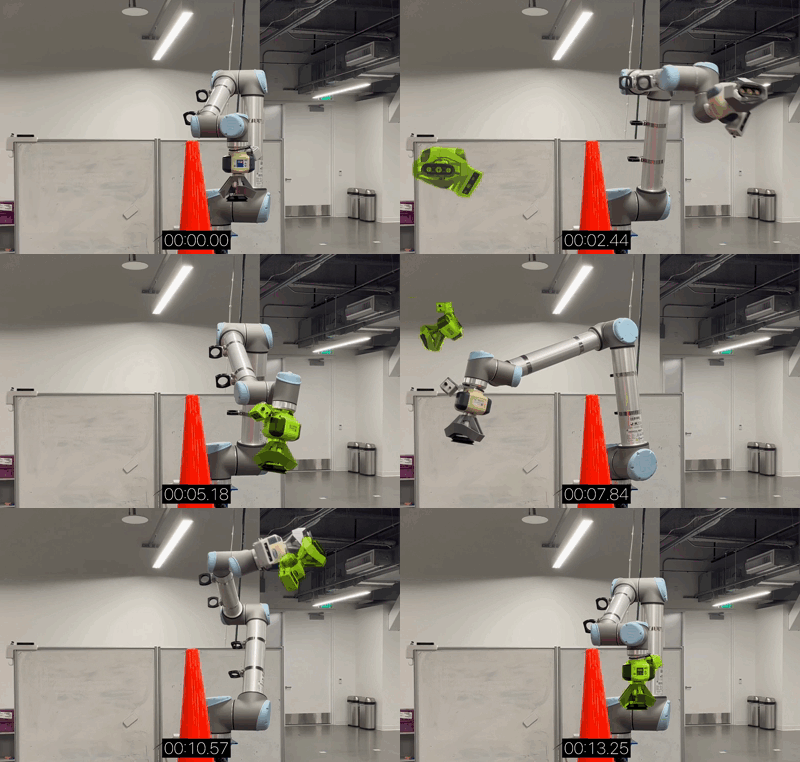
Isaac ROS cuMotion provides CUDA-accelerated manipulation capabilities for robots in ROS 2. It integrates cuMotion into MoveIt 2 to generate smooth, collision-free trajectories, and also exposes cuMotion inverse kinematics and trajectory generation capabilities through ROS 2 actions/services. Support is provided for segmenting and filtering the robot itself from the depth streams.
The key advantages of using Isaac ROS cuMotion are:
- Improved cycle times: cuMotion produces smooth, optimal-time trajectories in the presence of obstacles, generally reducing motion times compared to previous state-of-the-art planners. In cluttered environments and other challenging scenarios, cuMotion can often produce a valid trajectory when other planners might fail altogether.
- Improved planning times: cuMotion takes advantage of CUDA acceleration to produce collision-free, optimal-time trajectories in a fraction of a second.
- Avoidance of obstacles captured by depth cameras: cuMotion optionally leverages nvblox to perform 3D reconstruction of an environment from one or more depth image streams. The environment is represented as a signed distance field (SDF) for efficient obstacle-aware planning. Support is provided for segmenting and filtering the robot itself from the depth streams.
- Flexibility: A modular design simplifies integration with existing ROS 2 workflows, especially those already using MoveIt 2.
[!Warning] Before using or developing with cuMotion, familiarize yourself with the associated safety information that is provided by your robot manufacturer.
In addition, we provide the following best practices:
- Familiarize yourself with the location of the emergency stop buttons, and be prepared to apply if necessary.
- Before operation, ensure the working area is free of any persons or other potential hazards.
- Before operation, alert all persons near the working area that robot operation is about to begin.
- Before and during operation, be aware of any persons entering the vicinity around the working area, and be prepared to give necessary warnings, instructions, or take other necessary actions.
- Take extra caution when testing or deploying new features or code.
Examples are provided for three modes of operation:
- Standalone MoveIt: MoveIt’s RViz interface allows trajectories to be planned and visualized even without a physical robot or external simulator.
- Simulated robot (Isaac Sim): Trajectories may be planned and executed on a simulated robot in Isaac Sim, allowing convenient development and rapid iteration without use of physical hardware. Simulated sensors enable testing of perception, for example, for the purpose of collision avoidance.
- Physical robot: For on-robot testing and final deployment, trajectories are planned and executed on a physical robot.
The Isaac ROS cuMotion repository currently contains the following packages:
-
isaac_ros_cumotion: - This package contains the cuMotion planner node that provides the ROS 2 interfaces for inverse kinematics and motion generation using cuMotion.
-
isaac_ros_cumotion_examples: - This package contains various examples demonstrating use of cuMotion with MoveIt.
-
isaac_ros_cumotion_moveit: - This package provides a plugin for MoveIt 2 that exposes cuMotion as an external planner, leveraging
isaac_ros_cumotion.
Documentation
Please visit the Isaac ROS Documentation to learn how to use this repository.
Packages
-
isaac_ros_cumotion -
isaac_ros_cumotion_moveit -
isaac_ros_cumotion_object_attachment -
isaac_ros_cumotion_robot_segmenter isaac_ros_goal_setter_interfaces
Latest
Update 2026-09-21: Compatibility and integration updates for the Isaac ROS 5.0.0 release
CONTRIBUTING
Repository Summary
| Description | |
| Checkout URI | https://github.com/nvidia-isaac-ros/isaac_ros_cumotion.git |
| VCS Type | git |
| VCS Version | main |
| Last Updated | 2026-09-22 |
| Dev Status | UNKNOWN |
| Released | UNRELEASED |
| Contributing |
Help Wanted (-)
Good First Issues (-) Pull Requests to Review (-) |
Packages
| Name | Version |
|---|---|
| isaac_ros_cumotion | 5.0.0 |
| isaac_ros_cumotion_controllers | 5.0.0 |
| isaac_ros_cumotion_examples | 5.0.0 |
| isaac_ros_cumotion_interfaces | 5.0.0 |
| isaac_ros_cumotion_moveit | 5.0.0 |
| isaac_ros_cumotion_object_attachment | 5.0.0 |
| isaac_ros_cumotion_robot_description | 5.0.0 |
| isaac_ros_cumotion_robot_segmenter | 5.0.0 |
README
Isaac ROS cuMotion
NVIDIA accelerated packages for arm motion planning and control
Overview
Isaac ROS cuMotion provides CUDA-accelerated manipulation capabilities for robots in ROS 2. It integrates cuMotion into MoveIt 2 to generate smooth, collision-free trajectories, and also exposes cuMotion inverse kinematics and trajectory generation capabilities through ROS 2 actions/services. Support is provided for segmenting and filtering the robot itself from the depth streams.
The key advantages of using Isaac ROS cuMotion are:
- Improved cycle times: cuMotion produces smooth, optimal-time trajectories in the presence of obstacles, generally reducing motion times compared to previous state-of-the-art planners. In cluttered environments and other challenging scenarios, cuMotion can often produce a valid trajectory when other planners might fail altogether.
- Improved planning times: cuMotion takes advantage of CUDA acceleration to produce collision-free, optimal-time trajectories in a fraction of a second.
- Avoidance of obstacles captured by depth cameras: cuMotion optionally leverages nvblox to perform 3D reconstruction of an environment from one or more depth image streams. The environment is represented as a signed distance field (SDF) for efficient obstacle-aware planning. Support is provided for segmenting and filtering the robot itself from the depth streams.
- Flexibility: A modular design simplifies integration with existing ROS 2 workflows, especially those already using MoveIt 2.
[!Warning] Before using or developing with cuMotion, familiarize yourself with the associated safety information that is provided by your robot manufacturer.
In addition, we provide the following best practices:
- Familiarize yourself with the location of the emergency stop buttons, and be prepared to apply if necessary.
- Before operation, ensure the working area is free of any persons or other potential hazards.
- Before operation, alert all persons near the working area that robot operation is about to begin.
- Before and during operation, be aware of any persons entering the vicinity around the working area, and be prepared to give necessary warnings, instructions, or take other necessary actions.
- Take extra caution when testing or deploying new features or code.
Examples are provided for three modes of operation:
- Standalone MoveIt: MoveIt’s RViz interface allows trajectories to be planned and visualized even without a physical robot or external simulator.
- Simulated robot (Isaac Sim): Trajectories may be planned and executed on a simulated robot in Isaac Sim, allowing convenient development and rapid iteration without use of physical hardware. Simulated sensors enable testing of perception, for example, for the purpose of collision avoidance.
- Physical robot: For on-robot testing and final deployment, trajectories are planned and executed on a physical robot.
The Isaac ROS cuMotion repository currently contains the following packages:
-
isaac_ros_cumotion: - This package contains the cuMotion planner node that provides the ROS 2 interfaces for inverse kinematics and motion generation using cuMotion.
-
isaac_ros_cumotion_examples: - This package contains various examples demonstrating use of cuMotion with MoveIt.
-
isaac_ros_cumotion_moveit: - This package provides a plugin for MoveIt 2 that exposes cuMotion as an external planner, leveraging
isaac_ros_cumotion.
Documentation
Please visit the Isaac ROS Documentation to learn how to use this repository.
Packages
-
isaac_ros_cumotion -
isaac_ros_cumotion_moveit -
isaac_ros_cumotion_object_attachment -
isaac_ros_cumotion_robot_segmenter isaac_ros_goal_setter_interfaces
Latest
Update 2026-09-21: Compatibility and integration updates for the Isaac ROS 5.0.0 release
CONTRIBUTING
Repository Summary
| Description | |
| Checkout URI | https://github.com/nvidia-isaac-ros/isaac_ros_cumotion.git |
| VCS Type | git |
| VCS Version | main |
| Last Updated | 2026-09-22 |
| Dev Status | UNKNOWN |
| Released | UNRELEASED |
| Contributing |
Help Wanted (-)
Good First Issues (-) Pull Requests to Review (-) |
Packages
| Name | Version |
|---|---|
| isaac_ros_cumotion | 5.0.0 |
| isaac_ros_cumotion_controllers | 5.0.0 |
| isaac_ros_cumotion_examples | 5.0.0 |
| isaac_ros_cumotion_interfaces | 5.0.0 |
| isaac_ros_cumotion_moveit | 5.0.0 |
| isaac_ros_cumotion_object_attachment | 5.0.0 |
| isaac_ros_cumotion_robot_description | 5.0.0 |
| isaac_ros_cumotion_robot_segmenter | 5.0.0 |
README
Isaac ROS cuMotion
NVIDIA accelerated packages for arm motion planning and control
Overview
Isaac ROS cuMotion provides CUDA-accelerated manipulation capabilities for robots in ROS 2. It integrates cuMotion into MoveIt 2 to generate smooth, collision-free trajectories, and also exposes cuMotion inverse kinematics and trajectory generation capabilities through ROS 2 actions/services. Support is provided for segmenting and filtering the robot itself from the depth streams.
The key advantages of using Isaac ROS cuMotion are:
- Improved cycle times: cuMotion produces smooth, optimal-time trajectories in the presence of obstacles, generally reducing motion times compared to previous state-of-the-art planners. In cluttered environments and other challenging scenarios, cuMotion can often produce a valid trajectory when other planners might fail altogether.
- Improved planning times: cuMotion takes advantage of CUDA acceleration to produce collision-free, optimal-time trajectories in a fraction of a second.
- Avoidance of obstacles captured by depth cameras: cuMotion optionally leverages nvblox to perform 3D reconstruction of an environment from one or more depth image streams. The environment is represented as a signed distance field (SDF) for efficient obstacle-aware planning. Support is provided for segmenting and filtering the robot itself from the depth streams.
- Flexibility: A modular design simplifies integration with existing ROS 2 workflows, especially those already using MoveIt 2.
[!Warning] Before using or developing with cuMotion, familiarize yourself with the associated safety information that is provided by your robot manufacturer.
In addition, we provide the following best practices:
- Familiarize yourself with the location of the emergency stop buttons, and be prepared to apply if necessary.
- Before operation, ensure the working area is free of any persons or other potential hazards.
- Before operation, alert all persons near the working area that robot operation is about to begin.
- Before and during operation, be aware of any persons entering the vicinity around the working area, and be prepared to give necessary warnings, instructions, or take other necessary actions.
- Take extra caution when testing or deploying new features or code.
Examples are provided for three modes of operation:
- Standalone MoveIt: MoveIt’s RViz interface allows trajectories to be planned and visualized even without a physical robot or external simulator.
- Simulated robot (Isaac Sim): Trajectories may be planned and executed on a simulated robot in Isaac Sim, allowing convenient development and rapid iteration without use of physical hardware. Simulated sensors enable testing of perception, for example, for the purpose of collision avoidance.
- Physical robot: For on-robot testing and final deployment, trajectories are planned and executed on a physical robot.
The Isaac ROS cuMotion repository currently contains the following packages:
-
isaac_ros_cumotion: - This package contains the cuMotion planner node that provides the ROS 2 interfaces for inverse kinematics and motion generation using cuMotion.
-
isaac_ros_cumotion_examples: - This package contains various examples demonstrating use of cuMotion with MoveIt.
-
isaac_ros_cumotion_moveit: - This package provides a plugin for MoveIt 2 that exposes cuMotion as an external planner, leveraging
isaac_ros_cumotion.
Documentation
Please visit the Isaac ROS Documentation to learn how to use this repository.
Packages
-
isaac_ros_cumotion -
isaac_ros_cumotion_moveit -
isaac_ros_cumotion_object_attachment -
isaac_ros_cumotion_robot_segmenter isaac_ros_goal_setter_interfaces
Latest
Update 2026-09-21: Compatibility and integration updates for the Isaac ROS 5.0.0 release
CONTRIBUTING
Repository Summary
| Description | |
| Checkout URI | https://github.com/nvidia-isaac-ros/isaac_ros_cumotion.git |
| VCS Type | git |
| VCS Version | main |
| Last Updated | 2026-09-22 |
| Dev Status | UNKNOWN |
| Released | UNRELEASED |
| Contributing |
Help Wanted (-)
Good First Issues (-) Pull Requests to Review (-) |
Packages
| Name | Version |
|---|---|
| isaac_ros_cumotion | 5.0.0 |
| isaac_ros_cumotion_controllers | 5.0.0 |
| isaac_ros_cumotion_examples | 5.0.0 |
| isaac_ros_cumotion_interfaces | 5.0.0 |
| isaac_ros_cumotion_moveit | 5.0.0 |
| isaac_ros_cumotion_object_attachment | 5.0.0 |
| isaac_ros_cumotion_robot_description | 5.0.0 |
| isaac_ros_cumotion_robot_segmenter | 5.0.0 |
README
Isaac ROS cuMotion
NVIDIA accelerated packages for arm motion planning and control
Overview
Isaac ROS cuMotion provides CUDA-accelerated manipulation capabilities for robots in ROS 2. It integrates cuMotion into MoveIt 2 to generate smooth, collision-free trajectories, and also exposes cuMotion inverse kinematics and trajectory generation capabilities through ROS 2 actions/services. Support is provided for segmenting and filtering the robot itself from the depth streams.
The key advantages of using Isaac ROS cuMotion are:
- Improved cycle times: cuMotion produces smooth, optimal-time trajectories in the presence of obstacles, generally reducing motion times compared to previous state-of-the-art planners. In cluttered environments and other challenging scenarios, cuMotion can often produce a valid trajectory when other planners might fail altogether.
- Improved planning times: cuMotion takes advantage of CUDA acceleration to produce collision-free, optimal-time trajectories in a fraction of a second.
- Avoidance of obstacles captured by depth cameras: cuMotion optionally leverages nvblox to perform 3D reconstruction of an environment from one or more depth image streams. The environment is represented as a signed distance field (SDF) for efficient obstacle-aware planning. Support is provided for segmenting and filtering the robot itself from the depth streams.
- Flexibility: A modular design simplifies integration with existing ROS 2 workflows, especially those already using MoveIt 2.
[!Warning] Before using or developing with cuMotion, familiarize yourself with the associated safety information that is provided by your robot manufacturer.
In addition, we provide the following best practices:
- Familiarize yourself with the location of the emergency stop buttons, and be prepared to apply if necessary.
- Before operation, ensure the working area is free of any persons or other potential hazards.
- Before operation, alert all persons near the working area that robot operation is about to begin.
- Before and during operation, be aware of any persons entering the vicinity around the working area, and be prepared to give necessary warnings, instructions, or take other necessary actions.
- Take extra caution when testing or deploying new features or code.
Examples are provided for three modes of operation:
- Standalone MoveIt: MoveIt’s RViz interface allows trajectories to be planned and visualized even without a physical robot or external simulator.
- Simulated robot (Isaac Sim): Trajectories may be planned and executed on a simulated robot in Isaac Sim, allowing convenient development and rapid iteration without use of physical hardware. Simulated sensors enable testing of perception, for example, for the purpose of collision avoidance.
- Physical robot: For on-robot testing and final deployment, trajectories are planned and executed on a physical robot.
The Isaac ROS cuMotion repository currently contains the following packages:
-
isaac_ros_cumotion: - This package contains the cuMotion planner node that provides the ROS 2 interfaces for inverse kinematics and motion generation using cuMotion.
-
isaac_ros_cumotion_examples: - This package contains various examples demonstrating use of cuMotion with MoveIt.
-
isaac_ros_cumotion_moveit: - This package provides a plugin for MoveIt 2 that exposes cuMotion as an external planner, leveraging
isaac_ros_cumotion.
Documentation
Please visit the Isaac ROS Documentation to learn how to use this repository.
Packages
-
isaac_ros_cumotion -
isaac_ros_cumotion_moveit -
isaac_ros_cumotion_object_attachment -
isaac_ros_cumotion_robot_segmenter isaac_ros_goal_setter_interfaces
Latest
Update 2026-09-21: Compatibility and integration updates for the Isaac ROS 5.0.0 release
CONTRIBUTING
Repository Summary
| Description | |
| Checkout URI | https://github.com/nvidia-isaac-ros/isaac_ros_cumotion.git |
| VCS Type | git |
| VCS Version | main |
| Last Updated | 2026-09-22 |
| Dev Status | UNKNOWN |
| Released | UNRELEASED |
| Contributing |
Help Wanted (-)
Good First Issues (-) Pull Requests to Review (-) |
Packages
| Name | Version |
|---|---|
| isaac_ros_cumotion | 5.0.0 |
| isaac_ros_cumotion_controllers | 5.0.0 |
| isaac_ros_cumotion_examples | 5.0.0 |
| isaac_ros_cumotion_interfaces | 5.0.0 |
| isaac_ros_cumotion_moveit | 5.0.0 |
| isaac_ros_cumotion_object_attachment | 5.0.0 |
| isaac_ros_cumotion_robot_description | 5.0.0 |
| isaac_ros_cumotion_robot_segmenter | 5.0.0 |
README
Isaac ROS cuMotion
NVIDIA accelerated packages for arm motion planning and control
Overview
Isaac ROS cuMotion provides CUDA-accelerated manipulation capabilities for robots in ROS 2. It integrates cuMotion into MoveIt 2 to generate smooth, collision-free trajectories, and also exposes cuMotion inverse kinematics and trajectory generation capabilities through ROS 2 actions/services. Support is provided for segmenting and filtering the robot itself from the depth streams.
The key advantages of using Isaac ROS cuMotion are:
- Improved cycle times: cuMotion produces smooth, optimal-time trajectories in the presence of obstacles, generally reducing motion times compared to previous state-of-the-art planners. In cluttered environments and other challenging scenarios, cuMotion can often produce a valid trajectory when other planners might fail altogether.
- Improved planning times: cuMotion takes advantage of CUDA acceleration to produce collision-free, optimal-time trajectories in a fraction of a second.
- Avoidance of obstacles captured by depth cameras: cuMotion optionally leverages nvblox to perform 3D reconstruction of an environment from one or more depth image streams. The environment is represented as a signed distance field (SDF) for efficient obstacle-aware planning. Support is provided for segmenting and filtering the robot itself from the depth streams.
- Flexibility: A modular design simplifies integration with existing ROS 2 workflows, especially those already using MoveIt 2.
[!Warning] Before using or developing with cuMotion, familiarize yourself with the associated safety information that is provided by your robot manufacturer.
In addition, we provide the following best practices:
- Familiarize yourself with the location of the emergency stop buttons, and be prepared to apply if necessary.
- Before operation, ensure the working area is free of any persons or other potential hazards.
- Before operation, alert all persons near the working area that robot operation is about to begin.
- Before and during operation, be aware of any persons entering the vicinity around the working area, and be prepared to give necessary warnings, instructions, or take other necessary actions.
- Take extra caution when testing or deploying new features or code.
Examples are provided for three modes of operation:
- Standalone MoveIt: MoveIt’s RViz interface allows trajectories to be planned and visualized even without a physical robot or external simulator.
- Simulated robot (Isaac Sim): Trajectories may be planned and executed on a simulated robot in Isaac Sim, allowing convenient development and rapid iteration without use of physical hardware. Simulated sensors enable testing of perception, for example, for the purpose of collision avoidance.
- Physical robot: For on-robot testing and final deployment, trajectories are planned and executed on a physical robot.
The Isaac ROS cuMotion repository currently contains the following packages:
-
isaac_ros_cumotion: - This package contains the cuMotion planner node that provides the ROS 2 interfaces for inverse kinematics and motion generation using cuMotion.
-
isaac_ros_cumotion_examples: - This package contains various examples demonstrating use of cuMotion with MoveIt.
-
isaac_ros_cumotion_moveit: - This package provides a plugin for MoveIt 2 that exposes cuMotion as an external planner, leveraging
isaac_ros_cumotion.
Documentation
Please visit the Isaac ROS Documentation to learn how to use this repository.
Packages
-
isaac_ros_cumotion -
isaac_ros_cumotion_moveit -
isaac_ros_cumotion_object_attachment -
isaac_ros_cumotion_robot_segmenter isaac_ros_goal_setter_interfaces
Latest
Update 2026-09-21: Compatibility and integration updates for the Isaac ROS 5.0.0 release
CONTRIBUTING
Repository Summary
| Description | |
| Checkout URI | https://github.com/nvidia-isaac-ros/isaac_ros_cumotion.git |
| VCS Type | git |
| VCS Version | main |
| Last Updated | 2026-09-22 |
| Dev Status | UNKNOWN |
| Released | UNRELEASED |
| Contributing |
Help Wanted (-)
Good First Issues (-) Pull Requests to Review (-) |
Packages
| Name | Version |
|---|---|
| isaac_ros_cumotion | 5.0.0 |
| isaac_ros_cumotion_controllers | 5.0.0 |
| isaac_ros_cumotion_examples | 5.0.0 |
| isaac_ros_cumotion_interfaces | 5.0.0 |
| isaac_ros_cumotion_moveit | 5.0.0 |
| isaac_ros_cumotion_object_attachment | 5.0.0 |
| isaac_ros_cumotion_robot_description | 5.0.0 |
| isaac_ros_cumotion_robot_segmenter | 5.0.0 |
README
Isaac ROS cuMotion
NVIDIA accelerated packages for arm motion planning and control
Overview
Isaac ROS cuMotion provides CUDA-accelerated manipulation capabilities for robots in ROS 2. It integrates cuMotion into MoveIt 2 to generate smooth, collision-free trajectories, and also exposes cuMotion inverse kinematics and trajectory generation capabilities through ROS 2 actions/services. Support is provided for segmenting and filtering the robot itself from the depth streams.
The key advantages of using Isaac ROS cuMotion are:
- Improved cycle times: cuMotion produces smooth, optimal-time trajectories in the presence of obstacles, generally reducing motion times compared to previous state-of-the-art planners. In cluttered environments and other challenging scenarios, cuMotion can often produce a valid trajectory when other planners might fail altogether.
- Improved planning times: cuMotion takes advantage of CUDA acceleration to produce collision-free, optimal-time trajectories in a fraction of a second.
- Avoidance of obstacles captured by depth cameras: cuMotion optionally leverages nvblox to perform 3D reconstruction of an environment from one or more depth image streams. The environment is represented as a signed distance field (SDF) for efficient obstacle-aware planning. Support is provided for segmenting and filtering the robot itself from the depth streams.
- Flexibility: A modular design simplifies integration with existing ROS 2 workflows, especially those already using MoveIt 2.
[!Warning] Before using or developing with cuMotion, familiarize yourself with the associated safety information that is provided by your robot manufacturer.
In addition, we provide the following best practices:
- Familiarize yourself with the location of the emergency stop buttons, and be prepared to apply if necessary.
- Before operation, ensure the working area is free of any persons or other potential hazards.
- Before operation, alert all persons near the working area that robot operation is about to begin.
- Before and during operation, be aware of any persons entering the vicinity around the working area, and be prepared to give necessary warnings, instructions, or take other necessary actions.
- Take extra caution when testing or deploying new features or code.
Examples are provided for three modes of operation:
- Standalone MoveIt: MoveIt’s RViz interface allows trajectories to be planned and visualized even without a physical robot or external simulator.
- Simulated robot (Isaac Sim): Trajectories may be planned and executed on a simulated robot in Isaac Sim, allowing convenient development and rapid iteration without use of physical hardware. Simulated sensors enable testing of perception, for example, for the purpose of collision avoidance.
- Physical robot: For on-robot testing and final deployment, trajectories are planned and executed on a physical robot.
The Isaac ROS cuMotion repository currently contains the following packages:
-
isaac_ros_cumotion: - This package contains the cuMotion planner node that provides the ROS 2 interfaces for inverse kinematics and motion generation using cuMotion.
-
isaac_ros_cumotion_examples: - This package contains various examples demonstrating use of cuMotion with MoveIt.
-
isaac_ros_cumotion_moveit: - This package provides a plugin for MoveIt 2 that exposes cuMotion as an external planner, leveraging
isaac_ros_cumotion.
Documentation
Please visit the Isaac ROS Documentation to learn how to use this repository.
Packages
-
isaac_ros_cumotion -
isaac_ros_cumotion_moveit -
isaac_ros_cumotion_object_attachment -
isaac_ros_cumotion_robot_segmenter isaac_ros_goal_setter_interfaces
Latest
Update 2026-09-21: Compatibility and integration updates for the Isaac ROS 5.0.0 release
CONTRIBUTING
Repository Summary
| Description | |
| Checkout URI | https://github.com/nvidia-isaac-ros/isaac_ros_cumotion.git |
| VCS Type | git |
| VCS Version | main |
| Last Updated | 2026-09-22 |
| Dev Status | UNKNOWN |
| Released | UNRELEASED |
| Contributing |
Help Wanted (-)
Good First Issues (-) Pull Requests to Review (-) |
Packages
| Name | Version |
|---|---|
| isaac_ros_cumotion | 5.0.0 |
| isaac_ros_cumotion_controllers | 5.0.0 |
| isaac_ros_cumotion_examples | 5.0.0 |
| isaac_ros_cumotion_interfaces | 5.0.0 |
| isaac_ros_cumotion_moveit | 5.0.0 |
| isaac_ros_cumotion_object_attachment | 5.0.0 |
| isaac_ros_cumotion_robot_description | 5.0.0 |
| isaac_ros_cumotion_robot_segmenter | 5.0.0 |
README
Isaac ROS cuMotion
NVIDIA accelerated packages for arm motion planning and control
Overview
Isaac ROS cuMotion provides CUDA-accelerated manipulation capabilities for robots in ROS 2. It integrates cuMotion into MoveIt 2 to generate smooth, collision-free trajectories, and also exposes cuMotion inverse kinematics and trajectory generation capabilities through ROS 2 actions/services. Support is provided for segmenting and filtering the robot itself from the depth streams.
The key advantages of using Isaac ROS cuMotion are:
- Improved cycle times: cuMotion produces smooth, optimal-time trajectories in the presence of obstacles, generally reducing motion times compared to previous state-of-the-art planners. In cluttered environments and other challenging scenarios, cuMotion can often produce a valid trajectory when other planners might fail altogether.
- Improved planning times: cuMotion takes advantage of CUDA acceleration to produce collision-free, optimal-time trajectories in a fraction of a second.
- Avoidance of obstacles captured by depth cameras: cuMotion optionally leverages nvblox to perform 3D reconstruction of an environment from one or more depth image streams. The environment is represented as a signed distance field (SDF) for efficient obstacle-aware planning. Support is provided for segmenting and filtering the robot itself from the depth streams.
- Flexibility: A modular design simplifies integration with existing ROS 2 workflows, especially those already using MoveIt 2.
[!Warning] Before using or developing with cuMotion, familiarize yourself with the associated safety information that is provided by your robot manufacturer.
In addition, we provide the following best practices:
- Familiarize yourself with the location of the emergency stop buttons, and be prepared to apply if necessary.
- Before operation, ensure the working area is free of any persons or other potential hazards.
- Before operation, alert all persons near the working area that robot operation is about to begin.
- Before and during operation, be aware of any persons entering the vicinity around the working area, and be prepared to give necessary warnings, instructions, or take other necessary actions.
- Take extra caution when testing or deploying new features or code.
Examples are provided for three modes of operation:
- Standalone MoveIt: MoveIt’s RViz interface allows trajectories to be planned and visualized even without a physical robot or external simulator.
- Simulated robot (Isaac Sim): Trajectories may be planned and executed on a simulated robot in Isaac Sim, allowing convenient development and rapid iteration without use of physical hardware. Simulated sensors enable testing of perception, for example, for the purpose of collision avoidance.
- Physical robot: For on-robot testing and final deployment, trajectories are planned and executed on a physical robot.
The Isaac ROS cuMotion repository currently contains the following packages:
-
isaac_ros_cumotion: - This package contains the cuMotion planner node that provides the ROS 2 interfaces for inverse kinematics and motion generation using cuMotion.
-
isaac_ros_cumotion_examples: - This package contains various examples demonstrating use of cuMotion with MoveIt.
-
isaac_ros_cumotion_moveit: - This package provides a plugin for MoveIt 2 that exposes cuMotion as an external planner, leveraging
isaac_ros_cumotion.
Documentation
Please visit the Isaac ROS Documentation to learn how to use this repository.
Packages
-
isaac_ros_cumotion -
isaac_ros_cumotion_moveit -
isaac_ros_cumotion_object_attachment -
isaac_ros_cumotion_robot_segmenter isaac_ros_goal_setter_interfaces
Latest
Update 2026-09-21: Compatibility and integration updates for the Isaac ROS 5.0.0 release
CONTRIBUTING
Repository Summary
| Description | |
| Checkout URI | https://github.com/nvidia-isaac-ros/isaac_ros_cumotion.git |
| VCS Type | git |
| VCS Version | main |
| Last Updated | 2026-09-22 |
| Dev Status | UNKNOWN |
| Released | UNRELEASED |
| Contributing |
Help Wanted (-)
Good First Issues (-) Pull Requests to Review (-) |
Packages
| Name | Version |
|---|---|
| isaac_ros_cumotion | 5.0.0 |
| isaac_ros_cumotion_controllers | 5.0.0 |
| isaac_ros_cumotion_examples | 5.0.0 |
| isaac_ros_cumotion_interfaces | 5.0.0 |
| isaac_ros_cumotion_moveit | 5.0.0 |
| isaac_ros_cumotion_object_attachment | 5.0.0 |
| isaac_ros_cumotion_robot_description | 5.0.0 |
| isaac_ros_cumotion_robot_segmenter | 5.0.0 |
README
Isaac ROS cuMotion
NVIDIA accelerated packages for arm motion planning and control
Overview
Isaac ROS cuMotion provides CUDA-accelerated manipulation capabilities for robots in ROS 2. It integrates cuMotion into MoveIt 2 to generate smooth, collision-free trajectories, and also exposes cuMotion inverse kinematics and trajectory generation capabilities through ROS 2 actions/services. Support is provided for segmenting and filtering the robot itself from the depth streams.
The key advantages of using Isaac ROS cuMotion are:
- Improved cycle times: cuMotion produces smooth, optimal-time trajectories in the presence of obstacles, generally reducing motion times compared to previous state-of-the-art planners. In cluttered environments and other challenging scenarios, cuMotion can often produce a valid trajectory when other planners might fail altogether.
- Improved planning times: cuMotion takes advantage of CUDA acceleration to produce collision-free, optimal-time trajectories in a fraction of a second.
- Avoidance of obstacles captured by depth cameras: cuMotion optionally leverages nvblox to perform 3D reconstruction of an environment from one or more depth image streams. The environment is represented as a signed distance field (SDF) for efficient obstacle-aware planning. Support is provided for segmenting and filtering the robot itself from the depth streams.
- Flexibility: A modular design simplifies integration with existing ROS 2 workflows, especially those already using MoveIt 2.
[!Warning] Before using or developing with cuMotion, familiarize yourself with the associated safety information that is provided by your robot manufacturer.
In addition, we provide the following best practices:
- Familiarize yourself with the location of the emergency stop buttons, and be prepared to apply if necessary.
- Before operation, ensure the working area is free of any persons or other potential hazards.
- Before operation, alert all persons near the working area that robot operation is about to begin.
- Before and during operation, be aware of any persons entering the vicinity around the working area, and be prepared to give necessary warnings, instructions, or take other necessary actions.
- Take extra caution when testing or deploying new features or code.
Examples are provided for three modes of operation:
- Standalone MoveIt: MoveIt’s RViz interface allows trajectories to be planned and visualized even without a physical robot or external simulator.
- Simulated robot (Isaac Sim): Trajectories may be planned and executed on a simulated robot in Isaac Sim, allowing convenient development and rapid iteration without use of physical hardware. Simulated sensors enable testing of perception, for example, for the purpose of collision avoidance.
- Physical robot: For on-robot testing and final deployment, trajectories are planned and executed on a physical robot.
The Isaac ROS cuMotion repository currently contains the following packages:
-
isaac_ros_cumotion: - This package contains the cuMotion planner node that provides the ROS 2 interfaces for inverse kinematics and motion generation using cuMotion.
-
isaac_ros_cumotion_examples: - This package contains various examples demonstrating use of cuMotion with MoveIt.
-
isaac_ros_cumotion_moveit: - This package provides a plugin for MoveIt 2 that exposes cuMotion as an external planner, leveraging
isaac_ros_cumotion.
Documentation
Please visit the Isaac ROS Documentation to learn how to use this repository.
Packages
-
isaac_ros_cumotion -
isaac_ros_cumotion_moveit -
isaac_ros_cumotion_object_attachment -
isaac_ros_cumotion_robot_segmenter isaac_ros_goal_setter_interfaces
Latest
Update 2026-09-21: Compatibility and integration updates for the Isaac ROS 5.0.0 release
CONTRIBUTING
Repository Summary
| Description | |
| Checkout URI | https://github.com/nvidia-isaac-ros/isaac_ros_cumotion.git |
| VCS Type | git |
| VCS Version | main |
| Last Updated | 2026-09-22 |
| Dev Status | UNKNOWN |
| Released | UNRELEASED |
| Contributing |
Help Wanted (-)
Good First Issues (-) Pull Requests to Review (-) |
Packages
| Name | Version |
|---|---|
| isaac_ros_cumotion | 5.0.0 |
| isaac_ros_cumotion_controllers | 5.0.0 |
| isaac_ros_cumotion_examples | 5.0.0 |
| isaac_ros_cumotion_interfaces | 5.0.0 |
| isaac_ros_cumotion_moveit | 5.0.0 |
| isaac_ros_cumotion_object_attachment | 5.0.0 |
| isaac_ros_cumotion_robot_description | 5.0.0 |
| isaac_ros_cumotion_robot_segmenter | 5.0.0 |
README
Isaac ROS cuMotion
NVIDIA accelerated packages for arm motion planning and control
Overview
Isaac ROS cuMotion provides CUDA-accelerated manipulation capabilities for robots in ROS 2. It integrates cuMotion into MoveIt 2 to generate smooth, collision-free trajectories, and also exposes cuMotion inverse kinematics and trajectory generation capabilities through ROS 2 actions/services. Support is provided for segmenting and filtering the robot itself from the depth streams.
The key advantages of using Isaac ROS cuMotion are:
- Improved cycle times: cuMotion produces smooth, optimal-time trajectories in the presence of obstacles, generally reducing motion times compared to previous state-of-the-art planners. In cluttered environments and other challenging scenarios, cuMotion can often produce a valid trajectory when other planners might fail altogether.
- Improved planning times: cuMotion takes advantage of CUDA acceleration to produce collision-free, optimal-time trajectories in a fraction of a second.
- Avoidance of obstacles captured by depth cameras: cuMotion optionally leverages nvblox to perform 3D reconstruction of an environment from one or more depth image streams. The environment is represented as a signed distance field (SDF) for efficient obstacle-aware planning. Support is provided for segmenting and filtering the robot itself from the depth streams.
- Flexibility: A modular design simplifies integration with existing ROS 2 workflows, especially those already using MoveIt 2.
[!Warning] Before using or developing with cuMotion, familiarize yourself with the associated safety information that is provided by your robot manufacturer.
In addition, we provide the following best practices:
- Familiarize yourself with the location of the emergency stop buttons, and be prepared to apply if necessary.
- Before operation, ensure the working area is free of any persons or other potential hazards.
- Before operation, alert all persons near the working area that robot operation is about to begin.
- Before and during operation, be aware of any persons entering the vicinity around the working area, and be prepared to give necessary warnings, instructions, or take other necessary actions.
- Take extra caution when testing or deploying new features or code.
Examples are provided for three modes of operation:
- Standalone MoveIt: MoveIt’s RViz interface allows trajectories to be planned and visualized even without a physical robot or external simulator.
- Simulated robot (Isaac Sim): Trajectories may be planned and executed on a simulated robot in Isaac Sim, allowing convenient development and rapid iteration without use of physical hardware. Simulated sensors enable testing of perception, for example, for the purpose of collision avoidance.
- Physical robot: For on-robot testing and final deployment, trajectories are planned and executed on a physical robot.
The Isaac ROS cuMotion repository currently contains the following packages:
-
isaac_ros_cumotion: - This package contains the cuMotion planner node that provides the ROS 2 interfaces for inverse kinematics and motion generation using cuMotion.
-
isaac_ros_cumotion_examples: - This package contains various examples demonstrating use of cuMotion with MoveIt.
-
isaac_ros_cumotion_moveit: - This package provides a plugin for MoveIt 2 that exposes cuMotion as an external planner, leveraging
isaac_ros_cumotion.
Documentation
Please visit the Isaac ROS Documentation to learn how to use this repository.
Packages
-
isaac_ros_cumotion -
isaac_ros_cumotion_moveit -
isaac_ros_cumotion_object_attachment -
isaac_ros_cumotion_robot_segmenter isaac_ros_goal_setter_interfaces
Latest
Update 2026-09-21: Compatibility and integration updates for the Isaac ROS 5.0.0 release
CONTRIBUTING
Repository Summary
| Description | |
| Checkout URI | https://github.com/nvidia-isaac-ros/isaac_ros_cumotion.git |
| VCS Type | git |
| VCS Version | main |
| Last Updated | 2026-09-22 |
| Dev Status | UNKNOWN |
| Released | UNRELEASED |
| Contributing |
Help Wanted (-)
Good First Issues (-) Pull Requests to Review (-) |
Packages
| Name | Version |
|---|---|
| isaac_ros_cumotion | 5.0.0 |
| isaac_ros_cumotion_controllers | 5.0.0 |
| isaac_ros_cumotion_examples | 5.0.0 |
| isaac_ros_cumotion_interfaces | 5.0.0 |
| isaac_ros_cumotion_moveit | 5.0.0 |
| isaac_ros_cumotion_object_attachment | 5.0.0 |
| isaac_ros_cumotion_robot_description | 5.0.0 |
| isaac_ros_cumotion_robot_segmenter | 5.0.0 |
README
Isaac ROS cuMotion
NVIDIA accelerated packages for arm motion planning and control
Overview
Isaac ROS cuMotion provides CUDA-accelerated manipulation capabilities for robots in ROS 2. It integrates cuMotion into MoveIt 2 to generate smooth, collision-free trajectories, and also exposes cuMotion inverse kinematics and trajectory generation capabilities through ROS 2 actions/services. Support is provided for segmenting and filtering the robot itself from the depth streams.
The key advantages of using Isaac ROS cuMotion are:
- Improved cycle times: cuMotion produces smooth, optimal-time trajectories in the presence of obstacles, generally reducing motion times compared to previous state-of-the-art planners. In cluttered environments and other challenging scenarios, cuMotion can often produce a valid trajectory when other planners might fail altogether.
- Improved planning times: cuMotion takes advantage of CUDA acceleration to produce collision-free, optimal-time trajectories in a fraction of a second.
- Avoidance of obstacles captured by depth cameras: cuMotion optionally leverages nvblox to perform 3D reconstruction of an environment from one or more depth image streams. The environment is represented as a signed distance field (SDF) for efficient obstacle-aware planning. Support is provided for segmenting and filtering the robot itself from the depth streams.
- Flexibility: A modular design simplifies integration with existing ROS 2 workflows, especially those already using MoveIt 2.
[!Warning] Before using or developing with cuMotion, familiarize yourself with the associated safety information that is provided by your robot manufacturer.
In addition, we provide the following best practices:
- Familiarize yourself with the location of the emergency stop buttons, and be prepared to apply if necessary.
- Before operation, ensure the working area is free of any persons or other potential hazards.
- Before operation, alert all persons near the working area that robot operation is about to begin.
- Before and during operation, be aware of any persons entering the vicinity around the working area, and be prepared to give necessary warnings, instructions, or take other necessary actions.
- Take extra caution when testing or deploying new features or code.
Examples are provided for three modes of operation:
- Standalone MoveIt: MoveIt’s RViz interface allows trajectories to be planned and visualized even without a physical robot or external simulator.
- Simulated robot (Isaac Sim): Trajectories may be planned and executed on a simulated robot in Isaac Sim, allowing convenient development and rapid iteration without use of physical hardware. Simulated sensors enable testing of perception, for example, for the purpose of collision avoidance.
- Physical robot: For on-robot testing and final deployment, trajectories are planned and executed on a physical robot.
The Isaac ROS cuMotion repository currently contains the following packages:
-
isaac_ros_cumotion: - This package contains the cuMotion planner node that provides the ROS 2 interfaces for inverse kinematics and motion generation using cuMotion.
-
isaac_ros_cumotion_examples: - This package contains various examples demonstrating use of cuMotion with MoveIt.
-
isaac_ros_cumotion_moveit: - This package provides a plugin for MoveIt 2 that exposes cuMotion as an external planner, leveraging
isaac_ros_cumotion.
Documentation
Please visit the Isaac ROS Documentation to learn how to use this repository.
Packages
-
isaac_ros_cumotion -
isaac_ros_cumotion_moveit -
isaac_ros_cumotion_object_attachment -
isaac_ros_cumotion_robot_segmenter isaac_ros_goal_setter_interfaces
Latest
Update 2026-09-21: Compatibility and integration updates for the Isaac ROS 5.0.0 release