 ROS Index
Package Summary
| Version | 0.53.0 |
| License | Apache License 2.0 |
| Build type | AMENT_CMAKE |
| Use | RECOMMENDED |
Repository Summary
| Description | |
| Checkout URI | https://github.com/autowarefoundation/autoware_universe.git |
| VCS Type | git |
| VCS Version | main |
| Last Updated | 2026-10-26 |
| Dev Status | UNKNOWN |
| Released | UNRELEASED |
| Contributing |
Help Wanted (-)
Good First Issues (-) Pull Requests to Review (-) |
Package Description
Maintainers
- Tomoya Kimura
- Taiki Tanaka
- Takeshi Miura
- Eiki Nagata
Authors
accel_brake_map_calibrator
The role of this node is to automatically calibrate accel_map.csv / brake_map.csv used in the autoware_raw_vehicle_cmd_converter node.
The base map, which is lexus’s one by default, is updated iteratively with the loaded driving data.
How to calibrate
Launch Calibrator
After launching Autoware, run the autoware_accel_brake_map_calibrator by the following command and then perform autonomous driving. Note: You can collect data with manual driving if it is possible to use the same vehicle interface as during autonomous driving (e.g. using a joystick).
ros2 launch autoware_accel_brake_map_calibrator accel_brake_map_calibrator.launch.xml rviz:=true
Or if you want to use rosbag files, run the following commands.
ros2 launch autoware_accel_brake_map_calibrator accel_brake_map_calibrator.launch.xml rviz:=true use_sim_time:=true
ros2 bag play <rosbag_file> --clock
During the calibration with setting the parameter progress_file_output to true, the log file is output in [directory of autoware_accel_brake_map_calibrator]/config/ . You can also see accel and brake maps in [directory of autoware_accel_brake_map_calibrator]/config/accel_map.csv and [directory of autoware_accel_brake_map_calibrator]/config/brake_map.csv after calibration.
Calibration plugin
The rviz:=true option displays the RViz with a calibration plugin as below.

The current status (velocity and pedal) is shown in the plugin. The color on the current cell varies green/red depending on the current data is valid/invalid. The data that doesn’t satisfy the following conditions are considered invalid and will not be used for estimation since aggressive data (e.g. when the pedal is moving fast) causes bad calibration accuracy.
- The velocity and pedal conditions are within certain ranges from the index values.
- The steer value, pedal speed, pitch value, etc. are less than corresponding thresholds.
- The velocity is higher than a threshold.
The detailed parameters are described in the parameter section.
Note: You don’t need to worry about whether the current state is red or green during calibration. Just keep getting data until all the cells turn red.
The value of each cell in the map is gray at first, and it changes from blue to red as the number of valid data in the cell accumulates. It is preferable to continue the calibration until each cell of the map becomes close to red. In particular, the performance near the stop depends strongly on the velocity of 0 ~ 6m/s range and the pedal value of +0.2 ~ -0.4, range so it is desirable to focus on those areas.
Diagnostics
The accel brake map_calibrator publishes diagnostics message depending on the calibration status.
Diagnostic type WARN indicates that the current accel/brake map is estimated to be inaccurate. In this situation, it is strongly recommended to perform a re-calibration of the accel/brake map.
| Status | Diagnostics Type | Diagnostics message | Description |
|---|---|---|---|
| No calibration required | OK |
“OK” | |
| Calibration Required | WARN |
“Accel/brake map Calibration is required.” | The accuracy of current accel/brake map may be low. |
This diagnostics status can be also checked on the following ROS topic.
ros2 topic echo /accel_brake_map_calibrator/output/update_suggest
When the diagnostics type is WARN, True is published on this topic and the update of the accel/brake map is suggested.
Evaluation of the accel / brake map accuracy
The accuracy of map is evaluated by the Root Mean Squared Error (RMSE) between the observed acceleration and predicted acceleration.
TERMS:
-
Observed acceleration: the current vehicle acceleration which is calculated as a derivative value of the wheel speed. -
Predicted acceleration: the output of the original accel/brake map, which the Autoware is expecting. The value is calculated using the current pedal and velocity.
You can check additional error information with the following topics.
-
/accel_brake_map_calibrator/output/current_map_error: The error of the original map set in thecsv_path_accel/brake_mappath. The original map is not accurate if this value is large. -
/accel_brake_map_calibrator/output/updated_map_error: The error of the map calibrated in this node. The calibration quality is low if this value is large. -
/accel_brake_map_calibrator/output/map_error_ratio: The error ratio between the original map and updated map (ratio = updated / current). If this value is less than 1, it is desirable to update the map.
How to visualize calibration data
The process of calibration can be visualized as below. Since these scripts need the log output of the calibration, the pedal_accel_graph_output parameter must be set to true while the calibration is running for the visualization.
Visualize plot of relation between acceleration and pedal
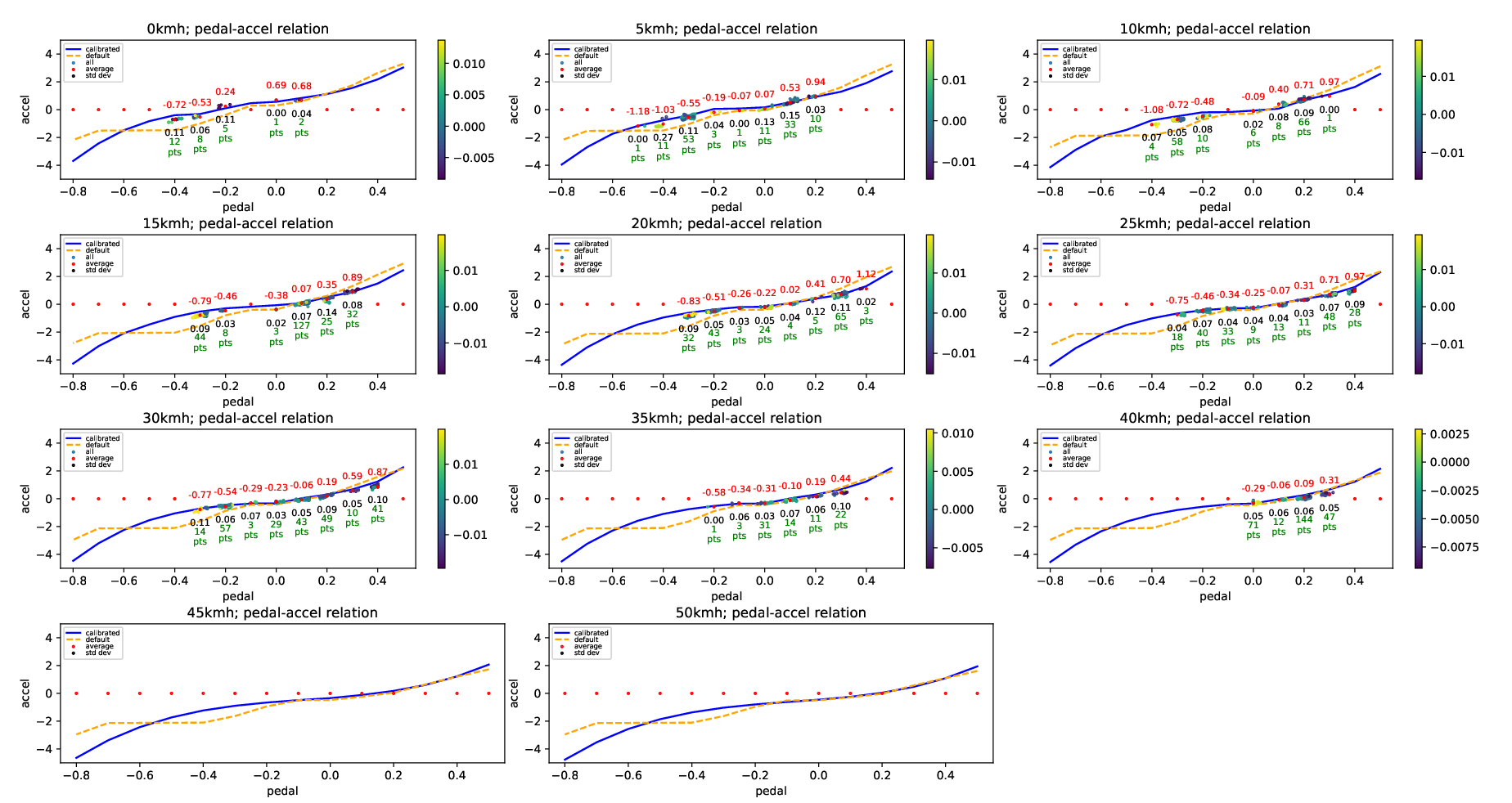
The following command shows the plot of used data in the calibration. In each plot of velocity ranges, you can see the distribution of the relationship between pedal and acceleration, and raw data points with colors according to their pitch angles.
ros2 run autoware_accel_brake_map_calibrator view_plot.py
Visualize statistics about acceleration/velocity/pedal data
The following command shows the statistics of the calibration:
- mean value
- standard deviation
- number of data
File truncated at 100 lines see the full file
Changelog for package autoware_accel_brake_map_calibrator
0.53.0 (2026-09-29)
-
Merge remote-tracking branch 'origin/main' into prepare-0.53.0-changelog
-
fix(design): align the vehicle node designs with the packages they build (#13336) AccelBrakeMapCalibrator is built with ament_auto_add_executable and registers no component, so its design has an executable but no plugin. The raw vehicle command converter registers as RawVehicleCommandConverterNode.
-
fix(vehicle): declare the dependencies these packages use (#13208)
* fix(vehicle): declare the dependencies these packages use Four packages use headers or symbols of packages that they never declare. Add the 10 missing entries: 8 <depend> and 2 <test_depend>.
* fix(vehicle): declare the script runtime dependencies and tf2 The review of the first commit found nine more missing entries. autoware_steer_offset_estimator uses tf2::Quaternion and tf2::Vector3 in an installed header and in the library code, so it gets <depend>tf2</depend>. The installed Python scripts of autoware_accel_brake_map_calibrator import rclpy, ament_index_python, numpy, and yaml, and its launch file starts rviz2. The installed plot script of autoware_raw_vehicle_cmd_converter imports ament_index_python, matplotlib, and numpy. These get <exec_depend> entries. ---------
-
refactor(vehicle): move node design files into each package (#13098) Co-authored-by: Claude Opus 5 (1M context) <<noreply@anthropic.com>>
-
Contributors: Mete Fatih Cırıt, Ryohsuke Mitsudome, Taekjin LEE
0.52.0 (2026-06-30)
-
Merge remote-tracking branch 'origin/main' into tmp/bot/bump_version_base
-
refactor(autoware_tensorrt_yolox): load label data in the node and pass it to the detector (#12866)
* refactor(autoware_tensorrt_yolox): throw on GPU init failure in constructor Remove [TrtYoloXDetector::isGPUInitialized()]{.title-ref} from the public API and instead throw [std::runtime_error]{.title-ref} in the constructor when the GPU is not available, so callers do not need to check initialisation state after construction.
* refactor(autoware_tensorrt_yolox): pass parsed label data instead of file paths to detector Replace the four label/remap/color-map file-path fields of TrtYoloXDetectorConfig with a single parsed LabelMaps, so the detector is decoupled from file I/O and constructible from in-memory data.
- Add LabelMaps plus load_label_maps() (reads files and resolves remaps into ready-to-use lookup tables) and the pure build_roi_id_to_target_id_map()
- Move file reading to the node layer; the detector receives resolved tables
- Drop the duplicated label members and setupLabel() from the detector
* refactor(autoware_tensorrt_yolox): hide internal label helpers from the public header Only load_label_maps, load_image_list and build_roi_id_to_target_id_map are used outside label.cpp, so move the remaining parsing helpers into an anonymous namespace.
- Move trim/read_csv/file_exists/load_list_from_text_file and the read_label_file/load_segmentation_colormap/load_label_id_remap_file parsers into an anonymous namespace; simplify them to return values now that the name-to-id outputs are unused
- Drop the now-unneeded <cstdint>/<optional> includes from the header
- Rewrite test_label to exercise the public load_label_maps and the pure build_roi_id_to_target_id_map instead of the internal parsers
* refactor(autoware_tensorrt_yolox): drop the skip_header_lines option Production CSV files always have a header, so read_csv always skipped exactly one line. Hard-code skipping the header line and remove the skip_header_lines parameter from read_csv, load_segmentation_colormap and load_label_id_remap_file. Also remove the now-unused test_label_remap_without_header.csv test fixture.
* refactor(autoware_tensorrt_yolox): inline label test data as temp files Remove the test_label_data/ directory and write file contents directly in each test's Arrange section using write_temp_file(), eliminating the ament_index_cpp dependency and the install step for test data.
File truncated at 100 lines see the full file
Package Dependencies
System Dependencies
Dependant Packages
Launch files
- launch/accel_brake_map_calibrator.launch.xml
-
- accel_brake_map_calib_param [default: $(find-pkg-share autoware_accel_brake_map_calibrator)/config/accel_brake_map_calibrator.param.yaml]
- csv_default_map_dir [default: $(find-pkg-share autoware_raw_vehicle_cmd_converter)/data/default/]
- csv_calibrated_map_dir [default: $(find-pkg-share autoware_accel_brake_map_calibrator)/config/]
- logger_level [default: info]
- rviz [default: true]
- pedal_accel_graph_output [default: true]
- progress_file_output [default: false]
- use_sim_time [default: false]
- calibration_method [default: each_cell]
Messages
Services
Plugins
Recent questions tagged autoware_accel_brake_map_calibrator at Robotics Stack Exchange
Package Summary
| Version | 0.53.0 |
| License | Apache License 2.0 |
| Build type | AMENT_CMAKE |
| Use | RECOMMENDED |
Repository Summary
| Description | |
| Checkout URI | https://github.com/autowarefoundation/autoware_universe.git |
| VCS Type | git |
| VCS Version | main |
| Last Updated | 2026-10-26 |
| Dev Status | UNKNOWN |
| Released | UNRELEASED |
| Contributing |
Help Wanted (-)
Good First Issues (-) Pull Requests to Review (-) |
Package Description
Maintainers
- Tomoya Kimura
- Taiki Tanaka
- Takeshi Miura
- Eiki Nagata
Authors
accel_brake_map_calibrator
The role of this node is to automatically calibrate accel_map.csv / brake_map.csv used in the autoware_raw_vehicle_cmd_converter node.
The base map, which is lexus’s one by default, is updated iteratively with the loaded driving data.
How to calibrate
Launch Calibrator
After launching Autoware, run the autoware_accel_brake_map_calibrator by the following command and then perform autonomous driving. Note: You can collect data with manual driving if it is possible to use the same vehicle interface as during autonomous driving (e.g. using a joystick).
ros2 launch autoware_accel_brake_map_calibrator accel_brake_map_calibrator.launch.xml rviz:=true
Or if you want to use rosbag files, run the following commands.
ros2 launch autoware_accel_brake_map_calibrator accel_brake_map_calibrator.launch.xml rviz:=true use_sim_time:=true
ros2 bag play <rosbag_file> --clock
During the calibration with setting the parameter progress_file_output to true, the log file is output in [directory of autoware_accel_brake_map_calibrator]/config/ . You can also see accel and brake maps in [directory of autoware_accel_brake_map_calibrator]/config/accel_map.csv and [directory of autoware_accel_brake_map_calibrator]/config/brake_map.csv after calibration.
Calibration plugin
The rviz:=true option displays the RViz with a calibration plugin as below.
The current status (velocity and pedal) is shown in the plugin. The color on the current cell varies green/red depending on the current data is valid/invalid. The data that doesn’t satisfy the following conditions are considered invalid and will not be used for estimation since aggressive data (e.g. when the pedal is moving fast) causes bad calibration accuracy.
- The velocity and pedal conditions are within certain ranges from the index values.
- The steer value, pedal speed, pitch value, etc. are less than corresponding thresholds.
- The velocity is higher than a threshold.
The detailed parameters are described in the parameter section.
Note: You don’t need to worry about whether the current state is red or green during calibration. Just keep getting data until all the cells turn red.
The value of each cell in the map is gray at first, and it changes from blue to red as the number of valid data in the cell accumulates. It is preferable to continue the calibration until each cell of the map becomes close to red. In particular, the performance near the stop depends strongly on the velocity of 0 ~ 6m/s range and the pedal value of +0.2 ~ -0.4, range so it is desirable to focus on those areas.
Diagnostics
The accel brake map_calibrator publishes diagnostics message depending on the calibration status.
Diagnostic type WARN indicates that the current accel/brake map is estimated to be inaccurate. In this situation, it is strongly recommended to perform a re-calibration of the accel/brake map.
| Status | Diagnostics Type | Diagnostics message | Description |
|---|---|---|---|
| No calibration required | OK |
“OK” | |
| Calibration Required | WARN |
“Accel/brake map Calibration is required.” | The accuracy of current accel/brake map may be low. |
This diagnostics status can be also checked on the following ROS topic.
ros2 topic echo /accel_brake_map_calibrator/output/update_suggest
When the diagnostics type is WARN, True is published on this topic and the update of the accel/brake map is suggested.
Evaluation of the accel / brake map accuracy
The accuracy of map is evaluated by the Root Mean Squared Error (RMSE) between the observed acceleration and predicted acceleration.
TERMS:
-
Observed acceleration: the current vehicle acceleration which is calculated as a derivative value of the wheel speed. -
Predicted acceleration: the output of the original accel/brake map, which the Autoware is expecting. The value is calculated using the current pedal and velocity.
You can check additional error information with the following topics.
-
/accel_brake_map_calibrator/output/current_map_error: The error of the original map set in thecsv_path_accel/brake_mappath. The original map is not accurate if this value is large. -
/accel_brake_map_calibrator/output/updated_map_error: The error of the map calibrated in this node. The calibration quality is low if this value is large. -
/accel_brake_map_calibrator/output/map_error_ratio: The error ratio between the original map and updated map (ratio = updated / current). If this value is less than 1, it is desirable to update the map.
How to visualize calibration data
The process of calibration can be visualized as below. Since these scripts need the log output of the calibration, the pedal_accel_graph_output parameter must be set to true while the calibration is running for the visualization.
Visualize plot of relation between acceleration and pedal
The following command shows the plot of used data in the calibration. In each plot of velocity ranges, you can see the distribution of the relationship between pedal and acceleration, and raw data points with colors according to their pitch angles.
ros2 run autoware_accel_brake_map_calibrator view_plot.py
Visualize statistics about acceleration/velocity/pedal data
The following command shows the statistics of the calibration:
- mean value
- standard deviation
- number of data
File truncated at 100 lines see the full file
Changelog for package autoware_accel_brake_map_calibrator
0.53.0 (2026-09-29)
-
Merge remote-tracking branch 'origin/main' into prepare-0.53.0-changelog
-
fix(design): align the vehicle node designs with the packages they build (#13336) AccelBrakeMapCalibrator is built with ament_auto_add_executable and registers no component, so its design has an executable but no plugin. The raw vehicle command converter registers as RawVehicleCommandConverterNode.
-
fix(vehicle): declare the dependencies these packages use (#13208)
* fix(vehicle): declare the dependencies these packages use Four packages use headers or symbols of packages that they never declare. Add the 10 missing entries: 8 <depend> and 2 <test_depend>.
* fix(vehicle): declare the script runtime dependencies and tf2 The review of the first commit found nine more missing entries. autoware_steer_offset_estimator uses tf2::Quaternion and tf2::Vector3 in an installed header and in the library code, so it gets <depend>tf2</depend>. The installed Python scripts of autoware_accel_brake_map_calibrator import rclpy, ament_index_python, numpy, and yaml, and its launch file starts rviz2. The installed plot script of autoware_raw_vehicle_cmd_converter imports ament_index_python, matplotlib, and numpy. These get <exec_depend> entries. ---------
-
refactor(vehicle): move node design files into each package (#13098) Co-authored-by: Claude Opus 5 (1M context) <<noreply@anthropic.com>>
-
Contributors: Mete Fatih Cırıt, Ryohsuke Mitsudome, Taekjin LEE
0.52.0 (2026-06-30)
-
Merge remote-tracking branch 'origin/main' into tmp/bot/bump_version_base
-
refactor(autoware_tensorrt_yolox): load label data in the node and pass it to the detector (#12866)
* refactor(autoware_tensorrt_yolox): throw on GPU init failure in constructor Remove [TrtYoloXDetector::isGPUInitialized()]{.title-ref} from the public API and instead throw [std::runtime_error]{.title-ref} in the constructor when the GPU is not available, so callers do not need to check initialisation state after construction.
* refactor(autoware_tensorrt_yolox): pass parsed label data instead of file paths to detector Replace the four label/remap/color-map file-path fields of TrtYoloXDetectorConfig with a single parsed LabelMaps, so the detector is decoupled from file I/O and constructible from in-memory data.
- Add LabelMaps plus load_label_maps() (reads files and resolves remaps into ready-to-use lookup tables) and the pure build_roi_id_to_target_id_map()
- Move file reading to the node layer; the detector receives resolved tables
- Drop the duplicated label members and setupLabel() from the detector
* refactor(autoware_tensorrt_yolox): hide internal label helpers from the public header Only load_label_maps, load_image_list and build_roi_id_to_target_id_map are used outside label.cpp, so move the remaining parsing helpers into an anonymous namespace.
- Move trim/read_csv/file_exists/load_list_from_text_file and the read_label_file/load_segmentation_colormap/load_label_id_remap_file parsers into an anonymous namespace; simplify them to return values now that the name-to-id outputs are unused
- Drop the now-unneeded <cstdint>/<optional> includes from the header
- Rewrite test_label to exercise the public load_label_maps and the pure build_roi_id_to_target_id_map instead of the internal parsers
* refactor(autoware_tensorrt_yolox): drop the skip_header_lines option Production CSV files always have a header, so read_csv always skipped exactly one line. Hard-code skipping the header line and remove the skip_header_lines parameter from read_csv, load_segmentation_colormap and load_label_id_remap_file. Also remove the now-unused test_label_remap_without_header.csv test fixture.
* refactor(autoware_tensorrt_yolox): inline label test data as temp files Remove the test_label_data/ directory and write file contents directly in each test's Arrange section using write_temp_file(), eliminating the ament_index_cpp dependency and the install step for test data.
File truncated at 100 lines see the full file
Package Dependencies
System Dependencies
Dependant Packages
Launch files
- launch/accel_brake_map_calibrator.launch.xml
-
- accel_brake_map_calib_param [default: $(find-pkg-share autoware_accel_brake_map_calibrator)/config/accel_brake_map_calibrator.param.yaml]
- csv_default_map_dir [default: $(find-pkg-share autoware_raw_vehicle_cmd_converter)/data/default/]
- csv_calibrated_map_dir [default: $(find-pkg-share autoware_accel_brake_map_calibrator)/config/]
- logger_level [default: info]
- rviz [default: true]
- pedal_accel_graph_output [default: true]
- progress_file_output [default: false]
- use_sim_time [default: false]
- calibration_method [default: each_cell]
Messages
Services
Plugins
Recent questions tagged autoware_accel_brake_map_calibrator at Robotics Stack Exchange
Package Summary
| Version | 0.53.0 |
| License | Apache License 2.0 |
| Build type | AMENT_CMAKE |
| Use | RECOMMENDED |
Repository Summary
| Description | |
| Checkout URI | https://github.com/autowarefoundation/autoware_universe.git |
| VCS Type | git |
| VCS Version | main |
| Last Updated | 2026-10-26 |
| Dev Status | UNKNOWN |
| Released | UNRELEASED |
| Contributing |
Help Wanted (-)
Good First Issues (-) Pull Requests to Review (-) |
Package Description
Maintainers
- Tomoya Kimura
- Taiki Tanaka
- Takeshi Miura
- Eiki Nagata
Authors
accel_brake_map_calibrator
The role of this node is to automatically calibrate accel_map.csv / brake_map.csv used in the autoware_raw_vehicle_cmd_converter node.
The base map, which is lexus’s one by default, is updated iteratively with the loaded driving data.
How to calibrate
Launch Calibrator
After launching Autoware, run the autoware_accel_brake_map_calibrator by the following command and then perform autonomous driving. Note: You can collect data with manual driving if it is possible to use the same vehicle interface as during autonomous driving (e.g. using a joystick).
ros2 launch autoware_accel_brake_map_calibrator accel_brake_map_calibrator.launch.xml rviz:=true
Or if you want to use rosbag files, run the following commands.
ros2 launch autoware_accel_brake_map_calibrator accel_brake_map_calibrator.launch.xml rviz:=true use_sim_time:=true
ros2 bag play <rosbag_file> --clock
During the calibration with setting the parameter progress_file_output to true, the log file is output in [directory of autoware_accel_brake_map_calibrator]/config/ . You can also see accel and brake maps in [directory of autoware_accel_brake_map_calibrator]/config/accel_map.csv and [directory of autoware_accel_brake_map_calibrator]/config/brake_map.csv after calibration.
Calibration plugin
The rviz:=true option displays the RViz with a calibration plugin as below.
The current status (velocity and pedal) is shown in the plugin. The color on the current cell varies green/red depending on the current data is valid/invalid. The data that doesn’t satisfy the following conditions are considered invalid and will not be used for estimation since aggressive data (e.g. when the pedal is moving fast) causes bad calibration accuracy.
- The velocity and pedal conditions are within certain ranges from the index values.
- The steer value, pedal speed, pitch value, etc. are less than corresponding thresholds.
- The velocity is higher than a threshold.
The detailed parameters are described in the parameter section.
Note: You don’t need to worry about whether the current state is red or green during calibration. Just keep getting data until all the cells turn red.
The value of each cell in the map is gray at first, and it changes from blue to red as the number of valid data in the cell accumulates. It is preferable to continue the calibration until each cell of the map becomes close to red. In particular, the performance near the stop depends strongly on the velocity of 0 ~ 6m/s range and the pedal value of +0.2 ~ -0.4, range so it is desirable to focus on those areas.
Diagnostics
The accel brake map_calibrator publishes diagnostics message depending on the calibration status.
Diagnostic type WARN indicates that the current accel/brake map is estimated to be inaccurate. In this situation, it is strongly recommended to perform a re-calibration of the accel/brake map.
| Status | Diagnostics Type | Diagnostics message | Description |
|---|---|---|---|
| No calibration required | OK |
“OK” | |
| Calibration Required | WARN |
“Accel/brake map Calibration is required.” | The accuracy of current accel/brake map may be low. |
This diagnostics status can be also checked on the following ROS topic.
ros2 topic echo /accel_brake_map_calibrator/output/update_suggest
When the diagnostics type is WARN, True is published on this topic and the update of the accel/brake map is suggested.
Evaluation of the accel / brake map accuracy
The accuracy of map is evaluated by the Root Mean Squared Error (RMSE) between the observed acceleration and predicted acceleration.
TERMS:
-
Observed acceleration: the current vehicle acceleration which is calculated as a derivative value of the wheel speed. -
Predicted acceleration: the output of the original accel/brake map, which the Autoware is expecting. The value is calculated using the current pedal and velocity.
You can check additional error information with the following topics.
-
/accel_brake_map_calibrator/output/current_map_error: The error of the original map set in thecsv_path_accel/brake_mappath. The original map is not accurate if this value is large. -
/accel_brake_map_calibrator/output/updated_map_error: The error of the map calibrated in this node. The calibration quality is low if this value is large. -
/accel_brake_map_calibrator/output/map_error_ratio: The error ratio between the original map and updated map (ratio = updated / current). If this value is less than 1, it is desirable to update the map.
How to visualize calibration data
The process of calibration can be visualized as below. Since these scripts need the log output of the calibration, the pedal_accel_graph_output parameter must be set to true while the calibration is running for the visualization.
Visualize plot of relation between acceleration and pedal
The following command shows the plot of used data in the calibration. In each plot of velocity ranges, you can see the distribution of the relationship between pedal and acceleration, and raw data points with colors according to their pitch angles.
ros2 run autoware_accel_brake_map_calibrator view_plot.py
Visualize statistics about acceleration/velocity/pedal data
The following command shows the statistics of the calibration:
- mean value
- standard deviation
- number of data
File truncated at 100 lines see the full file
Changelog for package autoware_accel_brake_map_calibrator
0.53.0 (2026-09-29)
-
Merge remote-tracking branch 'origin/main' into prepare-0.53.0-changelog
-
fix(design): align the vehicle node designs with the packages they build (#13336) AccelBrakeMapCalibrator is built with ament_auto_add_executable and registers no component, so its design has an executable but no plugin. The raw vehicle command converter registers as RawVehicleCommandConverterNode.
-
fix(vehicle): declare the dependencies these packages use (#13208)
* fix(vehicle): declare the dependencies these packages use Four packages use headers or symbols of packages that they never declare. Add the 10 missing entries: 8 <depend> and 2 <test_depend>.
* fix(vehicle): declare the script runtime dependencies and tf2 The review of the first commit found nine more missing entries. autoware_steer_offset_estimator uses tf2::Quaternion and tf2::Vector3 in an installed header and in the library code, so it gets <depend>tf2</depend>. The installed Python scripts of autoware_accel_brake_map_calibrator import rclpy, ament_index_python, numpy, and yaml, and its launch file starts rviz2. The installed plot script of autoware_raw_vehicle_cmd_converter imports ament_index_python, matplotlib, and numpy. These get <exec_depend> entries. ---------
-
refactor(vehicle): move node design files into each package (#13098) Co-authored-by: Claude Opus 5 (1M context) <<noreply@anthropic.com>>
-
Contributors: Mete Fatih Cırıt, Ryohsuke Mitsudome, Taekjin LEE
0.52.0 (2026-06-30)
-
Merge remote-tracking branch 'origin/main' into tmp/bot/bump_version_base
-
refactor(autoware_tensorrt_yolox): load label data in the node and pass it to the detector (#12866)
* refactor(autoware_tensorrt_yolox): throw on GPU init failure in constructor Remove [TrtYoloXDetector::isGPUInitialized()]{.title-ref} from the public API and instead throw [std::runtime_error]{.title-ref} in the constructor when the GPU is not available, so callers do not need to check initialisation state after construction.
* refactor(autoware_tensorrt_yolox): pass parsed label data instead of file paths to detector Replace the four label/remap/color-map file-path fields of TrtYoloXDetectorConfig with a single parsed LabelMaps, so the detector is decoupled from file I/O and constructible from in-memory data.
- Add LabelMaps plus load_label_maps() (reads files and resolves remaps into ready-to-use lookup tables) and the pure build_roi_id_to_target_id_map()
- Move file reading to the node layer; the detector receives resolved tables
- Drop the duplicated label members and setupLabel() from the detector
* refactor(autoware_tensorrt_yolox): hide internal label helpers from the public header Only load_label_maps, load_image_list and build_roi_id_to_target_id_map are used outside label.cpp, so move the remaining parsing helpers into an anonymous namespace.
- Move trim/read_csv/file_exists/load_list_from_text_file and the read_label_file/load_segmentation_colormap/load_label_id_remap_file parsers into an anonymous namespace; simplify them to return values now that the name-to-id outputs are unused
- Drop the now-unneeded <cstdint>/<optional> includes from the header
- Rewrite test_label to exercise the public load_label_maps and the pure build_roi_id_to_target_id_map instead of the internal parsers
* refactor(autoware_tensorrt_yolox): drop the skip_header_lines option Production CSV files always have a header, so read_csv always skipped exactly one line. Hard-code skipping the header line and remove the skip_header_lines parameter from read_csv, load_segmentation_colormap and load_label_id_remap_file. Also remove the now-unused test_label_remap_without_header.csv test fixture.
* refactor(autoware_tensorrt_yolox): inline label test data as temp files Remove the test_label_data/ directory and write file contents directly in each test's Arrange section using write_temp_file(), eliminating the ament_index_cpp dependency and the install step for test data.
File truncated at 100 lines see the full file
Package Dependencies
System Dependencies
Dependant Packages
Launch files
- launch/accel_brake_map_calibrator.launch.xml
-
- accel_brake_map_calib_param [default: $(find-pkg-share autoware_accel_brake_map_calibrator)/config/accel_brake_map_calibrator.param.yaml]
- csv_default_map_dir [default: $(find-pkg-share autoware_raw_vehicle_cmd_converter)/data/default/]
- csv_calibrated_map_dir [default: $(find-pkg-share autoware_accel_brake_map_calibrator)/config/]
- logger_level [default: info]
- rviz [default: true]
- pedal_accel_graph_output [default: true]
- progress_file_output [default: false]
- use_sim_time [default: false]
- calibration_method [default: each_cell]
Messages
Services
Plugins
Recent questions tagged autoware_accel_brake_map_calibrator at Robotics Stack Exchange
Package Summary
| Version | 0.53.0 |
| License | Apache License 2.0 |
| Build type | AMENT_CMAKE |
| Use | RECOMMENDED |
Repository Summary
| Description | |
| Checkout URI | https://github.com/autowarefoundation/autoware_universe.git |
| VCS Type | git |
| VCS Version | main |
| Last Updated | 2026-10-26 |
| Dev Status | UNKNOWN |
| Released | UNRELEASED |
| Contributing |
Help Wanted (-)
Good First Issues (-) Pull Requests to Review (-) |
Package Description
Maintainers
- Tomoya Kimura
- Taiki Tanaka
- Takeshi Miura
- Eiki Nagata
Authors
accel_brake_map_calibrator
The role of this node is to automatically calibrate accel_map.csv / brake_map.csv used in the autoware_raw_vehicle_cmd_converter node.
The base map, which is lexus’s one by default, is updated iteratively with the loaded driving data.
How to calibrate
Launch Calibrator
After launching Autoware, run the autoware_accel_brake_map_calibrator by the following command and then perform autonomous driving. Note: You can collect data with manual driving if it is possible to use the same vehicle interface as during autonomous driving (e.g. using a joystick).
ros2 launch autoware_accel_brake_map_calibrator accel_brake_map_calibrator.launch.xml rviz:=true
Or if you want to use rosbag files, run the following commands.
ros2 launch autoware_accel_brake_map_calibrator accel_brake_map_calibrator.launch.xml rviz:=true use_sim_time:=true
ros2 bag play <rosbag_file> --clock
During the calibration with setting the parameter progress_file_output to true, the log file is output in [directory of autoware_accel_brake_map_calibrator]/config/ . You can also see accel and brake maps in [directory of autoware_accel_brake_map_calibrator]/config/accel_map.csv and [directory of autoware_accel_brake_map_calibrator]/config/brake_map.csv after calibration.
Calibration plugin
The rviz:=true option displays the RViz with a calibration plugin as below.
The current status (velocity and pedal) is shown in the plugin. The color on the current cell varies green/red depending on the current data is valid/invalid. The data that doesn’t satisfy the following conditions are considered invalid and will not be used for estimation since aggressive data (e.g. when the pedal is moving fast) causes bad calibration accuracy.
- The velocity and pedal conditions are within certain ranges from the index values.
- The steer value, pedal speed, pitch value, etc. are less than corresponding thresholds.
- The velocity is higher than a threshold.
The detailed parameters are described in the parameter section.
Note: You don’t need to worry about whether the current state is red or green during calibration. Just keep getting data until all the cells turn red.
The value of each cell in the map is gray at first, and it changes from blue to red as the number of valid data in the cell accumulates. It is preferable to continue the calibration until each cell of the map becomes close to red. In particular, the performance near the stop depends strongly on the velocity of 0 ~ 6m/s range and the pedal value of +0.2 ~ -0.4, range so it is desirable to focus on those areas.
Diagnostics
The accel brake map_calibrator publishes diagnostics message depending on the calibration status.
Diagnostic type WARN indicates that the current accel/brake map is estimated to be inaccurate. In this situation, it is strongly recommended to perform a re-calibration of the accel/brake map.
| Status | Diagnostics Type | Diagnostics message | Description |
|---|---|---|---|
| No calibration required | OK |
“OK” | |
| Calibration Required | WARN |
“Accel/brake map Calibration is required.” | The accuracy of current accel/brake map may be low. |
This diagnostics status can be also checked on the following ROS topic.
ros2 topic echo /accel_brake_map_calibrator/output/update_suggest
When the diagnostics type is WARN, True is published on this topic and the update of the accel/brake map is suggested.
Evaluation of the accel / brake map accuracy
The accuracy of map is evaluated by the Root Mean Squared Error (RMSE) between the observed acceleration and predicted acceleration.
TERMS:
-
Observed acceleration: the current vehicle acceleration which is calculated as a derivative value of the wheel speed. -
Predicted acceleration: the output of the original accel/brake map, which the Autoware is expecting. The value is calculated using the current pedal and velocity.
You can check additional error information with the following topics.
-
/accel_brake_map_calibrator/output/current_map_error: The error of the original map set in thecsv_path_accel/brake_mappath. The original map is not accurate if this value is large. -
/accel_brake_map_calibrator/output/updated_map_error: The error of the map calibrated in this node. The calibration quality is low if this value is large. -
/accel_brake_map_calibrator/output/map_error_ratio: The error ratio between the original map and updated map (ratio = updated / current). If this value is less than 1, it is desirable to update the map.
How to visualize calibration data
The process of calibration can be visualized as below. Since these scripts need the log output of the calibration, the pedal_accel_graph_output parameter must be set to true while the calibration is running for the visualization.
Visualize plot of relation between acceleration and pedal
The following command shows the plot of used data in the calibration. In each plot of velocity ranges, you can see the distribution of the relationship between pedal and acceleration, and raw data points with colors according to their pitch angles.
ros2 run autoware_accel_brake_map_calibrator view_plot.py
Visualize statistics about acceleration/velocity/pedal data
The following command shows the statistics of the calibration:
- mean value
- standard deviation
- number of data
File truncated at 100 lines see the full file
Changelog for package autoware_accel_brake_map_calibrator
0.53.0 (2026-09-29)
-
Merge remote-tracking branch 'origin/main' into prepare-0.53.0-changelog
-
fix(design): align the vehicle node designs with the packages they build (#13336) AccelBrakeMapCalibrator is built with ament_auto_add_executable and registers no component, so its design has an executable but no plugin. The raw vehicle command converter registers as RawVehicleCommandConverterNode.
-
fix(vehicle): declare the dependencies these packages use (#13208)
* fix(vehicle): declare the dependencies these packages use Four packages use headers or symbols of packages that they never declare. Add the 10 missing entries: 8 <depend> and 2 <test_depend>.
* fix(vehicle): declare the script runtime dependencies and tf2 The review of the first commit found nine more missing entries. autoware_steer_offset_estimator uses tf2::Quaternion and tf2::Vector3 in an installed header and in the library code, so it gets <depend>tf2</depend>. The installed Python scripts of autoware_accel_brake_map_calibrator import rclpy, ament_index_python, numpy, and yaml, and its launch file starts rviz2. The installed plot script of autoware_raw_vehicle_cmd_converter imports ament_index_python, matplotlib, and numpy. These get <exec_depend> entries. ---------
-
refactor(vehicle): move node design files into each package (#13098) Co-authored-by: Claude Opus 5 (1M context) <<noreply@anthropic.com>>
-
Contributors: Mete Fatih Cırıt, Ryohsuke Mitsudome, Taekjin LEE
0.52.0 (2026-06-30)
-
Merge remote-tracking branch 'origin/main' into tmp/bot/bump_version_base
-
refactor(autoware_tensorrt_yolox): load label data in the node and pass it to the detector (#12866)
* refactor(autoware_tensorrt_yolox): throw on GPU init failure in constructor Remove [TrtYoloXDetector::isGPUInitialized()]{.title-ref} from the public API and instead throw [std::runtime_error]{.title-ref} in the constructor when the GPU is not available, so callers do not need to check initialisation state after construction.
* refactor(autoware_tensorrt_yolox): pass parsed label data instead of file paths to detector Replace the four label/remap/color-map file-path fields of TrtYoloXDetectorConfig with a single parsed LabelMaps, so the detector is decoupled from file I/O and constructible from in-memory data.
- Add LabelMaps plus load_label_maps() (reads files and resolves remaps into ready-to-use lookup tables) and the pure build_roi_id_to_target_id_map()
- Move file reading to the node layer; the detector receives resolved tables
- Drop the duplicated label members and setupLabel() from the detector
* refactor(autoware_tensorrt_yolox): hide internal label helpers from the public header Only load_label_maps, load_image_list and build_roi_id_to_target_id_map are used outside label.cpp, so move the remaining parsing helpers into an anonymous namespace.
- Move trim/read_csv/file_exists/load_list_from_text_file and the read_label_file/load_segmentation_colormap/load_label_id_remap_file parsers into an anonymous namespace; simplify them to return values now that the name-to-id outputs are unused
- Drop the now-unneeded <cstdint>/<optional> includes from the header
- Rewrite test_label to exercise the public load_label_maps and the pure build_roi_id_to_target_id_map instead of the internal parsers
* refactor(autoware_tensorrt_yolox): drop the skip_header_lines option Production CSV files always have a header, so read_csv always skipped exactly one line. Hard-code skipping the header line and remove the skip_header_lines parameter from read_csv, load_segmentation_colormap and load_label_id_remap_file. Also remove the now-unused test_label_remap_without_header.csv test fixture.
* refactor(autoware_tensorrt_yolox): inline label test data as temp files Remove the test_label_data/ directory and write file contents directly in each test's Arrange section using write_temp_file(), eliminating the ament_index_cpp dependency and the install step for test data.
File truncated at 100 lines see the full file
Package Dependencies
System Dependencies
Dependant Packages
Launch files
- launch/accel_brake_map_calibrator.launch.xml
-
- accel_brake_map_calib_param [default: $(find-pkg-share autoware_accel_brake_map_calibrator)/config/accel_brake_map_calibrator.param.yaml]
- csv_default_map_dir [default: $(find-pkg-share autoware_raw_vehicle_cmd_converter)/data/default/]
- csv_calibrated_map_dir [default: $(find-pkg-share autoware_accel_brake_map_calibrator)/config/]
- logger_level [default: info]
- rviz [default: true]
- pedal_accel_graph_output [default: true]
- progress_file_output [default: false]
- use_sim_time [default: false]
- calibration_method [default: each_cell]
Messages
Services
Plugins
Recent questions tagged autoware_accel_brake_map_calibrator at Robotics Stack Exchange
Package Summary
| Version | 0.53.0 |
| License | Apache License 2.0 |
| Build type | AMENT_CMAKE |
| Use | RECOMMENDED |
Repository Summary
| Description | |
| Checkout URI | https://github.com/autowarefoundation/autoware_universe.git |
| VCS Type | git |
| VCS Version | main |
| Last Updated | 2026-10-26 |
| Dev Status | UNKNOWN |
| Released | UNRELEASED |
| Contributing |
Help Wanted (-)
Good First Issues (-) Pull Requests to Review (-) |
Package Description
Maintainers
- Tomoya Kimura
- Taiki Tanaka
- Takeshi Miura
- Eiki Nagata
Authors
accel_brake_map_calibrator
The role of this node is to automatically calibrate accel_map.csv / brake_map.csv used in the autoware_raw_vehicle_cmd_converter node.
The base map, which is lexus’s one by default, is updated iteratively with the loaded driving data.
How to calibrate
Launch Calibrator
After launching Autoware, run the autoware_accel_brake_map_calibrator by the following command and then perform autonomous driving. Note: You can collect data with manual driving if it is possible to use the same vehicle interface as during autonomous driving (e.g. using a joystick).
ros2 launch autoware_accel_brake_map_calibrator accel_brake_map_calibrator.launch.xml rviz:=true
Or if you want to use rosbag files, run the following commands.
ros2 launch autoware_accel_brake_map_calibrator accel_brake_map_calibrator.launch.xml rviz:=true use_sim_time:=true
ros2 bag play <rosbag_file> --clock
During the calibration with setting the parameter progress_file_output to true, the log file is output in [directory of autoware_accel_brake_map_calibrator]/config/ . You can also see accel and brake maps in [directory of autoware_accel_brake_map_calibrator]/config/accel_map.csv and [directory of autoware_accel_brake_map_calibrator]/config/brake_map.csv after calibration.
Calibration plugin
The rviz:=true option displays the RViz with a calibration plugin as below.
The current status (velocity and pedal) is shown in the plugin. The color on the current cell varies green/red depending on the current data is valid/invalid. The data that doesn’t satisfy the following conditions are considered invalid and will not be used for estimation since aggressive data (e.g. when the pedal is moving fast) causes bad calibration accuracy.
- The velocity and pedal conditions are within certain ranges from the index values.
- The steer value, pedal speed, pitch value, etc. are less than corresponding thresholds.
- The velocity is higher than a threshold.
The detailed parameters are described in the parameter section.
Note: You don’t need to worry about whether the current state is red or green during calibration. Just keep getting data until all the cells turn red.
The value of each cell in the map is gray at first, and it changes from blue to red as the number of valid data in the cell accumulates. It is preferable to continue the calibration until each cell of the map becomes close to red. In particular, the performance near the stop depends strongly on the velocity of 0 ~ 6m/s range and the pedal value of +0.2 ~ -0.4, range so it is desirable to focus on those areas.
Diagnostics
The accel brake map_calibrator publishes diagnostics message depending on the calibration status.
Diagnostic type WARN indicates that the current accel/brake map is estimated to be inaccurate. In this situation, it is strongly recommended to perform a re-calibration of the accel/brake map.
| Status | Diagnostics Type | Diagnostics message | Description |
|---|---|---|---|
| No calibration required | OK |
“OK” | |
| Calibration Required | WARN |
“Accel/brake map Calibration is required.” | The accuracy of current accel/brake map may be low. |
This diagnostics status can be also checked on the following ROS topic.
ros2 topic echo /accel_brake_map_calibrator/output/update_suggest
When the diagnostics type is WARN, True is published on this topic and the update of the accel/brake map is suggested.
Evaluation of the accel / brake map accuracy
The accuracy of map is evaluated by the Root Mean Squared Error (RMSE) between the observed acceleration and predicted acceleration.
TERMS:
-
Observed acceleration: the current vehicle acceleration which is calculated as a derivative value of the wheel speed. -
Predicted acceleration: the output of the original accel/brake map, which the Autoware is expecting. The value is calculated using the current pedal and velocity.
You can check additional error information with the following topics.
-
/accel_brake_map_calibrator/output/current_map_error: The error of the original map set in thecsv_path_accel/brake_mappath. The original map is not accurate if this value is large. -
/accel_brake_map_calibrator/output/updated_map_error: The error of the map calibrated in this node. The calibration quality is low if this value is large. -
/accel_brake_map_calibrator/output/map_error_ratio: The error ratio between the original map and updated map (ratio = updated / current). If this value is less than 1, it is desirable to update the map.
How to visualize calibration data
The process of calibration can be visualized as below. Since these scripts need the log output of the calibration, the pedal_accel_graph_output parameter must be set to true while the calibration is running for the visualization.
Visualize plot of relation between acceleration and pedal
The following command shows the plot of used data in the calibration. In each plot of velocity ranges, you can see the distribution of the relationship between pedal and acceleration, and raw data points with colors according to their pitch angles.
ros2 run autoware_accel_brake_map_calibrator view_plot.py
Visualize statistics about acceleration/velocity/pedal data
The following command shows the statistics of the calibration:
- mean value
- standard deviation
- number of data
File truncated at 100 lines see the full file
Changelog for package autoware_accel_brake_map_calibrator
0.53.0 (2026-09-29)
-
Merge remote-tracking branch 'origin/main' into prepare-0.53.0-changelog
-
fix(design): align the vehicle node designs with the packages they build (#13336) AccelBrakeMapCalibrator is built with ament_auto_add_executable and registers no component, so its design has an executable but no plugin. The raw vehicle command converter registers as RawVehicleCommandConverterNode.
-
fix(vehicle): declare the dependencies these packages use (#13208)
* fix(vehicle): declare the dependencies these packages use Four packages use headers or symbols of packages that they never declare. Add the 10 missing entries: 8 <depend> and 2 <test_depend>.
* fix(vehicle): declare the script runtime dependencies and tf2 The review of the first commit found nine more missing entries. autoware_steer_offset_estimator uses tf2::Quaternion and tf2::Vector3 in an installed header and in the library code, so it gets <depend>tf2</depend>. The installed Python scripts of autoware_accel_brake_map_calibrator import rclpy, ament_index_python, numpy, and yaml, and its launch file starts rviz2. The installed plot script of autoware_raw_vehicle_cmd_converter imports ament_index_python, matplotlib, and numpy. These get <exec_depend> entries. ---------
-
refactor(vehicle): move node design files into each package (#13098) Co-authored-by: Claude Opus 5 (1M context) <<noreply@anthropic.com>>
-
Contributors: Mete Fatih Cırıt, Ryohsuke Mitsudome, Taekjin LEE
0.52.0 (2026-06-30)
-
Merge remote-tracking branch 'origin/main' into tmp/bot/bump_version_base
-
refactor(autoware_tensorrt_yolox): load label data in the node and pass it to the detector (#12866)
* refactor(autoware_tensorrt_yolox): throw on GPU init failure in constructor Remove [TrtYoloXDetector::isGPUInitialized()]{.title-ref} from the public API and instead throw [std::runtime_error]{.title-ref} in the constructor when the GPU is not available, so callers do not need to check initialisation state after construction.
* refactor(autoware_tensorrt_yolox): pass parsed label data instead of file paths to detector Replace the four label/remap/color-map file-path fields of TrtYoloXDetectorConfig with a single parsed LabelMaps, so the detector is decoupled from file I/O and constructible from in-memory data.
- Add LabelMaps plus load_label_maps() (reads files and resolves remaps into ready-to-use lookup tables) and the pure build_roi_id_to_target_id_map()
- Move file reading to the node layer; the detector receives resolved tables
- Drop the duplicated label members and setupLabel() from the detector
* refactor(autoware_tensorrt_yolox): hide internal label helpers from the public header Only load_label_maps, load_image_list and build_roi_id_to_target_id_map are used outside label.cpp, so move the remaining parsing helpers into an anonymous namespace.
- Move trim/read_csv/file_exists/load_list_from_text_file and the read_label_file/load_segmentation_colormap/load_label_id_remap_file parsers into an anonymous namespace; simplify them to return values now that the name-to-id outputs are unused
- Drop the now-unneeded <cstdint>/<optional> includes from the header
- Rewrite test_label to exercise the public load_label_maps and the pure build_roi_id_to_target_id_map instead of the internal parsers
* refactor(autoware_tensorrt_yolox): drop the skip_header_lines option Production CSV files always have a header, so read_csv always skipped exactly one line. Hard-code skipping the header line and remove the skip_header_lines parameter from read_csv, load_segmentation_colormap and load_label_id_remap_file. Also remove the now-unused test_label_remap_without_header.csv test fixture.
* refactor(autoware_tensorrt_yolox): inline label test data as temp files Remove the test_label_data/ directory and write file contents directly in each test's Arrange section using write_temp_file(), eliminating the ament_index_cpp dependency and the install step for test data.
File truncated at 100 lines see the full file
Package Dependencies
System Dependencies
Dependant Packages
Launch files
- launch/accel_brake_map_calibrator.launch.xml
-
- accel_brake_map_calib_param [default: $(find-pkg-share autoware_accel_brake_map_calibrator)/config/accel_brake_map_calibrator.param.yaml]
- csv_default_map_dir [default: $(find-pkg-share autoware_raw_vehicle_cmd_converter)/data/default/]
- csv_calibrated_map_dir [default: $(find-pkg-share autoware_accel_brake_map_calibrator)/config/]
- logger_level [default: info]
- rviz [default: true]
- pedal_accel_graph_output [default: true]
- progress_file_output [default: false]
- use_sim_time [default: false]
- calibration_method [default: each_cell]
Messages
Services
Plugins
Recent questions tagged autoware_accel_brake_map_calibrator at Robotics Stack Exchange
Package Summary
| Version | 0.53.0 |
| License | Apache License 2.0 |
| Build type | AMENT_CMAKE |
| Use | RECOMMENDED |
Repository Summary
| Description | |
| Checkout URI | https://github.com/autowarefoundation/autoware_universe.git |
| VCS Type | git |
| VCS Version | main |
| Last Updated | 2026-10-26 |
| Dev Status | UNKNOWN |
| Released | UNRELEASED |
| Contributing |
Help Wanted (-)
Good First Issues (-) Pull Requests to Review (-) |
Package Description
Maintainers
- Tomoya Kimura
- Taiki Tanaka
- Takeshi Miura
- Eiki Nagata
Authors
accel_brake_map_calibrator
The role of this node is to automatically calibrate accel_map.csv / brake_map.csv used in the autoware_raw_vehicle_cmd_converter node.
The base map, which is lexus’s one by default, is updated iteratively with the loaded driving data.
How to calibrate
Launch Calibrator
After launching Autoware, run the autoware_accel_brake_map_calibrator by the following command and then perform autonomous driving. Note: You can collect data with manual driving if it is possible to use the same vehicle interface as during autonomous driving (e.g. using a joystick).
ros2 launch autoware_accel_brake_map_calibrator accel_brake_map_calibrator.launch.xml rviz:=true
Or if you want to use rosbag files, run the following commands.
ros2 launch autoware_accel_brake_map_calibrator accel_brake_map_calibrator.launch.xml rviz:=true use_sim_time:=true
ros2 bag play <rosbag_file> --clock
During the calibration with setting the parameter progress_file_output to true, the log file is output in [directory of autoware_accel_brake_map_calibrator]/config/ . You can also see accel and brake maps in [directory of autoware_accel_brake_map_calibrator]/config/accel_map.csv and [directory of autoware_accel_brake_map_calibrator]/config/brake_map.csv after calibration.
Calibration plugin
The rviz:=true option displays the RViz with a calibration plugin as below.
The current status (velocity and pedal) is shown in the plugin. The color on the current cell varies green/red depending on the current data is valid/invalid. The data that doesn’t satisfy the following conditions are considered invalid and will not be used for estimation since aggressive data (e.g. when the pedal is moving fast) causes bad calibration accuracy.
- The velocity and pedal conditions are within certain ranges from the index values.
- The steer value, pedal speed, pitch value, etc. are less than corresponding thresholds.
- The velocity is higher than a threshold.
The detailed parameters are described in the parameter section.
Note: You don’t need to worry about whether the current state is red or green during calibration. Just keep getting data until all the cells turn red.
The value of each cell in the map is gray at first, and it changes from blue to red as the number of valid data in the cell accumulates. It is preferable to continue the calibration until each cell of the map becomes close to red. In particular, the performance near the stop depends strongly on the velocity of 0 ~ 6m/s range and the pedal value of +0.2 ~ -0.4, range so it is desirable to focus on those areas.
Diagnostics
The accel brake map_calibrator publishes diagnostics message depending on the calibration status.
Diagnostic type WARN indicates that the current accel/brake map is estimated to be inaccurate. In this situation, it is strongly recommended to perform a re-calibration of the accel/brake map.
| Status | Diagnostics Type | Diagnostics message | Description |
|---|---|---|---|
| No calibration required | OK |
“OK” | |
| Calibration Required | WARN |
“Accel/brake map Calibration is required.” | The accuracy of current accel/brake map may be low. |
This diagnostics status can be also checked on the following ROS topic.
ros2 topic echo /accel_brake_map_calibrator/output/update_suggest
When the diagnostics type is WARN, True is published on this topic and the update of the accel/brake map is suggested.
Evaluation of the accel / brake map accuracy
The accuracy of map is evaluated by the Root Mean Squared Error (RMSE) between the observed acceleration and predicted acceleration.
TERMS:
-
Observed acceleration: the current vehicle acceleration which is calculated as a derivative value of the wheel speed. -
Predicted acceleration: the output of the original accel/brake map, which the Autoware is expecting. The value is calculated using the current pedal and velocity.
You can check additional error information with the following topics.
-
/accel_brake_map_calibrator/output/current_map_error: The error of the original map set in thecsv_path_accel/brake_mappath. The original map is not accurate if this value is large. -
/accel_brake_map_calibrator/output/updated_map_error: The error of the map calibrated in this node. The calibration quality is low if this value is large. -
/accel_brake_map_calibrator/output/map_error_ratio: The error ratio between the original map and updated map (ratio = updated / current). If this value is less than 1, it is desirable to update the map.
How to visualize calibration data
The process of calibration can be visualized as below. Since these scripts need the log output of the calibration, the pedal_accel_graph_output parameter must be set to true while the calibration is running for the visualization.
Visualize plot of relation between acceleration and pedal
The following command shows the plot of used data in the calibration. In each plot of velocity ranges, you can see the distribution of the relationship between pedal and acceleration, and raw data points with colors according to their pitch angles.
ros2 run autoware_accel_brake_map_calibrator view_plot.py
Visualize statistics about acceleration/velocity/pedal data
The following command shows the statistics of the calibration:
- mean value
- standard deviation
- number of data
File truncated at 100 lines see the full file
Changelog for package autoware_accel_brake_map_calibrator
0.53.0 (2026-09-29)
-
Merge remote-tracking branch 'origin/main' into prepare-0.53.0-changelog
-
fix(design): align the vehicle node designs with the packages they build (#13336) AccelBrakeMapCalibrator is built with ament_auto_add_executable and registers no component, so its design has an executable but no plugin. The raw vehicle command converter registers as RawVehicleCommandConverterNode.
-
fix(vehicle): declare the dependencies these packages use (#13208)
* fix(vehicle): declare the dependencies these packages use Four packages use headers or symbols of packages that they never declare. Add the 10 missing entries: 8 <depend> and 2 <test_depend>.
* fix(vehicle): declare the script runtime dependencies and tf2 The review of the first commit found nine more missing entries. autoware_steer_offset_estimator uses tf2::Quaternion and tf2::Vector3 in an installed header and in the library code, so it gets <depend>tf2</depend>. The installed Python scripts of autoware_accel_brake_map_calibrator import rclpy, ament_index_python, numpy, and yaml, and its launch file starts rviz2. The installed plot script of autoware_raw_vehicle_cmd_converter imports ament_index_python, matplotlib, and numpy. These get <exec_depend> entries. ---------
-
refactor(vehicle): move node design files into each package (#13098) Co-authored-by: Claude Opus 5 (1M context) <<noreply@anthropic.com>>
-
Contributors: Mete Fatih Cırıt, Ryohsuke Mitsudome, Taekjin LEE
0.52.0 (2026-06-30)
-
Merge remote-tracking branch 'origin/main' into tmp/bot/bump_version_base
-
refactor(autoware_tensorrt_yolox): load label data in the node and pass it to the detector (#12866)
* refactor(autoware_tensorrt_yolox): throw on GPU init failure in constructor Remove [TrtYoloXDetector::isGPUInitialized()]{.title-ref} from the public API and instead throw [std::runtime_error]{.title-ref} in the constructor when the GPU is not available, so callers do not need to check initialisation state after construction.
* refactor(autoware_tensorrt_yolox): pass parsed label data instead of file paths to detector Replace the four label/remap/color-map file-path fields of TrtYoloXDetectorConfig with a single parsed LabelMaps, so the detector is decoupled from file I/O and constructible from in-memory data.
- Add LabelMaps plus load_label_maps() (reads files and resolves remaps into ready-to-use lookup tables) and the pure build_roi_id_to_target_id_map()
- Move file reading to the node layer; the detector receives resolved tables
- Drop the duplicated label members and setupLabel() from the detector
* refactor(autoware_tensorrt_yolox): hide internal label helpers from the public header Only load_label_maps, load_image_list and build_roi_id_to_target_id_map are used outside label.cpp, so move the remaining parsing helpers into an anonymous namespace.
- Move trim/read_csv/file_exists/load_list_from_text_file and the read_label_file/load_segmentation_colormap/load_label_id_remap_file parsers into an anonymous namespace; simplify them to return values now that the name-to-id outputs are unused
- Drop the now-unneeded <cstdint>/<optional> includes from the header
- Rewrite test_label to exercise the public load_label_maps and the pure build_roi_id_to_target_id_map instead of the internal parsers
* refactor(autoware_tensorrt_yolox): drop the skip_header_lines option Production CSV files always have a header, so read_csv always skipped exactly one line. Hard-code skipping the header line and remove the skip_header_lines parameter from read_csv, load_segmentation_colormap and load_label_id_remap_file. Also remove the now-unused test_label_remap_without_header.csv test fixture.
* refactor(autoware_tensorrt_yolox): inline label test data as temp files Remove the test_label_data/ directory and write file contents directly in each test's Arrange section using write_temp_file(), eliminating the ament_index_cpp dependency and the install step for test data.
File truncated at 100 lines see the full file
Package Dependencies
System Dependencies
Dependant Packages
Launch files
- launch/accel_brake_map_calibrator.launch.xml
-
- accel_brake_map_calib_param [default: $(find-pkg-share autoware_accel_brake_map_calibrator)/config/accel_brake_map_calibrator.param.yaml]
- csv_default_map_dir [default: $(find-pkg-share autoware_raw_vehicle_cmd_converter)/data/default/]
- csv_calibrated_map_dir [default: $(find-pkg-share autoware_accel_brake_map_calibrator)/config/]
- logger_level [default: info]
- rviz [default: true]
- pedal_accel_graph_output [default: true]
- progress_file_output [default: false]
- use_sim_time [default: false]
- calibration_method [default: each_cell]
Messages
Services
Plugins
Recent questions tagged autoware_accel_brake_map_calibrator at Robotics Stack Exchange
Package Summary
| Version | 0.53.0 |
| License | Apache License 2.0 |
| Build type | AMENT_CMAKE |
| Use | RECOMMENDED |
Repository Summary
| Description | |
| Checkout URI | https://github.com/autowarefoundation/autoware_universe.git |
| VCS Type | git |
| VCS Version | main |
| Last Updated | 2026-10-26 |
| Dev Status | UNKNOWN |
| Released | UNRELEASED |
| Contributing |
Help Wanted (-)
Good First Issues (-) Pull Requests to Review (-) |
Package Description
Maintainers
- Tomoya Kimura
- Taiki Tanaka
- Takeshi Miura
- Eiki Nagata
Authors
accel_brake_map_calibrator
The role of this node is to automatically calibrate accel_map.csv / brake_map.csv used in the autoware_raw_vehicle_cmd_converter node.
The base map, which is lexus’s one by default, is updated iteratively with the loaded driving data.
How to calibrate
Launch Calibrator
After launching Autoware, run the autoware_accel_brake_map_calibrator by the following command and then perform autonomous driving. Note: You can collect data with manual driving if it is possible to use the same vehicle interface as during autonomous driving (e.g. using a joystick).
ros2 launch autoware_accel_brake_map_calibrator accel_brake_map_calibrator.launch.xml rviz:=true
Or if you want to use rosbag files, run the following commands.
ros2 launch autoware_accel_brake_map_calibrator accel_brake_map_calibrator.launch.xml rviz:=true use_sim_time:=true
ros2 bag play <rosbag_file> --clock
During the calibration with setting the parameter progress_file_output to true, the log file is output in [directory of autoware_accel_brake_map_calibrator]/config/ . You can also see accel and brake maps in [directory of autoware_accel_brake_map_calibrator]/config/accel_map.csv and [directory of autoware_accel_brake_map_calibrator]/config/brake_map.csv after calibration.
Calibration plugin
The rviz:=true option displays the RViz with a calibration plugin as below.
The current status (velocity and pedal) is shown in the plugin. The color on the current cell varies green/red depending on the current data is valid/invalid. The data that doesn’t satisfy the following conditions are considered invalid and will not be used for estimation since aggressive data (e.g. when the pedal is moving fast) causes bad calibration accuracy.
- The velocity and pedal conditions are within certain ranges from the index values.
- The steer value, pedal speed, pitch value, etc. are less than corresponding thresholds.
- The velocity is higher than a threshold.
The detailed parameters are described in the parameter section.
Note: You don’t need to worry about whether the current state is red or green during calibration. Just keep getting data until all the cells turn red.
The value of each cell in the map is gray at first, and it changes from blue to red as the number of valid data in the cell accumulates. It is preferable to continue the calibration until each cell of the map becomes close to red. In particular, the performance near the stop depends strongly on the velocity of 0 ~ 6m/s range and the pedal value of +0.2 ~ -0.4, range so it is desirable to focus on those areas.
Diagnostics
The accel brake map_calibrator publishes diagnostics message depending on the calibration status.
Diagnostic type WARN indicates that the current accel/brake map is estimated to be inaccurate. In this situation, it is strongly recommended to perform a re-calibration of the accel/brake map.
| Status | Diagnostics Type | Diagnostics message | Description |
|---|---|---|---|
| No calibration required | OK |
“OK” | |
| Calibration Required | WARN |
“Accel/brake map Calibration is required.” | The accuracy of current accel/brake map may be low. |
This diagnostics status can be also checked on the following ROS topic.
ros2 topic echo /accel_brake_map_calibrator/output/update_suggest
When the diagnostics type is WARN, True is published on this topic and the update of the accel/brake map is suggested.
Evaluation of the accel / brake map accuracy
The accuracy of map is evaluated by the Root Mean Squared Error (RMSE) between the observed acceleration and predicted acceleration.
TERMS:
-
Observed acceleration: the current vehicle acceleration which is calculated as a derivative value of the wheel speed. -
Predicted acceleration: the output of the original accel/brake map, which the Autoware is expecting. The value is calculated using the current pedal and velocity.
You can check additional error information with the following topics.
-
/accel_brake_map_calibrator/output/current_map_error: The error of the original map set in thecsv_path_accel/brake_mappath. The original map is not accurate if this value is large. -
/accel_brake_map_calibrator/output/updated_map_error: The error of the map calibrated in this node. The calibration quality is low if this value is large. -
/accel_brake_map_calibrator/output/map_error_ratio: The error ratio between the original map and updated map (ratio = updated / current). If this value is less than 1, it is desirable to update the map.
How to visualize calibration data
The process of calibration can be visualized as below. Since these scripts need the log output of the calibration, the pedal_accel_graph_output parameter must be set to true while the calibration is running for the visualization.
Visualize plot of relation between acceleration and pedal
The following command shows the plot of used data in the calibration. In each plot of velocity ranges, you can see the distribution of the relationship between pedal and acceleration, and raw data points with colors according to their pitch angles.
ros2 run autoware_accel_brake_map_calibrator view_plot.py
Visualize statistics about acceleration/velocity/pedal data
The following command shows the statistics of the calibration:
- mean value
- standard deviation
- number of data
File truncated at 100 lines see the full file
Changelog for package autoware_accel_brake_map_calibrator
0.53.0 (2026-09-29)
-
Merge remote-tracking branch 'origin/main' into prepare-0.53.0-changelog
-
fix(design): align the vehicle node designs with the packages they build (#13336) AccelBrakeMapCalibrator is built with ament_auto_add_executable and registers no component, so its design has an executable but no plugin. The raw vehicle command converter registers as RawVehicleCommandConverterNode.
-
fix(vehicle): declare the dependencies these packages use (#13208)
* fix(vehicle): declare the dependencies these packages use Four packages use headers or symbols of packages that they never declare. Add the 10 missing entries: 8 <depend> and 2 <test_depend>.
* fix(vehicle): declare the script runtime dependencies and tf2 The review of the first commit found nine more missing entries. autoware_steer_offset_estimator uses tf2::Quaternion and tf2::Vector3 in an installed header and in the library code, so it gets <depend>tf2</depend>. The installed Python scripts of autoware_accel_brake_map_calibrator import rclpy, ament_index_python, numpy, and yaml, and its launch file starts rviz2. The installed plot script of autoware_raw_vehicle_cmd_converter imports ament_index_python, matplotlib, and numpy. These get <exec_depend> entries. ---------
-
refactor(vehicle): move node design files into each package (#13098) Co-authored-by: Claude Opus 5 (1M context) <<noreply@anthropic.com>>
-
Contributors: Mete Fatih Cırıt, Ryohsuke Mitsudome, Taekjin LEE
0.52.0 (2026-06-30)
-
Merge remote-tracking branch 'origin/main' into tmp/bot/bump_version_base
-
refactor(autoware_tensorrt_yolox): load label data in the node and pass it to the detector (#12866)
* refactor(autoware_tensorrt_yolox): throw on GPU init failure in constructor Remove [TrtYoloXDetector::isGPUInitialized()]{.title-ref} from the public API and instead throw [std::runtime_error]{.title-ref} in the constructor when the GPU is not available, so callers do not need to check initialisation state after construction.
* refactor(autoware_tensorrt_yolox): pass parsed label data instead of file paths to detector Replace the four label/remap/color-map file-path fields of TrtYoloXDetectorConfig with a single parsed LabelMaps, so the detector is decoupled from file I/O and constructible from in-memory data.
- Add LabelMaps plus load_label_maps() (reads files and resolves remaps into ready-to-use lookup tables) and the pure build_roi_id_to_target_id_map()
- Move file reading to the node layer; the detector receives resolved tables
- Drop the duplicated label members and setupLabel() from the detector
* refactor(autoware_tensorrt_yolox): hide internal label helpers from the public header Only load_label_maps, load_image_list and build_roi_id_to_target_id_map are used outside label.cpp, so move the remaining parsing helpers into an anonymous namespace.
- Move trim/read_csv/file_exists/load_list_from_text_file and the read_label_file/load_segmentation_colormap/load_label_id_remap_file parsers into an anonymous namespace; simplify them to return values now that the name-to-id outputs are unused
- Drop the now-unneeded <cstdint>/<optional> includes from the header
- Rewrite test_label to exercise the public load_label_maps and the pure build_roi_id_to_target_id_map instead of the internal parsers
* refactor(autoware_tensorrt_yolox): drop the skip_header_lines option Production CSV files always have a header, so read_csv always skipped exactly one line. Hard-code skipping the header line and remove the skip_header_lines parameter from read_csv, load_segmentation_colormap and load_label_id_remap_file. Also remove the now-unused test_label_remap_without_header.csv test fixture.
* refactor(autoware_tensorrt_yolox): inline label test data as temp files Remove the test_label_data/ directory and write file contents directly in each test's Arrange section using write_temp_file(), eliminating the ament_index_cpp dependency and the install step for test data.
File truncated at 100 lines see the full file
Package Dependencies
System Dependencies
Dependant Packages
Launch files
- launch/accel_brake_map_calibrator.launch.xml
-
- accel_brake_map_calib_param [default: $(find-pkg-share autoware_accel_brake_map_calibrator)/config/accel_brake_map_calibrator.param.yaml]
- csv_default_map_dir [default: $(find-pkg-share autoware_raw_vehicle_cmd_converter)/data/default/]
- csv_calibrated_map_dir [default: $(find-pkg-share autoware_accel_brake_map_calibrator)/config/]
- logger_level [default: info]
- rviz [default: true]
- pedal_accel_graph_output [default: true]
- progress_file_output [default: false]
- use_sim_time [default: false]
- calibration_method [default: each_cell]
Messages
Services
Plugins
Recent questions tagged autoware_accel_brake_map_calibrator at Robotics Stack Exchange
Package Summary
| Version | 0.53.0 |
| License | Apache License 2.0 |
| Build type | AMENT_CMAKE |
| Use | RECOMMENDED |
Repository Summary
| Description | |
| Checkout URI | https://github.com/autowarefoundation/autoware_universe.git |
| VCS Type | git |
| VCS Version | main |
| Last Updated | 2026-10-26 |
| Dev Status | UNKNOWN |
| Released | UNRELEASED |
| Contributing |
Help Wanted (-)
Good First Issues (-) Pull Requests to Review (-) |
Package Description
Maintainers
- Tomoya Kimura
- Taiki Tanaka
- Takeshi Miura
- Eiki Nagata
Authors
accel_brake_map_calibrator
The role of this node is to automatically calibrate accel_map.csv / brake_map.csv used in the autoware_raw_vehicle_cmd_converter node.
The base map, which is lexus’s one by default, is updated iteratively with the loaded driving data.
How to calibrate
Launch Calibrator
After launching Autoware, run the autoware_accel_brake_map_calibrator by the following command and then perform autonomous driving. Note: You can collect data with manual driving if it is possible to use the same vehicle interface as during autonomous driving (e.g. using a joystick).
ros2 launch autoware_accel_brake_map_calibrator accel_brake_map_calibrator.launch.xml rviz:=true
Or if you want to use rosbag files, run the following commands.
ros2 launch autoware_accel_brake_map_calibrator accel_brake_map_calibrator.launch.xml rviz:=true use_sim_time:=true
ros2 bag play <rosbag_file> --clock
During the calibration with setting the parameter progress_file_output to true, the log file is output in [directory of autoware_accel_brake_map_calibrator]/config/ . You can also see accel and brake maps in [directory of autoware_accel_brake_map_calibrator]/config/accel_map.csv and [directory of autoware_accel_brake_map_calibrator]/config/brake_map.csv after calibration.
Calibration plugin
The rviz:=true option displays the RViz with a calibration plugin as below.
The current status (velocity and pedal) is shown in the plugin. The color on the current cell varies green/red depending on the current data is valid/invalid. The data that doesn’t satisfy the following conditions are considered invalid and will not be used for estimation since aggressive data (e.g. when the pedal is moving fast) causes bad calibration accuracy.
- The velocity and pedal conditions are within certain ranges from the index values.
- The steer value, pedal speed, pitch value, etc. are less than corresponding thresholds.
- The velocity is higher than a threshold.
The detailed parameters are described in the parameter section.
Note: You don’t need to worry about whether the current state is red or green during calibration. Just keep getting data until all the cells turn red.
The value of each cell in the map is gray at first, and it changes from blue to red as the number of valid data in the cell accumulates. It is preferable to continue the calibration until each cell of the map becomes close to red. In particular, the performance near the stop depends strongly on the velocity of 0 ~ 6m/s range and the pedal value of +0.2 ~ -0.4, range so it is desirable to focus on those areas.
Diagnostics
The accel brake map_calibrator publishes diagnostics message depending on the calibration status.
Diagnostic type WARN indicates that the current accel/brake map is estimated to be inaccurate. In this situation, it is strongly recommended to perform a re-calibration of the accel/brake map.
| Status | Diagnostics Type | Diagnostics message | Description |
|---|---|---|---|
| No calibration required | OK |
“OK” | |
| Calibration Required | WARN |
“Accel/brake map Calibration is required.” | The accuracy of current accel/brake map may be low. |
This diagnostics status can be also checked on the following ROS topic.
ros2 topic echo /accel_brake_map_calibrator/output/update_suggest
When the diagnostics type is WARN, True is published on this topic and the update of the accel/brake map is suggested.
Evaluation of the accel / brake map accuracy
The accuracy of map is evaluated by the Root Mean Squared Error (RMSE) between the observed acceleration and predicted acceleration.
TERMS:
-
Observed acceleration: the current vehicle acceleration which is calculated as a derivative value of the wheel speed. -
Predicted acceleration: the output of the original accel/brake map, which the Autoware is expecting. The value is calculated using the current pedal and velocity.
You can check additional error information with the following topics.
-
/accel_brake_map_calibrator/output/current_map_error: The error of the original map set in thecsv_path_accel/brake_mappath. The original map is not accurate if this value is large. -
/accel_brake_map_calibrator/output/updated_map_error: The error of the map calibrated in this node. The calibration quality is low if this value is large. -
/accel_brake_map_calibrator/output/map_error_ratio: The error ratio between the original map and updated map (ratio = updated / current). If this value is less than 1, it is desirable to update the map.
How to visualize calibration data
The process of calibration can be visualized as below. Since these scripts need the log output of the calibration, the pedal_accel_graph_output parameter must be set to true while the calibration is running for the visualization.
Visualize plot of relation between acceleration and pedal
The following command shows the plot of used data in the calibration. In each plot of velocity ranges, you can see the distribution of the relationship between pedal and acceleration, and raw data points with colors according to their pitch angles.
ros2 run autoware_accel_brake_map_calibrator view_plot.py
Visualize statistics about acceleration/velocity/pedal data
The following command shows the statistics of the calibration:
- mean value
- standard deviation
- number of data
File truncated at 100 lines see the full file
Changelog for package autoware_accel_brake_map_calibrator
0.53.0 (2026-09-29)
-
Merge remote-tracking branch 'origin/main' into prepare-0.53.0-changelog
-
fix(design): align the vehicle node designs with the packages they build (#13336) AccelBrakeMapCalibrator is built with ament_auto_add_executable and registers no component, so its design has an executable but no plugin. The raw vehicle command converter registers as RawVehicleCommandConverterNode.
-
fix(vehicle): declare the dependencies these packages use (#13208)
* fix(vehicle): declare the dependencies these packages use Four packages use headers or symbols of packages that they never declare. Add the 10 missing entries: 8 <depend> and 2 <test_depend>.
* fix(vehicle): declare the script runtime dependencies and tf2 The review of the first commit found nine more missing entries. autoware_steer_offset_estimator uses tf2::Quaternion and tf2::Vector3 in an installed header and in the library code, so it gets <depend>tf2</depend>. The installed Python scripts of autoware_accel_brake_map_calibrator import rclpy, ament_index_python, numpy, and yaml, and its launch file starts rviz2. The installed plot script of autoware_raw_vehicle_cmd_converter imports ament_index_python, matplotlib, and numpy. These get <exec_depend> entries. ---------
-
refactor(vehicle): move node design files into each package (#13098) Co-authored-by: Claude Opus 5 (1M context) <<noreply@anthropic.com>>
-
Contributors: Mete Fatih Cırıt, Ryohsuke Mitsudome, Taekjin LEE
0.52.0 (2026-06-30)
-
Merge remote-tracking branch 'origin/main' into tmp/bot/bump_version_base
-
refactor(autoware_tensorrt_yolox): load label data in the node and pass it to the detector (#12866)
* refactor(autoware_tensorrt_yolox): throw on GPU init failure in constructor Remove [TrtYoloXDetector::isGPUInitialized()]{.title-ref} from the public API and instead throw [std::runtime_error]{.title-ref} in the constructor when the GPU is not available, so callers do not need to check initialisation state after construction.
* refactor(autoware_tensorrt_yolox): pass parsed label data instead of file paths to detector Replace the four label/remap/color-map file-path fields of TrtYoloXDetectorConfig with a single parsed LabelMaps, so the detector is decoupled from file I/O and constructible from in-memory data.
- Add LabelMaps plus load_label_maps() (reads files and resolves remaps into ready-to-use lookup tables) and the pure build_roi_id_to_target_id_map()
- Move file reading to the node layer; the detector receives resolved tables
- Drop the duplicated label members and setupLabel() from the detector
* refactor(autoware_tensorrt_yolox): hide internal label helpers from the public header Only load_label_maps, load_image_list and build_roi_id_to_target_id_map are used outside label.cpp, so move the remaining parsing helpers into an anonymous namespace.
- Move trim/read_csv/file_exists/load_list_from_text_file and the read_label_file/load_segmentation_colormap/load_label_id_remap_file parsers into an anonymous namespace; simplify them to return values now that the name-to-id outputs are unused
- Drop the now-unneeded <cstdint>/<optional> includes from the header
- Rewrite test_label to exercise the public load_label_maps and the pure build_roi_id_to_target_id_map instead of the internal parsers
* refactor(autoware_tensorrt_yolox): drop the skip_header_lines option Production CSV files always have a header, so read_csv always skipped exactly one line. Hard-code skipping the header line and remove the skip_header_lines parameter from read_csv, load_segmentation_colormap and load_label_id_remap_file. Also remove the now-unused test_label_remap_without_header.csv test fixture.
* refactor(autoware_tensorrt_yolox): inline label test data as temp files Remove the test_label_data/ directory and write file contents directly in each test's Arrange section using write_temp_file(), eliminating the ament_index_cpp dependency and the install step for test data.
File truncated at 100 lines see the full file
Package Dependencies
System Dependencies
Dependant Packages
Launch files
- launch/accel_brake_map_calibrator.launch.xml
-
- accel_brake_map_calib_param [default: $(find-pkg-share autoware_accel_brake_map_calibrator)/config/accel_brake_map_calibrator.param.yaml]
- csv_default_map_dir [default: $(find-pkg-share autoware_raw_vehicle_cmd_converter)/data/default/]
- csv_calibrated_map_dir [default: $(find-pkg-share autoware_accel_brake_map_calibrator)/config/]
- logger_level [default: info]
- rviz [default: true]
- pedal_accel_graph_output [default: true]
- progress_file_output [default: false]
- use_sim_time [default: false]
- calibration_method [default: each_cell]
Messages
Services
Plugins
Recent questions tagged autoware_accel_brake_map_calibrator at Robotics Stack Exchange
Package Summary
| Version | 0.53.0 |
| License | Apache License 2.0 |
| Build type | AMENT_CMAKE |
| Use | RECOMMENDED |
Repository Summary
| Description | |
| Checkout URI | https://github.com/autowarefoundation/autoware_universe.git |
| VCS Type | git |
| VCS Version | main |
| Last Updated | 2026-10-26 |
| Dev Status | UNKNOWN |
| Released | UNRELEASED |
| Contributing |
Help Wanted (-)
Good First Issues (-) Pull Requests to Review (-) |
Package Description
Maintainers
- Tomoya Kimura
- Taiki Tanaka
- Takeshi Miura
- Eiki Nagata
Authors
accel_brake_map_calibrator
The role of this node is to automatically calibrate accel_map.csv / brake_map.csv used in the autoware_raw_vehicle_cmd_converter node.
The base map, which is lexus’s one by default, is updated iteratively with the loaded driving data.
How to calibrate
Launch Calibrator
After launching Autoware, run the autoware_accel_brake_map_calibrator by the following command and then perform autonomous driving. Note: You can collect data with manual driving if it is possible to use the same vehicle interface as during autonomous driving (e.g. using a joystick).
ros2 launch autoware_accel_brake_map_calibrator accel_brake_map_calibrator.launch.xml rviz:=true
Or if you want to use rosbag files, run the following commands.
ros2 launch autoware_accel_brake_map_calibrator accel_brake_map_calibrator.launch.xml rviz:=true use_sim_time:=true
ros2 bag play <rosbag_file> --clock
During the calibration with setting the parameter progress_file_output to true, the log file is output in [directory of autoware_accel_brake_map_calibrator]/config/ . You can also see accel and brake maps in [directory of autoware_accel_brake_map_calibrator]/config/accel_map.csv and [directory of autoware_accel_brake_map_calibrator]/config/brake_map.csv after calibration.
Calibration plugin
The rviz:=true option displays the RViz with a calibration plugin as below.
The current status (velocity and pedal) is shown in the plugin. The color on the current cell varies green/red depending on the current data is valid/invalid. The data that doesn’t satisfy the following conditions are considered invalid and will not be used for estimation since aggressive data (e.g. when the pedal is moving fast) causes bad calibration accuracy.
- The velocity and pedal conditions are within certain ranges from the index values.
- The steer value, pedal speed, pitch value, etc. are less than corresponding thresholds.
- The velocity is higher than a threshold.
The detailed parameters are described in the parameter section.
Note: You don’t need to worry about whether the current state is red or green during calibration. Just keep getting data until all the cells turn red.
The value of each cell in the map is gray at first, and it changes from blue to red as the number of valid data in the cell accumulates. It is preferable to continue the calibration until each cell of the map becomes close to red. In particular, the performance near the stop depends strongly on the velocity of 0 ~ 6m/s range and the pedal value of +0.2 ~ -0.4, range so it is desirable to focus on those areas.
Diagnostics
The accel brake map_calibrator publishes diagnostics message depending on the calibration status.
Diagnostic type WARN indicates that the current accel/brake map is estimated to be inaccurate. In this situation, it is strongly recommended to perform a re-calibration of the accel/brake map.
| Status | Diagnostics Type | Diagnostics message | Description |
|---|---|---|---|
| No calibration required | OK |
“OK” | |
| Calibration Required | WARN |
“Accel/brake map Calibration is required.” | The accuracy of current accel/brake map may be low. |
This diagnostics status can be also checked on the following ROS topic.
ros2 topic echo /accel_brake_map_calibrator/output/update_suggest
When the diagnostics type is WARN, True is published on this topic and the update of the accel/brake map is suggested.
Evaluation of the accel / brake map accuracy
The accuracy of map is evaluated by the Root Mean Squared Error (RMSE) between the observed acceleration and predicted acceleration.
TERMS:
-
Observed acceleration: the current vehicle acceleration which is calculated as a derivative value of the wheel speed. -
Predicted acceleration: the output of the original accel/brake map, which the Autoware is expecting. The value is calculated using the current pedal and velocity.
You can check additional error information with the following topics.
-
/accel_brake_map_calibrator/output/current_map_error: The error of the original map set in thecsv_path_accel/brake_mappath. The original map is not accurate if this value is large. -
/accel_brake_map_calibrator/output/updated_map_error: The error of the map calibrated in this node. The calibration quality is low if this value is large. -
/accel_brake_map_calibrator/output/map_error_ratio: The error ratio between the original map and updated map (ratio = updated / current). If this value is less than 1, it is desirable to update the map.
How to visualize calibration data
The process of calibration can be visualized as below. Since these scripts need the log output of the calibration, the pedal_accel_graph_output parameter must be set to true while the calibration is running for the visualization.
Visualize plot of relation between acceleration and pedal
The following command shows the plot of used data in the calibration. In each plot of velocity ranges, you can see the distribution of the relationship between pedal and acceleration, and raw data points with colors according to their pitch angles.
ros2 run autoware_accel_brake_map_calibrator view_plot.py
Visualize statistics about acceleration/velocity/pedal data
The following command shows the statistics of the calibration:
- mean value
- standard deviation
- number of data
File truncated at 100 lines see the full file
Changelog for package autoware_accel_brake_map_calibrator
0.53.0 (2026-09-29)
-
Merge remote-tracking branch 'origin/main' into prepare-0.53.0-changelog
-
fix(design): align the vehicle node designs with the packages they build (#13336) AccelBrakeMapCalibrator is built with ament_auto_add_executable and registers no component, so its design has an executable but no plugin. The raw vehicle command converter registers as RawVehicleCommandConverterNode.
-
fix(vehicle): declare the dependencies these packages use (#13208)
* fix(vehicle): declare the dependencies these packages use Four packages use headers or symbols of packages that they never declare. Add the 10 missing entries: 8 <depend> and 2 <test_depend>.
* fix(vehicle): declare the script runtime dependencies and tf2 The review of the first commit found nine more missing entries. autoware_steer_offset_estimator uses tf2::Quaternion and tf2::Vector3 in an installed header and in the library code, so it gets <depend>tf2</depend>. The installed Python scripts of autoware_accel_brake_map_calibrator import rclpy, ament_index_python, numpy, and yaml, and its launch file starts rviz2. The installed plot script of autoware_raw_vehicle_cmd_converter imports ament_index_python, matplotlib, and numpy. These get <exec_depend> entries. ---------
-
refactor(vehicle): move node design files into each package (#13098) Co-authored-by: Claude Opus 5 (1M context) <<noreply@anthropic.com>>
-
Contributors: Mete Fatih Cırıt, Ryohsuke Mitsudome, Taekjin LEE
0.52.0 (2026-06-30)
-
Merge remote-tracking branch 'origin/main' into tmp/bot/bump_version_base
-
refactor(autoware_tensorrt_yolox): load label data in the node and pass it to the detector (#12866)
* refactor(autoware_tensorrt_yolox): throw on GPU init failure in constructor Remove [TrtYoloXDetector::isGPUInitialized()]{.title-ref} from the public API and instead throw [std::runtime_error]{.title-ref} in the constructor when the GPU is not available, so callers do not need to check initialisation state after construction.
* refactor(autoware_tensorrt_yolox): pass parsed label data instead of file paths to detector Replace the four label/remap/color-map file-path fields of TrtYoloXDetectorConfig with a single parsed LabelMaps, so the detector is decoupled from file I/O and constructible from in-memory data.
- Add LabelMaps plus load_label_maps() (reads files and resolves remaps into ready-to-use lookup tables) and the pure build_roi_id_to_target_id_map()
- Move file reading to the node layer; the detector receives resolved tables
- Drop the duplicated label members and setupLabel() from the detector
* refactor(autoware_tensorrt_yolox): hide internal label helpers from the public header Only load_label_maps, load_image_list and build_roi_id_to_target_id_map are used outside label.cpp, so move the remaining parsing helpers into an anonymous namespace.
- Move trim/read_csv/file_exists/load_list_from_text_file and the read_label_file/load_segmentation_colormap/load_label_id_remap_file parsers into an anonymous namespace; simplify them to return values now that the name-to-id outputs are unused
- Drop the now-unneeded <cstdint>/<optional> includes from the header
- Rewrite test_label to exercise the public load_label_maps and the pure build_roi_id_to_target_id_map instead of the internal parsers
* refactor(autoware_tensorrt_yolox): drop the skip_header_lines option Production CSV files always have a header, so read_csv always skipped exactly one line. Hard-code skipping the header line and remove the skip_header_lines parameter from read_csv, load_segmentation_colormap and load_label_id_remap_file. Also remove the now-unused test_label_remap_without_header.csv test fixture.
* refactor(autoware_tensorrt_yolox): inline label test data as temp files Remove the test_label_data/ directory and write file contents directly in each test's Arrange section using write_temp_file(), eliminating the ament_index_cpp dependency and the install step for test data.
File truncated at 100 lines see the full file
Package Dependencies
System Dependencies
Dependant Packages
Launch files
- launch/accel_brake_map_calibrator.launch.xml
-
- accel_brake_map_calib_param [default: $(find-pkg-share autoware_accel_brake_map_calibrator)/config/accel_brake_map_calibrator.param.yaml]
- csv_default_map_dir [default: $(find-pkg-share autoware_raw_vehicle_cmd_converter)/data/default/]
- csv_calibrated_map_dir [default: $(find-pkg-share autoware_accel_brake_map_calibrator)/config/]
- logger_level [default: info]
- rviz [default: true]
- pedal_accel_graph_output [default: true]
- progress_file_output [default: false]
- use_sim_time [default: false]
- calibration_method [default: each_cell]
Messages
Services
Plugins
Recent questions tagged autoware_accel_brake_map_calibrator at Robotics Stack Exchange
Package Summary
| Version | 0.53.0 |
| License | Apache License 2.0 |
| Build type | AMENT_CMAKE |
| Use | RECOMMENDED |
Repository Summary
| Description | |
| Checkout URI | https://github.com/autowarefoundation/autoware_universe.git |
| VCS Type | git |
| VCS Version | main |
| Last Updated | 2026-10-26 |
| Dev Status | UNKNOWN |
| Released | UNRELEASED |
| Contributing |
Help Wanted (-)
Good First Issues (-) Pull Requests to Review (-) |
Package Description
Maintainers
- Tomoya Kimura
- Taiki Tanaka
- Takeshi Miura
- Eiki Nagata
Authors
accel_brake_map_calibrator
The role of this node is to automatically calibrate accel_map.csv / brake_map.csv used in the autoware_raw_vehicle_cmd_converter node.
The base map, which is lexus’s one by default, is updated iteratively with the loaded driving data.
How to calibrate
Launch Calibrator
After launching Autoware, run the autoware_accel_brake_map_calibrator by the following command and then perform autonomous driving. Note: You can collect data with manual driving if it is possible to use the same vehicle interface as during autonomous driving (e.g. using a joystick).
ros2 launch autoware_accel_brake_map_calibrator accel_brake_map_calibrator.launch.xml rviz:=true
Or if you want to use rosbag files, run the following commands.
ros2 launch autoware_accel_brake_map_calibrator accel_brake_map_calibrator.launch.xml rviz:=true use_sim_time:=true
ros2 bag play <rosbag_file> --clock
During the calibration with setting the parameter progress_file_output to true, the log file is output in [directory of autoware_accel_brake_map_calibrator]/config/ . You can also see accel and brake maps in [directory of autoware_accel_brake_map_calibrator]/config/accel_map.csv and [directory of autoware_accel_brake_map_calibrator]/config/brake_map.csv after calibration.
Calibration plugin
The rviz:=true option displays the RViz with a calibration plugin as below.
The current status (velocity and pedal) is shown in the plugin. The color on the current cell varies green/red depending on the current data is valid/invalid. The data that doesn’t satisfy the following conditions are considered invalid and will not be used for estimation since aggressive data (e.g. when the pedal is moving fast) causes bad calibration accuracy.
- The velocity and pedal conditions are within certain ranges from the index values.
- The steer value, pedal speed, pitch value, etc. are less than corresponding thresholds.
- The velocity is higher than a threshold.
The detailed parameters are described in the parameter section.
Note: You don’t need to worry about whether the current state is red or green during calibration. Just keep getting data until all the cells turn red.
The value of each cell in the map is gray at first, and it changes from blue to red as the number of valid data in the cell accumulates. It is preferable to continue the calibration until each cell of the map becomes close to red. In particular, the performance near the stop depends strongly on the velocity of 0 ~ 6m/s range and the pedal value of +0.2 ~ -0.4, range so it is desirable to focus on those areas.
Diagnostics
The accel brake map_calibrator publishes diagnostics message depending on the calibration status.
Diagnostic type WARN indicates that the current accel/brake map is estimated to be inaccurate. In this situation, it is strongly recommended to perform a re-calibration of the accel/brake map.
| Status | Diagnostics Type | Diagnostics message | Description |
|---|---|---|---|
| No calibration required | OK |
“OK” | |
| Calibration Required | WARN |
“Accel/brake map Calibration is required.” | The accuracy of current accel/brake map may be low. |
This diagnostics status can be also checked on the following ROS topic.
ros2 topic echo /accel_brake_map_calibrator/output/update_suggest
When the diagnostics type is WARN, True is published on this topic and the update of the accel/brake map is suggested.
Evaluation of the accel / brake map accuracy
The accuracy of map is evaluated by the Root Mean Squared Error (RMSE) between the observed acceleration and predicted acceleration.
TERMS:
-
Observed acceleration: the current vehicle acceleration which is calculated as a derivative value of the wheel speed. -
Predicted acceleration: the output of the original accel/brake map, which the Autoware is expecting. The value is calculated using the current pedal and velocity.
You can check additional error information with the following topics.
-
/accel_brake_map_calibrator/output/current_map_error: The error of the original map set in thecsv_path_accel/brake_mappath. The original map is not accurate if this value is large. -
/accel_brake_map_calibrator/output/updated_map_error: The error of the map calibrated in this node. The calibration quality is low if this value is large. -
/accel_brake_map_calibrator/output/map_error_ratio: The error ratio between the original map and updated map (ratio = updated / current). If this value is less than 1, it is desirable to update the map.
How to visualize calibration data
The process of calibration can be visualized as below. Since these scripts need the log output of the calibration, the pedal_accel_graph_output parameter must be set to true while the calibration is running for the visualization.
Visualize plot of relation between acceleration and pedal
The following command shows the plot of used data in the calibration. In each plot of velocity ranges, you can see the distribution of the relationship between pedal and acceleration, and raw data points with colors according to their pitch angles.
ros2 run autoware_accel_brake_map_calibrator view_plot.py
Visualize statistics about acceleration/velocity/pedal data
The following command shows the statistics of the calibration:
- mean value
- standard deviation
- number of data
File truncated at 100 lines see the full file
Changelog for package autoware_accel_brake_map_calibrator
0.53.0 (2026-09-29)
-
Merge remote-tracking branch 'origin/main' into prepare-0.53.0-changelog
-
fix(design): align the vehicle node designs with the packages they build (#13336) AccelBrakeMapCalibrator is built with ament_auto_add_executable and registers no component, so its design has an executable but no plugin. The raw vehicle command converter registers as RawVehicleCommandConverterNode.
-
fix(vehicle): declare the dependencies these packages use (#13208)
* fix(vehicle): declare the dependencies these packages use Four packages use headers or symbols of packages that they never declare. Add the 10 missing entries: 8 <depend> and 2 <test_depend>.
* fix(vehicle): declare the script runtime dependencies and tf2 The review of the first commit found nine more missing entries. autoware_steer_offset_estimator uses tf2::Quaternion and tf2::Vector3 in an installed header and in the library code, so it gets <depend>tf2</depend>. The installed Python scripts of autoware_accel_brake_map_calibrator import rclpy, ament_index_python, numpy, and yaml, and its launch file starts rviz2. The installed plot script of autoware_raw_vehicle_cmd_converter imports ament_index_python, matplotlib, and numpy. These get <exec_depend> entries. ---------
-
refactor(vehicle): move node design files into each package (#13098) Co-authored-by: Claude Opus 5 (1M context) <<noreply@anthropic.com>>
-
Contributors: Mete Fatih Cırıt, Ryohsuke Mitsudome, Taekjin LEE
0.52.0 (2026-06-30)
-
Merge remote-tracking branch 'origin/main' into tmp/bot/bump_version_base
-
refactor(autoware_tensorrt_yolox): load label data in the node and pass it to the detector (#12866)
* refactor(autoware_tensorrt_yolox): throw on GPU init failure in constructor Remove [TrtYoloXDetector::isGPUInitialized()]{.title-ref} from the public API and instead throw [std::runtime_error]{.title-ref} in the constructor when the GPU is not available, so callers do not need to check initialisation state after construction.
* refactor(autoware_tensorrt_yolox): pass parsed label data instead of file paths to detector Replace the four label/remap/color-map file-path fields of TrtYoloXDetectorConfig with a single parsed LabelMaps, so the detector is decoupled from file I/O and constructible from in-memory data.
- Add LabelMaps plus load_label_maps() (reads files and resolves remaps into ready-to-use lookup tables) and the pure build_roi_id_to_target_id_map()
- Move file reading to the node layer; the detector receives resolved tables
- Drop the duplicated label members and setupLabel() from the detector
* refactor(autoware_tensorrt_yolox): hide internal label helpers from the public header Only load_label_maps, load_image_list and build_roi_id_to_target_id_map are used outside label.cpp, so move the remaining parsing helpers into an anonymous namespace.
- Move trim/read_csv/file_exists/load_list_from_text_file and the read_label_file/load_segmentation_colormap/load_label_id_remap_file parsers into an anonymous namespace; simplify them to return values now that the name-to-id outputs are unused
- Drop the now-unneeded <cstdint>/<optional> includes from the header
- Rewrite test_label to exercise the public load_label_maps and the pure build_roi_id_to_target_id_map instead of the internal parsers
* refactor(autoware_tensorrt_yolox): drop the skip_header_lines option Production CSV files always have a header, so read_csv always skipped exactly one line. Hard-code skipping the header line and remove the skip_header_lines parameter from read_csv, load_segmentation_colormap and load_label_id_remap_file. Also remove the now-unused test_label_remap_without_header.csv test fixture.
* refactor(autoware_tensorrt_yolox): inline label test data as temp files Remove the test_label_data/ directory and write file contents directly in each test's Arrange section using write_temp_file(), eliminating the ament_index_cpp dependency and the install step for test data.
File truncated at 100 lines see the full file
Package Dependencies
System Dependencies
Dependant Packages
Launch files
- launch/accel_brake_map_calibrator.launch.xml
-
- accel_brake_map_calib_param [default: $(find-pkg-share autoware_accel_brake_map_calibrator)/config/accel_brake_map_calibrator.param.yaml]
- csv_default_map_dir [default: $(find-pkg-share autoware_raw_vehicle_cmd_converter)/data/default/]
- csv_calibrated_map_dir [default: $(find-pkg-share autoware_accel_brake_map_calibrator)/config/]
- logger_level [default: info]
- rviz [default: true]
- pedal_accel_graph_output [default: true]
- progress_file_output [default: false]
- use_sim_time [default: false]
- calibration_method [default: each_cell]