 ROS Index
Package Summary
| Version | 1.7.0 |
| License | Apache-2.0 |
| Build type | AMENT_CMAKE |
| Use | RECOMMENDED |
Repository Summary
| Description | |
| Checkout URI | https://github.com/realmanrobot/ros2_rm_robot.git |
| VCS Type | git |
| VCS Version | humble |
| Last Updated | 2026-10-16 |
| Dev Status | UNKNOWN |
| Released | UNRELEASED |
| Contributing |
Help Wanted (-)
Good First Issues (-) Pull Requests to Review (-) |
Package Description
Maintainers
- rm
Authors
Content
- 1.rm_bringup Package Description
- 2.rm_bringup Package Use
- 2.1moveit2 Controlling Real Robotic Arm
- 2.2Gazebo control of robotic arm
- 3.rm_bringup Package Architecture Description
- 3.1Overview of Package Files
- 4.rm_bringup Topic Description
rm_bringup_Package_Description
rm_bringup is a function package for realizing the simultaneous running of multiple launch files. Using this package, a command can be used to launch complex functions combining multiple nodes. This package is introduced in detail in the following aspects.
- 1.Package use.
- 2.Package architecture description.
- 3.Package topic description.
Through the introduction of the three parts, it can help you: - 1.Understand the package use.
- 2.Familiar with the file structure and function of the package.
- 3.Familiar with the topic related to the package for easy development and use.
Source code address: https://github.com/RealManRobot/ros2_rm_robot.git。
rm_bringup_Package_Use
moveit2_Controlling_Real_Robotic_Arm
First, after configuring the environment and completing the connection, we can directly launch the node and run the launch.py file in the rm_bringup package through the following command.
rm@rm-desktop:~$ ros2 launch rm_bringup rm_<arm_type>_bringup.launch.py
In practice, the above
rm@rm-desktop:~$ ros2 launch rm_bringup rm_<arm_type>_6f_bringup.launch.py
The command to start the integrated six-axis force version is currently available for 63, 63_III, 65, 75, eco63, eco65, and rx75:
rm@rm-desktop:~$ ros2 launch rm_bringup rm_<arm_type>_6fb_bringup.launch.py
The command to start the vision-enabled integrated six-axis force version is currently only available for rx75:
rm@rm-desktop:~$ ros2 launch rm_bringup rm_<arm_type>_6fb_v_bringup.launch.py
For example, the launch command of 65 robotic arm:
rm@rm-desktop:~$ ros2 launch rm_bringup rm_65_bringup.launch.py
The following screen appears in the interface after a successful node launch.
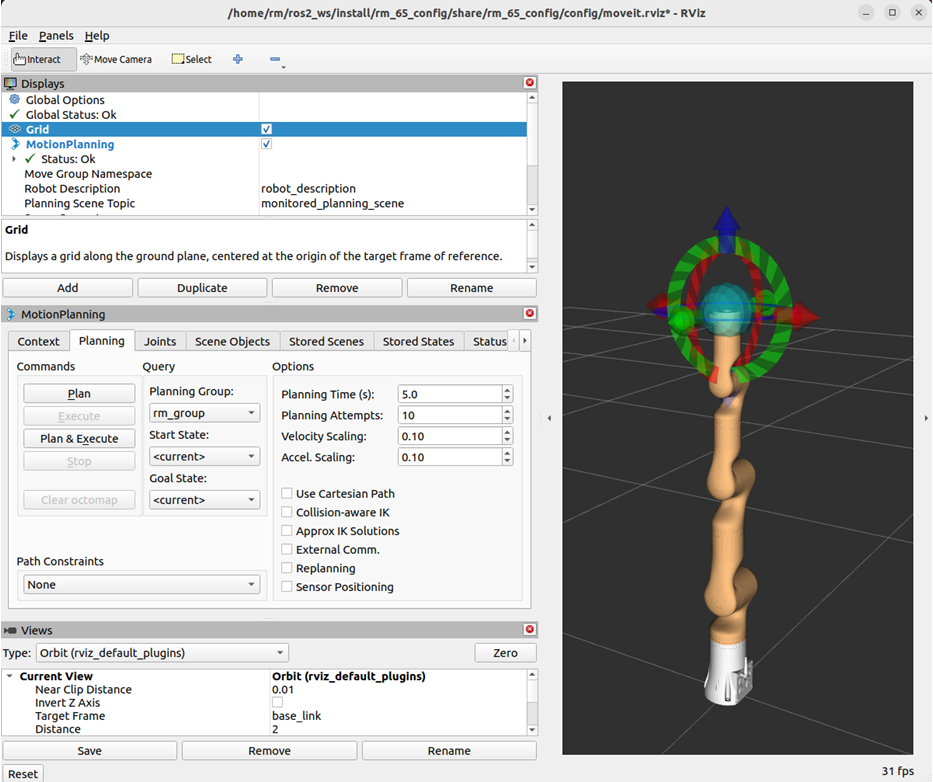
The launch file launches the function of moveit2 to control the real robotic arm. Then, you can control the robotic arm movement by dragging the control ball. For details, please refer to “rm_moveit2_config Detailed Description”.
Gazebo_control_of_robotic_arm
We can run the launch.py file in the rm_bringup package through the following command, and directly launch the gzaebo simulation node.
rm@rm-desktop:~$ ros2 launch rm_bringup rm_<arm_type>_gazebo.launch.py
In practice, the above
The command to start the six-axis force version is currently available for 63, 65, 75, and eco65:
rm@rm-desktop:~$ ros2 launch rm_bringup rm_<arm_type>_6f_gazebo.launch.py
The command to start the integrated six-axis force version is currently available for 63, 63_III, 65, 75, eco63, eco65, and rx75:
rm@rm-desktop:~$ ros2 launch rm_bringup rm_<arm_type>_6fb_gazebo.launch.py
The command to start the vision-enabled integrated six-axis force version is currently only available for rx75:
rm@rm-desktop:~$ ros2 launch rm_bringup rm_<arm_type>_6fb_v_gazebo.launch.py
For example, the launch command of 65 robotic arm:
rm@rm-desktop:~$ ros2 launch rm_bringup rm_65_gazebo.launch.py
The following screen appears in the interface after a successful node launch.
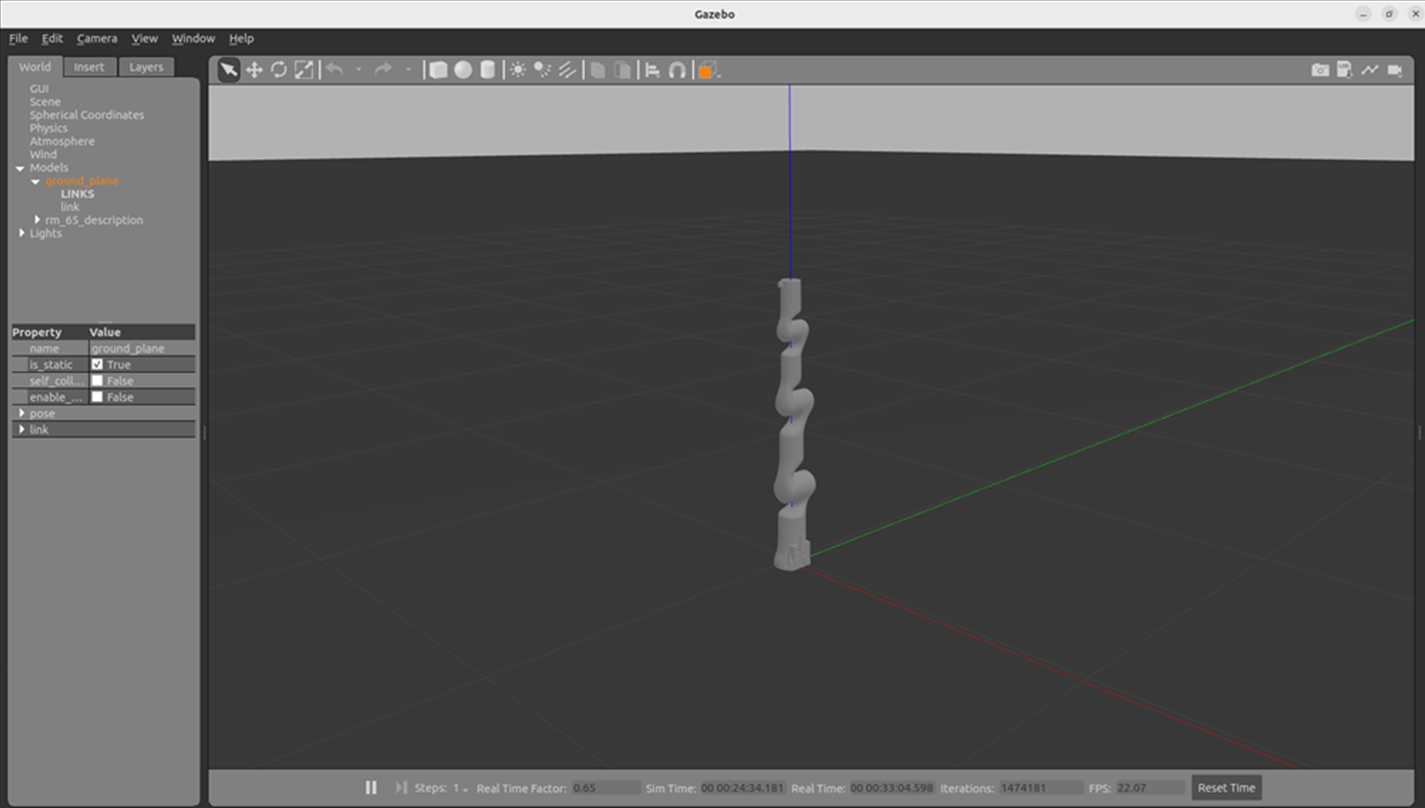 Then, we use the following command to launch moveit2 to control the simulation robot arm in Gazebo.
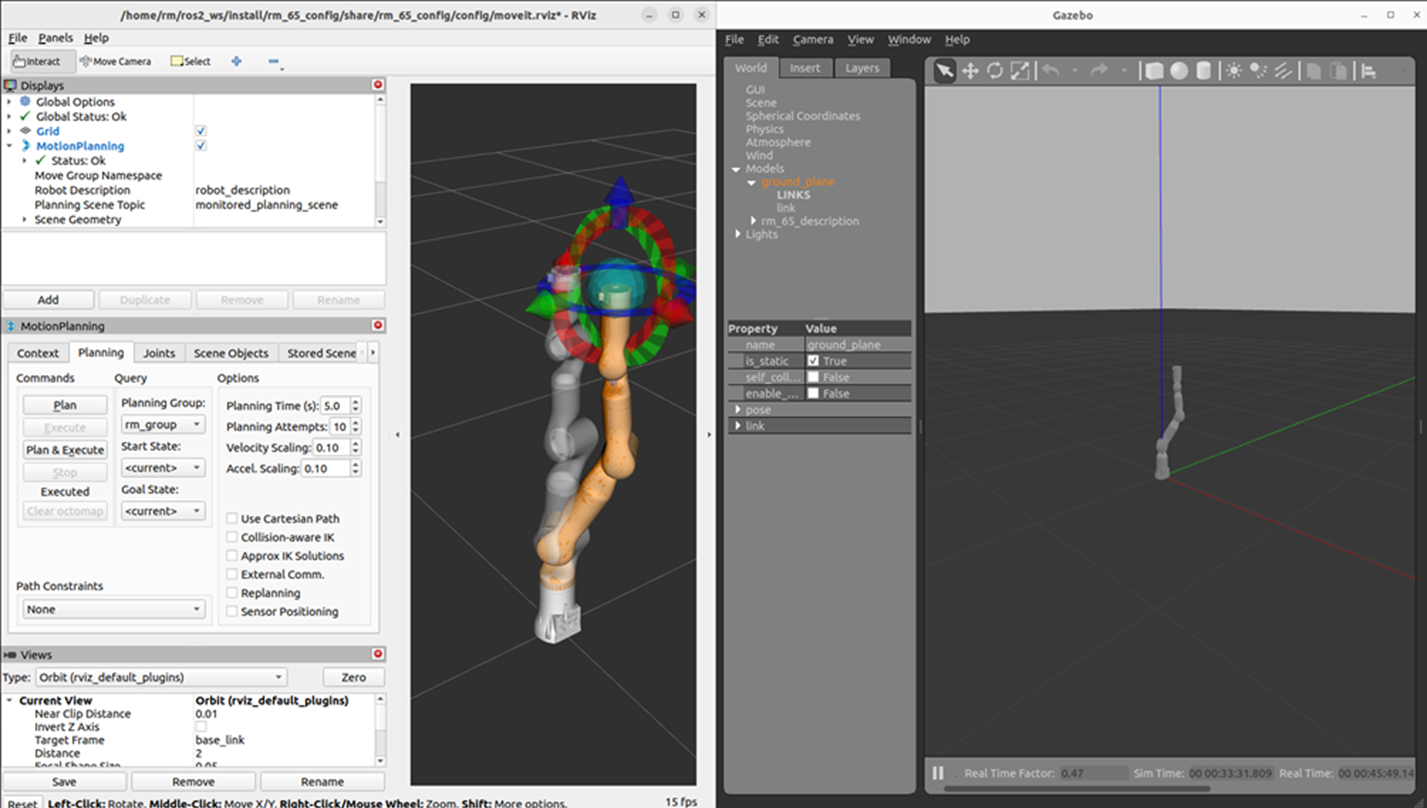
rm_bringup_Package_Architecture_Description
Overview_of_Package_Files
File truncated at 100 lines see the full file
Package Dependencies
| Deps | Name |
|---|---|
| ament_cmake | |
| ament_lint_auto | |
| ament_lint_common |
System Dependencies
Dependant Packages
Launch files
Messages
Services
Plugins
Recent questions tagged rm_bringup at Robotics Stack Exchange
Package Summary
| Version | 1.7.0 |
| License | Apache-2.0 |
| Build type | AMENT_CMAKE |
| Use | RECOMMENDED |
Repository Summary
| Description | |
| Checkout URI | https://github.com/realmanrobot/ros2_rm_robot.git |
| VCS Type | git |
| VCS Version | humble |
| Last Updated | 2026-10-16 |
| Dev Status | UNKNOWN |
| Released | UNRELEASED |
| Contributing |
Help Wanted (-)
Good First Issues (-) Pull Requests to Review (-) |
Package Description
Maintainers
- rm
Authors
Content
- 1.rm_bringup Package Description
- 2.rm_bringup Package Use
- 2.1moveit2 Controlling Real Robotic Arm
- 2.2Gazebo control of robotic arm
- 3.rm_bringup Package Architecture Description
- 3.1Overview of Package Files
- 4.rm_bringup Topic Description
rm_bringup_Package_Description
rm_bringup is a function package for realizing the simultaneous running of multiple launch files. Using this package, a command can be used to launch complex functions combining multiple nodes. This package is introduced in detail in the following aspects.
- 1.Package use.
- 2.Package architecture description.
- 3.Package topic description.
Through the introduction of the three parts, it can help you: - 1.Understand the package use.
- 2.Familiar with the file structure and function of the package.
- 3.Familiar with the topic related to the package for easy development and use.
Source code address: https://github.com/RealManRobot/ros2_rm_robot.git。
rm_bringup_Package_Use
moveit2_Controlling_Real_Robotic_Arm
First, after configuring the environment and completing the connection, we can directly launch the node and run the launch.py file in the rm_bringup package through the following command.
rm@rm-desktop:~$ ros2 launch rm_bringup rm_<arm_type>_bringup.launch.py
In practice, the above
rm@rm-desktop:~$ ros2 launch rm_bringup rm_<arm_type>_6f_bringup.launch.py
The command to start the integrated six-axis force version is currently available for 63, 63_III, 65, 75, eco63, eco65, and rx75:
rm@rm-desktop:~$ ros2 launch rm_bringup rm_<arm_type>_6fb_bringup.launch.py
The command to start the vision-enabled integrated six-axis force version is currently only available for rx75:
rm@rm-desktop:~$ ros2 launch rm_bringup rm_<arm_type>_6fb_v_bringup.launch.py
For example, the launch command of 65 robotic arm:
rm@rm-desktop:~$ ros2 launch rm_bringup rm_65_bringup.launch.py
The following screen appears in the interface after a successful node launch.
The launch file launches the function of moveit2 to control the real robotic arm. Then, you can control the robotic arm movement by dragging the control ball. For details, please refer to “rm_moveit2_config Detailed Description”.
Gazebo_control_of_robotic_arm
We can run the launch.py file in the rm_bringup package through the following command, and directly launch the gzaebo simulation node.
rm@rm-desktop:~$ ros2 launch rm_bringup rm_<arm_type>_gazebo.launch.py
In practice, the above
The command to start the six-axis force version is currently available for 63, 65, 75, and eco65:
rm@rm-desktop:~$ ros2 launch rm_bringup rm_<arm_type>_6f_gazebo.launch.py
The command to start the integrated six-axis force version is currently available for 63, 63_III, 65, 75, eco63, eco65, and rx75:
rm@rm-desktop:~$ ros2 launch rm_bringup rm_<arm_type>_6fb_gazebo.launch.py
The command to start the vision-enabled integrated six-axis force version is currently only available for rx75:
rm@rm-desktop:~$ ros2 launch rm_bringup rm_<arm_type>_6fb_v_gazebo.launch.py
For example, the launch command of 65 robotic arm:
rm@rm-desktop:~$ ros2 launch rm_bringup rm_65_gazebo.launch.py
The following screen appears in the interface after a successful node launch.
Then, we use the following command to launch moveit2 to control the simulation robot arm in Gazebo.
rm_bringup_Package_Architecture_Description
Overview_of_Package_Files
File truncated at 100 lines see the full file
Package Dependencies
| Deps | Name |
|---|---|
| ament_cmake | |
| ament_lint_auto | |
| ament_lint_common |
System Dependencies
Dependant Packages
Launch files
Messages
Services
Plugins
Recent questions tagged rm_bringup at Robotics Stack Exchange
Package Summary
| Version | 1.7.0 |
| License | Apache-2.0 |
| Build type | AMENT_CMAKE |
| Use | RECOMMENDED |
Repository Summary
| Description | |
| Checkout URI | https://github.com/realmanrobot/ros2_rm_robot.git |
| VCS Type | git |
| VCS Version | humble |
| Last Updated | 2026-10-16 |
| Dev Status | UNKNOWN |
| Released | UNRELEASED |
| Contributing |
Help Wanted (-)
Good First Issues (-) Pull Requests to Review (-) |
Package Description
Maintainers
- rm
Authors
Content
- 1.rm_bringup Package Description
- 2.rm_bringup Package Use
- 2.1moveit2 Controlling Real Robotic Arm
- 2.2Gazebo control of robotic arm
- 3.rm_bringup Package Architecture Description
- 3.1Overview of Package Files
- 4.rm_bringup Topic Description
rm_bringup_Package_Description
rm_bringup is a function package for realizing the simultaneous running of multiple launch files. Using this package, a command can be used to launch complex functions combining multiple nodes. This package is introduced in detail in the following aspects.
- 1.Package use.
- 2.Package architecture description.
- 3.Package topic description.
Through the introduction of the three parts, it can help you: - 1.Understand the package use.
- 2.Familiar with the file structure and function of the package.
- 3.Familiar with the topic related to the package for easy development and use.
Source code address: https://github.com/RealManRobot/ros2_rm_robot.git。
rm_bringup_Package_Use
moveit2_Controlling_Real_Robotic_Arm
First, after configuring the environment and completing the connection, we can directly launch the node and run the launch.py file in the rm_bringup package through the following command.
rm@rm-desktop:~$ ros2 launch rm_bringup rm_<arm_type>_bringup.launch.py
In practice, the above
rm@rm-desktop:~$ ros2 launch rm_bringup rm_<arm_type>_6f_bringup.launch.py
The command to start the integrated six-axis force version is currently available for 63, 63_III, 65, 75, eco63, eco65, and rx75:
rm@rm-desktop:~$ ros2 launch rm_bringup rm_<arm_type>_6fb_bringup.launch.py
The command to start the vision-enabled integrated six-axis force version is currently only available for rx75:
rm@rm-desktop:~$ ros2 launch rm_bringup rm_<arm_type>_6fb_v_bringup.launch.py
For example, the launch command of 65 robotic arm:
rm@rm-desktop:~$ ros2 launch rm_bringup rm_65_bringup.launch.py
The following screen appears in the interface after a successful node launch.
The launch file launches the function of moveit2 to control the real robotic arm. Then, you can control the robotic arm movement by dragging the control ball. For details, please refer to “rm_moveit2_config Detailed Description”.
Gazebo_control_of_robotic_arm
We can run the launch.py file in the rm_bringup package through the following command, and directly launch the gzaebo simulation node.
rm@rm-desktop:~$ ros2 launch rm_bringup rm_<arm_type>_gazebo.launch.py
In practice, the above
The command to start the six-axis force version is currently available for 63, 65, 75, and eco65:
rm@rm-desktop:~$ ros2 launch rm_bringup rm_<arm_type>_6f_gazebo.launch.py
The command to start the integrated six-axis force version is currently available for 63, 63_III, 65, 75, eco63, eco65, and rx75:
rm@rm-desktop:~$ ros2 launch rm_bringup rm_<arm_type>_6fb_gazebo.launch.py
The command to start the vision-enabled integrated six-axis force version is currently only available for rx75:
rm@rm-desktop:~$ ros2 launch rm_bringup rm_<arm_type>_6fb_v_gazebo.launch.py
For example, the launch command of 65 robotic arm:
rm@rm-desktop:~$ ros2 launch rm_bringup rm_65_gazebo.launch.py
The following screen appears in the interface after a successful node launch.
Then, we use the following command to launch moveit2 to control the simulation robot arm in Gazebo.
rm_bringup_Package_Architecture_Description
Overview_of_Package_Files
File truncated at 100 lines see the full file
Package Dependencies
| Deps | Name |
|---|---|
| ament_cmake | |
| ament_lint_auto | |
| ament_lint_common |
System Dependencies
Dependant Packages
Launch files
Messages
Services
Plugins
Recent questions tagged rm_bringup at Robotics Stack Exchange
Package Summary
| Version | 1.7.0 |
| License | Apache-2.0 |
| Build type | AMENT_CMAKE |
| Use | RECOMMENDED |
Repository Summary
| Description | |
| Checkout URI | https://github.com/realmanrobot/ros2_rm_robot.git |
| VCS Type | git |
| VCS Version | humble |
| Last Updated | 2026-10-16 |
| Dev Status | UNKNOWN |
| Released | UNRELEASED |
| Contributing |
Help Wanted (-)
Good First Issues (-) Pull Requests to Review (-) |
Package Description
Maintainers
- rm
Authors
Content
- 1.rm_bringup Package Description
- 2.rm_bringup Package Use
- 2.1moveit2 Controlling Real Robotic Arm
- 2.2Gazebo control of robotic arm
- 3.rm_bringup Package Architecture Description
- 3.1Overview of Package Files
- 4.rm_bringup Topic Description
rm_bringup_Package_Description
rm_bringup is a function package for realizing the simultaneous running of multiple launch files. Using this package, a command can be used to launch complex functions combining multiple nodes. This package is introduced in detail in the following aspects.
- 1.Package use.
- 2.Package architecture description.
- 3.Package topic description.
Through the introduction of the three parts, it can help you: - 1.Understand the package use.
- 2.Familiar with the file structure and function of the package.
- 3.Familiar with the topic related to the package for easy development and use.
Source code address: https://github.com/RealManRobot/ros2_rm_robot.git。
rm_bringup_Package_Use
moveit2_Controlling_Real_Robotic_Arm
First, after configuring the environment and completing the connection, we can directly launch the node and run the launch.py file in the rm_bringup package through the following command.
rm@rm-desktop:~$ ros2 launch rm_bringup rm_<arm_type>_bringup.launch.py
In practice, the above
rm@rm-desktop:~$ ros2 launch rm_bringup rm_<arm_type>_6f_bringup.launch.py
The command to start the integrated six-axis force version is currently available for 63, 63_III, 65, 75, eco63, eco65, and rx75:
rm@rm-desktop:~$ ros2 launch rm_bringup rm_<arm_type>_6fb_bringup.launch.py
The command to start the vision-enabled integrated six-axis force version is currently only available for rx75:
rm@rm-desktop:~$ ros2 launch rm_bringup rm_<arm_type>_6fb_v_bringup.launch.py
For example, the launch command of 65 robotic arm:
rm@rm-desktop:~$ ros2 launch rm_bringup rm_65_bringup.launch.py
The following screen appears in the interface after a successful node launch.
The launch file launches the function of moveit2 to control the real robotic arm. Then, you can control the robotic arm movement by dragging the control ball. For details, please refer to “rm_moveit2_config Detailed Description”.
Gazebo_control_of_robotic_arm
We can run the launch.py file in the rm_bringup package through the following command, and directly launch the gzaebo simulation node.
rm@rm-desktop:~$ ros2 launch rm_bringup rm_<arm_type>_gazebo.launch.py
In practice, the above
The command to start the six-axis force version is currently available for 63, 65, 75, and eco65:
rm@rm-desktop:~$ ros2 launch rm_bringup rm_<arm_type>_6f_gazebo.launch.py
The command to start the integrated six-axis force version is currently available for 63, 63_III, 65, 75, eco63, eco65, and rx75:
rm@rm-desktop:~$ ros2 launch rm_bringup rm_<arm_type>_6fb_gazebo.launch.py
The command to start the vision-enabled integrated six-axis force version is currently only available for rx75:
rm@rm-desktop:~$ ros2 launch rm_bringup rm_<arm_type>_6fb_v_gazebo.launch.py
For example, the launch command of 65 robotic arm:
rm@rm-desktop:~$ ros2 launch rm_bringup rm_65_gazebo.launch.py
The following screen appears in the interface after a successful node launch.
Then, we use the following command to launch moveit2 to control the simulation robot arm in Gazebo.
rm_bringup_Package_Architecture_Description
Overview_of_Package_Files
File truncated at 100 lines see the full file
Package Dependencies
| Deps | Name |
|---|---|
| ament_cmake | |
| ament_lint_auto | |
| ament_lint_common |
System Dependencies
Dependant Packages
Launch files
Messages
Services
Plugins
Recent questions tagged rm_bringup at Robotics Stack Exchange
Package Summary
| Version | 1.7.0 |
| License | Apache-2.0 |
| Build type | AMENT_CMAKE |
| Use | RECOMMENDED |
Repository Summary
| Description | |
| Checkout URI | https://github.com/realmanrobot/ros2_rm_robot.git |
| VCS Type | git |
| VCS Version | humble |
| Last Updated | 2026-10-16 |
| Dev Status | UNKNOWN |
| Released | UNRELEASED |
| Contributing |
Help Wanted (-)
Good First Issues (-) Pull Requests to Review (-) |
Package Description
Maintainers
- rm
Authors
Content
- 1.rm_bringup Package Description
- 2.rm_bringup Package Use
- 2.1moveit2 Controlling Real Robotic Arm
- 2.2Gazebo control of robotic arm
- 3.rm_bringup Package Architecture Description
- 3.1Overview of Package Files
- 4.rm_bringup Topic Description
rm_bringup_Package_Description
rm_bringup is a function package for realizing the simultaneous running of multiple launch files. Using this package, a command can be used to launch complex functions combining multiple nodes. This package is introduced in detail in the following aspects.
- 1.Package use.
- 2.Package architecture description.
- 3.Package topic description.
Through the introduction of the three parts, it can help you: - 1.Understand the package use.
- 2.Familiar with the file structure and function of the package.
- 3.Familiar with the topic related to the package for easy development and use.
Source code address: https://github.com/RealManRobot/ros2_rm_robot.git。
rm_bringup_Package_Use
moveit2_Controlling_Real_Robotic_Arm
First, after configuring the environment and completing the connection, we can directly launch the node and run the launch.py file in the rm_bringup package through the following command.
rm@rm-desktop:~$ ros2 launch rm_bringup rm_<arm_type>_bringup.launch.py
In practice, the above
rm@rm-desktop:~$ ros2 launch rm_bringup rm_<arm_type>_6f_bringup.launch.py
The command to start the integrated six-axis force version is currently available for 63, 63_III, 65, 75, eco63, eco65, and rx75:
rm@rm-desktop:~$ ros2 launch rm_bringup rm_<arm_type>_6fb_bringup.launch.py
The command to start the vision-enabled integrated six-axis force version is currently only available for rx75:
rm@rm-desktop:~$ ros2 launch rm_bringup rm_<arm_type>_6fb_v_bringup.launch.py
For example, the launch command of 65 robotic arm:
rm@rm-desktop:~$ ros2 launch rm_bringup rm_65_bringup.launch.py
The following screen appears in the interface after a successful node launch.
The launch file launches the function of moveit2 to control the real robotic arm. Then, you can control the robotic arm movement by dragging the control ball. For details, please refer to “rm_moveit2_config Detailed Description”.
Gazebo_control_of_robotic_arm
We can run the launch.py file in the rm_bringup package through the following command, and directly launch the gzaebo simulation node.
rm@rm-desktop:~$ ros2 launch rm_bringup rm_<arm_type>_gazebo.launch.py
In practice, the above
The command to start the six-axis force version is currently available for 63, 65, 75, and eco65:
rm@rm-desktop:~$ ros2 launch rm_bringup rm_<arm_type>_6f_gazebo.launch.py
The command to start the integrated six-axis force version is currently available for 63, 63_III, 65, 75, eco63, eco65, and rx75:
rm@rm-desktop:~$ ros2 launch rm_bringup rm_<arm_type>_6fb_gazebo.launch.py
The command to start the vision-enabled integrated six-axis force version is currently only available for rx75:
rm@rm-desktop:~$ ros2 launch rm_bringup rm_<arm_type>_6fb_v_gazebo.launch.py
For example, the launch command of 65 robotic arm:
rm@rm-desktop:~$ ros2 launch rm_bringup rm_65_gazebo.launch.py
The following screen appears in the interface after a successful node launch.
Then, we use the following command to launch moveit2 to control the simulation robot arm in Gazebo.
rm_bringup_Package_Architecture_Description
Overview_of_Package_Files
File truncated at 100 lines see the full file
Package Dependencies
| Deps | Name |
|---|---|
| ament_cmake | |
| ament_lint_auto | |
| ament_lint_common |
System Dependencies
Dependant Packages
Launch files
Messages
Services
Plugins
Recent questions tagged rm_bringup at Robotics Stack Exchange
Package Summary
| Version | 1.7.0 |
| License | Apache-2.0 |
| Build type | AMENT_CMAKE |
| Use | RECOMMENDED |
Repository Summary
| Description | |
| Checkout URI | https://github.com/realmanrobot/ros2_rm_robot.git |
| VCS Type | git |
| VCS Version | humble |
| Last Updated | 2026-10-16 |
| Dev Status | UNKNOWN |
| Released | UNRELEASED |
| Contributing |
Help Wanted (-)
Good First Issues (-) Pull Requests to Review (-) |
Package Description
Maintainers
- rm
Authors
Content
- 1.rm_bringup Package Description
- 2.rm_bringup Package Use
- 2.1moveit2 Controlling Real Robotic Arm
- 2.2Gazebo control of robotic arm
- 3.rm_bringup Package Architecture Description
- 3.1Overview of Package Files
- 4.rm_bringup Topic Description
rm_bringup_Package_Description
rm_bringup is a function package for realizing the simultaneous running of multiple launch files. Using this package, a command can be used to launch complex functions combining multiple nodes. This package is introduced in detail in the following aspects.
- 1.Package use.
- 2.Package architecture description.
- 3.Package topic description.
Through the introduction of the three parts, it can help you: - 1.Understand the package use.
- 2.Familiar with the file structure and function of the package.
- 3.Familiar with the topic related to the package for easy development and use.
Source code address: https://github.com/RealManRobot/ros2_rm_robot.git。
rm_bringup_Package_Use
moveit2_Controlling_Real_Robotic_Arm
First, after configuring the environment and completing the connection, we can directly launch the node and run the launch.py file in the rm_bringup package through the following command.
rm@rm-desktop:~$ ros2 launch rm_bringup rm_<arm_type>_bringup.launch.py
In practice, the above
rm@rm-desktop:~$ ros2 launch rm_bringup rm_<arm_type>_6f_bringup.launch.py
The command to start the integrated six-axis force version is currently available for 63, 63_III, 65, 75, eco63, eco65, and rx75:
rm@rm-desktop:~$ ros2 launch rm_bringup rm_<arm_type>_6fb_bringup.launch.py
The command to start the vision-enabled integrated six-axis force version is currently only available for rx75:
rm@rm-desktop:~$ ros2 launch rm_bringup rm_<arm_type>_6fb_v_bringup.launch.py
For example, the launch command of 65 robotic arm:
rm@rm-desktop:~$ ros2 launch rm_bringup rm_65_bringup.launch.py
The following screen appears in the interface after a successful node launch.
The launch file launches the function of moveit2 to control the real robotic arm. Then, you can control the robotic arm movement by dragging the control ball. For details, please refer to “rm_moveit2_config Detailed Description”.
Gazebo_control_of_robotic_arm
We can run the launch.py file in the rm_bringup package through the following command, and directly launch the gzaebo simulation node.
rm@rm-desktop:~$ ros2 launch rm_bringup rm_<arm_type>_gazebo.launch.py
In practice, the above
The command to start the six-axis force version is currently available for 63, 65, 75, and eco65:
rm@rm-desktop:~$ ros2 launch rm_bringup rm_<arm_type>_6f_gazebo.launch.py
The command to start the integrated six-axis force version is currently available for 63, 63_III, 65, 75, eco63, eco65, and rx75:
rm@rm-desktop:~$ ros2 launch rm_bringup rm_<arm_type>_6fb_gazebo.launch.py
The command to start the vision-enabled integrated six-axis force version is currently only available for rx75:
rm@rm-desktop:~$ ros2 launch rm_bringup rm_<arm_type>_6fb_v_gazebo.launch.py
For example, the launch command of 65 robotic arm:
rm@rm-desktop:~$ ros2 launch rm_bringup rm_65_gazebo.launch.py
The following screen appears in the interface after a successful node launch.
Then, we use the following command to launch moveit2 to control the simulation robot arm in Gazebo.
rm_bringup_Package_Architecture_Description
Overview_of_Package_Files
File truncated at 100 lines see the full file
Package Dependencies
| Deps | Name |
|---|---|
| ament_cmake | |
| ament_lint_auto | |
| ament_lint_common |
System Dependencies
Dependant Packages
Launch files
Messages
Services
Plugins
Recent questions tagged rm_bringup at Robotics Stack Exchange
Package Summary
| Version | 1.7.0 |
| License | Apache-2.0 |
| Build type | AMENT_CMAKE |
| Use | RECOMMENDED |
Repository Summary
| Description | |
| Checkout URI | https://github.com/realmanrobot/ros2_rm_robot.git |
| VCS Type | git |
| VCS Version | humble |
| Last Updated | 2026-10-16 |
| Dev Status | UNKNOWN |
| Released | UNRELEASED |
| Contributing |
Help Wanted (-)
Good First Issues (-) Pull Requests to Review (-) |
Package Description
Maintainers
- rm
Authors
Content
- 1.rm_bringup Package Description
- 2.rm_bringup Package Use
- 2.1moveit2 Controlling Real Robotic Arm
- 2.2Gazebo control of robotic arm
- 3.rm_bringup Package Architecture Description
- 3.1Overview of Package Files
- 4.rm_bringup Topic Description
rm_bringup_Package_Description
rm_bringup is a function package for realizing the simultaneous running of multiple launch files. Using this package, a command can be used to launch complex functions combining multiple nodes. This package is introduced in detail in the following aspects.
- 1.Package use.
- 2.Package architecture description.
- 3.Package topic description.
Through the introduction of the three parts, it can help you: - 1.Understand the package use.
- 2.Familiar with the file structure and function of the package.
- 3.Familiar with the topic related to the package for easy development and use.
Source code address: https://github.com/RealManRobot/ros2_rm_robot.git。
rm_bringup_Package_Use
moveit2_Controlling_Real_Robotic_Arm
First, after configuring the environment and completing the connection, we can directly launch the node and run the launch.py file in the rm_bringup package through the following command.
rm@rm-desktop:~$ ros2 launch rm_bringup rm_<arm_type>_bringup.launch.py
In practice, the above
rm@rm-desktop:~$ ros2 launch rm_bringup rm_<arm_type>_6f_bringup.launch.py
The command to start the integrated six-axis force version is currently available for 63, 63_III, 65, 75, eco63, eco65, and rx75:
rm@rm-desktop:~$ ros2 launch rm_bringup rm_<arm_type>_6fb_bringup.launch.py
The command to start the vision-enabled integrated six-axis force version is currently only available for rx75:
rm@rm-desktop:~$ ros2 launch rm_bringup rm_<arm_type>_6fb_v_bringup.launch.py
For example, the launch command of 65 robotic arm:
rm@rm-desktop:~$ ros2 launch rm_bringup rm_65_bringup.launch.py
The following screen appears in the interface after a successful node launch.
The launch file launches the function of moveit2 to control the real robotic arm. Then, you can control the robotic arm movement by dragging the control ball. For details, please refer to “rm_moveit2_config Detailed Description”.
Gazebo_control_of_robotic_arm
We can run the launch.py file in the rm_bringup package through the following command, and directly launch the gzaebo simulation node.
rm@rm-desktop:~$ ros2 launch rm_bringup rm_<arm_type>_gazebo.launch.py
In practice, the above
The command to start the six-axis force version is currently available for 63, 65, 75, and eco65:
rm@rm-desktop:~$ ros2 launch rm_bringup rm_<arm_type>_6f_gazebo.launch.py
The command to start the integrated six-axis force version is currently available for 63, 63_III, 65, 75, eco63, eco65, and rx75:
rm@rm-desktop:~$ ros2 launch rm_bringup rm_<arm_type>_6fb_gazebo.launch.py
The command to start the vision-enabled integrated six-axis force version is currently only available for rx75:
rm@rm-desktop:~$ ros2 launch rm_bringup rm_<arm_type>_6fb_v_gazebo.launch.py
For example, the launch command of 65 robotic arm:
rm@rm-desktop:~$ ros2 launch rm_bringup rm_65_gazebo.launch.py
The following screen appears in the interface after a successful node launch.
Then, we use the following command to launch moveit2 to control the simulation robot arm in Gazebo.
rm_bringup_Package_Architecture_Description
Overview_of_Package_Files
File truncated at 100 lines see the full file
Package Dependencies
| Deps | Name |
|---|---|
| ament_cmake | |
| ament_lint_auto | |
| ament_lint_common |
System Dependencies
Dependant Packages
Launch files
Messages
Services
Plugins
Recent questions tagged rm_bringup at Robotics Stack Exchange
Package Summary
| Version | 1.7.0 |
| License | Apache-2.0 |
| Build type | AMENT_CMAKE |
| Use | RECOMMENDED |
Repository Summary
| Description | |
| Checkout URI | https://github.com/realmanrobot/ros2_rm_robot.git |
| VCS Type | git |
| VCS Version | humble |
| Last Updated | 2026-10-16 |
| Dev Status | UNKNOWN |
| Released | UNRELEASED |
| Contributing |
Help Wanted (-)
Good First Issues (-) Pull Requests to Review (-) |
Package Description
Maintainers
- rm
Authors
Content
- 1.rm_bringup Package Description
- 2.rm_bringup Package Use
- 2.1moveit2 Controlling Real Robotic Arm
- 2.2Gazebo control of robotic arm
- 3.rm_bringup Package Architecture Description
- 3.1Overview of Package Files
- 4.rm_bringup Topic Description
rm_bringup_Package_Description
rm_bringup is a function package for realizing the simultaneous running of multiple launch files. Using this package, a command can be used to launch complex functions combining multiple nodes. This package is introduced in detail in the following aspects.
- 1.Package use.
- 2.Package architecture description.
- 3.Package topic description.
Through the introduction of the three parts, it can help you: - 1.Understand the package use.
- 2.Familiar with the file structure and function of the package.
- 3.Familiar with the topic related to the package for easy development and use.
Source code address: https://github.com/RealManRobot/ros2_rm_robot.git。
rm_bringup_Package_Use
moveit2_Controlling_Real_Robotic_Arm
First, after configuring the environment and completing the connection, we can directly launch the node and run the launch.py file in the rm_bringup package through the following command.
rm@rm-desktop:~$ ros2 launch rm_bringup rm_<arm_type>_bringup.launch.py
In practice, the above
rm@rm-desktop:~$ ros2 launch rm_bringup rm_<arm_type>_6f_bringup.launch.py
The command to start the integrated six-axis force version is currently available for 63, 63_III, 65, 75, eco63, eco65, and rx75:
rm@rm-desktop:~$ ros2 launch rm_bringup rm_<arm_type>_6fb_bringup.launch.py
The command to start the vision-enabled integrated six-axis force version is currently only available for rx75:
rm@rm-desktop:~$ ros2 launch rm_bringup rm_<arm_type>_6fb_v_bringup.launch.py
For example, the launch command of 65 robotic arm:
rm@rm-desktop:~$ ros2 launch rm_bringup rm_65_bringup.launch.py
The following screen appears in the interface after a successful node launch.
The launch file launches the function of moveit2 to control the real robotic arm. Then, you can control the robotic arm movement by dragging the control ball. For details, please refer to “rm_moveit2_config Detailed Description”.
Gazebo_control_of_robotic_arm
We can run the launch.py file in the rm_bringup package through the following command, and directly launch the gzaebo simulation node.
rm@rm-desktop:~$ ros2 launch rm_bringup rm_<arm_type>_gazebo.launch.py
In practice, the above
The command to start the six-axis force version is currently available for 63, 65, 75, and eco65:
rm@rm-desktop:~$ ros2 launch rm_bringup rm_<arm_type>_6f_gazebo.launch.py
The command to start the integrated six-axis force version is currently available for 63, 63_III, 65, 75, eco63, eco65, and rx75:
rm@rm-desktop:~$ ros2 launch rm_bringup rm_<arm_type>_6fb_gazebo.launch.py
The command to start the vision-enabled integrated six-axis force version is currently only available for rx75:
rm@rm-desktop:~$ ros2 launch rm_bringup rm_<arm_type>_6fb_v_gazebo.launch.py
For example, the launch command of 65 robotic arm:
rm@rm-desktop:~$ ros2 launch rm_bringup rm_65_gazebo.launch.py
The following screen appears in the interface after a successful node launch.
Then, we use the following command to launch moveit2 to control the simulation robot arm in Gazebo.
rm_bringup_Package_Architecture_Description
Overview_of_Package_Files
File truncated at 100 lines see the full file
Package Dependencies
| Deps | Name |
|---|---|
| ament_cmake | |
| ament_lint_auto | |
| ament_lint_common |
System Dependencies
Dependant Packages
Launch files
Messages
Services
Plugins
Recent questions tagged rm_bringup at Robotics Stack Exchange
Package Summary
| Version | 1.7.0 |
| License | Apache-2.0 |
| Build type | AMENT_CMAKE |
| Use | RECOMMENDED |
Repository Summary
| Description | |
| Checkout URI | https://github.com/realmanrobot/ros2_rm_robot.git |
| VCS Type | git |
| VCS Version | humble |
| Last Updated | 2026-10-16 |
| Dev Status | UNKNOWN |
| Released | UNRELEASED |
| Contributing |
Help Wanted (-)
Good First Issues (-) Pull Requests to Review (-) |
Package Description
Maintainers
- rm
Authors
Content
- 1.rm_bringup Package Description
- 2.rm_bringup Package Use
- 2.1moveit2 Controlling Real Robotic Arm
- 2.2Gazebo control of robotic arm
- 3.rm_bringup Package Architecture Description
- 3.1Overview of Package Files
- 4.rm_bringup Topic Description
rm_bringup_Package_Description
rm_bringup is a function package for realizing the simultaneous running of multiple launch files. Using this package, a command can be used to launch complex functions combining multiple nodes. This package is introduced in detail in the following aspects.
- 1.Package use.
- 2.Package architecture description.
- 3.Package topic description.
Through the introduction of the three parts, it can help you: - 1.Understand the package use.
- 2.Familiar with the file structure and function of the package.
- 3.Familiar with the topic related to the package for easy development and use.
Source code address: https://github.com/RealManRobot/ros2_rm_robot.git。
rm_bringup_Package_Use
moveit2_Controlling_Real_Robotic_Arm
First, after configuring the environment and completing the connection, we can directly launch the node and run the launch.py file in the rm_bringup package through the following command.
rm@rm-desktop:~$ ros2 launch rm_bringup rm_<arm_type>_bringup.launch.py
In practice, the above
rm@rm-desktop:~$ ros2 launch rm_bringup rm_<arm_type>_6f_bringup.launch.py
The command to start the integrated six-axis force version is currently available for 63, 63_III, 65, 75, eco63, eco65, and rx75:
rm@rm-desktop:~$ ros2 launch rm_bringup rm_<arm_type>_6fb_bringup.launch.py
The command to start the vision-enabled integrated six-axis force version is currently only available for rx75:
rm@rm-desktop:~$ ros2 launch rm_bringup rm_<arm_type>_6fb_v_bringup.launch.py
For example, the launch command of 65 robotic arm:
rm@rm-desktop:~$ ros2 launch rm_bringup rm_65_bringup.launch.py
The following screen appears in the interface after a successful node launch.
The launch file launches the function of moveit2 to control the real robotic arm. Then, you can control the robotic arm movement by dragging the control ball. For details, please refer to “rm_moveit2_config Detailed Description”.
Gazebo_control_of_robotic_arm
We can run the launch.py file in the rm_bringup package through the following command, and directly launch the gzaebo simulation node.
rm@rm-desktop:~$ ros2 launch rm_bringup rm_<arm_type>_gazebo.launch.py
In practice, the above
The command to start the six-axis force version is currently available for 63, 65, 75, and eco65:
rm@rm-desktop:~$ ros2 launch rm_bringup rm_<arm_type>_6f_gazebo.launch.py
The command to start the integrated six-axis force version is currently available for 63, 63_III, 65, 75, eco63, eco65, and rx75:
rm@rm-desktop:~$ ros2 launch rm_bringup rm_<arm_type>_6fb_gazebo.launch.py
The command to start the vision-enabled integrated six-axis force version is currently only available for rx75:
rm@rm-desktop:~$ ros2 launch rm_bringup rm_<arm_type>_6fb_v_gazebo.launch.py
For example, the launch command of 65 robotic arm:
rm@rm-desktop:~$ ros2 launch rm_bringup rm_65_gazebo.launch.py
The following screen appears in the interface after a successful node launch.
Then, we use the following command to launch moveit2 to control the simulation robot arm in Gazebo.
rm_bringup_Package_Architecture_Description
Overview_of_Package_Files
File truncated at 100 lines see the full file
Package Dependencies
| Deps | Name |
|---|---|
| ament_cmake | |
| ament_lint_auto | |
| ament_lint_common |
System Dependencies
Dependant Packages
Launch files
Messages
Services
Plugins
Recent questions tagged rm_bringup at Robotics Stack Exchange
Package Summary
| Version | 1.7.0 |
| License | Apache-2.0 |
| Build type | AMENT_CMAKE |
| Use | RECOMMENDED |
Repository Summary
| Description | |
| Checkout URI | https://github.com/realmanrobot/ros2_rm_robot.git |
| VCS Type | git |
| VCS Version | humble |
| Last Updated | 2026-10-16 |
| Dev Status | UNKNOWN |
| Released | UNRELEASED |
| Contributing |
Help Wanted (-)
Good First Issues (-) Pull Requests to Review (-) |
Package Description
Maintainers
- rm
Authors
Content
- 1.rm_bringup Package Description
- 2.rm_bringup Package Use
- 2.1moveit2 Controlling Real Robotic Arm
- 2.2Gazebo control of robotic arm
- 3.rm_bringup Package Architecture Description
- 3.1Overview of Package Files
- 4.rm_bringup Topic Description
rm_bringup_Package_Description
rm_bringup is a function package for realizing the simultaneous running of multiple launch files. Using this package, a command can be used to launch complex functions combining multiple nodes. This package is introduced in detail in the following aspects.
- 1.Package use.
- 2.Package architecture description.
- 3.Package topic description.
Through the introduction of the three parts, it can help you: - 1.Understand the package use.
- 2.Familiar with the file structure and function of the package.
- 3.Familiar with the topic related to the package for easy development and use.
Source code address: https://github.com/RealManRobot/ros2_rm_robot.git。
rm_bringup_Package_Use
moveit2_Controlling_Real_Robotic_Arm
First, after configuring the environment and completing the connection, we can directly launch the node and run the launch.py file in the rm_bringup package through the following command.
rm@rm-desktop:~$ ros2 launch rm_bringup rm_<arm_type>_bringup.launch.py
In practice, the above
rm@rm-desktop:~$ ros2 launch rm_bringup rm_<arm_type>_6f_bringup.launch.py
The command to start the integrated six-axis force version is currently available for 63, 63_III, 65, 75, eco63, eco65, and rx75:
rm@rm-desktop:~$ ros2 launch rm_bringup rm_<arm_type>_6fb_bringup.launch.py
The command to start the vision-enabled integrated six-axis force version is currently only available for rx75:
rm@rm-desktop:~$ ros2 launch rm_bringup rm_<arm_type>_6fb_v_bringup.launch.py
For example, the launch command of 65 robotic arm:
rm@rm-desktop:~$ ros2 launch rm_bringup rm_65_bringup.launch.py
The following screen appears in the interface after a successful node launch.
The launch file launches the function of moveit2 to control the real robotic arm. Then, you can control the robotic arm movement by dragging the control ball. For details, please refer to “rm_moveit2_config Detailed Description”.
Gazebo_control_of_robotic_arm
We can run the launch.py file in the rm_bringup package through the following command, and directly launch the gzaebo simulation node.
rm@rm-desktop:~$ ros2 launch rm_bringup rm_<arm_type>_gazebo.launch.py
In practice, the above
The command to start the six-axis force version is currently available for 63, 65, 75, and eco65:
rm@rm-desktop:~$ ros2 launch rm_bringup rm_<arm_type>_6f_gazebo.launch.py
The command to start the integrated six-axis force version is currently available for 63, 63_III, 65, 75, eco63, eco65, and rx75:
rm@rm-desktop:~$ ros2 launch rm_bringup rm_<arm_type>_6fb_gazebo.launch.py
The command to start the vision-enabled integrated six-axis force version is currently only available for rx75:
rm@rm-desktop:~$ ros2 launch rm_bringup rm_<arm_type>_6fb_v_gazebo.launch.py
For example, the launch command of 65 robotic arm:
rm@rm-desktop:~$ ros2 launch rm_bringup rm_65_gazebo.launch.py
The following screen appears in the interface after a successful node launch.
Then, we use the following command to launch moveit2 to control the simulation robot arm in Gazebo.
rm_bringup_Package_Architecture_Description
Overview_of_Package_Files
File truncated at 100 lines see the full file
Package Dependencies
| Deps | Name |
|---|---|
| ament_cmake | |
| ament_lint_auto | |
| ament_lint_common |