 ROS Index
Package Summary
| Version | 0.6.0 |
| License | Apache License 2.0 |
| Build type | AMENT_CMAKE |
| Use | RECOMMENDED |
Repository Summary
| Description | |
| Checkout URI | https://github.com/autowarefoundation/autoware_tools.git |
| VCS Type | git |
| VCS Version | main |
| Last Updated | 2026-03-26 |
| Dev Status | UNKNOWN |
| Released | UNRELEASED |
| Contributing |
Help Wanted (-)
Good First Issues (-) Pull Requests to Review (-) |
Package Description
Maintainers
- Yamato Ando
- Motsu-san
Authors
- Yamato Ando
- Motsu-san
Position Error Evaluator
Overview
This RViz plugin tool evaluates vehicle position error by measuring deviations from Lanelet2 map lane boundaries and stop lines. It provides interactive line-based measurement functionality with automatic CSV logging and screenshot capture capabilities.
Measurement Process
- Manual Ground Truth Line Drawing: Users draw lines along actual lane markings and stop lines visible in the pointcloud intensity view
- Automatic Map Line Detection: The tool automatically detects the closest corresponding line in the Lanelet2 map
- Error Calculation: Position and orientation error is calculated from the deviation between the drawn ground truth line and the matched map line, revealing localization accuracy on map
The reference lines (ground truth lines) used for measurement are lane markings and stop lines distinguished by the intensity brightness in the pointcloud.
Features
- Interactive Line Measurement: Click-and-drag interface to measure position errors in RViz
-
Dual Line Type Support:
- Stop Line Measurement: Measures X-axis error (longitudinal deviation) from stop lines
- Lane Boundary Measurement: Measures Y-axis error (lateral deviation) from lane boundaries
- Automatic CSV Export: Timestamped CSV files with measurement data
- Screenshot Integration: Automatic desktop screenshot capture after each measurement
- Real-time Error Display: Visual feedback with colored line indicators
- Lanelet2 Integration: Uses HD map data for accurate reference line detection
Prerequisites
- RViz2 and rviz_common
- Lanelet2 libraries
- Autoware map messages
- LL2 map which accuracy must match the desired precision, and the correct relationships between objects are essential.
-
Rosbag data for vehicle pose playback
-
System Dependencies:
- ImageMagick (
importcommand for screenshots) - X11 display server
- Qt5 development libraries(autoware usually includes these)
- ImageMagick (
# Install system dependencies
sudo apt install imagemagick x11-apps
Build Instructions
Adding the usual Autoware installation and build instructions, please do vcs import the repository and build the package.
vcs import < tools.repos
source /opt/ros/humble/setup.bash
rosdep install -y --from-paths src --ignore-src --rosdistro $ROS_DISTRO
rosdep update
colcon build --packages-up-to autoware_position_error_evaluator
Usage
Basic Operation
- Launch RViz with Autoware
-
Set pointcloud intensity view:
- In RViz Display window, select the pointcloud topic (e.g.
/sensing/lidar/concatenated/pointcloud) in the Sensing/LiDAR/ConcatenatedPointCloud category - Set “Color Transformer” to “Intensity”
- Adjust “Min Intensity” and “Max Intensity” to highlight lane markings
- Decay Time can be adjusted to visualize static lane markings better(e.g. set to 1.0)
- (Optional) Adjust point size for better visibility
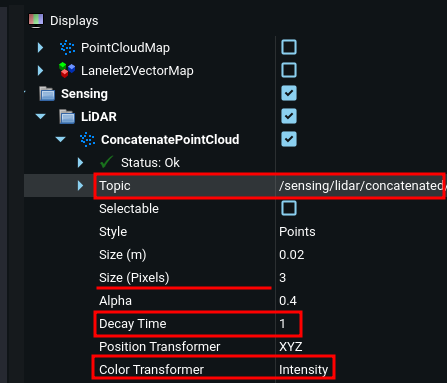
- In RViz Display window, select the pointcloud topic (e.g.
-
Add the Tool:
- Go to RViz toolbar
- Add “Position Error Evaluator Tool”(the arrow icon pointed in the image below)
- Click “Add Tool” button (#1 in the image)
- Select “PositionErrorEvaluatorTool” from the list pop-up (#2 in the image)
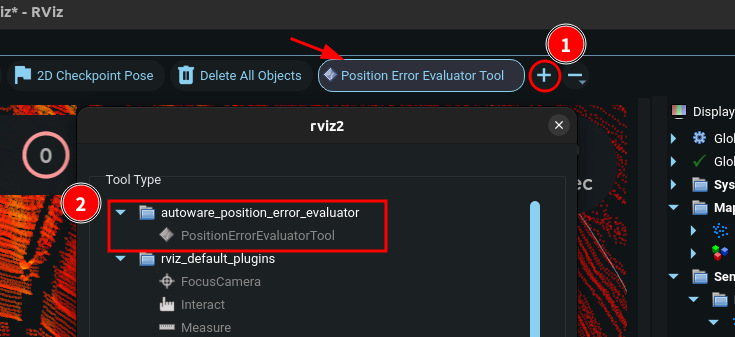
- Load Map Data: Ensure Lanelet2 map is loaded in RViz
- Stop replay rosbag: Pause the rosbag playback(space key on terminal of rosbag replay) to fix the vehicle pose during measurement
-
Start Measuring:
- Click to “Position Error Evaluator Tool”
- Click to start point of line measurement
- Click again to end point of line measurement
- Check the measurement result displayed in the terminal
- (if needed)Delete key to remove last measurement
- Right-click to reset current measurement
- Repeat for additional measurements as needed
Important Notes
- Straight sections only: Measurements are limited to straight road sections. Curves or complex-shaped sections cannot be measured accurately.
- Line segment requirements: Drawing line segments that are too short or too far from the target lanelet line may result in incorrect selection or measurement failure. Draw sufficiently long line segments close to the vehicle position on clearly distinguishable lane markings.
Measurement Types
Stop Line Measurement
- Click near a stop line in the map
- Tool automatically detects the closest stop line
- Measures X-error (longitudinal deviation)
File truncated at 100 lines see the full file
Changelog for package autoware_position_error_evaluator
0.6.0 (2026-02-14)
- fix(autoware_position_error_evaluator): add compile option to avoid depracated declarations (#334)
- Contributors: Fumiya Watanabe
0.5.0 (2025-12-30)
-
fix: to be consistent version in all package.xml(s)
-
feat(position_error_evaluator): add tool for evaluating position error (#301)
- autoware_evaluate_position_error_using_line_rviz_plugin
- remove abs
- style: reorder include section
- feat: add some libraries
- style: change line break position
- style: Remove line breaks
- style: Aligning the text
- feat: Change Lane line extraction method
- feat: Check angle if the segment is within line range
- feat: Change map line width
- feat: output csv result file
* feat: Change csv file naming If conflicted, The name is added sequential number
- feat: take a screenshot after measurement
- fix: Copyright messages
- refactor: Replace magic number to const
- refactor: Remove unused includes
- feat: Output trajectory.csv of measured map points
- feat: Undo just after measurement
- doc: Add README
- chore: Rename the package name
- doc: Follow markdownlint on README
- fix: cpplint error
- style(pre-commit): autofix
- chore: Add maintainer/author
- fix: Remove needless module in CMakeLists
- style: Replace forbidden/unknown words
- style(pre-commit): autofix
* feat: Not measure yaw difference if the stop line measurement is on Because the line is likely to be short to measure yaw difference accurately.
* refactor: remove unnecessary dependency ---------Co-authored-by: Yamato Ando <<yamato.ando@tier4.jp>> Co-authored-by: pre-commit-ci[bot] <66853113+pre-commit-ci[bot]@users.noreply.github.com>
-
Contributors: Motz, github-actions
-
fix: to be consistent version in all package.xml(s)
-
feat(position_error_evaluator): add tool for evaluating position error (#301)
- autoware_evaluate_position_error_using_line_rviz_plugin
- remove abs
- style: reorder include section
- feat: add some libraries
- style: change line break position
- style: Remove line breaks
- style: Aligning the text
- feat: Change Lane line extraction method
- feat: Check angle if the segment is within line range
- feat: Change map line width
- feat: output csv result file
* feat: Change csv file naming If conflicted, The name is added sequential number
- feat: take a screenshot after measurement
- fix: Copyright messages
- refactor: Replace magic number to const
- refactor: Remove unused includes
- feat: Output trajectory.csv of measured map points
- feat: Undo just after measurement
- doc: Add README
- chore: Rename the package name
- doc: Follow markdownlint on README
- fix: cpplint error
- style(pre-commit): autofix
- chore: Add maintainer/author
- fix: Remove needless module in CMakeLists
- style: Replace forbidden/unknown words
- style(pre-commit): autofix
* feat: Not measure yaw difference if the stop line measurement is on Because the line is likely to be short to measure yaw difference accurately.
File truncated at 100 lines see the full file
Package Dependencies
System Dependencies
Dependant Packages
Launch files
Messages
Services
Plugins
Recent questions tagged autoware_position_error_evaluator at Robotics Stack Exchange
Package Summary
| Version | 0.6.0 |
| License | Apache License 2.0 |
| Build type | AMENT_CMAKE |
| Use | RECOMMENDED |
Repository Summary
| Description | |
| Checkout URI | https://github.com/autowarefoundation/autoware_tools.git |
| VCS Type | git |
| VCS Version | main |
| Last Updated | 2026-03-26 |
| Dev Status | UNKNOWN |
| Released | UNRELEASED |
| Contributing |
Help Wanted (-)
Good First Issues (-) Pull Requests to Review (-) |
Package Description
Maintainers
- Yamato Ando
- Motsu-san
Authors
- Yamato Ando
- Motsu-san
Position Error Evaluator
Overview
This RViz plugin tool evaluates vehicle position error by measuring deviations from Lanelet2 map lane boundaries and stop lines. It provides interactive line-based measurement functionality with automatic CSV logging and screenshot capture capabilities.
Measurement Process
- Manual Ground Truth Line Drawing: Users draw lines along actual lane markings and stop lines visible in the pointcloud intensity view
- Automatic Map Line Detection: The tool automatically detects the closest corresponding line in the Lanelet2 map
- Error Calculation: Position and orientation error is calculated from the deviation between the drawn ground truth line and the matched map line, revealing localization accuracy on map
The reference lines (ground truth lines) used for measurement are lane markings and stop lines distinguished by the intensity brightness in the pointcloud.
Features
- Interactive Line Measurement: Click-and-drag interface to measure position errors in RViz
-
Dual Line Type Support:
- Stop Line Measurement: Measures X-axis error (longitudinal deviation) from stop lines
- Lane Boundary Measurement: Measures Y-axis error (lateral deviation) from lane boundaries
- Automatic CSV Export: Timestamped CSV files with measurement data
- Screenshot Integration: Automatic desktop screenshot capture after each measurement
- Real-time Error Display: Visual feedback with colored line indicators
- Lanelet2 Integration: Uses HD map data for accurate reference line detection
Prerequisites
- RViz2 and rviz_common
- Lanelet2 libraries
- Autoware map messages
- LL2 map which accuracy must match the desired precision, and the correct relationships between objects are essential.
-
Rosbag data for vehicle pose playback
-
System Dependencies:
- ImageMagick (
importcommand for screenshots) - X11 display server
- Qt5 development libraries(autoware usually includes these)
- ImageMagick (
# Install system dependencies
sudo apt install imagemagick x11-apps
Build Instructions
Adding the usual Autoware installation and build instructions, please do vcs import the repository and build the package.
vcs import < tools.repos
source /opt/ros/humble/setup.bash
rosdep install -y --from-paths src --ignore-src --rosdistro $ROS_DISTRO
rosdep update
colcon build --packages-up-to autoware_position_error_evaluator
Usage
Basic Operation
- Launch RViz with Autoware
-
Set pointcloud intensity view:
- In RViz Display window, select the pointcloud topic (e.g.
/sensing/lidar/concatenated/pointcloud) in the Sensing/LiDAR/ConcatenatedPointCloud category - Set “Color Transformer” to “Intensity”
- Adjust “Min Intensity” and “Max Intensity” to highlight lane markings
- Decay Time can be adjusted to visualize static lane markings better(e.g. set to 1.0)
- (Optional) Adjust point size for better visibility
- In RViz Display window, select the pointcloud topic (e.g.
-
Add the Tool:
- Go to RViz toolbar
- Add “Position Error Evaluator Tool”(the arrow icon pointed in the image below)
- Click “Add Tool” button (#1 in the image)
- Select “PositionErrorEvaluatorTool” from the list pop-up (#2 in the image)
- Load Map Data: Ensure Lanelet2 map is loaded in RViz
- Stop replay rosbag: Pause the rosbag playback(space key on terminal of rosbag replay) to fix the vehicle pose during measurement
-
Start Measuring:
- Click to “Position Error Evaluator Tool”
- Click to start point of line measurement
- Click again to end point of line measurement
- Check the measurement result displayed in the terminal
- (if needed)Delete key to remove last measurement
- Right-click to reset current measurement
- Repeat for additional measurements as needed
Important Notes
- Straight sections only: Measurements are limited to straight road sections. Curves or complex-shaped sections cannot be measured accurately.
- Line segment requirements: Drawing line segments that are too short or too far from the target lanelet line may result in incorrect selection or measurement failure. Draw sufficiently long line segments close to the vehicle position on clearly distinguishable lane markings.
Measurement Types
Stop Line Measurement
- Click near a stop line in the map
- Tool automatically detects the closest stop line
- Measures X-error (longitudinal deviation)
File truncated at 100 lines see the full file
Changelog for package autoware_position_error_evaluator
0.6.0 (2026-02-14)
- fix(autoware_position_error_evaluator): add compile option to avoid depracated declarations (#334)
- Contributors: Fumiya Watanabe
0.5.0 (2025-12-30)
-
fix: to be consistent version in all package.xml(s)
-
feat(position_error_evaluator): add tool for evaluating position error (#301)
- autoware_evaluate_position_error_using_line_rviz_plugin
- remove abs
- style: reorder include section
- feat: add some libraries
- style: change line break position
- style: Remove line breaks
- style: Aligning the text
- feat: Change Lane line extraction method
- feat: Check angle if the segment is within line range
- feat: Change map line width
- feat: output csv result file
* feat: Change csv file naming If conflicted, The name is added sequential number
- feat: take a screenshot after measurement
- fix: Copyright messages
- refactor: Replace magic number to const
- refactor: Remove unused includes
- feat: Output trajectory.csv of measured map points
- feat: Undo just after measurement
- doc: Add README
- chore: Rename the package name
- doc: Follow markdownlint on README
- fix: cpplint error
- style(pre-commit): autofix
- chore: Add maintainer/author
- fix: Remove needless module in CMakeLists
- style: Replace forbidden/unknown words
- style(pre-commit): autofix
* feat: Not measure yaw difference if the stop line measurement is on Because the line is likely to be short to measure yaw difference accurately.
* refactor: remove unnecessary dependency ---------Co-authored-by: Yamato Ando <<yamato.ando@tier4.jp>> Co-authored-by: pre-commit-ci[bot] <66853113+pre-commit-ci[bot]@users.noreply.github.com>
-
Contributors: Motz, github-actions
-
fix: to be consistent version in all package.xml(s)
-
feat(position_error_evaluator): add tool for evaluating position error (#301)
- autoware_evaluate_position_error_using_line_rviz_plugin
- remove abs
- style: reorder include section
- feat: add some libraries
- style: change line break position
- style: Remove line breaks
- style: Aligning the text
- feat: Change Lane line extraction method
- feat: Check angle if the segment is within line range
- feat: Change map line width
- feat: output csv result file
* feat: Change csv file naming If conflicted, The name is added sequential number
- feat: take a screenshot after measurement
- fix: Copyright messages
- refactor: Replace magic number to const
- refactor: Remove unused includes
- feat: Output trajectory.csv of measured map points
- feat: Undo just after measurement
- doc: Add README
- chore: Rename the package name
- doc: Follow markdownlint on README
- fix: cpplint error
- style(pre-commit): autofix
- chore: Add maintainer/author
- fix: Remove needless module in CMakeLists
- style: Replace forbidden/unknown words
- style(pre-commit): autofix
* feat: Not measure yaw difference if the stop line measurement is on Because the line is likely to be short to measure yaw difference accurately.
File truncated at 100 lines see the full file
Package Dependencies
System Dependencies
Dependant Packages
Launch files
Messages
Services
Plugins
Recent questions tagged autoware_position_error_evaluator at Robotics Stack Exchange
Package Summary
| Version | 0.6.0 |
| License | Apache License 2.0 |
| Build type | AMENT_CMAKE |
| Use | RECOMMENDED |
Repository Summary
| Description | |
| Checkout URI | https://github.com/autowarefoundation/autoware_tools.git |
| VCS Type | git |
| VCS Version | main |
| Last Updated | 2026-03-26 |
| Dev Status | UNKNOWN |
| Released | UNRELEASED |
| Contributing |
Help Wanted (-)
Good First Issues (-) Pull Requests to Review (-) |
Package Description
Maintainers
- Yamato Ando
- Motsu-san
Authors
- Yamato Ando
- Motsu-san
Position Error Evaluator
Overview
This RViz plugin tool evaluates vehicle position error by measuring deviations from Lanelet2 map lane boundaries and stop lines. It provides interactive line-based measurement functionality with automatic CSV logging and screenshot capture capabilities.
Measurement Process
- Manual Ground Truth Line Drawing: Users draw lines along actual lane markings and stop lines visible in the pointcloud intensity view
- Automatic Map Line Detection: The tool automatically detects the closest corresponding line in the Lanelet2 map
- Error Calculation: Position and orientation error is calculated from the deviation between the drawn ground truth line and the matched map line, revealing localization accuracy on map
The reference lines (ground truth lines) used for measurement are lane markings and stop lines distinguished by the intensity brightness in the pointcloud.
Features
- Interactive Line Measurement: Click-and-drag interface to measure position errors in RViz
-
Dual Line Type Support:
- Stop Line Measurement: Measures X-axis error (longitudinal deviation) from stop lines
- Lane Boundary Measurement: Measures Y-axis error (lateral deviation) from lane boundaries
- Automatic CSV Export: Timestamped CSV files with measurement data
- Screenshot Integration: Automatic desktop screenshot capture after each measurement
- Real-time Error Display: Visual feedback with colored line indicators
- Lanelet2 Integration: Uses HD map data for accurate reference line detection
Prerequisites
- RViz2 and rviz_common
- Lanelet2 libraries
- Autoware map messages
- LL2 map which accuracy must match the desired precision, and the correct relationships between objects are essential.
-
Rosbag data for vehicle pose playback
-
System Dependencies:
- ImageMagick (
importcommand for screenshots) - X11 display server
- Qt5 development libraries(autoware usually includes these)
- ImageMagick (
# Install system dependencies
sudo apt install imagemagick x11-apps
Build Instructions
Adding the usual Autoware installation and build instructions, please do vcs import the repository and build the package.
vcs import < tools.repos
source /opt/ros/humble/setup.bash
rosdep install -y --from-paths src --ignore-src --rosdistro $ROS_DISTRO
rosdep update
colcon build --packages-up-to autoware_position_error_evaluator
Usage
Basic Operation
- Launch RViz with Autoware
-
Set pointcloud intensity view:
- In RViz Display window, select the pointcloud topic (e.g.
/sensing/lidar/concatenated/pointcloud) in the Sensing/LiDAR/ConcatenatedPointCloud category - Set “Color Transformer” to “Intensity”
- Adjust “Min Intensity” and “Max Intensity” to highlight lane markings
- Decay Time can be adjusted to visualize static lane markings better(e.g. set to 1.0)
- (Optional) Adjust point size for better visibility
- In RViz Display window, select the pointcloud topic (e.g.
-
Add the Tool:
- Go to RViz toolbar
- Add “Position Error Evaluator Tool”(the arrow icon pointed in the image below)
- Click “Add Tool” button (#1 in the image)
- Select “PositionErrorEvaluatorTool” from the list pop-up (#2 in the image)
- Load Map Data: Ensure Lanelet2 map is loaded in RViz
- Stop replay rosbag: Pause the rosbag playback(space key on terminal of rosbag replay) to fix the vehicle pose during measurement
-
Start Measuring:
- Click to “Position Error Evaluator Tool”
- Click to start point of line measurement
- Click again to end point of line measurement
- Check the measurement result displayed in the terminal
- (if needed)Delete key to remove last measurement
- Right-click to reset current measurement
- Repeat for additional measurements as needed
Important Notes
- Straight sections only: Measurements are limited to straight road sections. Curves or complex-shaped sections cannot be measured accurately.
- Line segment requirements: Drawing line segments that are too short or too far from the target lanelet line may result in incorrect selection or measurement failure. Draw sufficiently long line segments close to the vehicle position on clearly distinguishable lane markings.
Measurement Types
Stop Line Measurement
- Click near a stop line in the map
- Tool automatically detects the closest stop line
- Measures X-error (longitudinal deviation)
File truncated at 100 lines see the full file
Changelog for package autoware_position_error_evaluator
0.6.0 (2026-02-14)
- fix(autoware_position_error_evaluator): add compile option to avoid depracated declarations (#334)
- Contributors: Fumiya Watanabe
0.5.0 (2025-12-30)
-
fix: to be consistent version in all package.xml(s)
-
feat(position_error_evaluator): add tool for evaluating position error (#301)
- autoware_evaluate_position_error_using_line_rviz_plugin
- remove abs
- style: reorder include section
- feat: add some libraries
- style: change line break position
- style: Remove line breaks
- style: Aligning the text
- feat: Change Lane line extraction method
- feat: Check angle if the segment is within line range
- feat: Change map line width
- feat: output csv result file
* feat: Change csv file naming If conflicted, The name is added sequential number
- feat: take a screenshot after measurement
- fix: Copyright messages
- refactor: Replace magic number to const
- refactor: Remove unused includes
- feat: Output trajectory.csv of measured map points
- feat: Undo just after measurement
- doc: Add README
- chore: Rename the package name
- doc: Follow markdownlint on README
- fix: cpplint error
- style(pre-commit): autofix
- chore: Add maintainer/author
- fix: Remove needless module in CMakeLists
- style: Replace forbidden/unknown words
- style(pre-commit): autofix
* feat: Not measure yaw difference if the stop line measurement is on Because the line is likely to be short to measure yaw difference accurately.
* refactor: remove unnecessary dependency ---------Co-authored-by: Yamato Ando <<yamato.ando@tier4.jp>> Co-authored-by: pre-commit-ci[bot] <66853113+pre-commit-ci[bot]@users.noreply.github.com>
-
Contributors: Motz, github-actions
-
fix: to be consistent version in all package.xml(s)
-
feat(position_error_evaluator): add tool for evaluating position error (#301)
- autoware_evaluate_position_error_using_line_rviz_plugin
- remove abs
- style: reorder include section
- feat: add some libraries
- style: change line break position
- style: Remove line breaks
- style: Aligning the text
- feat: Change Lane line extraction method
- feat: Check angle if the segment is within line range
- feat: Change map line width
- feat: output csv result file
* feat: Change csv file naming If conflicted, The name is added sequential number
- feat: take a screenshot after measurement
- fix: Copyright messages
- refactor: Replace magic number to const
- refactor: Remove unused includes
- feat: Output trajectory.csv of measured map points
- feat: Undo just after measurement
- doc: Add README
- chore: Rename the package name
- doc: Follow markdownlint on README
- fix: cpplint error
- style(pre-commit): autofix
- chore: Add maintainer/author
- fix: Remove needless module in CMakeLists
- style: Replace forbidden/unknown words
- style(pre-commit): autofix
* feat: Not measure yaw difference if the stop line measurement is on Because the line is likely to be short to measure yaw difference accurately.
File truncated at 100 lines see the full file
Package Dependencies
System Dependencies
Dependant Packages
Launch files
Messages
Services
Plugins
Recent questions tagged autoware_position_error_evaluator at Robotics Stack Exchange
Package Summary
| Version | 0.6.0 |
| License | Apache License 2.0 |
| Build type | AMENT_CMAKE |
| Use | RECOMMENDED |
Repository Summary
| Description | |
| Checkout URI | https://github.com/autowarefoundation/autoware_tools.git |
| VCS Type | git |
| VCS Version | main |
| Last Updated | 2026-03-26 |
| Dev Status | UNKNOWN |
| Released | UNRELEASED |
| Contributing |
Help Wanted (-)
Good First Issues (-) Pull Requests to Review (-) |
Package Description
Maintainers
- Yamato Ando
- Motsu-san
Authors
- Yamato Ando
- Motsu-san
Position Error Evaluator
Overview
This RViz plugin tool evaluates vehicle position error by measuring deviations from Lanelet2 map lane boundaries and stop lines. It provides interactive line-based measurement functionality with automatic CSV logging and screenshot capture capabilities.
Measurement Process
- Manual Ground Truth Line Drawing: Users draw lines along actual lane markings and stop lines visible in the pointcloud intensity view
- Automatic Map Line Detection: The tool automatically detects the closest corresponding line in the Lanelet2 map
- Error Calculation: Position and orientation error is calculated from the deviation between the drawn ground truth line and the matched map line, revealing localization accuracy on map
The reference lines (ground truth lines) used for measurement are lane markings and stop lines distinguished by the intensity brightness in the pointcloud.
Features
- Interactive Line Measurement: Click-and-drag interface to measure position errors in RViz
-
Dual Line Type Support:
- Stop Line Measurement: Measures X-axis error (longitudinal deviation) from stop lines
- Lane Boundary Measurement: Measures Y-axis error (lateral deviation) from lane boundaries
- Automatic CSV Export: Timestamped CSV files with measurement data
- Screenshot Integration: Automatic desktop screenshot capture after each measurement
- Real-time Error Display: Visual feedback with colored line indicators
- Lanelet2 Integration: Uses HD map data for accurate reference line detection
Prerequisites
- RViz2 and rviz_common
- Lanelet2 libraries
- Autoware map messages
- LL2 map which accuracy must match the desired precision, and the correct relationships between objects are essential.
-
Rosbag data for vehicle pose playback
-
System Dependencies:
- ImageMagick (
importcommand for screenshots) - X11 display server
- Qt5 development libraries(autoware usually includes these)
- ImageMagick (
# Install system dependencies
sudo apt install imagemagick x11-apps
Build Instructions
Adding the usual Autoware installation and build instructions, please do vcs import the repository and build the package.
vcs import < tools.repos
source /opt/ros/humble/setup.bash
rosdep install -y --from-paths src --ignore-src --rosdistro $ROS_DISTRO
rosdep update
colcon build --packages-up-to autoware_position_error_evaluator
Usage
Basic Operation
- Launch RViz with Autoware
-
Set pointcloud intensity view:
- In RViz Display window, select the pointcloud topic (e.g.
/sensing/lidar/concatenated/pointcloud) in the Sensing/LiDAR/ConcatenatedPointCloud category - Set “Color Transformer” to “Intensity”
- Adjust “Min Intensity” and “Max Intensity” to highlight lane markings
- Decay Time can be adjusted to visualize static lane markings better(e.g. set to 1.0)
- (Optional) Adjust point size for better visibility
- In RViz Display window, select the pointcloud topic (e.g.
-
Add the Tool:
- Go to RViz toolbar
- Add “Position Error Evaluator Tool”(the arrow icon pointed in the image below)
- Click “Add Tool” button (#1 in the image)
- Select “PositionErrorEvaluatorTool” from the list pop-up (#2 in the image)
- Load Map Data: Ensure Lanelet2 map is loaded in RViz
- Stop replay rosbag: Pause the rosbag playback(space key on terminal of rosbag replay) to fix the vehicle pose during measurement
-
Start Measuring:
- Click to “Position Error Evaluator Tool”
- Click to start point of line measurement
- Click again to end point of line measurement
- Check the measurement result displayed in the terminal
- (if needed)Delete key to remove last measurement
- Right-click to reset current measurement
- Repeat for additional measurements as needed
Important Notes
- Straight sections only: Measurements are limited to straight road sections. Curves or complex-shaped sections cannot be measured accurately.
- Line segment requirements: Drawing line segments that are too short or too far from the target lanelet line may result in incorrect selection or measurement failure. Draw sufficiently long line segments close to the vehicle position on clearly distinguishable lane markings.
Measurement Types
Stop Line Measurement
- Click near a stop line in the map
- Tool automatically detects the closest stop line
- Measures X-error (longitudinal deviation)
File truncated at 100 lines see the full file
Changelog for package autoware_position_error_evaluator
0.6.0 (2026-02-14)
- fix(autoware_position_error_evaluator): add compile option to avoid depracated declarations (#334)
- Contributors: Fumiya Watanabe
0.5.0 (2025-12-30)
-
fix: to be consistent version in all package.xml(s)
-
feat(position_error_evaluator): add tool for evaluating position error (#301)
- autoware_evaluate_position_error_using_line_rviz_plugin
- remove abs
- style: reorder include section
- feat: add some libraries
- style: change line break position
- style: Remove line breaks
- style: Aligning the text
- feat: Change Lane line extraction method
- feat: Check angle if the segment is within line range
- feat: Change map line width
- feat: output csv result file
* feat: Change csv file naming If conflicted, The name is added sequential number
- feat: take a screenshot after measurement
- fix: Copyright messages
- refactor: Replace magic number to const
- refactor: Remove unused includes
- feat: Output trajectory.csv of measured map points
- feat: Undo just after measurement
- doc: Add README
- chore: Rename the package name
- doc: Follow markdownlint on README
- fix: cpplint error
- style(pre-commit): autofix
- chore: Add maintainer/author
- fix: Remove needless module in CMakeLists
- style: Replace forbidden/unknown words
- style(pre-commit): autofix
* feat: Not measure yaw difference if the stop line measurement is on Because the line is likely to be short to measure yaw difference accurately.
* refactor: remove unnecessary dependency ---------Co-authored-by: Yamato Ando <<yamato.ando@tier4.jp>> Co-authored-by: pre-commit-ci[bot] <66853113+pre-commit-ci[bot]@users.noreply.github.com>
-
Contributors: Motz, github-actions
-
fix: to be consistent version in all package.xml(s)
-
feat(position_error_evaluator): add tool for evaluating position error (#301)
- autoware_evaluate_position_error_using_line_rviz_plugin
- remove abs
- style: reorder include section
- feat: add some libraries
- style: change line break position
- style: Remove line breaks
- style: Aligning the text
- feat: Change Lane line extraction method
- feat: Check angle if the segment is within line range
- feat: Change map line width
- feat: output csv result file
* feat: Change csv file naming If conflicted, The name is added sequential number
- feat: take a screenshot after measurement
- fix: Copyright messages
- refactor: Replace magic number to const
- refactor: Remove unused includes
- feat: Output trajectory.csv of measured map points
- feat: Undo just after measurement
- doc: Add README
- chore: Rename the package name
- doc: Follow markdownlint on README
- fix: cpplint error
- style(pre-commit): autofix
- chore: Add maintainer/author
- fix: Remove needless module in CMakeLists
- style: Replace forbidden/unknown words
- style(pre-commit): autofix
* feat: Not measure yaw difference if the stop line measurement is on Because the line is likely to be short to measure yaw difference accurately.
File truncated at 100 lines see the full file
Package Dependencies
System Dependencies
Dependant Packages
Launch files
Messages
Services
Plugins
Recent questions tagged autoware_position_error_evaluator at Robotics Stack Exchange
Package Summary
| Version | 0.6.0 |
| License | Apache License 2.0 |
| Build type | AMENT_CMAKE |
| Use | RECOMMENDED |
Repository Summary
| Description | |
| Checkout URI | https://github.com/autowarefoundation/autoware_tools.git |
| VCS Type | git |
| VCS Version | main |
| Last Updated | 2026-03-26 |
| Dev Status | UNKNOWN |
| Released | UNRELEASED |
| Contributing |
Help Wanted (-)
Good First Issues (-) Pull Requests to Review (-) |
Package Description
Maintainers
- Yamato Ando
- Motsu-san
Authors
- Yamato Ando
- Motsu-san
Position Error Evaluator
Overview
This RViz plugin tool evaluates vehicle position error by measuring deviations from Lanelet2 map lane boundaries and stop lines. It provides interactive line-based measurement functionality with automatic CSV logging and screenshot capture capabilities.
Measurement Process
- Manual Ground Truth Line Drawing: Users draw lines along actual lane markings and stop lines visible in the pointcloud intensity view
- Automatic Map Line Detection: The tool automatically detects the closest corresponding line in the Lanelet2 map
- Error Calculation: Position and orientation error is calculated from the deviation between the drawn ground truth line and the matched map line, revealing localization accuracy on map
The reference lines (ground truth lines) used for measurement are lane markings and stop lines distinguished by the intensity brightness in the pointcloud.
Features
- Interactive Line Measurement: Click-and-drag interface to measure position errors in RViz
-
Dual Line Type Support:
- Stop Line Measurement: Measures X-axis error (longitudinal deviation) from stop lines
- Lane Boundary Measurement: Measures Y-axis error (lateral deviation) from lane boundaries
- Automatic CSV Export: Timestamped CSV files with measurement data
- Screenshot Integration: Automatic desktop screenshot capture after each measurement
- Real-time Error Display: Visual feedback with colored line indicators
- Lanelet2 Integration: Uses HD map data for accurate reference line detection
Prerequisites
- RViz2 and rviz_common
- Lanelet2 libraries
- Autoware map messages
- LL2 map which accuracy must match the desired precision, and the correct relationships between objects are essential.
-
Rosbag data for vehicle pose playback
-
System Dependencies:
- ImageMagick (
importcommand for screenshots) - X11 display server
- Qt5 development libraries(autoware usually includes these)
- ImageMagick (
# Install system dependencies
sudo apt install imagemagick x11-apps
Build Instructions
Adding the usual Autoware installation and build instructions, please do vcs import the repository and build the package.
vcs import < tools.repos
source /opt/ros/humble/setup.bash
rosdep install -y --from-paths src --ignore-src --rosdistro $ROS_DISTRO
rosdep update
colcon build --packages-up-to autoware_position_error_evaluator
Usage
Basic Operation
- Launch RViz with Autoware
-
Set pointcloud intensity view:
- In RViz Display window, select the pointcloud topic (e.g.
/sensing/lidar/concatenated/pointcloud) in the Sensing/LiDAR/ConcatenatedPointCloud category - Set “Color Transformer” to “Intensity”
- Adjust “Min Intensity” and “Max Intensity” to highlight lane markings
- Decay Time can be adjusted to visualize static lane markings better(e.g. set to 1.0)
- (Optional) Adjust point size for better visibility
- In RViz Display window, select the pointcloud topic (e.g.
-
Add the Tool:
- Go to RViz toolbar
- Add “Position Error Evaluator Tool”(the arrow icon pointed in the image below)
- Click “Add Tool” button (#1 in the image)
- Select “PositionErrorEvaluatorTool” from the list pop-up (#2 in the image)
- Load Map Data: Ensure Lanelet2 map is loaded in RViz
- Stop replay rosbag: Pause the rosbag playback(space key on terminal of rosbag replay) to fix the vehicle pose during measurement
-
Start Measuring:
- Click to “Position Error Evaluator Tool”
- Click to start point of line measurement
- Click again to end point of line measurement
- Check the measurement result displayed in the terminal
- (if needed)Delete key to remove last measurement
- Right-click to reset current measurement
- Repeat for additional measurements as needed
Important Notes
- Straight sections only: Measurements are limited to straight road sections. Curves or complex-shaped sections cannot be measured accurately.
- Line segment requirements: Drawing line segments that are too short or too far from the target lanelet line may result in incorrect selection or measurement failure. Draw sufficiently long line segments close to the vehicle position on clearly distinguishable lane markings.
Measurement Types
Stop Line Measurement
- Click near a stop line in the map
- Tool automatically detects the closest stop line
- Measures X-error (longitudinal deviation)
File truncated at 100 lines see the full file
Changelog for package autoware_position_error_evaluator
0.6.0 (2026-02-14)
- fix(autoware_position_error_evaluator): add compile option to avoid depracated declarations (#334)
- Contributors: Fumiya Watanabe
0.5.0 (2025-12-30)
-
fix: to be consistent version in all package.xml(s)
-
feat(position_error_evaluator): add tool for evaluating position error (#301)
- autoware_evaluate_position_error_using_line_rviz_plugin
- remove abs
- style: reorder include section
- feat: add some libraries
- style: change line break position
- style: Remove line breaks
- style: Aligning the text
- feat: Change Lane line extraction method
- feat: Check angle if the segment is within line range
- feat: Change map line width
- feat: output csv result file
* feat: Change csv file naming If conflicted, The name is added sequential number
- feat: take a screenshot after measurement
- fix: Copyright messages
- refactor: Replace magic number to const
- refactor: Remove unused includes
- feat: Output trajectory.csv of measured map points
- feat: Undo just after measurement
- doc: Add README
- chore: Rename the package name
- doc: Follow markdownlint on README
- fix: cpplint error
- style(pre-commit): autofix
- chore: Add maintainer/author
- fix: Remove needless module in CMakeLists
- style: Replace forbidden/unknown words
- style(pre-commit): autofix
* feat: Not measure yaw difference if the stop line measurement is on Because the line is likely to be short to measure yaw difference accurately.
* refactor: remove unnecessary dependency ---------Co-authored-by: Yamato Ando <<yamato.ando@tier4.jp>> Co-authored-by: pre-commit-ci[bot] <66853113+pre-commit-ci[bot]@users.noreply.github.com>
-
Contributors: Motz, github-actions
-
fix: to be consistent version in all package.xml(s)
-
feat(position_error_evaluator): add tool for evaluating position error (#301)
- autoware_evaluate_position_error_using_line_rviz_plugin
- remove abs
- style: reorder include section
- feat: add some libraries
- style: change line break position
- style: Remove line breaks
- style: Aligning the text
- feat: Change Lane line extraction method
- feat: Check angle if the segment is within line range
- feat: Change map line width
- feat: output csv result file
* feat: Change csv file naming If conflicted, The name is added sequential number
- feat: take a screenshot after measurement
- fix: Copyright messages
- refactor: Replace magic number to const
- refactor: Remove unused includes
- feat: Output trajectory.csv of measured map points
- feat: Undo just after measurement
- doc: Add README
- chore: Rename the package name
- doc: Follow markdownlint on README
- fix: cpplint error
- style(pre-commit): autofix
- chore: Add maintainer/author
- fix: Remove needless module in CMakeLists
- style: Replace forbidden/unknown words
- style(pre-commit): autofix
* feat: Not measure yaw difference if the stop line measurement is on Because the line is likely to be short to measure yaw difference accurately.
File truncated at 100 lines see the full file
Package Dependencies
System Dependencies
Dependant Packages
Launch files
Messages
Services
Plugins
Recent questions tagged autoware_position_error_evaluator at Robotics Stack Exchange
Package Summary
| Version | 0.6.0 |
| License | Apache License 2.0 |
| Build type | AMENT_CMAKE |
| Use | RECOMMENDED |
Repository Summary
| Description | |
| Checkout URI | https://github.com/autowarefoundation/autoware_tools.git |
| VCS Type | git |
| VCS Version | main |
| Last Updated | 2026-03-26 |
| Dev Status | UNKNOWN |
| Released | UNRELEASED |
| Contributing |
Help Wanted (-)
Good First Issues (-) Pull Requests to Review (-) |
Package Description
Maintainers
- Yamato Ando
- Motsu-san
Authors
- Yamato Ando
- Motsu-san
Position Error Evaluator
Overview
This RViz plugin tool evaluates vehicle position error by measuring deviations from Lanelet2 map lane boundaries and stop lines. It provides interactive line-based measurement functionality with automatic CSV logging and screenshot capture capabilities.
Measurement Process
- Manual Ground Truth Line Drawing: Users draw lines along actual lane markings and stop lines visible in the pointcloud intensity view
- Automatic Map Line Detection: The tool automatically detects the closest corresponding line in the Lanelet2 map
- Error Calculation: Position and orientation error is calculated from the deviation between the drawn ground truth line and the matched map line, revealing localization accuracy on map
The reference lines (ground truth lines) used for measurement are lane markings and stop lines distinguished by the intensity brightness in the pointcloud.
Features
- Interactive Line Measurement: Click-and-drag interface to measure position errors in RViz
-
Dual Line Type Support:
- Stop Line Measurement: Measures X-axis error (longitudinal deviation) from stop lines
- Lane Boundary Measurement: Measures Y-axis error (lateral deviation) from lane boundaries
- Automatic CSV Export: Timestamped CSV files with measurement data
- Screenshot Integration: Automatic desktop screenshot capture after each measurement
- Real-time Error Display: Visual feedback with colored line indicators
- Lanelet2 Integration: Uses HD map data for accurate reference line detection
Prerequisites
- RViz2 and rviz_common
- Lanelet2 libraries
- Autoware map messages
- LL2 map which accuracy must match the desired precision, and the correct relationships between objects are essential.
-
Rosbag data for vehicle pose playback
-
System Dependencies:
- ImageMagick (
importcommand for screenshots) - X11 display server
- Qt5 development libraries(autoware usually includes these)
- ImageMagick (
# Install system dependencies
sudo apt install imagemagick x11-apps
Build Instructions
Adding the usual Autoware installation and build instructions, please do vcs import the repository and build the package.
vcs import < tools.repos
source /opt/ros/humble/setup.bash
rosdep install -y --from-paths src --ignore-src --rosdistro $ROS_DISTRO
rosdep update
colcon build --packages-up-to autoware_position_error_evaluator
Usage
Basic Operation
- Launch RViz with Autoware
-
Set pointcloud intensity view:
- In RViz Display window, select the pointcloud topic (e.g.
/sensing/lidar/concatenated/pointcloud) in the Sensing/LiDAR/ConcatenatedPointCloud category - Set “Color Transformer” to “Intensity”
- Adjust “Min Intensity” and “Max Intensity” to highlight lane markings
- Decay Time can be adjusted to visualize static lane markings better(e.g. set to 1.0)
- (Optional) Adjust point size for better visibility
- In RViz Display window, select the pointcloud topic (e.g.
-
Add the Tool:
- Go to RViz toolbar
- Add “Position Error Evaluator Tool”(the arrow icon pointed in the image below)
- Click “Add Tool” button (#1 in the image)
- Select “PositionErrorEvaluatorTool” from the list pop-up (#2 in the image)
- Load Map Data: Ensure Lanelet2 map is loaded in RViz
- Stop replay rosbag: Pause the rosbag playback(space key on terminal of rosbag replay) to fix the vehicle pose during measurement
-
Start Measuring:
- Click to “Position Error Evaluator Tool”
- Click to start point of line measurement
- Click again to end point of line measurement
- Check the measurement result displayed in the terminal
- (if needed)Delete key to remove last measurement
- Right-click to reset current measurement
- Repeat for additional measurements as needed
Important Notes
- Straight sections only: Measurements are limited to straight road sections. Curves or complex-shaped sections cannot be measured accurately.
- Line segment requirements: Drawing line segments that are too short or too far from the target lanelet line may result in incorrect selection or measurement failure. Draw sufficiently long line segments close to the vehicle position on clearly distinguishable lane markings.
Measurement Types
Stop Line Measurement
- Click near a stop line in the map
- Tool automatically detects the closest stop line
- Measures X-error (longitudinal deviation)
File truncated at 100 lines see the full file
Changelog for package autoware_position_error_evaluator
0.6.0 (2026-02-14)
- fix(autoware_position_error_evaluator): add compile option to avoid depracated declarations (#334)
- Contributors: Fumiya Watanabe
0.5.0 (2025-12-30)
-
fix: to be consistent version in all package.xml(s)
-
feat(position_error_evaluator): add tool for evaluating position error (#301)
- autoware_evaluate_position_error_using_line_rviz_plugin
- remove abs
- style: reorder include section
- feat: add some libraries
- style: change line break position
- style: Remove line breaks
- style: Aligning the text
- feat: Change Lane line extraction method
- feat: Check angle if the segment is within line range
- feat: Change map line width
- feat: output csv result file
* feat: Change csv file naming If conflicted, The name is added sequential number
- feat: take a screenshot after measurement
- fix: Copyright messages
- refactor: Replace magic number to const
- refactor: Remove unused includes
- feat: Output trajectory.csv of measured map points
- feat: Undo just after measurement
- doc: Add README
- chore: Rename the package name
- doc: Follow markdownlint on README
- fix: cpplint error
- style(pre-commit): autofix
- chore: Add maintainer/author
- fix: Remove needless module in CMakeLists
- style: Replace forbidden/unknown words
- style(pre-commit): autofix
* feat: Not measure yaw difference if the stop line measurement is on Because the line is likely to be short to measure yaw difference accurately.
* refactor: remove unnecessary dependency ---------Co-authored-by: Yamato Ando <<yamato.ando@tier4.jp>> Co-authored-by: pre-commit-ci[bot] <66853113+pre-commit-ci[bot]@users.noreply.github.com>
-
Contributors: Motz, github-actions
-
fix: to be consistent version in all package.xml(s)
-
feat(position_error_evaluator): add tool for evaluating position error (#301)
- autoware_evaluate_position_error_using_line_rviz_plugin
- remove abs
- style: reorder include section
- feat: add some libraries
- style: change line break position
- style: Remove line breaks
- style: Aligning the text
- feat: Change Lane line extraction method
- feat: Check angle if the segment is within line range
- feat: Change map line width
- feat: output csv result file
* feat: Change csv file naming If conflicted, The name is added sequential number
- feat: take a screenshot after measurement
- fix: Copyright messages
- refactor: Replace magic number to const
- refactor: Remove unused includes
- feat: Output trajectory.csv of measured map points
- feat: Undo just after measurement
- doc: Add README
- chore: Rename the package name
- doc: Follow markdownlint on README
- fix: cpplint error
- style(pre-commit): autofix
- chore: Add maintainer/author
- fix: Remove needless module in CMakeLists
- style: Replace forbidden/unknown words
- style(pre-commit): autofix
* feat: Not measure yaw difference if the stop line measurement is on Because the line is likely to be short to measure yaw difference accurately.
File truncated at 100 lines see the full file
Package Dependencies
System Dependencies
Dependant Packages
Launch files
Messages
Services
Plugins
Recent questions tagged autoware_position_error_evaluator at Robotics Stack Exchange
Package Summary
| Version | 0.6.0 |
| License | Apache License 2.0 |
| Build type | AMENT_CMAKE |
| Use | RECOMMENDED |
Repository Summary
| Description | |
| Checkout URI | https://github.com/autowarefoundation/autoware_tools.git |
| VCS Type | git |
| VCS Version | main |
| Last Updated | 2026-03-26 |
| Dev Status | UNKNOWN |
| Released | UNRELEASED |
| Contributing |
Help Wanted (-)
Good First Issues (-) Pull Requests to Review (-) |
Package Description
Maintainers
- Yamato Ando
- Motsu-san
Authors
- Yamato Ando
- Motsu-san
Position Error Evaluator
Overview
This RViz plugin tool evaluates vehicle position error by measuring deviations from Lanelet2 map lane boundaries and stop lines. It provides interactive line-based measurement functionality with automatic CSV logging and screenshot capture capabilities.
Measurement Process
- Manual Ground Truth Line Drawing: Users draw lines along actual lane markings and stop lines visible in the pointcloud intensity view
- Automatic Map Line Detection: The tool automatically detects the closest corresponding line in the Lanelet2 map
- Error Calculation: Position and orientation error is calculated from the deviation between the drawn ground truth line and the matched map line, revealing localization accuracy on map
The reference lines (ground truth lines) used for measurement are lane markings and stop lines distinguished by the intensity brightness in the pointcloud.
Features
- Interactive Line Measurement: Click-and-drag interface to measure position errors in RViz
-
Dual Line Type Support:
- Stop Line Measurement: Measures X-axis error (longitudinal deviation) from stop lines
- Lane Boundary Measurement: Measures Y-axis error (lateral deviation) from lane boundaries
- Automatic CSV Export: Timestamped CSV files with measurement data
- Screenshot Integration: Automatic desktop screenshot capture after each measurement
- Real-time Error Display: Visual feedback with colored line indicators
- Lanelet2 Integration: Uses HD map data for accurate reference line detection
Prerequisites
- RViz2 and rviz_common
- Lanelet2 libraries
- Autoware map messages
- LL2 map which accuracy must match the desired precision, and the correct relationships between objects are essential.
-
Rosbag data for vehicle pose playback
-
System Dependencies:
- ImageMagick (
importcommand for screenshots) - X11 display server
- Qt5 development libraries(autoware usually includes these)
- ImageMagick (
# Install system dependencies
sudo apt install imagemagick x11-apps
Build Instructions
Adding the usual Autoware installation and build instructions, please do vcs import the repository and build the package.
vcs import < tools.repos
source /opt/ros/humble/setup.bash
rosdep install -y --from-paths src --ignore-src --rosdistro $ROS_DISTRO
rosdep update
colcon build --packages-up-to autoware_position_error_evaluator
Usage
Basic Operation
- Launch RViz with Autoware
-
Set pointcloud intensity view:
- In RViz Display window, select the pointcloud topic (e.g.
/sensing/lidar/concatenated/pointcloud) in the Sensing/LiDAR/ConcatenatedPointCloud category - Set “Color Transformer” to “Intensity”
- Adjust “Min Intensity” and “Max Intensity” to highlight lane markings
- Decay Time can be adjusted to visualize static lane markings better(e.g. set to 1.0)
- (Optional) Adjust point size for better visibility
- In RViz Display window, select the pointcloud topic (e.g.
-
Add the Tool:
- Go to RViz toolbar
- Add “Position Error Evaluator Tool”(the arrow icon pointed in the image below)
- Click “Add Tool” button (#1 in the image)
- Select “PositionErrorEvaluatorTool” from the list pop-up (#2 in the image)
- Load Map Data: Ensure Lanelet2 map is loaded in RViz
- Stop replay rosbag: Pause the rosbag playback(space key on terminal of rosbag replay) to fix the vehicle pose during measurement
-
Start Measuring:
- Click to “Position Error Evaluator Tool”
- Click to start point of line measurement
- Click again to end point of line measurement
- Check the measurement result displayed in the terminal
- (if needed)Delete key to remove last measurement
- Right-click to reset current measurement
- Repeat for additional measurements as needed
Important Notes
- Straight sections only: Measurements are limited to straight road sections. Curves or complex-shaped sections cannot be measured accurately.
- Line segment requirements: Drawing line segments that are too short or too far from the target lanelet line may result in incorrect selection or measurement failure. Draw sufficiently long line segments close to the vehicle position on clearly distinguishable lane markings.
Measurement Types
Stop Line Measurement
- Click near a stop line in the map
- Tool automatically detects the closest stop line
- Measures X-error (longitudinal deviation)
File truncated at 100 lines see the full file
Changelog for package autoware_position_error_evaluator
0.6.0 (2026-02-14)
- fix(autoware_position_error_evaluator): add compile option to avoid depracated declarations (#334)
- Contributors: Fumiya Watanabe
0.5.0 (2025-12-30)
-
fix: to be consistent version in all package.xml(s)
-
feat(position_error_evaluator): add tool for evaluating position error (#301)
- autoware_evaluate_position_error_using_line_rviz_plugin
- remove abs
- style: reorder include section
- feat: add some libraries
- style: change line break position
- style: Remove line breaks
- style: Aligning the text
- feat: Change Lane line extraction method
- feat: Check angle if the segment is within line range
- feat: Change map line width
- feat: output csv result file
* feat: Change csv file naming If conflicted, The name is added sequential number
- feat: take a screenshot after measurement
- fix: Copyright messages
- refactor: Replace magic number to const
- refactor: Remove unused includes
- feat: Output trajectory.csv of measured map points
- feat: Undo just after measurement
- doc: Add README
- chore: Rename the package name
- doc: Follow markdownlint on README
- fix: cpplint error
- style(pre-commit): autofix
- chore: Add maintainer/author
- fix: Remove needless module in CMakeLists
- style: Replace forbidden/unknown words
- style(pre-commit): autofix
* feat: Not measure yaw difference if the stop line measurement is on Because the line is likely to be short to measure yaw difference accurately.
* refactor: remove unnecessary dependency ---------Co-authored-by: Yamato Ando <<yamato.ando@tier4.jp>> Co-authored-by: pre-commit-ci[bot] <66853113+pre-commit-ci[bot]@users.noreply.github.com>
-
Contributors: Motz, github-actions
-
fix: to be consistent version in all package.xml(s)
-
feat(position_error_evaluator): add tool for evaluating position error (#301)
- autoware_evaluate_position_error_using_line_rviz_plugin
- remove abs
- style: reorder include section
- feat: add some libraries
- style: change line break position
- style: Remove line breaks
- style: Aligning the text
- feat: Change Lane line extraction method
- feat: Check angle if the segment is within line range
- feat: Change map line width
- feat: output csv result file
* feat: Change csv file naming If conflicted, The name is added sequential number
- feat: take a screenshot after measurement
- fix: Copyright messages
- refactor: Replace magic number to const
- refactor: Remove unused includes
- feat: Output trajectory.csv of measured map points
- feat: Undo just after measurement
- doc: Add README
- chore: Rename the package name
- doc: Follow markdownlint on README
- fix: cpplint error
- style(pre-commit): autofix
- chore: Add maintainer/author
- fix: Remove needless module in CMakeLists
- style: Replace forbidden/unknown words
- style(pre-commit): autofix
* feat: Not measure yaw difference if the stop line measurement is on Because the line is likely to be short to measure yaw difference accurately.
File truncated at 100 lines see the full file
Package Dependencies
System Dependencies
Dependant Packages
Launch files
Messages
Services
Plugins
Recent questions tagged autoware_position_error_evaluator at Robotics Stack Exchange
Package Summary
| Version | 0.6.0 |
| License | Apache License 2.0 |
| Build type | AMENT_CMAKE |
| Use | RECOMMENDED |
Repository Summary
| Description | |
| Checkout URI | https://github.com/autowarefoundation/autoware_tools.git |
| VCS Type | git |
| VCS Version | main |
| Last Updated | 2026-03-26 |
| Dev Status | UNKNOWN |
| Released | UNRELEASED |
| Contributing |
Help Wanted (-)
Good First Issues (-) Pull Requests to Review (-) |
Package Description
Maintainers
- Yamato Ando
- Motsu-san
Authors
- Yamato Ando
- Motsu-san
Position Error Evaluator
Overview
This RViz plugin tool evaluates vehicle position error by measuring deviations from Lanelet2 map lane boundaries and stop lines. It provides interactive line-based measurement functionality with automatic CSV logging and screenshot capture capabilities.
Measurement Process
- Manual Ground Truth Line Drawing: Users draw lines along actual lane markings and stop lines visible in the pointcloud intensity view
- Automatic Map Line Detection: The tool automatically detects the closest corresponding line in the Lanelet2 map
- Error Calculation: Position and orientation error is calculated from the deviation between the drawn ground truth line and the matched map line, revealing localization accuracy on map
The reference lines (ground truth lines) used for measurement are lane markings and stop lines distinguished by the intensity brightness in the pointcloud.
Features
- Interactive Line Measurement: Click-and-drag interface to measure position errors in RViz
-
Dual Line Type Support:
- Stop Line Measurement: Measures X-axis error (longitudinal deviation) from stop lines
- Lane Boundary Measurement: Measures Y-axis error (lateral deviation) from lane boundaries
- Automatic CSV Export: Timestamped CSV files with measurement data
- Screenshot Integration: Automatic desktop screenshot capture after each measurement
- Real-time Error Display: Visual feedback with colored line indicators
- Lanelet2 Integration: Uses HD map data for accurate reference line detection
Prerequisites
- RViz2 and rviz_common
- Lanelet2 libraries
- Autoware map messages
- LL2 map which accuracy must match the desired precision, and the correct relationships between objects are essential.
-
Rosbag data for vehicle pose playback
-
System Dependencies:
- ImageMagick (
importcommand for screenshots) - X11 display server
- Qt5 development libraries(autoware usually includes these)
- ImageMagick (
# Install system dependencies
sudo apt install imagemagick x11-apps
Build Instructions
Adding the usual Autoware installation and build instructions, please do vcs import the repository and build the package.
vcs import < tools.repos
source /opt/ros/humble/setup.bash
rosdep install -y --from-paths src --ignore-src --rosdistro $ROS_DISTRO
rosdep update
colcon build --packages-up-to autoware_position_error_evaluator
Usage
Basic Operation
- Launch RViz with Autoware
-
Set pointcloud intensity view:
- In RViz Display window, select the pointcloud topic (e.g.
/sensing/lidar/concatenated/pointcloud) in the Sensing/LiDAR/ConcatenatedPointCloud category - Set “Color Transformer” to “Intensity”
- Adjust “Min Intensity” and “Max Intensity” to highlight lane markings
- Decay Time can be adjusted to visualize static lane markings better(e.g. set to 1.0)
- (Optional) Adjust point size for better visibility
- In RViz Display window, select the pointcloud topic (e.g.
-
Add the Tool:
- Go to RViz toolbar
- Add “Position Error Evaluator Tool”(the arrow icon pointed in the image below)
- Click “Add Tool” button (#1 in the image)
- Select “PositionErrorEvaluatorTool” from the list pop-up (#2 in the image)
- Load Map Data: Ensure Lanelet2 map is loaded in RViz
- Stop replay rosbag: Pause the rosbag playback(space key on terminal of rosbag replay) to fix the vehicle pose during measurement
-
Start Measuring:
- Click to “Position Error Evaluator Tool”
- Click to start point of line measurement
- Click again to end point of line measurement
- Check the measurement result displayed in the terminal
- (if needed)Delete key to remove last measurement
- Right-click to reset current measurement
- Repeat for additional measurements as needed
Important Notes
- Straight sections only: Measurements are limited to straight road sections. Curves or complex-shaped sections cannot be measured accurately.
- Line segment requirements: Drawing line segments that are too short or too far from the target lanelet line may result in incorrect selection or measurement failure. Draw sufficiently long line segments close to the vehicle position on clearly distinguishable lane markings.
Measurement Types
Stop Line Measurement
- Click near a stop line in the map
- Tool automatically detects the closest stop line
- Measures X-error (longitudinal deviation)
File truncated at 100 lines see the full file
Changelog for package autoware_position_error_evaluator
0.6.0 (2026-02-14)
- fix(autoware_position_error_evaluator): add compile option to avoid depracated declarations (#334)
- Contributors: Fumiya Watanabe
0.5.0 (2025-12-30)
-
fix: to be consistent version in all package.xml(s)
-
feat(position_error_evaluator): add tool for evaluating position error (#301)
- autoware_evaluate_position_error_using_line_rviz_plugin
- remove abs
- style: reorder include section
- feat: add some libraries
- style: change line break position
- style: Remove line breaks
- style: Aligning the text
- feat: Change Lane line extraction method
- feat: Check angle if the segment is within line range
- feat: Change map line width
- feat: output csv result file
* feat: Change csv file naming If conflicted, The name is added sequential number
- feat: take a screenshot after measurement
- fix: Copyright messages
- refactor: Replace magic number to const
- refactor: Remove unused includes
- feat: Output trajectory.csv of measured map points
- feat: Undo just after measurement
- doc: Add README
- chore: Rename the package name
- doc: Follow markdownlint on README
- fix: cpplint error
- style(pre-commit): autofix
- chore: Add maintainer/author
- fix: Remove needless module in CMakeLists
- style: Replace forbidden/unknown words
- style(pre-commit): autofix
* feat: Not measure yaw difference if the stop line measurement is on Because the line is likely to be short to measure yaw difference accurately.
* refactor: remove unnecessary dependency ---------Co-authored-by: Yamato Ando <<yamato.ando@tier4.jp>> Co-authored-by: pre-commit-ci[bot] <66853113+pre-commit-ci[bot]@users.noreply.github.com>
-
Contributors: Motz, github-actions
-
fix: to be consistent version in all package.xml(s)
-
feat(position_error_evaluator): add tool for evaluating position error (#301)
- autoware_evaluate_position_error_using_line_rviz_plugin
- remove abs
- style: reorder include section
- feat: add some libraries
- style: change line break position
- style: Remove line breaks
- style: Aligning the text
- feat: Change Lane line extraction method
- feat: Check angle if the segment is within line range
- feat: Change map line width
- feat: output csv result file
* feat: Change csv file naming If conflicted, The name is added sequential number
- feat: take a screenshot after measurement
- fix: Copyright messages
- refactor: Replace magic number to const
- refactor: Remove unused includes
- feat: Output trajectory.csv of measured map points
- feat: Undo just after measurement
- doc: Add README
- chore: Rename the package name
- doc: Follow markdownlint on README
- fix: cpplint error
- style(pre-commit): autofix
- chore: Add maintainer/author
- fix: Remove needless module in CMakeLists
- style: Replace forbidden/unknown words
- style(pre-commit): autofix
* feat: Not measure yaw difference if the stop line measurement is on Because the line is likely to be short to measure yaw difference accurately.
File truncated at 100 lines see the full file
Package Dependencies
System Dependencies
Dependant Packages
Launch files
Messages
Services
Plugins
Recent questions tagged autoware_position_error_evaluator at Robotics Stack Exchange
Package Summary
| Version | 0.6.0 |
| License | Apache License 2.0 |
| Build type | AMENT_CMAKE |
| Use | RECOMMENDED |
Repository Summary
| Description | |
| Checkout URI | https://github.com/autowarefoundation/autoware_tools.git |
| VCS Type | git |
| VCS Version | main |
| Last Updated | 2026-03-26 |
| Dev Status | UNKNOWN |
| Released | UNRELEASED |
| Contributing |
Help Wanted (-)
Good First Issues (-) Pull Requests to Review (-) |
Package Description
Maintainers
- Yamato Ando
- Motsu-san
Authors
- Yamato Ando
- Motsu-san
Position Error Evaluator
Overview
This RViz plugin tool evaluates vehicle position error by measuring deviations from Lanelet2 map lane boundaries and stop lines. It provides interactive line-based measurement functionality with automatic CSV logging and screenshot capture capabilities.
Measurement Process
- Manual Ground Truth Line Drawing: Users draw lines along actual lane markings and stop lines visible in the pointcloud intensity view
- Automatic Map Line Detection: The tool automatically detects the closest corresponding line in the Lanelet2 map
- Error Calculation: Position and orientation error is calculated from the deviation between the drawn ground truth line and the matched map line, revealing localization accuracy on map
The reference lines (ground truth lines) used for measurement are lane markings and stop lines distinguished by the intensity brightness in the pointcloud.
Features
- Interactive Line Measurement: Click-and-drag interface to measure position errors in RViz
-
Dual Line Type Support:
- Stop Line Measurement: Measures X-axis error (longitudinal deviation) from stop lines
- Lane Boundary Measurement: Measures Y-axis error (lateral deviation) from lane boundaries
- Automatic CSV Export: Timestamped CSV files with measurement data
- Screenshot Integration: Automatic desktop screenshot capture after each measurement
- Real-time Error Display: Visual feedback with colored line indicators
- Lanelet2 Integration: Uses HD map data for accurate reference line detection
Prerequisites
- RViz2 and rviz_common
- Lanelet2 libraries
- Autoware map messages
- LL2 map which accuracy must match the desired precision, and the correct relationships between objects are essential.
-
Rosbag data for vehicle pose playback
-
System Dependencies:
- ImageMagick (
importcommand for screenshots) - X11 display server
- Qt5 development libraries(autoware usually includes these)
- ImageMagick (
# Install system dependencies
sudo apt install imagemagick x11-apps
Build Instructions
Adding the usual Autoware installation and build instructions, please do vcs import the repository and build the package.
vcs import < tools.repos
source /opt/ros/humble/setup.bash
rosdep install -y --from-paths src --ignore-src --rosdistro $ROS_DISTRO
rosdep update
colcon build --packages-up-to autoware_position_error_evaluator
Usage
Basic Operation
- Launch RViz with Autoware
-
Set pointcloud intensity view:
- In RViz Display window, select the pointcloud topic (e.g.
/sensing/lidar/concatenated/pointcloud) in the Sensing/LiDAR/ConcatenatedPointCloud category - Set “Color Transformer” to “Intensity”
- Adjust “Min Intensity” and “Max Intensity” to highlight lane markings
- Decay Time can be adjusted to visualize static lane markings better(e.g. set to 1.0)
- (Optional) Adjust point size for better visibility
- In RViz Display window, select the pointcloud topic (e.g.
-
Add the Tool:
- Go to RViz toolbar
- Add “Position Error Evaluator Tool”(the arrow icon pointed in the image below)
- Click “Add Tool” button (#1 in the image)
- Select “PositionErrorEvaluatorTool” from the list pop-up (#2 in the image)
- Load Map Data: Ensure Lanelet2 map is loaded in RViz
- Stop replay rosbag: Pause the rosbag playback(space key on terminal of rosbag replay) to fix the vehicle pose during measurement
-
Start Measuring:
- Click to “Position Error Evaluator Tool”
- Click to start point of line measurement
- Click again to end point of line measurement
- Check the measurement result displayed in the terminal
- (if needed)Delete key to remove last measurement
- Right-click to reset current measurement
- Repeat for additional measurements as needed
Important Notes
- Straight sections only: Measurements are limited to straight road sections. Curves or complex-shaped sections cannot be measured accurately.
- Line segment requirements: Drawing line segments that are too short or too far from the target lanelet line may result in incorrect selection or measurement failure. Draw sufficiently long line segments close to the vehicle position on clearly distinguishable lane markings.
Measurement Types
Stop Line Measurement
- Click near a stop line in the map
- Tool automatically detects the closest stop line
- Measures X-error (longitudinal deviation)
File truncated at 100 lines see the full file
Changelog for package autoware_position_error_evaluator
0.6.0 (2026-02-14)
- fix(autoware_position_error_evaluator): add compile option to avoid depracated declarations (#334)
- Contributors: Fumiya Watanabe
0.5.0 (2025-12-30)
-
fix: to be consistent version in all package.xml(s)
-
feat(position_error_evaluator): add tool for evaluating position error (#301)
- autoware_evaluate_position_error_using_line_rviz_plugin
- remove abs
- style: reorder include section
- feat: add some libraries
- style: change line break position
- style: Remove line breaks
- style: Aligning the text
- feat: Change Lane line extraction method
- feat: Check angle if the segment is within line range
- feat: Change map line width
- feat: output csv result file
* feat: Change csv file naming If conflicted, The name is added sequential number
- feat: take a screenshot after measurement
- fix: Copyright messages
- refactor: Replace magic number to const
- refactor: Remove unused includes
- feat: Output trajectory.csv of measured map points
- feat: Undo just after measurement
- doc: Add README
- chore: Rename the package name
- doc: Follow markdownlint on README
- fix: cpplint error
- style(pre-commit): autofix
- chore: Add maintainer/author
- fix: Remove needless module in CMakeLists
- style: Replace forbidden/unknown words
- style(pre-commit): autofix
* feat: Not measure yaw difference if the stop line measurement is on Because the line is likely to be short to measure yaw difference accurately.
* refactor: remove unnecessary dependency ---------Co-authored-by: Yamato Ando <<yamato.ando@tier4.jp>> Co-authored-by: pre-commit-ci[bot] <66853113+pre-commit-ci[bot]@users.noreply.github.com>
-
Contributors: Motz, github-actions
-
fix: to be consistent version in all package.xml(s)
-
feat(position_error_evaluator): add tool for evaluating position error (#301)
- autoware_evaluate_position_error_using_line_rviz_plugin
- remove abs
- style: reorder include section
- feat: add some libraries
- style: change line break position
- style: Remove line breaks
- style: Aligning the text
- feat: Change Lane line extraction method
- feat: Check angle if the segment is within line range
- feat: Change map line width
- feat: output csv result file
* feat: Change csv file naming If conflicted, The name is added sequential number
- feat: take a screenshot after measurement
- fix: Copyright messages
- refactor: Replace magic number to const
- refactor: Remove unused includes
- feat: Output trajectory.csv of measured map points
- feat: Undo just after measurement
- doc: Add README
- chore: Rename the package name
- doc: Follow markdownlint on README
- fix: cpplint error
- style(pre-commit): autofix
- chore: Add maintainer/author
- fix: Remove needless module in CMakeLists
- style: Replace forbidden/unknown words
- style(pre-commit): autofix
* feat: Not measure yaw difference if the stop line measurement is on Because the line is likely to be short to measure yaw difference accurately.
File truncated at 100 lines see the full file