 ROS Index

|
plansys2_bt_example package from ros2_planning_system_examples repoplansys2_bt_example plansys2_cascade_example plansys2_combat_example plansys2_examples plansys2_multidomain_example plansys2_patrol_navigation_example plansys2_pddlplus_example plansys2_simple_example plansys2_simple_example_py |
ROS Distro
|
Package Summary
| Version | 0.0.4 |
| License | Apache License, Version 2.0 |
| Build type | AMENT_CMAKE |
| Use | RECOMMENDED |
Repository Summary
| Description | |
| Checkout URI | https://github.com/plansys2/ros2_planning_system_examples.git |
| VCS Type | git |
| VCS Version | rolling |
| Last Updated | 2026-10-23 |
| Dev Status | UNKNOWN |
| Released | UNRELEASED |
| Contributing |
Help Wanted (-)
Good First Issues (-) Pull Requests to Review (-) |
Package Description
Maintainers
- Francisco Martin Rico
Authors
PlanSys2 Behavior Tree Example
Description
This example shows how to use Behavior Trees to carry out the tasks that an action requires. Each action has an xml file that defines a behavior tree.
- In
srcthe actions are implemented. - In
src / behavior_tree_nodesBT nodes.
See https://github.com/IntelligentRoboticsLabs/ros2_planning_system/pull/27 for details.
Prerequisites
Navigation uses EasyNav: the Move BT node sends its goals
with easynav_system::GoalManagerClient. Without EasyNav, the package is built without Move
and easynav_sim_node.
How to run
In terminal 1:
source install/setup.bash
ros2 run plansys2_bt_example easynav_sim_node
This simulates EasyNav: each navigation takes 10 s, for several robots at once.
In terminal 2:
source install/setup.bash
ros2 launch plansys2_bt_example plansys2_bt_example.launch.yaml
In terminal 3:
There are two options in this example. First option is to use the plansys2 terminal. Secondly you can use the custom assemble controller. Both options are shown below.
source install/setup.bash

ros2 run plansys2_terminal plansys2_terminal
Enter it manually, line by line:
set instance r2d2 robot
set instance recharge_zone zone
set instance wheels_zone zone
set instance steering_wheels_zone zone
set instance body_car_zone zone
set instance assembly_zone zone
set instance wheel_1 piece
set instance body_car_1 piece
set instance steering_wheel_1 piece
set predicate (robot_available r2d2)
set predicate (robot_at r2d2 assembly_zone)
set predicate (is_recharge_zone recharge_zone)
set predicate (piece_at wheel_1 wheels_zone)
set predicate (piece_at body_car_1 body_car_zone)
set predicate (piece_at steering_wheel_1 steering_wheels_zone)
set goal (and(piece_at wheel_1 assembly_zone))
run
You can also paste the problem above into a file (e.g. problem.txt), start the plansys2_terminal and enter the following:
source problem.txt
Or use a custom controller:
source install/setup.bash
ros2 run plansys2_bt_example assemble_controller_node
NOTE: this problem domain is different from example entered in the plansys2 terminal.
In terminal 4 (optional):
NOTE: this is not working right now due to the upgrade to BT.CPP v4
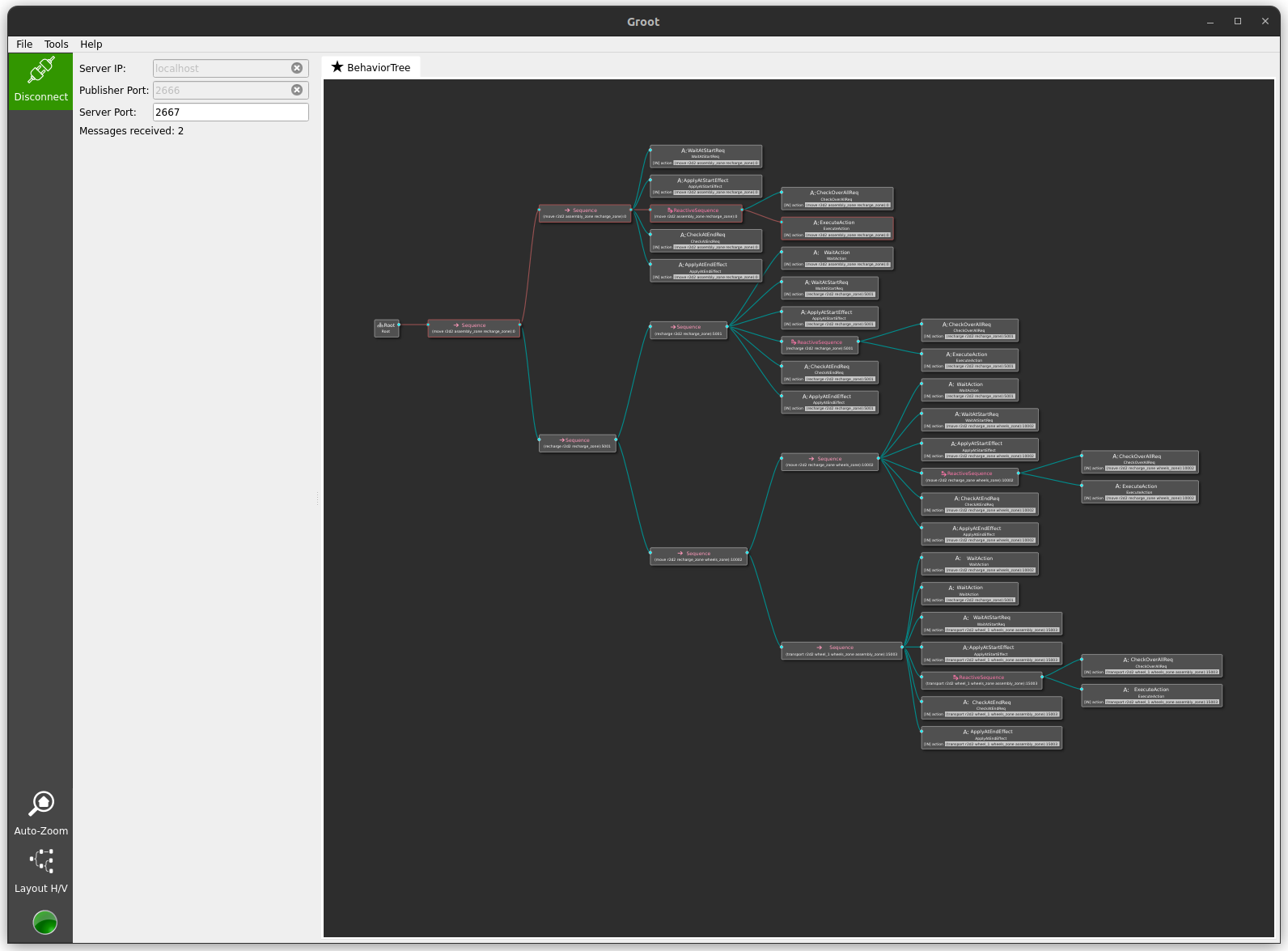
To monitor the behaviortree in Groot, type the following to connect it to the plansys2 executor:
$HOME/dev_ws/build/groot/Groot --mode monitor --publisher_port 2666 --server_port 2667 --autoconnect
NOTE: best way is to run commands above just after you have followed the instructions as mentioned in In terminal 3.
Variant: assembly with arms, to analyze parallel execution
pddl/bt_arm_example.pddl splits each trip into a long move and a short approach, and adds
an arm preparation before each pick (prepare_pick) and each release (prepare_release). The
preparation needs (heading ?r ?z), which the start of approach makes true and which stays
true until the robot leaves, so the plan prepares the arm during the approach.
The executor turns the plan into a behavior tree with a BT builder:
File truncated at 100 lines see the full file
Changelog for package plansys2_bt_example
0.0.4 (2020-01-09)
0.0.3 (2020-01-09)
0.0.2 (2020-01-08)
- Package description Signed-off-by: Francisco Martin Rico <<fmrico@gmail.com>>
- Setting CI Signed-off-by: Francisco Martin Rico <<fmrico@gmail.com>>
- Setting CI Signed-off-by: Francisco Martin Rico <<fmrico@gmail.com>>
- First functional version complete Signed-off-by: Francisco Martin Rico <<fmrico@gmail.com>>
- Execute actions independiently. Example Signed-off-by: Francisco Martin Rico <<fmrico@gmail.com>>
- Contributors: Francisco Martin Rico
Package Dependencies
System Dependencies
Dependant Packages
Launch files
Messages
Services
Plugins
Recent questions tagged plansys2_bt_example at Robotics Stack Exchange
|
|
plansys2_bt_example package from ros2_planning_system_examples repoplansys2_bt_example plansys2_cascade_example plansys2_combat_example plansys2_examples plansys2_multidomain_example plansys2_patrol_navigation_example plansys2_pddlplus_example plansys2_simple_example plansys2_simple_example_py |
ROS Distro
|
Package Summary
| Version | 0.0.4 |
| License | Apache License, Version 2.0 |
| Build type | AMENT_CMAKE |
| Use | RECOMMENDED |
Repository Summary
| Description | |
| Checkout URI | https://github.com/plansys2/ros2_planning_system_examples.git |
| VCS Type | git |
| VCS Version | rolling |
| Last Updated | 2026-10-23 |
| Dev Status | UNKNOWN |
| Released | UNRELEASED |
| Contributing |
Help Wanted (-)
Good First Issues (-) Pull Requests to Review (-) |
Package Description
Maintainers
- Francisco Martin Rico
Authors
PlanSys2 Behavior Tree Example
Description
This example shows how to use Behavior Trees to carry out the tasks that an action requires. Each action has an xml file that defines a behavior tree.
- In
srcthe actions are implemented. - In
src / behavior_tree_nodesBT nodes.
See https://github.com/IntelligentRoboticsLabs/ros2_planning_system/pull/27 for details.
Prerequisites
Navigation uses EasyNav: the Move BT node sends its goals
with easynav_system::GoalManagerClient. Without EasyNav, the package is built without Move
and easynav_sim_node.
How to run
In terminal 1:
source install/setup.bash
ros2 run plansys2_bt_example easynav_sim_node
This simulates EasyNav: each navigation takes 10 s, for several robots at once.
In terminal 2:
source install/setup.bash
ros2 launch plansys2_bt_example plansys2_bt_example.launch.yaml
In terminal 3:
There are two options in this example. First option is to use the plansys2 terminal. Secondly you can use the custom assemble controller. Both options are shown below.
source install/setup.bash

ros2 run plansys2_terminal plansys2_terminal
Enter it manually, line by line:
set instance r2d2 robot
set instance recharge_zone zone
set instance wheels_zone zone
set instance steering_wheels_zone zone
set instance body_car_zone zone
set instance assembly_zone zone
set instance wheel_1 piece
set instance body_car_1 piece
set instance steering_wheel_1 piece
set predicate (robot_available r2d2)
set predicate (robot_at r2d2 assembly_zone)
set predicate (is_recharge_zone recharge_zone)
set predicate (piece_at wheel_1 wheels_zone)
set predicate (piece_at body_car_1 body_car_zone)
set predicate (piece_at steering_wheel_1 steering_wheels_zone)
set goal (and(piece_at wheel_1 assembly_zone))
run
You can also paste the problem above into a file (e.g. problem.txt), start the plansys2_terminal and enter the following:
source problem.txt
Or use a custom controller:
source install/setup.bash
ros2 run plansys2_bt_example assemble_controller_node
NOTE: this problem domain is different from example entered in the plansys2 terminal.
In terminal 4 (optional):
NOTE: this is not working right now due to the upgrade to BT.CPP v4
To monitor the behaviortree in Groot, type the following to connect it to the plansys2 executor:
$HOME/dev_ws/build/groot/Groot --mode monitor --publisher_port 2666 --server_port 2667 --autoconnect
NOTE: best way is to run commands above just after you have followed the instructions as mentioned in In terminal 3.
Variant: assembly with arms, to analyze parallel execution
pddl/bt_arm_example.pddl splits each trip into a long move and a short approach, and adds
an arm preparation before each pick (prepare_pick) and each release (prepare_release). The
preparation needs (heading ?r ?z), which the start of approach makes true and which stays
true until the robot leaves, so the plan prepares the arm during the approach.
The executor turns the plan into a behavior tree with a BT builder:
File truncated at 100 lines see the full file
Changelog for package plansys2_bt_example
0.0.4 (2020-01-09)
0.0.3 (2020-01-09)
0.0.2 (2020-01-08)
- Package description Signed-off-by: Francisco Martin Rico <<fmrico@gmail.com>>
- Setting CI Signed-off-by: Francisco Martin Rico <<fmrico@gmail.com>>
- Setting CI Signed-off-by: Francisco Martin Rico <<fmrico@gmail.com>>
- First functional version complete Signed-off-by: Francisco Martin Rico <<fmrico@gmail.com>>
- Execute actions independiently. Example Signed-off-by: Francisco Martin Rico <<fmrico@gmail.com>>
- Contributors: Francisco Martin Rico
Package Dependencies
System Dependencies
Dependant Packages
Launch files
Messages
Services
Plugins
Recent questions tagged plansys2_bt_example at Robotics Stack Exchange
|
|
plansys2_bt_example package from ros2_planning_system_examples repoplansys2_bt_example plansys2_cascade_example plansys2_combat_example plansys2_examples plansys2_multidomain_example plansys2_patrol_navigation_example plansys2_pddlplus_example plansys2_simple_example plansys2_simple_example_py |
ROS Distro
|
Package Summary
| Version | 0.0.4 |
| License | Apache License, Version 2.0 |
| Build type | AMENT_CMAKE |
| Use | RECOMMENDED |
Repository Summary
| Description | |
| Checkout URI | https://github.com/plansys2/ros2_planning_system_examples.git |
| VCS Type | git |
| VCS Version | rolling |
| Last Updated | 2026-10-23 |
| Dev Status | UNKNOWN |
| Released | UNRELEASED |
| Contributing |
Help Wanted (-)
Good First Issues (-) Pull Requests to Review (-) |
Package Description
Maintainers
- Francisco Martin Rico
Authors
PlanSys2 Behavior Tree Example
Description
This example shows how to use Behavior Trees to carry out the tasks that an action requires. Each action has an xml file that defines a behavior tree.
- In
srcthe actions are implemented. - In
src / behavior_tree_nodesBT nodes.
See https://github.com/IntelligentRoboticsLabs/ros2_planning_system/pull/27 for details.
Prerequisites
Navigation uses EasyNav: the Move BT node sends its goals
with easynav_system::GoalManagerClient. Without EasyNav, the package is built without Move
and easynav_sim_node.
How to run
In terminal 1:
source install/setup.bash
ros2 run plansys2_bt_example easynav_sim_node
This simulates EasyNav: each navigation takes 10 s, for several robots at once.
In terminal 2:
source install/setup.bash
ros2 launch plansys2_bt_example plansys2_bt_example.launch.yaml
In terminal 3:
There are two options in this example. First option is to use the plansys2 terminal. Secondly you can use the custom assemble controller. Both options are shown below.
source install/setup.bash

ros2 run plansys2_terminal plansys2_terminal
Enter it manually, line by line:
set instance r2d2 robot
set instance recharge_zone zone
set instance wheels_zone zone
set instance steering_wheels_zone zone
set instance body_car_zone zone
set instance assembly_zone zone
set instance wheel_1 piece
set instance body_car_1 piece
set instance steering_wheel_1 piece
set predicate (robot_available r2d2)
set predicate (robot_at r2d2 assembly_zone)
set predicate (is_recharge_zone recharge_zone)
set predicate (piece_at wheel_1 wheels_zone)
set predicate (piece_at body_car_1 body_car_zone)
set predicate (piece_at steering_wheel_1 steering_wheels_zone)
set goal (and(piece_at wheel_1 assembly_zone))
run
You can also paste the problem above into a file (e.g. problem.txt), start the plansys2_terminal and enter the following:
source problem.txt
Or use a custom controller:
source install/setup.bash
ros2 run plansys2_bt_example assemble_controller_node
NOTE: this problem domain is different from example entered in the plansys2 terminal.
In terminal 4 (optional):
NOTE: this is not working right now due to the upgrade to BT.CPP v4
To monitor the behaviortree in Groot, type the following to connect it to the plansys2 executor:
$HOME/dev_ws/build/groot/Groot --mode monitor --publisher_port 2666 --server_port 2667 --autoconnect
NOTE: best way is to run commands above just after you have followed the instructions as mentioned in In terminal 3.
Variant: assembly with arms, to analyze parallel execution
pddl/bt_arm_example.pddl splits each trip into a long move and a short approach, and adds
an arm preparation before each pick (prepare_pick) and each release (prepare_release). The
preparation needs (heading ?r ?z), which the start of approach makes true and which stays
true until the robot leaves, so the plan prepares the arm during the approach.
The executor turns the plan into a behavior tree with a BT builder:
File truncated at 100 lines see the full file
Changelog for package plansys2_bt_example
0.0.4 (2020-01-09)
0.0.3 (2020-01-09)
0.0.2 (2020-01-08)
- Package description Signed-off-by: Francisco Martin Rico <<fmrico@gmail.com>>
- Setting CI Signed-off-by: Francisco Martin Rico <<fmrico@gmail.com>>
- Setting CI Signed-off-by: Francisco Martin Rico <<fmrico@gmail.com>>
- First functional version complete Signed-off-by: Francisco Martin Rico <<fmrico@gmail.com>>
- Execute actions independiently. Example Signed-off-by: Francisco Martin Rico <<fmrico@gmail.com>>
- Contributors: Francisco Martin Rico
Package Dependencies
System Dependencies
Dependant Packages
Launch files
Messages
Services
Plugins
Recent questions tagged plansys2_bt_example at Robotics Stack Exchange
|
|
plansys2_bt_example package from ros2_planning_system_examples repoplansys2_bt_example plansys2_cascade_example plansys2_combat_example plansys2_examples plansys2_multidomain_example plansys2_patrol_navigation_example plansys2_pddlplus_example plansys2_simple_example plansys2_simple_example_py |
ROS Distro
|
Package Summary
| Version | 0.0.4 |
| License | Apache License, Version 2.0 |
| Build type | AMENT_CMAKE |
| Use | RECOMMENDED |
Repository Summary
| Description | |
| Checkout URI | https://github.com/plansys2/ros2_planning_system_examples.git |
| VCS Type | git |
| VCS Version | rolling |
| Last Updated | 2026-10-23 |
| Dev Status | UNKNOWN |
| Released | UNRELEASED |
| Contributing |
Help Wanted (-)
Good First Issues (-) Pull Requests to Review (-) |
Package Description
Maintainers
- Francisco Martin Rico
Authors
PlanSys2 Behavior Tree Example
Description
This example shows how to use Behavior Trees to carry out the tasks that an action requires. Each action has an xml file that defines a behavior tree.
- In
srcthe actions are implemented. - In
src / behavior_tree_nodesBT nodes.
See https://github.com/IntelligentRoboticsLabs/ros2_planning_system/pull/27 for details.
Prerequisites
Navigation uses EasyNav: the Move BT node sends its goals
with easynav_system::GoalManagerClient. Without EasyNav, the package is built without Move
and easynav_sim_node.
How to run
In terminal 1:
source install/setup.bash
ros2 run plansys2_bt_example easynav_sim_node
This simulates EasyNav: each navigation takes 10 s, for several robots at once.
In terminal 2:
source install/setup.bash
ros2 launch plansys2_bt_example plansys2_bt_example.launch.yaml
In terminal 3:
There are two options in this example. First option is to use the plansys2 terminal. Secondly you can use the custom assemble controller. Both options are shown below.
source install/setup.bash

ros2 run plansys2_terminal plansys2_terminal
Enter it manually, line by line:
set instance r2d2 robot
set instance recharge_zone zone
set instance wheels_zone zone
set instance steering_wheels_zone zone
set instance body_car_zone zone
set instance assembly_zone zone
set instance wheel_1 piece
set instance body_car_1 piece
set instance steering_wheel_1 piece
set predicate (robot_available r2d2)
set predicate (robot_at r2d2 assembly_zone)
set predicate (is_recharge_zone recharge_zone)
set predicate (piece_at wheel_1 wheels_zone)
set predicate (piece_at body_car_1 body_car_zone)
set predicate (piece_at steering_wheel_1 steering_wheels_zone)
set goal (and(piece_at wheel_1 assembly_zone))
run
You can also paste the problem above into a file (e.g. problem.txt), start the plansys2_terminal and enter the following:
source problem.txt
Or use a custom controller:
source install/setup.bash
ros2 run plansys2_bt_example assemble_controller_node
NOTE: this problem domain is different from example entered in the plansys2 terminal.
In terminal 4 (optional):
NOTE: this is not working right now due to the upgrade to BT.CPP v4
To monitor the behaviortree in Groot, type the following to connect it to the plansys2 executor:
$HOME/dev_ws/build/groot/Groot --mode monitor --publisher_port 2666 --server_port 2667 --autoconnect
NOTE: best way is to run commands above just after you have followed the instructions as mentioned in In terminal 3.
Variant: assembly with arms, to analyze parallel execution
pddl/bt_arm_example.pddl splits each trip into a long move and a short approach, and adds
an arm preparation before each pick (prepare_pick) and each release (prepare_release). The
preparation needs (heading ?r ?z), which the start of approach makes true and which stays
true until the robot leaves, so the plan prepares the arm during the approach.
The executor turns the plan into a behavior tree with a BT builder:
File truncated at 100 lines see the full file
Changelog for package plansys2_bt_example
0.0.4 (2020-01-09)
0.0.3 (2020-01-09)
0.0.2 (2020-01-08)
- Package description Signed-off-by: Francisco Martin Rico <<fmrico@gmail.com>>
- Setting CI Signed-off-by: Francisco Martin Rico <<fmrico@gmail.com>>
- Setting CI Signed-off-by: Francisco Martin Rico <<fmrico@gmail.com>>
- First functional version complete Signed-off-by: Francisco Martin Rico <<fmrico@gmail.com>>
- Execute actions independiently. Example Signed-off-by: Francisco Martin Rico <<fmrico@gmail.com>>
- Contributors: Francisco Martin Rico
Package Dependencies
System Dependencies
Dependant Packages
Launch files
Messages
Services
Plugins
Recent questions tagged plansys2_bt_example at Robotics Stack Exchange
|
|
plansys2_bt_example package from ros2_planning_system_examples repoplansys2_bt_example plansys2_cascade_example plansys2_combat_example plansys2_examples plansys2_multidomain_example plansys2_patrol_navigation_example plansys2_pddlplus_example plansys2_simple_example plansys2_simple_example_py |
ROS Distro
|
Package Summary
| Version | 0.0.4 |
| License | Apache License, Version 2.0 |
| Build type | AMENT_CMAKE |
| Use | RECOMMENDED |
Repository Summary
| Description | |
| Checkout URI | https://github.com/plansys2/ros2_planning_system_examples.git |
| VCS Type | git |
| VCS Version | rolling |
| Last Updated | 2026-10-23 |
| Dev Status | UNKNOWN |
| Released | UNRELEASED |
| Contributing |
Help Wanted (-)
Good First Issues (-) Pull Requests to Review (-) |
Package Description
Maintainers
- Francisco Martin Rico
Authors
PlanSys2 Behavior Tree Example
Description
This example shows how to use Behavior Trees to carry out the tasks that an action requires. Each action has an xml file that defines a behavior tree.
- In
srcthe actions are implemented. - In
src / behavior_tree_nodesBT nodes.
See https://github.com/IntelligentRoboticsLabs/ros2_planning_system/pull/27 for details.
Prerequisites
Navigation uses EasyNav: the Move BT node sends its goals
with easynav_system::GoalManagerClient. Without EasyNav, the package is built without Move
and easynav_sim_node.
How to run
In terminal 1:
source install/setup.bash
ros2 run plansys2_bt_example easynav_sim_node
This simulates EasyNav: each navigation takes 10 s, for several robots at once.
In terminal 2:
source install/setup.bash
ros2 launch plansys2_bt_example plansys2_bt_example.launch.yaml
In terminal 3:
There are two options in this example. First option is to use the plansys2 terminal. Secondly you can use the custom assemble controller. Both options are shown below.
source install/setup.bash

ros2 run plansys2_terminal plansys2_terminal
Enter it manually, line by line:
set instance r2d2 robot
set instance recharge_zone zone
set instance wheels_zone zone
set instance steering_wheels_zone zone
set instance body_car_zone zone
set instance assembly_zone zone
set instance wheel_1 piece
set instance body_car_1 piece
set instance steering_wheel_1 piece
set predicate (robot_available r2d2)
set predicate (robot_at r2d2 assembly_zone)
set predicate (is_recharge_zone recharge_zone)
set predicate (piece_at wheel_1 wheels_zone)
set predicate (piece_at body_car_1 body_car_zone)
set predicate (piece_at steering_wheel_1 steering_wheels_zone)
set goal (and(piece_at wheel_1 assembly_zone))
run
You can also paste the problem above into a file (e.g. problem.txt), start the plansys2_terminal and enter the following:
source problem.txt
Or use a custom controller:
source install/setup.bash
ros2 run plansys2_bt_example assemble_controller_node
NOTE: this problem domain is different from example entered in the plansys2 terminal.
In terminal 4 (optional):
NOTE: this is not working right now due to the upgrade to BT.CPP v4
To monitor the behaviortree in Groot, type the following to connect it to the plansys2 executor:
$HOME/dev_ws/build/groot/Groot --mode monitor --publisher_port 2666 --server_port 2667 --autoconnect
NOTE: best way is to run commands above just after you have followed the instructions as mentioned in In terminal 3.
Variant: assembly with arms, to analyze parallel execution
pddl/bt_arm_example.pddl splits each trip into a long move and a short approach, and adds
an arm preparation before each pick (prepare_pick) and each release (prepare_release). The
preparation needs (heading ?r ?z), which the start of approach makes true and which stays
true until the robot leaves, so the plan prepares the arm during the approach.
The executor turns the plan into a behavior tree with a BT builder:
File truncated at 100 lines see the full file
Changelog for package plansys2_bt_example
0.0.4 (2020-01-09)
0.0.3 (2020-01-09)
0.0.2 (2020-01-08)
- Package description Signed-off-by: Francisco Martin Rico <<fmrico@gmail.com>>
- Setting CI Signed-off-by: Francisco Martin Rico <<fmrico@gmail.com>>
- Setting CI Signed-off-by: Francisco Martin Rico <<fmrico@gmail.com>>
- First functional version complete Signed-off-by: Francisco Martin Rico <<fmrico@gmail.com>>
- Execute actions independiently. Example Signed-off-by: Francisco Martin Rico <<fmrico@gmail.com>>
- Contributors: Francisco Martin Rico
Package Dependencies
System Dependencies
Dependant Packages
Launch files
Messages
Services
Plugins
Recent questions tagged plansys2_bt_example at Robotics Stack Exchange
|
|
plansys2_bt_example package from ros2_planning_system_examples repoplansys2_bt_example plansys2_cascade_example plansys2_combat_example plansys2_examples plansys2_multidomain_example plansys2_patrol_navigation_example plansys2_pddlplus_example plansys2_simple_example plansys2_simple_example_py |
ROS Distro
|
Package Summary
| Version | 0.0.4 |
| License | Apache License, Version 2.0 |
| Build type | AMENT_CMAKE |
| Use | RECOMMENDED |
Repository Summary
| Description | |
| Checkout URI | https://github.com/plansys2/ros2_planning_system_examples.git |
| VCS Type | git |
| VCS Version | rolling |
| Last Updated | 2026-10-23 |
| Dev Status | UNKNOWN |
| Released | UNRELEASED |
| Contributing |
Help Wanted (-)
Good First Issues (-) Pull Requests to Review (-) |
Package Description
Maintainers
- Francisco Martin Rico
Authors
PlanSys2 Behavior Tree Example
Description
This example shows how to use Behavior Trees to carry out the tasks that an action requires. Each action has an xml file that defines a behavior tree.
- In
srcthe actions are implemented. - In
src / behavior_tree_nodesBT nodes.
See https://github.com/IntelligentRoboticsLabs/ros2_planning_system/pull/27 for details.
Prerequisites
Navigation uses EasyNav: the Move BT node sends its goals
with easynav_system::GoalManagerClient. Without EasyNav, the package is built without Move
and easynav_sim_node.
How to run
In terminal 1:
source install/setup.bash
ros2 run plansys2_bt_example easynav_sim_node
This simulates EasyNav: each navigation takes 10 s, for several robots at once.
In terminal 2:
source install/setup.bash
ros2 launch plansys2_bt_example plansys2_bt_example.launch.yaml
In terminal 3:
There are two options in this example. First option is to use the plansys2 terminal. Secondly you can use the custom assemble controller. Both options are shown below.
source install/setup.bash

ros2 run plansys2_terminal plansys2_terminal
Enter it manually, line by line:
set instance r2d2 robot
set instance recharge_zone zone
set instance wheels_zone zone
set instance steering_wheels_zone zone
set instance body_car_zone zone
set instance assembly_zone zone
set instance wheel_1 piece
set instance body_car_1 piece
set instance steering_wheel_1 piece
set predicate (robot_available r2d2)
set predicate (robot_at r2d2 assembly_zone)
set predicate (is_recharge_zone recharge_zone)
set predicate (piece_at wheel_1 wheels_zone)
set predicate (piece_at body_car_1 body_car_zone)
set predicate (piece_at steering_wheel_1 steering_wheels_zone)
set goal (and(piece_at wheel_1 assembly_zone))
run
You can also paste the problem above into a file (e.g. problem.txt), start the plansys2_terminal and enter the following:
source problem.txt
Or use a custom controller:
source install/setup.bash
ros2 run plansys2_bt_example assemble_controller_node
NOTE: this problem domain is different from example entered in the plansys2 terminal.
In terminal 4 (optional):
NOTE: this is not working right now due to the upgrade to BT.CPP v4
To monitor the behaviortree in Groot, type the following to connect it to the plansys2 executor:
$HOME/dev_ws/build/groot/Groot --mode monitor --publisher_port 2666 --server_port 2667 --autoconnect
NOTE: best way is to run commands above just after you have followed the instructions as mentioned in In terminal 3.
Variant: assembly with arms, to analyze parallel execution
pddl/bt_arm_example.pddl splits each trip into a long move and a short approach, and adds
an arm preparation before each pick (prepare_pick) and each release (prepare_release). The
preparation needs (heading ?r ?z), which the start of approach makes true and which stays
true until the robot leaves, so the plan prepares the arm during the approach.
The executor turns the plan into a behavior tree with a BT builder:
File truncated at 100 lines see the full file
Changelog for package plansys2_bt_example
0.0.4 (2020-01-09)
0.0.3 (2020-01-09)
0.0.2 (2020-01-08)
- Package description Signed-off-by: Francisco Martin Rico <<fmrico@gmail.com>>
- Setting CI Signed-off-by: Francisco Martin Rico <<fmrico@gmail.com>>
- Setting CI Signed-off-by: Francisco Martin Rico <<fmrico@gmail.com>>
- First functional version complete Signed-off-by: Francisco Martin Rico <<fmrico@gmail.com>>
- Execute actions independiently. Example Signed-off-by: Francisco Martin Rico <<fmrico@gmail.com>>
- Contributors: Francisco Martin Rico
Package Dependencies
System Dependencies
Dependant Packages
Launch files
Messages
Services
Plugins
Recent questions tagged plansys2_bt_example at Robotics Stack Exchange
|
|
plansys2_bt_example package from ros2_planning_system_examples repoplansys2_bt_example plansys2_cascade_example plansys2_combat_example plansys2_examples plansys2_multidomain_example plansys2_patrol_navigation_example plansys2_pddlplus_example plansys2_simple_example plansys2_simple_example_py |
ROS Distro
|
Package Summary
| Version | 0.0.4 |
| License | Apache License, Version 2.0 |
| Build type | AMENT_CMAKE |
| Use | RECOMMENDED |
Repository Summary
| Description | |
| Checkout URI | https://github.com/plansys2/ros2_planning_system_examples.git |
| VCS Type | git |
| VCS Version | rolling |
| Last Updated | 2026-10-23 |
| Dev Status | UNKNOWN |
| Released | UNRELEASED |
| Contributing |
Help Wanted (-)
Good First Issues (-) Pull Requests to Review (-) |
Package Description
Maintainers
- Francisco Martin Rico
Authors
PlanSys2 Behavior Tree Example
Description
This example shows how to use Behavior Trees to carry out the tasks that an action requires. Each action has an xml file that defines a behavior tree.
- In
srcthe actions are implemented. - In
src / behavior_tree_nodesBT nodes.
See https://github.com/IntelligentRoboticsLabs/ros2_planning_system/pull/27 for details.
Prerequisites
Navigation uses EasyNav: the Move BT node sends its goals
with easynav_system::GoalManagerClient. Without EasyNav, the package is built without Move
and easynav_sim_node.
How to run
In terminal 1:
source install/setup.bash
ros2 run plansys2_bt_example easynav_sim_node
This simulates EasyNav: each navigation takes 10 s, for several robots at once.
In terminal 2:
source install/setup.bash
ros2 launch plansys2_bt_example plansys2_bt_example.launch.yaml
In terminal 3:
There are two options in this example. First option is to use the plansys2 terminal. Secondly you can use the custom assemble controller. Both options are shown below.
source install/setup.bash

ros2 run plansys2_terminal plansys2_terminal
Enter it manually, line by line:
set instance r2d2 robot
set instance recharge_zone zone
set instance wheels_zone zone
set instance steering_wheels_zone zone
set instance body_car_zone zone
set instance assembly_zone zone
set instance wheel_1 piece
set instance body_car_1 piece
set instance steering_wheel_1 piece
set predicate (robot_available r2d2)
set predicate (robot_at r2d2 assembly_zone)
set predicate (is_recharge_zone recharge_zone)
set predicate (piece_at wheel_1 wheels_zone)
set predicate (piece_at body_car_1 body_car_zone)
set predicate (piece_at steering_wheel_1 steering_wheels_zone)
set goal (and(piece_at wheel_1 assembly_zone))
run
You can also paste the problem above into a file (e.g. problem.txt), start the plansys2_terminal and enter the following:
source problem.txt
Or use a custom controller:
source install/setup.bash
ros2 run plansys2_bt_example assemble_controller_node
NOTE: this problem domain is different from example entered in the plansys2 terminal.
In terminal 4 (optional):
NOTE: this is not working right now due to the upgrade to BT.CPP v4
To monitor the behaviortree in Groot, type the following to connect it to the plansys2 executor:
$HOME/dev_ws/build/groot/Groot --mode monitor --publisher_port 2666 --server_port 2667 --autoconnect
NOTE: best way is to run commands above just after you have followed the instructions as mentioned in In terminal 3.
Variant: assembly with arms, to analyze parallel execution
pddl/bt_arm_example.pddl splits each trip into a long move and a short approach, and adds
an arm preparation before each pick (prepare_pick) and each release (prepare_release). The
preparation needs (heading ?r ?z), which the start of approach makes true and which stays
true until the robot leaves, so the plan prepares the arm during the approach.
The executor turns the plan into a behavior tree with a BT builder:
File truncated at 100 lines see the full file
Changelog for package plansys2_bt_example
0.0.4 (2020-01-09)
0.0.3 (2020-01-09)
0.0.2 (2020-01-08)
- Package description Signed-off-by: Francisco Martin Rico <<fmrico@gmail.com>>
- Setting CI Signed-off-by: Francisco Martin Rico <<fmrico@gmail.com>>
- Setting CI Signed-off-by: Francisco Martin Rico <<fmrico@gmail.com>>
- First functional version complete Signed-off-by: Francisco Martin Rico <<fmrico@gmail.com>>
- Execute actions independiently. Example Signed-off-by: Francisco Martin Rico <<fmrico@gmail.com>>
- Contributors: Francisco Martin Rico
Package Dependencies
System Dependencies
Dependant Packages
Launch files
Messages
Services
Plugins
Recent questions tagged plansys2_bt_example at Robotics Stack Exchange
|
|
plansys2_bt_example package from ros2_planning_system_examples repoplansys2_bt_example plansys2_cascade_example plansys2_combat_example plansys2_examples plansys2_multidomain_example plansys2_patrol_navigation_example plansys2_pddlplus_example plansys2_simple_example plansys2_simple_example_py |
ROS Distro
|
Package Summary
| Version | 0.0.4 |
| License | Apache License, Version 2.0 |
| Build type | AMENT_CMAKE |
| Use | RECOMMENDED |
Repository Summary
| Description | |
| Checkout URI | https://github.com/plansys2/ros2_planning_system_examples.git |
| VCS Type | git |
| VCS Version | rolling |
| Last Updated | 2026-10-23 |
| Dev Status | UNKNOWN |
| Released | UNRELEASED |
| Contributing |
Help Wanted (-)
Good First Issues (-) Pull Requests to Review (-) |
Package Description
Maintainers
- Francisco Martin Rico
Authors
PlanSys2 Behavior Tree Example
Description
This example shows how to use Behavior Trees to carry out the tasks that an action requires. Each action has an xml file that defines a behavior tree.
- In
srcthe actions are implemented. - In
src / behavior_tree_nodesBT nodes.
See https://github.com/IntelligentRoboticsLabs/ros2_planning_system/pull/27 for details.
Prerequisites
Navigation uses EasyNav: the Move BT node sends its goals
with easynav_system::GoalManagerClient. Without EasyNav, the package is built without Move
and easynav_sim_node.
How to run
In terminal 1:
source install/setup.bash
ros2 run plansys2_bt_example easynav_sim_node
This simulates EasyNav: each navigation takes 10 s, for several robots at once.
In terminal 2:
source install/setup.bash
ros2 launch plansys2_bt_example plansys2_bt_example.launch.yaml
In terminal 3:
There are two options in this example. First option is to use the plansys2 terminal. Secondly you can use the custom assemble controller. Both options are shown below.
source install/setup.bash

ros2 run plansys2_terminal plansys2_terminal
Enter it manually, line by line:
set instance r2d2 robot
set instance recharge_zone zone
set instance wheels_zone zone
set instance steering_wheels_zone zone
set instance body_car_zone zone
set instance assembly_zone zone
set instance wheel_1 piece
set instance body_car_1 piece
set instance steering_wheel_1 piece
set predicate (robot_available r2d2)
set predicate (robot_at r2d2 assembly_zone)
set predicate (is_recharge_zone recharge_zone)
set predicate (piece_at wheel_1 wheels_zone)
set predicate (piece_at body_car_1 body_car_zone)
set predicate (piece_at steering_wheel_1 steering_wheels_zone)
set goal (and(piece_at wheel_1 assembly_zone))
run
You can also paste the problem above into a file (e.g. problem.txt), start the plansys2_terminal and enter the following:
source problem.txt
Or use a custom controller:
source install/setup.bash
ros2 run plansys2_bt_example assemble_controller_node
NOTE: this problem domain is different from example entered in the plansys2 terminal.
In terminal 4 (optional):
NOTE: this is not working right now due to the upgrade to BT.CPP v4
To monitor the behaviortree in Groot, type the following to connect it to the plansys2 executor:
$HOME/dev_ws/build/groot/Groot --mode monitor --publisher_port 2666 --server_port 2667 --autoconnect
NOTE: best way is to run commands above just after you have followed the instructions as mentioned in In terminal 3.
Variant: assembly with arms, to analyze parallel execution
pddl/bt_arm_example.pddl splits each trip into a long move and a short approach, and adds
an arm preparation before each pick (prepare_pick) and each release (prepare_release). The
preparation needs (heading ?r ?z), which the start of approach makes true and which stays
true until the robot leaves, so the plan prepares the arm during the approach.
The executor turns the plan into a behavior tree with a BT builder:
File truncated at 100 lines see the full file
Changelog for package plansys2_bt_example
0.0.4 (2020-01-09)
0.0.3 (2020-01-09)
0.0.2 (2020-01-08)
- Package description Signed-off-by: Francisco Martin Rico <<fmrico@gmail.com>>
- Setting CI Signed-off-by: Francisco Martin Rico <<fmrico@gmail.com>>
- Setting CI Signed-off-by: Francisco Martin Rico <<fmrico@gmail.com>>
- First functional version complete Signed-off-by: Francisco Martin Rico <<fmrico@gmail.com>>
- Execute actions independiently. Example Signed-off-by: Francisco Martin Rico <<fmrico@gmail.com>>
- Contributors: Francisco Martin Rico
Package Dependencies
System Dependencies
Dependant Packages
Launch files
Messages
Services
Plugins
Recent questions tagged plansys2_bt_example at Robotics Stack Exchange
|
|
plansys2_bt_example package from ros2_planning_system_examples repoplansys2_bt_example plansys2_cascade_example plansys2_combat_example plansys2_examples plansys2_multidomain_example plansys2_patrol_navigation_example plansys2_pddlplus_example plansys2_simple_example plansys2_simple_example_py |
ROS Distro
|
Package Summary
| Version | 0.0.4 |
| License | Apache License, Version 2.0 |
| Build type | AMENT_CMAKE |
| Use | RECOMMENDED |
Repository Summary
| Description | |
| Checkout URI | https://github.com/plansys2/ros2_planning_system_examples.git |
| VCS Type | git |
| VCS Version | rolling |
| Last Updated | 2026-10-23 |
| Dev Status | UNKNOWN |
| Released | UNRELEASED |
| Contributing |
Help Wanted (-)
Good First Issues (-) Pull Requests to Review (-) |
Package Description
Maintainers
- Francisco Martin Rico
Authors
PlanSys2 Behavior Tree Example
Description
This example shows how to use Behavior Trees to carry out the tasks that an action requires. Each action has an xml file that defines a behavior tree.
- In
srcthe actions are implemented. - In
src / behavior_tree_nodesBT nodes.
See https://github.com/IntelligentRoboticsLabs/ros2_planning_system/pull/27 for details.
Prerequisites
Navigation uses EasyNav: the Move BT node sends its goals
with easynav_system::GoalManagerClient. Without EasyNav, the package is built without Move
and easynav_sim_node.
How to run
In terminal 1:
source install/setup.bash
ros2 run plansys2_bt_example easynav_sim_node
This simulates EasyNav: each navigation takes 10 s, for several robots at once.
In terminal 2:
source install/setup.bash
ros2 launch plansys2_bt_example plansys2_bt_example.launch.yaml
In terminal 3:
There are two options in this example. First option is to use the plansys2 terminal. Secondly you can use the custom assemble controller. Both options are shown below.
source install/setup.bash

ros2 run plansys2_terminal plansys2_terminal
Enter it manually, line by line:
set instance r2d2 robot
set instance recharge_zone zone
set instance wheels_zone zone
set instance steering_wheels_zone zone
set instance body_car_zone zone
set instance assembly_zone zone
set instance wheel_1 piece
set instance body_car_1 piece
set instance steering_wheel_1 piece
set predicate (robot_available r2d2)
set predicate (robot_at r2d2 assembly_zone)
set predicate (is_recharge_zone recharge_zone)
set predicate (piece_at wheel_1 wheels_zone)
set predicate (piece_at body_car_1 body_car_zone)
set predicate (piece_at steering_wheel_1 steering_wheels_zone)
set goal (and(piece_at wheel_1 assembly_zone))
run
You can also paste the problem above into a file (e.g. problem.txt), start the plansys2_terminal and enter the following:
source problem.txt
Or use a custom controller:
source install/setup.bash
ros2 run plansys2_bt_example assemble_controller_node
NOTE: this problem domain is different from example entered in the plansys2 terminal.
In terminal 4 (optional):
NOTE: this is not working right now due to the upgrade to BT.CPP v4
To monitor the behaviortree in Groot, type the following to connect it to the plansys2 executor:
$HOME/dev_ws/build/groot/Groot --mode monitor --publisher_port 2666 --server_port 2667 --autoconnect
NOTE: best way is to run commands above just after you have followed the instructions as mentioned in In terminal 3.
Variant: assembly with arms, to analyze parallel execution
pddl/bt_arm_example.pddl splits each trip into a long move and a short approach, and adds
an arm preparation before each pick (prepare_pick) and each release (prepare_release). The
preparation needs (heading ?r ?z), which the start of approach makes true and which stays
true until the robot leaves, so the plan prepares the arm during the approach.
The executor turns the plan into a behavior tree with a BT builder:
File truncated at 100 lines see the full file
Changelog for package plansys2_bt_example
0.0.4 (2020-01-09)
0.0.3 (2020-01-09)
0.0.2 (2020-01-08)
- Package description Signed-off-by: Francisco Martin Rico <<fmrico@gmail.com>>
- Setting CI Signed-off-by: Francisco Martin Rico <<fmrico@gmail.com>>
- Setting CI Signed-off-by: Francisco Martin Rico <<fmrico@gmail.com>>
- First functional version complete Signed-off-by: Francisco Martin Rico <<fmrico@gmail.com>>
- Execute actions independiently. Example Signed-off-by: Francisco Martin Rico <<fmrico@gmail.com>>
- Contributors: Francisco Martin Rico
Package Dependencies
System Dependencies
Dependant Packages
Launch files
Messages
Services
Plugins
Recent questions tagged plansys2_bt_example at Robotics Stack Exchange
|
|
plansys2_bt_example package from ros2_planning_system_examples repoplansys2_bt_example plansys2_cascade_example plansys2_combat_example plansys2_examples plansys2_multidomain_example plansys2_patrol_navigation_example plansys2_pddlplus_example plansys2_simple_example plansys2_simple_example_py |
ROS Distro
|
Package Summary
| Version | 0.0.4 |
| License | Apache License, Version 2.0 |
| Build type | AMENT_CMAKE |
| Use | RECOMMENDED |
Repository Summary
| Description | |
| Checkout URI | https://github.com/plansys2/ros2_planning_system_examples.git |
| VCS Type | git |
| VCS Version | rolling |
| Last Updated | 2026-10-23 |
| Dev Status | UNKNOWN |
| Released | UNRELEASED |
| Contributing |
Help Wanted (-)
Good First Issues (-) Pull Requests to Review (-) |
Package Description
Maintainers
- Francisco Martin Rico
Authors
PlanSys2 Behavior Tree Example
Description
This example shows how to use Behavior Trees to carry out the tasks that an action requires. Each action has an xml file that defines a behavior tree.
- In
srcthe actions are implemented. - In
src / behavior_tree_nodesBT nodes.
See https://github.com/IntelligentRoboticsLabs/ros2_planning_system/pull/27 for details.
Prerequisites
Navigation uses EasyNav: the Move BT node sends its goals
with easynav_system::GoalManagerClient. Without EasyNav, the package is built without Move
and easynav_sim_node.
How to run
In terminal 1:
source install/setup.bash
ros2 run plansys2_bt_example easynav_sim_node
This simulates EasyNav: each navigation takes 10 s, for several robots at once.
In terminal 2:
source install/setup.bash
ros2 launch plansys2_bt_example plansys2_bt_example.launch.yaml
In terminal 3:
There are two options in this example. First option is to use the plansys2 terminal. Secondly you can use the custom assemble controller. Both options are shown below.
source install/setup.bash

ros2 run plansys2_terminal plansys2_terminal
Enter it manually, line by line:
set instance r2d2 robot
set instance recharge_zone zone
set instance wheels_zone zone
set instance steering_wheels_zone zone
set instance body_car_zone zone
set instance assembly_zone zone
set instance wheel_1 piece
set instance body_car_1 piece
set instance steering_wheel_1 piece
set predicate (robot_available r2d2)
set predicate (robot_at r2d2 assembly_zone)
set predicate (is_recharge_zone recharge_zone)
set predicate (piece_at wheel_1 wheels_zone)
set predicate (piece_at body_car_1 body_car_zone)
set predicate (piece_at steering_wheel_1 steering_wheels_zone)
set goal (and(piece_at wheel_1 assembly_zone))
run
You can also paste the problem above into a file (e.g. problem.txt), start the plansys2_terminal and enter the following:
source problem.txt
Or use a custom controller:
source install/setup.bash
ros2 run plansys2_bt_example assemble_controller_node
NOTE: this problem domain is different from example entered in the plansys2 terminal.
In terminal 4 (optional):
NOTE: this is not working right now due to the upgrade to BT.CPP v4
To monitor the behaviortree in Groot, type the following to connect it to the plansys2 executor:
$HOME/dev_ws/build/groot/Groot --mode monitor --publisher_port 2666 --server_port 2667 --autoconnect
NOTE: best way is to run commands above just after you have followed the instructions as mentioned in In terminal 3.
Variant: assembly with arms, to analyze parallel execution
pddl/bt_arm_example.pddl splits each trip into a long move and a short approach, and adds
an arm preparation before each pick (prepare_pick) and each release (prepare_release). The
preparation needs (heading ?r ?z), which the start of approach makes true and which stays
true until the robot leaves, so the plan prepares the arm during the approach.
The executor turns the plan into a behavior tree with a BT builder:
File truncated at 100 lines see the full file
Changelog for package plansys2_bt_example
0.0.4 (2020-01-09)
0.0.3 (2020-01-09)
0.0.2 (2020-01-08)
- Package description Signed-off-by: Francisco Martin Rico <<fmrico@gmail.com>>
- Setting CI Signed-off-by: Francisco Martin Rico <<fmrico@gmail.com>>
- Setting CI Signed-off-by: Francisco Martin Rico <<fmrico@gmail.com>>
- First functional version complete Signed-off-by: Francisco Martin Rico <<fmrico@gmail.com>>
- Execute actions independiently. Example Signed-off-by: Francisco Martin Rico <<fmrico@gmail.com>>
- Contributors: Francisco Martin Rico