 ROS Index
Repository Summary
| Description | |
| Checkout URI | https://github.com/dobot-arm/dobot_6axis_ros2_v4.git |
| VCS Type | git |
| VCS Version | main |
| Last Updated | 2026-09-03 |
| Dev Status | UNKNOWN |
| Released | UNRELEASED |
| Contributing |
Help Wanted (-)
Good First Issues (-) Pull Requests to Review (-) |
Packages
| Name | Version |
|---|---|
| cr10_moveit | 0.3.0 |
| cr10af_moveit | 0.3.0 |
| cr12_moveit | 0.3.0 |
| cr16_moveit | 0.3.0 |
| cr20_moveit | 0.3.0 |
| cr20af_moveit | 0.3.0 |
| cr30h_moveit | 0.3.0 |
| cr3_moveit | 0.3.0 |
| cr3af_moveit | 0.3.0 |
| cr5_moveit | 0.3.0 |
| cr5af_moveit | 0.3.0 |
| cr6al_moveit | 0.3.0 |
| cr7_moveit | 0.3.0 |
| cra_description | 0.0.0 |
| dobot_bringup_v4 | 0.0.0 |
| dobot_demo | 0.0.0 |
| dobot_gazebo | 0.0.0 |
| dobot_kinematics_plugin | 0.1.0 |
| dobot_moveit | 0.0.0 |
| dobot_msgs_v4 | 0.0.0 |
| dobot_rviz | 0.0.0 |
| me6_moveit | 0.3.0 |
| nova2_moveit | 0.3.0 |
| nova2s_moveit | 0.3.0 |
| nova5_moveit | 0.3.0 |
| servo_action | 0.0.0 |
README
DOBOT 6Axis ROS2 V4
**Dobot Robotics ROS2 Software Development Kit** High-performance robot control framework based on TCP/IP protocol [English](README.md) · [简体中文](README_ZH.md) [](https://ubuntu.com/download/server) [](https://docs.ros.org/en/humble/) [](LICENSE)Quick Start
System Requirements
| Requirement | Version |
|---|---|
| OS | Ubuntu 22.04 LTS |
| ROS Version | ROS2 Humble |
| Python | 3.8+ |
Network Configuration
| Configuration | Description |
|---|---|
| Robot IP | 192.168.5.1 (must be in the same subnet) |
| Control Port | 29999 |
| Feedback Port | 30004 |
Installation
# Create workspace
mkdir -p ~/dobot_ws/src
cd ~/dobot_ws/src
git clone -b feature/v4-optimization https://github.com/Dobot-Arm/DOBOT_6Axis_ROS2_V4.git
cd ~/dobot_ws

# Install dependencies
sudo apt update && sudo apt install -y \
  ros-humble-moveit \
  ros-humble-gazebo-* \
  ros-humble-joint-state-publisher \
  ros-humble-robot-state-publisher

# Build
colcon build
source install/setup.bash

# Configure robot connection IP (default for wired connection)
echo "export IP_address=192.168.5.1" >> ~/.bashrc

# Specify robot model (choose according to actual model)
# Example: CR5 model
echo "export DOBOT_TYPE=cr5" >> ~/.bashrc
# Supported models: cr3, cr5, cr7, cr10, cr12, cr16, cr20, e6 (me6), cr10af, nova2, nova5, cr30h

# Apply configuration
source ~/.bashrc
Usage
1. RViz Visualization (Standalone)
Visualize the robot model without a physical robot:
ros2 launch dobot_rviz dobot_rviz.launch.py
2. RViz with Real Robot
Stream live joint states from the physical robot into RViz:
# Terminal 1: Connect to robot
ros2 launch dobot_bringup_v4 dobot_bringup_ros2.launch.py

# Terminal 2: RViz with live hardware mode
ros2 launch dobot_rviz dobot_rviz.launch.py live_hardware:=true
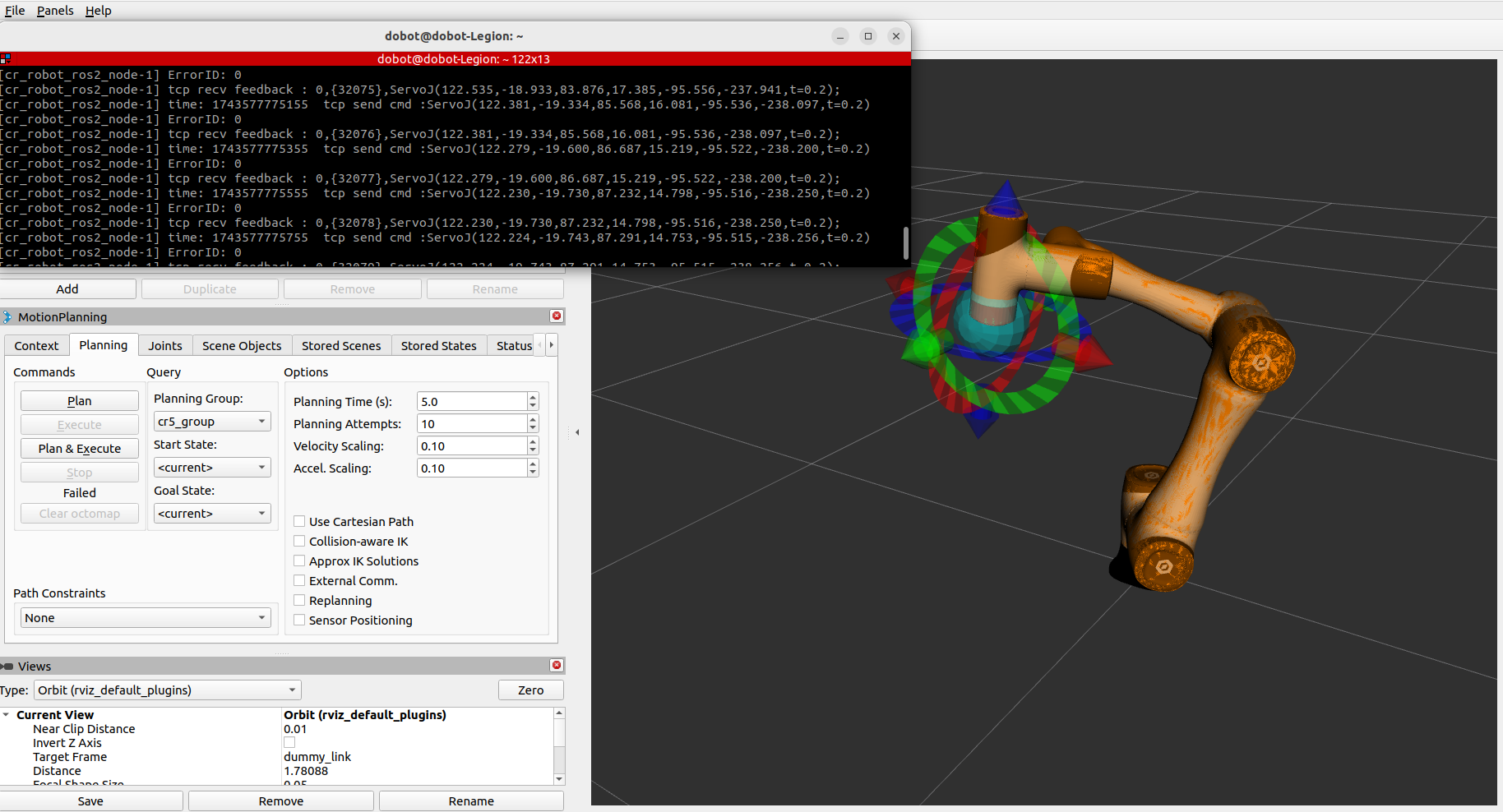
3. MoveIt Virtual Demo
Test motion planning in RViz with a virtual controller (no robot required):
ros2 launch dobot_moveit moveit_demo.launch.py
File truncated at 100 lines see the full file
CONTRIBUTING
Repository Summary
| Description | |
| Checkout URI | https://github.com/dobot-arm/dobot_6axis_ros2_v4.git |
| VCS Type | git |
| VCS Version | main |
| Last Updated | 2026-09-03 |
| Dev Status | UNKNOWN |
| Released | UNRELEASED |
| Contributing |
Help Wanted (-)
Good First Issues (-) Pull Requests to Review (-) |
Packages
| Name | Version |
|---|---|
| cr10_moveit | 0.3.0 |
| cr10af_moveit | 0.3.0 |
| cr12_moveit | 0.3.0 |
| cr16_moveit | 0.3.0 |
| cr20_moveit | 0.3.0 |
| cr20af_moveit | 0.3.0 |
| cr30h_moveit | 0.3.0 |
| cr3_moveit | 0.3.0 |
| cr3af_moveit | 0.3.0 |
| cr5_moveit | 0.3.0 |
| cr5af_moveit | 0.3.0 |
| cr6al_moveit | 0.3.0 |
| cr7_moveit | 0.3.0 |
| cra_description | 0.0.0 |
| dobot_bringup_v4 | 0.0.0 |
| dobot_demo | 0.0.0 |
| dobot_gazebo | 0.0.0 |
| dobot_kinematics_plugin | 0.1.0 |
| dobot_moveit | 0.0.0 |
| dobot_msgs_v4 | 0.0.0 |
| dobot_rviz | 0.0.0 |
| me6_moveit | 0.3.0 |
| nova2_moveit | 0.3.0 |
| nova2s_moveit | 0.3.0 |
| nova5_moveit | 0.3.0 |
| servo_action | 0.0.0 |
README
DOBOT 6Axis ROS2 V4
**Dobot Robotics ROS2 Software Development Kit** High-performance robot control framework based on TCP/IP protocol [English](README.md) · [简体中文](README_ZH.md) [](https://ubuntu.com/download/server) [](https://docs.ros.org/en/humble/) [](LICENSE)Quick Start
System Requirements
| Requirement | Version |
|---|---|
| OS | Ubuntu 22.04 LTS |
| ROS Version | ROS2 Humble |
| Python | 3.8+ |
Network Configuration
| Configuration | Description |
|---|---|
| Robot IP | 192.168.5.1 (must be in the same subnet) |
| Control Port | 29999 |
| Feedback Port | 30004 |
Installation
# Create workspace
mkdir -p ~/dobot_ws/src
cd ~/dobot_ws/src
git clone -b feature/v4-optimization https://github.com/Dobot-Arm/DOBOT_6Axis_ROS2_V4.git
cd ~/dobot_ws

# Install dependencies
sudo apt update && sudo apt install -y \
  ros-humble-moveit \
  ros-humble-gazebo-* \
  ros-humble-joint-state-publisher \
  ros-humble-robot-state-publisher

# Build
colcon build
source install/setup.bash

# Configure robot connection IP (default for wired connection)
echo "export IP_address=192.168.5.1" >> ~/.bashrc

# Specify robot model (choose according to actual model)
# Example: CR5 model
echo "export DOBOT_TYPE=cr5" >> ~/.bashrc
# Supported models: cr3, cr5, cr7, cr10, cr12, cr16, cr20, e6 (me6), cr10af, nova2, nova5, cr30h

# Apply configuration
source ~/.bashrc
Usage
1. RViz Visualization (Standalone)
Visualize the robot model without a physical robot:
ros2 launch dobot_rviz dobot_rviz.launch.py
2. RViz with Real Robot
Stream live joint states from the physical robot into RViz:
# Terminal 1: Connect to robot
ros2 launch dobot_bringup_v4 dobot_bringup_ros2.launch.py

# Terminal 2: RViz with live hardware mode
ros2 launch dobot_rviz dobot_rviz.launch.py live_hardware:=true
3. MoveIt Virtual Demo
Test motion planning in RViz with a virtual controller (no robot required):
ros2 launch dobot_moveit moveit_demo.launch.py
File truncated at 100 lines see the full file
CONTRIBUTING
Repository Summary
| Description | |
| Checkout URI | https://github.com/dobot-arm/dobot_6axis_ros2_v4.git |
| VCS Type | git |
| VCS Version | main |
| Last Updated | 2026-09-03 |
| Dev Status | UNKNOWN |
| Released | UNRELEASED |
| Contributing |
Help Wanted (-)
Good First Issues (-) Pull Requests to Review (-) |
Packages
| Name | Version |
|---|---|
| cr10_moveit | 0.3.0 |
| cr10af_moveit | 0.3.0 |
| cr12_moveit | 0.3.0 |
| cr16_moveit | 0.3.0 |
| cr20_moveit | 0.3.0 |
| cr20af_moveit | 0.3.0 |
| cr30h_moveit | 0.3.0 |
| cr3_moveit | 0.3.0 |
| cr3af_moveit | 0.3.0 |
| cr5_moveit | 0.3.0 |
| cr5af_moveit | 0.3.0 |
| cr6al_moveit | 0.3.0 |
| cr7_moveit | 0.3.0 |
| cra_description | 0.0.0 |
| dobot_bringup_v4 | 0.0.0 |
| dobot_demo | 0.0.0 |
| dobot_gazebo | 0.0.0 |
| dobot_kinematics_plugin | 0.1.0 |
| dobot_moveit | 0.0.0 |
| dobot_msgs_v4 | 0.0.0 |
| dobot_rviz | 0.0.0 |
| me6_moveit | 0.3.0 |
| nova2_moveit | 0.3.0 |
| nova2s_moveit | 0.3.0 |
| nova5_moveit | 0.3.0 |
| servo_action | 0.0.0 |
README
DOBOT 6Axis ROS2 V4
**Dobot Robotics ROS2 Software Development Kit** High-performance robot control framework based on TCP/IP protocol [English](README.md) · [简体中文](README_ZH.md) [](https://ubuntu.com/download/server) [](https://docs.ros.org/en/humble/) [](LICENSE)Quick Start
System Requirements
| Requirement | Version |
|---|---|
| OS | Ubuntu 22.04 LTS |
| ROS Version | ROS2 Humble |
| Python | 3.8+ |
Network Configuration
| Configuration | Description |
|---|---|
| Robot IP | 192.168.5.1 (must be in the same subnet) |
| Control Port | 29999 |
| Feedback Port | 30004 |
Installation
# Create workspace
mkdir -p ~/dobot_ws/src
cd ~/dobot_ws/src
git clone -b feature/v4-optimization https://github.com/Dobot-Arm/DOBOT_6Axis_ROS2_V4.git
cd ~/dobot_ws

# Install dependencies
sudo apt update && sudo apt install -y \
  ros-humble-moveit \
  ros-humble-gazebo-* \
  ros-humble-joint-state-publisher \
  ros-humble-robot-state-publisher

# Build
colcon build
source install/setup.bash

# Configure robot connection IP (default for wired connection)
echo "export IP_address=192.168.5.1" >> ~/.bashrc

# Specify robot model (choose according to actual model)
# Example: CR5 model
echo "export DOBOT_TYPE=cr5" >> ~/.bashrc
# Supported models: cr3, cr5, cr7, cr10, cr12, cr16, cr20, e6 (me6), cr10af, nova2, nova5, cr30h

# Apply configuration
source ~/.bashrc
Usage
1. RViz Visualization (Standalone)
Visualize the robot model without a physical robot:
ros2 launch dobot_rviz dobot_rviz.launch.py
2. RViz with Real Robot
Stream live joint states from the physical robot into RViz:
# Terminal 1: Connect to robot
ros2 launch dobot_bringup_v4 dobot_bringup_ros2.launch.py

# Terminal 2: RViz with live hardware mode
ros2 launch dobot_rviz dobot_rviz.launch.py live_hardware:=true
3. MoveIt Virtual Demo
Test motion planning in RViz with a virtual controller (no robot required):
ros2 launch dobot_moveit moveit_demo.launch.py
File truncated at 100 lines see the full file
CONTRIBUTING
Repository Summary
| Description | |
| Checkout URI | https://github.com/dobot-arm/dobot_6axis_ros2_v4.git |
| VCS Type | git |
| VCS Version | main |
| Last Updated | 2026-09-03 |
| Dev Status | UNKNOWN |
| Released | UNRELEASED |
| Contributing |
Help Wanted (-)
Good First Issues (-) Pull Requests to Review (-) |
Packages
| Name | Version |
|---|---|
| cr10_moveit | 0.3.0 |
| cr10af_moveit | 0.3.0 |
| cr12_moveit | 0.3.0 |
| cr16_moveit | 0.3.0 |
| cr20_moveit | 0.3.0 |
| cr20af_moveit | 0.3.0 |
| cr30h_moveit | 0.3.0 |
| cr3_moveit | 0.3.0 |
| cr3af_moveit | 0.3.0 |
| cr5_moveit | 0.3.0 |
| cr5af_moveit | 0.3.0 |
| cr6al_moveit | 0.3.0 |
| cr7_moveit | 0.3.0 |
| cra_description | 0.0.0 |
| dobot_bringup_v4 | 0.0.0 |
| dobot_demo | 0.0.0 |
| dobot_gazebo | 0.0.0 |
| dobot_kinematics_plugin | 0.1.0 |
| dobot_moveit | 0.0.0 |
| dobot_msgs_v4 | 0.0.0 |
| dobot_rviz | 0.0.0 |
| me6_moveit | 0.3.0 |
| nova2_moveit | 0.3.0 |
| nova2s_moveit | 0.3.0 |
| nova5_moveit | 0.3.0 |
| servo_action | 0.0.0 |
README
DOBOT 6Axis ROS2 V4
**Dobot Robotics ROS2 Software Development Kit** High-performance robot control framework based on TCP/IP protocol [English](README.md) · [简体中文](README_ZH.md) [](https://ubuntu.com/download/server) [](https://docs.ros.org/en/humble/) [](LICENSE)Quick Start
System Requirements
| Requirement | Version |
|---|---|
| OS | Ubuntu 22.04 LTS |
| ROS Version | ROS2 Humble |
| Python | 3.8+ |
Network Configuration
| Configuration | Description |
|---|---|
| Robot IP | 192.168.5.1 (must be in the same subnet) |
| Control Port | 29999 |
| Feedback Port | 30004 |
Installation
# Create workspace
mkdir -p ~/dobot_ws/src
cd ~/dobot_ws/src
git clone -b feature/v4-optimization https://github.com/Dobot-Arm/DOBOT_6Axis_ROS2_V4.git
cd ~/dobot_ws

# Install dependencies
sudo apt update && sudo apt install -y \
  ros-humble-moveit \
  ros-humble-gazebo-* \
  ros-humble-joint-state-publisher \
  ros-humble-robot-state-publisher

# Build
colcon build
source install/setup.bash

# Configure robot connection IP (default for wired connection)
echo "export IP_address=192.168.5.1" >> ~/.bashrc

# Specify robot model (choose according to actual model)
# Example: CR5 model
echo "export DOBOT_TYPE=cr5" >> ~/.bashrc
# Supported models: cr3, cr5, cr7, cr10, cr12, cr16, cr20, e6 (me6), cr10af, nova2, nova5, cr30h

# Apply configuration
source ~/.bashrc
Usage
1. RViz Visualization (Standalone)
Visualize the robot model without a physical robot:
ros2 launch dobot_rviz dobot_rviz.launch.py
2. RViz with Real Robot
Stream live joint states from the physical robot into RViz:
# Terminal 1: Connect to robot
ros2 launch dobot_bringup_v4 dobot_bringup_ros2.launch.py

# Terminal 2: RViz with live hardware mode
ros2 launch dobot_rviz dobot_rviz.launch.py live_hardware:=true
3. MoveIt Virtual Demo
Test motion planning in RViz with a virtual controller (no robot required):
ros2 launch dobot_moveit moveit_demo.launch.py
File truncated at 100 lines see the full file
CONTRIBUTING
Repository Summary
| Description | |
| Checkout URI | https://github.com/dobot-arm/dobot_6axis_ros2_v4.git |
| VCS Type | git |
| VCS Version | main |
| Last Updated | 2026-09-03 |
| Dev Status | UNKNOWN |
| Released | UNRELEASED |
| Contributing |
Help Wanted (-)
Good First Issues (-) Pull Requests to Review (-) |
Packages
| Name | Version |
|---|---|
| cr10_moveit | 0.3.0 |
| cr10af_moveit | 0.3.0 |
| cr12_moveit | 0.3.0 |
| cr16_moveit | 0.3.0 |
| cr20_moveit | 0.3.0 |
| cr20af_moveit | 0.3.0 |
| cr30h_moveit | 0.3.0 |
| cr3_moveit | 0.3.0 |
| cr3af_moveit | 0.3.0 |
| cr5_moveit | 0.3.0 |
| cr5af_moveit | 0.3.0 |
| cr6al_moveit | 0.3.0 |
| cr7_moveit | 0.3.0 |
| cra_description | 0.0.0 |
| dobot_bringup_v4 | 0.0.0 |
| dobot_demo | 0.0.0 |
| dobot_gazebo | 0.0.0 |
| dobot_kinematics_plugin | 0.1.0 |
| dobot_moveit | 0.0.0 |
| dobot_msgs_v4 | 0.0.0 |
| dobot_rviz | 0.0.0 |
| me6_moveit | 0.3.0 |
| nova2_moveit | 0.3.0 |
| nova2s_moveit | 0.3.0 |
| nova5_moveit | 0.3.0 |
| servo_action | 0.0.0 |
README
DOBOT 6Axis ROS2 V4
**Dobot Robotics ROS2 Software Development Kit** High-performance robot control framework based on TCP/IP protocol [English](README.md) · [简体中文](README_ZH.md) [](https://ubuntu.com/download/server) [](https://docs.ros.org/en/humble/) [](LICENSE)Quick Start
System Requirements
| Requirement | Version |
|---|---|
| OS | Ubuntu 22.04 LTS |
| ROS Version | ROS2 Humble |
| Python | 3.8+ |
Network Configuration
| Configuration | Description |
|---|---|
| Robot IP | 192.168.5.1 (must be in the same subnet) |
| Control Port | 29999 |
| Feedback Port | 30004 |
Installation
# Create workspace
mkdir -p ~/dobot_ws/src
cd ~/dobot_ws/src
git clone -b feature/v4-optimization https://github.com/Dobot-Arm/DOBOT_6Axis_ROS2_V4.git
cd ~/dobot_ws

# Install dependencies
sudo apt update && sudo apt install -y \
  ros-humble-moveit \
  ros-humble-gazebo-* \
  ros-humble-joint-state-publisher \
  ros-humble-robot-state-publisher

# Build
colcon build
source install/setup.bash

# Configure robot connection IP (default for wired connection)
echo "export IP_address=192.168.5.1" >> ~/.bashrc

# Specify robot model (choose according to actual model)
# Example: CR5 model
echo "export DOBOT_TYPE=cr5" >> ~/.bashrc
# Supported models: cr3, cr5, cr7, cr10, cr12, cr16, cr20, e6 (me6), cr10af, nova2, nova5, cr30h

# Apply configuration
source ~/.bashrc
Usage
1. RViz Visualization (Standalone)
Visualize the robot model without a physical robot:
ros2 launch dobot_rviz dobot_rviz.launch.py
2. RViz with Real Robot
Stream live joint states from the physical robot into RViz:
# Terminal 1: Connect to robot
ros2 launch dobot_bringup_v4 dobot_bringup_ros2.launch.py

# Terminal 2: RViz with live hardware mode
ros2 launch dobot_rviz dobot_rviz.launch.py live_hardware:=true
3. MoveIt Virtual Demo
Test motion planning in RViz with a virtual controller (no robot required):
ros2 launch dobot_moveit moveit_demo.launch.py
File truncated at 100 lines see the full file
CONTRIBUTING
Repository Summary
| Description | |
| Checkout URI | https://github.com/dobot-arm/dobot_6axis_ros2_v4.git |
| VCS Type | git |
| VCS Version | main |
| Last Updated | 2026-09-03 |
| Dev Status | UNKNOWN |
| Released | UNRELEASED |
| Contributing |
Help Wanted (-)
Good First Issues (-) Pull Requests to Review (-) |
Packages
| Name | Version |
|---|---|
| cr10_moveit | 0.3.0 |
| cr10af_moveit | 0.3.0 |
| cr12_moveit | 0.3.0 |
| cr16_moveit | 0.3.0 |
| cr20_moveit | 0.3.0 |
| cr20af_moveit | 0.3.0 |
| cr30h_moveit | 0.3.0 |
| cr3_moveit | 0.3.0 |
| cr3af_moveit | 0.3.0 |
| cr5_moveit | 0.3.0 |
| cr5af_moveit | 0.3.0 |
| cr6al_moveit | 0.3.0 |
| cr7_moveit | 0.3.0 |
| cra_description | 0.0.0 |
| dobot_bringup_v4 | 0.0.0 |
| dobot_demo | 0.0.0 |
| dobot_gazebo | 0.0.0 |
| dobot_kinematics_plugin | 0.1.0 |
| dobot_moveit | 0.0.0 |
| dobot_msgs_v4 | 0.0.0 |
| dobot_rviz | 0.0.0 |
| me6_moveit | 0.3.0 |
| nova2_moveit | 0.3.0 |
| nova2s_moveit | 0.3.0 |
| nova5_moveit | 0.3.0 |
| servo_action | 0.0.0 |
README
DOBOT 6Axis ROS2 V4
**Dobot Robotics ROS2 Software Development Kit** High-performance robot control framework based on TCP/IP protocol [English](README.md) · [简体中文](README_ZH.md) [](https://ubuntu.com/download/server) [](https://docs.ros.org/en/humble/) [](LICENSE)Quick Start
System Requirements
| Requirement | Version |
|---|---|
| OS | Ubuntu 22.04 LTS |
| ROS Version | ROS2 Humble |
| Python | 3.8+ |
Network Configuration
| Configuration | Description |
|---|---|
| Robot IP | 192.168.5.1 (must be in the same subnet) |
| Control Port | 29999 |
| Feedback Port | 30004 |
Installation
# Create workspace
mkdir -p ~/dobot_ws/src
cd ~/dobot_ws/src
git clone -b feature/v4-optimization https://github.com/Dobot-Arm/DOBOT_6Axis_ROS2_V4.git
cd ~/dobot_ws

# Install dependencies
sudo apt update && sudo apt install -y \
  ros-humble-moveit \
  ros-humble-gazebo-* \
  ros-humble-joint-state-publisher \
  ros-humble-robot-state-publisher

# Build
colcon build
source install/setup.bash

# Configure robot connection IP (default for wired connection)
echo "export IP_address=192.168.5.1" >> ~/.bashrc

# Specify robot model (choose according to actual model)
# Example: CR5 model
echo "export DOBOT_TYPE=cr5" >> ~/.bashrc
# Supported models: cr3, cr5, cr7, cr10, cr12, cr16, cr20, e6 (me6), cr10af, nova2, nova5, cr30h

# Apply configuration
source ~/.bashrc
Usage
1. RViz Visualization (Standalone)
Visualize the robot model without a physical robot:
ros2 launch dobot_rviz dobot_rviz.launch.py
2. RViz with Real Robot
Stream live joint states from the physical robot into RViz:
# Terminal 1: Connect to robot
ros2 launch dobot_bringup_v4 dobot_bringup_ros2.launch.py

# Terminal 2: RViz with live hardware mode
ros2 launch dobot_rviz dobot_rviz.launch.py live_hardware:=true
3. MoveIt Virtual Demo
Test motion planning in RViz with a virtual controller (no robot required):
ros2 launch dobot_moveit moveit_demo.launch.py
File truncated at 100 lines see the full file
CONTRIBUTING
Repository Summary
| Description | |
| Checkout URI | https://github.com/dobot-arm/dobot_6axis_ros2_v4.git |
| VCS Type | git |
| VCS Version | main |
| Last Updated | 2026-09-03 |
| Dev Status | UNKNOWN |
| Released | UNRELEASED |
| Contributing |
Help Wanted (-)
Good First Issues (-) Pull Requests to Review (-) |
Packages
| Name | Version |
|---|---|
| cr10_moveit | 0.3.0 |
| cr10af_moveit | 0.3.0 |
| cr12_moveit | 0.3.0 |
| cr16_moveit | 0.3.0 |
| cr20_moveit | 0.3.0 |
| cr20af_moveit | 0.3.0 |
| cr30h_moveit | 0.3.0 |
| cr3_moveit | 0.3.0 |
| cr3af_moveit | 0.3.0 |
| cr5_moveit | 0.3.0 |
| cr5af_moveit | 0.3.0 |
| cr6al_moveit | 0.3.0 |
| cr7_moveit | 0.3.0 |
| cra_description | 0.0.0 |
| dobot_bringup_v4 | 0.0.0 |
| dobot_demo | 0.0.0 |
| dobot_gazebo | 0.0.0 |
| dobot_kinematics_plugin | 0.1.0 |
| dobot_moveit | 0.0.0 |
| dobot_msgs_v4 | 0.0.0 |
| dobot_rviz | 0.0.0 |
| me6_moveit | 0.3.0 |
| nova2_moveit | 0.3.0 |
| nova2s_moveit | 0.3.0 |
| nova5_moveit | 0.3.0 |
| servo_action | 0.0.0 |
README
DOBOT 6Axis ROS2 V4
**Dobot Robotics ROS2 Software Development Kit** High-performance robot control framework based on TCP/IP protocol [English](README.md) · [简体中文](README_ZH.md) [](https://ubuntu.com/download/server) [](https://docs.ros.org/en/humble/) [](LICENSE)Quick Start
System Requirements
| Requirement | Version |
|---|---|
| OS | Ubuntu 22.04 LTS |
| ROS Version | ROS2 Humble |
| Python | 3.8+ |
Network Configuration
| Configuration | Description |
|---|---|
| Robot IP | 192.168.5.1 (must be in the same subnet) |
| Control Port | 29999 |
| Feedback Port | 30004 |
Installation
# Create workspace
mkdir -p ~/dobot_ws/src
cd ~/dobot_ws/src
git clone -b feature/v4-optimization https://github.com/Dobot-Arm/DOBOT_6Axis_ROS2_V4.git
cd ~/dobot_ws

# Install dependencies
sudo apt update && sudo apt install -y \
  ros-humble-moveit \
  ros-humble-gazebo-* \
  ros-humble-joint-state-publisher \
  ros-humble-robot-state-publisher

# Build
colcon build
source install/setup.bash

# Configure robot connection IP (default for wired connection)
echo "export IP_address=192.168.5.1" >> ~/.bashrc

# Specify robot model (choose according to actual model)
# Example: CR5 model
echo "export DOBOT_TYPE=cr5" >> ~/.bashrc
# Supported models: cr3, cr5, cr7, cr10, cr12, cr16, cr20, e6 (me6), cr10af, nova2, nova5, cr30h

# Apply configuration
source ~/.bashrc
Usage
1. RViz Visualization (Standalone)
Visualize the robot model without a physical robot:
ros2 launch dobot_rviz dobot_rviz.launch.py
2. RViz with Real Robot
Stream live joint states from the physical robot into RViz:
# Terminal 1: Connect to robot
ros2 launch dobot_bringup_v4 dobot_bringup_ros2.launch.py

# Terminal 2: RViz with live hardware mode
ros2 launch dobot_rviz dobot_rviz.launch.py live_hardware:=true
3. MoveIt Virtual Demo
Test motion planning in RViz with a virtual controller (no robot required):
ros2 launch dobot_moveit moveit_demo.launch.py
File truncated at 100 lines see the full file
CONTRIBUTING
Repository Summary
| Description | |
| Checkout URI | https://github.com/dobot-arm/dobot_6axis_ros2_v4.git |
| VCS Type | git |
| VCS Version | main |
| Last Updated | 2026-09-03 |
| Dev Status | UNKNOWN |
| Released | UNRELEASED |
| Contributing |
Help Wanted (-)
Good First Issues (-) Pull Requests to Review (-) |
Packages
| Name | Version |
|---|---|
| cr10_moveit | 0.3.0 |
| cr10af_moveit | 0.3.0 |
| cr12_moveit | 0.3.0 |
| cr16_moveit | 0.3.0 |
| cr20_moveit | 0.3.0 |
| cr20af_moveit | 0.3.0 |
| cr30h_moveit | 0.3.0 |
| cr3_moveit | 0.3.0 |
| cr3af_moveit | 0.3.0 |
| cr5_moveit | 0.3.0 |
| cr5af_moveit | 0.3.0 |
| cr6al_moveit | 0.3.0 |
| cr7_moveit | 0.3.0 |
| cra_description | 0.0.0 |
| dobot_bringup_v4 | 0.0.0 |
| dobot_demo | 0.0.0 |
| dobot_gazebo | 0.0.0 |
| dobot_kinematics_plugin | 0.1.0 |
| dobot_moveit | 0.0.0 |
| dobot_msgs_v4 | 0.0.0 |
| dobot_rviz | 0.0.0 |
| me6_moveit | 0.3.0 |
| nova2_moveit | 0.3.0 |
| nova2s_moveit | 0.3.0 |
| nova5_moveit | 0.3.0 |
| servo_action | 0.0.0 |
README
DOBOT 6Axis ROS2 V4
**Dobot Robotics ROS2 Software Development Kit** High-performance robot control framework based on TCP/IP protocol [English](README.md) · [简体中文](README_ZH.md) [](https://ubuntu.com/download/server) [](https://docs.ros.org/en/humble/) [](LICENSE)Quick Start
System Requirements
| Requirement | Version |
|---|---|
| OS | Ubuntu 22.04 LTS |
| ROS Version | ROS2 Humble |
| Python | 3.8+ |
Network Configuration
| Configuration | Description |
|---|---|
| Robot IP | 192.168.5.1 (must be in the same subnet) |
| Control Port | 29999 |
| Feedback Port | 30004 |
Installation
# Create workspace
mkdir -p ~/dobot_ws/src
cd ~/dobot_ws/src
git clone -b feature/v4-optimization https://github.com/Dobot-Arm/DOBOT_6Axis_ROS2_V4.git
cd ~/dobot_ws

# Install dependencies
sudo apt update && sudo apt install -y \
  ros-humble-moveit \
  ros-humble-gazebo-* \
  ros-humble-joint-state-publisher \
  ros-humble-robot-state-publisher

# Build
colcon build
source install/setup.bash

# Configure robot connection IP (default for wired connection)
echo "export IP_address=192.168.5.1" >> ~/.bashrc

# Specify robot model (choose according to actual model)
# Example: CR5 model
echo "export DOBOT_TYPE=cr5" >> ~/.bashrc
# Supported models: cr3, cr5, cr7, cr10, cr12, cr16, cr20, e6 (me6), cr10af, nova2, nova5, cr30h

# Apply configuration
source ~/.bashrc
Usage
1. RViz Visualization (Standalone)
Visualize the robot model without a physical robot:
ros2 launch dobot_rviz dobot_rviz.launch.py
2. RViz with Real Robot
Stream live joint states from the physical robot into RViz:
# Terminal 1: Connect to robot
ros2 launch dobot_bringup_v4 dobot_bringup_ros2.launch.py

# Terminal 2: RViz with live hardware mode
ros2 launch dobot_rviz dobot_rviz.launch.py live_hardware:=true
3. MoveIt Virtual Demo
Test motion planning in RViz with a virtual controller (no robot required):
ros2 launch dobot_moveit moveit_demo.launch.py
File truncated at 100 lines see the full file
CONTRIBUTING
Repository Summary
| Description | |
| Checkout URI | https://github.com/dobot-arm/dobot_6axis_ros2_v4.git |
| VCS Type | git |
| VCS Version | main |
| Last Updated | 2026-09-03 |
| Dev Status | UNKNOWN |
| Released | UNRELEASED |
| Contributing |
Help Wanted (-)
Good First Issues (-) Pull Requests to Review (-) |
Packages
| Name | Version |
|---|---|
| cr10_moveit | 0.3.0 |
| cr10af_moveit | 0.3.0 |
| cr12_moveit | 0.3.0 |
| cr16_moveit | 0.3.0 |
| cr20_moveit | 0.3.0 |
| cr20af_moveit | 0.3.0 |
| cr30h_moveit | 0.3.0 |
| cr3_moveit | 0.3.0 |
| cr3af_moveit | 0.3.0 |
| cr5_moveit | 0.3.0 |
| cr5af_moveit | 0.3.0 |
| cr6al_moveit | 0.3.0 |
| cr7_moveit | 0.3.0 |
| cra_description | 0.0.0 |
| dobot_bringup_v4 | 0.0.0 |
| dobot_demo | 0.0.0 |
| dobot_gazebo | 0.0.0 |
| dobot_kinematics_plugin | 0.1.0 |
| dobot_moveit | 0.0.0 |
| dobot_msgs_v4 | 0.0.0 |
| dobot_rviz | 0.0.0 |
| me6_moveit | 0.3.0 |
| nova2_moveit | 0.3.0 |
| nova2s_moveit | 0.3.0 |
| nova5_moveit | 0.3.0 |
| servo_action | 0.0.0 |
README
DOBOT 6Axis ROS2 V4
**Dobot Robotics ROS2 Software Development Kit** High-performance robot control framework based on TCP/IP protocol [English](README.md) · [简体中文](README_ZH.md) [](https://ubuntu.com/download/server) [](https://docs.ros.org/en/humble/) [](LICENSE)Quick Start
System Requirements
| Requirement | Version |
|---|---|
| OS | Ubuntu 22.04 LTS |
| ROS Version | ROS2 Humble |
| Python | 3.8+ |
Network Configuration
| Configuration | Description |
|---|---|
| Robot IP | 192.168.5.1 (must be in the same subnet) |
| Control Port | 29999 |
| Feedback Port | 30004 |
Installation
# Create workspace
mkdir -p ~/dobot_ws/src
cd ~/dobot_ws/src
git clone -b feature/v4-optimization https://github.com/Dobot-Arm/DOBOT_6Axis_ROS2_V4.git
cd ~/dobot_ws

# Install dependencies
sudo apt update && sudo apt install -y \
  ros-humble-moveit \
  ros-humble-gazebo-* \
  ros-humble-joint-state-publisher \
  ros-humble-robot-state-publisher

# Build
colcon build
source install/setup.bash

# Configure robot connection IP (default for wired connection)
echo "export IP_address=192.168.5.1" >> ~/.bashrc

# Specify robot model (choose according to actual model)
# Example: CR5 model
echo "export DOBOT_TYPE=cr5" >> ~/.bashrc
# Supported models: cr3, cr5, cr7, cr10, cr12, cr16, cr20, e6 (me6), cr10af, nova2, nova5, cr30h

# Apply configuration
source ~/.bashrc
Usage
1. RViz Visualization (Standalone)
Visualize the robot model without a physical robot:
ros2 launch dobot_rviz dobot_rviz.launch.py
2. RViz with Real Robot
Stream live joint states from the physical robot into RViz:
# Terminal 1: Connect to robot
ros2 launch dobot_bringup_v4 dobot_bringup_ros2.launch.py

# Terminal 2: RViz with live hardware mode
ros2 launch dobot_rviz dobot_rviz.launch.py live_hardware:=true
3. MoveIt Virtual Demo
Test motion planning in RViz with a virtual controller (no robot required):
ros2 launch dobot_moveit moveit_demo.launch.py
File truncated at 100 lines see the full file
CONTRIBUTING
Repository Summary
| Description | |
| Checkout URI | https://github.com/dobot-arm/dobot_6axis_ros2_v4.git |
| VCS Type | git |
| VCS Version | main |
| Last Updated | 2026-09-03 |
| Dev Status | UNKNOWN |
| Released | UNRELEASED |
| Contributing |
Help Wanted (-)
Good First Issues (-) Pull Requests to Review (-) |
Packages
| Name | Version |
|---|---|
| cr10_moveit | 0.3.0 |
| cr10af_moveit | 0.3.0 |
| cr12_moveit | 0.3.0 |
| cr16_moveit | 0.3.0 |
| cr20_moveit | 0.3.0 |
| cr20af_moveit | 0.3.0 |
| cr30h_moveit | 0.3.0 |
| cr3_moveit | 0.3.0 |
| cr3af_moveit | 0.3.0 |
| cr5_moveit | 0.3.0 |
| cr5af_moveit | 0.3.0 |
| cr6al_moveit | 0.3.0 |
| cr7_moveit | 0.3.0 |
| cra_description | 0.0.0 |
| dobot_bringup_v4 | 0.0.0 |
| dobot_demo | 0.0.0 |
| dobot_gazebo | 0.0.0 |
| dobot_kinematics_plugin | 0.1.0 |
| dobot_moveit | 0.0.0 |
| dobot_msgs_v4 | 0.0.0 |
| dobot_rviz | 0.0.0 |
| me6_moveit | 0.3.0 |
| nova2_moveit | 0.3.0 |
| nova2s_moveit | 0.3.0 |
| nova5_moveit | 0.3.0 |
| servo_action | 0.0.0 |
README
DOBOT 6Axis ROS2 V4
**Dobot Robotics ROS2 Software Development Kit** High-performance robot control framework based on TCP/IP protocol [English](README.md) · [简体中文](README_ZH.md) [](https://ubuntu.com/download/server) [](https://docs.ros.org/en/humble/) [](LICENSE)Quick Start
System Requirements
| Requirement | Version |
|---|---|
| OS | Ubuntu 22.04 LTS |
| ROS Version | ROS2 Humble |
| Python | 3.8+ |
Network Configuration
| Configuration | Description |
|---|---|
| Robot IP | 192.168.5.1 (must be in the same subnet) |
| Control Port | 29999 |
| Feedback Port | 30004 |
Installation
# Create workspace
mkdir -p ~/dobot_ws/src
cd ~/dobot_ws/src
git clone -b feature/v4-optimization https://github.com/Dobot-Arm/DOBOT_6Axis_ROS2_V4.git
cd ~/dobot_ws

# Install dependencies
sudo apt update && sudo apt install -y \
  ros-humble-moveit \
  ros-humble-gazebo-* \
  ros-humble-joint-state-publisher \
  ros-humble-robot-state-publisher

# Build
colcon build
source install/setup.bash

# Configure robot connection IP (default for wired connection)
echo "export IP_address=192.168.5.1" >> ~/.bashrc

# Specify robot model (choose according to actual model)
# Example: CR5 model
echo "export DOBOT_TYPE=cr5" >> ~/.bashrc
# Supported models: cr3, cr5, cr7, cr10, cr12, cr16, cr20, e6 (me6), cr10af, nova2, nova5, cr30h

# Apply configuration
source ~/.bashrc
Usage
1. RViz Visualization (Standalone)
Visualize the robot model without a physical robot:
ros2 launch dobot_rviz dobot_rviz.launch.py
2. RViz with Real Robot
Stream live joint states from the physical robot into RViz:
# Terminal 1: Connect to robot
ros2 launch dobot_bringup_v4 dobot_bringup_ros2.launch.py

# Terminal 2: RViz with live hardware mode
ros2 launch dobot_rviz dobot_rviz.launch.py live_hardware:=true
3. MoveIt Virtual Demo
Test motion planning in RViz with a virtual controller (no robot required):
ros2 launch dobot_moveit moveit_demo.launch.py
File truncated at 100 lines see the full file