 ROS Index
Package Summary
| Version | 0.50.0 |
| License | Apache License 2.0 |
| Build type | AMENT_CMAKE |
| Use | RECOMMENDED |
Repository Summary
| Description | |
| Checkout URI | https://github.com/autowarefoundation/autoware_launch.git |
| VCS Type | git |
| VCS Version | main |
| Last Updated | 2026-04-27 |
| Dev Status | UNKNOWN |
| Released | UNRELEASED |
| Contributing |
Help Wanted (-)
Good First Issues (-) Pull Requests to Review (-) |
Package Description
Maintainers
- Taekjin Lee
- Maxime CLEMENT
- Max Schmeller
Authors
autoware_sample_designs
autoware_sample_designs is a complete, working example of defining and launching a full Autoware system using Autoware System Designer.
It serves as the reference implementation for how to describe, configure, and deploy an Autoware autonomous driving stack using YAML-based system design — without writing ROS 2 launch files by hand.
What is Autoware System Designer?
Autoware System Designer is a toolset that lets you describe your entire software system in structured YAML files and automatically generates correct-by-construction ROS 2 launch files, parameter templates, and system visualization diagrams from them.
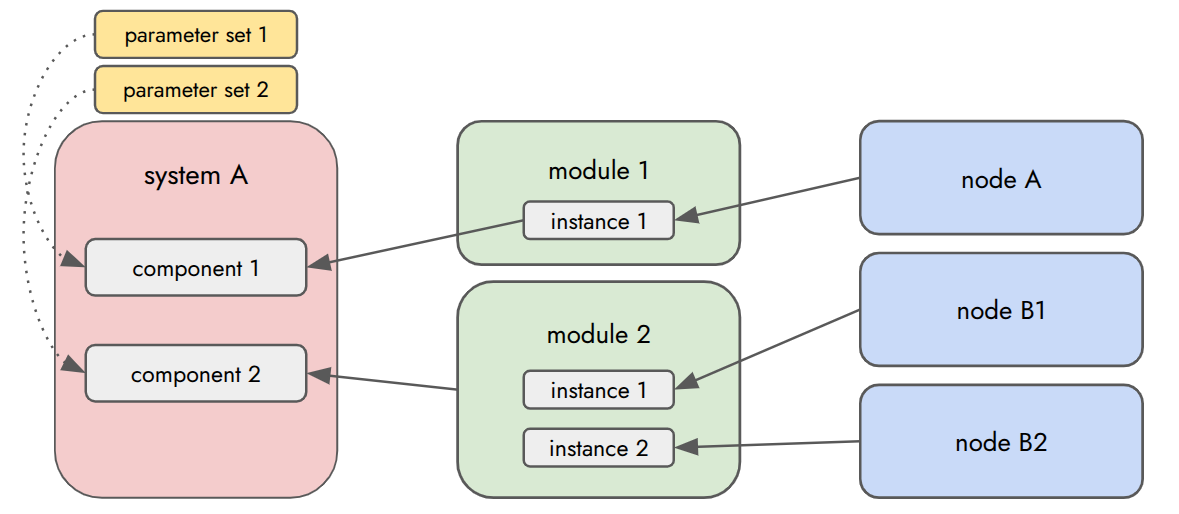
A system is composed of four entity types:
| Entity | File | Description |
|---|---|---|
| Node | *.node.yaml |
A single ROS 2 node — its topics, parameters, and execution config |
| Module | *.module.yaml |
A reusable group of nodes/sub-modules with wired connections |
| System | *.system.yaml |
The top-level description: components, connections, modes |
| Parameter Set | *.parameter_set.yaml |
Parameter overrides applied to nodes at deployment time |
The build step collects node definitions from across the workspace (resolved via workspace.yaml), combines them with the system design files in this package, and generates launch files and a system visualization:
each ROS 2 package (core, universe, …)         ┐
  └── design/node/  *.node.yaml                │
                                               ├── autoware_system_designer
this package                                   │
├── design/node/    *.node.yaml  (optional)    │
├── design/module/  *.module.yaml              │
├── design/system/  *.system.yaml              │
└── design/parameter_set/ *.parameter_set.yaml ┘
                                               │
                                               ▼
                                               install/
                                               ├── systems.html
                                               ├── AutowareSample/
                                               │   ├── Runtime.launch.xml
                                               │   ├── LoggingSimulation.launch.xml
                                               │   └── PlanningSimulation.launch.xml
                                               └── ...node launchers...
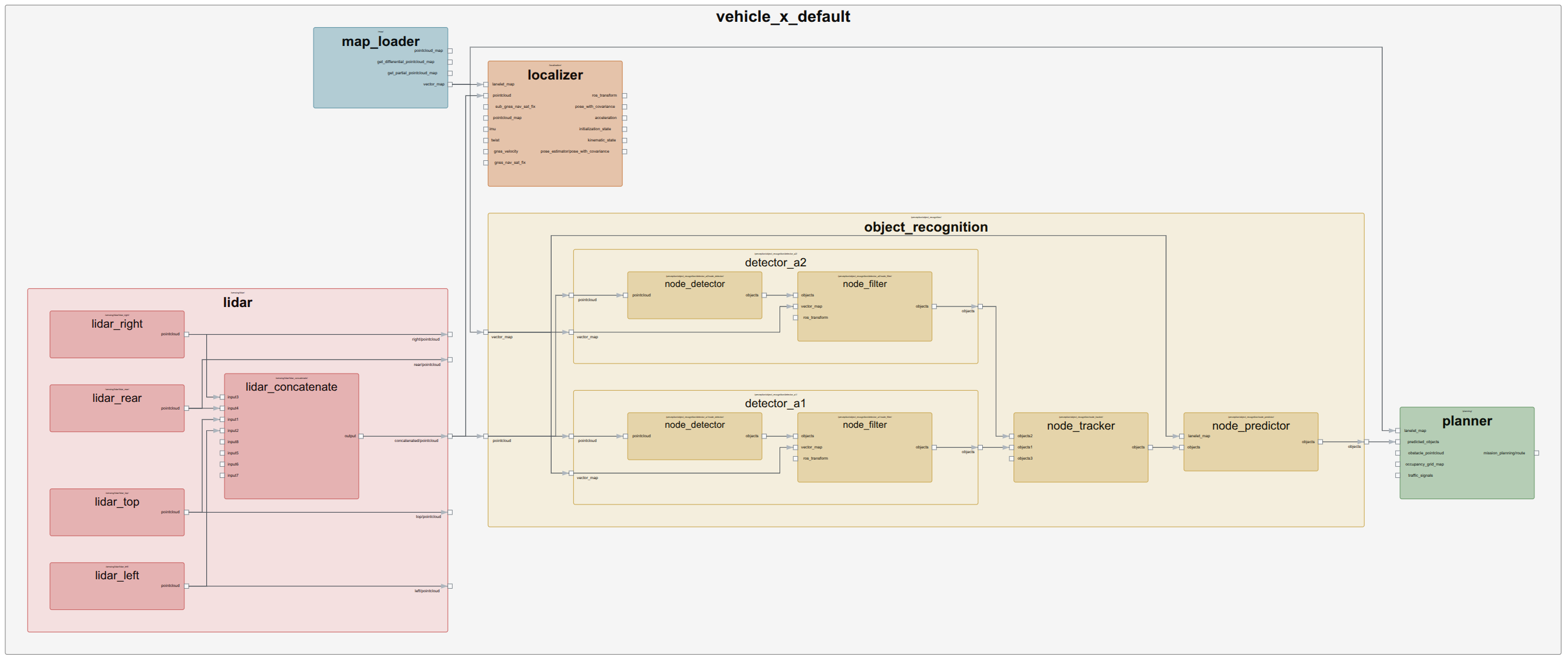
The generated node diagram shows the full system topology including all modules, nodes, and topic connections:
Visualizing the System
After building, open the generated HTML page in your browser to interactively explore the full system graph:
# From your colcon workspace root
firefox install/systems.html
# or
google-chrome install/systems.html
The visualization page shows every node, module, topic connection, and operating mode defined in the system.
Package Structure
autoware_sample_designs/
├── design/
│   ├── node/              # System-specific node definitions (wrapper/optional nodes only)
│   ├── module/            # Reusable subsystem modules (sensing, perception, …)
│   ├── system/
│   │   └── AutowareSample.system.yaml   # Top-level system definition
│   └── parameter_set/     # Parameter overrides per node, per mode
├── config/                # Shared parameter YAML files (owned by this package)
├── launch/                # Hand-written wrapper launch files for legacy integration
├── urdf/                  # Vehicle URDF
├── workspace.yaml         # Provider resolution rules for the system designer
└── CMakeLists.txt
The AutowareSample.system.yaml defines four operating modes — Runtime, LoggingSimulation, PlanningSimulation, and E2ESimulation — each with mode-specific component overrides and connections.
Relationship with autoware_launch
autoware_sample_designs is independent of autoware_launch as a system builder.
The system designer generates its own launch files and manages its own system topology.
autoware_launch does not control how this system is structured or launched.
The only connection is that some parameter set files reference shared parameter YAML files from autoware_launch (e.g., tracker, fusion, and filter configs that are common across vehicle variants):
# design/parameter_set/sample_system_perception.parameter_set.yaml
parameters:
  - node: /perception/object_recognition/detection/clustering/...
    param_files:
      # shared param file from autoware_launch — values only, no launch dependency
      - param_path: $(find-pkg-share autoware_launch)/config/perception/...
This is a runtime parameter file lookup — autoware_launch is not involved in building or launching the system. Node-specific parameters that belong to this vehicle configuration live in config/ inside this package itself.
Building
File truncated at 100 lines see the full file
Package Dependencies
| Deps | Name |
|---|---|
| ament_cmake_auto | |
| autoware_cmake | |
| sample_sensor_kit_description | |
| sample_sensor_kit_launch | |
| sample_vehicle_description | |
| autoware_system_designer |
System Dependencies
Dependant Packages
Launch files
- launch/sample_system_adapi_wrapper.launch.xml
-
- default_adapi_param_path [default: $(find-pkg-share autoware_default_adapi_universe)/config/default_adapi.param.yaml]
- launch/sample_system_sensing_wrapper.launch.xml
-
- launch_driver [default: true]
- vehicle_param_file [default: $(find-pkg-share sample_vehicle_description)/config/vehicle_info.param.yaml]
- vehicle_mirror_param_file [default: $(find-pkg-share sample_vehicle_description)/config/vehicle_mirror.param.yaml]
- pointcloud_container_name [default: pointcloud_container]
Messages
Services
Plugins
Recent questions tagged autoware_sample_designs at Robotics Stack Exchange
Package Summary
| Version | 0.50.0 |
| License | Apache License 2.0 |
| Build type | AMENT_CMAKE |
| Use | RECOMMENDED |
Repository Summary
| Description | |
| Checkout URI | https://github.com/autowarefoundation/autoware_launch.git |
| VCS Type | git |
| VCS Version | main |
| Last Updated | 2026-04-27 |
| Dev Status | UNKNOWN |
| Released | UNRELEASED |
| Contributing |
Help Wanted (-)
Good First Issues (-) Pull Requests to Review (-) |
Package Description
Maintainers
- Taekjin Lee
- Maxime CLEMENT
- Max Schmeller
Authors
autoware_sample_designs
autoware_sample_designs is a complete, working example of defining and launching a full Autoware system using Autoware System Designer.
It serves as the reference implementation for how to describe, configure, and deploy an Autoware autonomous driving stack using YAML-based system design — without writing ROS 2 launch files by hand.
What is Autoware System Designer?
Autoware System Designer is a toolset that lets you describe your entire software system in structured YAML files and automatically generates correct-by-construction ROS 2 launch files, parameter templates, and system visualization diagrams from them.
A system is composed of four entity types:
| Entity | File | Description |
|---|---|---|
| Node | *.node.yaml |
A single ROS 2 node — its topics, parameters, and execution config |
| Module | *.module.yaml |
A reusable group of nodes/sub-modules with wired connections |
| System | *.system.yaml |
The top-level description: components, connections, modes |
| Parameter Set | *.parameter_set.yaml |
Parameter overrides applied to nodes at deployment time |
The build step collects node definitions from across the workspace (resolved via workspace.yaml), combines them with the system design files in this package, and generates launch files and a system visualization:
each ROS 2 package (core, universe, …)         ┐
  └── design/node/  *.node.yaml                │
                                               ├── autoware_system_designer
this package                                   │
├── design/node/    *.node.yaml  (optional)    │
├── design/module/  *.module.yaml              │
├── design/system/  *.system.yaml              │
└── design/parameter_set/ *.parameter_set.yaml ┘
                                               │
                                               ▼
                                               install/
                                               ├── systems.html
                                               ├── AutowareSample/
                                               │   ├── Runtime.launch.xml
                                               │   ├── LoggingSimulation.launch.xml
                                               │   └── PlanningSimulation.launch.xml
                                               └── ...node launchers...
The generated node diagram shows the full system topology including all modules, nodes, and topic connections:
Visualizing the System
After building, open the generated HTML page in your browser to interactively explore the full system graph:
# From your colcon workspace root
firefox install/systems.html
# or
google-chrome install/systems.html
The visualization page shows every node, module, topic connection, and operating mode defined in the system.
Package Structure
autoware_sample_designs/
├── design/
│   ├── node/              # System-specific node definitions (wrapper/optional nodes only)
│   ├── module/            # Reusable subsystem modules (sensing, perception, …)
│   ├── system/
│   │   └── AutowareSample.system.yaml   # Top-level system definition
│   └── parameter_set/     # Parameter overrides per node, per mode
├── config/                # Shared parameter YAML files (owned by this package)
├── launch/                # Hand-written wrapper launch files for legacy integration
├── urdf/                  # Vehicle URDF
├── workspace.yaml         # Provider resolution rules for the system designer
└── CMakeLists.txt
The AutowareSample.system.yaml defines four operating modes — Runtime, LoggingSimulation, PlanningSimulation, and E2ESimulation — each with mode-specific component overrides and connections.
Relationship with autoware_launch
autoware_sample_designs is independent of autoware_launch as a system builder.
The system designer generates its own launch files and manages its own system topology.
autoware_launch does not control how this system is structured or launched.
The only connection is that some parameter set files reference shared parameter YAML files from autoware_launch (e.g., tracker, fusion, and filter configs that are common across vehicle variants):
# design/parameter_set/sample_system_perception.parameter_set.yaml
parameters:
  - node: /perception/object_recognition/detection/clustering/...
    param_files:
      # shared param file from autoware_launch — values only, no launch dependency
      - param_path: $(find-pkg-share autoware_launch)/config/perception/...
This is a runtime parameter file lookup — autoware_launch is not involved in building or launching the system. Node-specific parameters that belong to this vehicle configuration live in config/ inside this package itself.
Building
File truncated at 100 lines see the full file
Package Dependencies
| Deps | Name |
|---|---|
| ament_cmake_auto | |
| autoware_cmake | |
| sample_sensor_kit_description | |
| sample_sensor_kit_launch | |
| sample_vehicle_description | |
| autoware_system_designer |
System Dependencies
Dependant Packages
Launch files
- launch/sample_system_adapi_wrapper.launch.xml
-
- default_adapi_param_path [default: $(find-pkg-share autoware_default_adapi_universe)/config/default_adapi.param.yaml]
- launch/sample_system_sensing_wrapper.launch.xml
-
- launch_driver [default: true]
- vehicle_param_file [default: $(find-pkg-share sample_vehicle_description)/config/vehicle_info.param.yaml]
- vehicle_mirror_param_file [default: $(find-pkg-share sample_vehicle_description)/config/vehicle_mirror.param.yaml]
- pointcloud_container_name [default: pointcloud_container]
Messages
Services
Plugins
Recent questions tagged autoware_sample_designs at Robotics Stack Exchange
Package Summary
| Version | 0.50.0 |
| License | Apache License 2.0 |
| Build type | AMENT_CMAKE |
| Use | RECOMMENDED |
Repository Summary
| Description | |
| Checkout URI | https://github.com/autowarefoundation/autoware_launch.git |
| VCS Type | git |
| VCS Version | main |
| Last Updated | 2026-04-27 |
| Dev Status | UNKNOWN |
| Released | UNRELEASED |
| Contributing |
Help Wanted (-)
Good First Issues (-) Pull Requests to Review (-) |
Package Description
Maintainers
- Taekjin Lee
- Maxime CLEMENT
- Max Schmeller
Authors
autoware_sample_designs
autoware_sample_designs is a complete, working example of defining and launching a full Autoware system using Autoware System Designer.
It serves as the reference implementation for how to describe, configure, and deploy an Autoware autonomous driving stack using YAML-based system design — without writing ROS 2 launch files by hand.
What is Autoware System Designer?
Autoware System Designer is a toolset that lets you describe your entire software system in structured YAML files and automatically generates correct-by-construction ROS 2 launch files, parameter templates, and system visualization diagrams from them.
A system is composed of four entity types:
| Entity | File | Description |
|---|---|---|
| Node | *.node.yaml |
A single ROS 2 node — its topics, parameters, and execution config |
| Module | *.module.yaml |
A reusable group of nodes/sub-modules with wired connections |
| System | *.system.yaml |
The top-level description: components, connections, modes |
| Parameter Set | *.parameter_set.yaml |
Parameter overrides applied to nodes at deployment time |
The build step collects node definitions from across the workspace (resolved via workspace.yaml), combines them with the system design files in this package, and generates launch files and a system visualization:
each ROS 2 package (core, universe, …)         ┐
  └── design/node/  *.node.yaml                │
                                               ├── autoware_system_designer
this package                                   │
├── design/node/    *.node.yaml  (optional)    │
├── design/module/  *.module.yaml              │
├── design/system/  *.system.yaml              │
└── design/parameter_set/ *.parameter_set.yaml ┘
                                               │
                                               ▼
                                               install/
                                               ├── systems.html
                                               ├── AutowareSample/
                                               │   ├── Runtime.launch.xml
                                               │   ├── LoggingSimulation.launch.xml
                                               │   └── PlanningSimulation.launch.xml
                                               └── ...node launchers...
The generated node diagram shows the full system topology including all modules, nodes, and topic connections:
Visualizing the System
After building, open the generated HTML page in your browser to interactively explore the full system graph:
# From your colcon workspace root
firefox install/systems.html
# or
google-chrome install/systems.html
The visualization page shows every node, module, topic connection, and operating mode defined in the system.
Package Structure
autoware_sample_designs/
├── design/
│   ├── node/              # System-specific node definitions (wrapper/optional nodes only)
│   ├── module/            # Reusable subsystem modules (sensing, perception, …)
│   ├── system/
│   │   └── AutowareSample.system.yaml   # Top-level system definition
│   └── parameter_set/     # Parameter overrides per node, per mode
├── config/                # Shared parameter YAML files (owned by this package)
├── launch/                # Hand-written wrapper launch files for legacy integration
├── urdf/                  # Vehicle URDF
├── workspace.yaml         # Provider resolution rules for the system designer
└── CMakeLists.txt
The AutowareSample.system.yaml defines four operating modes — Runtime, LoggingSimulation, PlanningSimulation, and E2ESimulation — each with mode-specific component overrides and connections.
Relationship with autoware_launch
autoware_sample_designs is independent of autoware_launch as a system builder.
The system designer generates its own launch files and manages its own system topology.
autoware_launch does not control how this system is structured or launched.
The only connection is that some parameter set files reference shared parameter YAML files from autoware_launch (e.g., tracker, fusion, and filter configs that are common across vehicle variants):
# design/parameter_set/sample_system_perception.parameter_set.yaml
parameters:
  - node: /perception/object_recognition/detection/clustering/...
    param_files:
      # shared param file from autoware_launch — values only, no launch dependency
      - param_path: $(find-pkg-share autoware_launch)/config/perception/...
This is a runtime parameter file lookup — autoware_launch is not involved in building or launching the system. Node-specific parameters that belong to this vehicle configuration live in config/ inside this package itself.
Building
File truncated at 100 lines see the full file
Package Dependencies
| Deps | Name |
|---|---|
| ament_cmake_auto | |
| autoware_cmake | |
| sample_sensor_kit_description | |
| sample_sensor_kit_launch | |
| sample_vehicle_description | |
| autoware_system_designer |
System Dependencies
Dependant Packages
Launch files
- launch/sample_system_adapi_wrapper.launch.xml
-
- default_adapi_param_path [default: $(find-pkg-share autoware_default_adapi_universe)/config/default_adapi.param.yaml]
- launch/sample_system_sensing_wrapper.launch.xml
-
- launch_driver [default: true]
- vehicle_param_file [default: $(find-pkg-share sample_vehicle_description)/config/vehicle_info.param.yaml]
- vehicle_mirror_param_file [default: $(find-pkg-share sample_vehicle_description)/config/vehicle_mirror.param.yaml]
- pointcloud_container_name [default: pointcloud_container]
Messages
Services
Plugins
Recent questions tagged autoware_sample_designs at Robotics Stack Exchange
Package Summary
| Version | 0.50.0 |
| License | Apache License 2.0 |
| Build type | AMENT_CMAKE |
| Use | RECOMMENDED |
Repository Summary
| Description | |
| Checkout URI | https://github.com/autowarefoundation/autoware_launch.git |
| VCS Type | git |
| VCS Version | main |
| Last Updated | 2026-04-27 |
| Dev Status | UNKNOWN |
| Released | UNRELEASED |
| Contributing |
Help Wanted (-)
Good First Issues (-) Pull Requests to Review (-) |
Package Description
Maintainers
- Taekjin Lee
- Maxime CLEMENT
- Max Schmeller
Authors
autoware_sample_designs
autoware_sample_designs is a complete, working example of defining and launching a full Autoware system using Autoware System Designer.
It serves as the reference implementation for how to describe, configure, and deploy an Autoware autonomous driving stack using YAML-based system design — without writing ROS 2 launch files by hand.
What is Autoware System Designer?
Autoware System Designer is a toolset that lets you describe your entire software system in structured YAML files and automatically generates correct-by-construction ROS 2 launch files, parameter templates, and system visualization diagrams from them.
A system is composed of four entity types:
| Entity | File | Description |
|---|---|---|
| Node | *.node.yaml |
A single ROS 2 node — its topics, parameters, and execution config |
| Module | *.module.yaml |
A reusable group of nodes/sub-modules with wired connections |
| System | *.system.yaml |
The top-level description: components, connections, modes |
| Parameter Set | *.parameter_set.yaml |
Parameter overrides applied to nodes at deployment time |
The build step collects node definitions from across the workspace (resolved via workspace.yaml), combines them with the system design files in this package, and generates launch files and a system visualization:
each ROS 2 package (core, universe, …)         ┐
  └── design/node/  *.node.yaml                │
                                               ├── autoware_system_designer
this package                                   │
├── design/node/    *.node.yaml  (optional)    │
├── design/module/  *.module.yaml              │
├── design/system/  *.system.yaml              │
└── design/parameter_set/ *.parameter_set.yaml ┘
                                               │
                                               ▼
                                               install/
                                               ├── systems.html
                                               ├── AutowareSample/
                                               │   ├── Runtime.launch.xml
                                               │   ├── LoggingSimulation.launch.xml
                                               │   └── PlanningSimulation.launch.xml
                                               └── ...node launchers...
The generated node diagram shows the full system topology including all modules, nodes, and topic connections:
Visualizing the System
After building, open the generated HTML page in your browser to interactively explore the full system graph:
# From your colcon workspace root
firefox install/systems.html
# or
google-chrome install/systems.html
The visualization page shows every node, module, topic connection, and operating mode defined in the system.
Package Structure
autoware_sample_designs/
├── design/
│   ├── node/              # System-specific node definitions (wrapper/optional nodes only)
│   ├── module/            # Reusable subsystem modules (sensing, perception, …)
│   ├── system/
│   │   └── AutowareSample.system.yaml   # Top-level system definition
│   └── parameter_set/     # Parameter overrides per node, per mode
├── config/                # Shared parameter YAML files (owned by this package)
├── launch/                # Hand-written wrapper launch files for legacy integration
├── urdf/                  # Vehicle URDF
├── workspace.yaml         # Provider resolution rules for the system designer
└── CMakeLists.txt
The AutowareSample.system.yaml defines four operating modes — Runtime, LoggingSimulation, PlanningSimulation, and E2ESimulation — each with mode-specific component overrides and connections.
Relationship with autoware_launch
autoware_sample_designs is independent of autoware_launch as a system builder.
The system designer generates its own launch files and manages its own system topology.
autoware_launch does not control how this system is structured or launched.
The only connection is that some parameter set files reference shared parameter YAML files from autoware_launch (e.g., tracker, fusion, and filter configs that are common across vehicle variants):
# design/parameter_set/sample_system_perception.parameter_set.yaml
parameters:
  - node: /perception/object_recognition/detection/clustering/...
    param_files:
      # shared param file from autoware_launch — values only, no launch dependency
      - param_path: $(find-pkg-share autoware_launch)/config/perception/...
This is a runtime parameter file lookup — autoware_launch is not involved in building or launching the system. Node-specific parameters that belong to this vehicle configuration live in config/ inside this package itself.
Building
File truncated at 100 lines see the full file
Package Dependencies
| Deps | Name |
|---|---|
| ament_cmake_auto | |
| autoware_cmake | |
| sample_sensor_kit_description | |
| sample_sensor_kit_launch | |
| sample_vehicle_description | |
| autoware_system_designer |
System Dependencies
Dependant Packages
Launch files
- launch/sample_system_adapi_wrapper.launch.xml
-
- default_adapi_param_path [default: $(find-pkg-share autoware_default_adapi_universe)/config/default_adapi.param.yaml]
- launch/sample_system_sensing_wrapper.launch.xml
-
- launch_driver [default: true]
- vehicle_param_file [default: $(find-pkg-share sample_vehicle_description)/config/vehicle_info.param.yaml]
- vehicle_mirror_param_file [default: $(find-pkg-share sample_vehicle_description)/config/vehicle_mirror.param.yaml]
- pointcloud_container_name [default: pointcloud_container]
Messages
Services
Plugins
Recent questions tagged autoware_sample_designs at Robotics Stack Exchange
Package Summary
| Version | 0.50.0 |
| License | Apache License 2.0 |
| Build type | AMENT_CMAKE |
| Use | RECOMMENDED |
Repository Summary
| Description | |
| Checkout URI | https://github.com/autowarefoundation/autoware_launch.git |
| VCS Type | git |
| VCS Version | main |
| Last Updated | 2026-04-27 |
| Dev Status | UNKNOWN |
| Released | UNRELEASED |
| Contributing |
Help Wanted (-)
Good First Issues (-) Pull Requests to Review (-) |
Package Description
Maintainers
- Taekjin Lee
- Maxime CLEMENT
- Max Schmeller
Authors
autoware_sample_designs
autoware_sample_designs is a complete, working example of defining and launching a full Autoware system using Autoware System Designer.
It serves as the reference implementation for how to describe, configure, and deploy an Autoware autonomous driving stack using YAML-based system design — without writing ROS 2 launch files by hand.
What is Autoware System Designer?
Autoware System Designer is a toolset that lets you describe your entire software system in structured YAML files and automatically generates correct-by-construction ROS 2 launch files, parameter templates, and system visualization diagrams from them.
A system is composed of four entity types:
| Entity | File | Description |
|---|---|---|
| Node | *.node.yaml |
A single ROS 2 node — its topics, parameters, and execution config |
| Module | *.module.yaml |
A reusable group of nodes/sub-modules with wired connections |
| System | *.system.yaml |
The top-level description: components, connections, modes |
| Parameter Set | *.parameter_set.yaml |
Parameter overrides applied to nodes at deployment time |
The build step collects node definitions from across the workspace (resolved via workspace.yaml), combines them with the system design files in this package, and generates launch files and a system visualization:
each ROS 2 package (core, universe, …)         ┐
  └── design/node/  *.node.yaml                │
                                               ├── autoware_system_designer
this package                                   │
├── design/node/    *.node.yaml  (optional)    │
├── design/module/  *.module.yaml              │
├── design/system/  *.system.yaml              │
└── design/parameter_set/ *.parameter_set.yaml ┘
                                               │
                                               ▼
                                               install/
                                               ├── systems.html
                                               ├── AutowareSample/
                                               │   ├── Runtime.launch.xml
                                               │   ├── LoggingSimulation.launch.xml
                                               │   └── PlanningSimulation.launch.xml
                                               └── ...node launchers...
The generated node diagram shows the full system topology including all modules, nodes, and topic connections:
Visualizing the System
After building, open the generated HTML page in your browser to interactively explore the full system graph:
# From your colcon workspace root
firefox install/systems.html
# or
google-chrome install/systems.html
The visualization page shows every node, module, topic connection, and operating mode defined in the system.
Package Structure
autoware_sample_designs/
├── design/
│   ├── node/              # System-specific node definitions (wrapper/optional nodes only)
│   ├── module/            # Reusable subsystem modules (sensing, perception, …)
│   ├── system/
│   │   └── AutowareSample.system.yaml   # Top-level system definition
│   └── parameter_set/     # Parameter overrides per node, per mode
├── config/                # Shared parameter YAML files (owned by this package)
├── launch/                # Hand-written wrapper launch files for legacy integration
├── urdf/                  # Vehicle URDF
├── workspace.yaml         # Provider resolution rules for the system designer
└── CMakeLists.txt
The AutowareSample.system.yaml defines four operating modes — Runtime, LoggingSimulation, PlanningSimulation, and E2ESimulation — each with mode-specific component overrides and connections.
Relationship with autoware_launch
autoware_sample_designs is independent of autoware_launch as a system builder.
The system designer generates its own launch files and manages its own system topology.
autoware_launch does not control how this system is structured or launched.
The only connection is that some parameter set files reference shared parameter YAML files from autoware_launch (e.g., tracker, fusion, and filter configs that are common across vehicle variants):
# design/parameter_set/sample_system_perception.parameter_set.yaml
parameters:
  - node: /perception/object_recognition/detection/clustering/...
    param_files:
      # shared param file from autoware_launch — values only, no launch dependency
      - param_path: $(find-pkg-share autoware_launch)/config/perception/...
This is a runtime parameter file lookup — autoware_launch is not involved in building or launching the system. Node-specific parameters that belong to this vehicle configuration live in config/ inside this package itself.
Building
File truncated at 100 lines see the full file
Package Dependencies
| Deps | Name |
|---|---|
| ament_cmake_auto | |
| autoware_cmake | |
| sample_sensor_kit_description | |
| sample_sensor_kit_launch | |
| sample_vehicle_description | |
| autoware_system_designer |
System Dependencies
Dependant Packages
Launch files
- launch/sample_system_adapi_wrapper.launch.xml
-
- default_adapi_param_path [default: $(find-pkg-share autoware_default_adapi_universe)/config/default_adapi.param.yaml]
- launch/sample_system_sensing_wrapper.launch.xml
-
- launch_driver [default: true]
- vehicle_param_file [default: $(find-pkg-share sample_vehicle_description)/config/vehicle_info.param.yaml]
- vehicle_mirror_param_file [default: $(find-pkg-share sample_vehicle_description)/config/vehicle_mirror.param.yaml]
- pointcloud_container_name [default: pointcloud_container]
Messages
Services
Plugins
Recent questions tagged autoware_sample_designs at Robotics Stack Exchange
Package Summary
| Version | 0.50.0 |
| License | Apache License 2.0 |
| Build type | AMENT_CMAKE |
| Use | RECOMMENDED |
Repository Summary
| Description | |
| Checkout URI | https://github.com/autowarefoundation/autoware_launch.git |
| VCS Type | git |
| VCS Version | main |
| Last Updated | 2026-04-27 |
| Dev Status | UNKNOWN |
| Released | UNRELEASED |
| Contributing |
Help Wanted (-)
Good First Issues (-) Pull Requests to Review (-) |
Package Description
Maintainers
- Taekjin Lee
- Maxime CLEMENT
- Max Schmeller
Authors
autoware_sample_designs
autoware_sample_designs is a complete, working example of defining and launching a full Autoware system using Autoware System Designer.
It serves as the reference implementation for how to describe, configure, and deploy an Autoware autonomous driving stack using YAML-based system design — without writing ROS 2 launch files by hand.
What is Autoware System Designer?
Autoware System Designer is a toolset that lets you describe your entire software system in structured YAML files and automatically generates correct-by-construction ROS 2 launch files, parameter templates, and system visualization diagrams from them.
A system is composed of four entity types:
| Entity | File | Description |
|---|---|---|
| Node | *.node.yaml |
A single ROS 2 node — its topics, parameters, and execution config |
| Module | *.module.yaml |
A reusable group of nodes/sub-modules with wired connections |
| System | *.system.yaml |
The top-level description: components, connections, modes |
| Parameter Set | *.parameter_set.yaml |
Parameter overrides applied to nodes at deployment time |
The build step collects node definitions from across the workspace (resolved via workspace.yaml), combines them with the system design files in this package, and generates launch files and a system visualization:
each ROS 2 package (core, universe, …)         ┐
  └── design/node/  *.node.yaml                │
                                               ├── autoware_system_designer
this package                                   │
├── design/node/    *.node.yaml  (optional)    │
├── design/module/  *.module.yaml              │
├── design/system/  *.system.yaml              │
└── design/parameter_set/ *.parameter_set.yaml ┘
                                               │
                                               ▼
                                               install/
                                               ├── systems.html
                                               ├── AutowareSample/
                                               │   ├── Runtime.launch.xml
                                               │   ├── LoggingSimulation.launch.xml
                                               │   └── PlanningSimulation.launch.xml
                                               └── ...node launchers...
The generated node diagram shows the full system topology including all modules, nodes, and topic connections:
Visualizing the System
After building, open the generated HTML page in your browser to interactively explore the full system graph:
# From your colcon workspace root
firefox install/systems.html
# or
google-chrome install/systems.html
The visualization page shows every node, module, topic connection, and operating mode defined in the system.
Package Structure
autoware_sample_designs/
├── design/
│   ├── node/              # System-specific node definitions (wrapper/optional nodes only)
│   ├── module/            # Reusable subsystem modules (sensing, perception, …)
│   ├── system/
│   │   └── AutowareSample.system.yaml   # Top-level system definition
│   └── parameter_set/     # Parameter overrides per node, per mode
├── config/                # Shared parameter YAML files (owned by this package)
├── launch/                # Hand-written wrapper launch files for legacy integration
├── urdf/                  # Vehicle URDF
├── workspace.yaml         # Provider resolution rules for the system designer
└── CMakeLists.txt
The AutowareSample.system.yaml defines four operating modes — Runtime, LoggingSimulation, PlanningSimulation, and E2ESimulation — each with mode-specific component overrides and connections.
Relationship with autoware_launch
autoware_sample_designs is independent of autoware_launch as a system builder.
The system designer generates its own launch files and manages its own system topology.
autoware_launch does not control how this system is structured or launched.
The only connection is that some parameter set files reference shared parameter YAML files from autoware_launch (e.g., tracker, fusion, and filter configs that are common across vehicle variants):
# design/parameter_set/sample_system_perception.parameter_set.yaml
parameters:
  - node: /perception/object_recognition/detection/clustering/...
    param_files:
      # shared param file from autoware_launch — values only, no launch dependency
      - param_path: $(find-pkg-share autoware_launch)/config/perception/...
This is a runtime parameter file lookup — autoware_launch is not involved in building or launching the system. Node-specific parameters that belong to this vehicle configuration live in config/ inside this package itself.
Building
File truncated at 100 lines see the full file
Package Dependencies
| Deps | Name |
|---|---|
| ament_cmake_auto | |
| autoware_cmake | |
| sample_sensor_kit_description | |
| sample_sensor_kit_launch | |
| sample_vehicle_description | |
| autoware_system_designer |
System Dependencies
Dependant Packages
Launch files
- launch/sample_system_adapi_wrapper.launch.xml
-
- default_adapi_param_path [default: $(find-pkg-share autoware_default_adapi_universe)/config/default_adapi.param.yaml]
- launch/sample_system_sensing_wrapper.launch.xml
-
- launch_driver [default: true]
- vehicle_param_file [default: $(find-pkg-share sample_vehicle_description)/config/vehicle_info.param.yaml]
- vehicle_mirror_param_file [default: $(find-pkg-share sample_vehicle_description)/config/vehicle_mirror.param.yaml]
- pointcloud_container_name [default: pointcloud_container]
Messages
Services
Plugins
Recent questions tagged autoware_sample_designs at Robotics Stack Exchange
Package Summary
| Version | 0.50.0 |
| License | Apache License 2.0 |
| Build type | AMENT_CMAKE |
| Use | RECOMMENDED |
Repository Summary
| Description | |
| Checkout URI | https://github.com/autowarefoundation/autoware_launch.git |
| VCS Type | git |
| VCS Version | main |
| Last Updated | 2026-04-27 |
| Dev Status | UNKNOWN |
| Released | UNRELEASED |
| Contributing |
Help Wanted (-)
Good First Issues (-) Pull Requests to Review (-) |
Package Description
Maintainers
- Taekjin Lee
- Maxime CLEMENT
- Max Schmeller
Authors
autoware_sample_designs
autoware_sample_designs is a complete, working example of defining and launching a full Autoware system using Autoware System Designer.
It serves as the reference implementation for how to describe, configure, and deploy an Autoware autonomous driving stack using YAML-based system design — without writing ROS 2 launch files by hand.
What is Autoware System Designer?
Autoware System Designer is a toolset that lets you describe your entire software system in structured YAML files and automatically generates correct-by-construction ROS 2 launch files, parameter templates, and system visualization diagrams from them.
A system is composed of four entity types:
| Entity | File | Description |
|---|---|---|
| Node | *.node.yaml |
A single ROS 2 node — its topics, parameters, and execution config |
| Module | *.module.yaml |
A reusable group of nodes/sub-modules with wired connections |
| System | *.system.yaml |
The top-level description: components, connections, modes |
| Parameter Set | *.parameter_set.yaml |
Parameter overrides applied to nodes at deployment time |
The build step collects node definitions from across the workspace (resolved via workspace.yaml), combines them with the system design files in this package, and generates launch files and a system visualization:
each ROS 2 package (core, universe, …)         ┐
  └── design/node/  *.node.yaml                │
                                               ├── autoware_system_designer
this package                                   │
├── design/node/    *.node.yaml  (optional)    │
├── design/module/  *.module.yaml              │
├── design/system/  *.system.yaml              │
└── design/parameter_set/ *.parameter_set.yaml ┘
                                               │
                                               ▼
                                               install/
                                               ├── systems.html
                                               ├── AutowareSample/
                                               │   ├── Runtime.launch.xml
                                               │   ├── LoggingSimulation.launch.xml
                                               │   └── PlanningSimulation.launch.xml
                                               └── ...node launchers...
The generated node diagram shows the full system topology including all modules, nodes, and topic connections:
Visualizing the System
After building, open the generated HTML page in your browser to interactively explore the full system graph:
# From your colcon workspace root
firefox install/systems.html
# or
google-chrome install/systems.html
The visualization page shows every node, module, topic connection, and operating mode defined in the system.
Package Structure
autoware_sample_designs/
├── design/
│   ├── node/              # System-specific node definitions (wrapper/optional nodes only)
│   ├── module/            # Reusable subsystem modules (sensing, perception, …)
│   ├── system/
│   │   └── AutowareSample.system.yaml   # Top-level system definition
│   └── parameter_set/     # Parameter overrides per node, per mode
├── config/                # Shared parameter YAML files (owned by this package)
├── launch/                # Hand-written wrapper launch files for legacy integration
├── urdf/                  # Vehicle URDF
├── workspace.yaml         # Provider resolution rules for the system designer
└── CMakeLists.txt
The AutowareSample.system.yaml defines four operating modes — Runtime, LoggingSimulation, PlanningSimulation, and E2ESimulation — each with mode-specific component overrides and connections.
Relationship with autoware_launch
autoware_sample_designs is independent of autoware_launch as a system builder.
The system designer generates its own launch files and manages its own system topology.
autoware_launch does not control how this system is structured or launched.
The only connection is that some parameter set files reference shared parameter YAML files from autoware_launch (e.g., tracker, fusion, and filter configs that are common across vehicle variants):
# design/parameter_set/sample_system_perception.parameter_set.yaml
parameters:
  - node: /perception/object_recognition/detection/clustering/...
    param_files:
      # shared param file from autoware_launch — values only, no launch dependency
      - param_path: $(find-pkg-share autoware_launch)/config/perception/...
This is a runtime parameter file lookup — autoware_launch is not involved in building or launching the system. Node-specific parameters that belong to this vehicle configuration live in config/ inside this package itself.
Building
File truncated at 100 lines see the full file
Package Dependencies
| Deps | Name |
|---|---|
| ament_cmake_auto | |
| autoware_cmake | |
| sample_sensor_kit_description | |
| sample_sensor_kit_launch | |
| sample_vehicle_description | |
| autoware_system_designer |
System Dependencies
Dependant Packages
Launch files
- launch/sample_system_adapi_wrapper.launch.xml
-
- default_adapi_param_path [default: $(find-pkg-share autoware_default_adapi_universe)/config/default_adapi.param.yaml]
- launch/sample_system_sensing_wrapper.launch.xml
-
- launch_driver [default: true]
- vehicle_param_file [default: $(find-pkg-share sample_vehicle_description)/config/vehicle_info.param.yaml]
- vehicle_mirror_param_file [default: $(find-pkg-share sample_vehicle_description)/config/vehicle_mirror.param.yaml]
- pointcloud_container_name [default: pointcloud_container]
Messages
Services
Plugins
Recent questions tagged autoware_sample_designs at Robotics Stack Exchange
Package Summary
| Version | 0.50.0 |
| License | Apache License 2.0 |
| Build type | AMENT_CMAKE |
| Use | RECOMMENDED |
Repository Summary
| Description | |
| Checkout URI | https://github.com/autowarefoundation/autoware_launch.git |
| VCS Type | git |
| VCS Version | main |
| Last Updated | 2026-04-27 |
| Dev Status | UNKNOWN |
| Released | UNRELEASED |
| Contributing |
Help Wanted (-)
Good First Issues (-) Pull Requests to Review (-) |
Package Description
Maintainers
- Taekjin Lee
- Maxime CLEMENT
- Max Schmeller
Authors
autoware_sample_designs
autoware_sample_designs is a complete, working example of defining and launching a full Autoware system using Autoware System Designer.
It serves as the reference implementation for how to describe, configure, and deploy an Autoware autonomous driving stack using YAML-based system design — without writing ROS 2 launch files by hand.
What is Autoware System Designer?
Autoware System Designer is a toolset that lets you describe your entire software system in structured YAML files and automatically generates correct-by-construction ROS 2 launch files, parameter templates, and system visualization diagrams from them.
A system is composed of four entity types:
| Entity | File | Description |
|---|---|---|
| Node | *.node.yaml |
A single ROS 2 node — its topics, parameters, and execution config |
| Module | *.module.yaml |
A reusable group of nodes/sub-modules with wired connections |
| System | *.system.yaml |
The top-level description: components, connections, modes |
| Parameter Set | *.parameter_set.yaml |
Parameter overrides applied to nodes at deployment time |
The build step collects node definitions from across the workspace (resolved via workspace.yaml), combines them with the system design files in this package, and generates launch files and a system visualization:
each ROS 2 package (core, universe, …)         ┐
  └── design/node/  *.node.yaml                │
                                               ├── autoware_system_designer
this package                                   │
├── design/node/    *.node.yaml  (optional)    │
├── design/module/  *.module.yaml              │
├── design/system/  *.system.yaml              │
└── design/parameter_set/ *.parameter_set.yaml ┘
                                               │
                                               ▼
                                               install/
                                               ├── systems.html
                                               ├── AutowareSample/
                                               │   ├── Runtime.launch.xml
                                               │   ├── LoggingSimulation.launch.xml
                                               │   └── PlanningSimulation.launch.xml
                                               └── ...node launchers...
The generated node diagram shows the full system topology including all modules, nodes, and topic connections:
Visualizing the System
After building, open the generated HTML page in your browser to interactively explore the full system graph:
# From your colcon workspace root
firefox install/systems.html
# or
google-chrome install/systems.html
The visualization page shows every node, module, topic connection, and operating mode defined in the system.
Package Structure
autoware_sample_designs/
├── design/
│   ├── node/              # System-specific node definitions (wrapper/optional nodes only)
│   ├── module/            # Reusable subsystem modules (sensing, perception, …)
│   ├── system/
│   │   └── AutowareSample.system.yaml   # Top-level system definition
│   └── parameter_set/     # Parameter overrides per node, per mode
├── config/                # Shared parameter YAML files (owned by this package)
├── launch/                # Hand-written wrapper launch files for legacy integration
├── urdf/                  # Vehicle URDF
├── workspace.yaml         # Provider resolution rules for the system designer
└── CMakeLists.txt
The AutowareSample.system.yaml defines four operating modes — Runtime, LoggingSimulation, PlanningSimulation, and E2ESimulation — each with mode-specific component overrides and connections.
Relationship with autoware_launch
autoware_sample_designs is independent of autoware_launch as a system builder.
The system designer generates its own launch files and manages its own system topology.
autoware_launch does not control how this system is structured or launched.
The only connection is that some parameter set files reference shared parameter YAML files from autoware_launch (e.g., tracker, fusion, and filter configs that are common across vehicle variants):
# design/parameter_set/sample_system_perception.parameter_set.yaml
parameters:
  - node: /perception/object_recognition/detection/clustering/...
    param_files:
      # shared param file from autoware_launch — values only, no launch dependency
      - param_path: $(find-pkg-share autoware_launch)/config/perception/...
This is a runtime parameter file lookup — autoware_launch is not involved in building or launching the system. Node-specific parameters that belong to this vehicle configuration live in config/ inside this package itself.
Building
File truncated at 100 lines see the full file
Package Dependencies
| Deps | Name |
|---|---|
| ament_cmake_auto | |
| autoware_cmake | |
| sample_sensor_kit_description | |
| sample_sensor_kit_launch | |
| sample_vehicle_description | |
| autoware_system_designer |
System Dependencies
Dependant Packages
Launch files
- launch/sample_system_adapi_wrapper.launch.xml
-
- default_adapi_param_path [default: $(find-pkg-share autoware_default_adapi_universe)/config/default_adapi.param.yaml]
- launch/sample_system_sensing_wrapper.launch.xml
-
- launch_driver [default: true]
- vehicle_param_file [default: $(find-pkg-share sample_vehicle_description)/config/vehicle_info.param.yaml]
- vehicle_mirror_param_file [default: $(find-pkg-share sample_vehicle_description)/config/vehicle_mirror.param.yaml]
- pointcloud_container_name [default: pointcloud_container]
Messages
Services
Plugins
Recent questions tagged autoware_sample_designs at Robotics Stack Exchange
Package Summary
| Version | 0.50.0 |
| License | Apache License 2.0 |
| Build type | AMENT_CMAKE |
| Use | RECOMMENDED |
Repository Summary
| Description | |
| Checkout URI | https://github.com/autowarefoundation/autoware_launch.git |
| VCS Type | git |
| VCS Version | main |
| Last Updated | 2026-04-27 |
| Dev Status | UNKNOWN |
| Released | UNRELEASED |
| Contributing |
Help Wanted (-)
Good First Issues (-) Pull Requests to Review (-) |
Package Description
Maintainers
- Taekjin Lee
- Maxime CLEMENT
- Max Schmeller
Authors
autoware_sample_designs
autoware_sample_designs is a complete, working example of defining and launching a full Autoware system using Autoware System Designer.
It serves as the reference implementation for how to describe, configure, and deploy an Autoware autonomous driving stack using YAML-based system design — without writing ROS 2 launch files by hand.
What is Autoware System Designer?
Autoware System Designer is a toolset that lets you describe your entire software system in structured YAML files and automatically generates correct-by-construction ROS 2 launch files, parameter templates, and system visualization diagrams from them.
A system is composed of four entity types:
| Entity | File | Description |
|---|---|---|
| Node | *.node.yaml |
A single ROS 2 node — its topics, parameters, and execution config |
| Module | *.module.yaml |
A reusable group of nodes/sub-modules with wired connections |
| System | *.system.yaml |
The top-level description: components, connections, modes |
| Parameter Set | *.parameter_set.yaml |
Parameter overrides applied to nodes at deployment time |
The build step collects node definitions from across the workspace (resolved via workspace.yaml), combines them with the system design files in this package, and generates launch files and a system visualization:
each ROS 2 package (core, universe, …)         ┐
  └── design/node/  *.node.yaml                │
                                               ├── autoware_system_designer
this package                                   │
├── design/node/    *.node.yaml  (optional)    │
├── design/module/  *.module.yaml              │
├── design/system/  *.system.yaml              │
└── design/parameter_set/ *.parameter_set.yaml ┘
                                               │
                                               ▼
                                               install/
                                               ├── systems.html
                                               ├── AutowareSample/
                                               │   ├── Runtime.launch.xml
                                               │   ├── LoggingSimulation.launch.xml
                                               │   └── PlanningSimulation.launch.xml
                                               └── ...node launchers...
The generated node diagram shows the full system topology including all modules, nodes, and topic connections:
Visualizing the System
After building, open the generated HTML page in your browser to interactively explore the full system graph:
# From your colcon workspace root
firefox install/systems.html
# or
google-chrome install/systems.html
The visualization page shows every node, module, topic connection, and operating mode defined in the system.
Package Structure
autoware_sample_designs/
├── design/
│   ├── node/              # System-specific node definitions (wrapper/optional nodes only)
│   ├── module/            # Reusable subsystem modules (sensing, perception, …)
│   ├── system/
│   │   └── AutowareSample.system.yaml   # Top-level system definition
│   └── parameter_set/     # Parameter overrides per node, per mode
├── config/                # Shared parameter YAML files (owned by this package)
├── launch/                # Hand-written wrapper launch files for legacy integration
├── urdf/                  # Vehicle URDF
├── workspace.yaml         # Provider resolution rules for the system designer
└── CMakeLists.txt
The AutowareSample.system.yaml defines four operating modes — Runtime, LoggingSimulation, PlanningSimulation, and E2ESimulation — each with mode-specific component overrides and connections.
Relationship with autoware_launch
autoware_sample_designs is independent of autoware_launch as a system builder.
The system designer generates its own launch files and manages its own system topology.
autoware_launch does not control how this system is structured or launched.
The only connection is that some parameter set files reference shared parameter YAML files from autoware_launch (e.g., tracker, fusion, and filter configs that are common across vehicle variants):
# design/parameter_set/sample_system_perception.parameter_set.yaml
parameters:
  - node: /perception/object_recognition/detection/clustering/...
    param_files:
      # shared param file from autoware_launch — values only, no launch dependency
      - param_path: $(find-pkg-share autoware_launch)/config/perception/...
This is a runtime parameter file lookup — autoware_launch is not involved in building or launching the system. Node-specific parameters that belong to this vehicle configuration live in config/ inside this package itself.
Building
File truncated at 100 lines see the full file
Package Dependencies
| Deps | Name |
|---|---|
| ament_cmake_auto | |
| autoware_cmake | |
| sample_sensor_kit_description | |
| sample_sensor_kit_launch | |
| sample_vehicle_description | |
| autoware_system_designer |
System Dependencies
Dependant Packages
Launch files
- launch/sample_system_adapi_wrapper.launch.xml
-
- default_adapi_param_path [default: $(find-pkg-share autoware_default_adapi_universe)/config/default_adapi.param.yaml]
- launch/sample_system_sensing_wrapper.launch.xml
-
- launch_driver [default: true]
- vehicle_param_file [default: $(find-pkg-share sample_vehicle_description)/config/vehicle_info.param.yaml]
- vehicle_mirror_param_file [default: $(find-pkg-share sample_vehicle_description)/config/vehicle_mirror.param.yaml]
- pointcloud_container_name [default: pointcloud_container]