 ROS Index
Package Summary
| Version | 1.0.0 |
| License | Apache-2.0 |
| Build type | AMENT_CMAKE |
| Use | RECOMMENDED |
Repository Summary
| Description | |
| Checkout URI | https://github.com/castacks/airstack.git |
| VCS Type | git |
| VCS Version | develop |
| Last Updated | 2026-09-11 |
| Dev Status | UNKNOWN |
| Released | UNRELEASED |
| Contributing |
Help Wanted (-)
Good First Issues (-) Pull Requests to Review (-) |
Package Description
Maintainers
- koko
Authors
3D Waypoint RViz2 Plugin
An interactive RViz2 tool plugin for creating, manipulating, and managing 3D waypoints directly in the RViz2 viewport. Waypoint state is managed by a shared WaypointManager singleton so that both this tool (3D interaction) and the Tasks Panel’s Navigate tab (UI controls) operate on the same data.
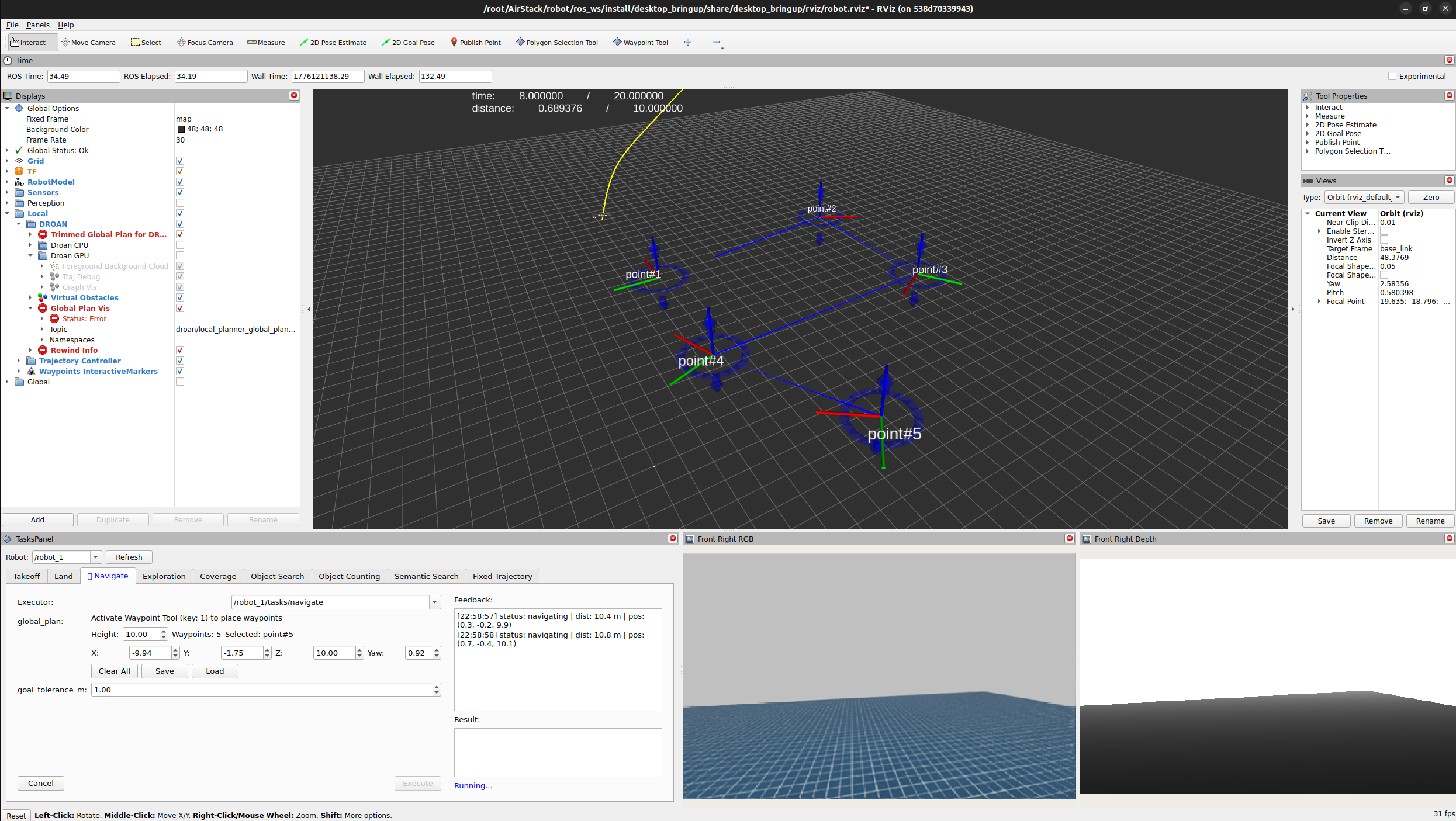
Architecture
 WaypointTool (rviz_common::Tool)        Tasks Panel Navigate tab
   mouse click in 3D viewport              UI: height, X/Y/Z/Yaw,
         |                                 Clear, Save, Load, Execute
         v                                        |
     +------------------------------------------+
     |          WaypointManager (singleton)      |
     |                                          |
     |  - InteractiveMarkerServer               |
     |  - Ogre SceneNode map (waypoint visuals) |
     |  - add / remove / clear / reorder        |
     |  - save / load (.db3 bag files)          |
     |  - getPath() -> nav_msgs/Path            |
     |  - Qt signals for UI updates             |
     +------------------------------------------+
-
WaypointTool (
rviz_common::Tool) – handles mouse events in the 3D viewport. Left-click to add, right-click near an existing waypoint to delete. Delegates all state toWaypointManager. -
WaypointManager (
QObjectsingleton) – owns all waypoint state: the interactive marker server, the Ogre scene nodes, persistence, and publishing. Emits Qt signals (waypointCountChanged,selectedMarkerChanged,waypointsCleared) so external UI can stay in sync. - The Tasks Panel (separate
rviz_tasks_panelpackage) holds ashared_ptrto the sameWaypointManagerinstance and provides the full control UI in its Navigate tab.
Features
- Interactive Waypoint Creation: Click to add waypoints at any position in the 3D environment
- 3D Manipulation: Drag and move waypoints using interactive markers (MOVE_ROTATE, MOVE_AXIS)
- Orientation Control: Set and adjust waypoint yaw via interactive markers or Navigate tab spinboxes
- Visual Feedback: Real-time axis indicator meshes at each waypoint
-
Waypoint Management:
- Add waypoints with left-click
- Delete waypoints with right-click or context menu
- “Set manual” context menu selects the waypoint for editing in the Navigate tab
- Automatic reordering after deletion (no gaps in numbering)
- Clear all waypoints at once
- Data Persistence: Save and load waypoint configurations using ROS 2 bag files (.db3)
-
Publishing: Publish waypoints as
nav_msgs/msg/Pathmessages - Configurable: Default height, frame ID, and topic name (persisted in RViz config)
Requirements
- ROS 2 Jazzy (or Humble and above)
- RViz2
- Qt5
- C++17
Dependencies
- rclcpp
- rviz_common
- rviz_default_plugins
- rviz_rendering
- rviz_ogre_vendor
- geometry_msgs
- visualization_msgs
- interactive_markers
- nav_msgs
- tf2
- tf2_geometry_msgs
- rosbag2_cpp
- pluginlib
Building
colcon build --packages-select waypoint_rviz2_plugin
Usage
Adding the Tool to RViz2
- Open RViz2
- In the toolbar, click the “+” icon to add a new tool
- Select waypoint_rviz2_plugin / WaypointTool from the list
- The tool appears in the toolbar with keyboard shortcut 1
Placing Waypoints
- Select the Tool: Click the Waypoint Tool icon or press 1
- Add Waypoints: Left-click anywhere in the 3D view
-
Move Waypoints: Add the interactive marker display (Add > By topic >
/waypoint_plugin/update/InteractiveMarkers), then drag markers to reposition - Delete Waypoints: Right-click near a waypoint, or use the context menu “delete”
- Select for Editing: Right-click a marker and choose “set manual” to select it in the Navigate tab
Navigate Tab Controls (in Tasks Panel)
All waypoint management UI lives in the Tasks Panel’s Navigate tab:
- Default Height – Z-height for newly placed waypoints
- X / Y / Z / Yaw spinboxes – edit the currently selected waypoint’s pose
- Clear All – remove all waypoints
-
Save / Load – persist waypoints to/from
.db3bag files - Waypoint count and selected waypoint labels update in real time
File truncated at 100 lines see the full file
Package Dependencies
System Dependencies
| Name |
|---|
| qt5-qmake |
| qtbase5-dev |
Dependant Packages
| Name | Deps |
|---|---|
| rviz_tasks_panel |
Launch files
Messages
Services
Plugins
Recent questions tagged waypoint_rviz2_plugin at Robotics Stack Exchange
Package Summary
| Version | 1.0.0 |
| License | Apache-2.0 |
| Build type | AMENT_CMAKE |
| Use | RECOMMENDED |
Repository Summary
| Description | |
| Checkout URI | https://github.com/castacks/airstack.git |
| VCS Type | git |
| VCS Version | develop |
| Last Updated | 2026-09-11 |
| Dev Status | UNKNOWN |
| Released | UNRELEASED |
| Contributing |
Help Wanted (-)
Good First Issues (-) Pull Requests to Review (-) |
Package Description
Maintainers
- koko
Authors
3D Waypoint RViz2 Plugin
An interactive RViz2 tool plugin for creating, manipulating, and managing 3D waypoints directly in the RViz2 viewport. Waypoint state is managed by a shared WaypointManager singleton so that both this tool (3D interaction) and the Tasks Panel’s Navigate tab (UI controls) operate on the same data.
Architecture
 WaypointTool (rviz_common::Tool)        Tasks Panel Navigate tab
   mouse click in 3D viewport              UI: height, X/Y/Z/Yaw,
         |                                 Clear, Save, Load, Execute
         v                                        |
     +------------------------------------------+
     |          WaypointManager (singleton)      |
     |                                          |
     |  - InteractiveMarkerServer               |
     |  - Ogre SceneNode map (waypoint visuals) |
     |  - add / remove / clear / reorder        |
     |  - save / load (.db3 bag files)          |
     |  - getPath() -> nav_msgs/Path            |
     |  - Qt signals for UI updates             |
     +------------------------------------------+
-
WaypointTool (
rviz_common::Tool) – handles mouse events in the 3D viewport. Left-click to add, right-click near an existing waypoint to delete. Delegates all state toWaypointManager. -
WaypointManager (
QObjectsingleton) – owns all waypoint state: the interactive marker server, the Ogre scene nodes, persistence, and publishing. Emits Qt signals (waypointCountChanged,selectedMarkerChanged,waypointsCleared) so external UI can stay in sync. - The Tasks Panel (separate
rviz_tasks_panelpackage) holds ashared_ptrto the sameWaypointManagerinstance and provides the full control UI in its Navigate tab.
Features
- Interactive Waypoint Creation: Click to add waypoints at any position in the 3D environment
- 3D Manipulation: Drag and move waypoints using interactive markers (MOVE_ROTATE, MOVE_AXIS)
- Orientation Control: Set and adjust waypoint yaw via interactive markers or Navigate tab spinboxes
- Visual Feedback: Real-time axis indicator meshes at each waypoint
-
Waypoint Management:
- Add waypoints with left-click
- Delete waypoints with right-click or context menu
- “Set manual” context menu selects the waypoint for editing in the Navigate tab
- Automatic reordering after deletion (no gaps in numbering)
- Clear all waypoints at once
- Data Persistence: Save and load waypoint configurations using ROS 2 bag files (.db3)
-
Publishing: Publish waypoints as
nav_msgs/msg/Pathmessages - Configurable: Default height, frame ID, and topic name (persisted in RViz config)
Requirements
- ROS 2 Jazzy (or Humble and above)
- RViz2
- Qt5
- C++17
Dependencies
- rclcpp
- rviz_common
- rviz_default_plugins
- rviz_rendering
- rviz_ogre_vendor
- geometry_msgs
- visualization_msgs
- interactive_markers
- nav_msgs
- tf2
- tf2_geometry_msgs
- rosbag2_cpp
- pluginlib
Building
colcon build --packages-select waypoint_rviz2_plugin
Usage
Adding the Tool to RViz2
- Open RViz2
- In the toolbar, click the “+” icon to add a new tool
- Select waypoint_rviz2_plugin / WaypointTool from the list
- The tool appears in the toolbar with keyboard shortcut 1
Placing Waypoints
- Select the Tool: Click the Waypoint Tool icon or press 1
- Add Waypoints: Left-click anywhere in the 3D view
-
Move Waypoints: Add the interactive marker display (Add > By topic >
/waypoint_plugin/update/InteractiveMarkers), then drag markers to reposition - Delete Waypoints: Right-click near a waypoint, or use the context menu “delete”
- Select for Editing: Right-click a marker and choose “set manual” to select it in the Navigate tab
Navigate Tab Controls (in Tasks Panel)
All waypoint management UI lives in the Tasks Panel’s Navigate tab:
- Default Height – Z-height for newly placed waypoints
- X / Y / Z / Yaw spinboxes – edit the currently selected waypoint’s pose
- Clear All – remove all waypoints
-
Save / Load – persist waypoints to/from
.db3bag files - Waypoint count and selected waypoint labels update in real time
File truncated at 100 lines see the full file
Package Dependencies
System Dependencies
| Name |
|---|
| qt5-qmake |
| qtbase5-dev |
Dependant Packages
| Name | Deps |
|---|---|
| rviz_tasks_panel |
Launch files
Messages
Services
Plugins
Recent questions tagged waypoint_rviz2_plugin at Robotics Stack Exchange
Package Summary
| Version | 1.0.0 |
| License | Apache-2.0 |
| Build type | AMENT_CMAKE |
| Use | RECOMMENDED |
Repository Summary
| Description | |
| Checkout URI | https://github.com/castacks/airstack.git |
| VCS Type | git |
| VCS Version | develop |
| Last Updated | 2026-09-11 |
| Dev Status | UNKNOWN |
| Released | UNRELEASED |
| Contributing |
Help Wanted (-)
Good First Issues (-) Pull Requests to Review (-) |
Package Description
Maintainers
- koko
Authors
3D Waypoint RViz2 Plugin
An interactive RViz2 tool plugin for creating, manipulating, and managing 3D waypoints directly in the RViz2 viewport. Waypoint state is managed by a shared WaypointManager singleton so that both this tool (3D interaction) and the Tasks Panel’s Navigate tab (UI controls) operate on the same data.
Architecture
 WaypointTool (rviz_common::Tool)        Tasks Panel Navigate tab
   mouse click in 3D viewport              UI: height, X/Y/Z/Yaw,
         |                                 Clear, Save, Load, Execute
         v                                        |
     +------------------------------------------+
     |          WaypointManager (singleton)      |
     |                                          |
     |  - InteractiveMarkerServer               |
     |  - Ogre SceneNode map (waypoint visuals) |
     |  - add / remove / clear / reorder        |
     |  - save / load (.db3 bag files)          |
     |  - getPath() -> nav_msgs/Path            |
     |  - Qt signals for UI updates             |
     +------------------------------------------+
-
WaypointTool (
rviz_common::Tool) – handles mouse events in the 3D viewport. Left-click to add, right-click near an existing waypoint to delete. Delegates all state toWaypointManager. -
WaypointManager (
QObjectsingleton) – owns all waypoint state: the interactive marker server, the Ogre scene nodes, persistence, and publishing. Emits Qt signals (waypointCountChanged,selectedMarkerChanged,waypointsCleared) so external UI can stay in sync. - The Tasks Panel (separate
rviz_tasks_panelpackage) holds ashared_ptrto the sameWaypointManagerinstance and provides the full control UI in its Navigate tab.
Features
- Interactive Waypoint Creation: Click to add waypoints at any position in the 3D environment
- 3D Manipulation: Drag and move waypoints using interactive markers (MOVE_ROTATE, MOVE_AXIS)
- Orientation Control: Set and adjust waypoint yaw via interactive markers or Navigate tab spinboxes
- Visual Feedback: Real-time axis indicator meshes at each waypoint
-
Waypoint Management:
- Add waypoints with left-click
- Delete waypoints with right-click or context menu
- “Set manual” context menu selects the waypoint for editing in the Navigate tab
- Automatic reordering after deletion (no gaps in numbering)
- Clear all waypoints at once
- Data Persistence: Save and load waypoint configurations using ROS 2 bag files (.db3)
-
Publishing: Publish waypoints as
nav_msgs/msg/Pathmessages - Configurable: Default height, frame ID, and topic name (persisted in RViz config)
Requirements
- ROS 2 Jazzy (or Humble and above)
- RViz2
- Qt5
- C++17
Dependencies
- rclcpp
- rviz_common
- rviz_default_plugins
- rviz_rendering
- rviz_ogre_vendor
- geometry_msgs
- visualization_msgs
- interactive_markers
- nav_msgs
- tf2
- tf2_geometry_msgs
- rosbag2_cpp
- pluginlib
Building
colcon build --packages-select waypoint_rviz2_plugin
Usage
Adding the Tool to RViz2
- Open RViz2
- In the toolbar, click the “+” icon to add a new tool
- Select waypoint_rviz2_plugin / WaypointTool from the list
- The tool appears in the toolbar with keyboard shortcut 1
Placing Waypoints
- Select the Tool: Click the Waypoint Tool icon or press 1
- Add Waypoints: Left-click anywhere in the 3D view
-
Move Waypoints: Add the interactive marker display (Add > By topic >
/waypoint_plugin/update/InteractiveMarkers), then drag markers to reposition - Delete Waypoints: Right-click near a waypoint, or use the context menu “delete”
- Select for Editing: Right-click a marker and choose “set manual” to select it in the Navigate tab
Navigate Tab Controls (in Tasks Panel)
All waypoint management UI lives in the Tasks Panel’s Navigate tab:
- Default Height – Z-height for newly placed waypoints
- X / Y / Z / Yaw spinboxes – edit the currently selected waypoint’s pose
- Clear All – remove all waypoints
-
Save / Load – persist waypoints to/from
.db3bag files - Waypoint count and selected waypoint labels update in real time
File truncated at 100 lines see the full file
Package Dependencies
System Dependencies
| Name |
|---|
| qt5-qmake |
| qtbase5-dev |
Dependant Packages
| Name | Deps |
|---|---|
| rviz_tasks_panel |
Launch files
Messages
Services
Plugins
Recent questions tagged waypoint_rviz2_plugin at Robotics Stack Exchange
Package Summary
| Version | 1.0.0 |
| License | Apache-2.0 |
| Build type | AMENT_CMAKE |
| Use | RECOMMENDED |
Repository Summary
| Description | |
| Checkout URI | https://github.com/castacks/airstack.git |
| VCS Type | git |
| VCS Version | develop |
| Last Updated | 2026-09-11 |
| Dev Status | UNKNOWN |
| Released | UNRELEASED |
| Contributing |
Help Wanted (-)
Good First Issues (-) Pull Requests to Review (-) |
Package Description
Maintainers
- koko
Authors
3D Waypoint RViz2 Plugin
An interactive RViz2 tool plugin for creating, manipulating, and managing 3D waypoints directly in the RViz2 viewport. Waypoint state is managed by a shared WaypointManager singleton so that both this tool (3D interaction) and the Tasks Panel’s Navigate tab (UI controls) operate on the same data.
Architecture
 WaypointTool (rviz_common::Tool)        Tasks Panel Navigate tab
   mouse click in 3D viewport              UI: height, X/Y/Z/Yaw,
         |                                 Clear, Save, Load, Execute
         v                                        |
     +------------------------------------------+
     |          WaypointManager (singleton)      |
     |                                          |
     |  - InteractiveMarkerServer               |
     |  - Ogre SceneNode map (waypoint visuals) |
     |  - add / remove / clear / reorder        |
     |  - save / load (.db3 bag files)          |
     |  - getPath() -> nav_msgs/Path            |
     |  - Qt signals for UI updates             |
     +------------------------------------------+
-
WaypointTool (
rviz_common::Tool) – handles mouse events in the 3D viewport. Left-click to add, right-click near an existing waypoint to delete. Delegates all state toWaypointManager. -
WaypointManager (
QObjectsingleton) – owns all waypoint state: the interactive marker server, the Ogre scene nodes, persistence, and publishing. Emits Qt signals (waypointCountChanged,selectedMarkerChanged,waypointsCleared) so external UI can stay in sync. - The Tasks Panel (separate
rviz_tasks_panelpackage) holds ashared_ptrto the sameWaypointManagerinstance and provides the full control UI in its Navigate tab.
Features
- Interactive Waypoint Creation: Click to add waypoints at any position in the 3D environment
- 3D Manipulation: Drag and move waypoints using interactive markers (MOVE_ROTATE, MOVE_AXIS)
- Orientation Control: Set and adjust waypoint yaw via interactive markers or Navigate tab spinboxes
- Visual Feedback: Real-time axis indicator meshes at each waypoint
-
Waypoint Management:
- Add waypoints with left-click
- Delete waypoints with right-click or context menu
- “Set manual” context menu selects the waypoint for editing in the Navigate tab
- Automatic reordering after deletion (no gaps in numbering)
- Clear all waypoints at once
- Data Persistence: Save and load waypoint configurations using ROS 2 bag files (.db3)
-
Publishing: Publish waypoints as
nav_msgs/msg/Pathmessages - Configurable: Default height, frame ID, and topic name (persisted in RViz config)
Requirements
- ROS 2 Jazzy (or Humble and above)
- RViz2
- Qt5
- C++17
Dependencies
- rclcpp
- rviz_common
- rviz_default_plugins
- rviz_rendering
- rviz_ogre_vendor
- geometry_msgs
- visualization_msgs
- interactive_markers
- nav_msgs
- tf2
- tf2_geometry_msgs
- rosbag2_cpp
- pluginlib
Building
colcon build --packages-select waypoint_rviz2_plugin
Usage
Adding the Tool to RViz2
- Open RViz2
- In the toolbar, click the “+” icon to add a new tool
- Select waypoint_rviz2_plugin / WaypointTool from the list
- The tool appears in the toolbar with keyboard shortcut 1
Placing Waypoints
- Select the Tool: Click the Waypoint Tool icon or press 1
- Add Waypoints: Left-click anywhere in the 3D view
-
Move Waypoints: Add the interactive marker display (Add > By topic >
/waypoint_plugin/update/InteractiveMarkers), then drag markers to reposition - Delete Waypoints: Right-click near a waypoint, or use the context menu “delete”
- Select for Editing: Right-click a marker and choose “set manual” to select it in the Navigate tab
Navigate Tab Controls (in Tasks Panel)
All waypoint management UI lives in the Tasks Panel’s Navigate tab:
- Default Height – Z-height for newly placed waypoints
- X / Y / Z / Yaw spinboxes – edit the currently selected waypoint’s pose
- Clear All – remove all waypoints
-
Save / Load – persist waypoints to/from
.db3bag files - Waypoint count and selected waypoint labels update in real time
File truncated at 100 lines see the full file
Package Dependencies
System Dependencies
| Name |
|---|
| qt5-qmake |
| qtbase5-dev |
Dependant Packages
| Name | Deps |
|---|---|
| rviz_tasks_panel |
Launch files
Messages
Services
Plugins
Recent questions tagged waypoint_rviz2_plugin at Robotics Stack Exchange
Package Summary
| Version | 1.0.0 |
| License | Apache-2.0 |
| Build type | AMENT_CMAKE |
| Use | RECOMMENDED |
Repository Summary
| Description | |
| Checkout URI | https://github.com/castacks/airstack.git |
| VCS Type | git |
| VCS Version | develop |
| Last Updated | 2026-09-11 |
| Dev Status | UNKNOWN |
| Released | UNRELEASED |
| Contributing |
Help Wanted (-)
Good First Issues (-) Pull Requests to Review (-) |
Package Description
Maintainers
- koko
Authors
3D Waypoint RViz2 Plugin
An interactive RViz2 tool plugin for creating, manipulating, and managing 3D waypoints directly in the RViz2 viewport. Waypoint state is managed by a shared WaypointManager singleton so that both this tool (3D interaction) and the Tasks Panel’s Navigate tab (UI controls) operate on the same data.
Architecture
 WaypointTool (rviz_common::Tool)        Tasks Panel Navigate tab
   mouse click in 3D viewport              UI: height, X/Y/Z/Yaw,
         |                                 Clear, Save, Load, Execute
         v                                        |
     +------------------------------------------+
     |          WaypointManager (singleton)      |
     |                                          |
     |  - InteractiveMarkerServer               |
     |  - Ogre SceneNode map (waypoint visuals) |
     |  - add / remove / clear / reorder        |
     |  - save / load (.db3 bag files)          |
     |  - getPath() -> nav_msgs/Path            |
     |  - Qt signals for UI updates             |
     +------------------------------------------+
-
WaypointTool (
rviz_common::Tool) – handles mouse events in the 3D viewport. Left-click to add, right-click near an existing waypoint to delete. Delegates all state toWaypointManager. -
WaypointManager (
QObjectsingleton) – owns all waypoint state: the interactive marker server, the Ogre scene nodes, persistence, and publishing. Emits Qt signals (waypointCountChanged,selectedMarkerChanged,waypointsCleared) so external UI can stay in sync. - The Tasks Panel (separate
rviz_tasks_panelpackage) holds ashared_ptrto the sameWaypointManagerinstance and provides the full control UI in its Navigate tab.
Features
- Interactive Waypoint Creation: Click to add waypoints at any position in the 3D environment
- 3D Manipulation: Drag and move waypoints using interactive markers (MOVE_ROTATE, MOVE_AXIS)
- Orientation Control: Set and adjust waypoint yaw via interactive markers or Navigate tab spinboxes
- Visual Feedback: Real-time axis indicator meshes at each waypoint
-
Waypoint Management:
- Add waypoints with left-click
- Delete waypoints with right-click or context menu
- “Set manual” context menu selects the waypoint for editing in the Navigate tab
- Automatic reordering after deletion (no gaps in numbering)
- Clear all waypoints at once
- Data Persistence: Save and load waypoint configurations using ROS 2 bag files (.db3)
-
Publishing: Publish waypoints as
nav_msgs/msg/Pathmessages - Configurable: Default height, frame ID, and topic name (persisted in RViz config)
Requirements
- ROS 2 Jazzy (or Humble and above)
- RViz2
- Qt5
- C++17
Dependencies
- rclcpp
- rviz_common
- rviz_default_plugins
- rviz_rendering
- rviz_ogre_vendor
- geometry_msgs
- visualization_msgs
- interactive_markers
- nav_msgs
- tf2
- tf2_geometry_msgs
- rosbag2_cpp
- pluginlib
Building
colcon build --packages-select waypoint_rviz2_plugin
Usage
Adding the Tool to RViz2
- Open RViz2
- In the toolbar, click the “+” icon to add a new tool
- Select waypoint_rviz2_plugin / WaypointTool from the list
- The tool appears in the toolbar with keyboard shortcut 1
Placing Waypoints
- Select the Tool: Click the Waypoint Tool icon or press 1
- Add Waypoints: Left-click anywhere in the 3D view
-
Move Waypoints: Add the interactive marker display (Add > By topic >
/waypoint_plugin/update/InteractiveMarkers), then drag markers to reposition - Delete Waypoints: Right-click near a waypoint, or use the context menu “delete”
- Select for Editing: Right-click a marker and choose “set manual” to select it in the Navigate tab
Navigate Tab Controls (in Tasks Panel)
All waypoint management UI lives in the Tasks Panel’s Navigate tab:
- Default Height – Z-height for newly placed waypoints
- X / Y / Z / Yaw spinboxes – edit the currently selected waypoint’s pose
- Clear All – remove all waypoints
-
Save / Load – persist waypoints to/from
.db3bag files - Waypoint count and selected waypoint labels update in real time
File truncated at 100 lines see the full file
Package Dependencies
System Dependencies
| Name |
|---|
| qt5-qmake |
| qtbase5-dev |
Dependant Packages
| Name | Deps |
|---|---|
| rviz_tasks_panel |
Launch files
Messages
Services
Plugins
Recent questions tagged waypoint_rviz2_plugin at Robotics Stack Exchange
Package Summary
| Version | 1.0.0 |
| License | Apache-2.0 |
| Build type | AMENT_CMAKE |
| Use | RECOMMENDED |
Repository Summary
| Description | |
| Checkout URI | https://github.com/castacks/airstack.git |
| VCS Type | git |
| VCS Version | develop |
| Last Updated | 2026-09-11 |
| Dev Status | UNKNOWN |
| Released | UNRELEASED |
| Contributing |
Help Wanted (-)
Good First Issues (-) Pull Requests to Review (-) |
Package Description
Maintainers
- koko
Authors
3D Waypoint RViz2 Plugin
An interactive RViz2 tool plugin for creating, manipulating, and managing 3D waypoints directly in the RViz2 viewport. Waypoint state is managed by a shared WaypointManager singleton so that both this tool (3D interaction) and the Tasks Panel’s Navigate tab (UI controls) operate on the same data.
Architecture
 WaypointTool (rviz_common::Tool)        Tasks Panel Navigate tab
   mouse click in 3D viewport              UI: height, X/Y/Z/Yaw,
         |                                 Clear, Save, Load, Execute
         v                                        |
     +------------------------------------------+
     |          WaypointManager (singleton)      |
     |                                          |
     |  - InteractiveMarkerServer               |
     |  - Ogre SceneNode map (waypoint visuals) |
     |  - add / remove / clear / reorder        |
     |  - save / load (.db3 bag files)          |
     |  - getPath() -> nav_msgs/Path            |
     |  - Qt signals for UI updates             |
     +------------------------------------------+
-
WaypointTool (
rviz_common::Tool) – handles mouse events in the 3D viewport. Left-click to add, right-click near an existing waypoint to delete. Delegates all state toWaypointManager. -
WaypointManager (
QObjectsingleton) – owns all waypoint state: the interactive marker server, the Ogre scene nodes, persistence, and publishing. Emits Qt signals (waypointCountChanged,selectedMarkerChanged,waypointsCleared) so external UI can stay in sync. - The Tasks Panel (separate
rviz_tasks_panelpackage) holds ashared_ptrto the sameWaypointManagerinstance and provides the full control UI in its Navigate tab.
Features
- Interactive Waypoint Creation: Click to add waypoints at any position in the 3D environment
- 3D Manipulation: Drag and move waypoints using interactive markers (MOVE_ROTATE, MOVE_AXIS)
- Orientation Control: Set and adjust waypoint yaw via interactive markers or Navigate tab spinboxes
- Visual Feedback: Real-time axis indicator meshes at each waypoint
-
Waypoint Management:
- Add waypoints with left-click
- Delete waypoints with right-click or context menu
- “Set manual” context menu selects the waypoint for editing in the Navigate tab
- Automatic reordering after deletion (no gaps in numbering)
- Clear all waypoints at once
- Data Persistence: Save and load waypoint configurations using ROS 2 bag files (.db3)
-
Publishing: Publish waypoints as
nav_msgs/msg/Pathmessages - Configurable: Default height, frame ID, and topic name (persisted in RViz config)
Requirements
- ROS 2 Jazzy (or Humble and above)
- RViz2
- Qt5
- C++17
Dependencies
- rclcpp
- rviz_common
- rviz_default_plugins
- rviz_rendering
- rviz_ogre_vendor
- geometry_msgs
- visualization_msgs
- interactive_markers
- nav_msgs
- tf2
- tf2_geometry_msgs
- rosbag2_cpp
- pluginlib
Building
colcon build --packages-select waypoint_rviz2_plugin
Usage
Adding the Tool to RViz2
- Open RViz2
- In the toolbar, click the “+” icon to add a new tool
- Select waypoint_rviz2_plugin / WaypointTool from the list
- The tool appears in the toolbar with keyboard shortcut 1
Placing Waypoints
- Select the Tool: Click the Waypoint Tool icon or press 1
- Add Waypoints: Left-click anywhere in the 3D view
-
Move Waypoints: Add the interactive marker display (Add > By topic >
/waypoint_plugin/update/InteractiveMarkers), then drag markers to reposition - Delete Waypoints: Right-click near a waypoint, or use the context menu “delete”
- Select for Editing: Right-click a marker and choose “set manual” to select it in the Navigate tab
Navigate Tab Controls (in Tasks Panel)
All waypoint management UI lives in the Tasks Panel’s Navigate tab:
- Default Height – Z-height for newly placed waypoints
- X / Y / Z / Yaw spinboxes – edit the currently selected waypoint’s pose
- Clear All – remove all waypoints
-
Save / Load – persist waypoints to/from
.db3bag files - Waypoint count and selected waypoint labels update in real time
File truncated at 100 lines see the full file
Package Dependencies
System Dependencies
| Name |
|---|
| qt5-qmake |
| qtbase5-dev |
Dependant Packages
| Name | Deps |
|---|---|
| rviz_tasks_panel |
Launch files
Messages
Services
Plugins
Recent questions tagged waypoint_rviz2_plugin at Robotics Stack Exchange
Package Summary
| Version | 1.0.0 |
| License | Apache-2.0 |
| Build type | AMENT_CMAKE |
| Use | RECOMMENDED |
Repository Summary
| Description | |
| Checkout URI | https://github.com/castacks/airstack.git |
| VCS Type | git |
| VCS Version | develop |
| Last Updated | 2026-09-11 |
| Dev Status | UNKNOWN |
| Released | UNRELEASED |
| Contributing |
Help Wanted (-)
Good First Issues (-) Pull Requests to Review (-) |
Package Description
Maintainers
- koko
Authors
3D Waypoint RViz2 Plugin
An interactive RViz2 tool plugin for creating, manipulating, and managing 3D waypoints directly in the RViz2 viewport. Waypoint state is managed by a shared WaypointManager singleton so that both this tool (3D interaction) and the Tasks Panel’s Navigate tab (UI controls) operate on the same data.
Architecture
 WaypointTool (rviz_common::Tool)        Tasks Panel Navigate tab
   mouse click in 3D viewport              UI: height, X/Y/Z/Yaw,
         |                                 Clear, Save, Load, Execute
         v                                        |
     +------------------------------------------+
     |          WaypointManager (singleton)      |
     |                                          |
     |  - InteractiveMarkerServer               |
     |  - Ogre SceneNode map (waypoint visuals) |
     |  - add / remove / clear / reorder        |
     |  - save / load (.db3 bag files)          |
     |  - getPath() -> nav_msgs/Path            |
     |  - Qt signals for UI updates             |
     +------------------------------------------+
-
WaypointTool (
rviz_common::Tool) – handles mouse events in the 3D viewport. Left-click to add, right-click near an existing waypoint to delete. Delegates all state toWaypointManager. -
WaypointManager (
QObjectsingleton) – owns all waypoint state: the interactive marker server, the Ogre scene nodes, persistence, and publishing. Emits Qt signals (waypointCountChanged,selectedMarkerChanged,waypointsCleared) so external UI can stay in sync. - The Tasks Panel (separate
rviz_tasks_panelpackage) holds ashared_ptrto the sameWaypointManagerinstance and provides the full control UI in its Navigate tab.
Features
- Interactive Waypoint Creation: Click to add waypoints at any position in the 3D environment
- 3D Manipulation: Drag and move waypoints using interactive markers (MOVE_ROTATE, MOVE_AXIS)
- Orientation Control: Set and adjust waypoint yaw via interactive markers or Navigate tab spinboxes
- Visual Feedback: Real-time axis indicator meshes at each waypoint
-
Waypoint Management:
- Add waypoints with left-click
- Delete waypoints with right-click or context menu
- “Set manual” context menu selects the waypoint for editing in the Navigate tab
- Automatic reordering after deletion (no gaps in numbering)
- Clear all waypoints at once
- Data Persistence: Save and load waypoint configurations using ROS 2 bag files (.db3)
-
Publishing: Publish waypoints as
nav_msgs/msg/Pathmessages - Configurable: Default height, frame ID, and topic name (persisted in RViz config)
Requirements
- ROS 2 Jazzy (or Humble and above)
- RViz2
- Qt5
- C++17
Dependencies
- rclcpp
- rviz_common
- rviz_default_plugins
- rviz_rendering
- rviz_ogre_vendor
- geometry_msgs
- visualization_msgs
- interactive_markers
- nav_msgs
- tf2
- tf2_geometry_msgs
- rosbag2_cpp
- pluginlib
Building
colcon build --packages-select waypoint_rviz2_plugin
Usage
Adding the Tool to RViz2
- Open RViz2
- In the toolbar, click the “+” icon to add a new tool
- Select waypoint_rviz2_plugin / WaypointTool from the list
- The tool appears in the toolbar with keyboard shortcut 1
Placing Waypoints
- Select the Tool: Click the Waypoint Tool icon or press 1
- Add Waypoints: Left-click anywhere in the 3D view
-
Move Waypoints: Add the interactive marker display (Add > By topic >
/waypoint_plugin/update/InteractiveMarkers), then drag markers to reposition - Delete Waypoints: Right-click near a waypoint, or use the context menu “delete”
- Select for Editing: Right-click a marker and choose “set manual” to select it in the Navigate tab
Navigate Tab Controls (in Tasks Panel)
All waypoint management UI lives in the Tasks Panel’s Navigate tab:
- Default Height – Z-height for newly placed waypoints
- X / Y / Z / Yaw spinboxes – edit the currently selected waypoint’s pose
- Clear All – remove all waypoints
-
Save / Load – persist waypoints to/from
.db3bag files - Waypoint count and selected waypoint labels update in real time
File truncated at 100 lines see the full file
Package Dependencies
System Dependencies
| Name |
|---|
| qt5-qmake |
| qtbase5-dev |
Dependant Packages
| Name | Deps |
|---|---|
| rviz_tasks_panel |
Launch files
Messages
Services
Plugins
Recent questions tagged waypoint_rviz2_plugin at Robotics Stack Exchange
Package Summary
| Version | 1.0.0 |
| License | Apache-2.0 |
| Build type | AMENT_CMAKE |
| Use | RECOMMENDED |
Repository Summary
| Description | |
| Checkout URI | https://github.com/castacks/airstack.git |
| VCS Type | git |
| VCS Version | develop |
| Last Updated | 2026-09-11 |
| Dev Status | UNKNOWN |
| Released | UNRELEASED |
| Contributing |
Help Wanted (-)
Good First Issues (-) Pull Requests to Review (-) |
Package Description
Maintainers
- koko
Authors
3D Waypoint RViz2 Plugin
An interactive RViz2 tool plugin for creating, manipulating, and managing 3D waypoints directly in the RViz2 viewport. Waypoint state is managed by a shared WaypointManager singleton so that both this tool (3D interaction) and the Tasks Panel’s Navigate tab (UI controls) operate on the same data.
Architecture
 WaypointTool (rviz_common::Tool)        Tasks Panel Navigate tab
   mouse click in 3D viewport              UI: height, X/Y/Z/Yaw,
         |                                 Clear, Save, Load, Execute
         v                                        |
     +------------------------------------------+
     |          WaypointManager (singleton)      |
     |                                          |
     |  - InteractiveMarkerServer               |
     |  - Ogre SceneNode map (waypoint visuals) |
     |  - add / remove / clear / reorder        |
     |  - save / load (.db3 bag files)          |
     |  - getPath() -> nav_msgs/Path            |
     |  - Qt signals for UI updates             |
     +------------------------------------------+
-
WaypointTool (
rviz_common::Tool) – handles mouse events in the 3D viewport. Left-click to add, right-click near an existing waypoint to delete. Delegates all state toWaypointManager. -
WaypointManager (
QObjectsingleton) – owns all waypoint state: the interactive marker server, the Ogre scene nodes, persistence, and publishing. Emits Qt signals (waypointCountChanged,selectedMarkerChanged,waypointsCleared) so external UI can stay in sync. - The Tasks Panel (separate
rviz_tasks_panelpackage) holds ashared_ptrto the sameWaypointManagerinstance and provides the full control UI in its Navigate tab.
Features
- Interactive Waypoint Creation: Click to add waypoints at any position in the 3D environment
- 3D Manipulation: Drag and move waypoints using interactive markers (MOVE_ROTATE, MOVE_AXIS)
- Orientation Control: Set and adjust waypoint yaw via interactive markers or Navigate tab spinboxes
- Visual Feedback: Real-time axis indicator meshes at each waypoint
-
Waypoint Management:
- Add waypoints with left-click
- Delete waypoints with right-click or context menu
- “Set manual” context menu selects the waypoint for editing in the Navigate tab
- Automatic reordering after deletion (no gaps in numbering)
- Clear all waypoints at once
- Data Persistence: Save and load waypoint configurations using ROS 2 bag files (.db3)
-
Publishing: Publish waypoints as
nav_msgs/msg/Pathmessages - Configurable: Default height, frame ID, and topic name (persisted in RViz config)
Requirements
- ROS 2 Jazzy (or Humble and above)
- RViz2
- Qt5
- C++17
Dependencies
- rclcpp
- rviz_common
- rviz_default_plugins
- rviz_rendering
- rviz_ogre_vendor
- geometry_msgs
- visualization_msgs
- interactive_markers
- nav_msgs
- tf2
- tf2_geometry_msgs
- rosbag2_cpp
- pluginlib
Building
colcon build --packages-select waypoint_rviz2_plugin
Usage
Adding the Tool to RViz2
- Open RViz2
- In the toolbar, click the “+” icon to add a new tool
- Select waypoint_rviz2_plugin / WaypointTool from the list
- The tool appears in the toolbar with keyboard shortcut 1
Placing Waypoints
- Select the Tool: Click the Waypoint Tool icon or press 1
- Add Waypoints: Left-click anywhere in the 3D view
-
Move Waypoints: Add the interactive marker display (Add > By topic >
/waypoint_plugin/update/InteractiveMarkers), then drag markers to reposition - Delete Waypoints: Right-click near a waypoint, or use the context menu “delete”
- Select for Editing: Right-click a marker and choose “set manual” to select it in the Navigate tab
Navigate Tab Controls (in Tasks Panel)
All waypoint management UI lives in the Tasks Panel’s Navigate tab:
- Default Height – Z-height for newly placed waypoints
- X / Y / Z / Yaw spinboxes – edit the currently selected waypoint’s pose
- Clear All – remove all waypoints
-
Save / Load – persist waypoints to/from
.db3bag files - Waypoint count and selected waypoint labels update in real time
File truncated at 100 lines see the full file
Package Dependencies
System Dependencies
| Name |
|---|
| qt5-qmake |
| qtbase5-dev |
Dependant Packages
| Name | Deps |
|---|---|
| rviz_tasks_panel |
Launch files
Messages
Services
Plugins
Recent questions tagged waypoint_rviz2_plugin at Robotics Stack Exchange
Package Summary
| Version | 1.0.0 |
| License | Apache-2.0 |
| Build type | AMENT_CMAKE |
| Use | RECOMMENDED |
Repository Summary
| Description | |
| Checkout URI | https://github.com/castacks/airstack.git |
| VCS Type | git |
| VCS Version | develop |
| Last Updated | 2026-09-11 |
| Dev Status | UNKNOWN |
| Released | UNRELEASED |
| Contributing |
Help Wanted (-)
Good First Issues (-) Pull Requests to Review (-) |
Package Description
Maintainers
- koko
Authors
3D Waypoint RViz2 Plugin
An interactive RViz2 tool plugin for creating, manipulating, and managing 3D waypoints directly in the RViz2 viewport. Waypoint state is managed by a shared WaypointManager singleton so that both this tool (3D interaction) and the Tasks Panel’s Navigate tab (UI controls) operate on the same data.
Architecture
 WaypointTool (rviz_common::Tool)        Tasks Panel Navigate tab
   mouse click in 3D viewport              UI: height, X/Y/Z/Yaw,
         |                                 Clear, Save, Load, Execute
         v                                        |
     +------------------------------------------+
     |          WaypointManager (singleton)      |
     |                                          |
     |  - InteractiveMarkerServer               |
     |  - Ogre SceneNode map (waypoint visuals) |
     |  - add / remove / clear / reorder        |
     |  - save / load (.db3 bag files)          |
     |  - getPath() -> nav_msgs/Path            |
     |  - Qt signals for UI updates             |
     +------------------------------------------+
-
WaypointTool (
rviz_common::Tool) – handles mouse events in the 3D viewport. Left-click to add, right-click near an existing waypoint to delete. Delegates all state toWaypointManager. -
WaypointManager (
QObjectsingleton) – owns all waypoint state: the interactive marker server, the Ogre scene nodes, persistence, and publishing. Emits Qt signals (waypointCountChanged,selectedMarkerChanged,waypointsCleared) so external UI can stay in sync. - The Tasks Panel (separate
rviz_tasks_panelpackage) holds ashared_ptrto the sameWaypointManagerinstance and provides the full control UI in its Navigate tab.
Features
- Interactive Waypoint Creation: Click to add waypoints at any position in the 3D environment
- 3D Manipulation: Drag and move waypoints using interactive markers (MOVE_ROTATE, MOVE_AXIS)
- Orientation Control: Set and adjust waypoint yaw via interactive markers or Navigate tab spinboxes
- Visual Feedback: Real-time axis indicator meshes at each waypoint
-
Waypoint Management:
- Add waypoints with left-click
- Delete waypoints with right-click or context menu
- “Set manual” context menu selects the waypoint for editing in the Navigate tab
- Automatic reordering after deletion (no gaps in numbering)
- Clear all waypoints at once
- Data Persistence: Save and load waypoint configurations using ROS 2 bag files (.db3)
-
Publishing: Publish waypoints as
nav_msgs/msg/Pathmessages - Configurable: Default height, frame ID, and topic name (persisted in RViz config)
Requirements
- ROS 2 Jazzy (or Humble and above)
- RViz2
- Qt5
- C++17
Dependencies
- rclcpp
- rviz_common
- rviz_default_plugins
- rviz_rendering
- rviz_ogre_vendor
- geometry_msgs
- visualization_msgs
- interactive_markers
- nav_msgs
- tf2
- tf2_geometry_msgs
- rosbag2_cpp
- pluginlib
Building
colcon build --packages-select waypoint_rviz2_plugin
Usage
Adding the Tool to RViz2
- Open RViz2
- In the toolbar, click the “+” icon to add a new tool
- Select waypoint_rviz2_plugin / WaypointTool from the list
- The tool appears in the toolbar with keyboard shortcut 1
Placing Waypoints
- Select the Tool: Click the Waypoint Tool icon or press 1
- Add Waypoints: Left-click anywhere in the 3D view
-
Move Waypoints: Add the interactive marker display (Add > By topic >
/waypoint_plugin/update/InteractiveMarkers), then drag markers to reposition - Delete Waypoints: Right-click near a waypoint, or use the context menu “delete”
- Select for Editing: Right-click a marker and choose “set manual” to select it in the Navigate tab
Navigate Tab Controls (in Tasks Panel)
All waypoint management UI lives in the Tasks Panel’s Navigate tab:
- Default Height – Z-height for newly placed waypoints
- X / Y / Z / Yaw spinboxes – edit the currently selected waypoint’s pose
- Clear All – remove all waypoints
-
Save / Load – persist waypoints to/from
.db3bag files - Waypoint count and selected waypoint labels update in real time
File truncated at 100 lines see the full file
Package Dependencies
System Dependencies
| Name |
|---|
| qt5-qmake |
| qtbase5-dev |
Dependant Packages
| Name | Deps |
|---|---|
| rviz_tasks_panel |
Launch files
Messages
Services
Plugins
Recent questions tagged waypoint_rviz2_plugin at Robotics Stack Exchange
Package Summary
| Version | 1.0.0 |
| License | Apache-2.0 |
| Build type | AMENT_CMAKE |
| Use | RECOMMENDED |
Repository Summary
| Description | |
| Checkout URI | https://github.com/castacks/airstack.git |
| VCS Type | git |
| VCS Version | develop |
| Last Updated | 2026-09-11 |
| Dev Status | UNKNOWN |
| Released | UNRELEASED |
| Contributing |
Help Wanted (-)
Good First Issues (-) Pull Requests to Review (-) |
Package Description
Maintainers
- koko
Authors
3D Waypoint RViz2 Plugin
An interactive RViz2 tool plugin for creating, manipulating, and managing 3D waypoints directly in the RViz2 viewport. Waypoint state is managed by a shared WaypointManager singleton so that both this tool (3D interaction) and the Tasks Panel’s Navigate tab (UI controls) operate on the same data.
Architecture
 WaypointTool (rviz_common::Tool)        Tasks Panel Navigate tab
   mouse click in 3D viewport              UI: height, X/Y/Z/Yaw,
         |                                 Clear, Save, Load, Execute
         v                                        |
     +------------------------------------------+
     |          WaypointManager (singleton)      |
     |                                          |
     |  - InteractiveMarkerServer               |
     |  - Ogre SceneNode map (waypoint visuals) |
     |  - add / remove / clear / reorder        |
     |  - save / load (.db3 bag files)          |
     |  - getPath() -> nav_msgs/Path            |
     |  - Qt signals for UI updates             |
     +------------------------------------------+
-
WaypointTool (
rviz_common::Tool) – handles mouse events in the 3D viewport. Left-click to add, right-click near an existing waypoint to delete. Delegates all state toWaypointManager. -
WaypointManager (
QObjectsingleton) – owns all waypoint state: the interactive marker server, the Ogre scene nodes, persistence, and publishing. Emits Qt signals (waypointCountChanged,selectedMarkerChanged,waypointsCleared) so external UI can stay in sync. - The Tasks Panel (separate
rviz_tasks_panelpackage) holds ashared_ptrto the sameWaypointManagerinstance and provides the full control UI in its Navigate tab.
Features
- Interactive Waypoint Creation: Click to add waypoints at any position in the 3D environment
- 3D Manipulation: Drag and move waypoints using interactive markers (MOVE_ROTATE, MOVE_AXIS)
- Orientation Control: Set and adjust waypoint yaw via interactive markers or Navigate tab spinboxes
- Visual Feedback: Real-time axis indicator meshes at each waypoint
-
Waypoint Management:
- Add waypoints with left-click
- Delete waypoints with right-click or context menu
- “Set manual” context menu selects the waypoint for editing in the Navigate tab
- Automatic reordering after deletion (no gaps in numbering)
- Clear all waypoints at once
- Data Persistence: Save and load waypoint configurations using ROS 2 bag files (.db3)
-
Publishing: Publish waypoints as
nav_msgs/msg/Pathmessages - Configurable: Default height, frame ID, and topic name (persisted in RViz config)
Requirements
- ROS 2 Jazzy (or Humble and above)
- RViz2
- Qt5
- C++17
Dependencies
- rclcpp
- rviz_common
- rviz_default_plugins
- rviz_rendering
- rviz_ogre_vendor
- geometry_msgs
- visualization_msgs
- interactive_markers
- nav_msgs
- tf2
- tf2_geometry_msgs
- rosbag2_cpp
- pluginlib
Building
colcon build --packages-select waypoint_rviz2_plugin
Usage
Adding the Tool to RViz2
- Open RViz2
- In the toolbar, click the “+” icon to add a new tool
- Select waypoint_rviz2_plugin / WaypointTool from the list
- The tool appears in the toolbar with keyboard shortcut 1
Placing Waypoints
- Select the Tool: Click the Waypoint Tool icon or press 1
- Add Waypoints: Left-click anywhere in the 3D view
-
Move Waypoints: Add the interactive marker display (Add > By topic >
/waypoint_plugin/update/InteractiveMarkers), then drag markers to reposition - Delete Waypoints: Right-click near a waypoint, or use the context menu “delete”
- Select for Editing: Right-click a marker and choose “set manual” to select it in the Navigate tab
Navigate Tab Controls (in Tasks Panel)
All waypoint management UI lives in the Tasks Panel’s Navigate tab:
- Default Height – Z-height for newly placed waypoints
- X / Y / Z / Yaw spinboxes – edit the currently selected waypoint’s pose
- Clear All – remove all waypoints
-
Save / Load – persist waypoints to/from
.db3bag files - Waypoint count and selected waypoint labels update in real time
File truncated at 100 lines see the full file
Package Dependencies
System Dependencies
| Name |
|---|
| qt5-qmake |
| qtbase5-dev |
Dependant Packages
| Name | Deps |
|---|---|
| rviz_tasks_panel |